Categories:
Use of templates in WhatsApp use cases
Guidelines for the configuration of a use case to send a template to the user in the response
Introduction
Aura integrates in WhatsApp channels the capability of managing templates.
A template is defined as a combination of different elements (multimedia, buttons, different designs for texts, etc.) that can be used for sending proactive and enricher messages to the user in WhatsApp channel.
Constructors can configure a use case to send a template. Currently, templates can only be sent unidirectionally: from WhatsApp to the user.

In case of handover use case, a human agent can send a template to the user. A human agent receives a response from the user as a result of sending the template (i.e., button pressed).
How to configure a use case to send a template to the user
Template registration
Previously, templates must be registered in the Facebook Administration Panel, and supervised and approved by Facebook.
To do that, follow the guidelines in the provided link and ask for support to the Kernel Team.
Gather information from template
Once the template has been created and registered, we will need to gather some basic information to start using it.
- Namespace: identifier of the workspace where the template has been created in the FB administration panel. This param is optional.
- Name: template name.
- Parameters: template composition. Parameters are arrays whose elements can be in an object format or simply text. Templates may or may not have parameters. It is necessary to know the composition to determine whether to inject values into certain parts of the template. The sections where parameters can be incorporated are:
An example is shown below:
"parameters": {
    "header": [
        {
            "type": "document",
            "document": {
                "filename": "sample.pdf",
                "link": "http://www.africau.edu/images/default/sample.pdf"
            }
        },
        {
            "type": "image",
            "image": {
                "link": "https://file-examples-com.github.io/uploads/2017/10/file_example_JPG_100kB.jpg"
            }
        }
    ],
    "body": [
        "John doe",
        "13/07/2021",
        "12345678A"
    ],
Button section
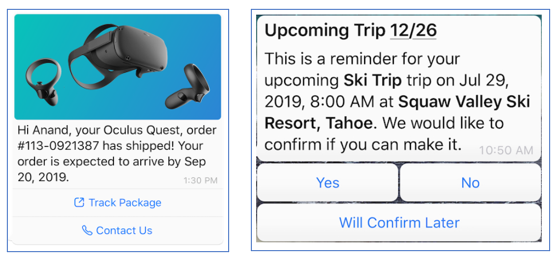
It can send two types of parameters:
- A simple string that will end up forming a button whose link is a dynamic URL.
    {
      "parameters": {
        "button": [
          "www.facebook-fake.com/track-package",
          "www.facebook-fake.com/contact"
        ]
      }
    }
- An object that will end up forming a quick-response with an object payload in response.
    "parameters": {
        "button": [
            {
                "intent": "intent.common-fake.accept"
            },
            {
                "intent": "intent.common-fake.deny"
            }
        ]
    }
An example of buttons as simple string and object is shown below:
Configure the use case to send a template
In order to include a template in use case dialog, send an activity with the following template custom type in the field contentType:
'application/vnd.telefonica.aura.template'
An example is shown below:
const attachment = {
    contentType: 'application/vnd.telefonica.aura.template',
    content: {
        {
           "namespace": "1da09e66_83a0_452e_8783_091089056340",
           "name": "test_template_fake",
           "parameters":{
               "header" : ["467"],
               "body": ["467"],
               "button": ["/fake/467"]
           }
        }
    }
};

const singleActivity = {
    type: 'message',
    attachments: [attachment],
    inputHint: InputHints.AcceptingInput
} as Activity;
List of available WhatsApp templates
The templates that are currently available to be used in WhatsApp channel are shown below:
- aura_yes_no
- bot-template-response
- pnuevo_aceptacion_sinvincular_v2
- pnuevo_ofrecimiento_sinvincular_v6
Internal process for the reception of a template
⚠️ This section has only descriptive purposes, as it refers to an internal process. Use cases constructors do not have to carry out any aditional task.
The message arrives to aura-bridge after going through the use case with the following format:
[
   {
      "contentType":"application/vnd.telefonica.aura.template",
      "content":{
         "namespace":"1da09e66_83a0_452e_8783_091089056340",
         "name":"test_template_fake",
         "parameters":{
            "header":[
               "467"
            ],
            "body":[
               "467"
            ],
            "button":[
               "/fake/467"
            ]
         }
      }
   }
]
Finally, the message will be received by WhatsApp services after conversion through aura-bridge with the following format:
{
   "to":"34674748749",
   "type":"template",
   "template":{
      "namespace":"1da09e66_83a0_452e_8783_091089056340",
      "name":"test_template_fake",
      "language":{
         "code":"es_ES",
         "policy":"deterministic"
      },
      "components":[
         {
            "type":"header",
            "parameters":[
               {
                  "type":"text",
                  "text":"467"
               }
            ]
         },
         {
            "type":"body",
            "parameters":[
               {
                  "type":"text",
                  "text":"467"
               }
            ]
         },
         {
            "type":"button",
            "sub_type":"url",
            "index":0,
            "parameters":[
               {
                  "type":"text",
                  "text":"/fake/467"
               }
            ]
         }
      ]
   }
}