Categories:
Generation of Aura NLP dictionaries
Aura NLP dictionaries are knowledge bases used to recognize entities from the users’ utterances.
Process at a glance
catalogs
. Firstly, check if catalogs must be updated to include the latest content.
. If required, update catalogs manually.
dictionaries
. Check that your NLP model is configured to use dictionaries
. Run the script and generate both items and aliases dictionaries
in Grammars
. Add new entities in dictionaries to the Grammars model to get sure that these entities are recognized with 100% accuracy.
NLP model
. Retrain the understanding model
. Validate it
. Merge and generate the NLP package
. Deploy the updated package
Introduction
The recognition of entities in the Aura NLP model is based on dictionaries: knowledge bases of entities that are included in the NLP model as part of stages for the recognition of entities in the user’s utterance.
Currently, these stages are Standard NER, Gazetteer NER and Entity Tagger Adapter.
Dictionaries are generated automatically from catalogs, during the NLP flow, when developing a use case.
Discover in the current documents:
Types of dictionaries in Aura NLP
There are two types of dictionaries defined in Aura:
- Items dictionary: it includes all the different values in its canonical form for each entity type. The canonical question is defined as the most common way to mention a specific entity. This file distinguishes by entity types.
- Alias dictionary: it includes the canonical value of a given concept (those found in items dictionary) and its list of aliases, that is, the most significant alternative names of an entity canon. This file does not distinguish by entity types.
For example, a TV use case can include the following dictionaries:
- Items dictionary: ent.audiovisual_actor: [Robert de Niro, Dustin Hoffman; Al Pacino, …]
- Alias dictionary: Robert de Niro: [De Niro, Robert Niro, Robert Deniro, …]
Aura NLP uses two dictionaries for entities recognition:
- Items dictionary:
sdict_items.json - Alias dictionary:
sdict_aliases.json
Items dictionary
sdict_items.json consists of a dictionary whose keys are the names of all the entity types and the value of each key includes a list with the canonical values of those entities. All canonical forms should be contemplated in this file.
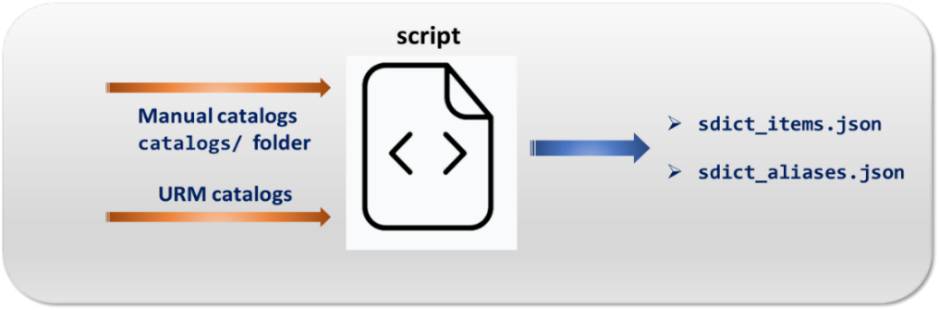
This file is automatically generated based on the data from manual catalogs and data from URM.
An example of sdict_items.json dictionary is shown below:
{
  "ent.audiovisual_actor": [
    "Angelina Jolie",
    "Brad Pitt",
    "Cate Blanchett",
    "Jennifer Anniston",
    "Jennifer Lawrence",
    "Morgan Freeman"
	]
}
Alias dictionary
sdict_aliases.json contains all the possible values (aliases) for an entity. These aliases are different ways to refer to the same value.
The dictionary keys are the canonical value of a given concept (those found in the sdict_items.json file) and their value is a list of aliases, meaning all the potential ways of referring to that concept. This file does not distinguish by entity types.
The alias dictionary is automatically generated based on the data from manual catalogs and data from URM.
Examples of the sdict_aliases.json dictionary are shown below:
{
  "#0": [
     "0",
     "zero",
     "the zero"
  ]
}
{
  "The Mandalorian": [
     "De Mandalorian",
     "De Mandaloriano",
     "El Mandalorian",
     "El Mandaloriano",
     "Mandalorian",
     "Mandaloriano",
     "el mandalorian",
     "el mandaloriano",
     "te mandalorian",
     "the mandalorian"
…  ]
}
Generation of Aura NLP dictionaries
When developing a use case in Aura, if it requires the recognition of entities, the NLP model must include any of the entities recognition stages:
In these stages, as part of the step for defining data resources, where all the training files required for every specific stage must be generated, the sdict dictionaries must be included.
For this purpose, follow these steps:
1. Check if content in catalogs is updated and complete
Manual catalogs are one of the inputs for NLP dictionaries.
At this stage, you have to check if their content is totally updated or if it is required to generate a newer version to include the very latest content (for instance, new films or series in Movistar+).
Discover how to generate or update content in manual catalogs in Aura.
⚠️ If the catalogs content is identical in different channels, the dictionaries can be generated just for one channel and then copied to the rest of them.
2. Configure the NLP model to use dictionaries
Dictionaries require a specific configuration, that must be set during the configuration of the NLP model, with two differentiated stages:
2.1. Dictionaries configuration in nlp.json file
If dictionaries are used, specific sections must be included in the nlp.json file, placed in the path:
aura-nlpdata-[country_code]/config/etc/nlp_config/nlp.json
urm_type_entities: from all the URM entities in the catalogs, it indicates which ones must be downloaded.headers_ignore: list with all the headers to be ignored.ner: this section is required as theStandardNerclass is instantiated when building the catalogs:n_context_words: number of context words used in the BILOU algorithm.phone_number_entity_type: type of entity to be assigned to an entity recognizer as phone number.
Example:
{
  "test-test": {
     "test_channel": {
        "training-sner": {
           "urm_type_entities": [
              "ent.audiovisual_director",
              "ent.audiovisual_actor",
              "ent.audiovisual_documental_title",
              "ent.audiovisual_film_title",
              "ent.audiovisual_tvshow_title",
              "ent.audiovisual_tvseries_title"
           ],
           "headers_ignore": [
              "metadata"
           ],
        },
        "ner": {
           "n_context_words": 3,
           "phone_number_entity_type": "ent.phonenumber"
        }
      }
   }
}
2.2. Dictionaries configuration in build_catalogs.cfg.tpl
The file build_catalogs_cfg.tpl is only required if the dictionaries sdict_item.json and sdict_aliases.json are generated from the manual catalogs in three specific stages: Standard NER, Gazetteer NER, and Entity Tagger Adapter.
It is placed on the path:
aura-nlpdata-[country_code]/config/etc/build_catalogs.cfg.tpl
Edit this file to indicate, for each language and channel, if URM data is to be downloaded and used as source for the generation of dictionaries.
For this purpose, the following fields must be filled, depending on the script used for the generation of dictionaries:
- If the new global script
build_local_catalogs_etl.shis used, the following parameters must be filled:
Recommended methodurm_mapper: dictionary that indicates, for each language and channel, if it has to download the URM.- To connect to API URM:
- $API_URM_ENDPOINT
- $USER_KERNEL_ACCESS_TOKEN
- $PASSWORD_KERNEL_ACCESS_TOKEN
- If the original script
build_local_catalogs.shis used, the following parameters must be filled:urm_mapper: dictionary that indicates, for each language and channel, if it has to download the URM.resources_provider: provider, that can beawsorazure.container: folder that includes the data to be downloaded. It can be$AWS_S3_BUCKETor$AZURE_CONTAINER.keyandsecret: these fields correspond to provider credentials.- To connect to AWS, you need:
- $AWS_ACCESS_KEY
- $AWS_SECRET_KEY
- To connect to Azure, you need:
- $AZURE_ACCOUNT_NAME
- $AZURE_SAS_TOKEN
- To connect to AWS, you need:
Example:
[catalogs]
resources_provider = aws
container = $AWS_S3_BUCKET or $AZURE_CONTAINER
urm_mapper = {
        'es-es': {
            'mp': {
                'urm': True
            },
            'stb': {
                'urm': True
            },
            'stbh': {
                'urm': True
            },
            'la_global': {
                'urm': True
            }
        }
    }

[aws]
key = $AWS_ACCESS_KEY
secret = $AWS_SECRET_KEY

[azure]
account_name = $AZURE_ACCOUNT_NAME
sas_token = $AZURE_SAS_TOKEN

[direct_sql:instance]
base_url = ${API_URM_ENDPOINT}
user = ${USER_KERNEL_ACCESS_TOKEN}
password = ${PASSWORD_KERNEL_ACCESS_TOKEN}
3. Set up specific configuration variables for dictionaries
Before training your understanding model, it is required to set up the configuration properties. Check the general process in the previous link.
If dictionaries are included in the model, there are certain additional variables required for the execution of the dictionaries script, which are enumerated below.
Moreover, the last six variables must only be defined when data from URM is included for the generation of the dictionaries.
Remember that you need to indicate the name of the CATALOGS_RESOURCES_PROVIDER provider and the container where the data is. Then, you only need the credentials of the chosen provider:
export CHANNEL_LIST: list of channels where dictionaries are generated. For example:export CHANNEL_LIST="la_global mh mp"export LANGUAGE: language for the generation of files. For example: export LANGUAGE=“es-es”export AZURE_CATALOGS_ACCOUNT_NAME: Azure account name where the data is.export AZURE_CATALOGS_TOKEN: Azure SAS token.export AWS_CATALOGS_ACCESS_KEY: AWS Access Key credential.export AWS_CATALOGS_SECRET_KEY: AWS Secret Key credential.export CATALOGS_RESOURCES_CONTAINER: Container or bucket name.export CATALOGS_RESOURCES_PROVIDER: Provider name,awsorazure.export API_URM_ENDPOINT: Endpoint of URM API.export USER_KERNEL_ACCESS_TOKEN: Username Kernel Access Token.export PASSWORD_KERNEL_ACCESS_TOKEN: Password Kernel Access Token.
4. Run the script for the generation of dictionaries
There are two alternatives to generate dictionaries:
- Use the new global script that makes use of the URM content datasets uploaded to the Kernel platform:
Recommended method- Run the global script
build_local_catalogs_etl.sh, located at:
aura-nlpdata-[country_code]/tools/build_local_catalogs_etl.sh
- Run the global script
- Use the original script that downloaded the information from the previously chosen URM containers:
- Run the original script
build_local_catalogs.sh, located at:
aura-nlpdata-[country_code]/tools/build_local_catalogs.sh
- Run the original script
After the script execution, the NLP dictionaries sdict_items.json and sdict_aliases.json are automatically generated in:
/aura-nlpdata-[country_code]/data/[language]/[channel]
You can create a Pull Request directly and see changes in comparison with the previous files.
Complementary, they are also placed in the temporary folder tmp_catalogs:
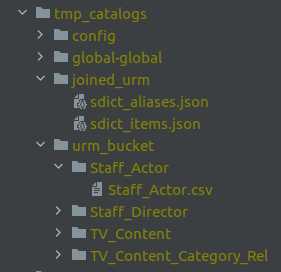
You can also check the downloaded data from URM in the urm_bucket folder inside tmp_catalogs.
5. Best practices for checking dictionaries
Once the dictionaries are generated, there are certain checks that should be done:
- Check that values that have been added and removed from catalogs are updated in
sdict_items.jsonandsdict_aliases.json. - Check that all the canons that have been included in the catalogs appear in
sdict_items.jsonand all the aliases appear insdict_aliases.jsonwith its corresponding canon. - Check that, at least, all the aliases of a canon that have been included in the catalogs appear in
sdict_aliases.jsonunder the expected canon. - Check that there are no unwanted duplicates. It is highly recommendable to check that the same canon (or normalized one) does not appear in different entities to avoid possible overlaps. For these situations, use the catalogs’
skip.jsonfile for skipping values from dicts and use theprecedence.jsonfile to prioritize an entity type. - Once both
sdict_items.jsonandsdict_aliases.jsonhave been generated, all the values that were added to the catalogs should be tested in your local environment to check that they retrieve their corresponding canon, entity type and label. In case there is an error, check what it is due to and make the necessary modifications. This step should be repeated until the result is the expected one.
5. Add new entities in dictionaries to the Grammars stage
⚠️ Of application just in case Grammars stage is included in the NLP model.
If you want to assure that new entities included in dictionaries are recognized with 100% accuracy, they must be included in the Grammar stage.
The NLP stage Grammars has specific guidelines for the generation of the required files through the software Unitex: Guidelines for the generation of Grammars in Unitex.
Take into account that input data for the Grammars stage should be normalized first.