Categories:
Guidelines for building Aura response texts
When developing a use case, discover how to generate the texts included in each element of the response that Aura provides to its users. Texts are generated with POEditor and imported into Aura Bot.
Process at a glance
POEditor
. Log in POEditor
. Access your local POEditor project or create one
resources
. If required, generate a new resource, element associated with an specific text, for importing it into the bot
texts
. Search the specific text by library or resource name
. Edit the text with the message to be shown to the user
locale files
. Install aura-locale-importer tool
. Upload locales to Aura Bot through this tool
swapping
. Make modifications available in between two releases through a hot swapping process
Introduction
When a new use case is developed, it is necessary to design Aura response for each step of the use case conversational flow. The answer, depending on the channel, can include text, cards, graphic resources, deeplinks, suggestions and actions.
The current section focuses on the text included in each element of the use case response.
Basic concepts
Get familiar with these basic concepts when designing your Aura response:
- POEditor For the generation of the text included in each response element, Aura relies on POEditor.
POEditor offers a centralized localization tool to handle the different messages that the bot shows to the customer and to adapt them to a specific language.
-
POEditor project Global project (for global use cases) or local project (for local use cases) to work in.
-
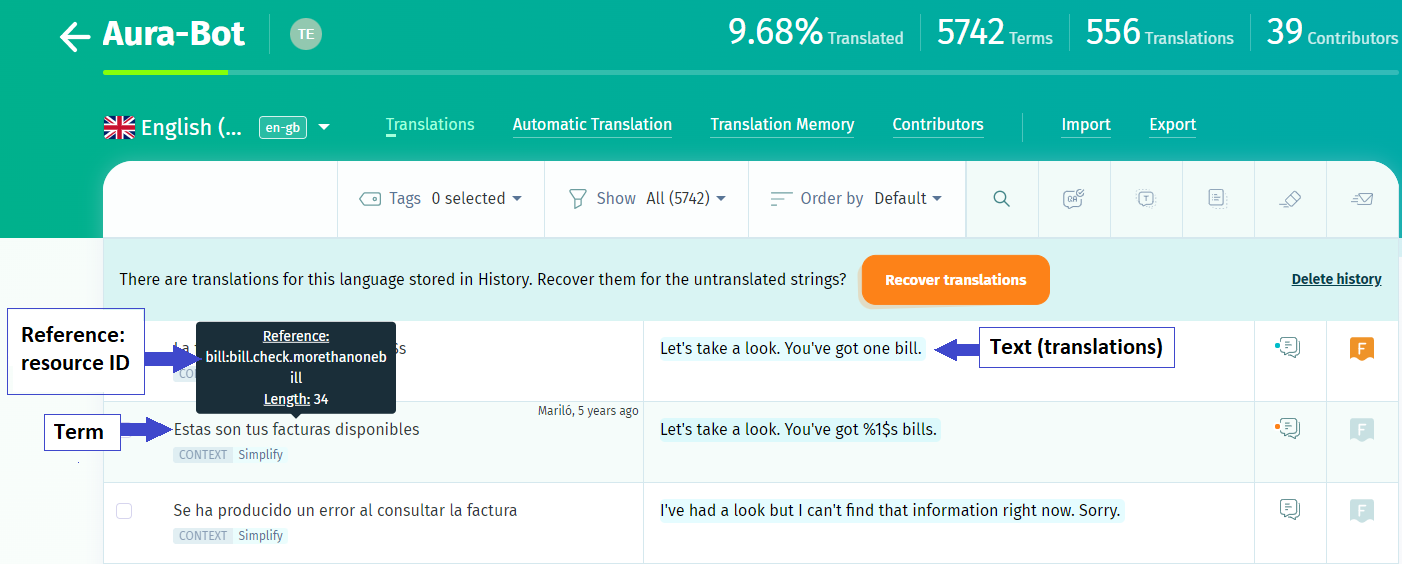
Term Prototypical phrase of the resource to be able to locate it easily. It is composed of a reference (resource), a context and n texts (translations).
-
Reference (resource) It is the resource ID. Mandatory field for the subsequent importation of the term into the locales. A resource is an aura-bot element for the generation of the required text in every component of Aura response. aura-bot resources are organized in libraries of dialogs. Each resource is associated to a copy. References must not contain spaces, they should be written all together or use kebab-case in the resource name.
-
Translations Texts containing the translations of each language where the resource is to be used. They correspond to the texts that Aura shows to the user in a specific field of Aura response in the selected channel containing the answer to the user’s request.
Depending on the use case type, different projects and tasks must be carried out:
| Global use cases | Local use cases | |
|---|---|---|
| POEditor project | Aura POEditor global project (Owned by Global Team) | Aura POEditor local project (Owned by LCDO Team) |
| Scope | - Edition of texts (copies) | - Edition of texts (copies) - Generation of resources (references) |
| Reference documentation | User Guide for Global Use Cases | Guidelines for the generation of resources in POEditor Guidelines for the edition of texts in POEditor |
Content managers should edit texts in POEditor both for global and local use cases. Meanwhile, the generation of new resources is only required in local use cases.

Once texts or resources are modified, they are automatically imported to aura-bot during the make-up process into the settings/locale folder of the use case library.
Enter POEditor
In order to use POEditor, a license is required. Therefore, the first step is the registration of a POEditor account, if not existing, in the POEditor website.
Once registered, access your local POEditor project.
Generation of resources in POEditor
A resource is an aura-bot element needed for the generation of the required text in every component of Aura response and its subsequent importation into Aura locales.
In this particular case, for local use cases, OBs are able to generate their own resources.
Resources naming conventions
The general format for Aura resources (references in POEditor) is composed of the mandatory name of the library followed by different prefixes:
➡️[library]:[ENVIRONMENT].[CHANNEL].[SUBSCRIPTION_TYPE].[resourcename]⬅️
. Bold: mandatory fields . Italics: optional fields
-
[library]: mandatory field. Name of aura-bot library where the resource is contained. The library name must be the same as the name of the library that is being exported and must be configured in the
locale-updatescript of thepackage.jsonfile where the library is declared. -
[ENVIRONMENT]:name of the environment. This is an optional field for the aura-bot resource that can be used in case it is required to show the user a different text in different environments. If this field is not existing, the same resource is used for every environment. The field must include the prefix of the environment (in uppercase):
PREorPRO.DEVshow the same texts thanPRO. -
[CHANNEL]:name of the channel. This is an optional field for the aura-bot resource that can be used in case it is required to show the user a different text in different channels. This field must include the prefix of the channel (in uppercase):
NOV,MH,MP,STB,STBH. If this field is not existing, the same resource is used for every channel. -
[subscriptionType]: optional field. Different texts can be defined for each user’s
subscriptionType, particularly:POSTPAID,PREPAID,CONTROL. They must be included in uppercase. If this field is not existing, the same resource is used for every subscription type. -
[resourcename]: Name of the intended resource. It can include as many parts as needed to describe the resource. It can be expressed in a single word with lowercase (resourcename) or using kebab-case (resource-name). For example:
services:services.usage.summary.
The following table shows some examples of bot resources and their associated copies in Aura:
| Aura domain | Resource name (reference) | Description | Example of copy |
|---|---|---|---|
| Bundle | services:services.find.oneservices | Text associated to this resource is shown for every environment, channel and subscription type. | You´ve got %1$s contracted |
| Bundle | services:PRE.POSTPAID.services.usage.summary | Text associated to this resource is shown to users with subscription type postpaid in PRE environment | Let’s take a look. You’ve got %1$0.2f %2$s of data left, from your %4$0.2f %5$s allowance on %3$s, until %6$s. |
| Billing | bill:bill.check.genericCardText | Text associated to this resource is shown for every environment, channel and subscription type. | Let’s take a look. You’ve got one bill. It´s 2f%1$s.%2$0 |
| Billing | bill:billing.topup.voucherincomplete | Text associated to this resource is shown for users in every environment and for every subscription type. | Top-up is not done |
For each resource, there are certain pre-defined constraints (for example, the maximum number of characters) and determined variables which are common to every defined resource. The following table shows an example of these concepts.
| Resource | Variables | Copy (response text) |
|---|---|---|
| services:services.usage.summary | %1$0.2f = Real Number, available data %2$s = Text, measuring unit for data %3$s = Text, name of bonus or plan %4$0.2f = Number, total data of bonus or plan %5$s = Text, date |
Let’s take a look. You’ve got 5.5 GB of data left, from your 20 GB allowance on Custom plan, until 07-05-2019. |
Precedence of prefixes
Resources are managed using a resolution matrix based on “from general to specific”. This means we will always have a generic resource in order to provide an answer to the user and, once we got it, Aura looks for a specific one if exists.
The order in the format reference is important to make the resolution matrix works properly. In this framework, the precedence of the prefixes is (from higher to lower):
- SubscriptionType
- Channel
- Environment
The order in which the different combinations of prefixes must be checked for strings depends on the specificity (the number of matched prefixes) and the previously defined precedence order. For example, given:
- library = “services”
- subscriptionType = “POSTPAID”
- channel = “TEST”
- Environment = “PRE”
- key = “title” The order of checking for matching terms must be the following (choosing the first existing translation):
- services:PRE.TEST.POSTPAID.title
- services:TEST.POSTPAID.title
- services:PRE.POSTPAID.title
- services:PRE.TEST.title
- services:POSTPAID.title
- services:TEST.title
- services:PRE.title
- services:title
See also how it is implemented in the locale manager.
Generation of a new resource in POEditor
⚠️ Remember that, for adding a new resource in the POEditor project, you need admin grants.
Follow the next steps:
- Access the main page of POEditor and enter the username and password to access to the Local projects and choose the project to work on.
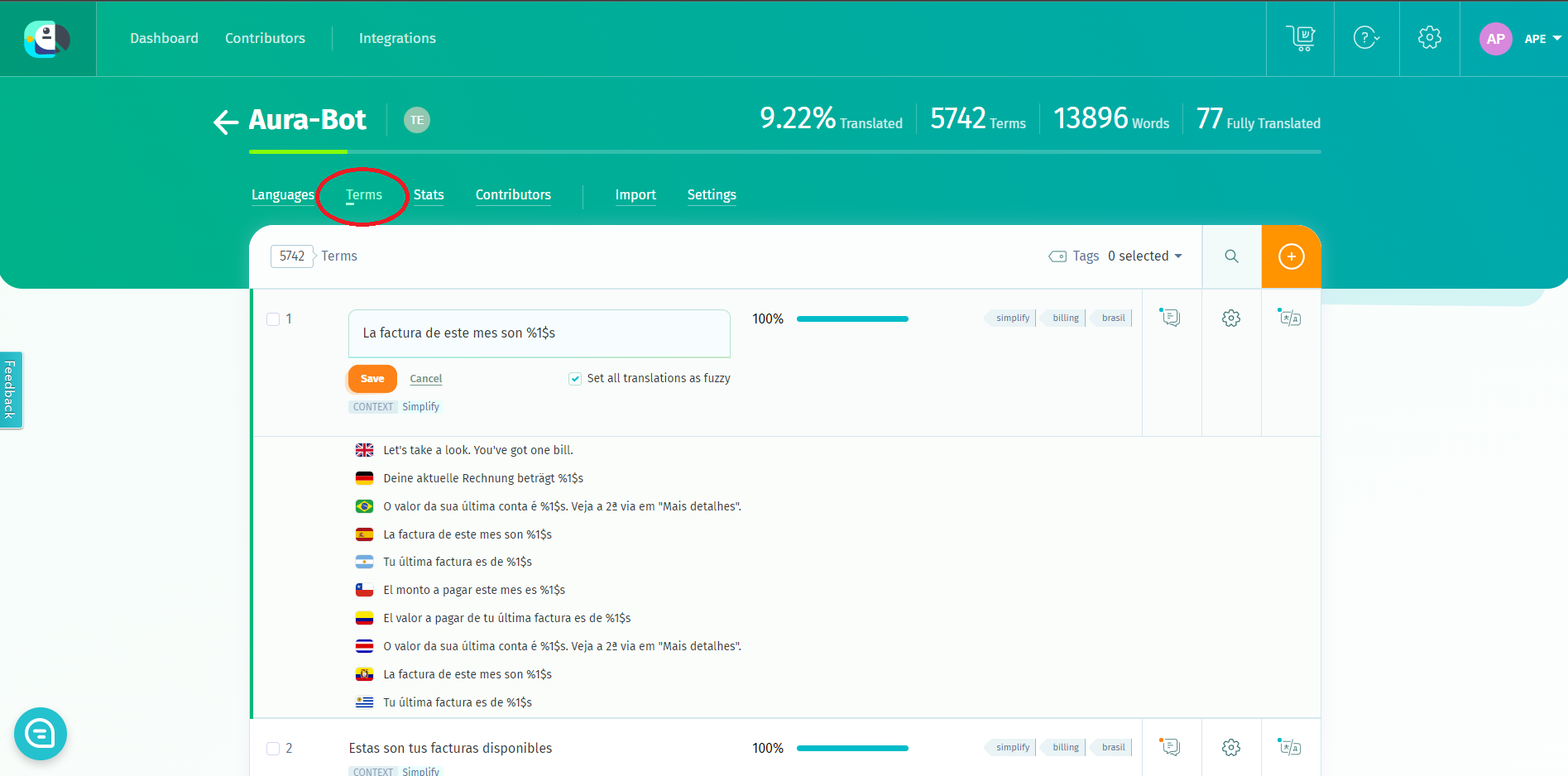
- Select your POEditor local project and access the “Terms” option. You can see all the existing resources or search by library or name. Note that you should access “Terms” at project level (aura-bot in the example below), not for a specific language.
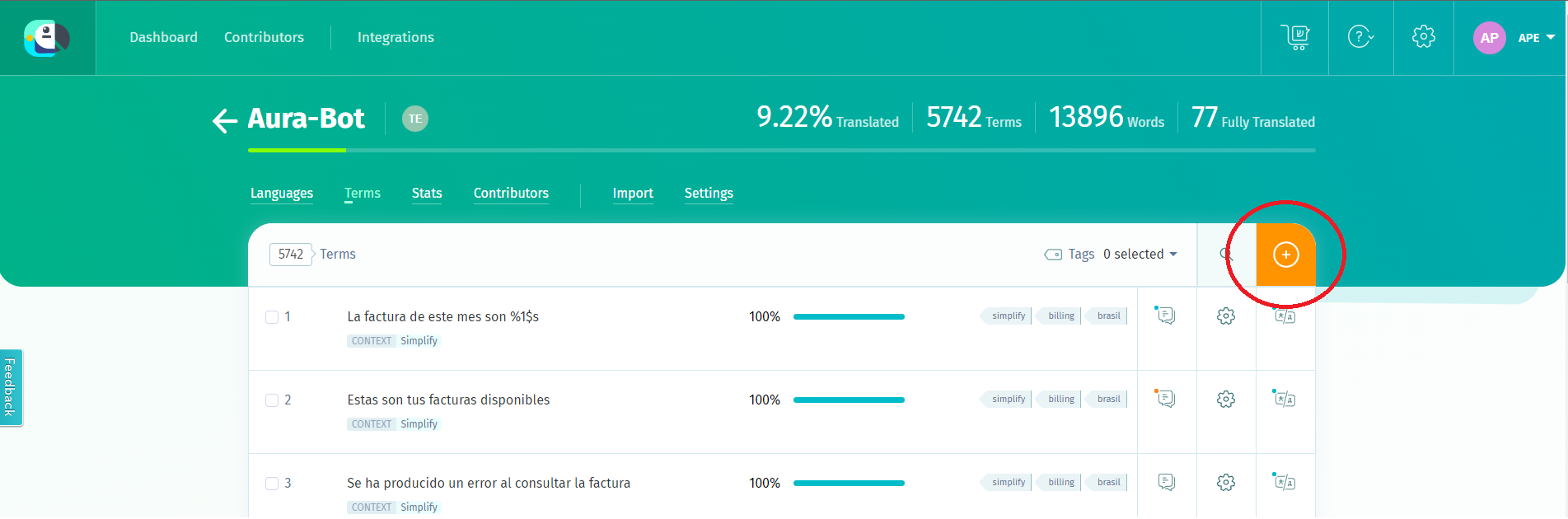
- Click on the “Add Term” button. In this field, the new resource must be added.
- Add the resource name, following the resources naming conventions.
- Optionally, you can add a context in the “context” field for the categorization of the resource. It is useful for further searching purposes to include the name of the library here.
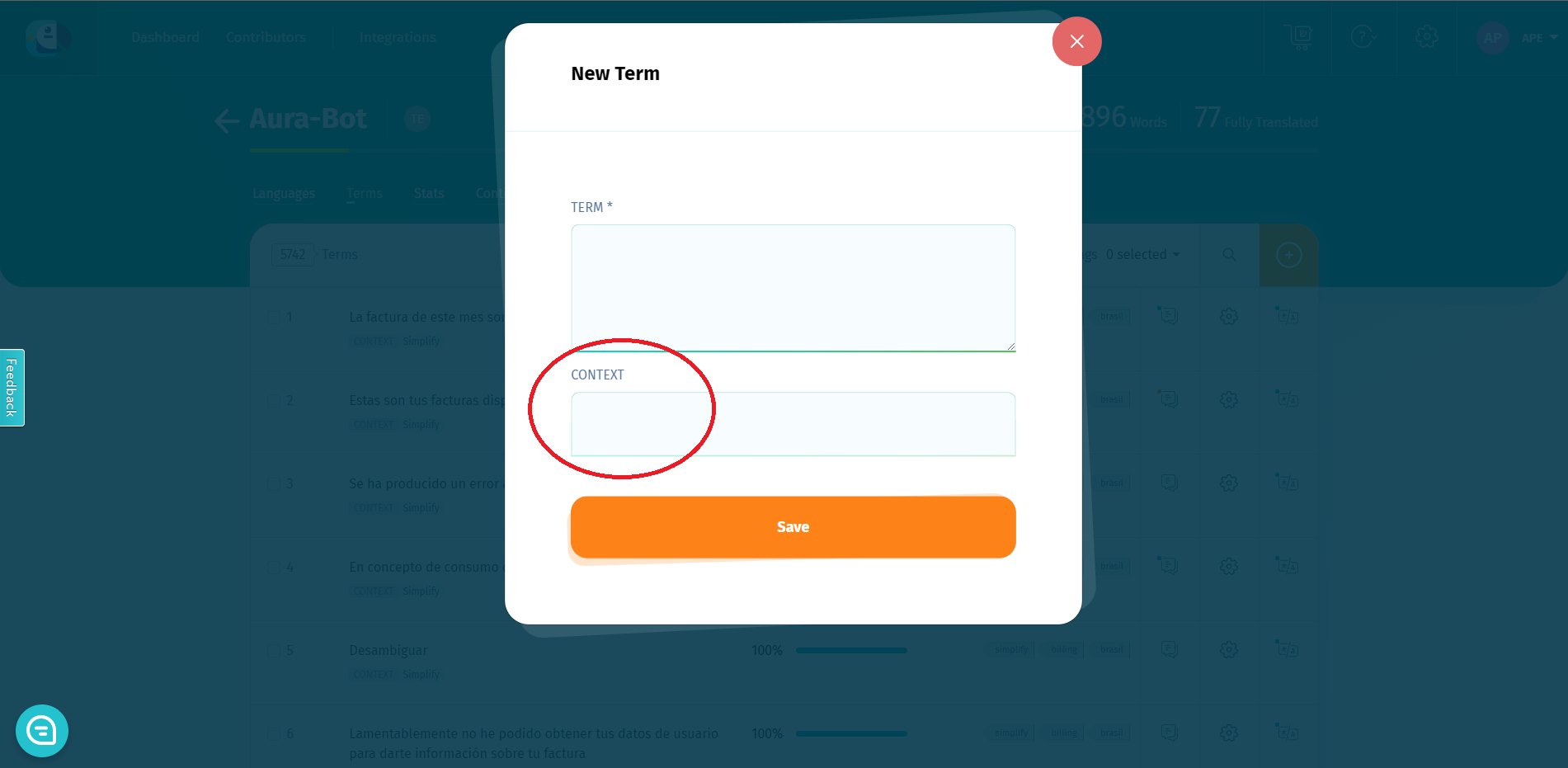
- Save the resource, so it is created and added to the project.
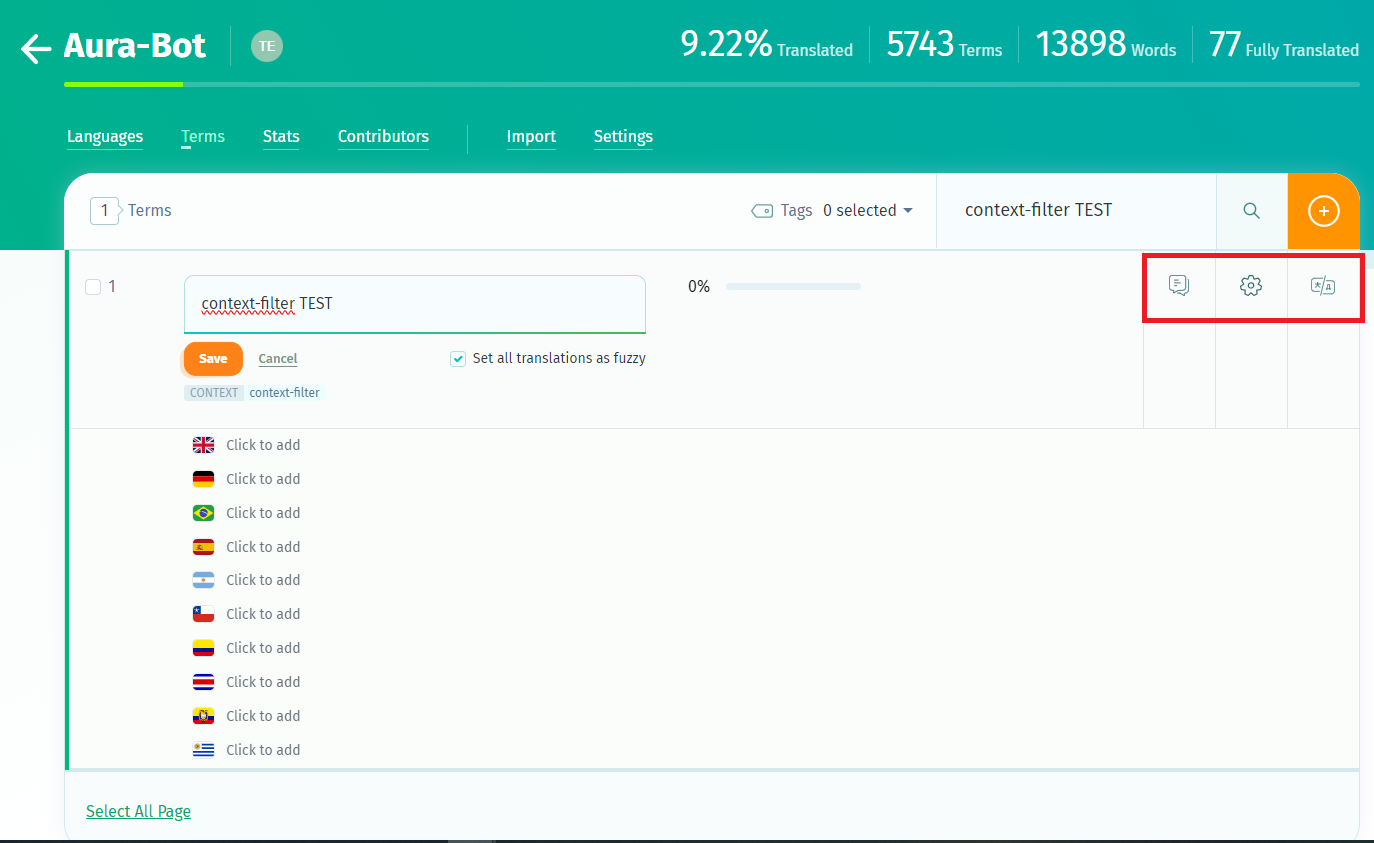
- Now, use the buttons in the right to fill in other fields:
-
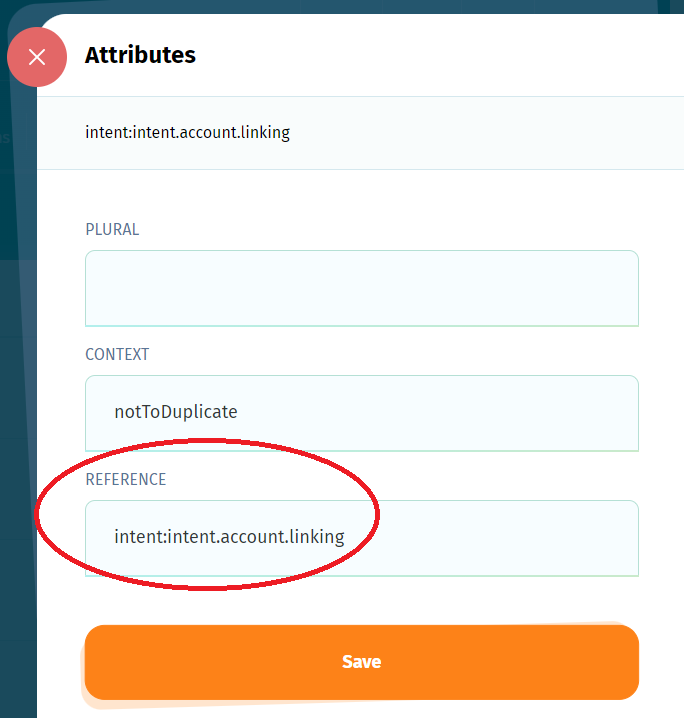
“Reference”: it can be added by clicking on the gear icon placed on the right hand side of the term. It should be the same as the name of the resource. It is important to fill in the “Reference”, as Aura uses it to import the resource into aura-bot.
-
“Translations”: text for each different language.
-
“Comments”
-
-
In order to check and modify references, please click the “R button” to the right of each term.
-
In order to check or edit all translations, please click the “T box”.
Resources for context filters and errors
There are special resources corresponding to errors or context filters that can be shared between libraries. The recommended way to add these resources is to duplicate them in every library that uses them.
For example, if we want a new error message to be sent when an API fails in two libraries (my-lib-1 & my-lib-2), we will add 2 resources:
- my-lib-1:errors.api-error
- my-lib-2:errors.api-error
In the case of context-filters, the format of the references will be, for example:
- my-lib-1:context-filters.annonymous.not.allowed
- my-lib-2:context-filters.annonymous.not.allowed
There is another way to add these resources:
- Sharing the same resource BY adding it to a general [library] like:
- “ob-errors” (ob-errors:api-error) or
- “ob-context-filters” (context-filters:annonymous.not.allowed)
- Importing it in every use case library that uses it.
However, this last method has certain problems, because you need to add the new [library] to the
aura-locale-importercommand with the flag–blike this:And it must be updated every time it changes in all libraries that use it to avoid conflicts during the make-up process.aura-locale-importer -u -j Aura-Bot -b my-lib-1,ob-errors -d ./settings/locale -m library -f
Edition of texts in POEditor
At this stage, you have to edit the text (copy) of the existing resources associated with the use case under development or to translate the text to one specific language. For this purpose, follow the instructions below:
-
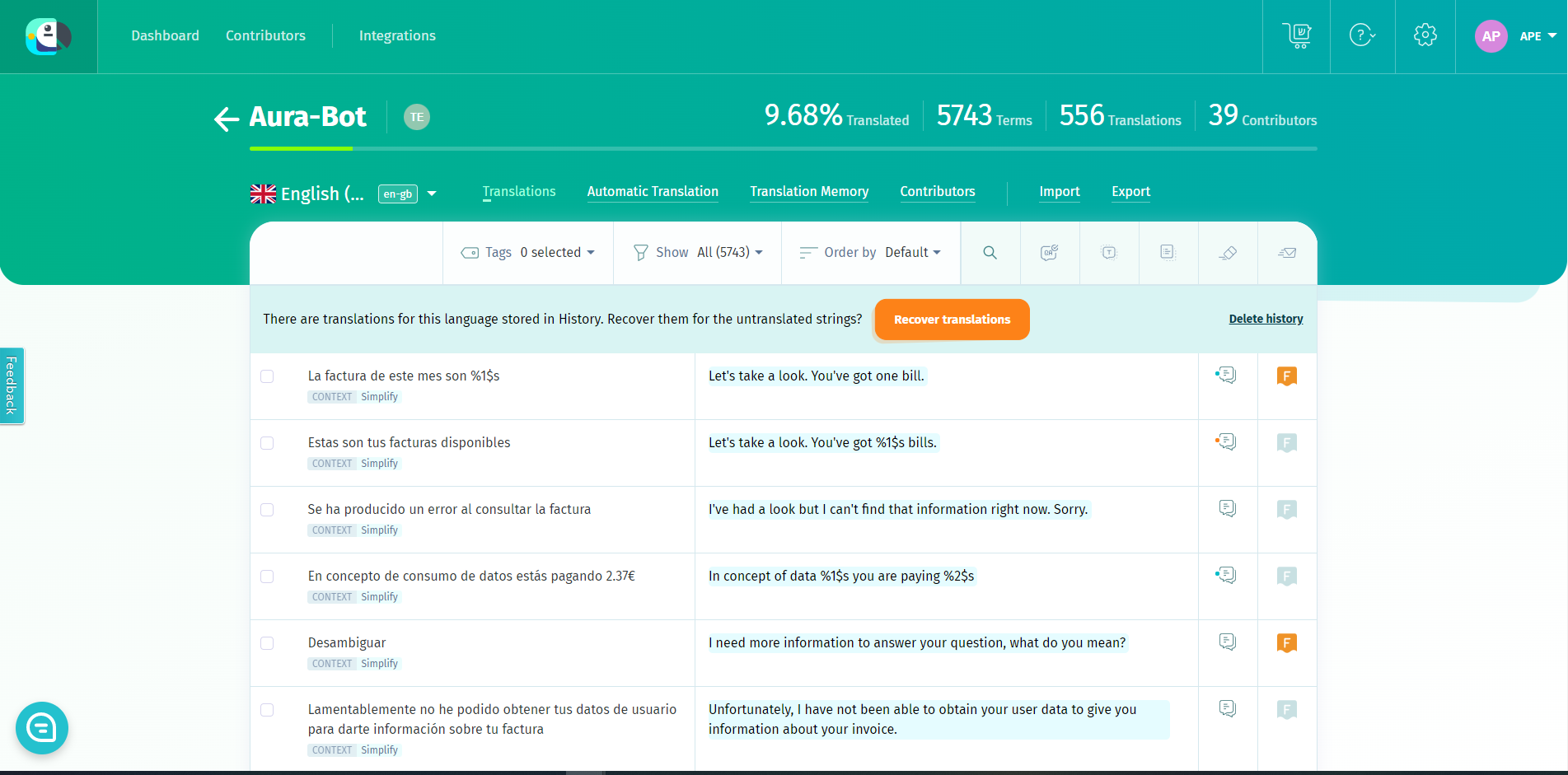
Enter your local POEditor project and then click in the desired language. All the resources and its associated texts are shown.
-
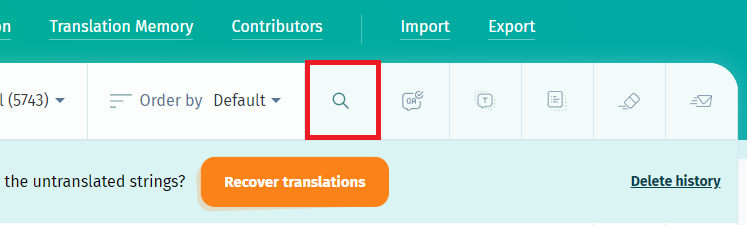
To find the text to be edited, there is a search box in the top-right corner of the POEditor interface. It is possible to search by key or part of a key of the resource (spanish translation of the term), or full or partial reference (key used in aura-bot for that term).
-
In case it is required to edit, for example, all strings concerning to account linking, search “account.linking”, which is the leading part of those strings. Each text can be edited just by clicking on the translation and modifying the text afterwards.
-
To find a term in a specific library, use the pattern “library_name”:
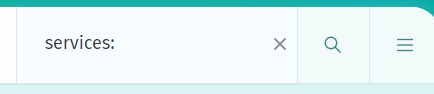
The edited texts are uploaded to aura-bot when deploying the corresponding Aura release.
Random alternative texts
aura-bot is able to show several alternative options of the same resource randomly. This behavior is provided as a platform feature and it only depends on the way the locales are defined in POEditor. The main idea is to add as many terms as alternative texts needed, keeping the same reference, as can be seen in the following picture.
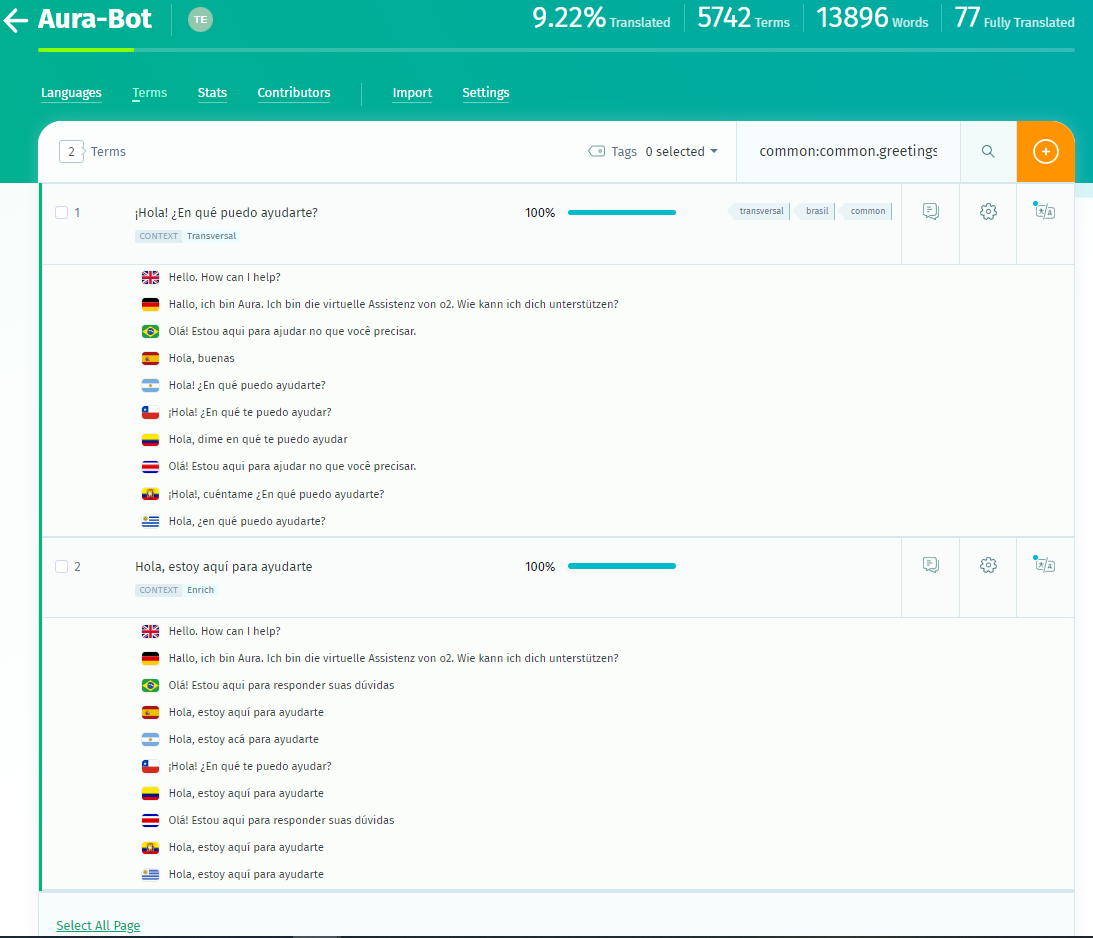
When the locales are read from POEditor API to be handled by aura-bot, an array of alternatives for the given reference are stored in the locale files of the use case:
"common:common.greetings.main":[
    "Hello"
    "Hello, I am here for helping your"
],
Then, when building the response, aura-bot will return one of the options randomly.
Sorted texts
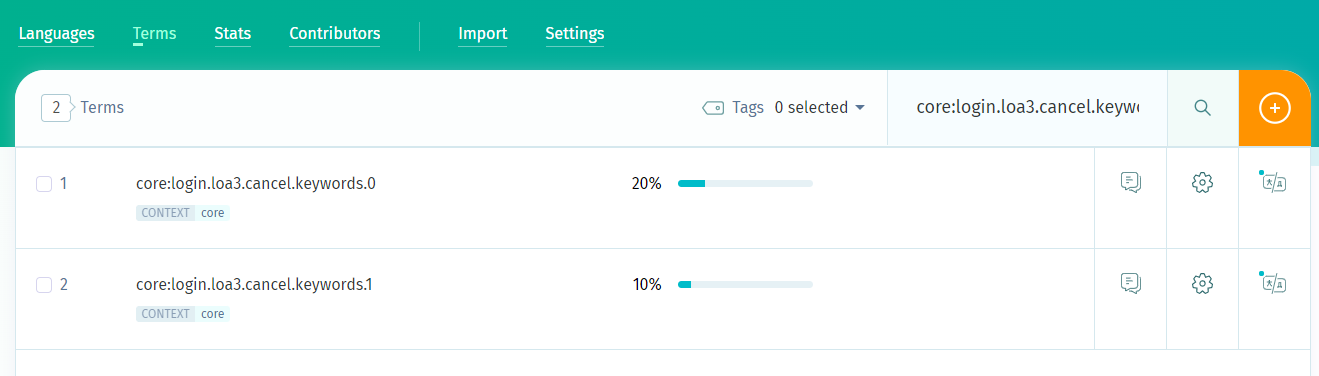
aura-bot is able to export sorted options of the same resource. If you want to guarantee the order in which the resources will be exported you have to define the resources in POEditor with numerical names(terms) starting at 0 and the same reference. For example
    core:login.loa2.cancel.keywords.0
    core:login.loa2.cancel.keywords.1
It will be exported as:
"core:login.loa2.cancel.keywords":[
    "close" (core:login.loa2.cancel.keywords.0)
    "cancel" (core:login.loa2.cancel.keywords.1)
],
This way ensure that the terms will be exported in order to the corresponding file.
Import locale files
We recommend using [aura-locale-importer() tool, a utility developed by Aura Global Team that allows locale files importation from POEditor.
- Install aura-locale-importer tool:
- Log in NPM to download the private NPM package dependencies. You can log in with user/password or using the token:
-
User/password -> npm login
-
Token -> Add the token to your environment variables on your machine. Follow the guidelines for mac/linux.
ℹ️ developers should request the token for the installation of the aura-locale-importer tool from the APE Team.
-
- Go to your use case library repository and enter the
package.jsonfile. This file contains the scripts of the project.
- Go to the field
locale-updateand add the following command:aura-locale-importer -u -l <language-country> -j <POEditor project> -b <my-library> -d <local-directory> -m library -f –t <token>
Where:
-l <language-country>: country translation e.g.,en-gb. If this field is empty, the system imports every translation file.-j <POEditor project>: POEditor project to be used:
. For global use cases: Aura-Bot project (global project)
. For local use cases: name of the OB’s local project-b <my-library>: all the libraries to be uploaded by aura-bot. For example:context-filter,core,errors,suggestions, etc.-d <local-directory>: local directory where result files are uploaded.-f: this parameter forces the files overwriting.-m library: it indicates the way of working. For the current release, it must belibrary.-t <token>: read-only API token to access to POEditor.- For local use cases, the local responsible of the POEditor website must, at this stage, provide you with the API token:
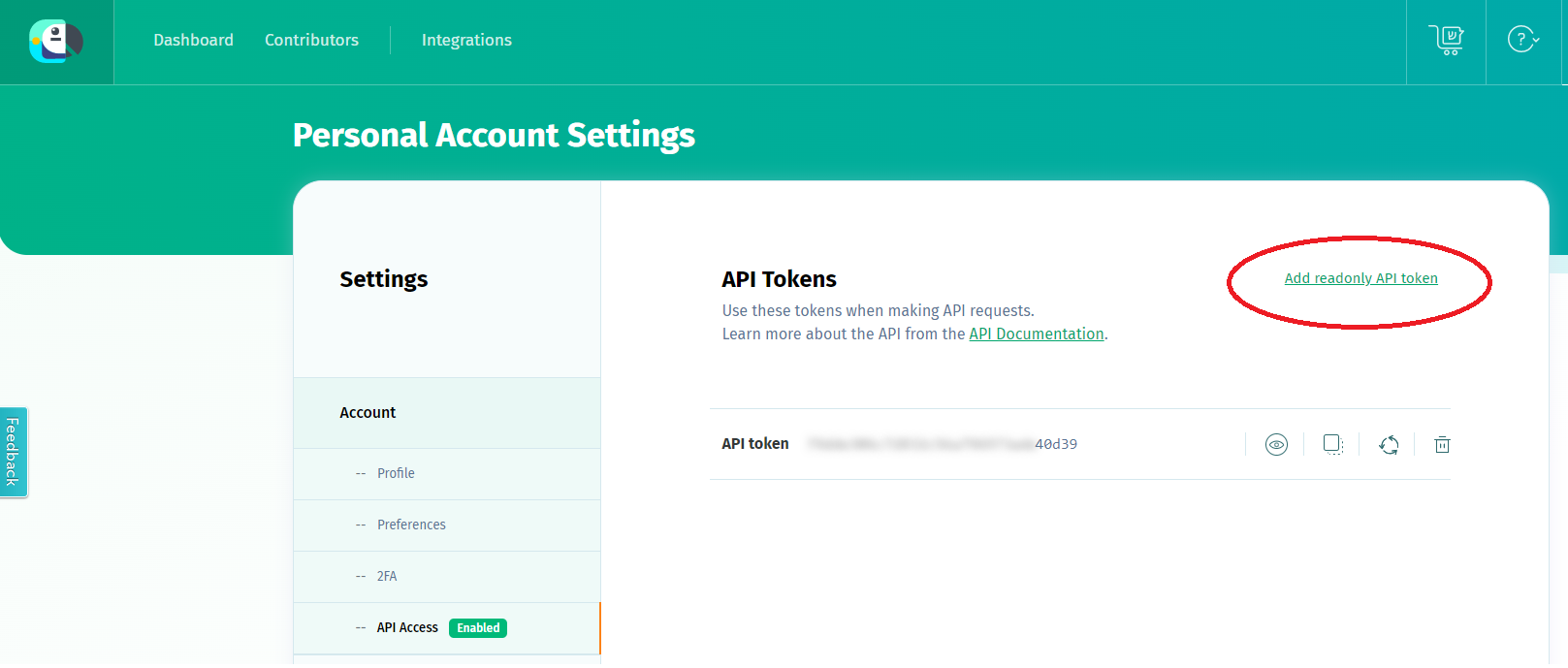
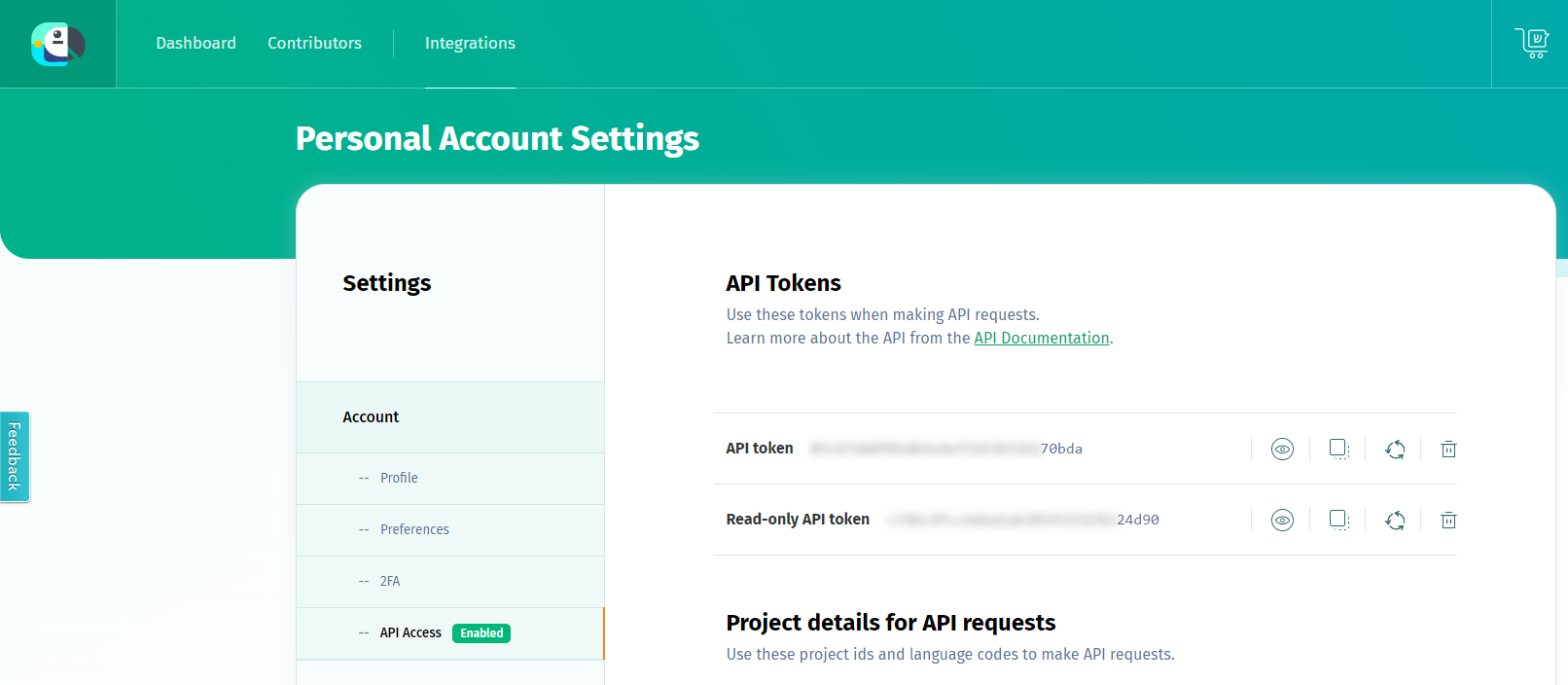 - Once you have the token, you can follow two different processes:
- Define it in the environment variable
- Once you have the token, you can follow two different processes:
- Define it in the environment variable $POEDITOR_TOKEN in the host running the process. In this case, this command should not be included here.
- Add it in the current command within -t <token>
An example for a local use case in Germany is shown below:
-
This command generates the locale files for the “bill” library that fulfil the conditions established in the parameters above:
$ aura-locale-importer -u -l de-de -j Aura-Bot-De -b bill -d ./locale -m library -f –t f9023005c8792e57d3593511b69c300e -
This command lists the content of the locale folder in the aura-bot project:
$ ls .locale -
The output can be one of these:
de-de.json en-gb.json es-es.json pt-br.json
Once the texts and resources are imported following the process above, when a new version of the library is generated, they are automatically integrated during the make-up process.
Management of locales for intents’ canonical phrases
The management of canonical phrases for CLU intents has been implemented in POEditor, as intents must have a canonical phrase to be able to disambiguate with them.
To do this, follow the guidelines in Manage locales for canonical phrases of intents.
Hot swapping process for the update of POEditor texts
It is possible for aura-bot to load new text locale files through a hot swapping process without service outage in order to have the updated texts available in the period between one release and the consecutive one.
For this purpose, the aura-configuration-updater allows making these modifications by providing the updated locales to your local DevOps Team.
In case developers have the need of making modifications to locales belonging to aura-bridge or aura-configuration-api because of the requirements of their use cases, they can follow the process specified in the document locales-managing.