Guidelines for the connection of a skill to Aura Minigroot
Detailed process for the connection of a skill to Aura Minigroot
Introduction
After the development of a skill, it can be tested easily using a tool created by Aura Global Team: Aura Minigroot.
⚠️ Aura Minigroot works together with the already existing Aura minibot, in fact constituting a unique tool. Both will be provided as docker images and must be installed jointly.
The following sections show the detailed guidelines for the connection of a skill to Aura Minigroot.
Prerequisites
The following previous tasks are required for the further connection of a skill with Aura Minigroot:
- There is a skill already developed and running (in this example the skill will be running in localhost)
- Aura minibot is already configured and running. You can follow the steps in Aura Minibot user guide.
1. Configure your new skill
To allow aura-groot to redirect activities to a new skill, configure it in:
/mock-configuration/mocks/mock-files/skills-configuration-mock.json.
In this example, we are going to redirect the channel novum-mytelco (you can use a new channel if you want, but you will have to add it to channels-configuration-mock.json):
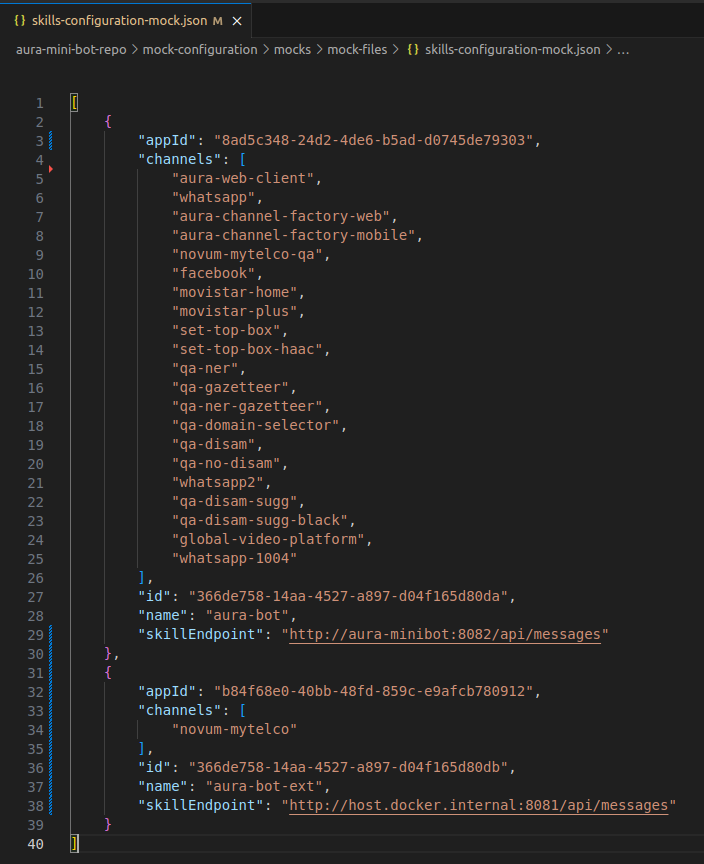
To do this, the following steps were taken:
- Delete the channel
novum-mytelcofrom the first skill (Aura minibot) channels list and add it to our new skill calledaura-bot-ext. - Configure the Microsoft appId of our skill, a new skill id (random uuid) and the skillEndpoint.
- To access
localhostfrom a docker container, we usehost.docker.internalinsteadlocalhost.
NOTE: If you use linux, maybe you should also add
extra_hosts: "host.docker.internal:host-gateway"to aura-groot in your docker-compose file.
2. User mock configuration
To access this skill, we are going to use anonymous users.
As Aura Minigroot also mocks anonymous users, we need to update the mock data to redirect the mocked anonymous user to our skill setting his channel to 45494a5b-835a-4fff-a813-b3d2be529dbe
(the channelId of novum-mytelco):
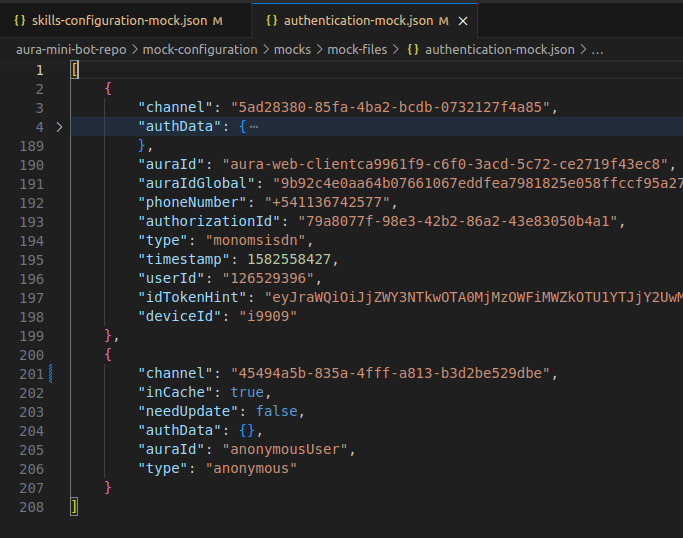
With this change, all the users not mocked in authentication-mock.json will be redirected to our new skill.
3. Restart the mini-groot
After these changes, you have to restart your Aura Minigroot container to refresh the configurations.
When the container restarts, you should have your new skill working with Aura Minigroot.