Categories:
Use of interactive messages in WhatsApp graphical interface
Aura is able to use certain interactive messages in WhatsApp channels: reply buttons and list messages in order to enrich the user’s experience.
Learn how to include them in the following guidelines
Introduction
Aura is able to use certain interactive messages in the WhatsApp graphical interface: Reply Buttons and List Messages.
Those components will be mapped to prompts and suggestions in the Aura answer model. That means that for WhatsApp-type channels, a prompt or a suggestion could be shown to the user using three components:
- Reply buttons: messages including different options as buttons, thus offering a quicker way for users to make a selection from a menu when interacting with Aura.
- List messages: messages that offer a simpler and more consistent way for users to make a selection when interacting with Aura.
- Enumerated text list: text-based list with the enumerated options for the user to select one of them (normal behavior in previous releases)
With these new components, Aura will improve the users’ experience, as they will be able to select among different options shown in WhatsApp in an easy and practical way.
Components and operation modes
Aura provides three modes of operation to show the different options to the users based on the above-mentioned interactive messages:
Automatic configuration (default mode)
For the new format of reply buttons and list messages in WhatsApp, there is a default configuration that contains the basic conversion rules from the response model to buttons/lists.
The default mode is set at Platform level, with different layouts depending on two parameters:
- The number of options (options offered to the user to choose among them).
- The length of the text of each option.
This configuration is described in the following table:
| Number of options | Less or equal to 20 characters | More than 20 characters |
|---|---|---|
| 1-3 options | Reply buttons | Enumerated text list |
| 4-10 options | List message | Enumerated text list |
| More than 10 options | Enumerated text list | Enumerated text list |
The following figure includes a screenshot of each layout, showing how the prompts or suggestions will be presented to the user.
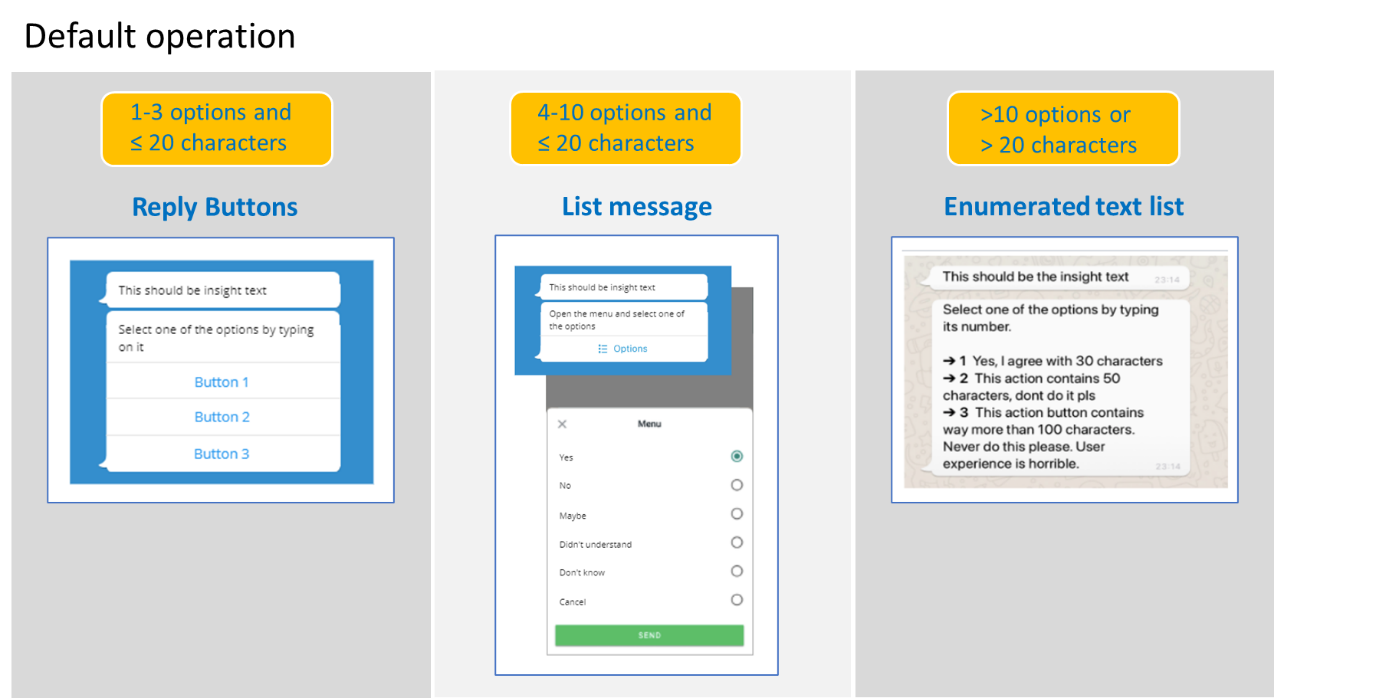
This default configuration set by the Platform can be modified at channel or dialog level to achieve any of the two operation modes set in the following sections and always bearing in mind the limitations for each format.
List message configuration
Aura sends the options inside a list message even if it is possible to present them using buttons.
To establish this configuration, follow the guidelines in Change default configuration by channel or Change default configuration by dialog, depending on your purpose.
⚠️ By default, the description field is empty, but if we want to add some more information, we can use it as in the example below.
[
    {
        "type": "imBack",
        "title": "2a via de fatura",
        "value": 1,
        "channelData": {
            "description": "Caso de Uso: 2a via de fatura" // Example
        }
    },
    {
        "type": "imBack",
        "title": "Informe de pagamento",
        "value": 2,
        "channelData": {
            "description": "Caso de Uso: Informe de pagamento" // Example
        }
    },
    {
        "type": "imBack",
        "title": "Faturas anteriores",
        "value": 3,
        "channelData": {
            "description": "Caso de Uso: Faturas anteriores" // Example
        }
    },
    {
        "type": "imBack",
        "title": "Outros assuntos",
        "value": 4,
        "channelData": {
            "description": "Exibir outras opções" // Example
        }
    }
]
Enumerated text list configuration
Aura sends the options as an enumerated text list, even if it is possible to present them using buttons or list messages.
To establish this configuration, follow the guidelines in Change default configuration by channel or Change default configuration by dialog, depending on your purpose.
How to change the default configuration of lists and buttons
When can constructors modify the default configuration?
Constructors can change the default configuration of lists and buttons at two levels: by channel or by dialog.
⚠️ The modification of the default configuration is only allowed with values (number of options and number of characters) within the ranges established by this default model (see table in Automatic configuration (default mode)).
If constructors try to set an invalid configuration, the Platform will change this configuration to a suitable one, which is included in the range of values (number of options and number of characters) set in the default mode.
The following table shows examples of allowed and not allowed configurations that the OB could try to set:
| ✅ ALLOWED CONFIGURATIONS |
|---|
| Example 1: - 1-10 options and less than 20 characters: use list message configuration - More than 10 options and more than 20 characters: use enumerated text list |
| Example 2: - 1-3 options and less than 20 characters: use reply buttons - More than 3 options (any number of characters): use enumerated text list |
| ⛔ INVALID CONFIGURATIONS |
|---|
| Example 1: - 4 options : use reply buttons ⚠️ The number of options must be between 1 and 3 to allow reply buttons 🔧 In this scenario, the Platform will change this configuration to an allowed one: list message |
| Example 2: - More than 20 characters: use list message ⚠️ The numer of options must be between 4 and 10 to allow list messafe 🔧 In this scenario, the Platform will change this configuration to an allowed one: enumerated text list |
Change default configuration by channel
The default configuration for lists and buttons can be overwritten at channel level. Therefore, a specific channel can have a different configuration than the default one set by the platform, provided that this configuration is allowed.
This information must be added to the whatsapp.listOptions property of the channel configuration file (aura-configuration-api).
[
    // ...
    {
        "channel_id": "e75e7b9d-7949-451a-9493-3d759745492c",
        "name": "whatsapp-1004",
        "whatsapp": {
            "client": {
                "id": "client-id",
                "scopes": "client-scopes",
                "secret": "client-secret"
            },
            "phoneNumber": "34666666666",
            "listOptions": {
                // Whatsapp list options here!
            }
        },
    }
    // ...
]
The listOptions property has the following format and fields:
export interface ListOptions {
    type: ListOptionsType;
    rules: {
        type: ListOptionsType;
        resources: {
            name: string;
            resourceKey: string;
        }[];
    }[];
}
Where:
| Field | Type | Description |
|---|---|---|
| type | Enum | If this field is indicated, it takes precedence over the general algorithm for detecting the list type. Possible values: - button: reply button - enumeratedList: enumerated text list - list: list message |
| rules | Object[] | Rules used to configure the list type |
| rules.type | Enum | List option type. Values: button, enumeratedList or list |
| rules.resources | Object[] | List with the information of resources to use for this list type |
| rules.resources.name | string | Field name. Currently, the possible values are: body, item or button |
| rules.resources.resourceKey | string | POEditor resource key |
For example, a channel can force the use of list type, whenever possible, with the next configuration added in the listOptions property of the channel configuration file:
[
    {
        "name": "whatsapp-1004",
        "whatsapp": {
            "listOptions": {
                "type": "list"
            }
        }
    }
]
If aura-bridge receives a prompt or suggestion message from the bot for a channel with this configuration, it will use the list type as the first option and will try to build the message.
If the message cannot be built in list format due to any WhatsApp API restriction, aura-bridge will finally build the message using an enumerated text list.
Change default configuration by dialog
The default configuration for lists and buttons set by the Platform can be overwritten at dialog level. Therefore, a specific dialog can decide which configuration must be used provided that this configuration is allowed.
For example, it will not be possible to force the presentation of 4 options as reply buttons. If the dialog tries to establish it, then the Platform will change this layout to a WhatsApp list, according to the default algorithm.
The configuration associated with a dialog can be configured in the channeldata.payload.bridge.whatsapp.listoptions activity field.
This field has the same format as that defined for by channel configuration, as shown in the code below.
{
    "type": "message",
    "text": "Ok, estarei aqui sempre que você precisar.",
    ...
    "channelData": {
        "payload": {
            "bridge": {
                "whatsapp": {
                    "listOptions": {
                        // Whatsapp list options here!
                    }
                }
            }

        }
    }
}
Priority among channel and dialog configuration
If channel has a configuration for the WhatsApp list format and the dialog establishes a different configuration than the channel, the second one prevails over the channel configuration.
Therefore, the order of precedence is as follows:
- Configuration by dialog.
- Configuration by channel.
- Default configuration.
POEditor resources for lists and buttons texts
The texts shown to the user in the interactive messages can be configurable through POEditor resources:
- Text in the header, for reply buttons, list messages and enumerated text list.
- Text in the button for list drop-down in list messages.
- Text for each option in enumerated text list.
These texts will be sent by the dialog in charge of building the response. If the dialog does not send them, they will be extracted from a specific POEditor resource (See table below). The POEditor resources are included in the following table:
| Interactive message | Resources for configurable texts |
|---|---|
| Reply button | - Header: bridge.[WA|A1004].wa.reply.buttons.header |
| List message | - Header: bridge.[WA|A1004].wa.list.messages.header - Button for list drop-down: bridge.[WA/A1004].wa.list.messages.button |
| Enumerated text list | - Header: bridge.[WA|A1004].wa.numeric.list.header - Format for each option: bridge.[WA/A1004].wa.numeric.list.bulletThis is a template that uses the following variables: - An ID to identify the option (identified as %(id)s) - The text for this option (identified as %(title)s) |
Examples
Use always enumeratedList
{
    "listOptions": {
        "type": "enumeratedList"
    }
}
Modify enumeratedList messages
{
    "listOptions": {
        "rules": [
            {
                "type": "enumeratedList",
                "resources": [
                    {
                        "name": "body",
                        "resourceKey": "bridge:wa.numeric.list.header.alternative"
                    },
                    {
                        "name": "item",
                        "item": "bridge:wa.numeric.list.bullet.alternative"            // POEditor template (Ex: "**→%(id)s** %(title)s")
                    }
                ]
            }
        ]
    }
}