Categories:
Use of emoticons in interactive message options
Guidelines for the configuration of the prompt to render an emoticon properly
Introduction
Aura is able to use emoticons, as part of the prompt options title.
This new feature, a most customized conversational flow can be generated, that allows an enhanced communication and engagement and a stronger emotional connection with the users.
How to configure prompt options to render emoticons
The way the prompt is created has changed: Previously, when specifying the title, it was reused for the id field of the options button. However, the title field did not support special characters such as emoticons.
To make emoticons rendering possible in the title field, adjustments have been made to allow different values in both fields, one for title and another for id.
For example, in the scenario below we have the same text, but one with emoticon and the other without it.
-
title: Loved the response 😍 -
id: Loved the response
To achieve this result, a new id field will be included at button level, within the channelData object of the button, which will be used in the prompt creation by Aura.
Important considerations
- The
idfield, atchannelData, must not contain emoticon! (See the example below). - If
idis sent with emoticon, an error will be thrown and the list will be rendered as a common enumerated list. - If the
idis not provided, the default logic continues, where thetitleis reused as theid. Therefore, if thetitlecontains an emoticon andchannelData.idis not provided, it will also result in an error and the list will be rendered as an enumerated list by default.
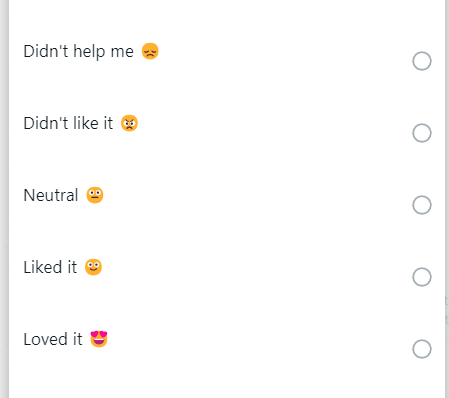
Example
When creating a new HeroCard prompt and modeling/creating the options that this prompt will have, you can include the new field called id in channelData object of the button, as seen in the example below:
const choices: CardAction[] = [
            //...
            {
                type: ActionTypes.ImBack,
                title: "Didn't like it 😠",
                value: "Didn't like it",
                channelData: {
                    id: "Didn't like it"
                }
            },
            {
                type: ActionTypes.ImBack,
                title: "Didn't help me 😞",
                value: "Didn't help me",
                channelData: {
                    id: "Didn't help me"
                }
            },
            //There is no emoticon, so there is no need for the channelData.id field.
            {
                type: ActionTypes.ImBack,
                title: "Neutral",
                value: "Neutral"
            }
            //...
        ];