Categories:
Terms and Conditions
Description of Terms and Conditions handled in Aura Bot Platform
Terms and conditions flow
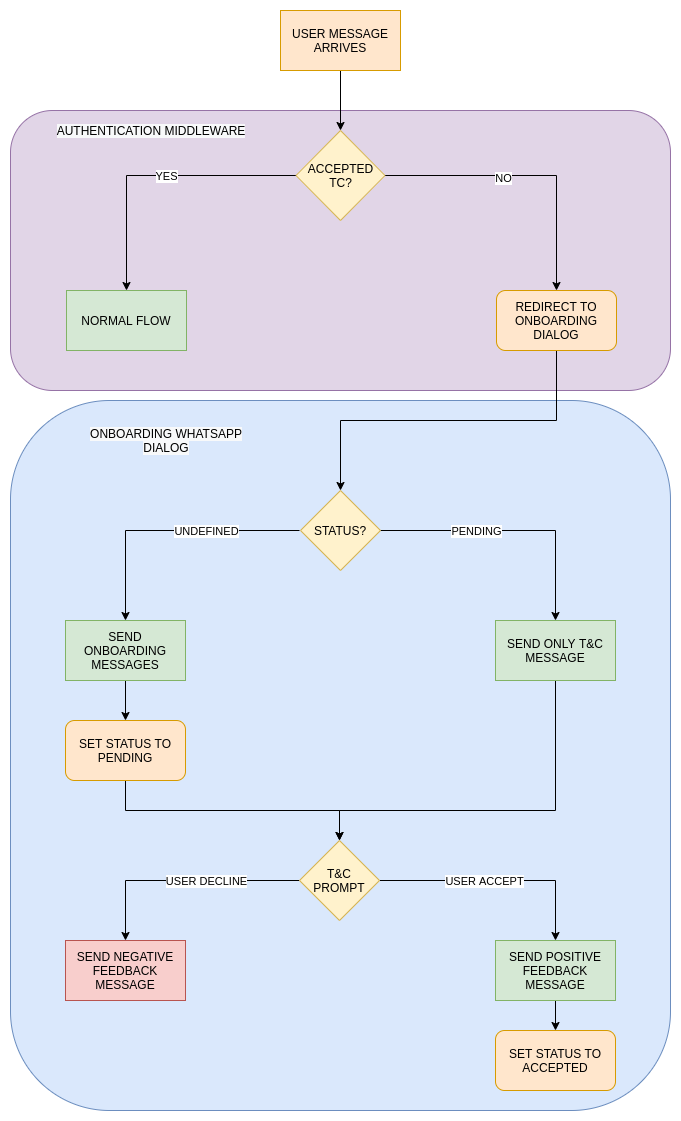
When a user message arrives, the first step in authentication is to check if it is in cache. In case that it is not found, Terms & Conditions API is checked and if the user does not exist or has a pending status, it is redirected to T&C dialog.
Obviously, all the users with accepted status continue with the normal flow. In the Terms and Conditions dialog a record with status pending is stored in the T&C API if does not exist yet and the terms and conditions prompt is shown. If the user accepts, the status accepted is set in T&C API.
Anonymous and authenticated users have different T&C, so if both are configured, users should accept T&C twice: after the first message as anonymous and after the authentication.
Terms and conditions settings
Terms and Conditions settings
In Aura channel model, T&C are set in the termsAndConditionsconfiguration model. It is added to channels who need to enable this feature.
There are two fields with different configurations inside: authenticated and anonymous. Each of these settings will be used according to the type of user. It defines the version and service used in T&C API.
{
  "channel_id": "f7fd1021-41cd-588a-a461-387cc24be223",
  "name": "whatsapp",
  "termsAndConditions": {
    "authenticated": {
      "version": "1",
      "service": "whatsappAuth"
    },
    "anonymous": {
      "version": "1",
      "service": "whatsappAnonymous"
    }
  }
}