Categories:
ATRIA application
Definition and role of applications in ATRIA
Introduction
Within ATRIA’s framework, an application is defined as an entity that allows the connection of a channel, service or skill with aura-gateway-api, the component in charge of managing the access to the different ATRIA capabilities.
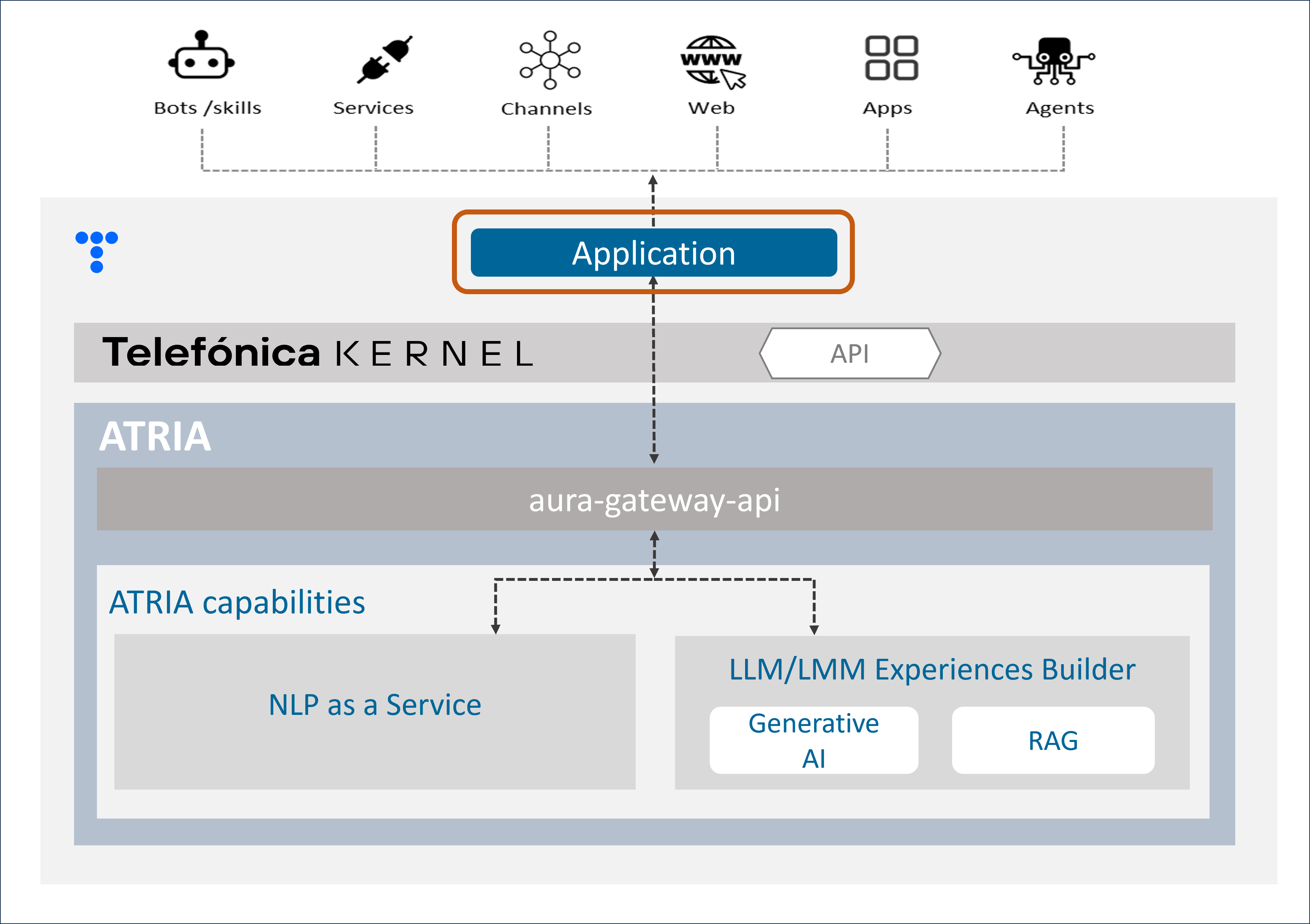
ATRIA application
As a preliminary step for leveraging any ATRIA AI-driven capability, the use case constructor must configure an application, including different parameters:
-
To indicate which specific ATRIA capabilities are utilized in the use case.
In this framework, applications supported by ATRIA can be classified as follows:- Applications that make use only of the NLP as a Service capabilities
- Applications that use Generative capabilities
- Applications that use RAG capabilities
The difference between Generative and RAG capabilities relies solely on the definition of the preset that is associated. But the same application can make use of one, several or all of these capabilities, combining their configuration.
-
Once the capabilities are selected, to set the required fields for its operation
For example, if we want to use Generative AI for the use case resolution, firstly, certain parameters must be set corresponding to:
-
Establishing admin accesses.
-
Setting the presets that the application can use, that is, the instructions to work with the AI model, that will be defined in the application configuration.
-
How to configure an application
An ATRIA application must be configured with specific parameters. For this purpose, follow the guidelines Configure an application in ATRIA, using the specific parameters for the ATRIA AI-driven technology to be used.
Example of application
This is a example of an application that makes use of NLPaaS, Generative and RAG capabilities:
    {
        "id": "8832550f-f03c-4e18-bdbe-7c6fc7adf5ff",
        "name": "app",
        "disabled": false,
        "brand": "0401",
        "nlp": {
            "channelId": "1234"
        },
        "models": {
            "level": "user",
            "presets": ["atria-rag-gpt-4", "generative-preset"]
        }
    }
Applications model
Common fields
| Field name | Type | Description |
|---|---|---|
| id | string | Unique application identifier. UUID |
| name | string | Unique application name |
| brand | string | Identifier of the Telefónica Brand associated to the application. Available values in the document Telefónica brands management |
| disabled | boolean | Boolean value to enable or disable the application. |
NLPaaS fields
| Field name | Type | Description |
|---|---|---|
| nlp.channelId | string | Channel identifier used to call NLP |
Generative/RAG fields
| Field name | Type | Description |
|---|---|---|
| models.level | string | It indicates the level application in atria-model-gateway, meaning that it has specific access and control privileges. Default value user |
| models.presets | string[] | It indicates all the available ATRIA presets that the application can use. - Check the list of available presets by default - Learn here how to add a new preset or modify one |