Categories:
Guidelines for building a dialog that uses async APIs
Orderly steps for building an Aura Bot dialog that require to call asynchronous APIs
Introduction to asynchronous APIs
Asynchronous APIs are defined as APIs that do not provide the information back immediately, but with a certain standby time as they must perform a specific task derived from the user’s request. When the execution of this task is finished, these APIs invoke a callback and pass to the dialog the result of the task accomplishment.
The call to an asynchronous API must be included in the use case dialog and the payload from the API will be sent to aura-bridge, which is in charge of delivering it to the dialog that invoked this API.
This functionality can be useful, for example, in use cases that need to call to self-diagnostics APIs.
ℹ️ Current requisites:
- This functionality only applies to Kernel APIs.
- The correct operation implies that the dialog is in bypass mode.
An example of the usefulness of asynchronous APIs is shown below:
- The user asks Aura: “Test my optical fiber connection” aura-bot recognizes this request and triggers a specific dialog. The dialog, that must be configured in bypass mode, calls an asynchronous API. The API takes T seconds in answering as Aura has to perform certain verification tests.
- After that time, the API sends a callback to the dialog with a text that include the result of the verification tests and offers different solutions for the user to choose.
- The user selects one of the options and the intended answer is provided to her.
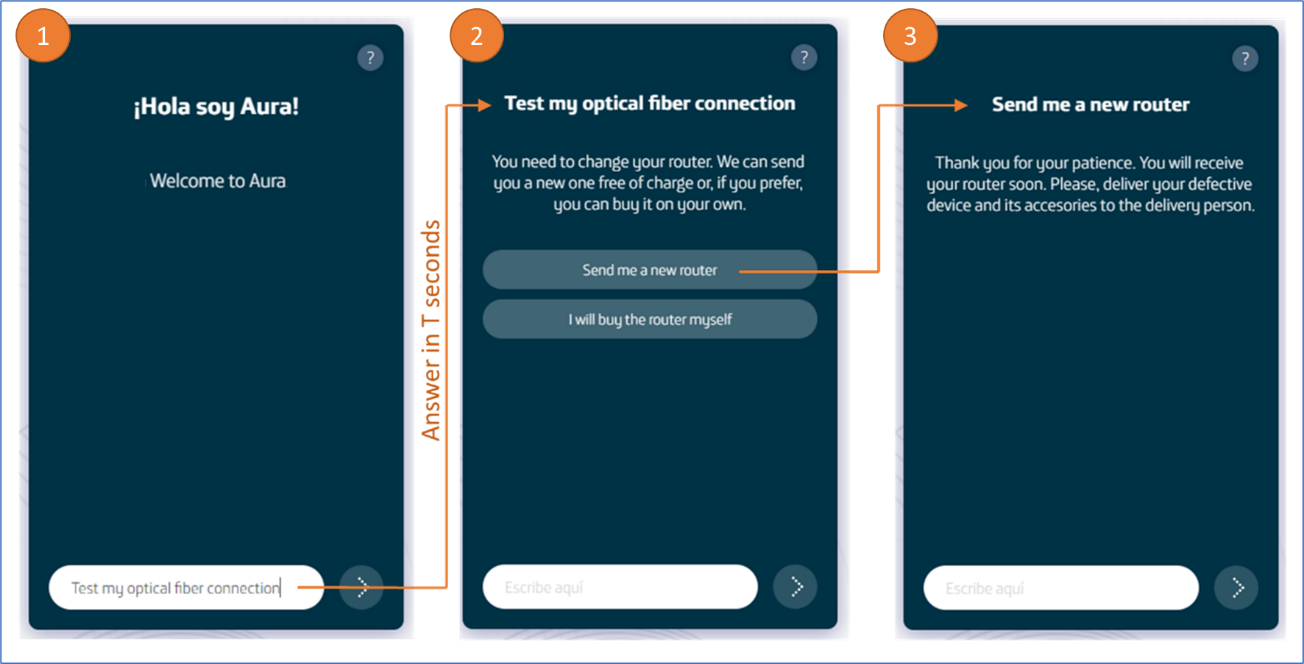
How to call asynchronous APIs in a dialog
Follow these guidelines in order to make your dialog call an asynchronous API.
1. Check purposes and scopes
Firstly, you should add in the channel configuration (aura-configuration-api) all the necessary purposes and scopes in order to invoke the APIs.
⚠️ It must be done for all the intended channels* that will use the dialog.
2. Call asynchronous APIs in the dialog
For including asynchronous APIs in the dialog, it must work in bypass mode. This bypass mode must be started when the first call to the asynchronous API is made.
    const callbackId = stepContext.context.activity.id;
    const bypass: Bypass<BypassModelData> = await Bypass.initialize(
            stepContext.context,
            this.timeout,
            { callbackId },
            'asyncCallback',
            BypassState.Init,
            getLiteral(stepContext?.context)('factotum:bypass.close.words'));
        const message = this.message4pCreate;
        message.diagnosis_callback_url = getAsyncCallbackUrl(
                stepContext.context, this.configuration, callbackId);
        const response = await this.sendMessageTo4p(stepContext, this.url4p, message, corr);
        // Update bypassmode (if connection is ok)
        bypass.state = BypassState.Bypass;
        bypass.data.tecnicalProblemId = response?.body?.id;
        await bypass.updateBypass(stepContext?.context, false);
This API has a parameter to send the callback where the response is received, in this case aura-bridge. To build this URL, there is a getAsyncCallbackUrl(@telefonica/aura-bot-common) method, belonging to the bridge-utils utility. This will return the callback URL based on the context, the configuration and an identifier that will be sent in the answer.
message.diagnosis_callback_url = getAsyncCallbackUrl (
                 stepContext.context, this.configuration, callbackId);
In each execution of the dialog, this must be finished (as bypass mode requires closing the dialog in each execution), so that it is reactivated by aura-bot when it finds the bypass mode.
Communication flow
The following diagram shows the request flow of a message to a dialog invoking an asynchronous API:
sequenceDiagram
    actor User
    participant Whatsapp
    participant 4P
    participant Bridge
    participant Bot
    participant Dialog
    User ->> Whatsapp: message
    Whatsapp ->> 4P: message
    4P ->> Bridge: message + apiKey + channelId
    Bridge ->> 4P: response 200
    Bridge ->> Bot: message + channelId
    Bot ->> Dialog: message
    Dialog ->> 4P: request async + callback bridge
    4P ->> Dialog: response 200
    Note right of 4P: when 4p finishes the request sends the response to the indicated callback (bridge)
    4P ->> Bridge: response request async
    Bridge ->> 4P: response 200
    Bridge ->> Bot: response request async
    Note right of Bridge: the response is sent as payload
    Bot ->> Bridge: response 200
    Bot ->> Dialog: response request async
Example of a dialog calling an asynchronous API
This is a dialog’s example that makes calls to an asynchronous API.
- Firstly, the dialog checks in which bypass state is:
    const corr = ContextUtils.getCorrelator (stepContext.context);
    try {
        const bypass = await Bypass.loadBypass (stepContext.context);
        switch (bypass.state) {
            case BypassState.Off:
            case BypassState.Init: {
                await this.onInit (stepContext, corr);
                break;
            }
            case BypassState.Bypass: {
                await this.onByPass (stepContext, corr);
                break;
            }
            case BypassState.Closed: {
                await this.onClosed (stepContext, corr);
                break;
            }
        }
    } catch (err) {
        await stepContext.context.sendActivity ('Error async event 4p');
        this.logger.error ({error: 'Error async event 4p', stck: err, corr});
    }
    return await stepContext.endDialog ();
- If bypass mode is not started, the asynchronous API call will be sent and the bypass mode will be initialized.
    private async onInit (stepContext: WaterfallStepContext, corr: string) {
        try {
            const callbackId = stepContext.context.activity.id;
            const bypass: Bypass <BypassModelData> = await Bypass.initialize (
                stepContext.context,
                this.timeout,
                {callbackId},
                'asyncCallback',
                BypassState.Init,
                getLiteral (stepContext? .context) ('factotum: bypass.close.words'));
            const message = this.message4pCreate;
            message.diagnosis_callback_url = getAsyncCallbackUrl (
                stepContext.context, this.configuration, callbackId);
            const response = await this.sendMessageTo4p (stepContext, this.url4p, message, corr);
            // Update bypassmode (if connection is ok)
            bypass.state = BypassState.Bypass;
            bypass.data.tecnicalProblemId = response? .body? .id;
            await bypass.updateBypass (stepContext? .context, false);
            this.logger.info ({msg: `Bypass initializated`, corr});
        } catch (err) {
            await Bypass.closeBypass (stepContext.context);
            await stepContext.context.sendActivity ('Error call async api 4p');
            this.logger.error ({msg: 'Error call async api 4p', error: err.message, stck: err, corr});
        }
    }
- If aura-bot is in bypass mode, the dialog could receive users’ messages. In the example, messages are ignored, but at this point the dialog can receive the response of the asynchronous API. If the sent identifier matches, the content will be sent to the user, thus ending the bypass mode.
In the
bypass.dataelement, information can be stored in order to be used between different bypass cycles.
   private async onByPass (stepContext: WaterfallStepContext, corr: string) {
        const payload = ChannelDataUtils.getPayloadAsyncCallback(stepContext.context);
        const bypass: Bypass <BypassModelData> = await Bypass.loadBypass (stepContext.context);
        if (payload && bypass.data.callbackId === payload.callbackId) {
            const payloadText = JSON.stringify (payload);
            this.logger.debug ({msg: `Send activity message $ {payloadText}`, corr});
            await stepContext.context.sendActivity (payloadText);
            await this.cancelTecnicalProblem (stepContext, corr);
        } else {
            this.logger.debug ({msg: `Ignore $ {stepContext? .context? .activity? .text}`, corr});
        }
    }
- If the bypass has ended, the bypass time has expired or the user has used one of the closing terms, the dialog must close the bypass mode and perform the appropriate operations. In the following example, a message is sent to the user.
    private async onClosed (stepContext: WaterfallStepContext, corr: string) {
        await Bypass.closeBypass (stepContext.context);
        await stepContext.context.sendActivity ('Bypass closed');
    }