Categories:
Aura NLP basic concepts and components
Basic concepts related to Aura NLP, components in Aura NLP architecture, catalogs and dictionaries
Utterance
An utterance is any textual input produced by the user that Aura receives through a specific communication channel and needs to understand, interpret and act accordingly. It may be a whole sentence, a phrase, or a single word. There can be many utterance variations for a particular intent.
Examples of utterances:
- “I want to watch Frozen”; “Play the movie Frozen”; “Frozen”; “Aura, search Frozen”
- “Show my bill”; “I want my bill”; “Bill”; “Hello, check my bill”
Use case
A use case is a written description of a certain functionality in Aura that is launched both by direct request from a user or through the data analysis of the user’s behavior.
A certain use case can be expressed by the user in a large variety of utterances through natural language, therefore Aura is intended to understand all those possible requests.
Examples of use cases:
- TV search
- Check my bill
- Change subtitles to English
Intent
The intent identifies the concrete action requested by the user, among a set of supported services. In other words, it is what the user is asking for and expects Aura to carry out and is usually defined with a verb.
The general format of an intent name in Aura is: intent.[DOMAIN].[INTENT]
In this format, [DOMAIN] is used for the categorization of use cases belonging to the same topic (i.e., for Telco use cases, different domains can be defined such as billing, data usage, etc.).
Example of intents:
- Pay my bill –>
intent.billing.pay - Make a phone call –>
intent.communications.call - Turn off the TV –>
intent.tv.off
When developing a use case, linguists must firstly define the intent associated to their use case:
- Check if the intent already exists in Existing_Intents_n_Entities database and, in that case, use it.
- If not existing, define a new one following the format above. At this stage, it is highly recommended that the intent name is reviewed by Aura Platform Team, in order to avoid further inconsistencies.
An example of an intent and certain associated training statements is shown below:
"intent.billing.check": [
      "Bill",
      "Billing information",
      "Can I see my bill?",
      "Check my bill",
      "How do I access my bill?",
      "Invoice details",
      "Show me my last invoice"]
Entity
An entity contains detailed information that is relevant in an utterance and provides specific arguments required to run the service (intent).
Depending on the NLP pipeline stages, entities can be expressed in different formats:
- If CLU stage is used to extract entities, the general format for an entity name is:
[entity_value:entity_type] - If CLU does not extract entities and an external entity extractor stage is used before CLU (Standard NER, Gazetteer NER or Grammars), entities are defined as:
[entity_type] - In both cases, the general format for the entity_type is
ent.[object]
Example of entities:
- Pay my bill –> bill
- Make a call –> phone call
- Turn off the TV –> TV
When developing a use case, linguists must define the entities associated to their use case:
- Check if the entity already exists and, in that case, use it.
- If not existing, define new ones following the format above. At this stage, it is highly recommended that the entity name is reviewed by Aura Platform Team, in order to avoid further inconsistencies.
A special situation, when the user’s utterance is recognized by means of the Grammar stage and there are different entities of the same type in the utterance, the format for entities is described in Grammars documentation: Recognition of utterances with several entities in Grammars.
Entity types for CLU
Conversational Language Understanding (CLU) uses the following entity types.
They are fully described in Microsoft documentation: CLU entity components and summarized below:
-
learned: Dict field to include entities of learned component type. This is actually not an entity type, but a feature. Therefore, they are uploaded as model_features and, at the same time, as simple entities (using the same name for both). An example of are those words referring to an audiovisual genre, such as
movie,seriesordocumentary. -
list: Dict field to include entities of list component type. Fixed, closed set of related words along with their synonyms.
-
prebuilts: Dict field to include entities of prebuilt component type.
-
regex: Dict field to include entities of regex component type.
-
combination: Field for the combination of components as one entity when they overlap.
Aura NLP basic components: stages, connectors and pipelines
Stages
Aura NLP provides a set of stages that encompasses different methods for natural language processing.
Each stage carries out a specific process to be executed with the user’s utterance with the final goal of recognizing the user’s intent and associated entities.
You can use different stages in an NLP model, both internal stages developed by Aura Cognitive Team or external ones such as Microsoft CLU for intents recognition, NER (Named Entity Recognition) stages for entities recognition, Grammars engine (GrapeNLP & Unitex, that provide a deterministic recognition of intents, etc.
📃 Check the current available NLP stages.
Connectors
Connectors are components that connect different NLP stages and control the flow of the complete pipeline.
Aura NLP integrates several types of connectors, that provide a different behavior to the pipeline: logical connectors, selection connectors and disambiguation connectors.
📃 Check the current available NLP connectors.
NLP pipeline
NLP stages and connectors are integrated into a key component of Aura NLP: the pipeline. An Aura NLP pipeline is a set of wired stages composing a big topology that defines the processing to be performed during the natural language recognition phase.
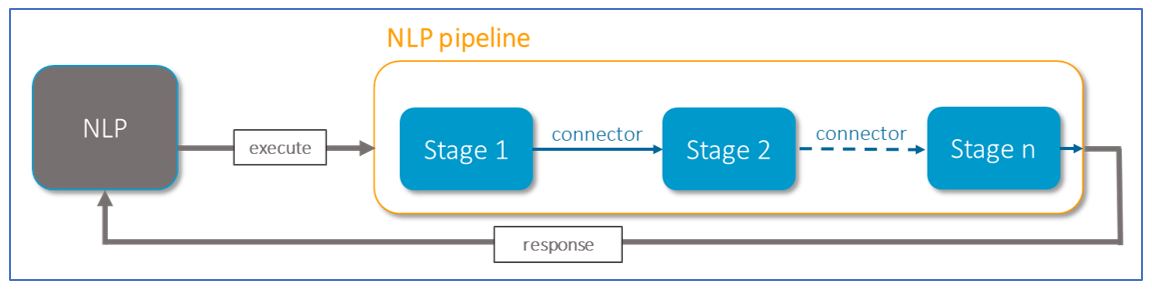
In the current release, Aura NLP includes:
- Normalization pipelines: Pipelines composed of different stages used for the normalization of the user’s utterance.
- Dynamic pipeline: Pipeline designed using different stages and connectors. The pipeline must be defined for each channel and included in a file named
pipeline.json.
Catalogs and dictionaries
NLP dictionaries
The recognition of entities in the Aura NLP model is based on dictionaries: knowledge bases of entities that are included in the NLP model as part of stages for entities recognition.
They are automatically generated from catalogs through the execution of a script.
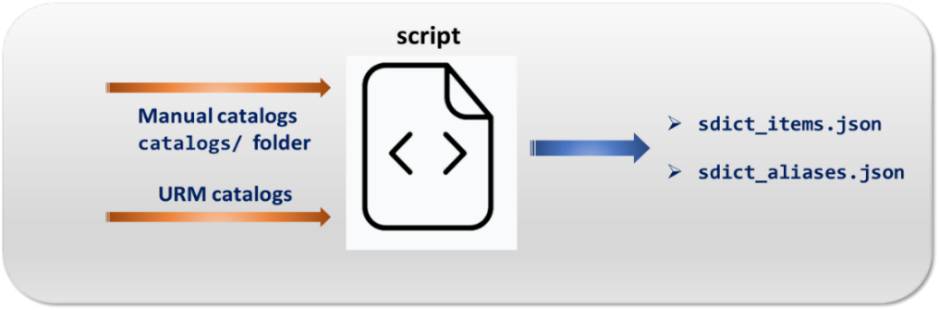
- Access to detailed information regarding what are Aura NLP dictionaries, types and guidelines for the generation or update of dictionaries in generation of Aura NLP dictionaries.
Catalogs
Catalogs are the source for entities to be included in an NLP model. Entities in catalogs are the input for the script that generates the NLP dictionaries.
There are two types of data in catalogs, at least one of them is required: manual catalogs and automatic catalogs that fetch data from Kernel URM database.
- Access to detailed information regarding what are entities catalogs, types and guidelines for the generation or update of catalogs in generation of Aura NLP catalogs.