Categories:
Aura response semantic model v3
Version v3 of Aura response semantic model description
Introduction
The Aura response semantic Model defines a set of properties which can be used as children of the Microsoft Azure Bot Service and Bot Framework activities channelData property included in the response activities.
Although the request and response models have some common fields, they are indeed different, so pay attention to both definitions.
The Aura response semantic model includes two properties: channelData and attachments properties:
-
channelData JSON schema for the Aura response semantic model v3
The root
channelDataproperties are included in the JSON schema for channelData v3 response model -
Root attachment properties
The fields included in the
attachmentsproperty are defined in the section Root attachments properties -
SkillPayload property
The fields included in the
SkillPayloadproperty are defined in the section SkillPayload property
Root attachments properties
Root attachments properties are an array of elements in the root of an activity that are intended to send specific responses from the skill to the channel. A single Aura response may contain different types of attachments. Find here more information regarding Direct Line attachment.
This field is kept as sent by the skill both by aura-groot and aura-bridge.
For third-party skills, the idea is to send here and attachment of contenType: application/json, although a devoted and specific contenType can be used, with the whole response of the skill to the user.
Root attachments properties are shown in the tables below. Mandatory sub-properties are highlighted in bold.
| Properties | Type | Description |
|---|---|---|
| contentType | string | Different values depending on the attachment type. Check them in contentType section. |
| version | string | Version of the specification |
| content | content | Content of the attachment itself. See sub-properties in content properties section. |
| name | string | Descriptive name for the attachment |
contentType properties
| Attachment type | Values |
|---|---|
| Adaptive Cards | application/vnd.microsoft.card.adaptive |
| Hero Cards | application/vnd.microsoft.card.hero |
| JSON | application/json |
| ZIP | application/zip |
Files sent from aura-bot |
application/vnd.telefonica.aura.file |
Templates sent from aura-bot |
application/vnd.telefonica.aura.template |
Suggestions v3 sent from aura-bot |
application/vnd.telefonica.aura.suggestion |
From the different types of attachments set above for the contentType property, the following table matches different Aura channels with the ones they support:
| Movistar Plus | STB | Movistar Home | |
|---|---|---|---|
| Adaptive Cards | no | no | no |
| Hero Cards | no | no | no |
| customData (JSON / ZIP) | yes | yes | yes |
| customData (JSON-LA / ZIP) | no | no | yes |
Adaptive card model
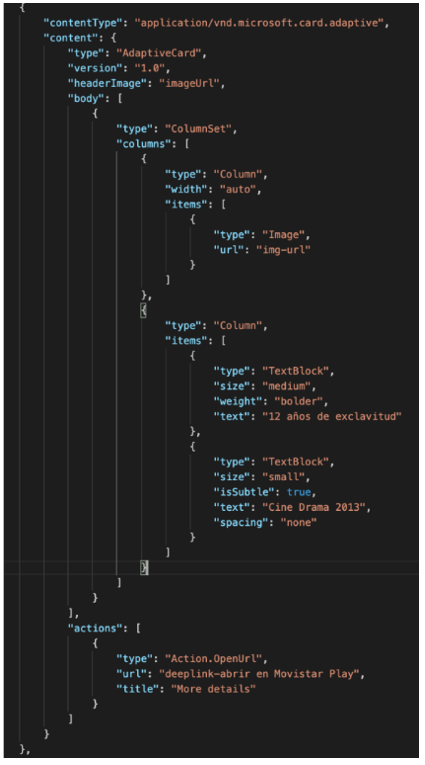
Adaptive Card is a customizable card that can contain any combination of text, speech, images, buttons and input fields. The standard version implemented is 1.5.
📄 Check the official website for Adaptive Cards.
An example of Adaptive Card format is shown below.
Hero card model
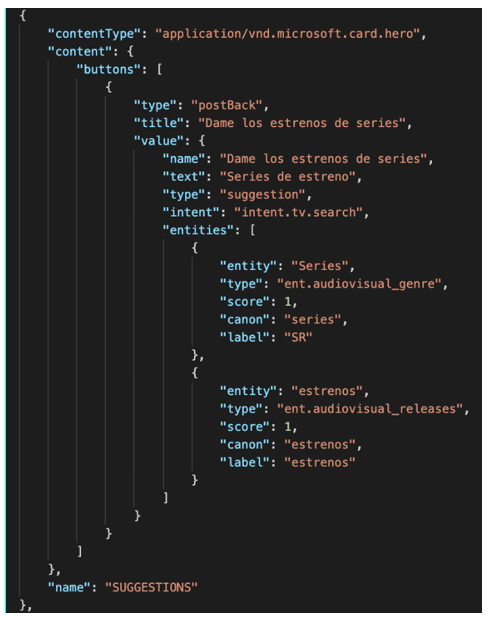
A Hero Card is a card that typically contains a single large image, one or more buttons and text.
An example of Hero Card format is shown below.
JSON response model
In this type of attachment, we only have three content properties:
-
type: type of JSON object. Currently, this field is only suitable for theactionsspecified in actions in channelData v3 although in further versions it can be implemented for other domains. -
data: JSON data itself. -
thirdParties: array ofThirdPartyobjects. This property includes information about the third-party or partner’s integrations that the channel should receive to correctly manage the request and the responses taking into account this partner. It follows thethirdPartytype properties where the fielddatais an open object that depends on the specific third-party (See thethirdPartytype properties in channeldata-3.0.0-response.schema.json. This value is optional.
This response is intended for responses from underlying APIs, where the channel will be in charge of rendering the response.
{
            "contentType": "application/json",
            "content": {
                "type": "",
                "data": {}
            },
            "name": "AuraCustomData"
        }
ZIP response model
In this case, the field content will include the ZIP file itself. This response is intended for responses which require downloading a file.
{
            "contentType": "application/zip",
            "content": "eJztnetu4sqWx18FWdqtGU0DLt/dUtSigfRmTkgygY66NdqKHKgk3m1stm3Snd3KI8yn8wTzAPNhNI/QLzaryjYYg4MNLsBpH22dcHHXf5Xrslb9KK/6wflPU8y940aO7WPbv7FMz+fecmPDN7h3PzgPW3fk74OL4S/34PvTd82m4/sjY/SAG2PnTmmMnElz4jzCPzTcqTXzmub0wbGx0AzL9JoeNtzRw/uJM8Ynj87YxX+almW8uTMtH7snHz7VW+
…
/dTpnei3d7XhaJabxyZtfninVQrIeKheBLSaUrtwW+1CQ5uaFSzOzm1z42u3RJhS/LGglWGyp/BdJSbaisWHYFmAsGzKXAl9lWqwyfAaf6sdcxdLnQ34wuSbh+fOSyYBZwsGfAiWlHQC1JXDE2fOPGGI9N0ux0qQgfGiM/iE373U6v1Rh0W1ft38NwaEZNGUHXgO8FelLXBHtecGDPYEYAqFcLalFz7mpX2IMo0KvVa7AUJQlxTPuOkNHn5+f/B5p62Oo=",
            "name": "AuraCustomData"
        }
Once the channel gets the ZIP file, it needs to be uncompressed. For example, for an Android application the process would be similar to the one below:
dataInflated = zlib.inflateSync(new Buffer(dataStringifiedAndDeflatedAndBase64, 'base64')).toString();
And for parsing:
object = JSON.parse(dataInflated);
For inflating and deflating in Android, you may use the classes called Inflater and Deflater.
Files sent from Aura Bot
A file is a special component that can be included in certain channels, such as WhatsApp. Constructors can configure a use case to send a file to the user by providing its URL. The file can be sent as a text message or as an attached file.
{
"contentType": "application/vnd.telefonica.aura.file",
"content": { "url": "https://link.com/file.pdf", "fileName": "file.pdf", "caption": "My file" }
}
Templates sent from Aura Bot
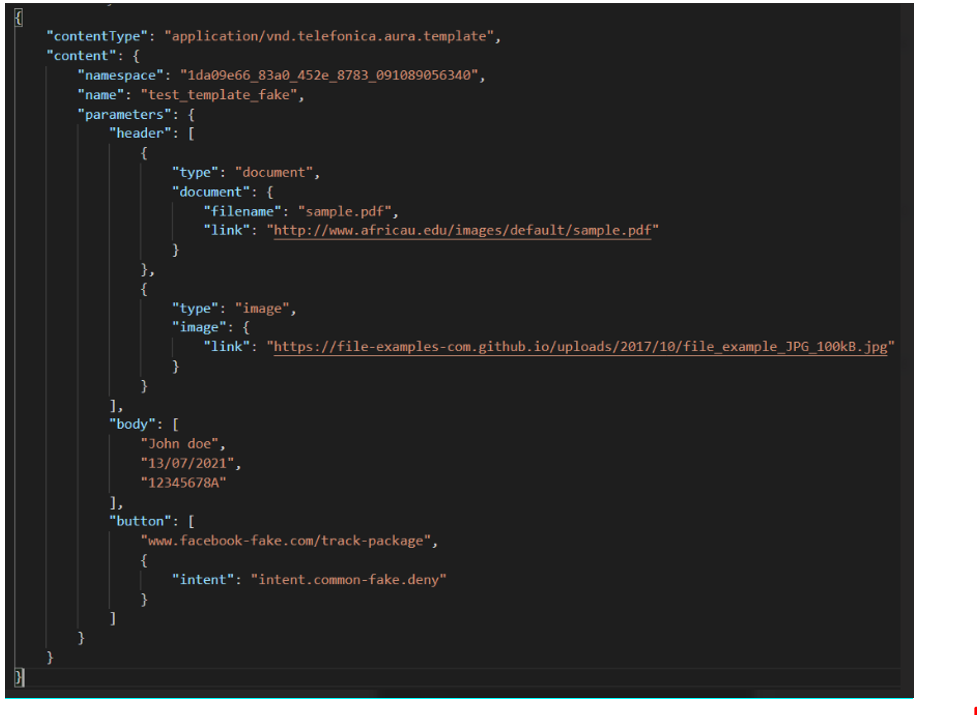
A template is defined as a combination of different elements (multimedia, buttons, different designs for texts, etc.) that can be used for sending proactive and enricher messages to the user in certain channels, such as WhatsApp. Constructors can configure a use case to send a template. Currently, templates can only be sent unidirectionally: from the channel to the user.
Suggestions v3 sent from Aura Bot
A suggestions v3 is defined to send as attachment with contentType: application/vnd.telefonica.aura.suggestion. Example:
   {
            contentType: AuraModels.AuraAttachmentContentType.AuraSuggestion,
            content: {
               suggestions
            }
   }
content properties
The properties of content type may include the following sub-properties in the table below.
We have included just certain properties as they depend on the content type.
| Property | Type | Description |
|---|---|---|
| type | string | For AdaptiveCard attachments: value: “AdaptiveCard”. |
| version | string | For AdaptiveCard attachments: version of the specification. For Aura internal attachments such as SingleActivity: version of the specification. |
| headerImage | string | For AdaptiveCard attachments: URL of the image in the header. |
| body | body | For AdaptiveCard attachments: body of the AdaptiveCards. |
| actions | action[] | For AdaptiveCard attachments: Actions available in the AdaptiveCard. They can be: action.OpenUrl, action.ShowCard, action.Submit |
| buttons | button[] | For HeroCard attachments: button that can be pressed by the user. |
| data | JSON object | For JSON attachments: JSON object. |
SkillPayload property
This field includes parameters with information generated from the skill to aura-groot. It allows aura-groot to handle and log properly the activities.
It contains the following property:
| Properties | Type | Description |
|---|---|---|
| intentResult | SkillPayloadIntentResult | Intent and entity definition |
SkillPayloadIntentResult
intentResult contains the following sub-properties:
| Properties | Type | Description |
|---|---|---|
| name | string | Unique identifier of the user’s intention. It should be a human-understandable but machine-readable string |
| entities | entities | Type and extract of the entity |
Entities
entities contains the following sub-properties:
| Properties | Type | Description |
|---|---|---|
| type | string | String with a unique name to identify the entity type (i.e., ent.movie) |
| entity | string | String with the extract of the utterance that is handled as an entity for the recognizer (“the lord of the rings”) |
Check the associated fields in the examples below.
Response to send only a text
Activity to send only text
{
   "locale":"en-EN",
   "type":"message",
   "from":{
      "id":"user1"
   },
   "text":"Hi, how are you? Let me know how I can help you.",
   "speak":"Hi, how are you? Let me know how I can help you.""channelData":{
      "payload":{
         "auraGroot":{
            "channelConversationId":"<channelConversationId>",
            "channelId":"<channelId>",

         },
         "skill":{
            "intentResult":{
               "name":"intention-of-the-user",
               "entities":[
                  {
                     "type":"type-of-the-entity",
                     "entity":"part-of-the-utterance",
                     "the lord of the rings"")"
                  }
               ]
            }
         }
      },
      "version":"3",
      "correlator":"19d63cd4-8f7e-4194-837d-c55991b1afcd"
   }
}
Response to send more complex data
Activity with attachments
{
   "locale":"en-EN",
   "type":"message",
   "from":{
      "id":"user1"
   },
   "attachments":[
      {
         "contentType":"application/json",
         "content":{
            "The json response of your bot"
         }
      }
   ],
   "text":"Hi, how are you? Let me know how I can help you.",
   "speak":"Hi, how are you? Let me know how I can help you.""channelData":{
      "payload":"auraGroot":{
         "channelConversationId":"<channelConversationId>",
         "channelId":"<channelId>",

      },
      "skill":{
         "intentResult":{
            "name":"intention-of-the-user",
            "entities":[
               {
                  "type":"type-of-the-entity",
                  "entity":"part-of-the-utterance",
                  "the lord of the rings"")"
               }
            ]
         }
      }
   },
   "version":"3",
   "correlator":"19d63cd4-8f7e-4194-837d-c55991b1afcd"
}