Categories:
Google RCS Business Messaging channel in Aura
Introduction to Google RCS Business Messaging channel in Aura, architecture and key features
Related documents
Activation of Google RCS Business Messaging channel
Practical guidelines for use cases development in Google RCS Business Messaging channel
Introduction to Google RCS Business Messaging in Aura
Rich Communication Services (RCS) is a communication protocol designed to enhance traditional SMS and MMS messaging.
The Google RCS Business Messaging channel (from now on, RCS channel) enables its users to incorporate richer content through chat features like video, images, and other interactive elements.
Aura allows RCS channel to communicate with the users through an application installed by default in their phones, with lower costs than WhatsApp.
In order to set up the RCS channel, Aura has to be registered as a partner with RCS Business Messaging.
After registration, an agent has to be created. An agent is a conversational entity that interacts with users by sending messages and reacting to users’ responses.
RCS allows sending different types of messages to the user:
- Text
- Media
- Suggested replies
- Suggested actions, like:
- Dial a number
- View a location
- Share a location
- Open a URL
- Create a calendar event
- Rich cards
- Carousels
Access detailed information regarding:
Overview of Aura - RCS communication architecture
The outlines of the communication between Aura and RCS are represented in the following figure:
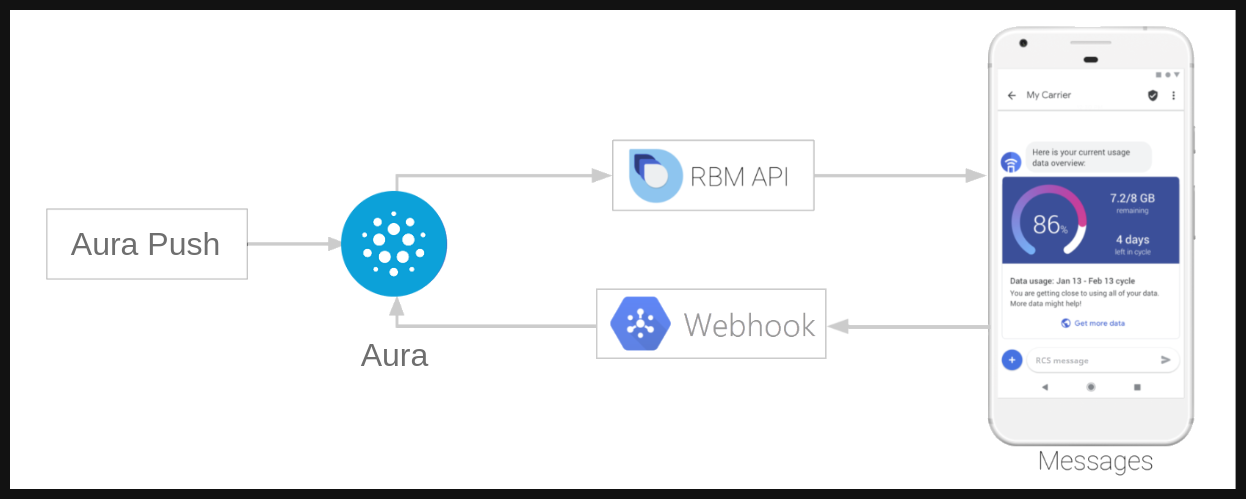
To start a conversation in RCS, the agent (aura-bridge in our case) is in charge of initiating it. In Aura, this is done using the aura-push plugin.
Through this set of endpoints, the channel is allowed to send messages to the user without a previous interaction. When the first message is sent, the responses of the user will be handled by aura-bridge and sent to the configured dialog in aura-bot.
Activation of RCS channels
The use of all the available Aura features in RCS requires the previous activation of the channels. Check the detailed process in:
Use case development
To learn how to develop use cases for RCS channels, refer to the following documentation:
Practical guidelines for use cases development in RCS