Categories:
Use of section title in interactive messages
Guidelines to configure a HeroCard to render a section title properly
Introduction
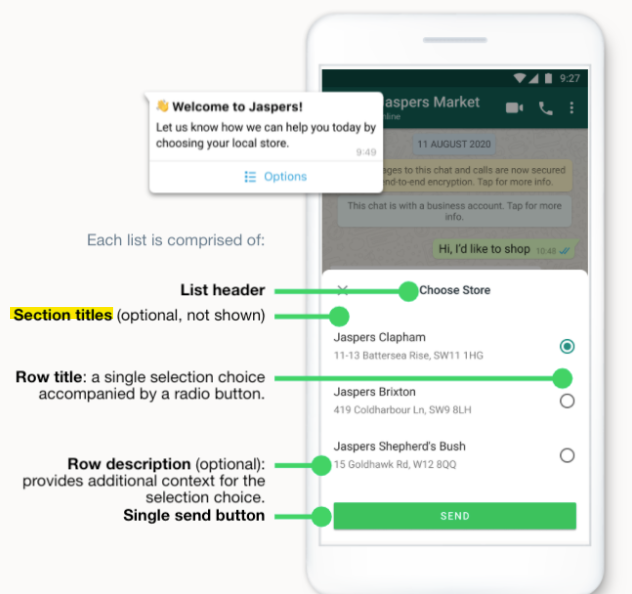
Aura is able to use a section title if the message has more than one section. This section title acts as a header for delimiting the beginning of the different sections in a WhatsApp action.
The section title is a string and can have a maximum of 24 characters.
The number of rows, joining all sections, cannot exceed 10. If this limit is surpassed, it will be rendered as an enumerated list.
From Cloud API, at least 2 sections are necessary to render the title.
How to use section title in your section
The section title is optional and is placed inside the HeroCard/Section, but it is required, if the card has more than one section.
In this case, we will use the HeroCard content field and include a new field called subtitle. This will be used by Aura to render the section title. When it exists, the section title is rendered; otherwise, nothing appears.
The image below shows more details on when this title will be placed.
Example
After creating the HeroCard, with its corresponding choices, it is possible to add the new field subtitle, and then the value will be rendered, as shown in the example below:
        //...
        let heroCard = CardFactory.heroCard(null, text, null, choices);
        (heroCard.content as any).subtitle = 'This is the section title';
        //...
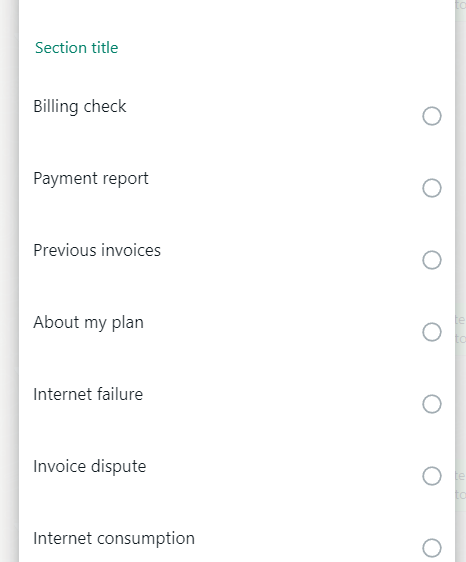
The result will be something like this: