Categories:
Aura Bot conversational flow
Description of users’ authentication process in Aura Bot. Discover the different types of users and how they can authenticate in Aura.
Aura conversational process
Once the user’s authentication is validated, aura-bot starts the message processing.
-
Firstly, all incoming message middlewares are executed, in the order established in the bot set-up.
-
Then, recognizers come into play in order to recognize the user’s intention.
Depending on the type of input message, the process is different. For instance, aura-bot is able to recognize the user’s intent itself if the message is anauraCommandor requires summoning Aura Cognitive Services for this purpose.
Recognizers are executed sequentially and, after one of them recognizes an intention, the rest are not executed. -
Once the intent and entities are identified, the next step is to route the message to the dialog in charge of that intent for the current channel. This step is done by the main dialog. This special and core dialog is responsible for:
- Getting the dialog that handles the recognized intent for the current channel. If it does not exist, an error is returned to the channel.
- Validating if the user’s context matches with the context filters configured in the selected dialog. If that is the case, then the context filter dialog is executed.
- Validating the authorization settings of the dialog to be executed with the AuraUser authentication model.
In the case of Kernel authentication, it checks that the scopes and purposes of the user contain the mandatory ones to execute the dialog.
This validation improves aura-bot performance, avoiding external requests to Kernel that will return a permissions error. If the user is anonymous, this step is not executed.
-
The specific dialog selected is started during one of the steps of the main dialog, and thus the execution is now managed directly by that specific dialog.
-
The dialog must get the information needed to provide a proper response to the user through Aura NLP, Complex Logic API or Kernel Telco APIs in order to generate the expected answer.
-
The response is now ready to be provided to the user and will start its way through the outgoing middlewares.
-
After that, the execution flow continues to the next step of the
MainDialog, that is checking whether or not the dialog must include suggestions. To do so, it will check that the proper dialog settings are stored in the context. If suggestions are needed, the suggestions API will be called, the resulting activity will be prepared following the UX Guidelines. -
In the end, a complete response consisting of several ordered activities will be provided to the channel, that will read them from Direct Line and the result will be rendered to the user.
Conversational process flowchart
The following flowchart schematically shows the components involved in the process.
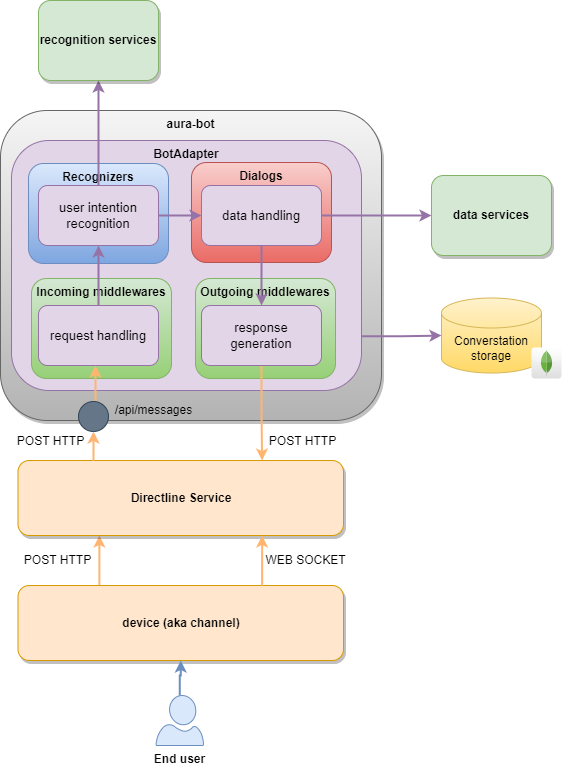
Check here the complete Aura Bot conversational process flowchart.