Categories:
Best practices for prompts generation
The purpose of this document is to provide complete and practical guidelines and best practices for constructors when creating a prompt for an ATRIA use case
The use of Markdown text
It is highly recommended to use Markdown as a format for prompts due to its benefits, summarized below:
Clarity and readability
- Markdown allows structuring text in a clear and hierarchical way using headings, lists and other elements. It helps understanding both humans and automated systems.
- Raw text is easy to read and understand, even without rendering. This streamlines review and collaborative work.
Easy edition and maintenance
- Markdown is editable in any plain text editor, without the need for specialized tools.
- It can be easily modified, versioned and maintained, especially within large or distributed teams.
Error minimization
- Markdown syntax is simple and minimizes common errors associated with other markup languages such as HTML.
- The visual structure allows a quick identification of inconsistencies or formatting issues.
Versatility and compatibility
- Markdown is a widely supported standard: it can be easily converted into HTML, PDF, or DOCX formats, presentations and more.
- Additionally, it is well-suited for integration with AI tools, static site generators, document management systems and version control systems like Git.
Portability and universality
- Markdown files are lightweight and portable, enabling easy use across different platforms and devices without formatting loss.
- As a plain text editor, Markdown ensures content accessibility and long-term usability, regardless of future technological changes.
Effective collaboration
- Markdown facilitates collaborative work in projects with different teams or people editing or reviewing simultaneously.
- Tt includes intuitive and useful change control, version controlling and diff tools.
Simplicity and legibility for AI
- Markdown is a lightweight markup language with a minimalist plain-text-formatting syntax. It eases LLMs to identify text structures in comparison to markup languages such as HTML or XML.
- Consequently, it reduces significantly misinterpretations and errors and improves processing efficiency.
In summary, using Markdown to define prompts makes them clearer, easier to edit, minimizes errors and provides great flexibility across platforms and tools.
General formatting guidelines
Sections and subsections
-
Organize your content: Use Markdown syntax for headers to separate the different parts of the prompt (##, ###, etc.)
-
Ensure clarity: Identify each section univocally for easy reading and maintenance of the prompt. In the following example, although Markdown shows a correct structure, visualization is not adequate:

Sections lists
- Add lists: If a section or sub-section includes multiple elements or fields, present them as a bulleted or numbered list for better organization. For example:

Line breaks
- Do not include line breaks manually (\n): The final formatting of the prompt with line breaks will be handled by the CTO team. Now, just write the content as it should appear, without adding manual line break characters.


Quotation marks
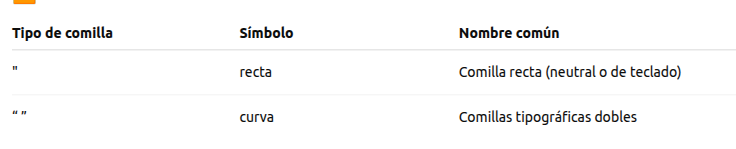
- Be consistent: Use the same type of quotation marks throughout the prompt (preferably: ‘single’ or “straight double”, depending on the project requirements)
- Avoid mixing styles: Do not combine straight and curly quotation marks. Although visually similar, mismatched opening and closing quotes can lead to unclosed texts.
URLs
- Be careful with URLs: the above-mentioned issue related to quotation marks affects URLs, as seen in the following example.
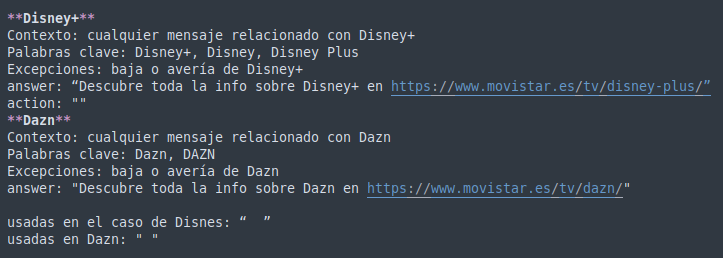
- Disney: incorrect → the closing quote in the URL is considered as part of the link
- Dazn: correct → the closing quote in the URL is closing the field “answer” correctly
- Review unusual characters: Once the prompt creation is finished, make a comprehensive review to check no invalid or wrong characters are included. This is particularly relevant if text has been copied from external sources.
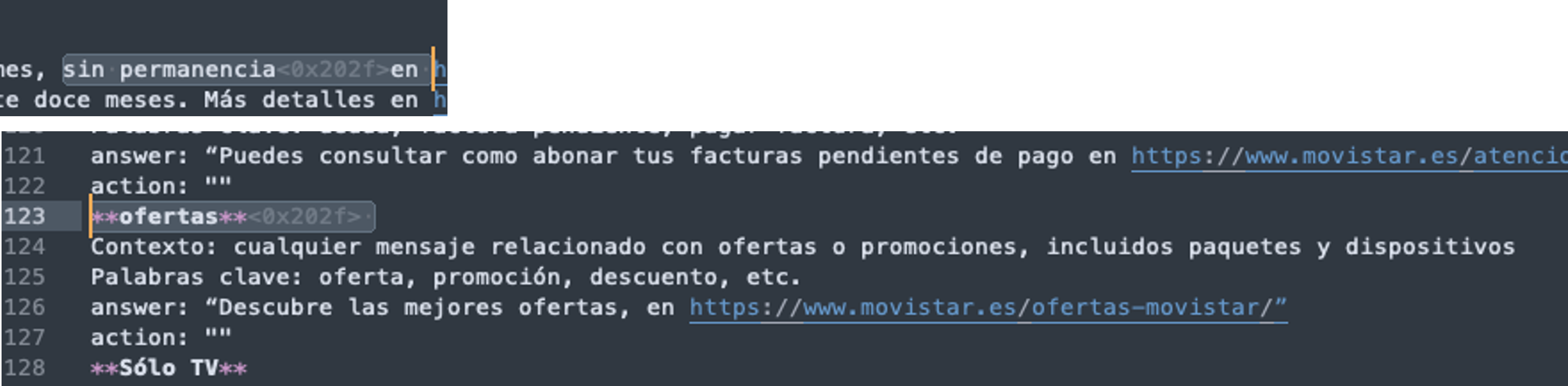
- Carry out a visual review: If possible, upload your prompt into a Markdown editor to review its visualization.
- Desktop version editors: Ghostwriter, VS Code, Pycharm, etc.
- Online editors: https://markdownlivepreview.com/, https://dillinger.io/, https://stackedit.io/, etc.
General content guidelines
Simple and direct language
-
Use clear and simple expressions instead of overly elaborate ones.
- Example: “Use a wide range…” instead of “Utilize a wide range…”.
-
Avoid unnecessary slang or technical terms that have not been previously defined.
-
Add a clear definition of relevant keywords and terms used in your prompt. For example: user_type, estado_desconocido, etc.
Language consistency
-
Include the main structure in English (language used for technical terms such as context, keywords, answer, action, etc.) and examples in the expected language, ex. Spanish.
-
Avoid mixing languages (English and Spanish) to ease reading and implementation.
Accurate examples and definitions
-
Examples must be grammatically and orthographically correct, with no errors in accents, capitalization or wording.
-
Check that fields or variables are clearly defined previous to its implementation.
-
Integrate examples in the corresponding section, not in a separate one.
Grammar and syntax review
-
Check grammatical agreements (singular vs. plural, gender, etc.).
-
Be coherent with the use of pronouns. For example: If you use “user” (singular), follow the sentence by “his/her”, not “their”, or change to “users”.
-
You can also use impersonal structures for ease.
Homogeneous categories structure
-
All categories must follow a common structure, with the same fields (context, keywords, answer, action), even if any is left empty.
-
If there are special values (such as unknown_status), they must be explained and applied consistently.