Categories:
Deploy a developed use case
Guidelines for the deployment of a new use case in Aura, in order to make it available for Aura users and the recommended checks to be done before deployment
Check points before use case deployment
Once the use case is developed and tested, and before its deployment, it is required to make certain verifications to assure its proper performance in the intended channel.
Check that the intended channel is enabled
aura-configuration-api must include an entry for each one of the desired channels the Aura users are going to use to interact with the aura-bot instance.
For example, if the Novum application is the intended channel, an entry such as the following one should be included in aura-configuration-api:
[
  {
    "name": "novum-mytelco",
    "prefix": "nov",
    "channel_id": "45494a5b-835a-4fff-a813-b3d2be529dbe"
    …
  }
…
]
At this stage, developers should validate with the local DevOps team that the channel name, prefix and identifier are the right ones. This channel identifier should be unique for the specific channel in Aura.
In case other channels are supported, additional entries such as the one provided in the example should be included.
Check that the required scopes and purposes are included
aura-configuration-api must include the Kernel scopes and the purposes granted for the user which are needed to cover all the enabled use cases (dialogs).
These scopes and purposes should include:
- The ones needed to get the user’s access token
- The ones needed to inject user’s information into the messages reaching the aura-bot instance
- The ones needed for the functionality implemented by each enabled use case.
The information regarding which scopes and purposes are needed can be located in the Kernel documentation website](https://developers.baikalplatform.com/) and, more concretely, in the specific sections for each Kernel installation made in every available environment for each specific country.
For example, in case of the Kernel User Profile API, for the production environment in Spain, the scopes and purposes information can be located at the Authentication section in User Profile (3.5.1). Notice the sections highlighted in bold on the previous URL to infer the specific URL to use for each concrete country and environment.
It is important to note that if the scope information is omitted, the requested access token is issued for all the scopes declared when the client application was created in the Kernel infrastructure.
An example of the scopes and purposes to be included into the concrete channel configuration to be able to invoke the previous APIs is the following one:
"name": "novum-mytelco",
    "prefix": "nov",
    "channel_id": "45494a5b-835a-4fff-a813-b3d2be529dbe",
    "fpa_auth_scopes": "device-catalog:devices-read device-stock:stock-read",
    "fpa_auth_purposes": "customer-self-service detect-abnormal-usage device-recommendations-v3 sim-upgrade-suggestion aura-read-insight-events identify-customer bolt-on-suggestion",
......
}
Two examples, for the Kernel User Profile API and the Subscribed Products API, are shown below, where scopes and purposes are found:
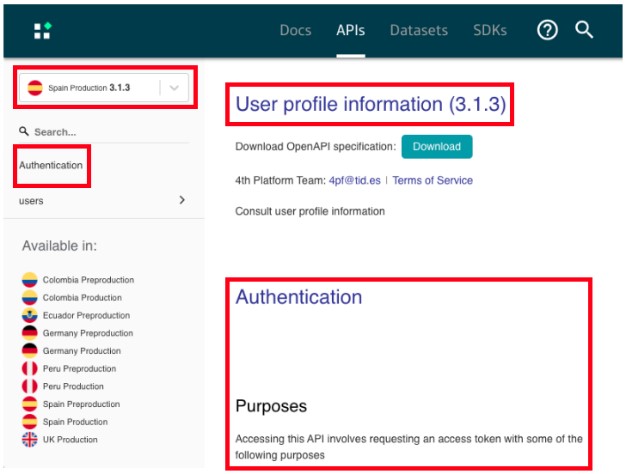
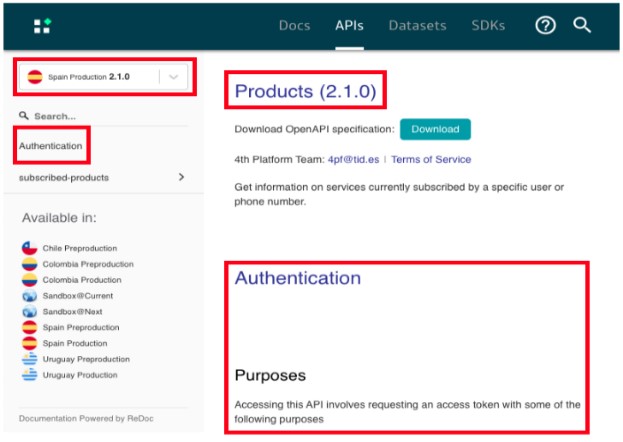
The following snippet shows how to indicate the scopes and purposes needed by an Aura user to execute all the dialogs within a library (if authorization setting is set at library level) or one of the dialogs (if set at dialog level), which are included in the dialog configuration (dialog-config.json.
These scopes and purposes are validated before making the correspondent API request to Kernel, to handle permissions errors beforehand and avoiding making a request that will fail in the end.
{ "id": "details-services",
      "suggestions": true,
      "authorization": {
        "purposes": "customer-self-service",
        "scopes": "subscribed-products-user-read"
      },
}
Deploy a developed use case
Once your developed use case is successfully tested in your local environment, provide the library’s .tgz file to your Local DevOps Team, which is responsible for the use case deployment.
This process will include the publication of the use case library and aura-bot make-up and running.