Categories:
Build an operation in a developed dialog
Guidelines for building an operation within an already developed dialog.
Introduction
Besides first-level intents in Aura, that are associated to the execution of a dialog and have the following format: intent.[intent_name], there is another type of intents called Operations that do not have to be associated to a dialog.
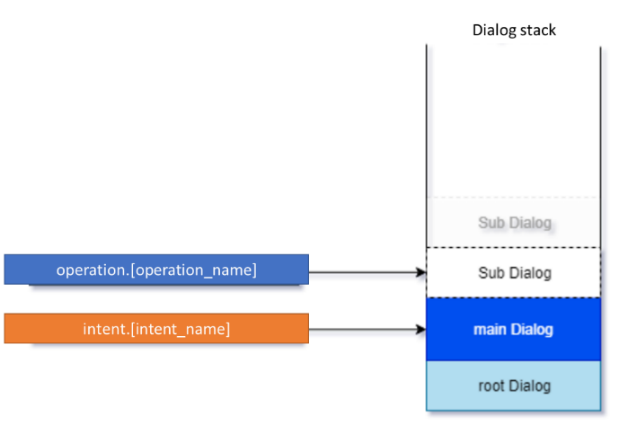
An operation is an intention that makes sense within a context, that is, within a specific dialog conversational flow and when the dialog is waiting for an interaction with the user.
Operations are not recognized by Aura NLP but through a direct auraCommand or through a dialogContext.
Operations have the following format: operation.[operation_name].
How to build an operation
It is recommended to build a specific .ts file for each operation and place it in the following folder together with the use case dialogs’ files:
[repository_name]/src/ or [repository_name]/[library name]/src/
An example is shown below: If we want to select the seat for a flight and we say to Aura: “I want the seat 24A”. Then, the recognizer will choose an intention, but this intention only makes sense if it is within a sub-process, which in this case would be “buying tickets”. In the following example, we have already opened a session in Air Europe and we have sent the intention to buy tickets:
{
  "intent": "intent.air-europe.buy-ticket",
  "entities": []
}
Secondly, in the “buy tickets” section of the App interface, when the user chooses a seat, the App will send the following operation to select the seat:
{
  "intent": "operation.air-europe.select-seat",
  "entities": [
    {
      "type": "ent.seat-number",
      "entity": "A24",
      "canon": "a24"
    }
  ]
}