Categories:
Github as orchestrator
How to use a Github repository to orchestrate the Release Train Manager processes
Release Train Manager Repository
To organize the work, we use a Github repository. This repository contains classic branches for the RTM development cycle itself and a set of branches reserved for RTM orchestration. The default base branch of the orchestrator is master.
The classic branches contain the prefixes:
- feat/description
- fix/description
- doc/description
- etc.
The specific branches for the orchestrator contain a descriptive name and the JIRA identifier:
- main/name_reference#id: To orchestrate new features.
- release/name_reference#id: To orchestrate releases.
- hotfix/name_reference#id: To orchestrate hotfix on a release.
- fasttrack/name_reference#id: To orchestrate features on a release.
To manage the RTM processes, we use Pull Requests (PR) in this repository. Each of these PRs has a base branch and a target branch, depending on the operation to be performed:
- main       -> Base: master. Target: main/name_reference#id
- release    -> Base: master. Target: release/name_reference#id
- hotfix     -> Base: a release branch. Target: hotfix/name_reference#id
- fasttrack  -> Base: a release branch. Target: fasttrack/name_reference#id
This PR is generated automatically when a commit is made for the first time in one of these special branches.
Pull Request Body
In the body of the generated PR, all the configuration information for the branch is displayed and the Pull Request will contain all the history of processes executed on it in comment mode.
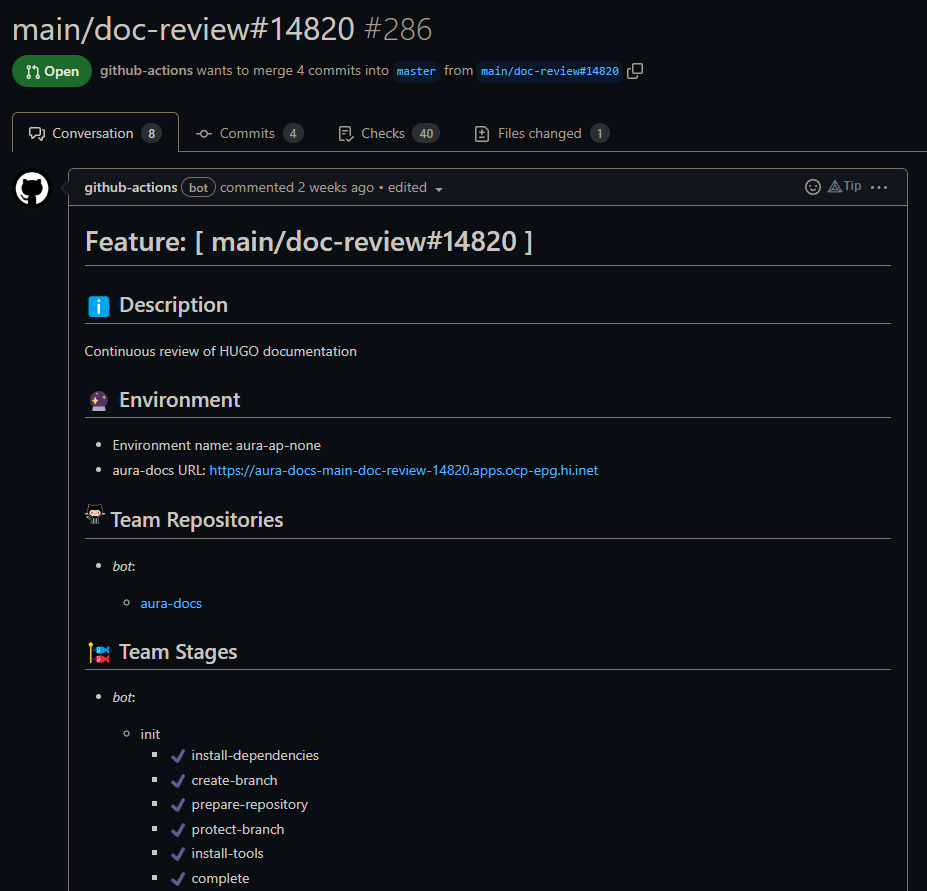
The information for the PR body is obtained from a configuration file and is updated as the different phases of the orchestrator are executed.
The Github Repository Structure
/
├─ .github/
│  ├─ PULL_REQUEST_TEMPLATE/
│  ├─ actions/
│  ├─ workflows/
├─ docs/
├─ resources/
│  ├─ templates/
├─ src/
│  ├─ tools/
│  │  ├─ build-docker/
│  │  ├─ build-actions/
│  ├─ toolkit/
│  │  ├─ nodejs/
│  │  │  ├─ package-manager/
│  │  │  │  ├─ operations/
├─ branch-config.yml
branch-config.yml
This file contains all the configuration associated with a special branch. In this file, the involved equipment, phases, steps, etc. are configured.
All the information is included in Branch Configuration section.
.github/actions
This folder contains Github Actions necessary to perform all operations on repositories, data persistence and communications with Jenkins, among others.
resource/templates
This folder contains templates for the branch-config.hml file for each branch type:
_main_      -> `main-branch-config.yml`
_hotfix_    -> `hotfix-branch-config.yml`
_release_   -> `release-branch-config.yml`
_fasttrack_ -> `fasttrack-branch-config.yml`
src/tools
It contains the tools needed to build the docker actions and images.
src/toolkit
It contains the code SDKs as a complement to the Github actions. These utilities will eventually become actions someday.
src/toolkit/nodejs
It contains the NodeJS toolkit. More information in [NodeJS Toolkit].
⚠️ NodeJS toolkit section WIP
.github/workflows
We define stage as a set of steps to be performed in a coordinated manner by each team. Until all the teams involved in the phase have completed all the steps of a phase, it will not be possible to move on to the next phase.
For example, for example, we can define the INIT phase in which the teams have to create the specific branches in their repositories and activate an environment where they can deploy. We would have that each team would have an INIT phase in its configuration, with a step to generate the branch or branches in its repositories, and the Devops team would also have another set of steps to prepare the environment.
All these configurations are explained in the Branch Configuration section.
In order to synchronize the work between the teams and perform these operations we will use Github Workflows. These workflows are explained in the [Workflows] section.
⚠️ Workflows section WIP