Categories:
Dialog context recognizer middleware
Description of dialog-context-recognizer-middleware, that manages the recognition process when there are different options in the response
Introduction
dialog-context-recognizer-middleware uses a model to facilitate the recognition when Aura response is composed of several options, which have either been generated automatically when a Prompt Choice or a list of CardActions has been processed or generated manually.
This model is defined in dialogContext model.
The source code of this recognizer is included in Aura Bot Platform recognizers - Github repository.
The behavior of this recognizer is channel-specific. The dialogContext configuration for each channel follows the model defined in the channel model sub-property.
This recognizer first checks if a cache exists with the dialogContext generated by the last message sent to the user. If it does not exist, then it checks the dialogContext information saved in aura-bot cache, in greater detail in property auraData.conversationData.dialogContext.
This differs with past versions where this information was obtained from channelData property in the activity, which now is defined in the processFromClient property.
The recognition is performed by proximity between the user’s phrase and the dialogContext values to be evaluated.
If Aura has sent several dialogContext messages, the last message will be the one containing a single dialogContext with all the previous ones merged.
If the dialogContext value exists in the cache, it is deleted once fetched. If another recognizer beats the dialog-context-recognizer-middleware, this process is performed inside the finalize-recognizers-middleware.
Environment variables
Three aura-bot environment variables come into play in the process:
AURA_DIALOG_CONTEXT_THRESHOLD: minimum threshold to validate the recognition (by default:0.8).AURA_DIALOG_CONTEXT_THRESHOLD_RELATION_UTTERANCE: Microsoft uses in its algorithm a fixed value of0.5. If the value is not set, then the value will be calculated based on the words of the user’s phrase divided by the words of the phrase to be compared. (by default: not set).AURA_DIALOG_CONTEXT_ORDINAL_CARDINAL_THRESHOLD: if the client phrase contains a number or thedialogContextvalues are enumerated by cardinals or/and ordinals, this threshold will be used instead ofAURA_DIALOG_CONTEXT_THRESHOLD. This is done to prevent numbers within the phrase from being confused with the position of the items in the options list.(by default:0.95).
The dialogContext can be generated automatically based on Prompt Choices or CardActions. This is configurable per channel, but developers could add the dialogContext object to the channelData with the expected actions.
Example
An example is shown below: a user asks for a recommendation in Movistar +. If these recommendations are included in a dialogContext, it gives the user the possibility to precisely select one of the options using voice:
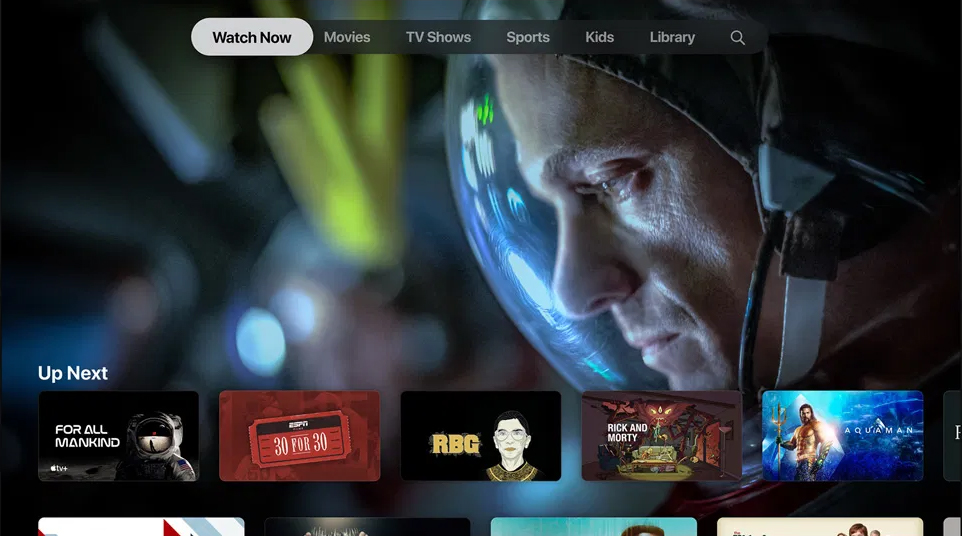
dialogContext stored for an Aura response:
{
  "dialogContext": [
    {
      "text": "I want to see the movie for all mankind|1|one|the first|first",
      "value": {
        "name": "I want to see the movie for all mankind",
        "text": "See for all mankindo",
        "type": "suggestion",
        "intent": "intent.tv.search",
        "entities": [
          {
            "type": "ent.audiovisual_film_title",
            "entity": "for all mankind",
            "canon": "for all mankind",
            "label": "",
            "score": 1
          },
          {
            "type": "ent.audiovisual_genre",
            "entity": "film",
            "canon": "films",
            "label": "CN",
            "score": 1
          }
        ]
      }
    },
     {
      "text": "I want to see the movie 30 for 30|two|second|the second|",
      "value": {
        "name": "I want to see the movie 30 for 30",
        "text": "See 30 for 30",
        "type": "suggestion",
        "intent": "intent.tv.search",
        "entities": [
          {
            "type": "ent.audiovisual_film_title",
            "entity": "30 for 30",
            "canon": "30 for 30",
            "label": "",
            "score": 1
          },
          {
            "type": "ent.audiovisual_genre",
            "entity": "film",
            "canon": "films",
            "label": "CN",
            "score": 1
          }
        ]
      }
    },
      {
      "text": "I want to see the movie rgb|3|three|the third|third",
      "value": {
        "name": "I want to see the movie rgb",
        "text": "See for all mankindo",
        "type": "suggestion",
        "intent": "intent.tv.search",
        "entities": [
          {
            "type": "ent.audiovisual_film_title",
            "entity": "rgb",
            "canon": "rgb",
            "label": "",
            "score": 1
          },
          {
            "type": "ent.audiovisual_genre",
            "entity": "film",
            "canon": "films",
            "label": "CN",
            "score": 1
          }
        ]
      }
    },
    .....
  ]
}