Categories:
Generation of Aura NLP catalogs
Entities catalogs are the input for the Aura NLP dictionaries, used to recognize entities from the users’ utterances.
Introduction
Catalogs in Aura are knowledge bases of entities. These catalogs are the input for the generation of Aura NLP dictionaries to be included in an NLP model.
Discover in the current documents:
Types of catalogs in Aura NLP
There are two types of catalogs, at least one of them is required:
- Automatic catalogs: data from Kernel URM
- Manual catalogs: data in catalogs/ folder
Automatic catalogs
Telefonica Kernel URM is a database that includes data from different key content such as film title, documental title, TV series title, TV shows, actors’ name, directors’ name, etc.
Aura can connect to the URM and automatically download the URM content when the NLP dictionaries (sdict files) are generated. You can indicate in the configuration whether to take data from Azure or AWS.
Data that can be downloaded from the URM correspond to the section urm_type_entities in the nlp.json configuration file:
- audiovisual_director
- audiovisual_actor
- audiovisual_documental_title
- audiovisual_film_title
- audiovisual_tvshow_title
- audiovisual_tvseries_title
The URM database should be continuously updated, in order to show the most recent content and scheduled programs (for instance, new films or series in Movistar + catalog).
As NLP dictionaries automatically include the data from the URM database, two situations are found that can lead to the generation of manual catalogs:
- The URM must be completed with the very latest content that can be offered to the user and must be recognized by Aura. In case a relevant entity is missing, the catalog must be updated manually.
- Linguists can detect mistakes in URM data: wrong formats, typos, missing aliases, etc. To overcome this problem, the manual updating of catalogs is required.
Manual catalogs
Catalogs can be updated manually in the catalogs/ folder, included in Aura NLP data directory: aura-nlpdata-[country_code]
This folder contains, categorized by language and channel, all the files required for the manual updating of entities.
The final goal is to complete the dictionaries with entities that should be recognized by the NLP system (when a NER stage is used) and to complete and/or refine data from URM (in case this source is used).
The detailed process to update manual catalogs is included in Guidelines for the generation or update of entities catalogs.
Guidelines for the generation or update of manual catalogs
As explained before, apart from automatic catalogs, that provides data from Kernel URM database, manual catalogs can be also generated to complete the automatic ones with new entities or correct mistakes.
The following sections include the orderly guidelines for the generation or update of manual entities catalogs.
1. Identify content
- Identify content to be updated in dictionaries: very latest content that must be included in dictionaries and recognized by Aura (for instance, new films or series in Movistar+ catalog).
- Check if this content (entities) are included in the URM database:
- These specific entities are missing
- Any mistake is detected in URM data regarding these entities (wrong formats, typos, missing aliases, etc.)
2. Access the catalogs/ folder and edit it
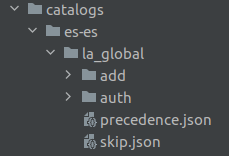
Access the catalogs/ folder in: aura-nlpdata-[country_code]/catalogs
Now, you should edit the different files, each one with its corresponding data as shown in the following sections.
2.1. auth/ folder
Working directory: aura-nlpdata-[country_code]/catalogs/[language]/[channel]/auth/
auth/ folder contains multiple JSON files including prioritized content that are added to the sdict_item.json and sdict_aliases.json dictionaries.
Follow these steps to edit the auth/ folder:
- Organize data into different JSON files by entity types (for example, one file for time entities and another for tv entities).
- It is mandatory that files names have the format:
<file_name>.ent.json - Add a file named
most_relevant_content.ent.jsonfor those key entities that must be recognized with 100% accuracy related to these fields:- Film title >
ent.audiovisual_film_title - Documental title >
ent.audiovisual_documental_title - TV series title >
ent.audiovisual_tvseries_title - TV shows >
ent.audiovisual_tvshows_title
- Film title >
- Add a JSON file for organizing any other entity type or topic (for example,
movistar+_sports.ent.json. - Edit each JSON file:
metadatafield should include the following fields:format: specification of format used in file.name: representative name to identify the content of the file.version: this should be updated when changing the file.
- Keys: entity types
- Values: list of entities
- If the item is a string, it is considered a canon and deleted from the rest of the entity types where it is found.
- If it is a list, the first element of the list is considered a canon and the rest of values are aliases for this canon. The canon is deleted from the rest of the entity types where it is found and aliases are removed from the
sdict_aliases.jsondictionary.
Example
{
    "metadata": {
        "format": "tef:dict:entity",
        "name": "AURA Movistar XXX",
        "version": "1.0"
    },
    "ent.audiovisual_sports_team": [
       [
           "Real Madrid",
           "el Real Madrid|comment",
           "##el Real Madrid",
           "Madrid"
       ],
       [
           "Sevilla|comment",
           "el Sevilla",
           "Sevilla club de fútbol",
           "Sevilla futbol club"
       ]
    ]
}
Best practices
- Comments can be added, since the script ignores them:
- Adding “##” before a value. ("## Spanish Football Teams")
- Adding “|” in a value or entity type, the text after this symbol is not considered as part of the entity (“el Real Madrid|comment”)
- Maintain correct indentation to ease catalogs reading.
- Declared entities, canons and aliases should be ordered alphabetically.
- Capitalize: first letter for proper nouns, titles, teams, companies, etc. (“The Wedding Date”); acronyms (“Chelsea FC”).
- Write punctuation correctly within values. For example, “Chelsea F C” could be written also as “Chelsea F.C.”. Do not include both forms because it could cause a duplicate due to normalization process.
- If the language includes words with diacritical marks, write values correctly.
- Check that the canon is the expected in case the API expects a specific one.
- Compare canon/alias included in catalogs to avoid overlaps and conflicts.
- Avoid duplicates.
2.2. add/ folder
Working directory: aura-nlpdata-[country_code]/catalogs/[language]/[channel]/add/
add/ folder contains multiple JSON files including additional or non-prioritized content to be added to the sdict_item.json and sdict_aliases.json dictionaries. It is used to complement information in dictionaries.
In case there is non-prioritized content, this folder will be empty.
Follow these steps to edit the add/ folder:
- Organize data into different JSON files by entity types (for example, one file for time entities and another for tv entities).
- It is mandatory that files names have the format:
<file_name>.ent.json - Edit each JSON file:
metadatafield should include the following fields:format: specification of format used in file.name: representative name to identify the content of the file.version: this should be updated when changing the file.
- Keys: entity types
- Values: list of entities
- If the item is a string, it is considered a canon and added to
sdict_items. - If it is a list:
- The first element of the list is considered a canon and added to
sdict_items.json. - The rest of values are aliases and are included in
sdict_aliases.
- The first element of the list is considered a canon and added to
Example
{
    "metadata": {
       "format": "tef:dict:entity",
       "name": "AURA Movistar XXX",
       "version": "1.0"
    },
    "ent.audiovisual_sports|comment": [
       [
           "GOLF",
           "Golf"
       ],
       [
           "tennis|comment",
           "##tenis",
           "tenis",
           "ten"
       ]
    ]
}
Best practices
Best practices for the auth/ folder also apply to add/ folder.
2.3. precedence.json file
Working directory: aura-nlpdata-[country_code]/catalogs/[language]/[channel]/precedence.json
precedence.json file establishes the priority of an entity type over the rest in the sdict_items.json dictionary.
Follow these steps to edit the precedence.json file:
- Edit the file including:
- Keys: entity type
- Values: list of entity types over which the key prevails.
Example
If the entity “Real Madrid” is present in both ent.audiovisual_documental_title and ent.audiovisual_sports_team, and we want soccer teams to have priority over documentaries, it has to be defined in precedence.json like this:
{
     "ent.audiovisual_sports_team": [
         "ent.audiovisual_documental_title"
     ]
}
Doing this way, “Real Madrid” of the entity type ent.audiovisual_documental_title would be eliminated.
Best practices
- Entities declared should be ordered alphabetically.
- Be careful to maintain the required JSON format.
2.4. skip.json file
Working directory: aura-nlpdata-[country_code]/catalogs/[language]/[channel]/skip.json
skip.json file defines conflicting items that must be eliminated from sdict_items.json and sdict_aliases.json dictionaries.
Follow these steps to edit the skip.json file:
skip_items_in_entity: dictionary, where:- Keys: entity type
- Values: list with entities to be deleted from that type of entity. Values defined here affect just canons.
skip_items_in_all_entities: list of values which will be removed from all types of entities where included. It affects to canons and aliases.
Example
{
    "skip_items_in_entity": {
        "ent.audiovisual_film_title": [
            "telefono",
            "the movie",
            "la resistencia"
        ],
        "ent.audiovisual_tvseries_title": [
            "cine",
            "director",
            "pelicula"
        ],
        "skip_items_in_all_entities": [
            "El peliculon",
            "dummy alias",
            "dummy del"
        ]
    }
}
Best practices
- Entities declared should be ordered alphabetically.
- Values inside entities should be ordered alphabetically.
- Be careful to maintain the required JSON format.
- Include values as they are found in dictionaries, respecting capitalization, diacritical marks, etc. The system deletes not only these values but also their normalized version.