Categories:
Connect a channel to Auraline
Guidelines for the connection of a channel to Auraline communication protocol
These guidelines are valid both for the scenario of an individual channel connecting to Auraline and for the connection of a channel aggregation platform to Auraline, although they are firstly conceived for the second scenario (Specific scenario for the use of Auraline communication protocol: CCaaS).
Introduction
Aura Platform Team has developed a new communication protocol: Auraline. It is based on Direct Line but with significant advantages as it is a proprietary one and, consequently, eliminates the dependency on Microsoft.
Channels can use this protocol through the Aura Request – Response Semantic Model, within the version v3 of the channelData property.
Find detailed information regarding Auraline communication protocol.
Prerequisites
For sending messages from a channel through Auraline, there are certain mandatory pre-requirements described below:
-
The channel must have a callback endpoint exposed to receive the responses.
- It must include an authorization type: Bearer, APIKey, etc. Only APIKey authentication will be supported for this initial phase, due to its simple approach.
- The value for this endpoint and header will be included in the configuration of each channel in Aura.
- This callback endpoint might be the same for all channels, but it also can be different, and so the required authorization.
-
Before sending messages, a new conversation must be generated.
- To generate a new conversation, an APIKey is required.
- This APIKey expires, so it is the channel’s responsibility to refresh it before the expiration date.
- The conversation provides back a
conversationIdand a token. - This token also expires, so it is required to refresh it or to obtain a new one.
- Once the previous steps are completed, you can start sending messages through Auraline.
Data to be used
-
aura-root needs a different
userIdper user and channel (individual application):- If it exists, we usually use the identifier of the channel (i.e., the
whatsapp_idor thephone_numberin a call) - If it does not exist, as in a web chat for this first phase, we recommend generating an identifier per session opened by the user. We normally generate a
UUIDv4, but aura-root allows any string in thefrom.idfield.
- If it exists, we usually use the identifier of the channel (i.e., the
-
aura-root will set up the selected channels. In the first phase, we will set up the selected Web Chat and provide the channel identifier to the channel, so it can be used in the requests.
- Certain information is required to set up the channel, such as the already mentioned callback URL and its authorization/credentials.
Integration scenario
The following figures show two different scenarios for the connection of a channel to Auraline:
- Connection of an individual channel to Auraline
- Connection of a channel aggregation platform to Auraline (for example, a call-center as a service (CCaaS) that aggregates several channels)
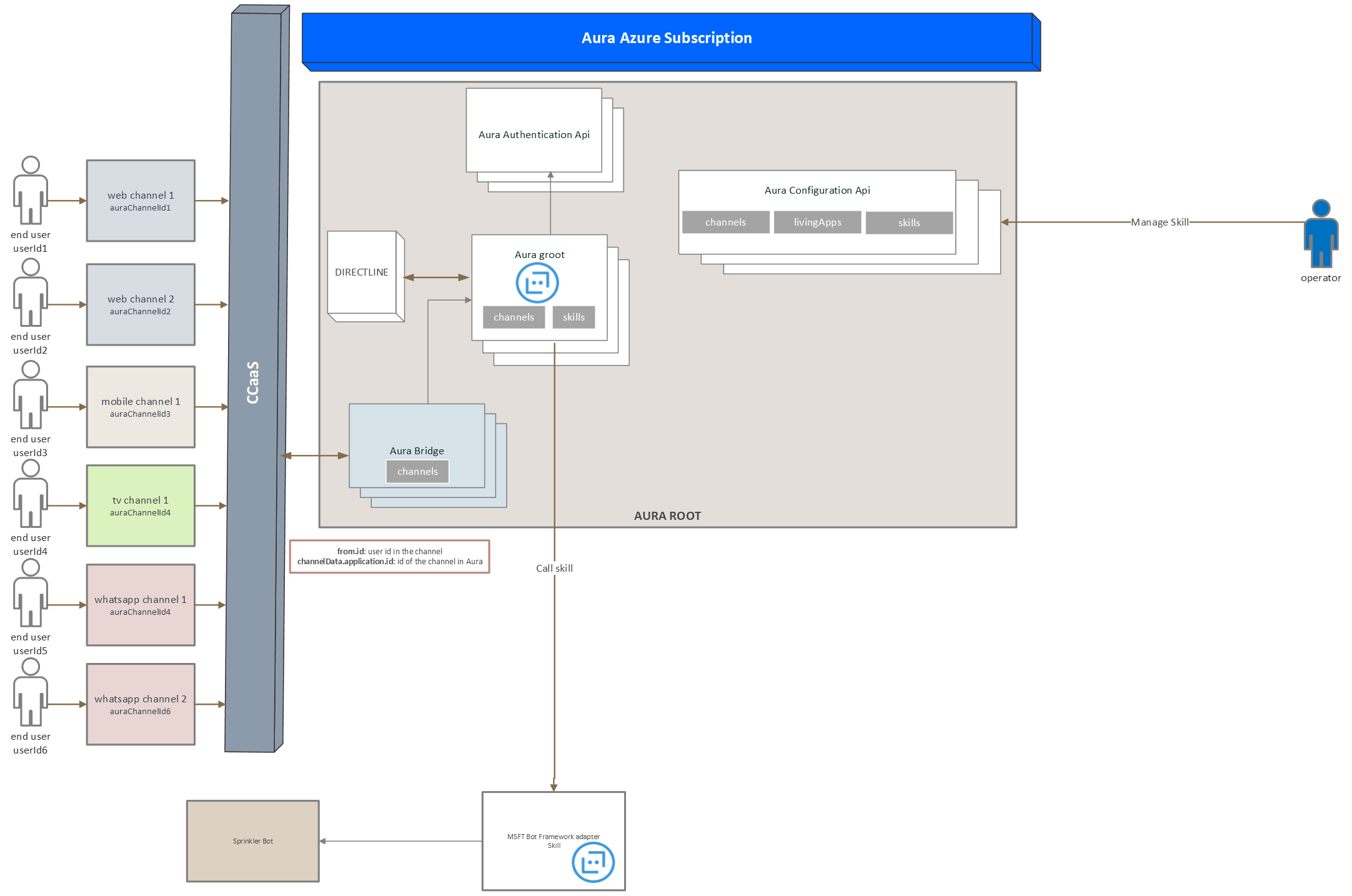
Communication protocol
The following sections describe Auraline communication protocol, that includes three main tasks: handling conversations, sending messages within a conversation and sending answers to the channel. Each of them is managed by an aura-bridge API:
Handling conversations
- If the channel does not count on a valid conversationId/token for the user/channel pair, then a new conversation MUST be created.
- An APIKey will be provided to the channel per environment that will allow access to this endpoint.
Create a conversation
The following snippets provide an example of the start conversation request and response.
It is recommended to count on a dedicated BE service that is in charge of creating conversations, so the semi-permanent APIKey is not included in the user’s apps. The app should only handle the temporary token created for each conversation.
Request
POST https://svc-[ENV].auracognitive.com/aura-services/v1/auraline/conversations
Authorization: APIKEY iaJrC8xpy8qbOF5xnR2vtCX7CZj0LdjAPGfiCpg4Fv0y8qbOF5xPGfiCpg4Fv0y8qqbOF5x8qbOF5xn
Response
HTTP/1.1 201 Created
[other headers]
{
  "conversationId": "X7CZj0LdjAPGfiCpg4Fv",
  "token": "RCurR_XV9ZA.cwA.BKA.iaJrC8xpy8qbOF5xnR2vtCX7CZj0LdjAPGfiCpg4Fv0y8qbOF5xPGfiCpg4Fv0y8qqbOF5x8qbOF5xn",
  "expires_in": 1800,
}
Example
A real example with development environment ap-one is shown below:
Parameters:
- URL to get conversation Id: https://svc-de-dev.auracognitive.com/aura-services/v1/auraline/conversations
- Method: Post
- APIKey: 5498fc14aec4d4f0d1d2db588ce0ef1023630c9bbb299af2af88bc873002b60fdbe9ff9bdc7538dfd5bf5afd94795f7ce38b71793daa8f41447c15c638c1b81550c762ccc6e6c5ab4cabc8d26290943a7dd6a853d776ad8cc301b06ba8c3a62dc23a3e2a5a33ae2616c0bc5a969232e214c1235dd05ffe40c2df85859637faeeef2a71997380a68e61a5cef317dc97148137105214945fbd96b9e56f85a90797e659b35008ed3ed355c741af4c3f015b
curl --location --request POST 'https://svc-de-dev.auracognitive.com/aura-services/v1/auraline/conversations' \
--header 'Authorization: APIKEY 5498fc14aec4d4f0d1d2db588ce0ef1023630c9bbb299af2af88bc873002b60fdbe9ff9bdc7538dfd5bf5afd94795f7ce38b71793daa8f41447c15c638c1b81550c762ccc6e6c5ab4cabc8d26290943a7dd6a853d776ad8cc301b06ba8c3a62dc23a3e2a5a33ae2616c0bc5a969232e214c1235dd05ffe40c2df85859637faeeef2a71997380a68e61a5cef317dc97148137105214945fbd96b9e56f85a90797e659b35008ed3ed355c741af4c3f015b' \
--data ''
Refresh a conversation token
If the channel (CCaaS) counts on a previously requested conversationId/token, it must be refreshed before it expires.
Request
POST https://svc-[ENV].auracognitive.com/aura-services/v1/auraline/conversations/X7CZj0LdjAPGfiCpg4Fv0y8xpy8qbOF5xnR2vtCX7CZj0Ldj/refresh
Authorization: APIKEY RCurR_XV9ZA.cwA.BKA.iaJrC8xpy8qbOF5xnR2vtCX7CZj0LdjAPGfiCpg4Fv0y8qbOF5xPGfiCpg4Fv0y8qqbOF5x8qbOF5xn
Response
HTTP/1.1 200 OK
[other headers]
{
  "conversationId": "X7CZj0LdjAPGfiCpg4Fv",
  "token": "RCurR_XV9ZA.cwA.BKA.y8qbOF5xPGfiCpg4Fv0y8qqbOF5x8qbOF5xniaJrC8xpy8qbOF5xnR2vtCX7CZj0LdjAPGfiCpg4Fv0",
  "expires_in": 1800
}
Example
A real example with development environment ap-one is shown below:
- ConversationId: ddlu65ft
- URL to get conversation Id: https://svc-de-dev.auracognitive.com/aura-services/v1/auraline/conversations/ddlu65ft/refresh/
- Method: Post
- APIKey: 005c4dae31a660fb7435034ded7790b843e139afc8d7512b973d2073b9be16172b69fe8952e1590c282bb7cb6a7fce362db5218b84dc960dec9c2dee8654d45def1c184e7a73988c3db67f62eb656ac2e646cc266942c016e32e048a13ee52ea0980a65f21dc119aff57af07cf5d3cb1320e4c52c5d964cabf0e4fb06ba38667861b5943fd59f6f7525151014776181e04f47033e99e3cd38810fc0d0470881c4aacc7f5b60c3f46a8a65f2c37a4dc00
curl --location --request POST 'https://svc-de-dev.auracognitive.com/aura-services/v1/auraline/conversations/ddlu65ft/refresh' \
--header 'Authorization: APIKEY RCurR_XV9ZA.cwA.BKA.y8qbOF5xPGfiCpg4Fv0y8qqbOF5x8qbOF5xniaJrC8xpy8qbOF5xnR2vtCX7CZj0LdjAPGfiCpg4Fv0' \
--data ''
This example uses a temporary token. You must generate your own conversationId to test it.
Sending messages within a conversation
In order to send an activity to aura-bridge, the client must create an Activity object to define the activity and then issue a POST request to https://svc-de-dev.auracognitive.com/aura-services/v1/auraline/conversations/{conversationId}/activities, specifying the Activity object in the body of the request.
The following snippets provide an example of the Send Activity request and response. This is only an example without full integration with aura-bridge.
Request
POST https://svc-de-dev.auracognitive.com/aura-services/v1/auraline/conversations/X7CZj0LdjAPGfiCpg4Fv/activities
Authorization: APIKEY TOKEN-GENERATED-FOR-CONVERSATION
Content-Type: application/json
[other headers]
{
    "locale": "en-EN",
    "type": "message",
    "from": {
        "id": "user1"
    },
    "text": "hallo",
    "channelData": {
       "version": "3",
       "correlator": "a9db4c4f-3ad5-6331-b34a-8ffb0254aaea3",
       "appContext": {
          "channel": {
             "id": "f69f5766-9386-169d-c386-34463b99a956",
             "modality": "text"
          }
      }
    }
}
Response
When the activity is delivered, the service responds with an HTTP status code that reflects the status code.
If the POST is successful, the response contains a JSON payload that specifies the ID of the Activity that was sent to the bot.
HTTP/1.1 200 OK
[other headers]
{
    "id": "nR2vtCX7"
}
Sending answers to the channel
Activities are returned by Aura to the channel in the callback configured for each channel.
The activityId will be a composition of the incoming activityId and the order of the response, separated by |. This follows Direct Line identifiers approach.
In any case, the order can also be inferred from the array direct order. We just added the pipe and the number to mimic Direct Line ids.
Request
Send messages from Aura to a specific channel.
# https://ccaas-callback-url/auraline/v1/conversations/{conversationId}/activities/{messageId}
POST https://ccaas-callback-url/auraline/v1/conversations/j0LdjAPGfiCpg/activities/nR2vtCX7
Authorization: CALLBACK-TOKEN-PROVIDED-BY-SPRINKLER
{
"activities": [
{
"type": "message",
"channelId": "channelId",
"conversation": {
"id": "j0LdjAPGfiCpg"
},
"id": "nR2vtCX7|0001",
"from": {
"id": "bot1"
},
"text": "hello"
},
{
"type": "message",
"channelId": "channelId",
"conversation": {
"id": "j0LdjAPGfiCpg"
},
"id": "nR2vtCX7|0002",
"from": {
"id": "bot1"
},
"text": "How are you?"
}
]
}
Response
When the activity is posted to the configured callback, the channel or CCaaS callback responds with an HTTP status code that reflects the status of the reception.
If the POST is successful, a 204 OK is expected. In this scenario Aura does not need anything, apart from the status code.
HTTP/1.1 204 OK
[other headers]
Answer status
aura-root needs that the channel or CCaaS informs about the status of the response delivered to the user.
Request
POST https://svc-de-dev.auracognitive.com/aura-services/v1/auraline/conversations/j0LdjAPGfiCpg/activities/nR2vtCX7/status
Authorization: APIKEY TOKEN-GENERATED-FOR-CONVERSATION

[{
    "id": "nR2vtCX7|0001",
    "status": "delivered"
},
{
    "id": "nR2vtCX7|0002",
    "status": "failed",
    "description": "Internal Error"
}]
Where:
status: Possible valuesdeliveredorfailed.description: Optional field intended for describing what happened with all the responses of each incoming message.
Response
HTTP/1.1 204 OK
[other headers]