Categories:
Direct Line communication protocol
Description of useful concepts to understand the Microsoft Direct Line protocol used by channels to communicate with Aura
Introduction
Aura platform is based on Microsoft Azure Bot Service and Bot Framework. Both provide tools to build, test, deploy, and manage intelligent bots all in one place. Through the use of a modular and extensible framework provided by the SDK, tools, templates and AI services, developers can create bots that use speech, understand natural language, handle questions and answers, and more.
One of the key capabilities of the Microsoft Azure Bot Service and Bot Framework is the integration of channels the final users can use to interact with the concrete bot instances implemented using this service and framework. This way, no matter which channel the final users interact with a concrete bot instance, they all are able to establish intelligent conversations with the bot.
Since the aura-groot leans on the Microsoft Azure Bot Service and Bot Framework, channels that use Direct Line communication protocol can “talk” to Aura and integrate with it, becoming Aura custom channels.
Direct Line API
The Microsoft Azure Bot Service exposes a general-purpose mechanism that channel developers can use when implementing or integrating new channels. This general-purpose communication mechanism is called Direct Line API.
The Direct Line API exposes a Web endpoint or URL of a service hosted in the Microsoft Azure cloud that channel developers can use to send messages directly to concrete instances of bot engines hosted in the Microsoft Azure Bot Service. This way, the Direct Line API provides a link between any third-party software component or application, typically used by the final user, and the concrete instance of the bot engine she may be willing to interact with.
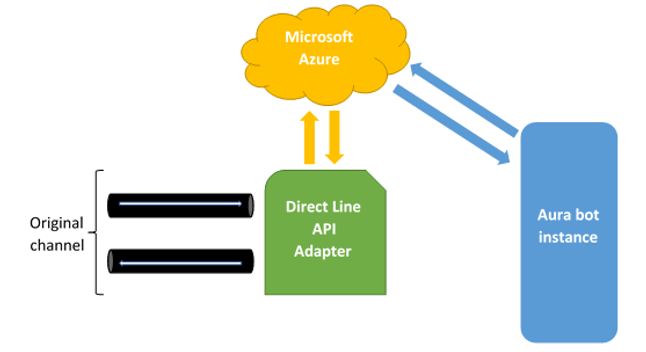
Typically, channels accessing through Direct Line to a bot send their requests calling the POST HTTP method of the /conversations/activities endpoint and, as it is an asynchronous API, read the responses from a WebSocket, which URL is obtained when requesting the token to access de API.
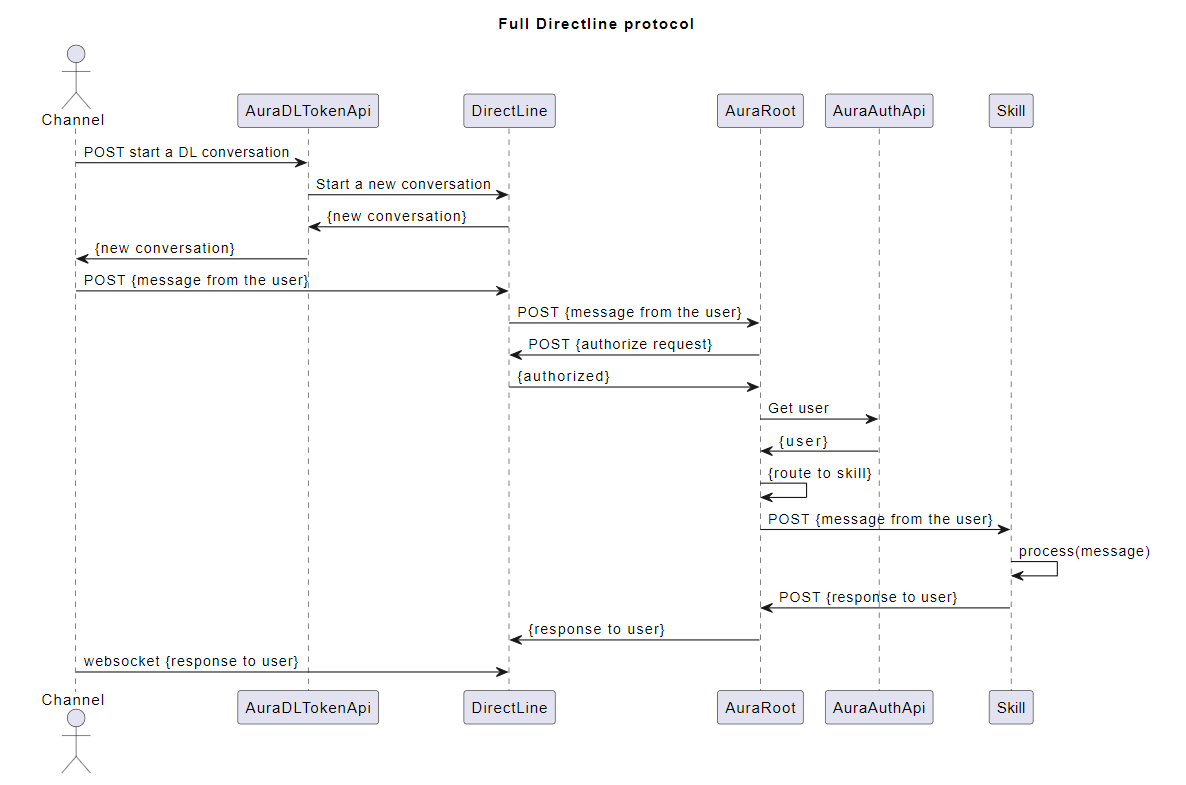
The general-purpose communication means exposed by the Direct Line API constitutes an additional mechanism channel developers and integrators can use to create as well as to integrate new channels Telefónica clients can use to interact with Aura. Thanks to it, any communication means can be integrated as an Aura channel.
The only thing which is needed is the proper transformation of the messages coming in and out of the concrete communication means as HTTP messages sent and received through the Direct Line API endpoint available at the Microsoft Azure cloud. This procedure is depicted in the following figure:
How to obtain a valid Direct Line token for Aura Groot
The objective of this document is to explain how an Aura’s channel might access the API that allows generating a Direct Line token valid for an Aura’s environment.
Channels are required to use tokens to communicate with Direct Line API. Each of those tokens is valid for one conversation (and one user) and until it expires (usually in one hour). If further interaction is required after the expiration, the token must be refreshed (get a new fresh version of the token with a later expiration time, calling directly to Direct Line API) before the previous valid token is expired. More information about token refreshing can be found in Direct Line documentation.
The first Direct Line token for each conversation must be obtained from aura-authentication-api. To use this API, a valid Aura APIkey is required:
- For integration environments, please ask it to Aura Global Operation Team.
- For preproduction and production environments, the OB Operation Team should provide it.
The API definition can be found in section Directline Token in aura-authentication-api. Note that there are two ways to ask for a token, one to get only the token (/token), and another one to get also the stream URL (/token/wss), this is the recommended one as it includes the WebSocket stream URL in the response.
The corresponding Operations Team should also provide the specific domain names where this API is published in each environment.
Request examples
Token only:
curl -X GET \
  https://svc-<env>.auracognitive.com/aura-services/v1/token \
  -H 'Authorization: APIKEY <YOUR-API-KEY>' \
  -H 'correlator: <CORR_UUID>' \
  -H 'cache-control: no-cache'
Token with web socket:
curl -X GET \
  https://svc-<env>.auracognitive.com/aura-services/v1/token/wss \
  -H 'Authorization: APIKEY <YOUR-API-KEY>' \
  -H 'correlator: <CORR_UUID>' \
  -H 'cache-control: no-cache'
Note that correlator header is optional, but it is convenient to send it, to track requests when it is necessary.
Response examples
These responses are returned by Direct Line servers and passed directly to the channel. The value of the field expires_in depends on what is returned by Direct Line, and it could have any numeric value, mainly 1800 or 3600.
The examples contain developed tokens already expired, so they cannot be used in real environments. A request with a valid APIkey must be done in order to get a real valid token.
Token only:
{
  "token": "ew0KICAiYWxnIjogIlJTMjU2IiwNCiAgImtpZCI6ICJodjRaemR0eXI1OXA3R1BSMEsycmhIUmJuUTQiLA0KICAieDV0IjogImh2NFp6ZHR5cjU5cDdHUFIwSzJyaEhSYm5RNCIsDQogICJ0eXAiOiAiSldUIg0KfQ.ew0KICAiYm90IjogIkJPVC1hdXJhLWFwLW5leHQiLA0KICAic2l0ZSI6ICJfLTJWLU9ocVl2NCIsDQogICJjb252IjogIklHUDR1N1VqR3V1SDA2TmZTSWV2dHktZXUiLA0KICAibmJmIjogMTY0OTc0NjA4MSwNCiAgImV4cCI6IDE2NDk3NDk2ODEsDQogICJpc3MiOiAiaHR0cHM6Ly9kaXJlY3RsaW5lLmJvdGZyYW1ld29yay5jb20vIiwNCiAgImF1ZCI6ICJodHRwczovL2RpcmVjdGxpbmUuYm90ZnJhbWV3b3JrLmNvbS8iDQp9.eZKIPviIA5WwtXPh3LEhD5je1bRR3svGom6KjhwKZpjv4HMCDmblspQSJ-Ax3G51jsZyU_NZM1HRvLweyfBC3TixlIPnLLQ2j55-ZUGQobVTVop84H3QRhUE13GwYPVrvgr_tRsqPTLlUMd7O9zpk5mZ_T-esMQXBwB51izTHRLExFAwDc1jIjV-FWJAQt6ROEZIqWJAMQ6WKuCsm1HXaa0NbCASq90cdZJZc_hyDeengrFklcIiXuzcoFYs3SNKBMCiYuHAWgYGWT6aHpWvreCjEo2VdkcJYkpweaBeagFRzftE3tyzDsb_QrNMrxrWuu5OXPi4j0r7avivL3ap-w",
  "expires_in": 3600
}
Token with web socket:
{
  "conversationId": "Da8BzFBhRMbDpcEN8mjqdn-eu",
  "token": "ew0KICAiYWxnIjogIlJTMjU2IiwNCiAgImtpZCI6ICJodjRaemR0eXI1OXA3R1BSMEsycmhIUmJuUTQiLA0KICAieDV0IjogImh2NFp6ZHR5cjU5cDdHUFIwSzJyaEhSYm5RNCIsDQogICJ0eXAiOiAiSldUIg0KfQ.ew0KICAiYm90IjogIkJPVC1hdXJhLWFwLW5leHQiLA0KICAic2l0ZSI6ICI4bVJVUmZyMEVxYyIsDQogICJjb252IjogIkRhOEJ6RkJoUk1iRHBjRU44bWpxZG4tZXUiLA0KICAibmJmIjogMTY0OTc0ODU4OCwNCiAgImV4cCI6IDE2NDk3NTIxODgsDQogICJpc3MiOiAiaHR0cHM6Ly9kaXJlY3RsaW5lLmJvdGZyYW1ld29yay5jb20vIiwNCiAgImF1ZCI6ICJodHRwczovL2RpcmVjdGxpbmUuYm90ZnJhbWV3b3JrLmNvbS8iDQp9.wGpPdShRoHf3M7zlTJO9nHyxD8bWF-3JeM7gd0BtrFLDCVEznO1j9Y2ovzRxmeJL8l4xo7T5tH538jAivexelpDb3VET7UvrhZVTNa19J7oOL-eqGtbspYoKp_2xzVNxm2w2lB5cRZVMfyzlvLptfx_-BD2XeohbYGbl_pnmLe6N-490h1S5bE613t1p4bYD1bPA0IKeGhhaiUUBMcA5mCO84eurYesLECAz3T5mCgLP2Xfq7FCeiFmxO4DiEZujKh5FSKd9Gp076ADHdIxxilvKdTFlXykx_v4-yx0xm8YoyHChyRIF9hEzX4dm6hsWLYsgCiM-t60I32_KSRJWxg",
  "expires_in": 3600,
  "streamUrl": "wss://directline.botframework.com/v3/directline/conversations/Da8BzFBhRMbDpcEN8mjqdn-eu/stream?watermark=-&t=ew0KICAiYWxnIjogIlJTMjU2IiwNCiAgImtpZCI6ICJodjRaemR0eXI1OXA3R1BSMEsycmhIUmJuUTQiLA0KICAieDV0IjogImh2NFp6ZHR5cjU5cDdHUFIwSzJyaEhSYm5RNCIsDQogICJ0eXAiOiAiSldUIg0KfQ.ew0KICAiYm90IjogIkJPVC1hdXJhLWFwLW5leHQiLA0KICAic2l0ZSI6ICI4bVJVUmZyMEVxYyIsDQogICJjb252IjogIkRhOEJ6RkJoUk1iRHBjRU44bWpxZG4tZXUiLA0KICAibmJmIjogMTY0OTc0ODU4OCwNCiAgImV4cCI6IDE2NDk3NDg2NDgsDQogICJpc3MiOiAiaHR0cHM6Ly9kaXJlY3RsaW5lLmJvdGZyYW1ld29yay5jb20vIiwNCiAgImF1ZCI6ICJodHRwczovL2RpcmVjdGxpbmUuYm90ZnJhbWV3b3JrLmNvbS8iDQp9.ctcwxvoyi8EdSee3x3TOogvy8puphmpsn8wouTaPZzFaVFb4YcuE-336e4bg99uCPffHAlVPLBc8xpVjeM4JdDQWncO-TpPFlj7fM_x_YmunlVLS4OsNspnMQ9lUgn6FLBD9GUdJ5GRySOltrDbsoHI0EMaljs2ni6b8ZQ9LKFdY8QyAKRqS9Eto1_MCiPmuseM_KM8VtL2fZMmhzwfhxf7dOHbEtu121Nj8LTxZTNI1f5gpKsEuw6neX1g7MQyrD-ajr0s-hD90g5r79vQvompVzFf3LgoXsMdKLIgz8PkVg6hIJwQFIC4piSHV7--g8k-alJ-XMspNGBCeD3dVfw",
  "referenceGrammarId": "f4d20b6f-6e5c-175e-abdf-e9eb65e5d058"
}
API errors handling
The aim of this endpoint is to allow the channels to obtain a valid token to access Direct Line API without sharing the primary keys of the bot with all of them. So, basically, the endpoint just wraps the requests to Direct Line API, this includes that all the errors returned by Direct Line API are returned to the caller.
| Status Code | Meaning | Recommended action |
|---|---|---|
| 400 | Error in the request. It could be an error in the request of the channel to Aura, or in Aura’s request to Direct Line. | Validate the request being launched. If it seems to be ok, request a validation of the logs in the corresponding Aura environment. |
| 401 | Invalid credentials. It could be an error in the APIKey or in the aura-authentication-api configuration. | Validate if your APIKey is valid. Request a validation of the logs in the corresponding Aura environment. |
| 429 | Too many requests. Direct Line service is having too many requests to get a valid token for this bot. | An exponential backoff system must be implemented to avoid making the situation worse. So, you should wait for 30 seconds before launching a new request. If this gets a 429 again, you should wait for 1 minute, then 2 minutes, etc. Consider that in order to avoid this situation, all the requests of your users must be taken into account all together. |
| 500 | Internal error. | Wait for the server to recover, but request to Aura Operations Team of the environment the resolution of the issue. |
Only the body and the status code of the response of Direct Line are returned to the caller, none of the headers are included.
Using the token: calling Direct Line API
HTTP GET requests made by the channel (to send or receive activities) will be authorized by a token (the first one, or after refresh) through the Authorization header, for instance:
POST https://directline.botframework.com/v3/directline/conversations/<CONV_ID>/activities
Authorization: Bearer <YOUR_TOKEN>
To get activities through a web socket, the channel must use the stream URL obtained in /token/wss. The token is sent in t param, and it will expire after one minute after the token request.
Once connected the web socket, it will get activities for one hour. After that time, a new token (through refreshing) and a new web socket connection are required, setting the fresh token within the t param in stream URL, for instance:
wss://directline.botframework.com/v3/directline/conversations/<CONV_ID>/stream?watermark=-&t=<NEW_TOKEN>"
Note that refresh token must be obtained before current token is expired.
Full communication flow
The flow to get the first token, and optionally refresh it, for conversations longer than one hour, is as follows:
sequenceDiagram

Channel ->> Auth API: Get Wss token (API key)
Auth API ->> Direct Line: Start conversation (app token)
Direct Line ->> Auth API: {conversationId, token, expires_in, streamUrl}
Auth API ->> Channel: {conversationId, token, expires_in, streamUrl}
loop send / receive activities during one hour
  Channel -->> Direct Line: POST /conversation/activities (token)
  Direct Line -->> Channel: [activities]
end

alt refresh token
  Channel ->> Direct Line: Refresh (token)
  Direct Line ->> Channel: new_token
  loop send / receive activities during one hour
    Channel -->> Direct Line: POST /conversation/activities (new_token)
    Direct Line -->> Channel: [activities]
  end
else
  Channel -->> Direct Line: POST /conversation/activities (token)
  Direct Line -->> Channel: Token expired (403)
end
Note that the sending of activities from Direct Line to the channel may be through a web socket (if opened) or HTTP GET request from channel.