Categories:
Building Aura response in WhatsApp channel
Building Aura response for a use case in the WhatsApp channel has certain particularities due to the limitations of WhatsApp channels
Introduction
When developing a use case, you should follow the general guidelines for building Aura response, which are common for all channels.
However, for WhatsApp channel, certain specific steps must be carried out regarding POEditor resources, rendering limitation of WhatsApp channels and the configuration of the Markdown type to be used in the response.
Specific POEditor resources for WhatsApp channel
Take into account that the WhatsApp channel requires specific POEditor resources corresponding to aura-bridge errors and to the onboarding, authentication and handover dialogs.
Therefore, you should edit the texts corresponding to these resources.
Resources for Aura bridge errors
The locales corresponding to aura-bridge errors can be checked here, with an example text for Spain: https://github.com/Telefonica/aura-bridge/blob/master/locale/es-es.json
There are specific resources for WhatsApp (WA) or general resources for all channels.
Resources for WhatsApp dialogs
Likewise, aura-bot has specific resources for the onboarding, authentication and handover dialogs.
At this stage, you should edit the texts associated to these resources, which are included in their corresponding documents:
| WhatsApp dialog | POEditor resources documentation |
|---|---|
| onboarding-whatsapp-dialog | Onboarding in WhatsApp |
| whatsapp-otp-login-dialog | SMS-OTP authentication in WhatsApp |
| handover-dialog | Handover in WhatsApp |
Resources for buttons and lists
Find specific resources for WhatsApp interactive messages (buttons and links) in Use of interactive messages in WhatsApp graphical interface.
Rendering in WhatsApp channels
WhatsApp is configured in Aura as "output_message_format": "simple".
That means that aura-bot can only return text or Hero Cards components.
Aura and WhatsApp speak different languages, so they cannot communicate directly and the bridge acts as a translator between them. Therefore, at this stage, it is required to render all the components to be included in Aura response taking into account the limitations and constraints for this channel.
Rendering Aura response components
For every component of Aura response, check the document Rendering Aura response components in WhatsApp to know how aura-bridge converts them to be shown in WhatsApp and the limitations and constraints for this channel.
Configuration of Markdown type in the response
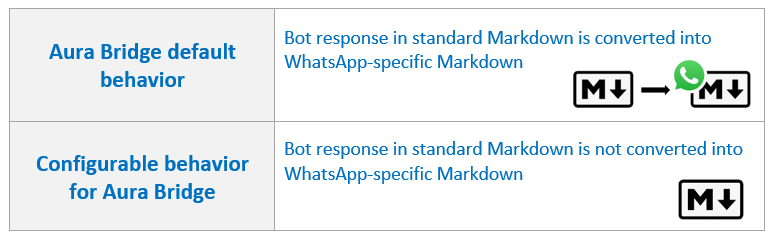
By default, use cases in WhatsApp build the response using WhatsApp-specific markdown as aura-bridge converts the standard Markdown (Direct Line messages) into WhatsApp markdown when a use case sends an answer containing this language.
However, OBs can decide if the conversion should or should not take place, so aura-bridge would/would not make the conversion before sending the message to the channel.
This modification in the Markdown format is available for WhatsApp-type channels (currently, WhatsApp) and can be done at two levels: a. Channel level b. Use case dialog level
The succeeding sections show the specific processes for this configuration.
Modifications of Markdown format at channel level
The default configuration of aura-bridge, that converts the standard Markdown (text received from Direct Line message) into WA-specific Markdown, can be modified at channel level, so the response to the user will be provided in WhatsApp Markdown format for a specific channel.
For this purpose, constructors must use the whatsapp field in the channels’ configuration file.
The interface is as follows:
export interface WhatsAppModel {
    ...
    /**
     * Indicates whether the texts of each of the messages received must be converted to the WhatsApp markdown format.
     * Default: true
     */
    textConvert?: boolean;
}
It is possible to disable text conversion to WhatsApp markdown format setting the value of the whatsapp.textConvert to false (by default, it is true):
{
    "name": "whatsapp",
    ...
    "whatsapp": {
        "textConvert": false        // Do not convert
    },
}
⚠️ Be aware of the behavior:
-
In this case, the dialog will follow the channel’s behavior.
-
However, if the dialog is also configured not to do the conversion (see next section), then this configuration will take precedence over the channel configuration.
Modification of Markdown format at dialog level
The default configuration of aura-bridge, that converts the standard Markdown Markdown (text received from Direct Line message) into WA-specific Markdown, can be modified at use case (dialog) level, so the response to the user will be provided in WhatsApp Markdown format for a specific use case.
For this purpose, constructors may change the activity using the payload model > textConvert field.
The interface is as follows:
export interface Whatsapp {
    ...

    /**
     * Indicates whether the texts of each of the messages received must be converted to the WhatsApp markdown format.
     * Default: true
     */
    textConvert?: boolean;
}
To avoid the text conversion to WhatsApp markdown format, constructors can set the value of the textConvert field to false (by default, it is true):
{
    type: 'message',
    ...
    channelData: {
        payload: {
            bridge: {
                whatsapp: {
                    textConvert: false      // Do not convert
                }
            }
        }
    }
}
⚠️ Remember that the dialog configuration will take precedence over the channel configuration.