Categories:
Use of catalogs in WhatsApp use cases
Guidelines for the configuration of a use case to send a catalog to the user in the response
Introduction
Aura integrates in the WhatsApp channel the capability of managing catalogs for businesses to share their products and services with customers. There are some types of messages that can be handled and sent by the dialogs.
How to configure a use case to send a catalog to the user
Catalog registration
Catalogs must be created in your WhatsApp business account after sending or receiving catalog messages in your bot.
Sending catalog messages to user
With the catalog already created, you could start to send catalog messages to the user. There are many catalog messages that could be sent to the user:
Catalog link messages
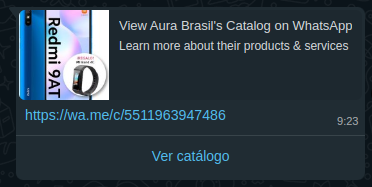
To send this type of message, only a WhatsApp link with the phone number associated to the catalog should be sent.
const activity = {
    type: 'message',
    text = `https://wa.me/c/${channelPhoneNumber}`,
    inputHint: InputHints.AcceptingInput
} as Activity;

await stepContext.context.sendActivity(activity);
Single product messages
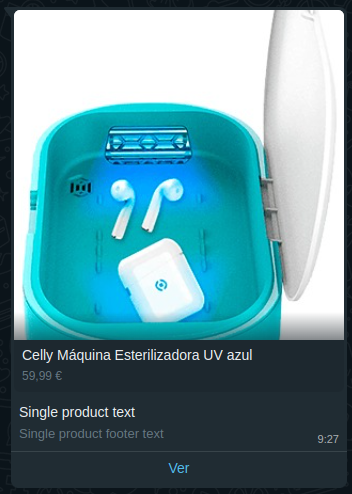
To send a message about one single product, the message with
WhatsApp format
should be added to the activity attachment with the attachment type application/vnd.telefonica.aura.whatsapp. This type
of attachment will be sent without changes to WhatsApp (except the to field).
const activity = {
    type: 'message',
    attachments: [{
        contentType: 'application/vnd.telefonica.aura.whatsapp',
        content: {
            "type":"interactive",
            "interactive":{
                "type":"product",
                "body":{
                    "text":"Single product text"
                },
                "footer":{
                    "text":"Single product footer text"
                },
                "action":{
                    "catalog_id":"418897730552898",
                    "product_retailer_id":"crucero"
                }
            }
        }
    }],
    inputHint: InputHints.AcceptingInput
} as Activity;

await stepContext.context.sendActivity(activity);
Multi product messages
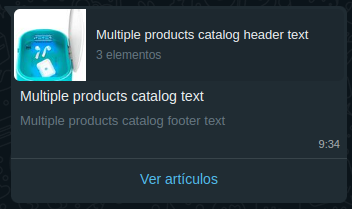
To send a message with a list of products, the message with
WhatsApp format
should be added to the activity attachment with the attachment type application/vnd.telefonica.aura.whatsapp, as for the single product message.
const activity = {
    type: 'message',
    attachments: [{
        contentType: 'application/vnd.telefonica.aura.whatsapp',
        content: {
            "type": "interactive",
            "interactive": {
                "type": "product_list",
                "header": {
                    "type": "text",
                    "text": "Multiple products catalog header text"
                },
                "body": {
                    "text": "Multiple products catalog text"
                },
                "footer": {
                    "text": "Multiple products catalog footer text"
                },
                "action": {
                    "catalog_id": "418897730552898",
                    "sections": [
                        {
                            "title": "Section title",
                            "product_items": [
                                {
                                    "product_retailer_id": "1q98dyindy"
                                },
                                {
                                    "product_retailer_id": "5o2h1wjjs0"
                                },
                                {
                                    "product_retailer_id": "crucero"
                                }
                            ]
                        }
                    ]
                }
            }
        }],
    inputHint: InputHints.AcceptingInput
} as Activity;

await stepContext.context.sendActivity(activity);
Receiving catalog messages from user
Some WhatsApp catalog messages fields will be sent raw to the bot inside an attachment according to the type of catalog message received.
To set the dialog that will receive each of these attachments, some settings should be added to the channel configuration, inside the requestOptions field. Find all the information in the attachment-recognizer-middleware documentation.
Receiving catalog order messages
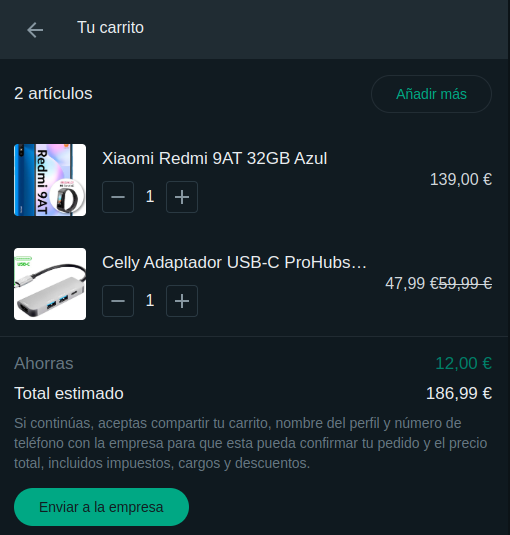
After setting the configuration for the middleware, you will receive an activity to your dialog with an attachment with the content
of the order field in the WhatsApp message.
Here is an example of what you will find inside stepContext.context.activity.attachments:
[
    {
        "contentType":"application/vnd.telefonica.aura.whatsapp.order",
        "content":{
            "catalog_id":"249320104001681",
            "product_items":[
                {
                    "currency":"EUR",
                    "item_price":139,
                    "product_retailer_id":"1106-591-137",
                    "quantity":1
                },
                {
                    "currency":"EUR",
                    "item_price":47.99,
                    "product_retailer_id":"1050-409-169",
                    "quantity":1
                }
            ]
        }
    }
]
Receiving catalog product related messages
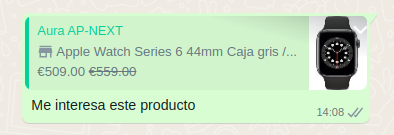
The same as for the catalog messages, you will receive the content of the context field in
WhatsApp message inside the attachment.
Here is an example of what you will find inside stepContext.context.activity.attachments:
[
    {
        "contentType":"application/vnd.telefonica.aura.whatsapp.context",
        "content":{
            "referred_product":{
                "catalog_id":"249320104001681",
                "product_retailer_id":"1106-591-137"
            }
        }
    }
]