Categories:
Aura KPIs uploader
Aura KPIs uploader is the component in charge of the management of Aura entities and KPIs dimensions
Introduction
aura-kpis-uploader is the component responsible for handling entities and KPIs dimensions in Aura.
Currently, it manages both CSV entities and AVRO ones, that coexist in Aura.
aura-kpis-uploader-cli is an executable script that uploads KPIs in the storage location indicated in the destination config. It is a cron-job deployed in Aura’s cluster that is executed every hour (although it is configurable in the range from 1h to 24h). It is developed with Node 14.
Detailed information regarding aura-kpis-uploader-cli is found in the following documents:
. Architecture and main components
. How does Aura KPIs uploader work?
. How to use Aura KPIs uploader?
. Environment variables
. KPIs dimensions and Aura entities processing
. Troubleshooting
Aura KPIs uploader architecture
In the following diagram the architecture of aura-kpis-uploader-cli is represented, including its main components, which are described in the following sections.

Aura KPIs uploader components
ConfigurationManager
ConfigurationManager is a handler for configuration, obtained through a channel configuration or environment variables.
Main process
Main process is referred to the process that a cron-job executes in Aura’s cluster.
KPI Upload
It contains the logic to perform the upload of KPIs dimensions and Aura entities in parallel mode to Kernel Azure Storage Account.
This process is in charge of converting Aura entity files to Avro format, so that they can be imported in Kernel DataLake and be consumed by third-party teams, such as Network Tokenization or BI of each OB. Aura DataSet Importer can only handle blobs of type Block Blob.
KPIs Processes
The processes are defined in a configuration file configured in AURA_SOURCE_PATH_AVRO_ADAPTERS and they are classified into:
-
KPIs Dimensions AVRO
Currently, KPIs dimensions are generated in Avro format
Storage File Manager
This module is used to download and upload files from and to Azure Storage.
Aura KPIs uploader operation
The execution flowchart of aura-kpis-uploader-cli is shown in the following image:
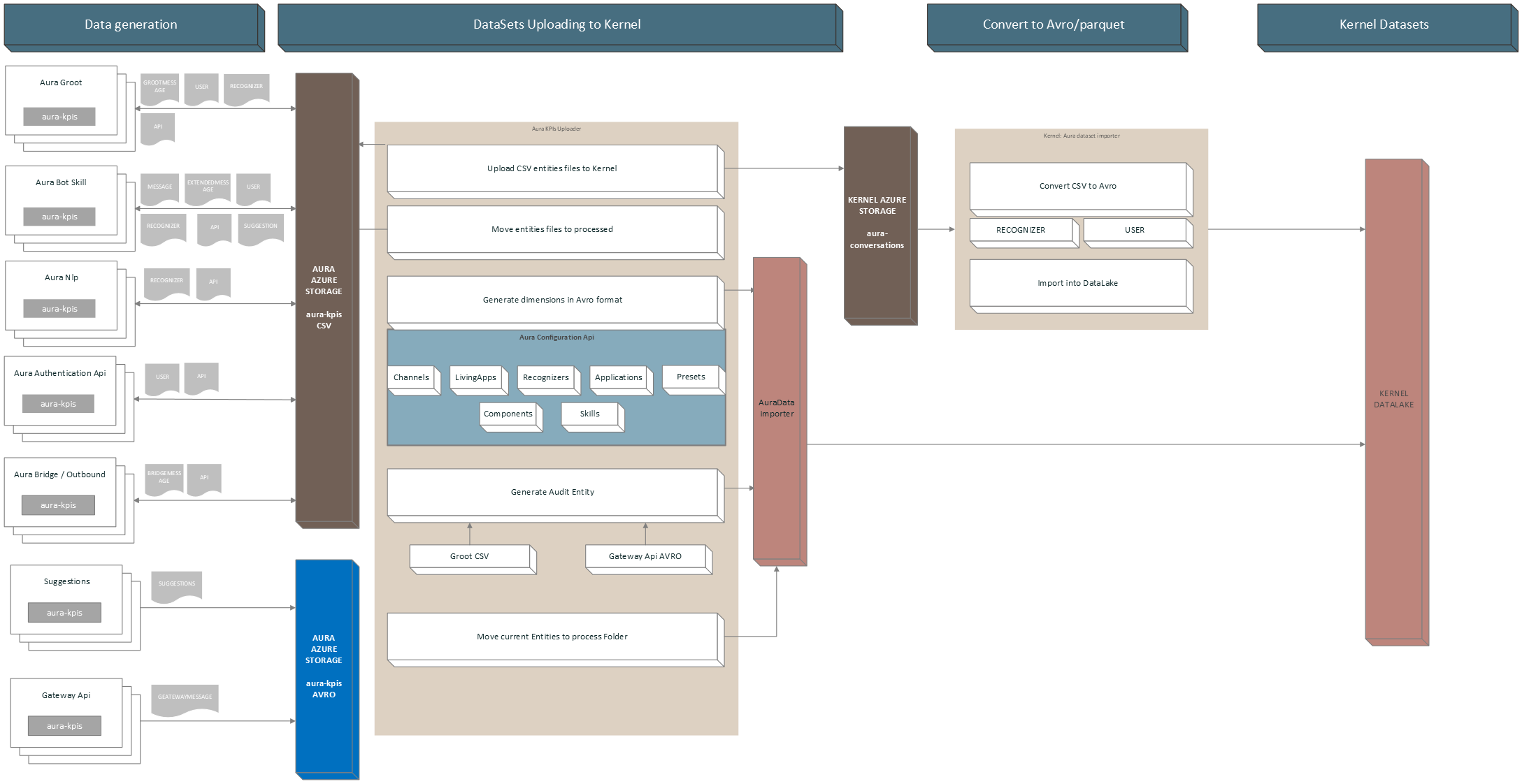
aura-kpis-uploader-cli is responsible for copying the CSV files in Aura KPIs container (environment variables: AURA_MICROSOFT_AZURE_STORAGE_COMMON_ACCOUNT) to the correspondent container in Kernel Azure Storage (environment variable: AURA_KPI_UPLOADER_MICROSOFT_AZURE_STORAGE_CONTAINER_DESTINATION).
Once the files are copied, the local copy is moved to a folder inside the container (environment variables: AURA_MICROSOFT_AZURE_STORAGE_COMMON_ACCOUNT/AURA_KPI_UPLOADER_PROCESSED_FOLDER) and kept there during a fixed time, for recovering purposes.
The configured time by default is 7 days and is set in installer aurak8s in the template lifecycle.json.j2:
    {
      "name": "retention-kpis-processed-policy",
      "enabled": true,
      "type": "Lifecycle",
      "definition": {
        "filters": {
          "blobTypes": [ "blockBlob" ],
          "prefixMatch": [ "{{ kpi_blob_container_name_processed }}" ]
        },
        "actions": {
          "baseBlob": {
            "delete": { "daysAfterModificationGreaterThan": {{ backup_retention_time | default(7) }} }
          }
        }
      }
    }
Independently of when it runs, aura-kpis-uploader-cli always performs the same process:
- It gets all the files in KPIs container (environment variable:
AURA_MICROSOFT_AZURE_STORAGE_COMMON_ACCOUNT). - Firstly, it verifies the number of files to process in order not to overload the memory. This is given by the environment variable
AURA_KPI_NUM_MAX_FILES_FOR_EXECUTION. If the number of files exceeds this number, it will adapt the dates until it gets a range that fulfills the condition. The initial date is determined byAURA_DAYS_INTERVALand the final date is calculated by subtracting the hours indicated inAURA_KPI_HOURS_TO_SUBTRACT_TO_GET_NUM_MAX_FILES. - When the number of files condition is fulfilled, all the aura-kpis-uploader processes will use that date range, except for the generation of the
AUDITfile, since this file is generated at run time and must be moved to the entities folder if everything has proceeded successfully, with the current date.
It can also be launched manually to process old files that have not been processed in the regular execution, due to lack of communication with Kernel or any other error.
Furthermore, aura-kpis-uploader-cli generates for dimensions of entity type files: Channels, Skills, Presets, Applications, Components and Recognizers. You can see more information in KPIs dimensions.