Categories:
Aura Bot routing manager
Description of Aura Bot routing manager, in charge of returning a dialog routing configuration
Introduction
The routing manager is an aura-bot module independent from the bot builder framework. It has the only goal to return a dialog routing configuration, where the main part has to be the address of the dialog matching the incoming recognizer object.
The recognizer object (incoming routing request) and the trigger conditions (configuration of an address) models are co-dependent.
- Recognition object example:
{
    "intents": {
        "intent.*": {
            "score": 1
        }
    },
    "entities": [
        {
            "entity": "*",
            "score": 1
        }
    ]
}
- Trigger condition example:
[
    {
      "intent": "intent.trigger",
    }
]
Trigger condition and Dialog registration
Dialogs and trigger dependence
The trigger condition and the registered dialog are also co-dependant. We can define several trigger conditions per dialog to be registered. Once the dialog to register is ready, we can start binding all the trigger conditions related to the dialog.
Resulting map of the binding process
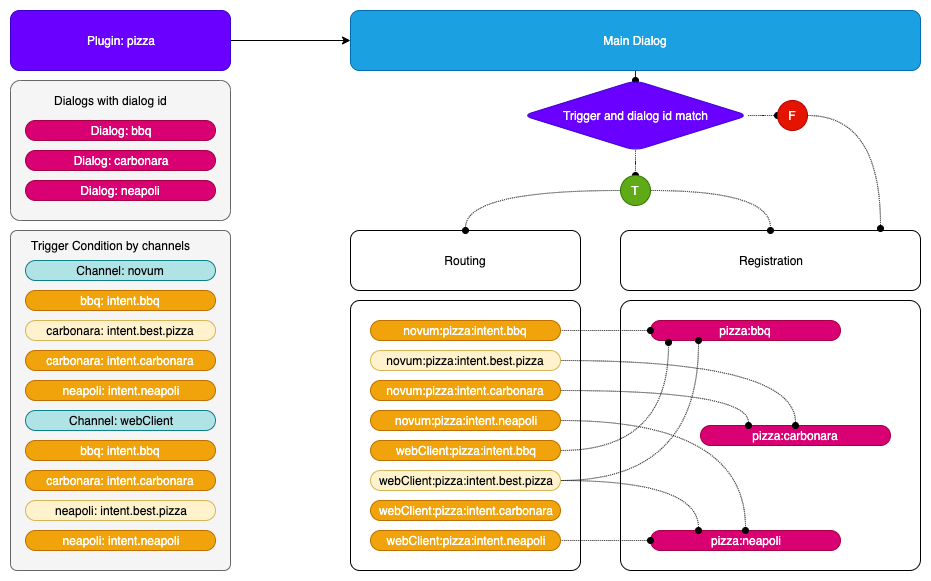
The incoming request is bound to a channel and a recognizer intent field and the resulting address to the library (or plugin) and the id provided by the dialog configuration.
Registering a dialog
-
If a dialog is inserted as a plugin:
- It has to be accessible by a trigger condition if it is located at the plugin configuration.
- It has to be accessible by a trigger condition if it has the property
triggerConditionin the dialog class, accessible across all channels. - It has to be accessible by calling it directly with its
idif it has anautoRegisterproperty set totrue, no routing will be involved.
-
Register the dialog with the library and dialog
id, forming the address.- Combination of library and dialog
id:library:dialogId - The extra control of the library is because we do not have control over the dialog naming, so we can be sure that each library can implement the name we want and the system will have an unique address.
- Combination of library and dialog
-
Bind all the trigger conditions with the resulting address.
- The trigger conditions will be implemented for this address also by channel.
- The model forming the address accessor will be:
channel:intent - The incoming recognizer result will have to match this model.
Internal intent
When we have an internal intent, it has to be accessible across all the channel. We have to register the trigger condition with no channel distinction.
Trigger condition:
// channel id = telefonica
"triggerConditions":[
    {
        "intent": "intent.internal.wifi"
    }
],
id: "dialogId"
Address map:
// the channel of the incoming petition will be ignored
{"intent.wifi": "libraryId:dialogId"}
Flow examples:
-
Registration
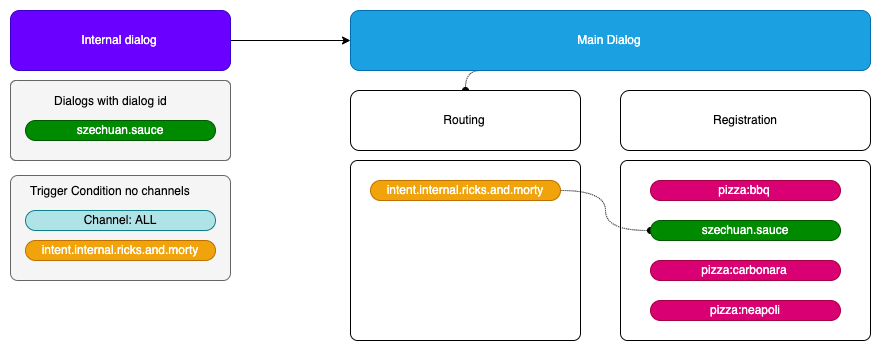
-
Routing
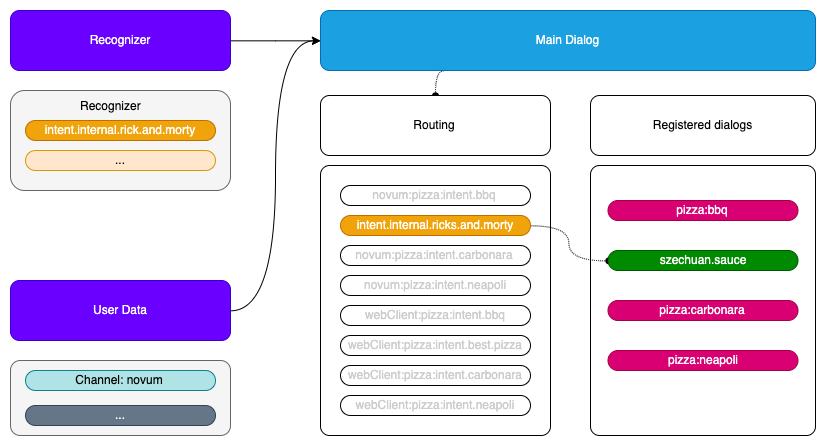
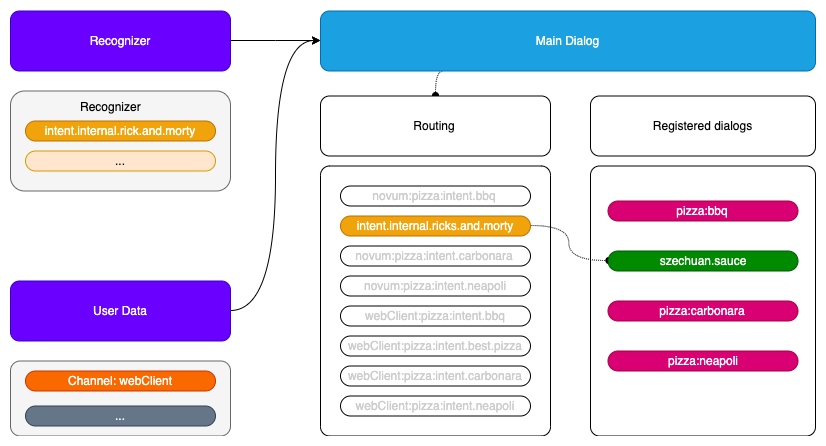
Class usage
Register a dialog with trigger conditions:
export interface RouteDialogConfiguration {
    suggestions?: boolean;
    triggers: TriggerCondition[];
    channelDataVersion?: string;
}

/**
* @deprecated This interface should not be used in favor of using RouteConfigurationElementMap interface,
* which improves the efficiency of getting route configuration.
 */
export interface RouteConfiguration {
    [library: string]: RouteConfigurationElement
}

/**
 * Route configuration value of map using to return route Configurations.
 */
export interface RouteConfigurationElement {
    channel: string;
    dialogs: {
        [dialog: string]: RouteDialogConfiguration
    }
}

const router = new RoutingMap();

// public addRoute(
//    routeDialogConfiguration: RouteDialogConfiguration,
//    dialogId: string,
//    channel?: string
// ): any {
router.addRoute(
    {showSuggestion: true, triggers: [{intent: intent.pizza}, {intent: intent.best.pizza}},
    'pizzaCompany:bestPizza',
    'novum')
    );
Obtain a route from a recognition:
//    public getRoute(
//        recognizerResult: { intent: string, entities?: Entity[] },
//        channel?: string
//    ): { id: string, showSuggestions: boolean }
const dialogConfig: {id: 'string', showSuggestion: boolean} = router.getRoute({intent: 'pizza'}, 'novum');
contextFilters
contextFilters are applied in the routing phase.
Context filter conditions will be checked using spleen library. These conditions can be as simple as 1 eq 1 (a context filter with this condition will be always executed) or can be more complex such as /authData/subscriptionType neq 'postpaid'
(that will be executed when the subscription type of the user be different than postpaid). In this case, we only can check properties of AuraUserBaseModel.
More examples of context filters are included below:
- If the user is anonymous, redirect it to intent
intent.account.linking
{
  "name": "Anonymous redirect to linking",
  "type": "type",
  "conditions": "/type eq 'anonymous'",
    "true": {
      "name": "Anonymous redirect to linking",
      "breakDialogExecution": true,
      "breakFilterEval": true,
      "redirectToIntent": "intent.account.linking",
      "suggestions": false
    }
}
- If the user is
multimsisdn, send him a message
{
  "name": "user_type_multimsisdn_not_allowed",
  "type": "user_type_filter",
  "conditions": "/type eq 'multimsisdn'",
  "true": {
    "name": "user_type_not_allowed_action_true",
    "breakDialogExecution": true,
    "breakFilterEval": true,
    "resource": "context-filter:multimsisdn-users-intent-not-allowed.text",
    "suggestions": false
  }
}
- If the user’s subscription type is
postpaid, send him a message. In this example, we are checkinguser.authData.subscriptionType, because our user type isAuraUserBaseModel<FourthPlatformAuth>, souser.authDatatype isFourthPlatformAuth
{
  "name": "user_type_postpaid_not_allowed",
  "type": "user_type_filter",
  "conditions": "/authData/subscriptionType eq 'postpaid'",
  "true": {
    "name": "user_type_postpaid_not_allowed_action_true",
    "breakDialogExecution": true,
    "breakFilterEval": true,
    "resource": "bill:bill.balance.postpaid",
    "suggestions": true
  }
}