This is the multi-page printable view of this section.
Click here to print.
Return to the regular view of this page.
Manage skills
Manage skills
The following guidelines include the detailed processes required for working with skills in Aura new distributed architecture (Phase 1)
ℹ️ Before facing these documents, The Aura Platform Team highly recommends reading the basic information regarding Aura distributed architecture to have a clear overview of the functional architecture, its benefits and foundations
Introduction
Aura new architecture is conceived as a multi-bot system, based on Microsoft skills architecture, that works with an orchestrator at the top (Aura Root). Currently, skills are independent domain bots able to manage specific experiences (use cases) of the same type.
In this framework, constructors can develop and integrate into Aura different type of skills, as independent modules:
- Skills developed over Aura cluster (Microsoft Bot Framework Direct Line protocol).
- Skills developed outside Aura cluster with a technology compatible with Microsoft Bot Framework (Composer, etc.).
- Third-party bots, developed with other technologies available on the market. These skills will require an adapter for its communication with Aura Root.
In the phase 1 of the architecture implementation, these are the main tasks that must be executed by constructors in order to make the most of Aura:
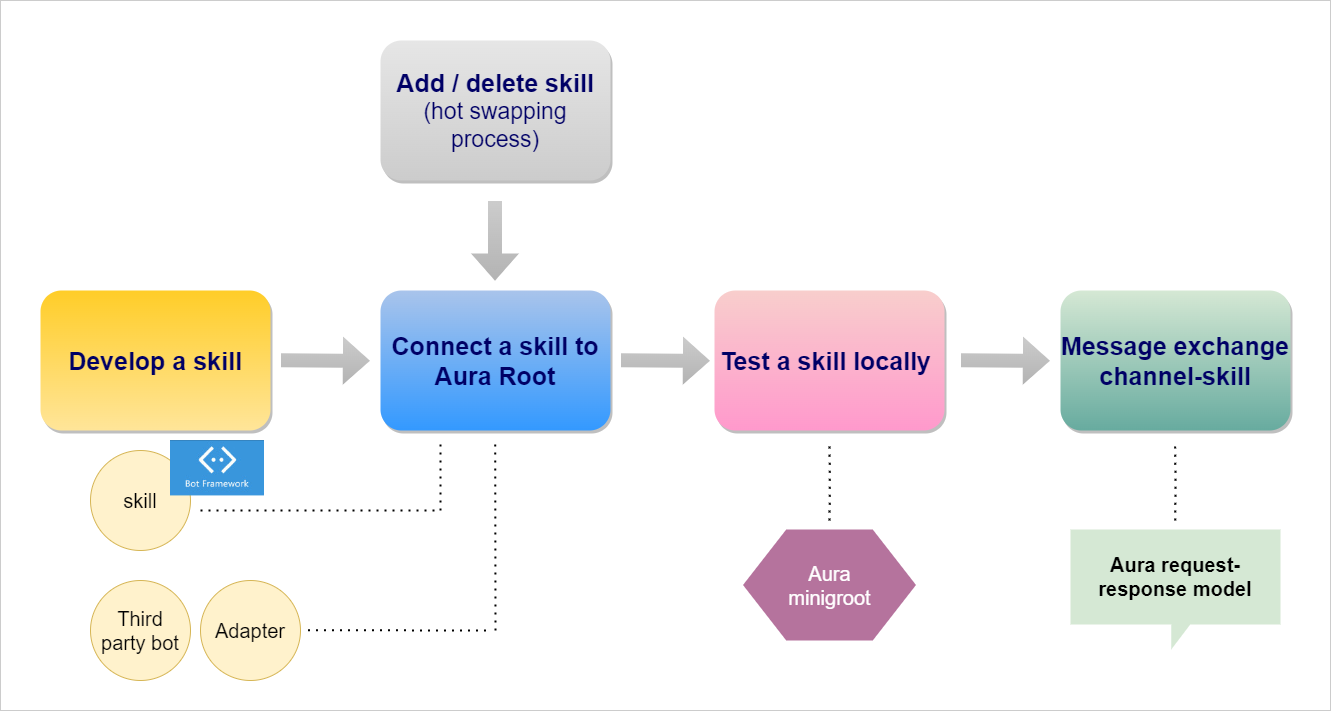
1 - Develop a skill
Guidelines for skills development
Description of processes and tools for the development of skills to be subsequently connected to Aura
Introduction
The process for the development of a skill that will be subsequently connected to Aura is different, depending on the type of skill.
In Phase 1, OBs are able to develop skills outside Aura cluster:
-
Using a technology compatible with Microsoft Bot Framework (Direct Line protocol), for example, with Microsoft composer.
-
Third-party bots, defined as bots that are not part of the Microsoft ecosystem.
The development of external bots with different technologies for their subsequent integration into Aura includes two main stages that must be carried out by constructors:
- The bot development itself, with the preferred technology (Google Assistant, Teneo, etc).
- The development of a third-party adapter, required for the bot to communicate with Aura Root. This adapter must be able to convert requests to be sent to the external bot, and the other way around with answers.
In this framework, there is an available tool that eases the development and subsequent testing of the skill: aura minigroot. The already existing aura minibot works now jointly with aura minigroot.
2 - Connect a skill to Aura Root
Guidelines for the connection of a skill to Aura Root
Detailed process for the connection of a skill to Aura Root
Introduction
The process for the connection of a skill to Aura Root is common for the three types of skills defined before.
⚠️ It is only important to take into account that, for third-party bots, constructors must previously develop a third-party adapter to communicate the bot with Aura Root (that is, to make it compatible with Microsoft Bot Framework protocol).
After doing that, the connection of the bot with Aura Root follows the same common steps as for other types of skills.
Prerequisites
The following previous tasks are required for the further connection of a skill with Aura Root:
- We have a skill already developed and published
- There is a channel routed by Aura Root to this skill
1. Register a skill in Aura
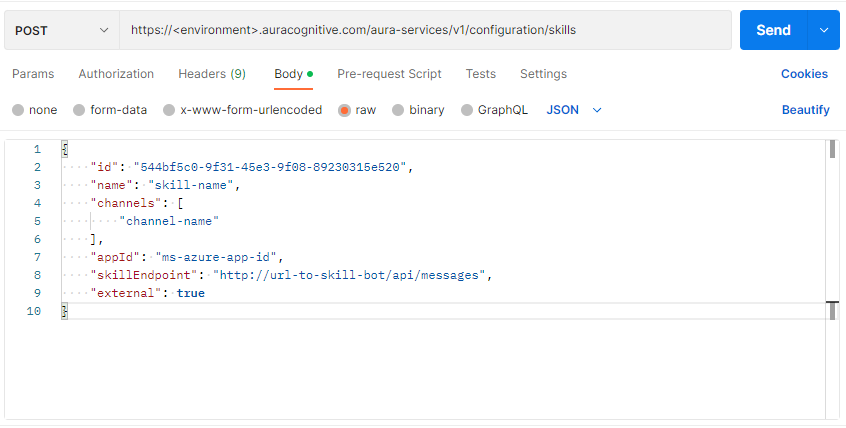
In order to activate a skill in Aura, make a POST request to the skills module of aura-configuration-api through the corresponding swagger.
https://<environment>.auracognitive.com/aura-services/v2/configuration/skills
The fields in the request are shown below:
id: Unique identifier of the skill. It can be generated with UUID Generator Tool by OB operator.name: name of the skill by OB operator.channels: array of strings including the name of the channel(s) associated with the skill.appId: Microsoft appIdskillEndpoint: endpoint where the skill is publishedexternal: Boolean value indicating if the skill is deployed in the same environment as aura-groot or not.
- If
true, the skill is deployed in a different environment.
- If
false or this parameter is not existing, then the skill is deployed in the same environment.
ℹ️ NOTE: Both the id and the name of the skill must be assigned by the OB operator, and they must ensure that they are unique in order to avoid collisions.
Check the following example of a request body:
{
    "id": "544bf5c0-9f31-45e3-9f08-89230315e520",
    "name": "skill-name",
    "channels": [
        "channel-name"
    ],
    "appId": "ms-azure-app-id",
    "skillEndpoint": "http://url-to-skill-bot/api/messages",
    "external": true //Only present if the skill is not in the same environment of Aura Groot
}
2. Make changes available in Aura Groot
In order to update Aura Groot configuration with the modifications carried out, at this stage it is required to restart this component.
Depending on the enviroment, there are two possible scenarios.
2.1. Connect to skill in a local environment
In these cases, it only will be neccessary to restart aura-groot component in local enviroment to connect to new skill. The instance can be started using the following command for running aura-groot in local environment:
npm start
2.2. Connect to skill in a production environment
In Aura production environments, it will not be necessary to restart the component to update the skills configuration. This connection is done automatically through the config-watcher.
The config-watcher runs periodically (every 5 minutes) and, when it detects that the configuration has been modified in aura-configuration-api, it will automatically restart the pods.
Alternative: Use the /refresh endpoint
⚠️ Use this manual process only if you cannot wait for the automatic execution of the config-watcher
In order to connect the skill in production environment in a manual way (only in the above-mentioned scenario), the /refresh endpoint of aura-groot allows the update of the new configuration without restarting the component.
Two different scenarios can arise here:
Update all configuration parameters
Make a port-forward to both aura-groot pods (one request per pod)
kubectl port-forward aura-groot-#### -n <namespace> 8080:8080
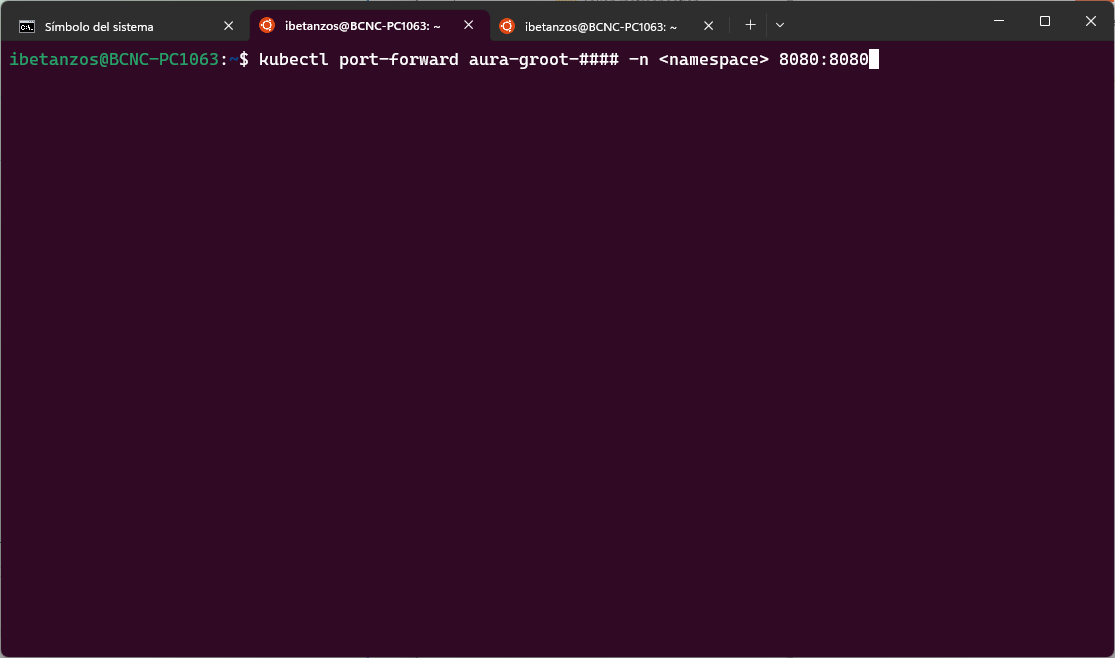
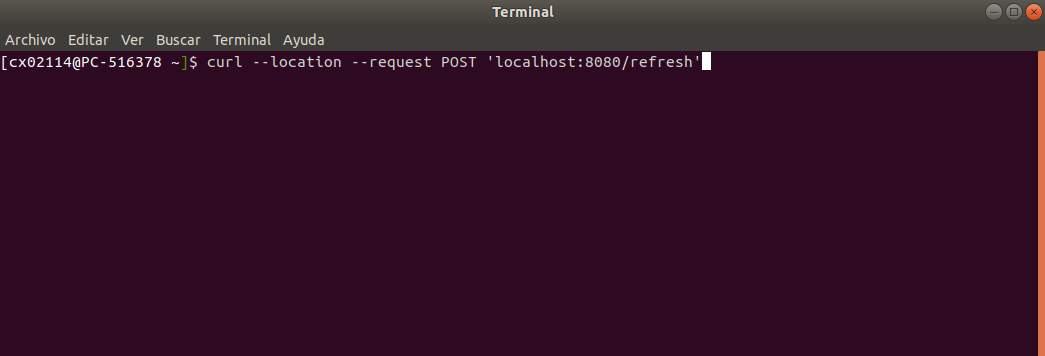
The request to the endpoint with post-forward is shown below:
curl --location --request POST 'localhost:8080/refresh'
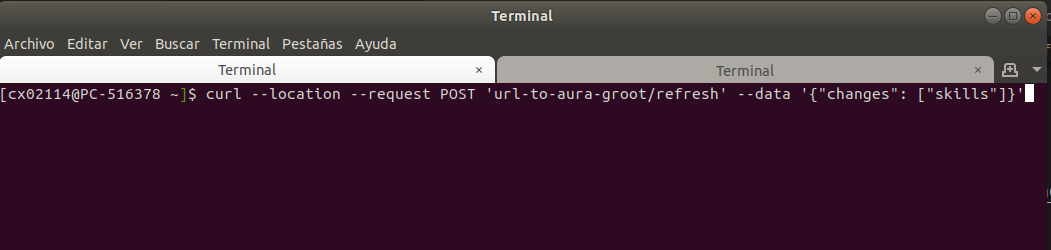
If we only want to update skills and/or channels information, send the parameters in the message body:
    curl --location --request POST 'localhost:8080/refresh' \
    --header 'Content-Type: application/json' \
    --data-raw '{
        "changes": ["skills", "channels"] // use "skills" and/or "channels" or neither of them
    }'
3 - Connect a skill to Aura Minigroot
Guidelines for the connection of a skill to Aura Minigroot
Detailed process for the connection of a skill to Aura Minigroot
Introduction
After the development of a skill, it can be tested easily using a tool created by Aura Global Team: Aura Minigroot.
⚠️ Aura Minigroot works together with the already existing Aura minibot, in fact constituting a unique tool. Both will be provided as docker images and must be installed jointly.
The following sections show the detailed guidelines for the connection of a skill to Aura Minigroot.
Prerequisites
The following previous tasks are required for the further connection of a skill with Aura Minigroot:
- There is a skill already developed and running (in this example the skill will be running in localhost)
- Aura minibot is already configured and running. You can follow the steps in Aura Minibot user guide.
To allow aura-groot to redirect activities to a new skill, configure it in:
/mock-configuration/mocks/mock-files/skills-configuration-mock.json.
In this example, we are going to redirect the channel novum-mytelco (you can use a new channel if you want, but you will have to add it to channels-configuration-mock.json):
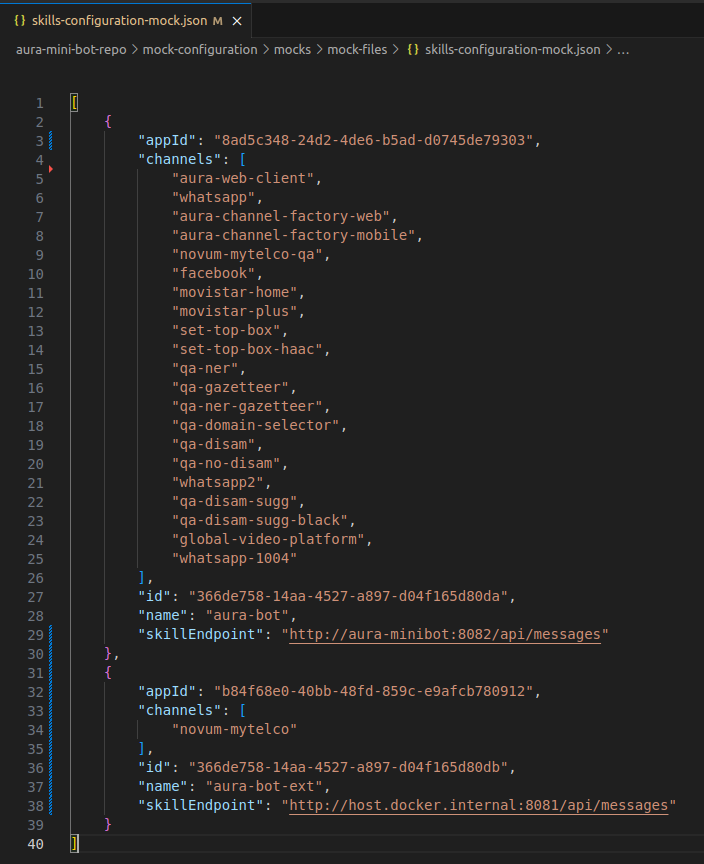
To do this, the following steps were taken:
- Delete the channel
novum-mytelco from the first skill (Aura minibot) channels list and add it to our new skill called aura-bot-ext.
- Configure the Microsoft appId of our skill, a new skill id (random uuid) and the skillEndpoint.
- To access
localhost from a docker container, we use host.docker.internal instead localhost.
NOTE: If you use linux, maybe you should also add extra_hosts: "host.docker.internal:host-gateway" to aura-groot in your docker-compose file.
2. User mock configuration
To access this skill, we are going to use anonymous users.
As Aura Minigroot also mocks anonymous users, we need to update the mock data to redirect the mocked anonymous user to our skill setting his channel to 45494a5b-835a-4fff-a813-b3d2be529dbe
(the channelId of novum-mytelco):
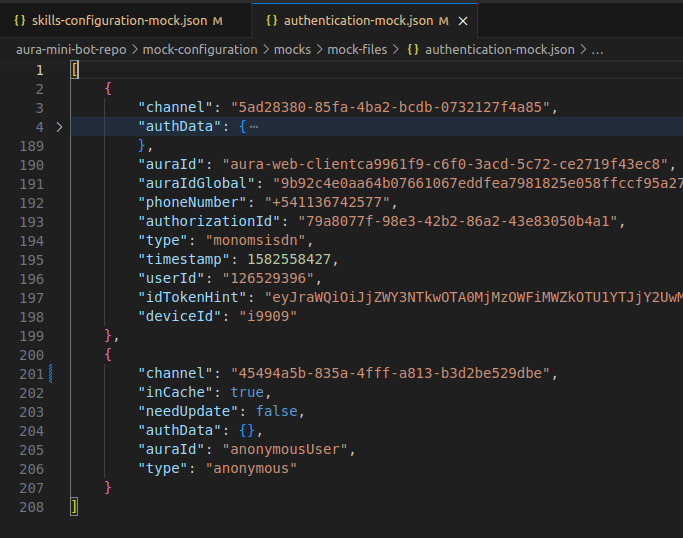
With this change, all the users not mocked in authentication-mock.json will be redirected to our new skill.
3. Restart the mini-groot
After these changes, you have to restart your Aura Minigroot container to refresh the configurations.
When the container restarts, you should have your new skill working with Aura Minigroot.
4 - Message exchange channels-skills
Message exchange between channels and skills
Guidelines for the exchange of messages that allows the communication between a channel and a skill
Introduction
Once a skill is connected to Aura Root, now it is required to establish a communication between a channel and this skill in order to exchange messages between them.
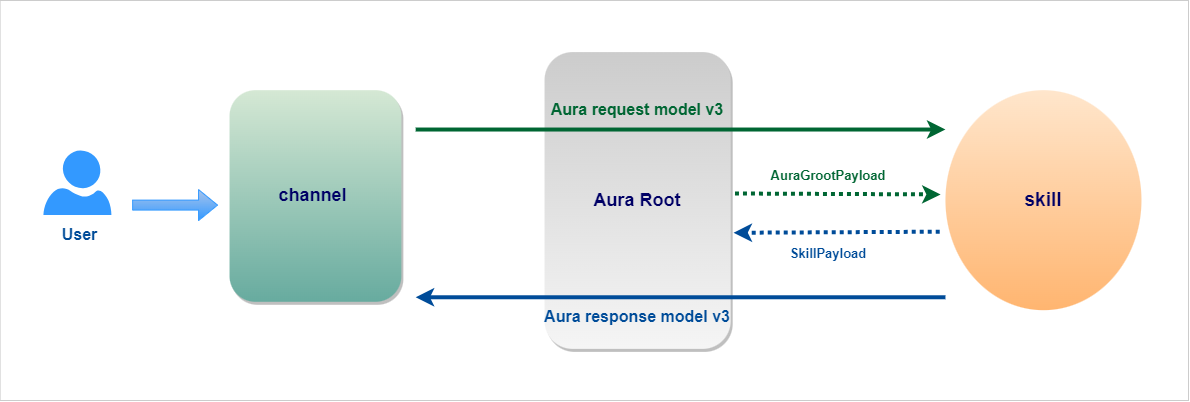
For this purpose, the communication protocol Aura request-response semantic model v3 must be used both by channels and skills to enable them to speak a language Aura can understand using the Direct Line API in order to make a request from a user through the designated channel and receive back the most suitable response from Aura.
Request model v3
Use the root channelData properties of the Aura request semantic model v3 for message exchange from the channel to the skill through aura-groot.
- JSON schema for the Aura request semantic model v3
payload property: In the framework of Aura distributed architecture, the payload property includes a specific field (AuraGrooPayload) that allows sending enriched information from aura-groot to the skill.
Response model v3
Use the root channelData properties of the Aura response semantic model v3 for message exchange from the skill to the channel through aura-groot.
- JSON schema for the Aura response semantic model v3
- Root attachment properties
skillPayload property: In the framework of Aura distributed architecture, this specific property allows sending enriched information from the skill to aura-groot.
5 - Hot swapping processes
Hot swapping processes in Aura distributed architecture
Guidelines to execute modifications in Aura distributed architecture through a hot swapping process
Introduction
Constructors can add, delete of modify a skill through a hot swapping process, without affecting other skills, through the aura-configuration-api.
Through this process, aura-groot can be modified to route to a new skill or delete from its routing tables other skills if constructors do not want to send requests to them.
Guidelines
Add a new skill
-
Deploy a new skill in your own deployment site.
-
Prepare your channel:
- (Optional) If your skill is serving a new channel, add the channel to the aura-configuration-api.
- (Optional) If your skill is serving an already existing channel that is not handled by any skill, nothing is needed.
- (Optional) If your skill is serving an already existing channel that is handled by another skill, delete the channel from the current skill configuration aura-configuration-api, launching a
PATCH request.
-
Prepare the POST request to the aura-configuration-api in order to add the skill.
-
Send the request to the aura-configuration-api to add the skill.
-
After the request is processed, aura-groot automatically loads the new skill and starts routing requests to it.
Delete an existing skill
-
Prepare the DELETE request to the aura-configuration-api to delete the skill.
-
Send the request to the aura-configuration-api to delete the skill.
-
After the request is processed, aura-groot automatically removes the deleted skill and no longer routes requests to it.
-
(Optional) If your skill is serving a dedicated channel that is no longer needed, remove the channel from the aura-configuration-api.
-
At this point, the skill can be undeployed from your deployment site.