Categories:
Aura Analytics data model
Data model of Aura Analytics 1.1. that can be used as the base for building new elements
Introduction
New elements can be built (or the current elements modified) by making use of the available fields in Kibana through the ingested Elastic Search index.
In this document, we provide a reference of the schema that the index follows, so that it can be used to build such new visualizations, or to better understand the existing ones.
Elements in the Aura-message data model have 3 different types:
-
Numeric: single numbers, integer or real. Suitable for numerical statistics, such as averages, or for plotting variation across time in graphs.
-
Keyword: they are opaque strings, i.e., terms that cannot be searched within (it is not possible to look for words inside a keyword field). They can, however, be used to create some term-level queries, such as prefix queries (find all instances that begin with) and they usually work great for aggregations, since most of them are categorical variables (fields that only have a limited number of possible values) and can therefore be bucketed and counted.
-
Text: these fields are divided into separate terms (words), and some pre-processing is done to them before indexing to improve access though an Elastic Search analyzer. Text fields cannot be used in aggregated visualizations, since they cannot be grouped. They are most useful for queries, because they allow searching for fragments (only a few words) and fuzzy searches.
Fields list
The following table lists all the fields available in the Aura-message-COUNTRY Elastic Search index, together with their type and a brief description.
The most relevant ones include a more detailed description in the section fields explanations.
Note that some fields of text type have a mirror field of type keyword, with the same content. Having the same data indexed in two different ways at the same time (as text and as keyword) enables to perform different types of analysis by choosing the right field.
The “Raw” column indicates if this field is already present in the Aura raw PPD files:
-
Yes: field contained in raw PPDs. -
No: generated field, produced when creating clean PPDs. They can be recognized as lowercase fields. -
Partial: It exists in the raw PPDs, but in a somehow different shape.
| Field | Type | Raw | Contents |
|---|---|---|---|
| CORR_ID | keyword | yes | Unique identifier for each interaction |
| VERSION_ID | keyword | yes | Aura Platform version |
| CHANNEL_CD | keyword | yes | Identifier for the channel this interaction corresponds to |
| STATUS_CD | keyword | yes | Internal code related to operation status |
| AURA_ID_GLOBAL | keyword | yes | (Mostly) unique identifier for the user |
| AURA_ID | keyword | yes | (Mostly) local identifier for the user |
| INTENT | keyword | yes | Detected user intent, including “system” intents |
| MESSAGE_USR | text | partial | Text request sent by the user |
| MESSAGE_USR_NORM | text | no | A normalized version of MESSAGE_USR |
| MESSAGE_USR_NORM.keyword | keyword | no | A keyword version of MESSAGE_USR_NORM, to enable aggregating on it |
| MESSAGE_AURA | text | partial | Text message sent by AURA to the user |
| MESSAGE_AURA.keyword | partial | Keyword version of MESSAGE_AURA, to enable aggregating on it | |
| MODALITY_CD_USR | text | partial | Modality of the user message |
| MODALITY_CD_AURA | text | partial | Modality of Aura response |
| ENTITIES | text | yes | Comma-separated list of the entities recognized in the user message |
| DIALOG_ID | text | yes | Identifier for the dialog that produced Aura response |
| DIALOG_ID.keyword | keyword | yes | Keyword version of DIALOG_ID, to enable aggregating on it |
| DURATION_NU | number | yes | Elapsed time, in ms, between the reception of the user message and the moment the response is generated to be sent to the channel |
| userType | keyword | no | A single char identifier that characterizes the user as a test user |
| usrMsgWc | number | no | Message word count: number of words contained in the user message |
| usrMsgSig | keyword | no | Message signature: a string that helps clustering user messages |
| AuraMsgGroup | keyword | no | Cluster the Aura response belongs to |
| weekday | number | no | Day of the week the interaction happened (0=Monday to 6=Sunday) |
| hour | number | no | (Integer) hour the interaction happened |
| country | keyword | partial | Two-letter code for the country |
| sesId | keyword | no | Session information |
| sesSize | number | no | Session information |
| sesDuration | number | no | Session information |
Fields explanations
This subsection contains more detailed descriptions of some of the key fields in the schema.
AURA_ID_GLOBAL
This element (mostly) uniquely identifies the user generating the interaction.
Note the concrete value of this field is not the same as the actual identifier used within Aura and uploaded to Kernel: for privacy reasons, the identifier was hashed when generating the PPD and has no resemblance to the original one. The correspondence is however maintained across time, so it is possible to analyse user behavior.
The “mostly” qualifier reflects one quirk of the original Aura identifier: it is generated with a dependence to the authentication method used by the channel, so if two channels follow different authentication methods (e.g., MobileConnect vs. User/Password) then the AURA_ID_GLOBAL identifier for the same user will be different. In summary:
-
The identifier stays the same for a given user across time.
-
Different users will not have the same identifier.
-
But the same user could produce two different identifiers if connected to two channels that use a different authentication method.
AURA_ID
This is a “local” identifier, i.e., one that is generated inside the channel according to specific channel characteristics and it is not tied as much as AURA_ID_GLOBAL to user authentication.
Its main disadvantage is its transient nature: the same user, on the same channel, could generate different AURA_ID strings when connecting different times on a different session. Therefore, for user accounting and tracing, AURA_ID_GLOBAL is usually preferred.
However, there are instances in which AURA_ID works better, namely for anonymous access (when the user is not authenticated). This depends on the channel:
- In the WhatsApp channel, the initial use of the channel will be anonymous from the Aura side (i.e., no authentication is done), hence
AURA_ID_GLOBALwill also be empty (at least until the user authenticates, which depends on the use case). But in this channel,AURA_IDhas a permanent value, linked to the WhatsApp user, so here it is a good substitute for a persistent id, even for unauthenticated users.
MESSAGE_USR
This field includes the message sent by the user.
It has been partially processed to enhance anonymization by removing some standard identifiers contained in it with <idxxx> strings (e.g., phone numbers appear as <idphone>).
Removal is done mostly through regular expressions, so there might be occasional glitches (such as identifying as phone a number that does not really correspond to a phone, just because it follows the phone number pattern).
MESSAGE_USR is a field of text type. As such, it is searchable: it is possible to search for specific words the user might have said.
Furthermore, it has been processed through an ElasticSearch analyzer adapted to the specific language used. This means that searches are able to match related words (e.g., plural versions of a singular query word, or verb conjugations). Phrase searches are also possible (by using double quotes around the phrase). If a phrase (several words) is used as a query without the quotes, ElasticSearch interprets it as a query for any of the words, so it will return all data elements that contain any of the words in the query.
In Kibana, more sophisticated text searches can be made by switching Lucene query syntax: proximity queries (words close to each other), fuzzy searches (query words allowing typos), wildcards, etc.
MESSAGE_USR_NORM
This is a normalized version of MESSAGE_USR, in which the user text has been streamlined by:
- Converting all the sentence to lowercase
- Removing all punctuation
- Removing any extra spaces
Furthermore, this field is not processed through a language-dependent analyzer as MESSAGE_USR is, so queries on this field must match words exactly. It is still a text type field. However, the same query language can be used.
MESSAGE_AURA
This contains the text message generated by Aura and sent to the user as response to the user query. It is a text type field, so it is possible to search for specific words in it.
In the current version of Aura KPIs logs, this field only contains the text response. Some Aura use cases do not generate a purely textual message, but a more elaborated one (e.g., a card with text and graphics). These complex answers are inserted as attachments into Aura’s response to the channel and since attachments are not logged into the MESSAGE field, this field will appear empty in those cases. So, an empty MESSAGE_AURA field does not necessarily mean that Aura did not provide an answer. As an alternative for those situations, looking at the DIALOG_ID field (or INTENT) may give a hint of the type of answer that Aura delivered.
MODALITY_CD_USR
This field contains the modality in which the user sent the message.
It is a slightly transformed field because there are some variations across Aura versions and, in order to unify it, the modalities are consolidated into only four different keywords: audio (spoken message), text (written free-text message) o form (commands sent via automatic processing or menus).
DIALOG_ID
This field contains the identifier for the user case dialog module at the aura-bot Framework that was selected to construct the Aura response.
Dialog identifiers have two components (library and dialog) separated by a colon e.g., services:service-usage
This field uses a custom analyser that splits the identifier at the colon, generating two terms. This makes possible to construct queries with one of the terms, e.g., “give me all the elements for the domain services”. But being a text field makes it impossible to do aggregations on it, so it cannot be used for statistics like bar charts (use DIALOG_ID.keyword for that).
DURATION_NU
This number reflects the time that took Aura to understand, process and respond to the user message. It is the difference (in milliseconds) between the timestamp of the moment the user message was received and the timestamp in which Aura’s response was finalized and sent to the channel.
Note that it is not a complete end-to-end delay time from the user’s point of view, since it does not include either the time it took the request to arrive to Aura through the channel or the time it took the response to travel back through the channel and get rendered at the client application (those times are outside Aura, and as such not registered by it).
Session Information
Session information includes the fields: sesId, sesSize, sesDuration.
These fields are generated by running a process over the time series formed by interactions from each user at each channel.
A session is automatically identified as a consecutive list of such user’s interactions, each separated from the next by a time interval shorter than 5 minutes. Once each session is identified, it is tabulated and labelled with three fields:
-
sesId: string, forming a unique identifier for the session. It should be considered as an opaque identifier and the guarantee is that no other session in the data stream carries the same identifier.
As an aside, interactions that do not correspond to actual user interactions (because no user could be identified or because the datapoint corresponds to an interaction not triggered by the user) are all labelled with a<void> sesId. -
sesSize: number of interactions this session contains. This is labelled only for the first interaction in the session, all other interactions carry a0in this field. Non-sessions such as the ones with<void> sesIdwill be left empty. This facilitates computing averages or other statistics on valid sessions, by just first filtering out all zero and empty values. -
sesDuration: time duration for each session, counted from the instant the first user message was received, to the instant the last Aura message was sent. For single-interaction sessions its value will be the same asDURATION_NU, for multiple interactions it will contain the time interval between all of them.
As with sesSize, only the first interaction in a session is annotated with sesDuration; the remaining interactions will be assigned a 0 value (and interactions that do not correspond to a session will be left empty). Therefore, to compute statistics on sesDuration, remove the 0 and empty values first.
userType
This field may be used, in certain cases, to help identify rows that do not correspond to real users but to test users (internal users that belong to test/QA teams and whose behaviour is, therefore, not representative of actual Aura users).
The field contains a single character, which is s for standard (real) users, and can be Q or T for QA/Test users respectively (there are also lowercased versions q and t, referring to unconfirmed test users).
Note that test user identification is not available on every country, since it depends on having a register of the AURA_GLOBAL_ID identifiers that QA/Test users authenticate and this is not always available.
usrMsgSig
This field is not useful by itself. Instead, it is intended to be used to help grouping together very similar user utterances. It does so by generating a signature of the utterance that is (hopefully) insensitive to small variations in the sentence.
This is an experimental field; it might change if we reach a variant that is better suited for its purpose.
The way to generate this signature is by following these steps with the utterance:
-
Start with the normalized utterance (i.e.,
MESSAGE_USR_NORM). -
Perform stemming (removal of word suffixes) on all the words. This makes bills and bill the same word.
-
Substitute words from a fixed list of very common, uninformative tokens (stopwords) by an asterisk. For example, this converts both “get my bill” and “get the bill” to the same phrase “get * bill”.
-
Group words in sets of 3 elements (trigrams) and sort them alphabetically. This removes the global structure of the sentence, while retaining local structure.
The resulting string is a non-understandable version of the original utterance (hence, it cannot be used by itself), but the fact that several very similar utterances produce the same signature helps cluster those utterances. An example is one of the preinstalled visualizations “Most Frequent User Utterances” which uses this field to group very similar utterances.
Another example is provided in the following figure, which shows message utterances generating the same signature:
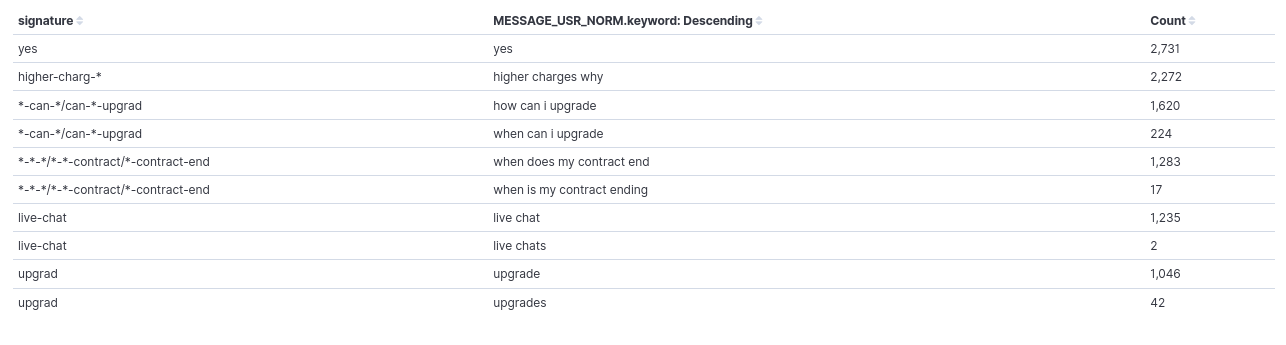
As it can be seen, the signature is the same for “how can I upgrade” and “when can I upgrade”, “when does my contract end” and “when is my contract ending”, and “live chat” & “live chats”. So, they would be counted together when aggregating by signature.
The procedure has its limitations and, as explained, it is experimental, so we are trying to improve it, but it can already alleviate a bit the inherent variability in user expressions.
AuraMsgGroup
Messages produced by Aura are as generated by its text resource database. In some cases, the same category of message produces different output texts, maybe because the message includes some user-dependent parameter or because the text database contains several variants of the same text (and Aura picks one at random).
The AuraMsgGroup field is a keyword field that helps categorize Aura answer by abstracting away some of this variation. It classifies the response given by Aura into two types of elements:
-
Generic group: a name such as
<NONE>,<GREETING>or<NOTFOUND>, which corresponds to a response category (see Table 3) -
Truncated answer: for answers that do not have a defined generic group, as a fallback the literal answer text is inserted, after substituting all numbers in it with a placeholder and truncating it (i.e., retain only the first characters).
The following table contains the generic groups defined so far. They correspond to the most frequent Aura messages. It is country-dependent, since it also depends on the use cases deployed in each country. As said above, responses not falling into these groups will be assigned a truncated version of the response text.
Note that th emost frequent Aura messages list can be enlarged with time. Also, the correspondence between Aura messages and groups is not static, if the text database is updated with new variants, it will be necessary to also update the translation table in the PPD cleaner process that generates this field.
| Group | Meaning |
|---|---|
| EMPTY | No textual answer from Aura (see note in Section MESSAGE_AURA for the usual meaning of no text answer) |
| NONE | Aura says it did not understand the user utterance |
| ERR | There was a processing error of some kind at Aura side, and the request could not be fulfilled |
| GREETING | Aura is greeting the user |
| GOODBYE | Aura is acknowledging a conversation end |
| YOU-ARE-WELCOME | Aura is accepting a compliment |
| CHURN | Aura recognizes the user intention to terminate a contract |
| NOTFOUND | Aura tried to search for some bit of data concerning the user query, and could not find it |
| CANNOT | Aura cannot fulfil the user request because of insufficient information (in the query, or on user data) |
| BILL-INFO | The user requested information about her bill, and Aura is returning it |
| DATA-INFO | The user requested information about her data usage, and Aura is returning it |
: The list can be enlarged with time. Also, the correspondence between Aura messages and groups is not static, if the text database is updated with new variants, it will be necessary to also update the translation table in the PPD cleaner process that generates this field.