Release Train Manager (RTM) implementation and architecture
Introduction to RTM development methodology
The “release train” software development methodology is a way of planning the delivery of software according to a predetermined and regular schedule, as if it were a “train timetable”. This schedule is public for all the teams that must contribute to the delivery and represents a commitment on their part, as the schedule must be adhered to.
If we use the metaphor: “the train will take the passengers who are ready to travel”, i.e., only the software that is ready to be integrated will be integrated. For this it is necessary to work on the different functionalities in parallel and in isolation without affecting the rest.
We start from a prioritized backlog. The tasks will enter the implementation phase in order of priority.
Github is used for the organization of the process. See here the details of Github as orchestrator.
The file and properties for the configuration of branches is included in Branch configuration.
Learn how locales files and the POEditor project are managed in RTM: Managing locales.
RTM overview
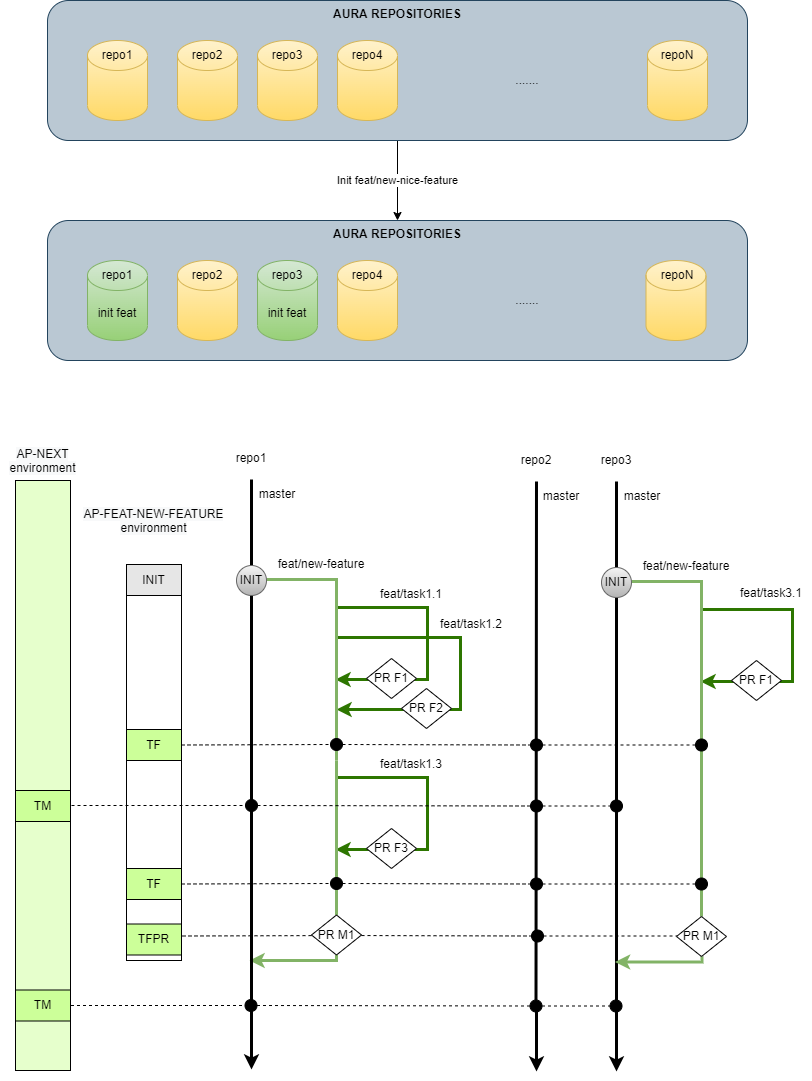
The important thing when we are working on a new feature is to be able to completely isolate the development, environment and testing. To do this, environments will be generated per feature and git branches will be used for the different repositories involved.
RTM Overview
INIT: initial processing of a feature (select repos involved, create branches on those repos and create environment).
TF (Tests Feature): daily smoke tests on feat/new-feature branches.
TFPR (Tests Feature PR): full regression tests on the master merge and the feat/new-feature branch.
TM (Tests Master): complete daily/weekly regression tests on the master branches.
PR Fx (PR Feature): PRs on the feat/new-feature branch.
PR Mx (PR Master): PRs on the master branch.
1 - Github as Orchestrator
Github as orchestrator
How to use a Github repository to orchestrate the Release Train Manager processes
Release Train Manager Repository
To organize the work, we use a Github repository. This repository contains classic branches for the RTM development cycle itself and a set of branches reserved for RTM orchestration. The default base branch of the orchestrator is master.
The classic branches contain the prefixes:
feat/description
fix/description
doc/description
etc.
The specific branches for the orchestrator contain a descriptive name and the JIRA identifier:
main/name_reference#id: To orchestrate new features.
release/name_reference#id: To orchestrate releases.
hotfix/name_reference#id: To orchestrate hotfix on a release.
fasttrack/name_reference#id: To orchestrate features on a release.
To manage the RTM processes, we use Pull Requests (PR) in this repository. Each of these PRs has a base branch and a target branch, depending on the operation to be performed:
This PR is generated automatically when a commit is made for the first time in one of these special branches.
Pull Request Body
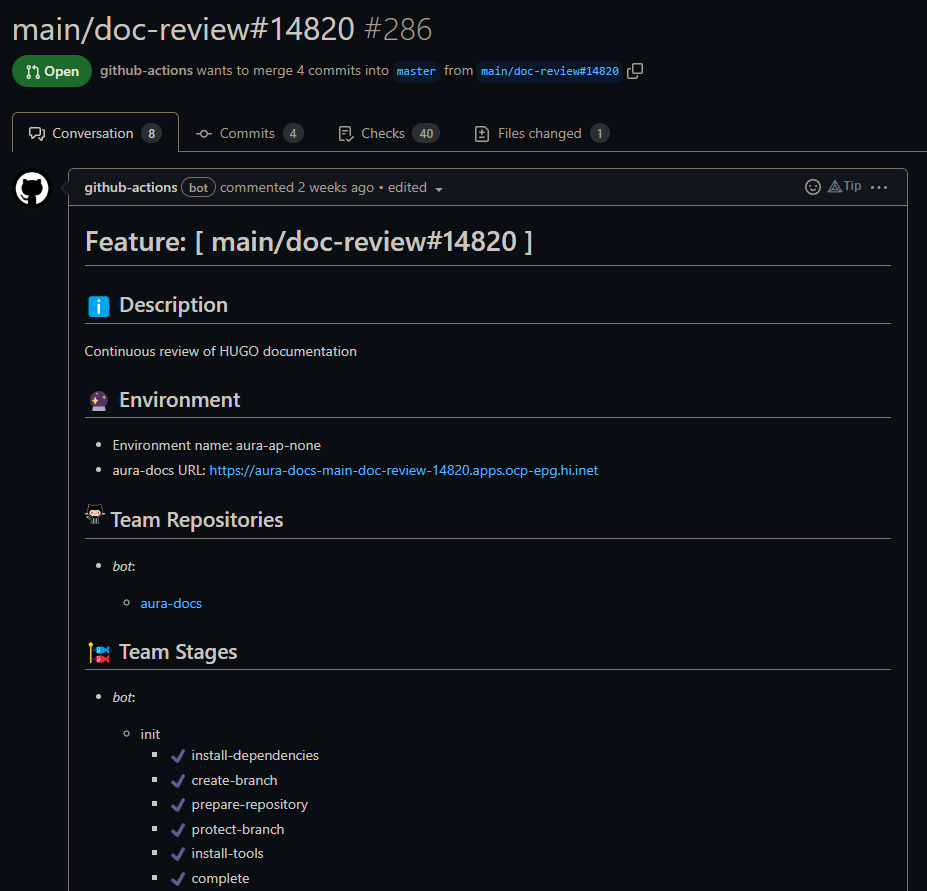
In the body of the generated PR, all the configuration information for the branch is displayed and the Pull Request will contain all the history of processes executed on it in comment mode.
An example of PR body of a main branch
The information for the PR body is obtained from a configuration file and is updated as the different phases of the orchestrator are executed.
This folder contains Github Actions necessary to perform all operations on repositories, data persistence and communications with Jenkins, among others.
resource/templates
This folder contains templates for the branch-config.hml file for each branch type:
It contains the tools needed to build the docker actions and images.
src/toolkit
It contains the code SDKs as a complement to the Github actions. These utilities will eventually become actions someday.
src/toolkit/nodejs
It contains the NodeJS toolkit. More information in [NodeJS Toolkit].
⚠️ NodeJS toolkit section WIP
.github/workflows
We define stage as a set of steps to be performed in a coordinated manner by each team. Until all the teams involved in the phase have completed all the steps of a phase, it will not be possible to move on to the next phase.
For example, for example, we can define the INIT phase in which the teams have to create the specific branches in their repositories and activate an environment where they can deploy. We would have that each team would have an INIT phase in its configuration, with a step to generate the branch or branches in its repositories, and the Devops team would also have another set of steps to prepare the environment.
In order to synchronize the work between the teams and perform these operations we will use Github Workflows. These workflows are explained in the [Workflows] section.
⚠️ Workflows section WIP
2 - Branch Configuration
Branch configuration
Description of the process for the configuration of branches in the Release Train Manager
Branch configuration file
The configuration of branches is defined in the branch-config.yml file.
Each stage defined in the schema is fully described in the Stages section.
Protection that will be applied to main branch when created in the RTM repository. This configuration can be partial and will be merged with the default configuration. All the documentation concerning the protection of a branch can be found at Github
Default configuration property, this configuration will be merged between custom protection configurations of teams or main branches. All the documentation concerning the protection of a branch can be found at Github
Jira URLs where the tasks that the branch solves once the life cycle is completed are
Fake data
true
Team Object
It contains a set of common properties and others customized by each team. In the following table, the properties that are shared by all teams are described.
Security configuration of the branches to be generated in the repositories. This configuration can be partial and will be merged with the default configuration. Example:
List of custom tasks to be completed before closing the PR for the branch. These tasks will be converted into a checkbox component in the body of the Pull Request
Fake data
false
Team Bot Custom Properties
Description of the bot’s custom properties.
Property
type
description
default
mandatory
update_dependencies
Object[] of {name: string, version: string}
List of objects with name and version. This property is used to update dependencies on the modules in the repositories defined by aura-bot. All the modules that use one of the libraries in the list, will be updated to the version that has been specified.
[]
false
dependencies
Object[] of {name: string, version: string}
List of objects with name and version. This property contains those @telefonica libraries that are needed in the Github library repository to isolate dependencies. At the INIT stage, the system will pick up that library from NPM and publish it to Github.
[]
false
node_version
number
Version of node to use in the bot’s Workflows.
14
true
tools
Object
It currently contains only one property, POEditor, which specifies the creation of a separated project to manage the localization strings.
Description of the different stages for main branches in the Release Train Manager
The following diagram shows the Release Train Manager stages for main branches:
All phases of the main branches are managed by the workflow:
.github/workflows/push-to-main.yml.
name:Push To Mainon:push:branches:- "main/**"- "hotfix/**"jobs:load-configuration:######### INIT #########prepare-init-process:protect_branch_main:init-bot-module:init-devops-module:init-legacy-module:init-models-module:init-nlp-module:init-training-nlp-module:init-qa-module:########## START ##########start-bot-module:start-qa-module:##################### PREPARE TO MERGE #####################block-close:prepare-to-merge-bot-module:prepare-to-merge-training-nlp-module:prepare-to-merge-qa-module:prepare-to-merge-legacy-module:prepare-to-merge-devops-module:########## CLOSE ##########close-bot-module:close-devops-module:close-qa-module:close-legacy-module:close-nlp-module:close-training-nlp-module:############# FINALIZE #############finalize-bot-module:process-result:
Main Init stage
In this phase, the branches are generated in the repositories and, if there is a configured environment, it will be deployed. As in every stage, each team defines its own steps, but some of them are shared and executed by any of the teams.
Common steps
Create branch
This step gets the list of repositories of the team (from branch-config.yml file, teams.*.repositories) which step is being executed and creates the corresponding main branch in all of them. If the branch already exists, it just goes on.
Protect Branch
Once all the initial changes are applied in each package of each main branch, they are protected to force the creation of a Pull Request to merge changes on them. It is executed after every stage of the RTM, because it needs the branch to be unprotected during its execution, to make changes automatically.
Unprotect Branch
RTM stages need to remove repositories’ branches protection to apply changes automatically in the code. It is executed at the beginning of almost any stage of the RTM.
Check conflicts
This step is executed during prepare-to-master stage to check if there is any conflict between master and the main branch in any configured repository. Any conflict will be reflected in the RTM as a message in the corresponding PR.
Init Bot Steps
Bot: Install dependencies
In this step, the dependencies defined in teams.bot.dependencies are installed. The tgz of the NPM module is obtained and installed in the Github repository. This is necessary because the main branch works in isolation and uses Github as the main repository.
Bot: Store Locales
In this step, all the locales files of every package in every repository are stored in DB. They are stored in the collection called branch-locales.
Bot: Prepare Repository
In this step, all the dependencies of every package in every repository are updated. Internal node packages (those belonging to @telefonica NPM organization) in master branch are read from npm registry and a x.y.z version is used. But each main branch uses for the internal dependencies a private GitHub npm registry and the dependencies are tagged with the decodedName of the branch: version: 7.5.0-main-my-feature.0.
Packages are read in order, so first those packages without internal dependencies are processed. They are published in GitHub registry and those packages depending on them are then processed, going on recursively.
Bot: Create Changelog
This step is responsible for creating the changelog scaffolding for the current version.
Bot: Install Tools
A new project is created in POEditor to include the language resources to be contained in this main branch. The project is created by auradev@tid.es user and its name will be the branch decoded name: main/feature-desc#id -> main-feature-desc-id. This project is intended to contain all the changes (creations or updates) of locales for the issues being resolved in this main branch.
Main Start stage
In this phase, all the components configured in branch-config.yml and that were prepared during the init stage will be deployed if an environment has been configured for the current branch. Afterwards, the sanity test plan is launched just to validate that the environment is properly settled. If no environment is configured (for instance, if a branch is just to review documentation or to prepare something specifically for a given OB, such as language trainings) tests are not executed.
Start Bot Steps
Bot: Trigger Deploy Components
A push is launched in the repositories of the components to force them to be deployed from CI job running in Jenkins. After each component is deployed, Jenkins sends a notification to GitHub to inform of the status, that is updated in the RTM API database.
Bot: Validate Deploy Components
This step is in charge of validating that all the components that are configured for the current branch have been deployed. It reads the information from the RTM API database that is updated with every notification from Jenkins, as explained in the previous step.
Main Prepare-To-Merge stage
This phase aims to merge master changes in the current main branch, deploy the updated version in the branch in configured environment, if exists, and launch the complete functional test plan to validate the full code base before merging to master.
Prepare-To-Merge Bot Steps
Bot: Update Locales
This step is in charge of updating the locales files in all repositories doing a merge into the main poEditor project and Aura-Bot PoEditor project.
Bot: Merge and Update Versions
Once the eventual conflicts have been resolved in all repositories configured in the branch, the content of master and main branches are merged together. In the happening of any change, tagged versions are automatically updated to provoke a new deployment of the components.
Bot: Publish Modules
If new versions have been generated in any of the bot npm libraries, a new version of them is published and updated in all the components.
Main Close stage
In this phase, all the components will be deployed in master and the libraries published in NPM. The versions of the modules will be updated if the repositories have been changed along the development in the main branch.
Close Bot Steps
Bot: Prepare versions to master
As already mentioned, bot versions in master are not tagged but in x.y.z format. This step calculates the next version of each library and component automatically depending on the existing version in master, the original semantic version and the number of changes in its tagged version in the main branch. If a library or a component has been updated in a main branch, no matter the number of commits needed for the change, its semantic version in master will be increased by 1 in the minor counter. For instance, if the version in master for library my-library is 6.2.0, and my-library has some changes in the current branch, its version in master after merging the main branch, will be 6.3.0.
Bot: merge to master
If new versions have been generated in the libraries, changes are merged and the libraries are published in @telefonica private npm registry.
Finalize step
In this phase, all the branches created, packages installed in Github and the POEditor project are deleted.
Finalize Bot Steps
Bot: Remove Main Branches
The main branch created in the repositories is removed.
Bot: Uninstall Tools
This step removes the POEditor project created for the language resources of this main branch.
Bot: Remove Packages
This step removes the packages created in the branch for each library.
3 - Managing locales
Managing locales in RTM
How locales files and POEditor project are managed in RTM.
How to manage locales
To avoid updating the locales with the base project in the main branches in the RTM INIT process, there is a job store-locales, that is responsible for storing the locales of each component/library in the branch-locales collection with the following structure:
{"branch":"main/fake","authentication-api":{"de-de":"{\n \"authentication:authenticator-error.description\": [\n \"Bei der Authentifizierung ist ein Fehler aufgetreten. Bitte versuche es später noch einmal\"\n ],\n ....","es-cr":"{\n \"authentication:A1004.authenticator-error.description\": [\n \"Parece que has olvidado tu usuario o contraseña de acceso a Mi Movistar.\"\n ] ....}"},"aura-bot-platform":{"es-cr":"{\n \"context-filter:multimsisdn-users-not-allowed.onboarding\": [\n \"Pulsa el micrófono y di lo que quieras. Consulta la ayuda para saber qué cosas puedes preguntarme.\"\n ],\n \"context-filter:user-info-not-accessible\": [\n \"Sorry\"\n ],\n \"core:bypass.close.words\": [\n \"cancelar\",\n \"cerrar\",\n \"salir\",\n \"desconectar\"\n ],\n \"core:empty.response\": [\n \"Ok, estarei aqui sempre que você precisar.\"\n ] }\n","de-de":"{\n \"context-filter:multimsisdn-users-intent-not-allowed.text\": [\n \"Entschuldigung, auf diese Daten kann ich aufgrund deines Vertrages nicht zugreifen. Zukünftig kann ich das sicherlich, aber bis dahin kann ich dir mit Fragen rund um o2 Services weiterhelfen. Wenn du mehr Informationen über deinen Vertrag erhalten möchtest, gehe einfach in deinen [Mein o2 Bereich](www.o2online.de/meino2).\"\n ],\n \"context-filter:user-info-not-accessible\": [\n \"Sorry\"\n ],\n \"core:bypass.close.words\": [\n \"cancelar\",\n \"cerrar\",\n \"salir\",\n \"desconectar\"\n ],\n \"core:empty.response\": [\n \"Ok, estarei aqui sempre que você precisar.\"\n ] }\n"}}
During the development of the main branch, if it is necessary to update the locales of any component, it will be done using the locale-update script, which will have been updated by the following locale-importer command in the creation phase of the branches of each component/library:
aura-locale-importer -u -s Db -pkg <package_name> -m library -b core -d ./locale -f -mb <main-branch-name>
The environment variables SECRET_TOKEN and BRANCH_CONFIG_APIKEY are required for its execution.
This command will do a merge between the local files stored in DB for that component/library and the resources created/updated in the POEditor project main-branch-name generating the new locales files.
In the execution of the prepare-to-merge of the bot, an update-locales step has been added, which updates the locales of each component/library by merging the content of the base project in POEditor (Aura-Bot) with the POEditor project of the main branch.
Endpoints locales
For the management of the locales in BD, the following endpoints have been created in aura-release-train-branches:
- /branches/{branch}/locales
- /branches/{branch}/locales/{package}
4 - API definition
Release Train Manager API definition
Description of Release Train Manager API
This API is used to manage the release train process and stores both the configuration and state of all the main/hotfix/release/fasttrack branches handled by the release train manager, but also the status of the environments: component versions deployed, if any component has a new version waiting to be deployed, etc.
The API is used both from the release train manager and from the Jenkins CI jobs themselves.