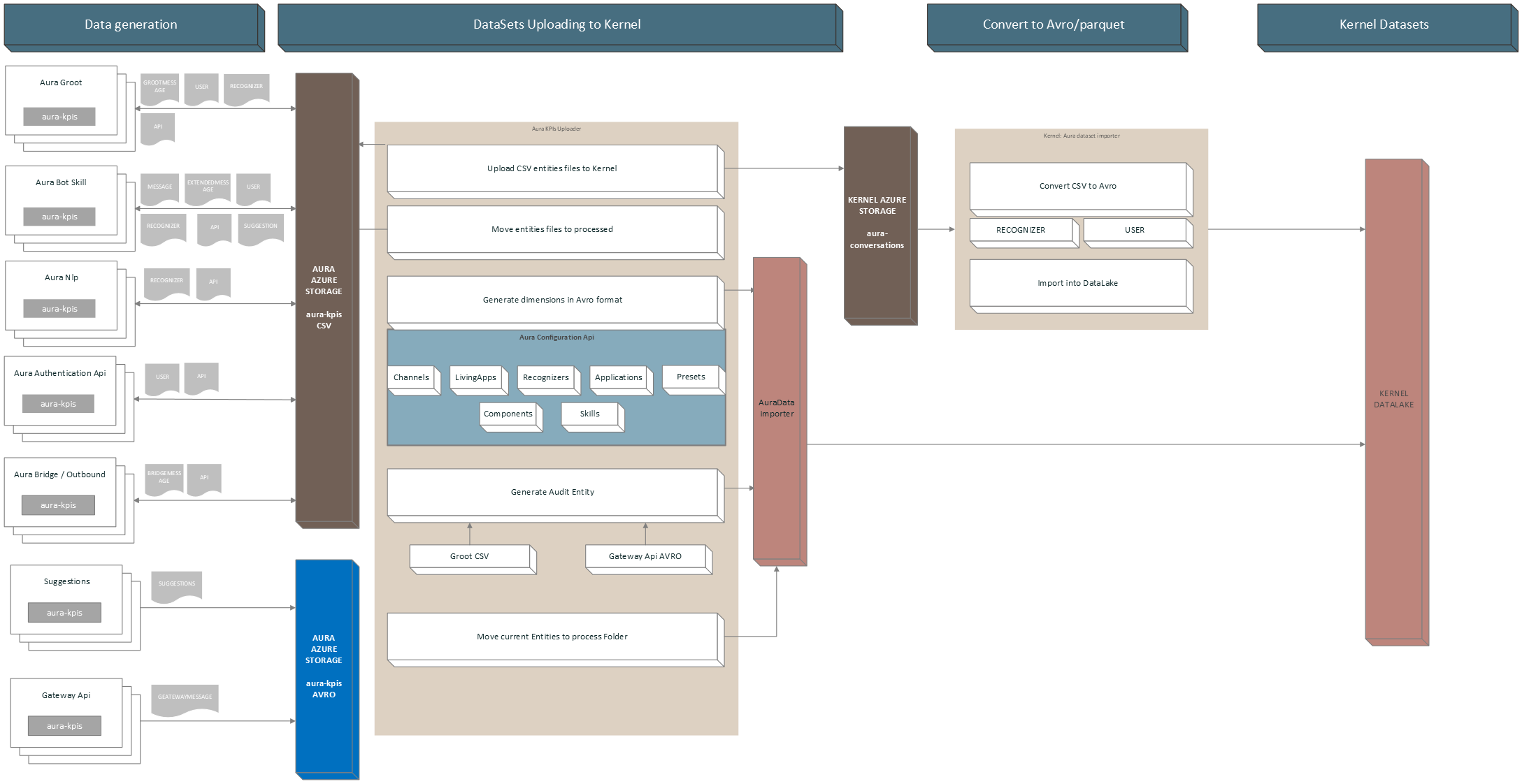
1 - User guide
Aura KPIs uploader user guide
Guidelines including the orderly steps to use aura-kpis-uploader
1. Prepare your CONFIG_FILE
First, review and prepare your environment variables in order to create your CONFIG_FILE.
An example is shown below:
AURA_AUTHORIZATION_HEADER=${AURA_AUTHORIZATION_HEADER}
AURA_CHANNELS_CONFIGURATION_API_ENDPOINT=${AURA_CHANNELS_CONFIGURATION_API_ENDPOINT}
AURA_DEFAULT_LOCALE=${AURA_DEFAULT_LOCALE}
AURA_ENVIRONMENT_NAME=${AURA_ENVIRONMENT_NAME}
AURA_MICROSOFT_AZURE_STORAGE_COMMON_ACCESS_KEY=${AURA_MICROSOFT_AZURE_STORAGE_COMMON_ACCESS_KEY}
AURA_MICROSOFT_AZURE_STORAGE_COMMON_ACCOUNT=${AURA_MICROSOFT_AZURE_STORAGE_COMMON_ACCOUNT}
AURA_MICROSOFT_AZURE_STORAGE_ACCESS_KEY_DESTINATION=${AURA_MICROSOFT_AZURE_STORAGE_ACCESS_KEY_DESTINATION}
AURA_MICROSOFT_AZURE_STORAGE_ACCOUNT_DESTINATION=${AURA_MICROSOFT_AZURE_STORAGE_ACCOUNT_DESTINATION}
AURA_MICROSOFT_AZURE_STORAGE_CONTAINER_DESTINATION=${AURA_MICROSOFT_AZURE_STORAGE_CONTAINER_DESTINATION}
AURA_VERSION=${AURA_VERSION}
2. Launch Aura KPIs uploader
There are two methods for launching the aura-kpis-uploader
- Directly with the source code: to launch it in your local environment
- As a docker container: to use it with the already generated Docker image.
$ cd aura-kpis-uploader
$ npm install
$ export CONFIG_FILE=[PATH_TO_MY_CONFIG_FILE]
$ npm run start
2.2.1. Pull image from repository
This method needs login first.
docker pull auraregistry.azurecr.io/aura/aura-kpis-uploader
2.2.2. Run Docker container
There are two options for running the Docker container:
-
With .env file:
Change $VERSION accordingly, exporting it or changing the string in the commands.
If $VERSION is not present, it will use the latest default tag.
docker run --rm -e CONFIG_FILE=/opt/aura-kpis-uploader/env/config_file.env \
        -v $(pwd):/opt/aura-kpis-uploader/env \
        auraregistry.azurecr.io/aura/aura-kpis-uploader:$VERSION
-
With environmental variables in command:
Note that host.docker.internal only works for MACOS/Windows systems:
docker run -e AURA_AUTHORIZATION_HEADER=${AURA_AUTHORIZATION_HEADER} \
        -e AURA_CHANNELS_CONFIGURATION_API_ENDPOINT=${AURA_CHANNELS_CONFIGURATION_API_ENDPOINT} \
        -e AURA_DEFAULT_LOCALE=${AURA_DEFAULT_LOCALE} \
        -e AURA_ENVIRONMENT_NAME=${AURA_ENVIRONMENT_NAME} \
        -e AURA_MICROSOFT_AZURE_STORAGE_COMMON_ACCESS_KEY=${AURA_MICROSOFT_AZURE_STORAGE_COMMON_ACCESS_KEY} \
        -e AURA_MICROSOFT_AZURE_STORAGE_COMMON_ACCOUNT=${AURA_MICROSOFT_AZURE_STORAGE_COMMON_ACCOUNT} \
        -e AURA_MICROSOFT_AZURE_STORAGE_ACCESS_KEY_DESTINATION=${AURA_MICROSOFT_AZURE_STORAGE_ACCESS_KEY_DESTINATION} \
        -e AURA_MICROSOFT_AZURE_STORAGE_ACCOUNT_DESTINATION=${AURA_MICROSOFT_AZURE_STORAGE_ACCOUNT_DESTINATION} \
        -e AURA_MICROSOFT_AZURE_STORAGE_CONTAINER_DESTINATION=${AURA_MICROSOFT_AZURE_STORAGE_CONTAINER_DESTINATION} \
        -e AURA_VERSION=${AURA_VERSION} \
        -v ${HOST_DIRECTORY}:/opt/aura-kpis-uploader/logs \
        auraregistry.azurecr.io/aura/aura-kpis-uploader:$VERSION
3. Execution Dependencies
With the addition of the new component aura-databricks-jobs, now for Avro entities, the execution of aura-kpis-uploader depends on aura-databricks-jobs being executed correctly.
This is done to avoid duplicating KPIs when they are processed by aura-databricks-jobs, and an error has occurred.
3.1 Evaluation of conditions for execution
If avro-to-dataset-job-cli has been executed correctly, it will write a file to the default avro folder containing a date. If this file exists and the date it contains does not exceed the time set for the scheduled run in Databricks, aura-kpis-uploader-cli will run its processes.
If avro-to-dataset-job-cli has generated any error in its execution, it will generate a file in the same folder containing internally the error(s) that have occurred.
Environment variables involved:
- AURA_KPIS_AVRO_DESTINATION_PATH: Default value is
avro.
- AURA_DATABRICKS_ERROR_FILENAME: Default value is
databricks.ERROR.
- AURA_DATABRICKS_EXECUTION_PERIOD: Default value is
24 hours.
The flow that Aura KPIs Uploader follows to validate if it is going to be executed is as follows:

4 Generate Reports
By default, aura-kpis-uploader generates reports if any error has occurred in the upload process.
These reports are available in the Azure Storage defined in AURA_MICROSOFT_AZURE_STORAGE_COMMON_ACCOUNT, path aura-kpis/reports/.
If you want to change the behavior and generate reports of all uploaded files or disable their generation, you can do it by changing the environment variable AURA_KPIS_REPORTS_MODE. If the value is set to all, it will generate a report for each of the processed files and if it is set to none, it will not generate any report. The default value is error.
4.1 Report upload Files
When an error occurs, the system will send an event to Prometheus to alert about the error.
 this.prometheusHandler.addSummary(
                        {
                        metricId: PrometheusMetrics.auraKpisUploaderReportErrorSummary,
                        start: this.startTimer
                        },
                        {
                        reportError: reportLink },
                        this.corr
                        );
The event will contain the metricId auraKpisUploaderReportErrorSummary, when an error occurs and a link to the report containing the error.
4.1.1 Report Model
A report will contain the following template in JSON format:
- numberOfFiles: Number of files processed.
- numberOfFilesSkipped: Number of files that have been skipped because they have not yet been processed.
- NumberOfFilesMovedToProcessed: Number of files that have been moved to the processed folder.
- numberOfFilesUploaded : Number of files that have been successfully uploaded.
- NumberOfFilesDeleted: Number of files that have been deleted from the main folder.
- numberOfFilesUploadValidated: Number of files that have been verified as successfully uploaded.
If errors have occurred, it will contain an errors property with the files that have failed, arranged as properties:
- key: Name of the file that has failed.
- step: It indicates in which phase it has failed. The possible ones are “UPLOADING”, “CHECK_IF_UPLOADED”, “MOVING_TO_PROCESSED” AND “REMOVING”.
- error: Error message obtained.
- corr: Associated correlator.
Example:
{
 "numberOfFiles": 43,
 "numberOfFilesSkipped": 0,
 "numberOfFilesMovedToProcessed": 41,
 "numberOfFilesUploaded": 41,
 "numberOfFilesDeleted": 41,
 "numberOfFilesUploadValidated": 41,
 "errors": {
   "BOT_da5df187-8aa9-55b7-94d6-50586bd6b0b8_CR_API_20240216T080000Z.txt": {
     "step": "UPLOADING",
     "error": "getaddrinfo ENOTFOUND aurautils-test.blob.core.windows.net",
     "corr": "ec4978ee-0021-4633-a28f-a933759d0250"
   },
   "BOT_b8efccfd-f2bd-5ef0-a19d-b2414ab94dc8_CR_API_20240215T160000Z.txt": {
     "step": "UPLOADING",
     "error": "getaddrinfo ENOTFOUND aurautils-test.blob.core.windows.net",
     "corr": "ec4978ee-0021-4633-a28f-a933759d0250"
   }
 }
}
4.2 Report Generating Avro KPIs
When an error occurs, the system will send an event to Prometheus to alert about the error.
 this.prometheusHandler.addSummary(
                        {
                        metricId: PrometheusMetrics.auraKpisGeneratedReportErrorSummary,
                        start: this.startTimer
                        },
                        {
                        reportError: reportLink },
                        this.corr
                        );
The event will contain the metricId auraKpisGeneratedReportErrorSummary, when an error occurs and a link to the report containing the error.
4.2.1 Report Model
A report will contain the following template in JSON format.
- numberBlobsLoaded: Number of blobs loaded.
- numberDataRowsLoaded: Number of total lines loaded from blobs.
- numberDataRowsGenerated: Number of Avro registers generated.
- numberEntitiesGenerated: Number of entities generated.
- numberDimensionalGenerated: Number of dimensional files generated.
If errors have occurred, it will contain an errors property with the files that have failed, arranged as properties:
- key: The id of the source. Example: ‘AUDIT’.
- error: Error message obtained.
- corr: Associated correlator.
Example:
{
 "numberBlobsLoaded": 13,
 "numberDataRowsLoaded": 0,
 "numberDataRowsGenerated": 141,
 "numberEntitiesGenerated": 2,
 "numberDimensionalGenerated": 7,
 "errors": {
   "GATEWAY": {
     "error": "Error parsing data. Field name does not exist in source",
     "corr": "ec4978ee-0021-4633-a28f-a933759d0250"
   },
   "AUDIT": {
     "error": "Error parsing data. Field id cannot be empty",
     "corr": "ec4978ee-0021-4633-a28f-a933759d0250"
   }
 }
}
2 - Adapter Manager
Aura KPIs Adapter Manager
Module to manage the copy of CSV files to Kernel and to generate Avro dimensional files and Avro Entity files.
⚠️ Although the definition of the module refers to Avro files, it also handles CSV files, until all CSV files are migrated to Avro in upcoming releases
Definition
Set of classes that will be in charge of processing the necessary operations to copy the KPIs in CSV format to Kernel and to process or generate the KPIs of the entities and dimensions in Avro format.
This is done from a definition file that, by default, is called aura-avro-adapter.json and is defined in the AURA_SOURCE_PATH_AVRO_ADAPTERS environment variable. This file is remotely loaded from the Storage AURA_MICROSOFT_AZURE_STORAGE_COMMON_ACCOUNT and the path AURA_KPIS_ENTITIES_CONTAINER/schemas/AURA_SOURCE_PATH_AVRO_ADAPTERS. If the file does not exist remotely, a local one is loaded by default.
Adapter Definition File Model
For each KPI file to be managed, a model is defined containing an array with all the adaptation operations to be performed. The content format of this file is JSON.
| Name |
Type |
Definition |
| name |
string |
Name of the adapter. To manage Avro files, this field contains the name of the Avro schema itself |
| schema |
AvroAdapterSchema |
Type of KPI, entity or dimensional |
| avroSchema |
string |
If the destination file is an Avro file, this field contains the Avro schema to generate the file. |
| source |
AvroAdapterSource |
Contains the necessary data from where you are going to copy or transform the data, if applicable. |
| fields |
AvroAdapterField |
Contains a set of properties with a model defined in AvroAdapterFieldModel |
| targetType |
AvroAdapterTargetType |
Type file to generate. Values: csv or avro. |
| versionSchema |
string |
If the file to generate is Avro, this field contains the version of its schema |
| stopWithErrors |
boolean |
When true, if another adapter has generated an error, this one will not be executed |
| expiresAt |
date |
If set, it indicates which date the intended KPI will no longer be processed. This is used when there are different versions of AVRO templates and you want to keep both versions until the end of a cycle, which is usually monthly. |
| order |
number |
Contains the execution order, the order 1 will be the first to execution. By default the order is MAX_SAFE_INTEGER. |
AvroAdapterSchema
| Name |
type |
Definition |
| dimensional |
string |
Type of KPI is dimensional. |
| entity |
string |
Type of KPI is an entity. |
AvroAdapterSource
| Name |
type |
Definition |
| data |
AvroAdapterSourceDataType |
Type of file to use as source. |
| id |
any |
KPI identifier, for example: GATEWAY, AUDIT, BOT, etc. |
| avroSchema |
string |
Name of the schema file. Required if the source is an Avro file, as its schema needs to read it. |
| avroSchemaVersion |
string |
Version of the schema, required if the source is an Avro file. |
| csvFolder |
string |
Name of the folder where this CSV is stored, required if the source is a partial CSV. |
| entityName |
string |
Entity name of the CSV to load, required if the source is a partial CSV. |
| useDefaultTimeFilter |
boolean |
If true, the adapter will ignore the pre-calculated date range at the beginning of the process and will use the default one, which is calculated based on AURA_DAYS_INTERVAL as the start date and the end date by subtracting AURA_KPIS_TIME_FILE_IS_IN_USE_AMOUNT * AURA_KPIS_TIME_FILE_IS_IN_USE_UNIT from the current date. The default is 30 days prior to the current time. |
| version |
string |
Version of the adapter. It is used to propagate changes in a release and to update the remote file where the adapter models are stored in aura-avro-adapter.json. Format: x.y.z |
| removeAfterProcessing |
boolean |
Remove source data after processing. The data won’t store in processed data folder. |
AvroAdapterSourceDataType
| Name |
type |
Definition |
| avro |
string |
Name of the source file for Avro. |
| object |
string |
Name of the source file for the Javascript object. |
| csv |
string |
Name of the source file for CSV. |
| partialCsv |
string |
Name of the source file when it is referred to specific data from a CSV file. |
AvroAdapterField
AvroAdapterFieldModel
| Name |
type |
Definition |
| sourceName |
string |
Name of the source field from which data is obtained. |
| nullable |
boolean |
It indicates whether the target field can be null or not. |
| preCalculated |
AvroPreCalculatedType |
String that indicates the type of calculation needed. For example, the required format for dates or numbers. |
| targetType |
Avrofieldbasetype |
Type of data for the target data. |
| defaultValue |
string |
number |
| symbols |
any[] |
Array with the values searched in the origin data. If the data does not match one of those values, it will generate an error. |
| format |
string |
Specific format to be sent, for precalculated fields. |
| description |
string |
Human-readable description of the field. |
| symbolsValues |
string |
If we want to change the value of the destination based on the values defined in the symbols field, we can define it in this field in the form of an object. |
| valueIfExist |
string |
If the source data exists, it will be changed to the one defined in this field. |
AvroPreCalculatedType
| Name |
type |
Definition |
| DATE_ISO_8691 |
string |
Format used for dates. The input date will be converted to this format. If there is no input date, the current date is obtained. |
| CUSTOM_DATE_FORMAT |
string |
Custom format for dates. Example: MM/DD/YYY |
| DURATION_ISO_8601 |
string |
Format used to set a duration. |
| COUNTRY_ISO_3166_ALPHA_3 |
string |
Format to indicate a country that complies with the ISO 3166 format. |
Avrofieldbasetype
| Name |
type |
Definition |
| string |
string |
Type string. |
| number |
string |
Type number. |
| enum |
string |
Type enumerable. |
| array |
string |
Type array. |
| boolean |
string |
Type boolean. |
AvroAdapterTargetType
| Name |
type |
Definition |
| csv |
string |
CSV file. |
| avro |
string |
Avro file. |
Types of adapters
The Adapter manager can perform several types of processes, that will be explained in the following sections.
Copy CSV files
This adapter will copy the CSV files generated from the Aura servers (aura-bot, aura-groot, aura-nlp, etc.) to the Kernel storage.
{
        "version": "1.0.0",
        "name": "E_Aura_BOT",
        "schema": "entity",
        "avroSchema": "",
        "source": {
            "data": "csv",
            "id": "BOT"
        },
        "targetType": "csv",
        "fields": {}
    }
Generate Dimensional KPIs in Avro
This adapter will generate an Avro file with Aura available RECOGNIZER data, as they are defined only in aura-kpis-uploader and not in aura-configuration-api.
  {
        "version": "1.0.0",
        "name": "D_Aura_Recognizer",
        "schema": "dimensional",
        "avroSchema": "aura-recognizer-asvc.json",
        "versionSchema": "6.0.0",
        "source": {
            "data": "object",
            "id": "RECOGNIZER"
        },
        "targetType": "avro",
        "fields": {
            "AURA_RECOGNIZER_ID": {
                "sourceName": "id",
                "targetType": "string"
            },
            "AURA_RECOGNIZER_NAME": {
                "sourceName": "name",
                "targetType": "string"
            },
            "EXTRACTION_TM": {
                "sourceName": "EXTRACTION_TM",
                "targetType": "string",
                "preCalculated": "DATE_ISO_8691"
            }
        }
    }
Copy Avro files
This adapter copies the KPIs generated in Avro by aura-gateway-api to be processed by aura-databricks-jobs.
    {
        "version": "1.0.0",
        "name": "Aura_Gateway_Message",
        "schema": "entity",
        "avroSchema": "aura-gateway-message-asvc.json",
        "versionSchema": "6.0.0",
        "source": {
            "data": "object",
            "id": "GATEWAY"
        },
        "targetType": "avro",
        "fields": {}
    }
Generate Avro from another Avro
This is an adapter that generates an AURA_AUDIT file based on the data from the AVRO file of the aura-gateway-api KPIs.
{       "version": "1.0.0",
        "name": "Aura_Audit",
        "stopWithErrors": true,
        "schema": "entity",
        "avroSchema": "aura-audit-asvc.json",
        "versionSchema": "6.0.0",
        "source": {
            "data": "avro",
            "id": "AUDIT",
            "avroSchema": "aura-gateway-message-asvc.json",
            "avroSchemaVersion": "6.0.0"
        },
        "targetType": "avro",
        "fields": {
            "INTERACTION_ID": {
                "sourceName": "CORR_ID",
                "targetType": "string"
            },
            "AURA_TM": {
                "sourceName": "MESSAGE_TM",
                "targetType": "string",
                "preCalculated": "DATE_ISO_8691"
            },
            "AURA_CHANNEL_ID": {
                "sourceName": "AURA_CHANNEL_ID",
                "targetType": "string",
                "nullable": "true"
            },
            "AURA_APP_ID": {
                "sourceName": "AURA_APP_ID",
                "targetType": "string"
            },
            "COUNTRY_3_ALPHA_CD": {
                "sourceName": "COUNTRY_3_ALPHA_CD",
                "targetType": "string",
                "preCalculated": "COUNTRY_ISO_3166_ALPHA_3"
            },
            "AURA_SERVICE_NAME_CD": {
                "sourceName": "AURA_PRESET_NAME",
                "targetType": "string",
                "defaultValue": "nlpaas",
                "valueIfExist" : "ai"
            },
            "AURA_PRESET_NAME": {
                "sourceName": "AURA_PRESET_NAME",
                "targetType": "string",
                "nullable": "true"
            },
            "AURA_COMPONENT_ID": {
                "sourceName": "AURA_COMPONENT_ID",
                "targetType": "string"
            },
            "AURA_COMPONENT_HOST_ID": {
                "sourceName": "AURA_COMPONENT_HOST_ID",
                "targetType": "string"
            },
            "AURA_VERSION_ID": {
                "sourceName": "AURA_VERSION_ID",
                "targetType": "string"
            },
            "DAY_DT": {
                "sourceName": "DAY_DT",
                "targetType": "string",
                "preCalculated": "CUSTOM_DATE_FORMAT",
                "format": "YYYY-MM-DD"
            },
            "BRAND_ID": {
                "sourceName": "BRAND_ID",
                "targetType": "string"
            }
        }
    }
Generate Avro from data in CSV file
This is an adapter that generates an AURA_AUDIT file based on the data from the CSV file of the aura-groot Message KPIs.
{
        "version": "1.0.0",
        "name": "Aura_Audit",
        "stopWithErrors": true,
        "order": 2,
        "schema": "entity",
        "avroSchema": "aura-audit-asvc.json",
        "versionSchema": "6.0.0",
        "source": {
            "data": "partialCsv",
            "id": "AUDIT",
            "csvFolder": "groot",
            "entityName":"GROOTMESSAGE"
        },
        "targetType": "avro",
        "fields": {
            "INTERACTION_ID": {
                "sourceName": "CORR_ID",
                "targetType": "string"
            },
            "AURA_TM": {
                "sourceName": "MSG_DT",
                "targetType": "string",
                "preCalculated": "DATE_ISO_8691"
            },
            "AURA_CHANNEL_ID": {
                "sourceName": "CHANNEL_ID",
                "targetType": "string",
                  "nullable": "true"
            },
            "AURA_APP_ID": {
                "sourceName": "AURA_APP_ID",
                "targetType": "string",
                "nullable": "true"
            },
            "COUNTRY_3_ALPHA_CD": {
                "sourceName": "COUNTRY_CD",
                "targetType": "string",
                "preCalculated": "COUNTRY_ISO_3166_ALPHA_3"
            },
            "AURA_SERVICE_NAME_CD": {
                "sourceName": "AURA_SERVICE_NAME_CD",
                "targetType": "string",
                "defaultValue": "message"

            },
            "AURA_PRESET_NAME": {
                "sourceName": "AURA_PRESET_NAME",
                "targetType": "string",
                "nullable": "true"
            },
            "AURA_COMPONENT_ID": {
                "sourceName": "AURA_COMPONENT_ID",
                "targetType": "string"
            },
            "AURA_COMPONENT_HOST_ID": {
                "sourceName": "AURA_COMPONENT_HOST_ID",
                "targetType": "string"
            },
            "AURA_VERSION_ID": {
                "sourceName": "VERSION_ID",
                "targetType": "string"
            },
            "DAY_DT": {
                "sourceName": "MSG_DT",
                "targetType": "string",
                "preCalculated": "CUSTOM_DATE_FORMAT",
                "format": "YYYY-MM-DD"
            },
            "BRAND_ID": {
                "sourceName": "BRAND_ID",
                "targetType": "string"
            }
        }
    }
Another example, deleting CSV source file data when the adapter finalize its execution.
{
        "version":"1.0.1",
        "name": "Aura_Gateway_Message_converter",
        "stopWithErrors": true,
        "order": 1,
        "schema": "entity",
        "avroSchema": "aura-gateway-message-asvc.json",
        "versionSchema": "6.0.0",
        "source": {
            "data": "partialCsv",
            "id": "GATEWAY",
            "csvFolder": "gwapi",
            "entityName": "GATEWAYMESSAGE",
            "removeAfterProcessing": true
        },
        "targetType": "avro",
        "fields": {
                "MESSAGE_ID": {
                "sourceName": "MESSAGE_ID",
                "targetType": "string",
                "defaultValue": "NO_MESSAGE_ID"
            },
            "MESSAGE_TM": {
                "sourceName": "MESSAGE_TM",
                "targetType": "string",
                "preCalculated": "DATE_ISO_8691"
            },
            "AURA_APP_ID": {
                "sourceName": "AURA_APP_ID",
                "targetType": "string",
                "nullable": "true"
            },
            "COUNTRY_3_ALPHA_CD": {
                "sourceName": "COUNTRY_3_ALPHA_CD",
                "targetType": "string",
                "preCalculated": "COUNTRY_ISO_3166_ALPHA_3"
            },
            "AURA_PRESET_NAME": {
                "sourceName": "AURA_PRESET_NAME",
                "targetType": "string",
                "nullable": "true"
            },
            "DAY_DT": {
                "sourceName": "MESSAGE_TM",
                "targetType": "string",
                "preCalculated": "CUSTOM_DATE_FORMAT",
                "format": "YYYY-MM-DD"
            },
            "BRAND_ID": {
                "sourceName": "BRAND_ID",
                "targetType": "string"
            },
            "AURA_NLP_IND": {
                "sourceName": "AURA_NLP_IND",
                "targetType": "boolean"
            },
            "CORR_ID": {
                "sourceName": "CORR_ID",
                "targetType": "string",
                "defaultValue": "NO_CORR_ID"
            }
        }
    }
Use filters in Avro files
With this model, it is possible to filter records from the Avro files that should not be loaded into these files:
export interface AvroAdapterSource {
    data: AvroAdapterSourceDataType;
    id: any;
    avroSchema?: string;
    avroSchemaVersion?: string;
    csvFolder: string;
    entityName: string;
    filter?: (SourceFilter | LogicalFilter);

}
export interface SourceFilter {
    field: string;
    value: any;
    operator: FilterOperator;
}
export interface LogicalFilter {
    logic: LogicalOperator.and | LogicalOperator.or;
    filters: (SourceFilter | LogicalFilter)[];
}
export enum FilterOperator {
    equal = 'equal',
    notEqual = 'notEqual',
    greaterThan = 'greaterThan',
    lessThan = 'lessThan'
}
export enum LogicalOperator {
    and = 'and',
    or = 'or'
}
These filters could be configured in aura-avro-adapter.json in two ways:
-
With logical filter, with several conditions. For example:
    {
        "version": "1.0.0",
        "name": "Aura_Audit",
        "stopWithErrors": true,
        "schema": "entity",
        "avroSchema": "aura-audit-asvc.json",
        "versionSchema": "6.0.0",
        "source": {
            "data": "partialCsv",
            "id": "AUDIT",
            "csvFolder": "groot",
            "entityName": "GROOTMESSAGE",
            "filter": {
                "logic": "and",
                "filters": [
                    {
                        "field": "CHANNEL_ID",
                        "value": "",
                        "operator": "notEqual"
                    },
                    {
                        "field": "ACTION_CD",
                        "value": "receive",
                        "operator": "equal"
                    }
                ]
            }
        }
-
Or it could be configured in aura-avro-adapter.json with simple filter. For example:
{
        "version": "1.0.0",
        "name": "Aura_Audit",
        "stopWithErrors": true,
        "schema": "entity",
        "avroSchema": "aura-audit-asvc.json",
        "versionSchema": "6.0.0",
        "source": {
            "data": "avro",
            "id": "AUDIT",
            "avroSchema": "aura-gateway-message-asvc.json",
            "avroSchemaVersion": "6.0.0",
            "filter": {
                "field": "AURA_APP_ID",
                "value": null,
                "operator": "notEqual"
            }
        },
        "targetType": "avro",
        "fields": {
            "INTERACTION_ID": {
                "sourceName": "CORR_ID",
                "targetType": "string"
            },
            "AURA_TM": {
                "sourceName": "MESSAGE_TM",
                "targetType": "string",
                "preCalculated": "DATE_ISO_8691"
            },
            "AURA_CHANNEL_ID": {
                "sourceName": "AURA_CHANNEL_ID",
                "targetType": "string",
                "nullable": "true"
            },
            "AURA_APP_ID": {
                "sourceName": "AURA_APP_ID",
                "targetType": "string",
                "nullable": "true"
            },
            "COUNTRY_3_ALPHA_CD": {
                "sourceName": "COUNTRY_3_ALPHA_CD",
                "targetType": "string"
            },
            "AURA_SERVICE_NAME_CD": {
                "sourceName": "AURA_PRESET_NAME",
                "targetType": "string",
                "defaultValue": "nlpaas",
                "valueIfExist": "ai"
            },
            "AURA_PRESET_NAME": {
                "sourceName": "AURA_PRESET_NAME",
                "targetType": "string",
                "nullable": "true"
            },
            "AURA_COMPONENT_ID": {
                "sourceName": "AURA_COMPONENT_ID",
                "targetType": "string"
            },
            "AURA_COMPONENT_HOST_ID": {
                "sourceName": "AURA_COMPONENT_HOST_ID",
                "targetType": "string"
            },
            "AURA_VERSION_ID": {
                "sourceName": "AURA_VERSION_ID",
                "targetType": "string"
            },
            "DAY_DT": {
                "sourceName": "DAY_DT",
                "targetType": "string",
                "preCalculated": "CUSTOM_DATE_FORMAT",
                "format": "YYYY-MM-DD"
            },
            "BRAND_ID": {
                "sourceName": "BRAND_ID",
                "targetType": "string"
            }
        }
    },
4 - Aura KPIs dimensions
Aura KPIs dimensions
Processing of Aura KPIs dimensions generated in aura-kpis-uploader
All of them will be generated in Avro format.
Introduction
aura-kpis-uploader-cli component generates the following types of KPIs dimensions:
. Channel type dimensions
. Recognizers type dimensions
. Skill type dimensions
. Components type dimensions
. Presets type dimensions
. Applications type dimensions
All of them are stored into the correspondent container in Aura Common Azure Storage (environment variable: AURA_KPIS_STORE_COMMON_CONTAINER).
Once the files are copied, the local copy is moved to a folder inside the container (environment variables: AURA_KPIS_STORE_COMMON_CONTAINER/ AURA_KPI_UPLOADER_PROCESSED_FOLDER) and kept there during a time, for recovering issues.
Types of KPIDimensionType:
export enum KPIDimensionTypes {
    KPIS_DIMENSIONS_CHANNEL = 'CHANNEL',
    KPIS_DIMENSIONS_RECOGNIZER = 'RECOGNIZER',
    KPIS_DIMENSIONS_SKILL = 'SKILL',
    KPIS_DIMENSIONS_APP = 'APP',
    KPIS_DIMENSIONS_PRESETS = 'PRESETS',
    KPIS_DIMENSIONS_COMPONENT = 'COMPONENT'
}
The path and filename should follow these patterns:
- Path:
AURA_KPIS_ENTITIES_CONTAINER/avro/dimensional/<avro_schema: name>/<avro_schema: x-fp-version>
- Filename:
<OB>_DIM_<DIM_NAME>_YYYYMMDDTHH0000Z.<AURA_KPI_FILES_EXTENSION>
The filename of the file is obtained as follows:
export function getDimensionFileName(KPIDimensionType: string) {
    return \`${getCountry().toUpperCase()}_\` +
        'DIM_' + \`${KPIDimensionType}_\` +
        \`${moment()
            .toISOString()
            .substring(0, 13)
            .replace(/-/g, '')
            .replace(/:/g, '') + '0000Z'}\` +
        \`${ConfigurationManager.instance.environmentConfiguration.AURA_KPI_FILES_EXTENSION}\`;
}
Channel type dimensions
aura-kpis-uploader-cli gets the list of channels configured in the environment through the aura-configuration-api channels endpoint.
It generates a file with the following schema:
The Adapter format:
 {
        "name": "D_Aura_Channel",
        "schema": "dimensional",
        "avroSchema": "aura-channel-asvc.json",
        "versionSchema": "6.0.0",
        "source": {
            "data": "object",
            "id": "CHANNEL"
        },
        "targetType": "avro",
        "fields": {
            "AURA_CHANNEL_ID": {
                "sourceName": "id",
                "targetType": "string"
            },
            "AURA_CHANNEL_NAME": {
                "sourceName": "name",
                "targetType": "string"
            },
            "AURA_CHANNEL_SHORT_NAME": {
                "sourceName": "prefix",
                "targetType": "string"
            },
            "AURA_SKILL_ID": {
                "sourceName": "skillId",
                "targetType": "string",
                "defaultValue": "NO_SKILL"
            },
            "AURA_NLP_STAGES_ARRAY": {
                "sourceName": "nlp.stages",
                "targetType": "array",
                "nullable": "true"
            },
            "EXTRACTION_TM": {
                "sourceName": "EXTRACTION_TM",
                "targetType": "string",
                "preCalculated": "DATE_ISO_8691"
            },
            "GBL_CONTACT_CHANNEL_ID": {
                "sourceName": "contact",
                "targetType": "string"
            },
            "BRAND_ID": {
                "sourceName": "brand",
                "targetType": "string"
            }
        }
    }
Recognizers type dimensions
aura-kpis-uploader-cli gets the recognizers configuration through the file configured in the project:
aura-kpis-uploader/src/dimensions/resource/recognizers.json
It generates a file with the following schema:
The Adapter format:
  {
        "version": "1.0.0",
        "name": "D_Aura_Recognizer",
        "schema": "dimensional",
        "avroSchema": "aura-recognizer-asvc.json",
        "versionSchema": "6.0.0",
        "source": {
            "data": "object",
            "id": "RECOGNIZER"
        },
        "targetType": "avro",
        "fields": {
            "AURA_RECOGNIZER_ID": {
                "sourceName": "id",
                "targetType": "string"
            },
            "AURA_RECOGNIZER_NAME": {
                "sourceName": "name",
                "targetType": "string"
            },
            "EXTRACTION_TM": {
                "sourceName": "EXTRACTION_TM",
                "targetType": "string",
                "preCalculated": "DATE_ISO_8691"
            }
        }
    }
Skill type dimensions
aura-kpis-uploader-cli gets the skill configuration through the aura-configuration-api Skills endpoint.
It generates a file with the following schema:
The Adapter format:
{
        "version": "1.0.0",
        "name": "D_Aura_Skill",
        "schema": "dimensional",
        "avroSchema": "aura-skill-asvc.json",
        "versionSchema": "6.0.0",
        "source": {
            "data": "object",
            "id": "SKILL"
        },
        "targetType": "avro",
        "fields": {
            "AURA_SKILL_ID": {
                "sourceName": "id",
                "targetType": "string"
            },
            "AURA_SKILL_NAME": {
                "sourceName": "name",
                "targetType": "string"
            },
            "EXTERNAL_SKILL_IND": {
                "sourceName": "external",
                "targetType": "boolean"
            },
            "EXTRACTION_TM": {
                "sourceName": "EXTRACTION_TM",
                "targetType": "string",
                "preCalculated": "DATE_ISO_8691"
            }
        }
    }
Components type dimensions
aura-kpis-uploader-cli gets the components configuration through the aura-configuration-api Components endpoint.
It generates a file with the following schema:
The Adapter format:
{
        "version": "1.0.0",
        "name": "D_Aura_Component",
        "schema": "dimensional",
        "avroSchema": "aura-component-asvc.json",
        "versionSchema": "6.0.0",
        "source": {
            "data": "object",
            "id": "COMPONENT"
        },
        "targetType": "avro",
        "fields": {
            "AURA_COMPONENT_ID": {
                "sourceName": "id",
                "targetType": "string"
            },
            "AURA_COMPONENT_NAME": {
                "sourceName": "name",
                "targetType": "string"
            },
            "EXTRACTION_TM": {
                "sourceName": "EXTRACTION_TM",
                "targetType": "string",
                "preCalculated": "DATE_ISO_8691"
            }
        }
    }
Presets type dimensions
aura-kpis-uploader-cli gets the presets configuration through the atria-model-gateway presets endpoint.
It generates a file with the following schema:
The Adapter format:
    {
        "version": "1.0.0",
        "name": "D_Aura_Preset",
        "schema": "dimensional",
        "avroSchema": "aura-preset-asvc.json",
        "versionSchema": "6.0.0",
        "source": {
            "data": "object",
            "id": "PRESETS"
        },
        "targetType": "avro",
        "fields": {
            "AURA_PRESET_ID": {
                "sourceName": "preset.id",
                "targetType": "string"
            },
            "AURA_PRESET_NAME": {
                "sourceName": "preset.name",
                "targetType": "string"
            },
            "AURA_MODEL_ID": {
                "sourceName": "model.id",
                "targetType": "string"
            },
            "AURA_PRESET_GROUP_NAME_CD": {
                "sourceName": "preset.group",
                "targetType": "enum",
                "symbols": [
                    "enriched_ai",
                    "simple_ai"
                ]
            },
            "EXTRACTION_TM": {
                "sourceName": "EXTRACTION_TM",
                "targetType": "string",
                "preCalculated": "DATE_ISO_8691"
            }
        }
    }
Applications type dimensions
aura-kpis-uploader-cli gets the applications configuration through the aura-configuration-api Applications endpoint.
It generates a file with the following schema:
The Adapter format:
    {
        "version": "1.0.0",
        "name": "D_Aura_App",
        "schema": "dimensional",
        "avroSchema": "aura-app-asvc.json",
        "versionSchema": "6.0.0",
        "source": {
            "data": "object",
            "id": "APP"
        },
        "targetType": "avro",
        "fields": {
            "AURA_APP_ID": {
                "sourceName": "id",
                "targetType": "string"
            },
            "AURA_APP_NAME": {
                "sourceName": "name",
                "targetType": "string"
            },
            "AURA_NLP_CHANNEL_ID": {
                "sourceName": "nlp.channeId",
                "targetType": "string",
                "nullable": "true"
            },
            "AURA_PRESET_NAMES_ARRAY": {
                "sourceName": "models.presets",
                "targetType": "array",
                "nullable": "true"
            },
            "EXTRACTION_TM": {
                "sourceName": "EXTRACTION_TM",
                "targetType": "string",
                "preCalculated": "DATE_ISO_8691"
            },
            "BRAND_ID": {
                "sourceName": "brand",
                "targetType": "string"
            }
        }
    }
5 - Aura entities processing
Aura entities processing
How Aura entities files are processed by aura-kpis-uploader and uploaded to Telefónica Kernel storage
Introduction
Currently, Aura entities processing is done both for CSV and Avro entities, that coexist in Aura.
These two processes are described in the following sections:
Aura entities processing for CSV files
Check Aura entities definition in CSV format here
aura-kpis-uploader-cli component aims to copy Aura’s entities files into Telefónica Kernel data storage.
It iterates all the folders where Aura servers store the entities files ( the aura-kpis container in the source Azure Storage account), copying them into the destination Azure Storage account (usually a Telefónica Kernel container).
Afterwards, the processed files are moved to the processed folder within the source container and, finally, the original files are removed.
sequenceDiagram
Title: Normal flow for a source component of Aura entities
    actor Cronjob
    participant uploadEntities
    participant processKPIS
    participant processBlobs
    participant processRemoteKPI
    participant StorageFileManager
    participant Azure Storage
    Cronjob ->> uploadEntities: Start process
    uploadEntities ->> processKPIS: Launch upload KPIS
    loop
      processKPIS ->> StorageFileManager: Get container client and blobs
      StorageFileManager ->> Azure Storage:
      Azure Storage ->> StorageFileManager: OK
      StorageFileManager ->> processKPIS: OK
      processKPIS ->> processBlobs: Send all blobs to process
      processBlobs ->> processRemoteKPI: Filter and format blobs
      loop
        processRemoteKPI ->> StorageFileManager: Copy source blobs to destination container
        StorageFileManager ->> Azure Storage:
        Azure Storage ->> StorageFileManager: OK
        StorageFileManager ->> processRemoteKPI: OK
        processRemoteKPI ->> StorageFileManager: Copy source blobs to source processed folder
        StorageFileManager ->> Azure Storage:
        Azure Storage ->> StorageFileManager: OK
        StorageFileManager ->> processRemoteKPI: OK
        processRemoteKPI ->> StorageFileManager: Delete source blobs
        StorageFileManager ->> Azure Storage:
        Azure Storage ->> StorageFileManager: OK
        StorageFileManager ->> processRemoteKPI: OK
      end
    end
The Adapter CSV entities definitions:
{
        "version": "1.0.0",
        "name": "E_Aura_BOT",
        "schema": "entity",
        "avroSchema": "",
        "source": {
            "data": "csv",
            "id": "BOT"
        },
        "targetType": "csv",
        "fields": {}
    },
    {
        "version": "1.0.0",
        "name": "E_Aura_CLF",
        "schema": "entity",
        "avroSchema": "",
        "source": {
            "data": "csv",
            "id": "CLF"
        },
        "targetType": "csv",
        "fields": {}
    },
    {
        "version": "1.0.0",
        "name": "E_Aura_GROOT",
        "schema": "entity",
        "avroSchema": "",
        "source": {
            "data": "csv",
            "id": "GROOT"
        },
        "targetType": "csv",
        "fields": {}
    },
    {
        "version": "1.0.0",
        "name": "E_Aura_NLP",
        "schema": "entity",
        "avroSchema": "",
        "source": {
            "data": "csv",
            "id": "NLP"
        },
        "targetType": "csv",
        "fields": {}
    }
Aura entities processing for AVRO files
Check Aura entities definition in Avro format here
There are two ways in which KPIs entities are created:
- One is through a component, for example, aura-gateway-api generates its KPIs while it is running.
- The other way is with the aura-kpis-uploader itself through the transformations of other KPIS already stored, for example
AUDIT, which is generated through the aura-gateway-api count in AVRO format and through the aura-groot KPI, which is in CSV format.
When generating KPIS in AVRO for entities, it is not done in the default folder for each entity AURA_KPIS_ENTITIES_CONTAINER/avro/entity/<avro_schema: name>/<avro_schema: x-fp-version>, but a temporary folder named current is used: AURA_KPIS_ENTITIES_CONTAINER/avro/current/entity/<avro_schema: name>/<avro_schema: x-fp-version>. This is done to separate the files already generated from those currently being generated. When the KPIS Uploader is run, it moves the files that have already been generated to the default folder and converts them to BlockBlob.
aura-gateway-api Message Entity KPI
It generates a file with the following schema:
Aura Gateway API Schema Definition
First the CSV data must be transformed into avro format:
{
        "version":"1.0.1",
        "name": "Aura_Gateway_Message_converter",
        "stopWithErrors": true,
        "order": 1,
        "schema": "entity",
        "avroSchema": "aura-gateway-message-asvc.json",
        "versionSchema": "6.0.0",
        "source": {
            "data": "partialCsv",
            "id": "GATEWAY",
            "csvFolder": "gwapi",
            "entityName": "GATEWAYMESSAGE",
            "removeAfterProcessing": true
        },
        "targetType": "avro",
        "fields": {
                "MESSAGE_ID": {
                "sourceName": "MESSAGE_ID",
                "targetType": "string",
                "defaultValue": "NO_MESSAGE_ID"
            },
            "MESSAGE_TM": {
                "sourceName": "MESSAGE_TM",
                "targetType": "string",
                "preCalculated": "DATE_ISO_8691"
            },
            "AURA_APP_ID": {
                "sourceName": "AURA_APP_ID",
                "targetType": "string",
                "nullable": "true"
            },
            "COUNTRY_3_ALPHA_CD": {
                "sourceName": "COUNTRY_3_ALPHA_CD",
                "targetType": "string",
                "preCalculated": "COUNTRY_ISO_3166_ALPHA_3"
            },
            "AURA_PRESET_NAME": {
                "sourceName": "AURA_PRESET_NAME",
                "targetType": "string",
                "nullable": "true"
            },
            "DAY_DT": {
                "sourceName": "MESSAGE_TM",
                "targetType": "string",
                "preCalculated": "CUSTOM_DATE_FORMAT",
                "format": "YYYY-MM-DD"
            },
            "BRAND_ID": {
                "sourceName": "BRAND_ID",
                "targetType": "string"
            },
            "AURA_NLP_IND": {
                "sourceName": "AURA_NLP_IND",
                "targetType": "boolean"
            },
            "CORR_ID": {
                "sourceName": "CORR_ID",
                "targetType": "string",
                "defaultValue": "NO_CORR_ID"
            }
        }
    }
The next adapter process the Gateway from current folder to entity destination folder.
{
        "version": "1.0.0",
        "name": "Aura_Gateway_Message",
        "schema": "entity",
        "avroSchema": "aura-gateway-message-asvc.json",
        "versionSchema": "6.0.0",
        "source": {
            "data": "object",
            "id": "GATEWAY"
        },
        "targetType": "avro",
        "fields": {}
    }
AUDIT Entity KPI
It generates a file with the following schema:
Audit Schema Definition
The Adapters format is shown below:
From current folder to entity destination folder:
    {
        "version": "1.0.0",
        "name": "Aura_Audit",
        "schema": "entity",
        "avroSchema": "aura-audit-asvc.json",
        "versionSchema": "6.0.0",
        "source": {
            "data": "object",
            "id": "AUDIT",
            "useDefaultTimeFilter": true
        },
        "targetType": "avro",
        "fields": {}
    }
From aura-gateway-api Message Entity KPI:
 {
        "version": "1.0.0",
        "name": "Aura_Audit",
        "stopWithErrors": true,
        "schema": "entity",
        "avroSchema": "aura-audit-asvc.json",
        "versionSchema": "6.0.0",
        "source": {
            "data": "avro",
            "id": "AUDIT",
            "avroSchema": "aura-gateway-message-asvc.json",
            "avroSchemaVersion": "6.0.0"
        },
        "targetType": "avro",
        "fields": {
            "INTERACTION_ID": {
                "sourceName": "CORR_ID",
                "targetType": "string"
            },
            "AURA_TM": {
                "sourceName": "MESSAGE_TM",
                "targetType": "string",
                "preCalculated": "DATE_ISO_8691"
            },
            "AURA_CHANNEL_ID": {
                "sourceName": "AURA_CHANNEL_ID",
                "targetType": "string",
                "nullable": "true"
            },
            "AURA_APP_ID": {
                "sourceName": "AURA_APP_ID",
                "targetType": "string"
            },
            "COUNTRY_3_ALPHA_CD": {
                "sourceName": "COUNTRY_3_ALPHA_CD",
                "targetType": "string",
                "preCalculated": "COUNTRY_ISO_3166_ALPHA_3"
            },
            "AURA_SERVICE_NAME_CD": {
                "sourceName": "AURA_PRESET_NAME",
                "targetType": "string",
                "defaultValue": "nlpaas",
                "valueIfExist" : "ai"
            },
            "AURA_PRESET_NAME": {
                "sourceName": "AURA_PRESET_NAME",
                "targetType": "string",
                "nullable": "true"
            },
            "AURA_COMPONENT_ID": {
                "sourceName": "AURA_COMPONENT_ID",
                "targetType": "string"
            },
            "AURA_COMPONENT_HOST_ID": {
                "sourceName": "AURA_COMPONENT_HOST_ID",
                "targetType": "string"
            },
            "AURA_VERSION_ID": {
                "sourceName": "AURA_VERSION_ID",
                "targetType": "string"
            },
            "DAY_DT": {
                "sourceName": "DAY_DT",
                "targetType": "string",
                "preCalculated": "CUSTOM_DATE_FORMAT",
                "format": "YYYY-MM-DD"
            },
            "BRAND_ID": {
                "sourceName": "BRAND_ID",
                "targetType": "string"
            }
        }
    }
From aura-groot Message Entity KPI:
{
        "version": "1.0.0",
        "name": "Aura_Audit",
        "stopWithErrors": true,
        "schema": "entity",
        "avroSchema": "aura-audit-asvc.json",
        "versionSchema": "6.0.0",
        "source": {
            "data": "partialCsv",
            "id": "AUDIT",
            "csvFolder": "groot",
            "entityName":"GROOTMESSAGE"
        },
        "targetType": "avro",
        "fields": {
            "INTERACTION_ID": {
                "sourceName": "CORR_ID",
                "targetType": "string"
            },
            "AURA_TM": {
                "sourceName": "MSG_DT",
                "targetType": "string",
                "preCalculated": "DATE_ISO_8691"
            },
            "AURA_CHANNEL_ID": {
                "sourceName": "CHANNEL_ID",
                "targetType": "string",
                  "nullable": "true"
            },
            "AURA_APP_ID": {
                "sourceName": "AURA_APP_ID",
                "targetType": "string",
                "nullable": "true"
            },
            "COUNTRY_3_ALPHA_CD": {
                "sourceName": "COUNTRY_CD",
                "targetType": "string",
                "preCalculated": "COUNTRY_ISO_3166_ALPHA_3"
            },
            "AURA_SERVICE_NAME_CD": {
                "sourceName": "AURA_SERVICE_NAME_CD",
                "targetType": "string",
                "defaultValue": "message"

            },
            "AURA_PRESET_NAME": {
                "sourceName": "AURA_PRESET_NAME",
                "targetType": "string",
                "nullable": "true"
            },
            "AURA_COMPONENT_ID": {
                "sourceName": "AURA_COMPONENT_ID",
                "targetType": "string"
            },
            "AURA_COMPONENT_HOST_ID": {
                "sourceName": "AURA_COMPONENT_HOST_ID",
                "targetType": "string"
            },
            "AURA_VERSION_ID": {
                "sourceName": "VERSION_ID",
                "targetType": "string"
            },
            "DAY_DT": {
                "sourceName": "MSG_DT",
                "targetType": "string",
                "preCalculated": "CUSTOM_DATE_FORMAT",
                "format": "YYYY-MM-DD"
            },
            "BRAND_ID": {
                "sourceName": "BRAND_ID",
                "targetType": "string"
            }
        }
    }
6 - Troubleshooting
Aura KPIs uploader troubleshooting
Most common errors in aura-kpis-uploader together with the generated logs and recommendations for errors fixing
Required environment variables
Situation produced due to missing configuration of the mandatory environment variables.
If any of the mandatory environment variables is missing, an error message appears in the aura-kpis-uploader logs similar to the one shown below:
{"module":"Orchestrator","corr":"aura-system","error":"\"AURA_AUTHORIZATION_HEADER\" is required.
\"AURA_CHANNELS_CONFIGURATION_API_ENDPOINT\" is required.
\"AURA_DEFAULT_LOCALE\" is required.
\"AURA_ENVIRONMENT_NAME\" is required.
\"AURA_MICROSOFT_AZURE_STORAGE_ACCESS_KEY_DESTINATION\" is required.
\"AURA_MICROSOFT_AZURE_STORAGE_ACCOUNT_DESTINATION\" is required.
\"AURA_MICROSOFT_AZURE_STORAGE_CONTAINER_DESTINATION\" is required.
\"AURA_MICROSOFT_AZURE_STORAGE_COMMON_ACCESS_KEY\" is required.
\"AURA_MICROSOFT_AZURE_STORAGE_COMMON_ACCOUNT\" is required.
\"AURA_VERSION\" is required:
ValidationError:
\"AURA_AUTHORIZATION_HEADER\" is required.
\"AURA_CHANNELS_CONFIGURATION_API_ENDPOINT\" is required.
\"AURA_DEFAULT_LOCALE\" is required.
\"AURA_ENVIRONMENT_NAME\" is required.
\"AURA_MICROSOFT_AZURE_STORAGE_ACCESS_KEY_DESTINATION\" is required.
\"AURA_MICROSOFT_AZURE_STORAGE_ACCOUNT_DESTINATION\" is required.
\"AURA_MICROSOFT_AZURE_STORAGE_CONTAINER_DESTINATION\" is required.
\"AURA_MICROSOFT_AZURE_STORAGE_COMMON_ACCESS_KEY\" is required.
\"AURA_MICROSOFT_AZURE_STORAGE_COMMON_ACCOUNT\" is required.
\"AURA_VERSION\" is required"
,"stck":{},"version":"not-reachable","app":"aura-kpis-uploader","host":"PC-516378","time":"2022-10-17T21:31:49.850Z","lvl":"ERROR","msg":"Error initializing configuration manager"}
Errors in origin
The failure in the source Azure account will cause errors in the KPIs entities files loading process, but will not affect the loading of KPIs dimensions files.
Three types of errors can be generated:
Error in the Azure Blob container that stores KPIs entities files
The value of AURA_KPIS_ENTITIES_CONTAINER environment variable is not correct, as the container does not exist.
In the aura-kpis-uploader logs, an error message similar to this will appear:
{"module":"StorageFileManager","corr":"578543a2-73ce-430a-b949-af8a054dce85","version":"7.4.0","app":"aura-kpis-uploader","host":"PC-516378","time":"2022-10-18T13:36:58.165Z","lvl":"INFO","msg":"Try to connect to container-error"}
{"module":"StorageFileManager","error":"The specified container does not exist.\nRequestId:77c28402-101e-0039-63f6-e2cdd3000000\nTime:2022-10-18T13:36:58.1896965Z, stck: RestError: The specified container does not exist.\nRequestId:77c28402-101e-0039-63f6-e2cdd3000000\nTime:2022-10-18T13:36:58.1896965Z","corr":"578543a2-73ce-430a-b949-af8a054dce85","version":"7.4.0","app":"aura-kpis-uploader","host":"PC-516378","time":"2022-10-18T13:36:58.205Z","lvl":"ERROR","msg":"Container container-error doesn't exist."}
{"module":"AuraKpisUploaderStorageManager","error":"Container container-error doesn't exist.","stck":{},"corr":"578543a2-73ce-430a-b949-af8a054dce85","version":"7.4.0","app":"aura-kpis-uploader","host":"PC-516378","time":"2022-10-18T13:36:58.206Z","lvl":"ERROR","msg":"Error in getBlobsList: container-error/services"}
{"module":"AuraKpisUploaderUploadKPIS","containerName":"container-error","blobName":"services","corr":"578543a2-73ce-430a-b949-af8a054dce85","version":"7.4.0","app":"aura-kpis-uploader","host":"PC-516378","time":"2022-10-18T13:36:58.206Z","lvl":"INFO","msg":"No blobs found"}
Error in the source Microsoft Storage account
The value of AURA_MICROSOFT_AZURE_STORAGE_COMMON_ACCOUNT environment variable is not correct.
In the aura-kpis-uploader logs, an error message similar to this will appear, where aura-kpis is the default value for AURA_KPIS_ENTITIES_CONTAINER:
{"module":"StorageFileManager","error":"request to https://auraapnext4bbfcc3773error.blob.core.windows.net/aura-kpis?restype=container failed, reason: getaddrinfo ENOTFOUND auraapnext4bbfcc3773error.blob.core.windows.net, stck: RestError: request to https://auraapnext4bbfcc3773error.blob.core.windows.net/aura-kpis?restype=container failed, reason: getaddrinfo ENOTFOUND auraapnext4bbfcc3773error.blob.core.windows.net","corr":"91d31b7a-fe0b-44f9-8ce9-1da9e5705d6f","version":"7.4.0","app":"aura-kpis-uploader","host":"PC-516378","time":"2022-10-18T13:41:38.536Z","lvl":"ERROR","msg":"Error getting remote container: aura-kpis"}
{"module":"AuraKpisUploaderStorageManager","error":"Error getting remote container: aura-kpis","stck":{},"corr":"91d31b7a-fe0b-44f9-8ce9-1da9e5705d6f","version":"7.4.0","app":"aura-kpis-uploader","host":"PC-516378","time":"2022-10-18T13:41:38.536Z","lvl":"ERROR","msg":"Error in getContainerClient: aura-kpis"}
Error in the source Microsoft Storage password
The value of AURA_MICROSOFT_AZURE_STORAGE_COMMON_ACCESS_KEY environment variable is not correct.
In the aura-kpis-uploader logs, an error message similar to this will appear:
{"module":"StorageFileManager","error":"Server failed to authenticate the request. Make sure the value of Authorization header is formed correctly including the signature.\nRequestId:b120fd76-a01e-0013-1cf7-e212c3000000\nTime:2022-10-18T13:43:27.8675929Z, stck: RestError: Server failed to authenticate the request. Make sure the value of Authorization header is formed correctly including the signature.\nRequestId:b120fd76-a01e-0013-1cf7-e212c3000000\nTime:2022-10-18T13:43:27.8675929Z","corr":"700a4fab-6ec3-487b-adec-de558b08fd45","version":"7.4.0","app":"aura-kpis-uploader","host":"PC-516378","time":"2022-10-18T13:43:27.916Z","lvl":"ERROR","msg":"Error getting remote container: aura-kpis"}
{"module":"AuraKpisUploaderStorageManager","error":"Error getting remote container: aura-kpis","stck":{},"corr":"700a4fab-6ec3-487b-adec-de558b08fd45","version":"7.4.0","app":"aura-kpis-uploader","host":"PC-516378","time":"2022-10-18T13:43:27.917Z","lvl":"ERROR","msg":"Error in getContainerClient: aura-kpis"}
Errors in destination
This failure in the destination Azure account will cause the failure both in the loading of the KPIs files of entities and dimensions.
Error in the destination Azure Blob container
The value of AURA_MICROSOFT_AZURE_STORAGE_CONTAINER_DESTINATION environment variable is not correct, as the container does not exist.
In the aura-kpis-uploader logs, an error message similar to this will appear, where aura-kpis-dest is the value of the environment variable AURA_MICROSOFT_AZURE_STORAGE_CONTAINER_DESTINATION:
{"module":"StorageFileManager","error":"The specified container does not exist.\nRequestId:2da2f410-701e-005d-2bdb-e23c4b000000\nTime:2022-10-18T10:22:13.3171521Z, stck: RestError: The specified container does not exist.\nRequestId:2da2f410-701e-005d-2bdb-e23c4b000000\nTime:2022-10-18T10:22:13.3171521Z","corr":"fb07d24e-abb8-44bb-9a22-62907d571bf6","version":"7.4.0","app":"aura-kpis-uploader","host":"PC-516378","time":"2022-10-18T10:22:13.359Z","lvl":"ERROR","msg":"Container aura-kpis-dest doesn't exist."}
Error in the destination Microsoft Storage account
The value of AURA_MICROSOFT_AZURE_STORAGE_ACCOUNT_DESTINATION environment variable is not correct.
In the aura-kpis-uploader logs, an error message similar to this will appear:
{"module":"StorageFileManager","error":"request to https://auraapcurrent81dc0acde7.blob.core.windows.net/aura-kpis-dest?restype=container failed, reason: getaddrinfo ENOTFOUND auraapcurrent81dc0acde7.blob.core.windows.net, stck: RestError: request to https://auraapcurrent81dc0acde7.blob.core.windows.net/aura-kpis-dest?restype=container failed, reason: getaddrinfo ENOTFOUND auraapcurrent81dc0acde7.blob.core.windows.net","corr":"e29992b5-0421-43ad-9dde-c3a7f523c934","version":"7.4.0","app":"aura-kpis-uploader","host":"PC-516378","time":"2022-10-18T09:18:14.980Z","lvl":"ERROR","msg":"Error getting remote container: aura-kpis-dest"}
Error in destination Microsoft Storage password
The value of AURA_MICROSOFT_AZURE_STORAGE_ACCESS_KEY_DESTINATION environment variable is not correct.
In the aura-kpis-uploader logs, an error message similar to this will appear to upload entities files or to obtain dimensions files:
{"module":"StorageFileManager","error":"Server failed to authenticate the request. Make sure the value of Authorization header is formed correctly including the signature.\nRequestId:4866760e-f01e-006c-7df8-e2dd58000000\nTime:2022-10-18T13:50:59.4208890Z, stck: RestError: Server failed to authenticate the request. Make sure the value of Authorization header is formed correctly including the signature.\nRequestId:4866760e-f01e-006c-7df8-e2dd58000000\nTime:2022-10-18T13:50:59.4208890Z","corr":"e98b397e-c0a7-41e6-a8eb-d9a1ddc1bff6","version":"7.4.0","app":"aura-kpis-uploader","host":"PC-516378","time":"2022-10-18T13:50:59.432Z","lvl":"ERROR","msg":"Error getting remote container: aura-kpis-dest"}
{"module":"StorageFileManager","error":"Error getting remote container: aura-kpis-dest","stck":{},"corr":"e98b397e-c0a7-41e6-a8eb-d9a1ddc1bff6","version":"7.4.0","app":"aura-kpis-uploader","host":"PC-516378","time":"2022-10-18T13:50:59.433Z","lvl":"ERROR","msg":"Error copyFromBlobToBlob file from aura-kpis/services/SERVICES_1bc69ce0-4ebd-11ed-91cc-e3d43fca9661_CR_USER_20221018T130000Z.txt to aura-kpis-dest/AURA-DATA/CR/USER/202210/SERVICES_1bc69ce0-4ebd-11ed-91cc-e3d43fca9661_CR_USER_20221018T130000Z.txt"}
{"module":"AuraKpisUploaderStorageManager","error":"Error getting remote container: aura-kpis-dest","stck":{},"corr":"e98b397e-c0a7-41e6-a8eb-d9a1ddc1bff6","version":"7.4.0","app":"aura-kpis-uploader","host":"PC-516378","time":"2022-10-18T13:50:59.433Z","lvl":"ERROR","msg":"Error in copyRemote: aura-kpis/services/SERVICES_1bc69ce0-4ebd-11ed-91cc-e3d43fca9661_CR_USER_20221018T130000Z.txt"}
The URL stored in AURA_CHANNELS_CONFIGURATION_API_ENDPOINT environment is not correct or endpoint is not reachable.
In the aura-kpis-uploader logs, an error message similar to this will appear:
{"module":"Orchestrator","corr":"aura-system","version":"7.4.0","app":"aura-kpis-uploader","host":"PC-516378","time":"2022-10-18T09:13:53.486Z","lvl":"DEBUG","msg":"AuraChannelsConfiguration starting"}
{"module":"channels-configuration","error":"getaddrinfo ENOTFOUND aura-configuration-api.aura-ap-next.svc.cluster.local","stck":{"errno":-3008,"code":"ENOTFOUND","syscall":"getaddrinfo","hostname":"aura-configuration-api.aura-ap-next.svc.cluster.local"},"version":"7.4.0","app":"aura-kpis-uploader","host":"PC-516378","time":"2022-10-18T09:13:58.507Z","lvl":"DEBUG","msg":"Get channels configuration failed."}
{"module":"Orchestrator","corr":"aura-system","error":"An error occurred while loading the channel information","stck":{},"version":"7.4.0","app":"aura-kpis-uploader","host":"PC-516378","time":"2022-10-18T09:13:58.508Z","lvl":"DEBUG","msg":"Module AuraChannelsConfiguration has not started."}
{"module":"Orchestrator","corr":"aura-system","error":"An error occurred while loading the channel information","stck":{},"version":"7.4.0","app":"aura-kpis-uploader","host":"PC-516378","time":"2022-10-18T09:13:58.509Z","lvl":"ERROR","msg":"Server cannot start"}
{"module":"Orchestrator","corr":"aura-system","version":"7.4.0","app":"aura-kpis-uploader","host":"PC-516378","time":"2022-10-18T09:13:58.509Z","lvl":"DEBUG","msg":"Server closing process started"}
The value of AURA_AUTHORIZATION_HEADER environment variable with authorization header to be sent to AURA_CHANNELS_CONFIGURATION_API_ENDPOINT is not correct.
In the aura-kpis-uploader logs, an error message similar to this will appear:
{"module":"channels-configuration","error":"Unauthorized","stck":{"status":401,"response":{"req":{"method":"GET","url":"http://localhost:8999/aura-services/v2/configuration/channels?excludeFields=dialogLibraries%2Cmetadata&includeFields&legacyMode=false","headers":{"content-type":"application/json","accept":"application/json","authorization":"APIKEY {{your apikey}}","correlator":"aura-system"}},"header":{"content-security-policy":"default-src 'self';base-uri 'self';block-all-mixed-content;font-src 'self' https: data:;frame-ancestors 'self';img-src 'self' data:;object-src 'none';script-src 'self';script-src-attr 'none';style-src 'self' https: 'unsafe-inline';upgrade-insecure-requests","x-dns-prefetch-control":"off","expect-ct":"max-age=0","x-frame-options":"SAMEORIGIN","strict-transport-security":"max-age=15552000; includeSubDomains","x-download-options":"noopen","x-content-type-options":"nosniff","x-permitted-cross-domain-policies":"none","referrer-policy":"no-referrer","x-xss-protection":"0","correlator":"aura-system","content-type":"application/json; charset=utf-8","content-length":"58","etag":"W/\"3a-LdGaUpp2yAiBlUgLhIWTUTcDhfM\"","date":"Wed, 19 Oct 2022 08:54:31 GMT","connection":"close"},"status":401,"text":"{\"code\":\"401\",\"message\":\"Given credentials are not valid\"}"}},"version":"7.4.0","app":"aura-kpis-uploader","host":"PC-516378","time":"2022-10-19T08:54:31.661Z","lvl":"DEBUG","msg":"Get channels configuration failed."}
Days intervals configuration
The value of AURA_DAYS_INTERVAL has an incorrect format.
In the aura-kpis-uploader logs, an error message similar to this will appear:
ERROR Error initializing configuration manager {
        module: 'Orchestrator',
        corr: 'aura-system',
        error: '"AURA_DAYS_INTERVAL" must be a number: ValidationError: "AURA_DAYS_INTERVAL" must be a number',
        stck: Error: "AURA_DAYS_INTERVAL" must be a number: ValidationError: "AURA_DAYS_INTERVAL" must be a number
            at Function.validateConfiguration (/home/cx02114/programacion/git/aura-kpis-uploader/lib/config/configuration-manager.js:104:19)
            at Function.init (/home/cx02114/programacion/git/aura-kpis-uploader/lib/config/configuration-manager.js:56:22)
            at Orchestrator.prepareConfigurationManager (/home/cx02114/programacion/git/aura-kpis-uploader/node_modules/@telefonica/aura-orchestrator/lib/orchestrator.js:33:49)
            at /home/cx02114/programacion/git/aura-kpis-uploader/lib/index.js:24:31
            at Object.<anonymous> (/home/cx02114/programacion/git/aura-kpis-uploader/lib/index.js:34:3)
            at Module._compile (internal/modules/cjs/loader.js:1085:14)
            at Object.Module._extensions..js (internal/modules/cjs/loader.js:1114:10)
            at Module.load (internal/modules/cjs/loader.js:950:32)
            at Function.Module._load (internal/modules/cjs/loader.js:790:12)
            at Function.executeUserEntryPoint [as runMain] (internal/modules/run_main.js:75:12),
        version: 'not-reachable',
        app: 'aura-kpis-uploader',
        host: 'PC-516378'
      }
ERROR Error in Orchestrator {
        module: 'StartService',
        error: '"AURA_DAYS_INTERVAL" must be a number: ValidationError: "AURA_DAYS_INTERVAL" must be a number',
        stck: Error: "AURA_DAYS_INTERVAL" must be a number: ValidationError: "AURA_DAYS_INTERVAL" must be a number
            at Function.validateConfiguration (/home/cx02114/programacion/git/aura-kpis-uploader/lib/config/configuration-manager.js:104:19)
            at Function.init (/home/cx02114/programacion/git/aura-kpis-uploader/lib/config/configuration-manager.js:56:22)
            at Orchestrator.prepareConfigurationManager (/home/cx02114/programacion/git/aura-kpis-uploader/node_modules/@telefonica/aura-orchestrator/lib/orchestrator.js:33:49)
            at /home/cx02114/programacion/git/aura-kpis-uploader/lib/index.js:24:31
            at Object.<anonymous> (/home/cx02114/programacion/git/aura-kpis-uploader/lib/index.js:34:3)
            at Module._compile (internal/modules/cjs/loader.js:1085:14)
            at Object.Module._extensions..js (internal/modules/cjs/loader.js:1114:10)
            at Module.load (internal/modules/cjs/loader.js:950:32)
            at Function.Module._load (internal/modules/cjs/loader.js:790:12)
            at Function.executeUserEntryPoint [as runMain] (internal/modules/run_main.js:75:12),
        corr: 'aura-system',
        version: 'not-reachable',
        app: 'aura-kpis-uploader',
        host: 'PC-516378'
      }