This is the multi-page printable view of this section.
Click here to print.
Return to the regular view of this page.
Aura Channels
Aura Channels
Discover in this section advanced technical documentation regarding Aura channels
Before facing these documents, we highly recommend reading the document Introduction to Aura channels, that provides a general overview of these components
Channels are shared components between Aura Virtual Assistant and ATRIA
Introduction
An Aura channel is any communication means a Telefónica client may use to interact with Aura, typically to gather information about, as well as to manage, the client’s Telefónica products and services.
As Aura platform is based on Microsoft Azure Bot Service and Bot Framework, it uses the general-purpose communication mechanism called Direct Line API, provided by Microsoft.
In this framework, Aura Virtual Assistant is able to communicate with different communication protocols:
- Directly with channels that “talk” Microsoft Direct Line
- Directly through communication protocols based on Direct Line, such as Auraline
- Through the use of adapters for channels that do not support Direct Line.
To become an Aura-compatible communication means, Aura channels must fulfil a set of requirements as well as support the so-called Aura request-response semantic model. Specifically, it employs one property, channelData, that serves as a crucial bridge, allowing Aura to harness channel-specific data and functionalities, ensuring a tailored and optimized interaction.
Depending on this model, the Aura channel will support distinct levels of complexity regarding the interactions to be implemented as well as the richness of the information provided to customers interacting with Aura.
Moreover, the practical processes for the management of channels are included in Manage channels in Aura, including guidelines for the installation and activation of channels and how to update channels configuration.
Index of documents
Throughout these documents, you can find comprehensive technical information regarding channels in Aura:
-
Aura communication protocols: Description of Direct Line and Auraline communication protocols.
-
Channels authentication: How an Aura channel authenticates its users.
-
Aura channel model: Updated model for the communication between Aura and a channel.
-
Detailed information regarding key channels available in Aura:
-
Manage channels in Aura: Guidelines for channels management in Aura, including installation and activation of channels and how to update channels configuration.
-
Use cases development. Guidelines for specific channels:
1 - Communication protocols
Communication protocols for channels in Aura
Description of the communication protocols that channels can use to communicate with Aura
Introduction
Channels can talk with Aura through two different communication protocols: Microsoft Direct Line and Auraline or through any aura-bridge adapter.
-
On one hand, Aura platform is based on Microsoft Azure Bot Service and Bot Framework and leans on the mechanisms, SDK, tools, and techniques provided by this bot engine to implement intelligent bots.
Microsoft Azure Bot Service allows the integration of different channels used by final users to interact with bot instances through a general-purpose communication mechanism called Direct Line API.
Channels can use this protocol through the Aura Request – Response Semantic Model, within the channelData property, used by Aura to define the model in any of the available versions: v1, v2 or the normalized one v3.
Find detailed information regarding Direct Line communication protocol
-
On the other hand, Aura Platform Team has developed a new communication protocol: Auraline. It is based on Direct Line but with significant advantages as it is a proprietary one and, consequently, eliminates the dependency on Microsoft.
Channels can use this protocol through the Aura Request – Response Semantic Model, within the version v3 of the channelData property.
Find detailed information regarding Auraline communication protocol
-
Other channels that do not support Direct Line (and consequently, Auraline) will be able to connect to Aura through aura-bridge adapters. This is the case of WhatsApp and Google RCS channels.
These adapters “translate” the information coming from the channel to a language Aura can understand.
The adapters are provided by aura-bridge and are based on the last version of the standard Aura request/response model.
Flowchart of general scenario regarding communication protocols in Aura
The feasible scenario for channels to communicate with Aura is schematically shown below:
- Aura communication protocols:
Communication through Direct Line, Auraline or aura-bridge channel adapter
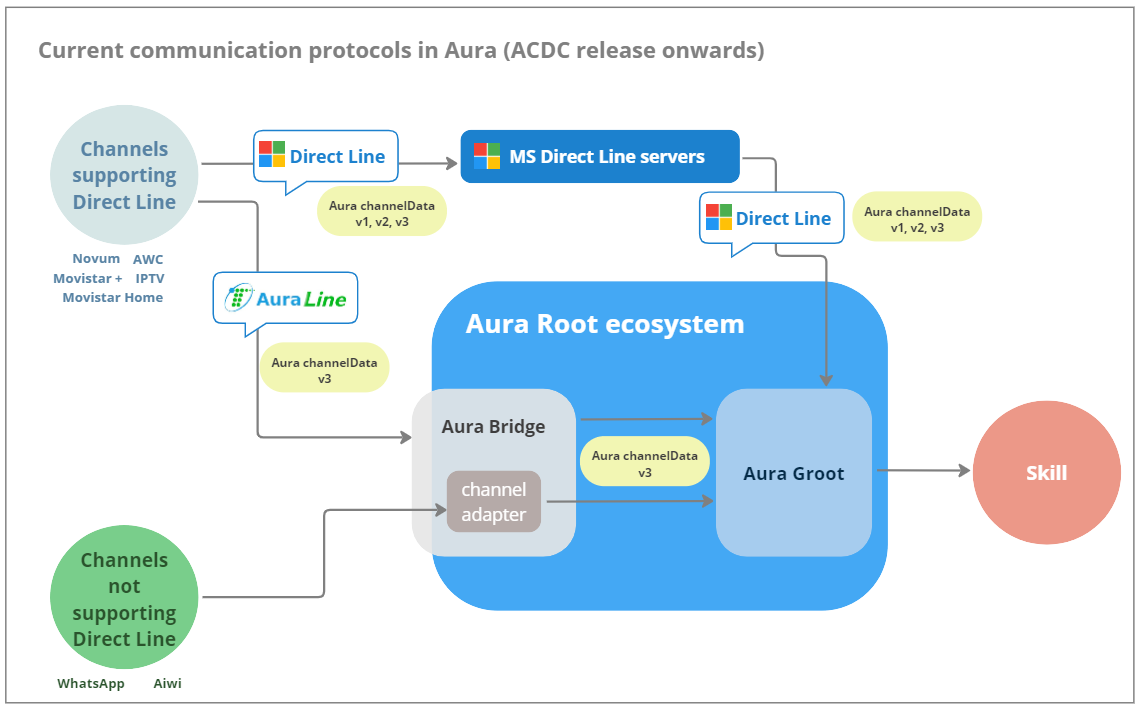
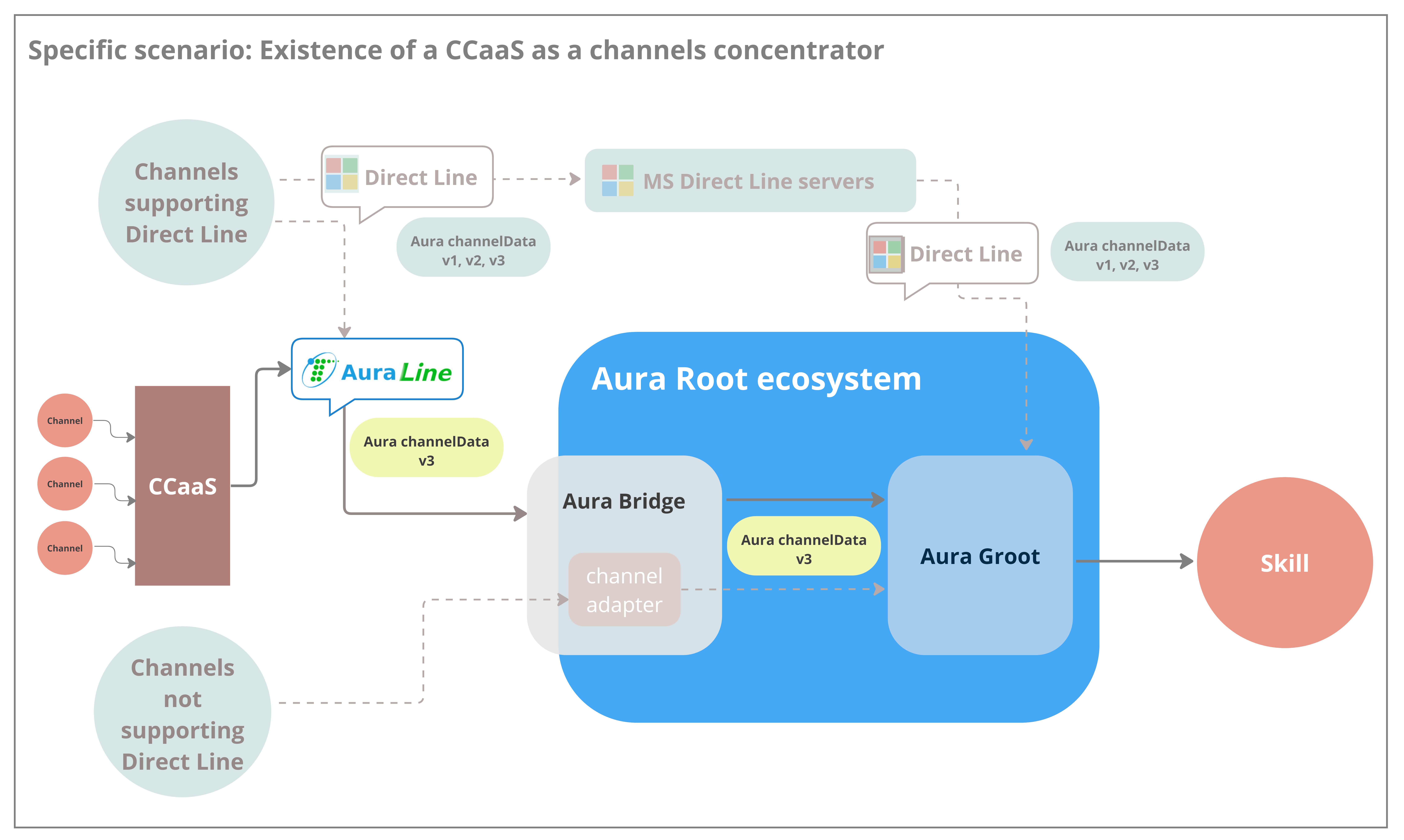
Auraline communication protocol is firstly conceived for a call center that aggregates different individual channels (call-center as a service), due to Direct Line limitations to manage this scenario. See details in the section Specific scenario for the use of Auraline communication protocol: CCaaS.
1.1 - Direct Line communication protocol
Direct Line communication protocol
Description of useful concepts to understand the Microsoft Direct Line protocol used by channels to communicate with Aura
Introduction
Aura platform is based on Microsoft Azure Bot Service and Bot Framework. Both provide tools to build, test, deploy, and manage intelligent bots all in one place. Through the use of a modular and extensible framework provided by the SDK, tools, templates and AI services, developers can create bots that use speech, understand natural language, handle questions and answers, and more.
One of the key capabilities of the Microsoft Azure Bot Service and Bot Framework is the integration of channels the final users can use to interact with the concrete bot instances implemented using this service and framework. This way, no matter which channel the final users interact with a concrete bot instance, they all are able to establish intelligent conversations with the bot.
Since the aura-groot leans on the Microsoft Azure Bot Service and Bot Framework, channels that use Direct Line communication protocol can “talk” to Aura and integrate with it, becoming Aura custom channels.
Direct Line API
The Microsoft Azure Bot Service exposes a general-purpose mechanism that channel developers can use when implementing or integrating new channels. This general-purpose communication mechanism is called Direct Line API.
The Direct Line API exposes a Web endpoint or URL of a service hosted in the Microsoft Azure cloud that channel developers can use to send messages directly to concrete instances of bot engines hosted in the Microsoft Azure Bot Service. This way, the Direct Line API provides a link between any third-party software component or application, typically used by the final user, and the concrete instance of the bot engine she may be willing to interact with.
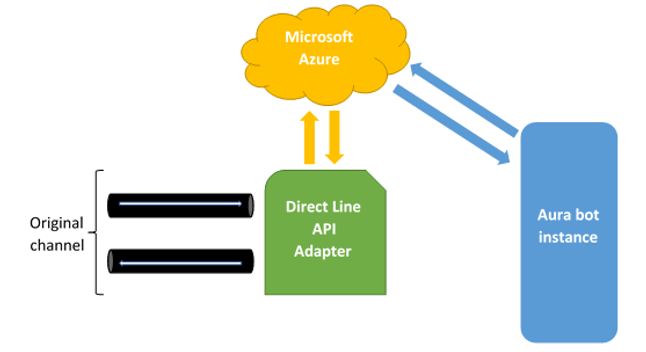
Typically, channels accessing through Direct Line to a bot send their requests calling the POST HTTP method of the /conversations/activities endpoint and, as it is an asynchronous API, read the responses from a WebSocket, which URL is obtained when requesting the token to access de API.
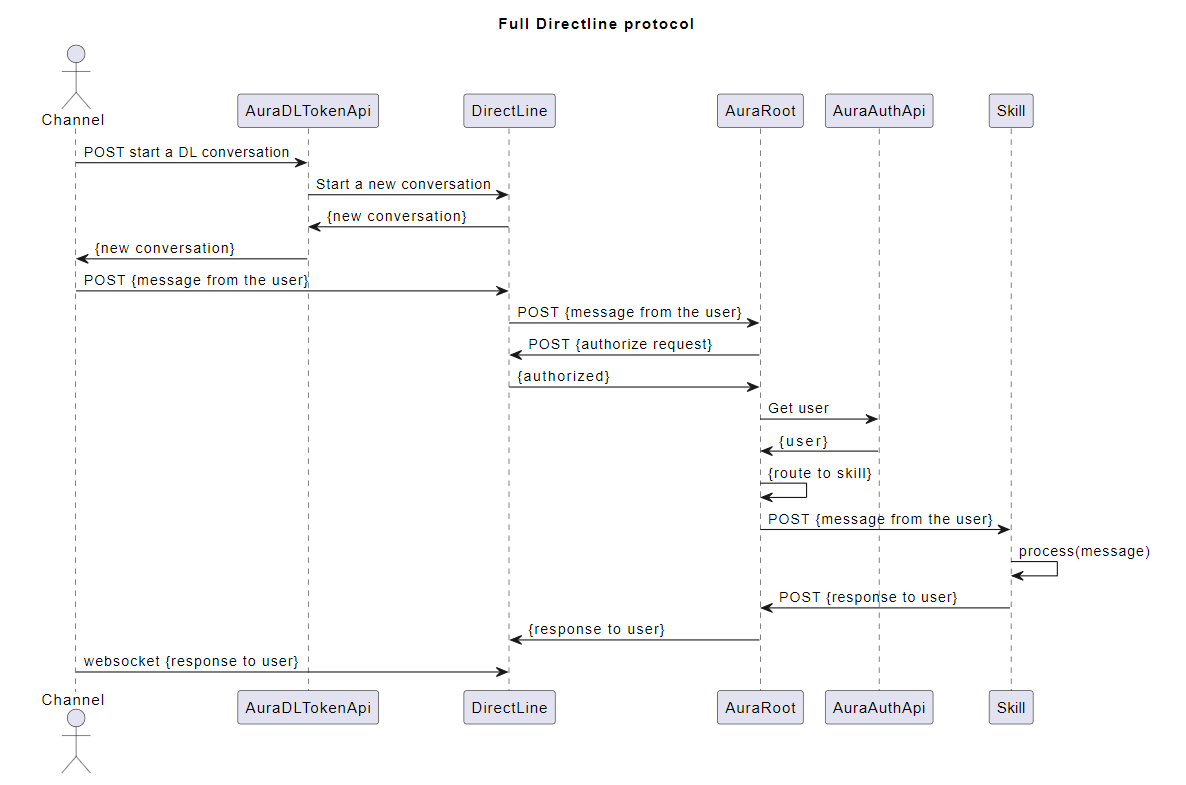
The general-purpose communication means exposed by the Direct Line API constitutes an additional mechanism channel developers and integrators can use to create as well as to integrate new channels Telefónica clients can use to interact with Aura. Thanks to it, any communication means can be integrated as an Aura channel.
The only thing which is needed is the proper transformation of the messages coming in and out of the concrete communication means as HTTP messages sent and received through the Direct Line API endpoint available at the Microsoft Azure cloud. This procedure is depicted in the following figure:
How to obtain a valid Direct Line token for Aura Groot
The objective of this document is to explain how an Aura’s channel might access the API that allows generating a Direct Line token valid for an Aura’s environment.
Channels are required to use tokens to communicate with Direct Line API. Each of those tokens is valid for one conversation (and one user) and until it expires (usually in one hour). If further interaction is required after the expiration, the token must be refreshed (get a new fresh version of the token with a later expiration time, calling directly to Direct Line API) before the previous valid token is expired. More information about token refreshing can be found in Direct Line documentation.
The first Direct Line token for each conversation must be obtained from aura-authentication-api. To use this API, a valid Aura APIkey is required:
- For integration environments, please ask it to Aura Global Operation Team.
- For preproduction and production environments, the OB Operation Team should provide it.
The API definition can be found in section Directline Token in aura-authentication-api. Note that there are two ways to ask for a token, one to get only the token (/token), and another one to get also the stream URL (/token/wss), this is the recommended one as it includes the WebSocket stream URL in the response.
The corresponding Operations Team should also provide the specific domain names where this API is published in each environment.
Request examples
Token only:
curl -X GET \
  https://svc-<env>.auracognitive.com/aura-services/v1/token \
  -H 'Authorization: APIKEY <YOUR-API-KEY>' \
  -H 'correlator: <CORR_UUID>' \
  -H 'cache-control: no-cache'
Token with web socket:
curl -X GET \
  https://svc-<env>.auracognitive.com/aura-services/v1/token/wss \
  -H 'Authorization: APIKEY <YOUR-API-KEY>' \
  -H 'correlator: <CORR_UUID>' \
  -H 'cache-control: no-cache'
Note that correlator header is optional, but it is convenient to send it, to track requests when it is necessary.
Response examples
These responses are returned by Direct Line servers and passed directly to the channel. The value of the field expires_in depends on what is returned by Direct Line, and it could have any numeric value, mainly 1800 or 3600.
The examples contain developed tokens already expired, so they cannot be used in real environments. A request with a valid APIkey must be done in order to get a real valid token.
Token only:
{
  "token": "ew0KICAiYWxnIjogIlJTMjU2IiwNCiAgImtpZCI6ICJodjRaemR0eXI1OXA3R1BSMEsycmhIUmJuUTQiLA0KICAieDV0IjogImh2NFp6ZHR5cjU5cDdHUFIwSzJyaEhSYm5RNCIsDQogICJ0eXAiOiAiSldUIg0KfQ.ew0KICAiYm90IjogIkJPVC1hdXJhLWFwLW5leHQiLA0KICAic2l0ZSI6ICJfLTJWLU9ocVl2NCIsDQogICJjb252IjogIklHUDR1N1VqR3V1SDA2TmZTSWV2dHktZXUiLA0KICAibmJmIjogMTY0OTc0NjA4MSwNCiAgImV4cCI6IDE2NDk3NDk2ODEsDQogICJpc3MiOiAiaHR0cHM6Ly9kaXJlY3RsaW5lLmJvdGZyYW1ld29yay5jb20vIiwNCiAgImF1ZCI6ICJodHRwczovL2RpcmVjdGxpbmUuYm90ZnJhbWV3b3JrLmNvbS8iDQp9.eZKIPviIA5WwtXPh3LEhD5je1bRR3svGom6KjhwKZpjv4HMCDmblspQSJ-Ax3G51jsZyU_NZM1HRvLweyfBC3TixlIPnLLQ2j55-ZUGQobVTVop84H3QRhUE13GwYPVrvgr_tRsqPTLlUMd7O9zpk5mZ_T-esMQXBwB51izTHRLExFAwDc1jIjV-FWJAQt6ROEZIqWJAMQ6WKuCsm1HXaa0NbCASq90cdZJZc_hyDeengrFklcIiXuzcoFYs3SNKBMCiYuHAWgYGWT6aHpWvreCjEo2VdkcJYkpweaBeagFRzftE3tyzDsb_QrNMrxrWuu5OXPi4j0r7avivL3ap-w",
  "expires_in": 3600
}
Token with web socket:
{
  "conversationId": "Da8BzFBhRMbDpcEN8mjqdn-eu",
  "token": "ew0KICAiYWxnIjogIlJTMjU2IiwNCiAgImtpZCI6ICJodjRaemR0eXI1OXA3R1BSMEsycmhIUmJuUTQiLA0KICAieDV0IjogImh2NFp6ZHR5cjU5cDdHUFIwSzJyaEhSYm5RNCIsDQogICJ0eXAiOiAiSldUIg0KfQ.ew0KICAiYm90IjogIkJPVC1hdXJhLWFwLW5leHQiLA0KICAic2l0ZSI6ICI4bVJVUmZyMEVxYyIsDQogICJjb252IjogIkRhOEJ6RkJoUk1iRHBjRU44bWpxZG4tZXUiLA0KICAibmJmIjogMTY0OTc0ODU4OCwNCiAgImV4cCI6IDE2NDk3NTIxODgsDQogICJpc3MiOiAiaHR0cHM6Ly9kaXJlY3RsaW5lLmJvdGZyYW1ld29yay5jb20vIiwNCiAgImF1ZCI6ICJodHRwczovL2RpcmVjdGxpbmUuYm90ZnJhbWV3b3JrLmNvbS8iDQp9.wGpPdShRoHf3M7zlTJO9nHyxD8bWF-3JeM7gd0BtrFLDCVEznO1j9Y2ovzRxmeJL8l4xo7T5tH538jAivexelpDb3VET7UvrhZVTNa19J7oOL-eqGtbspYoKp_2xzVNxm2w2lB5cRZVMfyzlvLptfx_-BD2XeohbYGbl_pnmLe6N-490h1S5bE613t1p4bYD1bPA0IKeGhhaiUUBMcA5mCO84eurYesLECAz3T5mCgLP2Xfq7FCeiFmxO4DiEZujKh5FSKd9Gp076ADHdIxxilvKdTFlXykx_v4-yx0xm8YoyHChyRIF9hEzX4dm6hsWLYsgCiM-t60I32_KSRJWxg",
  "expires_in": 3600,
  "streamUrl": "wss://directline.botframework.com/v3/directline/conversations/Da8BzFBhRMbDpcEN8mjqdn-eu/stream?watermark=-&t=ew0KICAiYWxnIjogIlJTMjU2IiwNCiAgImtpZCI6ICJodjRaemR0eXI1OXA3R1BSMEsycmhIUmJuUTQiLA0KICAieDV0IjogImh2NFp6ZHR5cjU5cDdHUFIwSzJyaEhSYm5RNCIsDQogICJ0eXAiOiAiSldUIg0KfQ.ew0KICAiYm90IjogIkJPVC1hdXJhLWFwLW5leHQiLA0KICAic2l0ZSI6ICI4bVJVUmZyMEVxYyIsDQogICJjb252IjogIkRhOEJ6RkJoUk1iRHBjRU44bWpxZG4tZXUiLA0KICAibmJmIjogMTY0OTc0ODU4OCwNCiAgImV4cCI6IDE2NDk3NDg2NDgsDQogICJpc3MiOiAiaHR0cHM6Ly9kaXJlY3RsaW5lLmJvdGZyYW1ld29yay5jb20vIiwNCiAgImF1ZCI6ICJodHRwczovL2RpcmVjdGxpbmUuYm90ZnJhbWV3b3JrLmNvbS8iDQp9.ctcwxvoyi8EdSee3x3TOogvy8puphmpsn8wouTaPZzFaVFb4YcuE-336e4bg99uCPffHAlVPLBc8xpVjeM4JdDQWncO-TpPFlj7fM_x_YmunlVLS4OsNspnMQ9lUgn6FLBD9GUdJ5GRySOltrDbsoHI0EMaljs2ni6b8ZQ9LKFdY8QyAKRqS9Eto1_MCiPmuseM_KM8VtL2fZMmhzwfhxf7dOHbEtu121Nj8LTxZTNI1f5gpKsEuw6neX1g7MQyrD-ajr0s-hD90g5r79vQvompVzFf3LgoXsMdKLIgz8PkVg6hIJwQFIC4piSHV7--g8k-alJ-XMspNGBCeD3dVfw",
  "referenceGrammarId": "f4d20b6f-6e5c-175e-abdf-e9eb65e5d058"
}
API errors handling
The aim of this endpoint is to allow the channels to obtain a valid token to access Direct Line API without sharing the primary keys of the bot with all of them. So, basically, the endpoint just wraps the requests to Direct Line API, this includes that all the errors returned by Direct Line API are returned to the caller.
| Status Code |
Meaning |
Recommended action |
| 400 |
Error in the request. It could be an error in the request of the channel to Aura, or in Aura’s request to Direct Line. |
Validate the request being launched. If it seems to be ok, request a validation of the logs in the corresponding Aura environment. |
| 401 |
Invalid credentials. It could be an error in the APIKey or in the aura-authentication-api configuration. |
Validate if your APIKey is valid. Request a validation of the logs in the corresponding Aura environment. |
| 429 |
Too many requests. Direct Line service is having too many requests to get a valid token for this bot. |
An exponential backoff system must be implemented to avoid making the situation worse. So, you should wait for 30 seconds before launching a new request. If this gets a 429 again, you should wait for 1 minute, then 2 minutes, etc. Consider that in order to avoid this situation, all the requests of your users must be taken into account all together. |
| 500 |
Internal error. |
Wait for the server to recover, but request to Aura Operations Team of the environment the resolution of the issue. |
Only the body and the status code of the response of Direct Line are returned to the caller, none of the headers are included.
Using the token: calling Direct Line API
HTTP GET requests made by the channel (to send or receive activities) will be authorized by a token (the first one, or after refresh) through the Authorization header, for instance:
POST https://directline.botframework.com/v3/directline/conversations/<CONV_ID>/activities
Authorization: Bearer <YOUR_TOKEN>
To get activities through a web socket, the channel must use the stream URL obtained in /token/wss. The token is sent in t param, and it will expire after one minute after the token request.
Once connected the web socket, it will get activities for one hour. After that time, a new token (through refreshing) and a new web socket connection are required, setting the fresh token within the t param in stream URL, for instance:
wss://directline.botframework.com/v3/directline/conversations/<CONV_ID>/stream?watermark=-&t=<NEW_TOKEN>"
Note that refresh token must be obtained before current token is expired.
Full communication flow
The flow to get the first token, and optionally refresh it, for conversations longer than one hour, is as follows:
sequenceDiagram

Channel ->> Auth API: Get Wss token (API key)
Auth API ->> Direct Line: Start conversation (app token)
Direct Line ->> Auth API: {conversationId, token, expires_in, streamUrl}
Auth API ->> Channel: {conversationId, token, expires_in, streamUrl}
loop send / receive activities during one hour
  Channel -->> Direct Line: POST /conversation/activities (token)
  Direct Line -->> Channel: [activities]
end

alt refresh token
  Channel ->> Direct Line: Refresh (token)
  Direct Line ->> Channel: new_token
  loop send / receive activities during one hour
    Channel -->> Direct Line: POST /conversation/activities (new_token)
    Direct Line -->> Channel: [activities]
  end
else
  Channel -->> Direct Line: POST /conversation/activities (token)
  Direct Line -->> Channel: Token expired (403)
end
Note that the sending of activities from Direct Line to the channel may be through a web socket (if opened) or HTTP GET request from channel.
1.2 - Auraline communication protocol
Auraline communication protocol
Description of the Auraline communication protocol used by channels to communicate with Aura
Related documents
Guidelines for connecting a channel to Auraline
Introduction
Aura Platform Team has developed a new communication protocol named Auraline. This is a proprietary protocol, developed and exclusively owned by Aura Platform Team for facilitating communication between channels and Aura. Auraline is based on Microsoft Direct Line and can be considered as a local implementation of the Microsoft protocol, eliminating dependencies on Microsoft Azure Bot Service.
This particularity provides significant advantages, including cost saving, higher flexibility and the ability to plan future developments according to our specific needs. Additionally, it enables us to address new backend-to-backend scenarios, such as managing a channels aggregator system or responding across multiple channels or applications instead of a single one.
Auraline facilitates the process for integrating new channels into the communication framework. Moreover, it enables an easy transition for channels that are currently integrated into Direct Line, minimizing disruptions and maximizing interoperability.
Auraline uses Aura request-response semantic model v3, implemented by the normalized version of the property channelData v3.
Communication protocol
Auraline facilitates the communication of a channel with aura-bridge and aura-groot, consequently establishing a connection with the skills connected to aura-groot. To enable this communication, specific plugins and swaggers are developed in aura-bridge to support this protocol.
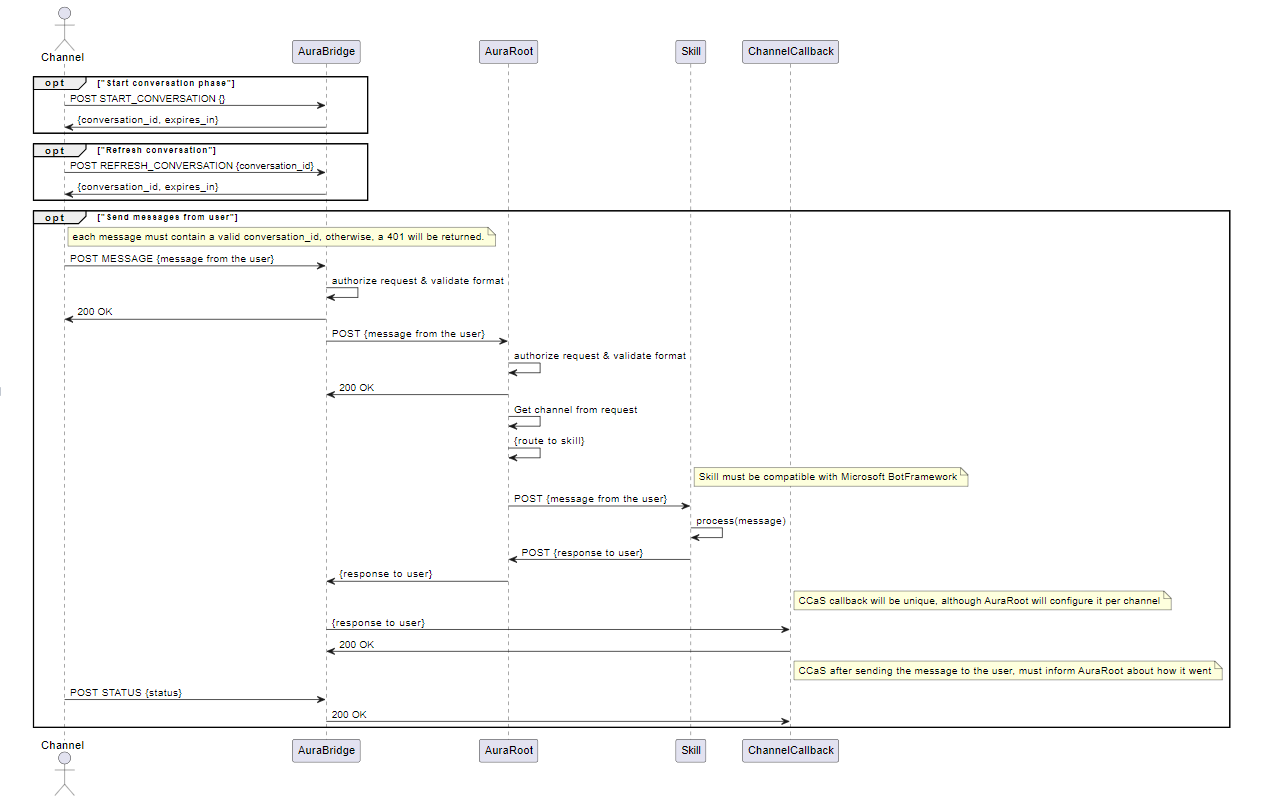
Given its foundation on the Microsoft Direct Line protocol, Auraline adopts the Direct Line JSON format and integrates the same basic processes as those in Microsoft framework:
As previously mentioned, Auraline relies on our request-response semantic model v3. The communication between aura-groot and aura-bridge will always use the single message response format in order to simplify the integration and ensure the orderly delivery of responses to the users.
Responses between aura-bridge and the channel will include an array of activities in a unique answer for each message, that will be orderly delivered to the channel.
The following figure shows the sequence diagram of Auraline communication protocol:
Specific scenario for the use of Auraline communication protocol: CCaaS
The development of Auraline communication protocol is initially aimed at resolving the scenario in which different channels are grouped together in a CCaaS (call-center as a service) that acts as a channel concentrator.
This scenario is schematically shown in the following figure:
2 - Channels authentication
Channels authentication
How an Aura channel can authenticate users, in different scenarios
Scenarios for users’ authentication
Regarding authentication, an Aura channel can deal with two different scenarios, which are fully explained in the succeeding sections:
- Dealing with authenticated users
- Dealing with anonymous users
Authenticated users
Aura supports two types of authentication when referring to channels:
- Integrated (or federated) authentication: aura-bot is responsible for the user’s authentication, i.e., when the channel sends its user identifier to aura-bot, and the bot executes the user authentication.
- Non-integrated authentication: the channel executes all the authentication processes for the user and sends to Aura the resulting
authorization_id.
Integrated authentication
The case of integrated authentication is characterized by the fact that the Aura channel is the one starting the authentication process, sending an account linking request to the aura-bot instance including the channel own user identifier, that will be used as a base for building an auraId.
It is used for those channels that cannot launch a Kernel authentication process themselves, before making a request to Aura. Therefore, all the authentication process is managed by the aura-bot instance making requests to Kernel when needed.
The message sent from the Aura channel to the aura-bot instance could contain a text similar to “I want to authenticate myself”, or an auraCommand with an account linking intent, or a use case that requires authentication.
Account linking auraCommand example:
{
  ...
  "from": {
    "id": "<channel-user-identifier>"
    ...
  },
  {
    "channelData": {
      "auraCommand": {
        "type": "suggestion",
        "value": {
          "intent": "intent.account.linking"
        }
      }
    }
  }
}
Channels with this authentication are:
Non-integrated authentication
In the case of non-integrated Authentication, the Aura channel must be registered as a Kernel Platform application, so it can have access to the Kernel Platform APIs.
Further information regarding this application registration process can be found in the Kernel documentation about getting credentials.
Please, remember to request access to the proper purpose that enables accessing to Aura Users APIs.
Once the Aura channel has been registered as an application, it will have access to the Kernel Platform Aura-Services API.
-
The Aura channel should launch an authorize request to authenticate the end user. Follow Kernel documentation about how to consume APIs.
-
Afterwards, the Aura channel should make a request to Aura getAuraId API.
- Firstly, the channel generates a 3-legged access token for the given user, including the purpose to access the Aura-Services APIs.
- Then, it makes a request to the
GetAuraId endpoint.
- The channel must call this API each time there is a new authorization session in the channel, because
aura_id is only valid while the session or authorization_id is valid.
- Remember to log every request to Kernel including the
x-correlator header (correlation id for the different services), so all requests can be traced in the channel, Aura and Kernel, and it is possible to have an E2E view of each request. The same correlator should be used in all requests related to a single user interaction, it should be sent to Aura, Kernel, etc.
You can cache the aura_id and send requests to Aura using that aura_id. If the aura_id is no longer valid, you will receive an error message like:
Channel data v3 (current):
"text": "<error_message>",
"inputHint": "acceptingInput",
"channelData": {
  "status": {
    "code": "ERROR.USER.UNAUTHENTICATED",
    "params": {"auraId": "received_aura_id"},
    "message": "Invalid aura user"
  }
}
Channel data v1 (obsolete):
"text": "<error_message>",
"inputHint": "acceptingInput",
"channelData": {
  "Error": {
    "code": "UNAUTHENTICATED",
    "data": "received_aura_id",
    "message": "Invalid auraId"
  }
}
If you receive an error like these, you will need to:
- Refresh the
authorization_id by calling the authorize method from Telefonica Kernel auth-server.
- Call the getAuraId API again from Kernel APIs.
-
The Telefonica Kernel Platform API calls the aura-services API that will validate if the user already exists or not.
- If the user exists with the same
user_id, authentication_context and authorization_id, the same user data will be returned to Kernel and to the Aura channel, including the aura_id of the user.
- If the user does not exist, it is created in the Aura users’ database and the result is returned to the Aura channel, which can get the
aura_id of the user.
Just in the case of non integrated authentication, the aura_id returned by Kernel API will be used as the from.id property in all requests to be sent to the aura-bot instance. For integrated authentication the channel just sends its internal user identifier.
Anonymous users
Anonymous users can only access a limited set of use cases that do not need granted access to any user data, for instance: generic questions or greetings.
- If a channel allows anonymous users, it would send an autogenerated
aura_id in the from.id property of the request in UUID format.
- If the channel does not support anonymous users, the user will be considered unauthenticated and will return an error like in non-integrated authentication.
Usually, if a use case is for channels that support anonymous users, an authentication dialog will be launched, specific to each channel, which will allow the user to log in to access the use case. Channels that support anonymous users usually have integrated (federated) authentication. Some authentication use cases are SMS-OTP in WhatsApp channel.
If the intention of the user is one of the admitted without authentication, the corresponding response will be sent. Otherwise, a prompt to launch the authentication process or a message informing that anonymous users cannot access that information will be returned.
Users expiration
The time to expire a user can be configured by channel with the configuration variable authorizationIdExpiration.
Learn how to do it in the document Configure users expiration.
3 - Channel Model
Aura channel model
The Aura channel model includes all the properties required for channels to communicate with Aura
Introduction
When integrating a channel into Aura, there are various properties, both mandatory and optional, that must be defined for the registration of this channel and in order to set its operational configuration within Aura.
In this framework, two scenarios arise, depending on the type of skill:
-
Registration of a channel that works against aura-bot skill
The tables below include the properties definition for this scenario
-
Registration of a channel that works against a third-party skill
This scenario includes certain particularities which are specifically described in the affected properties and marked as:
The tables that define Aura channel model includes the property type and a brief description of each of them, together with a column indicating which are the Aura Platform components affected by this property.
- Properties marked in bold are mandatory.
- Properties marked in italics are optional.
- Values of
Applicable Aura Platform components column:
- aura-configuration-api is not included, because it handles the configuration, so it uses everything.
- aura-bridge means aura-bridge and aura-bridge-outbound.
Channel configuration
| Property |
Type |
Description |
Applicable Aura Platform components |
|
| name |
string |
Descriptive name of the channel. Lowercase hyphen-separated words |
All Aura components |
|
| prefix |
string |
Minimal expression of channel name. Lowercase hyphen-separated words |
All Aura components |
|
| id |
UUID |
UUID that uniquely identifies the channel in Aura |
All Aura components |
|
| brand |
string |
Identifier of the Telefónica brand this channel belongs to. It must be one of the brands defined in Kernel D_Gbl_Brand global dimension entity. |
All Aura components |
|
| contact |
string |
Identifier of the type of contact channel. It must be one of the contact channels defined in Kernel D_Gbl_Contact_Channel global dimension entity. |
All Aura components |
|
| dialogLibraries |
array |
Array of dialogLibrary model with all the use cases supported by the channel.
Check the complete dialogLibrary model |
aura-bot |
|
| actions |
object |
List of configurations for the different actions sent by aura-bot.
Check the complete actions model |
aura-bot |
|
| rcs |
object |
RCS configuration. Type RCS model.
Check the complete RCS model |
aura-bridge |
|
| requestOptions |
object |
Object with request options. Type request model.
Check the complete requestOptions model |
aura-groot, aura-bot, aura-bridge, aura-file-manager |
|
| responseOptions |
object |
Object of response model that describes all the options of the response to the channel.
Check the complete responseOptions model |
aura-groot, aura-bot, aura-bridge, aura-file-manager |
|
| security |
object |
Authentication options object type security model.
Check the complete security model |
aura-bot, aura-bridge, aura-file-manager, aura-authentication-api |
|
| whatsapp |
object |
Object of whatsApp model that describes all the WhatsApp channel options.
Check the complete WhatsApp model |
aura-groot, aura-bot |
|
| auraBotCacheTTL |
number |
Set custom cache lifetime in MongoDB by channel |
aura-bot, aura-groot |
|
| type |
string |
Channel type: whatsapp, auraline, rcs. Used by aura-bridge to determine the correct plugin to handle incoming bot responses |
aura-bridge |
|
| atria |
object |
Object of Atria model with application and preset configs by intent.
Check the complete Atria model |
aura-groot, aura-bot |
|
1.1. NLP model
Channels working against a third-party skill: non-applicable model
| Property |
Type |
Description |
Applicable Aura Platform components |
| enabled |
boolean |
It indicates whether or not the channel counts on any training handled by aura-nlp. If not present, it means that no training has been provided for the channel |
aura-bot, aura-nlp |
| stages |
array |
List of nlp stages configured. This field should NOT be configured. Is automatically filled by aura-config-provision job. |
aura-kpis-uploader, nlp-provisioning |
Channels working against a third-party skill: non-applicable model
| Property |
Type |
Description |
Applicable Aura Platform components |
2.1. dialogLibrary model
| Property |
Type |
Description |
Applicable Aura Platform components |
| name |
string |
Unique name of the library |
aura-bot |
| dialogs |
array |
Array of the dialog model, with all the dialogs supported by this library |
aura-bot |
| authorization |
authorizationConfiguration model |
Authorization scopes and purposes |
aura-bot |
2.1.1. dialog model
| Property |
Type |
Description |
Applicable Aura Platform components |
| id |
string |
Unique identifier of the dialog. Usually a descriptive name |
aura-bot |
| prefix |
string |
Unique identifier with the acronym of the dialog |
aura-bot |
| triggerConditions |
array |
Array of triggerCondition model, with all the triggers leading to this dialog |
aura-bot |
| channelDataVersion |
string |
channelData version |
aura-bot |
| suggestions |
boolean |
Boolean value that indicates if the dialog should show suggestions |
aura-bot |
| allowAnonymous |
boolean |
Boolean value that indicates if the dialog allows anonymous users |
aura-bot |
| authorization |
object |
Array of the authorizationConfiguration model |
aura-bot |
| bypass |
object |
bypass model |
aura-bot |
2.1.1.1. triggerCondition model
| Property |
Type |
Description |
Applicable Aura Platform components |
| id |
string |
Unique identifier of the intent. It should follow this format intent.[case].[specific_resolution] |
aura-bot |
| contextFilters |
array |
Array of contextFilter model, with all the filters based on the user context that will control how the dialog is executed |
aura-bot |
| entity |
string |
Canonical value of the entity, when needed to fill the intent resolution |
aura-bot |
| settings |
intentSettings |
Intent properties which can be used to customize trigger conditions |
aura-bot |
2.1.1.1.1. contextFilter model
| Property |
Type |
Description |
Applicable Aura Platform components |
| name |
string |
Descriptive name of the filter |
aura-bot |
| type |
string |
Descriptive name of the filter type |
aura-bot |
| conditions |
string |
Boolean condition in spleen format that will control how the filter is validated. For instance: /authData/subscriptionType neq 'postpaid' will be truly if the UserType of the logged user is not postpaid |
aura-bot |
| true-false |
object |
conditionValidation model that describes the behavior of the dialog under each result |
aura-bot |
2.1.1.1.1.1. conditionValidation model
| Property |
Type |
Description |
Applicable Aura Platform components |
| name |
string |
Descriptive name of the condition validation |
aura-bot |
| breakDialogExecution |
boolean |
true if the dialog execution should be stopped |
aura-bot |
| breakFilterEval |
boolean |
true if the filters validation should be stopped if this validation is successful |
aura-bot |
| resource |
string |
Reference of the copy to be returned to the user if this validation is successful |
aura-bot |
| suggestions |
string |
Flag to indicate whether or not the dialog should show suggestions if contextFilter is true |
aura-bot |
| redirectToIntent |
string |
New intent to redirect |
aura-bot |
| originalIntent |
string |
Original intent when context filter be applied |
aura-bot |
2.1.1.1.2. intentSettings model
| Property |
Type |
Description |
Applicable Aura Platform components |
| type |
string |
intentSettings type |
aura-bot |
| action |
string |
Action to be performed and attached to the output message used in different channels |
aura-bot |
| actions |
actionConfig |
V3 Actions to be performed and attached to the output message used in different channels |
aura-bot |
| locales |
intentSettingsLocales |
Success or error messages to be displayed in output message |
aura-bot |
| payload |
object |
Parameters needed to recreate output message |
aura-bot |
| addEntitiesToPayload |
boolean |
Flag to indicate whether or not entities must be applied to the payload |
aura-bot |
| needPlayingContent |
boolean |
Flag to indicate whether or not playingContent is needed |
aura-bot |
| sound |
Sound |
Configuration involving sounds reproduced in different channels. Available values are defined in Sound enum. |
aura-bot |
| swapEntityCanonValue |
string |
Array of entity’s types which will be swapped payload entity value from entity.entity to entity.canon |
aura-bot |
| indexedResourceBase |
string |
POEditor resource reference to obtain deterministic value. e.g. generic:faq-answer. |
aura-bot |
| addEntitiesToPayload |
boolean |
Flag to indicate whether or not entities must be applied to the payload. |
aura-bot |
| confirmSuggestion |
boolean |
Flag to indicate whether or not suggestions must be confirmed. |
aura-bot |
| resolutionIntent |
string |
Intent returned by movistarResolution API. |
aura-bot |
| resolutionEntities |
Entity[] |
Entities returned by movistarResolution. |
aura-bot |
| payloadType |
payloadType |
Payload type included in payloadType enum such as ‘radio’. |
aura-bot |
| isFullscreen |
boolean |
Flag to indicate fullScreen behavior. |
aura-bot |
| functions |
functionsConfig |
Parameters related to the configuration of functions |
aura-bot |
| suggestions |
boolean |
Flag to indicate if suggestions will be returned |
aura-bot |
2.1.1.1.2.1. actionConfig model
| Property |
Type |
Description |
Applicable Aura Platform components |
| name |
string |
Action name |
aura-bot |
| target |
string |
Action target |
aura-bot |
| params |
object |
Action params |
aura-bot |
| postBack |
object |
Action postBack |
aura-bot |
2.1.1.1.2.2. intentSettingsLocales model
| Property |
Type |
Description |
Applicable Aura Platform components |
| success |
string |
Success message array |
aura-bot |
| error |
string |
Error message array |
aura-bot |
2.1.1.1.2.3. functionsConfig model
| Property |
Type |
Description |
Applicable Aura Platform components |
| params |
string[] |
Function params |
aura-bot |
| algorithm |
string |
Function algorithm name or js plain code |
aura-bot |
2.1.1.2. bypass model
| Property |
Type |
Description |
Applicable Aura Platform components |
| duration |
string |
Time in minutes during which the bypass is valid. The dialog must provide a way of setting a default duration that will depend on the use case |
aura-bot |
| payloadName |
boolean |
true if the dialog execution should be stopped |
aura-bot |
| initialData |
object |
Initial data to store in the bypass. Bypass.data |
aura-bot |
| recognizersEnabled |
boolean |
Enable recognizers when bypass is active |
aura-bot |
| recognizersBreakIntents |
string |
Break intents to replace dialog |
aura-bot |
2.1.2. authorizationConfiguration model
| Property |
Type |
Description |
Applicable Aura Platform components |
| scopes |
string |
Scopes defined in Kernel |
aura-bot |
| purposes |
string |
Purposes defined in Kernel |
aura-bot |
4.1. actions model
| Property |
Type |
Description |
Applicable Aura Platform components |
| afterLogin |
actionAfterLogin |
Configuration for action sent after login in WhatsApp |
aura-bot |
| thirdPartyApp |
actionThirdParty |
Configuration for action to launch 3PA from dialog |
aura-bot |
4.1.1. actionAfterLogin model
| Property |
Type |
Description |
Applicable Aura Platform components |
| action |
string |
Action sent in channelData |
aura-bot |
| type |
string |
Type sent in channelData |
aura-bot |
| data |
object |
Data sent in channelData. It can contain the field originalIntent |
aura-bot |
4.1.2. actionThirdParty model
| Property |
Type |
Description |
Applicable Aura Platform components |
| action |
string |
Action sent in channelData |
aura-bot |
| type |
string |
Type sent in channelData |
aura-bot |
| data |
object |
Data sent in channelData |
aura-bot |
| contentType |
string |
ContentType of the data in channelData |
aura-bot |
5.1. RCS model
| Property |
Type |
Description |
Applicable Aura Platform components |
| agentId |
string |
RCS agent ID |
aura-bridge |
| clientToken |
string |
Token configured in RCS webhook |
aura-bridge |
| email |
string |
RCS account email |
aura-bridge |
| privateKey |
string |
RCS account private key in base64 format |
aura-bridge |
6.1. requestOptions model
| Property |
Type |
Description |
Applicable Aura Platform components |
| fileAttachments |
fileAttachmentsModel |
Set of settings needed to processing file attachments |
aura-bot, aura-file-manager |
| requestOptionsVersion |
any |
Set of settings depending on the version |
aura-bot, aura-bridge, aura-file-manager |
| defaultIntentByAttachment |
any |
Key value pairs with types of attachments and the intent to route these messages |
aura-bot |
6.1.1. fileAttachments model
| Property |
Type |
Description |
Applicable Aura Platform components |
| enabled |
boolean |
Enable/disable file attachment processing |
aura-bot, aura-file-manager |
| enabledExtensions |
string |
Array with accepted file extensions (if not present, then all default files are accepted) |
aura-file-manager |
| customProactiveDialogId |
string |
Dialog identifier that allows to substitute core unexpected-file dialog |
aura-bot |
| validation |
validation |
Set of validations to apply to a file attachment |
aura-file-manager |
6.1.1.1. validation model
Validation is an object where keys are file extensions and values are objects with validations to apply to that particular file extension. The current available validations are related to size.
| Property |
Type |
Description |
Applicable Aura Platform components |
| size |
Size |
Size validation params |
aura-file-manager |
6.1.1.1.1. size
| Property |
Type |
Description |
Applicable Aura Platform components |
| max |
number |
Maximum size accepted |
aura-file-manager |
| min |
number |
Minimum size accepted |
aura-file-manager |
7.1. responseOptions model
| Property |
Type |
Description |
Applicable Aura Platform components |
| dialogContext |
dialogContext model |
DialogContext configuration |
aura-bot |
| versions |
responseOptionsVersion |
Response mode to be used by version (batch messages or single messages) |
aura-bot, aura-bridge |
| needsEmptyResponseEvent |
boolean |
If true, the bot will respond with an event if no response is sent to an input message |
aura-bridge |
| outputMessageFormat |
string |
Type of message supported by the channel. Possible values:
- custom: use for TV channels. Recommended value in new channels
- enrich: use for channels supporting Adaptive Cards (Novum)
- simple: use for channels supporting Hero Cards (WhatsApp)
Channels working against a third-party skill: custom |
aura-bot |
| sendSpeak |
boolean |
Flag to indicate that this channel returns speak with all messages |
aura-bot |
| disambiguationFormat |
string |
Format of disambiguation supported by the channel. Possible values: suggestions, prompt, disabled. By default, prompt |
aura-bot |
| textConvert |
boolean |
It indicates whether the texts of each of the messages received must be converted to the WhatsApp markdown format. By default: true |
aura-bridge |
| callbackOptions |
callbackOptions |
Parameter that defines URL and headers for Auraline callback |
aura-bridge |
| suggestionsNumber |
number |
It indicates the number of suggestions to be returned in a message. Only applies to channelData v3. |
aura-bot |
7.1.1. dialogContext model
| Property |
Type |
Description |
Applicable Aura Platform components |
| normalizeTerms |
boolean |
It normalizes the options of dialogContext before trying to match. By default: true |
aura-bot |
| disabled |
boolean |
It disables the generation of dialogContext. Default: false |
aura-bot |
| disabledMerge |
boolean |
It disables the use of the custom dialogContext. If a custom dialogContext exists, this won’t be merged with the auto-generated. By default: false |
aura-bot |
| processFromClient |
boolean |
It processes the dialogContext sent in the channelData of client message. By default: false |
aura-bot |
| returnToClient |
boolean |
It sends the current dialogContext in the channelData to the client message. By default: false |
aura-bot |
| defaultListType |
defaultListType model |
Improved recognition of numbers. |
aura-bot |
| promptChoice |
dialogContextGenerated model |
Object of dialogContextGenerated |
aura-bot |
| cardActions |
dialogContextGenerated model |
Object of dialogContextGenerated |
aura-bot |
7.1.1.1. defaultListType model
| Property |
Type |
Description |
Applicable Aura Platform components |
| DefaultListType |
enum |
- none: no generated list
- ordinal: only ordinal values are generated and will be included in the text field of the dialogContext
- cardinal: only the list of cardinals for each dialogContext option will be generated
- ordinalCardinal: both ordinal and cardinal values for each dialogContext option are generated |
aura-bot |
7.1.1.2. dialogContextGenerated model
| Property |
Type |
Description |
Applicable Aura Platform components |
| generate |
generateType model |
Value representing when the list is generated |
aura-bot |
| generateList |
boolean |
Boolean value to indicate if the list is generated |
aura-bot |
7.1.1.2.1. generateType model
| Property |
Type |
Description |
Applicable Aura Platform components |
| Generate |
enum |
- never: No lists are generated for dialogContext options. If this property is at channel level, options in Prompts and CardActions will be ignored
- always: The list will always be generated
- custom: If the channel has this value, then it will depend on the configuration of each Prompt or CardAction |
aura-bot |
7.1.2. responseOptionsVersion model
| Property |
Type |
Description |
Applicable Aura Platform components |
| key |
string |
Bot response version with the format: v1, v2, v3, etc. |
aura-bot |
| value |
responseOptionsVersionParameters |
Bot response mode for that version |
aura-bot |
7.1.2.1. responseOptionsVersionParameters model
| Property |
Type |
Description |
Applicable Aura Platform components |
| batchMessages |
boolean |
If batchMessages will be used |
aura-bot |
| singleMessage |
boolean |
If singleMessage will be used |
aura-bot |
| defaultDirectlineVersion |
boolean |
Flag to indicate if messages should be sent in this version between aura-bridge and aura-bot. Only one version can be set as default |
aura-bridge |
7.1.3. callbackOptions model
| Property |
Type |
Description |
Applicable Aura Platform components |
| url |
string |
Callback URL to send responses from Auraline |
aura-bridge |
| headers |
callbackOptionsHeaders |
Headers sent in the callback request |
aura-bridge |
| refreshOptions |
refreshOptions |
Configurations needed to refresh authorization token if needed |
aura-bridge |
| Property |
Type |
Description |
Applicable Aura Platform components |
| authorization |
string |
Authorization header sent in the request |
aura-bridge |
7.1.3.2. refreshOptions model
| Property |
Type |
Description |
Applicable Aura Platform components |
| refreshToken |
string |
Token used to refresh authorization token |
aura-bridge |
| expiresAt |
string |
Date of token expiration in ISO 8601 format |
aura-bridge |
| refreshTokenUrl |
string |
Endpoint to refresh token |
aura-bridge |
| clientId |
string |
Oauth clientId |
aura-bridge |
| clientSecret |
string |
Oauth secret |
aura-bridge |
| redirectUri |
string |
Oauth redirect uri |
aura-bridge |
| Property |
Type |
Description |
Applicable Aura Platform components |
7.1.4.1. disambiguationOptions model
| Property |
Type |
Description |
Applicable Aura Platform components |
| returnScore |
boolean |
Flag to return the score from disambiguation in NLP as a Service |
aura-gateway-api |
8.1. security model
| Property |
Type |
Description |
Applicable Aura Platform components |
| anonymous |
string |
Type of anonymous users that this channel handles. Values:
- anonymous: unauthenticated user
- identifiable: the channel userId univocally identifies a user in the channel |
aura-bot |
| allowUserProfile |
boolean |
Flag to indicate whether or not UserProfile Kernel API must be called during the authentication process. Values:
- True, if authentication allows calling UserProfile Kernel API
- False, if authentication does not allow calling UserProfile Kernel API |
aura-bot |
| anonymousSettings |
anonymousSettings |
Settings for checking user profile on anonymous users |
aura-bot |
| channelId |
string |
Readable channel identifier, resulting from the consolidation of the C360 and Telco listings, used for security purposes |
aura-bot, aura-authentication-api |
| authScopes |
string |
Blank separated list of the scopes needed by the users of this channel to request an access token to Kernel in order to access the corresponding APIs |
aura-bot |
| authPurposes |
string |
Blank separated list of the purposes needed by the users of this channel to request an access token to Kernel in order to access the corresponding APIs |
aura-bot |
| federatedAuthentication |
federatedAuthentication |
Model with the information to handle integrated authentication for its users |
aura-bot, aura-authentication-api |
| termsAndConditions |
termsAndConditionsConfiguration |
Set of settings needed to activate Terms and Conditions in the channel |
aura-bridge |
8.1.1. anonymousSettings model
| Property |
Type |
Description |
Applicable Aura Platform components |
| enableUserProfile |
boolean |
true means that user profile API will be requested for anonymous users, to check if current phone number is corporate. false or empty will not check user profile API |
aura-bot |
| checkPromptedNumber |
boolean |
true means that user profile API will be requested to check if prompted phone number is corporate. false or empty will not check user profile API for prompted phone numbers |
aura-bot |
8.1.2. federatedAuthentication model
| Property |
Type |
Description |
Applicable Aura Platform components |
| loginUrl |
string |
String with the IdBroker URL to be used to authenticate this channel users. If not set, the requests will be sent to AURA_BOT_DIALOG_ACCOUNT_LINKING_URL environment configuration |
aura-bot |
| auraIdSeparator |
string |
Separator to be used in aura-authentication-api to store the auraId of the user: <channelName><separator><channelUserId>. This format is used to avoid overlapping of userIds from different channels |
aura-bot |
| loginCallback |
loginCallback |
Object with the configuration of the channel callback that will be requested with the authentication result by aura-authentication-api, to finish the authentication process |
aura-authentication-api |
| logoutCallback |
logoutCallback |
Object with the configuration of the logout callback to delete session data or delete cookies from the browser |
aura-bot, aura-authentication-api |
| authorizationIdExpiration |
number |
Expiration time of users in seconds. If not configured, users will expire by authorizationId in Kernel as usual. |
aura-bot, aura-authentication-api |
8.1.2.1. loginCallback model & logoutCallback model
| Property |
Type |
Description |
Applicable Aura Platform components |
| method |
string |
HTTP method, usually, get or post, to be used to make the callback request |
aura-authentication-api |
| integrated |
string |
Flag to indicate whether the authentication response to be returned to the user is directly the response of the channel_communication_endpoint request or not |
aura-authentication-api |
| endpoint |
string |
Channel authentication callback endpoint |
aura-authentication-api |
| queryParams |
string |
Query params to be sent in the request to the authentication callback endpoint, if needed, if method is GET and queryparams are needed |
aura-authentication-api |
| headers |
array |
Array of string with the HTTP headers to be sent in the request to the authentication callback endpoint |
aura-authentication-api |
| body |
string |
String with the body to be returned in the request to the authentication callback endpoint, if needed, if method is POST and a body is needed. If the body is a JSON object, it should go stringified |
aura-authentication-api |
8.1.3. termsAndConditionsConfiguration model
8.1.3.1. termsAndConditionsModel model
| Property |
Type |
Description |
Applicable Aura Platform components |
| service |
string |
Name of the service where the T&C will be stored |
aura-bot |
| version |
string |
Version of the service where the T&C will be stored |
aura-bot |
9.1. WhatsApp model
| Property |
Type |
Description |
Applicable Aura Platform components |
| client |
whatsappClient |
Necessary information for Kernel WhatsApp client |
aura-bridge, Aura Filemanager |
| phoneNumber |
string |
WhatsApp phone number of the channel. Used to redirect the user to WhatsApp conversation in HTML templates |
aura-bot |
| listOptions |
listOptions |
Conversion of prompts and suggestions that use HeroCard to WhatsApp lists |
aura-bridge |
9.1.1. whatsApp client model
| Property |
Type |
Description |
Applicable Aura Platform components |
| id |
string |
Kernel WhatsApp client identifier |
aura-bridge, aura-file-manager |
| secret |
string |
Kernel WhatsApp client secret |
aura-bridge, aura-file-manager |
| purposes |
string |
Kernel WhatsApp client purposes |
aura-bridge, aura-file-manager |
| scopes |
string |
Kernel WhatsApp client scopes |
aura-bridge, aura-file-manager |
| version |
string |
Kernel WhatsApp API version (v1, v2) |
aura-bridge |
9.1.2. listOptions model
This model defines the conversion of prompts and suggestions that use HeroCard into WhatsApp lists.
| Property |
Type |
Description |
Applicable Aura Platform components |
| type |
string |
WhatsApp list type. Allowed values: button, enumeratedList, list |
aura-bridge |
| rules |
listOptionsRule |
Conversion rules to WhatsApp lists |
aura-bridge |
9.1.2.1. listOptionsRule model
This model defines the conversion of rules into WhatsApp lists.
| Property |
Type |
Description |
Applicable Aura Platform components |
| type |
string |
WhatsApp list type. Allowed values: button, enumeratedList, list |
aura-bridge |
| resources |
listOptionsResource model |
Definition of the resources used in the WhatsApp lists |
aura-bridge |
9.1.2.1.1. listOptionsResource model
| Property |
Type |
Description |
Applicable Aura Platform components |
| name |
string |
Name of resource |
aura-bridge |
| resourceKey |
string |
Resource key |
aura-bridge |
10.1 ATRIA model
| Property |
Type |
Description |
Applicable Aura Platform components |
| dialogs |
atriaDialogConfig |
ATRIA configuration by dialog |
aura-bot |
| recognizers |
atriaRecognizerConfig |
ATRIA configuration by intent |
aura-bot |
10.1.1 ATRIA Dialog config
| Property |
Type |
Description |
Applicable Aura Platform components |
| dialog string key |
atriaDialogConfig |
ATRIA configuration by key dialog |
aura-bot |
10.1.2 ATRIA Recognizer config
| Property |
Type |
Description |
Applicable Aura Platform components |
| intent string key |
atriaIntentConfig |
ATRIA configuration by key intent |
aura-bot |
10.1.1 ATRIA intent config
| Property |
Type |
Description |
Applicable Aura Platform components |
| applicationId |
string |
ATRIA application identifier |
aura-bot |
| presetId |
string |
ATRIA preset identifier |
aura-bot |
Example
export interface ChannelConfiguration {
    auraBotCacheTTL?: number;
    id: string;
    name: string;
    prefix: string;
    security?: {
        anonymous: 'anonymous' | 'identifiable';
        allowUserProfile: boolean;
        channelId: string;
        authPurposes: string;
        authScopes: string;
        federatedAuthentication?: {
            loginUrl: string;
            auraIdSeparator: string;
            loginCallback: {
                method: string;
                integrated: string;
                endpoint: string;
                queryParams?: string;
                headers?: [string];
                body?: string;
            };
            logoutCallback: {
                method: string;
                integrated: string;
                endpoint: string;
                queryParams?: string;
                headers?: [string];
                body?: string;
            };
        };
        termsAndConditions: {
            authenticated: {
                version: string;
                service: string;
            };
            anonymous: {
                version: string;
                service: string;
            };
        };
    };
    nlp?: {
        enabled: boolean;
            enabled: boolean;
            custom: boolean;
            azureContainerURL?: string;
            e2eBlockThreshold?: number;
            e2eWarningThreshold?: number;
        };
    };
    whatsapp?: {
        client: {
            id: string;
            secret: string;
            purposes?: string;
            scopes?: string;
        };
        phoneNumber?: string;
    };
    type?: 'whatsapp' | 'auraline';
    actions?: {
        afterLogin?: {
            action: string;
            type: string;
            data: any | {
                originIntent: any;
            };
        };
        thirdPartyApp?: {
            action?: string;
            type?: string;
            data?: any;
            contentType?: string;
        };
    };
    requestOptions?: {
        fileAttachments?: {
            enabled: boolean;
            enabledExtensions?: string[];
            customProactiveDialogId?: string;
            validations?: {
                [type: string]: {
                    size: {
                        min?: number;
                        max?: number;
                    };
                };
            };
        };
        requestOptionsVersion?: any;
    }
    responseOptions?: {
        dialogContext: {
            disabled: boolean;
            disabledMerge: boolean;
            normalizeTerms: boolean;
            defaultListType: 'none' | 'ordinalCardinal' | 'ordinal' | 'cardinal';
            promptChoice: {
                generate: 'never' | 'always' | 'custom';
                generateList: boolean;
            };
            cardActions: {
                generate: 'never' | 'always' | 'custom';
                generateList: boolean;
            };
            returnToClient?: boolean;
            processFromClient?: boolean;
        };
        versions?: {
            [key: string]: {
                batchMessages?: boolean;
                singleMessage?: boolean;
            };
        };
        needsEmptyResponseEvent?: boolean;
        outputMessageFormat: 'custom' | 'enrich' | 'html5' | 'simple' | 'voice';
        sendSpeak: boolean;
        disambiguationFormat?: 'disabled' | 'prompts' | 'suggestions';
    };
    dialogLibraries: [{
        name: string;
        authorization?: {
            scopes?: string;
            purposes?: string;
            [name: string]: string;
        };
        dialogs: [{
            id: string;
            triggerConditions: [{
                contextFilters?: [{
                    conditions: string;
                    false: {
                        breakDialogExecution: boolean;
                        breakFilterEval: boolean;
                        name: string;
                        resource: string;
                        suggestions?: boolean;
                        redirectToIntent?: string;
                        originalIntent?: string;
                    };
                    name: string;
                    true: {
                        breakDialogExecution: boolean;
                        breakFilterEval: boolean;
                        name: string;
                        resource: string;
                        suggestions?: boolean;
                        redirectToIntent?: string;
                        originalIntent?: string;
                    };
                    type: string;
                }];
                intent: string;
                entity?: string;
                settings?: {
                    type?: string;
                    action?: string;
                    locales?: {
                        success?: string[];
                        error?: string[];
                    };
                    payload?: any;
                    addEntitiesToPayload?: boolean;
                    needPlayingContent?: boolean;
                    sound?: 'positive' | 'negative' | 'none';
                    needTvResolution?: boolean;
                    confirmSuggestion?: boolean;
                    resolutionIntent?: string;
                    resolutionEntities?: any[];
                    payloadType?: 'tv' | 'communications'| 'wifi' | 'radio';
                    isFullscreen?: boolean;
                };
            }];
            channelDataVersion?: string;
            prefix?: string;
            suggestions?: boolean;
            allowAnonymous?: boolean;
            authorization?: {
                scopes?: string;
                purposes?: string;
                [name: string]: string;
            };
        }];
    }];
}
4 - WhatsApp channel
WhatsApp channel in Aura
Introduction to WhatsApp channel in Aura, architecture and key features. Description of the onboarding, authentication and handover processes in WhatsApp.
Related documents
Activation of WhatsApp channel
Practical guidelines for use cases development in WhatsApp
Introduction to WhatsApp channel in Aura
The use of Aura through a widespread channel such as WhatsApp achieves crucial advantages for our users, that will be able to get what they need through a simple and agile communication via WhatsApp.
Aura is available through a simple, direct and agile channel: WhatsApp
High-speed interaction with the user
Better engagement Aura-user, as WhatsApp channel is widely used by most of our users and always available in the mobile phone
Direct and concise responses to our users
Presently, Aura contains the functionalities listed below in WhatsApp. Moreover, OBs can build their own use cases in this channel.
- Onboarding
- Authentication
- Handover use case, in which the user asks for an agent to solve her request.
- Small Talk (greetings, goodbyes, thankyous, swearwords)
Key functionalities in WhatsApp channel
WhatsApp channel include the following key functionalities:
-
Several WhatsApp phone numbers
Aura supports several WhatsApp phone numbers that can be configured independently as different channels, allowing each of them to have different use cases, authentication methods, onboarding, trainings or Terms & Conditions. With this new feature, users will have different numbers at their disposal for an easier access to a service or request.
When developing a use case in Whatsapp, constructors can select the intended phone number the same way they select the channel for this use case.
Check this functionality in Aura supports several WhatsApp channels.
-
Phone number input
WhatsApp accepts different formats for entering the phone number during the users’ SMS-OTP authentication:
o Entering the phone number without country prefix > The prefix is automatically included.
o Entering the phone number with blank spaces > Spaces will be automatically removed.
o Identifying and extracting a phone number from a text written by the user is feasible.
With this feature, Aura users can authenticate with their phone number in an easier and quicker way.
-
Interchange of files between a user and Aura
Aura integrates in WhatsApp channel the capability of managing files: a WhatsApp use case can send a file to the user and a user can send files to a WhatsApp use case.
-
Interactive messages
Aura includes interactive messages in WhatsApp graphical interface: Reply Buttons and List Messages.
-
Configuration of the Markdown type in the response
Use cases in WhatsApp can be configured to use standard Markdown or WhatsApp-specific Markdown.
Learn how to take advantage of these features in Use cases in WhatsApp.
Architecture overview
Overview of Aura - WhatsApp communication architecture
The outlines of the communication between Aura and WhatsApp are represented in the following figure:
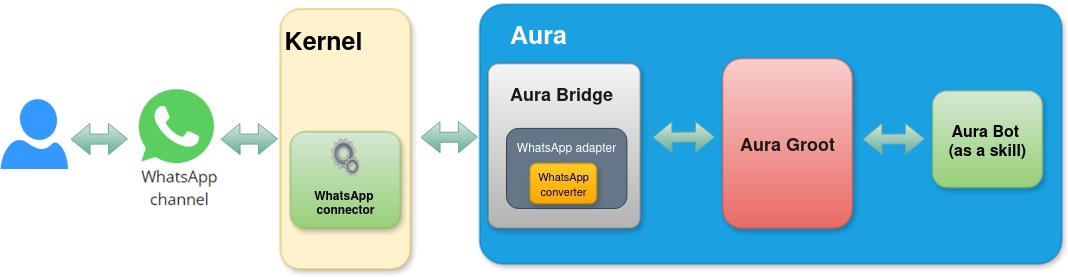
When a user requests a service to Aura through the WhatsApp channel, firstly Kernel summons Aura through a specific WhatsApp connector.
aura-bridge allows the compatibility of the Platform with the WhatsApp channel and acts as a communication layer with aura-groot.
Activation of WhatsApp channels
The use of all the available Aura features in WhatsApp requires the previous activation of the channels.
Check the detailed processes in:
WhatsApp activation
Onboarding in WhatsApp
The onboarding dialog for WhatsApp is a simple aura-bot dialog that returns certain personalized messages for WhatsApp with all the necessary information for the user’s onboarding and the Terms and Conditions management, depending on the type of user (authenticated or anonymous).
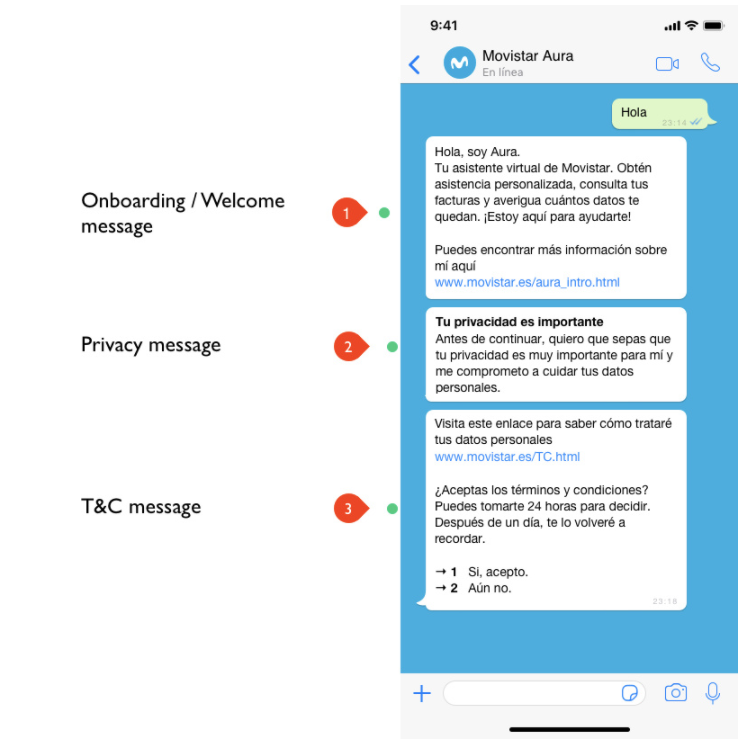
Find additional information regarding the onboarding process in WhatsApp in UC Catalog: Aura Platform capabilities. You can find here the detailed onboarding flowchart and specific POEditor resources for the onboarding conversational flow.
Authentication in WhatsApp channels
WhatsApp type channels support SMS-OTP authentication for “standard” use cases that require a level of assurance LoA2.
SMS-OTP authentication in WhatsApp
The WhatsApp login dialog is the aura-bot dialog in charge of the users’ login and authentication in WhatsApp channels through SMS-OTP authentication. The authentication operates following this process though the WhatsApp login dialog:
- The user requests a service to Aura (use case). If the use case requires authentication, Aura asks the user for it.
- The user is asked for using the current number or entering a new one, and Aura sends an SMS authcode to that number that must be entered back by the user.
- When the authentication finishes successfully, the use case is automatically executed (the user does not have to repeat the request).
The WhatsApp login dialog includes several steps:
- Checking if the user is already authenticated
- Asking the user if she wants to use the current phone number (if corporate) or she wants to enter a new one
- Inserting the phone number
- Inserting SMS OTP code and registering the user.
Find additional information regarding the SMS-OTP authentication process in WhatsApp in UC Catalog: Aura Platform capabilities. You can find here the detailed authentication flowchart and specific POEditor resources for the conversational flow.
The handover dialog in WhatsApp
The handover dialog is an aura-bot dialog that enables the user to initiate a conversation with a human agent in order to solve anything that Aura cannot do.
For this purpose, the dialog establishes a direct connection with the call-center software GENESYS.
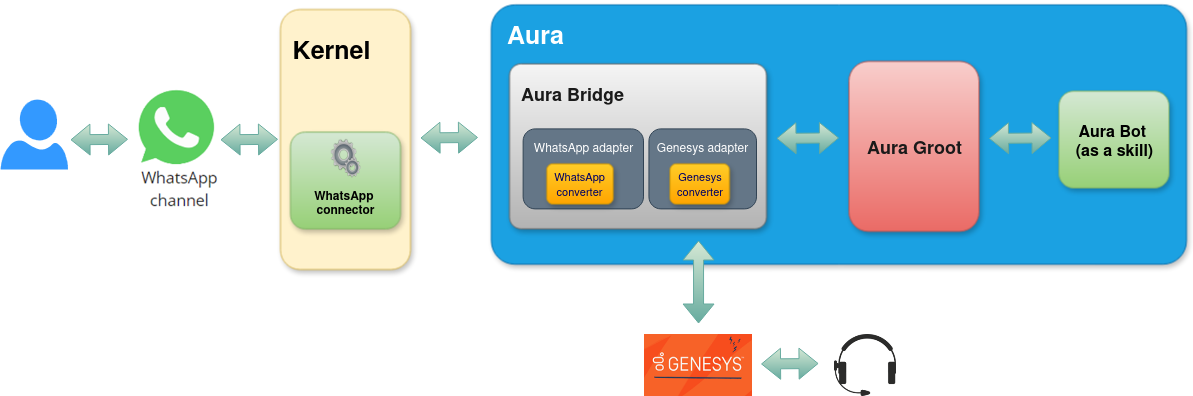
Find additional information regarding handover in WhatsApp in UC Catalog: Aura Platform capabilities. You can find here the detailed handover flowchart and specific POEditor resources for the conversational flow.
5 - Google RCS Business Messaging channel
Google RCS Business Messaging channel in Aura
Introduction to Google RCS Business Messaging channel in Aura, architecture and key features
Related documents
Activation of Google RCS Business Messaging channel
Practical guidelines for use cases development in Google RCS Business Messaging channel
Introduction to Google RCS Business Messaging in Aura
Rich Communication Services (RCS) is a communication protocol designed to enhance traditional SMS and MMS messaging.
The Google RCS Business Messaging channel (from now on, RCS channel) enables its users to incorporate richer content through chat features like video, images, and other interactive elements.
Aura allows RCS channel to communicate with the users through an application installed by default in their phones, with lower costs than WhatsApp.
In order to set up the RCS channel, Aura has to be registered as a partner with RCS Business Messaging.
After registration, an agent has to be created. An agent is a conversational entity that interacts with users by sending messages and reacting to users’ responses.
RCS allows sending different types of messages to the user:
- Text
- Media
- Suggested replies
- Suggested actions, like:
- Dial a number
- View a location
- Share a location
- Open a URL
- Create a calendar event
- Rich cards
- Carousels
Access detailed information regarding:
Overview of Aura - RCS communication architecture
The outlines of the communication between Aura and RCS are represented in the following figure:
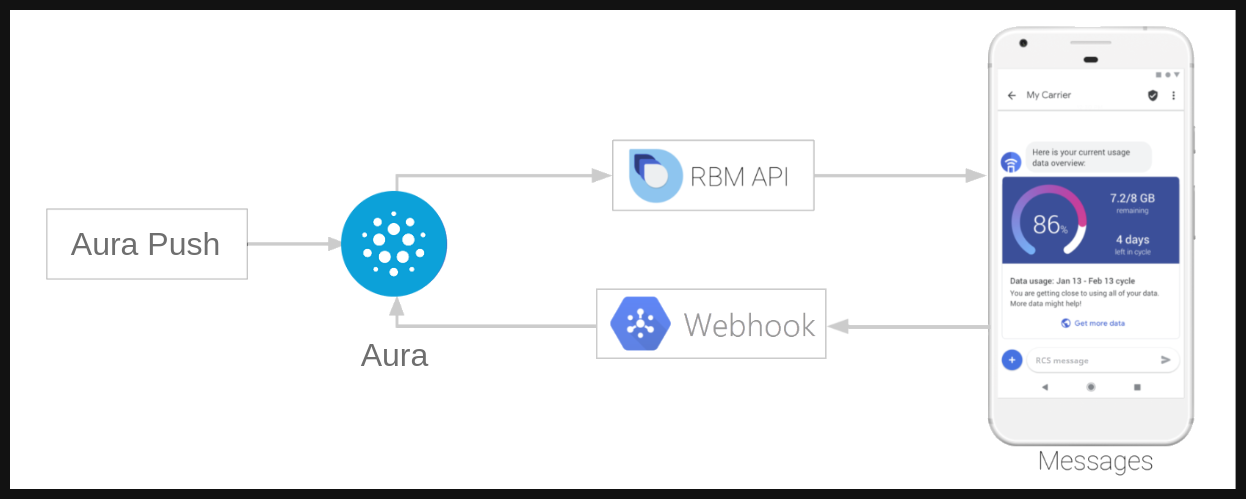
To start a conversation in RCS, the agent (aura-bridge in our case) is in charge of initiating it. In Aura, this is done using the aura-push plugin.
Through this set of endpoints, the channel is allowed to send messages to the user without a previous interaction. When the first message is sent, the responses of the user will be handled by aura-bridge and sent to the configured dialog in aura-bot.
Activation of RCS channels
The use of all the available Aura features in RCS requires the previous activation of the channels. Check the detailed process in:
RCS channel activation
Use case development
To learn how to develop use cases for RCS channels, refer to the following documentation:
Practical guidelines for use cases development in RCS
6 - Set Top Box channel
Set Top Box channel in Aura
Introduction to Set Top Box channel in Aura, architecture and key features. Description of how works the integration between the STB and Aura.
Related documents
Global video use cases
Introduction to Set Top Box channel in Aura
Television is currently one of the primary channels used by the customers of Telefónica’s brands across the countries. Indeed, Telefónica, as the owner of the channel, decides what is to be shown on it. The integration of Aura into the set-top-boxes (STB) of the countries streamlines access for end users, enabling them to explore the whole set of available TV features in each country.
Aura is available in the remote controller of the TV platforms
Aura provides natural language understanding for the user
Aura makes it easier to navigate through all the options of the graphical interface
Aura recognizes the main intentions of the users
Presently, Aura provides, among others, the functionalities listed below in STB:
- Actions to be executed by the device: record a content, change language, go to the beginning, go to the end, etc.
- Search in the TV content repository
- Information about what is the user watching
- Navigation through different sections of the interface
- Small Talk (greetings, goodbyes, thank yous, swear words)
Regarding the integration between the STB and Aura, there are currently two different implementations, depending on the version of the channelData used by the channel, and the version of the TV API used:
- STB channel in Spain, it is using channelData V1, with the legacy TV APIs.
- STB channel in Brazil, it is using channelData V3, with the normalized TV APIs.
All use cases are being moved to channelData V3, that in the end, will be the only one available for the integration.
Architecture overview
This section is WIP and will be completed soon.
Overview of Aura - STB communication architecture
STB uses Microsoft DirectLine protocol to access Aura. Further details in Microsoft Bot Service.
Authentication in STB channels
STB uses Non-integrated authentication, i.e. it is responsible for authenticating its users and calling the proper method to store the authorization_id for the Aura user.
Aura responses to STB channel
ChannelData version 1
Although STB channel in Spain uses channelData version 1, it counts on some requirements that are more strict than the Aura request and response model definition.
Field attachments
attachments is optional for DirectLine activities, but it is mandatory for STB, i.e. they always send both customAuraContent and customDataAsAttachment. It should contain the list of TV contents or the suggestions returned by the use case; if the use case does not return TV contents nor suggestions, for instance it only returns a text, a special attachment is expected.
type is mandatory and must have a proper value. common for those use cases returning only texts or no action to be executed by the device.action is also mandatory and must contain the action to be executed by the device. If no action is to be executed, then noAction should be passed.data is also mandatory, it contains the result of the use the case. If no data is needed, then an empty string should be sent.name is also mandatory and it must be AuraCustomData.
Examples
- Aura’s response to STB with TV suggestions
[
{
"type": "Receive_Message",
"activity": {
"type": "message",
"id": "Fdhko0UbZYn4ONV7HWsINn-eu|0000015",
"timestamp": "2025-04-15T13:47:33.8091689Z",
"channelId": "directline",
"from": {
"id": "BOT-aura-ap-four",
"name": "BOT-aura-ap-four"
},
"conversation": {
"id": "Fdhko0UbZYn4ONV7HWsINn-eu"
},
"text": "Hola, aquí estoy para ayudarte",
"speak": "Hola, aquí estoy para ayudarte",
"inputHint": "acceptingInput",
"attachments": [
{
"contentType": "application/vnd.microsoft.card.hero",
"content": {
"buttons": [
{
"type": "postBack",
"title": "Busca películas de comedia",
"value": {
"name": "Busca películas de comedia",
"text": "Película comedia",
"type": "suggestion",
"intent": "intent.tv.search",
"entities": [
{
"type": "ent.audiovisual_genre",
"entity": "películas",
"canon": "películas",
"label": "CN",
"score": 1
},
{
"type": "ent.audiovisual_subgenre",
"entity": "comedia",
"canon": "humor",
"label": "HU",
"score": 1
}
],
"inputIntent": "intent.common.greetings",
"inputEntities": []
}
},
{
"type": "postBack",
"title": "Quiero ver la película La ternura",
"value": {
"name": "Quiero ver la película La ternura",
"text": "Ver La ternura",
"type": "suggestion",
"intent": "intent.tv.search",
"entities": [
{
"type": "ent.audiovisual_film_title",
"entity": "La ternura",
"canon": "La ternura",
"label": "",
"score": 1
},
{
"type": "ent.audiovisual_genre",
"entity": "película",
"canon": "películas",
"label": "CN",
"score": 1
}
],
"inputIntent": "intent.common.greetings",
"inputEntities": []
}
},
{
"type": "postBack",
"title": "Películas en Fox",
"value": {
"name": "Películas en Fox",
"text": "Películas hoy Fox",
"type": "suggestion",
"intent": "intent.tv.content_get_info",
"entities": [
{
"type": "ent.audiovisual_channel",
"entity": "Fox",
"canon": "Fox",
"label": "",
"score": 1
},
{
"type": "ent.audiovisual_genre",
"entity": "Películas",
"canon": "películas",
"label": "CN",
"score": 1
}
],
"inputIntent": "intent.common.greetings",
"inputEntities": []
}
},
{
"type": "postBack",
"title": "Cuando es el partido del Madrid",
"value": {
"name": "Cuando es el partido del Madrid",
"text": "Partido del Real Madrid",
"type": "suggestion",
"intent": "intent.tv.question_time_loc",
"entities": [
{
"type": "ent.audiovisual_sports_team",
"entity": "Real Madrid",
"canon": "real madrid",
"label": "",
"score": 1
}
],
"inputIntent": "intent.common.greetings",
"inputEntities": []
}
},
{
"type": "postBack",
"title": "Quiero ver Divinity",
"value": {
"name": "Quiero ver Divinity",
"text": "Ver Divinity",
"type": "suggestion",
"intent": "intent.tv.display",
"entities": [
{
"type": "ent.audiovisual_channel",
"entity": "Divinity",
"canon": "Divinity",
"label": "",
"score": 1
}
],
"inputIntent": "intent.common.greetings",
"inputEntities": []
}
},
{
"type": "postBack",
"title": "Quiero quitar los subtítulos",
"value": {
"name": "Quiero quitar los subtítulos",
"text": "Desactivar subtítulos",
"type": "suggestion",
"intent": "intent.tv.subtitles_remove",
"entities": [],
"inputIntent": "intent.common.greetings",
"inputEntities": []
}
}
]
},
"name": "SUGGESTIONS"
},
{
"contentType": "application/json",
"content": {
"type": "common",
"action": "COMMON.GREETINGS",
"data": {},
"data_additional": {},
"status": {
"code": "200",
"message": "Success - General Code",
"info": {}
}
},
"name": "AuraCustomData"
}
],
"channelData": {
"intent": {
"id": "intent.common.greetings",
"name": "intent.common.greetings",
"entities": []
},
"content": {
"text": "Hola, aquí estoy para ayudarte",
"speak": "Hola, aquí estoy para ayudarte",
"sound": "positive",
"actions": []
},
"dialogContext": [
{
"text": "Busca películas de comedia",
"value": {
"name": "Busca películas de comedia",
"text": "Película comedia",
"type": "suggestion",
"intent": "intent.tv.search",
"entities": [
{
"type": "ent.audiovisual_genre",
"entity": "películas",
"canon": "películas",
"label": "CN",
"score": 1
},
{
"type": "ent.audiovisual_subgenre",
"entity": "comedia",
"canon": "humor",
"label": "HU",
"score": 1
}
],
"inputIntent": "intent.common.greetings",
"inputEntities": []
}
},
{
"text": "Quiero ver la película La ternura",
"value": {
"name": "Quiero ver la película La ternura",
"text": "Ver La ternura",
"type": "suggestion",
"intent": "intent.tv.search",
"entities": [
{
"type": "ent.audiovisual_film_title",
"entity": "La ternura",
"canon": "La ternura",
"label": "",
"score": 1
},
{
"type": "ent.audiovisual_genre",
"entity": "película",
"canon": "películas",
"label": "CN",
"score": 1
}
],
"inputIntent": "intent.common.greetings",
"inputEntities": []
}
},
{
"text": "Películas en Fox",
"value": {
"name": "Películas en Fox",
"text": "Películas hoy Fox",
"type": "suggestion",
"intent": "intent.tv.content_get_info",
"entities": [
{
"type": "ent.audiovisual_channel",
"entity": "Fox",
"canon": "Fox",
"label": "",
"score": 1
},
{
"type": "ent.audiovisual_genre",
"entity": "Películas",
"canon": "películas",
"label": "CN",
"score": 1
}
],
"inputIntent": "intent.common.greetings",
"inputEntities": []
}
},
{
"text": "Cuando es el partido del Madrid",
"value": {
"name": "Cuando es el partido del Madrid",
"text": "Partido del Real Madrid",
"type": "suggestion",
"intent": "intent.tv.question_time_loc",
"entities": [
{
"type": "ent.audiovisual_sports_team",
"entity": "Real Madrid",
"canon": "real madrid",
"label": "",
"score": 1
}
],
"inputIntent": "intent.common.greetings",
"inputEntities": []
}
},
{
"text": "Quiero ver Divinity",
"value": {
"name": "Quiero ver Divinity",
"text": "Ver Divinity",
"type": "suggestion",
"intent": "intent.tv.display",
"entities": [
{
"type": "ent.audiovisual_channel",
"entity": "Divinity",
"canon": "Divinity",
"label": "",
"score": 1
}
],
"inputIntent": "intent.common.greetings",
"inputEntities": []
}
},
{
"text": "Quiero quitar los subtítulos",
"value": {
"name": "Quiero quitar los subtítulos",
"text": "Desactivar subtítulos",
"type": "suggestion",
"intent": "intent.tv.subtitles_remove",
"entities": [],
"inputIntent": "intent.common.greetings",
"inputEntities": []
}
}
],
"fullScreen": false,
"version": "1.0.0",
"hasMoreMessages": false,
"correlator": "084e5b86-9bc2-4f38-b7ae-21b34b46600f"
},
"replyToId": "Fdhko0UbZYn4ONV7HWsINn-eu|0000014"
}
}
]
- Aura’s response to STB only with text
[
    {
        "type": "Receive_Message",
        "activity": {
            "type": "message",
            "id": "Fdhko0UbZYn4ONV7HWsINn-eu|0000009",
            "timestamp": "2025-04-15T13:36:35.5206701Z",
            "channelId": "directline",
            "from": {
                "id": "BOT-aura-ap-four",
                "name": "BOT-aura-ap-four"
            },
            "conversation": {
                "id": "Fdhko0UbZYn4ONV7HWsINn-eu"
            },
            "text": "¿Te gustaría experimentar una aventura emocionante o una trama más profunda y reflexiva?",
            "speak": "¿Te gustaría experimentar una aventura emocionante o una trama más profunda y reflexiva?",
            "inputHint": "acceptingInput",
            "attachments": [
                {
                    "contentType": "application/json",
                    "content": {
                        "type": "common",
                        "action": "noAction",
                        "data": {},
                        "data_additional": {},
                        "status": {
                            "code": "200",
                            "message": "Success - General Code",
                            "info": {}
                        }
                    },
                    "name": "AuraCustomData"
                }
            ],
            "channelData": {
                "intent": {
                    "id": "intent.tv.custom_recommendation",
                    "name": "intent.tv.custom_recommendation",
                    "entities": []
                },
                "content": {
                    "text": "¿Te gustaría experimentar una aventura emocionante o una trama más profunda y reflexiva?",
                    "speak": "¿Te gustaría experimentar una aventura emocionante o una trama más profunda y reflexiva?",
                    "sound": "positive",
                    "actions": []
                },
                "dialogContext": [],
                "fullScreen": false,
                "version": "1.0.0",
                "hasMoreMessages": false,
                "correlator": "ce12e579-76ad-4a75-8f98-7c6bae8260ca"
            },
            "replyToId": "Fdhko0UbZYn4ONV7HWsINn-eu|0000008"
        }
    }
]