1 - Authentication flow
Aura authentication flow
Description of the authentication flow for Aura users
The authentication validation process
Before starting a conversation with aura-bot, the channel needs to set a valid auraId and a fresh DirectLine token, if accessing via Direct Line, that should be sent as authorization header of bearer type in the request to the bot.
Find further information about Direct Line request in MS DirectLine API description.
Authentication validation in aura-bot consists of two phases:
-
Validate that the Direct Line token is a valid one, generated by the bot instance running behind aura-bot.
-
Validate the Aura credentials of the user, currently only based on Kernel authentication. If request authentication fails, the message is no longer processed, and an unauthenticated error response is returned to the channel.
An Aura channel should send its auraId in the from.id field of the request to the bot. Once the Direct Line token has been validated, aura-bot reads the from.id field to validate it:
-
Firstly, aura-bot checks if the auraId exists in the AuraUsers database and, if exists, then goes on with the authentication in Kernel.
-
If the channel allows anonymous users: In the happening that the received auraId does not exist in the AuraUsers database, then the user is marked as anonymous and the Kernel authentication validation is not launched.
-
If the channel does not allow anonymous users, then an UNAUTHENTICATED error is sent to the channel, informing that the Kernel authentication process must be relaunched before going on.
-
Kernel authentication validation:
-
A new fresh Kernel accessToken is requested for the userId and authorizationId related to the auraId.
-
If the authorizationId is invalid or no longer exists in Kernel, then an UNAUTHENTICATED error is sent to the channel, informing that the Kernel authentication process must be relaunched before going on.
-
Then a fresh Kernel introspect token is requested, so deeper information about the user identities and permissions for aura-bot is obtained.
-
Finally, the Kernel UserProfile info is obtained and processed to obtain further information about the user’s contract, for instance, its subscription type.
-
After that, all this information is stored in a cache during the time when Kernel accessToken is valid. During this period, the authentication validation process is avoided.
-
Besides, all this information is set in the AuraUser model and stored in the conversation context of the bot to be available during the rest of the conversation messages processing.
The authentication process is managed by the fourth-platform-authorization-middleware.
Users data storage
Authenticated users
Users database
When a user authenticates with the basic authentication mechanism of a channel, the user’s information is created/updated in MongoDB and aura-bot accesses it through the aura-authentication-api API Aura Services API published in Kernel.
For instance, in WhatsApp, when the user authenticates with SMS-OTP, her information is stored in AuraUsers database.
Local cache
It is the node cache that each pod has with information from the users.
The information is saved on each request and expires in 5 minutes, configurable via AURA_USER_LOCAL_CACHE_TTL environment variable.
Remote cache
Mongo cache with aura-bot users’ information. It is shared by all pods.
The information is saved on each request and expires in 1 hour, configurable via AURA_MONGODB_BOT_COLLECTION_CACHES_INDEX_TTL environment variable.
Anonymous users
Local cache
Node cache to store anonymous users’ information, who are accessing each pod.
The information expires in 5 minutes, configurable via AURA_USER_LOCAL_CACHE_TTL environment variable.
Both types of users
BotFramework conversational cache
This is the conversational cache of BotFramework, which is called internally in aura-bot persistentData.
It is a MongoDB cache with three parts: ConversationData, UserData and AuthData. Therefore, as this section is related to users’ information, it is stored in the last two sections.
Find more information about cache module.
How does the authenticated user’s cache expire?
The expiration of the cache depends on different factors:
- The TTL of each cache element.
- Kernel accessToken is no longer valid.
- If the
accountRemovalTimestamp of the conversational cache is greater than the timestamp of the cache
Authentication process flowchart
The following flowchart shows the authentication process:
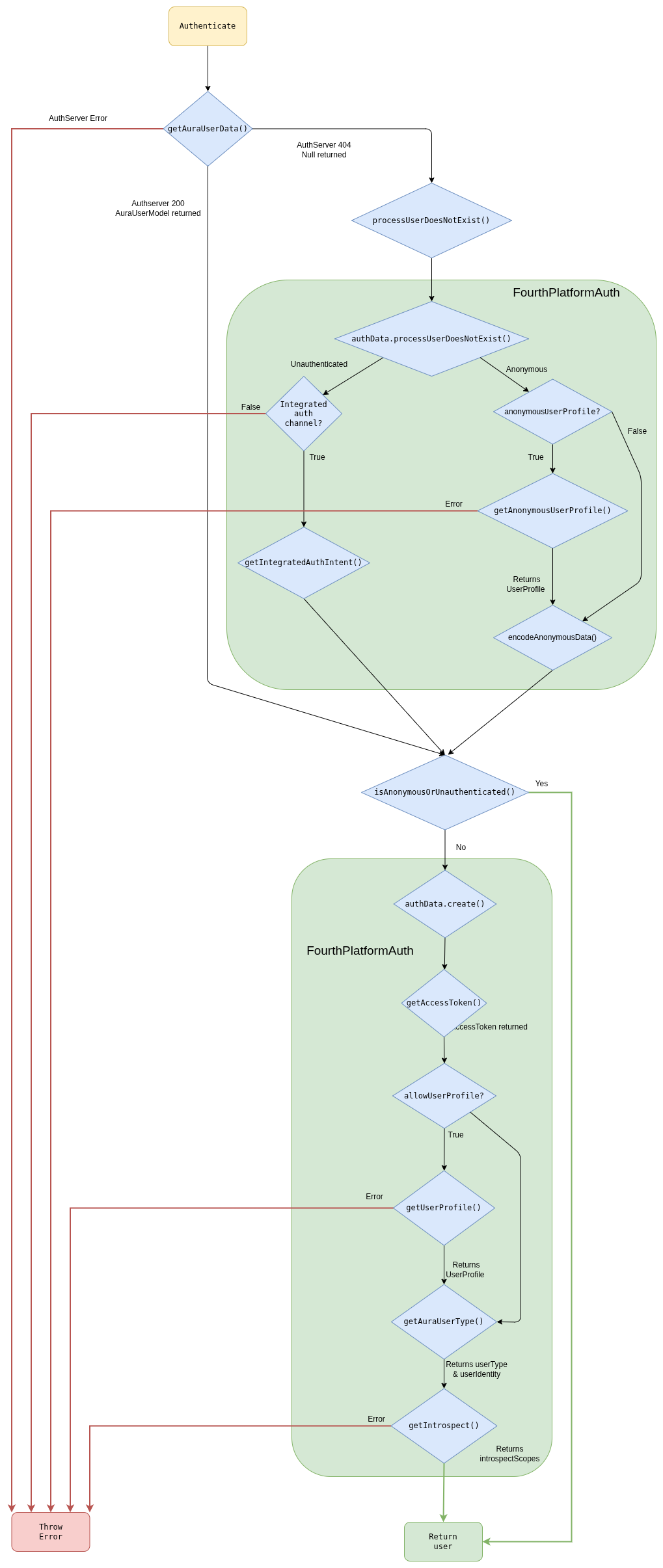
Authentication steps
getUserData()
This function gets the user’s data from AuraUsers database, accessing through the Aura Services API published in Kernel.
If the endpoint returns a 404 error, null is returned by the function because in this case the user is anonymous, but it depends on the channel configuration to mark it as an error, if the channel does not support anonymous users ( for example, novum-mytelco channel), or as a valid anonymous users, for channels that allowed them (such as WhatsApp or Aura Webclient).
If other error is returned, the function throws an error and the authentication flow ends.
In the normal flow, the endpoint returns a user and the function returns a AuraUserModel object:
{
   "userAuraId":"c2aa81f0-abd9-444f-b7cb-47c179f10556",
   "userAuraIdGlobal":"d065dba31c79090a9e3c5afa94558d0c39ffa90c8e136931a5a12069418efad5",
   "userChannel":{
      "id":"45494a5b-835a-4fff-a813-b3d2be529dbe",
      "dialogs":[

      ],
      "outputMessageFormat":null,
      "allowAnonymous":null,
      "name":null,
      "shortName":null,
      "fpaAuthIntegrated":null
   },
   "authorizationId":"",
   "userPhoneNumber":"+34600000003",
   "userClientId":"up24456789",
   "timestamp":1575366984,
   "userPhoneType":null,
   "userSubscriptionType":null,
   "userAccessToken":null,
   "introspectScopes":null,
   "userProfile":null,
   "userType":null,
   "userAccountNumber":null
}
getChannelConfiguration()
This method returns an ChannelConfiguration object. This function tries to obtain the channel configuration by the
channelId or channelName passed as parameters.
{
  "dialogLibraries": [
    {
      "name": "common",
      "dialogs": [
        {
          "id": "greetings",
          "allowAnonymous": true,
          "triggerConditions": [
            {
              "intent": "intent.common.greetings"
            }
          ]
        }
      ]
    }
  ],
  "id": "45494a5b-835a-4fff-a813-b3d2be529dbe",
  "name": "novum-mytelco",
  "nlp": {
    "enabled": true,
      "enabled": true
    }
  },
  "prefix": "nov",
  "requestOptions": {
    "requestOptionsVersion": {
      "1": {
        "channel": "directline"
      }
    }
  },
  "responseOptions": {
    "dialogContext": {
      "cardActions": {
        "generate": "always",
        "generateList": true
      },
      "defaultListType": "ordinalCardinal",
      "disabled": false,
      "normalizeTerms": true,
      "processFromClient": true,
      "promptChoice": {
        "generate": "always",
        "generateList": true
      },
      "returnToClient": false
    }
  },
  "security": {
    "authPurposes": "customer-self-service identify-customer aura-technical-problems-purpose",
    "channelId": "novum-mytelco"
  }
}
getInitialUserType()
This method returns an initial approach of the userType, because at this point some user types cannot be inferred.
Depending on the channel configuration and the user returned by getUserData(), there are four possible scenarios:
getUserData() returns a valid user
- The user has
userType
User.userType is returned
- The user does not have
userType
getUserData() returns null
- The channel allows anonymous
- The channel does not allow anonymous
Unauthenticated is returned
At this point, we can have three different flows:
- If the user is
anonymous, it is returned with the minimal data available.
- If the user is
unauthenticated and the channel have integrated auth, getIntegratedAuthIntent() is called but if the channel does not have integrated auth, an error is returned and the authentication ends.
- If the user is
undefined or other type, it starts the flow to obtain the data from Kernel.
getIntegratedAuthIntent() (Only unauthenticated users)
This method returns the intent to redirect to the integrated authentication.
This intent is returned in user.redirectIntent provided by the authentication function.
getUserAccessToken()
This method constructs the options object with scopes, purposes, authorizationId, deviceId, security.channelId and userId. Afterwards, it makes the request and obtain the token.
If an error occurs, the function will throw an error and the authentication ends with error.
security.channelId is added when requesting the jwt-bearer.
getUserProfile()
This method returns the user profile from Kernel. If there is any error, it will be thrown and the authentication will end with error.
{
    "id": "up24456789",
    "name": "ESP - Usuario de Prueba 2 - prepago",
    "id_document": {
      "country": "ESP",
      "type": "NIF",
      "value": "712724440A"
    },
    "identities": [
      {
        "type": "phone_number",
        "id": "+34600000003",
        "services": ["mobile_prepaid"],
        "roles": ["owner", "admin"]
      }
    ]
}
getAnonymousUserProfile()
This method returns the user profile from Kernel, for anonymous users. If there is any error, it will be thrown and the authentication will end with error.
[
  {
    "identities": [
      {
        "roles": [
          "owner"
        ],
        "id": "12SIME16",
        "services": [
          "authentication"
        ],
        "type": "uid"
      },
      {
        "roles": [
          "owner",
          "basic",
          "admin"
        ],
        "id": "+34680395460",
        "services": [
          "mobile_postpaid"
        ],
        "type": "phone_number"
      },
      {
        "roles": [
          "owner",
          "basic",
          "admin"
        ],
        "id": "+34911725467",
        "services": [
          "landline",
          "internet"
        ],
        "type": "phone_number"
      },
      {
        "id": "CD53D6C5285CB60DD8E50052C1DBFADDDA033613",
        "type": "uid",
        "roles": [
          "owner"
        ],
        "services": [
          "authentication"
        ]
      }
    ],
    "id": "CD53D6C5285CB60DD8E50052C1DBFADDDA033613"
  }
]
encodeAnonymousData()
This method sets the userId and auraIdGlobal for anonymous users. These values are needed to be stored in KPIs.
{
  "userId": "76661cf96c2bda27c4fb016627f2d74af1c3cee496b76cf5d7bc2b2ad8a38cb2",
  "auraIdGlobal": "8eeb101175bfe9c247e9d10669c0d1696e8034f8e1a12b25b54780e00de0e1c1!616e6f6e796d6f7573"
}
getAuraUserType()
This method returns the final userType and the userIdentity.
- First of all, identities are filtered and only the type
phone_number with services prepaid, postpaid, control, hybrid or internet are returned.
- After that, we need to select the phone number of the user among the numbers filtered.
- If we have more than 1 number and
userData do not have userPhoneNumber (the user has not been logged with phone number), the userType returned is multimsisdn and userIdentity is undefined.
- If there is only 1 phone number,
userType is monomsisdn.
- If there are many phones but we also have
userPhoneNumber in userData, this phone is searched in phones array and if found, the user is considered monomsisdn although it is multimsisdn.
Monomsisdn users return userType (prepaid, postpaid or control) and userIdentity filled:
{
   "type":"phone_number",
   "id":"+34600000003",
   "services":[
      "mobile_prepaid"
   ],
   "roles":[
      "owner",
      "admin"
   ],
   "phone_type":"mobile",
   "subscription_type":"prepaid",
   "identifier":"+34600000003"
}
getIntrospect()
This method returns the scopes, purposes and boundScopes for this user from Kernel.
{
   "scopes":[
      "event-low-data-read",
      "insights-data-usage-result-read",
      "mobile-balance-transfer-write",
      "auraid-read",
      "webviews-phone-number-read",
      ...
   ],
   "purposes":[
      "sim-upgrade-suggestion",
      "identify-customer",
      "customer-self-service",
      "aura-read-insight-events",
      "device-recommendations",
      "detect-abnormal-usage"
   ],
   "identifierBoundScopes":[

   ]
}
2 - Users types
Aura users types
Description of the different users types existing in Aura
Introduction
Aura supports different types of users: authenticated and anonymous, each of them with access to specific services and use cases. The following sections include detailed information about each type.
Authenticated users
Aura securely knows the identity of the users, as they must have successfully completed the authentication flow.
They can be classified into different groups regarding their type of subscription. This classification depends on the different countries, but in general terms, there are three main types of authenticated users: postpaid, prepaid, hybrid / control.
Authenticated users can access any use case in Aura, providing that the use case supports authenticated users or the specific subscription type of the user, defined through context filters.
In case the authorization process of an Aura user fails:
- If the channel does not allow anonymous users, then the request is marked as failed and a status with the unauthenticated error is returned to the channel. This indicates that the channel should relaunch the authentication of the user to get a valid auraId.
Anonymous users
Anonymous users are unauthenticated users but with authorized access to certain Aura’s use cases: to those which support the anonymous user’s type. In every case, Aura’s experience is different for each type of users.
Within anonymous users, there is a specific type named identifiable users in which the channel auraId univocally identifies a user in the channel.
It also depends on the channel, as different Aura channels can support both types of users (anonymous-identifiable and authenticated) or only authenticated ones.
Due to some restrictions in Kernel, from Kiss release onwards, anonymous users also have userId and auraGlobalId. These fields, in contrast to authenticated users, are not obtained from Kernel but auto-generated by aura-bot and aura-authentication-api in some cases, to be stored in KPIs. The values are generated to maintain the same value between channels to allow the user identification if possible.
3 - Login redirections
Login redirections
Description of the process for redirecting intents that need authentication in cases where the user is unauthenticated.
Global authentication dialogs
There are 2 different dialogs to authenticate the user according to the channel:
Login redirection process
To redirect to login dialogs, we need a contextFilter with the redirectToIntent field set with the intent of the authentication dialog that we want to redirect.
This is done in the channel model:
triggerCondition model > conditionValidation model
For example, if we want to redirect to authentication in a channel, we need to add a configuration in the dialog as shown below:
{
  "name": "bill",
  "dialogs": [
    {
      "id": "balance-check",
      "triggerConditions": [
        {
          "intent": "intent.balance.check",
          "contextFilters": [
            {
              "name": "Anonymous redirect to linking",
              "type": "type",
              "conditions": "/type eq 'anonymous'",
              "true": {
                "name": "Anonymous redirect to linking",
                "breakDialogExecution": true,
                "breakFilterEval": true,
                "redirectToIntent": "intent.account.linking",
                "suggestions": false
              }
            }
          ]
        }
      ]
    }
  ]
}
In WhatsApp channel, the contextFilter will be the same but changing the redirectToIntent to the intent for WhatsApp authentication (intent.authentication.login):
{
  "triggerConditions": [
    {
      "intent": "intent.factotum-test.whatsapp-auth",
      "contextFilters": [
        {
          "name": "Anonymous redirect to linking",
          "type": "type",
          "conditions": "/type eq 'anonymous'",
          "true": {
            "name": "Anonymous redirect to linking",
            "breakDialogExecution": true,
            "breakFilterEval": true,
            "redirectToIntent": "intent.authentication.login",
            "suggestions": false
          }
        }
      ]
    }
  ]
}
4 - Terms & Conditions
Terms and Conditions
Description of Terms and Conditions handled in Aura Bot Platform
Terms and conditions flow
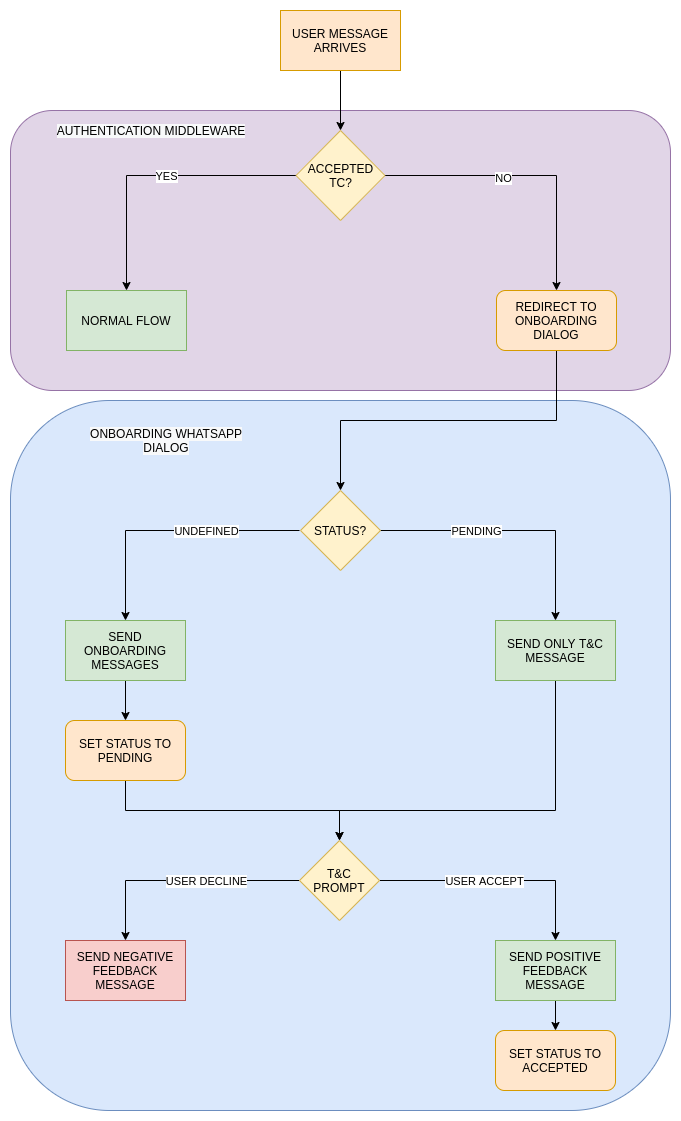
When a user message arrives, the first step in authentication is to check if it is in cache. In case that it
is not found, Terms & Conditions API is checked and if the user does not exist or has a pending status, it is redirected to T&C dialog.
Obviously, all the users with accepted status continue with the normal flow. In the Terms and Conditions dialog a record with status pending is stored in the T&C API if does not exist yet and the terms and conditions prompt is shown. If the user accepts, the status accepted is set in T&C API.
Anonymous and authenticated users have different T&C, so if both are configured, users should accept T&C twice: after the first message as anonymous and after the authentication.
Terms and conditions settings
Terms and Conditions settings
In Aura channel model, T&C are set in the termsAndConditionsconfiguration model. It is added to channels who need to enable this feature.
There are two fields with different configurations inside: authenticated and anonymous. Each of these settings will be used according to the type of user. It defines the version and service used in T&C API.
{
  "channel_id": "f7fd1021-41cd-588a-a461-387cc24be223",
  "name": "whatsapp",
  "termsAndConditions": {
    "authenticated": {
      "version": "1",
      "service": "whatsappAuth"
    },
    "anonymous": {
      "version": "1",
      "service": "whatsappAnonymous"
    }
  }
}