This is the multi-page printable view of this section.
Click here to print.
Return to the regular view of this page.
Recognizers
Aura Bot recognizers
Description of the different Aura Bot recognizers, components in charge of the identification of the user’s intention
What are Aura Bot recognizers?
Recognizers in aura-bot are a specific type of middlewares that are executed in a certain stage of the message flow. They are in charge of the recognition of the user’s intention based on the data sent in the request.
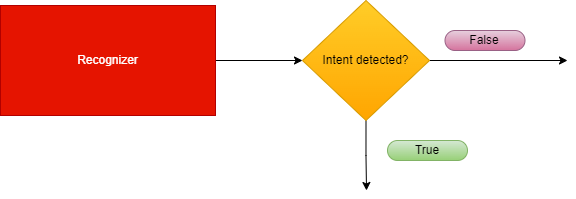
Recognizers inherit from the abstract class called BaseRecognizerMiddleware.
There are two types of recognizers, internal and external:
Internal recognizers
aura-bot own components that are able to recognize the intention of the user directly from the incoming message.
Currently, they are:
External recognizers
Responsible for calling an external API to obtain an intention.
Currently, the only external recognizer is nlp-recognizer-middleware, in charge of detecting the intention of the user from all the training of the environment.
Apart from the ones mentioned above, the finalize-recognizers-middleware is in charge of finalizing the recognition process.
Recognizers are executed sequentially in the order previously defined during the bot start-up.
Recognizers flow
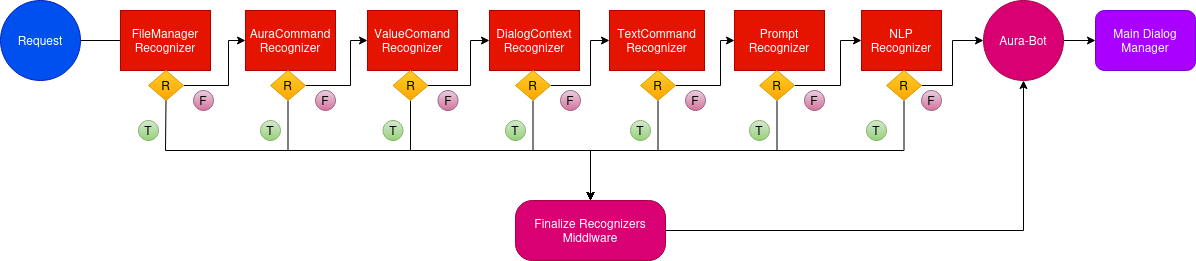
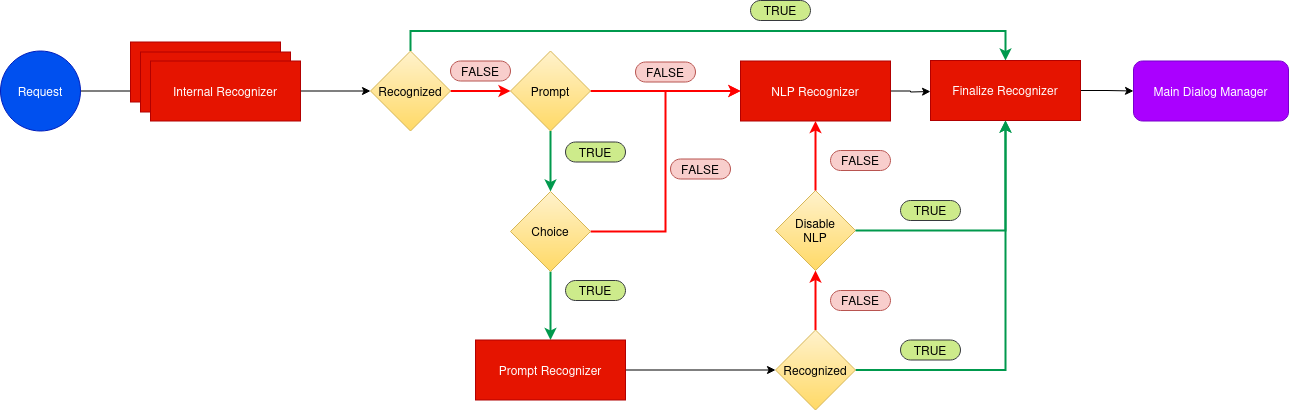
The following figure shows the execution flowchart for aura-bot recognizers, including the recognizers included in aura-bot by default. They are executed sequentially.
-
If one specific recognizer has obtained an intention, then the flow redirects to the finalize-recognizers-middleware, that provides the result to aura-bot in order to trigger the corresponding dialog.
-
If the recognizer in execution does not get the intention, then the flow continues and the succeeding recognizer is executed.
-
As can be seen in the flowchart, the last recognizer to be executed is the external one, nlp-recognizer-middleware. This is because aura-bot should only request it if no other recognizer gets the intention of the user.
-
The finalize-recognizers-middleware is in charge of deciding, in case there is any active prompt, whether to continue with the prompt or to remove the prompt from the dialog stack and process the attempt to start a new dialog otherwise.
1 - Base recognizer
Base recognizer
Description of base-recognizer
Introduction
Recognizers are middlewares that inherit from the abstract class called BaseRecognizerMiddleware.
export abstract class BaseRecognizerMiddleware implements Middleware, Recognizer {
    protected name: string;
    protected id: string;
    protected type: RecognizerType;
    constructor(name: string, id: string, type?: RecognizerType) {
        this.type = type || RecognizerType.Asynchronous;
        this.name = name;
        this.id = id;
    }
The source code of this recognizer is included in Aura Bot Platform recognizers - Github repository.
base-recognizer parameters
| Parameters |
Type |
Description |
| name |
property |
Name of the middleware. |
| id |
property |
Unique identifier for middleware. |
| type |
property |
Type of execution (async or sync) to execute the recognizer method. |
| recognize |
method |
Abstract method that must be implemented in the recognizer. If the recognizer detects an intent, it must save the intent result in the turn context. |
| onTurn |
method |
Private method executed when the activity is processed by the adapter. |
| processIntent |
method |
Protected method to process the intent and entities and store the intentResult and the intent in AuraCommand format. |
|
|
|
IntentResult model
| Name |
Type |
Description |
| text |
string |
Utterance sent to the recognizer. |
| alteredText |
string |
If the original text is changed due to mistakes such as spelling typos, the altered version is included here. |
| intents |
Object |
Map of intent names to an object with score is returned. Format: [name: string]: {score: number;}; |
| entities |
Entity |
Entities recognized. |
| promptCheck |
boolean |
If true, the finalize-recognizers-middleware evaluates if exits a prompt in the stack and decides whether it needs to pop from the stack or continues. |
|
|
|
2 - Aura Command recognizer middleware
Aura Command recognizer middleware
Description of aura-command-recognizer-middleware, in charge of identifying Aura commands.
Introduction
aura-command-recognizer-middleware checks the auraCommand property inside an activity.
This component is able to identify the so-called auraCommands, recognizing the user’s intent and associated entities from the messages reaching an aura-bot instance.
By default, it is the recognizer with more priority. The score for the intent is always 1.0.
The source code of this recognizer is included in Aura Bot Platform recognizers - Github repository.
An example is shown below:
Incoming activity with an auraCommand
{
  "activity": {
    "channelData": {
      "auraCommand": {
        "type": "suggestion",
        "value": {
          "intent": "intent.usage.check",
          "entities":[{
            "type": "measure",
            "entity" : "megabytes"
          }]
        }
      }
    }
  }
}
Recognizer Result
{
  "text": "check data usage",
  "intents":
    "intent.usage.check": {
      "score": 1.0
    }
  },
  "entities": [
    {
      "type": "measure",
      "entity": "megabytes"
    }
  ]
}
3 - Dialog context recognizer middleware
Dialog context recognizer middleware
Description of dialog-context-recognizer-middleware, that manages the recognition process when there are different options in the response
Introduction
dialog-context-recognizer-middleware uses a model to facilitate the recognition when Aura response is composed of several options, which have either been generated automatically when a Prompt Choice or a list of CardActions has been processed or generated manually.
This model is defined in dialogContext model.
The source code of this recognizer is included in Aura Bot Platform recognizers - Github repository.
The behavior of this recognizer is channel-specific. The dialogContext configuration for each channel follows the model defined in the channel model sub-property.
This recognizer first checks if a cache exists with the dialogContext generated by the last message sent to the user. If it does not exist, then it checks the dialogContext information saved in aura-bot cache, in greater detail in property auraData.conversationData.dialogContext.
This differs with past versions where this information was obtained from channelData property in the activity, which now is defined in the processFromClient property.
The recognition is performed by proximity between the user’s phrase and the dialogContext values to be evaluated.
If Aura has sent several dialogContext messages, the last message will be the one containing a single dialogContext with all the previous ones merged.
If the dialogContext value exists in the cache, it is deleted once fetched. If another recognizer beats the dialog-context-recognizer-middleware, this process is performed inside the finalize-recognizers-middleware.
Environment variables
Three aura-bot environment variables come into play in the process:
AURA_DIALOG_CONTEXT_THRESHOLD: minimum threshold to validate the recognition (by default: 0.8).AURA_DIALOG_CONTEXT_THRESHOLD_RELATION_UTTERANCE: Microsoft uses in its algorithm a fixed value of 0.5. If the value is not set, then the value will be calculated based on the words of the user’s phrase divided by the words of the phrase to be compared. (by default: not set).AURA_DIALOG_CONTEXT_ORDINAL_CARDINAL_THRESHOLD: if the client phrase contains a number or the dialogContext values are enumerated by cardinals or/and ordinals, this threshold will be used instead of AURA_DIALOG_CONTEXT_THRESHOLD. This is done to prevent numbers within the phrase from being confused with the position of the items in the options list.(by default: 0.95).
The dialogContext can be generated automatically based on Prompt Choices or CardActions. This is configurable per channel, but developers could add the dialogContext object to the channelData with the expected actions.
Example
An example is shown below: a user asks for a recommendation in Movistar +. If these recommendations are included in a dialogContext, it gives the user the possibility to precisely select one of the options using voice:
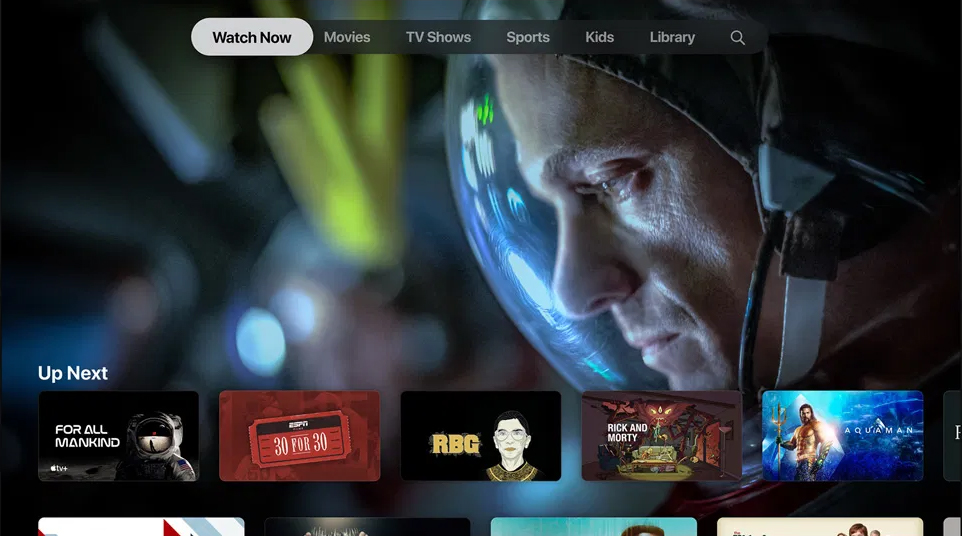
dialogContext stored for an Aura response:
{
  "dialogContext": [
    {
      "text": "I want to see the movie for all mankind|1|one|the first|first",
      "value": {
        "name": "I want to see the movie for all mankind",
        "text": "See for all mankindo",
        "type": "suggestion",
        "intent": "intent.tv.search",
        "entities": [
          {
            "type": "ent.audiovisual_film_title",
            "entity": "for all mankind",
            "canon": "for all mankind",
            "label": "",
            "score": 1
          },
          {
            "type": "ent.audiovisual_genre",
            "entity": "film",
            "canon": "films",
            "label": "CN",
            "score": 1
          }
        ]
      }
    },
     {
      "text": "I want to see the movie 30 for 30|two|second|the second|",
      "value": {
        "name": "I want to see the movie 30 for 30",
        "text": "See 30 for 30",
        "type": "suggestion",
        "intent": "intent.tv.search",
        "entities": [
          {
            "type": "ent.audiovisual_film_title",
            "entity": "30 for 30",
            "canon": "30 for 30",
            "label": "",
            "score": 1
          },
          {
            "type": "ent.audiovisual_genre",
            "entity": "film",
            "canon": "films",
            "label": "CN",
            "score": 1
          }
        ]
      }
    },
      {
      "text": "I want to see the movie rgb|3|three|the third|third",
      "value": {
        "name": "I want to see the movie rgb",
        "text": "See for all mankindo",
        "type": "suggestion",
        "intent": "intent.tv.search",
        "entities": [
          {
            "type": "ent.audiovisual_film_title",
            "entity": "rgb",
            "canon": "rgb",
            "label": "",
            "score": 1
          },
          {
            "type": "ent.audiovisual_genre",
            "entity": "film",
            "canon": "films",
            "label": "CN",
            "score": 1
          }
        ]
      }
    },
    .....
  ]
}
4 - attachment recognizer middleware
Attachment recognizer middleware
Description of the attachment-recognizer-middleware, in charge of managing some attachment types sent to aura-bot
Introduction to attachment recognizer middleware
attachment-recognizer manages messages that include attachments. Currently, only two types of attachment content types are handled:
application/vnd.telefonica.aura.whatsapp.orderapplication/vnd.telefonica.aura.whatsapp.context
These types are mapped by channel configuration in the field requestOptions.defaultIntentByAttachment and the intent set in this configuration
will be the intent set by this recognizer.
An example of defaultIntentByAttachment configuration is included below:
{
  "requestOptions": {
    "defaultIntentByAttachment": {
      "application/vnd.telefonica.aura.whatsapp.order": "intent.factotum-test.whatsapp-catalog-handler",
      "application/vnd.telefonica.aura.whatsapp.context": "intent.factotum-test.whatsapp-catalog-handler"
    }
  }
}
When one of these attachments is found in the activity but the configuration for this type is not found in the channel configuration,
the intent set in the environment variable AURA_ROOT_INTENT (None by default) will be set.
5 - File manager recognizer
File manager recognizer
Description of the file-manager-recognizer-middleware, in charge of managing files in use cases messages
Introduction to file-manager recognizer
file-manager recognizer manages messages that include files, both as text messages or as attachments. Although it is not a real recognizer, it is included in the list of recognizers because it is executed in the same way as the rest of them, and it is in charge of managing files, that are handled in the same way as intents.
The source code of this recognizer is included in Aura Bot Platform recognizers - Github repository.
Depending on which dialog is running (PromptAttachment, BypassDialog, none) and whether the channel is ready for managing files, these files can be:
- Used by the dialog that requested it.
- Processed and validated by the aura-file-manager API.
- Sent to the unexpected-file dialog.
- Other situations beyond the happy path.
This recognizer checks the attachments property or the property channelData.payload.asyncCallback.attachments inside an activity. The reason behind searching for two different properties has to do with its execution flow. The first one is used to send files from the user to aura-bot and the second one is used to send files from file-manager back to aura-bot, once they are validated.
It is the recognizer with more priority, (the first to be executed after the initialization middleware), so if it finds an intention, it will win, because its resulting score for the recognized intent will be always 1.0, i.e., a perfect recognition.
Example of an activity with a file attachment:
{
  "attachments": [
    {
      "contentType": "image/png",
      "contentUrl": "https://example.com/image.png"
    }
  ]
}
Example of an activity with a validated file attached in the channelData.payload.asyncCallback.attachments.
{
  "channelData": {
    "payload": {
      "asyncCallback": {
        "attachments": [
          {
            "contentUrl": "https://<host>/fromId/messageId_1646724898352?sv=2020-10-02&se=2022-03-08T08%3A34%3A59Z&sr=b&sp=r&sig=GTCdk%2B9lU4IkYTJVH1%2BpEMBAKHWmaOjMB026Qxxw1ZU%3D",
            "name": "messageId_1646724898352",
            "content": {
              "processed": true,
              "typeValidation": {
                "valid": true,
                "value": "png"
              },
              "sizeValidation": {
                "valid": true,
                "value": 40663
              },
              "status": [
                {
                  "code": "OK",
                  "message": ""
                }
              ]
            },
            "contentType": "image/png"
          }
        ]
      }
    }
  }
}
aura-bot includes the content-type of the incoming attachment in its request to the file-manager, so a proper extension can be inferred in all the cases.
file-manager recognizer flow
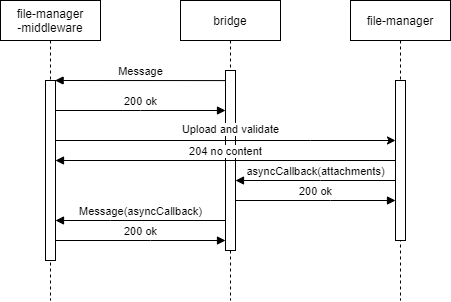
- The recognizer first checks if attachments data is present in the
activity.
- Then, the recognizer checks if the
channelData has file configuration enabled.
- The recognizer searchs for an active
PromptAttachment or bypass with file treatment.
- If it is found, then we will be on the case of an expected file and the processing will continue.
- If not, the processing will be redirected to the unexpected-file dialog.
- If we have an active
PromptAttachment or bypass with file treatment, the recognizer will send the data to be asynchronously processed by the file-manager API (a microservice with the only purpose of validating and upload files to a local repository).
- Through aura-bridge, the recognizer will receive the data processed by the file-manager API: (
channelData.payload.asyncCallback.attachments). In this stage, data with validations will be passed to the dialog where it can use it to do extra validations.
The following figures shows the different scenarios that can arise:
- The use case requests one file
sequenceDiagram
Title: Normal flow one file requested
    User/Kernel->>+Bridge: Phrase to init UC file dialog
    Bridge->>+Groot/Bot: Phrase to init UC file dialog
    Groot/Bot->>+NLP: Phrase user
    NLP->>+Groot/Bot: Intent dialog
    Groot/Bot->>+File Dialog: Start UC file dialog
    File Dialog->>+Bridge: Send me a file
    Bridge->>+User/Kernel: Send me a file
    User/Kernel->>+Bridge: Send a file
    Bridge->>+Groot/Bot: Send the attachment
    Groot/Bot->>+File Api: Validate / process the attachment
    File Api->>+Bridge: Attachment processed, validated and ready
    Bridge->>+Groot/Bot: Send attachment processed
    Groot/Bot->>+File Dialog: Send attachment processed
    File Dialog->>+Bridge: Ok
    Bridge->>+User/Kernel: Ok
- The use case requests one file but the user decides to send more than one file
sequenceDiagram
Title: One file requested, user send more
    User/Kernel->>+Bridge: Phrase to init UC file dialog
    Bridge->>+Groot/Bot: Phrase to init UC file dialog
    Groot/Bot->>+NLP: Phrase user
    NLP->>+Groot/Bot: Intent dialog
    Groot/Bot->>+File Dialog: Start UC file dialog
    File Dialog->>+Bridge: Send me a file
    Bridge->>+User/Kernel: Send me a file
    User/Kernel->>+Bridge: Send a file
    Bridge->>+Groot/Bot: Send the attachment
    Groot/Bot->>+File Api: Validate / process the attachment
    alt Processing file
    User/Kernel->>+Bridge: Send a file
    Bridge->>+Groot/Bot: Send the attachment
    Groot/Bot->>+File Dialog: Processing file & New attachment no validated send it
    File Dialog->>+Bridge: Processing file, don't send me more files
    Bridge->>+User/Kernel: Processing file, don't send me more files
    end
    File Api->>+Bridge: Attachment processed, validated and ready
    Bridge->>+Groot/Bot: Send attachment processed
    Groot/Bot->>+File Dialog: Send attachment processed
    File Dialog->>+Bridge: Ok
    Bridge->>+User/Kernel: Ok
- The use case requests several files: Files will arrive to the dialog as they are processed.
sequenceDiagram
Title: User send multiples files
    User/Kernel->>+Bridge: Phrase to init UC file dialog
    Bridge->>+Groot/Bot: Phrase to init UC file dialog
    Groot/Bot->>+NLP: Phrase user
    NLP->>+Groot/Bot: Intent dialog
    Groot/Bot->>+File Dialog: Start UC file dialog
    File Dialog->>+Bridge: Send me 3 files
    Bridge->>+User/Kernel: Send me 3 files
    User/Kernel->>+Bridge: Send 3 files
    alt Process attachment 2
    Bridge->>+Groot/Bot: Send attachment 2
    Groot/Bot->>+File Api: Validate / process the attachment 2
    File Api->>+Bridge: Attachment 2 processed, validated and ready
    Bridge->>+Groot/Bot: Send attachment 2 processed
    Groot/Bot->>+File Dialog: Receive 1/3 files processed
    end
    alt Process attachment 1
    Bridge->>+Groot/Bot: Send attachment 1
    Groot/Bot->>+File Api: Validate / process the attachment 1
    File Api->>+Bridge: Attachment 1 processed, validated and ready
    Bridge->>+Groot/Bot: Send attachment 1 processed
    Groot/Bot->>+File Dialog: Receive 2/3 files processed
    end
    alt Process attachment 3
    Bridge->>+Groot/Bot: Send attachment 3
    Groot/Bot->>+File Api: Validate / process the attachment 3
    File Api->>+Bridge: Attachment 3 processed, validated and ready
    Bridge->>+Groot/Bot: Send attachment 3 processed
    Groot/Bot->>+File Dialog: Receive 3/3 files processed
    end
    File Dialog->>+Bridge: Ok
    Bridge->>+User/Kernel: Ok
- In case of unexpected file:
sequenceDiagram
Title: Unexpected File
    User/Kernel->>+Bridge: Send a file
    Bridge->>+Groot/Bot: Send the attachment
    Groot/Bot->>+Unexpected File: Send the attachment
    Unexpected File->>+Bridge: Unexpected file
    Bridge->>+User/Kernel: Unexpected file
- Different problems may arise in reference to unavailable file-manager* API or aura-bridge:
sequenceDiagram
Title: File Api No Available
    User/Kernel->>+Bridge: Phrase to init UC file dialog
    Bridge->>+Groot/Bot: Phrase to init UC file dialog
    Groot/Bot->>+NLP: Phrase user
    NLP->>+Groot/Bot: Intent dialog
    Groot/Bot->>+File Dialog: Start UC file dialog
    File Dialog->>+Bridge: Send me a file
    Bridge->>+User/Kernel: Send me a file
    User/Kernel->>+Bridge: Send a file
    Bridge->>+Groot/Bot: Send the attachment
    alt Retries with File API
    Groot/Bot-xFile Api: Validate / process the attachment
    Groot/Bot-xFile Api: Validate / process the attachment
    Groot/Bot-xFile Api: Validate / process the attachment
    end
    Groot/Bot->>+File Dialog: Attachment no processed with problem explanation
sequenceDiagram
Title: Bridge no available
    User/Kernel->>+Bridge: Phrase to init UC file dialog
    Bridge->>+Groot/Bot: Phrase to init UC file dialog
    Groot/Bot->>+NLP: Phrase user
    NLP->>+Groot/Bot: Intent dialog
    Groot/Bot->>+File Dialog: Start UC file dialog
    File Dialog->>+Bridge: Send me a file
    Bridge->>+User/Kernel: Send me a file
    User/Kernel->>+Bridge: Send a file
    Bridge->>+Groot/Bot: Send the attachment
    Groot/Bot->>+File Api: Validate / process the attachment
    alt Bridge no reachable
    File Api-xBridge: Attachment processed, validated and ready
    File Api-xBridge: Attachment processed, validated and ready
    File Api-xBridge: Attachment processed, validated and ready
    end
    User/Kernel->>+Bridge: Aura, what's going on?
    Bridge->>+Groot/Bot: Aura, what's going on?
    Groot/Bot->>+File Dialog: Aura, what's going on? / Cut PromptAttachment or Bypass
    File Dialog->>+Bridge: Try again later / Other message
    Bridge->>+User/Kernel: Try again later / Other message
Environment variables
Practical process for managing files in a use case
Currently, it is only available for WhatsApp channels. Follow the guidelines in Use of files in WhatsApp.
6 - Prompt check recognizer middleware
Prompt check recognizer middleware
Description of prompt-check-recognizer-middleware, that manages the scenario when a user is requested to chose between different options
Introduction
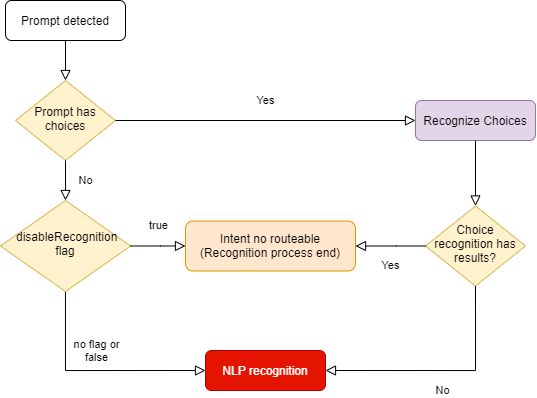
The prompt-check-recognizer-middleware checks whether there is a prompt dialog currently active and, if so, evaluates the input message to check if there is a match (the user has selected one of the options offered by the choice prompt). In this situation, a temporary recognizerResult is generated to prevent the nlp-recognizer-middleware from running.
prompt-check-recognizer-middleware has a disableRecognition flag to disable the recognition when prompt has not choices.
The source code of this recognizer is included in Aura Bot Platform recognizers - Github repository.
prompt-check-recognizer-middleware flow
The following diagram shows in detail the internal logic of the prompt-check-recognizer-middleware.
7 - Value command recognizer middleware
Value command recognizer middleware
Description of the value-command-recognizer-middleware, that checks the value property of the activity
Introduction
This recognizer checks the value property inside activity. The score for the intent is always 1.0.
The source code of this recognizer is included in Aura Bot Platform recognizers - Github repository.
An example is shown below:
Activity:
{
  "activity": {
    "value": {
      "intent": "intent.usage.check",
      "entities": [
        {
          "type": "measure",
          "entity": "megabytes"
        }
      ]
    }
  }
}
Recognizer Result:
{
  "text": "check data usage",
  "intents": {
    "intent.usage.check": {
      "score": 1.0
    }
  },
  "entities": [
    {
      "type": "measure",
      "entity": "megabytes"
    }
  ]
}
8 - Text command recognizer middleware
Text command recognizer middleware
Description of text-command-recognizer-middleware, used in Facebook channel
Introduction
This recognizer checks the text property inside of the activity and evaluates if this field contains an intent object in string format.
The source code of this recognizer is included in Aura Bot Platform recognizers - Github repository.
Its use is not recommended. Currently, it only applies to handle the Aura menu in Facebook apps.
Example
Incoming activity with a TextCommand
{
  "activity": {
    "text": "{\"intent\":\"intent.usage.check\",\"entities\":[{\"type\":\"measure\",\"entity\":\"megabytes\"}]}"
  }
}
Recognizer Result
{
  "text": "check data usage",
  "intents": {
    "intent.usage.check": {
      "score": 1.0
    }
  },
  "entities": [
    {
      "type": "measure",
      "entity": "megabytes"
    }
  ]
}
9 - Nlp recognizer middleware
Nlp recognizer middleware
Description of nlp-recognizer-middleware, responsible for calling an external API in an attempt to obtain the user’s intent.
Introduction
The main objective of the recognizer is to call aura-nlp API and process its response.
The environment variable AURA_COGNITIVE_ENDPOINT contains the URL of Aura NLP API.
It should not be requested from outside the NLP recognizer.
Aura NLP will not be requested if the channel is not configured to use it. This is configured in the channel collection in the Aura Configuration API:
{
    "name": "movistar-plus",
    "prefix": "mp",
    "nlp": {
        "enabled": false
    }
}
In this case, the NLP Recognizer will return an intent None with a score of 1.0. in the IntentResult.
Further information regarding channels’ configuration can be found in the Channels section.
The source code of this recognizer is included in Aura Bot Platform recognizers - Github repository.
Disambiguation case
In aura-bot platform, NLP response is processed and formatted in the nlp-recognizer-middleware. In this middleware, a request to the domainClassifier API is executed:
domainClassifier = (await nlpApi.domainClassifierDefaultQuery(domainClassifierDefaultRequest, correlator, options)).body;
The response received in case there is disambiguation has the following structure:
{
    query: 'original Phrase',
    channel: 'mp',
    intent_result: {
        entities: [],
        top_result: { intent: 'intent.disambiguation', score: 1.0 },
        intents: [
            { intent: 'intent.disambiguation', score: 1.0 }
        ]
    },
    domain_result: {},
    options: [
        {
            query: 'original Phrase',
            channel: 'mp',
            intent_result: {
                entities: [
                    {
                        entity: '14', type: 'faq', score: 0.90, start_index: 1, end_index: 1, canon: '14', label: null
                    }
                ],
                intents: [
                ]
            },
            domain_result: {},
            options: []
        }
    ]
}
As for the disambiguation case, information about the recognition process is obtained from the value options: [] shown in the example above. Otherwise, recognition’s response will be captured from the value intent_result: {}.
This value will be formatted and propagated into other components using the actual context:
ContextUtils.setIntentResult(context, result, context.activity.text, true)
Where result.entities will be formatted to avoid missing or empty arrays.
Following with the disambiguation example, information regarding it will be stored in result.disambiguationOptions with the following type IntentResult[].
10 - Triage recognizer middleware
Triage recognizer middleware
Description of triage-recognizer-middleware, responsible for calling an external API in an attempt to obtain the user’s intent.
Enabling the triage recognizer
The triage-recognizer-middleware is an optional recognizer that can be added to the environment variable AURA_ACTIVE_MIDDLEWARES to enable it.
AURA_ACTIVE_MIDDLEWARES=TriageRecognizerMiddleware
Once enabled, the middleware will only run if the following conditions are met:
- There is no intent already recognized in the context.
- The intent is included in the list of intents defined in the environment variable
AURA_INTENTS_NONE. By default, this variable contains the value ['None', 'intent.none', 'intent.tv.none'].
Adding the necessary configuration for the channel
To use this recognizer, it is necessary to add the configuration for the channel in the channel collection in the aura-configuration-api.
The configuration must include the applicationId and presetId for the TriageRecognizer in the atria.recognizers object.
For example, if the channel is movistar-plus, the configuration should look like this:
{
    "name": "movistar-plus",
    "prefix": "mp",
    "atria": {
        "recognizers": {
            "TriageRecognizer": {
                "applicationId": "816bdab6-3ea3-4a77-bdea-12945d6d7053",
                "presetId": "67cb30a2-aec7-448c-a2a6-18faaa9d1820"
            }
        }
    }
}
How the triage recognizer works
The triage-recognizer-middleware is responsible for calling an external API, ATRIA, to obtain the user’s intent using a Large Language Model (LLM) system.
The triage-recognizer-middleware uses the AiService to call the Atria generative API with the message received in the request and the configuration defined for the channel in the channel collection in the aura-configuration-api (see the section Adding the necessary configuration for the channel).
If triage middleware is enabled but the channel does not contain the config for the TriageRecognizer, the middleware will not be executed.
For each call, the previous session information associated with the user is sent, if it exists. The session information is stored in the context for future requests.
Finally, the intent is extracted from the response received from ATRIA and fills the IntentResult with the recognized intent.
11 - Finalize recognizers middleware
Finalize recognizers middleware
Description of finalize-recognizers-middleware, in charge of finalizing the recognition process.
Introduction
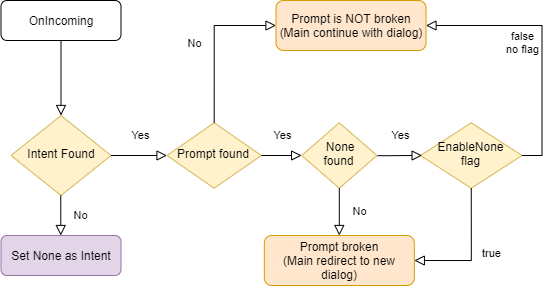
This middleware is not a recognizer itself, as it simply takes care of making the final adjustments to the recognition process, such as:
- Establish the final name of the attempt. It is necessary to put the prefix of the current channel.
- Remove the prompt from the stack if the conditions are met.
The source code of this recognizer is included in Aura Bot Platform recognizers - Github repository.
finalize-recognizers-middleware flow
Internal Recognizer Result:
Intent Type |
Prompt Check |
Execute NLP Recognizer |
Remove Prompt from Stack |
suggestion |
false |
false |
true |
operation |
false |
false |
false |
text |
false |
false |
false |
| No Intent detected |
true if Prompt |
If Prompt evaluation fails |
If NLP intent score >= 0.95 and if none is detected and enabled.
Customizable value, 0.95 is the default value of AURA_MIN_INTENT_SCORE_THRESHOLD_TO_CLEAN_STACK variable, that controls this behavior. |
By default, if there is a prompt and there has been NLP recognition, then if none intent is found it will not be enough to break the prompt unless enableNone is activated to break it.