This is the multi-page printable view of this section.
Click here to print.
Return to the regular view of this page.
Components
Aura Bot components
Description and role of the main Aura Bot components
aura-bot components can be categorized into three main groups for documentary purposes:
Aura Bot Platform components
Components aura-bot has, as a BotFramework bot:
Aura Bot functional modules
Components that have been built over aura-bot to provide it with specific functionalities.
Aura Bot databases
Databases used by aura-bot:
Aura Bot ActivityHandler
This is properly the core of the bot, i.e., the message dispatcher. aura-bot just extends the ActivityHandler provided by BotFramework to handle activities properly.
It overwrites the following events, that are executed just after all incoming middlewares finish:
onTurn: to update the states of the turn properly: conversationState, userState, userAuthState.onMessage: to run the main dialog, just after states have been updated.onDialog: it is executed after the whole main dialog ends and updates the states of the turn.
1 - Recognizers
Aura Bot recognizers
Description of the different Aura Bot recognizers, components in charge of the identification of the user’s intention
What are Aura Bot recognizers?
Recognizers in aura-bot are a specific type of middlewares that are executed in a certain stage of the message flow. They are in charge of the recognition of the user’s intention based on the data sent in the request.
Recognizers inherit from the abstract class called BaseRecognizerMiddleware.
There are two types of recognizers, internal and external:
Internal recognizers
aura-bot own components that are able to recognize the intention of the user directly from the incoming message.
Currently, they are:
External recognizers
Responsible for calling an external API to obtain an intention.
Currently, the only external recognizer is nlp-recognizer-middleware, in charge of detecting the intention of the user from all the training of the environment.
Apart from the ones mentioned above, the finalize-recognizers-middleware is in charge of finalizing the recognition process.
Recognizers are executed sequentially in the order previously defined during the bot start-up.
Recognizers flow
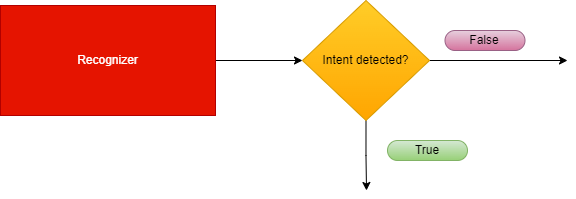
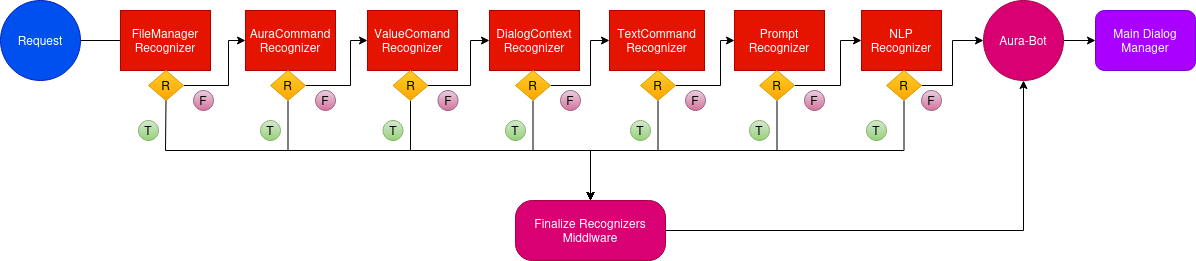
The following figure shows the execution flowchart for aura-bot recognizers, including the recognizers included in aura-bot by default. They are executed sequentially.
-
If one specific recognizer has obtained an intention, then the flow redirects to the finalize-recognizers-middleware, that provides the result to aura-bot in order to trigger the corresponding dialog.
-
If the recognizer in execution does not get the intention, then the flow continues and the succeeding recognizer is executed.
-
As can be seen in the flowchart, the last recognizer to be executed is the external one, nlp-recognizer-middleware. This is because aura-bot should only request it if no other recognizer gets the intention of the user.
-
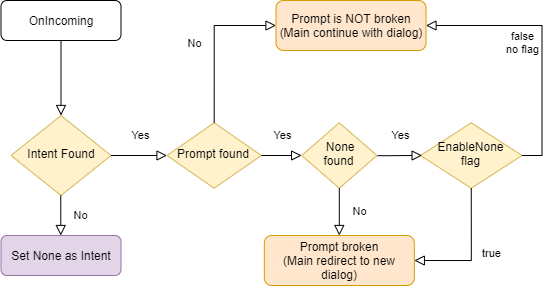
The finalize-recognizers-middleware is in charge of deciding, in case there is any active prompt, whether to continue with the prompt or to remove the prompt from the dialog stack and process the attempt to start a new dialog otherwise.
1.1 - Base recognizer
Base recognizer
Description of base-recognizer
Introduction
Recognizers are middlewares that inherit from the abstract class called BaseRecognizerMiddleware.
export abstract class BaseRecognizerMiddleware implements Middleware, Recognizer {
    protected name: string;
    protected id: string;
    protected type: RecognizerType;
    constructor(name: string, id: string, type?: RecognizerType) {
        this.type = type || RecognizerType.Asynchronous;
        this.name = name;
        this.id = id;
    }
The source code of this recognizer is included in Aura Bot Platform recognizers - Github repository.
base-recognizer parameters
| Parameters |
Type |
Description |
| name |
property |
Name of the middleware. |
| id |
property |
Unique identifier for middleware. |
| type |
property |
Type of execution (async or sync) to execute the recognizer method. |
| recognize |
method |
Abstract method that must be implemented in the recognizer. If the recognizer detects an intent, it must save the intent result in the turn context. |
| onTurn |
method |
Private method executed when the activity is processed by the adapter. |
| processIntent |
method |
Protected method to process the intent and entities and store the intentResult and the intent in AuraCommand format. |
|
|
|
IntentResult model
| Name |
Type |
Description |
| text |
string |
Utterance sent to the recognizer. |
| alteredText |
string |
If the original text is changed due to mistakes such as spelling typos, the altered version is included here. |
| intents |
Object |
Map of intent names to an object with score is returned. Format: [name: string]: {score: number;}; |
| entities |
Entity |
Entities recognized. |
| promptCheck |
boolean |
If true, the finalize-recognizers-middleware evaluates if exits a prompt in the stack and decides whether it needs to pop from the stack or continues. |
|
|
|
1.2 - Aura Command recognizer middleware
Aura Command recognizer middleware
Description of aura-command-recognizer-middleware, in charge of identifying Aura commands.
Introduction
aura-command-recognizer-middleware checks the auraCommand property inside an activity.
This component is able to identify the so-called auraCommands, recognizing the user’s intent and associated entities from the messages reaching an aura-bot instance.
By default, it is the recognizer with more priority. The score for the intent is always 1.0.
The source code of this recognizer is included in Aura Bot Platform recognizers - Github repository.
An example is shown below:
Incoming activity with an auraCommand
{
  "activity": {
    "channelData": {
      "auraCommand": {
        "type": "suggestion",
        "value": {
          "intent": "intent.usage.check",
          "entities":[{
            "type": "measure",
            "entity" : "megabytes"
          }]
        }
      }
    }
  }
}
Recognizer Result
{
  "text": "check data usage",
  "intents":
    "intent.usage.check": {
      "score": 1.0
    }
  },
  "entities": [
    {
      "type": "measure",
      "entity": "megabytes"
    }
  ]
}
1.3 - Dialog context recognizer middleware
Dialog context recognizer middleware
Description of dialog-context-recognizer-middleware, that manages the recognition process when there are different options in the response
Introduction
dialog-context-recognizer-middleware uses a model to facilitate the recognition when Aura response is composed of several options, which have either been generated automatically when a Prompt Choice or a list of CardActions has been processed or generated manually.
This model is defined in dialogContext model.
The source code of this recognizer is included in Aura Bot Platform recognizers - Github repository.
The behavior of this recognizer is channel-specific. The dialogContext configuration for each channel follows the model defined in the channel model sub-property.
This recognizer first checks if a cache exists with the dialogContext generated by the last message sent to the user. If it does not exist, then it checks the dialogContext information saved in aura-bot cache, in greater detail in property auraData.conversationData.dialogContext.
This differs with past versions where this information was obtained from channelData property in the activity, which now is defined in the processFromClient property.
The recognition is performed by proximity between the user’s phrase and the dialogContext values to be evaluated.
If Aura has sent several dialogContext messages, the last message will be the one containing a single dialogContext with all the previous ones merged.
If the dialogContext value exists in the cache, it is deleted once fetched. If another recognizer beats the dialog-context-recognizer-middleware, this process is performed inside the finalize-recognizers-middleware.
Environment variables
Three aura-bot environment variables come into play in the process:
AURA_DIALOG_CONTEXT_THRESHOLD: minimum threshold to validate the recognition (by default: 0.8).AURA_DIALOG_CONTEXT_THRESHOLD_RELATION_UTTERANCE: Microsoft uses in its algorithm a fixed value of 0.5. If the value is not set, then the value will be calculated based on the words of the user’s phrase divided by the words of the phrase to be compared. (by default: not set).AURA_DIALOG_CONTEXT_ORDINAL_CARDINAL_THRESHOLD: if the client phrase contains a number or the dialogContext values are enumerated by cardinals or/and ordinals, this threshold will be used instead of AURA_DIALOG_CONTEXT_THRESHOLD. This is done to prevent numbers within the phrase from being confused with the position of the items in the options list.(by default: 0.95).
The dialogContext can be generated automatically based on Prompt Choices or CardActions. This is configurable per channel, but developers could add the dialogContext object to the channelData with the expected actions.
Example
An example is shown below: a user asks for a recommendation in Movistar +. If these recommendations are included in a dialogContext, it gives the user the possibility to precisely select one of the options using voice:
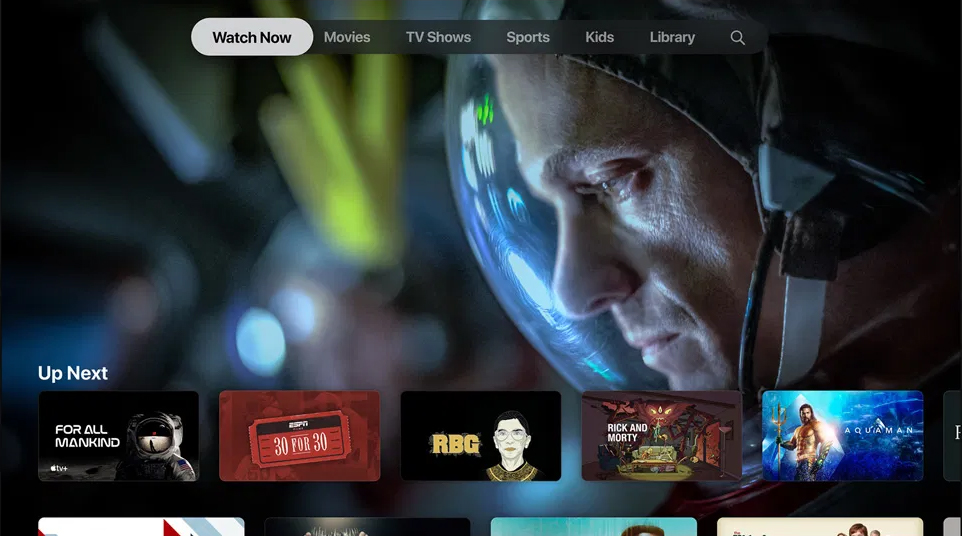
dialogContext stored for an Aura response:
{
  "dialogContext": [
    {
      "text": "I want to see the movie for all mankind|1|one|the first|first",
      "value": {
        "name": "I want to see the movie for all mankind",
        "text": "See for all mankindo",
        "type": "suggestion",
        "intent": "intent.tv.search",
        "entities": [
          {
            "type": "ent.audiovisual_film_title",
            "entity": "for all mankind",
            "canon": "for all mankind",
            "label": "",
            "score": 1
          },
          {
            "type": "ent.audiovisual_genre",
            "entity": "film",
            "canon": "films",
            "label": "CN",
            "score": 1
          }
        ]
      }
    },
     {
      "text": "I want to see the movie 30 for 30|two|second|the second|",
      "value": {
        "name": "I want to see the movie 30 for 30",
        "text": "See 30 for 30",
        "type": "suggestion",
        "intent": "intent.tv.search",
        "entities": [
          {
            "type": "ent.audiovisual_film_title",
            "entity": "30 for 30",
            "canon": "30 for 30",
            "label": "",
            "score": 1
          },
          {
            "type": "ent.audiovisual_genre",
            "entity": "film",
            "canon": "films",
            "label": "CN",
            "score": 1
          }
        ]
      }
    },
      {
      "text": "I want to see the movie rgb|3|three|the third|third",
      "value": {
        "name": "I want to see the movie rgb",
        "text": "See for all mankindo",
        "type": "suggestion",
        "intent": "intent.tv.search",
        "entities": [
          {
            "type": "ent.audiovisual_film_title",
            "entity": "rgb",
            "canon": "rgb",
            "label": "",
            "score": 1
          },
          {
            "type": "ent.audiovisual_genre",
            "entity": "film",
            "canon": "films",
            "label": "CN",
            "score": 1
          }
        ]
      }
    },
    .....
  ]
}
1.4 - attachment recognizer middleware
Attachment recognizer middleware
Description of the attachment-recognizer-middleware, in charge of managing some attachment types sent to aura-bot
Introduction to attachment recognizer middleware
attachment-recognizer manages messages that include attachments. Currently, only two types of attachment content types are handled:
application/vnd.telefonica.aura.whatsapp.orderapplication/vnd.telefonica.aura.whatsapp.context
These types are mapped by channel configuration in the field requestOptions.defaultIntentByAttachment and the intent set in this configuration
will be the intent set by this recognizer.
An example of defaultIntentByAttachment configuration is included below:
{
  "requestOptions": {
    "defaultIntentByAttachment": {
      "application/vnd.telefonica.aura.whatsapp.order": "intent.factotum-test.whatsapp-catalog-handler",
      "application/vnd.telefonica.aura.whatsapp.context": "intent.factotum-test.whatsapp-catalog-handler"
    }
  }
}
When one of these attachments is found in the activity but the configuration for this type is not found in the channel configuration,
the intent set in the environment variable AURA_ROOT_INTENT (None by default) will be set.
1.5 - File manager recognizer
File manager recognizer
Description of the file-manager-recognizer-middleware, in charge of managing files in use cases messages
Introduction to file-manager recognizer
file-manager recognizer manages messages that include files, both as text messages or as attachments. Although it is not a real recognizer, it is included in the list of recognizers because it is executed in the same way as the rest of them, and it is in charge of managing files, that are handled in the same way as intents.
The source code of this recognizer is included in Aura Bot Platform recognizers - Github repository.
Depending on which dialog is running (PromptAttachment, BypassDialog, none) and whether the channel is ready for managing files, these files can be:
- Used by the dialog that requested it.
- Processed and validated by the aura-file-manager API.
- Sent to the unexpected-file dialog.
- Other situations beyond the happy path.
This recognizer checks the attachments property or the property channelData.payload.asyncCallback.attachments inside an activity. The reason behind searching for two different properties has to do with its execution flow. The first one is used to send files from the user to aura-bot and the second one is used to send files from file-manager back to aura-bot, once they are validated.
It is the recognizer with more priority, (the first to be executed after the initialization middleware), so if it finds an intention, it will win, because its resulting score for the recognized intent will be always 1.0, i.e., a perfect recognition.
Example of an activity with a file attachment:
{
  "attachments": [
    {
      "contentType": "image/png",
      "contentUrl": "https://example.com/image.png"
    }
  ]
}
Example of an activity with a validated file attached in the channelData.payload.asyncCallback.attachments.
{
  "channelData": {
    "payload": {
      "asyncCallback": {
        "attachments": [
          {
            "contentUrl": "https://<host>/fromId/messageId_1646724898352?sv=2020-10-02&se=2022-03-08T08%3A34%3A59Z&sr=b&sp=r&sig=GTCdk%2B9lU4IkYTJVH1%2BpEMBAKHWmaOjMB026Qxxw1ZU%3D",
            "name": "messageId_1646724898352",
            "content": {
              "processed": true,
              "typeValidation": {
                "valid": true,
                "value": "png"
              },
              "sizeValidation": {
                "valid": true,
                "value": 40663
              },
              "status": [
                {
                  "code": "OK",
                  "message": ""
                }
              ]
            },
            "contentType": "image/png"
          }
        ]
      }
    }
  }
}
aura-bot includes the content-type of the incoming attachment in its request to the file-manager, so a proper extension can be inferred in all the cases.
file-manager recognizer flow
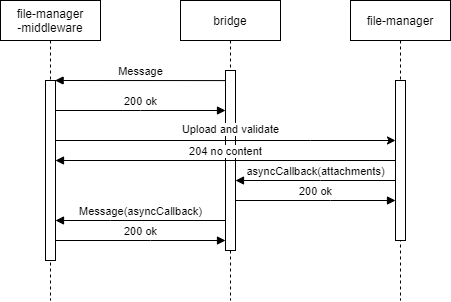
- The recognizer first checks if attachments data is present in the
activity.
- Then, the recognizer checks if the
channelData has file configuration enabled.
- The recognizer searchs for an active
PromptAttachment or bypass with file treatment.
- If it is found, then we will be on the case of an expected file and the processing will continue.
- If not, the processing will be redirected to the unexpected-file dialog.
- If we have an active
PromptAttachment or bypass with file treatment, the recognizer will send the data to be asynchronously processed by the file-manager API (a microservice with the only purpose of validating and upload files to a local repository).
- Through aura-bridge, the recognizer will receive the data processed by the file-manager API: (
channelData.payload.asyncCallback.attachments). In this stage, data with validations will be passed to the dialog where it can use it to do extra validations.
The following figures shows the different scenarios that can arise:
- The use case requests one file
sequenceDiagram
Title: Normal flow one file requested
    User/Kernel->>+Bridge: Phrase to init UC file dialog
    Bridge->>+Groot/Bot: Phrase to init UC file dialog
    Groot/Bot->>+NLP: Phrase user
    NLP->>+Groot/Bot: Intent dialog
    Groot/Bot->>+File Dialog: Start UC file dialog
    File Dialog->>+Bridge: Send me a file
    Bridge->>+User/Kernel: Send me a file
    User/Kernel->>+Bridge: Send a file
    Bridge->>+Groot/Bot: Send the attachment
    Groot/Bot->>+File Api: Validate / process the attachment
    File Api->>+Bridge: Attachment processed, validated and ready
    Bridge->>+Groot/Bot: Send attachment processed
    Groot/Bot->>+File Dialog: Send attachment processed
    File Dialog->>+Bridge: Ok
    Bridge->>+User/Kernel: Ok
- The use case requests one file but the user decides to send more than one file
sequenceDiagram
Title: One file requested, user send more
    User/Kernel->>+Bridge: Phrase to init UC file dialog
    Bridge->>+Groot/Bot: Phrase to init UC file dialog
    Groot/Bot->>+NLP: Phrase user
    NLP->>+Groot/Bot: Intent dialog
    Groot/Bot->>+File Dialog: Start UC file dialog
    File Dialog->>+Bridge: Send me a file
    Bridge->>+User/Kernel: Send me a file
    User/Kernel->>+Bridge: Send a file
    Bridge->>+Groot/Bot: Send the attachment
    Groot/Bot->>+File Api: Validate / process the attachment
    alt Processing file
    User/Kernel->>+Bridge: Send a file
    Bridge->>+Groot/Bot: Send the attachment
    Groot/Bot->>+File Dialog: Processing file & New attachment no validated send it
    File Dialog->>+Bridge: Processing file, don't send me more files
    Bridge->>+User/Kernel: Processing file, don't send me more files
    end
    File Api->>+Bridge: Attachment processed, validated and ready
    Bridge->>+Groot/Bot: Send attachment processed
    Groot/Bot->>+File Dialog: Send attachment processed
    File Dialog->>+Bridge: Ok
    Bridge->>+User/Kernel: Ok
- The use case requests several files: Files will arrive to the dialog as they are processed.
sequenceDiagram
Title: User send multiples files
    User/Kernel->>+Bridge: Phrase to init UC file dialog
    Bridge->>+Groot/Bot: Phrase to init UC file dialog
    Groot/Bot->>+NLP: Phrase user
    NLP->>+Groot/Bot: Intent dialog
    Groot/Bot->>+File Dialog: Start UC file dialog
    File Dialog->>+Bridge: Send me 3 files
    Bridge->>+User/Kernel: Send me 3 files
    User/Kernel->>+Bridge: Send 3 files
    alt Process attachment 2
    Bridge->>+Groot/Bot: Send attachment 2
    Groot/Bot->>+File Api: Validate / process the attachment 2
    File Api->>+Bridge: Attachment 2 processed, validated and ready
    Bridge->>+Groot/Bot: Send attachment 2 processed
    Groot/Bot->>+File Dialog: Receive 1/3 files processed
    end
    alt Process attachment 1
    Bridge->>+Groot/Bot: Send attachment 1
    Groot/Bot->>+File Api: Validate / process the attachment 1
    File Api->>+Bridge: Attachment 1 processed, validated and ready
    Bridge->>+Groot/Bot: Send attachment 1 processed
    Groot/Bot->>+File Dialog: Receive 2/3 files processed
    end
    alt Process attachment 3
    Bridge->>+Groot/Bot: Send attachment 3
    Groot/Bot->>+File Api: Validate / process the attachment 3
    File Api->>+Bridge: Attachment 3 processed, validated and ready
    Bridge->>+Groot/Bot: Send attachment 3 processed
    Groot/Bot->>+File Dialog: Receive 3/3 files processed
    end
    File Dialog->>+Bridge: Ok
    Bridge->>+User/Kernel: Ok
- In case of unexpected file:
sequenceDiagram
Title: Unexpected File
    User/Kernel->>+Bridge: Send a file
    Bridge->>+Groot/Bot: Send the attachment
    Groot/Bot->>+Unexpected File: Send the attachment
    Unexpected File->>+Bridge: Unexpected file
    Bridge->>+User/Kernel: Unexpected file
- Different problems may arise in reference to unavailable file-manager* API or aura-bridge:
sequenceDiagram
Title: File Api No Available
    User/Kernel->>+Bridge: Phrase to init UC file dialog
    Bridge->>+Groot/Bot: Phrase to init UC file dialog
    Groot/Bot->>+NLP: Phrase user
    NLP->>+Groot/Bot: Intent dialog
    Groot/Bot->>+File Dialog: Start UC file dialog
    File Dialog->>+Bridge: Send me a file
    Bridge->>+User/Kernel: Send me a file
    User/Kernel->>+Bridge: Send a file
    Bridge->>+Groot/Bot: Send the attachment
    alt Retries with File API
    Groot/Bot-xFile Api: Validate / process the attachment
    Groot/Bot-xFile Api: Validate / process the attachment
    Groot/Bot-xFile Api: Validate / process the attachment
    end
    Groot/Bot->>+File Dialog: Attachment no processed with problem explanation
sequenceDiagram
Title: Bridge no available
    User/Kernel->>+Bridge: Phrase to init UC file dialog
    Bridge->>+Groot/Bot: Phrase to init UC file dialog
    Groot/Bot->>+NLP: Phrase user
    NLP->>+Groot/Bot: Intent dialog
    Groot/Bot->>+File Dialog: Start UC file dialog
    File Dialog->>+Bridge: Send me a file
    Bridge->>+User/Kernel: Send me a file
    User/Kernel->>+Bridge: Send a file
    Bridge->>+Groot/Bot: Send the attachment
    Groot/Bot->>+File Api: Validate / process the attachment
    alt Bridge no reachable
    File Api-xBridge: Attachment processed, validated and ready
    File Api-xBridge: Attachment processed, validated and ready
    File Api-xBridge: Attachment processed, validated and ready
    end
    User/Kernel->>+Bridge: Aura, what's going on?
    Bridge->>+Groot/Bot: Aura, what's going on?
    Groot/Bot->>+File Dialog: Aura, what's going on? / Cut PromptAttachment or Bypass
    File Dialog->>+Bridge: Try again later / Other message
    Bridge->>+User/Kernel: Try again later / Other message
Environment variables
Practical process for managing files in a use case
Currently, it is only available for WhatsApp channels. Follow the guidelines in Use of files in WhatsApp.
1.6 - Prompt check recognizer middleware
Prompt check recognizer middleware
Description of prompt-check-recognizer-middleware, that manages the scenario when a user is requested to chose between different options
Introduction
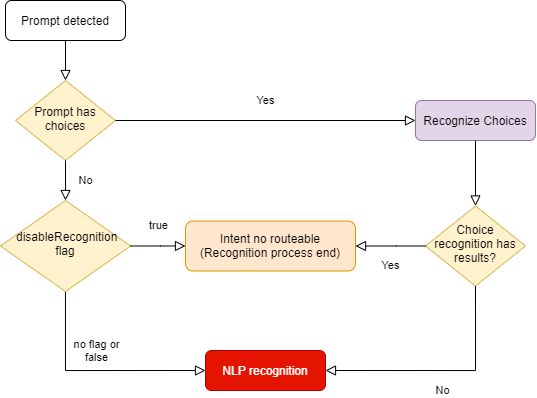
The prompt-check-recognizer-middleware checks whether there is a prompt dialog currently active and, if so, evaluates the input message to check if there is a match (the user has selected one of the options offered by the choice prompt). In this situation, a temporary recognizerResult is generated to prevent the nlp-recognizer-middleware from running.
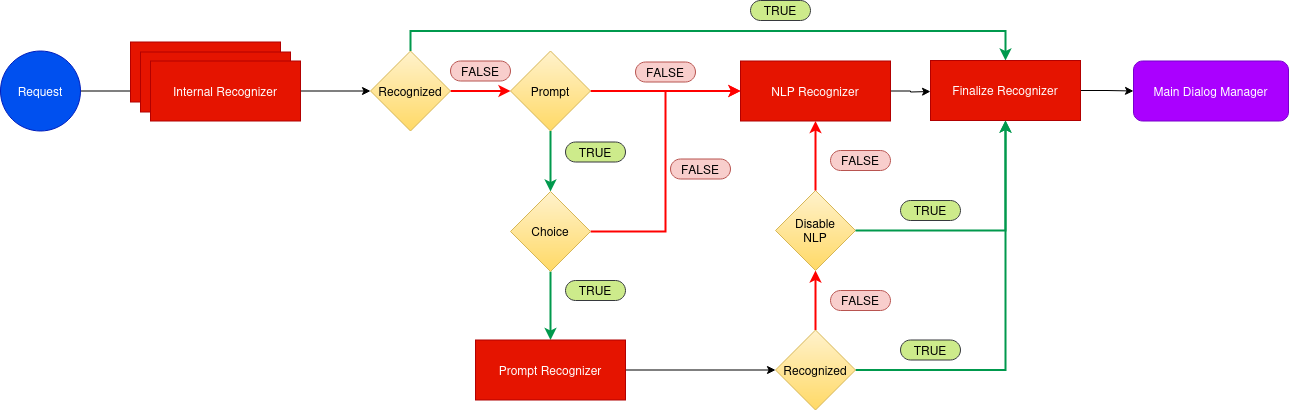
prompt-check-recognizer-middleware has a disableRecognition flag to disable the recognition when prompt has not choices.
The source code of this recognizer is included in Aura Bot Platform recognizers - Github repository.
prompt-check-recognizer-middleware flow
The following diagram shows in detail the internal logic of the prompt-check-recognizer-middleware.
1.7 - Value command recognizer middleware
Value command recognizer middleware
Description of the value-command-recognizer-middleware, that checks the value property of the activity
Introduction
This recognizer checks the value property inside activity. The score for the intent is always 1.0.
The source code of this recognizer is included in Aura Bot Platform recognizers - Github repository.
An example is shown below:
Activity:
{
  "activity": {
    "value": {
      "intent": "intent.usage.check",
      "entities": [
        {
          "type": "measure",
          "entity": "megabytes"
        }
      ]
    }
  }
}
Recognizer Result:
{
  "text": "check data usage",
  "intents": {
    "intent.usage.check": {
      "score": 1.0
    }
  },
  "entities": [
    {
      "type": "measure",
      "entity": "megabytes"
    }
  ]
}
1.8 - Text command recognizer middleware
Text command recognizer middleware
Description of text-command-recognizer-middleware, used in Facebook channel
Introduction
This recognizer checks the text property inside of the activity and evaluates if this field contains an intent object in string format.
The source code of this recognizer is included in Aura Bot Platform recognizers - Github repository.
Its use is not recommended. Currently, it only applies to handle the Aura menu in Facebook apps.
Example
Incoming activity with a TextCommand
{
  "activity": {
    "text": "{\"intent\":\"intent.usage.check\",\"entities\":[{\"type\":\"measure\",\"entity\":\"megabytes\"}]}"
  }
}
Recognizer Result
{
  "text": "check data usage",
  "intents": {
    "intent.usage.check": {
      "score": 1.0
    }
  },
  "entities": [
    {
      "type": "measure",
      "entity": "megabytes"
    }
  ]
}
1.9 - Nlp recognizer middleware
Nlp recognizer middleware
Description of nlp-recognizer-middleware, responsible for calling an external API in an attempt to obtain the user’s intent.
Introduction
The main objective of the recognizer is to call aura-nlp API and process its response.
The environment variable AURA_COGNITIVE_ENDPOINT contains the URL of Aura NLP API.
It should not be requested from outside the NLP recognizer.
Aura NLP will not be requested if the channel is not configured to use it. This is configured in the channel collection in the Aura Configuration API:
{
    "name": "movistar-plus",
    "prefix": "mp",
    "nlp": {
        "enabled": false
    }
}
In this case, the NLP Recognizer will return an intent None with a score of 1.0. in the IntentResult.
Further information regarding channels’ configuration can be found in the Channels section.
The source code of this recognizer is included in Aura Bot Platform recognizers - Github repository.
Disambiguation case
In aura-bot platform, NLP response is processed and formatted in the nlp-recognizer-middleware. In this middleware, a request to the domainClassifier API is executed:
domainClassifier = (await nlpApi.domainClassifierDefaultQuery(domainClassifierDefaultRequest, correlator, options)).body;
The response received in case there is disambiguation has the following structure:
{
    query: 'original Phrase',
    channel: 'mp',
    intent_result: {
        entities: [],
        top_result: { intent: 'intent.disambiguation', score: 1.0 },
        intents: [
            { intent: 'intent.disambiguation', score: 1.0 }
        ]
    },
    domain_result: {},
    options: [
        {
            query: 'original Phrase',
            channel: 'mp',
            intent_result: {
                entities: [
                    {
                        entity: '14', type: 'faq', score: 0.90, start_index: 1, end_index: 1, canon: '14', label: null
                    }
                ],
                intents: [
                ]
            },
            domain_result: {},
            options: []
        }
    ]
}
As for the disambiguation case, information about the recognition process is obtained from the value options: [] shown in the example above. Otherwise, recognition’s response will be captured from the value intent_result: {}.
This value will be formatted and propagated into other components using the actual context:
ContextUtils.setIntentResult(context, result, context.activity.text, true)
Where result.entities will be formatted to avoid missing or empty arrays.
Following with the disambiguation example, information regarding it will be stored in result.disambiguationOptions with the following type IntentResult[].
1.10 - Triage recognizer middleware
Triage recognizer middleware
Description of triage-recognizer-middleware, responsible for calling an external API in an attempt to obtain the user’s intent.
Enabling the triage recognizer
The triage-recognizer-middleware is an optional recognizer that can be added to the environment variable AURA_ACTIVE_MIDDLEWARES to enable it.
AURA_ACTIVE_MIDDLEWARES=TriageRecognizerMiddleware
Once enabled, the middleware will only run if the following conditions are met:
- There is no intent already recognized in the context.
- The intent is included in the list of intents defined in the environment variable
AURA_INTENTS_NONE. By default, this variable contains the value ['None', 'intent.none', 'intent.tv.none'].
Adding the necessary configuration for the channel
To use this recognizer, it is necessary to add the configuration for the channel in the channel collection in the aura-configuration-api.
The configuration must include the applicationId and presetId for the TriageRecognizer in the atria.recognizers object.
For example, if the channel is movistar-plus, the configuration should look like this:
{
    "name": "movistar-plus",
    "prefix": "mp",
    "atria": {
        "recognizers": {
            "TriageRecognizer": {
                "applicationId": "816bdab6-3ea3-4a77-bdea-12945d6d7053",
                "presetId": "67cb30a2-aec7-448c-a2a6-18faaa9d1820"
            }
        }
    }
}
How the triage recognizer works
The triage-recognizer-middleware is responsible for calling an external API, ATRIA, to obtain the user’s intent using a Large Language Model (LLM) system.
The triage-recognizer-middleware uses the AiService to call the Atria generative API with the message received in the request and the configuration defined for the channel in the channel collection in the aura-configuration-api (see the section Adding the necessary configuration for the channel).
If triage middleware is enabled but the channel does not contain the config for the TriageRecognizer, the middleware will not be executed.
For each call, the previous session information associated with the user is sent, if it exists. The session information is stored in the context for future requests.
Finally, the intent is extracted from the response received from ATRIA and fills the IntentResult with the recognized intent.
1.11 - Finalize recognizers middleware
Finalize recognizers middleware
Description of finalize-recognizers-middleware, in charge of finalizing the recognition process.
Introduction
This middleware is not a recognizer itself, as it simply takes care of making the final adjustments to the recognition process, such as:
- Establish the final name of the attempt. It is necessary to put the prefix of the current channel.
- Remove the prompt from the stack if the conditions are met.
The source code of this recognizer is included in Aura Bot Platform recognizers - Github repository.
finalize-recognizers-middleware flow
Internal Recognizer Result:
Intent Type |
Prompt Check |
Execute NLP Recognizer |
Remove Prompt from Stack |
suggestion |
false |
false |
true |
operation |
false |
false |
false |
text |
false |
false |
false |
| No Intent detected |
true if Prompt |
If Prompt evaluation fails |
If NLP intent score >= 0.95 and if none is detected and enabled.
Customizable value, 0.95 is the default value of AURA_MIN_INTENT_SCORE_THRESHOLD_TO_CLEAN_STACK variable, that controls this behavior. |
By default, if there is a prompt and there has been NLP recognition, then if none intent is found it will not be enough to break the prompt unless enableNone is activated to break it.
2 - Middlewares
Aura Bot middlewares
Description of the different Aura Bot middlewares, components in charge of the messages flow
Introduction to Aura Bot middlewares
Middlewares in aura-bot are software components in charge of the messages flow. In fact, they are just classes executed between the bot adapter and aura-bot logic.
Middlewares are defined by Microsoft BotFramework, thus Aura just adds as many middlewares as needed in order to make the bot handle messages appropriately.
Find here further information about middlewares in BotFramework.
There are two types of middlewares defined in aura-bot:
- Middlewares that are always executed following a specific order established by the bot.
- Middlewares that are optional and are activated by configuration, through the environment variable
AURA_ACTIVE_MIDDLEWARES.
The following figure schematically shows the aura-bot middlewares flow for messages, indicating their category and the orderly execution of all of them.
| Classification criteria |
Categories |
| When they are executed |
- INPUT (turquoise): if they are an input to aura-bot, in order to summon a dialog.
- OUTPUT (orange): they are an output from aura-bot, leading to the output message generation.
- INPUT-OUTPUT: (half turquoise/half orange), if they have methods to be run before executing the dialog and methods to be executed after it. |
| Mandatory / optional |
- M: mandatory
- O: optional |
| Execution mode: flow stops when middleware fails |
- False: Execution flow stops when middleware fails
- True: execution continues when middleware fails |
To configure the optional middlewares, they should be added to the environment variable AURA_ACTIVE_MIDDLEWARES that should contain the name/s of the needed optional middlewares. It should contain a comma separated list with all or a set of the following names:
- batch-outgoing-message-middleware
- speak-processor-middleware

2.1 - Incoming Event middleware
Incoming Event middleware
Description of incoming-event-middleware, executed in event activity types.
Introduction
The incoming-event-middleware is in charge of managing events, that is, activities for the end-to-end communication between aura-bot and channels.
Channels can send events to aura-bot to inform about any relevant event happening on their side.
In particular, aura-bridge sends an event to aura-bot, when the transformation from bot activity to WhatsApp message fails, that is handled by this middleware.
When aura-bot receives an event, this middleware prevents the execution of the rest of the middlewares by completing the request flow.
There are two types of events:
- Log type: the channel asks aura-bot to log certain information
- emptyResponse type: Event sent by the bot when no response activity is sent. Currently, it is internally used for aura-bot towards aura-bridge.
export enum TypeEvent {
    /**
     * Log event
     */
    Log = 'log',
    /**
     * Directline empty response event (Event sent by the bot when no response activity is sent)
     */
    EmptyResponse = 'emptyResponse'
}
This middleware is executed once the HTTP request arrives at the server to the POST /api/messages endpoint and the Direct Line authentication executed by the Adapter is successful.
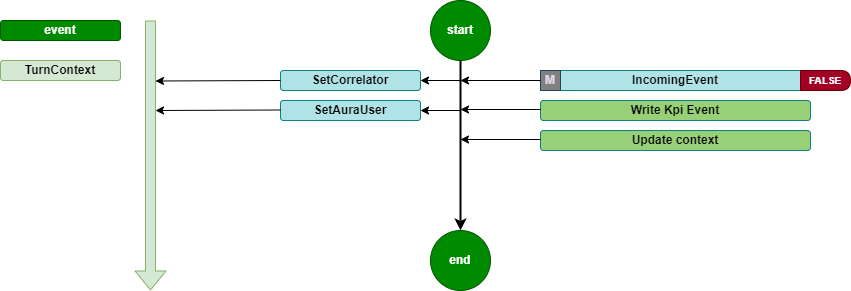
It is a Turn middleware, so it is executed during turn initialization. It is only executed if the type of the activity is event. In this case, the middleware records the KPIs and updates the context.
The source code of this middleware is included in Aura Bot Platform middlewares - Github repository.
Incoming Event flow diagram
The incoming-event-middleware flowchart is included below:
2.2 - Init middleware
Init middleware
Description of init-middleware, the very first one to be executed once the HTTP request arrives at the server
Introduction
The init-middleware is the first to be executed once the HTTP request arrives at the server to the POST /api/messages endpoint and the Direct Line authentication executed by the Adapter is successful.
It is a Turn middleware, so it is executed during turn initialization.
It launches the execution of all the following middlewares, in the order declared during aura-bot initialization. It is only executed if the type of the activity is message.
The source code of this middleware is included in Aura Bot Platform middlewares - Github repository.
init-middleware flowchart
The orderly steps for the management of this middleware are detailed below:
- Set a proper correlator in the
TurnContext, that will be used during the whole processing of the activity throughout aura-bot.
This means that:
- If a correlator is received in the
channelData of the activity, this one is used.
- If the channel does not send a correlator, a new one is generated at this point, to be used the same way.
ContextUtils.setCorrelator(context, ContextUtils.getCorrelatorFromChannelData(context));
/**
 * Get correlator from channel data, if exist there, or creates a new one.
    * @param context Context where the channel data will be taken from
    */
static getCorrelatorFromChannelData(context) {
    if (!context.activity.channelData || !context.activity.channelData.correlator) {
        context.activity.channelData = { ...context.activity.channelData || {}, correlator: uuid.v4() };
    }
    return context.activity.channelData.correlator;
}
-
Push the auraId, received in the from.id of the activity, to the TurnContext, to make it available in all the activity execution steps. The getAuraId method sets the auraId based on the channel type, if the channel is integrated. Then, the auraId is prefixed with the channel prefix.
This is necessary because the auraId is the key to the user cache and, if it is not formatted properly, it will fail to fetch the user from the cache and will re-request the user’s data from the services.
ContextUtils.setAuraId(context, ChannelDataUtils.getAuraId(context, AuraChannelsConfiguration.instance));
-
Initialize the data accessors of the conversational context in the TurnContext: conversationState, userState and authenticationState.
ContextUtils.setAuraPersistentDataAccesors(context, this.dataAccessors);
-
Initialize the conversationState. This is necessary to avoid errors when a user accesses through several channels simultaneously.
ContextUtils.setConversationState(context, this.conversationState);
-
Set activity locale with the default value.
context.activity.locale = ConfigurationManager.instance.environmentConfiguration.AURA_DEFAULT_LOCALE;
At this stage, two scenarios can happen:
-
If the activity processing is executed properly, the following middleware is executed.
-
In the happening of an unexpected error during the activity processing, the error makes all its way back to this initialization middleware error handling, in order to return the user a response activity including the most appropriate text related to the error.
One of the possible errors landing in this middleware during the activity processing, happens when the size of the response is bigger than the ones allowed by Direct Line protocol, that must not exceed 256K characters, the response is bypassed and a generic text explaining that there are too many results is returned to the user: (errors:error.message.oversize).
2.3 - Fourth Platform Authorization middleware
Description of fourth-platform-authorization-middleware, in charge of the validation of the user’s credentials
Introduction
fourth-platform-authorization-middleware validates the user’s credentials and the authorization of the auraId sent by the channel, in order to provide all the information of the user needed before the execution of any Aura use case.
It is always executed just after the init-middleware.
For further details about Aura authentication, please go to Aura authentication, in order to understand the different types of Aura users regarding authentication.
Modules
fourth-platform-authorization-middleware lays on two modules:
-
FourthPlatformAuth: class that must implement IAuraAuthenticator interface. This class provides all the methods and properties required to handle Kernel authorization mechanisms.
-
AuraUser: generic class depending on the authenticator provided, in this case FourthPlatformAuth, and that implements AuraUserBaseModel<IAuraAuthenticator>.
The first step is to try to get the user details from the aura-bot cache. In order to improve performance, we try to get it from the local cache of the server and only go to the remote cache if needed. This is done both if the user is authenticated or anonymous, but reading from different caches.
The source code of this middleware is included in Aura Bot Platform middlewares - Github repository.
If the user’s authentication information is cached, the next step is to validate it. If valid, then kpi-handler is called to write the USER entity row, and the next middleware is called. If user’s authentication information is neither cached nor valid, then the authentication process is launched:
-
Get user’s information by auraId from Aura AuthenticationService, getting both the data of the user stored in Aura users database and her channel configuration.
-
If it is a valid authenticated user, then read user’s authorization data from Kernel.
-
The first step in Kernel authentication is to have a valid accessToken, granted for the scopes and purposes needed by the use cases managed by the channel.
-
Then, if the channel needs it, UserProfile is read from Kernel API. Out of it, the AuraUserType is calculated in order to know if the user is monomsisdn, multimsisdn, nomsisdn.
-
The last step is to get the introspection token to obtain a complete view of the user’s identification, related to her authorization_id. Then, all the scopes in the introspection will be merged together and added to the information of the user.
-
After data from Aura AuthenticationService and Kernel is read and processed, there is a valid AuraUser object that is stored in the userDataCache and in the corresponding UserState of aura-bot.
-
Then, the next middleware is executed.
-
Error cases:
-
If a new accessToken cannot be obtained because authorization_id is not valid, then aura-bot stops message processing and returns an activity with an UNAUTHENTICATED code in the channelData to the channel, indicating that the channel must relaunch user authentication with Kernel.
-
Any other error generating accessToken or getting UserProfile or IntrospectionToken will return an INTERNAL code error in the channel, so it should retry the communication after a while.
-
If the given auraId does not exist in Aura’s database, it is validated if the user can be treated as anonymous.
In all the cases, before leaving the fourth-platform-authorization-middleware, the kpi-handler will be called to write a new row in the USER entity file, with the result of the authentication.
The flow diagram of the process is included below:

2.4 - Incoming KPI middleware
Incoming KPI middleware
Description of incoming-KPI-middleware, in charge of writing the KPI when a message is received
Introduction
The incoming-KPI-middleware extends BotFramework class IncomingMessageMiddleware, meaning that certain code is executed on incoming message.
This middleware is always executed just after the fourth-platform-authorization-middleware.
This middleware is in charge of writing a row in the MESSAGE entity file with the action received. This row is only written if the type of the received activity is message; otherwise, it is ignored.
In the happening of an error writing this information, the activity processing stops here, and an activity is sent to the user with an unexpected error text (errors:error.unexpected).
The source code of this middleware is included in Aura Bot Platform middlewares - Github repository.
2.5 - Bypass Mode middleware
Bypass Mode middleware
Description of bypass-mode-middleware, that when Aura Bot is in bypass mode, sends any input message directly to an external service
Introduction
The main functionality of bypass mode, is that once we are in this mode within a conversation, any input message to aura-bot will be directly sent to the external service, without any recognition made by the bot.
Likewise, any message from the external service will be shown to the user without going through aura-bot recognition system.
The source code of this middleware is included in Aura Bot Platform middlewares - Github repository.
The bypass-mode-middleware extends BotFramework class IncommingMessageMiddleware, meaning that certain code is executed on incoming message.
flowchart TD
    A[Request] --> InitMiddleware (Middlewares)
    subgraph Middlewares
        direction LR
        InitMiddleware[...] --> BypassMode
        BypassMode -->|disable| NLPRecognizer
        BypassMode -->|enable| FinalizeRecognizer
        NLPRecognizer --> FinalizeRecognizer
        FinalizeRecognizer --> EndMiddlewares[...]
    end
    EndMiddlewares --> AuraBot[Aura Bot]
    style BypassMode fill:#800,stroke:#300,stroke-width:1px
The bypass-mode-middleware skips the execution of nlp-recognizer-middleware, setting the value of intentResult in the TurnContext to the same that started the bypass mode.
In case of Init state, all the following middlewares are skipped. The dialog can find these messages in channelData conversationHistory.
⚠️ This is an incoming message middleware, so it only handles incoming messages.
📃 Find here practical guidelines for the configuration of aura-bot in bypass mode.
When using the bypass mode
The bypass mode can be used when all messages in a conversation want to be managed by the same dialog, without the bot recognizer system redirecting the request to another dialog.
The bypass mode ensures that, once active, all requests will be sent to the dialog that started this mode and will continue to receive all requests until the bypass mode is deactivated.
The bypass mode can be useful in multiple use cases:
- Chat with external systems. For example, the handover dialog directly forwards to Genesys (call center) all the messages the user sends once the communication between Aura and Genesys is established.
When the Bypass mode is finished
There are three different ways to exit the bypass mode:
-
It can be decided by the handover dialog itself, using closeBypass method in the bypass object stored in the TurnContext.
-
When certain time (configurable using de expirationTime field in the bypass object) passes without any exchange of messages.
-
When a user message sends one text defined as closeString. Currently, the user can close bypass indicating keywords defined by the bypass_model (using the closeString field). In the bypass model (saved in conversationData), it is possible to indicate the words that close the bypass mode. By default: core:bypass.close.words.
How does it work
The bypass-mode-middleware checks for each request if there is a bypass variable in the user’s conversationData. If the bypass variable exists (type @telefonica/aura-bot-common/models/bypass-model) and its status is different from Off, the middleware will perform the operations depending on the state.
The different possible bypass states are defined in BypassState enum:
export enum BypassState {
    Init = 'init',
    Bypass = 'bypass',
    Closed = 'closed',
    Paused = 'paused',
    Off = 'off'
}
Behavior depending on the state
As previously indicated, the bypass-mode-middleware performs operations based on the state of the bypass variable, which can be modified by the dialog according to the needs:
Init
Perform as in Bypass state. It allows the dialog to execute boot actions.
Bypass
By default, the bypass-mode-middleware sets the intentResult in TurnContext with the intent to start the bypass mode (bypass.intent), so that the dialog can manage the message.
If the bypass has not expired, the last access information (using updateLastAccess method) will be updated, restarting the expiration time again. In this state, the middleware does not close the bypass, this work is delegated to the dialog itself.
In the Bypass state, it is possible to execute an action using an channelData.auraCommand with the following format in the intent field (activity.channelData.auraCommand.value.intent):
<intent>.<action>
The possible actions that can be executed are defined in BypassAction enum:
export declare enum BypassAction {
    Init = "init",
    Start = "start",
    Close = "close",
    Pause = "pause",
    None = "none"
}
Currently, only the following actions have an effect on bypass-mode-middleware:
- Close. Set bypass in
Closed state and continues the normal execution.
As an example, we can send an auraCommand with the example-intent.close value on intent field to close the bypass and send to the dialog that handles the example-intent intent.
{
    "auraCommand": {
        ...
        "value": {
            "intent": "example-intent.close",
            "entities": [
                ...
            ]
        }
    }
}
Closed
Close bypass removing it from conversationData.
Paused
Currently it has no effect, although in the future it will temporarily stop bypass mode and resume it again.
Off
It has no effect.
Bypass model
The bypass model contains the following information:
export interface BypassModel {
    state: BypassState
    intent: Intent;
    duration: number;
    recipient: ChannelAccount;
    userId: string;
    data: any;
    closeReason: BypassCloseReason;
    payloadName: string;
    closeString: string | string[];
    expirationTime: number;
    recognizersEnabled: boolean;
    recognizersBreakIntents: Map<string, string[]>;
}
| Property |
Description |
| BypassState |
Current Bypass State |
| intent |
Intent that initiates the Bypass |
| duration |
Bypass life time in minutes |
| recipient |
Recipient to return the message to |
| userId |
Identifier of the user who activated the Bypass |
| data |
Specify information for dialog |
| closeReason |
Reason for closure. If unknown, the dialog must find out what the cause was |
| payloadName |
Name of the property in the channelData.payload. Used to send data to the bypass.ex: ‘handover’ |
| closeString |
Comma-separated string or array of string with the words that directly close the bypass |
| expirationTime |
Date of timeout for bypass |
| recognizersEnabled |
Flag to indicate whether or not recognizers must be executed and the final result stored, although the bypass is enabled. |
| recognizersBreakIntents |
Recognized intents to replace dialog with |
State diagram
The following diagram shows the state transition of bypass mode:
stateDiagram-v2
    [*] --> Init : Dialog init bypass (Bypass.initialize)
    Init --> Bypass : Dialog update
    Bypass --> Closed : Dialog update or BypassAction.Close is received
    Init --> Closed : Dialog update or BypassAction.Close is received
    Closed --> [*] : Bypass model is removed
    %% note left of Init : Dialog perform startup tasks
    %% note left of Bypass : Dialog manages all incoming conversation requests
Examples
Dialog using bypass
Starting bypass mode
In an initial state, the user’s conversationData does not have bypass information. The dialog must create the bypass object to start the bypass mode.
sequenceDiagram
    actor User
    Note right of User: No bypass
    User->>Bot: "First message"
    Bot->>BypassModeMiddleware: request context
    Note right of BypassModeMiddleware: does nothing (no bypass model)
    BypassModeMiddleware->>NLPRecognizerMiddleware: recognize from context
    NLPRecognizerMiddleware->>NLPRecognizerMiddleware: recognized intent: "intent.example"
    NLPRecognizerMiddleware->>ExampleDialog: request context
    ExampleDialog->>ExampleDialog: OnInit
    Note right of ExampleDialog: Create bypass model (bypass state: Init)
Receiving messages with Init or Bypass state
The bypass mode can remain in Init state until the dialog itself ends up performing startup tasks, or it can directly set the Bypass state (if the dialog does not have to execute any task).
In this state, nlp-recognizer will not do anything, since the bypass-mode-middleware will have set intentResult with the intent.example value.
sequenceDiagram
    actor User
    loop
        Note right of User: Bypass on Init/Bypass state
        User->>Bot: "New message X"
        Bot->>BypassModeMiddleware: request context
        Note right of BypassModeMiddleware: intentResult = "intent.example"
        BypassModeMiddleware->>NLPRecognizerMiddleware: does nothing
        Note right of NLPRecognizerMiddleware: does nothing
        NLPRecognizerMiddleware->>ExampleDialog: request context
        Note right of ExampleDialog: Message received
    end
    ExampleDialog->>ExampleDialog: OnBypass
    Note right of ExampleDialog: When the dialog finishes startup tasks, it can change the bypass state (state: Bypass)
Close bypass
The bypass mode can be closed directly by the dialog, when it has completed its tasks, or by sending the auraCommand with the value intent.example.close:
sequenceDiagram
    actor User

    Note right of User: Bypass on Init/Bypass state
    User->>Bot: "Message with auraCommand: intent.example.close"
    Bot->>BypassModeMiddleware: request context
    Note right of BypassModeMiddleware: Close bypass and set intentResult to "intent.example"
    BypassModeMiddleware->>NLPRecognizerMiddleware: does nothing
    Note right of NLPRecognizerMiddleware: does nothing
    NLPRecognizerMiddleware->>ExampleDialog: request context
    Note right of ExampleDialog: Message received
    ExampleDialog->>ExampleDialog: OnClose
    Note right of ExampleDialog: Execute close tasks
Recognizers enabled
The bypass mode, by default, is designed to avoid the execution of the recognizers of aura-bot, but starting in release 9.10.0 (delivered in March 25) it can be configured, using the dialog flag recognizersEnabled, to allow the execution of the recognizers, but the result is just stored in the context to be available for the dialog, and not to overwrite the bypassed dialog execution.
sequenceDiagram
    actor User

    Note right of User: Bypass on Bypass state
    User->>Bot: "Message from the user: I want to watch channel four"
    Bot->>BypassModeMiddleware: request context
    BypassModeMiddleware->>NLPRecognizerMiddleware: call to nlp
    FinalizeRecognizers->>BypassModeMiddleware: Store the IntentResult for intent.tv.display_channel
    Note right of ExampleDialog: Message received
    ExampleDialog->>ExampleDialog: Execute next step of the bypass dialog
    ExampleDialog->>ExampleDialog: Check if IntentResult is in recognizersBreakIntents
    ExampleDialog->>ExampleDialog: Close bypass
    ExampleDialog->>DisplayChannelDialog: Execute dialog
    DisplayChannelDialog->>Bot: Return display channel response
    Bot->>User: Return display channel response
2.6 - Outgoing channelData Normalizer middleware
Outgoing channelData Normalizer middleware
Description of outgoing-channeldata-normalizer-middleware, in charge of making the channelData conversion to the normalized version
Description
The outgoing-channeldata-normalizer-middleware transforms the outgoing channelData property of the Aura request-response model returned by the dialogs to the normalized version (if isn’t yet) to be read and modified if needed by outgoing dialogs (that work in normalized version).
AURA_CHANNELDATA_VALIDATION should be true and the dialog’s channelData version from dialogSettings.channelDataVersion should be lower than AURA_CHANNELDATA_CURRENT_VERSION to make the conversion. The conversion to original version again will be done in the Aura BotFramework adapter.
The source code of this middleware is included in Aura Bot Platform middlewares - Github repository.
2.7 - Speak Processor middleware
Speak Processor middleware
Description of speak-processor-middleware, in charge of setting and supporting the speak property to the activity in case the channel requires it
Description
The speak-processor-middleware extends BotFramework class OutgoingMessageMiddleware, meaning that certain code is executed on message outgoing.
The source code of this middleware is included in Aura Bot Platform middlewares - Github repository.
Depending on the configuration of the channel and the value of modality and fullAura.voice in the request channelData, it assures that a speakable sentence is provided in the activity.speak field.
-
If channel.alwaysSpeak is true or activity.channelData.modality is voice or activity.channelData auraMode.fullAura.voice is true, then:
-
If the activity does not have the speak field, then activity.text is processed applying the rules configured in AURA_MIDDLEWARE_SPEAK_PROCESSOR to clean up the text of unwanted characters and make it speakable.
-
If the activity already counts on a speak field, nothing is done.
-
If no rules are configured, nothing is done.
-
Otherwise, speak field is removed from the activity, because the channel will not wait for it.
2.8 - Outgoing middleware
Outgoing middleware
Description of outgoing-middleware, that formats the outgoing message
Description
The outgoing-middleware properly formats the outgoing message with all the common properties needed in an Aura’s response.
The source code of this middleware is included in Aura Bot Platform middlewares - Github repository.
It extends the BotFramework class OutgoingMessageMiddleware, meaning that certain code is executed on message outgoing.
-
Firstly, it sets the correlator in activity.channelData.correlator.
-
Then, it sends the outgoing MESSAGE entity row to the KPI handler.
-
Then, it updates Aura Context with the last information of the message processing.
-
If there is any error both during these steps or in any other step, that would be stored in the TurnContext, it would be properly added to the activity.channelData. Any activity with an error would contain:
-
The error text as activity.text.
-
As activity.speak, the already set activity.speak or activity.text.
-
activity.inputHint=acceptingInput
-
activity.channelData.hasMoreMessages = false
2.9 - Batch Outgoing Message middleware
Batch Outgoing Message middleware
Description of batch-outgoing-message-middleware, in charge of handling all the activities within one response jointly
Introduction
batch-outgoing-message-middleware implements BotFramework class Middleware.
It is executed after the aura-bot recognizers, whenever a new turn is started. Then, it waits for the execution of all the middlewares and the rest of the components of aura-bot, and thus it is the last element to be executed.
The goal of this middleware is to handle all the activities within one response jointly, to avoid issues with activity.inputHint. setting also activity.channelData.hasMoreMessages field properly, if the channel request needs it (for example, if channelData version is lower than 2).
The source code of this middleware is included in Aura Bot Platform middlewares - Github repository.
The flow of the middleware is explained as follows:
-
First of all, batch-outgoing-message-middleware looks for any error stored in the TurnContext.
-
If there is no error, it would check if the bot is configured to use always batch processing of the activities being returned or if the channel needs it.
-
If some error exists in the TurnContext, nothing is done.
-
If there is no error and the bot or channel implies batch activities processing, it would get all the activities to be sent from TurnContext activities queue and handle them to:
-
Set inputHint properly in each activity. There are 3 different values, defined by BotFramework:
-
IgnoringInput: it should be sent when the answer of the bot counts on several activities in all of them but the last one, so it indicates the channel to ignore the messages of the user until the last activity arrives.
-
AcceptingInput: it should be sent in the last activity of the answer of the bot, except if there’s a prompt. It indicates the channel that could start handling user messages again.
-
ExpectingInput: it should be sent if the last activity of the answer of the bot if there’s a prompt in it, it indicates the channel that the bot has asked something to the user and it is waiting for her response.
-
It also includes in the channelData of each activity the proper value for hasMoreMessages field, if the channel is configured to use it and the channelData version of the request (from version 2 onwards).
-
Finally, it calls the AuraBotAdapter method to send all the stored activities. In case the size of the response for any activity is larger than allowed by the Direct Line protocol, that must not exceed 256K characters, the response is ignored and a generic text explaining that there are too many results is returned to the user (errors:error.message.oversize).
2.10 - Extended Incoming Kpi middleware
Extended Incoming Kpi middleware
Description of extended-incoming-kpi-middleware, in charge of writing the KPI when a message is received. This is an extension of incoming-kpi-middleware
Introduction
extended-incoming-kpi-middleware extends BotFramework class IncomingMessageMiddleware, meaning that certain code is executed on the incoming message.
It is in charge of writing the row in the MESSAGE and EXTENDED_MESSAGE entity files with the action received. This row is only written if the type of the received activity is message; otherwise it is ignored.
In the happening of an error writing this information, the activity processing stops here and an activity is sent to the user with an unexpected error text (errors:error.unexpected).
This middleware is always executed just after the incoming-kpi-middleware.
The source code of this middleware is included in Aura Bot Platform middlewares - Github repository.
2.11 - Extended Outgoing middleware
Extended Outgoing middleware
Description of extended-outgoing-middleware, that formats the outgoing message
Description
The aim of extended-outgoing-middleware is to properly format the outgoing message with all the common properties needed in Aura’s response. This is an extension of the outgoing-middleware.
This middleware extends the BotFramework class OutgoingMessageMiddleware, meaning that certain code is executed on message outgoing.
-
Firstly, it sets the correlator in activity.channelData.correlator.
-
Then, it sends the outgoing EXTENDED_MESSAGE entity row to the KPI handler.
-
Then, it updates Aura Context with the last information of the message processing.
-
If there is any error both during these steps or in any other step, that would be stored in the TurnContext, it would be properly added to the activity.channelData. Any activity with an error would contain:
-
The error text as activity.text.
-
As activity.speak, the already set activity.speak or activity.text.
-
activity.inputHint=acceptingInput
-
activity.channelData.hasMoreMessages = false
The source code of this middleware is included in Aura Bot Platform middlewares - Github repository.
3 - Dialogs
Aura Bot dialogs
Description of Aura Bot dialogs, components in charge of the conversational flow with the users, its role in the bot and the different types of dialogs in Aura
Introduction
Dialogs are aura-bot components in charge of the use cases’ logic for establishing a conversational flow with the user and, if required, summoning Kernel or third-party APIs in order to fetch specific data and provide an appropriate response back to the user.
aura-bot dialogs are integrated into a library, which is a node.js package with a particular structure that can contain one or several dialogs plus i18n strings, environment variables, configuration files and graphical resources. Libraries are deployed in the bot as plugins.
Currently, aura-bot supports the Microsoft Bot Framework SDK v4 for JavaScript as the internal bot engine. For the dialogs development over aura-bot, developers are kindly requested to read the Microsoft documentation Send and receive text message.
Types of Aura Bot dialogs
aura-bot contains different types of dialogs:
-
Main dialog: dialog in charge of routing from the recognized intent to its specific dialog. Find detailed information here.
-
Core dialogs: the current core dialogs are described here.
-
Dialogs from global libraries that include the logic of Aura global use cases.
Local dialogs: Moreover, in the case of local experiences, which are developed by the OBs from scratch or inspired in global use cases, it is required to build a new local dialog with the logic of the use case. Learn how to build an Aura bot dialog.
3.1 - Aura Bot main dialog
Aura Bot main dialog
Description of the main dialog, one Aura Bot core dialog that maps the recognized intent with a specific dialog
Introduction
The main dialog is one of the aura-bot core dialogs in charge of routing from the recognized intention of the user to the specific dialog that provides the functionality required in an intended channel.
main dialog extends ComponentDialog, as all the rest of the dialogs. It is an internal dialog that contains all the intents-to-dialog routing map. It is loaded during the AuraBotserver start-up to be injected as a property in aura-bot and used after each intent recognition to execute the selected dialog.
At this stage, it is both instantiated and initialized, through these steps:
- First, the whole list of plugins to be loaded in the system are passed to the dialog.
- It also counts on the instance of the Aura BotFramework adapter, used during this start-up phase.
- Then the
WaterfallDialog with all the steps managed by the main dialog is added to the dialog.
- After that, it is initialized:
- A
RoutingMap is created.
- All the configured plugins are registered:
- First of all, internal dialogs are included as dialogs: context-filter dialog and suggestions dialog.
- Then, all the plugins configured in
plugins-config are looped to add the routes of all their dialogs in the RoutingMap property of the main dialog, used during the activities processing to map the recognized intent to the corresponding dialog.
During the activity processing, the ActivityHandler calls MainDialog.run method to handle the incoming activity (in the form of a TurnContext), that passes it through the dialog system. If no dialog is active, it starts the default dialog. If there is any error in the TurnContext, the processing stops here and is sent to the channel.
At this stage, the main dialog is in charge of:
- Routing the recognized intent to the dialog that handles it for the current channel.
- Update Aura Context information of the current activity to include the dialog information.
- If the dialog includes a
contextFilter that fits the user’s context, then the dialog executed is the internal context-filter dialog.
- If the user’s context does not match with the
contextFilter of the dialog or the dialog does not have any contextFilter, then the next step of the main dialog is executed to validate if the Kernel accessToken of the user includes the scopes and purposes needed to execute the dialog.
- If the
accessToken has no permissions to access it, then an error is returned, notifying the channel that the user has not consented aura-bot to access the specific API.
- If authorization is correct, then the specific dialog is executed.
- When it ends, the next step of the main dialog is executed to check whether or not the dialog needs suggestions. If the dialog is configured to send suggestions and the user’s settings support them, then the internal
SuggestionsDialog is executed.
- When it ends, the main dialog also ends and an outgoing message flow is started.
Find here detailed information regarding the Routing Manager.
3.2 - Aura Bot core dialogs
Aura Bot core dialogs
Aura Bot core dialogs are internal global dialogs that are deployed within a specific Aura Platform release
Introduction
The following aura-bot core dialogs are global ones designed and developed by Aura Platform Team that are at the OBs’ disposal to build experiences in Aura. OBs cannot modify their logic but use them as they are.
These dialogs are deployed jointly with the corresponding Aura Platform release.
As intended for Aura global experiences, they are named below but fully described in the section Global use cases together with other global dialogs.
4 - Aura Bot Adapter
Aura Bot ADapter
Description of aura-bot-adapter component, that extends the CloudAdapter class, the new implementation offered by Microsoft Bot Framework, which implements the Bot Framework Protocol and substitutes the deprecated BotFrameworkAdapter
Introduction
CloudAdapter is the new implementation offered by Microsoft Bot Framework, which implements the Bot Framework Protocol and substitutes the deprecated BotFrameworkAdapter class (deprecated since version 4.16.0).
The aura-bot component aura-bot-adapter now extends the CloudAdapter class and applies new methods to facilitate deployments on cloud’s environments.
aura-bot-adapter has the following roles:
- It overwrites the
sendActivities method of its parent to provide the feature of having all the activities returned in a turn in a single queue, so they can be handled properly by the batch-outgoing-message-middleware.
Implementation
The main changes that have been implemented during CloudAdapter modification are explained in the following sections:
Initialization
In CloudAdapter, there are differences on how to initialize the adapter. Configuration authentication variables are divided into ConfigurationServiceClientCredentialFactory and ConfigurationBotFrameworkAuthenticationOptions.
BotFrameworkAdapter (deprecated)
const adapter = new AuraBotAdapter({
        appId: this.configuration.AURA_MICROSOFT_APP_ID,
        appPassword: this.configuration.AURA_MICROSOFT_APP_PASSWORD,
        channelService: this.configuration.AURA_MICROSOFT_CHANNEL_SERVICE,
        openIdMetadata: this.configuration.AURA_MICROSOFT_OPEN_ID_METADATA,
        authConfig
    });
CloudAdapter
const credentialsFactory: ConfigurationServiceClientCredentialFactory = new ConfigurationServiceClientCredentialFactory({
    MicrosoftAppId: this.configuration.AURA_MICROSOFT_APP_ID,
    MicrosoftAppPassword: this.configuration.AURA_MICROSOFT_APP_PASSWORD
});
const botFrameworkAuthConfig: ConfigurationBotFrameworkAuthenticationOptions = {
    ChannelService: this.configuration.AURA_MICROSOFT_CHANNEL_SERVICE,
    BotOpenIdMetadata: this.configuration.AURA_MICROSOFT_OPEN_ID_METADATA
};
const botFrameworkAuthentication = new ConfigurationBotFrameworkAuthentication(botFrameworkAuthConfig, credentialsFactory, authConfig);
const adapter = new CloudAdapter(botFrameworkAuthentication);
processActivity vs process
The CloudAdapter class introduces a new method which processes the incoming request and applies a logic afterwards.
In aura-bot platform, this logic is focused on forwarding incoming petitions to the ActivityHandler.
BotFrameworkAdapter (deprecated)
await adapter.processActivity(req, res, async (context: TurnContext) => {});
CloudAdapter
await adapter.process(req, res, async (context: TurnContext) => {});
5 - Plugin Manager
Plugin Manager
Description of Aura Bot plugin manager, module in charge of loading all the information from external libraries
Introduction
Plugin Manager is the aura-bot module in charge of loading all the dialogs libraries (from now on, libraries will be referred as plugins) to make them available to answer the users’ requests in a use case.
Plugins interface is the definition object that could be consumed by other modules. We can found dialogs and middlewares from external libraries to be imported in aura-bot.
The interface that handles the Plugin Manager for each aura-bot library is:
export interface Plugins {
    middlewares?: Array<MiddlewareExecution<TurnContext>>;
    dialogs: Dialog[];
}
Loading process
The following information is read during the loading process for each plugin (in case the plugin provides it):
configSchema: it contains joi schema of local libraries variable. Find more information in libraries configuration.dialogs: dialogs of the library to resolve the use case.middlewares: future use.
In the same event loop using architect to get each plugin, the first step will be to load the configSchema of the plugin and validate it. If there are no errors, the next step will be to load the dialogs and middlewares defined in the plugin.
If the schema validation process throws any error, the plugin will be stopped by the Plugin Manager and the process will go on loading the rest of the plugins. Errors will be gathered during the whole loading process and will be shown at once at the end.
Configuration delivery to dialogs and middlewares
Plugin Manager is in charge of preparing and delivering configuration of external dialogs and middlewares. By now, in this first approach, all variables will be passed to all loaded modules. In this point all variables can be easily filtered, if needed.
Regarding libraries configuration, each library/plugin may count on a @hapi/joi schema. If a library has one, then it will be validated with process.env, that contains all the environment variables from aura-bot and from every configured library merged during configuration process.
Further information is found in configuration basics.
If the plugin has no schema defined, the Plugin Manager will deliver all global configuration variables directly to the plugin, by constructor argument.
Apart from the variables delivered, it can be found other variables from other plugins and global variables that are not required by the specific plugin.
6 - Routing Manager
Aura Bot routing manager
Description of Aura Bot routing manager, in charge of returning a dialog routing configuration
Introduction
The routing manager is an aura-bot module independent from the bot builder framework. It has the only goal to return a dialog routing configuration, where the main part has to be the address of the dialog matching the incoming recognizer object.
The recognizer object (incoming routing request) and the trigger conditions (configuration of an address) models are co-dependent.
- Recognition object example:
{
    "intents": {
        "intent.*": {
            "score": 1
        }
    },
    "entities": [
        {
            "entity": "*",
            "score": 1
        }
    ]
}
- Trigger condition example:
[
    {
      "intent": "intent.trigger",
    }
]
Trigger condition and Dialog registration
Dialogs and trigger dependence
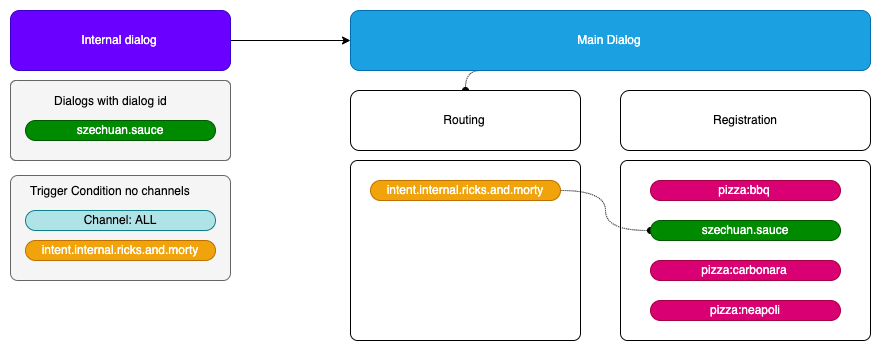
The trigger condition and the registered dialog are also co-dependant. We can define several trigger conditions per dialog to be registered. Once the dialog to register is ready, we can start binding all the trigger conditions related to the dialog.
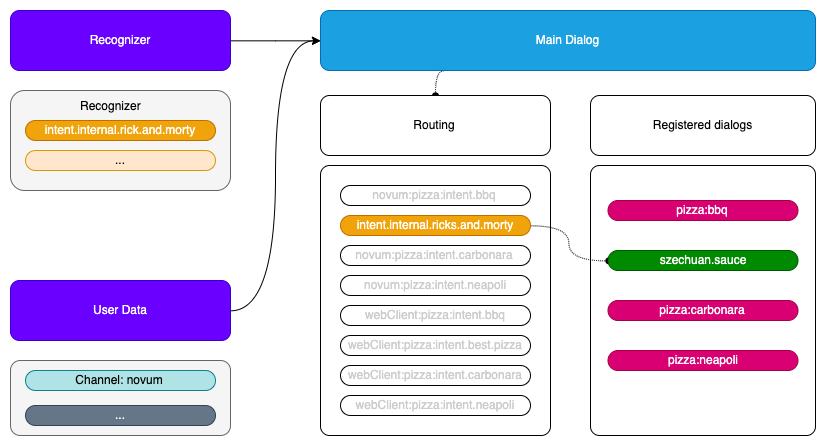
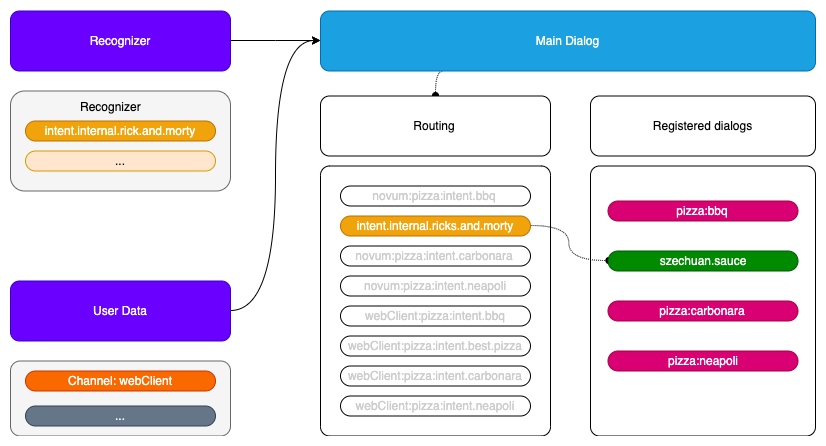
Resulting map of the binding process
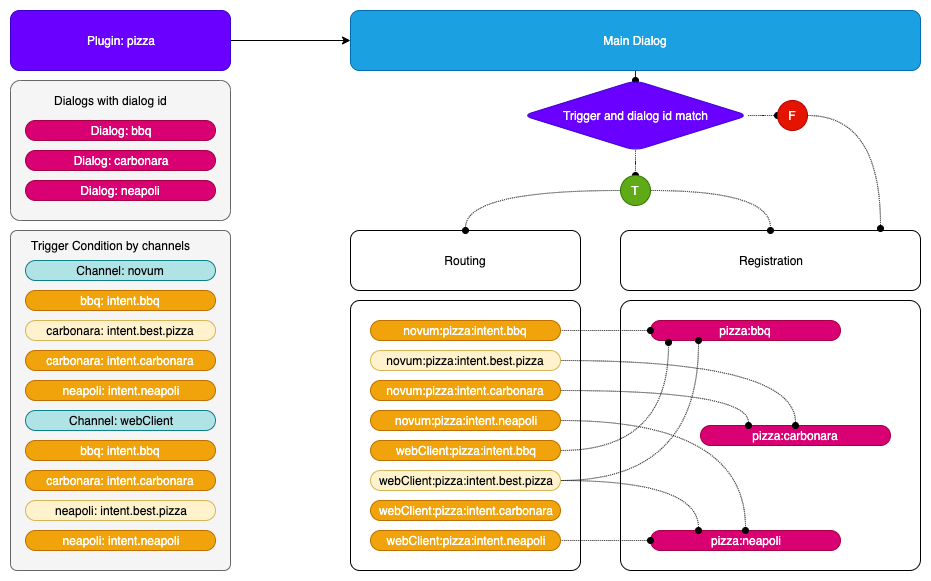
The incoming request is bound to a channel and a recognizer intent field and the resulting address to the library (or plugin) and the id provided by the dialog configuration.
Registering a dialog
-
If a dialog is inserted as a plugin:
- It has to be accessible by a trigger condition if it is located at the plugin configuration.
- It has to be accessible by a trigger condition if it has the property
triggerCondition in the dialog class, accessible across all channels.
- It has to be accessible by calling it directly with its
id if it has an autoRegister property set to true, no routing will be involved.
-
Register the dialog with the library and dialog id, forming the address.
- Combination of library and dialog
id: library:dialogId
- The extra control of the library is because we do not have control over the dialog naming, so we can be sure that each library can implement the name we want and the system will have an unique address.
-
Bind all the trigger conditions with the resulting address.
- The trigger conditions will be implemented for this address also by channel.
- The model forming the address accessor will be:
channel:intent
- The incoming recognizer result will have to match this model.
Internal intent
When we have an internal intent, it has to be accessible across all the channel. We have to register the trigger condition with no channel distinction.
Trigger condition:
// channel id = telefonica
"triggerConditions":[
    {
        "intent": "intent.internal.wifi"
    }
],
id: "dialogId"
Address map:
// the channel of the incoming petition will be ignored
{"intent.wifi": "libraryId:dialogId"}
Flow examples:
Class usage
Register a dialog with trigger conditions:
export interface RouteDialogConfiguration {
    suggestions?: boolean;
    triggers: TriggerCondition[];
    channelDataVersion?: string;
}

/**
* @deprecated This interface should not be used in favor of using RouteConfigurationElementMap interface,
* which improves the efficiency of getting route configuration.
 */
export interface RouteConfiguration {
    [library: string]: RouteConfigurationElement
}

/**
 * Route configuration value of map using to return route Configurations.
 */
export interface RouteConfigurationElement {
    channel: string;
    dialogs: {
        [dialog: string]: RouteDialogConfiguration
    }
}

const router = new RoutingMap();

// public addRoute(
//    routeDialogConfiguration: RouteDialogConfiguration,
//    dialogId: string,
//    channel?: string
// ): any {
router.addRoute(
    {showSuggestion: true, triggers: [{intent: intent.pizza}, {intent: intent.best.pizza}},
    'pizzaCompany:bestPizza',
    'novum')
    );
Obtain a route from a recognition:
//    public getRoute(
//        recognizerResult: { intent: string, entities?: Entity[] },
//        channel?: string
//    ): { id: string, showSuggestions: boolean }
const dialogConfig: {id: 'string', showSuggestion: boolean} = router.getRoute({intent: 'pizza'}, 'novum');
contextFilters
contextFilters are applied in the routing phase.
Context filter conditions will be checked using spleen library. These conditions can be as simple as 1 eq 1 (a context filter with this condition will be always executed) or can be more complex such as /authData/subscriptionType neq 'postpaid'
(that will be executed when the subscription type of the user be different than postpaid). In this case, we only can check properties of AuraUserBaseModel.
More examples of context filters are included below:
- If the user is anonymous, redirect it to intent
intent.account.linking
{
  "name": "Anonymous redirect to linking",
  "type": "type",
  "conditions": "/type eq 'anonymous'",
    "true": {
      "name": "Anonymous redirect to linking",
      "breakDialogExecution": true,
      "breakFilterEval": true,
      "redirectToIntent": "intent.account.linking",
      "suggestions": false
    }
}
- If the user is
multimsisdn, send him a message
{
  "name": "user_type_multimsisdn_not_allowed",
  "type": "user_type_filter",
  "conditions": "/type eq 'multimsisdn'",
  "true": {
    "name": "user_type_not_allowed_action_true",
    "breakDialogExecution": true,
    "breakFilterEval": true,
    "resource": "context-filter:multimsisdn-users-intent-not-allowed.text",
    "suggestions": false
  }
}
- If the user’s subscription type is
postpaid, send him a message.
In this example, we are checking user.authData.subscriptionType, because our user type is AuraUserBaseModel<FourthPlatformAuth>, so user.authData type is FourthPlatformAuth
{
  "name": "user_type_postpaid_not_allowed",
  "type": "user_type_filter",
  "conditions": "/authData/subscriptionType eq 'postpaid'",
  "true": {
    "name": "user_type_postpaid_not_allowed_action_true",
    "breakDialogExecution": true,
    "breakFilterEval": true,
    "resource": "bill:bill.balance.postpaid",
    "suggestions": true
  }
}
7 - Aura Bot databases
Aura Bot databases
Description of databases used by Aura Bot
Introduction
Currently, aura-bot uses two databases, described below:
MongoDB
In order to reuse the code, and clarify the development, all classes related with MongoDB connections are stored in the mongodb-storage.ts file within aura-bot-platform repository.
Here it can be found generic “connection” class, that is mongodb-connection.ts, that will handle the connection request, pooling them
and configuring according the configuration (config is mandatory when initializing).
We can find also several “DAO” files, that will couple with a specific MongoDB database and collection, and will create optionally
indexes or any other thing required in a specific domain.
MongoDbConnection
There will be only one instance of MongoDbConnection, creating it in the first call to getInstance (requiring config param) and
returning the same instance in subsequent calls (where the config param is not required).
To create the instance properly, the following configuration variables are used:
| Var name |
Description |
Required/Optional |
| AURA_MONGODB_URI |
URI to connect to MongoDB, for example mongodb://localhost:27017/?authSource=admin |
Required |
| AURA_MONGODB_USERNAME |
User name to authenticate connection to MongoDB |
Required |
| AURA_MONGODB_PASSWORD |
Password to authenticate connection to MongoDB |
Required |
| AURA_MONGODB_POOL_SIZE |
MongoDB pool size |
Optional (Default: 10) |
| AURA_MONGODB_SSL |
Use SSL or not when connecting to MongoDB |
Optional (Default: false) |
This singleton module should be loaded the first time automatically by the system, and then could be accessed just by calling getInstance
method, like:
const connection = await MongoDbConnection.getInstance();
const db = connection.dbConnect(DATABASE);
const collection = db.collection(COLLECTION);
MongoDbStorage
This DAO class will be used by Bot Builder v4 to store the conversation and user data. An index is created to delete documents older than 24
hours (specified by config var AURA_MONGODB_BOT_COLLECTION_CONTEXT_INDEX_TTL).
Following config variables are used to initialize this class:
| Var name |
Description |
Required/Optional |
| AURA_MONGODB_BOT_DATABASE |
Database name where the documents will be stored |
Required |
| AURA_MONGODB_BOT_COLLECTION_CONTEXT |
Collection name where the documents will be stored |
Required |
| AURA_MONGODB_BOT_COLLECTION_CONTEXT_INDEX_TTL |
Time (in seconds) that will exist the documents without updates, before being deleted |
Optional (Default: 86440) |
To create and initialize a MongoDbStorage, a code like following could be used:
const storage = await new MongoDbStorage().init(configuration);
Cache module
The cache module allows the generation of different types of cache:
AuraCacheLocal: only used for local data.AuraCacheRemote: only used for remote data.AuraCacheRemoteLocal: used for remote and local data, with priority for remote.AuraCacheLocalRemote: used for local and remote data, with priority for local.
How to use cache module
It is possible to use any of the caches through the following commands:
// cache local.
const auraCacheLocal = new AuraCacheLocal('nameCacheLocal');
// cache remote.
const auraCacheRemote = new AuraCacheRemote('nameCacheRemote');
// cache local-remote
const auraCacheLocalRemote = new AuraCacheLocalRemote('nameCacheLocalRemote');
// cache remote-local.
const auraCacheRemoteLocal = new AuraCacheRemoteLocal('nameCacheRemoteLocal');
Variables for AuraCacheLocal
Only for local cache (AuraCacheLocal), it is possible to define a series of options:
- stdTTL: standard TTL as number in seconds for every generated cache element. By default,
0 (0 = unlimited).
- compressedData: data is to be compressed in remote cache. By default,
false.
- deleteOnExpire: boolean value that indicates whether variables will be deleted automatically when they expire or not. If
true, the variable will be deleted. If false, the variable will remain. By default, true. You are encouraged to handle the variable upon the event expired by yourself.
const options = { stdTTL: 100, encryptData: true };
const auraCacheLocal = new AuraCacheLocal('nameCacheLocal', options);
Store a key
The following code sets a key value pair. It is possible to define a TTL (in seconds).
It returns true on success.
const auraCacheLocal = new AuraCacheLocal('nameCacheLocal');
auraCacheLocal.set('key', 'value');

const auraCacheRemote = new AuraCacheRemote('nameCacheRemote');
await auraCacheRemote.set('key', 'value', 1800); // -> data expire at 30m.
Retrieve a key
The following code gets a saved value from the cache.
It returns undefined if the value is not found or has expired. If the value is found, it returns an object with the corresponding key value pair.
const auraCacheLocal = new AuraCacheLocal('nameCacheLocal');
auraCacheLocal.set('key', 'value');
auraCacheLocal.get('key'); // -> value.

const auraCacheRemote = new AuraCacheRemote('nameCacheRemote');
await auraCacheRemote.set('key', 'value');
await auraCacheRemote.get('key'); // -> value.
For caches such as AuraCacheLocalRemote and AuraCacheRemoteLocal, it is possible to force it to obtain data different from the priority:
// cache local-remote
const auraCacheLocalRemote = new AuraCacheLocalRemote('nameCacheLocalRemote');
await auraCacheLocalRemote.set('key', 'value');
await auraCacheLocalRemote.getRemote('key'); // -> value.
auraCacheRemote.getLocal('key');
// cache remote-local.
const auraCacheRemoteLocal = new AuraCacheRemoteLocal('nameCacheRemoteLocal');
await auraCacheRemoteLocal.set('key', 'value');
auraCacheRemoteLocal.getLocal('key'); // -> value.
await auraCacheRemoteLocal.getRemote('key'); // -> value.
Delete a key
The following code deletes a key. It returns the number of deleted entries. A delete will never fail.
const auraCacheLocal = new AuraCacheLocal('nameCacheLocal');
auraCacheLocal.set('key', 'value');
auraCacheLocal.get('key'); // -> value.
auraCacheLocal.del('key'); // -> 1.
auraCacheLocal.get('key'); // -> undefined.

const auraCacheRemote = new AuraCacheRemote('auraCacheRemote');
await auraCacheRemote.set('key', 'value');
await auraCacheRemote.get('key'); // -> value.
await auraCacheRemote.del('key'); // -> 1.
await auraCacheRemote.get('key'); // -> undefined.
Flush all data
The following code deletes all data from a store.
const auraCacheLocal = new AuraCacheLocal('nameCacheLocal');
auraCacheLocal.set('key', 'value');
auraCacheLocal.get('key'); // -> value.
auraCacheLocal.flush(); // -> true.
auraCacheLocal.get('key'); // -> undefined.

const auraCacheRemote = new AuraCacheRemote('auraCacheRemote');
await auraCacheRemote.set('key', 'value');
await auraCacheRemote.get('key'); // -> value.
await auraCacheRemote.flush(); // -> true.
await auraCacheRemote.get('key'); // -> undefined.
Redis + MongoDB
If the configuration variable AURA_BOT_CONTEXT_DATABASE is set to REDIS-MONGODB, aura-bot uses a two-level cache to store the context through Aura Redis Mongo Synchronizer.
The following environment variables must be set for the two databases.
Variables
| Var name |
Description |
Required/Optional |
| AURA_MONGODB_BOT_COLLECTION_CONTEXT |
Name of the collection where the context is stored. By default: aura-context. |
Required |
| AURA_MONGODB_BOT_DATABASE |
Name of the database where the bot collections are stored. By default: aura-bot |
Required |
| AURA_MONGODB_PASSWORD |
Password of the MongoDB. Required |
Required |
| AURA_MONGODB_POOL_SIZE |
Pool size of the MongoDB. By default: 60. |
Required |
| AURA_MONGODB_SSL |
Boolean value indicating if MongoDB connection uses SSL or not. By default: true. |
Required |
| AURA_MONGODB_URI |
URI of the MongoDB |
Required |
| AURA_MONGODB_USERNAME |
Username of the MongoDB |
Required |
| AURA_REDIS_CONFIGURATION_PREFIX |
Prefix for Redis configuration keys. By default: aura-config: |
Required |
| AURA_REDIS_CONTEXT_CACHE_PREFIX |
Prefix for Redis context cache keys. By default: context: |
Required |
| AURA_REDIS_CONTEXT_CACHE_SHADOW_KEY_PREFIX |
Prefix for Redis shadow key cache keys. By default: shadow-key: |
Required |
| AURA_REDIS_CONTEXT_CACHE_ACTIVE_CONTEXT_PREFIX |
Prefix for Redis active context cache keys. By default: active-context: |
Required |
| AURA_REDIS_CONTEXT_CACHE_SHARD_COUNT |
Number of shards to generate lists for storing unprocessed context. |
Required |
| AURA_REDIS_CONTEXT_CACHE_TTL |
Time in seconds to store a context in cache. By default: 60. |
Required |
| AURA_REDIS_MODE |
Mode of Redis distribution (Cluster, Sentinel or Single). By default: Single. |
Required |
| AURA_REDIS_PREFIX |
Prefix that will be used by all redis keys when using redis-connector. This allow mixing in a single redis service messages coming from different environments in the same Azure subscription. |
Required |
| AURA_REDIS_SENTINEL_INSTANCE_NAME |
Name of the Redis instance. Use in sentinel mode. |
Optional |
| AURA_REDIS_HOSTS |
A string with list of nodes (host:port) separate by comma. For example: “localhost:port,localhost2:port2”. Default: ‘127.0.0.0:6379’ |
Required |
| AURA_REDIS_DATABASE |
Database number for Single or Sentinel mode. By default: 0. |
|
| AURA_REDIS_PASSWORD |
A string with the password of Redis. |
Required |
| AURA_REDIS_MAX_RECONNECT_RETRIES |
Number of retries to connect to Redis. By default: 25. |
Required |
| AURA_REDIS_MAX_RECONNECT_INTERVAL |
Time in milliseconds to wait before reconnecting to Redis. By default: 5000. |
Required |
| AURA_REDIS_USE_CONNECTION_POOL |
Used connection pool for Redis connections. Default: true. |
Required |
| AURA_REDIS_CONNECTION_POOL_MIN |
Minimum number of connections in the pool. Default: 2. |
Required |
| AURA_REDIS_CONNECTION_POOL_MAX |
Maximum number of connections in the pool. Default: 100. |
Required |