This is the multi-page printable view of this section.
Click here to print.
Return to the regular view of this page.
Technical components
ATRIA technical components
Comprehensive technical description of ATRIA main components
Introduction
ATRIA capabilities are driven by certain technical components, which are fully described in the succeeding documents, together with their role, architecture, communication protocols, sub-components and environment variables.
Index of technical components
-
ATRIA application: Configurable entity that allows the connection of channels, services or skills with aura-gateway-api.
-
aura-gateway-api: Entry gateway to ATRIA that manages the access to the different AI cognitive capabilities.
-
atria-model-gateway: Component that orchestrates the communication with LLM models.
-
atria-rag-server: Component that manages a RAG-type server for using RAG (Retrieval Augmented Generation) models.
-
atria-rag-generate-db: Component that manages the upload of documents to feed the databases.
-
agents-manager: Component that manages input and output requests to the registered agents, storing their conversation history by session.
-
agents-server: Component responsible for the execution of different agents’ tasks.
-
Aura NLP: Module of Aura Cognitive Services in charge of processing and understanding human natural language. It can be considered as a cross component for Aura Virtual Assistant and ATRIA.
-
ATRIA APIs documentation: List of available ATRIA APIs.
1 - ATRIA application
ATRIA application
Definition and role of applications in ATRIA
Introduction
Within ATRIA’s framework, an application is defined as an entity that allows the connection of a channel, service or skill with aura-gateway-api, the component in charge of managing the access to the different ATRIA capabilities.
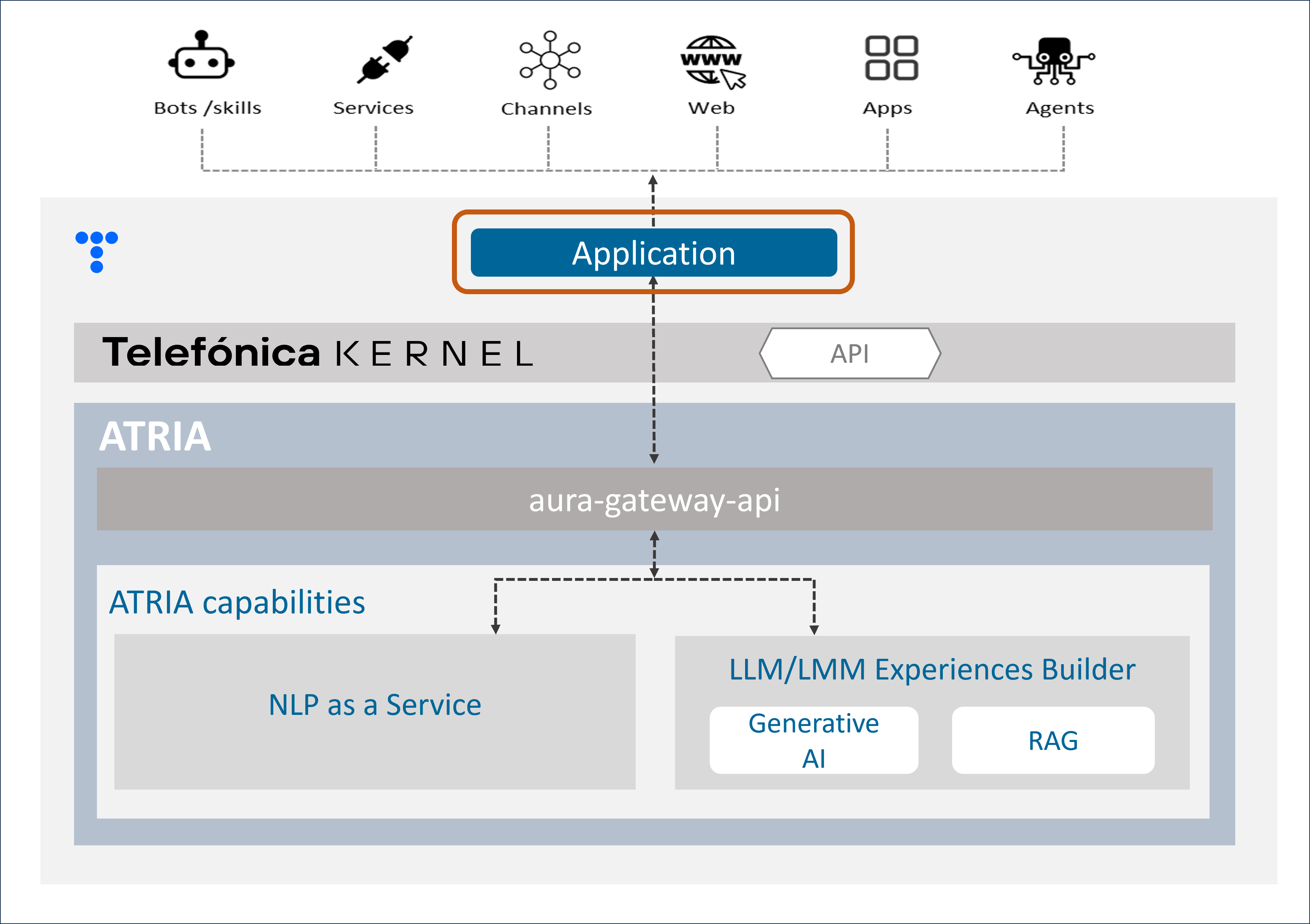
ATRIA application
As a preliminary step for leveraging any ATRIA AI-driven capability, the use case constructor must configure an application, including different parameters:
-
To indicate which specific ATRIA capabilities are utilized in the use case.
In this framework, applications supported by ATRIA can be classified as follows:
The difference between Generative and RAG capabilities relies solely on the definition of the preset that is associated. But the same application can make use of one, several or all of these capabilities, combining their configuration.
-
Once the capabilities are selected, to set the required fields for its operation
For example, if we want to use Generative AI for the use case resolution, firstly, certain parameters must be set corresponding to:
-
Establishing admin accesses.
-
Setting the presets that the application can use, that is, the instructions to work with the AI model, that will be defined in the application configuration.
An ATRIA application must be configured with specific parameters. For this purpose, follow the guidelines Configure an application in ATRIA, using the specific parameters for the ATRIA AI-driven technology to be used.
Example of application
This is a example of an application that makes use of NLPaaS, Generative and RAG capabilities:
    {
        "id": "8832550f-f03c-4e18-bdbe-7c6fc7adf5ff",
        "name": "app",
        "disabled": false,
        "brand": "0401",
        "nlp": {
            "channelId": "1234"
        },
        "models": {
            "level": "user",
            "presets": ["atria-rag-gpt-4", "generative-preset"]
        }
    }
Applications model
Common fields
| Field name |
Type |
Description |
| id |
string |
Unique application identifier. UUID |
| name |
string |
Unique application name |
| brand |
string |
Identifier of the Telefónica Brand associated to the application.
Available values in the document Telefónica brands management |
| disabled |
boolean |
Boolean value to enable or disable the application. |
NLPaaS fields
| Field name |
Type |
Description |
| nlp.channelId |
string |
Channel identifier used to call NLP |
Generative/RAG fields
2 - Aura Gateway API
Aura Gateway API
Descriptive technical documentation regarding aura-gateway-api, an ATRIA component that provides an interface to expose different capabilities
Introduction
aura-gateway-api is a server in charge of the access to the different AI cognitive capabilities provided by ATRIA.
A channel, service or skill can send a request through an application (entity that enables the communication with aura-gateway-api). After passing through Kernel for authentication and security purposes, aura-gateway-api sends this request to the corresponding AI-driven technology for providing the most accurate response.
Currently, aura-gateway-api enables the access to ATRIA capabilities.
Associated documentation
Descriptive technical documentation regarding aura-gateway-api includes:
Guidelines for working with aura-gateway-api for the development of experiences, depending on the specific ATRIA capability:
2.1 - Architecture and components
Aura Gateway API architecture and components
Development architecture and technical components of Aura Gateway API
Technical foundations
aura-gateway-api is mainly a web server built on Typescript 4.3 using nodejs as engine. It is api-first designed, using OpenAPI v3 to provide the API definition and openapi-backend to handle swagger specification.
aura-gateway-api server is composed by several plugins, which provide different functionalities to this component. From the different capabilities that aura-gateway-api can manage, certain plugins are used by all of them and others are specific of one capability.
A channel, service, or skill uses an application to connect with aura-gateway-api following this communication protocol.
Architecture overview
The following figure shows the main technical components of the aura-gateway-api.
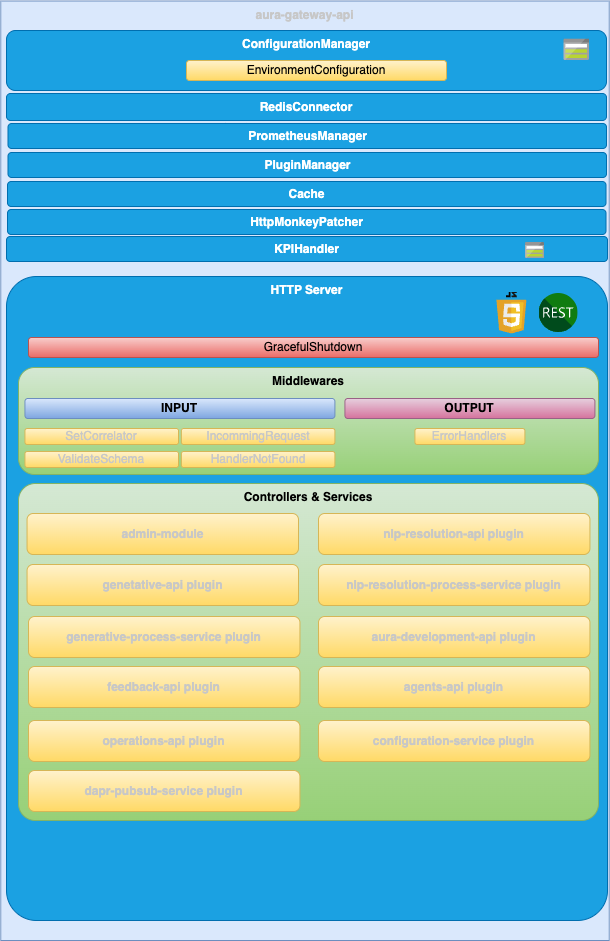
ConfigurationManager
ConfigurationManager is a handler for configuration, obtained through a configuration file or environment variables.
RedisConnector
RedisConnector is a handler connection to redis.
Kpis-handler
KpisHandler is the module responsible for writing the KPIs entities.
HTTP server
Microservice is implemented as an HTTP server (AuraGatewayServer) that exposes an API to receive the request to be validated.
Middlewares
The route published in the API definition file is handled by a controller but, before a request lands on its controller, it goes through a series of middlewares that provides some common steps needed by all the controllers of the server such as: request validation, common parameters extraction, logging, metrics initialization, etc.
Plugins
Different plugins provide functionality to aura-gateway-api.
Check the available ones together with detailed information in: aura-gateway-api plugins.
2.1.1 - Plugins
Aura gateway API plugins
aura-gateway-api plugins are components that provide different functionalities to aura-gateway-api
Introduction
aura-gateway-api is composed of plugins, which provide functionality to this component. Plugins work independently, the same way as a service in microservices oriented architecture: isolated, self-contained and without affecting other existing functionalities in the system.
From the different types of plugins, only Api plugins are available in aura-gateway-api.
The following plugins are currently available in aura-gateway-api. From the different ATRIA capabilities that this component can manage, certain plugins are used by all or some of them and others are specific of one capability.
Discover detailed information regarding the available plugins in the left index.
Plugins management
aura-gateway-api uses the @architect/architect library for the management of plugins, so it is the architect library that is responsible for managing the dependencies injection in each module.
To create the architect application, aura-gateway-api uses the PluginManager module (located in the modules/plugin-manager folder). This module starts as the rest of modules at the aura-gateway-api start-up.
The PluginManager performs the following tasks:
- It starts the architect application with the plugins defined in
plugin-config.json file, located at the root of the aura-gateway-api component.
- It adds the core modules to the IOC context. See the section plugins modules.
- It stores the information of each module defined in the plugins.
Apart from the aura-gateway-api core environment variables, each plugin can define its own specific variables. Access the document aura-gateway-api environment variables and find them in the section corresponding to your plugin.
Plugin basic structure
Currently, aura-gateway-api uses @architect/architect library for plugins management.
A basic plugin must define at least:
- A
package.json file defining the library, like any other JavaScript library, with a plugin section defining which modules it consumes and supplies.
- A source code file that defines the modules that it supplies (
index.ts for example).
The structure of this basic plugin is as follows:
session-api
├── index.ts
└── package.json
Plugins modules
aura-gateway-api currently adds one module that can be used by the different plugins. To use it, it is only necessary to add the package.json dependencies on plugin.consumes (like any other module/component).
- configurationManager: Module with the aura-gateway-api configuration information.
- redisConnector: Module with the aura-gateway-api Redis connection.
A plugin can provide one or more plugin modules and each plugin module can be of a different type. Each type of module is intended to add a specific functionality to aura-gateway-api.
2.1.1.1 - aura-generative-api plugin
aura-generative-api plugin
Description of the aura-generative-api plugin
Introduction
The aura-generative-api plugin manages the endpoints for the communication with atria-model-gateway.
Consumes components (IOC)
| Name |
Type |
Description |
| generativeProcessService |
PluginType.Service |
Send data to model-gw and process the response |
| applicationConfiguration |
PluginType.Service |
Configuration of applications |
Provides components (IOC)
| Name |
Type |
Description |
| generativeApi |
PluginType.API |
Endpoints for the communication with generative APIs |
2.1.1.2 - aura-generative-process-service plugin
aura-generative-process-service plugin
Description of the aura-generative-process-service plugin
Introduction
The aura-generative-process-service plugin manages the communication with atria-model-gateway to allow applications to communicate with LLMs.
Consumes components (IOC)
| Name |
Type |
Description |
| configurationManager |
PluginType.Service |
Configuration manager |
| applicationConfiguration |
PluginType.Service |
Configuration of applications |
Provides components (IOC)
| Name |
Type |
Description |
| generativeProcessService |
PluginType.Service |
Send data to model-gw and process the response |
2.1.1.3 - aura-nlp-resolution-api plugin
aura-nlp-resolution-api plugin
Technical description of the aura-nlp-resolution-api plugin
Introduction
The aura-nlp-resolution-api plugin manages the communication with NLP APIs to return a recognizer response.
Consumes components (IOC)
| Name |
Type |
Description |
| applicationConfiguration |
PluginType.Service |
Configuration of applications |
Provides components (IOC)
| Name |
Type |
Description |
| nlpResolutionApi |
PluginType.API |
Endpoints for the communication with NLP APIs |
2.1.1.4 - aura-nlp-resolution-process-service plugin
aura-nlp-resolution-process-service plugin
Technical description of the aura-nlp-resolution-process-service plugin
Introduction
The aura-nlp-resolution-process-service plugin manages the communication with NLP APIs to return a recognizer response.
Consumes components (IOC)
| Name |
Type |
Description |
| configurationManager |
PluginType.Service |
Configuration manager |
| applicationConfiguration |
PluginType.Service |
Configuration of applications |
| channelsConfiguration |
PluginType.Service |
Configuration of channels |
Provides components (IOC)
2.1.1.5 - aura-development-api plugin
aura-development-api plugin
Technical description of the aura-development-api plugin
Introduction
aura-development-api plugin manages the configuration in development environments. Only available in development environments.
Consumes components (IOC)
| Name |
Type |
Description |
| configurationManager |
PluginType.Service |
Configuration manager |
| redisConnector |
PluginType.Service |
Redis connector |
Provides components (IOC)
| Name |
Type |
Description |
| developmentApi |
PluginType.API |
Endpoints to change development configuration |
| behaviorCache |
PluginType.Service |
Cache to store the configuration changes |
| behaviorManager |
PluginType.Service |
Management of changes |
2.1.1.6 - aura-feedback-api plugin
aura-feedback-api plugin
Description of the aura-feedback-api plugin
Introduction
The aura-feedback-api plugin manages the communication with atria-model-gateway to provide feedback about the Generative and RAG services behavior.
Consumes components (IOC)
| Name |
Type |
Description |
| configurationManager |
PluginType.Service |
Configuration manager |
| applicationConfiguration |
PluginType.Service |
Configuration of applications |
Provides components (IOC)
| Name |
Type |
Description |
| feedbackApi |
PluginType.API |
Endpoints for the communication with feedback endpoint |
2.1.1.7 - aura-agents-api plugin
aura-agents-api plugin
Description of the aura-agents-api plugin
Introduction
The aura-agents-api plugin manages the endpoints for the communication with the agents-manager.
Consumes components (IOC)
| Name |
Type |
Description |
| configurationManager |
PluginType.Service |
Configuration manager |
| applicationConfiguration |
PluginType.Service |
Configuration of applications |
| agentsConfiguration |
PluginType.Service |
Configuration of agents |
Provides components (IOC)
| Name |
Type |
Description |
| agentsApi |
PluginType.API |
Endpoints for the communication with agents APIs |
| agentsManagerClient |
PluginType.Service |
Client of agents-manager |
2.1.1.8 - aura-operations-api plugin
aura-operations-api plugin
Description of the aura-operations-api plugin
Introduction
The aura-operations-api plugin manages the endpoints for operations related to Aura.
Consumes components (IOC)
| Name |
Type |
Description |
| configurationManager |
PluginType.Service |
Configuration manager |
Provides components (IOC)
| Name |
Type |
Description |
| operationsApi |
PluginType.API |
Endpoints for the communication with operations APIs |
| configWatcherOperationsClient |
PluginType.Service |
Client to make requests to the config-watcher |
2.2 - Operational overview
Aura Gateway API operational overview
Description of Aura Gateway API operation and communication protocol
Communication protocol
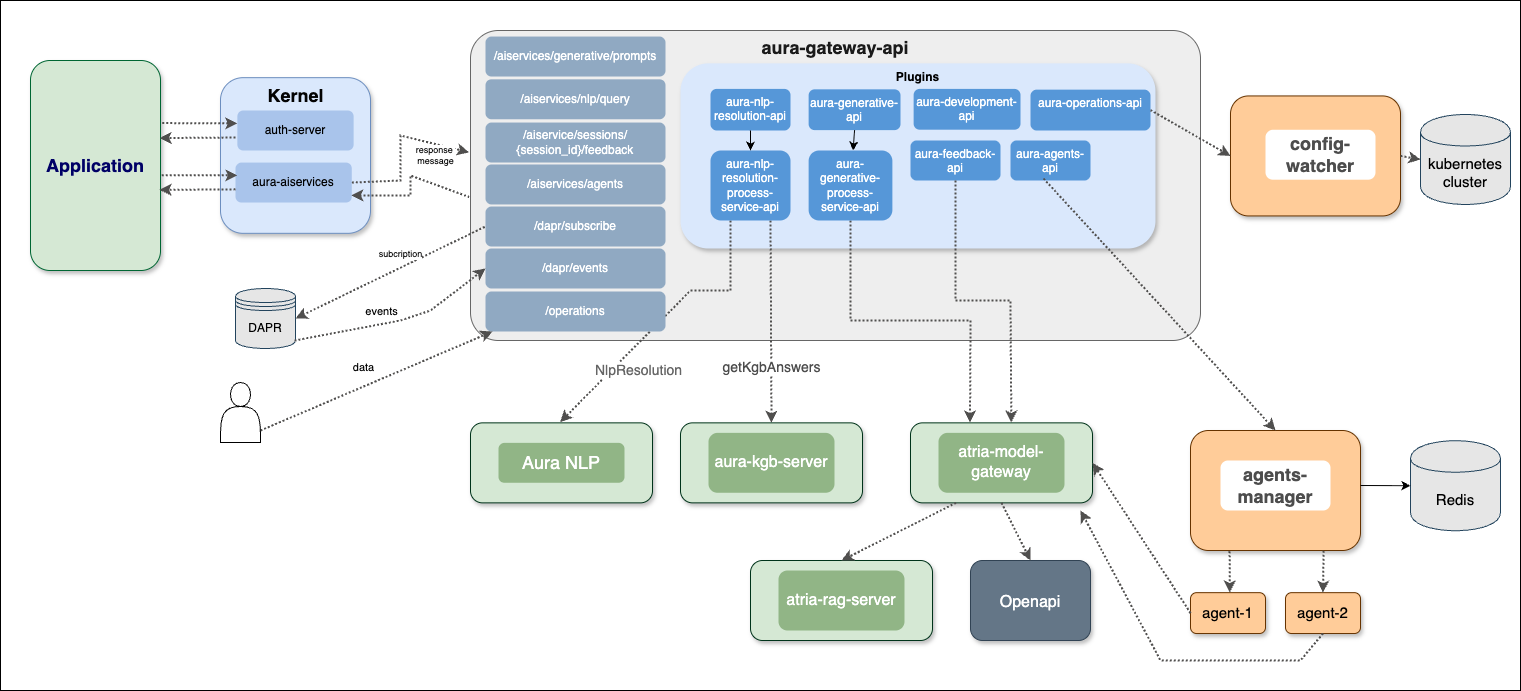
aura-gateway-api communication protocol is synchronous, depending on the endpoint.
A new component comes here into play: application, defined as an entity used by a channel, service or skill to connect with aura-gateway-api.
An application has a specific configuration and will be the entry point to the aura-gateway-api flow, previous pass through Kernel, meaning that the input parameters for aura-gateway-api come from the application, and no specific information regarding the channel, service or skill is required.
2.3 - Environment variables
Aura Gateway API environment variables
List of environment variables handled by Aura Gateway API
- Properties marked in bold are mandatory.
- Properties marked in italics are optional.
Introduction
aura-gateway-api environment variables can be common for all plugins or specific for each of them.
Common properties
| Property |
Type |
Description |
Modifiable by OB? |
|
| AURA_AUTHORIZATION_HEADER |
string |
APIKey to use with aura-services. |
NO |
|
| AURA_CHANNELS_CONFIGURATION_API_ENDPOINT |
string |
Configuration API URL where the bot should get the configuration of all the channels available in the environment. |
NO |
|
| AURA_ENCRYPTION_ALGORITHM |
string |
Encryption algorithm that will be used to validate the APIKey. By default: aes-256-cbc. |
NO |
|
| AURA_ENCRYPTION_IV_LENGTH |
number |
Size for the initialization vector used by the encryption algorithm that validates the APIKey. By default: 16. |
NO |
|
| AURA_ENCRYPTION_IV_POSITION |
number |
Position where to insert the initialization vector in the final string with the encrypted payload. By default: 35. |
NO |
|
| AURA_ENCRYPTION_KEY |
string |
Encryption key or comma-separated list of encryption keys to be used in the environment. It is mainly used to decrypt the APIKeys. |
NO. It would break database encrypted data and APIKey validation. |
|
| AURA_ENVIRONMENT_NAME |
string |
Name of the environment where the server is deployed. Used during server make-up to handle the indexes of the database properly. |
NO |
|
| AURA_HTTP_KEEP_ALIVE |
boolean |
Use of keep-alive in HTTP connections. Used in monkey-patcher. By default: true. |
NO |
|
| AURA_HTTP_KEEP_ALIVE_MSECS |
number |
Number of milliseconds to keep alive HTTP connections. Used in monkey-patcher. By default: 100000. |
NO |
|
| AURA_HTTP_KEEP_MAX_SOCKETS |
number |
Maximum number of sockets. Used in monkey-patcher. By default: 200. |
NO |
|
| AURA_HTTP_MAX_REQUEST_SIZE |
string |
Maximum size in bytes of body request. Allowed values must indicate the units: 10 mb, 200 kb, etc. By default, 20mb. |
NO |
|
| AURA_HTTP_PATHS_LOG_DISABLED |
string |
HTTP paths separated by commas whose request would not be logged. By default aura-kpis,static-resources Used in monkey-patcher. |
NO |
|
| AURA_INTERNAL_RETRIES |
number |
Number of retries to be made by the server in case of error in an internal request. By default: 1. |
NO |
|
| AURA_KPI_ENABLED |
Boolean |
Boolean value, indicating whether aura-gateway-api writes entity files or not. By default: true |
NO, excepting if requested by Product or Operations teams |
|
| AURA_KPI_FILE_PREFIX |
string |
String with the prefix used in the KPIs entities files of this service. By default, gwapi/GWAPI |
NO |
|
| AURA_KPI_REMOVE_SPECIAL_CHARACTERS |
string |
Regular expression for removing special characters Default:\n\r |
NO |
|
| AURA_KPI_STORE_MODE |
string |
It indicates which is the destination of the KPIs entities files. Default: blob. If file, they will be stored locally to the instance, in the folder shown in KPI_TO_DSV_LOCAL_FILES_DIRECTORY. For development purposes. If blob, they will be stored remotely in the Azure blob container shown in KPIS_STORE_CONTAINER. Mandatory in environments running on k8s. |
NO, only configurable when running aura-gateway-api locally. |
|
| AURA_KPI_TO_DSV_CACHE_TTL |
number |
Number with the amount of milliseconds to cache existing requests to calculate their duration. Default: 1800. |
NO |
|
| AURA_KPI_TO_DSV_DELIMITER |
string |
Field delimiter to be used in KPIs entities files. Default: | |
NO. It will break all the analysis and processes running on top of these files. |
|
| AURA_KPI_TO_DSV_EXTENSION |
string |
Extension to be used in KPIs entities files. Default: txt |
NO. If changed without changing aura-kpis-uploader, the files will not be uploaded to Kernel. |
|
| AURA_KPIS_BLOB_STORE_INTERVAL |
number |
Time interval in milliseconds to upload asynchronously logs to the KPIS_STORE_CONTAINER. Default: 60000. Only needed if KPI_STORE_MODE==blob. |
NO. In pre/production, it must be blob so the files will be uploaded to Kernel instance afterwards. Setting file for development is recommended. |
|
| AURA_KPIS_LOG_API_REQUEST_BODY |
boolean |
Flag to log or not the request body of the API calls. Default: true |
YES. Once disabled, to enable run performance tests to validate if it is possible to write them. |
|
| AURA_KPIS_LOG_API_RESPONSE_BODY |
boolean |
Flag to log or not the response body of the API calls. Default: true |
YES. Once disabled, to enable run performance tests to validate if it is possible to write them. |
|
| AURA_KPIS_STORE_CONTAINER |
string |
The name of the Azure Blob container to store KPIs entities files. By default, aura-kpis. It MUST be the same than the one configured in KPIS_UPLOADER module. Only needed if KPI_STORE_MODE==blob. |
NO. If changed without changing aura-kpis-uploader, the files will not be uploaded to Kernel. |
|
| AURA_LOGGING_FORMAT |
string |
Format to be used in monitoring logs: json or dev(more visual format). By default: json. |
NO. Only for development, set it to dev. |
|
| AURA_LOGGING_LEVEL |
string |
Level to be used in logs, from more to less verbose: 'TRACE', 'DEBUG', 'INFO', 'WARN', 'ERROR', 'FATAL', 'OFF'. By default: INFO. |
NO |
|
| AURA_MAKEUP_MODE |
string |
It allows dev mode for the make-up process with the value local. By default: full. |
NO |
|
| AURA_MICROSOFT_AZURE_STORAGE_COMMON_ACCESS_KEY |
string |
Microsoft Storage password of the common storage. Currently used for KPI storing. |
NO. Only if Operations Team changes it. |
|
| AURA_MICROSOFT_AZURE_STORAGE_COMMON_ACCOUNT |
string |
Microsoft Storage account of the common storage. Currently used for KPI storing. |
NO. Only if Operations Team changes it. |
|
| AURA_MICROSOFT_AZURE_STORAGE_ACCESS_KEY |
string |
Microsoft Storage password of the deployment. |
NO |
|
| AURA_MICROSOFT_AZURE_STORAGE_ACCOUNT |
string |
Microsoft Storage account of the environment. |
NO |
|
| AURA_MICROSOFT_AZURE_STORAGE_CONFIGURATION_CONTAINER |
string |
Aura configuration container name. By default: aura-configuration. |
NO |
|
| AURA_MICROSOFT_AZURE_STORAGE_STATIC_CONTAINER_NAME |
string |
Aura static container name. |
NO |
|
| AURA_HTTP_MONKEY_PATCHER_ENABLED |
boolean |
Flag to indicate whether Monkey Patcher is used in service or not. |
NO |
|
| AURA_REQUEST_TIMEOUT |
number |
Number of seconds to wait for a request. By default: 30 * 1000. |
NO |
|
| AURA_REQUEST_DEADLINE_TIMEOUT |
number |
Deadline timeout for the request. |
NO |
|
| AURA_RETRIES_CODES |
string[] |
List of codes that will be used to retry the request. By default: ['ECONNRESET']. |
NO |
|
| AURA_SERVER_PORT |
number |
Port to where server is listening. By default: 8989. |
NO |
|
| AURA_SERVER_REMOTE_CONTAINER_PREFIX |
number |
Remote container prefix. By default: aura-gateway-api. |
NO |
|
| AURA_SERVER_RETRIES |
number |
Number of retries made by aura-gateway-api in case of error in an HTTP request. By default: 3. |
NO, only if checked and validated with Aura Global Team. |
|
| AURA_SERVER_RETRY_DELAY |
number |
Delay between retries in case of error. By default: 100. |
NO, only if checked and validated with Aura Global Team. |
|
| AURA_SERVER_RETRY_FACTOR |
number |
Factor to multiply delay for every HTTP request retried. By default: 10. |
NO, only if checked and validated with Aura Global Team. |
|
| AURA_SERVICE_ENVIRONMENT |
string |
Type of environment: 'DEV', 'PRE', 'PRO'. By default, DEV. It is used during locale translation, to get the correct text reference. |
NO |
|
| AURA_SERVICES_PATH |
string |
Path where the services are located. By default: /aura-services/. |
NO |
|
| AURA_SHUTDOWN_GRACEFUL_TTL |
number |
Time in milliseconds to complete the SHUTDOWN signal and process all the messages in queue before SIGTERM. By default: 25 1000. |
NO |
|
| AURA_SWAGGER_LOCAL_PATH |
string |
Location of the swagger file generated from all loaded plugins. By default: swagger.yaml. Used during makeup to upload the file to remote. |
NO |
|
| AURA_SWAGGER_PLUGIN_PATH |
string |
Location of the swagger file of every plugin. Default: swagger.yaml. |
NO |
|
| AURA_SWAGGER_LOCAL_CORE_PATH |
string |
Location of aura-generative-service swagger base file. By default: swagger-core.yaml. |
NO |
|
| AURA_SWAGGER_REMOTE_CONTAINER_PREFIX |
string |
Remote container prefix to store the swagger information. By default: swagger |
NO |
|
| AURA_SOURCE_PATH_AVRO_ADAPTERS |
string |
Relative path to file with the dimensions and entities to transform to Avro. |
NO |
|
| AURA_TRUSTED_HOSTNAMES |
string |
Comma-separated list of the trusted domains URL of the current environment. |
YES, all the trusted domains must be added. |
|
| AURA_VERSION |
string |
Mandatory, release of Aura. |
NO |
|
aura-development-api plugin
| Property |
Type |
Description |
Modifiable by OB? |
|
| AURA_REDIS_MODE |
string |
Mode of Redis distribution. Values: CLUSTER, SENTINEL, SINGLE. By default: SENTINEL. |
NO |
|
| AURA_REDIS_PREFIX |
string |
Redis prefix. |
NO |
|
| AURA_REDIS_SENTINEL_INSTANCE_NAME |
string |
Name of the Redis instance. Used in SENTINEL mode. |
NO |
|
| AURA_REDIS_HOSTS |
string |
String with a list of nodes separated by ‘,’, including host and port separated by ‘:’. For example: “localhost:port,localhost2:port2”. |
NO |
|
| AURA_REDIS_DATABASE |
number |
Database number for SINGLE or SENTINEL mode. By default: 0. |
YES |
|
| AURA_REDIS_PASSWORD |
string |
String with Redis password. |
YES |
|
| AURA_REDIS_USE_CONNECTION_POOL |
boolean |
Use pool connections for Redis. By default: true. |
YES |
|
| AURA_REDIS_CONNECTION_POOL_MIN |
number |
Minimum number of connections in the pool. By default: 2. |
YES |
|
| AURA_REDIS_CONNECTION_POOL_MAX |
number |
Maximum number of connections in the pool. By default: 100. |
YES |
|
| AURA_REDIS_MAX_RECONNECT_RETRIES |
number |
Number of retries to connect to Redis. By default: 25 |
YES |
|
| AURA_REDIS_MAX_RECONNECT_INTERVAL |
number |
Time in milliseconds to wait before reconnecting to Redis. By default: 5000. |
YES |
|
| DEV_AURA_BEHAVIOR_CACHE_TTL |
number |
Maximum lifetime of behavior cache in seconds. After this time, the system will delete the message. By default: 60 * 60 (60 min). |
NO in production environments. This feature could only be activated in development environments. |
|
| DEV_AURA_BEHAVIOR_COMMAND_PATTERN |
string |
Pattern to recognize a behavior command. By default: gateway(:| +)(get|set|unset)(:| +)(\w+)(:| +)?.+ |
NO in production environments. This feature could only be activated in development environments. |
|
| DEV_AURA_BEHAVIOR_MANAGER_ACTIVE |
boolean |
Flag to indicate whether or not aura-behavior-manager module should be activated in the current deployment. It is only valid for development environments. By default: false |
NO in production environments. This feature could only be activated in development environments. |
|
| DEV_AURA_BEHAVIOR_PREFIX |
string |
Used in cache key prefix and in command name. By default: gateway. |
NO in production environments. This feature could only be activated in development environments. |
|
| DEV_AURA_BEHAVIOR_SETTINGS_FILE_CRON_PATTERN |
string |
CRON expression associated with the reload time of the configuration file. Configuration file is defined in: DEV_AURA_BEHAVIOR_SETTINGS_FILE_MICROSOFT_AZURE_STORAGE. By default: *\/5 * * * *. |
NO in production environments. This feature could only be activated in development environments. |
|
| DEV_AURA_BEHAVIOR_SETTINGS_FILE_MICROSOFT_AZURE_STORAGE |
string |
Profile configuration file location for the aura-behavior-manager. By default: aura-gateway/aura-gateway-behavior-manager.json |
NO in production environments. This feature could only be activated in development environments. |
|
aura-generative-api plugin
| Property |
Type |
Description |
Modifiable by OB? |
| AURA_MODEL_GW_ENDPOINT |
string |
URL of Atria Model GW API. |
NO. In any case, it must be the internal k8s URL pointing to the atria-model-gateway. |
aura-update-me-api plugin
| Property |
Type |
Description |
Modifiable by OB? |
| AURA_CONFIGURATION_RETRIES |
number |
Number of retries to get the configuration. By default: 3. |
NO, only if checked and validated with Aura Global Team. |
| AURA_CONFIGURATION_RETRY_DELAY |
number |
Delay between retries in case of error. By default: 100. |
NO, only if checked and validated with Aura Global Team. |
| AURA_CONFIGURATION_RETRY_FACTOR |
number |
Factor to multiply delay for every HTTP request retried. By default: 10. |
NO, only if checked and validated with Aura Global Team. |
aura-nlp-resolution-process-services plugin
| Property | Type | Description | Modifiable by OB? |
|:—————-|:—————————————————————————|
| AURA_COGNITIVE_ENDPOINT | string | URL of Aura NLP API. | NO. In any case, it must be the internal k8s URL pointing to the api-gw. |
aura-feedback-api plugin
| Property |
Type |
Description |
Modifiable by OB? |
| AURA_MODEL_GW_ENDPOINT |
string |
URL of Atria Model GW API. |
NO. In any case, it must be the internal k8s URL pointing to the atria-model-gateway. |
aura-agents-api plugin
| Property |
Type |
Description |
Modifiable by OB? |
| AURA_AGENTS_MANAGER_ENDPOINT |
string |
URL of agents-manager API. |
NO. In any case, it must be the internal k8s URL pointing to the agents-manager. |
| AURA_AUTHORIZATION_HEADER |
string |
APIKey to use with aura-services. |
NO |
aura-operations-api plugin
| Property |
Type |
Description |
Modifiable by OB? |
| AURA_CONFIG_WATCHER_ENDPOINT |
string |
URL of config-watcher API. |
NO. In any case, it must be the internal k8s URL pointing to the config-watcher. |
2.4 - API definition
API definition for Aura Gateway API
Description of API swaggers for aura-gateway-api component
APIs index
2.4.1 - Aura Gateway API
Aura Gateway API
Definition of the complete API in aura-gateway-api
Download swagger file
2.4.2 - Aura Gateway Core API
Aura Gateway Core API
Definition of the core API in aura-gateway-api
Download swagger file
2.4.3 - Aura Agents API
Aura Agents API
Description of Aura Agents API
Download swagger file
2.4.4 - Aura Generative API
Aura Generative API
Description of Aura Generative API
Download swagger file
2.4.5 - Aura NLP resolution API
Aura NLP resolution API
Description of Aura NLP Resolution API
Download swagger file
2.4.6 - Aura Feedback API
Aura Feedback API
Description of Aura Feedback API
Download swagger file
2.4.7 - Aura Gateway Development API
Aura Gateway Development API
Description of Aura Gateway Development API. Only available in development environments.
Download swagger file
2.4.8 - Aura Operations API
Aura Operations API
Description of Aura Operations API
Download swagger file
3 - ATRIA Model Gateway
ATRIA Model Gateway
Descriptive documentation regarding the ATRIA component atria-model-gateway
Introduction
atria-model-gateway is an ATRIA component in charge of managing the communication with different AI models.
Currently, this component receives a request from aura-gateway-api, together with other input data, and makes a call to the LLM/LMM Experiences Builder and use its capabilities.
atria-model-gateway is also in charge of security and privacy control and allows users to provide feedback on their experience.
If the selected AI model is RAG, then atria-model-gateway calls the atria-rag-server, which is in charge of executing the RAG chain and making the corresponding calls to the LLM models and databases.
The functional components of atria-model-gateway are described in the document LLM/LMM Experiences Builder
Associated documentation
Descriptive technical documentation regarding atria-model-gateway includes:
3.1 - Architecture and components
ATRIA Model Gateway architecture and components
Development architecture and technical components of the atria-model-gateway
Technical foundations
atria-model-gateway is responsible for managing the communication with different AI models. This component receives a request from aura-gateway-api, together with other input data, and makes a call the corresponding AI models.
If the selected AI model is RAG, then atria-model-gateway calls the atria-rag-server, which is in charge of executing the RAG chain and making the corresponding calls to the LLM models and databases.
Functional components
The functional components of atria-model-gateway are described in the document LLM/LMM Experiences Builder
Architecture overview
The following diagram schematically shows the main technical components integrated into atria-model-gateway.
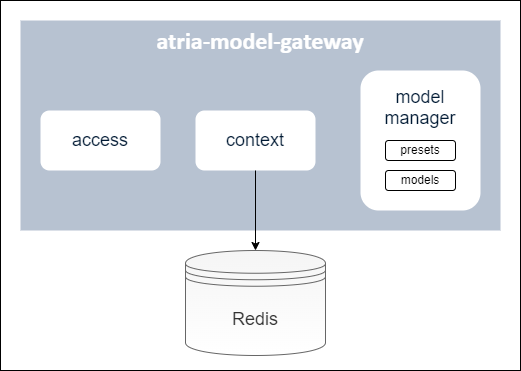
A brief description of these components is included below:
Access module
Module for the management of different profiles to access atria-model-gateway.
Context module
Module in charge of the storage of a conversation history in a cache (currently, Redis is used) over a period of time, grouped by session ID. These conversations are taken into account when calling the generative LLM models.
Model manager
Module that includes the available models and presets. It is in charge of receiving the info from aura-gateway-api and calling the corresponding model.
Models
Available AI models integrated into the atria-model-gateway.
Presets
Presets are configurable entities to define the specific model to work with and certain parameters associated to it: model Id, name, description, model parameters, etc.
Constructors can use the default presets or build new ones: Go to document ATRIA configuration.
When configuring an application, all the presets that can be used for this application must be previously defined.
3.2 - Operational overview
ATRIA Model Gateway operational overview
Overview of the atria-model-gateway operation
Operational workflow
The operational flow between an application (for the communication with aura-gateway-apì), atria-model-gateway, atria-rag-server and atria-rag-generate-db is schematically shown in the following figure:
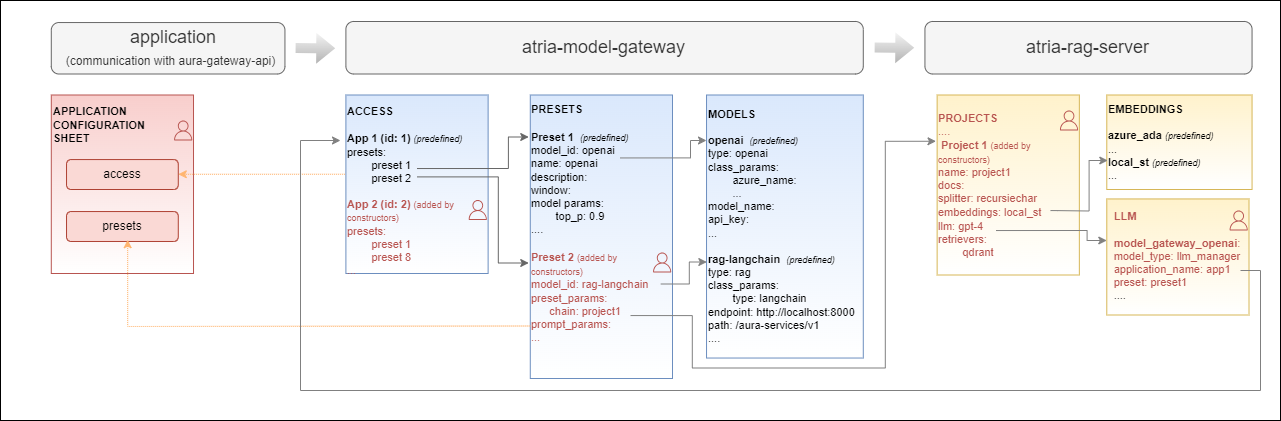
Configuration
atria-model-gateway includes a default configuration. Constructors can use it as is or they can modify it to be adapted to their requirements or business models: Go to document ATRIA configuration.
3.3 - API definition
Atria Model Gateway API definition
Description of Atria Model Gateway configuration API swagger
This is an internal ATRIA API
Download swagger file
3.4 - Environment variables
ATRIA Model Gateway environment variables
List of environment variables handled by the atria-model-gateway
Introduction
The atria-model-gateway depends on these environment variables to be set. None of them are modifiable by the OBs.
| Property |
Type |
Description |
| AURA_REDIS_DATABASE |
number |
Redis database number to be used by the server. This number is used to connect to the Redis database. |
| AURA_REDIS_HOSTS |
string |
Redis hosts to be used by the server. This is a comma-separated list of Redis host names or IP addresses. |
| AURA_REDIS_MODE |
string |
Mode of the Redis connection. |
| AURA_REDIS_PASSWORD |
number |
Ppassword for the Redis connection. This password is used to authenticate the connection to the Redis database. |
| AURA_REDIS_POOL_SIZE |
number |
Size of the Redis connection pool. This number is used to limit the number of connections to the Redis database. |
| AURA_REDIS_PREFIX_SUBSCRIBERS |
string |
Prefix for the Redis subscribers. This prefix is used to identify the subscribers in the Redis database. |
| AURA_REDIS_CHANNELS_SUBSCRIBERS |
string |
Channels (separated by ‘,’) for the Redis subscribers. Redis prefix is added to these channels at the beginning. |
| AURA_REDIS_P_CHANNELS_SUBSCRIBERS |
string |
Pattern channels (separated by ‘,’) for the Redis subscribers. Redis prefix is added to these pattern channels at the beginning. |
| AURA_DAPR_PUBSUB_NAME |
string |
DAPR pubsub component name. It is used to identify DAPR component to be used. |
| AURA_DAPR_PREFIX_SUBSCRIBERS |
string |
Prefix for the DAPR pubsub subscribers. This prefix is used to identify the subscribers in the configured database. |
| AURA_DAPR_TOPICS_SUBSCRIBERS |
string |
Topics (separated by ‘,’) for the DAPR pubsub subscribers. DAPR prefix is added to these topics at the beginning. |
-
The environment variables related to Redis are used to connect to the Redis database. This database is used to refresh the agent’s configuration, because every time the configuration of an agent is changed, it publishes this change in the corresponding channel so we can detect this change in order to refresh it.
-
The environment variables related to DAPR are used to connect to the DAPR components. These components are used to refresh the agent’s configuration, because every time the configuration of an agent is changed, it publishes this change in a corresponding topic, so we can detect this change in order to refresh it.
-
In order to use DAPR, it is necessary to have the DAPR pubsub component configured in the DAPR configuration file, besides the DAPR environment variables.
4 - ATRIA Models Manager
ATRIA Models Manager
Descriptive documentation regarding the ATRIA library atria-models-manager
Introduction
atria-models-manager is a ATRIA library responsible for managing all the models that we can use in the atria-model-gw model.
The objective is for the atria.model-gw to only have to import the models from this component, avoiding defining the logic of the models in the atria-model-gw.
For the first version, it will only feature Perplexity’s Sonar model, in the future, we will be able to migrate the atria-model-gw models here.
It contains all the logic necessary to call an LLM. Prompt construction, query tokenization, etc.
It also contains all the definitions of the exceptions that an LLM can throw.
How to use it
To use the atria-models-manager, you need to install it in your Python environment and import the model into the code.
5 - AURA GenAI Libs
AURA GenAI Libs
Descriptive documentation regarding the ATRIA library aura-genai-libs
Introduction
aura-genai-libs is a ATRIA that contains common components for agent development,
such as logs and the langchain call to the atria_model_gw service.
Includes the following modules:
-
logger module, whose purpose is to implement a callback handler to log the different stages of model, chain, and tool processing within the LangChain framework,
integrating it with the AURA PyTraces logging system and the ATRIA Agents context.
The module is based on the use of BaseCallbackHandler (langchain_core) and logs information at different
stages of the execution cycle of language models (LLM), chats, chains, and tools.
Each logged event uses m_headers.
-
chat_models module, which provides a custom implementation of the ChatOpenAI class from LangChain.
This custom implementation is designed to facilitate the integration with the atria_model_gw service.
How to use it
To use the aura-genai-libs, you need to install it in your Python environment and import and use the module in your code.
6 - ATRIA RAG Server
ATRIA RAG Server
Descriptive documentation regarding the ATRIA component atria-rag-server
Introduction
atria-rag-server is an ATRIA component that manages a RAG-type server. It is called by atria-model-gateway when RAG (Retrieval Augmented Generation) is used.
atria-rag-server manages the request made to the RAG model following the predefined RAG chain (pipeline) and making continuous requests combining Generative AI technology (LLMs) with semantic and lexical searches to retrieve the required information.
Associated documentation
Descriptive technical documentation regarding atria-rag-server includes:
6.1 - Architecture and components
ATRIA RAG Server architecture and components
Development architecture and technical components of the atria-rag-server
Architecture overview
The following diagram schematically shows the main technical components integrated into atria-rag-server.
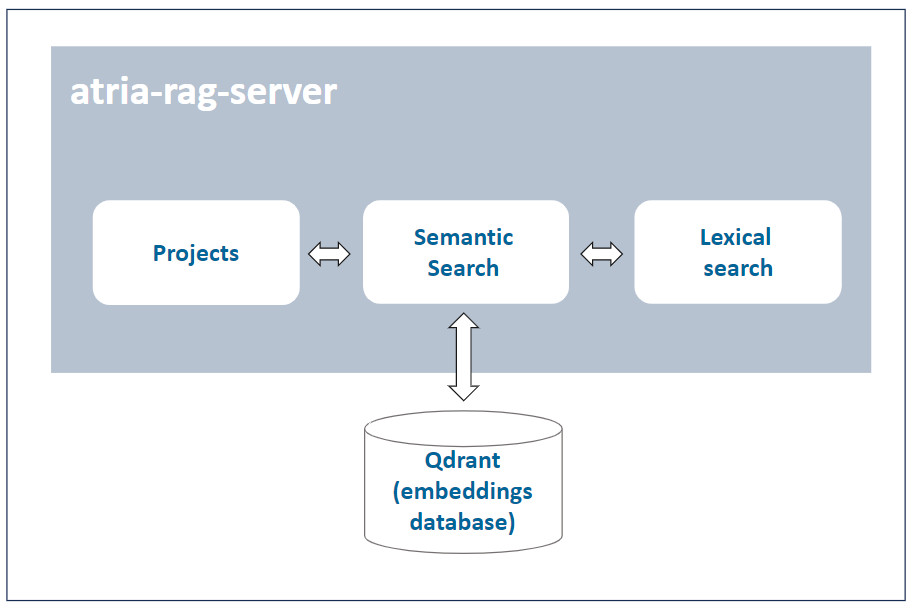
A brief description of the technical components is included below:
Project
A project contains information required for the execution of the RAG pipeline: specific models for semantic search and lexical search; path where the documents to feed the LLMs are located; allowed file extensions, etc.
Semantic search (embeddings)
Qdrant database that stores the embeddings generated through semantic search (OpenAI embeddings) technology.
Lexical search (LLMs)
Database that stores the required documentation for making lexical searching, based on keywords.
Configuration
atria-rag-server includes a default configuration. Constructors can use it as is or they can modify it to be adapted to their requirements or business models: Go to document ATRIA configuration.
6.2 - Operational overview
ATRIA RAG Server operational overview
Overview of the atria-rag-server operation
Operational workflow
The operational flow between an application (for the communication with aura-gateway-api), atria-model-gateway, atria-rag-server and atria-rag-generate-db is schematically shown in the document atria-model-gateway: operational flow.
Configuration
atria-rag-server includes a default configuration. Constructors can use it as is or they can modify it to be adapted to their requirements or business models: Go to document ATRIA configuration.
6.3 - Environment variables
ATRIA RAG Server environment variables
List of environment variables handled by the atria-rag-server
Introduction
The atria-rag-server depends on these environment variables to be set. None of them are modifiable by the OBs.
| Property |
Type |
Description |
| AURA_REDIS_DATABASE |
number |
Redis database number to be used by the server. This number is used to connect to the Redis database. |
| AURA_REDIS_HOSTS |
string |
Redis hosts to be used by the server. This is a comma-separated list of Redis host names or IP addresses. |
| AURA_REDIS_MODE |
string |
Mode of the Redis connection. |
| AURA_REDIS_PASSWORD |
number |
Ppassword for the Redis connection. This password is used to authenticate the connection to the Redis database. |
| AURA_REDIS_POOL_SIZE |
number |
Size of the Redis connection pool. This number is used to limit the number of connections to the Redis database. |
| AURA_REDIS_PREFIX_SUBSCRIBERS |
string |
Prefix for the Redis subscribers. This prefix is used to identify the subscribers in the Redis database. |
| AURA_REDIS_CHANNELS_SUBSCRIBERS |
string |
Channels (separated by ‘,’) for the Redis subscribers. Redis prefix is added to these channels at the beginning. |
| AURA_REDIS_P_CHANNELS_SUBSCRIBERS |
string |
Pattern channels (separated by ‘,’) for the Redis subscribers. Redis prefix is added to these pattern channels at the beginning. |
| AURA_DAPR_PUBSUB_NAME |
string |
DAPR pubsub component name. It is used to identify DAPR component to be used. |
| AURA_DAPR_PREFIX_SUBSCRIBERS |
string |
Prefix for the DAPR pubsub subscribers. This prefix is used to identify the subscribers in the configured database. |
| AURA_DAPR_TOPICS_SUBSCRIBERS |
string |
Topics (separated by ‘,’) for the DAPR pubsub subscribers. DAPR prefix is added to these topics at the beginning. |
-
The environment variables related to Redis are used to connect to the Redis database. This database is used to refresh the agent’s configuration, because every time the configuration of an agent is changed, it publishes this change in the corresponding channel so we can detect this change in order to refresh it.
-
The environment variables related to DAPR are used to connect to the DAPR components. These components are used to refresh the agent’s configuration, because every time the configuration of an agent is changed, it publishes this change in a corresponding topic, so we can detect this change in order to refresh it.
-
In order to use DAPR, it is necessary to have the DAPR pubsub component configured in the DAPR configuration file, besides the DAPR environment variables.
7 - ATRIA RAG generate DB
ATRIA RAG Generate DB
Descriptive documentation regarding the ATRIA component atria-rag-generate-db
Introduction
atria-rag-generate-db is an ATRIA component that manages a RAG-type database. This component is launched when you want to feed the document database for the first time or when you want to update the database with new information. See more information about these processes in the guidelines Import documents into ATRIA.
atria-rag-generate-db is in charge of handling the information coming from different sources and feeding the databases the RAG works with.
Associated documentation
Descriptive technical documentation regarding atria-rag-generate-db includes:
Launch atria-rag-generate-db
To launch atria-rag-generate-db, there are two suitable options:
Option 1
Send a request to the API for it to launch the atria-rag-generate-db. The endpoint responsible for this is:
/aura-services/v2/operations/data
curl -X POST "https://<your-atria-domain>/aura-services/v2/operations/data" \
-H "Content-Type: application/json"
-d '{
  "presetId": "<name of the project>"
}'
Option 2
Execute the following command to update the data in the environment.
This command is in charge of launching the generation of the database for all the projects, but we can launch this generation for a specific project.
PROJECT='project-copilot-reduced'
kubectl patch configmap/atria-rag-generate-db-project --type merge -p "{\"data\":{\"ATRIA_PROJECT\":\"${PROJECT}\"}}" -n <namespace>
kubectl create job --from=cronjob/atria-rag-generate-db $(date +%Y%m%d%H%M%S)-atria-rag-generate-db-${PROJECT} -n <namespace>
(Change <namespace> by the specific one)
7.1 - Architecture and components
ATRIA RAG Generate DB architecture and components
Development architecture and technical components of the atria-rag-generate-db
Architecture overview
The following diagram schematically shows the main technical components integrated into atria-rag-generate-db.
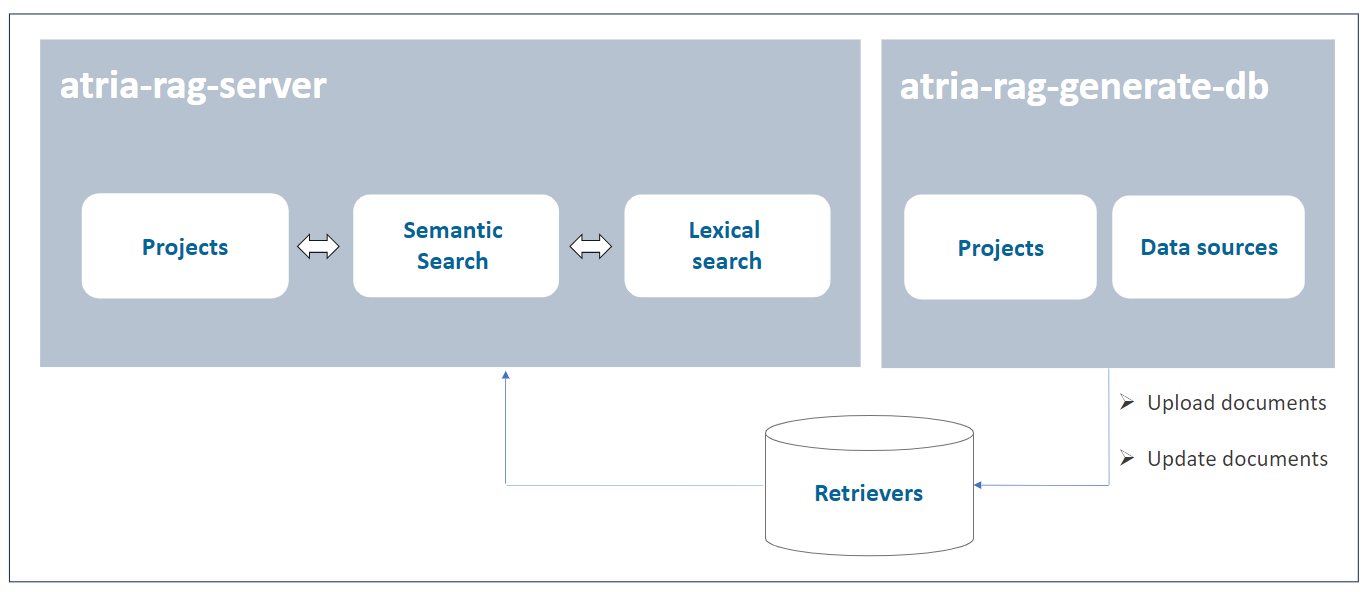
A brief description of the technical components is included below:
Data sources
A project contains information required for the execution of the generation of the databases: specific path of documents to feed the databases, allowed file extensions, etc. It can read from different sources, this source type is defined in the extensions field.
Before the information from the documents is stored in the corresponding database, the documents are processed, e.g., they are cut up and cleaned.
Retrievers
The retrievers are in charge of reading the information from the documents and feeding the databases.
The retrievers are defined in the retrievers field of the project. Each retriever is associated with a database in order to feed or retrieve information from it.
7.2 - Operational overview
ATRIA RAG Generate DB operational overview
Overview of the atria-rag-generate-db operation
Operational flow
The operational flow between an application (for the communication with aura-gateway-api), atria-model-gateway, atria-rag-server and atria-rag-generate-db is schematically shown in the document atria-model-gateway: operational flow.
Configuration
atria-model-gateway includes a default configuration. Constructors can use it as is or they can modify it to be adapted to their requirements or business models: Go to document ATRIA configuration.
Data persistence feature
Now ATRIA enables data persistence in knowledge bases across releases: After the installation of a new release, all existing data in the knowledge base (currently, Qdrant) remains fully available and accessible for every ATRIA experience. Thus, information is completely independent of the deployed version.
This feature provides key advantages:
- Guaranteed continuity of ATRIA experiences.
- No need for data re-ingestion after each release.
- No need to recalculate embeddings.
- Data ingested after the installation of a release (through hot swapping) is now automatically consolidated and carried forward to subsequent releases.
Tracking and clean-up processes
atria-rag-generate-db keeps a record of the current state of documents and related configuration for data sources, so it only feeds documents that have been modified or added since the last update.
atria-rag-generate-db also cleans up any resources that are left behind and no longer used after new ones are introduced.
Preset management
Preset report
After generation-db is executed, a report is logged with the following information for each preset:
- The preset name.
- The status of the execution (success, skipped or error).
- A descriptive message with the reason for the status.
- Date and time of the execution start.
- Date and time of the execution end.
- The configured documents for the preset
Preset availability
When a new preset is created, it is necessary to launch the database generation process by executing the atria-rag-generate-db component. This process may take several minutes to complete. Once the generation is finished, the atria-rag-generate-db component is automatically restarted.
While these processes are running, a message is shown to the user indicating that the preset is not yet available.
When both processes are finished, the preset becomes available for use.
Data migration between ATRIA releases
The data persistence feature is implemented by a migration tool between environments or releases integrated in the atria-rag-generate-db component. This tool moves the trained data from one release to another, to avoid generating preset data that has been previously created in a release.
The process for migrating data must be triggered manually by launching a command (similar to the aura-rag-generate-db job), where both source and target environments should be indicated.
After executing this command, data will be migrated from one environment to the other automatically.
The migration flow is executed as follows:
- Process the hashes file and, for each preset we want to migrate, we will do the following steps:
- Check that the preset from the source environment is in the config of the target environment
- Move the
trained_data files from the source environment to the respective training folder of the target environment
- Duplicate the collections from the source environment to the target environment
- Move the TFIDFs files from the source environment to the target environment
- Move the hashes file from the source environment to the target environment
- Add the new presets training files to the respective training folder in the target environment.
- Launch atria-rag-generate-db. Only new presets will be reloaded.
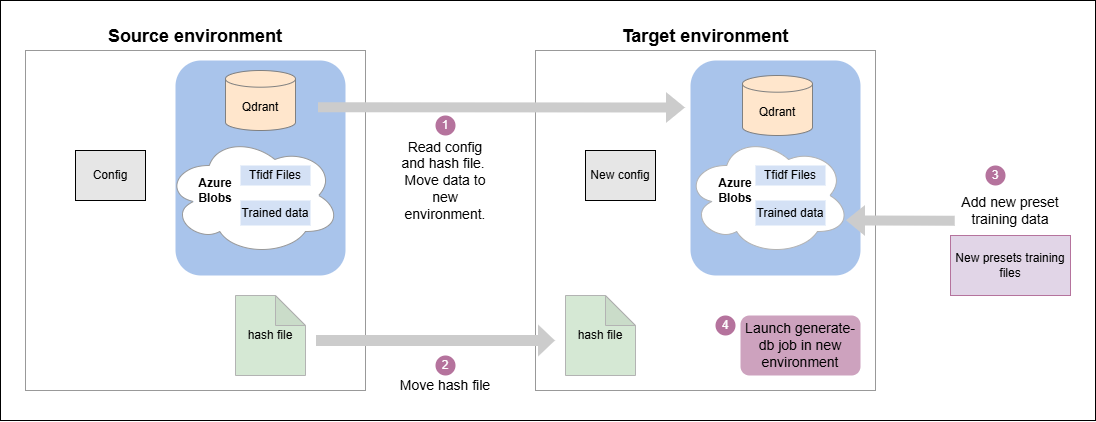
Data migration flow
In the migration process described above, the following folders are generated and stored in an Azure blob storage after atria-rag-generate-db is finished:
Shared data
This folder contains the trained data shared between atria-rag-server and atria-rag-generate-db.
This is used to store the files that the atria-rag-generate-db generates and then the atria-rag-server uses to be able to process the request.
At the moment, only the files generated by the TFIDF (Term Frequency–Inverse Document Frequency) exist in this folder.
This folder is used for migration, as we can take the TFIDFs of a trained preset to the blob of a specific release where that preset has not been trained and save the training afterward.
Trained data
This folder contains the files that have been used in the atria-rag-generate-db for each preset.
The folder structure is defined with a hash of the contents of all the files for each preset, to facilitate migration.
Atria RAG project hashes
This is a file containing all the information for each preset, to facilitate migration.
It contains the following information for each preset:
-
config_hash: Hash of the preset configuration at the time the atria-rag-generate-db was launched.
-
source_files_hash: Hash of the source files used to generate the preset. This hash should exist in one folder into the trained data folder.
-
metadata: Metadata of the preset, including the date of atria-rag-generate-db launching.
-
retrievers: Info that retrievers used to generate the preset. It contains the name of the Qdrant collection and the path where it holds the TFIDF files, which would correspond to the shared data.
{
  "5905dece-433d-47f4-a78c-72366bcd1473": {
    "config_hash": "28f837d56079f30c59a419292d129bc3",
    "source_files_hash": "cda3afcd8e74ede0d23065e897d55fae",
    "metadata": {
      "date": "2025-04-01 11:25:59"
    },
    "retrievers": {
      "qdrant_collection_name": "rag-ap-eight-9100-dev-project-copilot",
      "tfidf_path_file": "project-copilot/tfidf"
    }
  }
}
In addition to using this data for migration, it also speeds up the launch of the atria-rag-generate-db.
The config_hash and source_files_hash values are used to verify if, at the moment of launching the atria-rag-generate-db, something has been changed in the configuration or in the training data. If changes are detected, all the data for that preset is regenerated. Otherwise, if the preset has not changed, we will save that generation.
Launch migration process
The process to persist data between releases has to be launched manually through the execution of the following command:
To run this script, we just need the output files with the environment configuration info generated by the installer in the output_install directory from the source and destination environment.
With this info, run the script as shown below, using the corresponding files names for the desired environment:
./migrate-data --source-file ${SOURCE_ENVIRONMENT_INFO_FILE} --dest-file ${DEST_ENVIRONMENT_INFO_FILE}
Where:
source-file: Source environment info file where the data is stored.dest-file: Target environment info file where the data is going to be migrated.
8 - Agents Manager
Agents Manager
Descriptive technical documentation regarding agents-manager, the server in charge of managing and orchestrating access to the different agents within the ATRIA ecosystem
Introduction
agents-manager is a server in charge of managing and orchestrating access to the different agents within the AURA ecosystem.
The main purpose of agents-manager is to facilitate orchestration between the different agents registered in ATRIA, also to enrich the conversation by managing the message history, before sending the requests to the agent responsible for their processing.
Associated documentation
Descriptive technical documentation regarding agents-manager includes:
8.1 - Architecture and components
Agents Manager architecture and components
Development architecture and technical components of the agents-manager
Technical foundations
agents-manager is mainly a web server built on Typescript using nodejs as engine. It is api-first designed, using OpenAPI v3 to provide the API definition and openapi-backend to handle swagger specification.
agents-manager server is composed by several plugins, which provide different functionalities to this component.
A channel, service, or skill uses an application to connect with agents-manager following this communication protocol.
Architecture overview
The following figure shows the main technical components of the agents-manager, which are described below.
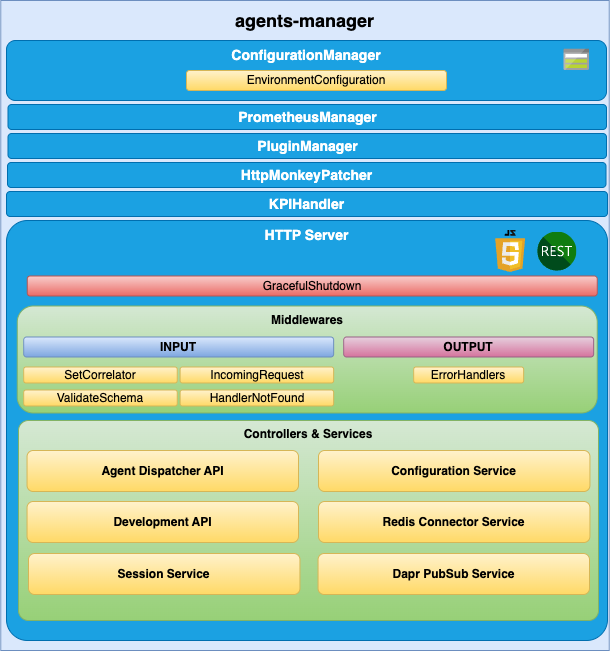
agents-manager components
ConfigurationManager
ConfigurationManager is a handler for configuration, obtained through a configuration file or environment variables.
RedisConnector
RedisConnector is a handler connection to Redis.
HTTP server
Microservice is implemented as an HTTP server (AuraServer) that exposes an API to receive the request to be validated.
Middlewares
The route published in the API definition file is handled by a controller but, before a request lands on its controller, it goes through a series of middlewares that provides some common steps needed by all the controllers of the server such as: request validation, common parameters extraction, logging, metrics initialization, etc.
Controllers and Services
agents-manager is composed of plugins, which provide functionality and uses specific modules from aura-configuration-api.
Check the available plugins together with detailed information in: agents-manager plugins.
8.1.1 - Plugins
Agents Manager API plugins
agents-manager plugins are components that provide different functionalities to agents-manager
Introduction
agents-manager is composed of plugins, which provide functionality to this component. Plugins work independently, the same way as a service in microservices oriented architecture: isolated, self-contained and without affecting other existing functionalities in the system.
From the different types of plugins, only Api plugins are available in agents-manager.
The following plugins are currently available in agents-manager. Certain plugins are used by all or some of the other plugins and others are specific for one capability.
Discover detailed information regarding the available plugins in the left index.
Plugins management
agents-manager uses the @architect/architect library for the management of plugins, so it is the architect library that is responsible for managing the dependencies injection in each module.
To create the architect application, agents-manager uses the PluginManager module (located in the modules/plugin-manager folder). This module starts as the rest of modules at the agents-manager start-up.
The PluginManager performs the following tasks:
- It starts the architect application with the plugins defined in
plugin-config.json file, located at the root of the agents-manager component.
- It adds the core modules to the IOC context. See the section plugins modules.
- It stores the information of each module defined in the plugins.
Apart from the agents-manager core environment variables, each plugin can define its own specific variables. Access the document agents-manager environment variables and find them in the section corresponding to your plugin.
Plugin basic structure
Currently, agents-manager uses @architect/architect library for plugins management.
A basic plugin must define at least:
- A
package.json file defining the library, like any other JavaScript library, with a plugin section defining which modules it consumes and supplies.
- A source code file that defines the modules that it supplies (
index.ts for example).
The structure of this basic plugin is as follows:
session-api
├── index.ts
└── package.json
Plugins modules
agents-manager currently adds one module that can be used by the different plugins. To use it, it is only necessary to add the package.json dependencies on plugin.consumes (like any other module/component).
- configurationManager: Module with the agents-manager configuration information.
- redisConnector: Module with the agents-manager Redis connection.
A plugin can provide one or more plugin modules and each plugin module can be of a different type. Each type of module is intended to add a specific functionality to agents-manager.
8.1.1.1 - agent-dispatcher-api plugin
agent-dispatcher-api plugin
Technical description of the agent-dispatcher-api plugin
Introduction
agent-dispatcher-api plugin manages and dispatches the requests to the agent API.
Consumes components (IOC)
| Name |
Type |
Description |
| configurationManager |
PluginType.Service |
Configuration manager |
| redisConnector |
PluginType.Service |
Redis connector |
| sessionService |
PluginType.Service |
Session service |
| agentsConfiguration |
PluginType.Service |
Agents Configuration |
Provides components (IOC)
| Name |
Type |
Description |
| agentDispatcherApi |
PluginType.API |
Agent dispatcher API |
8.1.1.2 - Agent Deployment Plugin
Agent Deployment Plugin
The agent-deployment plugin is a component that provides deployment functionalities for agents within the agents-manager.
Introduction
The agent-deployment plugin is designed to manage the deployment of agents in a flexible and scalable manner. It allows multiple agents to be deployed within a single microservice, and the same agent can be deployed with different configurations across different microservices or within the same microservice.
Plugin Management
The agent-deployment plugin uses the @architect/architect library for managing dependencies and plugin lifecycle. The PluginManager module, located in the modules/plugin-manager folder, is responsible for initializing the plugin at the start-up of the agents-manager.
The PluginManager performs the following tasks:
- Initializes the architect application with the plugins defined in the
plugin-config.json file, located at the root of the agents-manager component.
- Adds core modules to the IOC context. See the section plugin modules.
- Stores information about each module defined in the plugins.
Plugin Basic Structure
A basic plugin must define at least:
- A
package.json file defining the library, with a plugin section specifying which modules it consumes and supplies.
- A source code file that defines the modules it supplies (
index.ts for example).
The structure of this basic plugin is as follows:
agent-deployment-plugin
├── index.ts
└── package.json
Example index.ts
import { PluginType, registerPlugin } from '@telefonica/agents-manager-common';
import { Services } from './deployment-consume-services';

export = registerPlugin([
    {
        type: PluginType.Service,
        name: 'agentDeploymentService',
        instance: {
            deployAgent(agentConfig) {
                // Implementation for deploying an agent
            }
        },
        services: Services
    }
]);
Example package.json
{
    "name": "@telefonica/agent-deployment-plugin",
    "version": "1.0.0",
    "main": "index.js",
    "private": true,
    "plugin": {
        "consumes": [
            "configurationManager"
        ],
        "provides": [
            "agentDeploymentService"
        ]
    }
}
Plugin Modules
The agent-deployment plugin can utilize the following modules provided by the agents-manager:
- configurationManager: Module with the agents-manager configuration information.
- redisConnector: Module with the agents-manager Redis connection.
A plugin can provide one or more plugin modules, and each plugin module can be of a different type. Each type of module is intended to add specific functionality to the agents-manager.
8.1.1.3 - development-api plugin
development-api plugin
Technical description of the development-api plugin
Introduction
The development-api plugin manages the configuration in development environments. Only available in development environments.
Consumes components (IOC)
| Name |
Type |
Description |
| configurationManager |
PluginType.Service |
Configuration manager |
| redisConnector |
PluginType.Service |
Redis connector |
Provides components (IOC)
| Name |
Type |
Description |
| developmentApi |
PluginType.API |
Endpoints to change development configuration |
| behaviorCache |
PluginType.Service |
Cache to store the configuration changes |
| behaviorManager |
PluginType.Service |
Management of changes |
8.1.1.4 - configuration-service plugin
configuration-service plugin
Description of the configuration-service plugin
Introduction
The configuration-service plugin manages the configuration of agents.
Consumes components (IOC)
| Name |
Type |
Description |
| configurationManager |
PluginType.Service |
Configuration manager |
Provides components (IOC)
| Name |
Type |
Description |
| agentsConfiguration |
PluginType.Service |
Agents configuration |
8.1.1.5 - redis-connector-service plugin
redis-connector-service plugin
Description of the redis-connector-service plugin
Introduction
The redis-connector-service plugin manages requests to Redis.
Consumes components (IOC)
| Name |
Type |
Description |
| configurationManager |
PluginType.Service |
Configuration manager |
Provides components (IOC)
| Name |
Type |
Description |
| redisConnector |
PluginType.Service |
Redis connector |
8.1.1.6 - session-service plugin
session-service plugin
Technical description of the session-service plugin
Introduction
The session-service plugin manages the sessions.
Consumes components (IOC)
| Name |
Type |
Description |
| configurationManager |
PluginType.Service |
Configuration manager |
| redisConnector |
PluginType.Service |
Redis connector |
Provides components (IOC)
| Name |
Type |
Description |
| sessionService |
PluginType.Service |
Management of sessions |
8.2 - Communication protocol
Agents Manager communication protocol
Description of Agents Manager communication protocol
Communication protocol
The agents-manager uses a synchronous communication protocol, although the specific behavior may vary depending on the endpoint. The following diagram illustrates the protocol:
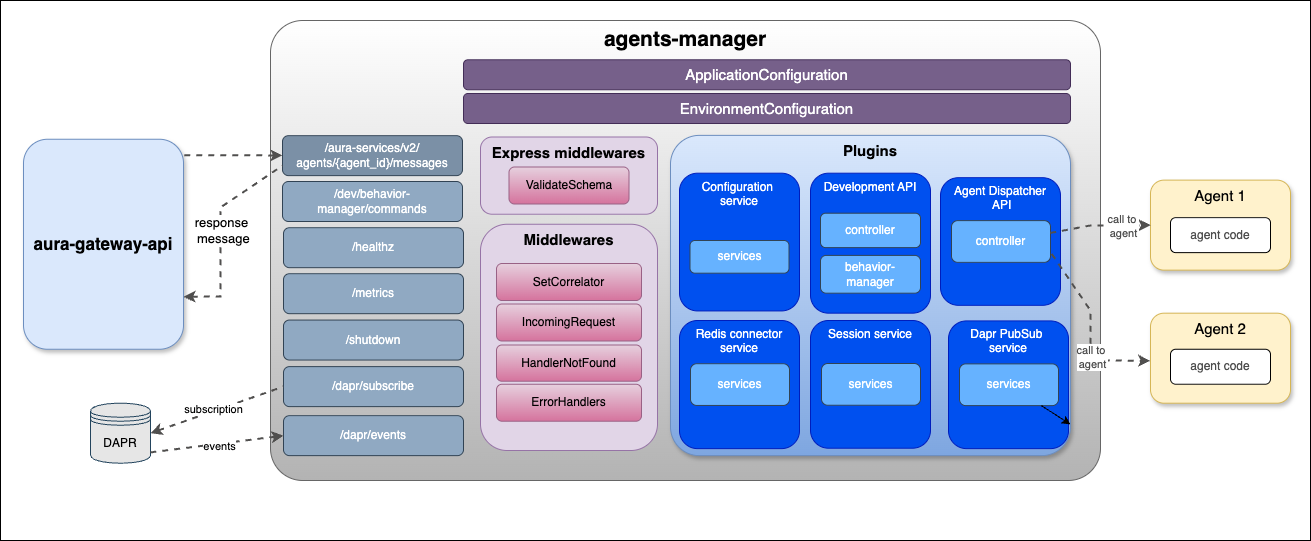
agents-manager communication protocol
8.3 - Environment variables
Agents Manager environment variables
List of environment variables handled by agents-manager
- Properties marked in bold are mandatory.
- Properties marked in italics are optional.
Introduction
agents-manager environment variables can be common for all plugins or specific for each of them.
Common properties
| Property |
Type |
Description |
Modifiable by OB? |
| AURA_AUTHORIZATION_HEADER |
string |
APIKey to use with aura-services. |
NO |
| AURA_DEFAULT_LOCALE |
string |
Culture code to be used by default in the current deployment: de-de, en-gb, es-es, pt-br. |
NO |
| AURA_DEFAULT_TIME_ZONE |
string |
Timezone where the service is running. |
NO |
| AURA_ENCRYPTION_ALGORITHM |
string |
Encryption algorithm that will be used to validate the APIKey. By default: aes-256-cbc. |
NO |
| AURA_ENCRYPTION_IV_LENGTH |
number |
Size for the initialization vector used by the encryption algorithm that validates the APIKey. By default: 16. |
NO |
| AURA_ENCRYPTION_IV_POSITION |
number |
Position where to insert the initialization vector in the final string with the encrypted payload. By default: 35. |
NO |
| AURA_ENCRYPTION_KEY |
string |
Encryption key or comma-separated list of encryption keys to be used in the environment. It is mainly used to decrypt the APIKeys. |
NO. It would break database encrypted data and APIKey validation. |
| AURA_ENVIRONMENT_NAME |
string |
Name of the environment where the server is deployed. Used during server make-up to handle the indexes of the database properly. |
NO |
| AURA_ENVIRONMENT_PREFIX |
string |
Prefix that will be used by all Redis keys when using redis-connector. By default: ``. (empty) |
YES |
| AURA_HTTP_KEEP_ALIVE |
boolean |
Use of keep-alive in HTTP connections. Used in monkey-patcher. By default: true. |
NO |
| AURA_HTTP_KEEP_ALIVE_MSECS |
number |
Number of milliseconds to keep alive HTTP connections. Used in monkey-patcher. By default: 100000. |
NO |
| AURA_HTTP_KEEP_MAX_SOCKETS |
number |
Maximum number of sockets. Used in monkey-patcher. By default: 250. |
NO |
| AURA_HTTP_MAX_REQUEST_SIZE |
string |
Maximum size in bytes of body request. Allowed values must indicate the units: 10 mb, 200 kb, etc. By default, 20mb. |
NO |
| AURA_LOGGING_FORMAT |
string |
Format to be used in monitoring logs: json or dev(more visual format). By default: json. |
NO. Only for development, set it to dev. |
| AURA_LOGGING_LEVEL |
string |
Level to be used in logs, from more to less verbose: 'TRACE', 'DEBUG', 'INFO', 'WARN', 'ERROR', 'FATAL', 'OFF'. By default: INFO. |
NO |
| AURA_MAKEUP_MODE |
string |
It allows dev mode for the make-up process with the value local. By default: full. |
NO |
| AURA_MICROSOFT_AZURE_STORAGE_ACCESS_KEY |
string |
Microsoft Storage password of the deployment. |
NO |
| AURA_MICROSOFT_AZURE_STORAGE_ACCOUNT |
string |
Microsoft Storage account of the environment. |
NO |
| AURA_MICROSOFT_AZURE_STORAGE_CONFIGURATION_CONTAINER |
string |
Aura configuration container name. By default: aura-configuration. |
NO |
| AURA_HTTP_MONKEY_PATCHER_ENABLED |
boolean |
Flag to indicate whether Monkey Patcher is used in service or not. |
NO |
| AURA_SERVER_PORT |
number |
Port to where server is listening. By default: 8990. |
NO |
| AURA_SERVER_REMOTE_CONTAINER_PREFIX |
number |
Remote container prefix. By default: agents-manager. |
NO |
| AURA_SERVICE_ENVIRONMENT |
string |
Type of environment: 'DEV', 'PRE', 'PRO'. By default, DEV. It is used during locale translation, to get the correct text reference. |
NO |
| AURA_SHUTDOWN_GRACEFUL_TTL |
number |
Time in milliseconds to complete the SHUTDOWN signal and process all the messages in queue before SIGTERM. By default: 25 * 1000. |
NO |
| AURA_SWAGGER_FROM_REMOTE |
boolean |
Flag to indicate whether the swagger file is loaded from remote or not. By default: true. |
NO |
| AURA_SWAGGER_LOCAL_PATH |
string |
Location of the swagger file generated from all loaded plugins. By default: swagger.yaml. Used during makeup to upload the file to remote. |
NO |
| AURA_SWAGGER_PLUGIN_PATH |
string |
Location of the swagger file of every plugin. By default: swagger.yaml. |
NO |
| AURA_SWAGGER_LOCAL_CORE_PATH |
string |
Location of server swagger base file. By default: swagger-core.yaml. |
NO |
| AURA_SWAGGER_REMOTE_CONTAINER_PREFIX |
string |
Remote container prefix to store the swagger information. By default: swagger |
NO |
| AURA_VERSION |
string |
Mandatory, release of Aura. |
NO |
| AURA_HTTP_PATHS_LOG_DISABLED |
string |
HTTP paths separated by commas whose request would not be logged. By default aura-configuration', 'metrics', 'healthz Used in monkey-patcher. |
NO |
development-api plugin
| Property |
Type |
Description |
Modifiable by OB? |
| DEV_AURA_BEHAVIOR_PREFIX |
string |
Used in cache key prefix and in command name. By default: gateway. |
NO in production environments. This feature could only be activated in development environments. |
| DEV_AURA_BEHAVIOR_CACHE_TTL |
number |
Maximum lifetime of behavior cache in seconds. After this time, the system will delete the message. By default: 60 * 60 (60 min). |
NO in production environments. This feature could only be activated in development environments. |
| DEV_AURA_BEHAVIOR_COMMAND_PATTERN |
string |
Pattern to recognize a behavior command. By default: gateway(:| +)(get|set|unset)(:| +)(\w+)(:| +)?.+ |
NO in production environments. This feature could only be activated in development environments. |
configuration-service plugin
| Property |
Type |
Description |
Modifiable by OB? |
| AURA_CONFIGURATION_API_ENDPOINT |
string |
Configuration API URL where the server should get the configuration. |
NO |
| AURA_AUTHORIZATION_HEADER |
string |
APIKey to use with aura-services. |
NO |
| AURA_CONFIGURATION_RETRIES |
number |
Number of retries to get the configuration. By default: 3. |
NO, only if checked and validated with Aura Global Team. |
| AURA_CONFIGURATION_RETRY_DELAY |
number |
Delay between retries in case of error. By default: 100. |
NO, only if checked and validated with Aura Global Team. |
| AURA_CONFIGURATION_RETRY_FACTOR |
number |
Factor to multiply delay for every HTTP request retried. By default: 10. |
NO, only if checked and validated with Aura Global Team. |
redis-connector-service plugin
| Property |
Type |
Description |
Modifiable by OB? |
| AURA_REDIS_MODE |
string |
Mode of Redis distribution. Values: CLUSTER, SENTINEL, SINGLE. By default: SENTINEL. |
NO |
| AURA_REDIS_SENTINEL_INSTANCE_NAME |
string |
Name of the Redis instance. Used in SENTINEL mode. |
NO |
| AURA_REDIS_HOSTS |
string |
String with a list of nodes separated by ‘,’, including host and port separated by ‘:’. For example: “localhost:port,localhost2:port2”. |
NO |
| AURA_REDIS_DATABASE |
number |
Database number for SINGLE or SENTINEL mode. By default: 0. |
YES |
| AURA_REDIS_PASSWORD |
string |
String with Redis password. |
YES |
| AURA_REDIS_USE_CONNECTION_POOL |
boolean |
Use pool connections for Redis. By default: true. |
YES |
| AURA_REDIS_CONNECTION_POOL_MIN |
number |
Minimum number of connections in the pool. By default: 2. |
YES |
| AURA_REDIS_CONNECTION_POOL_MAX |
number |
Maximum number of connections in the pool. By default: 100. |
YES |
| AURA_REDIS_MAX_RECONNECT_RETRIES |
number |
Number of retries to connect to Redis. By default: 25 |
YES |
| AURA_REDIS_MAX_RECONNECT_INTERVAL |
number |
Time in milliseconds to wait before reconnecting to Redis. By default: 5000. |
YES |
session-service plugin
| Property |
Type |
Description |
Modifiable by OB? |
| AURA_SESSION_MAX_HISTORY_LENGTH |
number |
Maximum number of messages to keep in history. Default: 10. |
NO |
| AURA_SESSION_EXPIRE_TIME |
number |
Expire time for the conversation history in seconds. Default: 3600 (1 hour). |
NO |
8.4 - API definition
API definition for Agents Manager
Description of API swaggers for agents-manager component
APIs index
8.4.1 - Agents Manager API
Agents Manager API
Definition of the complete API in agents-manager
Download swagger file
8.4.2 - Agents Manager Development API
Agents Manager Development API
Description of Agents Manager Development API. Only available in development environments.
Download swagger file
8.4.3 - Agents Manager Dispatcher API
Agents Manager Dispatcher API
Description of Agents Manager Dispatcher API
Download swagger file
9 - Agents Server
Agents Server
Descriptive documentation regarding the component agents-server
Introduction
The agents-server component is a microservice that provides the capability to create server API and manage agents. It is responsible for executing the agent’s tasks.
To launch the agents-server component, you need install the agents package you prefer to use and deploy the server using this agents package.
Associated documentation
Descriptive technical documentation regarding agents-server includes:
9.1 - Architecture and components
Agents Server architecture and components
Development architecture and technical components of the agents-server
Technical foundations
The agents-server component will start a server that listens for incoming requests and executes the agent’s tasks based on the received input.
The server can be configured to use an agent by specifying the agent package name.
This server creates a REST API that can be used to interact with different agents. The API allows sending requests to the agent and receiving responses.
Within the agents-server, the agents package component enables information processing tasks to be performed and acted upon to achieve specific objectives. This information can come from a database and respond to the user’s request based on that acquired information.
Architecture overview
The following figure shows the main technical components of the agents-server, which are described below.
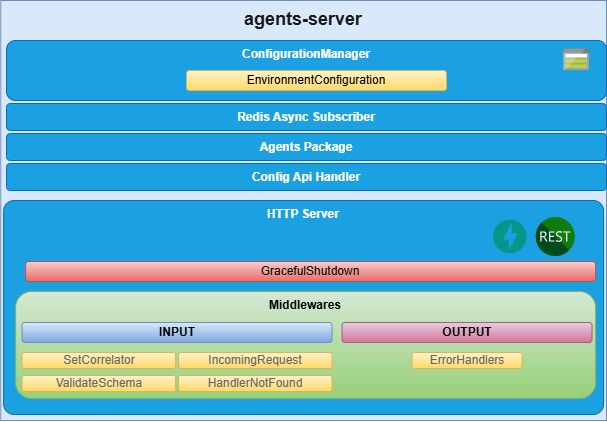
agents-server components
HTTP server
Microservice is implemented as an HTTP server (fastapi) that exposes an API to receive the request to be validated.
Config Api Handler
The agents-server uses the aura-configuration-api to get the configuration of the agent.
This handler is responsible for retrieving the configuration of the agent from the aura-configuration-api and providing it to the server.
ConfigurationManager
ConfigurationManager is a handler for configuration, obtained through a configuration file or environment variables.
Agents Package
The server is configured to use the agent of a specific agent package name. This package contains the agent’s code and its dependencies. The server will load the agent package and use it to execute the agent’s tasks.
Event Subscribers
Event subscribers are implementations for managing event registration and handling in the agents-server. They allow the server to listen for events and trigger actions based on those events.
Redis Async Subscriber
RedisAsyncSubscriber is a handler for subscribing to Redis channels asynchronously. It allows the server to receive messages from Redis and process them in real time.
DAPR Async Subscriber
DaprAsyncSubscriber is a handler for subscribing to DAPR topics asynchronously. It allows the server to receive messages from DAPR and process them in real time.
9.2 - Environment variables
Agents server environment variables
List of environment variables handled by the agents-server
Introduction
The agents-server depends on these environment variables to be set. None of them are modifiable by the OBs.
| Property |
Type |
Description |
| AGENT_PACKAGE_NAME |
string |
Package names containing the agents to be deployed. They must be separated by ,. |
| AURA_AGENT_DEPLOYMENT_NAME |
string |
Deployment name, which is used to obtain the agents to be deployed at API level. |
| AURA_CONFIG_API_API_KEY |
number |
APIKey for the aura-configuration-api. This key is used to authenticate requests to the aura-configuration-api. |
| AURA_CONFIG_API_BASE_URL |
string |
Base URL for the aura-configuration-api used to make requests to this component. |
| AURA_LOGGING_CONFIG_PATH |
string |
Path to the logging configuration file. This file is used to configure the logging settings for the server. |
| AURA_LOGGING_MODULE_NAME |
string |
Name of the logging module. This name is used to identify the logging module in the logging configuration. |
| AURA_LOGGING_NAME |
string |
Name of the logging instance. This name is used to identify the logging instance in the logging configuration. |
| AURA_REDIS_DATABASE |
number |
Redis database number to be used by the server. This number is used to connect to the Redis database. |
| AURA_REDIS_HOSTS |
string |
Redis hosts to be used by the server. This is a comma-separated list of Redis host names or IP addresses. |
| AURA_REDIS_MODE |
string |
Mode of the Redis connection. |
| AURA_REDIS_PASSWORD |
number |
Ppassword for the Redis connection. This password is used to authenticate the connection to the Redis database. |
| AURA_REDIS_POOL_SIZE |
number |
Size of the Redis connection pool. This number is used to limit the number of connections to the Redis database. |
| AURA_REDIS_PREFIX_SUBSCRIBERS |
string |
Prefix for the Redis subscribers. This prefix is used to identify the subscribers in the Redis database. |
| AURA_REDIS_CHANNELS_SUBSCRIBERS |
string |
Channels (separated by ‘,’) for the Redis subscribers. Redis prefix is added to these channels at the beginning. |
| AURA_REDIS_P_CHANNELS_SUBSCRIBERS |
string |
Pattern channels (separated by ‘,’) for the Redis subscribers. Redis prefix is added to these pattern channels at the beginning. |
| AURA_DAPR_PUBSUB_NAME |
string |
DAPR pubsub component name. It is used to identify DAPR component to be used. |
| AURA_DAPR_PREFIX_SUBSCRIBERS |
string |
Prefix for the DAPR pubsub subscribers. This prefix is used to identify the subscribers in the configured database. |
| AURA_DAPR_TOPICS_SUBSCRIBERS |
string |
Topics (separated by ‘,’) for the DAPR pubsub subscribers. DAPR prefix is added to these topics at the beginning. |
| AURA_MODEL_GW_BASE_URL |
string |
Base URL for the aura-model-gateway. This URL is used to make requests to the aura-model-gateway. |
| AURA_MONGODB_SSL |
boolean |
It indicates whether to use SSL for the MongoDB connection or not. This is a boolean value that can be set to true or false. |
| AURA_MONGODB_URI |
string |
URI for the MongoDB connection. This URI is used to connect to the MongoDB database. |
| AURA_MONGODB_USERNAME |
string |
Username for the MongoDB connection. This username is used to authenticate the connection to the MongoDB database. |
| AURA_MONGODB_PASSWORD |
string |
Password for the MongoDB connection. This password is used to authenticate the connection to the MongoDB database. |
-
The environment variables related to Redis are used to connect to the Redis database. This database is used to refresh the agent’s configuration, because every time the configuration of an agent is changed, it publishes this change in the corresponding channel so we can detect this change in order to refresh it.
-
The environment variables related to DAPR are used to connect to the DAPR components. These components are used to refresh the agent’s configuration, because every time the configuration of an agent is changed, it publishes this change in a corresponding topic, so we can detect this change in order to refresh it.
-
In order to use DAPR, it is necessary to have the DAPR pubsub component configured in the DAPR configuration file, besides the DAPR environment variables.
9.3 - API definition
Agents Server API definition
Description of Agents Server configuration API swagger
This is an internal AURA API.
Download swagger file
10 - ATRIA APIs documentation
ATRIA APIs documentation
ATRIA APIs index