This is the multi-page printable view of this section.
Click here to print.
Return to the regular view of this page.
Catalog of Technical Components
Discover Aura Virtual Assistant and ATRIA technical components through their descriptive documentation
Scope: Descriptive technical documents of Aura Virtual Assistant and ATRIA components.
Target audience: Aura Technical Teams
From this point forward, mentions to Aura refers to both Aura Virtual Assistant and ATRIA
Navigate through the section
Find here the descriptive document you need for components, whether related to Aura Virtual Assistant, ATRIA or cross components shared between these two platforms.
1 - Core technologies in Aura
Core technologies in Aura
DRAFT DOCUMENT
This document summarizes the core technologies used in both Aura Virtual Assistant and ATRIA, that support their different functionalities and services
Other technologies used for specific issues are referenced in the corresponding documentation
Aura ensures compliance with GDPR regulations
Aura installer relies in Python security practices
The use of ARM templates enhance security of our Azure resources
2 - Aura Bot as a skill
Aura Bot as a skill
aura-bot is Aura’s neuronal network in charge of core features in Aura Virtual Assistant.
Find in the current documents the description of this component, its architecture, components and processes.
Aura Virtual Assistant component
Introduction
aura-bot is an HTTP server, based on Microsoft Bot Framework. It is built in Typescript using the node.js SDK of Bot Framework. As an HTTP server, it uses Express.js.
aura-bot is Aura’s neuronal network, where it can be considered as a Bot Development Platform itself. In the recent distributed architecture, aura-bot is the only skill on the system that handles all requests, although the new entry point to the system is now the root bot called aura-groot, that redirects all requests to the only skill in order to access Aura through diverse communication channels and interacts with every Aura system or component in order to provide Aura users with the intended answer or requested service.
The following flowchart shows the complete conversational process executed by aura-bot.

Aura Bot functionalities
The main functionalities in charge of aura-bot are users’ sign up, authentication validation process and conversational process.
Apart from them, there are other processes managed by aura-bot that can be executed in order to customize the bot, activate other components, etc.
Find here all the information related to Aura Bot processes.
Aura Bot components
aura-bot components can be classified into different categories:
- Aura Bot Platform components, which are components aura-bot has as a BotFramework bot: dialogs, middlewares, recognizers, Bot framework adapter, Activity Handler, etc.
- Other components that have been developed within aura-bot to provide it with a specific functionality, such as plugin manager or routing manager.
- Moreover, the databases used by aura-bot.
Find detailed information of all of them in Aura Bot components.
The repository aura-bot-platform has a folder layout inside the src folder, to organize the code according to functionality groups.
In the src root folder, only main files should be placed, such as index.ts, or main server file server.ts (it was app.ts in aura-bot).
src/bots
At the beginning, only the file aura-bot.ts is hold here, that is the main ActivityHandler (a kind of replace of previous UniversalBot).
In a near future, more Bot Builder adapters could be located here.
src/config
This folder contains files that load configurations and that are required in other places, such as channel configuration, environment variables, etc.
src/db
This folder contains files that manage and connect to databases, such as MongoDB.
src/events
The files handling events (such as ModuleObserver subclasses) should be placed in this folder.
src/dialogs
This folder contains the main dialog (main.ts) and custom prompts, as use case dialogs will be located in libraries, loaded as dependencies.
src/make
This folder contains the code related with joining all the library-specific data with global one during the make-up process.
src/middlewares
This folder contains abstract middleware base classes, and specific middleware implementation (final classes).
src/middlewares/recognizers
This folder contains all the recognizers, such as NLP recognizer, Aura Command recognizer, etc.
src/models
Files located within this folder will have exported types and interfaces required in different parts of the code (types and interfaces required only within a file could be self contained).
src/modules
This folder contains independent code blocks, that could be exported as a reusable packages if required in different components, such as cache manager, locale manager, etc.
src/plugin
This folder contains the modules in charge of loading plugins: charging dialogs, middlewares, delivery configuration for these components, etc.
src/routing
This folder contains the code related with intent-to-dialog routing, as this is not part of Bot Builder anymore.
src/utils
This folder contains utility classes and methods that are not part or any other block. We should maintain this folder organized and tidy, to avoid lots of unspecific files.
2.1 - Architecture
Aura Bot architecture
Description of Aura Bot architecture and starting components
Introduction to Bot Framework service
A bot is an application, particularly an HTTP server, that allows interaction with users in a conversational way. Different means of interaction are available, such as text, cards with images, video or audio and speech.
Users interact with the bot through a given channel, that is the final application used directly by the users. For instance, the bot can be accessible from Facebook, WhatsApp or from any private application, such as My O2 or Mi Movistar. Every message exchanged between the user and the bot is called an activity.
Microsoft Bot Framework Service, that is the main component of Azure Bot Service, is responsible for sending the user’s request to the particular bot instance, in this case, to the corresponding instance of aura-bot. Channels communicating with a bot should include additional information required by this specific bot to handle the message in the body of the request, i.e., in the activity. aura-bot provides a definition of the channelData field of the activity, so channels are able to send and receive this information needed to handle Aura use cases.
aura-bot, as a bot based on Microsoft Bot Framework, understands different types of activities.
The most basic types of activities used by aura-bot are:
- Message: Means to transmit the user’s needs to the bot.
- Event: Events are in charge of the end-to-end communication between aura-bot and channels. They are managed by the incoming-event-middleware.
- ConversationUpdate: Activity that describes a change in conversation’s members, description, existence, etc.
Communication between BotFramework Service and aura-bot is based on HTTP. BotFramework Service sends an HTTP POST request to the bot, with the incoming activity from the user. The bot should respond with a 200 HTTP status code to this request. In aura-bot, this is executed before going on with the processing of the activity, so the echo message of the user is returned before the activity generated as an answer. These activities are sent to BotFramework Service as HTTP POST request, that is responded with 200 HTTP status code, too.
Once an activity arrives at the bot, the HTTP server should pass it to the BotFramework Adapter, that starts the activity processing.
At this moment, a turn starts, that refers to all the steps done from the moment that an activity enters the bot until all the answer activities are returned to the user. Each turn lays on a TurnContext, that holds all the information about the current activity. Bot Framework automatically includes in the TurnContext object some information, but aura-bot extends this object with extra information that makes it easier to provide a response to the user.
Please, check detailed information about Microsoft Bot Framework Service and the related SDK.
Aura Bot core architecture
The following diagram shows all the components running in any aura-bot instance. They are shown as they are loaded during bot start-up.
| Legend |
Blue boxes: singleton components
Yellow boxes within them: components that are handled the same way
Middlewares:
- M: mandatory ones
- O: optional, executed only if they are properly configured
Execution mode:
- F: execution flow stops when middleware fails
- T: execution continues when middleware fails |

Aura Bot messages flowchart
As explained before, messages are a type of activities that manage requests from the users: aura-bot receives a request from a user and provides an answer back.
The following diagram include the messages flow through aura-bot.

Aura Bot starting components and modules: Aura orchestrator
Currently, aura-bot includes an orchestrator that controls how the system is loaded and indicates which components and modules are required for the bot start-up.
The orchestrator handles a sorted array of components that must implement a series of methods that may receive the bot configuration if necessary. Modules are then initialized asynchronously, although they were synchronous.
This behavior simplifies both the definition of the singleton modules and how the orchestrator initializes them, with a minimum loss of performance during start-up.
        const orderedModules = [ModuleA, ModuleB, ModuleC];
        // Instantiate the Service App.
        const appOrchestrator = new Orchestrator();
        // Add configuration, that will be required by almost all other modules
        appOrchestrator.setConfigurationManager(Configuration);
        // Add the dependent modules in order.
        appOrchestrator.addModules(sortedModules);
        // Initiate the App.
        await appOrchestrator.init();
The orchestrator module is created during the server start-up with the following parameters:
Class that handles aura-bot configuration, that is the component in charge of loading the environment variables.
They are: MiniBotServiceMock, AuraChannelsConfiguration, AuraMongoDb.Connector, KpiHandler, HttpMonkeyPatcher, PluginManager, LocaleManager, AuraCacheManagement, AuraBotServer.
These modules are loaded in the given order. If any of these modules does not start correctly, aura-bot does not start. Otherwise, AuraBotServer is up and running at the end of the process. All these modules are available all along the bot.
- MiniBotServiceMock is only started if the bot is running locally through Aura minibot.
How to define singleton modules in Aura
In order to develop a new singleton module that can be used by aura-bot both internally and during the dialog execution, developers should keep in mind the following issues:
- All modules added to the orchestrator need and publish a static variable called
instance, that holds the singleton instance of that module.
- Modules must have a public static method:
init, that could be async or not depending on the needs of the module start-up. This method creates the singleton instance (and sets it to then instance variable). This method should only be called once by module or must throw an exception. It is only called by the orchestrator.
- It is also recommended to provide an empty private constructor that avoids the creation of new instances of the module.
An example of implementation is shown below:
export class Class1 {
    public static instance: Class1;
    private constructor() {
        // Stuff here...
    }
    public static async init(config: Configuration): Promise<Class1 > {
        if (!Class1 .instance) {
            Class1 .instance = new Class1 ();
            // More stuff here

            return Class1 .instance;
        } else {
            throw new Error('An instance of Class1  already exists');
        }
    }
}
To use any of these modules:
- Import its dependency.
- Access the module
instance property and call the required method.
The following example shows how to get a text translated by the LocaleManager.
import { LocaleManager } from '@telefonica/aura-utilities/lib/aura-locale-manager';
…
LocaleManager.instance.getText('errors:error.invalidScopes', auraUser, corr);
2.2 - Components
Aura Bot components
Description and role of the main Aura Bot components
aura-bot components can be categorized into three main groups for documentary purposes:
Aura Bot Platform components
Components aura-bot has, as a BotFramework bot:
Aura Bot functional modules
Components that have been built over aura-bot to provide it with specific functionalities.
Aura Bot databases
Databases used by aura-bot:
Aura Bot ActivityHandler
This is properly the core of the bot, i.e., the message dispatcher. aura-bot just extends the ActivityHandler provided by BotFramework to handle activities properly.
It overwrites the following events, that are executed just after all incoming middlewares finish:
onTurn: to update the states of the turn properly: conversationState, userState, userAuthState.onMessage: to run the main dialog, just after states have been updated.onDialog: it is executed after the whole main dialog ends and updates the states of the turn.
2.2.1 - Recognizers
Aura Bot recognizers
Description of the different Aura Bot recognizers, components in charge of the identification of the user’s intention
What are Aura Bot recognizers?
Recognizers in aura-bot are a specific type of middlewares that are executed in a certain stage of the message flow. They are in charge of the recognition of the user’s intention based on the data sent in the request.
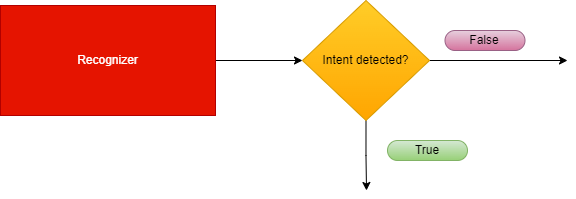
Recognizers inherit from the abstract class called BaseRecognizerMiddleware.
There are two types of recognizers, internal and external:
Internal recognizers
aura-bot own components that are able to recognize the intention of the user directly from the incoming message.
Currently, they are:
External recognizers
Responsible for calling an external API to obtain an intention.
Currently, the only external recognizer is nlp-recognizer-middleware, in charge of detecting the intention of the user from all the training of the environment.
Apart from the ones mentioned above, the finalize-recognizers-middleware is in charge of finalizing the recognition process.
Recognizers are executed sequentially in the order previously defined during the bot start-up.
Recognizers flow
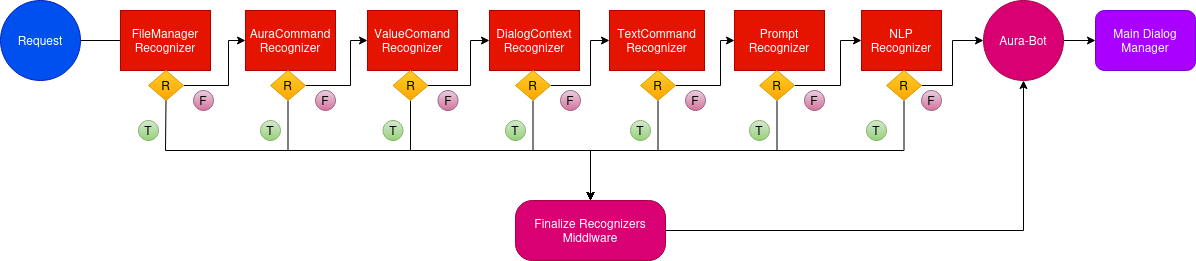
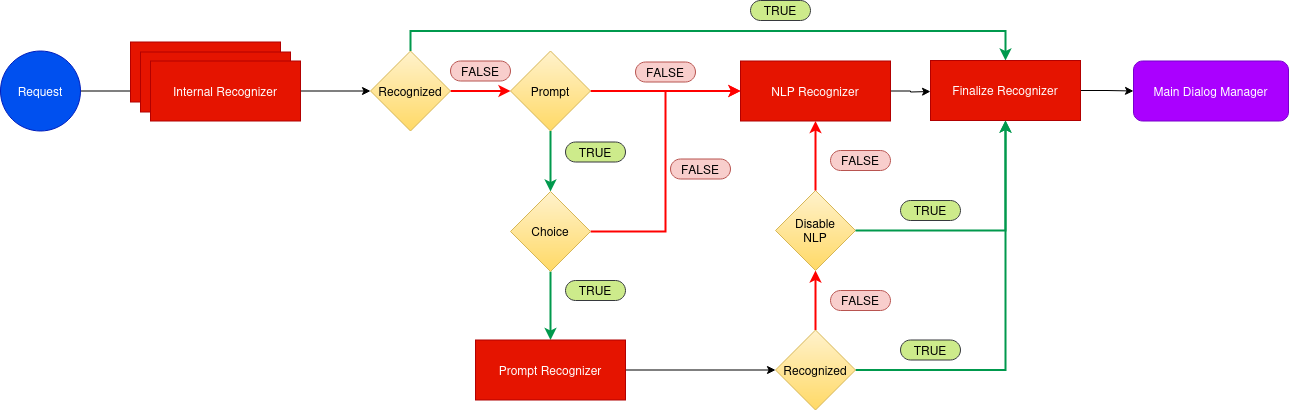
The following figure shows the execution flowchart for aura-bot recognizers, including the recognizers included in aura-bot by default. They are executed sequentially.
-
If one specific recognizer has obtained an intention, then the flow redirects to the finalize-recognizers-middleware, that provides the result to aura-bot in order to trigger the corresponding dialog.
-
If the recognizer in execution does not get the intention, then the flow continues and the succeeding recognizer is executed.
-
As can be seen in the flowchart, the last recognizer to be executed is the external one, nlp-recognizer-middleware. This is because aura-bot should only request it if no other recognizer gets the intention of the user.
-
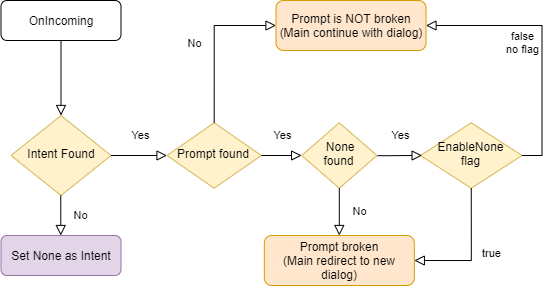
The finalize-recognizers-middleware is in charge of deciding, in case there is any active prompt, whether to continue with the prompt or to remove the prompt from the dialog stack and process the attempt to start a new dialog otherwise.
2.2.1.1 - Base recognizer
Base recognizer
Description of base-recognizer
Introduction
Recognizers are middlewares that inherit from the abstract class called BaseRecognizerMiddleware.
export abstract class BaseRecognizerMiddleware implements Middleware, Recognizer {
    protected name: string;
    protected id: string;
    protected type: RecognizerType;
    constructor(name: string, id: string, type?: RecognizerType) {
        this.type = type || RecognizerType.Asynchronous;
        this.name = name;
        this.id = id;
    }
The source code of this recognizer is included in Aura Bot Platform recognizers - Github repository.
base-recognizer parameters
| Parameters |
Type |
Description |
| name |
property |
Name of the middleware. |
| id |
property |
Unique identifier for middleware. |
| type |
property |
Type of execution (async or sync) to execute the recognizer method. |
| recognize |
method |
Abstract method that must be implemented in the recognizer. If the recognizer detects an intent, it must save the intent result in the turn context. |
| onTurn |
method |
Private method executed when the activity is processed by the adapter. |
| processIntent |
method |
Protected method to process the intent and entities and store the intentResult and the intent in AuraCommand format. |
|
|
|
IntentResult model
| Name |
Type |
Description |
| text |
string |
Utterance sent to the recognizer. |
| alteredText |
string |
If the original text is changed due to mistakes such as spelling typos, the altered version is included here. |
| intents |
Object |
Map of intent names to an object with score is returned. Format: [name: string]: {score: number;}; |
| entities |
Entity |
Entities recognized. |
| promptCheck |
boolean |
If true, the finalize-recognizers-middleware evaluates if exits a prompt in the stack and decides whether it needs to pop from the stack or continues. |
|
|
|
2.2.1.2 - Aura Command recognizer middleware
Aura Command recognizer middleware
Description of aura-command-recognizer-middleware, in charge of identifying Aura commands.
Introduction
aura-command-recognizer-middleware checks the auraCommand property inside an activity.
This component is able to identify the so-called auraCommands, recognizing the user’s intent and associated entities from the messages reaching an aura-bot instance.
By default, it is the recognizer with more priority. The score for the intent is always 1.0.
The source code of this recognizer is included in Aura Bot Platform recognizers - Github repository.
An example is shown below:
Incoming activity with an auraCommand
{
  "activity": {
    "channelData": {
      "auraCommand": {
        "type": "suggestion",
        "value": {
          "intent": "intent.usage.check",
          "entities":[{
            "type": "measure",
            "entity" : "megabytes"
          }]
        }
      }
    }
  }
}
Recognizer Result
{
  "text": "check data usage",
  "intents":
    "intent.usage.check": {
      "score": 1.0
    }
  },
  "entities": [
    {
      "type": "measure",
      "entity": "megabytes"
    }
  ]
}
2.2.1.3 - Dialog context recognizer middleware
Dialog context recognizer middleware
Description of dialog-context-recognizer-middleware, that manages the recognition process when there are different options in the response
Introduction
dialog-context-recognizer-middleware uses a model to facilitate the recognition when Aura response is composed of several options, which have either been generated automatically when a Prompt Choice or a list of CardActions has been processed or generated manually.
This model is defined in dialogContext model.
The source code of this recognizer is included in Aura Bot Platform recognizers - Github repository.
The behavior of this recognizer is channel-specific. The dialogContext configuration for each channel follows the model defined in the channel model sub-property.
This recognizer first checks if a cache exists with the dialogContext generated by the last message sent to the user. If it does not exist, then it checks the dialogContext information saved in aura-bot cache, in greater detail in property auraData.conversationData.dialogContext.
This differs with past versions where this information was obtained from channelData property in the activity, which now is defined in the processFromClient property.
The recognition is performed by proximity between the user’s phrase and the dialogContext values to be evaluated.
If Aura has sent several dialogContext messages, the last message will be the one containing a single dialogContext with all the previous ones merged.
If the dialogContext value exists in the cache, it is deleted once fetched. If another recognizer beats the dialog-context-recognizer-middleware, this process is performed inside the finalize-recognizers-middleware.
Environment variables
Three aura-bot environment variables come into play in the process:
AURA_DIALOG_CONTEXT_THRESHOLD: minimum threshold to validate the recognition (by default: 0.8).AURA_DIALOG_CONTEXT_THRESHOLD_RELATION_UTTERANCE: Microsoft uses in its algorithm a fixed value of 0.5. If the value is not set, then the value will be calculated based on the words of the user’s phrase divided by the words of the phrase to be compared. (by default: not set).AURA_DIALOG_CONTEXT_ORDINAL_CARDINAL_THRESHOLD: if the client phrase contains a number or the dialogContext values are enumerated by cardinals or/and ordinals, this threshold will be used instead of AURA_DIALOG_CONTEXT_THRESHOLD. This is done to prevent numbers within the phrase from being confused with the position of the items in the options list.(by default: 0.95).
The dialogContext can be generated automatically based on Prompt Choices or CardActions. This is configurable per channel, but developers could add the dialogContext object to the channelData with the expected actions.
Example
An example is shown below: a user asks for a recommendation in Movistar +. If these recommendations are included in a dialogContext, it gives the user the possibility to precisely select one of the options using voice:
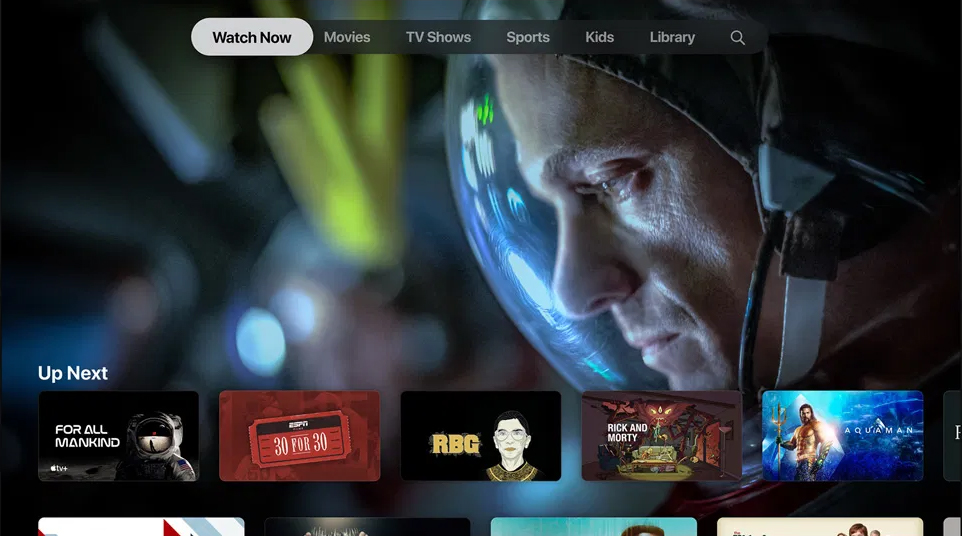
dialogContext stored for an Aura response:
{
  "dialogContext": [
    {
      "text": "I want to see the movie for all mankind|1|one|the first|first",
      "value": {
        "name": "I want to see the movie for all mankind",
        "text": "See for all mankindo",
        "type": "suggestion",
        "intent": "intent.tv.search",
        "entities": [
          {
            "type": "ent.audiovisual_film_title",
            "entity": "for all mankind",
            "canon": "for all mankind",
            "label": "",
            "score": 1
          },
          {
            "type": "ent.audiovisual_genre",
            "entity": "film",
            "canon": "films",
            "label": "CN",
            "score": 1
          }
        ]
      }
    },
     {
      "text": "I want to see the movie 30 for 30|two|second|the second|",
      "value": {
        "name": "I want to see the movie 30 for 30",
        "text": "See 30 for 30",
        "type": "suggestion",
        "intent": "intent.tv.search",
        "entities": [
          {
            "type": "ent.audiovisual_film_title",
            "entity": "30 for 30",
            "canon": "30 for 30",
            "label": "",
            "score": 1
          },
          {
            "type": "ent.audiovisual_genre",
            "entity": "film",
            "canon": "films",
            "label": "CN",
            "score": 1
          }
        ]
      }
    },
      {
      "text": "I want to see the movie rgb|3|three|the third|third",
      "value": {
        "name": "I want to see the movie rgb",
        "text": "See for all mankindo",
        "type": "suggestion",
        "intent": "intent.tv.search",
        "entities": [
          {
            "type": "ent.audiovisual_film_title",
            "entity": "rgb",
            "canon": "rgb",
            "label": "",
            "score": 1
          },
          {
            "type": "ent.audiovisual_genre",
            "entity": "film",
            "canon": "films",
            "label": "CN",
            "score": 1
          }
        ]
      }
    },
    .....
  ]
}
2.2.1.4 - attachment recognizer middleware
Attachment recognizer middleware
Description of the attachment-recognizer-middleware, in charge of managing some attachment types sent to aura-bot
Introduction to attachment recognizer middleware
attachment-recognizer manages messages that include attachments. Currently, only two types of attachment content types are handled:
application/vnd.telefonica.aura.whatsapp.orderapplication/vnd.telefonica.aura.whatsapp.context
These types are mapped by channel configuration in the field requestOptions.defaultIntentByAttachment and the intent set in this configuration
will be the intent set by this recognizer.
An example of defaultIntentByAttachment configuration is included below:
{
  "requestOptions": {
    "defaultIntentByAttachment": {
      "application/vnd.telefonica.aura.whatsapp.order": "intent.factotum-test.whatsapp-catalog-handler",
      "application/vnd.telefonica.aura.whatsapp.context": "intent.factotum-test.whatsapp-catalog-handler"
    }
  }
}
When one of these attachments is found in the activity but the configuration for this type is not found in the channel configuration,
the intent set in the environment variable AURA_ROOT_INTENT (None by default) will be set.
2.2.1.5 - File manager recognizer
File manager recognizer
Description of the file-manager-recognizer-middleware, in charge of managing files in use cases messages
Introduction to file-manager recognizer
file-manager recognizer manages messages that include files, both as text messages or as attachments. Although it is not a real recognizer, it is included in the list of recognizers because it is executed in the same way as the rest of them, and it is in charge of managing files, that are handled in the same way as intents.
The source code of this recognizer is included in Aura Bot Platform recognizers - Github repository.
Depending on which dialog is running (PromptAttachment, BypassDialog, none) and whether the channel is ready for managing files, these files can be:
- Used by the dialog that requested it.
- Processed and validated by the aura-file-manager API.
- Sent to the unexpected-file dialog.
- Other situations beyond the happy path.
This recognizer checks the attachments property or the property channelData.payload.asyncCallback.attachments inside an activity. The reason behind searching for two different properties has to do with its execution flow. The first one is used to send files from the user to aura-bot and the second one is used to send files from file-manager back to aura-bot, once they are validated.
It is the recognizer with more priority, (the first to be executed after the initialization middleware), so if it finds an intention, it will win, because its resulting score for the recognized intent will be always 1.0, i.e., a perfect recognition.
Example of an activity with a file attachment:
{
  "attachments": [
    {
      "contentType": "image/png",
      "contentUrl": "https://example.com/image.png"
    }
  ]
}
Example of an activity with a validated file attached in the channelData.payload.asyncCallback.attachments.
{
  "channelData": {
    "payload": {
      "asyncCallback": {
        "attachments": [
          {
            "contentUrl": "https://<host>/fromId/messageId_1646724898352?sv=2020-10-02&se=2022-03-08T08%3A34%3A59Z&sr=b&sp=r&sig=GTCdk%2B9lU4IkYTJVH1%2BpEMBAKHWmaOjMB026Qxxw1ZU%3D",
            "name": "messageId_1646724898352",
            "content": {
              "processed": true,
              "typeValidation": {
                "valid": true,
                "value": "png"
              },
              "sizeValidation": {
                "valid": true,
                "value": 40663
              },
              "status": [
                {
                  "code": "OK",
                  "message": ""
                }
              ]
            },
            "contentType": "image/png"
          }
        ]
      }
    }
  }
}
aura-bot includes the content-type of the incoming attachment in its request to the file-manager, so a proper extension can be inferred in all the cases.
file-manager recognizer flow
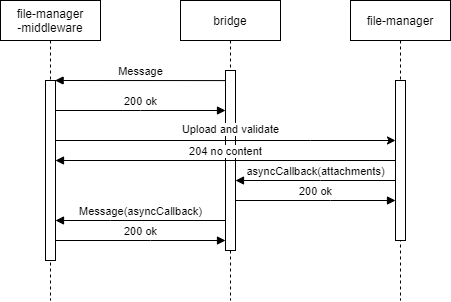
- The recognizer first checks if attachments data is present in the
activity.
- Then, the recognizer checks if the
channelData has file configuration enabled.
- The recognizer searchs for an active
PromptAttachment or bypass with file treatment.
- If it is found, then we will be on the case of an expected file and the processing will continue.
- If not, the processing will be redirected to the unexpected-file dialog.
- If we have an active
PromptAttachment or bypass with file treatment, the recognizer will send the data to be asynchronously processed by the file-manager API (a microservice with the only purpose of validating and upload files to a local repository).
- Through aura-bridge, the recognizer will receive the data processed by the file-manager API: (
channelData.payload.asyncCallback.attachments). In this stage, data with validations will be passed to the dialog where it can use it to do extra validations.
The following figures shows the different scenarios that can arise:
- The use case requests one file
sequenceDiagram
Title: Normal flow one file requested
    User/Kernel->>+Bridge: Phrase to init UC file dialog
    Bridge->>+Groot/Bot: Phrase to init UC file dialog
    Groot/Bot->>+NLP: Phrase user
    NLP->>+Groot/Bot: Intent dialog
    Groot/Bot->>+File Dialog: Start UC file dialog
    File Dialog->>+Bridge: Send me a file
    Bridge->>+User/Kernel: Send me a file
    User/Kernel->>+Bridge: Send a file
    Bridge->>+Groot/Bot: Send the attachment
    Groot/Bot->>+File Api: Validate / process the attachment
    File Api->>+Bridge: Attachment processed, validated and ready
    Bridge->>+Groot/Bot: Send attachment processed
    Groot/Bot->>+File Dialog: Send attachment processed
    File Dialog->>+Bridge: Ok
    Bridge->>+User/Kernel: Ok
- The use case requests one file but the user decides to send more than one file
sequenceDiagram
Title: One file requested, user send more
    User/Kernel->>+Bridge: Phrase to init UC file dialog
    Bridge->>+Groot/Bot: Phrase to init UC file dialog
    Groot/Bot->>+NLP: Phrase user
    NLP->>+Groot/Bot: Intent dialog
    Groot/Bot->>+File Dialog: Start UC file dialog
    File Dialog->>+Bridge: Send me a file
    Bridge->>+User/Kernel: Send me a file
    User/Kernel->>+Bridge: Send a file
    Bridge->>+Groot/Bot: Send the attachment
    Groot/Bot->>+File Api: Validate / process the attachment
    alt Processing file
    User/Kernel->>+Bridge: Send a file
    Bridge->>+Groot/Bot: Send the attachment
    Groot/Bot->>+File Dialog: Processing file & New attachment no validated send it
    File Dialog->>+Bridge: Processing file, don't send me more files
    Bridge->>+User/Kernel: Processing file, don't send me more files
    end
    File Api->>+Bridge: Attachment processed, validated and ready
    Bridge->>+Groot/Bot: Send attachment processed
    Groot/Bot->>+File Dialog: Send attachment processed
    File Dialog->>+Bridge: Ok
    Bridge->>+User/Kernel: Ok
- The use case requests several files: Files will arrive to the dialog as they are processed.
sequenceDiagram
Title: User send multiples files
    User/Kernel->>+Bridge: Phrase to init UC file dialog
    Bridge->>+Groot/Bot: Phrase to init UC file dialog
    Groot/Bot->>+NLP: Phrase user
    NLP->>+Groot/Bot: Intent dialog
    Groot/Bot->>+File Dialog: Start UC file dialog
    File Dialog->>+Bridge: Send me 3 files
    Bridge->>+User/Kernel: Send me 3 files
    User/Kernel->>+Bridge: Send 3 files
    alt Process attachment 2
    Bridge->>+Groot/Bot: Send attachment 2
    Groot/Bot->>+File Api: Validate / process the attachment 2
    File Api->>+Bridge: Attachment 2 processed, validated and ready
    Bridge->>+Groot/Bot: Send attachment 2 processed
    Groot/Bot->>+File Dialog: Receive 1/3 files processed
    end
    alt Process attachment 1
    Bridge->>+Groot/Bot: Send attachment 1
    Groot/Bot->>+File Api: Validate / process the attachment 1
    File Api->>+Bridge: Attachment 1 processed, validated and ready
    Bridge->>+Groot/Bot: Send attachment 1 processed
    Groot/Bot->>+File Dialog: Receive 2/3 files processed
    end
    alt Process attachment 3
    Bridge->>+Groot/Bot: Send attachment 3
    Groot/Bot->>+File Api: Validate / process the attachment 3
    File Api->>+Bridge: Attachment 3 processed, validated and ready
    Bridge->>+Groot/Bot: Send attachment 3 processed
    Groot/Bot->>+File Dialog: Receive 3/3 files processed
    end
    File Dialog->>+Bridge: Ok
    Bridge->>+User/Kernel: Ok
- In case of unexpected file:
sequenceDiagram
Title: Unexpected File
    User/Kernel->>+Bridge: Send a file
    Bridge->>+Groot/Bot: Send the attachment
    Groot/Bot->>+Unexpected File: Send the attachment
    Unexpected File->>+Bridge: Unexpected file
    Bridge->>+User/Kernel: Unexpected file
- Different problems may arise in reference to unavailable file-manager* API or aura-bridge:
sequenceDiagram
Title: File Api No Available
    User/Kernel->>+Bridge: Phrase to init UC file dialog
    Bridge->>+Groot/Bot: Phrase to init UC file dialog
    Groot/Bot->>+NLP: Phrase user
    NLP->>+Groot/Bot: Intent dialog
    Groot/Bot->>+File Dialog: Start UC file dialog
    File Dialog->>+Bridge: Send me a file
    Bridge->>+User/Kernel: Send me a file
    User/Kernel->>+Bridge: Send a file
    Bridge->>+Groot/Bot: Send the attachment
    alt Retries with File API
    Groot/Bot-xFile Api: Validate / process the attachment
    Groot/Bot-xFile Api: Validate / process the attachment
    Groot/Bot-xFile Api: Validate / process the attachment
    end
    Groot/Bot->>+File Dialog: Attachment no processed with problem explanation
sequenceDiagram
Title: Bridge no available
    User/Kernel->>+Bridge: Phrase to init UC file dialog
    Bridge->>+Groot/Bot: Phrase to init UC file dialog
    Groot/Bot->>+NLP: Phrase user
    NLP->>+Groot/Bot: Intent dialog
    Groot/Bot->>+File Dialog: Start UC file dialog
    File Dialog->>+Bridge: Send me a file
    Bridge->>+User/Kernel: Send me a file
    User/Kernel->>+Bridge: Send a file
    Bridge->>+Groot/Bot: Send the attachment
    Groot/Bot->>+File Api: Validate / process the attachment
    alt Bridge no reachable
    File Api-xBridge: Attachment processed, validated and ready
    File Api-xBridge: Attachment processed, validated and ready
    File Api-xBridge: Attachment processed, validated and ready
    end
    User/Kernel->>+Bridge: Aura, what's going on?
    Bridge->>+Groot/Bot: Aura, what's going on?
    Groot/Bot->>+File Dialog: Aura, what's going on? / Cut PromptAttachment or Bypass
    File Dialog->>+Bridge: Try again later / Other message
    Bridge->>+User/Kernel: Try again later / Other message
Environment variables
Practical process for managing files in a use case
Currently, it is only available for WhatsApp channels. Follow the guidelines in Use of files in WhatsApp.
2.2.1.6 - Prompt check recognizer middleware
Prompt check recognizer middleware
Description of prompt-check-recognizer-middleware, that manages the scenario when a user is requested to chose between different options
Introduction
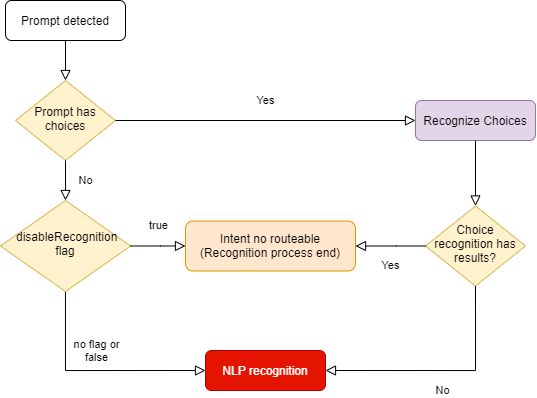
The prompt-check-recognizer-middleware checks whether there is a prompt dialog currently active and, if so, evaluates the input message to check if there is a match (the user has selected one of the options offered by the choice prompt). In this situation, a temporary recognizerResult is generated to prevent the nlp-recognizer-middleware from running.
prompt-check-recognizer-middleware has a disableRecognition flag to disable the recognition when prompt has not choices.
The source code of this recognizer is included in Aura Bot Platform recognizers - Github repository.
prompt-check-recognizer-middleware flow
The following diagram shows in detail the internal logic of the prompt-check-recognizer-middleware.
2.2.1.7 - Value command recognizer middleware
Value command recognizer middleware
Description of the value-command-recognizer-middleware, that checks the value property of the activity
Introduction
This recognizer checks the value property inside activity. The score for the intent is always 1.0.
The source code of this recognizer is included in Aura Bot Platform recognizers - Github repository.
An example is shown below:
Activity:
{
  "activity": {
    "value": {
      "intent": "intent.usage.check",
      "entities": [
        {
          "type": "measure",
          "entity": "megabytes"
        }
      ]
    }
  }
}
Recognizer Result:
{
  "text": "check data usage",
  "intents": {
    "intent.usage.check": {
      "score": 1.0
    }
  },
  "entities": [
    {
      "type": "measure",
      "entity": "megabytes"
    }
  ]
}
2.2.1.8 - Text command recognizer middleware
Text command recognizer middleware
Description of text-command-recognizer-middleware, used in Facebook channel
Introduction
This recognizer checks the text property inside of the activity and evaluates if this field contains an intent object in string format.
The source code of this recognizer is included in Aura Bot Platform recognizers - Github repository.
Its use is not recommended. Currently, it only applies to handle the Aura menu in Facebook apps.
Example
Incoming activity with a TextCommand
{
  "activity": {
    "text": "{\"intent\":\"intent.usage.check\",\"entities\":[{\"type\":\"measure\",\"entity\":\"megabytes\"}]}"
  }
}
Recognizer Result
{
  "text": "check data usage",
  "intents": {
    "intent.usage.check": {
      "score": 1.0
    }
  },
  "entities": [
    {
      "type": "measure",
      "entity": "megabytes"
    }
  ]
}
2.2.1.9 - Nlp recognizer middleware
Nlp recognizer middleware
Description of nlp-recognizer-middleware, responsible for calling an external API in an attempt to obtain the user’s intent.
Introduction
The main objective of the recognizer is to call aura-nlp API and process its response.
The environment variable AURA_COGNITIVE_ENDPOINT contains the URL of Aura NLP API.
It should not be requested from outside the NLP recognizer.
Aura NLP will not be requested if the channel is not configured to use it. This is configured in the channel collection in the Aura Configuration API:
{
    "name": "movistar-plus",
    "prefix": "mp",
    "nlp": {
        "enabled": false
    }
}
In this case, the NLP Recognizer will return an intent None with a score of 1.0. in the IntentResult.
Further information regarding channels’ configuration can be found in the Channels section.
The source code of this recognizer is included in Aura Bot Platform recognizers - Github repository.
Disambiguation case
In aura-bot platform, NLP response is processed and formatted in the nlp-recognizer-middleware. In this middleware, a request to the domainClassifier API is executed:
domainClassifier = (await nlpApi.domainClassifierDefaultQuery(domainClassifierDefaultRequest, correlator, options)).body;
The response received in case there is disambiguation has the following structure:
{
    query: 'original Phrase',
    channel: 'mp',
    intent_result: {
        entities: [],
        top_result: { intent: 'intent.disambiguation', score: 1.0 },
        intents: [
            { intent: 'intent.disambiguation', score: 1.0 }
        ]
    },
    domain_result: {},
    options: [
        {
            query: 'original Phrase',
            channel: 'mp',
            intent_result: {
                entities: [
                    {
                        entity: '14', type: 'faq', score: 0.90, start_index: 1, end_index: 1, canon: '14', label: null
                    }
                ],
                intents: [
                ]
            },
            domain_result: {},
            options: []
        }
    ]
}
As for the disambiguation case, information about the recognition process is obtained from the value options: [] shown in the example above. Otherwise, recognition’s response will be captured from the value intent_result: {}.
This value will be formatted and propagated into other components using the actual context:
ContextUtils.setIntentResult(context, result, context.activity.text, true)
Where result.entities will be formatted to avoid missing or empty arrays.
Following with the disambiguation example, information regarding it will be stored in result.disambiguationOptions with the following type IntentResult[].
2.2.1.10 - Triage recognizer middleware
Triage recognizer middleware
Description of triage-recognizer-middleware, responsible for calling an external API in an attempt to obtain the user’s intent.
Enabling the triage recognizer
The triage-recognizer-middleware is an optional recognizer that can be added to the environment variable AURA_ACTIVE_MIDDLEWARES to enable it.
AURA_ACTIVE_MIDDLEWARES=TriageRecognizerMiddleware
Once enabled, the middleware will only run if the following conditions are met:
- There is no intent already recognized in the context.
- The intent is included in the list of intents defined in the environment variable
AURA_INTENTS_NONE. By default, this variable contains the value ['None', 'intent.none', 'intent.tv.none'].
Adding the necessary configuration for the channel
To use this recognizer, it is necessary to add the configuration for the channel in the channel collection in the aura-configuration-api.
The configuration must include the applicationId and presetId for the TriageRecognizer in the atria.recognizers object.
For example, if the channel is movistar-plus, the configuration should look like this:
{
    "name": "movistar-plus",
    "prefix": "mp",
    "atria": {
        "recognizers": {
            "TriageRecognizer": {
                "applicationId": "816bdab6-3ea3-4a77-bdea-12945d6d7053",
                "presetId": "67cb30a2-aec7-448c-a2a6-18faaa9d1820"
            }
        }
    }
}
How the triage recognizer works
The triage-recognizer-middleware is responsible for calling an external API, ATRIA, to obtain the user’s intent using a Large Language Model (LLM) system.
The triage-recognizer-middleware uses the AiService to call the Atria generative API with the message received in the request and the configuration defined for the channel in the channel collection in the aura-configuration-api (see the section Adding the necessary configuration for the channel).
If triage middleware is enabled but the channel does not contain the config for the TriageRecognizer, the middleware will not be executed.
For each call, the previous session information associated with the user is sent, if it exists. The session information is stored in the context for future requests.
Finally, the intent is extracted from the response received from ATRIA and fills the IntentResult with the recognized intent.
2.2.1.11 - Finalize recognizers middleware
Finalize recognizers middleware
Description of finalize-recognizers-middleware, in charge of finalizing the recognition process.
Introduction
This middleware is not a recognizer itself, as it simply takes care of making the final adjustments to the recognition process, such as:
- Establish the final name of the attempt. It is necessary to put the prefix of the current channel.
- Remove the prompt from the stack if the conditions are met.
The source code of this recognizer is included in Aura Bot Platform recognizers - Github repository.
finalize-recognizers-middleware flow
Internal Recognizer Result:
Intent Type |
Prompt Check |
Execute NLP Recognizer |
Remove Prompt from Stack |
suggestion |
false |
false |
true |
operation |
false |
false |
false |
text |
false |
false |
false |
| No Intent detected |
true if Prompt |
If Prompt evaluation fails |
If NLP intent score >= 0.95 and if none is detected and enabled.
Customizable value, 0.95 is the default value of AURA_MIN_INTENT_SCORE_THRESHOLD_TO_CLEAN_STACK variable, that controls this behavior. |
By default, if there is a prompt and there has been NLP recognition, then if none intent is found it will not be enough to break the prompt unless enableNone is activated to break it.
2.2.2 - Middlewares
Aura Bot middlewares
Description of the different Aura Bot middlewares, components in charge of the messages flow
Introduction to Aura Bot middlewares
Middlewares in aura-bot are software components in charge of the messages flow. In fact, they are just classes executed between the bot adapter and aura-bot logic.
Middlewares are defined by Microsoft BotFramework, thus Aura just adds as many middlewares as needed in order to make the bot handle messages appropriately.
Find here further information about middlewares in BotFramework.
There are two types of middlewares defined in aura-bot:
- Middlewares that are always executed following a specific order established by the bot.
- Middlewares that are optional and are activated by configuration, through the environment variable
AURA_ACTIVE_MIDDLEWARES.
The following figure schematically shows the aura-bot middlewares flow for messages, indicating their category and the orderly execution of all of them.
| Classification criteria |
Categories |
| When they are executed |
- INPUT (turquoise): if they are an input to aura-bot, in order to summon a dialog.
- OUTPUT (orange): they are an output from aura-bot, leading to the output message generation.
- INPUT-OUTPUT: (half turquoise/half orange), if they have methods to be run before executing the dialog and methods to be executed after it. |
| Mandatory / optional |
- M: mandatory
- O: optional |
| Execution mode: flow stops when middleware fails |
- False: Execution flow stops when middleware fails
- True: execution continues when middleware fails |
To configure the optional middlewares, they should be added to the environment variable AURA_ACTIVE_MIDDLEWARES that should contain the name/s of the needed optional middlewares. It should contain a comma separated list with all or a set of the following names:
- batch-outgoing-message-middleware
- speak-processor-middleware

2.2.2.1 - Incoming Event middleware
Incoming Event middleware
Description of incoming-event-middleware, executed in event activity types.
Introduction
The incoming-event-middleware is in charge of managing events, that is, activities for the end-to-end communication between aura-bot and channels.
Channels can send events to aura-bot to inform about any relevant event happening on their side.
In particular, aura-bridge sends an event to aura-bot, when the transformation from bot activity to WhatsApp message fails, that is handled by this middleware.
When aura-bot receives an event, this middleware prevents the execution of the rest of the middlewares by completing the request flow.
There are two types of events:
- Log type: the channel asks aura-bot to log certain information
- emptyResponse type: Event sent by the bot when no response activity is sent. Currently, it is internally used for aura-bot towards aura-bridge.
export enum TypeEvent {
    /**
     * Log event
     */
    Log = 'log',
    /**
     * Directline empty response event (Event sent by the bot when no response activity is sent)
     */
    EmptyResponse = 'emptyResponse'
}
This middleware is executed once the HTTP request arrives at the server to the POST /api/messages endpoint and the Direct Line authentication executed by the Adapter is successful.
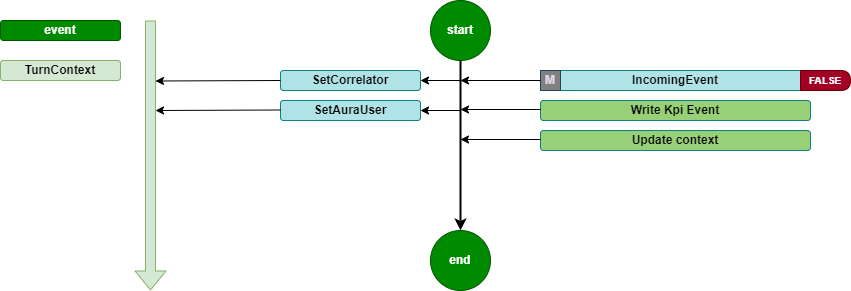
It is a Turn middleware, so it is executed during turn initialization. It is only executed if the type of the activity is event. In this case, the middleware records the KPIs and updates the context.
The source code of this middleware is included in Aura Bot Platform middlewares - Github repository.
Incoming Event flow diagram
The incoming-event-middleware flowchart is included below:
2.2.2.2 - Init middleware
Init middleware
Description of init-middleware, the very first one to be executed once the HTTP request arrives at the server
Introduction
The init-middleware is the first to be executed once the HTTP request arrives at the server to the POST /api/messages endpoint and the Direct Line authentication executed by the Adapter is successful.
It is a Turn middleware, so it is executed during turn initialization.
It launches the execution of all the following middlewares, in the order declared during aura-bot initialization. It is only executed if the type of the activity is message.
The source code of this middleware is included in Aura Bot Platform middlewares - Github repository.
init-middleware flowchart
The orderly steps for the management of this middleware are detailed below:
- Set a proper correlator in the
TurnContext, that will be used during the whole processing of the activity throughout aura-bot.
This means that:
- If a correlator is received in the
channelData of the activity, this one is used.
- If the channel does not send a correlator, a new one is generated at this point, to be used the same way.
ContextUtils.setCorrelator(context, ContextUtils.getCorrelatorFromChannelData(context));
/**
 * Get correlator from channel data, if exist there, or creates a new one.
    * @param context Context where the channel data will be taken from
    */
static getCorrelatorFromChannelData(context) {
    if (!context.activity.channelData || !context.activity.channelData.correlator) {
        context.activity.channelData = { ...context.activity.channelData || {}, correlator: uuid.v4() };
    }
    return context.activity.channelData.correlator;
}
-
Push the auraId, received in the from.id of the activity, to the TurnContext, to make it available in all the activity execution steps. The getAuraId method sets the auraId based on the channel type, if the channel is integrated. Then, the auraId is prefixed with the channel prefix.
This is necessary because the auraId is the key to the user cache and, if it is not formatted properly, it will fail to fetch the user from the cache and will re-request the user’s data from the services.
ContextUtils.setAuraId(context, ChannelDataUtils.getAuraId(context, AuraChannelsConfiguration.instance));
-
Initialize the data accessors of the conversational context in the TurnContext: conversationState, userState and authenticationState.
ContextUtils.setAuraPersistentDataAccesors(context, this.dataAccessors);
-
Initialize the conversationState. This is necessary to avoid errors when a user accesses through several channels simultaneously.
ContextUtils.setConversationState(context, this.conversationState);
-
Set activity locale with the default value.
context.activity.locale = ConfigurationManager.instance.environmentConfiguration.AURA_DEFAULT_LOCALE;
At this stage, two scenarios can happen:
-
If the activity processing is executed properly, the following middleware is executed.
-
In the happening of an unexpected error during the activity processing, the error makes all its way back to this initialization middleware error handling, in order to return the user a response activity including the most appropriate text related to the error.
One of the possible errors landing in this middleware during the activity processing, happens when the size of the response is bigger than the ones allowed by Direct Line protocol, that must not exceed 256K characters, the response is bypassed and a generic text explaining that there are too many results is returned to the user: (errors:error.message.oversize).
2.2.2.3 - Fourth Platform Authorization middleware
Description of fourth-platform-authorization-middleware, in charge of the validation of the user’s credentials
Introduction
fourth-platform-authorization-middleware validates the user’s credentials and the authorization of the auraId sent by the channel, in order to provide all the information of the user needed before the execution of any Aura use case.
It is always executed just after the init-middleware.
For further details about Aura authentication, please go to Aura authentication, in order to understand the different types of Aura users regarding authentication.
Modules
fourth-platform-authorization-middleware lays on two modules:
-
FourthPlatformAuth: class that must implement IAuraAuthenticator interface. This class provides all the methods and properties required to handle Kernel authorization mechanisms.
-
AuraUser: generic class depending on the authenticator provided, in this case FourthPlatformAuth, and that implements AuraUserBaseModel<IAuraAuthenticator>.
The first step is to try to get the user details from the aura-bot cache. In order to improve performance, we try to get it from the local cache of the server and only go to the remote cache if needed. This is done both if the user is authenticated or anonymous, but reading from different caches.
The source code of this middleware is included in Aura Bot Platform middlewares - Github repository.
If the user’s authentication information is cached, the next step is to validate it. If valid, then kpi-handler is called to write the USER entity row, and the next middleware is called. If user’s authentication information is neither cached nor valid, then the authentication process is launched:
-
Get user’s information by auraId from Aura AuthenticationService, getting both the data of the user stored in Aura users database and her channel configuration.
-
If it is a valid authenticated user, then read user’s authorization data from Kernel.
-
The first step in Kernel authentication is to have a valid accessToken, granted for the scopes and purposes needed by the use cases managed by the channel.
-
Then, if the channel needs it, UserProfile is read from Kernel API. Out of it, the AuraUserType is calculated in order to know if the user is monomsisdn, multimsisdn, nomsisdn.
-
The last step is to get the introspection token to obtain a complete view of the user’s identification, related to her authorization_id. Then, all the scopes in the introspection will be merged together and added to the information of the user.
-
After data from Aura AuthenticationService and Kernel is read and processed, there is a valid AuraUser object that is stored in the userDataCache and in the corresponding UserState of aura-bot.
-
Then, the next middleware is executed.
-
Error cases:
-
If a new accessToken cannot be obtained because authorization_id is not valid, then aura-bot stops message processing and returns an activity with an UNAUTHENTICATED code in the channelData to the channel, indicating that the channel must relaunch user authentication with Kernel.
-
Any other error generating accessToken or getting UserProfile or IntrospectionToken will return an INTERNAL code error in the channel, so it should retry the communication after a while.
-
If the given auraId does not exist in Aura’s database, it is validated if the user can be treated as anonymous.
In all the cases, before leaving the fourth-platform-authorization-middleware, the kpi-handler will be called to write a new row in the USER entity file, with the result of the authentication.
The flow diagram of the process is included below:

2.2.2.4 - Incoming KPI middleware
Incoming KPI middleware
Description of incoming-KPI-middleware, in charge of writing the KPI when a message is received
Introduction
The incoming-KPI-middleware extends BotFramework class IncomingMessageMiddleware, meaning that certain code is executed on incoming message.
This middleware is always executed just after the fourth-platform-authorization-middleware.
This middleware is in charge of writing a row in the MESSAGE entity file with the action received. This row is only written if the type of the received activity is message; otherwise, it is ignored.
In the happening of an error writing this information, the activity processing stops here, and an activity is sent to the user with an unexpected error text (errors:error.unexpected).
The source code of this middleware is included in Aura Bot Platform middlewares - Github repository.
2.2.2.5 - Bypass Mode middleware
Bypass Mode middleware
Description of bypass-mode-middleware, that when Aura Bot is in bypass mode, sends any input message directly to an external service
Introduction
The main functionality of bypass mode, is that once we are in this mode within a conversation, any input message to aura-bot will be directly sent to the external service, without any recognition made by the bot.
Likewise, any message from the external service will be shown to the user without going through aura-bot recognition system.
The source code of this middleware is included in Aura Bot Platform middlewares - Github repository.
The bypass-mode-middleware extends BotFramework class IncommingMessageMiddleware, meaning that certain code is executed on incoming message.
flowchart TD
    A[Request] --> InitMiddleware (Middlewares)
    subgraph Middlewares
        direction LR
        InitMiddleware[...] --> BypassMode
        BypassMode -->|disable| NLPRecognizer
        BypassMode -->|enable| FinalizeRecognizer
        NLPRecognizer --> FinalizeRecognizer
        FinalizeRecognizer --> EndMiddlewares[...]
    end
    EndMiddlewares --> AuraBot[Aura Bot]
    style BypassMode fill:#800,stroke:#300,stroke-width:1px
The bypass-mode-middleware skips the execution of nlp-recognizer-middleware, setting the value of intentResult in the TurnContext to the same that started the bypass mode.
In case of Init state, all the following middlewares are skipped. The dialog can find these messages in channelData conversationHistory.
⚠️ This is an incoming message middleware, so it only handles incoming messages.
📃 Find here practical guidelines for the configuration of aura-bot in bypass mode.
When using the bypass mode
The bypass mode can be used when all messages in a conversation want to be managed by the same dialog, without the bot recognizer system redirecting the request to another dialog.
The bypass mode ensures that, once active, all requests will be sent to the dialog that started this mode and will continue to receive all requests until the bypass mode is deactivated.
The bypass mode can be useful in multiple use cases:
- Chat with external systems. For example, the handover dialog directly forwards to Genesys (call center) all the messages the user sends once the communication between Aura and Genesys is established.
When the Bypass mode is finished
There are three different ways to exit the bypass mode:
-
It can be decided by the handover dialog itself, using closeBypass method in the bypass object stored in the TurnContext.
-
When certain time (configurable using de expirationTime field in the bypass object) passes without any exchange of messages.
-
When a user message sends one text defined as closeString. Currently, the user can close bypass indicating keywords defined by the bypass_model (using the closeString field). In the bypass model (saved in conversationData), it is possible to indicate the words that close the bypass mode. By default: core:bypass.close.words.
How does it work
The bypass-mode-middleware checks for each request if there is a bypass variable in the user’s conversationData. If the bypass variable exists (type @telefonica/aura-bot-common/models/bypass-model) and its status is different from Off, the middleware will perform the operations depending on the state.
The different possible bypass states are defined in BypassState enum:
export enum BypassState {
    Init = 'init',
    Bypass = 'bypass',
    Closed = 'closed',
    Paused = 'paused',
    Off = 'off'
}
Behavior depending on the state
As previously indicated, the bypass-mode-middleware performs operations based on the state of the bypass variable, which can be modified by the dialog according to the needs:
Init
Perform as in Bypass state. It allows the dialog to execute boot actions.
Bypass
By default, the bypass-mode-middleware sets the intentResult in TurnContext with the intent to start the bypass mode (bypass.intent), so that the dialog can manage the message.
If the bypass has not expired, the last access information (using updateLastAccess method) will be updated, restarting the expiration time again. In this state, the middleware does not close the bypass, this work is delegated to the dialog itself.
In the Bypass state, it is possible to execute an action using an channelData.auraCommand with the following format in the intent field (activity.channelData.auraCommand.value.intent):
<intent>.<action>
The possible actions that can be executed are defined in BypassAction enum:
export declare enum BypassAction {
    Init = "init",
    Start = "start",
    Close = "close",
    Pause = "pause",
    None = "none"
}
Currently, only the following actions have an effect on bypass-mode-middleware:
- Close. Set bypass in
Closed state and continues the normal execution.
As an example, we can send an auraCommand with the example-intent.close value on intent field to close the bypass and send to the dialog that handles the example-intent intent.
{
    "auraCommand": {
        ...
        "value": {
            "intent": "example-intent.close",
            "entities": [
                ...
            ]
        }
    }
}
Closed
Close bypass removing it from conversationData.
Paused
Currently it has no effect, although in the future it will temporarily stop bypass mode and resume it again.
Off
It has no effect.
Bypass model
The bypass model contains the following information:
export interface BypassModel {
    state: BypassState
    intent: Intent;
    duration: number;
    recipient: ChannelAccount;
    userId: string;
    data: any;
    closeReason: BypassCloseReason;
    payloadName: string;
    closeString: string | string[];
    expirationTime: number;
    recognizersEnabled: boolean;
    recognizersBreakIntents: Map<string, string[]>;
}
| Property |
Description |
| BypassState |
Current Bypass State |
| intent |
Intent that initiates the Bypass |
| duration |
Bypass life time in minutes |
| recipient |
Recipient to return the message to |
| userId |
Identifier of the user who activated the Bypass |
| data |
Specify information for dialog |
| closeReason |
Reason for closure. If unknown, the dialog must find out what the cause was |
| payloadName |
Name of the property in the channelData.payload. Used to send data to the bypass.ex: ‘handover’ |
| closeString |
Comma-separated string or array of string with the words that directly close the bypass |
| expirationTime |
Date of timeout for bypass |
| recognizersEnabled |
Flag to indicate whether or not recognizers must be executed and the final result stored, although the bypass is enabled. |
| recognizersBreakIntents |
Recognized intents to replace dialog with |
State diagram
The following diagram shows the state transition of bypass mode:
stateDiagram-v2
    [*] --> Init : Dialog init bypass (Bypass.initialize)
    Init --> Bypass : Dialog update
    Bypass --> Closed : Dialog update or BypassAction.Close is received
    Init --> Closed : Dialog update or BypassAction.Close is received
    Closed --> [*] : Bypass model is removed
    %% note left of Init : Dialog perform startup tasks
    %% note left of Bypass : Dialog manages all incoming conversation requests
Examples
Dialog using bypass
Starting bypass mode
In an initial state, the user’s conversationData does not have bypass information. The dialog must create the bypass object to start the bypass mode.
sequenceDiagram
    actor User
    Note right of User: No bypass
    User->>Bot: "First message"
    Bot->>BypassModeMiddleware: request context
    Note right of BypassModeMiddleware: does nothing (no bypass model)
    BypassModeMiddleware->>NLPRecognizerMiddleware: recognize from context
    NLPRecognizerMiddleware->>NLPRecognizerMiddleware: recognized intent: "intent.example"
    NLPRecognizerMiddleware->>ExampleDialog: request context
    ExampleDialog->>ExampleDialog: OnInit
    Note right of ExampleDialog: Create bypass model (bypass state: Init)
Receiving messages with Init or Bypass state
The bypass mode can remain in Init state until the dialog itself ends up performing startup tasks, or it can directly set the Bypass state (if the dialog does not have to execute any task).
In this state, nlp-recognizer will not do anything, since the bypass-mode-middleware will have set intentResult with the intent.example value.
sequenceDiagram
    actor User
    loop
        Note right of User: Bypass on Init/Bypass state
        User->>Bot: "New message X"
        Bot->>BypassModeMiddleware: request context
        Note right of BypassModeMiddleware: intentResult = "intent.example"
        BypassModeMiddleware->>NLPRecognizerMiddleware: does nothing
        Note right of NLPRecognizerMiddleware: does nothing
        NLPRecognizerMiddleware->>ExampleDialog: request context
        Note right of ExampleDialog: Message received
    end
    ExampleDialog->>ExampleDialog: OnBypass
    Note right of ExampleDialog: When the dialog finishes startup tasks, it can change the bypass state (state: Bypass)
Close bypass
The bypass mode can be closed directly by the dialog, when it has completed its tasks, or by sending the auraCommand with the value intent.example.close:
sequenceDiagram
    actor User

    Note right of User: Bypass on Init/Bypass state
    User->>Bot: "Message with auraCommand: intent.example.close"
    Bot->>BypassModeMiddleware: request context
    Note right of BypassModeMiddleware: Close bypass and set intentResult to "intent.example"
    BypassModeMiddleware->>NLPRecognizerMiddleware: does nothing
    Note right of NLPRecognizerMiddleware: does nothing
    NLPRecognizerMiddleware->>ExampleDialog: request context
    Note right of ExampleDialog: Message received
    ExampleDialog->>ExampleDialog: OnClose
    Note right of ExampleDialog: Execute close tasks
Recognizers enabled
The bypass mode, by default, is designed to avoid the execution of the recognizers of aura-bot, but starting in release 9.10.0 (delivered in March 25) it can be configured, using the dialog flag recognizersEnabled, to allow the execution of the recognizers, but the result is just stored in the context to be available for the dialog, and not to overwrite the bypassed dialog execution.
sequenceDiagram
    actor User

    Note right of User: Bypass on Bypass state
    User->>Bot: "Message from the user: I want to watch channel four"
    Bot->>BypassModeMiddleware: request context
    BypassModeMiddleware->>NLPRecognizerMiddleware: call to nlp
    FinalizeRecognizers->>BypassModeMiddleware: Store the IntentResult for intent.tv.display_channel
    Note right of ExampleDialog: Message received
    ExampleDialog->>ExampleDialog: Execute next step of the bypass dialog
    ExampleDialog->>ExampleDialog: Check if IntentResult is in recognizersBreakIntents
    ExampleDialog->>ExampleDialog: Close bypass
    ExampleDialog->>DisplayChannelDialog: Execute dialog
    DisplayChannelDialog->>Bot: Return display channel response
    Bot->>User: Return display channel response
2.2.2.6 - Outgoing channelData Normalizer middleware
Outgoing channelData Normalizer middleware
Description of outgoing-channeldata-normalizer-middleware, in charge of making the channelData conversion to the normalized version
Description
The outgoing-channeldata-normalizer-middleware transforms the outgoing channelData property of the Aura request-response model returned by the dialogs to the normalized version (if isn’t yet) to be read and modified if needed by outgoing dialogs (that work in normalized version).
AURA_CHANNELDATA_VALIDATION should be true and the dialog’s channelData version from dialogSettings.channelDataVersion should be lower than AURA_CHANNELDATA_CURRENT_VERSION to make the conversion. The conversion to original version again will be done in the Aura BotFramework adapter.
The source code of this middleware is included in Aura Bot Platform middlewares - Github repository.
2.2.2.7 - Speak Processor middleware
Speak Processor middleware
Description of speak-processor-middleware, in charge of setting and supporting the speak property to the activity in case the channel requires it
Description
The speak-processor-middleware extends BotFramework class OutgoingMessageMiddleware, meaning that certain code is executed on message outgoing.
The source code of this middleware is included in Aura Bot Platform middlewares - Github repository.
Depending on the configuration of the channel and the value of modality and fullAura.voice in the request channelData, it assures that a speakable sentence is provided in the activity.speak field.
-
If channel.alwaysSpeak is true or activity.channelData.modality is voice or activity.channelData auraMode.fullAura.voice is true, then:
-
If the activity does not have the speak field, then activity.text is processed applying the rules configured in AURA_MIDDLEWARE_SPEAK_PROCESSOR to clean up the text of unwanted characters and make it speakable.
-
If the activity already counts on a speak field, nothing is done.
-
If no rules are configured, nothing is done.
-
Otherwise, speak field is removed from the activity, because the channel will not wait for it.
2.2.2.8 - Outgoing middleware
Outgoing middleware
Description of outgoing-middleware, that formats the outgoing message
Description
The outgoing-middleware properly formats the outgoing message with all the common properties needed in an Aura’s response.
The source code of this middleware is included in Aura Bot Platform middlewares - Github repository.
It extends the BotFramework class OutgoingMessageMiddleware, meaning that certain code is executed on message outgoing.
-
Firstly, it sets the correlator in activity.channelData.correlator.
-
Then, it sends the outgoing MESSAGE entity row to the KPI handler.
-
Then, it updates Aura Context with the last information of the message processing.
-
If there is any error both during these steps or in any other step, that would be stored in the TurnContext, it would be properly added to the activity.channelData. Any activity with an error would contain:
-
The error text as activity.text.
-
As activity.speak, the already set activity.speak or activity.text.
-
activity.inputHint=acceptingInput
-
activity.channelData.hasMoreMessages = false
2.2.2.9 - Batch Outgoing Message middleware
Batch Outgoing Message middleware
Description of batch-outgoing-message-middleware, in charge of handling all the activities within one response jointly
Introduction
batch-outgoing-message-middleware implements BotFramework class Middleware.
It is executed after the aura-bot recognizers, whenever a new turn is started. Then, it waits for the execution of all the middlewares and the rest of the components of aura-bot, and thus it is the last element to be executed.
The goal of this middleware is to handle all the activities within one response jointly, to avoid issues with activity.inputHint. setting also activity.channelData.hasMoreMessages field properly, if the channel request needs it (for example, if channelData version is lower than 2).
The source code of this middleware is included in Aura Bot Platform middlewares - Github repository.
The flow of the middleware is explained as follows:
-
First of all, batch-outgoing-message-middleware looks for any error stored in the TurnContext.
-
If there is no error, it would check if the bot is configured to use always batch processing of the activities being returned or if the channel needs it.
-
If some error exists in the TurnContext, nothing is done.
-
If there is no error and the bot or channel implies batch activities processing, it would get all the activities to be sent from TurnContext activities queue and handle them to:
-
Set inputHint properly in each activity. There are 3 different values, defined by BotFramework:
-
IgnoringInput: it should be sent when the answer of the bot counts on several activities in all of them but the last one, so it indicates the channel to ignore the messages of the user until the last activity arrives.
-
AcceptingInput: it should be sent in the last activity of the answer of the bot, except if there’s a prompt. It indicates the channel that could start handling user messages again.
-
ExpectingInput: it should be sent if the last activity of the answer of the bot if there’s a prompt in it, it indicates the channel that the bot has asked something to the user and it is waiting for her response.
-
It also includes in the channelData of each activity the proper value for hasMoreMessages field, if the channel is configured to use it and the channelData version of the request (from version 2 onwards).
-
Finally, it calls the AuraBotAdapter method to send all the stored activities. In case the size of the response for any activity is larger than allowed by the Direct Line protocol, that must not exceed 256K characters, the response is ignored and a generic text explaining that there are too many results is returned to the user (errors:error.message.oversize).
2.2.2.10 - Extended Incoming Kpi middleware
Extended Incoming Kpi middleware
Description of extended-incoming-kpi-middleware, in charge of writing the KPI when a message is received. This is an extension of incoming-kpi-middleware
Introduction
extended-incoming-kpi-middleware extends BotFramework class IncomingMessageMiddleware, meaning that certain code is executed on the incoming message.
It is in charge of writing the row in the MESSAGE and EXTENDED_MESSAGE entity files with the action received. This row is only written if the type of the received activity is message; otherwise it is ignored.
In the happening of an error writing this information, the activity processing stops here and an activity is sent to the user with an unexpected error text (errors:error.unexpected).
This middleware is always executed just after the incoming-kpi-middleware.
The source code of this middleware is included in Aura Bot Platform middlewares - Github repository.
2.2.2.11 - Extended Outgoing middleware
Extended Outgoing middleware
Description of extended-outgoing-middleware, that formats the outgoing message
Description
The aim of extended-outgoing-middleware is to properly format the outgoing message with all the common properties needed in Aura’s response. This is an extension of the outgoing-middleware.
This middleware extends the BotFramework class OutgoingMessageMiddleware, meaning that certain code is executed on message outgoing.
-
Firstly, it sets the correlator in activity.channelData.correlator.
-
Then, it sends the outgoing EXTENDED_MESSAGE entity row to the KPI handler.
-
Then, it updates Aura Context with the last information of the message processing.
-
If there is any error both during these steps or in any other step, that would be stored in the TurnContext, it would be properly added to the activity.channelData. Any activity with an error would contain:
-
The error text as activity.text.
-
As activity.speak, the already set activity.speak or activity.text.
-
activity.inputHint=acceptingInput
-
activity.channelData.hasMoreMessages = false
The source code of this middleware is included in Aura Bot Platform middlewares - Github repository.
2.2.3 - Dialogs
Aura Bot dialogs
Description of Aura Bot dialogs, components in charge of the conversational flow with the users, its role in the bot and the different types of dialogs in Aura
Introduction
Dialogs are aura-bot components in charge of the use cases’ logic for establishing a conversational flow with the user and, if required, summoning Kernel or third-party APIs in order to fetch specific data and provide an appropriate response back to the user.
aura-bot dialogs are integrated into a library, which is a node.js package with a particular structure that can contain one or several dialogs plus i18n strings, environment variables, configuration files and graphical resources. Libraries are deployed in the bot as plugins.
Currently, aura-bot supports the Microsoft Bot Framework SDK v4 for JavaScript as the internal bot engine. For the dialogs development over aura-bot, developers are kindly requested to read the Microsoft documentation Send and receive text message.
Types of Aura Bot dialogs
aura-bot contains different types of dialogs:
-
Main dialog: dialog in charge of routing from the recognized intent to its specific dialog. Find detailed information here.
-
Core dialogs: the current core dialogs are described here.
-
Dialogs from global libraries that include the logic of Aura global use cases.
Local dialogs: Moreover, in the case of local experiences, which are developed by the OBs from scratch or inspired in global use cases, it is required to build a new local dialog with the logic of the use case. Learn how to build an Aura bot dialog.
2.2.3.1 - Aura Bot main dialog
Aura Bot main dialog
Description of the main dialog, one Aura Bot core dialog that maps the recognized intent with a specific dialog
Introduction
The main dialog is one of the aura-bot core dialogs in charge of routing from the recognized intention of the user to the specific dialog that provides the functionality required in an intended channel.
main dialog extends ComponentDialog, as all the rest of the dialogs. It is an internal dialog that contains all the intents-to-dialog routing map. It is loaded during the AuraBotserver start-up to be injected as a property in aura-bot and used after each intent recognition to execute the selected dialog.
At this stage, it is both instantiated and initialized, through these steps:
- First, the whole list of plugins to be loaded in the system are passed to the dialog.
- It also counts on the instance of the Aura BotFramework adapter, used during this start-up phase.
- Then the
WaterfallDialog with all the steps managed by the main dialog is added to the dialog.
- After that, it is initialized:
- A
RoutingMap is created.
- All the configured plugins are registered:
- First of all, internal dialogs are included as dialogs: context-filter dialog and suggestions dialog.
- Then, all the plugins configured in
plugins-config are looped to add the routes of all their dialogs in the RoutingMap property of the main dialog, used during the activities processing to map the recognized intent to the corresponding dialog.
During the activity processing, the ActivityHandler calls MainDialog.run method to handle the incoming activity (in the form of a TurnContext), that passes it through the dialog system. If no dialog is active, it starts the default dialog. If there is any error in the TurnContext, the processing stops here and is sent to the channel.
At this stage, the main dialog is in charge of:
- Routing the recognized intent to the dialog that handles it for the current channel.
- Update Aura Context information of the current activity to include the dialog information.
- If the dialog includes a
contextFilter that fits the user’s context, then the dialog executed is the internal context-filter dialog.
- If the user’s context does not match with the
contextFilter of the dialog or the dialog does not have any contextFilter, then the next step of the main dialog is executed to validate if the Kernel accessToken of the user includes the scopes and purposes needed to execute the dialog.
- If the
accessToken has no permissions to access it, then an error is returned, notifying the channel that the user has not consented aura-bot to access the specific API.
- If authorization is correct, then the specific dialog is executed.
- When it ends, the next step of the main dialog is executed to check whether or not the dialog needs suggestions. If the dialog is configured to send suggestions and the user’s settings support them, then the internal
SuggestionsDialog is executed.
- When it ends, the main dialog also ends and an outgoing message flow is started.
Find here detailed information regarding the Routing Manager.
2.2.3.2 - Aura Bot core dialogs
Aura Bot core dialogs
Aura Bot core dialogs are internal global dialogs that are deployed within a specific Aura Platform release
Introduction
The following aura-bot core dialogs are global ones designed and developed by Aura Platform Team that are at the OBs’ disposal to build experiences in Aura. OBs cannot modify their logic but use them as they are.
These dialogs are deployed jointly with the corresponding Aura Platform release.
As intended for Aura global experiences, they are named below but fully described in the section Global use cases together with other global dialogs.
2.2.4 - Aura Bot Adapter
Aura Bot ADapter
Description of aura-bot-adapter component, that extends the CloudAdapter class, the new implementation offered by Microsoft Bot Framework, which implements the Bot Framework Protocol and substitutes the deprecated BotFrameworkAdapter
Introduction
CloudAdapter is the new implementation offered by Microsoft Bot Framework, which implements the Bot Framework Protocol and substitutes the deprecated BotFrameworkAdapter class (deprecated since version 4.16.0).
The aura-bot component aura-bot-adapter now extends the CloudAdapter class and applies new methods to facilitate deployments on cloud’s environments.
aura-bot-adapter has the following roles:
- It overwrites the
sendActivities method of its parent to provide the feature of having all the activities returned in a turn in a single queue, so they can be handled properly by the batch-outgoing-message-middleware.
Implementation
The main changes that have been implemented during CloudAdapter modification are explained in the following sections:
Initialization
In CloudAdapter, there are differences on how to initialize the adapter. Configuration authentication variables are divided into ConfigurationServiceClientCredentialFactory and ConfigurationBotFrameworkAuthenticationOptions.
BotFrameworkAdapter (deprecated)
const adapter = new AuraBotAdapter({
        appId: this.configuration.AURA_MICROSOFT_APP_ID,
        appPassword: this.configuration.AURA_MICROSOFT_APP_PASSWORD,
        channelService: this.configuration.AURA_MICROSOFT_CHANNEL_SERVICE,
        openIdMetadata: this.configuration.AURA_MICROSOFT_OPEN_ID_METADATA,
        authConfig
    });
CloudAdapter
const credentialsFactory: ConfigurationServiceClientCredentialFactory = new ConfigurationServiceClientCredentialFactory({
    MicrosoftAppId: this.configuration.AURA_MICROSOFT_APP_ID,
    MicrosoftAppPassword: this.configuration.AURA_MICROSOFT_APP_PASSWORD
});
const botFrameworkAuthConfig: ConfigurationBotFrameworkAuthenticationOptions = {
    ChannelService: this.configuration.AURA_MICROSOFT_CHANNEL_SERVICE,
    BotOpenIdMetadata: this.configuration.AURA_MICROSOFT_OPEN_ID_METADATA
};
const botFrameworkAuthentication = new ConfigurationBotFrameworkAuthentication(botFrameworkAuthConfig, credentialsFactory, authConfig);
const adapter = new CloudAdapter(botFrameworkAuthentication);
processActivity vs process
The CloudAdapter class introduces a new method which processes the incoming request and applies a logic afterwards.
In aura-bot platform, this logic is focused on forwarding incoming petitions to the ActivityHandler.
BotFrameworkAdapter (deprecated)
await adapter.processActivity(req, res, async (context: TurnContext) => {});
CloudAdapter
await adapter.process(req, res, async (context: TurnContext) => {});
2.2.5 - Plugin Manager
Plugin Manager
Description of Aura Bot plugin manager, module in charge of loading all the information from external libraries
Introduction
Plugin Manager is the aura-bot module in charge of loading all the dialogs libraries (from now on, libraries will be referred as plugins) to make them available to answer the users’ requests in a use case.
Plugins interface is the definition object that could be consumed by other modules. We can found dialogs and middlewares from external libraries to be imported in aura-bot.
The interface that handles the Plugin Manager for each aura-bot library is:
export interface Plugins {
    middlewares?: Array<MiddlewareExecution<TurnContext>>;
    dialogs: Dialog[];
}
Loading process
The following information is read during the loading process for each plugin (in case the plugin provides it):
configSchema: it contains joi schema of local libraries variable. Find more information in libraries configuration.dialogs: dialogs of the library to resolve the use case.middlewares: future use.
In the same event loop using architect to get each plugin, the first step will be to load the configSchema of the plugin and validate it. If there are no errors, the next step will be to load the dialogs and middlewares defined in the plugin.
If the schema validation process throws any error, the plugin will be stopped by the Plugin Manager and the process will go on loading the rest of the plugins. Errors will be gathered during the whole loading process and will be shown at once at the end.
Configuration delivery to dialogs and middlewares
Plugin Manager is in charge of preparing and delivering configuration of external dialogs and middlewares. By now, in this first approach, all variables will be passed to all loaded modules. In this point all variables can be easily filtered, if needed.
Regarding libraries configuration, each library/plugin may count on a @hapi/joi schema. If a library has one, then it will be validated with process.env, that contains all the environment variables from aura-bot and from every configured library merged during configuration process.
Further information is found in configuration basics.
If the plugin has no schema defined, the Plugin Manager will deliver all global configuration variables directly to the plugin, by constructor argument.
Apart from the variables delivered, it can be found other variables from other plugins and global variables that are not required by the specific plugin.
2.2.6 - Routing Manager
Aura Bot routing manager
Description of Aura Bot routing manager, in charge of returning a dialog routing configuration
Introduction
The routing manager is an aura-bot module independent from the bot builder framework. It has the only goal to return a dialog routing configuration, where the main part has to be the address of the dialog matching the incoming recognizer object.
The recognizer object (incoming routing request) and the trigger conditions (configuration of an address) models are co-dependent.
- Recognition object example:
{
    "intents": {
        "intent.*": {
            "score": 1
        }
    },
    "entities": [
        {
            "entity": "*",
            "score": 1
        }
    ]
}
- Trigger condition example:
[
    {
      "intent": "intent.trigger",
    }
]
Trigger condition and Dialog registration
Dialogs and trigger dependence
The trigger condition and the registered dialog are also co-dependant. We can define several trigger conditions per dialog to be registered. Once the dialog to register is ready, we can start binding all the trigger conditions related to the dialog.
Resulting map of the binding process
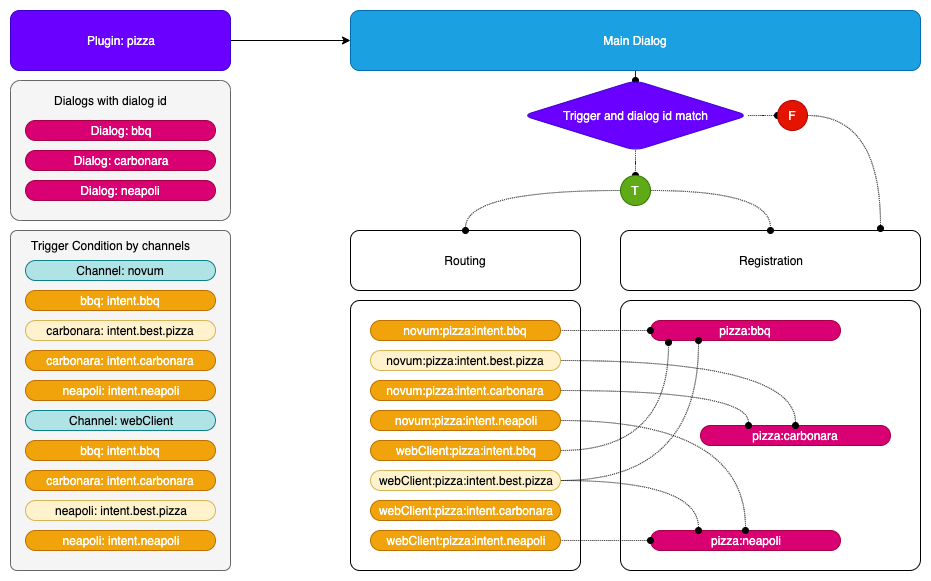
The incoming request is bound to a channel and a recognizer intent field and the resulting address to the library (or plugin) and the id provided by the dialog configuration.
Registering a dialog
-
If a dialog is inserted as a plugin:
- It has to be accessible by a trigger condition if it is located at the plugin configuration.
- It has to be accessible by a trigger condition if it has the property
triggerCondition in the dialog class, accessible across all channels.
- It has to be accessible by calling it directly with its
id if it has an autoRegister property set to true, no routing will be involved.
-
Register the dialog with the library and dialog id, forming the address.
- Combination of library and dialog
id: library:dialogId
- The extra control of the library is because we do not have control over the dialog naming, so we can be sure that each library can implement the name we want and the system will have an unique address.
-
Bind all the trigger conditions with the resulting address.
- The trigger conditions will be implemented for this address also by channel.
- The model forming the address accessor will be:
channel:intent
- The incoming recognizer result will have to match this model.
Internal intent
When we have an internal intent, it has to be accessible across all the channel. We have to register the trigger condition with no channel distinction.
Trigger condition:
// channel id = telefonica
"triggerConditions":[
    {
        "intent": "intent.internal.wifi"
    }
],
id: "dialogId"
Address map:
// the channel of the incoming petition will be ignored
{"intent.wifi": "libraryId:dialogId"}
Flow examples:
Class usage
Register a dialog with trigger conditions:
export interface RouteDialogConfiguration {
    suggestions?: boolean;
    triggers: TriggerCondition[];
    channelDataVersion?: string;
}

/**
* @deprecated This interface should not be used in favor of using RouteConfigurationElementMap interface,
* which improves the efficiency of getting route configuration.
 */
export interface RouteConfiguration {
    [library: string]: RouteConfigurationElement
}

/**
 * Route configuration value of map using to return route Configurations.
 */
export interface RouteConfigurationElement {
    channel: string;
    dialogs: {
        [dialog: string]: RouteDialogConfiguration
    }
}

const router = new RoutingMap();

// public addRoute(
//    routeDialogConfiguration: RouteDialogConfiguration,
//    dialogId: string,
//    channel?: string
// ): any {
router.addRoute(
    {showSuggestion: true, triggers: [{intent: intent.pizza}, {intent: intent.best.pizza}},
    'pizzaCompany:bestPizza',
    'novum')
    );
Obtain a route from a recognition:
//    public getRoute(
//        recognizerResult: { intent: string, entities?: Entity[] },
//        channel?: string
//    ): { id: string, showSuggestions: boolean }
const dialogConfig: {id: 'string', showSuggestion: boolean} = router.getRoute({intent: 'pizza'}, 'novum');
contextFilters
contextFilters are applied in the routing phase.
Context filter conditions will be checked using spleen library. These conditions can be as simple as 1 eq 1 (a context filter with this condition will be always executed) or can be more complex such as /authData/subscriptionType neq 'postpaid'
(that will be executed when the subscription type of the user be different than postpaid). In this case, we only can check properties of AuraUserBaseModel.
More examples of context filters are included below:
- If the user is anonymous, redirect it to intent
intent.account.linking
{
  "name": "Anonymous redirect to linking",
  "type": "type",
  "conditions": "/type eq 'anonymous'",
    "true": {
      "name": "Anonymous redirect to linking",
      "breakDialogExecution": true,
      "breakFilterEval": true,
      "redirectToIntent": "intent.account.linking",
      "suggestions": false
    }
}
- If the user is
multimsisdn, send him a message
{
  "name": "user_type_multimsisdn_not_allowed",
  "type": "user_type_filter",
  "conditions": "/type eq 'multimsisdn'",
  "true": {
    "name": "user_type_not_allowed_action_true",
    "breakDialogExecution": true,
    "breakFilterEval": true,
    "resource": "context-filter:multimsisdn-users-intent-not-allowed.text",
    "suggestions": false
  }
}
- If the user’s subscription type is
postpaid, send him a message.
In this example, we are checking user.authData.subscriptionType, because our user type is AuraUserBaseModel<FourthPlatformAuth>, so user.authData type is FourthPlatformAuth
{
  "name": "user_type_postpaid_not_allowed",
  "type": "user_type_filter",
  "conditions": "/authData/subscriptionType eq 'postpaid'",
  "true": {
    "name": "user_type_postpaid_not_allowed_action_true",
    "breakDialogExecution": true,
    "breakFilterEval": true,
    "resource": "bill:bill.balance.postpaid",
    "suggestions": true
  }
}
2.2.7 - Aura Bot databases
Aura Bot databases
Description of databases used by Aura Bot
Introduction
Currently, aura-bot uses two databases, described below:
MongoDB
In order to reuse the code, and clarify the development, all classes related with MongoDB connections are stored in the mongodb-storage.ts file within aura-bot-platform repository.
Here it can be found generic “connection” class, that is mongodb-connection.ts, that will handle the connection request, pooling them
and configuring according the configuration (config is mandatory when initializing).
We can find also several “DAO” files, that will couple with a specific MongoDB database and collection, and will create optionally
indexes or any other thing required in a specific domain.
MongoDbConnection
There will be only one instance of MongoDbConnection, creating it in the first call to getInstance (requiring config param) and
returning the same instance in subsequent calls (where the config param is not required).
To create the instance properly, the following configuration variables are used:
| Var name |
Description |
Required/Optional |
| AURA_MONGODB_URI |
URI to connect to MongoDB, for example mongodb://localhost:27017/?authSource=admin |
Required |
| AURA_MONGODB_USERNAME |
User name to authenticate connection to MongoDB |
Required |
| AURA_MONGODB_PASSWORD |
Password to authenticate connection to MongoDB |
Required |
| AURA_MONGODB_POOL_SIZE |
MongoDB pool size |
Optional (Default: 10) |
| AURA_MONGODB_SSL |
Use SSL or not when connecting to MongoDB |
Optional (Default: false) |
This singleton module should be loaded the first time automatically by the system, and then could be accessed just by calling getInstance
method, like:
const connection = await MongoDbConnection.getInstance();
const db = connection.dbConnect(DATABASE);
const collection = db.collection(COLLECTION);
MongoDbStorage
This DAO class will be used by Bot Builder v4 to store the conversation and user data. An index is created to delete documents older than 24
hours (specified by config var AURA_MONGODB_BOT_COLLECTION_CONTEXT_INDEX_TTL).
Following config variables are used to initialize this class:
| Var name |
Description |
Required/Optional |
| AURA_MONGODB_BOT_DATABASE |
Database name where the documents will be stored |
Required |
| AURA_MONGODB_BOT_COLLECTION_CONTEXT |
Collection name where the documents will be stored |
Required |
| AURA_MONGODB_BOT_COLLECTION_CONTEXT_INDEX_TTL |
Time (in seconds) that will exist the documents without updates, before being deleted |
Optional (Default: 86440) |
To create and initialize a MongoDbStorage, a code like following could be used:
const storage = await new MongoDbStorage().init(configuration);
Cache module
The cache module allows the generation of different types of cache:
AuraCacheLocal: only used for local data.AuraCacheRemote: only used for remote data.AuraCacheRemoteLocal: used for remote and local data, with priority for remote.AuraCacheLocalRemote: used for local and remote data, with priority for local.
How to use cache module
It is possible to use any of the caches through the following commands:
// cache local.
const auraCacheLocal = new AuraCacheLocal('nameCacheLocal');
// cache remote.
const auraCacheRemote = new AuraCacheRemote('nameCacheRemote');
// cache local-remote
const auraCacheLocalRemote = new AuraCacheLocalRemote('nameCacheLocalRemote');
// cache remote-local.
const auraCacheRemoteLocal = new AuraCacheRemoteLocal('nameCacheRemoteLocal');
Variables for AuraCacheLocal
Only for local cache (AuraCacheLocal), it is possible to define a series of options:
- stdTTL: standard TTL as number in seconds for every generated cache element. By default,
0 (0 = unlimited).
- compressedData: data is to be compressed in remote cache. By default,
false.
- deleteOnExpire: boolean value that indicates whether variables will be deleted automatically when they expire or not. If
true, the variable will be deleted. If false, the variable will remain. By default, true. You are encouraged to handle the variable upon the event expired by yourself.
const options = { stdTTL: 100, encryptData: true };
const auraCacheLocal = new AuraCacheLocal('nameCacheLocal', options);
Store a key
The following code sets a key value pair. It is possible to define a TTL (in seconds).
It returns true on success.
const auraCacheLocal = new AuraCacheLocal('nameCacheLocal');
auraCacheLocal.set('key', 'value');

const auraCacheRemote = new AuraCacheRemote('nameCacheRemote');
await auraCacheRemote.set('key', 'value', 1800); // -> data expire at 30m.
Retrieve a key
The following code gets a saved value from the cache.
It returns undefined if the value is not found or has expired. If the value is found, it returns an object with the corresponding key value pair.
const auraCacheLocal = new AuraCacheLocal('nameCacheLocal');
auraCacheLocal.set('key', 'value');
auraCacheLocal.get('key'); // -> value.

const auraCacheRemote = new AuraCacheRemote('nameCacheRemote');
await auraCacheRemote.set('key', 'value');
await auraCacheRemote.get('key'); // -> value.
For caches such as AuraCacheLocalRemote and AuraCacheRemoteLocal, it is possible to force it to obtain data different from the priority:
// cache local-remote
const auraCacheLocalRemote = new AuraCacheLocalRemote('nameCacheLocalRemote');
await auraCacheLocalRemote.set('key', 'value');
await auraCacheLocalRemote.getRemote('key'); // -> value.
auraCacheRemote.getLocal('key');
// cache remote-local.
const auraCacheRemoteLocal = new AuraCacheRemoteLocal('nameCacheRemoteLocal');
await auraCacheRemoteLocal.set('key', 'value');
auraCacheRemoteLocal.getLocal('key'); // -> value.
await auraCacheRemoteLocal.getRemote('key'); // -> value.
Delete a key
The following code deletes a key. It returns the number of deleted entries. A delete will never fail.
const auraCacheLocal = new AuraCacheLocal('nameCacheLocal');
auraCacheLocal.set('key', 'value');
auraCacheLocal.get('key'); // -> value.
auraCacheLocal.del('key'); // -> 1.
auraCacheLocal.get('key'); // -> undefined.

const auraCacheRemote = new AuraCacheRemote('auraCacheRemote');
await auraCacheRemote.set('key', 'value');
await auraCacheRemote.get('key'); // -> value.
await auraCacheRemote.del('key'); // -> 1.
await auraCacheRemote.get('key'); // -> undefined.
Flush all data
The following code deletes all data from a store.
const auraCacheLocal = new AuraCacheLocal('nameCacheLocal');
auraCacheLocal.set('key', 'value');
auraCacheLocal.get('key'); // -> value.
auraCacheLocal.flush(); // -> true.
auraCacheLocal.get('key'); // -> undefined.

const auraCacheRemote = new AuraCacheRemote('auraCacheRemote');
await auraCacheRemote.set('key', 'value');
await auraCacheRemote.get('key'); // -> value.
await auraCacheRemote.flush(); // -> true.
await auraCacheRemote.get('key'); // -> undefined.
Redis + MongoDB
If the configuration variable AURA_BOT_CONTEXT_DATABASE is set to REDIS-MONGODB, aura-bot uses a two-level cache to store the context through Aura Redis Mongo Synchronizer.
The following environment variables must be set for the two databases.
Variables
| Var name |
Description |
Required/Optional |
| AURA_MONGODB_BOT_COLLECTION_CONTEXT |
Name of the collection where the context is stored. By default: aura-context. |
Required |
| AURA_MONGODB_BOT_DATABASE |
Name of the database where the bot collections are stored. By default: aura-bot |
Required |
| AURA_MONGODB_PASSWORD |
Password of the MongoDB. Required |
Required |
| AURA_MONGODB_POOL_SIZE |
Pool size of the MongoDB. By default: 60. |
Required |
| AURA_MONGODB_SSL |
Boolean value indicating if MongoDB connection uses SSL or not. By default: true. |
Required |
| AURA_MONGODB_URI |
URI of the MongoDB |
Required |
| AURA_MONGODB_USERNAME |
Username of the MongoDB |
Required |
| AURA_REDIS_CONFIGURATION_PREFIX |
Prefix for Redis configuration keys. By default: aura-config: |
Required |
| AURA_REDIS_CONTEXT_CACHE_PREFIX |
Prefix for Redis context cache keys. By default: context: |
Required |
| AURA_REDIS_CONTEXT_CACHE_SHADOW_KEY_PREFIX |
Prefix for Redis shadow key cache keys. By default: shadow-key: |
Required |
| AURA_REDIS_CONTEXT_CACHE_ACTIVE_CONTEXT_PREFIX |
Prefix for Redis active context cache keys. By default: active-context: |
Required |
| AURA_REDIS_CONTEXT_CACHE_SHARD_COUNT |
Number of shards to generate lists for storing unprocessed context. |
Required |
| AURA_REDIS_CONTEXT_CACHE_TTL |
Time in seconds to store a context in cache. By default: 60. |
Required |
| AURA_REDIS_MODE |
Mode of Redis distribution (Cluster, Sentinel or Single). By default: Single. |
Required |
| AURA_REDIS_PREFIX |
Prefix that will be used by all redis keys when using redis-connector. This allow mixing in a single redis service messages coming from different environments in the same Azure subscription. |
Required |
| AURA_REDIS_SENTINEL_INSTANCE_NAME |
Name of the Redis instance. Use in sentinel mode. |
Optional |
| AURA_REDIS_HOSTS |
A string with list of nodes (host:port) separate by comma. For example: “localhost:port,localhost2:port2”. Default: ‘127.0.0.0:6379’ |
Required |
| AURA_REDIS_DATABASE |
Database number for Single or Sentinel mode. By default: 0. |
|
| AURA_REDIS_PASSWORD |
A string with the password of Redis. |
Required |
| AURA_REDIS_MAX_RECONNECT_RETRIES |
Number of retries to connect to Redis. By default: 25. |
Required |
| AURA_REDIS_MAX_RECONNECT_INTERVAL |
Time in milliseconds to wait before reconnecting to Redis. By default: 5000. |
Required |
| AURA_REDIS_USE_CONNECTION_POOL |
Used connection pool for Redis connections. Default: true. |
Required |
| AURA_REDIS_CONNECTION_POOL_MIN |
Minimum number of connections in the pool. Default: 2. |
Required |
| AURA_REDIS_CONNECTION_POOL_MAX |
Maximum number of connections in the pool. Default: 100. |
Required |
2.3 - Configuration
Aura Bot configuration
Description of Aura Bot configuration basics, nomenclature, environment variables and libraries configuration
Introduction
The current section includes:
Configuration basics
Process and priorities
Aura components environment configuration will be loaded merging the variables defined in the environment of the host running the server and those defined in a configuration file, that will be passed to the server as an environment variable named CONFIG_FILE.
Variable values defined in the host environment will take precedence to those defined in the CONFIG_FILE.
Finally, variables collected by the make-up process of the external libraries .env.libraries will be loaded with less priority (as if they had been defined in the environment or in the CONFIG_FILE, they will have more priority).
Afterwards, all variables are joined together and, in case the same variable key is used twice, the priority will be as follows (the higher in the list, the more priority):
- Vars from the environment
- Vars from the file pointed by
CONFIG_FILE
- Vars from
.env.libraries (in aura-bot root, autogenerated file)
Nomenclature
-
Environment variables names should start with AURA_ in main Aura components, to avoid problems with the overlapping of system variables.
-
Environment variables used in aura-bot libraries should start with the name of the library (BILL_), to isolate variable names and avoid overwriting between different libraries.
Note:
Review carefully with the DevOps Team variable names that are set automatically by kubernetes, such as [APP_NAME]_PORT that has the docker host of the k8s cluster.
In the case of aura-bot pods, it will be: AURA_BOT_PORT. So, this variable must not be used internally.
Configuration validation
aura-bot counts on a @hapi/joi validation schema that will contain the variables used by it.
During the start-up process, if the validation of global configuration fails, the full list of variables to fix will be shown and the bot will not start. See libraries configuration for further information.
Once the configuration is loaded and the instance created, it will count on the property environmentConfiguration, that contains all the variables set in the system. The names of the variables will be the same than the environment variables, just the type will be set during the schema validation.
For a complete list of environment variables in the system, check aura-bot environment variables.
Passing configuration to our internal libraries
aura-bot internal modules such as the server, middlewares and all of our internal libraries (aura-kpis, aura-logging, aura-locale-manager, etc.) must be prepared to get the configuration when creating an instance.
They should provide a constructor or an init method, with a configuration argument, to receive the environment configuration, for example:
export class SingletonModule {

    /** Private constructor to avoid unwanted instances */
    private constructor() { }

    readonly id: string = 'SingletonModule';

    public static init(configuration: Configuration): SingletonModule {
         if (!SingletonModule.instance) {
            // Do initializing stuff
            return SingletonModule.instance;
        } else {
            throw new Error('An instance of SingletonModule already exists');
        }
    }

    /** Module internal instance */
    private static instance: SingletonModule;
}
Aura Channels configuration
The list of channels available in the environment includes the channel name, id, basic channel configuration, response type, enabled purposes in Kernel, etc. This setting is configured in aura-configuration-api server.
In principle, this setting should not be modified by the OB developers, as it is automatically modified during the make-up phase. However, it is recommended recommended that local developers use their own aura-configuration API server and can make changes for local testing purposes.
You can find detailed information regarding the channel configuration file in Channel Model section.
AuraChannelsConfiguration is a singleton class that contains utils to obtain information about the channels. This module is initialized at server start-up like other singleton modules. To use it, you should use the instance already created:
const configuration = {
    AURA_CHANNELS_CONFIGURATION_API_ENDPOINT: 'http://...' // Mandatory.
};

AuraChannelsConfiguration.init(configuration);
The variable AURA_CHANNELS_CONFIGURATION_API_ENDPOINT contains the URL to access aura-configuration-api service. AuraChannelsConfiguration uses the following methods:
getChannelByName
Get channel configuration value by name of channel.
AuraChannelsConfiguration.instance.getChannelByName('channelName');
getChannelByPrefix
Get channel configuration value by prefix of channel.
AuraChannelsConfiguration.instance.getChannelByPrefix('channelPrefix');
getChannelById
Get channel configuration value by id of channel.
AuraChannelsConfiguration.instance.getChannelById('channelId');`
getChannels
Get all channels configuration.
AuraChannelsConfiguration.instance.getChannels();
2.3.1 - Components configuration
Aura Bot components configuration
Configuration of Aura bot dialogs and middlewares
Configuration delivery to dialogs and middlewares
Configuration delivery to dialogs and middlewares is executed by the plugin manager.
aura-bot has the control to prepare and manage all configuration variables and make validations to get ready. In case that any validation fails, the set of libraries wrongly loaded will be shown and the bot will not start. If there is a problem with the scheme of an external library, the broken library should be extracted or fixed.
Configuration of libraries
The configuration of aura-bot libraries is fully defined in libraries configuration.
2.3.2 - Environment variables
Aura Bot environment variables
Updated list of Aura Bot environment variables
- Properties marked in bold are mandatory.
- Properties marked in italics are optional.
| Property |
Type |
Description |
Modifiable by OB? |
| AURA_ACCESS_TOKEN_EXPIRATION_MARGIN |
number |
Time in milliseconds as margin to validate access token expiration. Default: 300000. |
NO |
| AURA_ACTIVATE_MINI_BOT |
boolean |
Flag to activate minibot mode. By default: false. |
NO. Only valid during development to run Aura minibot. |
| AURA_ACTIVE_MIDDLEWARES |
string |
List of configurable middlewares. Order in list is not taken into account. Name/id middlewares cannot have spaces. Example: BatchOutgoingMessage, Facebook. |
NO. Only guided by Global Team. |
| AURA_BOT_APIKEY_PATH |
string |
Path to validate channel APIKey authorization. |
NO |
| AURA_HTTP_KEEP_ALIVE_MSECS |
number |
Number of milliseconds to keep alive HTTP connections. Used in HTTPMonkeyPatcher module. |
NO |
| AURA_HTTP_KEEP_ALIVE |
boolean |
Boolean value that indicates the use of keep-alive in HTTP connections. Used in HTTPMonkeyPatcher module. |
NO |
| AURA_HTTP_KEEP_MAX_SOCKETS |
number |
Maximum number of sockets. Used in HTTPMonkeyPatcher module. |
NO |
| AURA_HTTP_GOT_REQUEST_LOG_ENABLED |
boolean |
Enable or disable the monkey patching of the HTTP and HTTPs modules using Got library. By default, false. |
YES |
| AURA_HTTP_MAX_REQUEST_SIZE |
string |
Maximum size in bytes of the request body. It is a string because, the allowed values must indicate the units: 10 mb, 200 kb, etc. By default, 20 mb. |
YES, in order to decrease it if it is considered too high. For this purpose, both local and global Operations Teams must review it, because it could lead to DDoS attacks easily. |
| AURA_AUTHORIZATION_ENDPOINT |
string |
aura-authentication-api base endpoint. |
NO. In any case, it must be the internal k8s URL pointing to the aura-authentication-api. |
| AURA_AUTHORIZATION_HEADER |
string |
Complete authorization header to be sent to aura-authentication-api, with the following format: APIKEY xxxxxx. |
YES, but only if the previous APIKey was deprecated. |
| AURA_BRIDGE_ENDPOINT |
string |
Bridge endpoint that will be used by aura-bot to send the use cases responses. |
NO |
| AURA_BRIDGE_ASYNC_CALLBACK_PATH |
string |
Bridge path that will be used by async-callback responses. Default value: aura-services/v1/async-callback/notifications. |
NO |
| AURA_CHANNELDATA_CURRENT_VERSION |
string |
channelData version used internally by aura-bot. By default, 3. |
NO |
| AURA_CHANNELDATA_DEFAULT_VERSION |
string |
channelData version returned by default in all messages. By default, 1.0.0. |
NO |
| AURA_CHANNELDATA_RESPONSE_VALIDATION |
boolean |
Flag to indicate that response validation should be done. By default, true. |
NO |
| AURA_CHANNELDATA_VALIDATION |
boolean |
Flag to indicate that request validation should be done. By default, true. |
NO |
| AURA_CHANNELDATA_VALIDATION_VERSIONS |
string |
channelData versions that will be validated. By default, 3. |
NO |
| AURA_CHANNELDATA_VALIDATION_MIN_VERSION |
string |
Minimal version to validate. By default, 3. |
NO |
| AURA_CHANNELS_CONFIGURATION_API_ENDPOINT |
string |
Complete URL where aura-bot should get the configuration of all the channels available in the environment. It should provide an array of channels fitting Aura channel model. |
YES, but only if the generated sas token was |
| AURA_COGNITIVE_ENDPOINT |
string |
URL of Aura NLP API. |
NO. In any case, it must be the internal k8s URL pointing to the api-gw. |
| AURA_DEFAULT_LOCALE |
string |
Culture code to be used by default in the current deployment: de-de, en-gb, es-es, pt-br. |
NO |
| AURA_DEFAULT_TIME_ZONE |
string |
Default time zone. For example: Europe/Madrid |
NO |
| AURA_DIALOG_CONTEXT_THRESHOLD |
number |
Minimal score to considered valid a dialogContext option. By default, 0.8 |
NO without the advice of a language expert that validates the new threshold. |
| AURA_DIALOG_CONTEXT_ORDINAL_CARDINAL_THRESHOLD |
number |
Threshold that will be used in case the dialogContext elements are in list form and also if the input phrase has some number. By default, 0.95 |
NO without the advice of a language expert that validates the new threshold. It must be deeply validated by the Global Team, in the happening of an error in the dialog context recognition. |
| AURA_DIALOG_CONTEXT_THRESHOLD_RELATION_UTTERANCE |
number |
If its value is greater than 0, it will be used to evaluate the relationship between value and utterance by characters and tokens. |
NO without the advice of a language expert that validates the new threshold. It must be deeply validated by the Global Team, in the happening of an error in the dialog context recognition. |
| AURA_ENCRYPTION_ALGORITHM |
string |
Encryption algorithm used to validate the APIKey. |
NO. It would break database encrypted data and APIKey validation. |
| AURA_ENCRYPTION_IV_LENGTH |
number |
Size for the initialization vector used by the encryption algorithm that validates the APIKey |
NO. It would break database encrypted data and APIKey validation. |
| AURA_ENCRYPTION_IV_POSITION |
number |
Position where to insert the initialization vector in the final string with the encrypted payload. Future use. |
NO. It would break database encrypted data and APIKey validation. |
| AURA_EXTENDED_KPI_GENERIC_QUESTION_INTENT |
string |
Generic question intent used to extract options from entities field. |
NO |
| AURA_EXTENDED_KPI_HANDOVER_DIALOG_PREFIX |
string |
Dialog prefix for handover dialog. |
NO. |
| AURA_EXTENDED_KPI_REMOVE_HTML_TAGS |
boolean |
Flag that indicates if it is necessary or not to remove HTML tags from the text. |
NO. |
| AURA_EXTENDED_KPI_SKIP_AURA_ACTION |
boolean |
Skip message if it is an aura-action. |
NO. |
| AURA_ENCRYPTION_KEY |
string |
Encryption key or comma-separated list of encryption keys to be used in the environment. It is mainly used to decrypt the APIKeys. |
NO. It would break database encrypted data and APIKey validation. |
| AURA_FILE_ENDPOINT |
string |
URL of the files microservice. |
NO. |
| AURA_FP_AUTHSERVER_ENDPOINT |
string |
URL of the Kernel authentication server, used to get valid access_token or introspect_token to handle calls to Kernel data APIS. It MUST end with / |
NO |
| AURA_FP_CLIENT_CRED_PURPOSES |
string |
Purposes used in 2-legged user profile queries in Kernel. |
YES |
| AURA_FP_CLIENT_CRED_SCOPES |
string |
Scopes used in 2-legged user profile queries in Kernel |
YES |
| AURA_FP_CLIENT_ID |
string |
Client ID to be logged in as Kernel application. |
NO |
| AURA_FP_CLIENT_SECRET |
string |
Client password to be logged in as Kernel application. |
NO |
| AURA_FP_ISSUER |
string |
URL of the endpoint serving Aura’s public key of the environment. |
NO |
| AURA_FP_PRIVATE_KEY |
string |
Base64 encoded string of the private key of the environment. |
NO |
| AURA_FP_USER_PROFILE_ENDPOINT |
string |
URL of Kernel UserProfile API. |
NO |
| AURA_SHUTDOWN_GRACEFUL_TTL |
number |
Number of milliseconds to wait until all bot tasks are done before shutting each pod down. By default, 25000 (25 seconds) |
NO |
| AURA_GATEWAY_API_ENDPOINT |
URI string |
Endpoint to access the locally deployed ATRIA aura-gateway-api |
NO |
| AURA_GATEWAY_API_ISSUER_URL |
string |
Aura issuer URL. It is automatically fulfilled by the installer. |
NO |
| AURA_INTENTS_NONE |
string |
None intents separated by commas. Default: None,intent.none,intent.tv.none. Used in the main-dialog. |
YES. The default values are always added to the provided list. |
| AURA_INTERNAL_RETRIES |
number |
Number of retries for internal calls. By default: 1 |
NO, except if requested. |
| AURA_KPI_FILE_PREFIX |
string |
String with the prefix used in the KPIs entities files of this service. |
NO |
| AURA_KPIS_LOG_API_REQUEST_BODY |
boolean |
Flag to log or not the request body of the API calls. Default: true |
YES. Once disabled, to enable run performance tests to validate if it is possible to write them. |
| AURA_KPIS_LOG_API_RESPONSE_BODY |
boolean |
Flag to log or not the response body of the API calls. Default: true |
YES. Once disabled, to enable run performance tests to validate if it is possible to write them. |
| AURA_KPI_REMOVE_SPECIAL_CHARACTERS |
string |
Regular expression on removing special characters. Default:\n\r |
NO |
| AURA_KPI_STORE_MODE |
string |
Destination of the KPIs entities files. Default: blob. If file, they will be stored locally in the instance, in the folder shown in KPI_TO_DSV_LOCAL_FILES_DIRECTORY. For development purposes. If blob, they will be stored remotely in the Azure blob container shown in KPIS_STORE_CONTAINER. Mandatory in environments running on k8s. |
NO, only configurable when running the bot locally. |
| AURA_KPI_TO_DSV_CACHE_TTL |
number |
Number with the amount of milliseconds to cache existing requests to calculate their duration. Default: 1800. |
NO |
| AURA_KPI_TO_DSV_DELIMITER |
string |
Field delimiter to be used in KPIs entities files. Default: | |
NO. It will break all the analysis and processes running on top of these files. |
| AURA_KPI_TO_DSV_EXTENSION |
string |
The extension to be used in KPIs entities files. Default: txt |
NO. If changed without changing aura-kpis-uploader, the files will not be uploaded to Kernel. |
| AURA_KPIS_BLOB_STORE_INTERVAL |
number |
Time interval in milliseconds to upload asyncrhonously logs to the KPIS_STORE_CONTAINER. Default: 60000. Only needed if KPI_STORE_MODE==blob. |
NO. In pre/production it must be blob so the files will be uploaded to Kernel instance afterwards. Setting file for development is recommended. |
| AURA_KPIS_STORE_CONTAINER |
string |
The name of the Azure Blob container to store KPIs entities files. By default, aura-kpis. It MUST be the same than the one configured in KPIS_UPLOADER module. Only needed if KPI_STORE_MODE==blob. |
NO. If changed without changing aura-kpis-uploader, the files will not be uploaded to Kernel. |
| AURA_LOCALE_FOLDER |
string |
Full path to the local folder where locale files are stored. By default, ./locale. |
NO |
| AURA_LOCALE_FORCE_IMPORT |
boolean |
true if locale remote loading must be carried out although there were validation errors. By default, false. |
YES |
| AURA_LOCALE_REMOTE_BACKUP |
boolean |
true, if after updating locale files with the remote version, a backup of the former local files should be stored in Azure Storage. By default, false. |
YES |
| AURA_LOCALE_REMOTE_CONTAINER_PREFIX |
string |
Path within AURA_LOCALE_REMOTE_CONTAINER where the locale files are stored. By default, locale. |
NO |
| AURA_LOCALE_REMOTE_CONTAINER |
string |
Name of the Azure Storage Blob Container where the locale files will be stored. By default, static-resources. |
NO |
| AURA_LOGGING_FORMAT |
string |
Format to be used in monitoring logs: json or dev(more visual format). By default, json. |
NO. Only for development, set it to dev. |
| AURA_LOGGING_LEVEL |
string |
Level to be used in monitoring logs, from more to less verbose: 'TRACE', 'DEBUG', 'INFO', 'WARN', 'ERROR', 'FATAL', 'OFF'. By default, INFO. |
YES, for development set it to DEBUG. In pre/production should be INFO or ERROR. For analysis of an issue in pre/production it may be changed to DEBUG. |
| AURA_LOGGING_EXTRA_TIME_METRICS |
boolean |
true if the time metrics should be logged in the monitoring logs. By default: false. |
NO |
| AURA_MAX_ATTACHMENT_JSON_SIZE |
number |
Maximum size from which Aura response attachments will be zipped. By default, 10000 (10 KB) |
NO |
| AURA_MAX_HISTORY_CHAT_ITERATIONS |
number |
Maximum number of messages saved in the history conversation. |
YES |
| AURA_MICROSOFT_APP_ID |
string |
ID of the Microsoft bot application to be used in the deployment. |
NO. Only if Operations Team changes it. |
| AURA_MICROSOFT_APP_PASSWORD |
string |
Password of the Microsoft bot application to be used in the deployment. |
NO. It must be changed by Operations Team. |
| AURA_MICROSOFT_AZURE_STORAGE_COMMON_ACCESS_KEY |
string |
Microsoft Storage password of the common storage. Currently used for KPI storing. |
NO. Only if Operations Team changes it. |
| AURA_MICROSOFT_AZURE_STORAGE_COMMON_ACCOUNT |
string |
Microsoft Storage account of the common storage. Currently used for KPI storing. |
NO. Only if Operations Team changes it. |
| AURA_MICROSOFT_AZURE_STORAGE_ACCESS_KEY |
string |
Microsoft Storage password of the deployment. |
NO. It must be changed by Operations Team. |
| AURA_MICROSOFT_AZURE_STORAGE_ACCOUNT |
string |
Microsoft Storage account of the environment. |
NO. It must be changed by Operations Team. |
| AURA_MICROSOFT_AZURE_STORAGE_CONFIGURATION_CONTAINER |
string |
Name of the container where basic bot configuration files are stored: Mongo indexes descriptor, aura-behavior-manager configuration, etc. By default, aura-configuration. |
NO |
| AURA_MICROSOFT_AZURE_STORAGE_SUGGESTION_TABLE_TTL |
number |
Number of seconds to store the users’ suggestions. By default, 86400 (one day). |
NO |
| AURA_MICROSOFT_AZURE_STORAGE_SUGGESTION_TABLE |
string |
Name of the Azure Storage table where users’ sent suggestions will be stored. By default, AuraUserSuggestionTable |
NO |
| AURA_MICROSOFT_CHANNEL_SERVICE |
string |
Microsoft Channel Service. |
NO. It must be changed by Operations Team. |
| AURA_MICROSOFT_OPEN_ID_METADATA |
string |
Metadata used in Microsoft OpendId validation. |
NO. It must be changed by Operations Team. |
| AURA_MIDDLEWARE_SPEAK_PROCESSOR |
string |
Used to enable speak property text substitution on the outgoing messages, to produce speakable text. Regular expression of substitution format example: [["\\*"," asterisk "],["\\#"," hash "]] |
YES. Include all the needed changes to be done automatically between the written and the spoken text. |
| AURA_MIN_INTENT_SCORE_THRESHOLD_TO_CLEAN_STACK |
number |
Minimal score to clean the dialog stack in a prompt case. By default, 0.95 |
NO. Environment configuration should be delivered with a validated threshold, currently 0, meaning that any valid NLP result will break the prompt and move the user to the new dialog. Do not change it without validating it with Aura Global Team. |
| AURA_MONGODB_BOT_COLLECTION_CACHES_INDEX_TTL |
number |
Number of seconds to keep the user’s data available in aura-bot cache. By default, 3600. |
NO |
| AURA_MONGODB_BOT_COLLECTION_CACHES |
string |
MongoDB collection name where aura-bot will store the remote caches used during request processing. By default, aura-caches. |
NO |
| AURA_MONGODB_BOT_COLLECTION_CONTEXT_INDEX_TTL |
number |
Number of seconds to keep the context data available in aura-bot context cache. By default, 3600. |
NO |
| AURA_MONGODB_BOT_COLLECTION_CONTEXT |
string |
MongoDB collection name where aura-bot will store the context of the users. By default, aura-context. |
NO |
| AURA_MONGODB_BOT_DATABASE |
string |
MongoDB database name where aura-bot will store all the data needed to handle requests. By default, aura-bot. |
NO |
| AURA_MONGODB_CACHE_TTL |
number |
Lifetime of cache used by aura-behavior-manager. It MUST be disabled in PRE and PRO environments. By default, 3600 seconds (1h). |
YES, only for development environments. |
| AURA_MONGODB_CACHE_DATABASE |
string |
Database used in cache of aura-behavior-manager. By default, aura-bot-caches. |
YES, only for development environments. |
| AURA_MONGODB_CACHE_COLLECTION_DL |
string |
Collection used in cache of aura-behavior-manager. By default, dev-cache. |
YES, only for development environments. |
| AURA_MONGODB_CACHE_INDEX_DL |
string |
Index used in TwoLevelsCache of aura-behavior-manager. By default, id. |
YES, only for development environments. |
| AURA_MONGODB_PASSWORD |
string |
MongoDB password to access AURA_MONGODB_BOT_DATABASE in AURA_MONGODB_URI. |
NO |
| AURA_MONGODB_POOL_SIZE |
number |
Number of connections available in MongoDB pool. By default, 60. |
NO |
| AURA_MONGODB_SSL |
boolean |
true if access to AURA_MONGODB_URI is SSL. By default, false. |
NO |
| AURA_MONGODB_URI |
string |
MongoDB URI of the server handling. AURA_MONGODB_BOT_DATABASE. |
NO |
| AURA_MONGODB_USERNAME |
string |
MongoDB username to access AURA_MONGODB_BOT_DATABASE in AURA_MONGODB_URI. |
NO |
| AURA_MONGODB_MAX_POOL_SIZE |
number |
Maximum number of connections in the MongoDB pool. By default, 60. |
NO |
| AURA_MONGODB_MIN_POOL_SIZE |
number |
Minimum number of connections in the MongoDB pool. By default, 2. |
NO |
| AURA_MONGODB_MAX_IDLE_TIME_MS |
number |
Maximum idle time in milliseconds for connections in the MongoDB pool. By default, 30000 (30 seconds). |
NO |
| AURA_MONGODB_RETRY_WRITES |
boolean |
true if retry writes are enabled in the MongoDB connection. By default, true. |
NO |
| AURA_MONGODB_RETRY_READS |
boolean |
true if retry reads are enabled in the MongoDB connection. By default, true. |
NO |
| AURA_MONGODB_HEARTBEAT_FREQUENCY_MS |
number |
Frequency in milliseconds of the heartbeat in the MongoDB connection. By default, 2000 (2 seconds). |
NO |
| AURA_MONGODB_SERVER_SELECTION_TIMEOUT_MS |
number |
Timeout in milliseconds for server selection in the MongoDB connection. By default, 5000 (5 seconds). |
NO |
| AURA_MONGODB_SOCKET_TIMEOUT_MS |
number |
Timeout in milliseconds for socket operations in the MongoDB connection. By default, 45000 (45 seconds). |
NO |
| AURA_CONNECTION_TIMEOUT_MS |
number |
Timeout in milliseconds for establishing a connection to the MongoDB server. By default, 10000 (10 seconds). |
NO |
| AURA_MONGODB_READ_PREFERENCE |
string |
Read preference for the MongoDB connection. By default, primaryPreferred. Possible values: primary, primaryPreferred, secondary, secondaryPreferred, nearest. |
NO |
| AURA_PHONE_COUNTRY_CODE |
string |
Two letters ISO-3166 country code to obtain phonenumber without country prefix. It must be one of BR, DE, ES, UK. |
YES, if the expected country code is not correctly configured. |
| AURA_PROMETHEUS_REGEX |
string |
Stringified object that contains regex to apply to prometheus paths in order to group equivalent requests in prometheus. Example: '{"subscribed_products/$1/users/*/products": "/subscribed_products\\/(v\\d)\\/users\\/.*\\/products/"}'. By default: '{}' |
YES |
| AURA_PRESUGGESTIONS_INTENT |
string |
Intent that forces to ask for pre-suggestions in the suggestions dialog. By default: 'intent.getOnboarding' |
NO, only if another intent was configured to obtain presuggestions. |
| AURA_REQUEST_ENABLE_NAGLE |
boolean |
Boolean to enable Nagle. By default: false. |
NO |
| AURA_REQUEST_TIMEOUT |
number |
Number of milliseconds to wait for a request. By default: 30000, 30 seconds. |
YES, in case of network issues. |
| AURA_RETRIES_CODES |
string[] |
Array of strings with error codes. By default: [‘ECONNRESET’]. |
NO, except if requested. |
| AURA_SEED_ID |
string |
Seed used to generate userIds for anonymous users. |
NO |
| AURA_ROOT_INTENT |
string |
Default intent that aura-bot sets if it has not been possible to determine the user’s intention during recognition/routing process. By default, the none intent will be returned. |
NO |
| AURA_SERVER_PORT |
number |
Port where aura-bot will be listening to requests. By default, 8080. |
NO |
| AURA_SERVICE_ENVIRONMENT |
string |
Type of environment: 'DEV', 'PRE', 'PRO'. By default, DEV. It is used during locale translation, to get the correct text reference and, in development environments, to allow aura-behavior-manager execution. |
NO |
| AURA_SERVICE_URL_DIRECTLINE |
string |
Default URL for Direct Line services. By default, https://directline.botframework.com/. |
NO |
| AURA_STATIC_RESOURCE_ENDPOINT |
string |
URL of the server publishing aura-bot static resources. |
NO |
| AURA_STATIC_RESOURCE_SAS_TOKEN |
string |
Credentials to access the server publishing aura-bot static resources. |
NO. Only if Operations Team needs to change it. |
| AURA_SUGGESTIONS_V3_NUMBER |
number |
Number of suggestions configured to be returned in channelData version 3. By default, 5. |
No, only changed if the Global Team or the LCDO Dev Team requires it. |
| AURA_SUPERAGENT_DEADLINE_TIMEOUT |
number |
Number of milliseconds to wait until the superagent deadline timeout, as specified here. It is optional and, by default, it is not configured. |
No, only changed if the Global Team or the LCDO Dev Team requires it. |
| AURA_SUPERAGENT_RESPONSE_TIMEOUT |
number |
Number of milliseconds to wait until the superagent response timeout, as specified here. It is optional and, by default, it is not configured. |
No, only changed if the Global Team or the LCDO Dev Team requires it. |
| AURA_SUPERAGENT_RETRY_ATTEMPTS |
number |
Number of retry attempts (not counting the first attempt) to be applied on superagent requests, as specified here. It is optional and, by default, it is not configured. |
No, only changed if the Global Team or the LCDO Dev Team requires it. |
| AURA_TEMPORARY_REMOTE_CONTAINER |
string |
Container to upload temporary resources. By default, aura-temporary-resources |
NO |
| AURA_TERMS_AND_CONDITIONS_API_KEY |
string |
APIKey to call Aura Terms and Conditions API. |
NO |
| AURA_TERMS_AND_CONDITIONS_ENDPOINT |
string |
Aura Terms and Conditions API basic endpoint. |
NO |
| AURA_TERMS_AND_CONDITIONS_EXPIRATION |
number |
Terms and conditions expiration time. By default, 86400000 (1 day). |
NO, only changed if the Global Team requires it. |
| AURA_URL_SAS_EXPIRATION |
number |
Expiration time for sas URLs generated for temporary resources. By default, 600 (minutes). |
YES if LCDO or Operations Team prefer another duration time. |
| AURA_USER_ENCRYPT_CACHE |
boolean |
true to encrypt data stored in users’ cache. By default, true. |
NO |
| AURA_USER_LOCAL_CACHE_TTL |
number |
Number of seconds to keep the user’s data available in aura-bot users’ local cache. By default, 300 sec. |
NO |
| AURA_VERSION |
string |
Number of the Aura release being executed. |
NO |
| AURA_HTTP_PATHS_LOG_DISABLED |
string |
HTTP paths separated by commas which requests would not be logged. By default: aura-kpis,static-resources. Used in http-monkey-patcher. |
YES, if there is a path that should not be logged. The default values are always added to the provided list. |
| DEV_AURA_BOT_BEHAVIOR_CRON_PATTERN |
string |
Cron pattern to set the refresh time of aura-behavior-manager configuration. By default, */5 * * * * (every 5 minutes). It is only valid for development environments. |
YES, in development environments. |
| DEV_AURA_BOT_BEHAVIOR_MICROSOFT_AZURE_STORAGE_SETTINGS_FILE |
string |
Name of the configuration file route used by aura-behavior-manager. By default, aura-bot/aura-bot-behavior-manager.json. It is only valid for development environments. |
YES, in development environments |
| DEV_AURA_BEHAVIOR_MANAGER_ACTIVE |
boolean |
Flag to indicate whether or not aura-behavior-manager module should be activated in the current deployment. It is only valid for development environments. |
YES, in development environments. |
| AURA_KPIS_BLOB_TIME_WAIT_IF_EXISTS |
number |
Time to wait in milliseconds if the KPIs blob exists to avoid duplicate headers. By default: 1000. |
YES |
2.4 - Processes
Aura Bot processes
Description of the main functionalities carried by Aura Bot and the different processes that can be executed for its management
The main functionalities in charge of aura-bot as Aura’s neuronal network are listed below:
-
Aura users’ sign up:
Different ways of registering users in Aura, depending on the channel. Find detailed information in channel authentication.
-
Aura authentication validation process
Aura supports different types of users, each of them with access to specific services and use cases: authenticated users and anonymous users. The authentication process carried out by aura-bot is fully explained in Users authentication.
-
Aura conversational process
aura-bot is in charge of managing the conversational flow with the user, from receiving her request and understand it to fetch the required data to compose the most appropriate response and provide it back to the user.
Find detailed information in Aura conversational flow.
Apart from these core tasks in Aura’s performance, there are other processes that can be executed over aura-bot in order to customize it or access to different components.
2.4.1 - Users authentication
Users authentication
Description of users’ authentication process in Aura Bot. Discover the different types of users and how they can authenticate in Aura
Introduction
aura-bot supports different types of users, each of them with access to specific services and use cases:
- Authenticated users
- Anonymous users
In the authentication process, aura-bot carries out the following summarized steps:
- Obtains information from the users
- Validates it
- If the validation is successful, and depending on the type of user, aura-bot allows accessing to different services
- Stores the user’s data
The detailed process is described in users’ authentication flow.
The authentication of a user implies the acceptance of Terms and Conditions, which are handled by aura-bot.
In certain scenarios (use cases) where the user is unauthenticated, it is required to redirect specific intents that need authentication. Find here the complete information regarding login redirections.
2.4.1.1 - Authentication flow
Aura authentication flow
Description of the authentication flow for Aura users
The authentication validation process
Before starting a conversation with aura-bot, the channel needs to set a valid auraId and a fresh DirectLine token, if accessing via Direct Line, that should be sent as authorization header of bearer type in the request to the bot.
Find further information about Direct Line request in MS DirectLine API description.
Authentication validation in aura-bot consists of two phases:
-
Validate that the Direct Line token is a valid one, generated by the bot instance running behind aura-bot.
-
Validate the Aura credentials of the user, currently only based on Kernel authentication. If request authentication fails, the message is no longer processed, and an unauthenticated error response is returned to the channel.
An Aura channel should send its auraId in the from.id field of the request to the bot. Once the Direct Line token has been validated, aura-bot reads the from.id field to validate it:
-
Firstly, aura-bot checks if the auraId exists in the AuraUsers database and, if exists, then goes on with the authentication in Kernel.
-
If the channel allows anonymous users: In the happening that the received auraId does not exist in the AuraUsers database, then the user is marked as anonymous and the Kernel authentication validation is not launched.
-
If the channel does not allow anonymous users, then an UNAUTHENTICATED error is sent to the channel, informing that the Kernel authentication process must be relaunched before going on.
-
Kernel authentication validation:
-
A new fresh Kernel accessToken is requested for the userId and authorizationId related to the auraId.
-
If the authorizationId is invalid or no longer exists in Kernel, then an UNAUTHENTICATED error is sent to the channel, informing that the Kernel authentication process must be relaunched before going on.
-
Then a fresh Kernel introspect token is requested, so deeper information about the user identities and permissions for aura-bot is obtained.
-
Finally, the Kernel UserProfile info is obtained and processed to obtain further information about the user’s contract, for instance, its subscription type.
-
After that, all this information is stored in a cache during the time when Kernel accessToken is valid. During this period, the authentication validation process is avoided.
-
Besides, all this information is set in the AuraUser model and stored in the conversation context of the bot to be available during the rest of the conversation messages processing.
The authentication process is managed by the fourth-platform-authorization-middleware.
Users data storage
Authenticated users
Users database
When a user authenticates with the basic authentication mechanism of a channel, the user’s information is created/updated in MongoDB and aura-bot accesses it through the aura-authentication-api API Aura Services API published in Kernel.
For instance, in WhatsApp, when the user authenticates with SMS-OTP, her information is stored in AuraUsers database.
Local cache
It is the node cache that each pod has with information from the users.
The information is saved on each request and expires in 5 minutes, configurable via AURA_USER_LOCAL_CACHE_TTL environment variable.
Remote cache
Mongo cache with aura-bot users’ information. It is shared by all pods.
The information is saved on each request and expires in 1 hour, configurable via AURA_MONGODB_BOT_COLLECTION_CACHES_INDEX_TTL environment variable.
Anonymous users
Local cache
Node cache to store anonymous users’ information, who are accessing each pod.
The information expires in 5 minutes, configurable via AURA_USER_LOCAL_CACHE_TTL environment variable.
Both types of users
BotFramework conversational cache
This is the conversational cache of BotFramework, which is called internally in aura-bot persistentData.
It is a MongoDB cache with three parts: ConversationData, UserData and AuthData. Therefore, as this section is related to users’ information, it is stored in the last two sections.
Find more information about cache module.
How does the authenticated user’s cache expire?
The expiration of the cache depends on different factors:
- The TTL of each cache element.
- Kernel accessToken is no longer valid.
- If the
accountRemovalTimestamp of the conversational cache is greater than the timestamp of the cache
Authentication process flowchart
The following flowchart shows the authentication process:
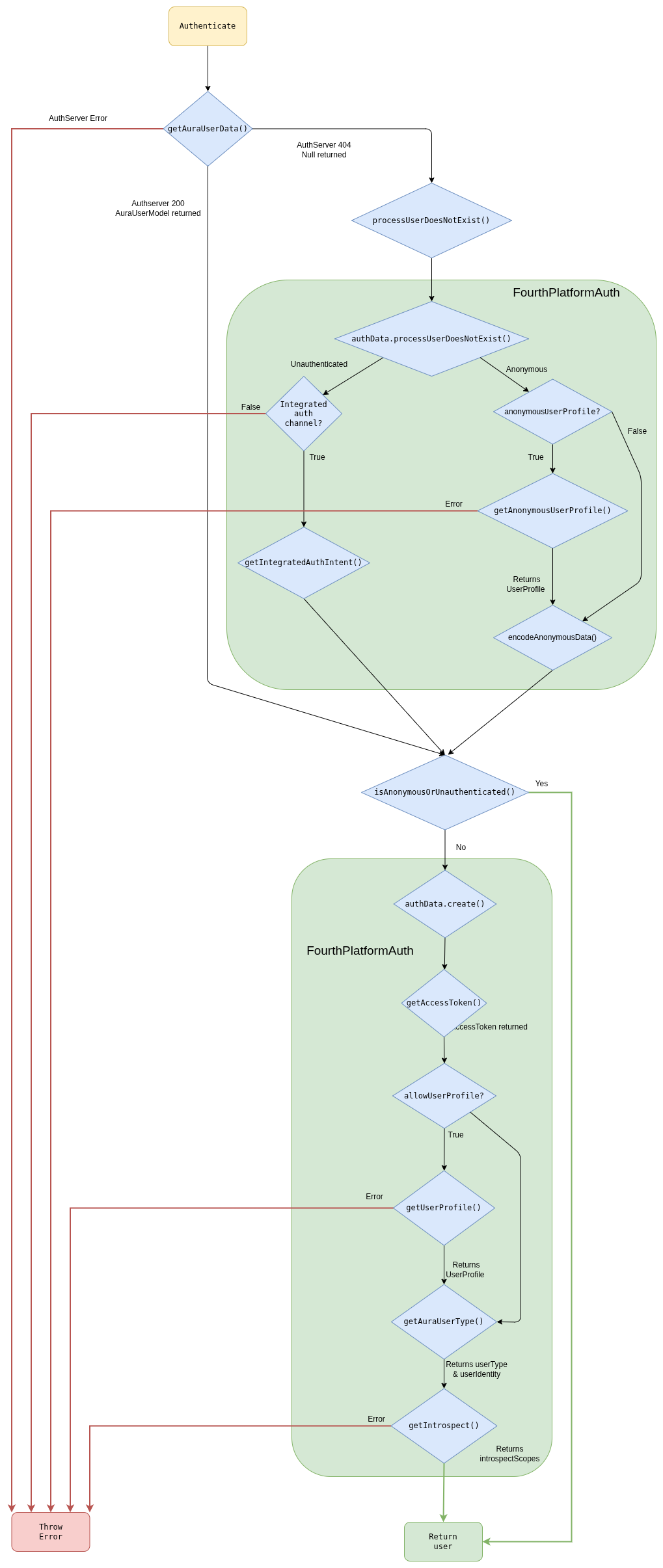
Authentication steps
getUserData()
This function gets the user’s data from AuraUsers database, accessing through the Aura Services API published in Kernel.
If the endpoint returns a 404 error, null is returned by the function because in this case the user is anonymous, but it depends on the channel configuration to mark it as an error, if the channel does not support anonymous users ( for example, novum-mytelco channel), or as a valid anonymous users, for channels that allowed them (such as WhatsApp or Aura Webclient).
If other error is returned, the function throws an error and the authentication flow ends.
In the normal flow, the endpoint returns a user and the function returns a AuraUserModel object:
{
   "userAuraId":"c2aa81f0-abd9-444f-b7cb-47c179f10556",
   "userAuraIdGlobal":"d065dba31c79090a9e3c5afa94558d0c39ffa90c8e136931a5a12069418efad5",
   "userChannel":{
      "id":"45494a5b-835a-4fff-a813-b3d2be529dbe",
      "dialogs":[

      ],
      "outputMessageFormat":null,
      "allowAnonymous":null,
      "name":null,
      "shortName":null,
      "fpaAuthIntegrated":null
   },
   "authorizationId":"",
   "userPhoneNumber":"+34600000003",
   "userClientId":"up24456789",
   "timestamp":1575366984,
   "userPhoneType":null,
   "userSubscriptionType":null,
   "userAccessToken":null,
   "introspectScopes":null,
   "userProfile":null,
   "userType":null,
   "userAccountNumber":null
}
getChannelConfiguration()
This method returns an ChannelConfiguration object. This function tries to obtain the channel configuration by the
channelId or channelName passed as parameters.
{
  "dialogLibraries": [
    {
      "name": "common",
      "dialogs": [
        {
          "id": "greetings",
          "allowAnonymous": true,
          "triggerConditions": [
            {
              "intent": "intent.common.greetings"
            }
          ]
        }
      ]
    }
  ],
  "id": "45494a5b-835a-4fff-a813-b3d2be529dbe",
  "name": "novum-mytelco",
  "nlp": {
    "enabled": true,
      "enabled": true
    }
  },
  "prefix": "nov",
  "requestOptions": {
    "requestOptionsVersion": {
      "1": {
        "channel": "directline"
      }
    }
  },
  "responseOptions": {
    "dialogContext": {
      "cardActions": {
        "generate": "always",
        "generateList": true
      },
      "defaultListType": "ordinalCardinal",
      "disabled": false,
      "normalizeTerms": true,
      "processFromClient": true,
      "promptChoice": {
        "generate": "always",
        "generateList": true
      },
      "returnToClient": false
    }
  },
  "security": {
    "authPurposes": "customer-self-service identify-customer aura-technical-problems-purpose",
    "channelId": "novum-mytelco"
  }
}
getInitialUserType()
This method returns an initial approach of the userType, because at this point some user types cannot be inferred.
Depending on the channel configuration and the user returned by getUserData(), there are four possible scenarios:
getUserData() returns a valid user
- The user has
userType
User.userType is returned
- The user does not have
userType
getUserData() returns null
- The channel allows anonymous
- The channel does not allow anonymous
Unauthenticated is returned
At this point, we can have three different flows:
- If the user is
anonymous, it is returned with the minimal data available.
- If the user is
unauthenticated and the channel have integrated auth, getIntegratedAuthIntent() is called but if the channel does not have integrated auth, an error is returned and the authentication ends.
- If the user is
undefined or other type, it starts the flow to obtain the data from Kernel.
getIntegratedAuthIntent() (Only unauthenticated users)
This method returns the intent to redirect to the integrated authentication.
This intent is returned in user.redirectIntent provided by the authentication function.
getUserAccessToken()
This method constructs the options object with scopes, purposes, authorizationId, deviceId, security.channelId and userId. Afterwards, it makes the request and obtain the token.
If an error occurs, the function will throw an error and the authentication ends with error.
security.channelId is added when requesting the jwt-bearer.
getUserProfile()
This method returns the user profile from Kernel. If there is any error, it will be thrown and the authentication will end with error.
{
    "id": "up24456789",
    "name": "ESP - Usuario de Prueba 2 - prepago",
    "id_document": {
      "country": "ESP",
      "type": "NIF",
      "value": "712724440A"
    },
    "identities": [
      {
        "type": "phone_number",
        "id": "+34600000003",
        "services": ["mobile_prepaid"],
        "roles": ["owner", "admin"]
      }
    ]
}
getAnonymousUserProfile()
This method returns the user profile from Kernel, for anonymous users. If there is any error, it will be thrown and the authentication will end with error.
[
  {
    "identities": [
      {
        "roles": [
          "owner"
        ],
        "id": "12SIME16",
        "services": [
          "authentication"
        ],
        "type": "uid"
      },
      {
        "roles": [
          "owner",
          "basic",
          "admin"
        ],
        "id": "+34680395460",
        "services": [
          "mobile_postpaid"
        ],
        "type": "phone_number"
      },
      {
        "roles": [
          "owner",
          "basic",
          "admin"
        ],
        "id": "+34911725467",
        "services": [
          "landline",
          "internet"
        ],
        "type": "phone_number"
      },
      {
        "id": "CD53D6C5285CB60DD8E50052C1DBFADDDA033613",
        "type": "uid",
        "roles": [
          "owner"
        ],
        "services": [
          "authentication"
        ]
      }
    ],
    "id": "CD53D6C5285CB60DD8E50052C1DBFADDDA033613"
  }
]
encodeAnonymousData()
This method sets the userId and auraIdGlobal for anonymous users. These values are needed to be stored in KPIs.
{
  "userId": "76661cf96c2bda27c4fb016627f2d74af1c3cee496b76cf5d7bc2b2ad8a38cb2",
  "auraIdGlobal": "8eeb101175bfe9c247e9d10669c0d1696e8034f8e1a12b25b54780e00de0e1c1!616e6f6e796d6f7573"
}
getAuraUserType()
This method returns the final userType and the userIdentity.
- First of all, identities are filtered and only the type
phone_number with services prepaid, postpaid, control, hybrid or internet are returned.
- After that, we need to select the phone number of the user among the numbers filtered.
- If we have more than 1 number and
userData do not have userPhoneNumber (the user has not been logged with phone number), the userType returned is multimsisdn and userIdentity is undefined.
- If there is only 1 phone number,
userType is monomsisdn.
- If there are many phones but we also have
userPhoneNumber in userData, this phone is searched in phones array and if found, the user is considered monomsisdn although it is multimsisdn.
Monomsisdn users return userType (prepaid, postpaid or control) and userIdentity filled:
{
   "type":"phone_number",
   "id":"+34600000003",
   "services":[
      "mobile_prepaid"
   ],
   "roles":[
      "owner",
      "admin"
   ],
   "phone_type":"mobile",
   "subscription_type":"prepaid",
   "identifier":"+34600000003"
}
getIntrospect()
This method returns the scopes, purposes and boundScopes for this user from Kernel.
{
   "scopes":[
      "event-low-data-read",
      "insights-data-usage-result-read",
      "mobile-balance-transfer-write",
      "auraid-read",
      "webviews-phone-number-read",
      ...
   ],
   "purposes":[
      "sim-upgrade-suggestion",
      "identify-customer",
      "customer-self-service",
      "aura-read-insight-events",
      "device-recommendations",
      "detect-abnormal-usage"
   ],
   "identifierBoundScopes":[

   ]
}
2.4.1.2 - Users types
Aura users types
Description of the different users types existing in Aura
Introduction
Aura supports different types of users: authenticated and anonymous, each of them with access to specific services and use cases. The following sections include detailed information about each type.
Authenticated users
Aura securely knows the identity of the users, as they must have successfully completed the authentication flow.
They can be classified into different groups regarding their type of subscription. This classification depends on the different countries, but in general terms, there are three main types of authenticated users: postpaid, prepaid, hybrid / control.
Authenticated users can access any use case in Aura, providing that the use case supports authenticated users or the specific subscription type of the user, defined through context filters.
In case the authorization process of an Aura user fails:
- If the channel does not allow anonymous users, then the request is marked as failed and a status with the unauthenticated error is returned to the channel. This indicates that the channel should relaunch the authentication of the user to get a valid auraId.
Anonymous users
Anonymous users are unauthenticated users but with authorized access to certain Aura’s use cases: to those which support the anonymous user’s type. In every case, Aura’s experience is different for each type of users.
Within anonymous users, there is a specific type named identifiable users in which the channel auraId univocally identifies a user in the channel.
It also depends on the channel, as different Aura channels can support both types of users (anonymous-identifiable and authenticated) or only authenticated ones.
Due to some restrictions in Kernel, from Kiss release onwards, anonymous users also have userId and auraGlobalId. These fields, in contrast to authenticated users, are not obtained from Kernel but auto-generated by aura-bot and aura-authentication-api in some cases, to be stored in KPIs. The values are generated to maintain the same value between channels to allow the user identification if possible.
2.4.1.3 - Login redirections
Login redirections
Description of the process for redirecting intents that need authentication in cases where the user is unauthenticated.
Global authentication dialogs
There are 2 different dialogs to authenticate the user according to the channel:
Login redirection process
To redirect to login dialogs, we need a contextFilter with the redirectToIntent field set with the intent of the authentication dialog that we want to redirect.
This is done in the channel model:
triggerCondition model > conditionValidation model
For example, if we want to redirect to authentication in a channel, we need to add a configuration in the dialog as shown below:
{
  "name": "bill",
  "dialogs": [
    {
      "id": "balance-check",
      "triggerConditions": [
        {
          "intent": "intent.balance.check",
          "contextFilters": [
            {
              "name": "Anonymous redirect to linking",
              "type": "type",
              "conditions": "/type eq 'anonymous'",
              "true": {
                "name": "Anonymous redirect to linking",
                "breakDialogExecution": true,
                "breakFilterEval": true,
                "redirectToIntent": "intent.account.linking",
                "suggestions": false
              }
            }
          ]
        }
      ]
    }
  ]
}
In WhatsApp channel, the contextFilter will be the same but changing the redirectToIntent to the intent for WhatsApp authentication (intent.authentication.login):
{
  "triggerConditions": [
    {
      "intent": "intent.factotum-test.whatsapp-auth",
      "contextFilters": [
        {
          "name": "Anonymous redirect to linking",
          "type": "type",
          "conditions": "/type eq 'anonymous'",
          "true": {
            "name": "Anonymous redirect to linking",
            "breakDialogExecution": true,
            "breakFilterEval": true,
            "redirectToIntent": "intent.authentication.login",
            "suggestions": false
          }
        }
      ]
    }
  ]
}
2.4.1.4 - Terms & Conditions
Terms and Conditions
Description of Terms and Conditions handled in Aura Bot Platform
Terms and conditions flow
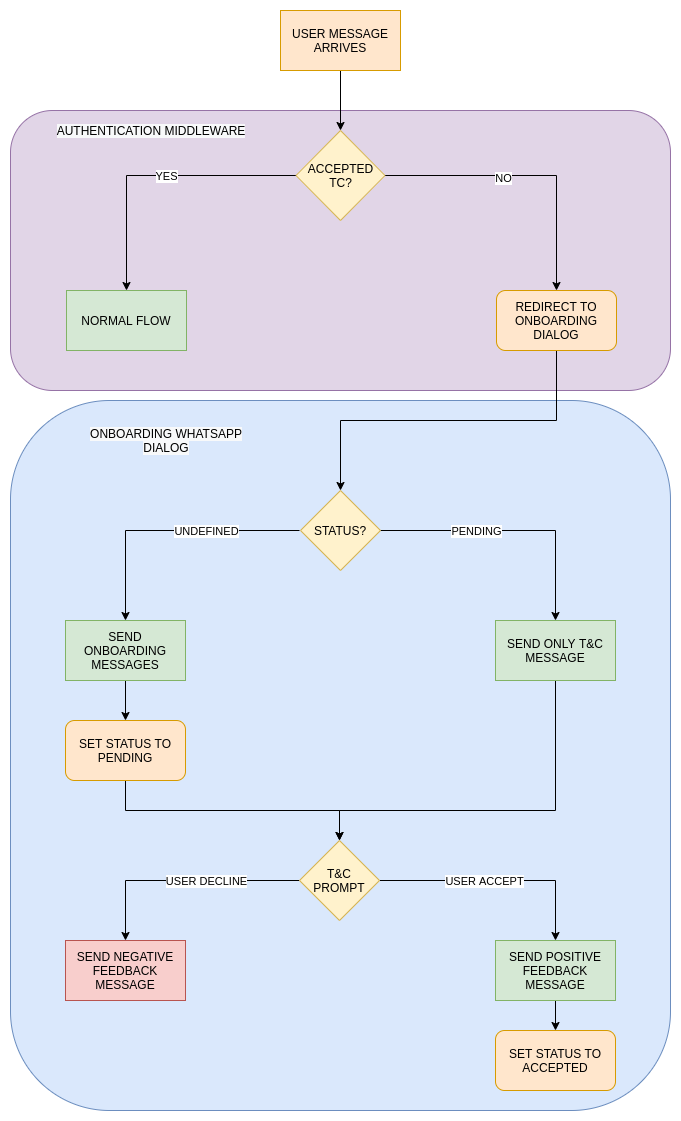
When a user message arrives, the first step in authentication is to check if it is in cache. In case that it
is not found, Terms & Conditions API is checked and if the user does not exist or has a pending status, it is redirected to T&C dialog.
Obviously, all the users with accepted status continue with the normal flow. In the Terms and Conditions dialog a record with status pending is stored in the T&C API if does not exist yet and the terms and conditions prompt is shown. If the user accepts, the status accepted is set in T&C API.
Anonymous and authenticated users have different T&C, so if both are configured, users should accept T&C twice: after the first message as anonymous and after the authentication.
Terms and conditions settings
Terms and Conditions settings
In Aura channel model, T&C are set in the termsAndConditionsconfiguration model. It is added to channels who need to enable this feature.
There are two fields with different configurations inside: authenticated and anonymous. Each of these settings will be used according to the type of user. It defines the version and service used in T&C API.
{
  "channel_id": "f7fd1021-41cd-588a-a461-387cc24be223",
  "name": "whatsapp",
  "termsAndConditions": {
    "authenticated": {
      "version": "1",
      "service": "whatsappAuth"
    },
    "anonymous": {
      "version": "1",
      "service": "whatsappAnonymous"
    }
  }
}
2.4.2 - Conversational flow
Aura Bot conversational flow
Description of users’ authentication process in Aura Bot. Discover the different types of users and how they can authenticate in Aura.
Aura conversational process
Once the user’s authentication is validated, aura-bot starts the message processing.
-
Firstly, all incoming message middlewares are executed, in the order established in the bot set-up.
-
Then, recognizers come into play in order to recognize the user’s intention.
Depending on the type of input message, the process is different. For instance, aura-bot is able to recognize the user’s intent itself if the message is an auraCommand or requires summoning Aura Cognitive Services for this purpose.
Recognizers are executed sequentially and, after one of them recognizes an intention, the rest are not executed.
-
Once the intent and entities are identified, the next step is to route the message to the dialog in charge of that intent for the current channel. This step is done by the main dialog. This special and core dialog is responsible for:
- Getting the dialog that handles the recognized intent for the current channel. If it does not exist, an error is returned to the channel.
- Validating if the user’s context matches with the context filters configured in the selected dialog. If that is the case, then the context filter dialog is executed.
- Validating the authorization settings of the dialog to be executed with the AuraUser authentication model.
In the case of Kernel authentication, it checks that the scopes and purposes of the user contain the mandatory ones to execute the dialog.
This validation improves aura-bot performance, avoiding external requests to Kernel that will return a permissions error. If the user is anonymous, this step is not executed.
-
The specific dialog selected is started during one of the steps of the main dialog, and thus the execution is now managed directly by that specific dialog.
-
The dialog must get the information needed to provide a proper response to the user through Aura NLP, Complex Logic API or Kernel Telco APIs in order to generate the expected answer.
-
The response is now ready to be provided to the user and will start its way through the outgoing middlewares.
-
After that, the execution flow continues to the next step of the MainDialog, that is checking whether or not the dialog must include suggestions.
To do so, it will check that the proper dialog settings are stored in the context. If suggestions are needed, the suggestions API will be called, the resulting activity will be prepared following the UX Guidelines.
-
In the end, a complete response consisting of several ordered activities will be provided to the channel, that will read them from Direct Line and the result will be rendered to the user.
Conversational process flowchart
The following flowchart schematically shows the components involved in the process.
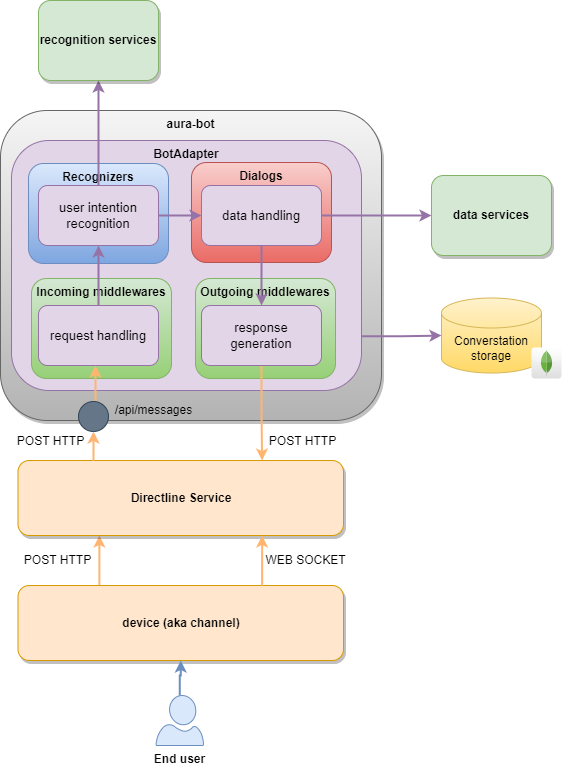
Check here the complete Aura Bot conversational process flowchart.
2.4.3 - channelData management
Aura Bot channelData
How Aura Bot manages the channelData property used by Aura to define the Aura request-response semantic model
The current section details the management by aura-bot skill of the channelData property used by Aura to define the Aura Request – Response Semantic Model.
The Aura semantic application model defines a set of properties that can be used as secondary elements of the Microsoft Azure Bot Service and Bot Framework Activities property included in the application activities.
channelData is an open field in the activity, i.e., the message exchanged during a communication between a channel and a bot built on top of Microsoft Bot Framework, that is devoted to define the specific format of the request needed by the specific bot to provide a proper response to the channel and, thus, to the user.
The current section will describe the specific channelData aspects related to aura-bot, such as:
2.4.3.1 - Handling channelData versions
Handling channelData versions
Description of components that make Aura Bot capable of working with different channelData versions.
UML diagram
@startuml
title ChannelData handling diagram
actor User
participant AuraGroot
participant ChannelDataValidatorMiddleware #76bbe7
participant AuraBot #ebdff7
participant Routing #ebdff7
participant MainDialog #1add4d
participant Dialog #1c733b
participant OutgoingChannelDataNormalizerMiddleware #73c1c3
participant Adapter #1bcad5
participant AuraChannelDataHandler #ebba65
User -> AuraGroot: User request
AuraGroot -> ChannelDataValidatorMiddleware: request reaches validation middleware
alt AURA_CHANNELDATA_VALIDATION === true
    ChannelDataValidatorMiddleware -> AuraChannelDataHandler: isValidatableVersion checks if channelData request version is validatable
    AuraChannelDataHandler -> ChannelDataValidatorMiddleware: isValidatableVersion returns if version is valid
    alt isValidatableVersion === true
        ChannelDataValidatorMiddleware -> AuraChannelDataHandler: getRequestValidator validates channelData request
        AuraChannelDataHandler -> ChannelDataValidatorMiddleware: getRequestValidator returns validation
    end
end
ChannelDataValidatorMiddleware -> AuraBot
AuraBot -> MainDialog: Route to main dialog
MainDialog -> Routing: MainDialog routing step
alt channelDataRequest <= v3
    Routing -> Routing: Add information to triggerCondition
end
alt channelDataRequest >= v3
    Routing -> Routing: Add information to triggerCondition (intent.vX)
end
Routing -> MainDialog: checkLegacyDialogStep check if a conversion to legacy channel data is needed
alt channelDataRequest <= v3
    MainDialog -> AuraChannelDataHandler: getNormalized normalizes request to supported aura-bot channelData
end
MainDialog -> Dialog: Reach dialog by intent if exists
alt channelDataRequest === v3 && channelDataVersion === v3
    Dialog -> AuraChannelDataHandler: formatChannelDataV3 formats response to be compatible with v3 version
    AuraChannelDataHandler -> Dialog: formatChannelDataV3 returns formatted v3 channelData
end
Dialog -> OutgoingChannelDataNormalizerMiddleware: Pass activity formed in dialog to outgoingMiddlewares
alt channelDataRequest <= v3
    OutgoingChannelDataNormalizerMiddleware -> AuraChannelDataHandler: getNormalized Normalizes activity (output) and request (input) to be compatible with supported aura-bot version
    AuraChannelDataHandler -> OutgoingChannelDataNormalizerMiddleware: getResponseChannelData Gets original response channel data
end
OutgoingChannelDataNormalizerMiddleware -> Adapter: Middleware's pipeline is finished and result is received by the adapter
alt AURA_CHANNELDATA_RESPONSE_VALIDATION === true
    Adapter -> AuraChannelDataHandler: isValidatableVersion checks if channelData response version is validatable
    AuraChannelDataHandler -> Adapter: isValidatableVersion returns if version is valid
    alt isValidatableVersion === true
        Adapter -> AuraChannelDataHandler: getResponseValidator gets validation for the response version
    end
end
alt channelDataRequest >= v3
    Adapter -> Adapter: Add version parameter to response.
end
alt channelDataRequest < v3
    Adapter -> Adapter: getResponseChannelData gets transformed channel data from correct version (removes version field)
end
Adapter -> AuraBot: Activity is processed and ready to be sent
AuraBot -> User: Bot response
@enduml
The version format will be a semantic versioning, (MAJOR.MINOR.PATCH). However, aura-bot will work exclusively with the MAJOR version:
If a customer sends the version 3.1.0, for Aura the version is 3.
Aura will keep the original version from the request in the response. That is, if the client sends version 3.0.0, but Aura is currently working with version 3.5.1 as Aura works with the older one, there is no problem and Aura will keep the version that the client sent, 3.0.0, in the response.
For versions greater or equal to 3.0.0, aura-bot accepts either SemVer versioning (3.0.0) or major versioning (3) in channelData.version property.
Request channelData validation
The channeldata-validator-middleware executes request channelData validations. aura-bot receives the request which contains information about the channelData version. With that information, different validations are made.
More information regarding validations being made and utilities that used for this flow can be found in channelData validation.
Aura Bot channelData versions behavior
- aura-bot is able to work with channelData versions
v1, v2 and v3.
- If a channel does not specify the version, it is assumed to be working with version
v1.
- Version
v2 was specific for living-apps, and version v3 is the first version of the normalized channelDatamodel.
- Use cases created for
channelData version v1 will not be able to execute dialogs created with the v3 model and vice versa.
The format for intents in channelData version v3 only changes internally.
Therefore, when defining an intent, it is not necessary to specify its version, the dialog loading system will do it internally.
Dialog configuration
From channelData v3 onwards, it is necessary to specify the version to be used in the channelData dialogs.
If no version is specified, it is understood that they work in v1 mode for classic use cases.
If you want to work with the channelData normalized version (v3), specify it in the use case dialog configuration file.
Example:
{
  "name": "packageLibTest",
  "dialogs": [
    {
      "id": "channel-data-V3-dialog-example",
      "channelDataVersion": "v3",   <-  It's mandatory specific version for ChannelData v3
      "triggerConditions": [
        {
          "intent": "intent.factotum-test.channel-data-model"
        }
      ]
    }
  ]
}
When a dialog has specified its channelData version through the channelDataVersion property, it can only be executed if the client has specified that version in the request. Otherwise, the system will return an “I don’t understand you”.
A client can have two dialogs for the same use case with different versions, but it is mandatory that the names of the dialogs are different. The intents must be called exactly the same for v3 and for others, as the format of the intents is set internally and it is not necessary to specify anything.
{
  "name": "packageLibTest",
  "dialogs": [
    {
      "id": "channel-data-V1-dialog-example",
      "triggerConditions": [
        {
          "intent": "intent.factotum-test.channel-data-model"
        }
      ]
    }
  ]
}
This configuration contains the same intent as the previous one, but the dialog is for channelData version v1, as its version has not been set. It should be noted that if you set a version channelDataVersion: v1 it will also work in v1 mode.
Routing to version v3
Loading Dialogs configuration
The first step to set the intents to their proper version must be done during the dialogs loading. This is done inside the aura-configuration package in the document channels-configuration-current.ts.
    private buildAuraChannel(channelConfiguration: ChannelConfiguration): ChannelConfiguration {
        ........

        // NORMALIZATION. Assign the intent to the channel Data Version
        channelConfiguration.dialogLibraries?.forEach((library) => {
            library.dialogs.forEach((dialog) => {
                const channelDataVersion = this.getChannelDataVersionMajor(dialog.channelDataVersion);
                if (channelDataVersion > 2) {
                    dialog.triggerConditions.forEach((triggerCondition) => {
                        triggerCondition.intent = this.getIntentByChannelDataVersion(triggerCondition.intent, dialog.channelDataVersion);
                    });
                }
            });
        });

        .......
Routing configuration
Intents whose dialogs have the property channelDataVersion with a value greater than or equal to v3 will name their intents with the corresponding version.
Example:
-
“channelDataVersion”: “v3” -> intent.[intent_name].v3
-
“channelDataVersion”: “v2” -> intent.[intent_name]
-
“channelDataVersion”: “v1” -> intent.[intent_name]
-
“No channelDataVersion” -> intent.[intent_name]
For the previous example, the dialog routing would be as follows:
Establishment of intent versioning in recognizers
When a channel sets a version of the channelData greater or equal to v3, the routing step will set intent format in getIntentByChannelDataVersion(), which can be found in aura-configuration.
  public static setIntentResult(context: TurnContext, intentResult: any, utterance: string, promptCheck: boolean,
        ......
        intentResult.intent = AuraChannelsConfiguration.instance.getIntentByChannelDataVersion(intentResult.intent, ChannelDataUtils.getChannelDataVersion(context));
        ......
    }
Routing to v3 dialog
Once the routing and the recognizers steps are executed, based of the result obtained, it will be routed to a v3 dialog if channelDataVersion: "v3" and there is match in the recognized intent.
Dialogs in v3
Currently, only certain dialogs have been migrated to channelData v3 version,as specified in the following sections.
Greetings v3 dialog
Greetings dialog, which is included in common library, has been migrated to v3.
For more information about this implementation, check Create/migrate a dialog to channelData v3.
didntUnderstand special case
There is a particular case: a request needs a V3 dialog and this is not implemented. In this case, None dialog should be triggered.
At the moment, None has not being migrated to v3 so this type of requests are redirected to bot’s fallback case didntUnderstand.
This occurs due to routing appending v3 to None intent and not finding a match. This case returns an activity with the resource core:core.cancel
Prompt case
In this particular case, the last message processed by the dialog must have the channelData correct version.
Firstly, the prompt is displayed to the user going through the mainDialog, but user’s response to that prompt does not follow the same path.
During this stage, channelData is converted into v3 for compatibility with aura-bot core.
If the dialog is in version v1, channelData will not need to be modified, so the channeldata-validator-middleware will check if the dialog is legacy and will convert its response channelData to v1.
Outgoing middlewares
Once aura-bot responds, this response is being processed by certain middlewares that work in v3 version. Hence, there are two possible flows:
-
User is requesting a v1 dialog
In this case, the response from the v1 dialog is converted into v3 immediately after the activity is created.
Once the activity is being processed by the middleware’s pipeline, it is converted from v3 to v1 by the outgoingchannelDataNormalizer middleware, that performs the same actions in reverse order than incomingchannelDataNormalizer middleware.
Once the activity is being processed by the middleware’s pipeline, it is converted from v3 to v1 in the Aura BotFramework adapter.
-
User is requesting a v3 dialog
In this case, the response from the v3 dialog is already in the current supported version, so there is no need to merge to other version.
Adapter
Before sending the response to the user, there are a number of extra steps which are performed inside the Aura BotFramework adapter.
channelData validation
As done in the request stage, there is another validation in the response, before sending the resulting activity to the user, checking if the sent schema is valid for the activity version.
Find more information about which validations are made and utilities used for this flow in channelData validations.
Activity merging
For more information about how channelData merges are processed, check channelData mapping.
2.4.3.2 - channelData mapping
channelData mapping
channelData mapping in Aura response
Introduction
Currently, Aura supports dialogs able to provide responses in v1, v2 and v3 channelData versions. These responses are mapped to be handled by the bot output middlewares as v3, but after that, dialogs are mapped again to the original response version to be returned to the client.
However, incoming middlewares are able to work with different request channelData versions v1, v2 and v3, indistinctly.

Request
The request is currently not transformed and is accessed using channelData utils from the aura-bot-common library.
These utils make transparent the access to all channelData properties needed in v1 or v3.
Response
The response returned by the dialog is normalized in the outgoingchannelDataNormalizer middleware, the first outgoing middleware executed after the dialog.
This normalization is done if the channelData version returned is lower than the current version.
The middleware calls ChannelDataResponseMapper.getResponseChannelData with:
- The normalized version (currently,
v3) as first parameter.
- The channelData in the old version as second parameter.
This mapper function will return a normalized version of the channelData.
After all the middlewares are executed, in the adapter, the response should be transformed to the version returned by dialog again.
To do this, ChannelDataResponseMapper.getResponseChannelData
is called again with:
- The version originally returned by the dialog as first parameter.
- The
channelData as second parameter.
- The original
channelData returned by the dialog as third parameter. This third parameter is needed because in the conversion from old versions to the normalized version certain fields may disappear, so we need to merge the normalized channelData (maybe modified by the outgoing middlewares) with the original returned by the dialog.
Channels using a BotService adapter
Channels such as Facebook that use a BotService Adapter will always use a channelData without version, which internally is translated to v1.
This means that the request will have to be mapped for good. The major implication is that channelData version v3 must take into account the fields needed by these adapters, so the communication and the user’s experience are kept the same.
Currently, aura-bot is only validated to be accessed through the Facebook Messenger adapter. In this case, the protocol allows the exchange of HeroCards, but the way they are sent to the channel is a bit different than in Direct Line channels: they are sent as attachments of the channelData instead of attachments of the activity.
So, in order to allow Aura use cases to send buttons or a complete HeroCard to a user, the attachments field of the channelData must be kept during the version mapping.
2.4.3.3 - channelData validations
channelData validations
channelData validations done both in the request and the response, according to a certain configuration
Validations in request channelData
Request channelData will be validated if its version is greater than or equal to AURA_CHANNELDATA_VALIDATION_MIN_VERSION, that is always v3 (prior versions will never validate and will get all the channelData “as they are”).
That means, that any version from v3 onwards will be validated (even non existing versions, such as 99, will try to be validated).
Versions from v3 onwards will only use the major as a string (e.g., 3), but also semver is understood (e.g., 3.0.0), but note that minor and patch will be ignored (e.g., 3.2.1 === 3.0.0) when looking for a validator.
Logic location
The validation is done in the channeldata-validator-middleware, that must be one of the first middlewares, to ensure that no other logic is fetching data from channelData before validating it.
Errors
There are two types of errors on request validation:
- Validation error: the request
channelData does not comply the schema for that version. The error is stored in requestValidationErrors property within the thrown error.
- Missing validator error: the specified version does not have a matching validator, so
channelData is invalid.
Validations in response channelData
Response channelData will be validated if AURA_CHANNELDATA_RESPONSE_VALIDATION environment variable is set to true.
In that case, all outgoing activities will have their channelData validated, even the error messages, before sending to the user.
The validation must be done after the channelData is transformed into the final version (that could be or not the “internal” version).
Logic location
The response validation is done in Aura Groot, in AuraCloudAdapter class.
Errors
There are two types of errors on response validation:
- Validation error: the response
channelData does not comply the schema for that version and the error is stored in responseValidationErrors property within the thrown error.
- Missing validator error: the specified version does not have a matching validator, so the
channelData is invalid.
2.5 - Aura Bot object, data types and models
Aura Bot object, data types and models
Description of the different types of data and models supported by Aura Bot
aura-bot supports several data models, compatible with different languages or structures in order to execute the conversational flow.
The current document includes the description of the different models supported by Aura Bot platform, currently:
auraCommand model
The use of auraCommands, that is, pre-defined options that the user can select from Aura’s interface, is managed by the auraCommand model.
dialogContext model
Aura supports the dialogContext model, a structure that facilitates the recognition of CardActions and prompts without the need of training.
Aura API Key
Aura counts on API Keys to connect to available API endpoints. They are based on an encrypted APIKey data model, which is included in aura-validate-apikey utility.
2.5.1 - auraCommand model
auraCommand model
Description of the auraCommand model suitable for sending intents directly to Aura with no recognition stage
Introduction
An auraCommand is an structure to send intents directly to Aura. It includes specific messages consisting on pre-defined options that the user can select from Aura’s interface as part of the response to her request.
These messages come from channels using Direct Line format. Currently, they correspond to notifications and suggestions.
The aura-bot recognizer in charge of auraCommand is aura-command-recognizer-middleware. This recognizer detects if the message matches auraCommand format and then processes the message and extract the intent and entities from it.
An auraCommand should be sent within the channelData of the request to aura-bot in an optional property called auraCommand.
AuraCommand property in channelData
It is the channelData property called AuraCommand, which value should fit an AuraCommand Model.
| Property |
Type |
Description |
| auraCommand |
AuraCommand |
This property contains an auraCommand object. |
AuraCommand Model
| Property |
Type |
Description |
| type |
string |
AuraCommand type: - suggestion: used to send a common intent. The prefix of the intent must be
intent.. Its the type by default. - operation: It represents an intent that needs a context in Aura. The prefix of the intent must be
operation. - notification: It represents an intent generated by notification. The prefix must be
intent. - text: The value of the
auraCommand contains directly a string with the text to be recognized by NLP. - event: The value of the AuraCommand contains and event that aura-bot recognizes to carry out an action.
|
| value |
Intent model or string |
Object intent or text. |
| utm |
Utm model |
Source that contains the AuraCommand. |
| actions |
Action model |
Array of actions. |
Intent model
| Property |
Type |
Description |
| intent |
string |
Name of the intent. If this name does not contain the prefix intent., Aura will add the it. |
| entities |
Entity model |
Array with the entities. This array can be empty. |
Entity model
| Property |
Type |
Description |
| type |
string |
Name of the intent. If this name does not contain the prefix intent., Aura will add it. |
| entity |
string |
Name of the entity. If this name does not contain the prefix ent. Aura will add it. |
| canon |
string |
|
| score |
float |
Array with the entities. This array can be empty. |
Utm model
| Property |
Type |
Description |
| source |
string |
It identifies which site sent the traffic. In Aura, use the channel name. |
| medium |
string |
It identifies what type of link was used, such as cost per click or email. In Aura, use banner, button, etc. |
| campaign |
string |
It identifies a specific product, promotion or strategic campaign. |
| term |
string |
It identifies search terms. |
| content |
string |
It identifies what was specifically clicked to bring the user to the site, such as a banner ad or a text link. |
2.5.2 - dialogContext model
dialogContext model
Description of the dialogContext model, for the management of different existing options in the response
Introduction
A dialogContext is a structure that facilitates the recognition of CardActions and prompts without the need of training.
It has the following characteristics:
- It can be autogenerated when a prompt is active.
- It can be autogenerated when there is a
CardAction.
- It can be created manually in a dialog but with certain restrictions.
- It is stored in the conversation cache.
- It is processed by the dialog-context-recognizer-middleware.
- It is auto-generated and stored by the aura-bot adapter.
- It can be configured at channel level, prompt level and
CardAction level.
- It facilitates the recognition of
CardActions if a user, instead of pressing the button, types the button text.
- It facilitates the recognition of numbered lists either by ordinals or cardinals.
- It uses a proximity search algorithm.
- It solves the problems of the recognition of numbers and ordinals that the current Bot Framework prompt has.
Existing models
dialogContext model
| Property |
Type |
Description |
| text |
String |
Text or texts (separated by ‘|’) with the options to be matched. |
| value |
Object |
Object of IntentResult or other with the action to carry out if the option is validated. |
Example:
"dialogContext": [
                    {
                        "text": "Hello",
                        "value": {
                            "intent": "intent.factotum-test.dialog-context",
                            "entities": [
                                {
                                    "entity": "greetings",
                                    "type": "ent.dialog-context",
                                    "score": 1
                                }
                            ]
                        }
                    },
                    {
                        "text": "Bye bye mi picolissima dama",
                        "value": {
                            "intent": "intent.factotum-test.dialog-context",
                            "entities": [
                                {
                                    "entity": "goodbyes",
                                    "type": "ent.dialog-context",
                                    "score": 1
                                }
                            ]
                        }
                    }
                ]
Channel model
The dialogContext model at the channel level applies to all dialog components.
This model has the highest priority, i.e., in case of conflict between models, the channel model has the highest weight.
This model is inside the responseOptions.dialogContext property. Check it in Aura channel model: ResponseOptions model.
An example is shown below:
channel: {
...
        responseOptions: {
            dialogContext: {
                normalizeTerms: true,
                disabled: false,
                disabledMerge: false,
                processFromClient: false,
                returnToClient: false,
                defaultListType: 'none',
                promptChoice: {
                    generate: 'never',
                    generateList: false
                },
                cardActions: {
                    generate: 'never',
                    generateList: false
                }
            }
        }
    },
...
Prompt model
The options of dialogContext for a prompt can be included inside the property validations of Prompt Options within its sub-property dialogContext.
When generating the list of options, the system takes into account two properties of the prompt: recognizeNumbers and recognizeOrdinals.
In these cases:
- If the prompt has
recognizeNumbers=false and we have activated the list of options, only the ordinal values of each option will be generated.
- If the option
recognizeOrdinals=false, then only the cardinal options will be generated.
- If both are set to
false, no list items will be generated.
By default, the prompt has both properties set to true.
| Property |
Type |
Description |
| originalFindChoicesOptions |
Object |
Original prompt findChoiceOptions. Used if the dialogContext recognizer needs to change it, the prompt would be restored to the original state. |
| originalStored |
Boolean |
It indicates whether the dialogContext recognizer had to overwrite the original prompt values. Default: false. |
| enabled |
Boolean |
It indicates whether the generation of ordinal and cardinal lists for prompt options is active. Default: Inherited from the channel configuration. |
| listType |
DefaultListType |
Type of list to enumerate the prompt options. Default: OrdinalCardinal. |
Example of prompt options:
{
  "Choices": [
    {
      "value": "Lunes",
      "synonyms": [
        "El lunes"
      ]
    },
    {
      "value": "martes"
    }
  ],
  "validations": {
    "dialogContext": {
      "enabled": true,
      "listType": "ordinal "
    }
  }
}
CardAction model
The options of dialogContext for a CardAction can be included inside the property channelData of button options, within the sub-property dialogContext.
| Property |
Type |
Description |
| enabled |
Boolean |
It indicates whether the generation of ordinal and cardinal lists for CardAction options is active. Default: Inherited from the channel configuration. |
| listType |
DefaultListType |
Type of the list to enumerate the CardAction buttons. Default: OrdinalCardinal. |
| synonyms |
String[] |
Array of strings with synonyms of the title. |
{
  "buttons": [
    {
      "type": "postBack",
      "title": "Monday",
      "value": {
        "intent": "monday"
      },
      "channelData": {
        "dialogContext": {
          "enabled": true,
          "listType": "ordinalCardinal"
        }
      }
    },
    {
      "type": "postBack",
      "title": "Wednesday",
      "value": {
        "intent": "wednesday"
      },
      "channelData": {
        "dialogContext": {
          "enabled": true,
          "listType": "ordinalCardinal",
          "synonyms": [
            "X"
          ]
        }
      }
    }
  ]
}
Custom dialogContext
It is possible to add in the channelData a dialogContext manually. If the channel configuration allows it, this will be merged with the _dialogContext that is generated automatically.
The following rules must be taken into account when including our own dialogContext:
- Do not generate the list values, that is, do not add ordinals and/or cardinals, as this will be done by the system.
- The options of a custom
dialogContext are included right at the top of the list.
How does dialogContext work?
The dialogContext flowchart includes two differentiate phases: recognition phase and build phase, described below.

Recognition phase
When validating if the user has entered a phrase that matches the dialogContext that we have generated from the previous answer, take into account that the comparison is done by proximity.
The match value will be reported in a score field that goes from 0 to 1. Valid values will be those that are greater or equal to a given threshold. For a dialogContext we have two thresholds.
AURA_DIALOG_CONTEXT_THRESHOLD: Default threshold when comparing two strings. Default value: 0.80.AURA_DIALOG_CONTEXT_ORDINAL_CARDINAL_THRESHOLD: Threshold used in case dialogContext elements are in list form and also if the input phrase includes a number. By default, 0.95.
This value is so high because if the user writes ‘11’ or ’the 11’, and there are only 5 elements in the list, the comparison could give us a very high value, since comparing 11 with 1 has a threshold higher than 0.80, which means that writing 11 would select the first option. To avoid this kind of cases when there are numbers in the user input and the list is enumerated, then the threshold should be stricter.
Another thing to take into account is that if the dialogContext does not get a valid match, if we have an active prompt choice, the system will override its recognizeNumbers and recognizeOrdinals properties, as long as we are working with enumerated elements.
This is done because when MS Bot Framework detects an ordinal number in a sentence, it ignores the rest of the sentence, which can lead to many errors. These values are restored every time the prompt is regenerated if it has not been resolved.
In the recognition phase, the dialogContext recognizer compares value to value, and in the case that one of them meets the conditions, the intention associated with the value is established. It also assigns to the input text the value expected by the prompt, in case there is one.
Example:
DialogContext
[
  {
    "text": "1|the 1|one|the one|first|the first|Monday",
    "value": {
      "intent": "monday"
    }
  },
  {
    "text": "2|the 2|two|the two|second|the second|Tuesday",
    "value": {
      "intent": "tuesday"
    }
  },
  {
    "text": "3|the 3|three|the three|third|the third|X|Wednesday",
    "value": {
      "intent": "wednesday"
    }
  },
  {
    "text": "4|the 4|four|the four|fourth|the fourth|Thursday",
    "value": "The Thursday"
  },
  {
    "text": "5|the 5|five|the five|fifth|the fifth|Friday",
    "value": "Friday"
  }
]
User Input: the 4
- In this case, as the list is numbered and the user has entered a number in his sentence, the selected threshold will be
AURA_DIALOG_CONTEXT_ORDINAL_CARDINAL_THRESHOLD.
- The elements of each option will be compared with the user’s value:
   1 ≅ the 4  -> Score 0
   the 1 ≅ the 4  -> Score 0.80
   ......
   the 4 ≅ the 4  -> Score 1.0   -> Option Selected
- If the selected option has value, the value is assigned to the activity text. In other case, the assigned value is the last value of the text, in this case ‘Thursday’.
- If there is a prompt choice, the validations
recognizeNumbers and recognizeOrdinals are set to false.
Build phase
The build phase is responsible for collecting the customized dialogContext (if any) and, in turn, for generating the dialogContext of the CardActions and Prompt in the different activities that make up the output message.
The enumeration of the elements depends on the configuration of the channel and the respective components. Once generated, it is stored in the user’s conversation cache.
The module in charge of this procedure is the Aura Bot Adapter.
2.6 - Response message formats
Description of the different response message formats supported by Aura Bot
By default, aura-bot uses Directline protocol to send the responses to the channels.
But it contains different response formats depending on the channel, to be able to deliver the responses in the most appropriate way for each channel.
The current available formats for Aura responses are:
For information regarding which channelData version is returned in Aura response, check the document Version in responses
2.6.1 - HTML5
HTML5
Description of HTML5 model supported by Aura
Introduction
Hypertext Markup Language revision 5 (HTML5) is markup language for the structure and presentation of World Wide Web content.
Aura Platform supports HTML5 model, therefore, it is possible to develop experiences that include HTML content in the response.
HTML5 components
There are two main components in the HTML5 model:
- HTML attachments: set of models whose main property is that the content of the elements to render are composed of HTML5 tags.
- HTML5 custom tags: different types of custom tags generated to send commands to Aura.
2.6.1.1 - Attachments
HTML5 attachments
Types of HTML attachments for Microsoft Bot Framework
Introduction
HTML attachments are a set of models whose main property is that the content of the elements to render are composed of HTML5 tags.
Aura’s HTML5 attachment template is used to send HTML5 snippets as a response template.
Custom Attachment Model
The custom attachment model contains a free format model.
Bot Framework Attachment Properties
- Properties marked in bold are mandatory.
- Properties marked in italics are optional.
| Property |
Type |
Description |
| contentType |
string |
Content type name.
Value: application/vnd.telefonica.aura.html.custom |
| content |
AuraHtmlCustomContent |
Model of the object where the HTML5 is |
| version |
string |
Attachment model version model |
| name |
string |
Attachment name (optional) |
Aura HTML Custom Content
HTML container
The HTML container contains an identifier and the content of HTML.
Content may be self-contained or referenced. If it is self-contained, the property data will contain the HTML. Otherwise, the property url-data will contain the URL to download the HTML.
| Property |
Type |
Description |
| id |
string |
Identifier of tag where the content data will be placed. |
| encoded |
EncodedFormat |
How the HTML5 code is encoded in data properties. Values: none, base64 or zip |
| data |
string |
HTML5 data. |
| url-data |
string |
URL where the HTML to assign to the given container id should be downloaded. The encoded field in this case is ignored. |
| content-type |
string |
Type of source: html, javascript, css or json.
- If url-data has a URL, the AuraSDK will insert:
. <link href="[url-data]" rel="stylesheet" type="text/css" /> for css.
. <script src="[url-data]"></script> for js.
- If you do not use the Aura SDK, you must insert it manually.
Default value: html
Note: Javascript content cannot be unloaded once loaded into the browser, unless you reload the page or iframe. |
| Property |
Description |
| none |
The data is sent in HTML format |
| base64 |
The data is encoded in Base64 |
| zip |
The data is compressed in zip format |
Example
{
  "attachments": [
    {
      "contentType": "application/vnd.telefonica.aura.html.custom",
      "version": "1.0.0",
      "content": {
        "containers": [
          {
            "id": "id-background",
            "url-data":"https://telepizza.com/containers/background?id=334"
          },
          {
            "id": "id-footer",
            "encoded": "base64",
            "data":"PGgyPkhUTUwgTGlua3M8L2gyPgo8cD5IVE1MIGxpbmtzIGFyZSBkZWZpbmVkIHdpdGggdGhlIGEgdGFnOjwvcD4KCjxhIGhyZWY9Imh0dHBzOi8vd3d3Lnczc2Nob29scy5jb20iPlRoaXMgaXMgYSBsaW5rPC9hPg=="
          }
        ]
      }
    }
  ]
}
Building Aura response through HTML5
To include HTML content in Aura’s responses, two conditions must be satisfied:
- First, generate a response with an attachment whose content has the HTML code.
- Second, the client must support the model of this type of attachments.
Check how to add attachments into messages in MS Bot Framework.
Generate Response with an HTML5 attachment
In order to generate responses with HTML content, it is necessary to follow the model created for it: Attachment Models.
To do this, simply generate an message attachment with the new model.
For example, if we want to send the word “Hello World” in HTML format:
- Generate the necessary HTML code: Hello World! .
- Include this code inside the model and assign a container to it, so that the client knows in which part of the webpage he must go. The assignation of a container is mandatory and needs the target Id of HTML element where the content will be rendered.
var message = new Message(session)
    .addAttachment({
        contentType: "application/vnd.telefonica.aura.html.custom",
	  version: "1.0.0"
        content: {
		containers:[
		{
			id: "aura-body",
			data: "<span> Hello World! <span>"
		}
	     ]
	   }
	});
The content can be encoded to avoid problems with HTML code characters or to compress content if it is large. To inform the client of the type of encoding, use the encoded property.
var message = new Message(session)
    .addAttachment({
        contentType: "application/vnd.telefonica.aura.html.custom",
	  version: "1.0.0"
        content: {
		containers:[
		{
			id: "aura-body",
			encoded: "base64",
			data: "PHNwYW4+IEhlbGxvIFdvcmxkISA8c3Bhbj4="
		}
	     ]
	   }
  });
2.6.1.2 - Custom tags
Custom tags generated to send commands to Aura
Introduction
Discover the different types of custom tags supported by Aura.
Find here general information regarding custom elements.
The function of this set of tags is to encapsulate all the interactions within the HTML that is sent in the attachment. Any iteration that occurs within the HTML code must generate an event. In this way, the channel only has to manage the events that occur from these tags.
Capabilities:
- Action tags define the type of event triggered:
- External as auracommand
- Internal as internal channel capability
- etc.
- Action tags define the trigger to activate the action by voice.
- Action tags define the targets of HTML elements that is associated to this action by an event.
Aura action: <aura-action>
This tag contains a collection of sub-tags in which the targets, triggers and events necessary to perform this action will be determined.
| Property |
Description |
| id |
Optional identifier |
| name |
Custom name of the action |
Example:
<aura-action name="selectSeat">

</aura-action>
Aura action trigger: <aura-action-trigger> (Not implemented yet)
This tag is used to identify an action based on a voice message from the user.
Initially, are only two types:
The recognition of the intention of this voice message may be associated with entities.
| Property |
Description |
| id |
Optional identifier. |
| type |
Recognizer type: Regex: A regular expression engine is executed to determine if the value of reg expression matches with the message of voice. This expression may contain groups to identify entities. Proximity: This type uses a proximity phrase comparison algorithm. Based on a minimum resemblance value (min-threshold), it will determine if the event will be triggered. You can include entities in the entity field.
|
| value |
Text to compare. If the type is Regex, this text must be a regular expression. |
| entity |
It represents one o more entities to send to the event if the trigger is activated. |
| entity-field |
In the case of a regular expression, it represents an entity calculated on the basis of the regular expression. |
Examples:
    <aura-action-trigger type="regex" value="/select seat ([1-500])/" entity-field="$1">  </aura-action-trigger>
    <aura-action-trigger type="proximity" min-threshold="0.99" value="select seat 1C" entity="32">  </aura-action-trigger>
Aura action target: <aura-action-target>
It defines the targets of HTML elements that are associated to this action by an HTML event.
| Property |
Description |
| id |
Optional identifier. |
| target |
Pattern to determine the identifiers of the tags from the elements that compose the HTML. The format of the pattern is a querySelector syntax. |
| event |
HTML event to which the action should be associated. For example: click |
| evalue |
JSON Object to validate. The JSON object has the properties field and value. The evaluation returns true if the field contains the value.
Example: {"field":"checked", "value":true} |
| mode |
Modality of target element: submit, single or multiple. - submit: this value indicates that the composition of the aura-event will be done after the event is launched.
- single: this value indicates that you only need to evaluate one element independently.
- multiple: this value indicates that the final composition depends on a set of elements.
|
| entity-field |
It represents a property in the target element to be used as entity. |
| voice-field |
It represents a property in the target element to be used for dialogContext models. This value can contain multiple string fields separated by pipes (\, ` |
| canon-field |
It represents a property in the target element to be used as canon. |
| entity-type |
It represents the type property of the entity model |
| entity-default |
Used to set a entity by default when the command is build. |
| canon-default |
Used to set a canon by default when the command is built. |
| voice-default |
Used as an alternative for voice-field. |
Aura action event: <aura-action-event>
It contains the event that will be generated if the action is activated. This event is associated with a data model that contains the information related to the event.
| Property |
Description |
| id |
Optional identifier. Optional |
| type |
Type of event generated if the action is launched. Values: auraCommand. |
| intent |
Intent of the command. |
| command-type |
Type of auraCommand. Values: intent, operation or text. |
| event-hook |
Event to hook the result of the event. It is used to add an event listener to capture the event and result of an aura-action-event.
Example: aura-la-event.
Example of capture: document.body.addEventListener("aura-la-event", customFunction, true). |
Examples
To capture the events:
<script>
  /** To capture the event
  /* 1.- Add the listener
  **/
  document.body.addEventListener("seatSelected", customFunction, true);
  /* 2.- create the function to execute */
  function customFunction(e) {
    console.log(e.detail);
}
</script>
<input type="button" id="b-1" data-seat="1A" value="Seat 1A" />
<input type="button" id="b-2" data-seat="1B" value="Seat 1B" />
<input type="button" id="b-3" data-seat="1C" value="Seat 1C" />
<input type="button" id="b-4" data-seat="1E" value="Seat 1E" />
<input type="button" id="b-5" data-seat="1F" value="Seat 1F" />
<!--Aura custom tags-->
<aura-action id="selectSingleButton">
   <aura-action-target target="[id^=b-]" event="click" entity-field="value" canon-field="data-seat" entity-type="seat" mode='submit'> </aura-action-target>
   <aura-action-event type="auraCommand" intent="operation.select.seat" command-type="operation" event-hook="aura-la-event"> </aura-action-event>
</aura-action>
Result if button with id=b-1 was clicked:
{
    "auraCommand": {
        "type": "operation",
        "value": {
            "intent": "operation.select.seat",
            "entities": [
                {
                    "entity": "1A",
                    "type": "seat",
                    "canon": "Seat 1A"
                }
            ]
        }
    }
}
<input type="button" id="bm-1" data-seat="1A" value="Seat 1A" class="unselected" onclick="switchStyle(this)" />
<input type="button" id="bm-2" data-seat="1B" value="Seat 1B" class="unselected" onclick="switchStyle(this)" />
<input type="button" id="bm-3" data-seat="1C" value="Seat 1C" class="unselected" onclick="switchStyle(this)" />
<input type="button" id="bm-4" data-seat="1D" value="Seat 1D" class="unselected" onclick="switchStyle(this)" />
<input type="button" id="bm-5" data-seat="1E" value="Seat 1E" class="unselected" onclick="switchStyle(this)" /> <br /> <br />
<input type="button" id="sbm" data-seat="send" value="Submit" />
<!--Aura tags-->
<aura-action id="selectMultipleButton">
   <aura-action-target target="[id^=bm-]" event="click" entity-field="value" canon-field="data-seat" entity-type="seat" mode='multiple'> </aura-action-target>
   <aura-action-target target="[id^=sbm]" event="click" mode='submit'> </aura-action-target>
   <aura-action-event type="auraCommand" intent="operation.select.seat" command-type="operation" event-hook="aura-la-event"> </aura-action-event>
</aura-action>
<input type="radio" name="rbseat" data-seat="1A" value="Seat 1A" />Seat 1A <br />
<input type="radio" name="rbseat" data-seat="1B" value="Seat 1B" />Seat 1B <br />
<input type="radio" name="rbseat" data-seat="1C" value="Seat 1C" />Seat 1C <br />
<input type="radio" name="rbseat" data-seat="1D" value="Seat 1D" />Seat 1D <br />
<input type="radio" name="rbseat" data-seat="1E" value="Seat 1E" />Seat 1E <br /> <br />
<input type="button" id="srbseat" data-seat="send" value="Submit" />
<!--Aura tags-->
<aura-action id="selectSimpleRadio">
   <aura-action-target target="[name^=rbseat]"  entity-field="value" canon-field="data-seat" entity-type="seat" mode='single'  evalue='{"field":"checked", "value":true}'> </aura-action-target>
   <aura-action-target target="[id^=srbseat]" event="click" mode='submit'> </aura-action-target>
   <aura-action-event type="auraCommand" intent="operation.select.seat" command-type="operation" event-hook="aura-la-event"> </aura-action-event>
</aura-action>
<input type="checkbox" name="chkseat" data-seat="1A" value="Seat 1A" />Seat 1A <br />
<input type="checkbox" name="chkseat"  data-seat="1B" value="Seat 1B" />Seat 1B <br />
<input type="checkbox" name="chkseat" data-seat="1C" value="Seat 1C" />Seat 1C <br />
<input type="checkbox" name="chkseat" data-seat="1D" value="Seat 1D" />Seat 1D <br />
<input type="checkbox" name="chkseat" data-seat="1E" value="Seat 1E" />Seat 1E <br /> <br />
<input type="button" id="schkseat" data-seat="send" value="Submit" />
<!--Aura tags-->
<aura-action id="selectByCheckboxMultiple">
   <aura-action-target target="[name^=chkseat]" event="click" entity-field="value" canon-field="data-seat" entity-type="seat" mode='multiple'> </aura-action-target>
   <aura-action-target target="[id^=schkseat]" event="click" mode='submit'> </aura-action-target>
   <aura-action-event type="auraCommand" intent="operation.select.seat" command-type="operation" event-hook="aura-la-event"> </aura-action-event>
</aura-action>
Result if the first and the last checkboxes were checked:
{
    "auraCommand": {
        "type": "operation",
        "value": {
            "intent": "operation.select.seat",
            "entities": [
                {
                    "entity": "1A",
                    "type": "seat",
                    "canon": "Seat 1A"
                },
                {
                    "entity": "1E",
                    "type": "seat",
                    "canon": "Seat 1E"
                }
            ]
        }
    }
}
Select Single
<select name="selectOpt">
   <option id="op-1" label="Seat 1A" value="1A">Seat 1A</option>
   <option id="op-2" label="Seat 1B" value="1B">Seat 1B</option>
   <option id="op-3" label="Seat 1C" value="1C">Seat 1C</option>
   <option id="op-4" label="Seat 1D" value="1D">Seat 1D</option>
   <option id="op-5" label="Seat 1E" value="1E">Seat 1E</option>
</select>
<!--Aura tags-->
<aura-action id="selectSingleOption">
   <aura-action-target target="[id^=op-]" evalue='{"field":"selected", "value":true}' entity-field="label" canon-field="value" entity-type="seat" mode='single' > </aura-action-target>
   <aura-action-target target="[name^=selectOpt]" event="change" mode='submit'> </aura-action-target>
   <aura-action-event type="auraCommand" intent="operation.select.seat" command-type="operation" event-hook="aura-la-event"> </aura-action-event>
</aura-action>
Select Multiple
<select name="selectOpt">
   <option id="op-1" label="Seat 1A" value="1A">Seat 1A</option>
   <option id="op-2" label="Seat 1B" value="1B">Seat 1B</option>
   <option id="op-3" label="Seat 1C" value="1C">Seat 1C</option>
   <option id="op-4" label="Seat 1D" value="1D">Seat 1D</option>
   <option id="op-5" label="Seat 1E" value="1E">Seat 1E</option>
</select>
 <input type="button" id="smop" data-seat="send" value="Submit" />
<!--Aura tags-->
<aura-action id="selectMultipleOption">
   <aura-action-target target="[id^=mop-]" evalue='{"field":"selected", "value":true}' entity-field="label" canon-field="value" entity-type="seat" mode='multiple' > </aura-action-target>
   <aura-action-target target="[id^=smop]" event="click" mode='submit'> </aura-action-target>
   <aura-action-event type="auraCommand" intent="operation.select.seat" command-type="operation" event-hook="aura-la-event"> </aura-action-event>
</aura-action>
Input Text
<input type="text" id="textSelect" />
<input type="button" id="textType" data-seat="send" value="Submit" />
<!--Aura tags-->
<aura-action id="selectText">
   <aura-action-target target="[id^=textSelect]" entity-field="value" canon-field="value" evalue="" entity-type="seat" mode='single'> </aura-action-target>
   <aura-action-target target="[id^=textType]" event="click" mode='submit'> </aura-action-target>
   <aura-action-event type="auraCommand" intent="operation.select.seat" command-type="operation" event-hook="aura-la-event"> </aura-action-event>
</aura-action>
All In One
<body>
   <section>
      <input type="button" id="bm-1" data-seat="1A" value="Seat 1A" class="unselected" onclick="switchStyle(this)" />
      <input type="button" id="bm-2" data-seat="1B" value="Seat 1B" class="unselected" onclick="switchStyle(this)" />
      <input type="button" id="bm-3" data-seat="1C" value="Seat 1C" class="unselected" onclick="switchStyle(this)" />
      <input type="button" id="bm-4" data-seat="1D" value="Seat 1D" class="unselected" onclick="switchStyle(this)" />
      <input type="button" id="bm-5" data-seat="1E" value="Seat 1E" class="unselected" onclick="switchStyle(this)" />
   </section>
   <section>
      <input type="radio" name="rbseat" data-seat="1A" value="Seat 1A" />Seat 1A <br />
      <input type="radio" name="rbseat" data-seat="1B" value="Seat 1B" />Seat 1B <br />
      <input type="radio" name="rbseat" data-seat="1C" value="Seat 1C" />Seat 1C <br />
      <input type="radio" name="rbseat" data-seat="1D" value="Seat 1D" />Seat 1D <br />
      <input type="radio" name="rbseat" data-seat="1E" value="Seat 1E" />Seat 1E <br />
   </section>
   <section>
      <input type="checkbox" name="chkseat" data-seat="1A" value="Seat 1A" />Seat 1A <br />
      <input type="checkbox" name="chkseat" data-seat="1B" value="Seat 1B" />Seat 1B <br />
      <input type="checkbox" name="chkseat" data-seat="1C" value="Seat 1C" />Seat 1C <br />
      <input type="checkbox" name="chkseat" data-seat="1D" value="Seat 1D" />Seat 1D <br />
      <input type="checkbox" name="chkseat" data-seat="1E" value="Seat 1E" />Seat 1E <br />
   </section>
   <section>
      <select name="selectOpt">
         <option value=""></option>
         <option id="op-1" label="Seat 1A" value="1A">Seat 1A</option>
         <option id="op-2" label="Seat 1B" value="1B">Seat 1B</option>
         <option id="op-3" label="Seat 1C" value="1C">Seat 1C</option>
         <option id="op-4" label="Seat 1D" value="1D">Seat 1D</option>
         <option id="op-5" label="Seat 1E" value="1E">Seat 1E</option>
      </select>
   </section>
   <section>
      <select name="mselectOpt" multiple>
         <option id="mop-1" label="Seat 1A" value="1A">Seat 1A</option>
         <option id="mop-2" label="Seat 1B" value="1B">Seat 1B</option>
         <option id="mop-3" label="Seat 1C" value="1C">Seat 1C</option>
         <option id="mop-4" label="Seat 1D" value="1D">Seat 1D</option>
         <option id="mop-5" label="Seat 1E" value="1E">Seat 1E</option>
      </select>
      <br />
   </section>
   <section>
      <input type="text" id="textSelect" />
      <input type="button" id="textType" data-seat="send" value="Submit" />
   </section>
   <!--Aura tags-->
   <aura-action id="selectSeat">
      <aura-action-target target="[id^=bm-]" event="click" entity-field="data-seat" canon-field="value" entity-type="seat2" mode='multiple'> </aura-action-target>
      <aura-action-target target="[name^=rbseat]" entity-field="value" canon-field="data-seat" entity-type="seat3" mode='single' evalue='{"field":"checked", "value":true}'> </aura-action-target>
      <aura-action-target target="[name^=chkseat]" event="click" entity-field="value" canon-field="data-seat" entity-type="seat4" mode='multiple'> </aura-action-target>
      <aura-action-target target="[id^=op-]" evalue='{"field":"selected", "value":true}' entity-field="label" canon-field="value" entity-type="seat5" mode='single'> </aura-action-target>
      <aura-action-target target="[id^=mop-]" evalue='{"field":"selected", "value":true}' entity-field="label" canon-field="value" entity-type="seat6" mode='multiple'> </aura-action-target>
      <aura-action-target target="[id^=textSelect]" entity-field="value" evalue="" canon-field="value" entity-type="seat7" mode='single'> </aura-action-target>
      <aura-action-target target="[id^=textType]" event="click"  mode='submit'> </aura-action-target>
      <aura-action-event type="auraCommand" intent="operation.select.seat" command-type="operation" event-hook="aura-la-event"> </aura-action-event>
   </aura-action>
</body>
2.6.2 - Single Messages
Description of the single message format, that allows sending a batch of messages at once
Introduction
The single message format consists on a way to send a batch of messages at once (in one single activity). Both the sender and the receiver should be capable of handling it, that is, “merging” several messages into a single one when sending, and do the reverse process when receiving.
When a channel enables singleMessage activity, it has to be prepared to process the activities sent, as they are not standard. This means doing the reverse process done in the bot, taking a single message and process every activity contained within as if they would have come
one by one. Note that if the content type is application/vnd.telefonica.aura.message.single.zip, the content must be unzipped first.
Configuration
To enable single message functionality in a channel, it must be configured with singleMessage property set to true.
This property belongs to Aura channel model: ResponseOptionsVersionParameters model.
Following is an example configuration of one channel with enabled singleMessage:
[
  (...)
  {
    "responseOptions": {
      "versions": {
        "v1": {
          "singleMessage": true,
        }
      }
    },
    "channel_id": "1234",
    "name": "example"
    (...)
  }
  (...)
]
If we want to send two simple messages, by default they will be processed as a batch, as explained in batch messages format, in order to ensure inputHint is correct.
We will, in this example, send two activities:
{
  "type": "message",
  "recipient": {
    "id": "my-user",
    "name": "test-user"
  },
  "text": "Primer mensaje",
  "channelData": {
    "correlator": "5555",
    "answersCallback": "http://localhost:3000"
  },
  "inputHint": "ignoringInput"
}
and
{
  "type": "message",
  "recipient": {
    "id": "my-user",
    "name": "test-user"
  },
  "text": "Segundo mensaje",
  "channelData": {
    "correlator": "5555",
    "answersCallback": "http://localhost:3000"
  },
  "inputHint": "acceptingInput"
}
However, if we active the single message mode as explained before (singleMessage: true) and try to send the same two messages in a batch, we will merge them together, in a container activity, and will send only this one:
{
  "type": "message",
  "recipient": {
    "id": "my-user",
    "name": "test-user"
  },
  "channelData": {
    "correlator": "5555",
    "answersCallback": "http://localhost:3000"
  },
  "inputHint": "acceptingInput",
  "attachments": [
    {
      "contentType": "application/vnd.telefonica.aura.message.single",
      "content": [
        {
          "type": "message",
          "recipient": {
            "id": "my-user",
            "name": "test-user"
          },
          "text": "Primer mensaje",
          "channelData": {
            "correlator": "5555",
            "answersCallback": "http://localhost:3000"
          },
          "inputHint": "ignoringInput"
        },
        {
          "type": "message",
          "recipient": {
            "id": "my-user",
            "name": "test-user"
          },
          "text": "Segundo mensaje",
          "channelData": {
            "correlator": "5555",
            "answersCallback": "http://localhost:3000"
          },
          "inputHint": "acceptingInput"
        }
      ],
      "name": "singleMessage"
    }
  ]
}
Note that all the activities in the batch are stored together in the content of one single attachment, with application/vnd.telefonica.aura.message.single content type and always inputHint set to acceptingInput. The channelData from the container activity (the outer-most), and therefore the correlator and dialogContext are copied from the last activity in the array (the last in the batch).
Single message mode (zipped)
If the content of a single message is big enough (specified in AURA_MAX_ATTACHMENT_JSON_SIZE env var, 10KB by default), the content will be zipped, and the content type will be application/vnd.telefonica.aura.message.single.zip.
With the previous example, we will send:
{
  "type": "message",
  "recipient": {
    "id": "my-user",
    "name": "test-user"
  },
  "channelData": {
    "correlator": "5555",
    "answersCallback": "http://localhost:3000"
  },
  "inputHint": "acceptingInput",
  "attachments": [
    {
      "contentType": "application/vnd.telefonica.aura.message.single.zip",
      "content": "eJztks1y0zAQx1/F6Bw7NnY+mhNMykxT6MAhDIdODmtpHYvYkiKtHUrww3DlNfpiSEmhDMxwgOGGTpb/uz/tx//2yAg/EFuw18395yfRC0e6i2DfyciAhQjedwJspHS07zDqNb//EhmLXDqwCRsxqUxHV1IFgtwqbaXarsI/r/EalMJmJbwmpE+iRir0gkPbS45vbeOVmsi4xXj8GJGUmioLLR603SVct+MA06pH64CkVmxxZDJQr/cf3z3PD8t6up5fTd9kl1V/8XISAxtGrLK6/R4InYVY9qCeSZEt7fJ68uqw81TlX/lRDomhOyMxtPQtOxMZZLM8zp9Oq7goOI8vsCziuchFXlTzNK34I6zz7Z0+TyzT3K316nfFfkpPp/AEujOB0KJzsD1NyiDs/ng5Dwu4BILQC9fWYgOkrSdWZcZhVk5inE8mcZEXGMM8z2Mh8pSnOMtmWe4RNbgbbfHmXJFjC7IdDsPo+GutQAS8bv3gfNhteE6Rv6zPcWBMI/lpfeNeiaSV3GqnK0o4WJHUaPV5y/Qw+bIj0iqgNsOwGbEGSgx+cd3WFxI47if/Aedo6L8B/8KA/8IxFTTOW2bzFZX1doo=",
      "name": "singleMessage"
    }
  ]
}
2.6.3 - Batch Messages
Description of batch messages response format
Introduction
aura-bot has two working modes for sending messages: immediate mode and batch mode, than can be selected by channel configuration.
We can configure aura-bot in immediate or batch mode by channel, in the responseOptions.versions.vX.batchMessages property, where:
vX: channelData version (v3 for channelData 3.0.0).
Configuring it this way, we are able to send batch messages only in certain channels.
In immediate mode, when a message is sent by a dialog or middleware, it is sent directly to the user (after executing the outgoing middlewares), without delays.
Batch mode
In batch mode, aura-bot intercepts and stores all the sending messages (after being processed by
the outgoing middlewares), and sends them all at once on turn end.
When using batch mode and all the messages are gathered from the bot message queue and processed together to assure that the inputHint is correct in all of them, then the behavior is as follows:
All but the last message is set to ignoringInput, as the specification says, and the last message maintains the status set by the dialog or, if it has not been defined (undefined), is set to acceptingInput.
Note that if a dialog sends a prompt, it is its responsibility to send the proper inputHint, in this case expectingInput.
The activities array may contain messages for multiple channels, we can use the method filterByConversationId that returns activities classified by conversationId. This classification allows setting the inputHint correctly for each channel.
The legacy hasMoreMessages flag in channelData is also set when batch processing the messages, but this flag will disappear in near future.
2.6.4 - Files Message
Description of the capability of Aura use cases to exchange files with the customers
Introduction
Aura integrates the capability of managing files in certain channels. Currently, WhatsApp channels.
This feature is available in a bidirectional way:
- A WhatsApp use case can send a file to the user
- A user can send a file to a WhatsApp use case
Access the documentation in Use of files in WhatsApp.
2.6.5 - Templates Messages
Description of the capability of Aura use cases to send templates to the customers
Introduction
Aura integrates the capability of including templates in a use case for the enrichment of the response provided to the users through the combination of different elements (multimedia, buttons, different designs for texts, etc.).
Currently, this feature is available in WhatsApp channels and unidirectionally: from WhatsApp to the user.
Access the documentation in Use of templates in WhatsApp.
2.6.6 - Error Messages
Error messages v2
Description of errors messages response format
Introduction
When an error happens in a use case in channelData version 2 or higher, it is necessary to set the error in the context status.
const status: AuraResponseStatus = new AuraResponseStatus(AURA_STATUS.ERROR.OTHER.GENERAL, 'Error Whatsapp');
ContextUtils.setStatus(stepContext.context, status);
The activity will be sent as usual.
This is an example of an error when a use case sends a file.
    const status: AuraResponseStatus = new AuraResponseStatus(AURA_STATUS.ERROR.FILE.ERROR_GENERATE_SAS_URL, 'Error Whatsapp file retrieval');
    const attachment: Attachment = {
        contentType: 'application/vnd.telefonica.aura.file',
        content: {
            url: null,
            fileName: null
        }
    };
    const activity: Partial<Activity> = {
        type: 'message', attachments: [attachment],
        inputHint: InputHints.AcceptingInput,
        channelData: {}
    };
    ContextUtils.setStatus(stepContext.context, status);
    await stepContext.context.sendActivity(activity);
All error status are defined in https://github.com/Telefonica/aura-bot-common/blob/master/src/models/aura-status/aura-status-codes.ts
2.6.7 - Version in response messages
Version in response messages
Table to show if the version is returned in channelData according to some parameters
Table
| Channel Id in incoming channelData? |
Valid auraId? |
LegacyUC set version? |
Input version |
Message returned by |
Returned version in response channelData? |
| - |
- |
- |
3 |
aura-bot &
aura-groot |
|
| - |
|
(MH UCs) |
1 |
aura-bot |
|
| - |
|
(Normal UCs) |
1 |
aura-bot |
|
|
|
- |
1 |
aura-bot |
|
|
|
- |
1 |
aura-groot |
|
If any field is empty in any row, it means that this value does not affect to the final result.
3 - Aura Groot
Aura Groot
aura-groot is the router bot that manages the behavior of Aura Root ecosystem functionalities acting as a router for the request to a specific skill.
Find in the current documents the description of this component, its architecture, components and processes.
Aura Virtual Assistant component
Introduction
aura-groot is the main component in charge of handling the distributed architecture of Aura. It is responsible for the communication between each channel and its corresponding skill, keeping track of all the communication process, but introducing a minimal interference on it.
aura-groot main role includes:
-
It is the component in charge of making the decision about what is the best bot to answer the user’s request and routing the request to the corresponding skill (bot).
-
It is able to map configurable input parameters such as the channel that sent the request, user type, previous requests stored in the context, utterance, etc. with a specific domain. The OB will be able to configure the parameters used for the routing process.
Currently, routing is done only by channels or group of channels (no configuration options are available).
Aura Groot components
aura-groot contains two main components:
- Middlewares: software components in charge of the message flow.
- Recognizers: specific type of middlewares that are executed in a certain stage of the message flow.
Access to the corresponding sections to find detailed information regarding these components.
Aura Groot architecture
The first diagram shows all the components running in aura-groot.

The following diagram includes the messages flow through aura-groot.

Aura Groot configuration and operation
Find out the environment variables included in the aura-groot component here.
The operation of aura-groot is described in the document Aura Groot operational flows.
ConversationId handling
aura-groot uses groot-channel conversation identifier to track the conversation with the user and the use case with the skill. It is a string generated by the channel and is unique for each conversation. The groot-channel is sent in the incoming request to aura-groot in the conversationId field of the message object.
Additionally, it adds conversationReference inside. In this way, aura-groot only has to manage a single conversation and avoids synchronizing two different conversations. Doing so, accesses from aura-groot to the database are reduced.
This change implies a modification in the process the BotFramework works with a conversation, in two different documents which are updated separately. But, on the contrary, the advantage is a most efficient and secure way of working.
sequenceDiagram
title: BEFORE-DIRE-STRAITS

    actor Channel
    participant AuraGroot #ebdff7
    participant AuraBot #ebdff7

    Channel ->> AuraGroot: request message1
    AuraGroot ->> AuraGroot: create targetSkill in groot-channel
    AuraGroot ->> AuraGroot: save conversationReference in groot-channel
    AuraGroot ->> AuraBot: request message1
    AuraBot -->> AuraGroot: response message1
    AuraGroot ->> AuraGroot: load conversationReference in groot-channel
    AuraGroot -->> Channel: response message1
    AuraBot -->> AuraGroot: response endOfConversation
    AuraGroot ->> AuraGroot: load conversationReference in groot-channel
    AuraGroot ->> AuraGroot: delete targetSkill

    Channel ->> AuraGroot: request message2
    AuraGroot ->> AuraGroot: create targetSkill in groot-channel
    AuraGroot ->> AuraGroot: save conversationReference in groot-channel
    AuraGroot ->> AuraBot: request message2
    AuraBot -->> AuraGroot: response message2
    AuraGroot ->> AuraGroot: load conversationReference in groot-channel
    AuraGroot -->> Channel: response message2
    AuraBot -->> AuraGroot: response endOfConversation
    AuraGroot ->> AuraGroot: load conversationReference in groot-channel
    AuraGroot ->> AuraGroot: delete targetSkill
Aura Groot endpoints
| Path |
Method |
Description |
| /api/messages/ |
POST |
Incoming requests of channels or aura-bridge |
| /refresh/ |
POST |
Update skills and channels. Data: {"changes": ["skills", "channels"]}. You can use “skills” and/or “channels” or neither of them. In the last case, all will be updated. |
| /api/skills/* |
POST |
Endpoints of Direct Line API for skills can exchange messages with aura-groot. The path where the skills will return the answers is configured in the environment variable AURA_SKILLS_RESPONSE_PATH, by default, /api/skills. |
| /healthz |
GET |
Monitoring endpoint. Healthcheck endpoint to validate if the server is up and running, only available from local network |
| /shutdown |
GET |
Monitoring endpoint. Wait until shutdown (Kubernetes lifecycle). |
| /heapSnapshot |
GET |
Endpoint that must be called internally directly accessing to the aura-groot pod. It stores in Aura Azure Storage Account a copy of the heap memory of the pod. It is useful to debug memory leaks. |
| /heapStatistics |
GET |
Endpoint that must be called internally directly accessing to the aura-groot pod. It returns the heap memory statistics of the pod. |
These endpoints do not need to be defined in the plugin swagger, since they are supplied by the aura-groot core. Specific routes are defined in https://github.com/Telefonica/aura-distributed-bot/blob/main/master/packages/aura-groot/src/modules/server/routes.ts.
Postman collection
Aura Platform Team has generated a Postman collection for simulations over Aura distributed architecture: Aura distributed Postman collection.
3.1 - Environment variables
Aura Groot environment variables
Updated list of aura-groot environment variables
- Properties marked in bold are mandatory.
- Properties marked in italics are optional.
| Property |
Type |
Description |
Modifiable by OB? |
| AURA_ACTIVATE_MINI_BOT |
boolean |
Flag to activate minibot mode. By default: false. |
NO. Only valid during development to run Aura minibot. |
| AURA_ALLOWED_CALLERS |
string |
List of allowed callers separated by commas. By default: [*] |
YES |
| AURA_AUTHORIZATION_APIKEY_PATH |
string |
Path to validate channel APIKey authorization |
NO |
| AURA_AUTHORIZATION_ENDPOINT |
string |
aura-authentication-api base endpoint. |
NO. In any case, it must be the internal k8s URL pointing to the aura-authentication-api. |
| AURA_AUTHORIZATION_HEADER |
string |
Complete authorization header to be sent to aura-authentication-api, with the following format: APIKEY xxxxxx. |
YES, but only if the previous APIKey was deprecated. |
| AURA_CHANNELDATA_CURRENT_VERSION |
string |
channelData version used internally by aura-groot. By default, 3. |
NO |
| AURA_CHANNELDATA_DEFAULT_VERSION |
string |
channelData version returned by default in all messages. By default, 1.0.0. |
NO |
| AURA_CHANNELDATA_RESPONSE_VALIDATION |
boolean |
Flag to indicate that response validation should be done. By default, true. |
NO |
| AURA_CHANNELDATA_VALIDATION |
boolean |
Flag to indicate that request validation should be done. By default, true. |
NO |
| AURA_CHANNELDATA_VALIDATION_VERSIONS |
string |
channelData versions that will be validated. By default, 3. |
NO |
| AURA_CHANNELDATA_VALIDATION_MIN_VERSION |
string |
Minimal version to validate. By default, 3. |
NO |
| AURA_CHANNELS_CONFIGURATION_API_ENDPOINT |
string |
Endpoint for aura-configuration-api. |
NO |
| AURA_DEFAULT_LOCALE |
string |
Culture code to be used by default in the current deployment: de-de, en-gb, es-es, pt-br. |
NO |
| AURA_DEFAULT_TIME_ZONE |
string |
Default time zone. For example: Europe/Madrid |
NO |
| AURA_ENCRYPTION_ALGORITHM |
string |
Encryption algorithm used to validate the APIKey |
NO. It would break database encrypted data and APIKey validation. |
| AURA_ENCRYPTION_IV_LENGTH |
number |
Size for the initialization vector used by the encryption algorithm that validates the APIKey |
NO. It would break database encrypted data and APIKey validation. |
| AURA_ENCRYPTION_IV_POSITION |
number |
Position where to insert the initialization vector in the final string with the encrypted payload. Future use. |
NO. It would break database encrypted data and APIKey validation. |
| AURA_ENCRYPTION_KEY |
string |
Encryption key or comma-separated list of encryption keys to be used in the environment. It is mainly used to decrypt the APIKeys. |
NO. It would break database encrypted data and APIKey validation. |
| AURA_ENVIRONMENT_NAME |
string |
Name of the environment where the aura-authentication-api is deployed. For example: ap-next, es-dev or de-pre. |
NO |
| AURA_EXTERNAL_HOST_SERVICE_URL |
string |
URL of the external host service. |
NO. In any case, it must be the internal k8s URL pointing to the host-service. |
| AURA_HOST_SERVICE_URL |
string |
URL of the host service. |
NO. In any case, it must be the internal k8s URL pointing to the host-service. |
| AURA_HTTP_PATHS_DISABLED_FOR_LOGS |
stringArray |
Paths which will be filtered in logs. Used in HTTPMonkeyPatcher module. |
NO |
| AURA_HTTP_KEEP_ALIVE |
boolean |
Use of keep-alive in HTTP connections. Used in HTTPMonkeyPatcher module. |
NO |
| AURA_HTTP_KEEP_ALIVE_MSECS |
number |
Number of milliseconds to keep alive HTTP connections. Used in HTTPMonkeyPatcher module. |
NO |
| AURA_HTTP_MONKEY_PATCHER_ENABLED |
boolean |
Enable or disable the monkey patching of the HTTP and HTTPs modules. By default, false. |
YES |
| AURA_HTTP_REQUEST_MAX_SOCKETS |
number |
Maximum number of HTTP sockets open in the server. By default, 100 |
NO. Only if indicated by Aura Global Team. |
| AURA_IGNORE_LOGGING_PATH |
string |
Comma-separated string with all the incoming paths which requests should not be logged. By default, /healthz |
YES |
| AURA_INTERNAL_DELAY_MS |
number |
The time in milliseconds between retries. By default, 10000 |
NO, except if requested |
| AURA_INTERNAL_RETRIES |
number |
Number of retries for internal calls. By default, 1 |
NO, except if requested |
| AURA_KPI_ENABLED |
Boolean |
Boolean value, indicating whether aura-groot writes entity files or not. By default: true |
NO, excepting if requested by Product or Operations teams |
| AURA_KPI_FILE_PREFIX |
string |
String with the prefix used in the KPIs entities files of this service. By default, groot/GROOT |
NO |
| AURA_KPI_REMOVE_SPECIAL_CHARACTERS |
string |
Regular expression for removing special characters Default:\n\r |
NO |
| AURA_KPI_STORE_MODE |
string |
It indicates which is the destination of the KPIs entities files. Default: blob. If file, they will be stored locally to the instance, in the folder shown in KPI_TO_DSV_LOCAL_FILES_DIRECTORY. For development purposes. If blob, they will be stored remotely in the Azure blob container shown in KPIS_STORE_CONTAINER. Mandatory in environments running on k8s. |
NO, only configurable when running aura-groot locally. |
| AURA_KPI_TO_DSV_CACHE_TTL |
number |
Number with the amount of milliseconds to cache existing requests to calculate their duration. Default: 1800. |
NO |
| AURA_KPI_TO_DSV_DELIMITER |
string |
Field delimiter to be used in KPIs entities files. Default: | |
NO. It will break all the analysis and processes running on top of these files. |
| AURA_KPI_TO_DSV_EXTENSION |
string |
Extension to be used in KPIs entities files.Default: txt |
NO. If changed without changing aura-kpi-uploader, the files will not be uploaded to Kernel. |
| AURA_KPIS_BLOB_STORE_INTERVAL |
number |
Time interval in milliseconds to upload asyncrhonously logs to the KPIS_STORE_CONTAINER. Default: 60000. Only needed if KPI_STORE_MODE==blob. |
NO. In pre/production, it must be blob so the files will be uploaded to Kernel instance afterwards. Setting file for development is recommended. |
| AURA_KPIS_LOG_API_REQUEST_BODY |
boolean |
Flag to log or not the request body of the API calls. Default: true |
YES. Once disabled, to enable run performance tests to validate if it is possible to write them. |
| AURA_KPIS_LOG_API_RESPONSE_BODY |
boolean |
Flag to log or not the response body of the API calls. Default: true |
YES. Once disabled, to enable run performance tests to validate if it is possible to write them. |
| AURA_KPIS_STORE_CONTAINER |
string |
The name of the Azure Blob container to store KPIs entities files. By default, aura-kpis. It MUST be the same than the one configured in KPIS_UPLOADER module. Only needed if KPI_STORE_MODE==blob. |
NO. If changed without changing aura-kpi-uploader, the files will not be uploaded to Kernel. |
| AURA_LOCALE_FOLDER |
string |
Full path to the local folder where locale files are stored. By default, ./locale. |
NO |
| AURA_LOCALE_FORCE_IMPORT |
boolean |
true if locale remote loading must be carried out although there were validation errors. By default, false. |
YES |
| AURA_LOCALE_REMOTE_CONTAINER |
string |
Name of the Azure Storage Blob Container where the locale files will be stored. By default, static-resources. |
NO |
| AURA_LOCALE_REMOTE_CONTAINER_PREFIX |
string |
Path within AURA_LOCALE_REMOTE_CONTAINER where the locale files are stored. By default, locale. |
NO |
| AURA_LOGGING_FORMAT |
string |
Format to be used in monitoring logs: json or dev(more visual format). By default, json. |
NO. Only for development, set it to dev. |
| AURA_LOGGING_LEVEL |
string |
Level to be used in monitoring logs, from more to less verbose: 'TRACE', 'DEBUG', 'INFO', 'WARN', 'ERROR', 'FATAL', 'OFF'. By default, INFO. |
YES, for development set it to DEBUG. In pre/production should be INFO or ERROR. For analysis of an issue in pre/production it may be changed to DEBUG. |
| AURA_MAKEUP_MODE |
string |
Allow dev mode of the make-up with the value local. By default, full. |
NO, only for development, set it to local. |
| AURA_MAX_HISTORY_CHAT_ITERATIONS |
number |
Number of history chat iterations saved in conversation history. By default, 6 |
NO |
| AURA_MESSAGES_REQUEST_PATH |
string |
Path exposed to receive incoming messages. By default, /api/messages |
NO |
| AURA_MICROSOFT_APP_ID |
string |
ID of the Microsoft bot application to be used in the deployment. |
NO. Only if Operations Team changes it. |
| AURA_MICROSOFT_APP_PASSWORD |
string |
Password of the Microsoft bot application to be used in the deployment. |
NO. It must be changed by Operations Team. |
| AURA_MICROSOFT_APP_TYPE |
string |
Type of the Microsoft bot application to be used in the deployment. By default: MultiTenant |
NO. Only if Operations Team changes it. |
| AURA_MICROSOFT_APP_TENANT_ID |
string |
Tenant ID of the Microsoft bot application to be used in the deployment. |
NO. Only if operations team changes it. |
| AURA_MICROSOFT_AZURE_STORAGE_COMMON_ACCESS_KEY |
string |
Microsoft Storage password of the common storage. Currently used for KPI storing. |
NO. Only if Operations Team changes it. |
| AURA_MICROSOFT_AZURE_STORAGE_COMMON_ACCOUNT |
string |
Microsoft Storage account of the common storage. Currently used for KPI storing. |
NO. Only if Operations Team changes it. |
| AURA_MICROSOFT_AZURE_STORAGE_ACCESS_KEY |
string |
Microsoft Storage password of the deployment. |
NO. It must be changed by Operations Team. |
| AURA_MICROSOFT_AZURE_STORAGE_ACCOUNT |
string |
Microsoft Storage account of the environment. |
NO. It must be changed by Operations Team. |
| AURA_MICROSOFT_AZURE_STORAGE_CONFIGURATION_CONTAINER |
string |
Name of the container where basic bot configuration files are stored: Mongo indexes descriptor, aura-behavior-manager configuration, etc. By default, aura-configuration. |
NO |
| AURA_MIDDLEWARE_SPEAK_PROCESSOR |
string |
Used to enable speak property text substitution on the outgoing messages, to produce speakable text. Regular expression of substitution format example: [["\\*"," asterisk "],["\\#"," hash "]] |
YES. It includes all the needed changes to be done automatically between the written and the spoken text. |
| AURA_MONGODB_BOT_COLLECTION_CONTEXT_INDEX_TTL |
number |
Number of seconds to keep the context data available in aura-groot context cache. By default, 3600. |
NO |
| AURA_MONGODB_BOT_COLLECTION_CONTEXT |
string |
MongoDB collection name where aura-groot will store the context of the users. By default, aura-context. |
NO |
| AURA_MONGODB_BOT_DATABASE |
string |
MongoDB database name where aura-groot will store all the data needed to handle requests. By default, aura-groot. |
NO |
| AURA_MONGODB_CACHE_TTL |
number |
Lifetime of cache used by aura-behavior-manager. It MUST be disabled in PRE and PRO environments. By default, 3600 seconds (1h). |
YES, only for development environments. |
| AURA_MONGODB_CACHE_DATABASE |
string |
Database used in cache of aura-behavior-manager. By default, aura-groot-caches. |
YES, only for development environments. |
| AURA_MONGODB_CACHE_COLLECTION_DL |
string |
Collection used in cache of aura-behavior-manager. By default, dev-cache. |
YES, only for development environments. |
| AURA_MONGODB_CACHE_INDEX_DL |
string |
Index used in TwoLevelsCache of aura-behavior-manager. By default, id. |
YES, only for development environments. |
| AURA_MONGODB_CACHE_METRIC_TTL |
number |
Lifetime of metric cache. By default, 60 seconds (1 minute). |
YES. |
| AURA_MONGODB_CACHE_METRIC_COLLECTION |
string |
Collection used in metric-cache. By default, metric-cache. |
YES |
| AURA_MONGODB_CACHE_METRIC_INDEX |
string |
Index used in TwoLevelsCache of metric-cache. By default, correlator. |
YES |
| AURA_MONGODB_PASSWORD |
string |
MongoDB password to access AURA_MONGODB_BOT_DATABASE in AURA_MONGODB_URI. |
NO |
| AURA_MONGODB_POOL_SIZE |
number |
Number of connections available in MongoDB pool. By default, 60. |
NO |
| AURA_MONGODB_SSL |
boolean |
true if access to AURA_MONGODB_URI is SSL. By default, false. |
NO |
| AURA_MONGODB_URI |
string |
MongoDB URI of the server handling. AURA_MONGODB_BOT_DATABASE. |
NO |
| AURA_MONGODB_USERNAME |
string |
MongoDB username to access AURA_MONGODB_BOT_DATABASE in AURA_MONGODB_URI. |
NO |
| AURA_MONGODB_MAX_POOL_SIZE |
number |
Maximum number of connections in the MongoDB pool. By default, 60. |
NO |
| AURA_MONGODB_MIN_POOL_SIZE |
number |
Minimum number of connections in the MongoDB pool. By default, 2. |
NO |
| AURA_MONGODB_MAX_IDLE_TIME_MS |
number |
Maximum idle time in milliseconds for connections in the MongoDB pool. By default, 30000 (30 seconds). |
NO |
| AURA_MONGODB_RETRY_WRITES |
boolean |
true if retry writes are enabled in the MongoDB connection. By default, true. |
NO |
| AURA_MONGODB_RETRY_READS |
boolean |
true if retry reads are enabled in the MongoDB connection. By default, true. |
NO |
| AURA_MONGODB_HEARTBEAT_FREQUENCY_MS |
number |
Frequency in milliseconds of the heartbeat in the MongoDB connection. By default, 2000 (2 seconds). |
NO |
| AURA_MONGODB_SERVER_SELECTION_TIMEOUT_MS |
number |
Timeout in milliseconds for server selection in the MongoDB connection. By default, 5000 (5 seconds). |
NO |
| AURA_MONGODB_SOCKET_TIMEOUT_MS |
number |
Timeout in milliseconds for socket operations in the MongoDB connection. By default, 45000 (45 seconds). |
NO |
| AURA_CONNECTION_TIMEOUT_MS |
number |
Timeout in milliseconds for establishing a connection to the MongoDB server. By default, 10000 (10 seconds). |
NO |
| AURA_MONGODB_READ_PREFERENCE |
string |
Read preference for the MongoDB connection. By default, primaryPreferred. Possible values: primary, primaryPreferred, secondary, secondaryPreferred, nearest. |
NO |
| AURA_REQUEST_ENABLE_NAGLE |
boolean |
Boolean to enable Nagle. By default: false. |
NO |
| AURA_REQUEST_TIMEOUT |
number |
Number of milliseconds to wait a request. By default: 30000, 30 seconds. |
YES, in case of network issues. |
| AURA_SERVER_BODY_LIMIT |
string |
Maximum size in bytes of the request body. It is a string because the allowed values must indicate the units: 10 mb, 200 kb, etc. By default, 20 mb. |
YES, in order to decrease it, if it is considered too high. To increase it, both local and global Operational Teams must review it, because it could lead to DDoS attacks easily. |
| AURA_SERVER_PORT |
number |
Port where aura-groot will be listening to requests. By default, 8080. |
NO |
| AURA_SERVICE_ENVIRONMENT |
string |
Type of environment: 'DEV', 'PRE', 'PRO'. By default, DEV. It is used during locale translation, to get the correct text reference and, in development environments, to allow aura-behavior-manager execution. |
NO |
| AURA_SERVICE_URL_DIRECTLINE |
string |
Default URL for Direct Line services. By default, https://directline.botframework.com/. |
NO |
| AURA_SHUTDOWN_GRACEFUL_TTL |
number |
Number of milliseconds to wait until all aura-groot tasks are done before shutting each pod down. By default 25000 (25 seconds) |
NO |
| AURA_SKILLS_BLOCKED_TIMEOUT |
number |
Number of seconds to block a skill after a timeout. By default, 600 (10 minutes). |
NO |
| AURA_SKILLS_RESPONSE_PATH |
string |
Path where the skills will return the answers. By default, /api/skills. |
NO |
| AURA_SUPERAGENT_DEADLINE_TIMEOUT |
number |
Number of milliseconds to wait until the superagent deadline timeout, as specified here. It is optional and, by default, is not configured. |
No, only changed if the Global Team or the LCDO Dev Team requires it. |
| AURA_SUPERAGENT_RESPONSE_TIMEOUT |
number |
Number of milliseconds to wait until the superagent response timeout, as specified here. It is optional and, by default, it is not configured. |
No, only changed if the Global Team or the LCDO Dev Team requires it. |
| AURA_SUPERAGENT_RETRY_ATTEMPTS |
number |
Number of retry attempts (not counting the first attempt) to be applied on superagent requests, as specified here. It is optional and, by default, it is not configured. |
No, only changed if the Global Team or the LCDO Dev Team requires it. |
| AURA_RETRIES_CODES |
string[] |
Array of strings with error codes. By default, [‘ECONNRESET’] |
NO, except if requested |
| AURA_VERSION |
string |
Number of the Aura release being executed. |
NO |
| AURA_HTTP_PATHS_LOG_DISABLED |
string |
HTTP paths separated by commas which requests would not be logged. By default: aura-kpis,static-resources. Used in http-monkey-patcher. |
YES, if there is a path that is not wanted to be logged. The default values are always added to the provided list. |
| DEV_AURA_BEHAVIOR_MANAGER_ACTIVE |
boolean |
Flag to indicate whether or not aura-behavior-manager module should be activated in the current deployment. It is only valid for development environments. |
YES, in development environments. |
| DEV_AURA_GROOT_BEHAVIOR_CRON_PATTERN |
string |
Cron pattern to set the refresh time of aura-behavior-manager configuration. By default, */5 * * * * (every 5 minutes). It is only valid for development environments. |
YES, in development environments. |
| DEV_AURA_GROOT_BEHAVIOR_MICROSOFT_AZURE_STORAGE_SETTINGS_FILE |
string |
Name of the configuration file route used by aura-behavior-manager. By default, aura-groot/aura-groot-behavior-manager.json. It is only valid for development environments. |
YES, in development environments |
3.2 - Middlewares
Aura Groot middlewares
Description of middlewares included in aura-groot
Introduction
The current document describes the different middlewares that are part of aura-groot
init-middleware
This middleware is in charge of setting the initial context values (userData accessor, conversationData accessor, correlator)
for the rest of the middlewares/handlers.
user-middleware
In this middleware, the user is checked and stored in context for the following middlewares/handlers.
Find detailed information in user-middleware documentation.
channeldata-validator-middleware
This middleware validates input channelData activities and throws an error if something is wrong.
Find more information in channeldata-validator-middleware documentation.
3.2.1 - Channeldata validator middleware
Channeldata validator middleware
Description of channeldata-validator-middleware, in charge of the validation of the request channelData for normalized versions
Introduction
The source code of this middleware is included in this Github repository.
This middleware will check if the channelData of the incoming request is valid or not. This validation is made:
- If the environment variable
AURA_CHANNELDATA_VALIDATION is set to true.
- If the incoming
channelData version is greater or equal than AURA_CHANNELDATA_VALIDATION_MIN_VERSION.
- If a validator for this version exists. Validators are loaded using schemas stored in aura-models package.
If the validation is ok or is not executed because one or more of the previous conditions are not satisfied, aura-groot continues the normal flow, executing the rest of middlewares.
If the validation fails, the error message core:core.model-validation.request.error will be returned to the user and no more middlewares will be executed.
3.2.2 - User middleware
User middleware
Description of user-middleware in charge of the validation of the user’s data
Introduction
user-middleware is the middleware in charge of validating auraId and channel.
This is needed in aura-groot because routing is currently done by channel, so if the request does not include channelId (mandatory only in channelData v3), the user must be checked in aura-authentication-api to obtain the channel of this user.
This middleware throws an error if there is not activity.from.id or if some error is returned by aura-authentication-api
(except 404, because anonymous users should continue the flow).
This middleware also handles a basic user’s cache to avoid unnecessary calls to aura-authentication-api with every user’s request.
This cache is implemented using bot UserState.
3.3 - Recognizers
Aura Groot recognizers
Description of recognizers included in aura-groot
Introduction
The current documents describe the different recognizers that are part of aura-groot.
They are listed below:
3.3.1 - Domain recognizer
Domain recognizer
Description of domain-recognizer in charge of recognizing the user’s domain
Introduction
domain-recognizer is the aura-groot recognizer in charge of identifying the domain in the user’s input request.
This is possible thanks to the mapping of the list of channels and skills that is done at server start-up. A skill can have several associated channels, but a channel can only have one associated skill.
Example:
GOOD
channel1 => skill1
channel2 => skill1
channel3 => skill2

BAD
channel1 => skill1
channel2 => skill2
channel2 => skill1 -> This is not possible
When a user writes through a channel:
- The domain to which the channel belongs is identified
- The skill associated with that domain is executed
- The domain is registered in KPIs
If the recognition of the domain fails, the user will be returned the error message root:skill.not.found.
3.3.2 - Intent result recognizer
Intent result recognizer
Description of intent-result-recognizer in charge of registering the intent result
Introduction
intent-result-recognizer is the recognizer in charge of the registration of the intent result.
This recognizer is executed after the execution of the middlewares and before sending a message to user. It is also in charge of registering the result of the intent in KPIs.
It receives information from the skill in the following way:
activity: {
    channelData: {
        payload: {
            skill: {
                intentResult: {
                    name: string,
                    entities: [
                        entity: string,
                        type: string
                    ]
                }
            }
        }
    }
}
3.4 - Operational flows
Aura Groot operational flows
Description of aura-groot main operational flows
Introduction
The current document includes the main operational flows in the aura-groot component.
Blocked skill
This flow describes the control of the messages received by aura-groot from the skill and the sending of the error message to the user in case the skill does not respond.
sequenceDiagram
title: BLOCKED-SKILL

    actor Channel
    participant AuraGroot #ebdff7
    participant AuraBot #ebdff7

    Channel ->> AuraGroot: request message1
    AuraGroot ->> AuraGroot: create skillConversation1, begin timeout in targetSkill
    AuraGroot ->> AuraBot: request message1
    AuraBot -->> AuraGroot: response message1
    AuraGroot ->> AuraGroot: delete timeout, update targetSkill
    AuraGroot -->> Channel: response message1
    AuraBot -->> AuraGroot: response endOfConversation
    AuraGroot ->> AuraGroot: delete targetSkill

    Channel ->> AuraGroot: request message2
    AuraGroot ->> AuraGroot: create skillConversation2, begin timeout in targetSkill
    AuraGroot ->> AuraBot: request message2
    Channel -->> AuraGroot: request message3
    AuraGroot ->> AuraGroot: control timeout (active targetSkill)

    alt timeout targetSkill < TIMEOUT
        AuraGroot ->> AuraBot: request message3
        AuraBot -->> AuraGroot: response message2
        AuraGroot ->> AuraGroot: delete timeout, update targetSkill
        AuraGroot -->> Channel: response message2

        AuraBot -->> AuraGroot: response message3
        AuraGroot ->> AuraGroot: delete timeout, update targetSkill
        AuraGroot -->> Channel: response message3
        AuraBot -->> AuraGroot: response endOfConversation message2
        AuraGroot ->> AuraGroot: delete targetSkill
        AuraBot -->> AuraGroot: response endOfConversation message3
        AuraGroot ->> AuraGroot: discard endOfConversation in conversation2
    end

    alt timeout targetSkill > TIMEOUT
        AuraGroot -->> Channel: Error
        AuraGroot ->> AuraGroot: begin timeout, in targetSkill
        AuraGroot ->> AuraBot: request message3
        AuraBot -->> AuraGroot: response message2
        AuraGroot ->> AuraGroot: delete timeout, update targetSkill
        AuraGroot -->> Channel: response message2
        AuraBot -->> AuraGroot: response endOfConversation message2
        AuraGroot ->> AuraGroot: delete targetSkill
        AuraBot -->> AuraGroot: response message3
        AuraGroot ->> AuraGroot: discard delete timeout in targetSkill
        AuraGroot -->> Channel: response message3
        AuraBot -->> AuraGroot: response endOfConversation message3
        AuraGroot ->> AuraGroot: discard endOfConversation in targetSkill
    end
Use case with asynchronous calls
This diagram describes the flow of a user’s request that is resolved through a dialog with asynchronous calls.
Further information regarding how asynchronous APIs are handled by Aura can be found in the Guidelines for building a dialog that uses async APIs.
sequenceDiagram
title: MESSAGE_ASYNC_USECASE
    actor User
    User ->> WA: User request
    WA ->> 4P: User request
    4P ->> AuraBridge: User request
    AuraBridge ->> 4P: 200 OK
    AuraBridge ->> AuraGroot: User request
    AuraGroot ->> AuraBridge: 200 OK
    AuraGroot ->> AuraGroot: create skillConversation1, begin timeout in targetSkill
    AuraGroot ->> AuraSkill: User request
    AuraSkill ->> AuraGroot: 200 OK
    AuraSkill ->> AuraSkill: basic whatsapp flow
    AuraSkill ->> LocalDialog: message
    LocalDialog ->> 4P: request async + callback bridge
    4P ->> LocalDialog: 200 OK
    Note right of 4P: when 4p finishes the request sends the response to the indicated callback (AuraBridge)
    4P ->> AuraBridge: response request async
    AuraBridge ->> 4P: 200 OK
    AuraBridge ->> AuraGroot: response request async
    AuraGroot ->> AuraBridge: 200 OK
    Note right of AuraBridge: the response is sent as payload
    AuraGroot ->> AuraGroot: control timeout
    alt targetSkill.timeout < TIMEOUT
        AuraGroot ->> AuraSkill: response request async
        AuraSkill ->> AuraGroot: 200 OK
        AuraSkill ->> LocalDialog: response request async
        LocalDialog ->> LocalDialog: process response
        LocalDialog ->> AuraSkill: response processing
        AuraSkill ->> AuraGroot: async response processed
        AuraSkill ->> AuraGroot: response endOfConversation
        AuraGroot ->> AuraSkill: 200 OK
        AuraGroot ->> AuraGroot: delete targetSkill
        AuraGroot ->> AuraGroot: delete skillConversation1
        AuraGroot ->> AuraBridge: async response processed
        AuraBridge ->> AuraGroot: 200 OK
        AuraBridge ->> 4P: async response processed
        4P ->> AuraBridge: 200 OK
        4P ->> WA: async response processed
        WA ->> User: async response processed
    else
        AuraGroot ->> AuraBridge: error
        AuraBridge ->> AuraGroot: 200 OK
        AuraBridge ->> 4P: async error
        4P ->> AuraBridge: 200 OK
        4P ->> WA: error
        WA ->> User: error
        AuraGroot -> AuraSkill: request async endOfConversation
        AuraGroot -> AuraGroot: delete skillConversation1
        AuraGroot -> AuraGroot: create skillConversation2, begin timeout in targetSkill
        AuraGroot ->> AuraSkill: response request async
        AuraSkill ->> AuraGroot: 200 OK
        AuraSkill ->> AuraSkill: Not recognize
        AuraSkill ->> AuraGroot: none
        AuraSkill ->> AuraGroot: response endOfConversation
        AuraGroot ->> AuraSkill: 200 OK
        AuraGroot ->> AuraGroot: delete targetSkill
        AuraGroot ->> AuraGroot: delete skillConversation2
        AuraGroot ->> AuraBridge: none
        AuraBridge ->> AuraGroot: 200 OK
        AuraBridge ->> 4P: none
        4P ->> AuraBridge: 200 OK
        4P ->> WA: none
        WA ->> User: none
    end
Use case with files sending by the user
This diagram describes the flow of a use case that includes sending a file by the user (WhatsApp channel).
Further information regarding how to receive a file from the user can be found in:
sequenceDiagram
title: MESSAGE_FILE_USECASE
    User ->> WA: Phrase to init UC file dialog
    WA ->> 4P: Phrase to init UC file dialog
    4P ->> AuraBridge:Phrase to init UC file dialog
    AuraBridge ->> 4P: 200 OK
    AuraBridge ->> AuraGroot: Phrase to init UC file dialog
    AuraGroot ->> AuraBridge: 200 OK
    AuraGroot ->> AuraGroot: create skillConversation1, begin timeout in targetSkill
    AuraGroot ->> AuraSkill: Phrase to init UC file dialog
    AuraSkill ->> AuraGroot: 200 OK
    AuraSkill ->> AuraSkill: Basic whatsapp flow for authenticated user
    AuraSkill ->> FileDialog: Start UC file dialog
    FileDialog ->> AuraSkill: Send me a file
    AuraSkill ->> AuraGroot:  Send me a file
    AuraGroot ->> AuraSkill: 200 OK
    AuraGroot ->> AuraGroot: delete timeout in targetSkill
    AuraGroot ->> AuraBridge: Send me a file
    AuraBridge ->> AuraGroot: 200 OK
    AuraBridge ->> 4P: Send me a file
    4P ->> AuraBridge: 200 OK
    4P ->> WA: Send a file
    WA ->> User: Send a file
    User ->> WA: Send the attachment
    WA ->> 4P: Send the attachment
    4P ->> AuraBridge: Send the attachment
    AuraBridge ->> 4P: 200 OK
    AuraBridge ->> AuraGroot: Send the attachment
    AuraGroot ->> AuraBridge: 200 OK
    AuraGroot ->> AuraSkill: Send the attachment
    AuraSkill ->> AuraGroot: 200 OK
    AuraSkill ->> FileApi: Validate / process the attachment
    FileApi ->> AuraBot: 200 OK
    FileApi ->> AuraBridge: Attachment processed, validated and ready (async-callback)
    AuraBridge ->> FileApi: 200 OK
    AuraBridge ->> AuraGroot: Send attachment processed
    AuraGroot ->> AuraBridge: 200 OK
    AuraGroot ->> AuraGroot: control timeout
    Note right of AuraSkill: we could control that it is a system message, but the case would be the same if a message from the user arrives before the asynchronous response
    alt targetSkill.timeout < TIMEOUT
        AuraGroot ->> AuraSkill: Send attachment processed
        AuraSkill ->> AuraGroot: 200 OK
        AuraGroot ->> FileDialog: Send attachment processed
        FileDialog ->> FileDialog: process attachment
        FileDialog ->> AuraSkill: response processed attachment
        AuraSkill ->> AuraGroot: response processed attachment
        AuraSkill ->> AuraGroot: response endOfConversation
        AuraGroot ->> AuraSkill: 200 OK
        AuraGroot ->> AuraGroot: delete targetSkill
        AuraGroot ->> AuraGroot: delete skillConversation1
        AuraGroot ->> AuraBridge: response processed attachment
        AuraBridge ->> AuraGroot: 200 OK
        AuraBridge ->> 4P: response processed attachment
        4P ->> AuraBridge: 200 OK
        4P ->> WA: response processed attachment
        WA ->> User: response processed attachment
    else
        AuraGroot ->> AuraBridge: error
        AuraBridge ->> AuraGroot: 200 OK
        AuraBridge ->> 4P: async error
        4P ->> AuraBridge: 200 OK
        4P ->> WA: error
        WA ->> User: error
        AuraGroot -> AuraSkill: request endOfConversation
        AuraGroot -> AuraGroot: delete skillConversation1
        AuraGroot -> AuraGroot: create skillConversation2, begin timeout in targetSkill
        AuraGroot ->> AuraSkill: response processed attachment
        AuraSkill ->> AuraGroot: 200 OK
        AuraSkill ->> AuraSkill: UnexpectedFile
        AuraSkill ->> AuraGroot: UnexpectedFile
        AuraSkill ->> AuraGroot: response endOfConversation
        AuraGroot ->> AuraSkill: 200 OK
        AuraGroot ->> AuraGroot: delete targetSkill
        AuraGroot ->> AuraGroot: delete skillConversation2
        AuraGroot ->> AuraBridge: UnexpectedFile
        AuraBridge ->> AuraGroot: 200 OK
        AuraBridge ->> 4P: UnexpectedFile
        4P ->> AuraBridge: 200 OK
        4P ->> WA: UnexpectedFile
        WA ->> User: UnexpectedFile
    end
Handover use case
This diagram describes the flow of the handover use case.
Further information regarding about handover use case handover-genesys dialog.
sequenceDiagram

title: handover
actor Channel
participant Bridge #ebdff7
participant AuraGroot #ebdff7
participant AuraBot #ebdff7
participant Genesys #ebdff7

Channel ->> AuraGroot: request message1
AuraGroot ->> AuraGroot: create skillConversation1, begin timeout in targetSkill
AuraGroot ->> AuraBot: request message1
AuraBot -->> AuraGroot: response message1
AuraGroot ->> AuraGroot: delete timeout in targetSkill
AuraGroot -->> Channel: response message1
AuraBot -->> AuraGroot: response endOfConversation
AuraGroot ->> AuraGroot: delete targetSkill
AuraBot ->> Genesys: request chat "init"
Genesys ->> AuraBot: response chat "init"
AuraBot ->> Genesys: message history
Genesys ->> AuraBot: response message history
Genesys -->> Bridge: pushNotification: starter messages with genesys

Bridge ->> AuraGroot: request message2
AuraGroot ->> AuraGroot: create skillConversation2, begin timeout in targetSkill
AuraGroot ->> AuraBot: request message2
AuraBot -->> AuraGroot: response message2
AuraGroot ->> AuraGroot: delete timeout in targetSkill
AuraGroot -->> Bridge: response message2
Bridge -->> Channel: response message2
AuraBot -->> AuraGroot: response endOfConversation
AuraGroot ->> AuraGroot: delete targetSkill
3.5 - Databases
Aura Groot databases
Description of databases used by Aura Groot
Introduction
Currently, aura-groot uses two databases, described below.
MongoDB
In order to reuse the code and clarify the development, all classes related with MongoDB storage are stored in the mongodb-storage.ts file within aura-bot-common repository.
MongoDbStorage
This storage class will be used by Bot Builder v4 to store the conversation and user’s data. An index is created to delete documents older than 24 hours (specified by config var AURA_MONGODB_BOT_COLLECTION_CONTEXT_INDEX_TTL).
The following aura-groot environment variables are used to initialize this class:
| Var name |
Description |
Required/Optional |
| AURA_MONGODB_BOT_DATABASE |
Database name where the documents will be stored |
Required |
| AURA_MONGODB_BOT_COLLECTION_CONTEXT |
Collection name where the documents will be stored |
Required |
| AURA_MONGODB_BOT_COLLECTION_CONTEXT_INDEX_TTL |
Duration (in seconds) for which the documents will exist without updates before being deleted. By default, 86440. |
Optional |
To create and initialize a MongoDbStorage, a code like the following below could be used:
    const storage = await MongoDbStorage.create(
            this.configuration.AURA_MONGODB_BOT_DATABASE,
            this.configuration.AURA_MONGODB_BOT_COLLECTION_CONTEXT,
            () => ConfigurationManager.instance.get('AURA_MONGODB_BOT_COLLECTION_CONTEXT_INDEX_TTL')
        );
Aura Groot cache module
The aura groot cache module allows the generation of different types of cache:
MetricCache: used for remote and local data. Is a TwoLevelsCache.
How to use cache module
This cache stores the timestamp when a request from the channel arrives at the aura-groot and is retrieved after the skill’s response to calculate the duration in the KPI GrootMessageEntity.
Variables for AuraGrootCache
The following aura-groot environment variables are used to initialize this class:
| Var name |
Description |
Required/Optional |
| AURA_MONGODB_BOT_DATABASE |
Database name where the documents will be stored |
Required |
| AURA_MONGODB_CACHE_METRIC_COLLECTION |
Collection name where the documents will be stored. By default, metric-cache |
Optional |
| AURA_MONGODB_CACHE_METRIC_TTL |
Duration (in seconds) for which the documents will exist in local cache before being deleted. By default, 60. |
Optional |
| AURA_MONGODB_CACHE_METRIC_INDEX |
Index used in TwoLevelsCache of metric-cache. By default, correlator. |
Optional |
Example of data storage:
{
    "_id" : "64d0e9608a473f63c8bda87b",
    "correlator" : "6eea808b-30f8-4358-9859-cd42892a962b",
    "data" : [
        2339137,
        419794024
    ],
    "lastAccess" : "2023-08-07T12:53:52.370Z"
}
Redis + MongoDB
If the configuration variable AURA_BOT_CONTEXT_DATABASE is set to REDIS-MONGODB, aura-groot uses a two-level cache to store the context Aura Redis Mongo Sync.
The following environment variables must be set for the two databases.
Variables
| Var name |
Description |
Required/Optional |
| AURA_MONGODB_BOT_COLLECTION_CONTEXT |
Name of the collection where the context is stored. By default: aura-context. |
Required |
| AURA_MONGODB_BOT_DATABASE |
Name of the database where the bot collections are stored. By default: aura-bot |
Required |
| AURA_MONGODB_PASSWORD |
Password of the MongoDB. Required |
Required |
| AURA_MONGODB_POOL_SIZE |
Pool size of the MongoDB. By default: 60. |
Required |
| AURA_MONGODB_SSL |
Boolean value indicating if MongoDB connection uses SSL or not. By default: true. |
Required |
| AURA_MONGODB_URI |
URI of the MongoDB |
Required |
| AURA_MONGODB_USERNAME |
Username of the MongoDB |
Required |
| AURA_REDIS_CONFIGURATION_PREFIX |
Prefix for Redis configuration keys. By default: aura-config: |
Required |
| AURA_REDIS_CONTEXT_CACHE_PREFIX |
Prefix for Redis context cache keys. By default: context: |
Required |
| AURA_REDIS_CONTEXT_CACHE_SHADOW_KEY_PREFIX |
Prefix for Redis shadow key cache keys. By default: shadow-key: |
Required |
| AURA_REDIS_CONTEXT_CACHE_ACTIVE_CONTEXT_PREFIX |
Prefix for Redis active context cache keys. By default: active-context: |
Required |
| AURA_REDIS_CONTEXT_CACHE_SHARD_COUNT |
Number of shards to generate lists for storing unprocessed context. |
Required |
| AURA_REDIS_CONTEXT_CACHE_TTL |
Time in seconds to store a context in cache. By default: 60. |
Required |
| AURA_REDIS_MODE |
Mode of Redis distribution (Cluster, Sentinel or Single). By default: Single. |
Required |
| AURA_REDIS_PREFIX |
Prefix that will be used by all redis keys when using redis-connector. This allow mixing in a single redis service messages coming from different environments in the same Azure subscription. |
Required |
| AURA_REDIS_SENTINEL_INSTANCE_NAME |
Name of the Redis instance. Use in sentinel mode. |
Optional |
| AURA_REDIS_HOSTS |
A string with list of nodes (host:port) separate by comma. For example: “localhost:port,localhost2:port2”. Default: ‘127.0.0.0:6379’ |
Required |
AURA_REDIS_DATABASE Database number for Single or Sentinel mode. By default: 0. |
|
|
| AURA_REDIS_PASSWORD |
A string with the password of Redis. |
Required |
| AURA_REDIS_MAX_RECONNECT_RETRIES |
Number of retries to connect to Redis. By default: 25. |
Required |
| AURA_REDIS_MAX_RECONNECT_INTERVAL |
Time in milliseconds to wait before reconnecting to Redis. By default: 5000. |
Required |
| AURA_REDIS_USE_CONNECTION_POOL |
Used connection pool for Redis connections. Default: true. |
Required |
| AURA_REDIS_CONNECTION_POOL_MIN |
Minimum number of connections in the pool. Default: 2. |
Required |
| AURA_REDIS_CONNECTION_POOL_MAX |
Maximum number of connections in the pool. Default: 100. |
Required |
4 - Aura Bridge
Aura Bridge
aura-bridge is the component in charge of the communication protocol between aura-groot and certain external channels that cannot implement the Direct Line protocol.
Find in the current documents the description of this component, its architecture, components and processes.
Aura Virtual Assistant component
Introduction to Aura Bridge
aura-bridge is the component of Aura in charge of adapting the communication protocol, both message format and API calls, between aura-groot and certain external channels, such as Whatsapp, that cannot implement Direct Line protocol (aura-groot native language). It is designed to be extensible, i.e., if any other external channel needs to be integrated with aura-groot, a new adapter for this channel might be added easily to the bridge.
aura-bridge is built as a set of configurable plugins that are deployed on top of aura-bridge core. Each plugin consists of an OpenAPI definition, a controller, a request handler and a converter.
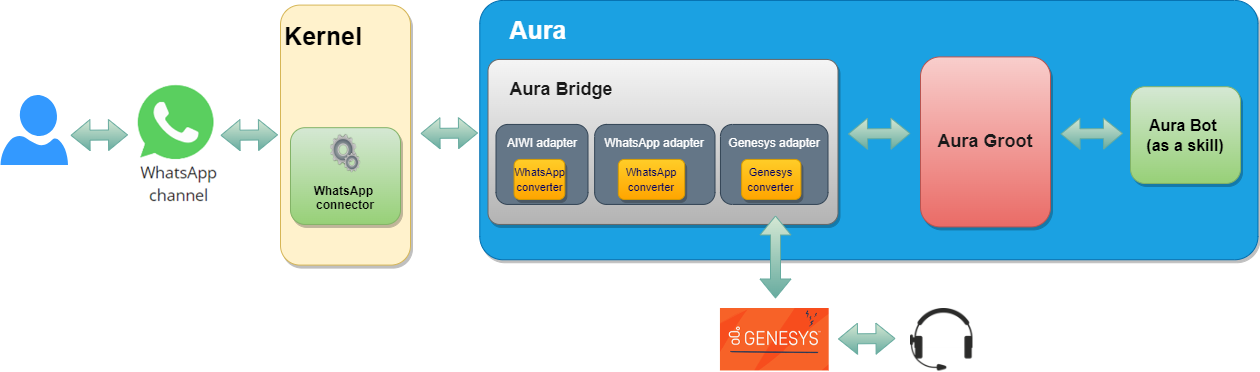
Regarding its implementation, the following technologies are used:
aura-bridge is divided into two sub-components from the logical point of view, where aura-bridge-outbound is a component which shares the same logical implementation as aura-bridge, with the main distinction lying in the differences in its configuration, which implies a deployment specialization:
- Component in charge of adapting the communication from the channel: aura-bridge
Channel communication protocol ➡️ Direct Line protocol
- Component in charge of adapting the communication to the channel: aura-bridge-outbound
Direct Line protocol ➡️ Channel communication protocol
aura-bridge documentation is included in different sections, depending on its scope:
Communication protocol
aura-groot communication protocol is completely asynchronous, this means that the answer of a request is not included in the HTTP response related to the request, but it is sent as a new HTTP request to the callback configured for each channel. For internal channels, the default callback is Direct Line, but for external channels, the callback is aura-bridge.
But, following the same asynchronous approach in aura-bridge, it must be defined a callback for each channel, too. Therefore, channels connected to aura-bridge must be able to handle asynchronous HTTP communication.
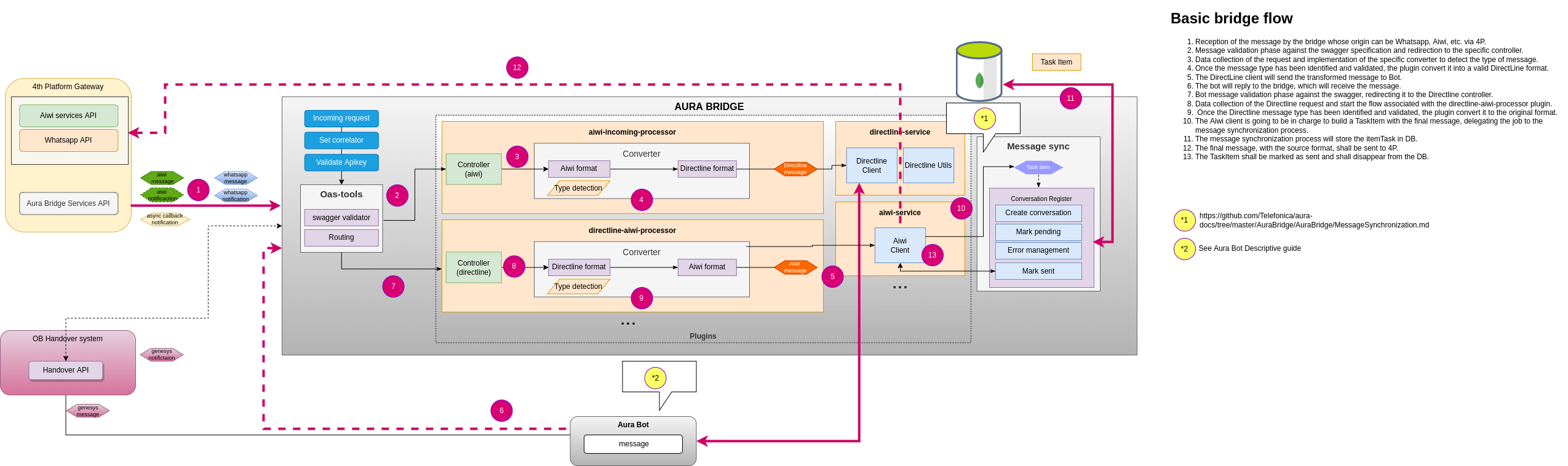
Aura bridge limitations for Whatsapp channels
-
Facebook does not have Service-Level Agreements (SLA) in their APIs, thus messages managed by aura-bridge could suffer delay in their response times.
-
If no ACK is received for the message sent, aura-bridge will wait until AURA_QUEUE_MANAGER_SENT_MESSAGE_TTL (in milliseconds) is met and this could cause a delay in the next message response.
-
If an ACK is received, it can have the following statues:
export enum StatusType {
    // Message the user sent to your business was deleted by the user.
    Deleted = 'deleted',
    // Message sent by your business was delivered to the user's device
    Delivered = 'delivered',
    // Message sent by your business failed to send
    Failed = 'failed',
    // Message sent by your business was read by the user
    Read = 'read',
    // Message sent by your business was received by the server
    Sent = 'sent',
    // Indicates an item in a catalog is not available or does not exist.
    Warning = 'warning'
}
Each one of this states is obtained through a new ACK, and by rule we receive from one to two, but this may change due to its dependency with WhatsApp Business API.
Aura bridge outbound
aura-bridge-outbound is a component which shares the same logical implementation as aura-bridge, with the main distinction lying in the differences in its configuration, which implies a deployment specialization.
Its main mission is focused on returning the responses of aura-groot to the users and leveraging load for aura-bridge
ℹ️ aura-bridge and aura-bridge-outbound share the same make-up process. Further information in aura-bridge make-up
As aura-bridge and aura-bridge-outbound work together, the configuration of both components must be consistent. Further information in aura-bridge environment variables.
Functionality
aura-bridge-outbound is in charge of sending the responses to the corresponding channel callback. For WhatsApp channels, the default callback is Kernel WhatsApp API implementation.
In Aura distributed architecture, this component also works as a translator for aura-groot, but the other way round as aura-bridge does: it translates the Direct Line formatted responses from aura-groot into the corresponding format for each channel (WhatsApp, etc.) and also implements the corresponding protocol for each channel.
ℹ️ aura-bridge and aura-bridge-outbound environment variable AURA_BRIDGE_ENDPOINT should point to internal network (Ex. http://aura-bridge-outbound:8045). Further information about these variables can be found in aura-bridge environment variables.
Sequence diagram
sequenceDiagram
    Channel->>+Aura Bridge: Channel sends a message to bridge.
    Aura Bridge->>+Aura Groot: AURA_BRIDGE_ENDPOINT as serviceUrl variable points to Aura Bridge Outbound, bridge sends the message to groot.
    Aura Groot->>+Aura Bridge Outbound: Groot processes message and sends converted message to outbound.
    Aura Bridge Outbound-->>-Channel: Processed message is sent back to Channel.
ℹ️ Note that message’s information is synchronized between aura-bridge and aura-bridge-outbound due to their shared cache.
4.1 - Architecture
Aura bridge architecture
Description of Aura bridge general architecture at the level of components
Introduction
aura-bridge architecture is designed based on three fundamental components:
-
aura-bridge: It is identified as the core component of the aura-bridge. It is in charge of starting the basic functionality modules, loading the plugins and starting the expressjs server.
-
aura-bridge-common: It can be defined as an SDK (Software Development Kit) to be able to develop a plugin.
-
aura-bridge-plugin. Component that provides functionality to aura-bridge. This component works the same way as a service in an architecture oriented to microservices (isolated, small and self-contained).
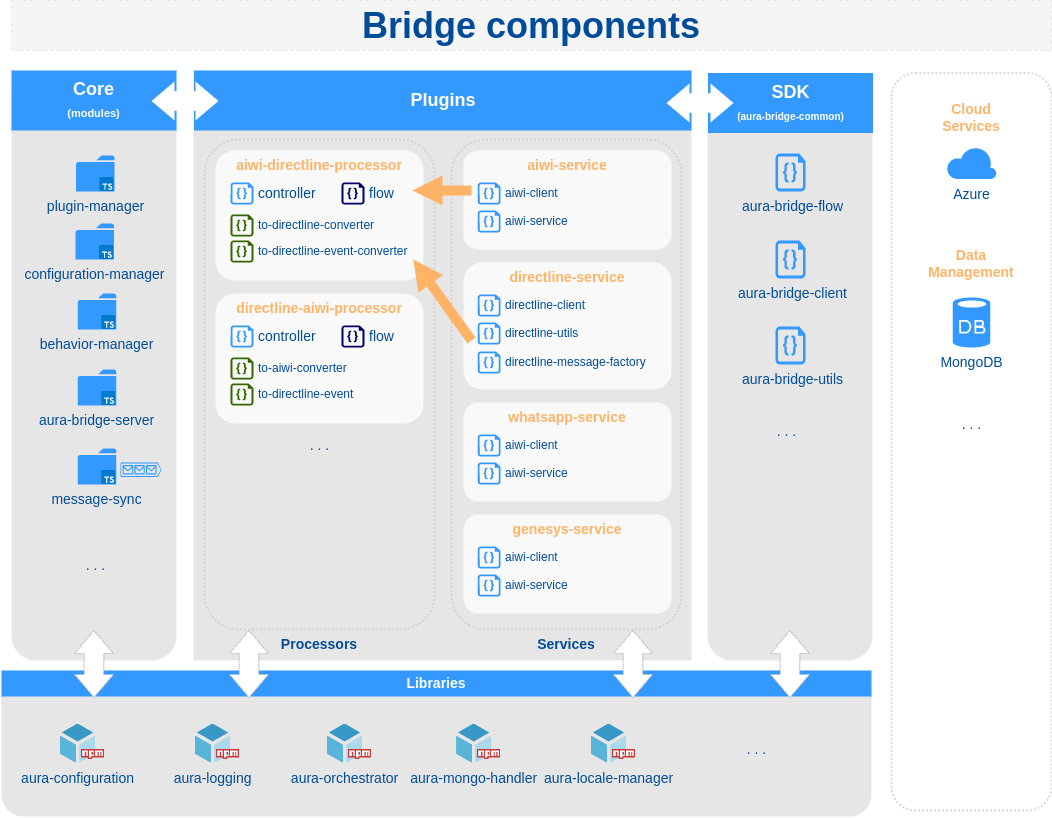
Aura bridge
As mentioned above, it is the core of the system and can work without the need for any plugin.
Source code structure
src
├── cache               # Two level cache module
├── config              # Configuration manager module
├── controllers         # Generic and metric controllers (oastool)
├── make                # Aura bridge make up
├── message-sync        # Queue management system
├── middlewares         # Express middlewares
├── modules             # Bridge modules: behavior-manager, plugin-manager
└── utils               # Bridge utilities: prometheus-utils
Aura bridge common
aura-bridge-common contains all the necessary utilities in order to develop a new aura-bridge plugin and the models used in these utilities.
Aura bridge plugin
Base class to develop an aura-bridge client.
To implement a new client, it is only necessary to extend the class AuraBridgeClient and implement the sendMessage method.
export class TestClient extends AuraBridgeClient {

    public async sendMessage(message: TestMessage, options: SendMessageOptions): Promise<any> {
      ...
    }
}
If the new aura-bridge client needs to use the OAuth protocol, it is possible to extend the class AuraBridgeClientOAuthTokens and indicate the configuration of OAuth clients, passing the parameter authClients in constructor. In this way, the tokens will be updated automatically.
export class TestOauthClient extends AuraBridgeClientOAuthTokens {
  ...
}
aura-bridge-flow
AuraBridgeFlow allows the generation of a “processor” type plugin in a quickly and standardized way: control of errors, logs, metrics, client retry policies, etc.
As a rule, a “processor” type plugin receives, converts and sends a message to a destination. In case of error, it can send messages to another list of destinations.
sequenceDiagram
    Origin->>+Processor Plugin: Message
    Processor Plugin->>+Processor Plugin: Convert message

    alt ok
        Processor Plugin->>+Destination: Converted message
    end
    opt Extra response
        Processor Plugin->>+Error destination (1): Error message (1)
        Processor Plugin->>+Error destination (2): Error message (2)
    end
aura-bridge-utils
AuraBridgeUtils contains utilities for request information, get generic errors, etc.
aura-bridge plugins
A plugin is a module/component that provides aura-bridge with new functionality and works independently without affecting other existing functionality in the system.
📃 Find here detailed descriptive documentation about aura-bridge plugins.
📃 Find here the guidelines for the generation of a plugin and activation in aura-bridge.
4.2 - Components
Aura bridge components
Description and role of the main Aura Bridge components
Introduction
aura-bridge components are shown in the following schema and described below or in specific documents.
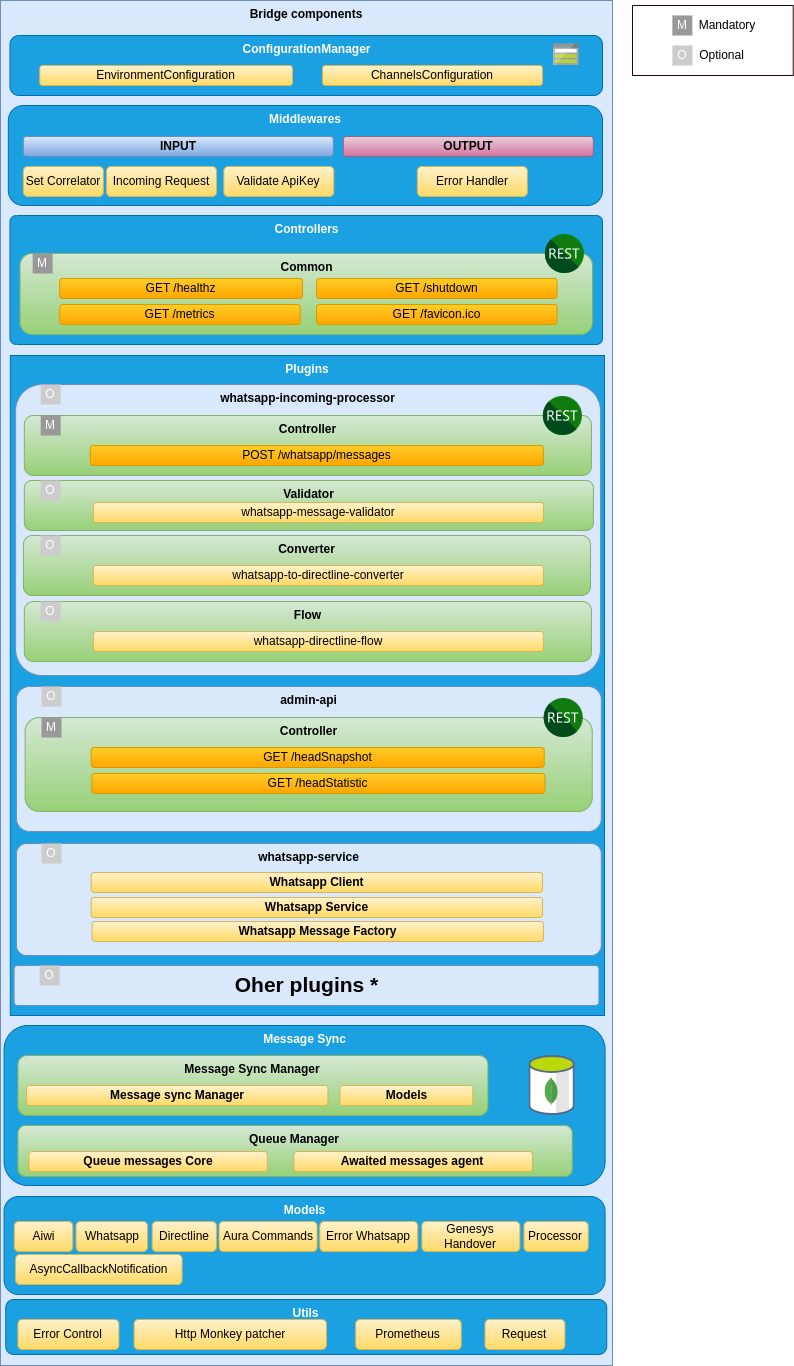
Server
The web server is implemented using express, that is the main web framework for nodeJS. It uses openapi-backend on top of Express to allow handling the OpenAPI v3 file.
It is in charge of setting up all the rest of the components that are needed during a request processing, as well as reading the before mentioned swagger file and setting up all the routes defined in it.
Access here to aura-bridge APIs definition.
Middlewares
Each route published in the API definition file is handled by a controller, but before a request lands on its controller, it goes through a series of middlewares, that provides some common steps needed by all the controllers of the server, such as: request authorization, request validation, common parameters extraction, logging, metrics initialization, etc.
Plugins
aura-bridge is composed of plugins, which provide functionality to the bridge.
Find complete information regarding this component in Aura bridge plugins.
Message syncer
One of the main features of aura-bridge is to be able to keep the order of the messages sent to the user, to assure that they are rendered in the correct order, so they are understandable by the users.
The component in charge of guaranteeing this order is call message syncer. It is an internal queue message system that lays on a two-level cache: a local one, that improves performance, and a remote one, to provide consistency.
Know the the detailed process for response messages synchronization managed by the message syncer.
Metrics
Aura metrics system is based on Prometheus that is an open-source systems monitoring and alerting toolkit originally built at SoundCloud.
Prometheus service pools every component to get the metrics generated during the last time period. Every component counts on a private endpoint (not accessible from internet) called /metrics where Prometheus requests the metrics.
For further information about metrics, read Metrics in aura-bridge.
4.2.1 - Plugins
Aura bridge plugins
Aura bridge plugins are components that provide different functionalities to the bridge
Introduction
aura-bridge is composed of plugins, which provide functionality to the bridge. Plugins work independently, the same way as a service in a microservices oriented architecture: isolated, self-contained and without affecting other existing functionalities in the system.
The aura-bridge plugins system also allows an OB to generate new plugins and create an “ad hoc” aura-bridge, with the functionalities required and removing those which are not needed for the OB.
ℹ️ The practical process for the generation of plugins is included in develop a plugin and activate in aura-bridge.
Discover in the current documents detailed information regarding aura-bridge plugins:
Types of plugins
There are different types of plugins:
-
Api. REST services that perform specific tasks not associated with the communication with a channel.
-
Client. These plugins define clients that can be used to communicate with a channel. These clients are normally used by processor plugins.
-
Processor. Plugins in charge of communicating with a channel, transforming the message received from a source channel to a destination channel.
-
Service. Utility plugins to be used by the rest of plugins.
Plugins management
As indicated in the previous section, aura-bridge uses the library@architect/architect for the management of plugins, so it is the architect library that is responsible for managing the dependencies injection in each module.
To create the architect application, aura-bridge uses the PluginManager module (located in the modules/plugin-manager folder). This module starts as the rest of modules at the aura-bridge start-up.
The PluginManager performs the following tasks:
- It starts the architect application with the plugins defined in
plugin-config.json file, located at the root of the aura-bridge component.
- It adds the core modules to the IOC context. See the section modules added by aura-bridge.
- It stores the information of each module defined in the plugins.
An example to define aura-bridge-example-service plugin of the previous section is shown below:
/* file: plugin-config.json */
[
    "./lib/plugins/aura-bridge-example-service",
]
Currently, the plugins are in the src/plugins folder of aura-bridge, but in the future these plugins should be independent libraries and could be charged by library name (for example: @telefonica/aura-bridge-example-service).
Apart from the aura-bridge core environment variables, each plugin can define its own specific variables. Access the document Aura bridge environment variables and find them in the section corresponding to your plugin.
Plugin basic structure
Currently, aura-bridge uses @architect/architect library for plugins management.
A basic plugin must define at least:
- A
package.json file defining the library, like any other JavaScript library, with a plugin section defining which modules it consumes and supplies.
- A source code file that defines the modules that it supplies (
index.ts for example).
The structure of this basic plugin is as follows:
aura-bridge-example-service
├── index.ts
└── package.json
A couple of examples with the content of each file are included below:
/* file: index.ts */
import { PluginType, registerPlugin } from '@telefonica/aura-bridge-common';
import { v4 as uuidv4 } from 'uuid';
import { Services } from './example-consume-services';

export = registerPlugin([
    {
        type: PluginType.Service,       // Plugin service type
        name: 'exampleService',         // Name of the plugin service
        instance: {                     // [provides] Instance that provides the module
            getUniqueId() {
                return uuidv4();
            }
        },
        services: Services              // [consumes] Needed modules are added here
    }
]);
/* file: package.json */
{
    "name": "@telefonica/aura-bridge-example-service",
    "version": "1.0.0",
    "main": "index.js",
    "private": true,
    "plugin": {
        "consumes": [
            "configurationManager"
        ],
        "provides": [
            "exampleService"
        ]
    }
}
The modules specified in the plugin.consumes field define the services that are needed by this plugin. The modules specified in the plugin.provides field define the modules that this plugin offered.
Plugins modules
aura-bridge currently adds three modules that can be used by the different plugins. To use them, it is only necessary to add the package.json dependencies on plugin.consumes (like any other module/component).
- configurationManager: Module with the aura-bridge configuration information.
- auraBridgeCache: Module to manage the aura-bridge cache.
- prometheus: Service for metrics management.
A plugin can provide one or more plugin modules and each plugin module can be of a different type. Each type of module is intended to add a specific functionality to aura-bridge.
The existing types are defined in PluginType, which are described in the following sections.
export enum PluginType {
    Api = 'Api',
    Client = 'Client',
    Processor = 'Processor',
    Service = 'Service'
}
All plugins modules must follow the base Plugin interface:
export interface Plugin {
    /**
     * Plugin module name.
     */
    name: string;
    /**
     * Object where the services that plugin module consume will be injected (IOC).
     */
    services?: unknown;
    /**
     * Plugin module type.
     */
    type?: PluginType;
    /**
     * @hapi/joi schema definition with the variables used by the plugin module.
     */
    configuration?: { [key: string]: any; };
}
API plugin module
Use the aucli tool to generate the scaffolding of an API plugin: aucli bridge generate api
An API plugin module type mainly contains:
- At least one source code file that defines the API plugin module and controllers for each of the operations specified in the swagger definition.
- A
package.json file defining the library, with a plugin section defining which modules it consumes and supplies.
- A
swagger.yaml file that contains a detailed description of the entire API defined by the plugin.
The basic structure for a API plugin module type is as follows:
aura-bridge-example-api
├── index.ts
├── package.json
└── swagger.yaml
A type API module must implement the PluginApi interface:
export interface PluginApi extends Plugin {
    /**
     * List of controllers (Express) defined by the plugin module.
     */
    controller: { [operationId: string]: PluginApiController | ((req: Request, res: Response) => Promise<void>) };
}

export interface PluginApiController {
    /**
     * Is directline processor?
     */
    isDirectlineProcessor?: boolean;
    /**
     * Channel type.
     */
    channelType?: BridgeType;
    /**
     * Express controller function.
     */
    controller: (req: Request, res: Response) => Promise<void>;
    /**
     * Custom error handler.
     */
    errorHandler?: (err: any, request: express.Request, response: express.Response, next: express.NextFunction) => void;
}
A couple of examples with the content of each file are included below:
/* file: index.ts */
import { PluginType, registerPlugin } from '@telefonica/aura-bridge-common';
import { Services } from './example-api-consume-services';

const controller = {
    hello: (req: Request, res: Response) => {
        res.send({ message: 'Hello from example api!' });
    }
}

export = registerPlugin([
    {
        type: PluginType.Api,           // Plugin module type
        name: 'exampleApi',             // Plugin module name
        controller,                     // Controllers definitions (linked to swagger operationId),
                                        // or it is possible to also use the PluginApiController interface
        services: Services,             // [consumes] Needed modules are added here
    }
]);
/* file: package.json */
{
    "name": "@telefonica/aura-bridge-example-api",
    "version": "1.0.0",
    "main": "index.js",
    "private": true,
    "plugin": {
        "consumes": [ ],
        "provides": [
            "exampleApi"
        ]
    }
}
# file: swagger.yaml
openapi: 3.0.0
info:
  title: aura bridge example api
...
paths:
  /example/hello:
   get:
     operationId: hello             # Function name defined in "controller".
     x-router-controller: plugins   # It should always be "plugins".
     responses:
       '200':
         description: OK
         headers: { }
An API module can also define its own error handling and not use the default error handling defined in the bridge core.
Example:
public errorHandler(err: any, request: express.Request, response: express.Response, next: express.NextFunction) {
    const corr = (request as any).correlator;

    let status: number = 200;
    let message: string = 'Accepted request';

    if (err.statusCode === 401) {
        status = err.statusCode;
        message = 'Unauthorized request';
    }

    // An error in swagger validation is simply logged as a warning
    if (err.failedValidation) {
        logger.warning({
            msg: `Bad request on swagger validation. The first error message was: ${err?.validationResult[0]?.message}`,
            stck: err.validationResult, corr,
            step: AuraBridgeStep.Controller
        });
    }

    response.status(status).send({ code: status, message });
}
Client module
Use the aucli tool to generate the scaffolding of a client module: aucli bridge generate client
A client module type mainly contains:
- At least one source code file that defines the client module and the client itself.
- A
package.json file defining the library, with a plugin section defining which modules it consumes and supplies.
The basic structure for a client module type is as follows:
aura-bridge-example-client
├── index.ts
├── package.json
A type client module must implement the PluginClient interface:
export interface PluginClient extends Plugin {
    /**
     * Client instance.
     */
    instance?: any;
    /**
     * Returns a client instance if it must be initiated asynchronously.
     */
    getInstance?: () => any;
}
The instance field or the getInstance method should be used to obtain the client, but not both. If the client does not need to be initiated asynchronously, the client definition in the instance field is the preferred option. If it is necessary to asynchronously start the client, the getInstance method must be used.
A couple of examples with the content of each file are included below:
/* file: index.ts */
import { PluginType, registerPlugin } from '@telefonica/aura-bridge-common';
import { Services } from './example-consume-services';
import { ExampleClient } from './example-client';

export = registerPlugin([
    {
        type: PluginType.Client,
        name: 'ExampleClient',
        instance: new ExampleClient(),
        services: Services
    }
]);
/* file: package.json */
{
    "name": "@telefonica/aura-bridge-example-client",
    "version": "1.0.0",
    "main": "index.js",
    "private": true,
    "plugin": {
        "consumes": [
            "configurationManager"
        ],
        "provides": [
            "ExampleClient"
        ]
    }
}
/* file: example-client.ts */
import { AuraBridgeClient, AuraBridgeRequestInfo, SendMessageOptions } from '@telefonica/aura-bridge-common';
import { AuraLogger } from '@telefonica/aura-logging';
import { Services } from './example-consume-services';

const logger: AuraLogger.AuraBusEmitter = new AuraLogger.AuraBusEmitter('ExampleClient');

export class ExampleClient extends AuraBridgeClient {
    public constructor() {
        super('ExampleClient', Services.configurationManager.environmentConfiguration);
    }

    public async sendMessage(message: any, options: SendMessageOptions): Promise<void> {
        const { corr }: Partial<AuraBridgeRequestInfo> = options.requestInfo;
        // TODO: Implement the message sending logic here.
    }
}
A basic client should only extend the AuraBridgeClient class and implement the sendMessage method. The client can define any other method, but the sendMessage method will be used by the processors to send a message to a destination.
If the client uses the OAuth protocol, it is possible to add the OpenID authorization information to the client and automatically update the access token for the communication. To make use of this functionality, it is necessary that the new client extends from AuraBridgeClientOAuthTokens class instead of AuraBridgeClient class:
/* file: example-client.ts */
import { AuraBridgeClientOAuthTokens, AuraBridgeRequestInfo, SendMessageOptions } from '@telefonica/aura-bridge-common';
import { AuraLogger } from '@telefonica/aura-logging';
import { Services } from './example-consume-services';

const logger: AuraLogger.AuraBusEmitter = new AuraLogger.AuraBusEmitter('ExampleClient');

export class ExampleClient extends AuraBridgeClientOAuthTokens {
    public constructor() {
        super(
            'ExampleClient',
            Services.configurationManager.environmentConfiguration,
            [] // TODO: Add list ClientOAuthInformation here
        );
    }

    public async init(): Promise<void> {
        await this.refreshTokens();    // <-- It is responsible for updating the tokens before it expire.
    }

    public async sendMessage(message: any, options: SendMessageOptions): Promise<void> {
        const { corr }: Partial<AuraBridgeRequestInfo> = options.requestInfo;
        // TODO: Implement the message sending logic here.
    }
}
In addition to the refreshTokens method, the AuraBridgeClientOAuthTokens class defines the following methods:
addOpenIdClients: Add new clients to the list to update your tokens.getTokenByClientId: Get token by client id.stopRefreshTokens: Stop refresh client tokens.
Processor module
Use the aucli tool to generate the scaffolding of a processor module: aucli bridge generate processor.
As a general rule, a processor is responsible for converting an input message (from a “source” channel) to an output message (that will be sent to a “destination” channel).
Processor flow
To help with the task of generating a processor (in addition to the aucli tool) , the aura-bridge-common library provides the AuraBridgeFlow class that allows to define the converter and the client that will be used to convert and send the incoming message to the destination in a simple and declarative way.
const flow: BridgeFlow = {
    source: {                               // Source from where the request is initiated
        type: BridgeNodeType.Directline
    },
    destination: {                          // Destination where the request will be redirected
        type: BridgeNodeType.TestModel,
        converter: DirectlineToTestModelConverter,
        client: services.testModelClient,
        clientOptions: { queue: { bridgeFlowName: directlineToTestModelFlow.name } }
    },
    onError: {
        // ...
    }
};
In the same way, in case an exception occurs, it is possible to define the list of channels that should be informed.
const flow: BridgeFlow = {
    source: {
        // ...
    },
    destination: {
        // ...
    },
    onError: {                          // How and which channels should be informed on exception
        destinations: [
            {
                type: BridgeNodeType.TestModel,
                converter: ErrorToTestModelApiConverter,
                client: services.testModelClient,
                decode: TestModelDestinationResponseError
            },
            {
                type: BridgeNodeType.Directline,
                converter: ErrorToDirectlineEventConverter,
                client: services.directlineClient,
                decode: directlineDestinationResponseError
            }
        ]
    }
};
Declaring a destination
The destination field must follow the interface BridgeDestination.
export interface BridgeDestination extends BridgeNode {
    /**
     * Client instance that will be used to send the message to the destination
     */
    client: AuraBridgeClient;
    /**
     * Client options. System to send the message used: queue, retries, etc
     */
    clientOptions?: SendMessageClientOptions;
    /**
     * Converter to use
     */
    converter?: AuraBridgeMessageConverter;
    /**
     * Relationship between exception and response error
     */
    decode?: ExceptionResponseError[];
    /**
     * Optional condition for a destination to be executed
     */
    condition?: (error?: Error, lastError?: Error, requestInfo?: AuraBridgeRequestInfo, message?: any) => boolean;
}
The process to send a message using the previous definition is shown below:
If the indicated condition is true, the message will be converted (using converter) and sent (using client with options defined in clientOptions field). If during the process there is an error that throws an exception, all the destinations defined in onError.destinations field will be executed in order in the same way.
The following diagram shows the execution sequence:
flowchart LR
    subgraph source
        A[Message]
    end
    subgraph destination
    direction LR
        A[Message] --> Check{check condition}
        Check -->|True| Converter[Converter]
        Check -->|False| End[end]
        Converter --> |Converted message| Client[Client]
        help[Send message using clientOptions]
    end
When an exception is thrown, all the destinations defined in onError.Destinations are processed, passing both the original message and the exception occurred:
flowchart LR
    subgraph onError information
        Message[Message]
        Exception[Exception message]
    end
    subgraph onError destinations
    direction LR
        Message[Message] --> CheckOnError{check condition}
        Exception --> CheckOnError{check condition}
        CheckOnError -->|True| ConverterOnError[Converter]
        CheckOnError -->|False| EndOnError[Next destination]
        ConverterOnError --> |Converted message| ClientOnError[Client]
        helpOnError[Send message using clientOptions]
    end
Sending a specific message on exception
When an exception occurred during the execution of a flow (BridgeFlow), it is possible to decode the exception in a specific error message for each destination defined in onError.destinations field.
The list that relates the exception with each message is added in the field decode of BridgeDestination. Each of these elements must implement the following interface:
/**
 * @interface ExceptionResponseError
 */
export interface ExceptionResponseError {
    /**
     * Name error from exception
     */
    name?: string;
    /**
     * Message to user key
     */
    messageToUserKey?: string;
    /**
     * Error status from exception
     */
    status?: number;
    /**
     * Error response code
     */
    responseCode?: string;
    /**
     * Response error information
     */
    response: ResponseError;
}
In the following code, the example shows how to send a message with status 500 and message key bridge:error.transform when an error in the converter has occurred:
const exampleResponseError: ExceptionResponseError[] = [
    {
        name: AuraBridgeConverterError.name,
        response: {
            status: StatusCodes.INTERNAL_SERVER_ERROR,
            description: 'Internal bridge error converting input message to output format',
            messageToUserKey: 'bridge:error.transform'
        }
    }
];
Basic structure of the processor module
The processor module type mainly contains:
- At least one source code file that defines the processor plugin module and controllers for each of the operations specified in the swagger definition.
- A
package.json file defining the library, with a plugin section defining which modules it consumes and supplies.
- A
swagger.yaml file that contains a detailed description of the entire API defined by the plugin.
- A source code file that defines the
BridgeFlow.
- A source code file that defines the
AuraBridgeMessageConverter.
The basic structure for a processor plugin module type is as follows:
aura-bridge-example-processor
├── index.ts            # Processor plugin module and controller
├── converter.ts        # Converter (AuraBridgeMessageConverter)
├── flow.ts             # Flow (BridgeFlow)
├── package.json
└── swagger.yaml        # Api definition
A type processor module must implement the PluginProcessor interface:
export interface PluginProcessor extends PluginApi {
    /**
     * List of defined flows.
     */
    flows: BridgeFlow[];
}
In addition to the definition of flows, the same requirements as for an API plugin type are applied.
If the processor plugin must manage the aura-groot response (using DirectLine) for a channel type, it is possible to use the PluginApiController interface to define the controller.
For example:
/* Manage aura-groot response messages for whatsapp channels */
postDirectlineConversationsActivities: {
    isDirectlineProcessor: true,                            // Indicates if it is a directline processor
    channelType: BridgeType.Whatsapp,                      // Channel type
    controller: directlineWhatsappController.controller     // Controller definition
}
In this way, all the messages sent for the WhatsApp type channel to /aura-services/{channelName}/v3/conversations/{conversationId}/activities and
/aura-services/{channelName}/v3/conversations/{conversationId}/activities/{messageId} endpoints will be managed by the defined controller.
⚠️ These endpoints do not need to be defined in the plugin swagger, since they are supplied by the aura-bridge core.
A couple of examples with the content of each file are shown below:
/* file: index.ts */
/* description: Using controller function */

import ...

const controller = {
    exampleNotification: async (req: Request, res: Response) => {
        const env = Services.configurationManager.environmentConfiguration;
        res.status(200).send();
        await AuraBridgeFlow.process(exampleToDirectlineFlow(Services), getRequestInformation(req, env), req.body);
    }
};

export = registerPlugin([
    {
        type: PluginType.Processor,         // Plugin module type
        name: 'exampleProcessor',           // Plugin module name
        controller,                         // Controllers definitions (linked to swagger operationId)
        flows: [exampleToDirectlineFlow],   // Flows
        services: Services                  // [consumes] Needed modules are added here
    }
]);

/* file: index.ts */
/* description: Using PluginApiController interface */

import ...

const controller = {
    // This plugin manages all the requests from aura-groot for the testModel channel type destination
    postDirectlineConversationsActivities: {
        isDirectlineProcessor: true,
        channelType: BridgeType.TestModel,
        controller:  async (req: Request, res: Response) => {
            ...
        }
    }
};

export = registerPlugin([
    {
        type: PluginType.Processor,         // Plugin module type
        name: 'directlineTestModelProcessor',    // Plugin module name
        controller,                         // Controllers definitions (linked to swagger operationId)
        flows: [exampleToDirectlineFlow],   // Flows
        services: Services                  // [consumes] Needed modules are added here
    }
]);
/* file: converter.ts */
import ...

export class ExampleConverter extends AuraBridgeMessageConverter {
    public static async message(incomingMessage: ExampleMessage) {
        // Logic of the converter here
    }
}
/* file: flow.ts */
/**
 * Flow: example to directline.
 *
 *
 * [Example] ─────> (bridge) ───(ok)──────> [Directline]
 *
 * @returns {BridgeFlow} flow
 */
export function asyncCallbackToDirectlineFlow(services: any): BridgeFlow {
    const flow: BridgeFlow = {
        source: {
            type: BridgeNodeType.Example
        },
        destination: {
            type: BridgeNodeType.Directline,
            converter: ExampleConverter,
            client: services.directlineClient,
            clientOptions: { retries: {} }
        },
        onError: {
            destinations: [
                ...
            ]
        }
    };

    return flow;
}
/* file: package.json */
{
    "name": "@telefonica/aura-bridge-example-processor",
    "version": "1.0.0",
    "main": "index.js",
    "private": true,
    "plugin": {
        "consumes": [ ... ],
        "provides": [
            "exampleProcessor"
        ]
    }
}
# file: swagger.yaml
openapi: 3.0.0
info:
  title: aura bridge example processor
...
paths:
  /example/notification:
   get:
     operationId: exampleNotification       # Function name defined in "controller".
     x-router-controller: plugins           # It should always be "plugins".
     responses:
       '200':
         description: OK
         headers: { }
Service module
Use the aucli tool to generate the scaffolding of a service plugin: aucli bridge generate service
A service plugin module is a set of utilities that can be reused by the rest of plugins and mainly contains:
- At least one source code file that defines the service plugin module and the service itself.
- A
package.json file defining the library, with a plugin section defining that modules consume and supplies.
The basic structure for a service plugin module type is as follows:
aura-bridge-example-service
├── index.ts
└── package.json
A type service module must implement the PluginService interface:
export interface PluginService extends Plugin {
    /**
     * Service instance.
     */
    instance?: any;
    /**
     * Returns a service instance if it must be initiated asynchronously.
     */
    getInstance?: () => any;
}
The instance field or the getInstance method should be used to obtain the service, but not both. If the service does not need to be initiated asynchronously, the service definition in the instance field is the preferred option. If it is necessary to asynchronously start the service, the getInstance method must be used.
A couple of examples with the content of each file are shown below:
/* file: index.ts */
import { PluginType, registerPlugin } from '@telefonica/aura-bridge-common';
...

const exampleService = {
    isActionMessage: (message: ExampleMesageModel) => {
        return !!message?.channelData?.customData?.action;
    }
}

export = registerPlugin([
    {
        type: PluginType.Service,       // Plugin module type
        name: 'exampleService',         // Plugin module name
        instance: exampleService,       // Service instance
        services: Services              // [consumes] Needed modules are added here
    }
]);
/* file: package.json */
{
    "name": "@telefonica/aura-bridge-example-service",
    "version": "1.0.0",
    "main": "index.js",
    "private": true,
    "plugin": {
        "consumes": [ ],
        "provides": [
            "exampleService"
        ]
    }
}
Plugins in specific channels
There is a relationship between a channel and the different plugins that give full support to the channel in aura-bridge. This is because plugins can supply: services, incoming messages management, output messages management, etc.
Therefore, to support a channel like WhatsApp, several plugins may be necessary and knowing that relationship allows to enable/disable the support to the complete channel in aura-bridge correctly.
Plugins for WhatsApp channel
| Plugin |
Dependencies |
Core dependencies |
| whatsapp-incoming-processor |
whatsapp-service, directline-service |
configurationManager, prometheus |
| directline-whatsapp-processor |
whatsapp-service, directline-service |
configurationManager |
| directline-whatsapp-service |
whatsapp-service, directline-service |
configurationManager |
| whatsapp-service |
|
configurationManager, prometheus |
| directline-service |
|
configurationManager, auraBridgeCache |
How to disable the WhatsApp channel
To disable the WhatsApp channel, it is necessary to take into account the following:
-
The whatsapp-incoming-processor and directline-whatsapp-processor plugins are not dependent on any other plugin, so they can be removed from the plugin-config.json file.
-
The directline-whatsapp-service, whatsapp-service and directline-service plugins can be used by other plugins and can only be removed if they are not needed.
Plugins for async-callback
| Plugin |
Dependencies |
Core dependencies |
| async-callback-directline-processor |
directline-service |
configurationManager, prometheus |
How to disable the async-callback functionality
The async-callback-directline-processor plugin is not dependent on any other plugin, so it can be removed from the plugin-config.json file to completely disable the async-callback functionality.
Plugins for Genesys
How to disable the Genesys functionality
The genesys-directline-processor plugin is not dependent on any other plugin, so it can be removed from the plugin-config.json file to completely disable the Genesys functionality.
4.2.1.1 - Global plugins catalog
Aura bridge global plugins catalog
Current global plugins developed in Aura bridge by the Aura Platform Team
Global plugins repository
Check the Github global plugins repository to see the currently available plugins in aura-bridge.
Aura Platform Team is progressively documenting each plugin within this section. The already documented ones include the corresponding link below.
-
admin-api plugin
-
async-callback-directline-processor plugin
-
auraline-conversation-api plugin
-
auraline-incoming-processor plugin
-
auraline-service plugin
-
aurapush-incoming-processor plugin
-
aurapush-sendfeedback-service plugin
-
directline-auraline-processor plugin
-
directline-rcs-processor plugin
-
directline-service plugin
-
directline-whatsapp-processor plugin
-
directline-whatsapp-service plugin
-
genesys-directline-processor plugin
-
rcs-incoming-processor plugin
-
rcs-service plugin
-
whatsapp-incoming-processor plugin
-
whatsapp-service plugin
4.2.1.2 - auraline-conversation-api plugin
auraline-conversation-api plugin
Technical description of auraline-conversation-api plugin
Introduction
auraline-conversation-api plugin allows you to generate conversation identifiers together with an associated token to be able to communicate through the new Auraline service. This service works similarly to Microsoft Direct Line.
It is mandatory to load this plugin if any channel wants to communicate with aura-bot through Auraline.
Based on official Direct Line API 3.0
Open a new conversation
Before establishing a communication between a client and aura-bot through the Auraline channel, it is necessary to obtain a conversation ID and a token associated to it. This token will be used as APIKey to send messages to the user together with the conversation ID created.
HTTP
POST https://bridge-url.com/aura-services/v1/auraline/conversations
Authorization: APIKEY [Secret]
Conversation Response Model (Create or Update Token)
| Property |
Type |
Description |
| conversationId |
string |
The identification of conversation created or updated (refresh token). |
| token |
string |
Token generated for conversation. It is temporary and can be refreshed. Use with “APIKEY” string in the Authorization HTTP header. |
| expires_in |
number |
Time in seconds for the duration of the token. If you want to refresh it, it must be done before this time has elapsed. It will be set based on the value of AURALINE_CONVERSATION_EXPIRATION_TIME |
The following snippets provide an example of the start conversation request and response.
-
Request
HTTP
POST https://bridge-url.com/aura-services/v1/auraline/conversations
Authorization: APIKEY iaJrC8xpy8qbOF5xnR2vtCX7CZj0LdjAPGfiCpg4Fv0y8qbOF5xPGfiCpg4Fv0y8qqbOF5x8qbOF5xn
-
Response
HTTP/1.1 201 Created
[other headers]
BODY
{
  "conversationId": "X7CZj0LdjAPGfiCpg4Fv",
  "token": "RCurR_XV9ZA.cwA.BKA.iaJrC8xpy8qbOF5xnR2vtCX7CZj0LdjAPGfiCpg4Fv0y8qbOF5xPGfiCpg4Fv0y8qqbOF5x8qbOF5xn",
  "expires_in": 1800,
}
Refresh a Conversation Token
A conversation token can be refreshed an unlimited number of times, as long as it has not expired, as an expired token cannot be refreshed.
To refresh a conversation token, issue this request:
HTTP
POST https://bridge-url.com/aura-services/v1/auraline/conversations/{conversationid}/refresh
Authorization: APIKEY [TOKEN_TO_BE_REFRESHED]
The following snippets provide an example of the Refresh Token request and response.
-
Request
HTTP
POST https://bridge-url.com/aura-services/v1/auraline/conversations/X7CZj0LdjAPGfiCpg4Fv/refresh
Authorization: APIKEY RCurR_XV9ZA.cwA.BKA.iaJrC8xpy8qbOF5xnR2vtCX7CZj0LdjAPGfiCpg4Fv0y8qbOF5xPGfiCpg4Fv0y8qqbOF5x8qbOF5xn
-
Response
If the request is successful, the response contains:
- A new token that is valid for the same conversation as the previous token.
- An
expires_in value that indicates the number of seconds until the new token expires.
For the new token to remain useful, you must refresh the token before it expires:
HTTP
HTTP/1.1 200 OK
[other headers]
BODY
{
  "conversationId": "X7CZj0LdjAPGfiCpg4Fv",
  "token": "RCurR_XV9ZA.cwA.BKA.y8qbOF5xPGfiCpg4Fv0y8qqbOF5x8qbOF5xniaJrC8xpy8qbOF5xnR2vtCX7CZj0LdjAPGfiCpg4Fv0",
  "expires_in": 1800
}
4.2.1.3 - auraline-incoming-processor plugin
auraline-incoming-processor plugin
Technical description of auraline-incoming-processor plugin
Introduction
This plugin receives requests and transforms them to Auraline format to send them to aura-groot.
The specific environment variables for this plugin are located at auraline-incoming-processor plugin configuration.
Consumes components (IOC)
| Name |
Type |
Description |
| auralineClient |
PluginType.Service |
Auraline client |
| configurationManager |
PluginType.Service |
Configuration manager |
| directlineClient |
PluginType.Service |
DirectLine client |
| directlineService |
PluginType.Service |
Services and utilities for Directline channel |
Provides components (IOC)
| Name |
Type |
Description |
| auraline-directline-processor |
PluginType.Processor |
Manage requests |
| auraline-status-processor |
PluginType.Processor |
Manage status |
Controller
This plugin sets the endpoints it supports.
| Operation id |
Path |
Description |
| postAuralineMessages |
/aura-services/v1/auraline/conversations/{conversationId}/activities |
Manage the messages sent |
| postAuralineStatus |
/aura-services/v1/auraline/conversations/{conversationId}/activities/{activityId}/status |
Manage the status |
auraline-directline-processor flow definition
To process a message, the auraline-directline-processor uses AuraBridgeFlow with the following definition:
    const flow: BridgeFlow = {
        name: 'auralineToDirectlineFlow',
        source: {
            type: BridgeNodeType.Auraline
        },
        destination: {
            type: BridgeNodeType.Directline,
            converter: AuralineToDirectlineConverter,
            client: services.directlineClient,
            clientOptions: { retries: {} }
        },
        onError: {
            destinations: [
                {
                    type: BridgeNodeType.Auraline,
                    converter: AuralineToAuralineApiConverter,
                    client: services.auralineClient,
                    decode: auralineDirectlineResponseError
                },
                {
                    type: BridgeNodeType.Directline,
                    converter: AuralineToDirectlineEventConverter,
                    client: services.directlineClient
                }
            ]
        }
    };
According to the flow definition, AuraBridgeFlow tries to process, convert and send (using retries) the message to aura-groot using the DirectLine client.
If some type of error occurs during this process, an event message will be sent to aura-groot and client with the error information.
flowchart LR
    subgraph Flow
        direction LR
        B(Controller) --> C(Converter)
    end
    A(Client) -->|message| Flow
    Flow -->|ok| D(Bot Directline)
    Flow -->|error| E(Bot Directline Event)
    Flow -->|error| F(Client message)
auraline-directline-processor message conversion
The plugin uses two converters to transform messages to DirectLine format: AuralineToDirectlineConverter and AuralineToDirectlineEventConverter.
AuralineToDirectlineConverter
Main converter, in charge of transforming messages to DirectLine format messages using the directline-message-factory-v3 service of directline-service plugin.
AuralineToDirectlineEventConverter
It makes the conversion to a DirectLine event message if an error in the process has occurred.
Auraline status controller
This controller handles Auraline status requests and validate the APIKey fields. After that, it returns the status and if there
is not an error, it passes the message to Auraline status processor.
Auraline status processor
This processor handles the status, deletes the message in queues and log errors if received.
4.2.1.4 - aurapush-sendfeedback-service
Aura Push send feedback service
Description of Aura Push send feedback service
Description
aurapush-sendfeedback-service plugin contains the services and utilities to send information to the aura-push service.
To send this information an event consumer is used: aurapush-sendfeedback-consumer. This consumer listens for the following events:
- whatsapp.ackMessageReceived: Event emitted when a new ack message is received.
- core.flow.error.directlineToWhatsappFlow: Event emitted when an error occurs during sending a message from Direct Line to WhatsApp.
sequenceDiagram
    alt whatsapp.ackMessageReceived
        AuraPushFeedbackConsumer->>+onAckMessageReceived: ACK
    end
    alt core.flow.error.directlineToWhatsappFlow
        AuraPushFeedbackConsumer->>+onCoreErrorDirectlineToWhatsappFlow: Core flow error
    end
        onAckMessageReceived->>+auraPushFeedbackClient: ACK and path
        onCoreErrorDirectlineToWhatsappFlow->>+auraPushFeedbackClient: Core flow error and path
        auraPushFeedbackClient->>+Aura Push: Message
⚠️ For Brazil OB, the aurapush-sendfeedback-service plugin requires a specific configuration in the installer aurak8s.
Consumes components (IOC)
| Name |
Type |
Description |
| configurationManager |
PluginType.Service |
Configuration manager |
| eventService |
PluginType.Service |
Bridge event management service |
Provides components (IOC)
| Name |
Type |
Description |
| auraPushSendFeedbackService |
PluginType.Service |
Services and utilities for AuraPush send message feedback |
| auraPushFeedbackClient |
PluginType.Service |
Aura push feedback client |
4.2.1.5 - directline-auraline-processor plugin
directline-auraline-processor plugin
Technical description of directline-auraline-processor plugin
Introduction
This plugin receives requests from aura-groot and send them to Auraline callback.
Consumes components (IOC)
| Name |
Type |
Description |
| auralineClient |
PluginType.Service |
Auraline client |
| configurationManager |
PluginType.Service |
Configuration manager |
| directlineService |
PluginType.Service |
Services and utilities for Directline channel |
Provides components (IOC)
| Name |
Type |
Description |
| directlineAuralineProcessor |
PluginType.Processor |
Manage Auraline responses |
auraline-directline-processor flow definition
To process a message, the auraline-directline-processor uses AuraBridgeFlow with the following definition:
    const flow: BridgeFlow = {
        name: 'directlineToAuralineFlow',
        source: {
            type: BridgeNodeType.Directline
        },
        destination: {
            type: BridgeNodeType.Auraline,
            converter: DirectlineToAuralineConverter,
            client: services.auralineClient,
            clientOptions: { queue: { bridgeFlowName: directlineToAuralineFlow.name } }
        },
        onError: {
            destinations: [
                {
                    type: BridgeNodeType.Auraline,
                    converter: ErrorToAuralineApiConverter,
                    client: services.auralineClient,
                    decode: AuralineDestinationResponseError
                }
            ]
        }
    };
According to the flow definition, AuraBridgeFlow tries to process, convert and send (using queues) the message to the
Auraline callback endpoint defined in the callbackOptions channel configuration property, within the ResponseOptions model.
If some type of error occurs during this process and is marked as recoverable, certain retries will be executed. If after all,
the error continues, an error message will be sent to the endpoint.
AuralineToDirectlineConverter
Main converter, in charge of transforming DirectLine activities to Auraline format. The response messages will have the
following format:
{
        "activities": [
            {
                "type": "message",
                "serviceUrl": "http://aura-bridge-outbound:8045/aura-services/auraline",
                "channelId": "c71dc728-5fe2-4735-927d-0c419b35ec59",
                "conversation": {
                    "id": "4nc3u4hn"
                },
                "recipient": {
                    "id": "user1"
                },
                "text": "Hi!",
                "inputHint": "acceptingInput",
                "channelData": {
                    "hasMoreMessages": false,
                    "correlator": "53c42d06-3be1-48c4-a6c9-afa6e76d54fc"
                },
                "replyToId": "8vvicc88",
                "id": "8vvicc88|0001"
            }
        ],
        "correlator": "53c42d06-3be1-48c4-a6c9-afa6e76d54fc",
        "timestamp": "2023-11-08T12:24:36.420Z",
        "id": "8vvicc88",
        "to": "user1",
        "conversationId": "4nc3u4hn"
    }
Inside the activities array, all activities will have a unique identifier (messageId|XXXX) that the client should store to
later send the ack to Auraline.
4.2.1.6 - directline-rcs-processor plugin
directline-rcs-processor plugin
Technical description of directline-rcs-processor plugin
Introduction
This plugin receives requests from aura-groot and send them to RCS callback.
Consumes components (IOC)
| Name |
Type |
Description |
| rcsClient |
PluginType.Service |
RCS client |
| directlineClient |
PluginType.Service |
Directline client |
| configurationManager |
PluginType.Service |
Configuration manager |
| directlineService |
PluginType.Service |
Services and utilities for Directline channel |
Provides components (IOC)
| Name |
Type |
Description |
| directlineRcsProcessor |
PluginType.Processor |
Manage RCS responses |
rcs-directline-processor flow definition
To process a message, the directline-rcs-processor uses AuraBridgeFlow with the following definition:
    const flow: BridgeFlow = {
        name: 'directlineToRcsFlow',
        source: {
            type: BridgeNodeType.Directline
        },
        destination: {
            type: BridgeNodeType.Rcs,
            converter: DirectlineToRcsConverter,
            client: services.rcsClient,
            clientOptions: { queue: { bridgeFlowName: directlineToRcsFlow.name } }
        },
        onError: {
            destinations: [
                {
                    type: BridgeNodeType.Rcs,
                    converter: ErrorToRcsApiConverter,
                    client: services.rcsClient,
                    decode: RcsDestinationResponseError
                },
                {
                    type: BridgeNodeType.Directline,
                    converter: ErrorToDirectlineEventConverter,
                    client: services.directlineClient,
                    decode: RcsDestinationResponseError
                }
            ]
        }
    };
According to the flow definition, AuraBridgeFlow tries to process, convert and send (using queues) the message to the Google RCS messages endpoint. If some type of error occurs during this process and is marked as recoverable, certain retries will be executed. If after all, the error continues, an error message will be sent to RCS and an error event will be sent to aura-groot.
rcsToDirectlineConverter
Main converter, in charge of transforming DirectLine activities to RCS format.
This converter only handles activities with an attachment type
application/vnd.telefonica.aura.rcs.message with content in RCS format.
{
  "type": "message",
  "serviceUrl": "http://localhost:8045/aura-services/javiagent",
  "channelId": "f7fd1021-41cd-588a-a461-387cc24be225",
  "from": {},
  "conversation": {
    "id": "d152aee9-1aaa-5b54-95a5-79352eee2e45"
  },
  "recipient": {
    "id": "34659949469",
    "name": "javiagent_xxxxxx_agent@rbm.goog"
  },
  "text": "Text doesn't matter",
  "inputHint": "acceptingInput",
  "attachments": [
    {
      "contentType": "application/vnd.telefonica.aura.rcs.message",
      "content": {
        "contentMessage": {
          "richCard": {
            "carouselCard": {
              "cardWidth": "MEDIUM",
              "cardContents": [
                {
                  "title": "Card #1",
                  "description": "The description for card #1",
                  "suggestions": [
                    {
                      "reply": {
                        "text": "Card #1",
                        "postbackData": "{\\"intent\\": \\"intent.factotum-test.rcs-formats\\",\\"entities\\":[{\\"type\\":\\"type\\",\\"entity\\":\\"postback\\"},{\\"type\\":\\"data\\",\\"entity\\":\\"card 1\\"}]}"
                      }
                    }
                  ],
                  "media": {
                    "height": "MEDIUM",
                    "contentInfo": {
                      "fileUrl": "https://storage.googleapis.com/kitchen-sink-sample-images/cute-dog.jpg",
                      "forceRefresh": "false"
                    }
                  }
                },
                {
                  "title": "Card #2",
                  "description": "The description for card #2",
                  "suggestions": [
                    {
                      "reply": {
                        "text": "Card #2",
                        "postbackData": "{\\"intent\\": \\"intent.factotum-test.rcs-formats\\",\\"entities\\":[{\\"type\\":\\"type\\",\\"entity\\":\\"postback\\"},{\\"type\\":\\"data\\",\\"entity\\":\\"card 2\\"}]}"
                      }
                    }
                  ],
                  "media": {
                    "height": "MEDIUM",
                    "contentInfo": {
                      "fileUrl": "https://storage.googleapis.com/kitchen-sink-sample-images/elephant.jpg",
                      "forceRefresh": "false"
                    }
                  }
                }
              ]
            }
          }
        }
      }
    }
  ],
  "channelData": {
    "correlator": "73b72144-7247-4876-880b-57b63efa323e",
    "version": "3",
    "status": {
      "code": "SUCCESS",
      "message": "Success"
    },
    "payload": {
      "bridge": {
        "channelId": "f7fd1021-41cd-588a-a461-387cc24be225"
      }
    }
  },
  "replyToId": "11879060267953086"
}
If an attachment of this type is not present, a simple message with the value of the activity.text field will be sent to the user.
4.2.1.7 - directline-service plugin
directline-service plugin
Technical description of directline-service plugin
Introduction
directline-service plugin contains the services and utilities related to message creation for Microsoft Directline v3. This plugin also contains the Directline client to send messages to aura-root.
The specific environment variables for this plugin are located at directline-service plugin configuration.
Consumes components (IOC)
| Name |
Type |
Description |
| configurationManager |
PluginType.Service |
Configuration manager |
| auraBridgeCache |
PluginType.Service |
Cache for ack messages |
Provides components (IOC)
| Name |
Type |
Description |
| directlineClient |
PluginType.Client |
Direct Line client |
| directlineService |
PluginType.Service |
Services and utilities for Direct Line protocol |
directlineClient plugin
The directlineClient class extends from the AuraBridgeClient and allows sending requests to aura-root.
directlineService
The directlineService class provides utilities related to the Directline client.
messageFactory for channelData v1 (DirectlineMessageFactory): Factory to create different types of Directline messages with channelData v1.messageFactory for channelData v3 (DirectlineMessageFactoryV3): Factory to create different types of Directline messages with channelData v3.
4.2.1.8 - directline-whatsapp-service plugin
directline-whatsapp-service plugin
Technical description of directline-whatsapp-service plugin
Introduction
directline-whatsapp-service plugin contains the services and utilities for directline-whatsapp message conversion.
The specific environment variables for this plugin are located at directline-whatsapp-service configuration.
Consumes components (IOC)
| Name |
Type |
Description |
| configurationManager |
PluginType.Service |
Configuration manager |
| prometheus |
PluginType.Service |
Metrics client for prometheus |
| whatsappService |
PluginType.Service |
Services and utilities for WhatsApp channel |
Provides components (IOC)
| Name |
Type |
Description |
| directlineWhatsappService |
PluginType.Service |
Services and utilities for Direct Line - WhatsApp message conversion |
whatsappService
The DirectlineWhatsappService class provides the following utilities:
-
directlineToWhatsappConverter: It converts DirectLine messages (DirectlineMessageModel) to WhatsApp messages (WhatsappMessageResponseModel).
-
directlineWhatsappUtils: Utilities to help with message conversion: DirectLine to WhatsApp.
Converting Direct Line messages to WhatsApp models
The DirectlineToWhatsappConverter class extends from AuraBridgeMessageConverter and converts DirectLine messages to WhatsApp models.
To make this conversion, the DirectlineToWhatsappConverter differences between the following types of messages depending on the DirectLine message content:
| Type |
Direct Line message content |
text |
Direct Line messages that do not contain attachments |
list |
Direct Line messages that contain more than one attachment and the attachmentLayout field value is list. |
carousel |
Direct Line messages that contain more than one attachment and the attachmentLayout field value is carousel. |
heroCard |
Direct Line message that contains a single attachment and the contentType field value is application/vnd.microsoft.card.hero. |
file |
Direct Line message that contains a single attachment and the contentType field value is application/vnd.telefonica.aura.file. |
template |
Direct Line message that contains a single attachment and the contentType field value is application/vnd.telefonica.aura.template. |
videoCard |
Direct Line message that contains a single attachment and the contentType field value is application/vnd.microsoft.card.video. |
whatsapp |
Direct Line message that contains a single attachment and the contentType field value is application/vnd.telefonica.aura.whatsapp. |
In the case of list and carousel, in which there is more than one attachment, each attachment in list follows the same procedure to obtain type depending on the value of the contentType field.
⚠️ Currently, the file, template and videoCard types are disabled when they must be generated from list or carousel.
Type text conversion
DirectLine messages identified with the text type is transformed to WhatsApp text messages using the WhatsappMessageFactory.createTextMessage.
Find further information about sending WhatsApp text messages.
Type heroCard conversion
DirectLine messages identified with the heroCard type is transformed to WhatsApp text messages using the WhatsappMessageFactory.createTextMessage.
These messages will be transformed to WhatsApp list messages, WhatsApp reply buttons or enumerated text lists, following the defined guidelines in WhatsApp list options.
The transformation to a WhatsApp message depends on the type of list obtained:
-
button type. It will be transformed to WhatsApp interactive button message using the WhatsappMessageFactory.createInteractiveButtonMessage.
-
list type. It will be transformed to WhatsApp interactive list message using the WhatsappMessageFactory.createInteractiveListMessage.
-
enumeratedList type. It will be transformed to WhatsApp formatted text message using the WhatsappMessageFactory.createHeroCardMessage.
Type file conversion
DirectLine messages identified with the file type is transformed to WhatsApp media messages using the WhatsappMessageFactory.createFileMessage.
The currently supported file types are: image, document, audio and video.
Find here further information about sending WhatsApp media messages.
Type template conversion
DirectLine messages identified with the template type is transformed to WhatsApp media messages using the WhatsappMessageFactory.createTemplateMessage.
Find here further information about sending WhatsApp template messages.
Type videoCard conversion
DirectLine messages identified with the template type will be transformed to WhatsApp media messages using the WhatsappMessageFactory.createTemplateMessage.
Find here further information about sending WhatsApp template messages.
Type whatsapp conversion
Direct Line messages identified as type whatsapp will be sent to WhatsApp without any transformation. This kind of
messages is composed of an attachment type application/vnd.telefonica.aura.whatsapp whose content will be sent directly to
WhatsApp. Only the field to will be added.
Text conversion to WhatsApp markdown format
All texts obtained using LocaleManager instance are formatted in WhatsApp markdown format. This implies that all resources defined in POEditor to be used in WhatsApp messages must use the markdown standard format.
The getLocaleTextWithParsedMarkdown function from whatsapp-message-utils is responsible for converting the text to WhatsApp markdown format.
For the text sent from the DirectLine message, the DirectlineToWhatsappConverter class converts text to WhatsApp markdown format according to the following:
- If the DirectLine message contains information in the
channelData.payload.bridge.whatsapp.textConvert field, its value is used to convert to WhatsApp markdown format.
- If the request field is not present, the channel configuration is used.
- Finally, if it is not possible to obtain conversion information in the previous cases, the text message is converted by default.
By default, aura-bridge converts the text received from DirectLine message to specific WhatsApp markdown format.
The practical processes for modifying this behavior is explained in the following documents:
4.2.1.9 - genesys-directline-processor plugin
genesys-directline-processor plugin
Technical description of genesys-directline-processor plugin
Introduction
This plugin receives requests from handover and transforms them to DirectLine format to send them to aura-groot.
The specific environment variables for this plugin are located at genesys-directline-processor plugin configuration.
Consumes components (IOC)
| Name |
Type |
Description |
| configurationManager |
PluginType.Service |
Configuration manager |
| directlineClient |
PluginType.Service |
DirectLine client |
| directlineService |
PluginType.Service |
Services and utilities for Directline channel |
Provides components (IOC)
| Name |
Type |
Description |
| genesysProcessor |
PluginType.Processor |
Manage requests from handover |
Controller
This plugin sets the endpoints that support handover.
| Operation id |
Path |
Description |
| postGenesysMessages |
/aura-services/v1/genesys/messages |
Manage the messages sent by handover |
Flow definition
To process a message from handover, the genesys-directline-processor plugin uses AuraBridgeFlow with the following definition:
    const flow: BridgeFlow = {
        source: {
            type: BridgeNodeType.Genesys
        },
        destination: {
            type: BridgeNodeType.Directline,
            converter: GenesysToDirectlineConverter,
            client: services.directlineClient,
            clientOptions: { retries: {} }
        },
        onError: {
            destinations: [
                {
                    type: BridgeNodeType.Directline,
                    converter: GenesysToDirectlineEventConverter,
                    client: services.directlineClient
                }
            ]
        }
    };
According to the flow definition, AuraBridgeFlow tries to process, convert and send (using retries) the message to aura-groot using the DirectLine client.
If some type of error occurs during this process, an event message will be sent to aura-groot with the error information.
flowchart LR
    subgraph Flow
        direction LR
        B(Controller) --> C(Converter)
    end
    A(Handover) -->|message| Flow
    Flow -->|ok| D(Groot Directline)
    Flow -->|error| E(Groot Directline Event)
Message conversion
The plugin uses two converters to transform messages from Handover to DirectLine format: GenesysToDirectlineConverter and GenesysToDirectlineEventConverter.
GenesysToDirectlineConverter
Main converter, in charge of transforming Handover messages to DirectLine format messages using the messageFactory service of directline-whatsapp-service plugin.
The Handover data information in DirectLine message is added to the channeldata.payload.handover field. The converted message also includes an auraCommand with suggestion type and value defined in the environment variable AURA_GENESYS_AURA_COMMAND_DEFAULT_INTENT (by default: intent.common.handover).
Further information about handover payload in channelData v3
GenesysToDirectlineEventConverter
It makes the conversion to a DirectLine event message if an error in the process has occurred.
4.2.1.10 - whatsapp-client-service plugin
whatsapp-client-service plugin
Technical description of whatsapp-client-service plugin
Introduction
whatsapp-client-service plugin contains the services and utilities related to the WhatsApp channel. This plugin also contains the WhatsApp client to send messages to WhatsApp through Kernel.
The specific environment variables for this plugin are located at whatsapp-client-service plugin configuration.
Consumes components (IOC)
| Name |
Type |
Description |
| configurationManager |
PluginType.Service |
Configuration manager |
| prometheus |
PluginType.Service |
Metrics client for Prometheus |
Provides components (IOC)
| Name |
Type |
Description |
| whatsappClient |
PluginType.Client |
WhatsApp client |
whatsappClient plugin
The WhatsappClient class extends from the AuraBridgeClientOAuthTokens class to obtain the access tokens used in OpenId authentication necessary to perform communications with the Kernel API.
The WhatsappClient allows sending requests to WhatsApp through the Kernel API and is responsible for managing and refreshing all the access tokens of the whatsapp channel type.
Management of multiple Kernel WhatsApp APIs
WhatsappClient is able to handle multiple versions of Kernel WhatsApp APIs. Every channel could have in its configuration a version field with the Kernel WhatsApp API version, and this is the version to be used. By default, if no version is configured, WhatsappClient will use v1. Currently, v1 and v2 are supported.
Configuration by channel
The whatsApp.client field allows the configuration of WhatsappClient options. The interface for this field is defined as follows:
export interface FPClientModel {
    /** Client id */
    id: string;
    /** Client secret */
    secret: string;
    /** Client purposes */
    purposes?: string;
    /** Client scopes */
    scopes?: string;
    /** Client version */
    version?: string;
}
Example:
{
    ...
    "type": "whatsapp",
    "whatsapp": {
        "client": {
            "id": "client-id",              // Client id
            "purposes": "client-purposes",  // Client purposes
            "scopes": "client-scopes",      // Client scopes
            "secret": "client-secret"       // Client secret
            "version": "v1"
        }
    }
}
Error management policy
The WhatsappClient defines its own retry policy when an error occurs.
export const whatsappClientErrorPolicy: IndexedErrorPolicy = {
    // Client code (whatsapp)
    responseCode: {
        429: {
            description: 'The frequency limit was reached',
            recoverable: true
        },
        500: {
            description: 'Generic error-Message failed to send because of an unknown error.Try again later.',
            recoverable: true
        },
        1015: {
            description: 'Customer frequency limit reached.',
            recoverable: true
        },
        1016: {
            description: 'System overloaded.',
            recoverable: true
        },
        1017: {
            description: 'It is not the main master node.',
            recoverable: true
        },
        1018: {
            description: 'It is not a primary main app.',
            recoverable: true
        }
    },
    // Http status (4P)
    status: {
        // 404
        [StatusCodes.NOT_FOUND]: {
            description: ReasonPhrases.NOT_FOUND,
            recoverable: true
        },
        // 408
        [StatusCodes.REQUEST_TIMEOUT]: {
            description: ReasonPhrases.REQUEST_TIMEOUT,
            recoverable: true
        },
        // 409
        [StatusCodes.CONFLICT]: {
            description: ReasonPhrases.CONFLICT,
            recoverable: true
        },
        // 413
        [StatusCodes.REQUEST_TOO_LONG]: {
            description: ReasonPhrases.REQUEST_TOO_LONG,
            recoverable: true
        },
        // 500
        [StatusCodes.INTERNAL_SERVER_ERROR]: {
            description: ReasonPhrases.INTERNAL_SERVER_ERROR,
            recoverable: true
        },
        // 502
        [StatusCodes.BAD_GATEWAY]: {
            description: ReasonPhrases.BAD_GATEWAY,
            recoverable: true
        },
        // 503
        [StatusCodes.SERVICE_UNAVAILABLE]: {
            description: ReasonPhrases.SERVICE_UNAVAILABLE,
            recoverable: true
        },
        // 504
        [StatusCodes.GATEWAY_TIMEOUT]: {
            description: ReasonPhrases.GATEWAY_TIMEOUT,
            recoverable: true
        }
    }
};
The WhatsappClient retry policy differences between two types of errors:
- Errors generated by WhatsApp API, associated with the
responseCode error field.
- Errors generated by Kernel API, associated with the
status error field.
4.2.1.11 - whatsapp-service plugin
whatsapp-service plugin
Technical description of whatsapp-service plugin
Introduction
whatsapp-service plugin contains the services and utilities related to the WhatsApp channel. This plugin also contains the WhatsApp client to send messages to WhatsApp through Kernel.
The specific environment variables for this plugin are located at whatsapp-service plugin configuration.
Consumes components (IOC)
| Name |
Type |
Description |
| configurationManager |
PluginType.Service |
Configuration manager |
| prometheus |
PluginType.Service |
Metrics client for Prometheus |
| whatsappClient |
PluginType.Client |
WhatsApp client |
Provides components (IOC)
| Name |
Type |
Description |
| whatsappService |
PluginType.Service |
Services and utilities for WhatsApp channel |
whatsappService
The WhatsappService class provides utilities related to the WhatsApp client.
messageFactory (WhatsappMessageFactory): Factory to create different types of WhatsApp messages.interactiveMessageUtils (WhatsappInteractiveMessageUtils): Utilities for interactive message management.whatsappUtils (WhatsappUtils): Utilities for WhatsApp channel.
Find here further information about WhatsApp API section.
4.2.2 - Aura Bridge cache
Aura Bridge cache
Description of Aura Bridge cache
Description
The aura-bridge currently makes use of two caches:
- ackCache: Cache that uses
RedisConnector and stores information associated with ack status messages of aura-bridge.
- commandCache: Cache using
RedisConnector that allows to store the Behavior Manager information.
Configuration
ackCache
ackCache is configured with the following environment variables:
| Property |
Type |
Description |
| BRIDGE_CACHE_MESSAGES_ACK_TTL |
number |
Time to live of the objects stored in the bridge ack cache messages in seconds. By default: 24 * 60 * 60. |
| BRIDGE_CACHE_MESSAGES_ACK_ACTIVE |
boolean |
Allows to enable/disable the ack messages cache. By default: false. |
commandCache
commandCache is configured with the following environment variables:
| Property |
Type |
Description |
| DEV_AURA_BEHAVIOR_CACHE_TTL |
number |
Maximum lifetime of behavior cache in aura-bridge in seconds. After this time, the system will delete the message. By default: 60 * 60 (60 min). |
4.3 - Environment variables
Aura bridge environment variables
Description of all the environment variables defined in Aura Bridge
Bridge Core environment variables
- Properties marked in bold are mandatory.
- Properties marked in italics are optional.
As aura-bridge and aura-bridge-outbound work together, the configuration of both components must be consistent, as it is detailed in the following tables.
| Property |
Type |
Description |
Modifiable by OB? |
Same in aura-bridge-outbound? |
| AURA_AUTHORIZATION_HEADER |
string |
Complete authorization header to be sent to aura-groot, with the following format: APIKEY xxxxxx. |
YES, but only if the previous APIKey was deprecated. |
YES |
| AURA_BRIDGE_DIRECTLINE_ACTIONS |
string[] |
Actions that must be forwarded to Directline. By default: ['REDIRECT.COMMAND'] |
YES |
YES |
| AURA_BRIDGE_REMOTE_CONTAINER_PREFIX |
number |
Remote container prefix. By default: aura-bridge. |
NO |
YES |
| AURA_BRIDGE_RETRIES |
number |
Number of retries made by aura-bridge in case of error in an HTTP request. By default: 3. |
NO, only if checked and validated with Aura Global Team. |
YES |
| AURA_BRIDGE_RETRY_DELAY |
number |
Delay between retries in case of error. By default: 100. |
NO, only if checked and validated with Aura Global Team. |
YES |
| AURA_BRIDGE_RETRY_FACTOR |
number |
Factor to multiply delay for every HTTP request retried. By default: 10. |
NO, only if checked and validated with Aura Global Team. |
YES |
| AURA_BRIDGE_SERVER_PORT |
number |
Port to where aura-bridge is listening. By default: 8045. |
NO |
YES |
| AURA_BRIDGE_STARTUP |
string[] |
Tasks executed during start-up. By default: ['readAwaitedMessages']. |
YES |
YES |
| AURA_BRIDGE_TIMEZONE |
string |
Timezone to be included in the channelData sent to aura-bot. By default: Europe/Madrid. |
YES |
YES |
| AURA_BRIDGE_WA_BLACKLISTED_NUMBERS |
Set |
Numbers that are blacklisted and will not be processed by aura-bridge. By default: ``. Example: ’number1,number2,number3' |
YES |
YES |
| AURA_CALLBACK_HEADER |
string |
Deprecated. Name of the HTTP header that contains the endpoint where aura-bridge sends the responses to the current user request. By default: answers-callback. Only for development. |
NO |
YES |
| AURA_CHANNELS_CONFIGURATION_API_ENDPOINT |
string |
Endpoint for aura-configuration-api. |
NO |
YES |
| AURA_DEFAULT_LOCALE |
string |
Culture code to be used by default in the current deployment: de-de, en-gb, es-es, pt-br. |
NO |
YES |
| AURA_ENCRYPTION_ALGORITHM |
string |
Encryption algorithm used to validate the APIKey. By default: aes-256-cbc. |
NO. It would break APIKey validation. |
YES |
| AURA_ENCRYPTION_IV_LENGTH |
number |
Size for the initialization vector used by the encryption algorithm that validates the APIKey. By default: 16. |
NO. It would break APIKey validation. |
YES |
| AURA_ENCRYPTION_IV_POSITION |
number |
Position where to insert the initialization vector in the final string with the encrypted payload. By default: 35. |
NO. It would break APIKey validation. |
YES |
| AURA_ENCRYPTION_KEY |
string |
Encryption key or comma-separated list of encryption keys to be used in the environment. It is mainly used to decrypt the APIKeys. |
NO. It would break database encrypted data and APIKey validation. |
YES |
| AURA_ENVIRONMENT_NAME |
string |
Name of the environment where aura-bridge is deployed. Used during aura-bridge make-up to handle the indexes of the database properly. For example: ap-next, es-dev, de-pre |
NO |
YES |
| AURA_HTTP_KEEP_ALIVE |
boolean |
Use of keep-alive in HTTP connections. Used in monkey-patcher. By default: true. |
NO |
YES |
| AURA_HTTP_KEEP_ALIVE_MSECS |
number |
Number of milliseconds to keep alive HTTP connections. Used in monkey-patcher. By default: 100000. |
NO |
YES |
| AURA_HTTP_KEEP_MAX_SOCKETS |
number |
Maximum number of sockets. Used in monkey-patcher. By default: 200. |
NO |
YES |
| AURA_HTTP_PATHS_LOG_DISABLED |
string |
HTTP paths separated by commas which request wouldn’t be logged. By default aura-kpis,static-resources Used in monkey-patcher. |
YES, if there is a path that is not wanted to be logged. The default values are always added to the provided list. |
YES |
| AURA_HTTP_MAX_REQUEST_SIZE |
string |
Maximum size in bytes of the request body. It is a string because, the allowed values must indicate the units: 10 mb, 200 kb… By default, 20mb. |
YES to decrease it, if it is considered too high. To increase it, both local and global operational teams must review it, because it could lead to DDoS attacks easily. |
YES |
| AURA_HTTP_RECOVERABLE_CODES |
string |
List of HTTP codes, separated by commas, that can be retried. By default: 500, 502, 503, 504, 409, 408, 404 |
Only after a careful review involving local and global teams, any of these codes can be considered unrecoverable. |
YES |
| AURA_HTTP_INCOMING_PATHS_LOG_DISABLED |
string |
Comma-separated string with all the incoming paths whose requests should not be logged. By default, /healthz, /metrics, /favicon.ico |
YES |
YES |
| AURA_LOCALE_FOLDER |
string |
Full path to the local folder where locale files are stored. By default: ./locale. |
NO |
YES |
| AURA_LOCALE_FORCE_IMPORT |
boolean |
true if locale remote loading must be carried out although there were validation errors. By default: false. |
YES |
YES |
| AURA_LOCALE_REMOTE_BACKUP |
boolean |
true if after updating locale files with the remote version, a backup of the former local files should be stored in Azure Storage. By default: false. |
YES |
YES |
| AURA_LOCALE_REMOTE_CONTAINER |
string |
Name of the Azure Storage Blob container where the locale files are stored. By default: static-resources. |
NO |
YES |
| AURA_LOCALE_REMOTE_CONTAINER_PREFIX |
string |
Path within AURA_LOCALE_REMOTE_CONTAINER where the locale files are stored. By default: aura-bridge/locale. |
NO |
YES |
| AURA_LOGGING_FORMAT |
string |
Format to be used in monitoring logs: json or dev(more visual format). By default: json. |
NO. Only for development, set it to dev. |
YES |
| AURA_LOGGING_LEVEL |
string |
Level to be used in monitoring logs, from more to less verbose: 'TRACE', 'DEBUG', 'INFO', 'WARN', 'ERROR', 'FATAL', 'OFF'. By default: INFO. |
YES, for development set it to ‘DEBUG’. In pre/production, it should be ‘INFO’ or ‘ERROR’. For analysis of an issue in pre/production, it may be changed to ‘DEBUG’. |
YES |
| AURA_LOGGING_EXTRA_TIME_METRICS |
boolean |
true if the time metrics should be logged in the monitoring logs. By default: false. |
NO |
YES |
| AURA_MAKEUP_MODE |
string |
It allows dev mode for the make-up with the value local. By default: full. |
NO, only for development, set it to local. |
YES |
| AURA_MICROSOFT_AZURE_STORAGE_ACCESS_KEY |
string |
Microsoft Storage password of the deployment. |
NO |
YES |
| AURA_MICROSOFT_AZURE_STORAGE_ACCOUNT |
string |
Microsoft Storage account of the environment. |
NO |
YES |
| AURA_MICROSOFT_AZURE_STORAGE_CONFIGURATION_CONTAINER |
string |
Aura configuration container name. By default: aura-configuration. |
NO |
YES |
| AURA_MICROSOFT_AZURE_STORAGE_STATIC_CONTAINER_NAME |
string |
Name of the container where the static resources are stored. |
NO |
YES |
| AURA_PHONE_COUNTRY_CODE_NU |
string |
Country code of the phone number. By default: 34. |
YES |
YES |
| AURA_QUEUE_MANAGER_AWAITED_MESSAGES_BY_TURN |
number |
Number of messages to be imported by the Awaited Message Agent in each turn. By default: 100. |
NO |
NO |
| AURA_QUEUE_MANAGER_AWAITED_MESSAGES_INTERVAL |
number |
In milliseconds, time interval of a shift for the Awaited Message Agent. By default: 20 * 1000. (20 seg) |
NO |
NO |
| AURA_QUEUE_MANAGER_AWAITED_MESSAGE_TTL |
number |
In milliseconds, maximum lifetime of a message in aura-bridge. After this time, the system will delete the message. By default: 15 * 60 * 1000 (15 min). |
NO |
YES |
| AURA_QUEUE_MANAGER_AWAITED_RETRIES_FACTOR |
number |
Factor to manage the Backoff of the AWAITED Message Agent. The time to consider an AWAITED message will be: currentRetry MAX_PENDING_TIME AWAITED_RETRIES_FACTOR. By default: 0.1. |
NO |
YES |
| AURA_QUEUE_MANAGER_CHECK_QUEUE_INTERVAL_TTL |
number |
In milliseconds, time interval used by the queue manager to check if the queue system has pending messages. If not, it deactivates the service and it will be reactivated when a new message comes in. By default: 1000. |
NO |
YES |
| AURA_QUEUE_MANAGER_CONCURRENT |
number |
Number of messages processed by the memory queue simultaneously. By default: 50. |
NO |
NO |
| AURA_QUEUE_MANAGER_CONCURRENT_FACTOR |
number |
Variable to control the queue execution in blocks. By default: 2. |
NO |
NO |
| AURA_QUEUE_MANAGER_INTERVAL |
number |
In milliseconds, time interval for processing messages in the queue. By default: 200. |
NO |
YES |
| AURA_QUEUE_MANAGER_FORCE_MESSAGE_ORDER |
boolean |
Flag to indicate whether or not aura-bridge outgoing messages order must be assured. By default: false. |
NO |
YES |
| AURA_QUEUE_MANAGER_MAX_PENDING_TTL |
number |
In milliseconds, time when a message is in PENDING status before it is considered AWAITED. By default: 30 * 1000. |
NO |
YES |
| AURA_QUEUE_MANAGER_MAX_PENDING_TTL_MARGIN |
number |
In milliseconds, time margin used by the memory queue to manage the time that a PENDING message has before being discarded and returned to the AWAITEDs system. By default: 5 * 1000. |
NO |
YES |
| AURA_QUEUE_MANAGER_MAX_RETRIES |
number |
Number of validation attempts. Do not confuse with message sending retries. These retries are for the validations that a message makes to see if it can be sent or if it has to continue waiting. By default: 100. |
NO |
YES |
| AURA_QUEUE_MANAGER_MESSAGE_TTL |
number |
In milliseconds, lifetime of an incoming message. By default: 5 * 1000. |
NO |
YES |
| AURA_QUEUE_MANAGER_SENT_MESSAGE_TTL |
number |
In milliseconds, lifetime of a message with status to SENT. If the ACK does not arrive from the client, then the message is considered as sent and is deleted from the system, making way for the next messages that the user has pending. By default: 5 * 1000. |
NO |
YES |
| AURA_QUEUE_MANAGER_METRICS_PARTIAL_INTERVAL |
number |
In milliseconds, when the queue must write a partial summary of its execution cycle. By default: 30 * 1000. |
NO |
YES |
| AURA_REDIS_MODE |
string |
Mode of Redis distribution. Values: CLUSTER, SENTINEL, SINGLE. By default: SENTINEL. |
NO |
YES |
| AURA_REDIS_SENTINEL_INSTANCE_NAME |
string |
Name of the Redis instance. Use in SENTINEL mode. |
NO |
YES |
| AURA_REDIS_HOSTS |
string |
A string with list of nodes separated by ‘,’, including host and port separated by ‘:’. For example: “localhost:port,localhost2:port2”. |
NO |
YES |
| AURA_REDIS_DATABASE |
number |
Database number for SINGLE or SENTINEL mode. By default: 0. |
YES |
YES |
| AURA_REDIS_PASSWORD |
string |
String with Redis password. |
YES |
YES |
| AURA_ENVIRONMENT_PREFIX |
string |
Prefix that will be used by all Redis keys when using redis-connector. This allows mixing in a single Redis service messages coming from different environments in the same Azure subscription. By default: ``. (empty) |
YES |
YES |
| AURA_REDIS_USE_CONNECTION_POOL |
string |
Use pool connections for Redis. By default: true. |
YES |
YES |
| AURA_REDIS_CONNECTION_POOL_MIN |
number |
Minimum number of connections in the pool. By default: 2. |
YES |
YES |
| AURA_REDIS_CONNECTION_POOL_MAX |
number |
Maximum number of connections in the pool. By default: 100. |
YES |
YES |
| AURA_REDIS_MAX_RECONNECT_RETRIES |
number |
Number of retries to connect to Redis. By default: 25 |
YES |
YES |
| AURA_REDIS_MAX_RECONNECT_INTERVAL |
number |
Time in milliseconds to wait before reconnecting to Redis. By default: 5000. |
YES |
YES |
| AURA_REQUEST_TIMEOUT |
number |
Number of seconds to wait for a request. By default: 30 * 1000. |
YES, in case of network issues. |
YES |
| AURA_SERVICE_ENVIRONMENT |
string |
Type of environment: 'DEV', 'PRE', 'PRO'. By default, DEV. It is used during locale translation, to get the correct text reference. |
NO |
YES |
| AURA_SHUTDOWN_GRACEFUL_TTL |
number |
Time in milliseconds to complete the SHUTDOWN signal and process all the messages in queue before SIGTERM. By default: 25 * 1000. |
YES |
YES |
| AURA_SWAGGER_LOCAL_PATH |
string |
Location of the swagger file generated from all loaded plugins. By default: swagger.yaml. Used during makeup to upload the file to remote. |
NO |
YES |
| AURA_SWAGGER_LOCAL_CORE_PATH |
string |
Location of aura-bridge swagger base file. By default: swagger-core.yaml. |
YES |
YES |
| AURA_SWAGGER_REMOTE_CONTAINER_PREFIX |
string |
Remote container prefix to store the swagger information. By default: aura-bridge/swagger |
YES |
YES |
| AURA_VERSION |
string |
Mandatory, release of Aura. |
NO |
YES |
| BRIDGE_CACHE_MESSAGES_ACK_ACTIVE |
boolean |
Flag to enable/disable the ack messages cache. By default: false |
YES |
YES |
| BRIDGE_CACHE_MESSAGES_ACK_DELETE_WHEN_USED |
boolean |
Removes the ack message from the cache when it is used. By default: true. |
YES |
YES |
| BRIDGE_CACHE_MESSAGES_ACK_TTL |
number |
Time to live of the objects stored in the bridge ack cache messages in seconds. By default: 24 * 60 * 60. |
YES |
YES |
| BRIDGE_EVENT_SERVICE_ACTIVE |
boolean |
Allows to enable/disable the bridge event service. By default: false. |
YES |
YES |
| DEV_AURA_BEHAVIOR_CACHE_TTL |
number |
Maximum lifetime of behavior cache in aura-bridge in seconds. After this time, the system will delete the message. By default: 60 * 60 (60 min). |
YES |
YES |
| DEV_AURA_BEHAVIOR_COMMAND_PATTERN |
string |
Pattern to recognize a behavior command. By default: ^\/bridge(:| +)(get|set|unset)(:| +)(\w+)(:| +)?.+ |
NO in production environments. This feature could only be activated in development environments. |
YES |
| DEV_AURA_BEHAVIOR_MANAGER_ACTIVE |
boolean |
Flag to indicate whether or not behavior-manager module should be activated in the current deployment. It is only valid for development environments. By default: false |
NO in production environments. This feature could only be activated in development environments. |
YES |
| DEV_AURA_BEHAVIOR_SETTINGS_FILE_CRON_PATTERN |
string |
CRON expression associated with the reload time of the configuration file. Configuration file is defined in: DEV_AURA_BEHAVIOR_SETTINGS_FILE_MICROSOFT_AZURE_STORAGE. By default: *\/5 * * * *. |
NO in production environments. This feature could only be activated in development environments. |
YES |
| DEV_AURA_BEHAVIOR_SETTINGS_FILE_MICROSOFT_AZURE_STORAGE |
string |
Profile configuration file location for the behavior-manager. By default: aura-bridge/aura-bridge-behavior-manager.json |
NO in production environments. This feature could only be activated in development environments. |
YES |
Bridge plugins environment variables
admin-api plugin
| Property |
Type |
Description |
Modifiable by OB? |
Same in Aura Bridge Outbound? |
| AURA_BOT_ENDPOINT |
string |
Endpoint to make requests to aura-groot. |
NO, for production environments. YES in local environments, to point to the local instance of aura-groot. |
YES |
directline-service plugin
| Property |
Type |
Description |
Modifiable by OB? |
Same in Aura Bridge Outbound? |
| AURA_BOT_APIKEY |
string |
APIKey to be authorized in aura-groot requests. |
YES, but only if the previous APIKey was deprecated. |
YES |
| AURA_BOT_ENDPOINT |
string |
Endpoint to make requests to aura-groot. |
NO for production environments. YES in local environments, to point to the local instance of aura-groot. |
YES |
| AURA_BRIDGE_DOMAIN |
string |
aura-bridge domain. By default: /aura-services. |
NO |
YES |
| AURA_BRIDGE_ENDPOINT |
string |
aura-bridge endpoint used by aura-groot to send the use cases responses. |
NO for production environments. YES in local environments, to point to the current instance of aura-bridge from aura-groot. |
YES |
| AURA_BRIDGE_OVERWRITE_LIST_TYPE_FROM_MSG |
boolean |
If set to true, it will get the type from the message. By default: false. |
YES |
YES |
| AURA_BRIDGE_REQUEST_VERSION |
string |
Version to send in the channelData property sent to aura-groot. By default: 2.0.0. |
NO |
YES |
genesys-directline-processor plugin
| Property |
Type |
Description |
Modifiable by OB? |
Same in Aura Bridge Outbound? |
| AURA_GENESYS_CALLBACK_HEADER |
string |
Name of the HTTP header that contains the endpoint where aura-bridge will send the callback response to Genesys. By default: genesys-callback. Only for development. |
NO |
YES |
| AURA_GENESYS_AURA_COMMAND_DEFAULT_INTENT |
string |
Intent always sent to DirectLine as Auracommand suggestion. By default: intent.common.handover. |
YES |
YES |
whatsapp-incoming-processor plugin
| Property |
Type |
Description |
Modifiable by OB? |
Same in Aura Bridge Outbound? |
| AURA_FP_WHATSAPP_ENDPOINT |
string |
Endpoint to the WhatsApp API in Kernel. Used to access WA API through Kernel. Must not contain the API version. |
NO |
YES |
whatsapp-service plugin
| Property |
Type |
Description |
Modifiable by OB? |
Same in Aura Bridge Outbound? |
| AURA_WHATSAPP_DIRECTLINE_DEFAULT_VERSION |
string |
Default version used to comunicate between bridge and bot. Default value ‘2’. Individual version could be configured for every channel. See defaultDirectlineVersion |
YES |
YES |
| AURA_FP_WHATSAPP_ENDPOINT |
string |
Endpoint to the WhatsApp API in Kernel. It will be used to access WA API through Kernel. Must not contain the API version. |
NO |
YES |
| AURA_WHATSAPP_LIST_OPTION_MAX_TITLE_LENGTH |
number |
Maximum number of characters to use message list. By default: 20. |
YES, with caution respecting the limits of the WhatsApp API |
YES |
| AURA_WHATSAPP_BUTTON_OPTION_MAX_TITLE_LENGTH |
number |
Maximum number of characters to use reply button. By default: 20. |
YES, with caution respecting the limits of the WhatsApp API |
YES |
| AURA_WHATSAPP_ACK_NO_ANSWER_STATUSES |
string |
List of status, separated by commas, to avoid sending error messages to WhatsApp when ACKs arrive with the status error defined in this variable. By default, 470. |
YES |
YES |
| AURA_WHATSAPP_BR_UNIFIED_CONVID |
string |
Unified conversation id for BR phones. By default, false. |
YES |
YES |
whatsapp-client-service plugin
| Property |
Type |
Description |
Modifiable by OB? |
Same in Aura Bridge Outbound? |
| AURA_FP_AUTHSERVER_ENDPOINT |
string |
URL of the Kernel AuthServer, used to get valid access_token or introspect_token to handle calls to Kernel data APIS. It MUST end with / |
NO |
YES |
| AURA_FP_WHATSAPP_ENDPOINT |
string |
Endpoint to the WhatsApp API in Kernel used to access WA API through Kernel. It must not contain the API version. |
NO |
YES |
aurapush-sendfeedback-service plugin
| Property |
Type |
Description |
Modifiable by OB? |
Same in Aura Bridge Outbound? |
| AURA_PUSH_FEEDBACK_ENDPOINT |
string |
URL for sending acks to Aura push |
YES |
YES |
| AURA_PUSH_FEEDBACK_SUBSCRIPTION_KEY |
string |
Subscription key to AURA_PUSH_FEEDBACK_ENDPOINT |
YES |
YES |
auraline-conversation-api-plugin
| Property |
Type |
Description |
Modifiable by OB? |
Same in Aura Bridge Outbound? |
| AURALINE_CONVERSATION_EXPIRATION_TIME |
string {time}{unit} |
Token validity time. This time can be expressed in years (y), months (M), days (d), hours (h), minutes (m) or seconds (s). Examples: 1y = one year 2M = two months 5h = five hours 3m = three minutes 90s = ninety seconds. By default 12h |
YES |
YES |
auraline-incoming-processor plugin
| Property |
Type |
Description |
Modifiable by OB? |
Same in Aura Bridge Outbound? |
| AURALINE_CHANNEL_ID |
string |
Channel ID to be included in the channelData property sent to aura-bot. Only if the channel is always the same and is not sent in the message activity |
YES |
YES |
| AURALINE_DEFAULT_VERSION |
string |
Version to be included in the channelData property sent to aura-bot. By default 3 |
NO |
YES |
rcs-service plugin
| Property |
Type |
Description |
Modifiable by OB? |
Same in Aura Bridge Outbound? |
| AURA_RCS_DEFAULT_VERSION |
string |
Version to be included in the channelData property sent to aura-bot. By default 3 |
NO |
YES |
| AURA_RCS_BUSSINESS_MESSAGING_AUTH_ENDPOINTS |
string |
Google authentication endpoint list. By default: https://www.googleapis.com/auth/rcsbusinessmessaging. |
YES |
YES |
| AURA_RCS_BUSSINESS_MESSAGING_ENDPOINT |
string |
Google RCS messages endpoint. By default: https://rcsbusinessmessaging.googleapis.com/. |
YES |
YES |
4.4 - Functionalities
Aura bridge functionalities
Description of the main functionalities carried by Aura bridge and the different processes that can be executed for its management
The current documents describe the main functionalities of aura-bridge and processes that can be carried out over it:
4.4.1 - Redirect command actions
Actions managed by redirect command
Description of the redirect command, in charge of sending a message to Aura Groot when this command is received by Aura Bridge
Introduction
Certain actions can be performed by aura-bridge when a specific command is received. Currently, only the redirect command is implemented in the plugins that manage messages from aura-groot:
- directline-whatsapp-processor plugin
- directline-rcs-processor plugin
Redirect command
The redirect command allows sending a message to aura-groot when a message with this command is received by aura-bridge from aura-groot. For example, if you want to launch an intent after login in aura-groot. In this case, aura-bot needs to receive the new requested intent from outside to relaunch and complete the authentication flow.
The format of an action message is the following:
{
  "type":"message",
  "channelData":{
    "actions":[
      {
        "target":"bridge",
        "name":"REDIRECT.COMMAND",
        "params":{
          "auraCommand":{
            "type":"suggestion",
            "value":{
              "intent":"intent.common.greetings"
            }
          }
        }
      }
    ]
  },
  "inputHint":"ignoringInput"
}
{
    "type": "message",
    "channelData": {
        "customData": {
            "type": "redirect",
            "action": "REDIRECT.COMMAND",
            "data": {
                "auraCommand": {
                    "type": "suggestion",
                    "value": {
                        "intent": "intent.common.greetings"
                    }
                }
            }
        },
    },
    "inputHint": "ignoringInput"
}
In this example, if aura-bridge receives this message, it will send an auraCommand with the intent intent.common.greetings to aura-groot.
Redirect command in directline-whatsapp-processor plugin
The directline-whatsapp-processor plugin can behave in different ways depending on the message containing the REDIRECT.COMMAND action:
- aura-groot message contains text in the
text field:
In this scenario, in addition to sending the message to the bot with the REDIRECT.COMMAND information, a message will be sent to WhatsApp with that text.
graph LR
    A(aura-groot) -->|Redirect message| B(Bridge)
    B -->|Whatsapp user message| W[Whatsapp]
    B -->|Redirect message| A
- aura-groot message does not contains text (empty) in the
text field:
In this scenario, only one message will be sent to the bot with the REDIRECT.COMMAND information. No message will be sent to the WhatsApp user.
graph LR
    A(aura-groot) -->|Redirect message with empty text| B(Bridge)
    B -->|Redirect message| A
The same process is followed in the directline-rcs-processor plugin.
4.4.2 - Response messages synchronization
Aura bridge response messages synchronization
Description of the process for the synchronization of the user’s messages executed by Aura Bridge using Redis as the database for storing Aura bridge cache
Introduction
aura-bridge manages the synchronization of the user’s messages.
Requirements
Messages in aura-bridge are divided into two parts:
- The entry of the message in the bridge (Request Message)
- The message replies (Response Message)
Message order
The messages must be sorted in order:
- If there is a previous message that has not yet received a reply, it must wait.
- If there is a previous response to the current one, wait for it.
Error returning messages to the client
- If a response returns a non-recoverable error, all messages belonging to the same group, i.e., to the same request, must be cancelled.
- If a response returns a recoverable error, the message must be included in messages to be resent, together with those of the same group.
Flow of messages in the queue
Incoming message (request)
This is the input message, containing a unique identifier requestId and the conversation identifier.
If the message does not have a direct response, but is made through an external service, the async callback must carry the identifier requestId, so that the bridge does not block the queue. Note that the requirement that a message cannot go out if it has a previous request would cause the queue to block because it has no response. By assigning this identifier to the callback, the bridge reuses the previous request and thus the callback response would unblock the queue.
Before sending an async Callback to aura-groot, you must assign the messageId with the id of the activity:
messageId = context.activity.id
Output message (response)
Output messages can be one or several for each input message. They all contain a unique identifier responseId, the identifier to the input message to which they belong (requestId) and the conversation identifier.
Awaited messages
The outgoing messages can be in two states:
PENDING, which means that messages are already included in the queue and it is currently trying to send them.AWAITED, which are messages that have been tried to be sent, but for whatever reason it has not been possible.
These messages must be reattempted to be sent.
All these processes are managed by the message syncer.
The related aura-bridge environment variables are shown in the following table:
| Property |
Type |
Description |
Default Value |
| AURA_QUEUE_MANAGER_AWAITED_MESSAGE_TTL |
number |
In milliseconds, maximum lifetime of a message in aura-bridge. After this time, the system will delete the message. |
900.000 (15 m) |
| AURA_QUEUE_MANAGER_AWAITED_MESSAGES_BY_TURN |
number |
Number of messages to be imported by the Awaited Message Agent in each turn. |
15 |
| AURA_QUEUE_MANAGER_AWAITED_MESSAGES_INTERVAL |
number |
In milliseconds, time interval of a shift for the Awaited Message Agent. |
20.000 |
| AURA_QUEUE_MANAGER_AWAITED_RETRIES_FACTOR |
number |
Factor to manage the backoff of the Awaited Message Agent. The time to consider an AWAITED message is:
currentRetry * MAX_PENDING_TIME * AWAITED_RETRIES_FACTOR |
1 |
| AURA_QUEUE_MANAGER_AWAITED_TIME_WHEN_RETRIES_END |
number |
In milliseconds, when a message has consumed all the retries from the queue, it goes to the AWAITED state. This variable assigns the waiting time assigned to retry the message. |
5000 |
| AURA_QUEUE_MANAGER_CHECK_QUEUE_INTERVAL |
number |
In milliseconds, time interval used by the queue manager to check if the queue system has pending messages. If not, it deactivates the service and it will be reactivated when a new message comes in. |
1000 |
| AURA_QUEUE_MANAGER_CONCURRENT |
number |
Number of messages processed by the memory queue simultaneously. |
25 |
| AURA_QUEUE_MANAGER_CONCURRENT_FACTOR |
number |
It sets together with AURA_QUEUE_QUEUE_MANAGER_CONCURRENT the maximum number of messages the message execution queue can have. The number is assigned with the operation:
AURA_QUEUE_QUEUE_MANAGER_CONCURRENT * AURA_QUEUE_QUEUE_MANAGER_CONCURRENT_FACTOR |
2 |
| AURA_QUEUE_MANAGER_INTERVAL |
number |
In milliseconds, time interval for processing messages in the queue. |
200 |
| AURA_QUEUE_MANAGER_MAX_PENDING_TTL |
number |
In milliseconds, time that a message is in PENDING status before it is considered as AWAITED. |
30.000 |
| AURA_QUEUE_MANAGER_MAX_PENDING_TTL_MARGIN |
number |
In milliseconds, time margin used by the memory queue to manage the time that a PENDING message has before being discarded and returned to the AWAITEDs system. |
5.000 |
| AURA_QUEUE_MANAGER_MAX_RETRIES |
number |
Number of validation attempts. Do not confuse with message sending retries. These retries are for the validations that a message makes to check if it can be sent or if it has to continue waiting. |
100 |
| AURA_QUEUE_MANAGER_MESSAGE_TTL |
number |
In milliseconds, lifetime of an incoming message. |
10.000 |
| AURA_QUEUE_MANAGER_SENT_MESSAGE_TTL |
number |
In milliseconds, lifetime of a message with status SENT. If the ACK does not arrive from the client, then the message is considered as sent and is deleted from the system, making way for the next messages that the user has pending. |
5.000 |
| AURA_QUEUE_MANAGER_DATABASE |
string |
Set the default database engine to store the queue information. Values: REDIS, MONGODB |
MONGODB |
| AURA_QUEUE_MANAGER_METRICS_PARTIAL_INTERVAL |
number |
In milliseconds, it is used to obtain partial values of the queue metrics. These metrics are internal and used for performance testing to see the behavior of the message queue. To enable these metrics, it is necessary to set the environment variable AURA_LOGGING_EXTRA_TIME_METRICS to true. |
30.000 |
Message Model
{
    _id?;                       // Mongo Id. Not used in Redis
    conversationId: string;     // Conversation Identifier
    origin: string;             // Name of Client
    requestId: string;          // Request Identifier
    taskItem?: TaskItem;        // Task Item Model
    requestTimestamp?: number;  // Date of request
    responseId?: string;        // Response Identifier
    responseTimestamp?: number; // Date of response
    asyncResponseId?: string;   // Identifier of Async response
    status?: MessageSyncStatus; // Status of Message
    lastAccess?: Date;          // Date of last Access
    sentAttempt?: number;       // Number of sent attempts
    awaitedRetries: number;     // Number of retries by Awaited Agent module
    awaitedToDate: Date;        // Next Date to retry to send the Message
    expiresAt?: Date;           // Message expiration Date
    requestIdCounter?: number;  // Number of response messages
    expiresAtTS?: number;       // Expiration Date in Unix Timestamp format (seconds)
    awaitedToDateTS?: number;   // Same that awaited to Date but in  Unix Timestamp format (seconds)
}
Redis Message Models
Several data structures designed to prioritize performance are required to manage messages in the queue with Redis.
These data structures will be responsible for storing the key data of a conversation: ConversationId, Request Message, Response Message, ACK management, Awaited Messages.
MinMessageInfo String
Structure containing the minimum information of an message, that is: requestId, responseId, conversationId.
It is used as a member of a list and must be passed as a string in a certain order to serve as an internal key and not generate duplicates.
Example:
{ rqId: [requestId], rsId: [responseId], cnId: [ConversationId] }
Redis KEYS
 Request Message:            bridge:queue:req:[ requestId ]  EXPIRES => AURA_QUEUE_MANAGER_MESSAGE_TTL**
 Response Message:           bridge:queue:res:[ responseId ]  EXPIRES => AURA_QUEUE_MANAGER_AWAITED_MESSAGE_TTL**
 Conversation Request List:  bridge:queue:[ conversationId ]:req   EXPIRES => AURA_QUEUE_MANAGER_MESSAGE_TTL**
 Conversation Response List: bridge:queue:[ conversationId ]   EXPIRES => AURA_QUEUE_MANAGER_MESSAGE_TTL**
 Pending Message List:       bridge:queue:pendingMessages    EXPIRES => AURA_QUEUE_MANAGER_MESSAGE_TTL**
 ACK Identifier:             bridge:queue:asyncRequest:[ asyncRequestId ]   EXPIRES => AURA_QUEUE_MANAGER_SENT_MESSAGE_TTL**
Request Message
Request messages are stored in a HASH structure:
KEY: bridge:queue:req:[ requestId ] EXPIRES: AURA_QUEUE_MANAGER_MESSAGE_TTL
FIELDS:
| Field |
Description |
| conversationId |
Conversation identifier |
| origin |
Sender client of the message |
| requestId |
Request identifier |
| requestTimestamp |
Timestamp with the date of request |
| status |
Status of message. Valuer: WAITING, PENDING |
| responseIdCounter |
Number of replies that have arrived with for this request message |
| expiresAtTS |
Timestamp with the expiration date of the message |
|
|
Response Message
Response messages are stored in a HASH structure:
KEY: bridge:queue:res:[ responseId ] EXPIRES: AURA_QUEUE_MANAGER_AWAITED_MESSAGE_TTL
FIELDS:
| Field |
Description |
| conversationId |
Conversation identifier |
| origin |
Sender client of the message |
| requestId |
Request identifier |
| responseId |
Response identifier |
| requestTimestamp |
Timestamp with the date of request |
| responseTimestamp |
Timestamp with the date of response |
| status |
Status of message. Values: WAITING, PENDING, SENT, AWAITED, CANCEL |
| expiresAtTS |
Timestamp with the expiration date of the message |
| awaitedToDateTS |
Timestamp with the next date to retry sending the message |
| awaitedRetries |
Number of awaited retries |
| taskItem |
TaskItem Model |
Conversation Structures
Request List
Queue-structured list of incoming messages in a conversation.
It is necessary to maintain the order of the messages. If a reply is going to be sent, make sure that there are no pending incoming messages.
KEY: bridge:queue:[ conversationId ]:req EXPIRES: AURA_QUEUE_MANAGER_MESSAGE_TTL
VALUES: Strings with the key of the requests.
bridge:queue:cnId-1:req

    bridge:queue:req:rqId-A (older)
    bridge:queue:req:rqId-B
Response List
Sorted list with the [ requestTimestamp ].([ responseTimestamp ] % 10000) as score. One for each conversation.
It will be the one that indicates the order in which the messages will be sent. It contains a MinMessageInfo
It must be taken into account that it must be used together with the previous one because a previous input message may not have received a response yet, so it will not be in this list yet.
Sorted list with the [ requestTimestamp ].([ responseTimestamp ] % 10000) as score. One for each conversation.
It will be the one that indicates the order in which the messages will be sent and contains a MinMessageInfo.
Take into account that it must be used together with the previous one because a previous input message may not have received a response yet, so it will not be in this list yet.
KEY: bridge:queue:[ conversationId ] EXPIRES: AURA_QUEUE_MANAGER_MESSAGE_TTL
VALUES: MinMessageInfo [requestTimestamp].([responseTimestamp] % 10000)
bridge:queue:cnId-1

    10000000.00001  { rqId: rqId-A, rsId: rsId-A1, cnId: cnId-1 }
    10000000.00009  { rqId: rqId-A, rsId: rsId-A2, cnId: cnId-1 }
    10000001.00007  { rqId: rqId-B, rsId: rsId-B1, cnId: cnId-1 }
Manage of awaited messages
When a message has consumed all its retries, it goes to an AWAITED state, so that it can be reattempted again. The information regarding when messages can be reattempted is stored in a sorted list, the date from which it can be reattempted and the message data is stored as MinMessageInfo.
KEY: bridge:queue:pendingMessages EXPIRES: AURA_QUEUE_MANAGER_MESSAGE_TTL
VALUES: MinMessageInfo [Timestamp]
bridge:queue:pendingMessages

    10000000  { rqId: rqId-A, rsId: rsId-A1, cnId: cnId-1 }
    10000002  { rqId: rqId-A, rsId: rsId-A2, cnId: cnId-1 }
    10000003  { rqId: rqId-B, rsId: rsId-B1, cnId: cnId-1 }
ACK Management
When a message is returned to the client, an identifier (asyncResponseId) is received, which is used to later identify to which message an ACK belongs. This identifier is stored in a key-value structure (asyncRequestId, MinMessageInfo).
KEY: bridge:queue:asyncRequest:[ asyncRequestId ] EXPIRES: AURA_QUEUE_MANAGER_SENT_MESSAGE_TTL
VALUE: MinMessageInfo
  bridge:queue:asyncRequest:rA1  -> { rqId: rqId-A, rsId: rsId-A1, cnId: cnId-1 }
  bridge:queue:asyncRequest:rA2  -> { rqId: rqId-A, rsId: rsId-A2, cnId: cnId-1 }
  bridge:queue:asyncRequest:rB1  -> { rqId: rqId-B, rsId: rsId-B1, cnId: cnId-1 }
Message flow and operations
Request Message
- The message information is stored in the request message structure.
AURA_QUEUE_MANAGER_MESSAGE_TTL is set to expire.- It is added to the request list of the conversation.
- The expiration of the list is set to
AURA_QUEUE_QUEUE_MANAGER_MESSAGE_TTL.
Example:
conversationId: conv-01
requestId:      rq-message-1


[Request Message]
Key
 bridge:queue:req:rq-message-1
Properties
 conversationId: "conv-01"
 origin: "whatsapp"
 requestId: "rq-message-1"
 requestTimestamp: 0000000001
 status: "WAITING"
 responseIdCounter: 0
 expiresAtTS: 000060001

[Conversation conv-01 List]
Key
 bridge:queue:conv-01:req
Value
 0: bridge:queue:req:rq-message-1
If another message from the same user comes in, its request message record is created and added to the end of the list.
In this way, the conversation list has the items sorted in order of arrival, with the oldest being the first. This is useful to know if a message has any unanswered incoming messages.
Example:
conversationId: conv-01
requestId:      rq-message-2

[Request Messages]
.....
Key
 bridge:queue:req:rq-message-1
Properties
 .....
Key
 bridge:queue:req:rq-message-2
Properties
 .....
....

[Conversation conv-01 List]
Key
 bridge:queue:conv-01:req
Value
 0: bridge:queue:req:rq-message-1
 1: bridge:queue:req:rq-message-2
If a message from another user arrives, we will have:
conversationId: conv-02
requestId:      rq-message-3

[Request Messages]
.....
Key
 bridge:queue:req:rq-message-1
Properties
 .....
Key
 bridge:queue:req:rq-message-2
Properties
 .....
Key
 bridge:queue:req:rq-message-3
Properties
 .....
....

[Conversations Lists]

Key
 bridge:queue:conv-01:req
Value
 0: bridge:queue:req:rq-message-1
 1: bridge:queue:req:rq-message-2


Key
 bridge:queue:conv-02:req
Value
 0: bridge:queue:req:rq-message-3
Response Message
-
Response messages have the identifier associated with the request message. With this identifier, the properties of the input message are obtained and a new HASH record is created for the response data.
-
The expiration time of AURA_QUEUE_MANAGER_AWAITED_MESSAGE_TTL is added.
-
Added 1 to the message counter of the request property requestIdCounter.
-
Add to the list of response Messages of the conversation.
-
The expiration of the conversation response list is set to AURA_QUEUE_QUEUE_MANAGER_AWAITED_MESSAGE_TTL.
-
It is added to the list of Pending Messages (awaited).
-
The expiration of the list of Pending Messages is set to AURA_QUEUE_QUEUE_MANAGER_AWAITED_MESSAGE_TTL.
Example:
conversationId: conv-01
responseId:      res-message-1-1


[Response Message]
Key
 bridge:queue:res:rq-message-1-1
Properties
 conversationId: "conv-01"
 origin: "whatsapp"
 requestId: "rq-message-1"
 responseId: "res-message-1-1"
 requestTimestamp: 0000000001
 responseTimestamp: 0000000012
 status: "PENDING"
 expiresAtTS: 000080001
 awaitedToDateTS: 000080001
 awaitedRetries: 0
 taskItem: [TaskItem data]

[Conversation responses conv-01 Sorted List]
Key
 bridge:queue:conv-01
Value
 0:  10000000.00001  "{ rqId: 'rq-message-1', rsId: 'res-message-1-1', cnId: 'conv-01' }"

[Pending messages Sorted List]
Key
 bridge:queue:pendingMessages
Value
 0:  000080001  "{ rqId: 'rq-message-1', rsId: 'res-message-1-1', cnId: 'conv-01' }"
If another response to the same request arrives, we will have:
 conversationId: conv-01
 responseId:      res-message-1-2


[Response Message]
Key
  bridge:queue:res:rq-message-1-2
Properties
 ....

[Conversation responses conv-01 Sorted List]
Key
  bridge:queue:conv-01
Value
  0:  10000000.00001  "{ rqId: 'rq-message-1', rsId: 'res-message-1-1', cnId: 'conv-01' }"
  0:  10000000.00002  "{ rqId: 'rq-message-1', rsId: 'res-message-1-2', cnId: 'conv-01' }"

[Pending messages Sorted List]
Key
  bridge:queue:pendingMessages
Value
  0:  000080001  "{ rqId: 'rq-message-1', rsId: 'res-message-1-1', cnId: 'conv-01' }"
  1:  000080002  "{ rqId: 'rq-message-1', rsId: 'res-message-1-2', cnId: 'conv-01' }"
If a message arrives from another request, we will have:
 conversationId: conv-02
 responseId:      res-message-2-1

[Response Message]
Key
  bridge:queue:res:rq-message-2-1
Properties
 ....

[Conversation responses conv-02 Sorted List]
Key
  bridge:queue:conv-02
Value
  0:  10000005.00003  "{ rqId: 'rq-message-2', rsId: 'res-message-2-1', cnId: 'conv-02' }"

[Pending messages Sorted List]
Key
  bridge:queue:pendingMessages
Value
  0:  000080001  "{ rqId: 'rq-message-1', rsId: 'res-message-1-1', cnId: 'conv-01' }"
  1:  000080002  "{ rqId: 'rq-message-1', rsId: 'res-message-1-2', cnId: 'conv-01' }"
  2:  000080003  "{ rqId: 'rq-message-2', rsId: 'res-message-2-1', cnId: 'conv-02' }"
Validate if the response can be sent to the client
It is the operation that each message must perform before being sent to ensure the order of the messages.
Steps:
-
The response message has an associated a request message. The first thing to be validated is whether the request message is the first in the list of request messages of the conversation list or not.
This is important because a previous request message may have operations as attachments, which means that response messages have not been received yet.
-
If the request message matches with the request message of the current Response message, then what is checked is whether this response message is the first in the list of Response messages in the conversation or not.
In this case three things can happen:
- If the current response message is the first in the list, the message can go out.
- If the first message in the list is not the current response message and it exists, then the current request message will wait.
- If the first message in the list is not the current response message and it does not exist, it is removed from the list and checked again.
Awaited Management
This is the management of messages that could not be sent because you still have previous messages to send and your sending attempts have been completed.
A message can also go to AWAITED status when a recoverable error occurs.
Steps:
- As they are in an ordered list (
bridge:queue:pendingMessages), simply collect the messages from that list.
- Once the messages to be processed have been collected, they must be blocked so that other services do not process the same messages.
- These collected messages are passed to the priority queue to be processed.
Logical States
These are logical states since any message that passes to these states is removed from the queuing system.

Message synchronization modules
Message synchronization is managed at two levels:
-
The first level is the micro-service memory. A queue within the micro-service’s own memory is used to manage message synchronization locally.
For the management of this level, a module called Memory Queue Manager is used, which is composed of two components:
- Memory Queue Core that implements an in-memory queue manager.
- Awaited Message Manager, which is responsible for collecting pending messages from Redis.
-
The second level is through Redis. It is used to synchronize messages between the different micro-services.
For queue management at this level, the Message Sync Module is used, which is responsible, among other things, for managing the CRUD operations of the messages in the queue in Redis.

Memory Queue Manager
Memory Queue Core
Message Task Model
{
  executionTask: QueueTask;                     // Task to execute when validation is OK
  validationTask?: QueueTask;                   // Task to validate if the Main task can be executed
  errorTask?: QueueTask;                        // Task to execute when Main Task fails
  taskId: string;                               // Task identify
  taskGroup: string;                            // Task Group
  tsInput: number;                              // Time when the input message was received
  tsOutput: number;                             // Time when the response message was received
  internalId?: number;                          // Use by the Queue internally
  timeInQueue?: number;                         // Maximum time that one Task can stay in Queue
  messageOptions: SendMessageOptions<any>;      // Message Options
  corr: string;                                 // Task correlator
}
Architecture

Life Cycle
Enqueue Phase
Messages can be queued in the memory queue for two reasons:
- Because a response arrives to aura-bridge and it wants to be synchronized or
- Because the agent that takes care of the pending messages has obtained messages from Redis,
bridge:queue:pendingMessages list.

The aura-bridge environment variables that are associated with this agent are:

Select Priority Tasks
At this point, those that are not expired are selected from the main queue, and secondly, if they belong to a group, only the first one to be sent to the priority queue will be sent to the priority queue.

The aura-bridge environment variables that are associated with this process are:

Execution Phase
In this phase, each task is validated to see if it can be executed. This validation is done, firstly, by validating if it has not expired or has not exceeded the maximum number of validations, and secondly if there is no pending task for the user to whom the message is addressed.

The flow within the execution phase is as follows:

The aura-bridge environment variables that are associated with this process are:

Awaited Messages Agent
This module is in charge of collecting messages with AWAITED status.
The collection of these messages is done periodically:
- The variable
AURA_QUEUE_QUEUE_MANAGER_AWAITED_MESSAGES_INTERVAL is the one that establishes the interval time.
- The number of messages to collect at each interval is determined by the environment variable
AURA_QUEUE_QUEUE_MANAGER_AWAITED_MESSAGES_BY_TURN.
When the module is started for the first time, a second within a minute is set, i.e., a value between 0 and 59 in which the first request for messages with AWAITED status will be launched, and from then on, the time interval is followed. This is to try to avoid that two instances of aura-bridge make the request at the same time.
Memory Sync Manager
This module is in charge of managing the synchronization between the different aura-bridge instances and their messages. This is performed through the MessageSyncManager class.
Methods
createConversationRegister
Method used for message input in aura-bridge. It sets the message to WAITING status.
This method has all steps to manage Request Message Flow.
-
Input:
origin: Name of the client sending the message. Example: “whatsapp”.conversationId: Conversation identifier.requestId: Identifier of the incoming message.corr: Correlator of the request.requestTimestamp: Date on which the request is made.
-
Output:
getInitDefaultValues
This is an auxiliary method used to initialize the values to their default value.
-
Input:
origin: Name of the client sending the message.conversationId: Conversation identifier.requestId: Identifier of the incoming message.requestTimestamp: Date on which the request is made.
-
Output
markPendingConversationRegister
This method is called when a response message has arrived and has all steps to manage Response Message Flow.
- Input:
origin: Name of the client sending the message.conversationId: Conversation identifier.requestId: Identifier of the incoming message.taskItem : Message Task Model.corr: Current correlator.responseId: Unique identifier for the response message.
markSentConversationRegister
This method is used when a message is sent to the destination client. It sets the status of the message to SENT.
- Input:
conversationId: Conversation identifier.requestId: Identifier of the incoming message.corr: Current correlator.responseId: Unique identifier for the response message.asyncResponseId: Identifier received when sending the message. This is used when sending messages against asynchronous clients. This identifier is necessary to manage the ACKs.
canSendConversationMessage
This is the method used by the default validator of a message to know whether or not the current message can be sent to the destination client.
The model used to the return value is:
CanSendResponse {
    canSendStatus: CanSendStatus;
    firstResponseId: string;
}
-
Input:
conversationId: Conversation identifier.requestId: Identifier of the incoming message.corr: Current correlator.
-
Output:
CanSendResponse: it returns a boolean value indicating whether or not the message can be sent.
getFirstConversationMessage
This method returns true if the current message is the first one, indicating that it can be sent immediately.
-
Input:
conversationId: Conversation identifier.
-
Output:
deleteConversationMessage
This method deletes all references in Redis of a message. To select the message to be deleted, it uses the model SyncMessageOptions.
SyncMessageOptions {
    responseId?: string;
    asyncResponseId?: string;
    corr: string;
}
- Input:
options: SyncMessageOptions
deleteConversationRegister
This method deletes all messages from the same RequestId.
- Input:
allOriginExcept: Indicates that messages should not be deleted.status: The status that the message must have to be deleted.requestInfo: Object generated in all requests that contains the relevant information of a request.
getConversationMessage
This method returns a message based on its responseId or asyncResponseId.
-
Input:
options: SyncMessageOptions.projection: A filter in JSON format to return only specific fields. Example: { name:1}.
-
Output:
setAwaitedByRequestId
This method sets the message to AWAITED status based on its requestId.
setAwaitedByResponseId
This method sets the message to AWAITED status based on its responseId.
- Input:
options: SyncMessageOptions.
getAwaitedMessages
It returns a specified number of messages with AWAITED status.
-
Input:
nMessages: Number of messages to return.corr: Current correlator.
-
Output:
setErrorById
Used when needs remove current message and their siblings.
- Input:
options: SyncMessageOptions.
updateAwaitedExpires
Set a new date for awaited.
- Input:
responseId: Response id of message to update.corr: Current correlator.
removeRequestMessage
Remove all references of a message in redis.
- Input:
syncOptions: SyncMessageOptions.removeOwner: True if the current message must be deletedcorr: Current correlator.
getAllSiblings
Get all siblings of a message
-
Input:
responseIdKey: Response message Key in Rediscorr: Current correlator.
-
Output:
ResponsesIdByRequestId: model with info and siblings.
removeAllSiblings
Remove all siblings from a RequestIdByRequestId model.
- Input:
ResponsesIdByRequestId: Model with info and siblings.corr: Current correlator.
generateUniqueMinInfoKey
Get all siblings of a message.
-
Input:
-
Output:
string: String with the data in JSON model: { rqId: minInfo.rqId, rsId: minInfo.rsId, cnId: minInfo.cnId }.
removeAllReferencesAtTime
Used to remove all references of a message in Redis setting a timer.
- Input:
syncOptions: SyncMessageOptions.delay: Delay in seconds to wait until remove the references.corr: Current correlator.
4.4.3 - Aura bridge payload model
Aura bridge channelData.payload model
Description of the data model used by Aura Bridge in channelData.payload
Description
aura-bridge adds relevant information in communication with aura-groot through a field called payLoad. This field is at the root of the channelData field of the activity:
{
    from: {
        ...
    },
    conversation: {
        ...
    },
    channelData: {
        payload: { ... } // Bridge extra information
    }
}
Read detailed information regarding the management of the channelData payload property.
aura-models library, available in aura-utilities repository, contains the basic typescript interfaces and models definitions used across aura-groot components.
4.4.4 - Aura bridge blacklist numbers in WhatsApp
Aura bridge blacklist numbers in WhatsApp
Description of the process for stoping call loops in numbers with autoreply activated in WhatsApp channel
Introduction
A call loop between two phone numbers occurs when both numbers have automated systems (such as voicemail, auto-reply or call-forwarding) that continuously trigger each other in response to calls. In this situation, each number responds to the other’s automatic actions, creating an endless cycle of calls back and forth.
aura-bridge manages a mechanism to stop call loops for numbers that have autoreply activated.
Configuration
The mechanism for stopping call loops is configured as follows:
- The numbers with autoreply response must be identified and included in the aura-bridge environment variable
AURA_BRIDGE_WA_BLACKLISTED_NUMBERS.
- Afterwards, it is necessary to restart the pod for this configuration to be refreshed.
- The Operations Team must remove the number from the list and reboot again, since it is a mechanism to stop the loop at a certain time. Otherwise, the list would grow exponentially and would not be programmatically viable.
Additionally to using this aura-bridge mechanism, a recommendation is to manage externally numbers with autoreply activated to limit them and consequently prevent call loops from ocurring.
When this configuration is set, if the from field of a message matches a number included in the blacklist, then aura-bridge avoids processing the message, thus preventing call loops.
4.4.5 - Supporting several WhatsApp numbers
Aura bridge supports several WhatsApp numbers
Description of the process for the configuration of Aura, so Aura bridge can support several WhatsApp channels
Introduction
aura-bridge is able to support different WhatsApp numbers, treating each of them as a different Aura channel. For example, it will be possible to have several numbers at the same time and with the support of the same bridge.
From Aura’s point of view, we would consider these numbers as different channels: they can be configured to all intents and purposes as different channels.
Communication flow
Request flow of a message to aura-groot from a web container or native app:
sequenceDiagram

whatsapp ->> Kernel: 1002 request
whatsapp ->> Kernel: 1004 request
Kernel ->> bridge: request + apiKey + channelId
Note right of bridge: get openId data for this channelId
bridge ->> aura: request + channelId
aura ->> bridge: response + channelId
bridge ->> Kernel: response + accessToken
Kernel ->> whatsapp: response to 1002
Kernel ->> whatsapp: response to 1004
Properties of the channel
The WhatsApp channel must have the following fields in its configuration, defined in the WhatsApp client model, within Aura channel model:
"channel_id": "<channel_id>",     // Contains the UUID that identifies the channel univocally in Aura.
...,
"whatsapp": {
    "client": {
        "id": "<id>",             // authorization ID with Kernel whatsapp client.
        "secret": "<secret>",     // authorization secret with Kernel whatsapp client
        "purposes": "<purposes>", // authorization purposes with Kernel whatsapp client
        "scopes": "<scopes>"      // authorization scopes with Kernel whatsapp client
    }
},
....
Set the webhook
The last step is to tell Kernel which is the callback of the service where Aura will process the WhatsApp requests. So, in this case, we must set as webhook the WhatsApp messages endpoint of aura-bridge.
An example request is shown below:
# substitute <aura-services-domain> with the domain of your environment, usually something like svc-es-pro
# substitute <api-key> with an APIKey generated
# substitute <channelId> with an whatsapp channel identifier

$ curl -i -X PATCH -H "Authorization: Bearer $TOKEN" -H 'content-type: application/json' -H 'x-correlator: $CORRELATOR' 'https://api.global-int-current.baikalplatform.com/whatsapp/v1/settings/webhook' -d '{"webhooks": {"url": "https://<aura-services-domain>.auracognitive.com/aura-services/v1/whatsapp/messages?apikey=<api_key>&channelId=<channel_id>"}}'

HTTP/2 201
{"webhooks": {"url": "https://<aura-services-domain>.auracognitive.com/aura-services/v1/whatsapp/messages?apikey=<api_key>&channelId=<channel_id>"}}
It is not needed that the endpoint is up and running to set it as webhook.
Further information of Kernel APIs for WhatsApp: https://developers.baikalplatform.com/apis/whatsapp/1.0.0/#operation/Update-Webhooks
Detailed information for WhatsApp activation.
4.4.6 - Errors management
Errors handled by Aura bridge
Description of how Aura bridge manages errors coming from different sources
Introduction
aura-bridge has to manage errors for different sources such as aura-groot, Kernel, WhatsApp, etc.
Management of Kernel errors
If a request to Kernel fails, aura-bridge receives a direct response error.
There are two error types:
- Recoverable: aura-bridge enqueues the message and tries to resend the message later.
- Unrecoverable: aura-bridge removes the message.
In both cases, aura-bridge cannot inform about the error to the user and must send an event to aura-groot, in order to record the KPIs.
@startuml
title Kernel error

Actor User
participant AuraBridge
participant AuraGroot
participant Kernel_Whatsapp


User -> AuraBridge: user message
AuraBridge -> AuraGroot: send user message
AuraGroot -> AuraBridge: replay with activity
AuraBridge -> Kernel_Whatsapp: send message from activity
Kernel_Whatsapp -> AuraBridge: response error
AuraBridge -> AuraGroot: send event for kpis
    alt error is unrecoverable
        AuraBridge -> AuraBridge: remove message from activity
    end
    alt error is recoverable
       loop For numRetries
            AuraBridge -> Kernel_Whatsapp: send message from activity
        end
    end
@enduml
Management of WhatsApp errors
If WhatsApp reports an error to Kernel, then Kernel sends the bridge a message with the errors.
There are two error types:
- Recoverable: aura-bridge enqueues the message and tries to resend the message later.
- Unrecoverable: aura-bridge removes the message and informs about it to the user.
In both cases, aura-bridge sends an event to aura-groot, in order to record the KPIs.
@startuml
title Error Whatsapp

Actor User
participant AuraBridge
participant AuraGroot
participant Kernel
participant Whatsapp


User -> AuraBridge: user message
AuraBridge -> AuraGroot: send user message
AuraGroot -> AuraBridge: replay with activity
AuraBridge -> Kernel  : send message from activity
Kernel -> Whatsapp: send message from activity
Whatsapp -> Kernel: response error
Kernel -> AuraBridge: response error
AuraBridge -> AuraGroot: send event for kpis
    alt error is unrecoverable
        AuraBridge -> User: send error message for user
        AuraBridge -> AuraBridge: remove message from activity
    end
    alt error is recoverable
       loop For numRetries
            AuraBridge -> Kernel: send message from activity
        end
    end
@enduml
Management of rendering errors
It occurs when the transformation from aura-groot activity to WhatsApp message fails.
aura-bridge sends an event to aura-groot, in order to record the KPIs and informs about error to the user.
@startuml
title Rendering error

Actor User
participant AuraBridge
participant AuraGroot
participant Kernel_Whatsapp


User -> AuraBridge: user message
AuraBridge -> AuraGroot: send user message
AuraGroot -> AuraBridge: replay with activity
alt rendering fails
    AuraBridge -> AuraBridge: render bot activity to whatsapp message
end
AuraBridge -> AuraGroot: send event for kpis
AuraBridge -> User: send error message for user
@enduml
4.4.7 - Bridge events management
Event management by Aura bridge
Description of how the aura-bridge can emit and listen to events through a centralized service.
Introduction
aura-bridge can emit and listen to events using the AuraBridgeEventService class. This service extends directly from EventEmitter, so any method of this class is available.
How to activate the event service?
The BRIDGE_EVENT_SERVICE_ACTIVE environment variable sets whether or not the event service will be active.
It is possible to continue using the event service even if it is not active. The code will compile and will not produce any errors on execution, but no events will be emitted or received.
Using the event service in a plugin
As for any other service that is necessary in an aura-bridge plugin, it must be added in the plugin configuration:
// plugin package.json file
{
    "name": "@telefonica/aura-bridge-example-service",
    "version": "1.0.0",
    "main": "index.js",
    "private": true,
    "plugin": {
        "consumes": [
            "eventService"          // <--
        ],
        "provides": [
            "exampleService"
        ]
    }
}
Emitting events
To emit an event when an important action must be notified, you can use the emit method:
Services.eventService.emit(WhatsappEvent.AckMessageReceived, eventData);
The events that a plugin emits must be defined in the events field of the service provided by the plugin.
export = registerPlugin([
    {
        type: PluginType.Processor,
        name: 'whatsappIncommingProcessor',
        events: [
            // Event emitted when a new ack message is received.
            WhatsappEvent.AckMessageReceived
        ]
        // ...
    }
]);
Listening for events
Once the event service is injected into the plugin, we can listen for events of a specific type using the on method:
Services.eventService.on(WhatsappEvent.AckMessageReceived, async () => {
    // process event here
});
⚠️ Check the BRIDGE_EVENT_SERVICE_ACTIVE variable if you are not receiving events
4.4.8 - Bridge channelData v3 configuration
Bridge channelData v3 configuration
Description of how the aura-bridge can be configured to communicate with aura-bot using channelData v3 for WhatsApp channels
Introduction
aura-bridge can handle WhatsApp messages and send them to aura-groot using channelData v2 and channelData v3. The version to be used will depend on the configuration of the channel.
To configure a channel to use channelData v3, you should set the variable defaultDirectlineVersion to true in the channel:
{
"id": "888888-8888-8888-8888-8888888888",
"name": "whatsapp",
"prefix": "wa",
"responseOptions": {
.
.
.
"versions": {
"v2": {
"singleMessage": true
},
"v3": {
"singleMessage": true,
"defaultDirectlineVersion": true
}
},
"needsEmptyResponseEvent": true
},
"type": "whatsapp",
.
.
.
}
On the contrary, if you want to configure at once all the WhatsApp channels to use channelData v3, you should set the following aura-bridge environment variable AURA_WHATSAPP_DIRECTLINE_DEFAULT_VERSION to 3.
Also with this configuration, you can configure any of the channels to use channelData v2 using the defaultDirectlineVersion flag, as seen previously.
4.5 - API definition
Aura Bridge APIs definition
Description of API swaggers for Aura bridge
Introduction
This section includes the OpenAPI definition files of the APIs of Aura. The folder contains the API of Aura and the partial published in Kernel.
The following APIs are available in aura-bridge:
4.5.1 - Aura bridge API
Aura bridge API
Description of Aura bridge API
Download swagger file
4.5.2 - AuraLine channel APIs
Aura Bridge APIs for AuraLine channel
Description of aura-bridge API swaggers for AuraLine channel
Introduction
Currently, aura-bridge counts on the following API swaggers for the AuraLine channel:
4.5.2.1 - AuraLine Channel Callback API
AuraLine Channel Callback API
Description of AuraLine Channel Callback API
Download swagger file
4.5.2.2 - AuraLine Conversation API
AuraLine Conversation API
Description of AuraLine Conversation API
Download swagger file
4.5.2.3 - AuraLine Message API
AuraLine Message API
Description of AuraLine Message API
Download swagger file
5 - Aura NLP
Aura NLP
Aura NLP is the component in charge of processing, analyzing and understanding human natural language. Discover throughout these documents key descriptive documentation regarding this component.
Shared component between Aura Virtual Assistant and ATRIA
Related documents
Use cases development over Aura NLP
What is Aura NLP?
Aura NLP (Natural Language Processing) is the module of Aura Cognitive Services in charge of processing and understanding human natural language in simplified use cases.
Aura’s interaction with users is based on the intent & entity model: a user’s request expressed in natural language is understood by Aura in terms of identifying the user’s intent and the associated entities.
An NLP model contains three basic components: stages, connectors and pipelines. Stages provide different methods for the recognition of intents and entities in the user’s utterance. They are linked through different types of connectors composing an NLP pipeline.
When developing a use case, linguists or NLP experts must build up the NLP model and train it, that is, teach Aura to understand. Afterwards, the model is tested through an ongoing and cyclical process until its accuracy is good enough in terms of recognition of the use case intent and entities.
Throughout this section, you can access to detailed information, both descriptive and practical, regarding Aura NLP:
📄 Aura NLP basic concepts and components. Key concepts that must be known by linguists in order to manage Aura NLP.
📄 Configuration of the NLP system. Description of NLP operational configuration (internal) and introduction to the configuration of NLP stages.
📄 API definition
📄 Moreover, access our practical guidelines for NLP experts and linguists: Train Aura to understand: Use cases development over Aura NLP.
Overview of intent and entities recognition
Aura’s conversational process with the user is composed of three overall stages: the user makes a request to Aura; Aura recognizes the user’s intent and associated entities; Aura provides the user with the requested answer or service.
Two are the main actors in the process: while aura-bot is the component in charge of handling the conversational flow with the user, Aura NLP is responsible for the understanding process, which is schematically shown below.
-
Aura user asks for a service/request (utterance) through a specific channel.
-
aura-bot receives the request and handles it. For its understanding, aura-bot summons Aura NLP.
-
Aura NLP recognizes the intents and associated entities in the user request and sends the information back to aura-bot.
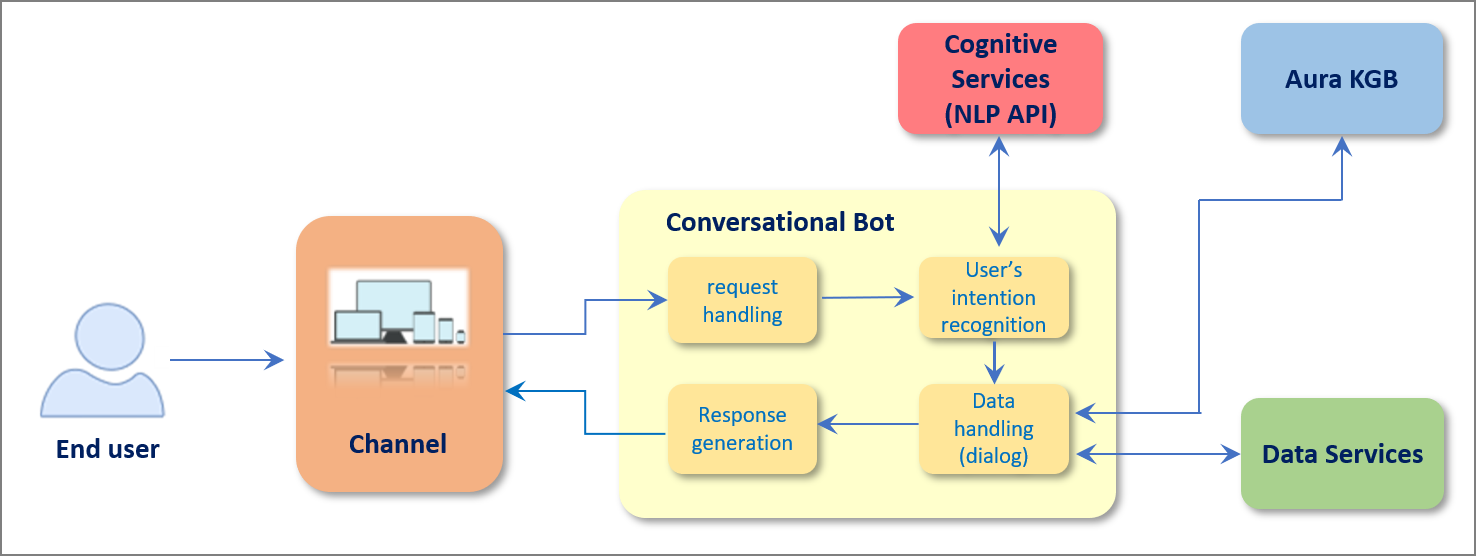
5.1 - Concepts and components
Aura NLP basic concepts and components
Basic concepts related to Aura NLP, components in Aura NLP architecture, catalogs and dictionaries
Utterance
An utterance is any textual input produced by the user that Aura receives through a specific communication channel and needs to understand, interpret and act accordingly.
It may be a whole sentence, a phrase, or a single word. There can be many utterance variations for a particular intent.
Examples of utterances:
- “I want to watch Frozen”; “Play the movie Frozen”; “Frozen”; “Aura, search Frozen”
- “Show my bill”; “I want my bill”; “Bill”; “Hello, check my bill”
Use case
A use case is a written description of a certain functionality in Aura that is launched both by direct request from a user or through the data analysis of the user’s behavior.
A certain use case can be expressed by the user in a large variety of utterances through natural language, therefore Aura is intended to understand all those possible requests.
Examples of use cases:
- TV search
- Check my bill
- Change subtitles to English
Intent
The intent identifies the concrete action requested by the user, among a set of supported services. In other words, it is what the user is asking for and expects Aura to carry out and is usually defined with a verb.
The general format of an intent name in Aura is: intent.[DOMAIN].[INTENT]
In this format, [DOMAIN] is used for the categorization of use cases belonging to the same topic (i.e., for Telco use cases, different domains can be defined such as billing, data usage, etc.).
Example of intents:
- Pay my bill –>
intent.billing.pay
- Make a phone call –>
intent.communications.call
- Turn off the TV –>
intent.tv.off
When developing a use case, linguists must firstly define the intent associated to their use case:
- Check if the intent already exists in Existing_Intents_n_Entities database and, in that case, use it.
- If not existing, define a new one following the format above. At this stage, it is highly recommended that the intent name is reviewed by Aura Platform Team, in order to avoid further inconsistencies.
An example of an intent and certain associated training statements is shown below:
"intent.billing.check": [
"Bill",
"Billing information",
"Can I see my bill?",
"Check my bill",
"How do I access my bill?",
"Invoice details",
"Show me my last invoice"]
Entity
An entity contains detailed information that is relevant in an utterance and provides specific arguments required to run the service (intent).
Depending on the NLP pipeline stages, entities can be expressed in different formats:
- If CLU stage is used to extract entities, the general format for an entity name is:
[entity_value:entity_type]
- If CLU does not extract entities and an external entity extractor stage is used before CLU (Standard NER, Gazetteer NER or Grammars), entities are defined as:
[entity_type]
- In both cases, the general format for the entity_type is
ent.[object]
Example of entities:
- Pay my bill –> bill
- Make a call –> phone call
- Turn off the TV –> TV
When developing a use case, linguists must define the entities associated to their use case:
- Check if the entity already exists and, in that case, use it.
- If not existing, define new ones following the format above. At this stage, it is highly recommended that the entity name is reviewed by Aura Platform Team, in order to avoid further inconsistencies.
A special situation, when the user’s utterance is recognized by means of the Grammar stage and there are different entities of the same type in the utterance, the format for entities is described in Grammars documentation: Recognition of utterances with several entities in Grammars.
Entity types for CLU
Conversational Language Understanding (CLU) uses the following entity types.
They are fully described in Microsoft documentation: CLU entity components and summarized below:
-
learned: Dict field to include entities of learned component type. This is actually not an entity type, but a feature. Therefore, they are uploaded as model_features and, at the same time, as simple entities (using the same name for both). An example of are those words referring to an audiovisual genre, such as movie, series or documentary.
-
list: Dict field to include entities of list component type. Fixed, closed set of related words along with their synonyms.
-
prebuilts: Dict field to include entities of prebuilt component type.
-
regex: Dict field to include entities of regex component type.
-
combination: Field for the combination of components as one entity when they overlap.
Aura NLP basic components: stages, connectors and pipelines
Stages
Aura NLP provides a set of stages that encompasses different methods for natural language processing.
Each stage carries out a specific process to be executed with the user’s utterance with the final goal of recognizing the user’s intent and associated entities.
You can use different stages in an NLP model, both internal stages developed by Aura Cognitive Team or external ones such as Microsoft CLU for intents recognition, NER (Named Entity Recognition) stages for entities recognition, Grammars engine (GrapeNLP & Unitex, that provide a deterministic recognition of intents, etc.
📃 Check the current available NLP stages.
Connectors
Connectors are components that connect different NLP stages and control the flow of the complete pipeline.
Aura NLP integrates several types of connectors, that provide a different behavior to the pipeline: logical connectors, selection connectors and disambiguation connectors.
📃 Check the current available NLP connectors.
NLP pipeline
NLP stages and connectors are integrated into a key component of Aura NLP: the pipeline. An Aura NLP pipeline is a set of wired stages composing a big topology that defines the processing to be performed during the natural language recognition phase.
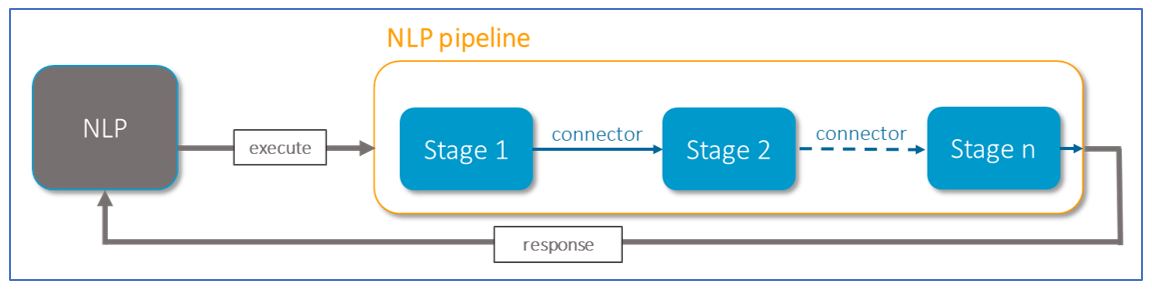
In the current release, Aura NLP includes:
- Normalization pipelines: Pipelines composed of different stages used for the normalization of the user’s utterance.
- Dynamic pipeline: Pipeline designed using different stages and connectors. The pipeline must be defined for each channel and included in a file named
pipeline.json.
Catalogs and dictionaries
NLP dictionaries
The recognition of entities in the Aura NLP model is based on dictionaries: knowledge bases of entities that are included in the NLP model as part of stages for entities recognition.
They are automatically generated from catalogs through the execution of a script.
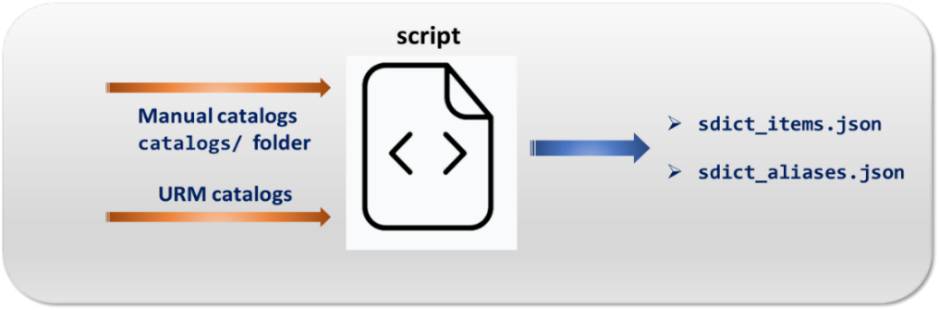
- Access to detailed information regarding what are Aura NLP dictionaries, types and guidelines for the generation or update of dictionaries in generation of Aura NLP dictionaries.
Catalogs
Catalogs are the source for entities to be included in an NLP model. Entities in catalogs are the input for the script that generates the NLP dictionaries.
There are two types of data in catalogs, at least one of them is required: manual catalogs and automatic catalogs that fetch data from Kernel URM database.
- Access to detailed information regarding what are entities catalogs, types and guidelines for the generation or update of catalogs in generation of Aura NLP catalogs.
5.2 - Internal configuration
NLP system configuration
Internal configuration of Aura NLP system: operational configuration and configuration of NLP stages
Introduction
The configuration of the NLP system is organized in two different purposes, each of them supported by one configuration file:
NLP operational configuration: bootstrap.cfg
The bootstrap.cfg file contains operational config sections for Aura NLP (ports, URIs, usernames, passwords, etc.).
This file can be found in the path:
aura-nlpdata-[country_code]/config/etc/bootstrap.cfg
⚠️ When developing a use case, NLP engineers or linguists should not modify this file. If any modification is required, it must be approved by the Aura Platform Team.
The file follows the general structure shown hereunder:
[working_directory]
stages_folder =./tmp/
[logging]
handlers = { . . . }
loggers = { . . . }
root = { . . . }
[country-langs]
country_mapper = { . . . }
[channels]
channel_list = [
{
'prefix': 'fb',
'name': 'whatsapp',
'id': '269d6-f052-4d2e-8f66-f59a9f31eff9'
},
. . . ]
[platform]
platform = 'ES'
[azure_models]
container_url = ${AZURE_NLP_MODELS_URL}
Moreover, it is required to include in this file other different sections belonging to specific stages or databases used.
The fields included in each section are described below.
Working directory
[working_directory]
stages_folder = ./tmp/
The main fields are explained below:
stages_folder: Main directory for the different stages.
Logging
[logging]
handlers = {
'hdl1': {
'class':'logging.StreamHandler',
'formatter':'console',
'level':'INFO'
}
}
loggers = {
'nlp': {
'level': 'INFO',
'handlers': [
'hdl1'
],
'filters': []
}
}
root = {
'level':'INFO',
'handlers': [
'hdl1'
]
}
The main fields are explained below. However, for more details, developers are kindly requested to read the General Python logging documentation
-
handlers: This field configures a dictionary with different logging handlers. Each key is the name of a handler, and it is composed by the next parameters:
class: It is configured with Python logging handlers (See Python documentation).formatter: It configures the format of logs. It must be filled with the labels json, string, console or simple.level: Level of the logging event. It must be filled with the labels INFO, ERROR, WARN or DEBUG.
-
loggers: The corresponding value is a Python dictionary in which each key is a logger name and each value is a dictionary describing how to configure the corresponding Logger instance:
level (optional parameter): Level of the logger.handlers (optional parameter): List of IDs of the handlers for this logger.filters (optional parameter): List of IDs of the filters for this logger.
-
root: Configuration for the root logger.
level (optional parameter): Level of the logger.handlers (optional parameter): List of IDs of the handlers for this logger.
[country-langs]
country_mapper = {
'es-es': {
'country_name': 'Spain',
'language_name': 'Spanish',
'alpha2': 'es',
'alpha3': 'esp',
'culture': 'es-es'
}
}
[channels]
channel_list = [
{
'prefix': 'mp',
'name': 'movistar-plus',
'id': '60f0ffda-e58a-4a96-aad9-d42be70b7b42'
},
]
[platform]
platform = 'ES'
The main fields are explained below:
-
country_mapper: Mapper with a list of fields that specifies the allowed languages based on the ISO-639 code.
-
channel_list: List of available channels. This field must contain three parameters for each channel. This information is already configured for every OB.
prefix: Prefix of the channel.name: Name of the channel.id: ID of the channel.
-
platform: Allowed platform.
CLU
The CLU stage requires a specific operational configuration:
[CLU]
base_url = https://${RESOURCE_NAME_CLU}.cognitiveservices.azure.com
base_url_api = https://${RESOURCE_NAME_CLU}.cognitiveservices.azure.com
api_version = 2023-04-01
http_retry_codes = {429, 500}
http_max_attempts = 10
http_sleep_time = 5
http_time_out = 60
http_time_out_recognizer = 60
http_retry_codes_recognizer = {429, 500}
http_max_attempts_recognizer = 5
http_sleep_time_recognizer = 0.5
http_raise_when_retry_limit_exceeded_recognizer = True
The main fields are explained below:
base_url: Base URL for CLU service.base_url_api: Base URL for CLU API service.api_version: CLU API version.http_retry_codes: Response status code, if more requests than the limit have been sent.http_max_attemps: Maximum number of HTTP requests allowed.http_sleep_time: Timeout between HTTP requests.http_time_out: Time in seconds for raising a timeout exception when HTTP request does not return a response for
training API requests.http_time_out_recognizer: Time in seconds for raising a timeout exception when HTTP request does not return a
response for CLU recognizer.http_retry_codes_recognizer: Set of response status codes that will retry CLU recognizer request.http_max_attemps_recognizer: Maximum number of attempts that will be performed in CLU recognizer request when there
is an exception by timeout or connection error or a request code defined in http_retry_codes_recognizer is set.http_sleep_time_recognizer: Time to wait between HTTP CLU recognizer requests.http_raise_when_retry_limit_exceeded_recognizer: Boolean (true/false) value to inform if an exception must be
re-raised when it happens and the maximum number of retries is exceeded.
OpenAI Embeddings
The OpenAI Embeddings stage configuration allows to have different databases per each combination of language and channel.
Some of these values will be configured by the installer aurak8s, such as base_url_api.
It is also necessary to enable its configuration in aurak8s installer, following the instructions in the Enable OpenAI deployment section.
[openai_embeddings_recognizer]
azure_token_base_url = https://login.microsoftonline.com
management_url = https://management.azure.com
management_api_version = 2023-05-01
http_retry_codes = {429,500}
http_max_attempts = 10
http_sleep_time = 5
http_time_out = 30
base_url_api = https://test.openai.azure.com/openai
base_api_version = 2023-05-15
http_time_out_recognizer = 20
http_retry_codes_recognizer = {429,500}
http_max_attempts_recognizer = 10
http_sleep_time_recognizer = 10
http_raise_when_retry_limit_exceeded_recognizer = True
sku_name = Standard
sku_capacity = 120
[qdrant:instance]
url = http://hotname:6333
api_key = api-test
shard_number = 1
replication_factor = 1
chunk_size = 30
exponential_sleep = True
max_exponential_sleep_time = 120
The associated fields are defined below:
azure_token_base_url: Base URL to get oauth token.management_url: Azure URL where the embedding OpenAI model will be deployed.management_api_version: Version of the embedding OpenAI model in Azure.http_retry_codes: Response status code to retry request.http_max_attemps: Maximum number of HTTP requests allowed.http_sleep_time: Timeout for each attempt when we retry any HTTP request.http_time_out: Time in seconds for raising a timeout exception when HTTP request does not return a response for OpenAI embeddings training API requests.base_url_api: Base URL for OpenAI embeddings service.base_api_version: OpenAI embeddings version.http_time_out_recognizer: Time in seconds for raising a timeout exception when HTTP request does not return a response for OpenAI embeddings recognizer.http_retry_codes_recognizer: Set of response status codes that will retry OpenAI embeddings recognizer request.http_max_attemps_recognizer: Maximum number of attempts that will be performed in OpenAI embeddings recognizer request when there is an exception by timeout or connection error or a request code defined in http_retry_codes_recognizer.http_sleep_time_recognizer: Time to wait between HTTP OpenAI embeddings recognizer requests.http_raise_when_retry_limit_exceeded_recognizer: Boolean (true/false) value to inform if an exception must be re-raised when it happens and the maximum number of retries is exceeded.sku_name: Name of the resource model representing the SKU.sku_capacity: Capacity of Tokens per Minute Rate Limit (Thousands).url: URL for Qdrant service.api_key: Key needed to connect with Qdrant service.shard_number: Number of shards for Qdrant service.replication_factor: Replication factor for Qdrant service.chunk_size: Number of embeddings to be sent in each request to the Qdrant service.exponential_sleep: Boolean (true/false) value to inform if the exponential sleep is enabled. By default, it is False.max_exponential_sleep_time: Maximum time in seconds for the exponential sleep. By default, it is 120 seconds.
base_url_api = https://internal.com/
http_retry_codes = {429, 500}
http_max_attempts = 10
http_sleep_time = 5
http_time_out = 30
Where:
http_retry_codes: Response status code to retry request.http_max_attempts: Maximum number of HTTP requests allowed.http_sleep_time: Timeout for each attempt when we retry any HTTP request.
Azure models
The azure_models configuration is detailed below:
[azure_models]
container_url = ${AZURE_NLP_MODELS_URL}
Where:
container_url: URL for the Azure NLP models container.
Embeddings Domain Classifier
The Embeddings Domain Classifier stage configuration allows the use of different databases per each combination of language and channel.
Some of these values will be configured by the installer aurak8s, such as base_url_api.
It is also necessary to enable its configuration in aurak8s installer, following the instructions in the Enable OpenAI deployment section.
[openai_embeddings_domain_classifier]
azure_token_base_url = https://login.microsoftonline.com
management_url = https://management.azure.com
management_api_version = 2023-05-01
http_retry_codes = {429,500}
http_max_attempts = 10
http_sleep_time = 5
http_time_out = 30
base_url_api = https://test.openai.azure.com/openai
base_api_version = 2023-05-15
http_time_out_domain_classifier = 20
http_retry_codes_domain_classifier = {429,500}
http_max_attempts_domain_classifier = 10
http_sleep_time_domain_classifier = 10
http_raise_when_retry_limit_exceeded_domain_classifier = True
sku_name = Standard
sku_capacity = 120
[qdrant:instance]
url = http://hotname:6333
api_key = api-test
shard_number = 1
replication_factor = 1
chunk_size = 30
exponential_sleep = True
max_exponential_sleep_time = 120
The associated fields are defined below:
azure_token_base_url: Base URL to get oauth token.management_url: Azure URL where the embedding OpenAI model will be deployed.management_api_version: Version of the embedding OpenAI model in Azure.http_retry_codes: Response status code to retry request.http_max_attemps: Maximum number of HTTP requests allowed.http_sleep_time: Timeout for each attempt when we retry any HTTP request.http_time_out: Time in seconds for raising a timeout exception when HTTP request does not return a response for OpenAI embeddings training API requests.base_url_api: Base URL for OpenAI embeddings service.base_api_version: OpenAI embeddings version.http_time_out_domain_classifier: Time in seconds for raising a timeout exception when HTTP request does not return a response for embeddings domain classifier.http_retry_codes_domain_classifier: Set of response status codes that will retry embeddings domain classifier request.http_max_attempts_domain_classifier: Maximum number of attempts that will be performed in embeddings domain classifier request when there is an exception by timeout or connection error or a request code defined in http_retry_codes_domain_classifier.http_sleep_time_domain_classifier: Time to wait between HTTP embeddings domain classifier requests.http_raise_when_retry_limit_exceeded_domain_classifier: Boolean (true/false) value to inform if an exception must be re-raised when it happens and the maximum number of retries is exceeded.sku_name: Name of the resource model representing the SKU.sku_capacity: Capacity of Tokens per Minute Rate Limit (Thousands).url: URL for Qdrant service.api_key: Key needed to connect with Qdrant service.shard_number: Number of shards for Qdrant service.replication_factor: Replication factor for Qdrant service.chunk_size: Number of embeddings to be sent in each request to the Qdrant service.exponential_sleep: Boolean (true/false) value to inform if the exponential sleep is enabled. By default, it is False.max_exponential_sleep_time: Maximum time in seconds for the exponential sleep. By default, it is 120 seconds.
5.3 - API definition
Aura NLP API
Description of Aura NLP API
Download swagger file
6 - Aura Channels
Aura Channels
Discover in this section advanced technical documentation regarding Aura channels
Before facing these documents, we highly recommend reading the document Introduction to Aura channels, that provides a general overview of these components
Channels are shared components between Aura Virtual Assistant and ATRIA
Introduction
An Aura channel is any communication means a Telefónica client may use to interact with Aura, typically to gather information about, as well as to manage, the client’s Telefónica products and services.
As Aura platform is based on Microsoft Azure Bot Service and Bot Framework, it uses the general-purpose communication mechanism called Direct Line API, provided by Microsoft.
In this framework, Aura Virtual Assistant is able to communicate with different communication protocols:
- Directly with channels that “talk” Microsoft Direct Line
- Directly through communication protocols based on Direct Line, such as Auraline
- Through the use of adapters for channels that do not support Direct Line.
To become an Aura-compatible communication means, Aura channels must fulfil a set of requirements as well as support the so-called Aura request-response semantic model. Specifically, it employs one property, channelData, that serves as a crucial bridge, allowing Aura to harness channel-specific data and functionalities, ensuring a tailored and optimized interaction.
Depending on this model, the Aura channel will support distinct levels of complexity regarding the interactions to be implemented as well as the richness of the information provided to customers interacting with Aura.
Moreover, the practical processes for the management of channels are included in Manage channels in Aura, including guidelines for the installation and activation of channels and how to update channels configuration.
Index of documents
Throughout these documents, you can find comprehensive technical information regarding channels in Aura:
-
Aura communication protocols: Description of Direct Line and Auraline communication protocols.
-
Channels authentication: How an Aura channel authenticates its users.
-
Aura channel model: Updated model for the communication between Aura and a channel.
-
Detailed information regarding key channels available in Aura:
-
Manage channels in Aura: Guidelines for channels management in Aura, including installation and activation of channels and how to update channels configuration.
-
Use cases development. Guidelines for specific channels:
6.1 - Communication protocols
Communication protocols for channels in Aura
Description of the communication protocols that channels can use to communicate with Aura
Introduction
Channels can talk with Aura through two different communication protocols: Microsoft Direct Line and Auraline or through any aura-bridge adapter.
-
On one hand, Aura platform is based on Microsoft Azure Bot Service and Bot Framework and leans on the mechanisms, SDK, tools, and techniques provided by this bot engine to implement intelligent bots.
Microsoft Azure Bot Service allows the integration of different channels used by final users to interact with bot instances through a general-purpose communication mechanism called Direct Line API.
Channels can use this protocol through the Aura Request – Response Semantic Model, within the channelData property, used by Aura to define the model in any of the available versions: v1, v2 or the normalized one v3.
Find detailed information regarding Direct Line communication protocol
-
On the other hand, Aura Platform Team has developed a new communication protocol: Auraline. It is based on Direct Line but with significant advantages as it is a proprietary one and, consequently, eliminates the dependency on Microsoft.
Channels can use this protocol through the Aura Request – Response Semantic Model, within the version v3 of the channelData property.
Find detailed information regarding Auraline communication protocol
-
Other channels that do not support Direct Line (and consequently, Auraline) will be able to connect to Aura through aura-bridge adapters. This is the case of WhatsApp and Google RCS channels.
These adapters “translate” the information coming from the channel to a language Aura can understand.
The adapters are provided by aura-bridge and are based on the last version of the standard Aura request/response model.
Flowchart of general scenario regarding communication protocols in Aura
The feasible scenario for channels to communicate with Aura is schematically shown below:
- Aura communication protocols:
Communication through Direct Line, Auraline or aura-bridge channel adapter
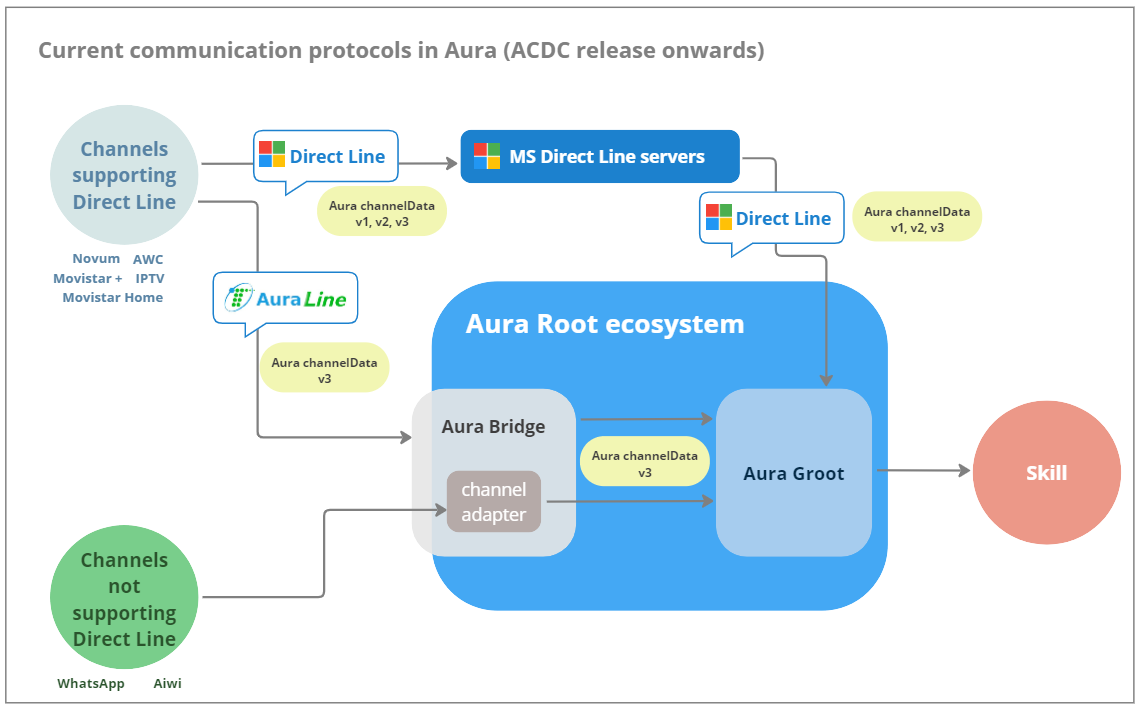
Auraline communication protocol is firstly conceived for a call center that aggregates different individual channels (call-center as a service), due to Direct Line limitations to manage this scenario. See details in the section Specific scenario for the use of Auraline communication protocol: CCaaS.
6.1.1 - Direct Line communication protocol
Direct Line communication protocol
Description of useful concepts to understand the Microsoft Direct Line protocol used by channels to communicate with Aura
Introduction
Aura platform is based on Microsoft Azure Bot Service and Bot Framework. Both provide tools to build, test, deploy, and manage intelligent bots all in one place. Through the use of a modular and extensible framework provided by the SDK, tools, templates and AI services, developers can create bots that use speech, understand natural language, handle questions and answers, and more.
One of the key capabilities of the Microsoft Azure Bot Service and Bot Framework is the integration of channels the final users can use to interact with the concrete bot instances implemented using this service and framework. This way, no matter which channel the final users interact with a concrete bot instance, they all are able to establish intelligent conversations with the bot.
Since the aura-groot leans on the Microsoft Azure Bot Service and Bot Framework, channels that use Direct Line communication protocol can “talk” to Aura and integrate with it, becoming Aura custom channels.
Direct Line API
The Microsoft Azure Bot Service exposes a general-purpose mechanism that channel developers can use when implementing or integrating new channels. This general-purpose communication mechanism is called Direct Line API.
The Direct Line API exposes a Web endpoint or URL of a service hosted in the Microsoft Azure cloud that channel developers can use to send messages directly to concrete instances of bot engines hosted in the Microsoft Azure Bot Service. This way, the Direct Line API provides a link between any third-party software component or application, typically used by the final user, and the concrete instance of the bot engine she may be willing to interact with.
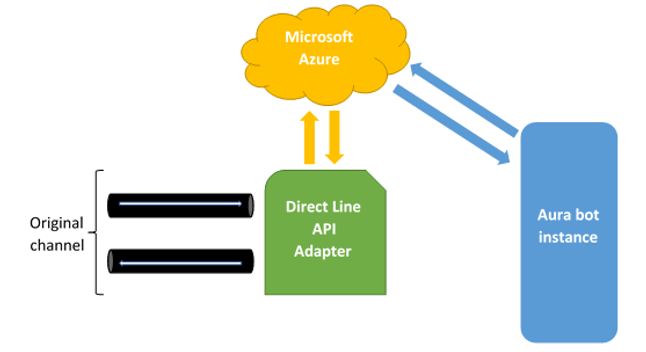
Typically, channels accessing through Direct Line to a bot send their requests calling the POST HTTP method of the /conversations/activities endpoint and, as it is an asynchronous API, read the responses from a WebSocket, which URL is obtained when requesting the token to access de API.
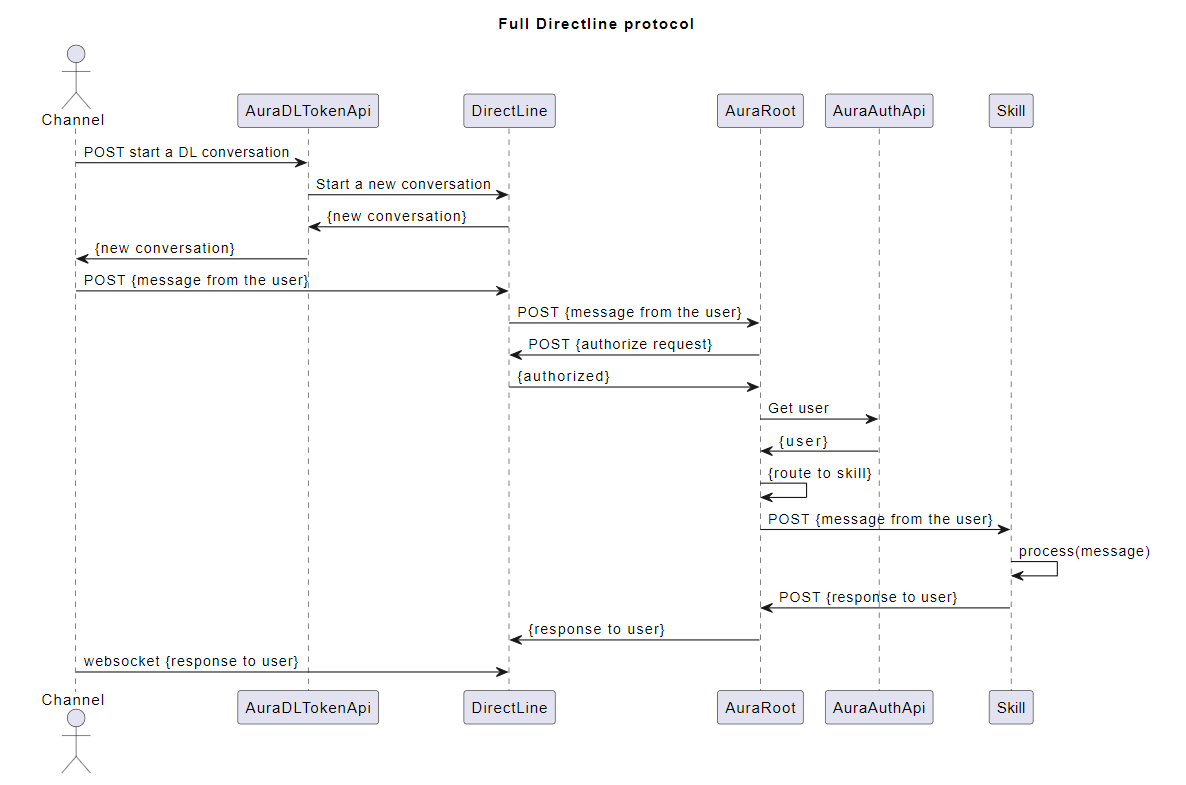
The general-purpose communication means exposed by the Direct Line API constitutes an additional mechanism channel developers and integrators can use to create as well as to integrate new channels Telefónica clients can use to interact with Aura. Thanks to it, any communication means can be integrated as an Aura channel.
The only thing which is needed is the proper transformation of the messages coming in and out of the concrete communication means as HTTP messages sent and received through the Direct Line API endpoint available at the Microsoft Azure cloud. This procedure is depicted in the following figure:
How to obtain a valid Direct Line token for Aura Groot
The objective of this document is to explain how an Aura’s channel might access the API that allows generating a Direct Line token valid for an Aura’s environment.
Channels are required to use tokens to communicate with Direct Line API. Each of those tokens is valid for one conversation (and one user) and until it expires (usually in one hour). If further interaction is required after the expiration, the token must be refreshed (get a new fresh version of the token with a later expiration time, calling directly to Direct Line API) before the previous valid token is expired. More information about token refreshing can be found in Direct Line documentation.
The first Direct Line token for each conversation must be obtained from aura-authentication-api. To use this API, a valid Aura APIkey is required:
- For integration environments, please ask it to Aura Global Operation Team.
- For preproduction and production environments, the OB Operation Team should provide it.
The API definition can be found in section Directline Token in aura-authentication-api. Note that there are two ways to ask for a token, one to get only the token (/token), and another one to get also the stream URL (/token/wss), this is the recommended one as it includes the WebSocket stream URL in the response.
The corresponding Operations Team should also provide the specific domain names where this API is published in each environment.
Request examples
Token only:
curl -X GET \
https://svc-<env>.auracognitive.com/aura-services/v1/token \
-H 'Authorization: APIKEY <YOUR-API-KEY>' \
-H 'correlator: <CORR_UUID>' \
-H 'cache-control: no-cache'
Token with web socket:
curl -X GET \
https://svc-<env>.auracognitive.com/aura-services/v1/token/wss \
-H 'Authorization: APIKEY <YOUR-API-KEY>' \
-H 'correlator: <CORR_UUID>' \
-H 'cache-control: no-cache'
Note that correlator header is optional, but it is convenient to send it, to track requests when it is necessary.
Response examples
These responses are returned by Direct Line servers and passed directly to the channel. The value of the field expires_in depends on what is returned by Direct Line, and it could have any numeric value, mainly 1800 or 3600.
The examples contain developed tokens already expired, so they cannot be used in real environments. A request with a valid APIkey must be done in order to get a real valid token.
Token only:
{
"token": "ew0KICAiYWxnIjogIlJTMjU2IiwNCiAgImtpZCI6ICJodjRaemR0eXI1OXA3R1BSMEsycmhIUmJuUTQiLA0KICAieDV0IjogImh2NFp6ZHR5cjU5cDdHUFIwSzJyaEhSYm5RNCIsDQogICJ0eXAiOiAiSldUIg0KfQ.ew0KICAiYm90IjogIkJPVC1hdXJhLWFwLW5leHQiLA0KICAic2l0ZSI6ICJfLTJWLU9ocVl2NCIsDQogICJjb252IjogIklHUDR1N1VqR3V1SDA2TmZTSWV2dHktZXUiLA0KICAibmJmIjogMTY0OTc0NjA4MSwNCiAgImV4cCI6IDE2NDk3NDk2ODEsDQogICJpc3MiOiAiaHR0cHM6Ly9kaXJlY3RsaW5lLmJvdGZyYW1ld29yay5jb20vIiwNCiAgImF1ZCI6ICJodHRwczovL2RpcmVjdGxpbmUuYm90ZnJhbWV3b3JrLmNvbS8iDQp9.eZKIPviIA5WwtXPh3LEhD5je1bRR3svGom6KjhwKZpjv4HMCDmblspQSJ-Ax3G51jsZyU_NZM1HRvLweyfBC3TixlIPnLLQ2j55-ZUGQobVTVop84H3QRhUE13GwYPVrvgr_tRsqPTLlUMd7O9zpk5mZ_T-esMQXBwB51izTHRLExFAwDc1jIjV-FWJAQt6ROEZIqWJAMQ6WKuCsm1HXaa0NbCASq90cdZJZc_hyDeengrFklcIiXuzcoFYs3SNKBMCiYuHAWgYGWT6aHpWvreCjEo2VdkcJYkpweaBeagFRzftE3tyzDsb_QrNMrxrWuu5OXPi4j0r7avivL3ap-w",
"expires_in": 3600
}
Token with web socket:
{
"conversationId": "Da8BzFBhRMbDpcEN8mjqdn-eu",
"token": "ew0KICAiYWxnIjogIlJTMjU2IiwNCiAgImtpZCI6ICJodjRaemR0eXI1OXA3R1BSMEsycmhIUmJuUTQiLA0KICAieDV0IjogImh2NFp6ZHR5cjU5cDdHUFIwSzJyaEhSYm5RNCIsDQogICJ0eXAiOiAiSldUIg0KfQ.ew0KICAiYm90IjogIkJPVC1hdXJhLWFwLW5leHQiLA0KICAic2l0ZSI6ICI4bVJVUmZyMEVxYyIsDQogICJjb252IjogIkRhOEJ6RkJoUk1iRHBjRU44bWpxZG4tZXUiLA0KICAibmJmIjogMTY0OTc0ODU4OCwNCiAgImV4cCI6IDE2NDk3NTIxODgsDQogICJpc3MiOiAiaHR0cHM6Ly9kaXJlY3RsaW5lLmJvdGZyYW1ld29yay5jb20vIiwNCiAgImF1ZCI6ICJodHRwczovL2RpcmVjdGxpbmUuYm90ZnJhbWV3b3JrLmNvbS8iDQp9.wGpPdShRoHf3M7zlTJO9nHyxD8bWF-3JeM7gd0BtrFLDCVEznO1j9Y2ovzRxmeJL8l4xo7T5tH538jAivexelpDb3VET7UvrhZVTNa19J7oOL-eqGtbspYoKp_2xzVNxm2w2lB5cRZVMfyzlvLptfx_-BD2XeohbYGbl_pnmLe6N-490h1S5bE613t1p4bYD1bPA0IKeGhhaiUUBMcA5mCO84eurYesLECAz3T5mCgLP2Xfq7FCeiFmxO4DiEZujKh5FSKd9Gp076ADHdIxxilvKdTFlXykx_v4-yx0xm8YoyHChyRIF9hEzX4dm6hsWLYsgCiM-t60I32_KSRJWxg",
"expires_in": 3600,
"streamUrl": "wss://directline.botframework.com/v3/directline/conversations/Da8BzFBhRMbDpcEN8mjqdn-eu/stream?watermark=-&t=ew0KICAiYWxnIjogIlJTMjU2IiwNCiAgImtpZCI6ICJodjRaemR0eXI1OXA3R1BSMEsycmhIUmJuUTQiLA0KICAieDV0IjogImh2NFp6ZHR5cjU5cDdHUFIwSzJyaEhSYm5RNCIsDQogICJ0eXAiOiAiSldUIg0KfQ.ew0KICAiYm90IjogIkJPVC1hdXJhLWFwLW5leHQiLA0KICAic2l0ZSI6ICI4bVJVUmZyMEVxYyIsDQogICJjb252IjogIkRhOEJ6RkJoUk1iRHBjRU44bWpxZG4tZXUiLA0KICAibmJmIjogMTY0OTc0ODU4OCwNCiAgImV4cCI6IDE2NDk3NDg2NDgsDQogICJpc3MiOiAiaHR0cHM6Ly9kaXJlY3RsaW5lLmJvdGZyYW1ld29yay5jb20vIiwNCiAgImF1ZCI6ICJodHRwczovL2RpcmVjdGxpbmUuYm90ZnJhbWV3b3JrLmNvbS8iDQp9.ctcwxvoyi8EdSee3x3TOogvy8puphmpsn8wouTaPZzFaVFb4YcuE-336e4bg99uCPffHAlVPLBc8xpVjeM4JdDQWncO-TpPFlj7fM_x_YmunlVLS4OsNspnMQ9lUgn6FLBD9GUdJ5GRySOltrDbsoHI0EMaljs2ni6b8ZQ9LKFdY8QyAKRqS9Eto1_MCiPmuseM_KM8VtL2fZMmhzwfhxf7dOHbEtu121Nj8LTxZTNI1f5gpKsEuw6neX1g7MQyrD-ajr0s-hD90g5r79vQvompVzFf3LgoXsMdKLIgz8PkVg6hIJwQFIC4piSHV7--g8k-alJ-XMspNGBCeD3dVfw",
"referenceGrammarId": "f4d20b6f-6e5c-175e-abdf-e9eb65e5d058"
}
API errors handling
The aim of this endpoint is to allow the channels to obtain a valid token to access Direct Line API without sharing the primary keys of the bot with all of them. So, basically, the endpoint just wraps the requests to Direct Line API, this includes that all the errors returned by Direct Line API are returned to the caller.
| Status Code |
Meaning |
Recommended action |
| 400 |
Error in the request. It could be an error in the request of the channel to Aura, or in Aura’s request to Direct Line. |
Validate the request being launched. If it seems to be ok, request a validation of the logs in the corresponding Aura environment. |
| 401 |
Invalid credentials. It could be an error in the APIKey or in the aura-authentication-api configuration. |
Validate if your APIKey is valid. Request a validation of the logs in the corresponding Aura environment. |
| 429 |
Too many requests. Direct Line service is having too many requests to get a valid token for this bot. |
An exponential backoff system must be implemented to avoid making the situation worse. So, you should wait for 30 seconds before launching a new request. If this gets a 429 again, you should wait for 1 minute, then 2 minutes, etc. Consider that in order to avoid this situation, all the requests of your users must be taken into account all together. |
| 500 |
Internal error. |
Wait for the server to recover, but request to Aura Operations Team of the environment the resolution of the issue. |
Only the body and the status code of the response of Direct Line are returned to the caller, none of the headers are included.
Using the token: calling Direct Line API
HTTP GET requests made by the channel (to send or receive activities) will be authorized by a token (the first one, or after refresh) through the Authorization header, for instance:
POST https://directline.botframework.com/v3/directline/conversations/<CONV_ID>/activities
Authorization: Bearer <YOUR_TOKEN>
To get activities through a web socket, the channel must use the stream URL obtained in /token/wss. The token is sent in t param, and it will expire after one minute after the token request.
Once connected the web socket, it will get activities for one hour. After that time, a new token (through refreshing) and a new web socket connection are required, setting the fresh token within the t param in stream URL, for instance:
wss://directline.botframework.com/v3/directline/conversations/<CONV_ID>/stream?watermark=-&t=<NEW_TOKEN>"
Note that refresh token must be obtained before current token is expired.
Full communication flow
The flow to get the first token, and optionally refresh it, for conversations longer than one hour, is as follows:
sequenceDiagram
Channel ->> Auth API: Get Wss token (API key)
Auth API ->> Direct Line: Start conversation (app token)
Direct Line ->> Auth API: {conversationId, token, expires_in, streamUrl}
Auth API ->> Channel: {conversationId, token, expires_in, streamUrl}
loop send / receive activities during one hour
Channel -->> Direct Line: POST /conversation/activities (token)
Direct Line -->> Channel: [activities]
end
alt refresh token
Channel ->> Direct Line: Refresh (token)
Direct Line ->> Channel: new_token
loop send / receive activities during one hour
Channel -->> Direct Line: POST /conversation/activities (new_token)
Direct Line -->> Channel: [activities]
end
else
Channel -->> Direct Line: POST /conversation/activities (token)
Direct Line -->> Channel: Token expired (403)
end
Note that the sending of activities from Direct Line to the channel may be through a web socket (if opened) or HTTP GET request from channel.
6.1.2 - Auraline communication protocol
Auraline communication protocol
Description of the Auraline communication protocol used by channels to communicate with Aura
Related documents
Guidelines for connecting a channel to Auraline
Introduction
Aura Platform Team has developed a new communication protocol named Auraline. This is a proprietary protocol, developed and exclusively owned by Aura Platform Team for facilitating communication between channels and Aura. Auraline is based on Microsoft Direct Line and can be considered as a local implementation of the Microsoft protocol, eliminating dependencies on Microsoft Azure Bot Service.
This particularity provides significant advantages, including cost saving, higher flexibility and the ability to plan future developments according to our specific needs. Additionally, it enables us to address new backend-to-backend scenarios, such as managing a channels aggregator system or responding across multiple channels or applications instead of a single one.
Auraline facilitates the process for integrating new channels into the communication framework. Moreover, it enables an easy transition for channels that are currently integrated into Direct Line, minimizing disruptions and maximizing interoperability.
Auraline uses Aura request-response semantic model v3, implemented by the normalized version of the property channelData v3.
Communication protocol
Auraline facilitates the communication of a channel with aura-bridge and aura-groot, consequently establishing a connection with the skills connected to aura-groot. To enable this communication, specific plugins and swaggers are developed in aura-bridge to support this protocol.
Given its foundation on the Microsoft Direct Line protocol, Auraline adopts the Direct Line JSON format and integrates the same basic processes as those in Microsoft framework:
As previously mentioned, Auraline relies on our request-response semantic model v3. The communication between aura-groot and aura-bridge will always use the single message response format in order to simplify the integration and ensure the orderly delivery of responses to the users.
Responses between aura-bridge and the channel will include an array of activities in a unique answer for each message, that will be orderly delivered to the channel.
The following figure shows the sequence diagram of Auraline communication protocol:
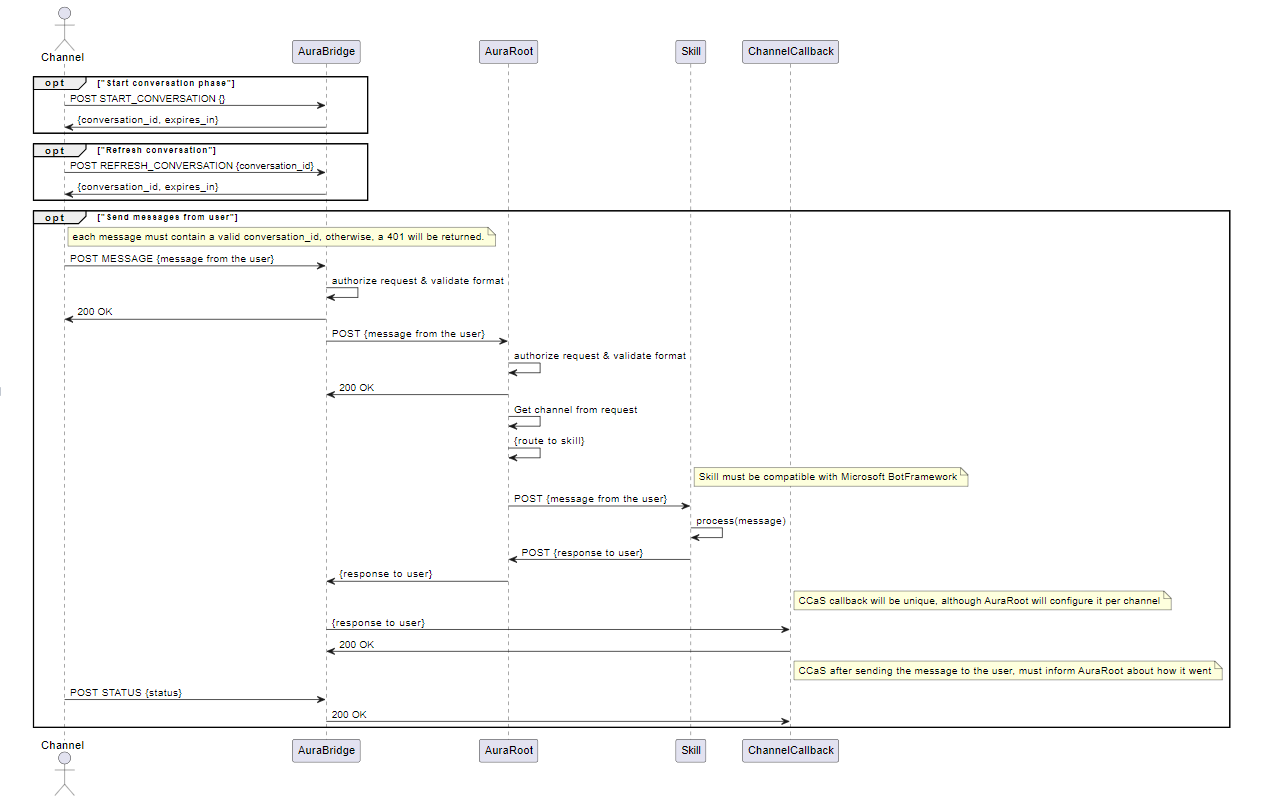
Specific scenario for the use of Auraline communication protocol: CCaaS
The development of Auraline communication protocol is initially aimed at resolving the scenario in which different channels are grouped together in a CCaaS (call-center as a service) that acts as a channel concentrator.
This scenario is schematically shown in the following figure:
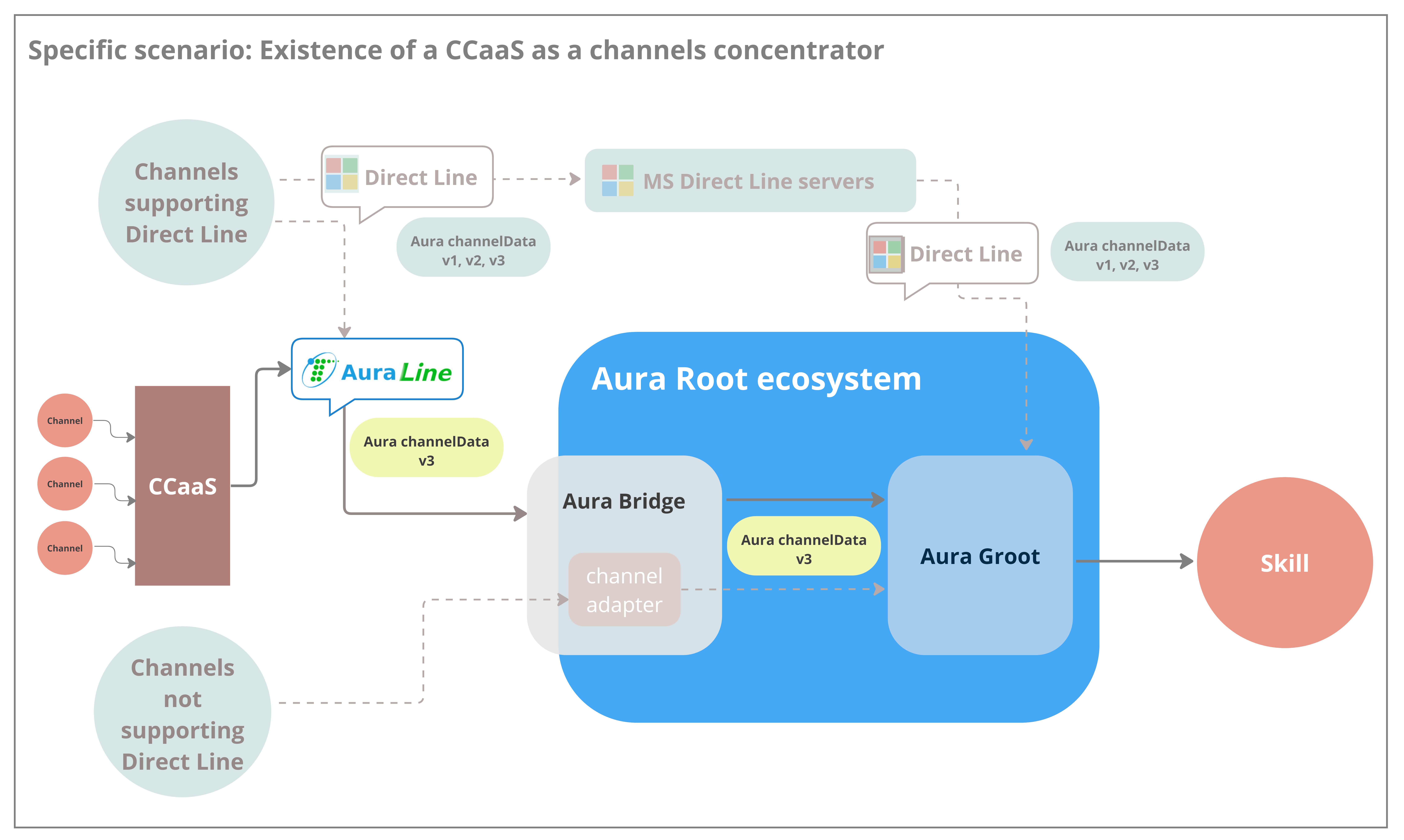
6.2 - Channels authentication
Channels authentication
How an Aura channel can authenticate users, in different scenarios
Scenarios for users’ authentication
Regarding authentication, an Aura channel can deal with two different scenarios, which are fully explained in the succeeding sections:
- Dealing with authenticated users
- Dealing with anonymous users
Authenticated users
Aura supports two types of authentication when referring to channels:
- Integrated (or federated) authentication: aura-bot is responsible for the user’s authentication, i.e., when the channel sends its user identifier to aura-bot, and the bot executes the user authentication.
- Non-integrated authentication: the channel executes all the authentication processes for the user and sends to Aura the resulting
authorization_id.
Integrated authentication
The case of integrated authentication is characterized by the fact that the Aura channel is the one starting the authentication process, sending an account linking request to the aura-bot instance including the channel own user identifier, that will be used as a base for building an auraId.
It is used for those channels that cannot launch a Kernel authentication process themselves, before making a request to Aura. Therefore, all the authentication process is managed by the aura-bot instance making requests to Kernel when needed.
The message sent from the Aura channel to the aura-bot instance could contain a text similar to “I want to authenticate myself”, or an auraCommand with an account linking intent, or a use case that requires authentication.
Account linking auraCommand example:
{
...
"from": {
"id": "<channel-user-identifier>"
...
},
{
"channelData": {
"auraCommand": {
"type": "suggestion",
"value": {
"intent": "intent.account.linking"
}
}
}
}
}
Channels with this authentication are:
Non-integrated authentication
In the case of non-integrated Authentication, the Aura channel must be registered as a Kernel Platform application, so it can have access to the Kernel Platform APIs.
Further information regarding this application registration process can be found in the Kernel documentation about getting credentials.
Please, remember to request access to the proper purpose that enables accessing to Aura Users APIs.
Once the Aura channel has been registered as an application, it will have access to the Kernel Platform Aura-Services API.
-
The Aura channel should launch an authorize request to authenticate the end user. Follow Kernel documentation about how to consume APIs.
-
Afterwards, the Aura channel should make a request to Aura getAuraId API.
- Firstly, the channel generates a 3-legged access token for the given user, including the purpose to access the Aura-Services APIs.
- Then, it makes a request to the
GetAuraId endpoint.
- The channel must call this API each time there is a new authorization session in the channel, because
aura_id is only valid while the session or authorization_id is valid.
- Remember to log every request to Kernel including the
x-correlator header (correlation id for the different services), so all requests can be traced in the channel, Aura and Kernel, and it is possible to have an E2E view of each request. The same correlator should be used in all requests related to a single user interaction, it should be sent to Aura, Kernel, etc.
You can cache the aura_id and send requests to Aura using that aura_id. If the aura_id is no longer valid, you will receive an error message like:
Channel data v3 (current):
"text": "<error_message>",
"inputHint": "acceptingInput",
"channelData": {
"status": {
"code": "ERROR.USER.UNAUTHENTICATED",
"params": {"auraId": "received_aura_id"},
"message": "Invalid aura user"
}
}
Channel data v1 (obsolete):
"text": "<error_message>",
"inputHint": "acceptingInput",
"channelData": {
"Error": {
"code": "UNAUTHENTICATED",
"data": "received_aura_id",
"message": "Invalid auraId"
}
}
If you receive an error like these, you will need to:
- Refresh the
authorization_id by calling the authorize method from Telefonica Kernel auth-server.
- Call the getAuraId API again from Kernel APIs.
-
The Telefonica Kernel Platform API calls the aura-services API that will validate if the user already exists or not.
- If the user exists with the same
user_id, authentication_context and authorization_id, the same user data will be returned to Kernel and to the Aura channel, including the aura_id of the user.
- If the user does not exist, it is created in the Aura users’ database and the result is returned to the Aura channel, which can get the
aura_id of the user.
Just in the case of non integrated authentication, the aura_id returned by Kernel API will be used as the from.id property in all requests to be sent to the aura-bot instance. For integrated authentication the channel just sends its internal user identifier.
Anonymous users
Anonymous users can only access a limited set of use cases that do not need granted access to any user data, for instance: generic questions or greetings.
- If a channel allows anonymous users, it would send an autogenerated
aura_id in the from.id property of the request in UUID format.
- If the channel does not support anonymous users, the user will be considered unauthenticated and will return an error like in non-integrated authentication.
Usually, if a use case is for channels that support anonymous users, an authentication dialog will be launched, specific to each channel, which will allow the user to log in to access the use case. Channels that support anonymous users usually have integrated (federated) authentication. Some authentication use cases are SMS-OTP in WhatsApp channel.
If the intention of the user is one of the admitted without authentication, the corresponding response will be sent. Otherwise, a prompt to launch the authentication process or a message informing that anonymous users cannot access that information will be returned.
Users expiration
The time to expire a user can be configured by channel with the configuration variable authorizationIdExpiration.
Learn how to do it in the document Configure users expiration.
6.3 - Channel Model
Aura channel model
The Aura channel model includes all the properties required for channels to communicate with Aura
Introduction
When integrating a channel into Aura, there are various properties, both mandatory and optional, that must be defined for the registration of this channel and in order to set its operational configuration within Aura.
In this framework, two scenarios arise, depending on the type of skill:
-
Registration of a channel that works against aura-bot skill
The tables below include the properties definition for this scenario
-
Registration of a channel that works against a third-party skill
This scenario includes certain particularities which are specifically described in the affected properties and marked as:
The tables that define Aura channel model includes the property type and a brief description of each of them, together with a column indicating which are the Aura Platform components affected by this property.
- Properties marked in bold are mandatory.
- Properties marked in italics are optional.
- Values of
Applicable Aura Platform components column:
- aura-configuration-api is not included, because it handles the configuration, so it uses everything.
- aura-bridge means aura-bridge and aura-bridge-outbound.
Channel configuration
| Property |
Type |
Description |
Applicable Aura Platform components |
|
| name |
string |
Descriptive name of the channel. Lowercase hyphen-separated words |
All Aura components |
|
| prefix |
string |
Minimal expression of channel name. Lowercase hyphen-separated words |
All Aura components |
|
| id |
UUID |
UUID that uniquely identifies the channel in Aura |
All Aura components |
|
| brand |
string |
Identifier of the Telefónica brand this channel belongs to. It must be one of the brands defined in Kernel D_Gbl_Brand global dimension entity. |
All Aura components |
|
| contact |
string |
Identifier of the type of contact channel. It must be one of the contact channels defined in Kernel D_Gbl_Contact_Channel global dimension entity. |
All Aura components |
|
| dialogLibraries |
array |
Array of dialogLibrary model with all the use cases supported by the channel.
Check the complete dialogLibrary model |
aura-bot |
|
| actions |
object |
List of configurations for the different actions sent by aura-bot.
Check the complete actions model |
aura-bot |
|
| rcs |
object |
RCS configuration. Type RCS model.
Check the complete RCS model |
aura-bridge |
|
| requestOptions |
object |
Object with request options. Type request model.
Check the complete requestOptions model |
aura-groot, aura-bot, aura-bridge, aura-file-manager |
|
| responseOptions |
object |
Object of response model that describes all the options of the response to the channel.
Check the complete responseOptions model |
aura-groot, aura-bot, aura-bridge, aura-file-manager |
|
| security |
object |
Authentication options object type security model.
Check the complete security model |
aura-bot, aura-bridge, aura-file-manager, aura-authentication-api |
|
| whatsapp |
object |
Object of whatsApp model that describes all the WhatsApp channel options.
Check the complete WhatsApp model |
aura-groot, aura-bot |
|
| auraBotCacheTTL |
number |
Set custom cache lifetime in MongoDB by channel |
aura-bot, aura-groot |
|
| type |
string |
Channel type: whatsapp, auraline, rcs. Used by aura-bridge to determine the correct plugin to handle incoming bot responses |
aura-bridge |
|
| atria |
object |
Object of Atria model with application and preset configs by intent.
Check the complete Atria model |
aura-groot, aura-bot |
|
1.1. NLP model
Channels working against a third-party skill: non-applicable model
| Property |
Type |
Description |
Applicable Aura Platform components |
| enabled |
boolean |
It indicates whether or not the channel counts on any training handled by aura-nlp. If not present, it means that no training has been provided for the channel |
aura-bot, aura-nlp |
| stages |
array |
List of nlp stages configured. This field should NOT be configured. Is automatically filled by aura-config-provision job. |
aura-kpis-uploader, nlp-provisioning |
Channels working against a third-party skill: non-applicable model
| Property |
Type |
Description |
Applicable Aura Platform components |
2.1. dialogLibrary model
| Property |
Type |
Description |
Applicable Aura Platform components |
| name |
string |
Unique name of the library |
aura-bot |
| dialogs |
array |
Array of the dialog model, with all the dialogs supported by this library |
aura-bot |
| authorization |
authorizationConfiguration model |
Authorization scopes and purposes |
aura-bot |
2.1.1. dialog model
| Property |
Type |
Description |
Applicable Aura Platform components |
| id |
string |
Unique identifier of the dialog. Usually a descriptive name |
aura-bot |
| prefix |
string |
Unique identifier with the acronym of the dialog |
aura-bot |
| triggerConditions |
array |
Array of triggerCondition model, with all the triggers leading to this dialog |
aura-bot |
| channelDataVersion |
string |
channelData version |
aura-bot |
| suggestions |
boolean |
Boolean value that indicates if the dialog should show suggestions |
aura-bot |
| allowAnonymous |
boolean |
Boolean value that indicates if the dialog allows anonymous users |
aura-bot |
| authorization |
object |
Array of the authorizationConfiguration model |
aura-bot |
| bypass |
object |
bypass model |
aura-bot |
2.1.1.1. triggerCondition model
| Property |
Type |
Description |
Applicable Aura Platform components |
| id |
string |
Unique identifier of the intent. It should follow this format intent.[case].[specific_resolution] |
aura-bot |
| contextFilters |
array |
Array of contextFilter model, with all the filters based on the user context that will control how the dialog is executed |
aura-bot |
| entity |
string |
Canonical value of the entity, when needed to fill the intent resolution |
aura-bot |
| settings |
intentSettings |
Intent properties which can be used to customize trigger conditions |
aura-bot |
2.1.1.1.1. contextFilter model
| Property |
Type |
Description |
Applicable Aura Platform components |
| name |
string |
Descriptive name of the filter |
aura-bot |
| type |
string |
Descriptive name of the filter type |
aura-bot |
| conditions |
string |
Boolean condition in spleen format that will control how the filter is validated. For instance: /authData/subscriptionType neq 'postpaid' will be truly if the UserType of the logged user is not postpaid |
aura-bot |
| true-false |
object |
conditionValidation model that describes the behavior of the dialog under each result |
aura-bot |
2.1.1.1.1.1. conditionValidation model
| Property |
Type |
Description |
Applicable Aura Platform components |
| name |
string |
Descriptive name of the condition validation |
aura-bot |
| breakDialogExecution |
boolean |
true if the dialog execution should be stopped |
aura-bot |
| breakFilterEval |
boolean |
true if the filters validation should be stopped if this validation is successful |
aura-bot |
| resource |
string |
Reference of the copy to be returned to the user if this validation is successful |
aura-bot |
| suggestions |
string |
Flag to indicate whether or not the dialog should show suggestions if contextFilter is true |
aura-bot |
| redirectToIntent |
string |
New intent to redirect |
aura-bot |
| originalIntent |
string |
Original intent when context filter be applied |
aura-bot |
2.1.1.1.2. intentSettings model
| Property |
Type |
Description |
Applicable Aura Platform components |
| type |
string |
intentSettings type |
aura-bot |
| action |
string |
Action to be performed and attached to the output message used in different channels |
aura-bot |
| actions |
actionConfig |
V3 Actions to be performed and attached to the output message used in different channels |
aura-bot |
| locales |
intentSettingsLocales |
Success or error messages to be displayed in output message |
aura-bot |
| payload |
object |
Parameters needed to recreate output message |
aura-bot |
| addEntitiesToPayload |
boolean |
Flag to indicate whether or not entities must be applied to the payload |
aura-bot |
| needPlayingContent |
boolean |
Flag to indicate whether or not playingContent is needed |
aura-bot |
| sound |
Sound |
Configuration involving sounds reproduced in different channels. Available values are defined in Sound enum. |
aura-bot |
| swapEntityCanonValue |
string |
Array of entity’s types which will be swapped payload entity value from entity.entity to entity.canon |
aura-bot |
| indexedResourceBase |
string |
POEditor resource reference to obtain deterministic value. e.g. generic:faq-answer. |
aura-bot |
| addEntitiesToPayload |
boolean |
Flag to indicate whether or not entities must be applied to the payload. |
aura-bot |
| confirmSuggestion |
boolean |
Flag to indicate whether or not suggestions must be confirmed. |
aura-bot |
| resolutionIntent |
string |
Intent returned by movistarResolution API. |
aura-bot |
| resolutionEntities |
Entity[] |
Entities returned by movistarResolution. |
aura-bot |
| payloadType |
payloadType |
Payload type included in payloadType enum such as ‘radio’. |
aura-bot |
| isFullscreen |
boolean |
Flag to indicate fullScreen behavior. |
aura-bot |
| functions |
functionsConfig |
Parameters related to the configuration of functions |
aura-bot |
| suggestions |
boolean |
Flag to indicate if suggestions will be returned |
aura-bot |
2.1.1.1.2.1. actionConfig model
| Property |
Type |
Description |
Applicable Aura Platform components |
| name |
string |
Action name |
aura-bot |
| target |
string |
Action target |
aura-bot |
| params |
object |
Action params |
aura-bot |
| postBack |
object |
Action postBack |
aura-bot |
2.1.1.1.2.2. intentSettingsLocales model
| Property |
Type |
Description |
Applicable Aura Platform components |
| success |
string |
Success message array |
aura-bot |
| error |
string |
Error message array |
aura-bot |
2.1.1.1.2.3. functionsConfig model
| Property |
Type |
Description |
Applicable Aura Platform components |
| params |
string[] |
Function params |
aura-bot |
| algorithm |
string |
Function algorithm name or js plain code |
aura-bot |
2.1.1.2. bypass model
| Property |
Type |
Description |
Applicable Aura Platform components |
| duration |
string |
Time in minutes during which the bypass is valid. The dialog must provide a way of setting a default duration that will depend on the use case |
aura-bot |
| payloadName |
boolean |
true if the dialog execution should be stopped |
aura-bot |
| initialData |
object |
Initial data to store in the bypass. Bypass.data |
aura-bot |
| recognizersEnabled |
boolean |
Enable recognizers when bypass is active |
aura-bot |
| recognizersBreakIntents |
string |
Break intents to replace dialog |
aura-bot |
2.1.2. authorizationConfiguration model
| Property |
Type |
Description |
Applicable Aura Platform components |
| scopes |
string |
Scopes defined in Kernel |
aura-bot |
| purposes |
string |
Purposes defined in Kernel |
aura-bot |
4.1. actions model
| Property |
Type |
Description |
Applicable Aura Platform components |
| afterLogin |
actionAfterLogin |
Configuration for action sent after login in WhatsApp |
aura-bot |
| thirdPartyApp |
actionThirdParty |
Configuration for action to launch 3PA from dialog |
aura-bot |
4.1.1. actionAfterLogin model
| Property |
Type |
Description |
Applicable Aura Platform components |
| action |
string |
Action sent in channelData |
aura-bot |
| type |
string |
Type sent in channelData |
aura-bot |
| data |
object |
Data sent in channelData. It can contain the field originalIntent |
aura-bot |
4.1.2. actionThirdParty model
| Property |
Type |
Description |
Applicable Aura Platform components |
| action |
string |
Action sent in channelData |
aura-bot |
| type |
string |
Type sent in channelData |
aura-bot |
| data |
object |
Data sent in channelData |
aura-bot |
| contentType |
string |
ContentType of the data in channelData |
aura-bot |
5.1. RCS model
| Property |
Type |
Description |
Applicable Aura Platform components |
| agentId |
string |
RCS agent ID |
aura-bridge |
| clientToken |
string |
Token configured in RCS webhook |
aura-bridge |
| email |
string |
RCS account email |
aura-bridge |
| privateKey |
string |
RCS account private key in base64 format |
aura-bridge |
6.1. requestOptions model
| Property |
Type |
Description |
Applicable Aura Platform components |
| fileAttachments |
fileAttachmentsModel |
Set of settings needed to processing file attachments |
aura-bot, aura-file-manager |
| requestOptionsVersion |
any |
Set of settings depending on the version |
aura-bot, aura-bridge, aura-file-manager |
| defaultIntentByAttachment |
any |
Key value pairs with types of attachments and the intent to route these messages |
aura-bot |
6.1.1. fileAttachments model
| Property |
Type |
Description |
Applicable Aura Platform components |
| enabled |
boolean |
Enable/disable file attachment processing |
aura-bot, aura-file-manager |
| enabledExtensions |
string |
Array with accepted file extensions (if not present, then all default files are accepted) |
aura-file-manager |
| customProactiveDialogId |
string |
Dialog identifier that allows to substitute core unexpected-file dialog |
aura-bot |
| validation |
validation |
Set of validations to apply to a file attachment |
aura-file-manager |
6.1.1.1. validation model
Validation is an object where keys are file extensions and values are objects with validations to apply to that particular file extension. The current available validations are related to size.
| Property |
Type |
Description |
Applicable Aura Platform components |
| size |
Size |
Size validation params |
aura-file-manager |
6.1.1.1.1. size
| Property |
Type |
Description |
Applicable Aura Platform components |
| max |
number |
Maximum size accepted |
aura-file-manager |
| min |
number |
Minimum size accepted |
aura-file-manager |
7.1. responseOptions model
| Property |
Type |
Description |
Applicable Aura Platform components |
| dialogContext |
dialogContext model |
DialogContext configuration |
aura-bot |
| versions |
responseOptionsVersion |
Response mode to be used by version (batch messages or single messages) |
aura-bot, aura-bridge |
| needsEmptyResponseEvent |
boolean |
If true, the bot will respond with an event if no response is sent to an input message |
aura-bridge |
| outputMessageFormat |
string |
Type of message supported by the channel. Possible values:
- custom: use for TV channels. Recommended value in new channels
- enrich: use for channels supporting Adaptive Cards (Novum)
- simple: use for channels supporting Hero Cards (WhatsApp)
Channels working against a third-party skill: custom |
aura-bot |
| sendSpeak |
boolean |
Flag to indicate that this channel returns speak with all messages |
aura-bot |
| disambiguationFormat |
string |
Format of disambiguation supported by the channel. Possible values: suggestions, prompt, disabled. By default, prompt |
aura-bot |
| textConvert |
boolean |
It indicates whether the texts of each of the messages received must be converted to the WhatsApp markdown format. By default: true |
aura-bridge |
| callbackOptions |
callbackOptions |
Parameter that defines URL and headers for Auraline callback |
aura-bridge |
| suggestionsNumber |
number |
It indicates the number of suggestions to be returned in a message. Only applies to channelData v3. |
aura-bot |
7.1.1. dialogContext model
| Property |
Type |
Description |
Applicable Aura Platform components |
| normalizeTerms |
boolean |
It normalizes the options of dialogContext before trying to match. By default: true |
aura-bot |
| disabled |
boolean |
It disables the generation of dialogContext. Default: false |
aura-bot |
| disabledMerge |
boolean |
It disables the use of the custom dialogContext. If a custom dialogContext exists, this won’t be merged with the auto-generated. By default: false |
aura-bot |
| processFromClient |
boolean |
It processes the dialogContext sent in the channelData of client message. By default: false |
aura-bot |
| returnToClient |
boolean |
It sends the current dialogContext in the channelData to the client message. By default: false |
aura-bot |
| defaultListType |
defaultListType model |
Improved recognition of numbers. |
aura-bot |
| promptChoice |
dialogContextGenerated model |
Object of dialogContextGenerated |
aura-bot |
| cardActions |
dialogContextGenerated model |
Object of dialogContextGenerated |
aura-bot |
7.1.1.1. defaultListType model
| Property |
Type |
Description |
Applicable Aura Platform components |
| DefaultListType |
enum |
- none: no generated list
- ordinal: only ordinal values are generated and will be included in the text field of the dialogContext
- cardinal: only the list of cardinals for each dialogContext option will be generated
- ordinalCardinal: both ordinal and cardinal values for each dialogContext option are generated |
aura-bot |
7.1.1.2. dialogContextGenerated model
| Property |
Type |
Description |
Applicable Aura Platform components |
| generate |
generateType model |
Value representing when the list is generated |
aura-bot |
| generateList |
boolean |
Boolean value to indicate if the list is generated |
aura-bot |
7.1.1.2.1. generateType model
| Property |
Type |
Description |
Applicable Aura Platform components |
| Generate |
enum |
- never: No lists are generated for dialogContext options. If this property is at channel level, options in Prompts and CardActions will be ignored
- always: The list will always be generated
- custom: If the channel has this value, then it will depend on the configuration of each Prompt or CardAction |
aura-bot |
7.1.2. responseOptionsVersion model
| Property |
Type |
Description |
Applicable Aura Platform components |
| key |
string |
Bot response version with the format: v1, v2, v3, etc. |
aura-bot |
| value |
responseOptionsVersionParameters |
Bot response mode for that version |
aura-bot |
7.1.2.1. responseOptionsVersionParameters model
| Property |
Type |
Description |
Applicable Aura Platform components |
| batchMessages |
boolean |
If batchMessages will be used |
aura-bot |
| singleMessage |
boolean |
If singleMessage will be used |
aura-bot |
| defaultDirectlineVersion |
boolean |
Flag to indicate if messages should be sent in this version between aura-bridge and aura-bot. Only one version can be set as default |
aura-bridge |
7.1.3. callbackOptions model
| Property |
Type |
Description |
Applicable Aura Platform components |
| url |
string |
Callback URL to send responses from Auraline |
aura-bridge |
| headers |
callbackOptionsHeaders |
Headers sent in the callback request |
aura-bridge |
| refreshOptions |
refreshOptions |
Configurations needed to refresh authorization token if needed |
aura-bridge |
| Property |
Type |
Description |
Applicable Aura Platform components |
| authorization |
string |
Authorization header sent in the request |
aura-bridge |
7.1.3.2. refreshOptions model
| Property |
Type |
Description |
Applicable Aura Platform components |
| refreshToken |
string |
Token used to refresh authorization token |
aura-bridge |
| expiresAt |
string |
Date of token expiration in ISO 8601 format |
aura-bridge |
| refreshTokenUrl |
string |
Endpoint to refresh token |
aura-bridge |
| clientId |
string |
Oauth clientId |
aura-bridge |
| clientSecret |
string |
Oauth secret |
aura-bridge |
| redirectUri |
string |
Oauth redirect uri |
aura-bridge |
| Property |
Type |
Description |
Applicable Aura Platform components |
7.1.4.1. disambiguationOptions model
| Property |
Type |
Description |
Applicable Aura Platform components |
| returnScore |
boolean |
Flag to return the score from disambiguation in NLP as a Service |
aura-gateway-api |
8.1. security model
| Property |
Type |
Description |
Applicable Aura Platform components |
| anonymous |
string |
Type of anonymous users that this channel handles. Values:
- anonymous: unauthenticated user
- identifiable: the channel userId univocally identifies a user in the channel |
aura-bot |
| allowUserProfile |
boolean |
Flag to indicate whether or not UserProfile Kernel API must be called during the authentication process. Values:
- True, if authentication allows calling UserProfile Kernel API
- False, if authentication does not allow calling UserProfile Kernel API |
aura-bot |
| anonymousSettings |
anonymousSettings |
Settings for checking user profile on anonymous users |
aura-bot |
| channelId |
string |
Readable channel identifier, resulting from the consolidation of the C360 and Telco listings, used for security purposes |
aura-bot, aura-authentication-api |
| authScopes |
string |
Blank separated list of the scopes needed by the users of this channel to request an access token to Kernel in order to access the corresponding APIs |
aura-bot |
| authPurposes |
string |
Blank separated list of the purposes needed by the users of this channel to request an access token to Kernel in order to access the corresponding APIs |
aura-bot |
| federatedAuthentication |
federatedAuthentication |
Model with the information to handle integrated authentication for its users |
aura-bot, aura-authentication-api |
| termsAndConditions |
termsAndConditionsConfiguration |
Set of settings needed to activate Terms and Conditions in the channel |
aura-bridge |
8.1.1. anonymousSettings model
| Property |
Type |
Description |
Applicable Aura Platform components |
| enableUserProfile |
boolean |
true means that user profile API will be requested for anonymous users, to check if current phone number is corporate. false or empty will not check user profile API |
aura-bot |
| checkPromptedNumber |
boolean |
true means that user profile API will be requested to check if prompted phone number is corporate. false or empty will not check user profile API for prompted phone numbers |
aura-bot |
8.1.2. federatedAuthentication model
| Property |
Type |
Description |
Applicable Aura Platform components |
| loginUrl |
string |
String with the IdBroker URL to be used to authenticate this channel users. If not set, the requests will be sent to AURA_BOT_DIALOG_ACCOUNT_LINKING_URL environment configuration |
aura-bot |
| auraIdSeparator |
string |
Separator to be used in aura-authentication-api to store the auraId of the user: <channelName><separator><channelUserId>. This format is used to avoid overlapping of userIds from different channels |
aura-bot |
| loginCallback |
loginCallback |
Object with the configuration of the channel callback that will be requested with the authentication result by aura-authentication-api, to finish the authentication process |
aura-authentication-api |
| logoutCallback |
logoutCallback |
Object with the configuration of the logout callback to delete session data or delete cookies from the browser |
aura-bot, aura-authentication-api |
| authorizationIdExpiration |
number |
Expiration time of users in seconds. If not configured, users will expire by authorizationId in Kernel as usual. |
aura-bot, aura-authentication-api |
8.1.2.1. loginCallback model & logoutCallback model
| Property |
Type |
Description |
Applicable Aura Platform components |
| method |
string |
HTTP method, usually, get or post, to be used to make the callback request |
aura-authentication-api |
| integrated |
string |
Flag to indicate whether the authentication response to be returned to the user is directly the response of the channel_communication_endpoint request or not |
aura-authentication-api |
| endpoint |
string |
Channel authentication callback endpoint |
aura-authentication-api |
| queryParams |
string |
Query params to be sent in the request to the authentication callback endpoint, if needed, if method is GET and queryparams are needed |
aura-authentication-api |
| headers |
array |
Array of string with the HTTP headers to be sent in the request to the authentication callback endpoint |
aura-authentication-api |
| body |
string |
String with the body to be returned in the request to the authentication callback endpoint, if needed, if method is POST and a body is needed. If the body is a JSON object, it should go stringified |
aura-authentication-api |
8.1.3. termsAndConditionsConfiguration model
8.1.3.1. termsAndConditionsModel model
| Property |
Type |
Description |
Applicable Aura Platform components |
| service |
string |
Name of the service where the T&C will be stored |
aura-bot |
| version |
string |
Version of the service where the T&C will be stored |
aura-bot |
9.1. WhatsApp model
| Property |
Type |
Description |
Applicable Aura Platform components |
| client |
whatsappClient |
Necessary information for Kernel WhatsApp client |
aura-bridge, Aura Filemanager |
| phoneNumber |
string |
WhatsApp phone number of the channel. Used to redirect the user to WhatsApp conversation in HTML templates |
aura-bot |
| listOptions |
listOptions |
Conversion of prompts and suggestions that use HeroCard to WhatsApp lists |
aura-bridge |
9.1.1. whatsApp client model
| Property |
Type |
Description |
Applicable Aura Platform components |
| id |
string |
Kernel WhatsApp client identifier |
aura-bridge, aura-file-manager |
| secret |
string |
Kernel WhatsApp client secret |
aura-bridge, aura-file-manager |
| purposes |
string |
Kernel WhatsApp client purposes |
aura-bridge, aura-file-manager |
| scopes |
string |
Kernel WhatsApp client scopes |
aura-bridge, aura-file-manager |
| version |
string |
Kernel WhatsApp API version (v1, v2) |
aura-bridge |
9.1.2. listOptions model
This model defines the conversion of prompts and suggestions that use HeroCard into WhatsApp lists.
| Property |
Type |
Description |
Applicable Aura Platform components |
| type |
string |
WhatsApp list type. Allowed values: button, enumeratedList, list |
aura-bridge |
| rules |
listOptionsRule |
Conversion rules to WhatsApp lists |
aura-bridge |
9.1.2.1. listOptionsRule model
This model defines the conversion of rules into WhatsApp lists.
| Property |
Type |
Description |
Applicable Aura Platform components |
| type |
string |
WhatsApp list type. Allowed values: button, enumeratedList, list |
aura-bridge |
| resources |
listOptionsResource model |
Definition of the resources used in the WhatsApp lists |
aura-bridge |
9.1.2.1.1. listOptionsResource model
| Property |
Type |
Description |
Applicable Aura Platform components |
| name |
string |
Name of resource |
aura-bridge |
| resourceKey |
string |
Resource key |
aura-bridge |
10.1 ATRIA model
| Property |
Type |
Description |
Applicable Aura Platform components |
| dialogs |
atriaDialogConfig |
ATRIA configuration by dialog |
aura-bot |
| recognizers |
atriaRecognizerConfig |
ATRIA configuration by intent |
aura-bot |
10.1.1 ATRIA Dialog config
| Property |
Type |
Description |
Applicable Aura Platform components |
| dialog string key |
atriaDialogConfig |
ATRIA configuration by key dialog |
aura-bot |
10.1.2 ATRIA Recognizer config
| Property |
Type |
Description |
Applicable Aura Platform components |
| intent string key |
atriaIntentConfig |
ATRIA configuration by key intent |
aura-bot |
10.1.1 ATRIA intent config
| Property |
Type |
Description |
Applicable Aura Platform components |
| applicationId |
string |
ATRIA application identifier |
aura-bot |
| presetId |
string |
ATRIA preset identifier |
aura-bot |
Example
export interface ChannelConfiguration {
auraBotCacheTTL?: number;
id: string;
name: string;
prefix: string;
security?: {
anonymous: 'anonymous' | 'identifiable';
allowUserProfile: boolean;
channelId: string;
authPurposes: string;
authScopes: string;
federatedAuthentication?: {
loginUrl: string;
auraIdSeparator: string;
loginCallback: {
method: string;
integrated: string;
endpoint: string;
queryParams?: string;
headers?: [string];
body?: string;
};
logoutCallback: {
method: string;
integrated: string;
endpoint: string;
queryParams?: string;
headers?: [string];
body?: string;
};
};
termsAndConditions: {
authenticated: {
version: string;
service: string;
};
anonymous: {
version: string;
service: string;
};
};
};
nlp?: {
enabled: boolean;
enabled: boolean;
custom: boolean;
azureContainerURL?: string;
e2eBlockThreshold?: number;
e2eWarningThreshold?: number;
};
};
whatsapp?: {
client: {
id: string;
secret: string;
purposes?: string;
scopes?: string;
};
phoneNumber?: string;
};
type?: 'whatsapp' | 'auraline';
actions?: {
afterLogin?: {
action: string;
type: string;
data: any | {
originIntent: any;
};
};
thirdPartyApp?: {
action?: string;
type?: string;
data?: any;
contentType?: string;
};
};
requestOptions?: {
fileAttachments?: {
enabled: boolean;
enabledExtensions?: string[];
customProactiveDialogId?: string;
validations?: {
[type: string]: {
size: {
min?: number;
max?: number;
};
};
};
};
requestOptionsVersion?: any;
}
responseOptions?: {
dialogContext: {
disabled: boolean;
disabledMerge: boolean;
normalizeTerms: boolean;
defaultListType: 'none' | 'ordinalCardinal' | 'ordinal' | 'cardinal';
promptChoice: {
generate: 'never' | 'always' | 'custom';
generateList: boolean;
};
cardActions: {
generate: 'never' | 'always' | 'custom';
generateList: boolean;
};
returnToClient?: boolean;
processFromClient?: boolean;
};
versions?: {
[key: string]: {
batchMessages?: boolean;
singleMessage?: boolean;
};
};
needsEmptyResponseEvent?: boolean;
outputMessageFormat: 'custom' | 'enrich' | 'html5' | 'simple' | 'voice';
sendSpeak: boolean;
disambiguationFormat?: 'disabled' | 'prompts' | 'suggestions';
};
dialogLibraries: [{
name: string;
authorization?: {
scopes?: string;
purposes?: string;
[name: string]: string;
};
dialogs: [{
id: string;
triggerConditions: [{
contextFilters?: [{
conditions: string;
false: {
breakDialogExecution: boolean;
breakFilterEval: boolean;
name: string;
resource: string;
suggestions?: boolean;
redirectToIntent?: string;
originalIntent?: string;
};
name: string;
true: {
breakDialogExecution: boolean;
breakFilterEval: boolean;
name: string;
resource: string;
suggestions?: boolean;
redirectToIntent?: string;
originalIntent?: string;
};
type: string;
}];
intent: string;
entity?: string;
settings?: {
type?: string;
action?: string;
locales?: {
success?: string[];
error?: string[];
};
payload?: any;
addEntitiesToPayload?: boolean;
needPlayingContent?: boolean;
sound?: 'positive' | 'negative' | 'none';
needTvResolution?: boolean;
confirmSuggestion?: boolean;
resolutionIntent?: string;
resolutionEntities?: any[];
payloadType?: 'tv' | 'communications'| 'wifi' | 'radio';
isFullscreen?: boolean;
};
}];
channelDataVersion?: string;
prefix?: string;
suggestions?: boolean;
allowAnonymous?: boolean;
authorization?: {
scopes?: string;
purposes?: string;
[name: string]: string;
};
}];
}];
}
6.4 - WhatsApp channel
WhatsApp channel in Aura
Introduction to WhatsApp channel in Aura, architecture and key features. Description of the onboarding, authentication and handover processes in WhatsApp.
Related documents
Activation of WhatsApp channel
Practical guidelines for use cases development in WhatsApp
Introduction to WhatsApp channel in Aura
The use of Aura through a widespread channel such as WhatsApp achieves crucial advantages for our users, that will be able to get what they need through a simple and agile communication via WhatsApp.
Aura is available through a simple, direct and agile channel: WhatsApp
High-speed interaction with the user
Better engagement Aura-user, as WhatsApp channel is widely used by most of our users and always available in the mobile phone
Direct and concise responses to our users
Presently, Aura contains the functionalities listed below in WhatsApp. Moreover, OBs can build their own use cases in this channel.
- Onboarding
- Authentication
- Handover use case, in which the user asks for an agent to solve her request.
- Small Talk (greetings, goodbyes, thankyous, swearwords)
Key functionalities in WhatsApp channel
WhatsApp channel include the following key functionalities:
-
Several WhatsApp phone numbers
Aura supports several WhatsApp phone numbers that can be configured independently as different channels, allowing each of them to have different use cases, authentication methods, onboarding, trainings or Terms & Conditions. With this new feature, users will have different numbers at their disposal for an easier access to a service or request.
When developing a use case in Whatsapp, constructors can select the intended phone number the same way they select the channel for this use case.
Check this functionality in Aura supports several WhatsApp channels.
-
Phone number input
WhatsApp accepts different formats for entering the phone number during the users’ SMS-OTP authentication:
o Entering the phone number without country prefix > The prefix is automatically included.
o Entering the phone number with blank spaces > Spaces will be automatically removed.
o Identifying and extracting a phone number from a text written by the user is feasible.
With this feature, Aura users can authenticate with their phone number in an easier and quicker way.
-
Interchange of files between a user and Aura
Aura integrates in WhatsApp channel the capability of managing files: a WhatsApp use case can send a file to the user and a user can send files to a WhatsApp use case.
-
Interactive messages
Aura includes interactive messages in WhatsApp graphical interface: Reply Buttons and List Messages.
-
Configuration of the Markdown type in the response
Use cases in WhatsApp can be configured to use standard Markdown or WhatsApp-specific Markdown.
Learn how to take advantage of these features in Use cases in WhatsApp.
Architecture overview
Overview of Aura - WhatsApp communication architecture
The outlines of the communication between Aura and WhatsApp are represented in the following figure:
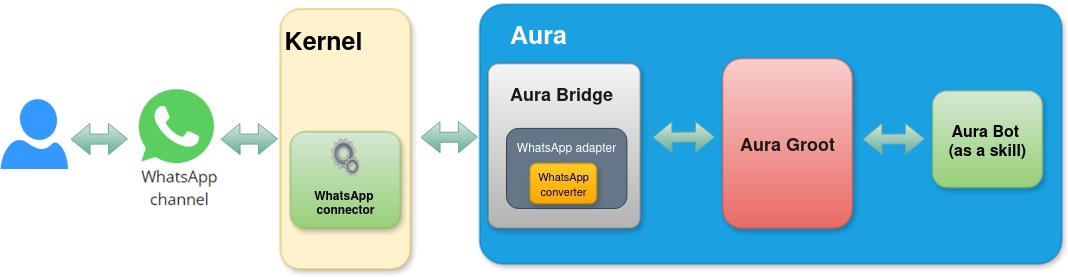
When a user requests a service to Aura through the WhatsApp channel, firstly Kernel summons Aura through a specific WhatsApp connector.
aura-bridge allows the compatibility of the Platform with the WhatsApp channel and acts as a communication layer with aura-groot.
Activation of WhatsApp channels
The use of all the available Aura features in WhatsApp requires the previous activation of the channels.
Check the detailed processes in:
WhatsApp activation
Onboarding in WhatsApp
The onboarding dialog for WhatsApp is a simple aura-bot dialog that returns certain personalized messages for WhatsApp with all the necessary information for the user’s onboarding and the Terms and Conditions management, depending on the type of user (authenticated or anonymous).
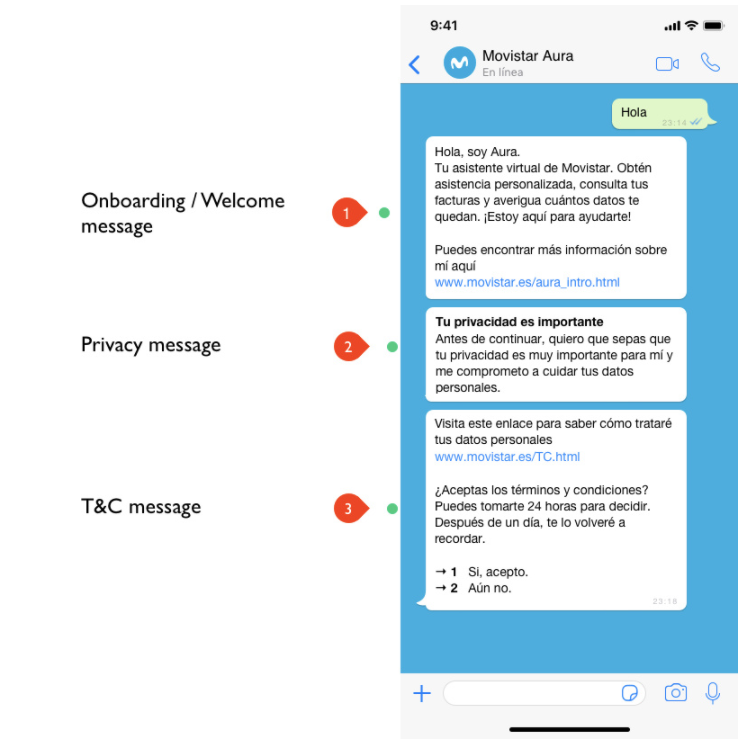
Find additional information regarding the onboarding process in WhatsApp in UC Catalog: Aura Platform capabilities. You can find here the detailed onboarding flowchart and specific POEditor resources for the onboarding conversational flow.
Authentication in WhatsApp channels
WhatsApp type channels support SMS-OTP authentication for “standard” use cases that require a level of assurance LoA2.
SMS-OTP authentication in WhatsApp
The WhatsApp login dialog is the aura-bot dialog in charge of the users’ login and authentication in WhatsApp channels through SMS-OTP authentication. The authentication operates following this process though the WhatsApp login dialog:
- The user requests a service to Aura (use case). If the use case requires authentication, Aura asks the user for it.
- The user is asked for using the current number or entering a new one, and Aura sends an SMS authcode to that number that must be entered back by the user.
- When the authentication finishes successfully, the use case is automatically executed (the user does not have to repeat the request).
The WhatsApp login dialog includes several steps:
- Checking if the user is already authenticated
- Asking the user if she wants to use the current phone number (if corporate) or she wants to enter a new one
- Inserting the phone number
- Inserting SMS OTP code and registering the user.
Find additional information regarding the SMS-OTP authentication process in WhatsApp in UC Catalog: Aura Platform capabilities. You can find here the detailed authentication flowchart and specific POEditor resources for the conversational flow.
The handover dialog in WhatsApp
The handover dialog is an aura-bot dialog that enables the user to initiate a conversation with a human agent in order to solve anything that Aura cannot do.
For this purpose, the dialog establishes a direct connection with the call-center software GENESYS.
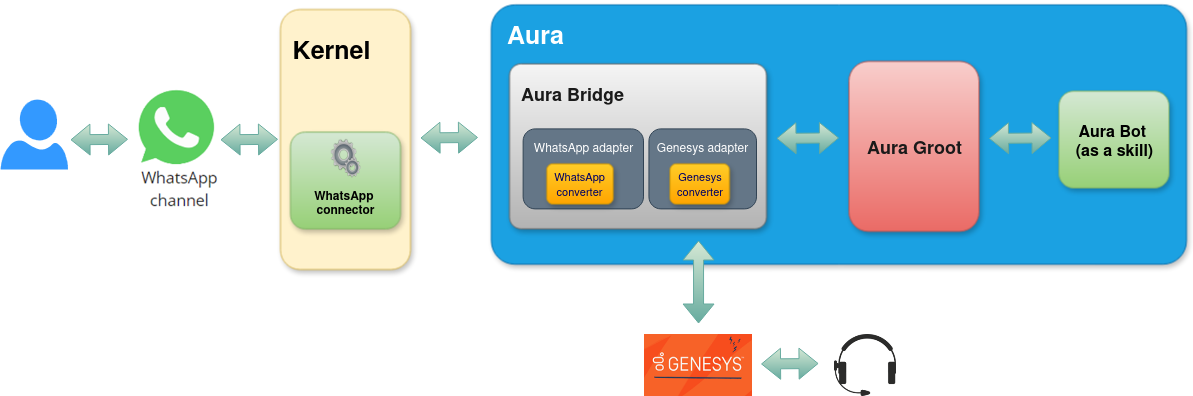
Find additional information regarding handover in WhatsApp in UC Catalog: Aura Platform capabilities. You can find here the detailed handover flowchart and specific POEditor resources for the conversational flow.
6.5 - Google RCS Business Messaging channel
Google RCS Business Messaging channel in Aura
Introduction to Google RCS Business Messaging channel in Aura, architecture and key features
Related documents
Activation of Google RCS Business Messaging channel
Practical guidelines for use cases development in Google RCS Business Messaging channel
Introduction to Google RCS Business Messaging in Aura
Rich Communication Services (RCS) is a communication protocol designed to enhance traditional SMS and MMS messaging.
The Google RCS Business Messaging channel (from now on, RCS channel) enables its users to incorporate richer content through chat features like video, images, and other interactive elements.
Aura allows RCS channel to communicate with the users through an application installed by default in their phones, with lower costs than WhatsApp.
In order to set up the RCS channel, Aura has to be registered as a partner with RCS Business Messaging.
After registration, an agent has to be created. An agent is a conversational entity that interacts with users by sending messages and reacting to users’ responses.
RCS allows sending different types of messages to the user:
- Text
- Media
- Suggested replies
- Suggested actions, like:
- Dial a number
- View a location
- Share a location
- Open a URL
- Create a calendar event
- Rich cards
- Carousels
Access detailed information regarding:
Overview of Aura - RCS communication architecture
The outlines of the communication between Aura and RCS are represented in the following figure:
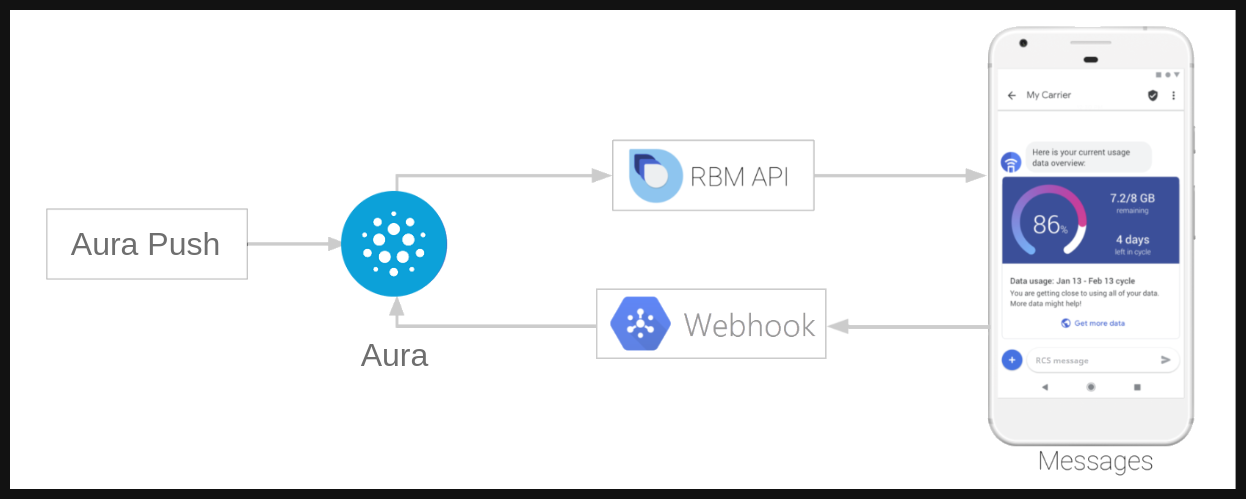
To start a conversation in RCS, the agent (aura-bridge in our case) is in charge of initiating it. In Aura, this is done using the aura-push plugin.
Through this set of endpoints, the channel is allowed to send messages to the user without a previous interaction. When the first message is sent, the responses of the user will be handled by aura-bridge and sent to the configured dialog in aura-bot.
Activation of RCS channels
The use of all the available Aura features in RCS requires the previous activation of the channels. Check the detailed process in:
RCS channel activation
Use case development
To learn how to develop use cases for RCS channels, refer to the following documentation:
Practical guidelines for use cases development in RCS
6.6 - Set Top Box channel
Set Top Box channel in Aura
Introduction to Set Top Box channel in Aura, architecture and key features. Description of how works the integration between the STB and Aura.
Related documents
Global video use cases
Introduction to Set Top Box channel in Aura
Television is currently one of the primary channels used by the customers of Telefónica’s brands across the countries. Indeed, Telefónica, as the owner of the channel, decides what is to be shown on it. The integration of Aura into the set-top-boxes (STB) of the countries streamlines access for end users, enabling them to explore the whole set of available TV features in each country.
Aura is available in the remote controller of the TV platforms
Aura provides natural language understanding for the user
Aura makes it easier to navigate through all the options of the graphical interface
Aura recognizes the main intentions of the users
Presently, Aura provides, among others, the functionalities listed below in STB:
- Actions to be executed by the device: record a content, change language, go to the beginning, go to the end, etc.
- Search in the TV content repository
- Information about what is the user watching
- Navigation through different sections of the interface
- Small Talk (greetings, goodbyes, thank yous, swear words)
Regarding the integration between the STB and Aura, there are currently two different implementations, depending on the version of the channelData used by the channel, and the version of the TV API used:
- STB channel in Spain, it is using channelData V1, with the legacy TV APIs.
- STB channel in Brazil, it is using channelData V3, with the normalized TV APIs.
All use cases are being moved to channelData V3, that in the end, will be the only one available for the integration.
Architecture overview
This section is WIP and will be completed soon.
Overview of Aura - STB communication architecture
STB uses Microsoft DirectLine protocol to access Aura. Further details in Microsoft Bot Service.
Authentication in STB channels
STB uses Non-integrated authentication, i.e. it is responsible for authenticating its users and calling the proper method to store the authorization_id for the Aura user.
Aura responses to STB channel
ChannelData version 1
Although STB channel in Spain uses channelData version 1, it counts on some requirements that are more strict than the Aura request and response model definition.
Field attachments
attachments is optional for DirectLine activities, but it is mandatory for STB, i.e. they always send both customAuraContent and customDataAsAttachment. It should contain the list of TV contents or the suggestions returned by the use case; if the use case does not return TV contents nor suggestions, for instance it only returns a text, a special attachment is expected.
type is mandatory and must have a proper value. common for those use cases returning only texts or no action to be executed by the device.action is also mandatory and must contain the action to be executed by the device. If no action is to be executed, then noAction should be passed.data is also mandatory, it contains the result of the use the case. If no data is needed, then an empty string should be sent.name is also mandatory and it must be AuraCustomData.
Examples
- Aura’s response to STB with TV suggestions
[
{
"type": "Receive_Message",
"activity": {
"type": "message",
"id": "Fdhko0UbZYn4ONV7HWsINn-eu|0000015",
"timestamp": "2025-04-15T13:47:33.8091689Z",
"channelId": "directline",
"from": {
"id": "BOT-aura-ap-four",
"name": "BOT-aura-ap-four"
},
"conversation": {
"id": "Fdhko0UbZYn4ONV7HWsINn-eu"
},
"text": "Hola, aquí estoy para ayudarte",
"speak": "Hola, aquí estoy para ayudarte",
"inputHint": "acceptingInput",
"attachments": [
{
"contentType": "application/vnd.microsoft.card.hero",
"content": {
"buttons": [
{
"type": "postBack",
"title": "Busca películas de comedia",
"value": {
"name": "Busca películas de comedia",
"text": "Película comedia",
"type": "suggestion",
"intent": "intent.tv.search",
"entities": [
{
"type": "ent.audiovisual_genre",
"entity": "películas",
"canon": "películas",
"label": "CN",
"score": 1
},
{
"type": "ent.audiovisual_subgenre",
"entity": "comedia",
"canon": "humor",
"label": "HU",
"score": 1
}
],
"inputIntent": "intent.common.greetings",
"inputEntities": []
}
},
{
"type": "postBack",
"title": "Quiero ver la película La ternura",
"value": {
"name": "Quiero ver la película La ternura",
"text": "Ver La ternura",
"type": "suggestion",
"intent": "intent.tv.search",
"entities": [
{
"type": "ent.audiovisual_film_title",
"entity": "La ternura",
"canon": "La ternura",
"label": "",
"score": 1
},
{
"type": "ent.audiovisual_genre",
"entity": "película",
"canon": "películas",
"label": "CN",
"score": 1
}
],
"inputIntent": "intent.common.greetings",
"inputEntities": []
}
},
{
"type": "postBack",
"title": "Películas en Fox",
"value": {
"name": "Películas en Fox",
"text": "Películas hoy Fox",
"type": "suggestion",
"intent": "intent.tv.content_get_info",
"entities": [
{
"type": "ent.audiovisual_channel",
"entity": "Fox",
"canon": "Fox",
"label": "",
"score": 1
},
{
"type": "ent.audiovisual_genre",
"entity": "Películas",
"canon": "películas",
"label": "CN",
"score": 1
}
],
"inputIntent": "intent.common.greetings",
"inputEntities": []
}
},
{
"type": "postBack",
"title": "Cuando es el partido del Madrid",
"value": {
"name": "Cuando es el partido del Madrid",
"text": "Partido del Real Madrid",
"type": "suggestion",
"intent": "intent.tv.question_time_loc",
"entities": [
{
"type": "ent.audiovisual_sports_team",
"entity": "Real Madrid",
"canon": "real madrid",
"label": "",
"score": 1
}
],
"inputIntent": "intent.common.greetings",
"inputEntities": []
}
},
{
"type": "postBack",
"title": "Quiero ver Divinity",
"value": {
"name": "Quiero ver Divinity",
"text": "Ver Divinity",
"type": "suggestion",
"intent": "intent.tv.display",
"entities": [
{
"type": "ent.audiovisual_channel",
"entity": "Divinity",
"canon": "Divinity",
"label": "",
"score": 1
}
],
"inputIntent": "intent.common.greetings",
"inputEntities": []
}
},
{
"type": "postBack",
"title": "Quiero quitar los subtítulos",
"value": {
"name": "Quiero quitar los subtítulos",
"text": "Desactivar subtítulos",
"type": "suggestion",
"intent": "intent.tv.subtitles_remove",
"entities": [],
"inputIntent": "intent.common.greetings",
"inputEntities": []
}
}
]
},
"name": "SUGGESTIONS"
},
{
"contentType": "application/json",
"content": {
"type": "common",
"action": "COMMON.GREETINGS",
"data": {},
"data_additional": {},
"status": {
"code": "200",
"message": "Success - General Code",
"info": {}
}
},
"name": "AuraCustomData"
}
],
"channelData": {
"intent": {
"id": "intent.common.greetings",
"name": "intent.common.greetings",
"entities": []
},
"content": {
"text": "Hola, aquí estoy para ayudarte",
"speak": "Hola, aquí estoy para ayudarte",
"sound": "positive",
"actions": []
},
"dialogContext": [
{
"text": "Busca películas de comedia",
"value": {
"name": "Busca películas de comedia",
"text": "Película comedia",
"type": "suggestion",
"intent": "intent.tv.search",
"entities": [
{
"type": "ent.audiovisual_genre",
"entity": "películas",
"canon": "películas",
"label": "CN",
"score": 1
},
{
"type": "ent.audiovisual_subgenre",
"entity": "comedia",
"canon": "humor",
"label": "HU",
"score": 1
}
],
"inputIntent": "intent.common.greetings",
"inputEntities": []
}
},
{
"text": "Quiero ver la película La ternura",
"value": {
"name": "Quiero ver la película La ternura",
"text": "Ver La ternura",
"type": "suggestion",
"intent": "intent.tv.search",
"entities": [
{
"type": "ent.audiovisual_film_title",
"entity": "La ternura",
"canon": "La ternura",
"label": "",
"score": 1
},
{
"type": "ent.audiovisual_genre",
"entity": "película",
"canon": "películas",
"label": "CN",
"score": 1
}
],
"inputIntent": "intent.common.greetings",
"inputEntities": []
}
},
{
"text": "Películas en Fox",
"value": {
"name": "Películas en Fox",
"text": "Películas hoy Fox",
"type": "suggestion",
"intent": "intent.tv.content_get_info",
"entities": [
{
"type": "ent.audiovisual_channel",
"entity": "Fox",
"canon": "Fox",
"label": "",
"score": 1
},
{
"type": "ent.audiovisual_genre",
"entity": "Películas",
"canon": "películas",
"label": "CN",
"score": 1
}
],
"inputIntent": "intent.common.greetings",
"inputEntities": []
}
},
{
"text": "Cuando es el partido del Madrid",
"value": {
"name": "Cuando es el partido del Madrid",
"text": "Partido del Real Madrid",
"type": "suggestion",
"intent": "intent.tv.question_time_loc",
"entities": [
{
"type": "ent.audiovisual_sports_team",
"entity": "Real Madrid",
"canon": "real madrid",
"label": "",
"score": 1
}
],
"inputIntent": "intent.common.greetings",
"inputEntities": []
}
},
{
"text": "Quiero ver Divinity",
"value": {
"name": "Quiero ver Divinity",
"text": "Ver Divinity",
"type": "suggestion",
"intent": "intent.tv.display",
"entities": [
{
"type": "ent.audiovisual_channel",
"entity": "Divinity",
"canon": "Divinity",
"label": "",
"score": 1
}
],
"inputIntent": "intent.common.greetings",
"inputEntities": []
}
},
{
"text": "Quiero quitar los subtítulos",
"value": {
"name": "Quiero quitar los subtítulos",
"text": "Desactivar subtítulos",
"type": "suggestion",
"intent": "intent.tv.subtitles_remove",
"entities": [],
"inputIntent": "intent.common.greetings",
"inputEntities": []
}
}
],
"fullScreen": false,
"version": "1.0.0",
"hasMoreMessages": false,
"correlator": "084e5b86-9bc2-4f38-b7ae-21b34b46600f"
},
"replyToId": "Fdhko0UbZYn4ONV7HWsINn-eu|0000014"
}
}
]
- Aura’s response to STB only with text
[
{
"type": "Receive_Message",
"activity": {
"type": "message",
"id": "Fdhko0UbZYn4ONV7HWsINn-eu|0000009",
"timestamp": "2025-04-15T13:36:35.5206701Z",
"channelId": "directline",
"from": {
"id": "BOT-aura-ap-four",
"name": "BOT-aura-ap-four"
},
"conversation": {
"id": "Fdhko0UbZYn4ONV7HWsINn-eu"
},
"text": "¿Te gustaría experimentar una aventura emocionante o una trama más profunda y reflexiva?",
"speak": "¿Te gustaría experimentar una aventura emocionante o una trama más profunda y reflexiva?",
"inputHint": "acceptingInput",
"attachments": [
{
"contentType": "application/json",
"content": {
"type": "common",
"action": "noAction",
"data": {},
"data_additional": {},
"status": {
"code": "200",
"message": "Success - General Code",
"info": {}
}
},
"name": "AuraCustomData"
}
],
"channelData": {
"intent": {
"id": "intent.tv.custom_recommendation",
"name": "intent.tv.custom_recommendation",
"entities": []
},
"content": {
"text": "¿Te gustaría experimentar una aventura emocionante o una trama más profunda y reflexiva?",
"speak": "¿Te gustaría experimentar una aventura emocionante o una trama más profunda y reflexiva?",
"sound": "positive",
"actions": []
},
"dialogContext": [],
"fullScreen": false,
"version": "1.0.0",
"hasMoreMessages": false,
"correlator": "ce12e579-76ad-4a75-8f98-7c6bae8260ca"
},
"replyToId": "Fdhko0UbZYn4ONV7HWsINn-eu|0000008"
}
}
]
7 - Aura Global use cases
Aura Global use cases
Discover the Global use cases developed by Aura Platform Team and put at the OB’s disposal and the global libraries and dialogs that contain the logic for different experiences
Aura Virtual Assistant components
Introduction
Global use cases are experiences already designed, developed and tested by Aura Platform Team.
OBs cannot modify their logic but use them as they are or get inspired for deploying their own experiences.
The current section includes:
-
Global dialogs / libraries, that contain the logic for the management of different experiences:
-
Global use cases, as experiences that reach the final users:
-
Aura video use cases, that provide different experiences for Telefónica customers related to video services.
-
Use cases for testing Aura: libraries used by Aura Global Team for testing Aura Platform functionalities.
📃 Find guidelines for installing and using global experiences in your Aura system: Use global use cases.
ℹ️ With the introduction of the channelData normalized version (v3), these global dialogs will be progressively adapted to be compatible with this version.
This information is included in the documentation of the specific dialogs where two versions (v1 and v3) are already available, together with the changes in the dialogs’ functionality that, for example, affect to video use cases.
Libraries configuration
aura-bot has the control to prepare and manage all configuration variables and make validations to get ready. In case that any validation fails, the set of libraries wrongly loaded will be shown and the bot will not start. If there is a problem with the scheme of an external library, the broken library should be extracted or fixed.
In order to validate schemas of the variables used in external libraries, it is optional that each library has an accessible scheme with the names of THEIR variables, default values, etc.
For example, there is a library that exposes a variable that contains a threshold that can be modified from outside that library. The developer´s library should create a schema (using @hapi/joi) specifying the name of the variable with the prefix of the library name (for example: LIBRARYNAME_THRESHOLD).
It is suggested that at the library level and within the src/ folder, a file named configuration-schema.ts is created, containing the configuration scheme like the one shown below:
import * as joi from 'joi';
const configurationSchema = {
LIBRARYNAME_DEFAULT_GREETINGS: joi.string().default('hello'),
LIBRARYNAME_COMMON_COUNT_GREETINGS: joi.number().default(1800)
};
export default configurationSchema;
In this first approach, there is no name validation (checking the prefix name of the variables).
Nomenclature for libraries variables
The naming of local library environment variables must follow these instructions:
- Follow the structure:
LIBRARYNAME_*.
- If the environment variable is an endpoint:
LIBRARYNAME_*_ENDPOINT.
- If the environment variable is a Kernel endpoint:
AURA_FP_*_ENDPOINT.
- If the environment variable is a Kernel endpoint and is only used in one library or the use case uses a different API version than the global one:
LIBRARYNAME_FP_*_ENDPOINT
Each library in this section includes its own variables.
7.1 - Authentication dialogs
Global authentication dialogs
Global authentication dialogs support different types of authentication in Aura
Global authentication dialogs include:
7.1.1 - account-linking dialog
account-linking dialog
Description of the account-linking dialog, one of the dialogs that handles users’ account linking
Introduction
The account-linking dialog is included in the global linking library.
It is in charge of handling user’s account linking for channels using integrated authentication, that is, channels that already have a proper user’s identifier that should be linked with the corresponding auraId and that cannot handle Kernel authentication directly:
- WebClient
- Facebook
- WhatsApp
This dialog launches authentication in Kernel based on browser navigation. It includes several steps to validate the Terms and Conditions of the services and to launch the user’s autentication in the OB authenticator and in Kernel that, in the end, would register the auraId in Aura users’ database.
Environment variables
| Property |
Type |
Scope |
Description |
| LINKING_FP_ACCESS_SESSIONS_ENDPOINT |
string |
Local |
URL to Kernel Access Sessions API |
| LINKING_FP_CALLBACK_LOGIN_URL |
string |
Local |
URL to redirect to authentification login |
| LINKING_FP_CALLBACK_LOGOUT_URL |
string |
Local |
URL to redirect to authentification logout |
| LINKING_TERMS_AND_CONDITIONS_URL |
string |
Local |
URL to terms and conditions HTML file. By default: /documents/termsandconditions.html |
| SAFETY_CHECK_ENDPOINT |
string |
Local |
URL API client endpoint |
7.1.2 - get-oauth-url dialog
get-oauth-url dialog
Description of the get-oauth-url dialog, one of the dialogs that handles users’ account linking
The get-oauth-url dialog is included in the global linking library.
This dialog returns to the channel the oauth URL to launch the account linking.
7.1.3 - account-remove dialog
account-remove dialog
Description of the account-remove dialog, one of the dialogs that handles users’ account linking
The account-remove dialog is included in the global linking library.
This dialog launches the logout process in Kernel based on browser navigation.
It includes several steps to remove the login session from Kernel and in the OB authenticator that, in the end, would remove the auraId from the Aura Users’ database.
7.1.4 - seamless-account-remove dialog
seamless-account-remove dialog
Description of the seamless-account-remove dialog, one of the dialogs that handles users’ account linking
The seamless-account-remove dialog is included in the global linking library.
This dialog launches seamless logout in Kernel.
It counts on several steps to remove the login session from Kernel and in the OB authenticator that, in the end, would remove the auraId from the Aura users’ database.
7.1.5 - onboarding-whatsapp dialog
onboarding-whatsapp dialog
Description of the global onboarding-whatsapp dialog for WhatsApp channel
Introduction
The onboarding-whatsapp dialog is a simple dialog that returns some personalized messages for WhatsApp or other channel.
The dialog returns three messages with all the information necessary for the user’s onboarding and the Terms and Conditions acceptance.
According to the type of user (authenticated or anonymous), the messages will be different:
For anonymous users, the messages returned will be:
onboarding:onboarding.welcomeonboarding:onboarding.privacyonboarding:onboarding.terms-and-conditions
For authenticated users, the returned messages will be:
onboarding:onboarding.auth.welcomeonboarding:onboarding.auth.privacyonboarding:onboarding.auth.terms-and-conditions
If one of these texts are filled with " " in the locales, this message will not be sent, excepting terms-and-conditions text, which is mandatory. The first two messages, welcome and privacy, are only sent the first time this user arrives to the dialog. In succeeding interactions, only terms-and-conditions message will be returned.
Terms and conditions
aura-bot redirects to this dialog when Terms and Conditions settings are set, and the user has not accepted them yet.
More info about Terms and Conditions settings and flows here.
7.1.6 - whatsapp-otp-login dialog
whatsapp-otp-login dialog
Description of the whatsapp-otp-login dialog, that handles SMS-OTP authentication in this channel
Introduction
The whatsapp-otp-login dialog is a global dialog to make the user login in the WhatApp channel.
Currently, it only supports SMS-OTP authentication.
Access to the Kernel WhatsApp API.
📃 Check the dialog’s code in the aura-bot-libraries Github repository.
Flows
The dialog flow is divided in several steps, which are described in the following sections.
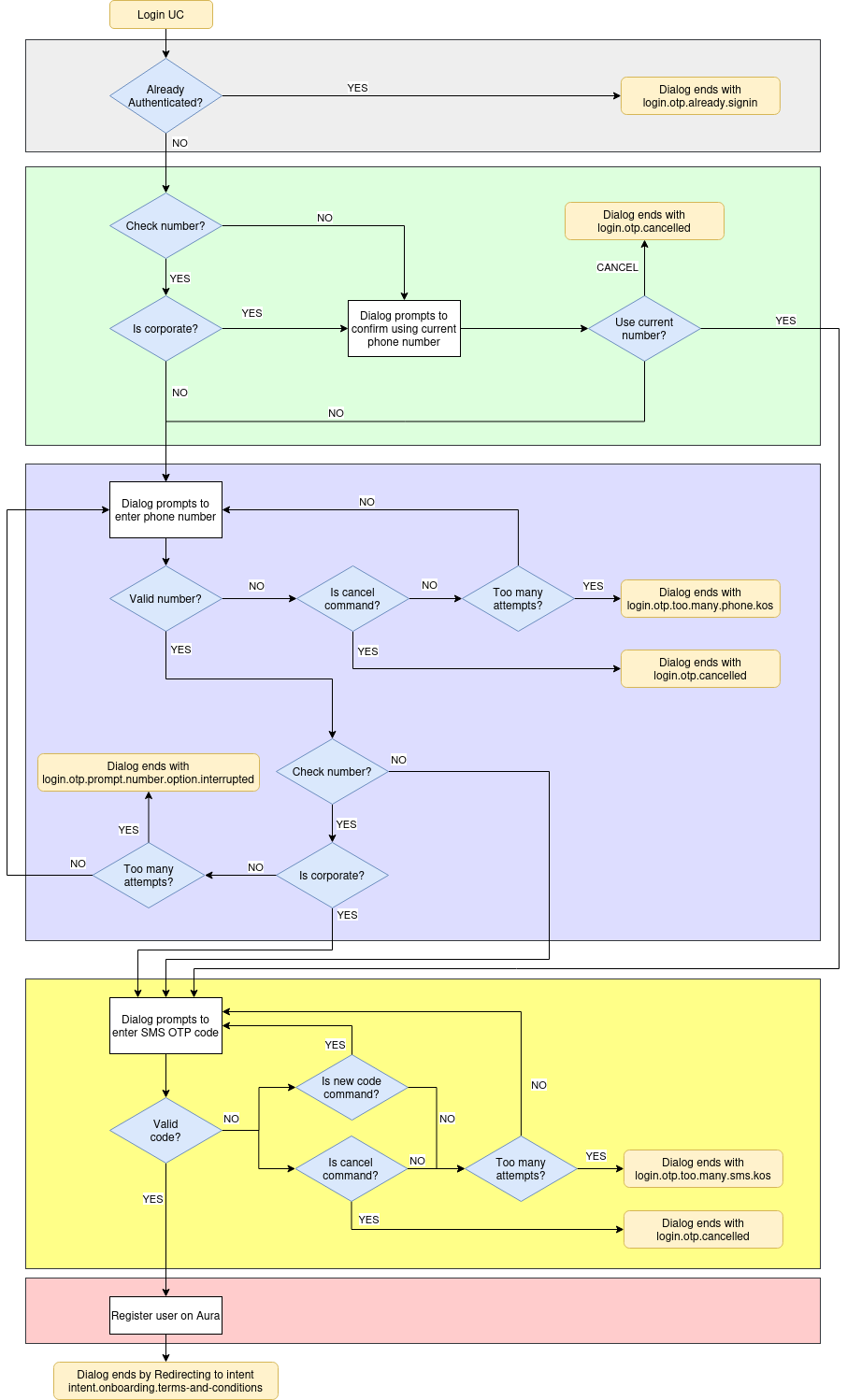
Additionally, a sequence flow is included in Operational flowcharts: WhatsApp OTP (LoA2) authentication.
Check if the user is already authenticated
When the dialog flow starts, it checks if the current user is already authenticated, verifying if the type of user is anonymous.
If so, the dialog flow ends with the text resource login.otp.already.signin. If not, it starts a sub-dialog to verify the phone number to send the SMS code.
Check if current number is corporate
In this step, if configured so, the system checks if the current phone number is corporate, to allow using it in next steps.
- If check is not enabled or user is not corporate, go to the following step for prompting a new phone number.
- Otherwise, ask the user if she wants to use current number.
Prompt a phone number
This step prompts the user to enter the phone number he wants to log in with in Aura, thus the dialog will send the SMS-OTP code to that phone number.
- If the phone number format is correct:
- If configured to check the prompted number and the number is not corporate, ask for a new phone number (until max number of retries is reached).
- Otherwise, it starts a sub-dialog to verify the SMS authcode.
- If the format is wrong, the dialog will prompt again to enter with correct format until the maximum number of attempts is reached (See settings section). When the user reaches this maximum, the dialog ends with the text resource
login.otp.too.many.phone.kos.
To send this code to the user phone, the send code endpoint from Kernel is called. This endpoint returns an authentication_id that will be used in the next step to validate the OTP code.
Insert SMS OTP code
This step prompts the user to enter the SMS authcode sent to phone number provided on the previous step.
- When the user enters the correct code, the dialog starts the following step in order to register the user.
- If the authcode is wrong, the dialog will prompt again to enter the correct authcode until the maximum number of attempts is reached (See settings section).
When the user reaches the maximum authcode attempts the dialog ends with the text resource login.otp.too.many.sms.kos. A new code can be sent by sending the text resource login.otp.newCode.command which makes the bot to send a new auth code to the phone number provided.
To validate the code, the Kernel validate code endpoint is called with the code received by the user and the authentication_id returned in the previous api call. This call returns all the necessary data to register the user in Aura.
Register user
This step registers the user in Aura ecosystem and redirects to onboarding T&C with the intent intent.onboarding.terms-and-conditions or the requested intent before authentication if T&C are already accepted.
To do this registry, the method GET /users/aura-id/{auraId} from aura-authentication-api is called and the user is registered with the data obtained from Kernel in the previous step.
The redirect to onboarding (or the intent set) is done if the field actions.afterLogin is present in the channel configuration. An example of this configuration is shown below:
{
"name": "whatsapp",
"prefix": "wa",
"type": "whatsapp",
"responseOptions": {
"versions": {
"v1": {
"singleMessage": true,
}
}
}
.
.
.
"actions":
"afterLogin": {
"type": "redirect",
"action": "REDIRECT.COMMAND",
"data": {
"auraCommand": {
"type": "suggestion",
"value": {
"intent": "intent.onboarding.terms-and-conditions"
}
}
}
}
}
.
.
.
This configuration is used to generate the redirect command that will be sent to launch the intent. If there is an intent requested before authentication and the T&C are already accepted, the intent set in configuration will be overwritten with the requested intent.
NOTE The user can cancel login flow at any moment by sending the text resource login.otp.cancel.command.
Sequence diagram
sequenceDiagram
autonumber
participant user
participant auraBridge
participant auraBot
participant 4p
participant auraAuth
participant T&C API
rect rgb(255, 255, 230)
Note left of user: USER REQUESTS AN AUTHENTICATED UC
user->>auraBridge: I want to see my billing data
auraBridge->>auraBot:
auraBot->>auraBot: Dialog needs auth and user is anonymous. Redirect to whatsapp login
auraBot->>auraBridge:
auraBridge->>user: login.otp.phone.number: Please enter your phone number
user->>auraBridge: +34665762892
auraBridge->>auraBot:
auraBot->>4p: Aura requests a new OTP sms
4p->>user: (SMS) login.otp.sms.code.message: Your verification code is 6789
4p->>auraBot: authorization_id
auraBot->>auraBridge:
auraBridge->>user: login.otp.sms.sent.message: Please insert the code
user->>auraBridge: 6789
auraBridge->>auraBot:
auraBot->>4p: Aura validates the code
4p->>auraBot: Returns user data
auraBot->>auraAuth: Register user
auraAuth->>auraBot: 200 OK
alt
Note left of T&C API: User already accepted authenticated T&C
auraBot->>T&C API: Checks terms and conditions
T&C API->>auraBot: 200 OK
auraBot->>auraBridge: Response + Redirect intent
auraBridge->>user: login.otp.success: Great! you are now signed in
auraBridge->>auraBot: intent.billing from redirect intent
auraBot->>auraBot: authenticates the user and executes the billing dialog
auraBot->>auraBridge:
auraBridge->>user: "Here is your billing data"
else
Note left of T&C API: User needs to accept authenticated T&C
auraBot->>T&C API: Checks terms and conditions
T&C API->>auraBot: 404 Not found
auraBot->>auraBridge: Response + Redirect intent
auraBridge->>user: login.otp.success: Great! you are now signed in
auraBridge->>auraBot: intent.onboarding.terms-and-conditions from redirect intent
auraBot->>auraBot: authenticates the user and executes T&C dialog
auraBot->>auraBridge:
auraBridge->>user: onboarding:onboarding.auth.welcome
auraBridge->>user: onboarding:onboarding.auth.privacy
auraBridge->>user: onboarding:onboarding.auth.terms-and-conditions
else
Note left of T&C API: Channel doesn't have terms and conditions config
auraBot->>auraBridge: Response + Redirect intent
auraBridge->>user: login.otp.success: Great! you are now signed in
auraBridge->>auraBot: intent.billing from redirect intent
auraBot->>auraBot: authenticates the user and executes the billing dialog
auraBot->>auraBridge:
auraBridge->>user: "Here is your billing data"
end
end
BotResponse settings
Currently, the dialog has a main intent intent.authentication.login and three auxiliary intents: otp-confirm-user-phone-number-dialog, intent.authentication.otp.phone.number and intent.authentication.otp.auth.code. These auxiliary intents are necessary to enable the flow between sub-dialogs.
{
"id": "whatsapp-otp-login-dialog",
"triggerConditions": [
{
"intent": "intent.authentication.login"
}
]
},
{
"id": "otp-confirm-user-phone-number-dialog",
"triggerConditions": [
{
"intent": "intent.otp.confirm.user.phone.number.dialog"
}
]
},
{
"id": "otp-phone-number-dialog",
"triggerConditions": [
{
"intent": "intent.authentication.otp.phone.number"
}
]
},
{
"id": "otp-sms-auth-code-dialog",
"triggerConditions": [
{
"intent": "intent.authentication.otp.auth.code"
}
]
}
Settings
This section lists and describes all the variables the whatsapp-otp-login dialog uses and that can be configured to adapt the environment:
| Property |
Type |
Description |
Default value |
| LINKING_FP_WHATSAPP_ENDPOINT |
string |
WhatsApp API endpoint |
|
| LINKING_WA_MAX_FP_SEND_SMS_RETRIES |
number |
Maximum SMS retries. |
3 |
| LINKING_WA_MAX_AUTHCODE_RETRIES |
number |
Maximum authcode retries. |
3 |
| LINKING_WA_MAX_PHONENUMBER_RETRIES |
number |
Maximum phonenumber retries. |
3 |
7.1.7 - whatsapp-logout dialog
whatsapp-logout dialog
Description of the whatsapp-logout dialog, that handles the log out process for this channel
Introduction
The whatsapp-logout dialog is a global dialog in charge of the user’s logout in the WhatsApp channel.
📃 Check the dialog’s code in the aura-bot-libraries Github repository.
Flows
The flow of this dialog is simple. In the first step, a prompt is returned to the user to confirm if he wants to logout.
After that, if he accepts, certain actions are performed:
- The user is deleted in Aura database calling the aura services API. If this call fails, an error will be returned, and the logout will fail.
- The user is deleted in Kernel calling the logout endpoint. If this call fails, the flow continues normally returning a success message to the user and only showing an error log.
- If the user is logged with LoA3, access session is deleted in Kernel calling access session delete endpoint. If this call fails, the flow continues normally returning a success message and only showing the error in logs.
- The local cache is set to invalid to force the refresh next time the user interacts with Aura.
7.2 - Conversational dialog
Conversational dialog
Description of the conversational-dialog global use case available for Aiwi
Introduction
The conversational-dialog allows users to interact with an LLM with a predefined prompt.
This prompt should return a json formatted object to be mapped in a standard Aiwi response message.
Specific configuration
The conversational-dialog is designed to handle user’s requests using LLMs in ATRIA.
Currently, this dialog is available for Aura channelData V1 version and can only be used for the channel AIWI.
For this use case, the required specific configuration is set below:
{
"name": "conversational",
"dialogs": [
{
"id": "conversational-dialog",
"allowAnonymous": true,
"triggerConditions": [
{
"intent": "None"
}
],
"bypass": {
"duration": 30,
"payloadName": "conversational",
"initialData": {},
"recognizersEnabled": false,
"recognizersBreakIntents": {}
}
}
]
}
Specific values
| Key |
Value |
Description |
| bypass.duration |
30 (minutes) |
This value overwrites the default aura-bot value for bypass lasting 10 minutes. |
| bypass.payloadName |
conversational |
Name of the interface that will be used as bypass payload for this dialog. |
| bypass.initialData |
empty |
It should contain any data needed by the dialog to be initialized. |
| bypass.recognizersEnabled |
false |
This value overwrites the default aura-bot way of working with recognizers when it is in bypass mode. If it is set to true, recognizers are executed, and their result is stored in the bypass payload to be used, if needed, afterwards. |
| bypass.recognizersBreakIntents |
empty |
Used to handle when the user requested any other use case during the execution of the dialog. To enable this config, bypass.recognizersEnabled should be enabled. |
Environment variables
| Property |
Type |
Description |
Modifiable by OB? |
| AURA_GATEWAY_API_ENDPOINT |
URI string |
Endpoint to access the locally deployed ATRIA aura-gateway-api |
NO |
| AURA_GATEWAY_API_ISSUER_URL |
string |
Aura issuer URL. It is automatically fulfilled by the installer. |
NO |
| CONVERSATIONAL_COMMAND_KEY |
string |
Key of the command in the returned json from prompt. |
YES |
| CONVERSATIONAL_MESSAGE_KEY |
string |
Key of the message in the returned json from prompt. |
YES |
Configuration by channel
From Prince’s release onwards, the configuration of applicationId and presetId per channel and intent has been added to the channel model.
For this use case, the required specific configuration per channel is set below (added dialogs section under atria property at Main-Recognizer-Video-Triage-29855):
{
"atria": {
"dialogs":{
"None": {
"applicationId": "816bdab6-3ea3-4a77-bdea-12945d6d7053",
"presetId": "ef3d0603-3fef-4109-a577-0ab92f9060df"
}
}
}
}
Specific values by channel
| Intent |
Key |
Value |
Description |
Modifiable by OB? |
| intent.tv.custom_recommendation |
applicationId |
1eb11727-14f2-447f-acc0-a2211ab55870 |
ATRIA application identifier |
NO |
| intent.tv.custom_recommendation |
presetId |
e0cdcae2-025d-4624-8096-d6bf4b5eaaff |
ATRIA preset identifier to be used within the use case. |
NO |
7.3 - generic-ai-dialog
Aura bot generic-ai-dialog
Description of Aura bot generic-ai-dialog, that allows managing several experiences for TV channels using AI services and complex logic resolution.
Introduction
The aura-bot-generic-ai-library library includes the following list of dialogs:
7.3.1 - Generic AI Dialog v1
Aura Bot generic-ai-dialog-v1
Description of Aura bot generic-ai-dialog-v1, that allows managing several experiences for TV channels using AI services and complex logic resolution.
Introduction
The generic-ai-dialog-v1 allows OBs to implement search and recommendation use cases for TV channels based on AI services and complex logic resolution for channelData v1 channels.
You can check its source code in Github: generic-ai-dialog-v1.ts.
Environment variables
| Property |
Type |
Description |
Mandatory |
| AURA_AUTHORIZATION_HEADER |
string |
Authorization header to be sent to AURA_GATEWAY_API_ENDPOINT |
yes |
| AURA_COMPLEX_LOGIC_ENDPOINT |
string |
URL of Complex Logic endpoint to interact with resolution API. |
yes |
| AURA_GATEWAY_API_ENDPOINT |
string |
URL of Aura Gateway API endpoint |
yes |
| AURA_GATEWAY_API_ISSUER_URL |
string |
Issuer URL for token info |
yes |
| AURA_CHANNELDATA_DEFAULT_VERSION |
string |
Default version of channelData. By default 1.0.0. |
no |
| AURA_CHANNELDATA_LA_DEFAULT_VERSION |
string |
Default version of channelData for Latin America. By default 2.0.0. |
no |
| GENERIC_MP_RESOLUTION_NO_RESULT_CODE |
string[] |
List of resolution codes that indicate no results found. By default ['211', '462']. |
no |
How it works
The dialog works in a similar way to the generic-ai-dialog-v3 but adapted to the structure of channelData v1.
Complex Logic proxy is used to interact with Complex Logic resolution API, which returns a response similar to Movistar Plus Resolution API. This adaptation is only valid for TVSearch responses for STB channel, because only a subset of fields has been mapped from normalized TV API to legacy TV API.
7.3.2 - Generic AI Dialog v3
Aura Bot generic-ai-dialog-v3
Description of Aura bot generic-ai-dialog-v3, that allows managing several experiences for TV channels using AI services and complex logic resolution.
Introduction
The generic-ai-dialog-v3 allows OBs to implement search and recommendation use cases for TV channels based on AI services and complex logic resolution for channelData v3 channels.
You can check its source code in Github: generic-ai-dialog-v3.ts.
Environment variables
| Property |
Type |
Description |
Mandatory |
| AURA_AUTHORIZATION_HEADER |
string |
Authorization header to be sent to AURA_GATEWAY_API_ENDPOINT |
yes |
| AURA_COMPLEX_LOGIC_ENDPOINT |
string |
URL of Complex Logic endpoint to interact with resolution API. |
yes |
| AURA_GATEWAY_API_ENDPOINT |
string |
URL of Aura Gateway API endpoint |
yes |
| AURA_GATEWAY_API_ISSUER_URL |
string |
Issuer URL for token info |
yes |
| AURA_CHANNELDATA_DEFAULT_VERSION |
string |
Default version of channelData. By default 1.0.0. |
no |
| AURA_CHANNELDATA_LA_DEFAULT_VERSION |
string |
Default version of channelData for Latin America. By default 2.0.0. |
no |
Adding configurations for the AI Service
To use the AI Service, you need to add the intent configurations to the channel settings. The configurations should be added in the following format:
{
"atria": {
"dialogs": {
"intent.tv.retrieve": {
"applicationId": "816bdab6-3ea3-4a77-bdea-12945d6d7053",
"presetId": "5d06f26c-a8d8-4f45-a999-102aaa8b191b"
}
}
}
}
With this configuration, when the generic-ia-dialog-v3 is called with the intent intent.tv.retrieve, it will use the specified applicationId and presetId to call the generative API.
How it works
Steps
- The dialog starts by retrieving the intent information from the context and logging the start of the dialog.
- Then, it calls the AI service to get a generative response based on the intent and the current session ID. The session ID is updated in the context for future requests.
- Next, it calls the complex logic service to get a resolution based on the intent and entities from the generative response.
- If the resolution indicates no content found, it redirects to the conversational-search dialog.
- Otherwise, it builds an activity to be sent to the user using the intent result, intent settings, and resolution.
- If any error occurs during these steps, it logs the error, sets the error in the context, and builds an activity from the error.
- Finally, it sends the activity to the user and ends the dialog.
Sequence diagram
sequenceDiagram
autonumber
participant User
participant Dialog
participant AI Services
participant Complex Logic
participant Conversational Search
Dialog->>Dialog: Retrieve intent information from context
Dialog->>AI Services: Call AI service with intent and session ID
AI Services->>Dialog: Return generative response and session ID
Dialog->>Complex Logic: Call complex logic service with intent and entities
Complex Logic->>Dialog: Return resolution
alt No content found in resolution
Dialog->>Conversational Search: Redirect to conversational-search dialog
else Content found
Dialog->>Dialog: Build activity with intent result, intent settings, and resolution
Dialog->>User: Send activity to user
end
Dialog->>Dialog: End dialog
7.4 - generic-dialog
Aura bot generic-dialog
Description of Aura bot generic-dialog, that allows managing several experiences for TV channels based on a simple configuration
Find here details regarding the global generic library and dialogs’ versions and the condition for a use case to be generic
Related documents
📄 Guidelines for the development of experiences through the generic-dialog
Introduction
The generic-dialog allows OBs to implement certain local use cases for Movistar Home, Movistar Plus and Set-top Box (STB) channels in an autonomous, agile and simple way with no code development, only by means of configuration.
Different versions compatible with channelData v1 and v3 are available:
Aura global generic-dialog
The generic-dialog responds to the intention of having a single dialog based on configuration that allows managing several intents whose behavior is similar.
Therefore, it allows the development of certain types of use cases in a simple and autonomous way, with no associated code development and simply by means of configuration.
The global generic-dialog file, generic-dialog.ts includes the logic for the use case execution, where configuration is recovered and the output message is generated with the defined parameters.
Besides this global generic-dialog, there are several plugins based on the same dialog, all of them working as the global one and with similar code. In this framework, each OB have a specific generic-dialog in its corresponding library generic-[OB]/ which must be used when developing a local use case.
The global library that includes the generic dialog is named generic and has been designed for the management of different types of dialogs.
You can find it here.
Conditions for a use case to be generic
In order to consider a use case as part of the generic-dialog, it must fulfil these conditions:
✅ Local use cases developed from scratch by the OBs.
✅ Use cases with intents that can be managed by Movistar Plus, Movistar Home or Set-Top-Box (STB) channels.
✅ Dialog with only one interaction with the user: only one message from the user and one response from the bot are allowed. For example: greetings dialog.
✅ There is a direct transformation from intent to action (you may or may not call the API Movistar Resolution for this purpose). For example: tv-remote-actions use cases).
✅ Use cases that require the conversion of input parameters through a function to get the correct payload. For example: conversion on entities. For example: move_forward.
✅ Currently, only one text response is allowed:
settings.locale.success when all works fine.settings.locale.error when something goes wrong.- Also, the text can be set in the response from the resolution API but, if required for example a variable text depending on the response of the API or the recognized entity, then developers must create another dialog.
Merely as examples of the potential of aura-bot generic dialog, below you can find different use cases for the channels Movistar Plus, Movistar Home or STB channels that can be developed through it. Use them as a reference for developing your own local experiences!
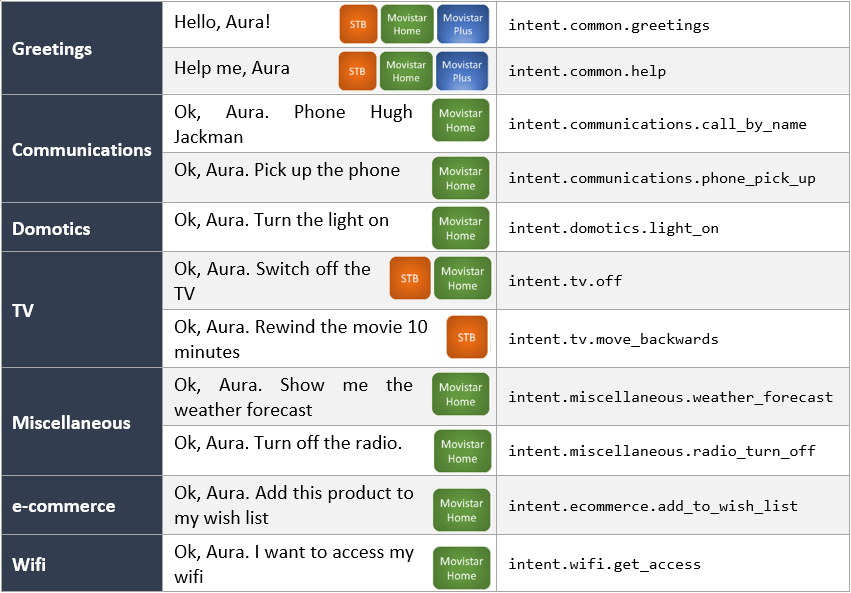
7.4.1 - generic-dialog v1
Aura Bot generic-dialog v1
Dialog based on a simple configuration that allows managing several experiences for TV channels. This version is compatible with channelData v1.
Introduction
The generic-dialog allows OBs to implement certain local use cases for Movistar Home, Movistar Plus and Set-top Box (STB) channels in an autonomous, agile and simple way with no code development, only by means of configuration.
Use this generic-dialog if your channelData version is v1.
You can check its source code in Github: generic-dialog.ts.
Included intents
The next table shows current intents available on generic-dialog and the previous library where the intent was set.
| Intent |
Previous library |
| intent.common.goodbyes |
common |
| intent.common.greetings |
common |
| intent.common.help |
common |
| intent.common.swearwords |
common |
| intent.common.thankyous |
common |
| intent.communications.silent_mode_on |
communications |
| intent.communications.silent_mode_off |
communications |
| intent.communications.call_voicemail |
communications |
| intent.communications.add_contact |
communications |
| intent.communications.phone_pick_up |
communications |
| intent.communications.call |
communications |
| intent.communications.call_by_number |
communications |
| intent.communications.call_by_name |
communications |
| intent.communications.check_calls |
communications |
| intent.communications.redial |
communications |
| intent.communications.ignore_calls |
communications |
| intent.domotics.light_on |
domotics |
| intent.domotics.light_off |
domotics |
| intent.ecommerce.add_to_wish_list |
ecommerce |
| intent.miscellaneous.radio_turn_off |
miscellaneous |
| intent.miscellaneous.time_check |
miscellaneous |
| intent.miscellaneous.weather_forecast |
miscellaneous |
| intent.miscellaneous.news_listen |
miscellaneous |
| intent.navigation.section_show |
navigation |
| intent.navigation.back |
navigation |
| intent.navigation.next |
navigation |
| intent.navigation.previous |
navigation |
| intent.carousel.info |
tv |
| intent.tv.details |
tv |
| intent.tv.help |
tv |
| intent.tv.init |
tv |
| intent.tv.from_beginning |
tv |
| intent.tv.record |
tv |
| intent.tv.channel_down |
tv |
| intent.tv.channel_up |
tv |
| intent.tv.move_backwards |
tv |
| intent.tv.move_forwards |
tv |
| intent.tv.mute |
tv |
| intent.tv.unmute |
tv |
| intent.tv.stop |
tv |
| intent.tv.off |
tv |
| intent.tv.on |
tv |
| intent.tv.pause |
tv |
| intent.tv.resume |
tv |
| intent.tv.volume_down |
tv |
| intent.tv.volume_up |
tv |
| intent.tv.c2c |
tv |
| intent.tv.content_get_info |
tv |
| intent.tv.none |
tv |
| intent.tv.question_time_loc |
tv |
| intent.tv.search |
tv |
| intent.tv.search_similar |
tv |
| intent.tv.vod_epq_information |
tv |
| intent.tv.watching_now |
tv |
| intent.tv.suggestions |
tv |
| intent.wifi.get_access |
wifi |
Generic indexed text
Generic dialog implements an algorithm, which based on a dialog configuration, can customize its response. The getIndexedText function returns a POEditor resource based on the dialog configuration’s setting indexedResourceBase and the value entity.entity obtained from the first entity. This functionality relies in those two values and will return an error if they are not present.
{
"intent": "intent.exact-match.faq",
"settings": {
"indexedResourceBase": "generic:faq-answer.",
"functions": {
"params": [
"context",
"currentIntent",
"persistentData"
],
"algorithm": "getIndexedText"
}
}
}
In this example, the reference that will be searched in POEditor will be generic:faq-answer.X, where X is the identifier gathered from the first entity.
Keep in mind that in function.params there has to be an array of parameters that will be used in getIndexedText.
Enabling AI resolution
To enable the AI-based fallback mechanism, add the flag enableAIResolution to true inside the dialog configuration for the intent. This setting allows the dialog to use the ai recognizer when the NLP resolution returns no entities or when the Movistar Plus resolution returns no results.
Example configuration:
{
"intent": "intent.tv.search",
"settings": {
"locales": {
"error": [
"core:flc.answer.error"
]
},
"enableAIResolution": true,
"needTvResolution": true
}
}
AI fallback resolution
When using generic-dialog v1 and needTvResolution is set to true, a fallback mechanism using AI services is available if enableAIResolution is set to true in the dialog configuration.
If NLP resolution returns no entities or when the Movistar Plus resolution returns no results, the system applies an AI-based fallback strategy (“triage”). This ensures robustness and continuity of the dialog flow.
The fallback is triggered in two scenarios:
-
No entities detected
If the intent requires TV resolution and no entities are returned by the NLP (intentResult.entities?.length === 0), the dialog calls the recognizeUsingAI function.
If a new intent is successfully recognized, the current dialog is replaced by the new one.
-
Movistar Plus resolution returns no results
When the intent and entities are passed to Movistar Plus Resolution but no valid result is obtained (GENERIC_MP_RESOLUTION_NO_RESULT_CODE), the system again invokes recognizeUsingAI.
A new intent will be attempted and, if available, the dialog is redirected accordingly.
In both cases, the interaction origin is marked as InteractionOriginType.NoResults.
7.4.2 - generic-dialog-v3
Aura Bot generic-dialog-v3
Dialog based on a simple configuration that allows managing several experiences for TV channels. This version is compatible with channelData v3.
Introduction
The generic-dialog-v3 allows OBs to implement certain local use cases for channelData v3 channels in an autonomous, agile and simple way with no code development, only by means of configuration.
You can check its source code in Github: generic-v3-dialog.ts.
Differences between generic dialog v1 and v3
These are the main differences in comparison with the generic-dialog v1:
-
Deprecated fields in dialog’s settings (dialogLibraries.dialogs.triggerConditions.settings):
type, action, payload, addEntitiesToPayload, sound, payloadType and isFullScreen are no longer used.action, payload and sound configurations will be transformed to the new actions format and added to the new field actions.
-
New field actions: This field contains the configuration of all the actions returned inside the channelData.
Generic dialog environment variables
Generic
| Property |
Type |
Scope |
Description |
| TV_VOLUME_LEVELS_UP_DOWN |
number |
Local |
Number of points at which the volume can be raised and lowered. By default 5. |
| TV_MOVE_SECONDS_BACKWARD_FORWARD |
number |
Local |
Number of seconds in which user can forward or rewind a video. By default 60. |
| WIFI_FP_SMART_WIFI_ENDPOINT |
string |
Local |
URL Kernel endpoint endpoint to interact with smart wifi API. |
| TV_TIMER_RECOGNIZER_FIRST_ENTITY_CONFIG |
string |
Local |
Configuration of the recognition of entities with timer content in first position to calculate number of seconds. By default: 1 4:0.25,3 4s:0.75,4 de hora:0.25,hora:1.0,media:0.5,medio:0.5,minuto:1.0,un:1.0,un 4:0.25,una:1.0. |
| TV_TIMER_RECOGNIZER_SECOND_ENTITY_CONFIG | string | Local | Configuration of recognition of entities with timer content in second position to calculate number of seconds. By default: 1 4:0.25,3 4s:0.75,4 de hora:0.25,hora:1.0,media:0.5,medio:0.5,minuto:1.0,un:1.0,un 4:0.25,una:1.0,4:0.25. |
Generic dialog utilities
There are several functions that implement different requirements for the generic-dialog such as:
calculateSecondLevels: Calculate the value in seconds in case the entity type is not expressed in this format: ent.time_length_sec.
Right now it only converts minutes into seconds.getIndexedText: Get the text’s reference with information about the entity value.getInfoWifiPlus: Retrieve Wi-Fi info.getSecondsLevelsWithTimerRecognizer: Calculates the total number of seconds, based on the provided timer entities, making a recognition and conversion of them depending on the configuration of each country. The configuration is added in the environment variables: TV_TIMER_RECOGNIZER_FIRST_ENTITY_CONFIG and TV_TIMER_RECOGNIZER_SECOND_ENTITY_CONFIG.getWifiInfo: Manage Wi-Fi data by setting the persistentData and the value of movistarPlusResolution.
AI fallback resolution
The configuration and fallback mechanism for AI resolution in generic-dialog-v3 are the same as in generic-dialog v1.
The only difference is in the second fallback condition:
- In generic-dialog v1, the fallback is triggered when Movistar Plus resolution returns no results.
- In generic-dialog v3, the fallback is triggered when the complex logic resolution process returns no results.
All other aspects (configuration with enableAIResolution, marking the interaction origin as InteractionOriginType.NoResults, and redirecting to the new dialog) remain exactly the same.
7.5 - Miscellaneous
Aura global dialogs: miscellaneous
Aura Global dialogs belonging to different fields of application in terms of users’ experiences
Introduction
This section includes both global dialogs/libraries that can be installed by the OB as well as core dialogs that are deployed within the corresponding Aura Platform release:
7.5.1 - context-filter dialog
context-filter dialog
Description of the global context-filter dialog that manages contextFilters to configure the behavior of a specific dialog.
Introduction
ℹ️ The context-filter dialog is an aura-bot core dialog, deployed jointly with the corresponding Aura Platform release.
Find the source code of this dialog in its different versions:
The context-filter dialog handles the execution of all the contextFilters configured in each dialog, evaluating all the properties of the contextFilter, within the triggerCondition model.
-
Does the current contextFilter break the dialog execution? If breakDialogExecution is true, then the response to the request is just handled by the contextFilter, as the dialog is not executed.
-
Does the current contextFilter break the rest of the contextFilters evaluation? If breakFilterEval is true, then the rest of the configured contextFilters are not evaluated.
-
resource: if the contextFilter condition is matched, then the configured resource is returned to the user.
-
redirectToIntent: if the contextFilter condition is matched, then the execution passes to the dialog in charge of the configured intent for the current channel.
-
suggestions: flag to indicate whether or not the response handled by the contextFilter should return suggestions to the user.
Example: Scenario 1
- Couple of
contextFilter, both of them break the dialog execution and only return a resource.
- None of them break the rest of the
contextFilter evaluation, so the last matching contextFilter resource is returned.
In this case, if the user is prepaid, the response is bill:bill.check.prepaid with suggestions; if the user is multimisdn, the response is context-filter:multimsisdn-users-intent-not-allowed.text without suggestions. It works the same than setting breakFilterEval to true, what it is in fact recommended, to avoid performance loss.
"triggerConditions": [
{
"intent": "intent.billing.check",
"contextFilters": [
{
"name": "subscription_type_prepaid_invoice",
"type": "subscription_type_filter",
"conditions": "/authData/subscriptionType eq 'prepaid'",
"true": {
"name": "subscription_type_prepaid_invoice_true",
"breakDialogExecution": true,
"breakFilterEval": false,
"resource": "bill:bill.check.prepaid",
"suggestions": true
}
},
{
"name": "Multimsisdn Not Allowed",
"type": "UserType",
"conditions": "/type eq 'multimsisdn'",
"true": {
"name": "Return_resource_not_multimsisdn_allowed",
"breakDialogExecution": true,
"breakFilterEval": false,
"resource": "context-filter:multimsisdn-users-intent-not-allowed.text",
"suggestions": false
}
}
]
Example: Scenario 2
-
Single filter configured, that matches whether the user is anonymous or not.
If the user is anonymous, then the dialog execution is broken and the rest of the contextFilter are not evaluated. The execution is redirected to the dialog that handles intent.account.linking for the current channel.
-
Redirect to the dialog indicated in the contextFilter of the dialog settings:
"contextFilters": [
{
"name": "Anonymous redirect to linking",
"type": "type",
"conditions": "/type eq 'anonymous'",
"true": {
"name": "Anonymous redirect to linking",
"breakDialogExecution": true,
"breakFilterEval": true,
"redirectToIntent": "intent.account.linking",
"suggestions": false
}
}
]
7.5.2 - mocks-v3 dialog
mocks-v3 dialog
Description of the mocks-v3 dialog, responsible for handling mocked responses in use cases
Introduction to the mocks-v3 dialog
The mocks-v3 dialog is a new dialog that returns mocked responses of use cases to be used by developers.
These responses are returned in channelData V3 format.
Find here the source code of the dialog’s file mocks-dialog.ts.
How it works
The mocks-v3 dialog gets a mocked response from a blob in Azure Storage, it formats the response in a message with a channelData in version v3 and send it to the user. This mocked responses are part of the library resources and are uploaded to Azure Blob Storage during the make-up process, but new ones could be uploaded directly to Azure Blob Storage and will be returned by the dialog.
The mocks-v3 dialog updates the mock files cache if it is older than 2 minutes (or the configured value in MOCKSV3_ACCESS_AZURE_CONTAINER_TIMEOUT_MS environment variable).
These mocked files are stored in the static-resources container of Aura’s Azure Storage instance of the deployment, within the path:
libraries/mocks/${channelPrefix}/${intent}
The files will have the entities values, alphabetically sorted and joined with - as filename.
For example, if the mocked response has these values:
{
"intent": "intent.tv.search",
"entities": [
{
"entity": "temporada 3",
"type": "ent.audiovisual_tv_season_number",
"score": 0.0,
"start_index": 29,
"end_index": 41,
"canon": "3 temporada",
"label": null
},
{
"entity": "episodio 1",
"type": "ent.audiovisual_tv_episode_number",
"score": 0.0,
"start_index": 16,
"end_index": 28,
"canon": "1 capítulo",
"label": null
}
]
}
Then, the name of the file will be episodio_1-temporada_3.json and if the channel is set-top-box the complete route will be:
static-resources/libraries/mocks/stb/intent.tv.search/episodio_1-temporada_3.json
With these names, the mock will match the recognized intents and entities to find the correct mocked response to be returned.
The next table shows current responses configured in the mocks-v3 dialog:
| Intent |
Entity |
Aura Command |
Phrase |
Response |
intent.tv.search |
La Resistencia |
"auraCommand": { "type": "suggestion", "value": { "intent": "intent.tv.search","entities": [{ "entity": "La Resistencia", "type": "ent.audiovisual_tvshow_title", "canon": "La Resistencia", "score": 1 }]}} |
Busca La Resistencia |
Tv search with 0 results |
intent.tv.search |
fútbol |
"auraCommand": { "type": "suggestion", "value": { "intent": "intent.tv.search", "entities": [{ "entity": "fútbol","type": "ent.audiovisual_sports", "canon": "fútbol", "score": 1 }]}} |
Busca fútbol |
Tv search with 1 result (catalog_type=LIVE and content_type=live_episode) |
intent.tv.search |
Virtual Hero |
"auraCommand": { "type": "suggestion", "value": { "intent": "intent.tv.search", "entities": [ { "entity": "Virtual Hero", "type": "ent.audiovisual_tvseries_title", "canon": "Virtual Hero", "score": 1 }]}} |
Busca Virtual Hero |
Tv search with multiple results |
intent.tv.search |
Star Wars |
"auraCommand": { "type": "suggestion", "value": { "intent": "intent.tv.search", "entities": [{ "entity": "Star Wars", "type": "ent.audiovisual_film_title", "canon": "Star Wars","score": 1 }]}} |
Búscame Star Wars |
tv.search with multiple third party results |
intent.tv.search |
Closer |
"auraCommand": { "type": "suggestion", "value": { "intent": "intent.tv.search", "entities": [{ "entity": "Closer", "type": "ent.audiovisual_film_title", "canon": "Closer", "score": 1 }]}} |
Búscame Closer |
tv.search with third party result |
intent.tv.display |
Star Wars |
"auraCommand": { "type": "suggestion", "value": { "intent": "auraCommand", "entities": [{ "entity": "star wars", "type": "ent.audiovisual_film_title", "canon": "Star Wars", "score": 1 }]}} |
Pon Star Wars |
tv.display with CONTENT.PLAY action and third party result |
intent.tv.display |
La princesa prometida |
"auraCommand": { "type": "suggestion", "value": { "intent": "intent.tv.display", "entities": [{ "entity": "La princesa prometida", "type": "ent.audiovisual_film_title", "canon": "La princesa prometida"," score": 1 }]}} |
Pon La princesa prometida |
tv.display with CONTENT.PLAY action |
intent.tv.display |
Telecinco |
"auraCommand": {"type": "suggestion", "value": {"intent": "intent.tv.display","entities": [ {"entity": "telecinco","type": "ent.audiovisual_channel","canon": "Telecinco","score": 1}] }} |
Pon Telecinco |
tv.display with CHANNEL.PLAY action |
Environment variables
| Name |
Default value |
Description |
| MOCKSV3_ACCESS_AZURE_CONTAINER_TIMEOUT_MS |
120000 |
Time to refresh Azure blob storage files cache |
| AURA_RESOURCES_PREFIX |
libraries |
Base folder in static-resources where dialog files are stored |
Dates and country codes
-
⚠️ Dates
Date fields like start, end, release_date and expiration_date should be formatted to ISO-8601 UTC according to Kernel documentation.
Currently, in Kernel response, start and end do not match the format and these fields are modified in mock responses manually.
-
⚠️ Country codes
Country fields like original_language_code, audios and subtiltes should follow the ISO 639-2 format, but
currently, none of these fields follow this standard in Kernel responses. Therefore, these fields are modified in mock responses to follow the standard.
default_language_order is not present in current mock responses but should be a combination between two ISO 639-1 country codes.
7.5.3 - suggestions dialog V3
suggestions dialog v3
Description of the suggestions dialog v3 that allows sending suggestions to the user
Introduction
ℹ️ This is an aura-bot core dialog, deployed jointly with the corresponding Aura Platform release.
The aim of the suggestions dialog v3 is precisely to send suggestions to the user related to the current conversation. This can help the user get the information he needs quickly using these suggestions.
This dialog is closely related to the main dialog. The main dialog will execute the suggestions dialog if the suggestions property is true in aura-configuration-api server or suggestions property is true in settings of triggerConditions of generic-dialog-v3 dialog.
Find here the source code of the dialog’s file suggestions-v3.ts.
Settings
The suggestions dialog v3 is part of the aura-bot core, so it does not have a specific section in the ChannelConfiguration model.
As previously indicated, each dialog can activate suggestions using the suggestions field in its own section.
An extract of the dialog-config.json file is included below:
Example for generic-dialog-v3 dialog:
{
"id": "generic-dialog-v3",
"channelDataVersion": "v3",
"triggerConditions": [
{
"intent": "intent.tv.init",
"settings": {
"locales": {
"success": [
"tv:tv.init.start"
],
"error": [
"tv:tv.error.fpaOrCognitive"
]
},
"sound": "positive",
"needPlayingContent": false,
"payloadType": "tv",
"suggestions": true
}
}
]
}
This snippet shows how to execute the suggestions dialog v3 after the generic-v3-dialog dialog is executed.
Example for none-v3 dialog:
{
"triggerConditions": [
{
"intent": "None"
}
],
"id": "none-v3",
"channelDataVersion": "v3",
"suggestions": true
}
This snippet shows how to execute the suggestions dialog v3 after the none-v3-dialog dialog is executed.
How it works
If the suggestions property is true for the running dialog, the main dialog will pass the conversational flow to suggestions dialog v3 in the suggestions step.
Currently, the dialog get suggestions data of aura-configuration-api, Obtaining suggestions randomly, the number of suggestions configured globally or per channel.
Configuration variables used globally
This section lists all the variables that the suggestions dialog v3 uses and can be configured to adapt the environment:
| Property |
Type |
Description |
| AURA_SUGGESTIONS_V3_NUMBER |
string |
Number of suggestions configured to be returned in channel data version 3. By default, 5. |
Configuration variables used per channel
responseOptions.suggestionsNumber has been added to the channel response optionally, so if it is not configured, the global configuration prevails.
Configuration template suggestions
the suggestions dialog v3 return suggestion data as an attachment with a new template defined with contentType: application/vnd.telefonica.aura.suggestion
Example response:
{
"type": "message",
"attachments": [
{
"contentType": "application/vnd.telefonica.aura.suggestion",
"content": {
"suggestions": [
{
"title": "suggestions:tv.search.byGenderViaChannel.suggestion.button",
"value": {
"intent": "intent.tv.content_get_info",
"entities": [
{
"canon": "Discovery",
"entity": "Discovery",
"label": "",
"score": 1,
"type": "ent.audiovisual_channel"
},
{
"canon": "documentales",
"entity": "Documentales",
"label": "DC",
"score": 1,
"type": "ent.audiovisual_genre"
}
]
}
},
{
"title": "suggestions:tv.searchSportByTeam.suggestion.button",
"value": {
"intent": "intent.tv.search",
"entities": [
{
"canon": "estudiantes",
"entity": "Estudiantes",
"label": "",
"score": 1,
"type": "ent.audiovisual_sports_team"
}
]
}
},
{
"title": "suggestions:tv.search.byGenderViaChannel.suggestion.button",
"value": {
"intent": "intent.tv.content_get_info",
"entities": [
{
"canon": "Telecinco",
"entity": "Telecinco",
"label": "",
"score": 1,
"type": "ent.audiovisual_channel"
},
{
"canon": "programas de televisión",
"entity": "Programas",
"label": "PR",
"score": 1,
"type": "ent.audiovisual_genre"
}
]
}
},
{
"title": "suggestions:tv.search.byGender.suggestion.button",
"value": {
"intent": "intent.tv.search",
"entities": [
{
"canon": "películas",
"entity": "película",
"label": "CN",
"score": 1,
"type": "ent.audiovisual_genre"
}
]
}
},
{
"title": "suggestions:tv.search.byActor.suggestion.button",
"value": {
"intent": "intent.tv.search",
"entities": [
{
"canon": "Mario Casas",
"entity": "Mario Casas",
"label": "",
"score": 1,
"type": "ent.audiovisual_actor"
},
{
"canon": "películas",
"entity": "películas",
"label": "CN",
"score": 1,
"type": "ent.audiovisual_genre"
}
]
}
}
]
}
}
]
}
I18n
| key |
description |
suggestions:${titleResource.name} |
Used to get cardAction title name from suggestion when the suggestion resource is button type |
7.5.4 - unexpected-file dialog
unexpected-file dialog
Description of the unexpected-file dialog for the management of unforeseen files
Introduction
ℹ️ This is an aura-bot core dialog, deployed jointly with the corresponding Aura Platform release.
The aim of the unexpected-file dialog is to be triggered when a attachment is received on aura-bot, but it is not being expected.
The prerequisite for a file being expected is either a active bypass dialog that accept attachments or a dialog with an active AttachmentPrompt.
Find here the source code of the dialog’s file unexpected-file.ts.
I18n
| key |
description |
core:unexpected.file |
Error message of file attachments not supported |
Flow
The unexpected-file dialog is closely related to file-manager recognizer.
When the recognizer detects a valid attachments data and the channel supports attachments, then it will check if a dialog capable of handling attachments is executing. Otherwise, it will pass the attachment to the unexpected-file dialog
7.6 - Video use cases
Aura video use cases
Discover the global experiences developed by Aura Platform Team for video channels
Aura global video use cases provide different experiences to Telefónica customers for video services. Those video services could be provided by two platforms (BoB, for Spain or GVP, currently in Brazil) and through different channels, like Set-Top-Box, mobile apps or Movistar Home.
Experiences provided by Aura video use cases are related to searching or playing TV content, TV channels tuning, TV program guide information, reproduction control (move forwards/back, pause, resume, etc.), menu navigation, language and subtitles changing, actions to control (switch on/off, move channels up/down, mute/unmute, volume up/down) and more.
Those use cases are currently available in Spain legacy video platform for MH, STB and MP channels, but from now on, Aura Global Team will progressively migrate and adapt them in three ways:
- Use cases will be migrated to a new Aura Platform component called Complex Logic Framework
- Use cases will be adapted to normalized Aura v3 request-response model
- Use cases will be adapted to use Video Contents normalized Kernel API
ℹ️ The objective and focus of all the documentation you can find here is for normalized Aura Global Video use cases (v3).
Access the left menu and discover the available video global experiences.
In addition, related with video plugins, there is a Postman collection available in Video Contents Kernel API.
7.6.1 - TV search use case
TV search use case
Global use case developed by Aura Platform Team that allows users to search specific TV content in Aura
Introduction
The TV search use case is a global experience designed and developed by Aura Global Team that allows Telefónica customers to ask Aura for TV content using a vocal interface.
Find additional information in following the documents:
Specifications
Kernel API
In order to resolve the user’s search request, Aura uses Video Contents normalized Kernel API.
Request-response model
TV search use case is adapted to the new request-response normalized model v3.
Available channels
Once TV search v3 use case is fully normalized, it will be available for any channel that implements normalized v3 request-response model including TV related data.
Search features
Currently, the normalized TV search use case includes basic search features and smart answers for entertainment content:
- Search by title
- Search by genre (movie, series, documentaries, programs, short films and games)
- Search by subgenre (action, scare, love, etc)
- Search by actor or director
In addition to these search features, the use case includes a contingency or fallback search mode used in case the Video Contents API does not provide any answer to Aura request. The contingency or fallback search mode could be deactivated by configuration.
🆕 As a novelty in the current release, the use case is able to provide the users with smart answers features, meaning that the entities included in the user’s requests can be included in the answer.
Therefore, the answer could be of this type:
“That’s what I’ve found about [$title, $participant, $genre, $subgenre]
For example:
- The user asks for a specific title: “Play a film starring Brad Pitt”
- In previous versions, Aura sends the content provided by the API as “That’s what I’ve found for you”
- Now, the entity can be included in the answer, giving the user a most personalized answer: “That’s what I’ve found about Brad Pitt”
Current limitations
Currently, the TV search use case does not include these features:
- Request for a specific season o episode of a TV Series.
- Search content from third-parties (content must belong to Aura’s catalog).
- Search including temporary entities or time intervals.
- Search sport content based on entities.
Use case development
The TV search use case development includes these components:
Understanding features
| Entity |
Example |
ent.audiovisual_film_title |
“Busca La princesa prometida” |
ent.audiovisual_documental_title |
“Busca ABBA Forever” |
ent.audiovisual_tvshow_title |
“Busca Late Motiv” |
ent.audiovisual_tvseries_title |
“Busca Hierro” |
ent.audiovisual_subgenre |
“Busca una comedia” |
ent.audiovisual_genre |
“Busca una película” |
ent.audiovisual_actor |
“Busca algo de Brad Pitt” |
ent.audiovisual_director |
“Busca algo de Almodóvar” |
⚠️ Other entities in the user’s request are not taken into account in the searching process.
In order to understand users’ requests (utterances), Aura is trained with:
- NLP expression to recognize the user’s utterance and detect her intention.
- TV catalog in order to understand TV content (titles, actors, director) in the user’s utterance and detect them as Aura entities.
- Other content like genre or subgenre.
Use case logic
Once Aura has recognized the user’s utterance based on NLP components, the use case should be resolved based on:
7.6.1.1 - Dialog configuration
Configuration of the generic-dialog for TV search use case
How the generic-dialog must be configured for this use case
Specific configuration
The TV search use case is triggered by the generic-dialog-v3.
For this use case, the required specific configuration is set below:
{
"id": "generic-dialog-v3",
"channelDataVersion": "v3",
"triggerConditions": [
{
"intent": "intent.tv.search",
"settings": {
"locales": {
"error": [
"core:flc.answer.error"
]
},
"needTvResolution": true,
"payloadType": "tv"
}
}
],
"onlyIn": [
"movistar-plus",
"set-top-box"
]
}
Specific values
| Key |
Value |
Description |
| triggerConditions[?].settings.needTvResolution |
true |
Get resolution from resolution api |
7.6.1.2 - TV search plugin
TV search plugin
Complex Logic Framework plugin for the TV search use case
Introduction
The TV search plugin resolves the request from a user searching a video content.
It includes some key steps described in the following sections.
This step validates that the input request fulfills all the requirements from the input schema.
If the input data has an error the resource returned is:
tv:video.model-validation.request.error.
Filter invalid entities
The TV search plugin executes the step for entities validation listed below and prepares data before resolving the request:
- Check that season/episode entity contains a number. In other case, it removes this entity.
Entertainment Search
The search of video content is based in the received entities.
The search stage follows the following steps:
Build the search_query param
The search builds a search_query param using label values of entities to prioritize the searched video content. If the label value is null for an entity, then the canon value is used.
Entities used to search are grouped by:
- Title entities:
ent.audiovisual_documental_title, ent.audiovisual_film_title, ent.audiovisual_tvseries_title and ent.audiovisual_tvshows_title
- Participant entities:
ent.audiovisual_actor and ent.audiovisual_director
- Genre entities:
ent.audiovisual_genre and ent.audiovisual_subgenre
The priority to search using these entities is described as follows:
- If there are title entities and other entities, then the
search_query parameter is built only using title entities.
- For instance:
title: ("Matrix" OR "La princesa prometida")
- If there are participant entities and other entities, then the
search_query parameter is built only using participant entities.
- All entities (
ent.audiovisual_actor and ent.audiovisual_director) are used for fields actor and director.
- For instance:
actor: ("Tom Cruise" OR "Martin Scorsese") OR director: ("Tom Cruise" OR "Martin Scorsese")
- If there are genre entities and other entities, then the
search_query parameter is built only using genre entities.
- The
ent.audiovisual_genre is used with the field content_category and the ent.audiovisual_subgenre with field genre.
- For instance:
content_category: ("MOV" OR "SER" OR "DOC") AND genre: ("TE" OR "AC")
- If there are not any entities allowed, then a query param to search is not built.
With this prioritization, the system builds a search_query param that will be used to call the API video query for searching purposes.
API video query
After preparing the search_query parameter, we will make a query to the Telefonica Kernel video API by searching through all the possible fields with the remaining words.
To make this API call, several parameters are needed, which are described below:
user_id: Input data[aura_user][user_id]administrative_number: Input data[app_context][user][account_number]access_token: Input data[aura_user][access_token]scopes: Input data[aura_user][scopes]purposes: Input data[aura_user][purposes]device_type: Input data[app_context][device][type]catalog_types: List of allowed catalog types. The value can now be a list of catalog types provided by the device, as long as the values are one of the following predefined identifiers: VOD, LIVE, L7D, LCH, LSR.search_query: String with a custom search query based in the received entities.show_series: series.profile: Input data[app_context][user][video_profile_name].
This field may not be implemented in certain cases and this could give the error 501 Not Implemented in the video API according to the documentation.
To prevent this problem we should send this field only when input data has this value.commercialization_types: List made by SVOD.max_quality: Input data[app_context][device][max_quality]
Search response
When performing a search, the following possible scenarios can occur for the response received by the search:
a. Receive an API error. The returned resource is tv:video.api.answer.error.
b. Receive no results at all. Then, it executes the contingency search if it isn’t disabled by configuration. If it is disabled by configuration, the returned resource is tv:video.search.no-results.
c. Receive a single result by searching for one title entity. The returned resource is tv:video.search.by-title.simple-result and params with the value of the title searched for.
d. Receive several results by searching for one title entity. The returned resource is tv:video.search.by-title.multiple-results and params with the value of the title searched for.
e. Receive a single result by searching for one actor/director entity. The returned resource is tv:video.search.by-participant.simple-result and params with the value of the participant searched for.
f. Receive several results by searching for one actor/director entity. The returned resource is tv:video.search.by-participant.multiple-results and params with the value of the participant searched for.
g. Receive a single result by searching for one genre entity. The returned resource is tv:video.search.by-genre.simple-result and params with the value of the genre searched for.
h. Receive several results by searching for one genre entity. The returned resource is tv:video.search.by-genre.multiple-results and params with the value of the genre searched for.
i. Receive a single result by searching for one genre and one subgenre entity. The returned resource is tv:video.search.by-subgenre.simple-result and params with the value of the genre and subgenre searched for.
j. Receive several results by searching for one genre and one subgenre entity. The returned resource is tv:video.search.by-subgenre.multiple-results and params with the value of the genre and subgenre searched for.
k. Receive a single result in all other cases. The returned resource is tv:video.search.by-default.simple-result.
l. Receive several results in all other cases. The returned resource is tv:video.search.by-default.multiple-results.
Contingency search
The contingency search is a more in-depth search to get, at least, one response. This search uses the entire utterance in every search field.
Contingency search is based on the following steps:
Normalization section
When a request is made by the user, it is possible to find certain words with no real value for Aura, so the system is not able to redirect them to obtain a response. For this reason, a list of forbidden words known as “ignore-words” will be declared, which will be eliminated.
The first step is to transform the entire utterance received as input to lowercase, removing all non-alphanumeric characters and separators. Once the utterance has been normalized, the words that belong to the list of “ignore-words” are eliminated.
This list is declared in a resource file called normalizer_rules.json. This file can be found in the following path:
src.aura_clf_video.resources.[language].normalizer_rules.json
Where [language] must be replaced by each language, for example: es-es.
If the language does not have the normalizer rule defined, it will be redirected to a default folder:
src.aura_clf_video.resources.default.normalizer_rules.json
If, for example, the language is Spanish, the path to the resource where the normalization rules are defined will be:
src.aura_clf_video.resources.es-es.normalizer_rules.json
-
Normalizer rules structure
It is a dictionary where all the items are declared in a list as shown below:
{
"ignore_items": [
"ignore item 1",
"ignore item 2"
]
}
-
Validation of resource content
The normalization is done sequentially, a previous rule cannot affect a succeeding one.
For example:
- The utterance is “ok aura some”.
- We define “aura” and also “ok aura” in the “ignore-words” list.
- If we remove “aura” firstly from the original utterance, we obtain the following normalized utterance: “ok some”. In this case, “ok aura” does not have any effect.
- In short, the correct order should be: first, remove “ok aura” and, after that, remove “aura”. In this case, we will obtain the final utterance as “some”.
“Ignore-words” will be automatically validated in order to prevent this behavior in every Pull Request.
If after normalization the normalized phrase is empty, the resource returned is:
tv:video.search.contingency.no-results
API video query
After normalizing, we will query the Telefonica Kernel video API by searching through all possible fields with the remaining words.
To make this API call, a series of parameters are going to be needed, which are described below:
user_id: Input data[aura_user][user_id]administrative_number: Input data[app_context][user][account_number]access_token: Input data[aura_user][access_token]scopes: Input data[aura_user][scopes]purposes: Input data[aura_user][purposes]device_type: Input data[app_context][device][type]catalog_types: List of allowed catalog types. The value can now be a list of catalog types provided by the device, as long as the values are one of the following predefined identifiers: VOD, LIVE, L7D, LCH, LSR.search_query: Is a joint of the normalized phrase by OR operator. Use this format to search by any fields. Example: “La resistencia Shameless” the search_query is “(La OR resistencia OR Shameless)”.show_series: series.profile: Input data[app_context][user][video_profile_name]. This field may not be implemented in some cases and this could give the error 501 Not Implemented in the video API according to the documentation.
To prevent this problem, we should send this field only when input data has this value.commercialization_types: List made by SVOD.max_quality: Input data[app_context][device][max_quality]current_region: Input data[app_context][location][currentRegion] if exists. Otherwise, do not use this param.
Contingency search response
When performing a contingency search, there are four possible scenarios for the response received by the search:
a. Receive an API error. The returned resource is tv:video.api.answer.error
b. Receive no results at all. The returned resource is tv:video.search.contingency.no-results
c. Receive a single result. The returned resource is tv:video.search.contingency.single-result
d. Receive several results. The returned resource is tv:video.search.contingency.multiple-results
Response
The response follows this response schema.
Where:
-
intent: input intent.
-
entities: input entities.
-
result_intent: This field is always MEDIA.SEARCH because it is the response associated to this domain.
-
resources: List of response resources that includes three main parameters:
-
payload: Information provided by the Kernel API, when we make the search request.
If we receive a response. This field includes the following parameters:
type: The value of this field depends on the type of data included in the field data (info returned by the API):
- If it is a value:
details
- If it is a list:
content_list
data: It returns the information provided by the Kernel API.
-
status: Final status request. this field includes field the following parameters:
code: Status code.message: Status message, which describes the status code.params: Parameter that sends details of status. This field does not appear if it is empty.
-
actions: Actions to follow with the result of request.
-
conditions: Condition for the actions to be applied.
7.6.1.3 - TV search resources
TV search use case resources
Resources used by the TV search use case
Introduction
The TV search use case will use three different types of resources:
Specific resources for the use case: tv.search
The resources associated to the TV search plugin are defined below:
| Specific resources for tv.search use case |
Definition |
Example |
Managed by |
Scope |
tv:video.search.by-title.simple-result |
Resource returned when the search finds one result by searching for one title entity |
He encontrado esto sobre $title |
tv.search plugin |
Use case-specific |
tv:video.search.by-title.multiple-results |
Resource returned when the search finds more than one result by searching for one title entity |
He encontrado estos contenidos sobre $title |
tv.search plugin |
Use case-specific |
tv:video.search.by-participant.simple-result |
Resource returned when the search finds one result by searching for one actor/director entity |
En este contenido participa $participant |
tv.search plugin |
Use case-specific |
tv:video.search.by-participant.multiple-results |
Resource returned when the search finds more than one result by searching for one actor/director entity |
En estos contenidos participa $participant |
tv.search plugin |
Use case-specific |
tv:video.search.by-genre.simple-result |
Resource returned when the search finds one result by searching for one genre entity |
Mira lo que he encontrado sobre $genre |
tv.search plugin |
Use case-specific |
tv:video.search.by-genre.multiple-results |
Resource returned when the search finds more than one result by searching for one genre entity |
Estos son los contenidos que he encontrado sobre $genre |
tv.search plugin |
Use case-specific |
tv:video.search.by-subgenre.simple-result |
Resource returned when the search finds one result by searching for one genre and one subgenre entity |
Mira lo que he encontrado sobre $genre de $subgenre |
tv.search plugin |
Use case-specific |
tv:video.search.by-subgenre.multiple-results |
Resource returned when the search finds more than one result by searching for one genre and one subgenre entity |
Estos son los contenidos que he encontrado sobre $genre de $subgenre |
tv.search plugin |
Use case-specific |
tv:video.search.by-default.simple-result |
Resource returned when the search finds one result |
Aquí tienes este contenido |
tv.search plugin |
Use case-specific |
tv:video.search.by-default.multiple-results |
Resource returned when the search finds more than one result |
Aquí tienes estos contenidos |
tv.search plugin |
Use case-specific |
tv:video.search.contingency.no-results |
Resource returned when the contingency search does not find any result |
No he encontrado nada |
tv.search plugin |
Use case-specific |
tv:video.search.contingency.single-result |
Resource returned when the contingency search finds one result |
Este es el resultado que he encontrado |
tv.search plugin |
Use case-specific |
tv:video.search.contingency.multiple-results |
Resource returned when the contingency search finds more than one result |
Estos son los resultados que he encontrado |
tv.search plugin |
Use case-specific |
tv:video.search.no-results |
Resource when the contingency search is disabled and does not find any result |
No he encontrado lo que dices |
tv.search plugin |
Use case-specific |
7.6.1.4 - NLP configuration by OB
NLP configuration by OB
NLP configuration by OB for the TV search use case
Introduction
The current document includes the configuration of the NLP model for the TV search use case in the OBs where it is available.
Brazil
The aura-nlpdata repository structure in Brazil is organized by channel: aura-nlpdata-br-[channel]. Each repository will contain the files for the available use cases in this channel.
The following configuration corresponds to the STB channel, which is included in the repository: https://github.com/Telefonica/aura-nlpdata-br-stb
Intent
intent.tv.search
Entities
ent.audiovisual_actorent.audiovisual_directorent.audiovisual_documental_titleent.audiovisual_film_titleent.audiovisual_genreent.audiovisual_subgenreent.audiovisual_tvseries_titleent.audiovisual_tvshow_title
Pipeline stages
The following stages of STB’s pipeline have been used to develop this UC:
CluRecognizerWrapperEntityTaggerAdapterWrapper
The whole pipeline.jsonfile is available at: https://github.com/Telefonica/aura-nlpdata-br-stb/blob/master/data/pt-br/stb/pipeline.json
Spain
The TV search use case is available for three channels: Movistar Plus, Movistar Home and STB.
Intent
intent.tv.search
Entities
ent.audiovisual_actorent.audiovisual_bestent.audiovisual_directorent.audiovisual_documental_titleent.audiovisual_film_titleent.audiovisual_genreent.audiovisual_most_watchedent.audiovisual_releasesent.audiovisual_sportsent.audiovisual_sports_circuitent.audiovisual_sports_player_driverent.audiovisual_sports_player_riderent.audiovisual_sports_seasonent.audiovisual_sports_season_motorent.audiovisual_sports_teament.audiovisual_sports_unitent.audiovisual_subgenreent.audiovisual_tv_episode_numberent.audiovisual_tv_season_numberent.audiovisual_tvseries_titleent.audiovisual_tvshow_titleent.device_mobileent.device_tvent.time_instantent.time_intervalent.time_interval_futureent.time_interval_past
Pipeline stages
The following stages of STB’s pipeline have been used to develop this UC:
CluRecognizerWrapperPygrapeGrammarWrapperEntityTaggerAdapterWrapper
The whole pipeline.json files can be checked here for each channel:
7.6.2 - TV display use case
TV display use case
Global use case developed by Aura Platform Team that allows users to display specific TV channels in Aura
Introduction
The TV display use case is a global experience designed and developed by Aura Global Team that allows Telefónica customers to ask Aura for a TV channel or other entities using a vocal interface.
Find additional information in following the documents:
Specifications
Kernel API
In order to resolve the user’s display request, Aura uses Video Contents normalized Kernel API.
Request-response model
TV display use case is adapted to the new request-response normalized model v3.
Available channels
Once TV display v3 use case is fully normalized, it will be available for any channel that implements normalized v3 request-response model including TV related data.
Display features
Currently, the normalized TV display use case includes the following display features:
- Display by channel (both for Brazil and Spain OBs)
- Display by content: title, genre, subgenre, actor or director (for Spain OB)
Therefore, the answer could be of this type:
“This is what they are broadcasting now on that channel”
Use case development
The TV display use case development includes these components:
Understanding features
In order to understand users’ requests (utterances), Aura is trained with:
- NLP expression to recognize the user’s utterance and detect her intention.
- TV catalog in order to understand TV content (channels, titles, genres, subgenres, actors, directors) in the user’s utterance and detect them as Aura entities.
Use case logic
Once Aura has recognized the user’s utterance based on NLP components, the use case should be resolved based on:
7.6.2.1 - Dialog configuration
Configuration of the generic-dialog for TV display use case
How the generic-dialog must be configured for this use case
Specific configuration
The TV display use case is triggered by the generic-dialog-v3.
For this use case, the required specific configuration is set below:
{
"id": "generic-dialog-v3",
"channelDataVersion": "v3",
"triggerConditions": [
{
"intent": "intent.tv.display",
"settings": {
"locales": {
"error": [
"core:flc.answer.error"
]
},
"needTvResolution": true
}
}
],
"onlyIn": [
"movistar-plus",
"set-top-box"
]
}
Specific values
| Key |
Value |
Description |
| triggerConditions[?].settings.needTvResolution |
true |
Get resolution from resolution API |
7.6.2.2 - TV display plugin
TV display plugin
Complex Logic Framework plugin for the TV display use case
Introduction
The TV display plugin resolves the request from a user displaying a channel or content.
It includes some key steps described in the following sections.
This step validates that the input request fulfills all the requirements from the input schema.
If the input data has an error, the resource returned is:
tv:video.model-validation.request.error.
Display channel or content
The display channel or content is based in the received entities.
The display stage follows the steps set below:
Build the search_query param
The display plugin builds a search_query param using label values of entities to prioritize the searched channel content or video content. If the label value is null for an entity, then the canon value is used.
Entities used to search are grouped by:
- Channel entities:
ent.audiovisual_channel
- Title entities:
ent.audiovisual_documental_title, ent.audiovisual_film_title, ent.audiovisual_tvseries_title and ent.audiovisual_tvshow_title
- Participant entities:
ent.audiovisual_actor and ent.audiovisual_director
- Genre entities:
ent.audiovisual_genre and ent.audiovisual_subgenre
The priority to search using these entities is described as follows:
- If there are channel entities and other entities, then the
search_query parameter is built only using the first channel entity.
- For instance:
channel_name: "La 1"
- If there are title entities and other entities, then the
search_query parameter is built only using title entities.
- For instance:
title: ("Matrix" OR "La princesa prometida")
- If there are participant entities and other entities, then the
search_query parameter is built only using participant entities.
- All entities (
ent.audiovisual_actor and ent.audiovisual_director) are used for fields actor and director.
- For instance:
actor: ("Tom Cruise" OR "Martin Scorsese") OR director: ("Tom Cruise" OR "Martin Scorsese")
- If there are genre entities and other entities, then the
search_query parameter is built only using genre entities.
- The
ent.audiovisual_genre is used with the field content_category and the ent.audiovisual_subgenre with field genre.
- For instance:
content_category: ("MOV" OR "SER" OR "DOC") AND genre: ("Terror" OR "Acción")
- If there are not any entities allowed, then a query param to search is not built.
With this prioritization, the system builds a search_query param that will be used to call the API video query for searching purposes.
Video query API
After preparing the search_query parameter, we will make a query to Video Contents normalized Kernel API by searching through all the possible fields with the remaining words.
To make this API call, several parameters are needed, which are described below:
user_id: Input data[aura_user][user_id]administrative_number: Input data[app_context][user][account_number]access_token: Input data[aura_user][access_token]scopes: Input data[aura_user][scopes]purposes: Input data[aura_user][purposes]device_type: Input data[app_context][device][type]catalog_types: use LIVE value if there are channel entities, else use VOD,LIVE,L7D value for title entities, participant entities or genre entities.search_query: String with a custom search query based in the received entities.show_series: series.commercialization_types: List made by SVOD.max_quality: Input data[app_context][device][max_quality]order: personalcommercial_offer: Input data[app_context][user][profile] if exists. Otherwise, do not use this param.live_at: if there are channel entities use UTC current time at which the request is made. Otherwise, do not use this param.profile: Input data[app_context][user][video_profile_name] if exists. Otherwise, do not use this param.current_region: Input data[app_context][location][currentRegion] if exists. Otherwise, do not use this param.
The fields current_region and profile may not be implemented in certain cases and this could give the error 501 Not Implemented in the video API according to the documentation.
To prevent this problem, we should send these fields only when input data has this value.
Display response
When a user requests for displaying a channel, the following possible scenarios can occur for the response:
a. Receive no results at all. Then, it executes the contingency search.
b. Receive content with channel info. The returned resource is tv:video.display.by-channel.single-result
c. Receive content with channel info has already been broadcast or recieve a video content. The returned resource is video.display.by-default.single-result
d. Receive content with channel info that has not been broadcast yet or the content does not have enough information to be played. The returned resource is video.display.by-default.detail-result
e. Receive more than one type of content with channel info or video content. The returned resource is tv:video.display.by-default.multiple-results
f. Receive an API error. The returned resource is tv:video.api.answer.error
Contingency search
The contingency search is a more in-depth search to get, at least, one response. This search uses the entire utterance in every search field.
Contingency search is based on the following steps:
Normalization section
When a request is made by the user, it is possible to find certain words with no real value for Aura, so the system is not able to redirect them to obtain a response. For this reason, a list of forbidden words known as “ignore-words” will be declared, which will be eliminated.
The first step is to transform the entire utterance received as input to lowercase, removing all non-alphanumeric characters and separators. Once the utterance has been normalized, the words that belong to the list of “ignore-words” are eliminated.
This list is declared in a resource file called normalizer_rules.json. This file can be found in the following path:
src.aura_clf_video.resources.[language].normalizer_rules.json
Where [language] must be replaced by each language, for example: es-es.
If the language does not have the normalizer rule defined, it will be redirected to a default folder:
src.aura_clf_video.resources.default.normalizer_rules.json
If, for example, the language is Spanish, the path to the resource where the normalization rules are defined will be:
src.aura_clf_video.resources.es-es.normalizer_rules.json
-
Normalizer rules structure
It is a dictionary where all the items are declared in a list as shown below:
{
"ignore_items": [
"ignore item 1",
"ignore item 2"
]
}
-
Validation of resource content
The normalization is done sequentially, a previous rule cannot affect a succeeding one.
For example:
- The utterance is “ok aura some”.
- We define “aura” and also “ok aura” in the “ignore-words” list.
- If we remove “aura” firstly from the original utterance, we obtain the following normalized utterance: “ok some”. In this case, “ok aura” does not have any effect.
- In short, the correct order should be: first, remove “ok aura” and, after that, remove “aura”. In this case, we will obtain the final utterance as “some”.
“Ignore-words” will be automatically validated in order to prevent this behavior in every Pull Request.
If after normalization the normalized phrase is empty, the resource returned is:
tv:video.display.contingency.no-results
API video query
After normalizing, we will query the Telefonica Kernel video API by searching through all possible fields with the remaining words.
To make this API call, a series of parameters are going to be needed, which are described below:
user_id: Input data[aura_user][user_id]administrative_number: Input data[app_context][user][account_number]access_token: Input data[aura_user][access_token]scopes: Input data[aura_user][scopes]purposes: Input data[aura_user][purposes]device_type: Input data[app_context][device][type]catalog_types: List that is made by VOD, LIVE and L7D.search_query: Is a joint of the normalized phrase by OR operator. Use this format to search by any fields. Example: “La resistencia Shameless” the search_query is “(La OR resistencia OR Shameless)”.show_series: series.profile: Input data[app_context][user][video_profile_name]. This field may not be implemented in some cases and this could give the error 501 Not Implemented in the video API according to the documentation.
To prevent this problem, we should send this field only when input data has this value.commercialization_types: List made by SVOD.max_quality: Input data[app_context][device][max_quality]order: personalcurrent_region: Input data[app_context][location][currentRegion] if exists. Otherwise, do not use this param.
Contingency search response
When performing a contingency search, there are four possible scenarios for the response received by the search:
a. Receive an API error. The returned resource is tv:video.api.answer.error
b. Receive no results at all. The returned resource is tv:video.display.contingency.no-results
c. Receive a single result. The returned resource is tv:video.display.contingency.single-result
d. Receive several results. The returned resource is tv:video.display.contingency.multiple-results
Response
The response follows this response schema.
Where:
-
intent: input intent.
-
entities: input entities.
-
result_intent: This field is always MEDIA.SEARCH except when the resource is:
video.display.by-channel.single-result, then the field value is CHANNEL.PLAYvideo.display.by-default.single-result, then the field value is CONTENT.PLAY
-
resources: List of response resources that includes three main parameters:
-
payload: Information provided by the Kernel API, when we make the display request.
If we receive a response, this field includes the following parameters:
type: The value of this field depends on the type of data included in the field data (info returned by the API):
- If it is a value:
details
- If it is a list:
content_list
data: It returns the information provided by the Kernel API.
-
status: Final status request. This field includes the following parameters:
code: Status code.message: Status message, which describes the status code.params: Parameter that sends details of status. This field does not appear if it is empty.
-
actions: Actions to follow with the result of request. This plugin could include the following actions:
REMOTEON.ZAPTO: The target for this action is stb and its parameters are:
channelId, channelNumber and deviceId when we have the resource tv:video.display.by-channel.single-result
REMOTEON.PLAYTO: The target for this action is stb and its parameters are:
contentId, deviceId, liveProgramId and catalogType when we have the resource video.display.by-default.single-result and content has already been broadcast.contentId, deviceId and catalogType when we have the resource video.display.by-default.single-result and content is a video content.
MAKE_SOUND: The target for this action is channel and its unique parameter is sound with the value:
positive when we have the resource tv:video.display.by-channel.single-result, video.display.by-default.single-result, video.display.by-default.detail-result, tv:video.display.by-default.multiple-results, tv:video.display.contingency.single-result, tv:video.display.contingency.multiple-resultsnegative when we have the resource tv:video.display.contingency.no-results and tv:video.api.answer.error.
-
conditions: Condition for the actions to be applied.
7.6.2.3 - TV display resources
TV display use case resources
Resources used by the TV display use case
Introduction
The TV display use case will use three different types of resources:
Specific resources for the use case: tv.display
The resources associated to the TV display plugin are defined below:
| Specific resources for tv.display use case |
Definition |
Example |
Managed by |
Scope |
video.display.by-channel.single-result |
Resource returned when the search finds one channel and is broadcasting |
Esto es lo que están emitiendo ahora en ese canal |
tv.display plugin |
Use case-specific |
video.display.by-default.single-result |
Resource returned when the search finds one channel content has already been broadcast or finds a video content |
Voy a ello, dame un segundo |
tv.display plugin |
Use case-specific |
video.display.by-default.detail-result |
Resource returned when the search finds one channel content or video content that has not been broadcast yet, or the content does not have enough information to be played |
Mira, he encontrado este contenido |
tv.display plugin |
Use case-specific |
tv:video.display.by-default.multiple-results |
Resource returned when the search finds more than one channel content or content on demand |
He encontrado estos contenidos relacionados con tu petición |
tv.display plugin |
Use case-specific |
tv:video.display.contingency.single-result |
Resource returned when the contingency search finds one result |
He encontrado este contenido relacionado |
tv.display plugin |
Use case-specific |
tv:video.display.contingency.multiple-results |
Resource returned when the contingency search finds more than one result |
He encontrado estos contenidos relacionados |
tv.display plugin |
Use case-specific |
tv:video.display.contingency.no-results |
Resource returned when the contingency search does not find any result |
Lo siento, no encuentro lo que dices |
tv.display plugin |
Use case-specific |
7.6.2.4 - NLP configuration by OB
NLP configuration by OB
NLP configuration by OB for the TV display use case
Introduction
The current document includes the configuration of the NLP model for the normalized TV display use case in the OBs where it is available.
Brazil
The aura-nlpdata repository structure in Brazil is organized by channel: aura-nlpdata-br-[channel]. Each repository will contain the files for the available use cases in this channel.
The following configuration corresponds to the STB channel, which is included in the repository: https://github.com/Telefonica/aura-nlpdata-br-stb
Intent
intent.tv.display
Entities
| ent.audiovisual_channel | “Quiero ver La 1” |
Pipeline stages
The following stages of STB’s pipeline have been used to develop this UC:
CluRecognizerWrapperPygrapeGrammarWrapperEntityTaggerAdapterWrapper
The whole pipeline.jsonfile is available at: https://github.com/Telefonica/aura-nlpdata-br-stb/blob/master/data/pt-br/stb/pipeline.json
Spain
The TV display use case is available for three channels: Movistar Plus, Movistar Home and STB.
Intent
intent.tv.display
Entities
| ent.audiovisual_channel | “Quiero ver La 1” |
| ent.audiovisual_*_title | “Ver Titanic” |
| ent.audiovisual_subgenre | “Pon esta comedia” |
| ent.audiovisual_genre | “Pon la película” |
| ent.audiovisual_actor | “Quiero ver la peli de Brad Pitt” |
| ent.audiovisual_director | “Ver el documental de Almodóvar” |
Pipeline stages
The following stages of STB’s pipeline have been used to develop this UC:
CluRecognizerWrapperPygrapeGrammarWrapperEntityTaggerAdapterWrapper
The whole pipeline.json files can be checked here for each channel:
7.6.3 - TV content get info use case
TV content get info use case
Global use case developed by Aura Platform Team that allows users to get content info specific TV channels in Aura
Introduction
The TV content get info use case is a global experience designed and developed by Aura Global Team that allows Telefónica customers to ask Aura for a TV channel information using a vocal interface.
Find additional information in following the documents:
Specifications
Kernel API
In order to resolve the user’s request, Aura uses Video Contents normalized Kernel API.
Request-response model
TV content get info use case is adapted to the new request-response normalized model v3.
Available channels
Once TV content get info v3 use case is fully normalized, it will be available for any channel that implements normalized v3 request-response model including TV related data.
Currently, STB channels in ES are already available.
Display features
Currently, the normalized TV content get info use case includes basic get content information features for channels:
- Content get info by channel
Therefore, the answer could be of this type:
“This is what they are broadcasting now on that channel”
Use case development
The TV content get info use case development includes these components:
Understanding features
| Entity |
Example |
ent.audiovisual_channel |
“What’s on in channel 1?” |
⚠️ Other entities in the user’s request are not taken into account in the get content info process.
In order to understand users’ requests (utterances), Aura is trained with:
- NLP expression to recognize the user’s utterance and detect her intention.
- TV catalog in order to understand TV content (channels) in the user’s utterance and detect them as Aura entities.
Use case logic
Once Aura has recognized the user’s utterance based on NLP components, the use case should be resolved based on:
7.6.3.1 - Dialog configuration
Configuration of the generic dialog for TV content get info use case
How the generic dialog must be configured for this use case
Specific configuration
The TV content get info use case is triggered by the generic dialog v3.
For this use case, the required specific configuration is set below:
{
"id": "generic-dialog-v3",
"channelDataVersion": "v3",
"triggerConditions": [
{
"intent": "intent.tv.content_get_info",
"settings": {
"locales": {
"error": [
"core:flc.answer.error"
]
},
"needTvResolution": true
}
}
],
"onlyIn": [
"movistar-plus",
"set-top-box"
]
}
Specific values
| Key |
Value |
Description |
| triggerConditions[?].settings.needTvResolution |
true |
Get resolution from resolution API |
7.6.3.2 - TV content get info plugin
TV content get info plugin
Complex Logic Framework plugin for the TV content get info use case
Introduction
The TV content get info plugin resolves the request from a user getting information about channel.
It includes some key steps described in the following sections.
This step validates that the input request fulfills all the requirements from the input schema.
If the input data has an error, the resource returned is:
tv:video.model-validation.request.error.
Get content info about a channel
The content get info about a channel is based in the received entities.
The content get info stage follows the steps set below:
Build the search_query param
The content get info builds a search_query param using label values of first entity ent.audiovisual_channel to prioritize channels searching. If the label value is null for an entity, then the canon value is used.
Entity used to search is: ent.audiovisual_channel
The entity will be used as follows:
- If there are channel entities and other entities, then the
search_query parameter is built only using the first channel entity.
- For instance:
channel_name: "La 1"
- If there are not entities allowed, then a query param to content get info is not built.
With this prioritization, the system builds a search_query param that will be used to call the video query API for searching purposes.
Video query API
After preparing the search_query parameter, we will make a query to Video Contents normalized Kernel API by searching through all the possible fields with the remaining words.
To make this API call, several parameters are needed, which are described below:
user_id: Input data[aura_user][user_id]administrative_number: Input data[app_context][user][account_number]access_token: Input data[aura_user][access_token]scopes: Input data[aura_user][scopes]purposes: Input data[aura_user][purposes]device_type: Input data[app_context][device][type]catalog_types: LIVE.search_query: String with a custom search query based in the received entities.show_series: series.commercialization_types: List made by SVOD.max_quality: Input data[app_context][device][max_quality]order: personalcommercial_offer: Input data[app_context][user][profile] if exists. Otherwise, do not use this param.live_at: UTC current time at which the request is made.profile: Input data[app_context][user][video_profile_name] if exists. Otherwise, do not use this param.current_region: Input data[app_context][location][currentRegion] if exists. Otherwise, do not use this param.
The fields current_region and profile may not be implemented in certain cases and this could give the error 501 Not Implemented in the video API according to the documentation.
To prevent this problem, we should send these fields only when input data has this value.
Content get info response
When a user requests for getting content information about a channel, the following possible scenarios can occur for the response:
a. No content with channel info is received. The returned resource is tv:video.content-get-info.by-channel.no-results
b. Receive content with channel info. The returned resource is tv:video.content-get-info.by-channel.single-result
c. More than one type of content is received. The returned resource is tv:video.content-get-info.by-channel.multiple-results
d. The request does not contain any ent.audiovisual_channel entity. The returned resource is tv:video.content-get-info.by-channel.no-results
e. Receive an API error. The returned resource is tv:video.api.answer.error
Response
The response follows this response schema.
Where:
-
intent: input intent.
-
entities: input entities.
-
result_intent: This field is always MEDIA.SEARCH.
-
resources: List of response resources that includes three main parameters:
-
payload: Information provided by the Kernel API, when we make the content get info request.
If we receive a response, this field includes the following parameters:
type: The value of this field depends on the type of data included in the field data (info returned by the API):
- If it is a value:
details
- If it is a list:
content_list
data: It returns the information provided by the Kernel API.
-
status: Final status request. This field includes the following parameters:
code: Status code.message: Status message, which describes the status code.params: Parameter that sends details of status. This field does not appear if it is empty.
-
actions: Actions to follow with the result of request. This plugin could include the following actions:
MAKE_SOUND: The target for this action is channel and its unique parameter is sound (with negative value assigned). This action is returned when we have the resource tv:video.content-get-info.by-channel.no-results
-
conditions: Condition for the actions to be applied.
7.6.3.3 - TV content get info resources
TV content get info use case resources
Resources used by the TV content get info use case
The TV content get info use case will use three different types of resources:
Specific resources for the use case: tv.content_get_info
The resources associated to the TV content get info plugin are defined below:
| Specific resources for tv.content_get_info use case |
Definition |
Example |
Managed by |
Scope |
tv:video.content-get-info.by-channel.no-results |
Resource returned when the search does not find any result with channel info |
Lo siento, no encuentro lo que dices |
tv.content_get_info plugin |
Use case-specific |
tv:video.content-get-info.by-channel.single-result |
Resource returned when the search finds one channel |
Esto es lo que están emitiendo ahora en ese canal |
tv.content_get_info plugin |
Use case-specific |
tv:video.content-get-info.by-channel.multiple-results |
Resource returned when the search finds more than one channel |
He encontrado estos contenidos que se estan emitiendo |
tv.content_get_info plugin |
Use case-specific |
7.6.3.4 - NLP configuration by OB
NLP configuration by OB
NLP configuration by OB for the TV content get info use case
Introduction
The current document includes the configuration of the NLP model for the TV content get info use case in the OBs where it is available.
Brazil
The aura-nlpdata repository structure in Brazil is organized by channel: aura-nlpdata-br-[channel]. Each repository will contain the files for the available use cases in this channel.
The following configuration corresponds to the STB channel, which is included in the repository: https://github.com/Telefonica/aura-nlpdata-br-stb
Intent
intent.tv.content_get_info
Entities
ent.audiovisual_actorent.audiovisual_actorent.audiovisual_bestent.audiovisual_channelent.audiovisual_directorent.audiovisual_documental_titleent.audiovisual_film_titleent.audiovisual_genreent.audiovisual_most_watchedent.audiovisual_releasesent.audiovisual_sportsent.audiovisual_sports_circuitent.audiovisual_sports_player_driverent.audiovisual_sports_player_riderent.audiovisual_sports_seasonent.audiovisual_sports_season_motorent.audiovisual_sports_teament.audiovisual_sports_unitent.audiovisual_subgenreent.audiovisual_tv_episode_numberent.audiovisual_tv_season_numberent.audiovisual_tvseries_titleent.audiovisual_tvshow_titleent.device_mobileent.device_tvent.time_instantent.time_intervalent.time_interval_futureent.time_interval_past
Pipeline stages
The following stages of STB’s pipeline have been used to develop this UC:
PygrapeGrammarWrapperEntityTaggerAdapterWrapper
The whole pipeline.jsonfile is available at: https://github.com/Telefonica/aura-nlpdata-br-stb/blob/master/data/pt-br/stb/pipeline.json
7.6.4 - TV move backwards use case
TV move backwards use case
Global use case developed by Aura Platform Team that allows users to move the content backwards on the TV by using Aura
Introduction
The TV move backwards use case is a global experience designed and developed by Aura Global Team that allows Telefónica customers to move the content backwards on the TV using a vocal interface.
Find additional information in following the documents:
Specifications
Request-response model
TV move backwards use case is adapted to the new request-response normalized model v3.
Available channels
Once TV move backwards v3 use case is fully normalized, it will be available for any channel that implements normalized v3 request-response model including TV related data.
Currently, STB channel in ES is available for channelData V1. And channelData V3 is suitable for STB in Brazil with time entity recognition: ent.time_length_hour.
Display features
Currently, the normalized TV move backwards use case includes basic move backwards features for some entities:
- Move the TV content backwards
- Move backwards by specifying the desired time
This UC also includes specific verbs without entities. For AP repository the key verbs are: “retroceder”, “retornar” and “rebobinar”. For Brazil, they are “recuar” and “retroceder”.
Therefore, the answer could be of this type:
“Okay, I’ll rewind the TV content.”
Use case development
The TV move backwards use case development includes these components:
Understanding features
| Entity |
Example |
ent.audiovisual_genre |
“Move the movie backwards” |
ent.time_length_hour |
“Move the movie backwards 2 hours” |
ent.time_length_min |
“Move the movie backwards 2 minutes” |
ent.time_length_sec |
“Move the movie backwards 2 seconds” |
ent.time_instant |
“Move it backwards now” |
⚠️ Other entities in the user’s request are not taken into account in the move backwards process.
In order to understand users’ requests (utterances), Aura is trained with:
- NLP expression to recognize the user’s utterance and detect the user’s intention.
Use case logic
Once Aura has recognized the user’s utterance based on NLP components, the use case should be resolved based on:
7.6.4.1 - Dialog configuration
Configuration of the generic dialog for TV move backwards use case
How the generic dialog must be configured for this use case
Specific configuration
The TV move backwards use case is triggered by the generic dialog v3.
For this use case, the required specific configuration is set below:
- Configuration for Brazil OB in STB channel. In this configuration, no default value is defined, as the STB device will resolve it when receiving an empty value in the parameter
levels. A new entity is now recognized: ent.time_length_hour. Additional recognition was required by the aura-bot in order to obtain the total number of seconds to be returned in the parameter levels. To obtain that convertion into seconds, a new function has been created in utiles called: getSecondsLevelsWithTimerRecognizer.
{
"id": "generic-dialog-v3",
"channelDataVersion": "v3",
"suggestions": false,
"triggerConditions": [
{
"intent": "intent.tv.move_backwards",
"settings": {
"locales": {
"success": [
"tv:tv.moveBackwards"
],
"error": [
"core:flc.answer.error"
]
},
"actions": [
{
"name": "SEND_KEY"
},
{
"name": "MAKE_SOUND"
}
],
"payloadType": "tv",
"functions": {
"params": [
"currentIntent",
"persistentData",
"genericUtils",
"configuration"
],
"algorithm": "return new Promise(async (resolve, reject) => { try { const params = { levels: await genericUtils.getSecondsLevelsWithTimerRecognizer(currentIntent, configuration) }; persistentData.dialogData.actionParams['SEND_KEY'] = params; resolve(); } catch (error) { reject(error); } });"
}
}
}
],
"onlyIn": [
"set-top-box"
]
}
7.6.4.2 - TV move backwards resources
TV move backwards use case resources
Resources used by the TV move backwards use case
The TV move backwards use case will use two different types of resources:
7.6.4.3 - NLP configuration by OB
NLP configuration by OB
NLP configuration by OB for the TV move backwards use case
Introduction
The current document includes the configuration of the NLP model for the TV move backwards use case in the OBs where it is available.
Brazil
The aura-nlpdata repository structure in Brazil is organized by channel: aura-nlpdata-br-[channel]. Each repository will contain the files for the available use cases in this channel.
The following configuration corresponds to the STB channel, which is included in the repository: https://github.com/Telefonica/aura-nlpdata-br-stb
Intent
intent.tv.move_backwards
Entities
ent.audiovisual_genreent.time_length_secent.time_length_minent.time_length_hourent.time_instant
Pipeline stages
The following stages of STB’s pipeline have been used to develop this UC:
PygrapeGrammarWrapperEntityTaggerAdapterWrapper
The whole pipeline.jsonfile is available at: https://github.com/Telefonica/aura-nlpdata-br-stb/blob/master/data/pt-br/stb/pipeline.json
7.6.5 - TV move forwards use case
TV move forwards use case
Global use case developed by Aura Platform Team that allows users to move the content forwards on the TV by using Aura
Introduction
The TV move forwards use case is a global experience designed and developed by Aura Global Team that allows Telefónica customers to move the content forwards on the TV using a vocal interface.
Find additional information in following the documents:
Specifications
Request-response model
TV move forwards use case is adapted to the new request-response normalized model v3.
Available channels
Once TV move forwards v3 use case is fully normalized, it will be available for any channel that implements normalized v3 request-response model including TV related data.
Currently, MH and STB channels in ES are already available for channelData V3 version and MP is available for channelData V1. But for these channels, time entity recognition: ent.time_length_hour is not yet available. It would be available for STB in Brazil.
Display features
Currently, the normalized TV move forwards use case includes basic move forwards features for some entities:
- Move the TV content forwards
- Move forwards by specifying the desired time
This UC also includes specific verbs without entities. For AP repository the key verbs are: “avanzar” and “adelantar”. For Brazil, they are “adiantar” and “avançar”.
Therefore, the answer could be of this type:
“Ok, I’ll fast forward the content a little”
Use case development
The TV move forwards use case development includes these components:
Understanding features
| Entity |
Example |
ent.audiovisual_genre |
“Move the movie forwards” |
ent.time_length_hour |
“Move the movie forwards 2 hours” |
ent.time_length_min |
“Move the movie forwards 2 minutes” |
ent.time_length_sec |
“Move the movie forwards 2 seconds” |
ent.time_instant |
“Move it forwards now” |
⚠️ Other entities in the user’s request are not taken into account in the move forwards process.
In order to understand users’ requests (utterances), Aura is trained with:
- NLP expression to recognize the user’s utterance and detect the user’s intention.
Use case logic
Once Aura has recognized the user’s utterance based on NLP components, the use case should be resolved based on:
7.6.5.1 - Dialog configuration
Configuration of the generic dialog for TV move forwards use case
How the generic dialog must be configured for this use case
Specific configuration
The TV move forwards use case is triggered by the generic dialog v3.
For this use case, the required specific configuration is set below:
- Configuration for Spain OB in MP, MH and STB channels. In this configuration, there is still a default value of 60 seconds if no time entity is identified. Only the minutes and seconds entities are handled.
{
"id": "generic-dialog-v3",
"channelDataVersion": "v3",
"suggestions": false,
"triggerConditions": [
{
"intent": "intent.tv.move_forwards",
"settings": {
"locales": {
"success": [
"tv:tv.moveForwards"
],
"error": [
"core:flc.answer.error"
]
},
"actions": [
{
"name": "SEND_KEY",
"params": {
"keyCode": "MOVE_FORWARD",
"levels": "60"
}
},
{
"name": "MAKE_SOUND"
}
],
"payloadType": "tv",
"functions": {
"params": [
"currentIntent",
"persistentData"
],
"algorithm": "currentIntent.entities.map((ent) => { if (!isNaN(ent.entity)) { persistentData.dialogData.actionParams.SEND_KEY = { levels: ent.type === 'ent.time_length_sec' ? Number(ent.entity) : Number(ent.entity) * 60}}})"
}
}
}
],
"onlyIn": [
"movistar-plus",
"set-top-box"
]
}
- Configuration for Brazil OB in STB channel. In this configuration, no default value is defined, as the STB device will resolve it when receiving an empty value in the parameter
levels. A new entity is now recognized: ent.time_length_hour. Additional recognition was required by the aura-bot in order to obtain the total number of seconds to be returned in the parameter levels. To obtain that convertion into seconds, a new function has been created in utiles called: getSecondsLevelsWithTimerRecognizer.
{
"id": "generic-dialog-v3",
"channelDataVersion": "v3",
"suggestions": false,
"triggerConditions": [
{
"intent": "intent.tv.move_forwards",
"settings": {
"locales": {
"success": [
"tv:tv.moveForwards"
],
"error": [
"core:flc.answer.error"
]
},
"actions": [
{
"name": "SEND_KEY"
},
{
"name": "MAKE_SOUND"
}
],
"payloadType": "tv",
"functions": {
"params": [
"currentIntent",
"persistentData",
"genericUtils",
"configuration"
],
"algorithm": "return new Promise(async (resolve, reject) => { try { const params = { levels: await genericUtils.getSecondsLevelsWithTimerRecognizer(currentIntent, configuration) }; persistentData.dialogData.actionParams['SEND_KEY'] = params; resolve(); } catch (error) { reject(error); } });"
}
}
}
],
"onlyIn": [
"set-top-box"
]
}
7.6.5.2 - TV move forwards resources
TV move forwards use case resources
Resources used by the TV move forwards use case
The TV move forwards use case will use two different types of resources:
7.6.5.3 - NLP configuration by OB
NLP configuration by OB
NLP configuration by OB for the TV move forwards use case
Introduction
The current document includes the configuration of the NLP model for the TV move forwards use case in the OBs where it is available.
Brazil
The aura-nlpdata repository structure in Brazil is organized by channel: aura-nlpdata-br-[channel]. Each repository will contain the files for the available use cases in this channel.
The following configuration corresponds to the STB channel, which is included in the repository: https://github.com/Telefonica/aura-nlpdata-br-stb
Intent
intent.tv.move_forwards
Entities
ent.audiovisual_genreent.time_length_secent.time_length_minent.time_length_hourent.time_instant
Pipeline stages
The following stages of STB’s pipeline have been used to develop this UC:
PygrapeGrammarWrapperEntityTaggerAdapterWrapper
The whole pipeline.jsonfile is available at: https://github.com/Telefonica/aura-nlpdata-br-stb/blob/master/data/pt-br/stb/pipeline.json
7.6.6 - TV VOD EPG information use case
Global use case developed by Aura Platform Team that allows users to get VOD EPG information about the playing content.
Introduction
The TV VOD EPG information use case is a global experience designed and developed by Aura Global Team that allows Telefónica customers to ask Aura about what they are watching on TV at that specific moment using a vocal interface. The use case answers with the name of the TV content being broadcasted.
- A user interacts with Aura through a normalized video channel
- She asks about the content currently playing: “What am I watching?”, “What’s on?”
- Aura recognizes the request and provides back to the channel the information required to answer the request
Find additional information in following the documents:
Specifications
Kernel API
In order to resolve the user’s request, Aura uses Video Contents normalized Kernel API.
Request-response model
TV VOD EPG information use case is adapted to the new request-response normalized model v3.
Available channels
TV VOD EPG information use case could be available for any channel that implements normalized v3 request-response model including TV related data.
Currently, STB channels in BR are already available.
Display features
Currently, the normalized TV VOD EPG information use case includes basic VOD EPG information features for content:
- VOD EPG information by content
Therefore, the questions could be of this type:
“What am I watching?”
“Which actors are involved?”
Use case development
The TV VOD EPG information use case development includes these components:
Understanding features
| Entity |
Example |
ent.device_tv |
“¿Qué estoy viendo en la tele?” |
ent.device_mobile |
“¿Qué estoy viendo en el móvil?” |
ent.device_phone |
“¿Qué estoy viendo en el teléfono?” |
In order to understand users’ requests (utterances), Aura is trained with:
- NLP expression to recognize the user’s utterance and detect the user’s intention.
Use case logic
Once Aura has recognized the user’s utterance based on NLP components, the use case should be resolved based on:
7.6.6.1 - Dialog configuration
How the generic dialog must be configured for this use case
Specific configuration
The TV VOD EPG information use case is triggered by the generic dialog v3.
For this use case, the required specific configuration is set below:
{
"id": "generic-dialog-v3",
"channelDataVersion": "v3",
"triggerConditions": [
{
"intent": "intent.tv.vod_epg_information",
"settings": {
"locales": {
"error": [
"core:flc.answer.error"
]
},
"payloadType" : "tv",
"functions" : {
"params" : [
"currentIntent",
"persistentData"
],
"algorithm" : "const entityType = currentIntent?.entities?.[0]?.type; switch (entityType) { case 'ent.device_tv': case 'ent.device_mobile': case 'ent.device_phone': persistentData.dialogData.dialogSetting.forcedIntentResult = { name: 'MEDIA.SHEET_TV', entities: [ { type: entityType, entity: currentIntent.entities?.[0]?.entity } ] }; break; default: persistentData.dialogData.dialogSetting.forcedIntentResult = { name: 'MEDIA.SHEET_SECOND_SCREEN', entities: [] }; break; }"
}
}
}
],
"onlyIn": [
"set-top-box"
]
}
Specific values
| Key |
Value |
Description |
| triggerConditions[?].settings.functions.params |
String[] |
Params for algorithm |
| triggerConditions[?].settings.functions.algorithm |
String |
Logic to get intentResult by entities |
7.6.6.2 - TV VOD EPG information plugin
Complex Logic Framework plugin for the TV VOD EPG information use case
Introduction
The TV VOD EPG information plugin resolves the request from a user getting information about the TV content broadcasted in this specific moment
It includes some key steps described in the following sections.
This step validates that the input request fulfills all the requirements from the input schema.
If the input data has an error, the resource returned is:
tv:video.model-validation.request.error.
Get VOD EPG information about a playing content
The VOD EPG information about a playing content is based in the catalog type and content id.
To retrieve content information stage follows the steps set below:
Video query API
We will make a query to Video Contents normalized Kernel API to retrieve content.
To make this API call, several parameters are needed, which are described below:
user_id: Input data[aura_user][user_id]access_token: Input data[aura_user][access_token]catalog_type: Input data[app_context][playing][catalog_type] where “vod” is “VOD”, “l7d” and “record” is “L7D”, and “live” is “LIVE”.administrative_number: Input data[app_context][user][account_number]content_id: Input data[app_context][playing][content_id]scopes: Input data[aura_user][scopes]purposes: Input data[aura_user][purposes]device_type: Input data[app_context][device][type]
When a user requests for getting playing EPG information about a specific content, the following possible scenarios can occur for the response:
a. Receive a content with the EPG information and the request contain devices entities (ent.device_tv, ent.device_mobile, ent.device_phone). The returned resource is tv:tv.moreInfoTvDetail
b. Receive a content with the EPG information and the request does not contain any devices entities (ent.device_tv, ent.device_mobile, ent.device_phone). The returned resource is tv:carousel.info.contentDetail
c. Not received or not found in API any content with the EPG information and the request does not contain any devices entities (ent.device_tv, ent.device_mobile, ent.device_phone). The returned resource is tv:tv.moreInfoTvNotAllowed
d. Not received or not found in API any content with the EPG information and the request contain devices entities (ent.device_tv, ent.device_mobile, ent.device_phone). The returned resource is tv:tv.more_info.notAllowed
e. Receive an API error. The returned resource is tv:video.api.answer.error
Response
The response follows this response schema.
Where:
-
intent: input intent.
-
entities: input entities.
-
result_intent: This field is always MEDIA.SHEET_TV except when the resource is tv:carousel.info.contentDetail or tv:tv.more_info.notAllowed. In this case this field is MEDIA.SHEET_SECOND_SCREEN.
-
resources: List of response resources that includes three main parameters:
type: Type of the response resource.name: Name of the response resource. Example: tv:tv.moreInfoTvDetailparams: This field returns any required parameter in the resource.
-
payload: Information provided by the Kernel API, when we make the VOD EPG information request.
For this case, If we receive a response, it is a value and then this field includes the following parameters:
type: detailsdata: It returns the information provided by the Kernel API.
-
status: Final status request. This field includes the following parameters:
code: Status code.message: Status message, which describes the status code.params: Parameter that sends details of status. This field does not appear if it is empty.
-
actions: Actions to follow with the result of request.
-
conditions: Condition for the actions to be applied.
7.6.6.3 - TV VOD EPG information resources
Resources used by the TV VOD EPG information use case
The TV VOD EPG information use case will use three different types of resources:
The resources associated to the TV VOD EPG information plugin are defined below:
| Specific resources for tv.vod_epg_information use case |
Definition |
Example |
Managed by |
Scope |
tv:tv.moreInfoTvDetail |
Resource returned when content is retrieved with some device entities (ent.device_tv, ent.device_mobile, ent.device_phone) |
Esto es lo que se está reproduciendo en la televisión |
tv.vod_epg_information plugin |
Use case-specific |
tv:carousel.info.contentDetail |
Resource returned when content is retrieved without any device entity (ent.device_tv, ent.device_mobile, ent.device_phone) |
Aquí tienes más detalles |
tv.vod_epg_information plugin |
Use case-specific |
tv:tv.moreInfoTvNotAllowed |
No resource returned when content is retrieved with some device entities (ent.device_tv, ent.device_mobile, ent.device_phone) |
Vaya, parece que no puedo darte más información de lo que estás viendo en la televisión |
tv.vod_epg_information plugin |
Use case-specific |
tv:tv.more_info.notAllowed |
No resource returned when content is retrieced without any device entity (ent.device_tv, ent.device_mobile, ent.device_phone) |
Vaya, parece que no puedo hacer eso |
tv.vod_epg_information plugin |
Use case-specific |
7.6.6.4 - NLP configuration by OB
NLP configuration by OB
NLP configuration by OB for the TV VOD EPG information use case
Introduction
The current document includes the configuration of the NLP model for the TV VOD EPG information use case in the OBs where it is available.
Brazil
The aura-nlpdata repository structure in Brazil is organized by channel: aura-nlpdata-br-[channel]. Each repository will contain the files for the available use cases in this channel.
The following configuration corresponds to the STB channel, which is included in the repository: https://github.com/Telefonica/aura-nlpdata-br-stb
Intent
intent.tv.vod_epg_information
Entities
ent.device_tvent.device_mobileent.device_phone
Pipeline stages
The following stages of STB’s pipeline have been used to develop this UC:
- “ExactMatchRecognizerWrapper”
- “PygrapeGrammarWrapper”
- “EntityTaggerAdapterWrapper”
The whole pipeline.jsonfile is available at: https://github.com/Telefonica/aura-nlpdata-br-stb/blob/master/data/pt-br/stb/pipeline.json
7.6.7 - TV none use case
TV none use case
Global use case developed by Aura Platform Team that allows searching content related with the user’s utterance when the intent is intent.tv.none
Introduction
The TV none use case is a global experience designed and developed by Aura Global Team that allows Telefónica customers to ask Aura using a vocal interface.
Find additional information in following the documents:
Specifications
Kernel API
In order to resolve the user’s request, Aura uses Video Contents normalized Kernel API.
Request-response model
TV none use case is adapted to the new request-response normalized model v3.
Available channels
Once TV none v3 use case is fully normalized, it will be available for any channel that implements normalized v3 request-response model including TV related data.
Currently, STB channels in BR are already available.
Display features
Currently, the normalized TV none use case includes basic search features for content/channels:
- none search content/channels with user normalized utterance
Therefore, the answer could be any provided by the recognized intent: intent.tv.none
Use case development
The TV none use case development includes these components:
Understanding features
-
TV none use case intent: intent.tv.none
-
TV none use case entities: Ignore the entities for search content/channels, use normalized utterance for contigency search.
In order to understand users’ requests (utterances), Aura is trained with:
- NLP expression to recognize the user’s utterance and detect her intention.
- TV catalog in order to understand TV content (channels) in the user’s utterance and detect them as Aura entities.
Use case logic
Once Aura has recognized the user’s utterance based on NLP components, the use case should be resolved based on:
7.6.7.1 - Dialog configuration
Configuration of the generic dialog for TV none use case
How the generic dialog must be configured for this use case
Specific configuration
The TV none use case is triggered by the generic dialog v3.
For this use case, the required specific configuration is set below:
{
"id": "generic-dialog-v3",
"channelDataVersion": "v3",
"triggerConditions": [
{
"intent": "intent.tv.none",
"settings": {
"locales": {
"error": [
"core:flc.answer.error"
]
},
"needTvResolution": true
}
}
],
"onlyIn": [
"set-top-box"
]
}
Specific values
| Key |
Value |
Description |
| triggerConditions[?].settings.needTvResolution |
true |
Get resolution from resolution API |
7.6.7.2 - TV None plugin
TV none plugin
Complex Logic Framework plugin for the TV none use case
Introduction
The TV none plugin resolves the request from a user getting information about channel.
It includes some key steps described in the following sections.
This step validates that the input request fulfills all the requirements from the input schema.
If the input data has an error, the resource returned is:
tv:video.model-validation.request.error.
Contingency Search
The contingency search is a more in-depth search to get, at least, one response. This search uses the entire utterance in every search field.
Contingency search is based on the following steps:
Normalization section
When a request is made by the user, it is possible to find certain words with no real value for Aura, so the system is not able to redirect them to obtain a response. For this reason, a list of forbidden words known as “ignore-words” will be declared, which will be eliminated.
The first step is to transform the entire utterance received as input to lowercase, removing all non-alphanumeric characters and separators. Once the utterance has been normalized, the words that belong to the list of “ignore-words” are eliminated.
This list is declared in a resource file called normalizer_rules.json. This file can be found in the following path:
src.aura_clf_video.resources.[language].normalizer_rules.json
Where [language] must be replaced by each language, for example: es-es.
If the language does not have the normalizer rule defined, it will be redirected to a default folder:
src.aura_clf_video.resources.default.normalizer_rules.json
If, for example, the language is Spanish, the path to the resource where the normalization rules are defined will be:
src.aura_clf_video.resources.es-es.normalizer_rules.json
-
Normalizer rules structure:
It is a dictionary where all the items are declared in a list as shown below:
{
"ignore_items": [
"ignore item 1",
"ignore item 2"
]
}
-
Validation of resource content:
The normalization is done sequentially, a previous rule cannot affect a succeeding one.
For example:
- The utterance is “ok aura some”.
- We define “aura” and also “ok aura” in the “ignore-words” list.
- If we remove “aura” firstly from the original utterance, we obtain the following normalized utterance: “ok some”. In this case, “ok aura” does not have any effect.
- In short, the correct order should be: first, remove “ok aura” and, after that, remove “aura”. In this case, we will obtain the final utterance as “some”.
“Ignore-words” will be automatically validated in order to prevent this behavior in every Pull Request.
If after normalization the normalized phrase is empty, the resource returned is:
tv:video.search.contingency.no-results
API video query
After normalizing, we will query the Telefonica Kernel video API by searching through all possible fields with the remaining words.
To make this API call, a series of parameters are going to be needed, which are described below:
user_id: Input data[aura_user][user_id]administrative_number: Input data[app_context][user][account_number]access_token: Input data[aura_user][access_token]scopes: Input data[aura_user][scopes]purposes: Input data[aura_user][purposes]device_type: Input data[app_context][device][type]catalog_types: List that is made by VOD, LIVE and L7D.search_query: Is a joint of the normalized phrase by OR operator. Use this format to search by any fields. Example: “La resistencia Shameless” the search_query is “(La OR resistencia OR Shameless)”.show_series: series.profile: Input data[app_context][user][video_profile_name]. This field may not be implemented in some cases and this could give the error 501 Not Implemented in the video API according to the documentation.
To prevent this problem, we should send this field only when input data has this value.commercialization_types: List made by SVOD.max_quality: Input data[app_context][device][max_quality]order: personalcurrent_region: Input data[app_context][location][currentRegion] if exists. Otherwise, do not use this param.
Contingency search response
When performing a contingency search, there are four possible scenarios for the response received by the search:
a. Receive an API error. The returned resource is tv:video.api.answer.error
b. Receive no results at all. The returned resource is tv:video.search.contingency.no-results
c. Receive a single result. The returned resource is tv:video.search.contingency.single-result
d. Receive several results. The returned resource is tv:video.search.contingency.multiple-results
Response
The response follows this response schema.
Where:
-
intent: input intent.
-
entities: input entities.
-
result_intent: This field is always MEDIA.SEARCH because it is the response associated to this domain.
-
resources: List of response resources that includes three main parameters:
-
payload: Information provided by the Kernel API, when we make the search request.
If we receive a response. This field includes the following parameters:
type: The value of this field depends on the type of data included in the field data (info returned by the API):
- If it is a value:
details
- If it is a list:
content_list
data: It returns the information provided by the Kernel API.
-
status: Final status request. this field includes field the following parameters:
code: Status code.message: Status message, which describes the status code.params: Parameter that sends details of status. This field does not appear if it is empty.
-
actions: Actions to follow with the result of request.
-
conditions: Condition for the actions to be applied.
7.6.7.3 - TV none resources
TV none use case resources
Resources used by the TV none use case
The TV none use case will use three different types of resources:
Specific resources for the use case: tv.none
The resources associated to the TV none plugin are defined below:
| Specific resources for tv.none use case |
Definition |
Example |
Managed by |
Scope |
tv:video.search.contingency.no-results |
Resource returned when the contingency search does not find any result |
No he encontrado nada |
tv.none plugin |
Use case-specific |
tv:video.search.contingency.single-result |
Resource returned when the contingency search finds one result |
Este es el resultado que he encontrado |
tv.none plugin |
Use case-specific |
tv:video.search.contingency.multiple-results |
Resource returned when the contingency search finds more than one result |
Estos son los resultados que he encontrado |
tv.none plugin |
Use case-specific |
7.6.7.4 - NLP configuration by OB
NLP configuration by OB
NLP configuration by OB for the TV None use case
Introduction
The current document includes the configuration of the NLP model for the TV None use case in the OBs where it is available.
Brazil
The aura-nlpdata repository structure in Brazil is organized by channel: aura-nlpdata-br-[channel]. Each repository will contain the files for the available use cases in this channel.
The following configuration corresponds to the STB channel, which is included in the repository: https://github.com/Telefonica/aura-nlpdata-br-stb
Intent
intent.tv.none
Entities
- No use specific entities to obtain results.
Pipeline stages
The following stages of STB’s pipeline have been used to develop this UC:
The whole pipeline.jsonfile is available at: https://github.com/Telefonica/aura-nlpdata-br-stb/blob/master/data/pt-br/stb/pipeline.json
7.6.8 - Audiovisual App Opening use case
Audiovisual App Opening use case
Global use case developed by Aura Platform Team that allows users accessing third-party apps
Introduction
The Audiovisual App Opening use case is a global experience designed and developed by Aura Global Team that allows Telefónica customers to open different third-party apps that are considered audiovisual apps.
- A user interacts with Aura through a normalized video channel
- The user requests: “I want to put this
<app> on the TV”, where <app> is a third-party app
- Aura recognizes the request and provides back to the channel the information required to open this app
For example:
- “Open Amazon Prime Video app”
- “Access TikTok”
- “Put Disney on TV”
Find additional information in the following documents:
Specifications
Kernel API
In order to resolve the user’s request, Aura uses Video Contents normalized Kernel API.
Request-response model
Audiovisual App Opening use case is adapted to the request-response normalized model v3.
Available channels
- STB (aura-nlpdata-br-stb)
- GVP (aura-nlpdata-ap)
Use case development
The Audiovisual App Opening use case development includes these components:
Understanding features
| Entity |
Example |
ent.audiovisual_app |
“Open Disney” |
In order to understand users’ requests (utterances), Aura is trained with:
- NLP expression to recognize the user’s utterance and detect its intention.
- TV catalog in order to understand audiovisual apps in the user’s utterance and detect them as Aura entities.
Use case logic
Once Aura has recognized the user’s utterance based on NLP components, the use case should be resolved based on:
7.6.8.1 - Dialog configuration
Configuration of the generic-dialog for the Audiovisual App Opening use case
How the generic-dialog must be configured for this use case
Specific configuration
The Audiovisual App Opening use case is triggered by the generic-dialog-v3.
For this use case, the required specific configuration is set below:
{
"id": "generic-dialog-v3",
"channelDataVersion": "v3",
"triggerConditions": [
{
"intent": "intent.tv.app_open",
"settings": {
"locales": {
"error": [
"tv:video.section.not_available"
]
},
"actions": [
{
"name": "GOTOAPP"
},
{
"name": "MAKE_SOUND"
}
],
"sound": "positive",
"needPlayingContent": false,
"payloadType": "tv"
}
}
],
"onlyIn": [
"set-top-box"
]
}
7.6.8.2 - Audiovisual App Opening resources
Audiovisual App Opening use case resources
Resources used by the Audiovisual App Opening use case
Introduction
The Audiovisual App Opening use case will use three different types of resources:
Specific resources for the use case
The resources associated to the Audiovisual App Opening plugin are defined below:
| Specific resources for intent.tv.app_open use case |
Definition |
Example |
Managed by |
Scope |
|
|
|
|
|
tv:video.section.not_available |
Resource returned when the section is not available |
|
tv.app_open plugin |
Use case-specific |
7.6.8.3 - NLP configuration by OB
NLP configuration by OB
NLP configuration by OB for the Audiovisual App Opening use case
Introduction
The current document includes the configuration of the NLP model for the Audiovisual App Opening use case in the OBs where it is available.
Brazil
The aura-nlpdata repository structure in Brazil is organized by channel: aura-nlpdata-br-[channel]. Each repository will contain the files for the available use cases in this channel.
The following configuration corresponds to the STB channel, which is included in the repository: https://github.com/Telefonica/aura-nlpdata-br-stb
Intent
intent.tv.app_open
Entities
ent.audiovisual_app
Pipeline stages
The following stages of STB’s pipeline have been used to develop this UC:
PygrapeGrammarWrapperEntityTaggerAdapterWrapper
The whole pipeline.jsonfile is available at: https://github.com/Telefonica/aura-nlpdata-br-stb/blob/master/data/pt-br/stb/pipeline.json
7.6.9 - Change language use case
Change language use case
Global use case developed by Aura Platform Team that allows users to change the language on TV
Introduction
The Change language use case is a global video experience designed and developed by Aura Global Team that allows Telefónica customers to change the language on TV.
-
A user interacts with Aura through a normalized video channel
-
The user requests: “Change subtitles to English”
-
Aura recognizes the request and provides back to the channel the information required
For example:
Find additional information in the following documents:
Specifications
Kernel API
In order to resolve the user’s request, Aura uses Video Contents normalized Kernel API.
Request-response model
Change language use case is adapted to the request-response normalized model v3.
Available channels
- STB (aura-nlpdata-br-stb)
- GVP (aura-nlpdata-ap)
Use case development
The Change language use case development includes these components:
Understanding features
- Change language use case intent:
intent.tv.language_change
Use case logic
Once Aura has recognized the user’s utterance based on NLP components, the use case should be resolved based on:
7.6.9.1 - Dialog configuration
Configuration of the generic-dialog for Change language use case
How the generic-dialog must be configured for this use case
Specific configuration
The Change language use case is triggered by the generic-dialog-v3.
For this use case, the required specific configuration is set below:
{
"id": "generic-dialog-v3",
"channelDataVersion": "v3",
"triggerConditions": [
{
"intent": "intent.tv.language_change",
"settings": {
"locales": {
"error": [
"tv:tv.error.fpaOrCognitive"
]
},
"actions": [
{
"name": "REMOTEON_AUDIO_SUBTITLES"
},
{
"name": "MAKE_SOUND"
}
],
"payloadType": "tv"
}
}
],
"onlyIn": [
"set-top-box"
]
}
7.6.9.2 - Change language resources
Change language use case resources
Resources used by the Change language use case
Introduction
The Change language use case will use three different types of resources:
7.6.9.3 - NLP configuration by OB
NLP configuration by OB
NLP configuration by OB for the TV Change language use case
Introduction
The current document includes the configuration of the NLP model for the TV Change language use case in the OBs where it is available.
Brazil
The aura-nlpdata repository structure in Brazil is organized by channel: aura-nlpdata-br-[channel]. Each repository will contain the files for the available use cases in this channel.
The following configuration corresponds to the STB channel, which is included in the repository: https://github.com/Telefonica/aura-nlpdata-br-stb
Intent
intent.tv.language_change
Entities
No entities are handled for this intent.
Commands
Currently, the commands that trigger this intent are:
"Audio em língua estrangeira",
"Colocar legendas em espanhol",
"Legendas em inglês",
"Som em original"
Pipeline stages
Since there is a closed list of commands that could trigger this UC, the stage involved in its recognition is a deterministic one:
"ExactMatchRecognizerWrapper",
The whole pipeline.jsonfile is available at: https://github.com/Telefonica/aura-nlpdata-br-stb/blob/master/data/pt-br/stb/pipeline.json
7.6.10 - Section Show
Section Show use case
Global use case developed by Aura Platform Team that allows users accessing sections
Introduction
The Section Show use case is a global experience designed and developed by Aura Global Team that allows Telefónica customers to open different sections and navigate through them.
- A user interacts with Aura through a normalized video channel
- The user requests: “I want to put this
<section> on the TV”
- Aura recognizes the request and provides back to the channel the information required to open this section
For example:
- “Open aventura”
- “Access Kids”
- “Put films on TV”
Find additional information in the following documents:
Specifications
Kernel API
In order to resolve the user’s request, Aura uses Video Contents normalized Kernel API.
Request-response model
Section Show use case is adapted to the request-response normalized model v3.
Available channels
- STB (aura-nlpdata-br-stb)
- GVP (aura-nlpdata-ap)
Use case development
The Section Show use case development includes these components:
Understanding features
| Entity |
Example |
ent.section |
“Open Films” |
In order to understand users’ requests (utterances), Aura is trained with:
- NLP expression to recognize the user’s utterance and detect its intention.
- TV catalog in order to understand audiovisual sections in the user’s utterance and detect them as Aura entities.
Use case logic
Once Aura has recognized the user’s utterance based on NLP components, the use case should be resolved based on:
7.6.10.1 - Dialog configuration
Configuration of the generic-dialog for Section Show use case
How the generic-dialog must be configured for this use case
Specific configuration
The Section Show use case is triggered by the generic-dialog-v3.
For this use case, the required specific configuration is set below:
{
"id": "generic-dialog-v3",
"channelDataVersion": "v3",
"triggerConditions": [
{
{
"intent": "intent.navigation.section_show",
"settings": {
"locales": {
"error": [
"tv:tv.error.fpaOrCognitive"
]
},
"actions": [
{
"name": "NAVIGATION_SECTION_SHOW"
},
{
"name": "MAKE_SOUND"
}
],
"sound": "positive",
"needPlayingContent": false,
"payloadType": "tv"
}
}
}
],
"onlyIn": [
"set-top-box"
]
}
7.6.10.2 - Section Show resources
Section Show use case resources
Resources used by the Section Show use case
Introduction
The Section Show use case will use three different types of resources:
Specific resources for the use case: tv.display
There are no specific resources for TV section show in V3. For v1, the resources associated are defined below:
| Specific resources for tv.display use case |
Definition |
Example |
Managed by |
Scope |
navigation:navigation.section_show |
Resource returned when the navigation section show is successfully |
|
navigation.section_show plugin |
Use case-specific |
7.6.10.3 - NLP configuration by OB
NLP configuration by OB
NLP configuration by OB for the Section Show use case
Introduction
The current document includes the configuration of the NLP model for the Section Show use case in the OBs where it is available.
Brazil
The aura-nlpdata repository structure in Brazil is organized by channel: aura-nlpdata-br-[channel]. Each repository will contain the files for the available use cases in this channel.
The following configuration corresponds to the STB channel, which is included in the repository: https://github.com/Telefonica/aura-nlpdata-br-stb
Intent
intent.navigation.section_show
Entities
ent.section
Pipeline stages
The following stages of STB’s pipeline have been used to develop this UC:
PygrapeGrammarWrapperEntityTaggerAdapterWrapper
The whole pipeline.jsonfile is available at: https://github.com/Telefonica/aura-nlpdata-br-stb/blob/master/data/pt-br/stb/pipeline.json
7.6.11 - Subtitles remove use case
Subtitles remove use case
Global use case developed by Aura Platform Team that allows users to remove the subtitles
Introduction
The Subtitles remove use case is a global experience designed and developed by Aura Global Team that allows Telefónica customers to remove the subtitles.
- A user interacts with Aura through a normalized video channel
- The user requests: “Remove subtitles from the film”.
- Aura recognizes the request and provides back to the channel the information required
For example:
- “Remove subtitles from the movie”
- “Remove subtitles from this episode”
Find additional information in the following documents:
Specifications
Kernel API
In order to resolve the user’s request, Aura uses Video Contents normalized Kernel API.
Request-response model
Subtitles remove use case is adapted to the request-response normalized model v3.
Available channels
- STB (aura-nlpdata-br-stb)
- GVP (aura-nlpdata-ap)
Use case development
The Subtitles remove use case development includes these components:
Understanding features
- Subtitles remove use case intent:
intent.tv.subtitles_remove
Use case logic
Once Aura has recognized the user’s utterance based on NLP components, the use case should be resolved based on:
7.6.11.1 - Dialog configuration
Configuration of the generic-dialog for Subtitles remove use case
How the generic-dialog must be configured for this use case
Specific configuration
The Subtitles remove use case is triggered by the generic-dialog-v3.
For this use case, the required specific configuration is set below:
{
"id": "generic-dialog-v3",
"channelDataVersion": "v3",
"triggerConditions": [
{
"intent": "intent.tv.subtitles_remove",
"settings": {
"locales": {
"error": [
"tv:tv.error.fpaOrCognitive"
]
},
"actions": [
{
"name": "REMOTEON_AUDIO_SUBTITLES",
"params": {
"subtitles": "None"
}
},
{
"name": "MAKE_SOUND"
}
],
"payloadType": "tv"
}
}
],
"onlyIn": [
"set-top-box"
]
}
7.6.11.2 - Subtitles remove resources
Subtitles remove use case resources
Resources used by the Subtitles remove use case
Introduction
The Subtitles remove use case will use three different types of resources:
7.6.11.3 - NLP configuration by OB
NLP configuration by OB
NLP configuration by OB for the TV Subtitles remove use case
Introduction
The current document includes the configuration of the NLP model for the TV Subtitles remove use case in the OBs where it is available.
Brazil
The aura-nlpdata repository structure in Brazil is organized by channel: aura-nlpdata-br-[channel]. Each repository will contain the files for the available use cases in this channel.
The following configuration corresponds to the STB channel, which is included in the repository: https://github.com/Telefonica/aura-nlpdata-br-stb
Intent
intent.tv.subtitles_remove
Entities
No entities are handled for this intent.
Commands
Currently, the commands that trigger this intent are:
"Desativar legendas",
"Remova as legendas"
Pipeline stages
Since there is a closed list of commands that could trigger this UC, the stage involved in its recognition is a deterministic one:
"ExactMatchRecognizerWrapper",
The whole pipeline.jsonfile is available at: https://github.com/Telefonica/aura-nlpdata-br-stb/blob/master/data/pt-br/stb/pipeline.json
7.6.12 - Global resources for TV use cases
Global resources for TV use cases
This document describes the global resources shared among global TV use cases
Introduction
Apart from the specific resources for each TV-related use case, there are two types of global resources that can be used by any global experience for TV channels, which are described below:
- Aura Platform global resources
- Common resources for video use cases
The Aura Platform global resources that can be used by global TV experiences are:
| Aura Platform Global resources |
Definition |
Example |
Managed by |
Scope |
core:core.model-validation.request.error |
Error generated in the validation of input fields of the request-response v3 model |
Lo siento, ha ocurrido un error inesperado |
aura-bot |
Used by all Aura global use cases |
core:core.model-validation.answer.error |
Error generated in the validation of output fields from the request-response v3 model |
Lo siento, ha ocurrido un error inesperado |
aura-bot |
Used by all Aura global use cases |
core:core.cancel |
Error generated when the request is adapted to normalized format but the triggered dialog is not migrated to v3 |
Vaya, parece que no soy capaz de entenderte. Inténtalo de nuevo |
aura-bot |
Used by all Aura global use cases |
core:core.model-validation.version.error |
Error generated when the request is sent with a format version not supported by the channel |
Lo siento, ha ocurrido un error inesperado |
aura-bot |
Used by all Aura global use cases |
core:flc.answer.error |
Error generated by aura-bot in case the CLF API does not respond |
Lo siento, ha ocurrido un error inesperado |
aura-bot |
Used by Aura global use cases using the Complex Logic Framework |
Common resources for video use cases
The general video use cases resources that can be used by global TV experiences are:
| Common resources for video use cases |
Definition |
Example |
Managed by |
Scope |
tv:video.model-validation.request.error |
Error generated when the input request validation fails |
Algo no ha ido bien, inténtalo de nuevo |
CLF |
Used by global video use cases |
tv:video.api.answer.error |
Error generated when API request fails |
Lo sentimos, ha ocurrido un error inesperado |
CLF |
Used by global video use cases |
7.6.13 - Legacy Video API for Spain
Legacy Video API for Spain
Description of Legacy Video API.
Download swagger file
7.6.14 - Adapter request-response model v1 to v3
Adapter request-response model v1 to v3
This document describes the adapter use cases with request-response model v1 and v3.
Introduction
Adapter use cases allow to work with request-response model v1 to adapt to systems that do not support v3 yet.
Mainly, this adapter receives a request in v1 format and internally transforms it to v3 format to process it with the corresponding TV CLF plugin. Then, the response in v3 format is transformed back to v1 format to send the response.
Dialog Configuration
Specific configuration
The adapter use case is triggered by the generic dialog v1.
For this use case, the required specific configuration is set below:
- Configuration for Spain OB in STB channel.
{
"id": "generic-dialog-v1",
...
}
Adapter use cases
The adapter use case is intended to work with the following TV use cases:
7.7 - AI use cases
Aura AI use cases
Discover the AI global experiences developed by Aura Platform Team for video channels
Aura AI global cases provide different experiences to Telefónica customers for video services. Those video services could be provided by two platforms (one in Spain and GVP, currently in Brazil) and through different media, like Set-Top-Box and mobile apps, Movistar Plus.
Access the left menu and discover the available AI global experiences.
7.7.1 - TV LLM Conversational None UC
TV LLM Conversational None UC
Global Use Case developed by Aura Platform Team that informs users of the platform’s available actions, ensuring correct invocation for proper system understanding.
Introduction
The video LLM Conversational None use case is a global experience designed and developed by Aura Global Team that provides Telefónica customers guidance on gaining knowledge of available platform actions and how to perform them correctly.
Find additional information in the following documents:
Specifications
Request-response model
The TV LLM Conversational None UC is adapted to both request-response V1 and to its normalized model V3.
Available channels
The TV LLM Conversational None UC can be enabled in any channel in both v1 and v3 and TV-related payloads.
Use case development
The TV LLM Conversational None UC includes the following components:
Understanding features
- Intent:
intent.conversational.none
Use case logic
Once Aura recognizes the user’s utterance, the UC is resolved via:
7.7.1.1 - Dialog configuration
Configuration of the generic-ai-dialog for TV LLM Conversational None UC
How the generic-ai-dialog must be configured for this use case
Specific configuration
The TV LLM Conversational None UC is triggered by the generic-ai-dialog-v1 for channelData v1 or generic-ai-dialog-v3 for channelData v3.
For this use case, the required specific configuration is set below:
Example v1:
{
"name": "generic-ai",
"dialogs": [
{
"id": "generic-ai-dialog-v1",
"onlyIn": [
"set-top-box"
],
"triggerConditions": [
{
"intent": "intent.conversational.none",
"settings": {
"locales": {
"error": [
"tv.error.fpaOrCognitive"
]
}
}
}
]
}
]
}
Example v3:
{
"channelDataVersion": "v3",
"id": "generic-ai-dialog-v3",
"onlyIn": [
"set-top-box",
"global-video-platform"
],
"triggerConditions": [
{
"intent": "intent.conversational.none",
"settings": {
"locales": {
"error": [
"core:flc.answer.error"
]
}
}
}
]
}
7.7.1.2 - AI configuration by OB
AI configuration by OB
The following information applies to both Spain and Brazil; there will not be separate blocks for each OB.
Introduction
LLMs UCs are configured and located within the aura-config-provision repository. See the TV LLM Conversational None Preset (notice that in the url, the field [ob] needs to be replaced by [es] or [br])
LLM use cases have been designed to provide a fallback mechanism for user requests that are not currently understood, i.e. return a ‘None’ intent, or when no content is found in the video platform related to it, offering a second chance for classification and response generation.
Intent
The Conversational None Use Case has different invocation points:
- From triage: when the LLM fails to map the user’s input to any known intent often due to ambiguous, incomplete or broad queries (“Uno hacia abajo”, “Sintoniza el canal”, “Cambia cómo suena”).
- From failures or KOs occurring in other supported use cases.
Once the user’s input is classified as intent.conversational.none, the request is routed to the Conversational None Agent, an LLM-based conversational module designed to handle unclassified or unsupported queries with the goal of guiding the user toward valid flows or supported actions within the platform by suggesting possible next steps or rephrasing options.
The conversation is considered complete once the LLM returns a response to the user. Subsequent user inputs will be reprocessed through the full recognition pipeline, including both deterministic and LLM-based intent classifiers.
In the output format, the LLM returns a structured JSON response based on predefined Use Cases configured within the field use_cases in the preset (in args). These Use Cases follow a structured format that includes three fields separated by a pipe (|):
- NAME (mandatory): The name of the Use Case.
- DESCRIPTION (optional): A short explanation or instruction. This field may be empty.
- EXAMPLE (mandatory): A representative user utterance for that Use Case.
Sample extract from use case information:
| NAME |
DESCRIPTION |
EXAMPLE |
| abrir una sección |
Para abrir una sección es necesario mencionar el nombre de la sección que deseas consultar. Algunas son: Deportes, Cine o Series. |
Abrir la sección Deportes |
| Desativar o som |
|
Silencie a TV |
Based on this information and according to matching criteria with the user’s request, the LLM constructs its output response by returning two fields:
- “speak”: intended for voice output to be spoken by the system.
- “text”: displayed on screen as visual feedback within the Video Platform interface.
The content of these fields varies depending on the type of match between user’s input and the predefined Use Cases:
- Single Use Case Match:
- If the Use Case has a description:
- “speak”: this field references the name of the Use Case related to the request, describes its invocation process and includes a relevant example.
- “text”: this field mirrors the example used in “speak”.
- If the Use Case has no description:
- “speak”: this field mentions the name of the Use Case linked to the request and the corresponding example.
- “text”: this field mirrors the example used in “speak”.
- Multiple Use Cases Match:
- “speak”: this field mentions the ambiguity and shows two likely Use Cases with examples.
- “text”: this field includes the same two examples.
- No match:
- “speak”: this field explains the uncertainty and suggests two random valid Use Cases with examples.
- “text”: this field repeats only the examples pertaining to the Use Cases shown in “speak”.
This conditional behavior ensures that the assistant gives relevant, helpful responses tailored to the context of the user’s request.
Examples in Castilian Spanish:
| Type of match |
Input |
Output |
| “Single Use Case no description” |
“Pon la peli desde el principio” |
{{"name": "llm_conversational_none", "arguments": {{ "speak": "Parece que quieres poner un contenido desde el principio. Por ejemplo, prueba a decir Pon Titanic desde el principio.", "text": "Pon Titanic desde el principio"}}}} |
| “Single Use Case with description” |
“Pon cualquier canal” |
{{"name": "llm_conversational_none", "arguments": {{ "speak": "Parece que quieres cambiar de canal. Para cambiar de canal es necesario mencionar el nombre del canal que quieres sintonizar o indicar el número de dial asociado a ese canal. Por ejemplo, prueba a decir Pon el canal Antena 3.", "text": "Pon el canal Antena 3"}}}} |
| “Multiple Use Cases” |
“Volumen” |
{{"name": "llm_conversational_none", "arguments": {{ "speak": "Creo que quieres ejecutar alguna acción relacionada con el volumen. Podría ser bajar el volumen o subir el volumen. Por ejemplo, prueba a decir Baja un poco el volumen o Sube un poco el volumen", "text": "Baja un poco el volumen, Sube un poco el volumen"}}}} |
| “No match” |
“Cántame una canción” |
{{"name": "llm_conversational_none", "arguments": {{ "speak": "No tengo claro a qué te refieres pero sí que puedo cambiar de canal o abrir una sección. Por ejemplo, prueba a decir Pon el canal Antena 3 o Abrir la sección Deportes", "text": "Pon el canal Antena 3, Abrir la sección Deportes"}}}} |
Examples in Brazilian Portuguese:
| Type of match |
Input |
Output |
| “Single Use Case no description” |
“Coloque o filme desde o começo” |
{{"name": "llm_conversational_none", "arguments": {{ "speak": "Parece que você quer colocar um conteúdo desde o começo. Por exemplo, tente dizer Começar desde o início.", "text": "Começar desde o início"}}}} |
| “Single Use Case with description” |
“Coloque qualquer canal |
{{"name": "llm_conversational_none", "arguments": {{ "speak": "Parece que você quer mudar de canal. Para mudar de canal é necessário mencionar o nome do canal que deseja sintonizar. Por exemplo, tente dizer Mudar para o SBT.", "text": "Mudar para o SBT"}}}} |
| “Multiple Use Cases” |
“Volume” |
{{"name": "llm_conversational_none", "arguments": {{ "speak": "Creo que você quer executar alguma ação relacionada ao volume. Pode ser abaixar o volume ou subir o volume. Por exemplo, tente dizer Abaixe o volume ou Suba o volume", "text": "Abaixe o volume, Suba o volume"}}}} |
| “No match” |
“Canta-me uma canção” |
{{"name": "llm_conversational_none", "arguments": {{ "speak": "Não tenho certeza do que você está se referindo mas eu posso mudar de canal ou abrir uma seção. Por exemplo, tente dizer Mudar para o SBT ou Abra Filmes", "text": "Mudar para o SBT, Abra Filmes"}}}} |
7.7.2 - TV LLM Conversational Search UC
TV LLM Conversational Search UC
Global use case developed by Aura Platform Team that allows users searching for recommendations by holding a conversation with Aura
Introduction
The video LLM Conversational Search use case is a global experience designed and developed by Aura Global Team that allows Telefónica customers to hold a conversation with Aura for having TV content recommendations using a voice interface.
Find additional information in the following documents:
Specifications
Kernel API
To resolve the user’s request, Aura uses the normalized Video Contents Kernel API.
Request-response model
The Conversational search use case is adapted to both request-response normalized model v3 and v1.
Available channels
The Conversational search use case can be enabled in any channel in both v1 and v3 and TV-related payloads.
Use case development
The Conversational search use case includes the following components:
Understanding features
- Intent:
intent.conversational.search
Use case logic
Once Aura recognizes the user’s utterance, the UC is resolved via:
7.7.2.1 - tv-conversational-search-dialog
Description of Aura bot conversational-search-dialog, that is specifically designed to resolve the advanced TV recommendation using LLMs in ATRIA and complex logic resolution.
Introduction
The conversational-search-dialog is specifically designed to resolve the advanced recommendation, using LLMs in ATRIA. Specifically the LLM configured for TV Conversational Search UC.
You can check its source code in Github:
For this use case, the required specific configuration is set below:
{
"channelDataVersion": "v3", // Only in Aura channelData V3 version
"id": "conversational-search-dialog-v3",
"allowAnonymous": true,
"triggerConditions": [
{
"intent": "intent.conversational.search",
"settings": {
"locales": {
"error": [
"core:flc.answer.error"
]
},
"needTvResolution": true
}
}
],
"bypass": {
"duration": 60,
"payloadName": "openai",
"initialData": {},
"recognizersEnabled": true,
"recognizersBreakIntents": {
"intent.tv.display": [],
"intent.navigation.section_show": []
}
}
}
Specific values
| Key |
Value |
Description |
| bypass.duration |
60 (minutes) |
This value overwrites the default aura-bot value for bypass lasting 10 minutes. |
| bypass.payloadName |
openai |
Name of the interface that will be used as bypass payload for this dialog. |
| bypass.initialData |
empty |
It should contain any data needed by the dialog to be initialized. |
| bypass.recognizersEnabled |
true |
This value overwrites the default aura-bot way of working with recognizers when it is in bypass mode. If it is set to true, recognizers are executed, and their result is stored in the bypass payload to be used, if needed, afterwards. |
| bypass.recognizersBreakIntents |
Array of intents |
Used to handle when the user requested any other use case during the execution of the TV Conversational Search UC. |
Configuration by channel
For this dialog it is necessary to add the configuration of applicationId and presetId per channel and intent in the channel model.
For this use case, the required specific configuration per channel is set below:
{
"atria": {
"dialogs": {
"intent.conversational.search": {
"applicationId": "816bdab6-3ea3-4a77-bdea-12945d6d7053",
"presetId": "acdef02f-f810-4474-8143-6b2a04a042f8"
}
}
}
}
Environment variables
| Property |
Type |
Description |
Mandatory |
| AURA_AUTHORIZATION_HEADER |
string |
Authorization header to be sent to AURA_GATEWAY_API_ENDPOINT |
yes |
| AURA_COMPLEX_LOGIC_ENDPOINT |
string |
URL of Complex Logic endpoint to interact with resolution API. |
yes |
| AURA_GATEWAY_API_ENDPOINT |
string |
URL of Aura Gateway API endpoint |
yes |
| AURA_GATEWAY_API_ISSUER_URL |
string |
Issuer URL for token info |
yes |
| AURA_CHANNELDATA_DEFAULT_VERSION |
string |
Default version of channelData. By default 1.0.0. |
no |
| AURA_CHANNELDATA_LA_DEFAULT_VERSION |
string |
Default version of channelData for Latin America. By default 2.0.0. |
no |
| CONVERSATIONAL_SEARCH_MAX_TAGS |
number |
Default number of max tags to manage in the dialog. By default 4. |
no |
| CONVERSATIONAL_SEARCH_TAGS_SCORE_THRESHOLD |
number |
Default number with minimum score threshold required for a tag to be considered relevant in a TV Conversational Search. Value of this variable oscillates between 0 and 1. By default 0. |
no |
How it works
Steps
- The dialog starts by init bypass mode.
- Then, it checks if the iteration comes from the Triage recognizer, by setting the user’s text to the fixed phase of resource:
tv-conversational-search:command.recommend and then calling the AI service.
- If the iteration originated because there were no results, it will return the text obtained from the resource:
tv-conversational-search:command.no-results to the user.
- Then, it calls the AI service to get a generative response based on the intent and the current session ID. The session ID is updated in the context for future requests.
- Next, with the response obtained from the LLM, the user will be composed of the following:
- If the generative response returns command info, It will be checked if the command is
EXIT so the bypass will be closed and the resource: tv-conversational-search:command.exit will be returned to the user.
- If the generative response returns tags info, it calls the complex logic service to get a resolution based on the intent and tags from the generative response. If the tags are not valid or not meet a threshold or there are no results, the resource will be returned:
tv-conversational-search:command.no-results. Instead, ff content exists, it will be returned in the channel data, but the text of the result shown to the user will always be the one obtained from generative response.
- If the generative response returns text info, this text is included in response of user, unless there are no results, as we indicated in the previous paragraph, a specific resource will be returned.
- Finally, it sends the activity to the user and ends the dialog.
- The bypass will only be closed if these two conditions are met:
- The ‘EXIT’ command is detected.
- A new user intent configured that match those configured in the dialog in field:
recognizersBreakIntents.
Sequence diagram
sequenceDiagram
autonumber
participant User
participant Dialog
participant AI Services
participant Complex Logic
Dialog->>Dialog: Open dialog
Dialog->>Dialog: Init bypass mode and check interaction origin
alt interaction origin is no-results
Dialog->>User: Send activity to user with command no-results text
Dialog->>Dialog: End dialog
else interaction origin is triage
Dialog->>Dialog: set text to send LLM with command recommend.
end
Dialog->>Dialog: continue bypass
alt user intent recognized match with break intent configured
Dialog->>Dialog: Close bypass
Dialog->>User: Send activity to user with command exit text
else user intent is not break intent configured
Dialog->>Dialog: continue bypass
Dialog->>AI Services: Call AI service with intent and session ID
AI Services->>Dialog: Return generative response and session ID
alt generative response contains a 'EXIT' command
Dialog->>Dialog: Close bypass
Dialog->>User: Send activity to user with command exit text
Dialog->>Dialog: End dialog
else generative response contains tags
alt tags are valid
Dialog->>Complex Logic: Call complex logic service with intent and tags
Complex Logic->>Dialog: Return resolution
alt No content found in resolution
Dialog->>User: Send activity to user with command no-results text
else Content found
Dialog->>User: Send activity to user with text of generative response and resolution
end
else tags are invalid
Dialog->>User: Send activity to user with command no-results text
end
else generative response contains text
Dialog->>User: Send activity to user with text of generative response
end
end
Dialog->>Dialog: End dialog
7.7.2.2 - TV Conversational Search plugin
Complex Logic Framework plugin for the TV Conversational Search use case
TV Conversational Search plugin
Complex Logic Framework plugin for the TV Conversational Search use case
Introduction
The TV Conversational Search plugin resolves requests from a user to obtain personalized recommendations for audiovisual content from Telefónica catalogs.
- Intent:
intent.conversational.search
- Main result intents:
MEDIA.SEARCH (default), CHANNEL.PLAY (when zapping to a live channel).
This step validates that the input request fulfills all the requirements from the input schema.
If the input data is invalid, the resource returned is:
Entities used for search
The plugin works with the following entity types:
| Entity type |
Usage in search |
Notes |
ent.audiovisual_query |
Yes |
Free text query, multiple values accepted with ||. |
Multiple entities & values:
You can repeat the same entity type multiple times and/or provide several values in a single entity using the \|\| separator.
Building the search query
The plugin constructs two query strings:
-
search_query → technical query sent to Kernel API:
- Group query and channel entities in parentheses.
- Joins different entity types with
AND.
- Query: split on ||, trim each value, and join with OR inside the parentheses (no quotes).
- Example:
(mystery OR series)
-
search_query_response → a simplified, user-readable query string included in the payload and telemetry.
If no entities are present, the plugin returns a no results response.
API video query (Handler 4P)
Plugin calls Handler4P.tv_4p_handler.get_user_content_search(...) with the following parameters:
user_id: data[aura_user][user_id]administrative_number: data[app_context][user][account_number]access_token: data[aura_user][access_token]scopes: data[aura_user][scopes]purposes: data[aura_user][purposes]device_type: data[app_context][device][type]catalog_types:
- Default:
VOD, LIVE, L7D
- Allowed:
VOD, LIVE, L7D, LCH, LSR
- Filtered according to
allowed_catalog_types of the device
search_query: built as explained aboveshow_series: seriesprofile: data[app_context][user][video_profile_name] (optional; only if present to avoid API 501 errors)commercialization_types: [SVOD]max_quality: data[app_context][device][max_quality] (optional)current_region: data[app_context][location][currentRegion] (optional)order: personal
Response logic
Depending on the number and type of results, the plugin builds different responses:
1. No results
- Plays negative sound unless the channel is disabled in the
sound_disabled_channels configuration
result_intent: MEDIA.SEARCH- Resource:
tv:video.conversational.search.no-results
- Status:
SUCCESS.NO_CONTENT
2. One result
- Live channel:
- Payload:
{ type: details, data: <channel info> }
- Action:
REMOTEON.ZAPTO (with params channelId and deviceId)
- Plays positive sound
result_intent: CHANNEL.PLAY- Resource:
tv:video.conversational.search.single-result
- Non-live content (VOD, L7D, etc.):
- Payload: details of the single item
- Plays positive sound unless the channel is disabled in the
sound_disabled_channels configuration
result_intent: MEDIA.SEARCH- Resource:
tv:video.conversational.search.by-default.simple-result
3. Multiple results
- Payload: list of items
- Plays positive sound unless the channel is disabled in the
sound_disabled_channels configuration
result_intent: MEDIA.SEARCH- Resource:
tv:video.conversational.search.multiple-results (with param query_displayed)
Resources returned
The TV Recommend plugin may return the following resources:
tv:video.model-validation.request.error → input validation errortv:video.api.answer.error → API Video errortv:video.conversational.search.no-results → no content foundtv:video.conversational.search.by-default.simple-result → one non-live resulttv:video.conversational.search.multiple-results → multiple resultstv:video.conversational.search.display.single-result → one live channel (tune channel)
Payload and actions
-
Payload:
type: details (single item) or content_list (multiple items)data: item(s) from Kernel API- For multiple results: includes
search_query (human-readable string)
-
Actions:
- Sound feedback (positive/negative)
- For a single live channel:
{"name": "REMOTEON.ZAPTO", "params": {"channelId": "$channelId", "deviceId": "$deviceId"}, "target": "stb"}
Status codes
status: Final status request. This field includes the following parameters:
code: Status code with value: SUCCESS, SUCCESS.NO_CONTENT or ERROR.INTERNAL.message: Status message, which describes the status code.params: Parameter that sends details of status. This field does not appear if it is empty.
Example behavior
- “Recommend me something”
- for a single live channel result →
CHANNEL.PLAY tune channel with live channel.
- for a multiple results →
MEDIA.SEARCH with tv:video.conversational.search.multiple-results.
- for any results →
tv:video.conversational.search.no-results.
7.7.2.3 - TV Conversational Search UC resources
TV LLM Conversational Search UC resources
Resources used by the TV LLM Conversational Search UC
Introduction
The TV LLM Conversational Search UC will use three different types of resources:
Specific resources for the use case: TV LLM Conversational Search
In case the LLM Conversational Search does not return the text to be shown to the user, the resources from TV Conversational Search plugin would be used
The resources associated to aura-bot are defined below:
| Specific resources for TV LLM Conversational Search use case |
Definition |
Example |
Managed by |
Scope |
tv-conversational-search:command.exit |
Resource returned when the user sends a message to stop the dialog and launch a different UC |
Entendido. Recuerda que puedes volver a probarlo diciendo “Recomendador avanzado" |
conversational-search dialog |
Use case-specific |
tv-conversational-search:command.close.words |
Resource returned when the user sends a message to stop the dialog. By default, it is not configured. |
Salir, cerrar, goodbye, exit, quit |
conversational-search dialog dialog |
Use case-specific |
tv-conversational-search:command.no-results |
Resource returned in case there is no results |
Ahora mismo no encuentro resultados, pero si me dices un género o tu estado de ánimo te sugiero algo. |
conversational-search dialog |
Use case-specific |
tv-conversational-search:command.recommend |
Resource used to call the LLM with a fixed phrase when the request comes from triage |
Recomendación avanzada |
conversational-search dialog |
Use case-specific |
The resources associated to the TV LLM Conversational Search plugin are defined below:
| Specific resources for TV LLM Conversational Search use case |
Definition |
Example |
Managed by |
Scope |
tv:video.conversational.by-default.simple-result |
Resource returned when finds one result as recommendation |
Here is a suggestion |
tv.recommend plugin |
Use case-specific |
tv:video.conversational.multiple-results |
Resource returned when finds more than one result as recommendation |
Here are some suggestions |
tv.recommend plugin |
Use case-specific |
tv:video.conversational.display.single-result |
Resource returned when one live channel is recommended and starts playback |
Tuning to channel |
tv.recommend plugin |
Use case-specific |
tv:video.conversational.no-results |
Resource returned when does not find any result as recommendation |
Nothing found |
tv.recommend plugin |
Use case-specific |
7.7.2.4 - AI configuration by OB
AI configuration by OB
The following information applies to both Spain and Brazil; there will not be separate blocks for each OB.
Introduction
LLMs UCs are configured and located within the aura-config-provision repository. See the TV LLM Conversational Search Preset (notice that in the url, the field [ob] needs to be replaced by [es] or [br])
LLM use cases have been designed to provide a fallback mechanism for user requests that are not currently understood, i.e. return a ‘None’ intent, or when no content is found in the video platform related to it, offering a second chance for classification and response generation.
Intent
The Conversational Search use case has different invocation points:
- From triage: when the LLM identifies that the user’s intention is to perform an open search or to get an advanced recommendation (“Recomiéndame algo para ver”, “Quiero ver algo divertido”, “Ponme con el recomendador”)
- Fallback for the TV Search deterministic use case and for the TV LLM Search UC for user’s requests with 0 results or KO.
Once the user’s request is classified under intent.conversational.search, the user will enter into a conversation with the LLM Conversational Search agent. During this conversation, the agent will attempt to refine the user’s search criteria to try to lead the user to content that is available on the platform according to the available thematic categories also called tags (e.g., “Amor imposible”, “Persecuciones”, “Psicópatas”).
The conversation can be ended through various means:
- By breaking intents:
- ES:
intent.tv.display (contents & channels) and intent.navigation.section_show (sections, apps…)
- BR:
intent.tv.display (channels), intent.tv.app_open (apps/third party platforms) and intent.navigation.section_show (sections)
-
By breaking command: EXIT (“Salir”, “Abandonar”, “Quiero irme ya”, “Eu quero sair daqui”, “Terminei”)
-
When the user clicks on one of the contents that appears on the screen in response to their request
In the output format, the identified categories, their score, and the text for the user will be included without exceeding the 115-character limit.
The number of tags will vary depending on different cases:
- Returning 0 when it is identified that the user wants to leave the conversation (breaking command)
- Returning 1 when the category mentioned by the user matches one from the available list
- Returning 3 for cases such as:
- No categories are identified in the user’s request
- The user wants to see the full list of categories or any recommendation in general
The list of thematic categories is configured within the field tags in the preset (in args) with a format of comma-separated items enclosed in square brackets ([tag1, tag2, tag3, tag4…]).
Examples:
| Input |
Output |
| “Suficiente, quiero salir” |
{"name": "llm_conversational_search", "arguments": {"command": "EXIT"} |
| “Me apetece ver algo de amor” |
{"name": "llm_conversational_search", "arguments": {"text": "Aquí tienes algo sobre la temática: Amor", "command": "", "tags":[{ "tag": "Amor", "score": 0.98 }]}} |
| “Me gustaría ver contenido de aviones” |
{"name": "llm_conversational_search", "arguments": {"text": "No he encontrado nada relacionado pero puedes explorar categorías como: Épico, Bélico o Crimen fallido", "command": "", "tags":[{ "tag": "Épico", "score": 0.98 }, { "tag": "Bélico", "score": 0.92 }, { "tag": "Crimen fallido", "score": 0.89}]}} |
| “¿Qué categorías tienes disponibles?” |
{"name": "llm_conversational_search", "arguments": {"text": "Estas son algunas de las categorías que puedes explorar: Amor, Crisis de pareja o Reencuentros amorosos","command": "", "tags":[{ "tag": "Amor", "score": 0.93 }, { "tag": "Crisis de pareja", "score": 0.87 }, { "tag": "Reencuentros amorosos", "score": 0.77 }]}} |
7.7.3 - TV LLM Recommend UC
TV LLM Recommend UC
Global use case developed by Aura Platform Team that allows users to get personalized TV/video recommendations in Aura
Introduction
The video LLM Recommend use case is a global experience designed and developed by Aura Global Team that allows Telefónica customers to ask Aura for content recommendations (live channels and catalog items) using a voice interface.
Find additional information in the following documents:
Specifications
Kernel API
To resolve the user’s request, Aura uses the normalized Video Contents Kernel API.
Request-response model
The TV LLM Recommend UC is available only when using the normalized request-response model v3.
Available channels
The TV LLM Recommend UC can be enabled in any channel implementing the normalized v3 request-response model and TV-related payloads.
TV LLM Recommend features
The normalized TV LLM Recommend UC includes personalized recommendations:
- Suggest a single live channel (with a zap action).
- Suggest a single catalog item (e.g., VOD).
- Suggest a list of items when multiple results are available.
- Return no content when the API returns no results.
Current limitations
Currently, the TV LLM Recommend UC does not include:
- Fallback/contingency search (as in TV search).
- Filters customized (as persons, genres, participants, …).
- Third-party catalogs outside Aura/Kernel scope.
Use case development
The TV LLM Recommend UC includes these components:
Understanding features
- Intent:
intent.tv.recommend
Use case logic
Once Aura recognizes the user’s utterance, the UC is resolved via:
Response
The response follows the standard video plugin response schema.
Where:
-
intent: input intent.
-
entities: input entities as received.
-
result_intent: usually MEDIA.SEARCH; CHANNEL.PLAY is used when returning a single live channel.
-
resources: List of response resources that includes three main parameters:
type: Type of the response resource.name: Name of the response resource. Example: tv:video.recommend.multiple-results, tv:video.recommend.by-default.simple-result, tv:video.recommend.display.single-result, tv:video.recommend.no-results.params: This field returns any required parameter in the resource. Example: channelId or deviceId for tv:video.recommend.display.single-result.
-
payload: Information provided by the Kernel API, when we make the content get info request.
If we receive a response, this field includes the following parameters:
type: The value of this field depends on the type of data included in the field data (info returned by the API):
- If it is a value:
details
- If it is a list:
content_list
data: It returns the information provided by the Kernel API.
-
status: Final status request. This field includes the following parameters:
code: Status code.message: Status message, which describes the status code.params: Parameter that sends details of status. This field does not appear if it is empty.
-
actions: Actions to follow with the result of request. This plugin could include the following actions:
REMOTEON.ZAPTO: Used to tune a live channel on STB.
-
conditions: conditions for actions to be applied.
7.7.3.1 - Dialog configuration
Configuration of the generic-dialog for TV Recommend use case
How the generic-dialog must be configured for this use case
Specific configuration
The TV Recommend use case is triggered by the generic-dialog-v3.
For this use case, the required configuration is:
{
"id": "generic-dialog-v3",
"channelDataVersion": "v3",
"triggerConditions": [
{
"intent": "intent.tv.recommend",
"settings": {
"locales": {
"error": [
"core:flc.answer.error"
]
},
"needTvResolution": true,
"payloadType": "tv"
}
}
]
}
7.7.3.2 - TV Recommend plugin
Complex Logic Framework plugin for the TV Recommend use case
TV Recommend plugin
Complex Logic Framework plugin for the TV Recommend use case
Introduction
The TV Recommend plugin resolves requests from a user to obtain personalized recommendations for audiovisual content from Telefónica catalogs.
- Intent:
intent.tv.recommend
- Main result intents:
MEDIA.SEARCH (default), CHANNEL.PLAY (when zapping to a live channel).
This step validates that the input request fulfills all the requirements from the input schema.
If the input data is invalid, the resource returned is:
Entities used for search
The plugin works with the following entity types:
| Entity type |
Usage in search |
Notes |
ent.audiovisual_channel |
Yes |
Multiple values accepted, separated by ||. |
ent.audiovisual_person |
Yes |
For participants (actors, directors, presenters, etc.), multiple values accepted with ||. |
ent.audiovisual_query |
Yes |
Free text query, multiple values accepted with ||. |
Multiple entities & values:
You can repeat the same entity type multiple times and/or provide several values in a single entity using the \|\| separator.
Building the search query
The plugin constructs two query strings:
-
search_query → technical query sent to Kernel API:
-
search_query_response → a simplified, user-readable query string included in the payload and telemetry.
If no entities are present, the plugin returns a no results response.
API video query (Handler 4P)
Plugin calls Handler4P.tv_4p_handler.get_user_content_search(...) with the following parameters:
user_id: data[aura_user][user_id]administrative_number: data[app_context][user][account_number]access_token: data[aura_user][access_token]scopes: data[aura_user][scopes]purposes: data[aura_user][purposes]device_type: data[app_context][device][type]catalog_types:
- Default:
VOD, LIVE, L7D
- Allowed:
VOD, LIVE, L7D, LCH, LSR
- Filtered according to
allowed_catalog_types of the device
search_query: built as explained aboveshow_series: seriesprofile: data[app_context][user][video_profile_name] (optional; only if present to avoid API 501 errors)commercialization_types: [SVOD]max_quality: data[app_context][device][max_quality] (optional)current_region: data[app_context][location][currentRegion] (optional)order: personal
Response logic
Depending on the number and type of results, the plugin builds different responses:
1. No results
- Plays negative sound unless the channel is disabled in the
sound_disabled_channels configuration
result_intent: MEDIA.SEARCH- Resource:
tv:video.recommend.no-results
- Status:
SUCCESS.NO_CONTENT
2. One result
- Live channel:
- Payload:
{ type: details, data: <channel info> }
- Action:
REMOTEON.ZAPTO (with params channelId and deviceId)
- Plays positive sound unless the channel is disabled in the
sound_disabled_channels configuration
result_intent: CHANNEL.PLAY- Resource:
tv:video.recommend.display.single-result
- Non-live content (VOD, L7D, etc.):
- Payload: details of the single item
- Plays positive sound
result_intent: MEDIA.SEARCH- Resource:
tv:video.recommend.by-default.simple-result
3. Multiple results
- Payload: content list and
search_query (search query response string)
- Plays positive sound unless the channel is disabled in the
sound_disabled_channels configuration
result_intent: MEDIA.SEARCH- Resource:
tv:video.recommend.multiple-results (with param query_displayed)
Resources returned
The TV Recommend plugin may return the following resources:
tv:video.model-validation.request.error → input validation errortv:video.api.answer.error → API Video errortv:video.recommend.no-results → no content foundtv:video.recommend.by-default.simple-result → one non-live resulttv:video.recommend.multiple-results → multiple resultstv:video.recommend.display.single-result → one live channel (tune channel)
Payload and actions
-
Payload:
type: details (single item) or content_list (multiple items)data: item(s) from Kernel API- For multiple results: includes
search_query (human-readable string)
-
Actions:
- Sound feedback (positive/negative)
- For a single live channel:
{"name": "REMOTEON.ZAPTO", "params": {"channelId": "$channelId", "deviceId": "$deviceId"}, "target": "stb"}
Status codes
status: Final status request. This field includes the following parameters:
code: Status code with value: SUCCESS, SUCCESS.NO_CONTENT or ERROR.INTERNAL.message: Status message, which describes the status code.params: Parameter that sends details of status. This field does not appear if it is empty.
Example behavior
- “Recommend me something”
- for a single live channel result →
CHANNEL.PLAY tune channel with live channel.
- for a multiple results →
MEDIA.SEARCH with tv:video.recommend.multiple-results.
- for any results →
tv:video.recommend.no-results.
7.7.3.3 - TV LLM Recommend UC resources
TV LLM Recommend UC resources
Resources used by the TV LLM Recommend UC
Introduction
The TV LLM Recommend UC will use three different types of resources:
Specific resources for the use case: TV LLM Recommend
The resources associated to the TV LLM Recommend plugin are defined below:
| Specific resources for TV LLM Search use case |
Definition |
Example |
Managed by |
Scope |
tv:video.recommend.by-default.simple-result |
Resource returned when finds one result as recommendation |
Here is a suggestion |
tv.recommend plugin |
Use case-specific |
tv:video.recommend.multiple-results |
Resource returned when finds more than one result as recommendation |
Here are some suggestions |
tv.recommend plugin |
Use case-specific |
tv:video.recommend.display.single-result |
Resource returned when one live channel is recommended and starts playback |
Tuning to channel |
tv.recommend plugin |
Use case-specific |
tv:video.recommend.no-results |
Resource returned when does not find any result as recommendation |
Nothing found |
tv.recommend plugin |
Use case-specific |
7.7.3.4 - AI configuration by OB
AI configuration by OB
The following information applies to both Spain and Brazil; there will not be separate blocks for each OB.
Introduction
LLMs UCs are configured and located within the aura-config-provision repository. See the TV LLM Search Preset (notice that in the url, the field [ob] needs to be replaced by [es] or [br])
LLM use cases have been designed to provide a fallback mechanism for user requests that currently return a ‘None’ intent or zero results, offering a second chance for classification and response generation.
Intent
intent.tv.recommend: This intent will be returned when the user seeks TV content recommendations and explicitly refers to entities such as genres, subgenres, titles, sports-related content, directors, or actors. Example: “¿Qué documentales me recomiendas?”.
Entities
Three different entities can be returned if mentioned by the user:
entities.channel: This entity will be returned whenever there is a mention of a TV channel or a third-party TV platform in the user’s request.entities.person: This entity will be returned whenever a proper name belonging to an actor, actress, director, driver, boxer, or other public figure is mentioned in the user’s request.entities.query: This entity will be returned when any relevant information for performing a search on the platform is mentioned in the user’s request. (e.g., TV titles, genres, subgenres)
Examples:
| Input |
Output |
| “Recomiéndame algún documental sobre historia” |
{"intent": "intent.tv.recommend", "entities.query": "documental||historia"} |
| “¿Qué películas de acción me recomiendas?” |
{"intent": "intent.tv.recommend", "entities.query": "películas||acción"} |
7.7.4 - TV LLM Search UC
TV LLM Search UC
Global use case developed by Aura Platform Team that allows users to search specific TV content in Aura
Introduction
The video LLM Search use case is a global experience designed and developed by Aura Global Team that allows Telefónica customers to ask Aura for TV content (live content and catalog items) using a voice interface.
Find additional information in the following documents:
Specifications
Kernel API
To resolve the user’s request, Aura uses the normalized Video Contents Kernel API.
Request-response model
The TV LLM Search UC is adapted to the normalized request-response model v3.
Available channels
The TV LLM Search UC can be enabled in any channel implementing the normalized v3 request-response model and TV-related payloads.
TV LLM Search features
The normalized TV LLM Search UC includes basic retrieval features for entertainment content:
- Search by channel (including live channels and third-party streaming platforms).
- Search by person (e.g., presenters/actors).
- Search by free-form query strings. (e.g., TV content titles, genres, subgenres, …).
- Support for multiple values per entity.
When a single live content is unambiguously found, the plugin can trigger a channel tune action (REMOTEON.ZAPTO) to start playback on the STB.
Current limitations
Currently, the TV LLM Search UC does not include:
- Contingency/fallback search mode (no secondary search if zero results).
- Temporal filters (time intervals).
- Third-party catalogs outside Aura/Kernel scope.
Use case development
The TV LLM Search UC includes the following components:
Understanding features
| Entity |
Example (utterance) |
Notes |
ent.audiovisual_channel |
“Pon #0” / “Abrir Movistar LaLiga” |
Multiple channels allowed via canon with ` |
ent.audiovisual_person |
“Lo de Broncano” |
Multiple persons allowed via canon with ` |
ent.audiovisual_query |
“noticias Oviedo” |
Multiple tokens allowed via canon with ` |
⚠️ NLP should provide the canon field concatenated with || (double pipe) when multiple values are recognized (see NLP configuration)
⚠️ Other entities (e.g., time, devices, etc.) are not used by this plugin and should be omitted for this UC.
Use case logic
Once Aura recognizes the user’s utterance, the UC is resolved via:
Response
The response follows the standard video plugin response schema.
Where:
-
intent: input intent.
-
entities: input entities as received.
-
result_intent: usually MEDIA.SEARCH; CHANNEL.PLAY is used when returning a single live channel.
-
resources: List of response resources that includes three main parameters:
type: Type of the response resource.name: Name of the response resource. Example: tv:video.retrieve.multiple-results, tv:video.retrieve.by-default.simple-result, tv:video.retrieve.display.single-result, tv:video.retrieve.no-results.params: This field returns any required parameter in the resource. Example: queryDisplayed.
-
payload: Information provided by the Kernel API, when we make the content get info request.
If we receive a response, this field includes the following parameters:
type: The value of this field depends on the type of data included in the field data (info returned by the API):
- If it is a value:
details
- If it is a list:
content_list
data: It returns the information provided by the Kernel API.
-
status: Final status request. This field includes the following parameters:
code: Status code.message: Status message, which describes the status code.params: Parameter that sends details of status. This field does not appear if it is empty.
-
actions: Actions to follow with the result of request. This plugin could include the following actions:
REMOTEON.ZAPTO: Used to tune a live channel on STB.
-
conditions: conditions for actions to be applied.
7.7.4.1 - Dialog configuration
Configuration of the generic-ai-dialog for TV LLM Search UC
How the generic-ai-dialog must be configured for this use case
Specific configuration
The TV LLM Search UC is triggered by the generic-ai-dialog-v1 for channelData v1 or generic-ai-dialog-v3 for channelData v3.
For this use case, the required specific configuration is set below:
Example v1:
{
"id": "generic-ai-dialog-v3",
"onlyIn": [
"movistar-plus"
],
"triggerConditions": [
{
"intent": "intent.tv.retrieve",
"settings": {
"locales": {
"error": [
"tv:tv.error.fpaOrCognitive"
]
},
"payloadType": "tv"
}
}
]
}
Example v3:
{
"id": "generic-ai-dialog-v1",
"onlyIn": [
"movistar-plus"
],
"triggerConditions": [
{
"intent": "intent.tv.retrieve",
"settings": {
"locales": {
"error": [
"tv:tv.error.fpaOrCognitive"
]
},
"payloadType": "tv"
}
}
]
}
7.7.4.2 - TV Retrieve plugin for LLM Search UC
Complex Logic Framework TV Retrieve plugin for the TV LLM Search UC
TV Retrieve plugin for LLM Search UC
Complex Logic Framework TV Retrieve plugin for the TV LLM Search UC
Introduction
The TV Retrieve plugin for LLM Search UC resolves requests from a user to search and retrieve audiovisual content from Telefónica catalogs.
- Intent:
intent.tv.retrieve
- Main result intents:
MEDIA.SEARCH (default), CHANNEL.PLAY (when zapping to a live channel).
This step validates that the input request fulfills all the requirements from the input schema.
If the input data is invalid, the resource returned is:
Entities used for search
The plugin works with the following entity types:
| Entity type |
Usage in search |
Notes |
ent.audiovisual_channel |
Yes |
Multiple values accepted, separated by ||. |
ent.audiovisual_person |
Yes |
For participants (actors, directors, presenters, etc.), multiple values accepted with ||. |
ent.audiovisual_query |
Yes |
Free text query, multiple values accepted with ||. |
Multiple entities & values:
You can repeat the same entity type multiple times and/or provide several values in a single entity using the \|\| separator.
Building the search query
The plugin constructs two query strings:
-
search_query → technical query sent to Kernel API:
-
search_query_response → a simplified, user-readable query string included in the payload and telemetry.
If no entities are present, the plugin returns a no results response.
API video query (Handler 4P)
Plugin calls Handler4P.tv_4p_handler.get_user_content_search(...) with the following parameters:
user_id: data[aura_user][user_id]administrative_number: data[app_context][user][account_number]access_token: data[aura_user][access_token]scopes: data[aura_user][scopes]purposes: data[aura_user][purposes]device_type: data[app_context][device][type]catalog_types:
- Default:
VOD, LIVE, L7D
- Allowed:
VOD, LIVE, L7D, LCH, LSR
- Filtered according to
allowed_catalog_types of the device
search_query: built as explained aboveshow_series: seriesprofile: data[app_context][user][video_profile_name] (optional; only if present to avoid API 501 errors)commercialization_types: [SVOD]max_quality: data[app_context][device][max_quality] (optional)current_region: data[app_context][location][currentRegion] (optional)
Response logic
Depending on the number and type of results, the plugin builds different responses:
1. No results
- Plays negative sound unless the channel is disabled in the
sound_disabled_channels configuration
result_intent: MEDIA.SEARCH- Resource:
tv:video.retrieve.no-results
- Status:
SUCCESS.NO_CONTENT
2. One result
- Live channel:
- Payload:
{ type: details, data: <channel info> }
- Action:
REMOTEON.ZAPTO (with params channelId and deviceId)
- Plays positive sound unless the channel is disabled in the
sound_disabled_channels configuration
result_intent: CHANNEL.PLAY- Resource:
tv:video.retrieve.display.single-result
- Non-live content (VOD, L7D, etc.):
- Payload: details of the single item
- Plays positive sound
result_intent: MEDIA.SEARCH- Resource:
tv:video.retrieve.by-default.simple-result
3. Multiple results
- Payload: content list and
search_query (search query response string)
- Plays positive sound unless the channel is disabled in the
sound_disabled_channels configuration
result_intent: MEDIA.SEARCH- Resource:
tv:video.retrieve.multiple-results (with param query_displayed)
Resources returned
The TV Retrieve plugin for LLM Search UC may return the following resources:
tv:video.model-validation.request.error → input validation errortv:video.api.answer.error → API Video errortv:video.retrieve.no-results → no content foundtv:video.retrieve.by-default.simple-result → one non-live resulttv:video.retrieve.multiple-results → multiple resultstv:video.retrieve.display.single-result → one live channel (tune channel)
Payload and actions
-
Payload:
type: details (single item) or content_list (multiple items)data: item(s) from Kernel API- For multiple results: includes
search_query (human-readable string)
-
Actions:
- Sound feedback (positive/negative)
- For a single live channel:
{"name": "REMOTEON.ZAPTO", "params": {"channelId": "$channelId", "deviceId": "$deviceId"}, "target": "stb"}
Status codes
status: Final status request. This field includes the following parameters:
code: Status code with value: SUCCESS, SUCCESS.NO_CONTENT or ERROR.INTERNAL.message: Status message, which describes the status code.params: Parameter that sends details of status. This field does not appear if it is empty.
Example behavior
-
“Put La 1” → detects ent.audiovisual_channel with value "La 1" → single live channel result → CHANNEL.PLAY tune channel with live channel.
-
“I want something with Brad Pitt” → detects ent.audiovisual_person with value "Brad Pitt" → multiple results → MEDIA.SEARCH with tv:video.retrieve.multiple-results.
-
“Mystery series” → detects audiovisual_query with value "Mystery series" → if no results → tv:video.retrieve.no-results.
7.7.4.3 - TV LLM Search UC resources
TV LLM Search UC resources
Resources used by the TV LLM Search UC
Introduction
The TV LLM Search UC will use three different types of resources:
Specific resources for the use case: TV LLM Search
The resources associated to the TV LLM Search plugin are defined below:
| Specific resources for TV LLM Search use case |
Definition |
Example |
Managed by |
Scope |
tv:video.retrieve.by-default.simple-result |
Resource returned when the search finds one result |
Here is the content I found |
tv.retrieve plugin |
Use case-specific |
tv:video.retrieve.multiple-results |
Resource returned when the search finds more than one result |
Here are the contents I found |
tv.retrieve plugin |
Use case-specific |
tv:video.retrieve.display.single-result |
Resource returned when the search finds a single live channel and starts playback |
Tuning to channel with live channel |
tv.retrieve plugin |
Use case-specific |
tv:video.retrieve.no-results |
Resource returned when the search does not find any result |
I haven’t found anything |
tv.retrieve plugin |
Use case-specific |
7.7.4.4 - AI configuration by OB
AI configuration by OB
The following information applies to both Spain and Brazil; there will not be separate blocks for each OB.
Introduction
LLMs UCs are configured and located within the aura-config-provision repository. See the TV LLM Search Preset (notice that in the url, the field [ob] needs to be replaced by [es] or [br])
LLM use cases have been designed to provide a fallback mechanism for user requests that currently return a ‘None’ intent or zero results, offering a second chance for classification and response generation.
Intents
Once the triage has classified the user’s petition under the intent intent.tv.retrieve, the user’s petition can be further classified into the following intents or UCs:
intent.tv.recommend: This intent will be returned when the user seeks TV content recommendations and explicitly refers to entities such as genres, subgenres, titles, sports-related content, directors, or actors. Example: “¿Qué documentales me recomiendas?”.intent.tv.retrieve: This intent will be returned when the user is searching for either generic or specific TV content. Example: “Muestra películas dirigidas por Quentin Tarantino”.intent.tv.none: This intent will be returned for any request that is not covered by the two use cases outlined above. Examples: “Cambia a Telecinco”, “Avanza 5 minutos”, “Pon una alarma”.
Entities
Three different entities can be returned if mentioned by the user:
entities.channel: This entity will be returned whenever there is a mention of a TV channel or a third-party TV platform in the user’s request.entities.person: This entity will be returned whenever a proper name belonging to an actor, actress, director, driver, boxer, or other public figure is mentioned in the user’s request.entities.query: This entity will be returned when any relevant information for performing a search on the platform is mentioned in the user’s request. (e.g., TV titles, genres, subgenres)
In the output format, the only mandatory field is that of the intent.
Entities are optional, as they may or may not be mentioned in the user’s request. If multiple values are present for an entity type, values must be separated by a double pipe “||”.
Examples:
| Input |
Output |
| “Pon películas de Netflix de Almodovar y Tarantino” |
{"intent": "intent.tv.retrieve", "entities.channel": "Netflix", "entities.person": "Almodovar||Tarantino", "entities.query": "películas"} |
| “Pon la película Titanic” |
{"intent": "intent.tv.retrieve", "entities.query": "película||Titanic"} |
| “Pon antena 3” |
{"intent": "intent.tv.none", "entities.channel": "antena 3"} |
| “¿Qué películas de acción me recomiendas?” |
{"intent": "intent.tv.recommend", "entities.query": "películas||acción"} |
7.7.5 - TV LLM Triage UC
TV LLM Triage UC
Global use case developed by Aura Platform Team that routes unanswered or unclassified requests to different LLMs
Introduction
The video LLM Triage use case is a global experience designed and developed by Aura Global Team that routes unanswered or unclassified requests to different LLMs to improve the chances of returning relevant results to the user.
Find additional information in the following documents:
7.7.5.1 - AI configuration by OB
AI configuration by OB
The following information applies to both Spain and Brazil; there will not be separate blocks for each OB.
Introduction
LLMs UCs are configured and located within the aura-config-provision repository. See the TV LLM Triage Preset (notice that in the url, the field [ob] needs to be replaced by [es] or [br])
LLM use cases have been designed to provide a fallback mechanism for user requests that currently return a ‘None’ intent or zero results, offering a second chance for classification and response generation.
Intents
This UC can classify the user’s query into three different intents:
intent.tv.retrieve: This intent will be returned when the user is searching for either generic or specific TV content or when the user seeks TV content recommendations and explicitly refers to TV content entities. Examples: “Muestra películas dirigidas por Quentin Tarantino”, “¿Qué documentales me recomiendas?”.intent.conversational.search: This intent will be returned for user queries involving generic searches or advanced suggestions that do not explicitly reference TV content entities. Examples: “Recomendaciones avanzadas”, “Quiero ver algo en la tele”.intent.none: This intent will be returned for any request that is not covered by the two use cases outlined above. Examples: “Cambia a Telecinco”, “Avanza 5 minutos”, “Pon una alarma”.
Examples:
| Input |
Output |
| “Recomendador avanzado” |
{"intent": "intent.conversational.search"} |
| “Pon películas de Netflix de Almodovar y Tarantino” |
{"intent": "intent.tv.retrieve"} |
| “Patatas fritas” |
{"intent": "intent.none"} |
7.7.6 - TV Custom Recommendation UC
TV Custom Recommendation UC
Global use case developed by Aura Platform Team that allows users to launch a custom recommendation based on Large Language Models (LLMs), through the use of ATRIA
Introduction
The TV Custom Recommendation use case is a global experience designed and developed by Aura Global Team that allows Telefónica customers to ask Aura for a TV recommendation based on their mood and likes, using a vocal interface.
Find additional information in the following documents:
Specifications
Kernel API
In order to resolve the user’s request, Aura uses Video Contents normalized Kernel API.
Request-response model
TV custom recommendation UC is available for use in both the deprecated request-response model v1 and the current request-response model v3.
Available channels
The TV Custom Recommendation UC is available for STB channel both in Spain and in Brazil.
Custom recommendation features
Currently, the TV custom recommendation use case includes:
- A conversation flow to identify the user’s likes and mood
- Once all the information is captured and treated by the LLM, a search by topic is launched to the TV APIs
Use case development
The TV custom recommendation use case development includes these components:
Understanding features
- TV custom recommendation use case intent:
intent.tv.custom-recommendation
In order to understand users’ requests (utterances), Aura is trained with:
- NLP expression to recognize the user’s utterance and detect the user’s intention.
Use case logic
Once Aura has recognized the user’s utterance based on NLP components, the use case should be resolved based on:
Use case configuration
Check the section Configuration of the TV Custom Recommendation use case in order to know the required configuration for the TV Custom Recommendation experience for each OB.
7.7.6.1 - Dialog configuration
Configuration of the tv-custom-recommendation-dialog
How the tv-custom-recommendation-dialog must be configured for this use case
Specific configuration
The tv-custom-recommendation-dialog is specifically designed to resolve the advanced TV recommendation, using LLMs in ATRIA.
Currently, this dialog is available for Aura channelData V1 and V3 versions.
For this use case, the required specific configuration is set below:
{
"id": "tv-custom-recommendation",
"channelDataVersion": "v3", // Only in Aura channelData V3 version
"triggerConditions": [
{
"intent": "intent.tv.custom_recommendation"
}
],
"bypass": {
"duration": 4,
"payloadName": "openai",
"initialData": {},
"recognizersEnabled": true,
"recognizersBreakIntents": {
"intent.tv.display": [
"[Display Channel]",
"[Display Contents]"
],
"intent.navigation.section_show": [
"[Sections]"
]
}
}
}
Specific values
| Key |
Value |
Description |
| bypass.duration |
4 (minutes) |
This value overwrites the default aura-bot value for bypass lasting 10 minutes. |
| bypass.payloadName |
openai |
Name of the interface that will be used as bypass payload for this dialog. |
| bypass.initialData |
empty |
It should contain any data needed by the dialog to be initialized. |
| bypass.recognizersEnabled |
true |
This value overwrites the default aura-bot way of working with recognizers when it is in bypass mode. If it is set to true, recognizers are executed, and their result is stored in the bypass payload to be used, if needed, afterwards. |
| bypass.recognizersBreakIntents |
Array of intents and their tagged topic matches |
Used to handle when the user requested any other use case during the execution of the advanced custom recommendation. |
Environment variables
| Property |
Type |
Description |
Modifiable by OB? |
| AURA_GATEWAY_API_ENDPOINT |
URI string |
Endpoint to access the locally deployed ATRIA aura-gateway-api |
NO |
| AURA_GATEWAY_API_ISSUER_URL |
string |
Aura issuer URL. It is automatically fulfilled by the installer. |
NO |
| TVCUSTOMRECOMMENDATION_COMMAND_REGEXP |
string |
Regex to match the command for TV custom recommendation |
NO |
| TVCUSTOMRECOMMENDATION_GET_TOPIC_REGEXP |
string |
Regex to match the topic command for TV custom recommendation |
NO |
| TVCUSTOMRECOMMENDATION_CLEAN_TOPIC_REGEXP |
string |
Regex to replace the command by text for TV custom recommendation response |
NO |
| TVCUSTOMRECOMMENDATION_MAX_ITERATIONS |
number |
Maximum number of question and answer cycles allowed by the dialog, to avoid an infinite conversation between the user and the LLM. By default, 5. |
YES |
Configuration by channel
From Prince’s release onwards, the configuration of applicationId and presetId per channel and intent has been added to the channel model.
For this use case, the required specific configuration per channel is set below (added dialogs section under atria property at Main-Recognizer-Video-Triage-29855):
...,
"atria": {
"dialogs": {
"intent.tv.custom_recommendation": {
"applicationId": "816bdab6-3ea3-4a77-bdea-12945d6d7053",
"presetId": "ef3d0603-3fef-4109-a577-0ab92f9060df"
}
}
}
Specific values by channel
| Intent |
Key |
Value |
Description |
Modifiable by OB? |
| intent.tv.custom_recommendation |
applicationId |
816bdab6-3ea3-4a77-bdea-12945d6d7053 |
ATRIA application identifier |
NO |
| intent.tv.custom_recommendation |
presetId |
ef3d0603-3fef-4109-a577-0ab92f9060df |
ATRIA preset identifier to be used within the use case. |
NO |
Dialog flows
The following diagrams are a simplification of the whole flow, this means that not all the components of Aura or Kernel are included, for the sake of the readability of the diagrams.
Please, take into account, that:
- AuraBot includes DirectLine, aura-groot and aura-bot components.
- ATRIA includes aura-gateway-api, atria-model-gw and OpenAI models calls.
- AuraTVAPI includes the calls to Kernel.
Standard execution
actor User
participant STB #ebdff7
participant AuraBot
participant AuraNLP
participant Atria
participant AuraTVAPI
User -> STB ++: Recomendación personalizada
STB -> AuraBot ++: sendActivity("Recomendación personalizada")
AuraBot -> STB: 200 OK
AuraBot -> AuraNLP ++: recognize("Recomendación personalizada")
AuraNLP -> AuraBot --: 200 OK (intent.tv.custom_recommendation)
AuraBot -> AuraBot: openDialog("custom_recommendation")
group custom_recommendation dialog
AuraBot -> AuraBot: init bypass mode
AuraBot -> Atria ++: prompt(app, preset, "custom_recommendation")
Atria -> AuraBot: "¡Hola! ¿En qué puedo ayudarte hoy? ¿Qué tipo de contenido estás buscando?" 200 OK
AuraBot -> AuraBot: sendToUser("¡Hola! ¿En qué puedo ayudarte hoy? ¿Qué tipo de contenido estás buscando?")
end
AuraBot -> STB: sendActivity("¡Hola! ¿En qué puedo ayudarte hoy? ¿Qué tipo de contenido estás buscando?")
User -> STB: Estoy tristón y quiero animarme
STB -> AuraBot: sendActivity("Estoy tristón y quiero animarme")
AuraBot -> STB: 200 OK
group custom_recommendation dialog
AuraBot -> Atria: prompt(app, preset, "Estoy tristón y quiero animarme")
Atria -> AuraBot: "¿Te gustaría ver algo emocionante o prefieres algo más relajado?" 200 OK
AuraBot -> AuraBot: sendToUser("¿Te gustaría ver algo emocionante o prefieres algo más relajado?")
end
AuraBot -> STB: sendActivity("¿Te gustaría ver algo emocionante o prefieres algo más relajado?")
User -> STB: Emocionante
STB -> AuraBot: sendActivity("Emocionante")
AuraBot -> STB: 200 OK
group custom_recommendation dialog
AuraBot -> Atria: prompt(app, preset, "Emocionante")
Atria -> AuraBot: "¿Te gustan las historias de héroes o tal vez algo de alto voltaje? O quizás prefieres persecuciones y carreras." 200 OK
AuraBot -> AuraBot: sendToUser("¿Te gustan las historias de héroes o tal vez algo de alto voltaje? O quizás prefieres persecuciones y carreras.")
end
AuraBot -> STB: sendActivity("¿Te gustan las historias de héroes o tal vez algo de alto voltaje? O quizás prefieres persecuciones y carreras.")
User -> STB: Héroes
STB -> AuraBot: sendActivity("Héroes")
AuraBot -> STB: 200 OK
group custom_recommendation dialog
AuraBot -> Atria: prompt(app, preset, "Héroes")
Atria -> AuraBot: "¿Quieres ver algo sobre héroes salvando el mundo o más bien sobre héroes en situaciones peligrosas?" 200 OK
AuraBot -> AuraBot: sendToUser("¿Quieres ver algo sobre héroes salvando el mundo o más bien sobre héroes en situaciones peligrosas?")
end
AuraBot -> STB: sendActivity("¿Quieres ver algo sobre héroes salvando el mundo o más bien sobre héroes en situaciones peligrosas?")
User -> STB: Salvando el mundo
STB -> AuraBot: sendActivity("Salvando el mundo")
AuraBot -> STB: 200 OK
group custom_recommendation dialog
AuraBot -> Atria: prompt(app, preset, "Salvando el mundo")
Atria -> AuraBot --: "[RESULT TAG]" 200 OK
AuraBot -> AuraTVAPI ++: searchTVContentByTag("[RESULT TAG]")
AuraTVAPI -> AuraBot --: contents 200 OK
AuraBot -> AuraBot: sendToUser("Este es el contenido que puedo recomendarte", contents)
end
AuraBot -> STB: sendActivity("Este es el contenido que puedo recomendarte", contents)
The user requests another use case while the recommendation dialog is open
actor User
participant STB #ebdff7
participant AuraBot
participant AuraNLP
participant Atria
participant AuraTVAPI
User -> STB ++: Recomendación personalizada
STB -> AuraBot ++: sendActivity("Recomendación personalizada")
AuraBot -> STB: 200 OK
AuraBot -> AuraNLP ++: recognize("Recomendación personalizada")
AuraNLP -> AuraBot --: 200 OK (intent.tv.custom_recommendation)
AuraBot -> AuraBot: openDialog("custom_recommendation")
group custom_recommendation dialog
AuraBot -> AuraBot: init bypass recognizing mode
AuraBot -> Atria ++: prompt(app, preset, "custom_recommendation")
Atria -> AuraBot: "¿Qué tipo de emociones prefieres experimentar al ver una película o serie?" 200 OK
AuraBot -> AuraBot: sendToUser("¿Qué tipo de emociones prefieres experimentar al ver una película o serie?")
end
AuraBot -> STB: sendActivity("¿Qué tipo de emociones prefieres experimentar al ver una película o serie?")
User -> STB: Emociones fuertes
STB -> AuraBot: sendActivity("Emociones fuertes")
AuraBot -> STB: 200 OK
AuraBot -> AuraNLP ++: recognize("Emociones fuertes")
AuraNLP -> AuraBot --: None 200 OK
AuraBot -> AuraBot: storeIntentResolutionInContext(None)
group custom_recommendation dialog
AuraBot -> Atria: prompt(app, preset, "Emociones fuertes")
Atria -> AuraBot: "¿Prefieres historias de acción intensa o situaciones peligrosas en las que los protagonistas tienen que luchar por sobrevivir?" 200 OK
AuraBot -> AuraBot: sendToUser("¿Prefieres historias de acción intensa o situaciones peligrosas en las que los protagonistas tienen que luchar por sobrevivir?")
end
AuraBot -> STB: sendActivity("¿Prefieres historias de acción intensa o situaciones peligrosas en las que los protagonistas tienen que luchar por sobrevivir?")
User -> STB: Abre Netflix por favor
STB -> AuraBot: sendActivity("Abre Netflix por favor")
AuraBot -> STB: 200 OK
AuraBot -> AuraNLP ++: recognize("Abre Netflix por favor")
AuraNLP -> AuraBot --: {intent: intent.navigation.section_show, entities: [section: netflix]} 200 OK
AuraBot -> AuraBot: storeIntentResolutionInContext({intent: intent.navigation.section_show, entities: [section: netflix]})
group custom_recommendation dialog
AuraBot -> Atria: prompt(app, preset, "Abre Netflix por favor")
Atria -> AuraBot: "[Sections]" 200 OK
AuraBot -> AuraBot: redirectToDialog({intent: intent.navigation.section_show, entities: [section: netflix]})
end
group section_show dialog
AuraBot -> AuraBot: sendToUser(openSectionNetflix)
end
AuraBot -> STB: sendActivity(openSectionNetflix)
7.7.6.2 - TV Custom Recommendation resources
TV Custom Recommendation use case resources
Resources used by the TV Custom Recommendation use case
Introduction
The TV Custom Recommendation use case will use three different types of resources:
Specific resources for the use case: tv.custom_recommendation
The resources associated to the TV Custom Recommendation plugin are defined below:
| Specific resources for tv.custom-recommendation use case |
Definition |
Example |
Managed by |
Scope |
tv-custom-recommendation:command.exit |
Resource returned when the user sends a message to stop the dialog and launch a different UC |
Entendido. Recuerda que puedes volver a probarlo diciendo “Recomendador avanzado" |
tv.custom_recommendation dialog |
Use case-specific |
tv-custom-recommendation:command.close.words |
Resource returned when the user sends a message to stop the dialog. By default, it is not configured. |
Salir, cerrar, goodbye, exit, quit |
tv.custom_recommendation dialog |
Use case-specific |
tv-custom-recommendation:error.message |
Resource returned in the happening of an error |
Algo no ha ido bien, inténtalo de nuevo |
tv.custom_recommendation dialog |
Use case-specific |
tv-custom-recommendation:command.none |
Resource returned when ATRIA does not recognize what the user is saying and returns a topic of “[None]” |
Uy, no tengo claro a qué te refieres |
tv.custom_recommendation dialog |
Use case-specific |
tv-custom-recommendation:command.unknown-error |
Resource returned when ATRIA returns a tagged topic that is not matched in the dialog. |
Algo no ha ido bien, inténtalo de nuevo |
tv.custom_recommendation dialog |
Use case-specific |
7.7.6.3 - NLP configuration by OB
NLP configuration by OB
NLP configuration by OB for the TV Custom Recommendation use case
Introduction
The current document includes the configuration of the NLP model for the normalized TV Custom Recommendation use case in the OBs where it is available.
Spain
The TV Custom Recommendation use case is accessible in STB channel.
Intent
intent.tv.custom_recommendation
Entities
No entities are handled for this intent.
Pipeline stages
Since there is a closed list of commands that could trigger this UC, the stage involved in its recognition is a deterministic one:
- “ExactMatchRecognizerWrapper”
The whole pipeline.jsonfile is available at https://github.com/Telefonica/aura-nlpdata-es/blob/master/data/es-es/stb/pipeline.json
Commands
Currently, the commands that trigger this intent are:
"Abre el recomendador avanzado",
"Abre el recomendador personalizado",
"Abre la recomendación avanzada",
"Abre la recomendación personalizada",
"Abre recomendación avanzada",
"Abre recomendación personalizada",
"Abre recomendador avanzado",
"Abre recomendador personalizado",
"Abrir el recomendador avanzado",
"Abrir el recomendador personalizado",
"Abrir la recomendación avanzada",
"Abrir la recomendación personalizada",
"Abrir recomendación avanzada",
"Abrir recomendación personalizada",
"Abrir recomendador avanzado",
"Abrir recomendador personalizado",
"Recomendación avanzada",
"Recomendación personalizada",
"Recomendador avanzado",
"Recomendador personalizado"
Brazil
The aura-nlpdata repository structure in Brazil is organized by channel: aura-nlpdata-br-[channel]. Each repository will contain the files for the available use cases in this channel.
The following configuration corresponds to the STB channel, which is included in the repository: https://github.com/Telefonica/aura-nlpdata-br-stb
Intent
intent.tv.custom_recommendation
Entities
No entities are handled for this intent.
Pipeline stages
Since there is a closed list of commands that could trigger this UC, the stage involved in its recognition is a deterministic one:
- “ExactMatchRecognizerWrapper”
The whole pipeline.jsonfile is available at: https://github.com/Telefonica/aura-nlpdata-br-stb/blob/master/data/pt-br/stb/pipeline.json
Commands
Currently, the commands that trigger this intent are:
"Abra o recomendador avançado",
"Abra o recomendador personalizado",
"Abra a recomendação avançada",
"Abra a recomendação personalizada",
"Abra recomendação avançada",
"Abra recomendação personalizada",
"Abra recomendador avançado",
"Abra recomendador personalizado",
"Abrir o recomendador avançado",
"Abrir o recomendador personalizado",
"Abrir a recomendação avançada",
"Abrir a recomendação personalizada",
"Abrir recomendação avanzada",
"Abrir recomendação personalizada",
"Abrir recomendador avançado",
"Abrir recomendador personalizado",
"Recomendação avançada",
"Recomendação personalizada",
"Recomendador avançado",
"Recomendador personalizado"
7.7.6.4 - NLP configuration by OB
NLP configuration by OB
NLP configuration by OB for the TV Custom Recommendation use case
Introduction
The current document includes the configuration of the NLP model for the normalized TV Custom Recommendation use case in the OBs where it is available.
Spain
The TV Custom Recommendation use case is accessible in STB channel.
Intent
intent.tv.custom_recommendation
Entities
No entities are handled for this intent.
Pipeline stages
Since there is a closed list of commands that could trigger this UC, the stage involved in its recognition is a deterministic one:
- “ExactMatchRecognizerWrapper”
The whole pipeline.jsonfile is available at https://github.com/Telefonica/aura-nlpdata-es/blob/master/data/es-es/stb/pipeline.json
Commands
Currently, the commands that trigger this intent are:
"Abre el recomendador avanzado",
"Abre el recomendador personalizado",
"Abre la recomendación avanzada",
"Abre la recomendación personalizada",
"Abre recomendación avanzada",
"Abre recomendación personalizada",
"Abre recomendador avanzado",
"Abre recomendador personalizado",
"Abrir el recomendador avanzado",
"Abrir el recomendador personalizado",
"Abrir la recomendación avanzada",
"Abrir la recomendación personalizada",
"Abrir recomendación avanzada",
"Abrir recomendación personalizada",
"Abrir recomendador avanzado",
"Abrir recomendador personalizado",
"Recomendación avanzada",
"Recomendación personalizada",
"Recomendador avanzado",
"Recomendador personalizado"
Brazil
The aura-nlpdata repository structure in Brazil is organized by channel: aura-nlpdata-br-[channel]. Each repository will contain the files for the available use cases in this channel.
The following configuration corresponds to the STB channel, which is included in the repository: https://github.com/Telefonica/aura-nlpdata-br-stb
Intent
intent.tv.custom_recommendation
Entities
No entities are handled for this intent.
Pipeline stages
Since there is a closed list of commands that could trigger this UC, the stage involved in its recognition is a deterministic one:
- “ExactMatchRecognizerWrapper”
The whole pipeline.jsonfile is available at: https://github.com/Telefonica/aura-nlpdata-br-stb/blob/master/data/pt-br/stb/pipeline.json
Commands
Currently, the commands that trigger this intent are:
"Abra o recomendador avançado",
"Abra o recomendador personalizado",
"Abra a recomendação avançada",
"Abra a recomendação personalizada",
"Abra recomendação avançada",
"Abra recomendação personalizada",
"Abra recomendador avançado",
"Abra recomendador personalizado",
"Abrir o recomendador avançado",
"Abrir o recomendador personalizado",
"Abrir a recomendação avançada",
"Abrir a recomendação personalizada",
"Abrir recomendação avanzada",
"Abrir recomendação personalizada",
"Abrir recomendador avançado",
"Abrir recomendador personalizado",
"Recomendação avançada",
"Recomendação personalizada",
"Recomendador avançado",
"Recomendador personalizado"
7.8 - Use cases for testing Aura
Use cases for testing Aura
Libraries for testing different Aura Platform functionalities
Introduction
The Github library aura-bot-libraries-test contains different libraries and dialogs used by the Aura Global Team for testing Aura.
Check the Github repository:
https://github.com/Telefonica/aura-bot-libraries-test/tree/master/packages
It includes several examples generated by APE for testing the use of certain Aura features and the factotum library that integrates test dialogs related to Aura core functionalities.
Within the factotum library, several dialogs are included for the management of the handover use case for the WhatsApp channel:
The different dialogs from the GitHub repository will be progressively documented here in upcoming releases
7.8.1 - handover-genesys dialogs
handover-genesys dialogs
Description of the handover-genesys dialogs that use the bypass mode. Currently, these dialogs are only available for WhatsApp channel.
Introduction
The Github repository handover-genesys includes the available family of dialogs for the management of the handover use case for WhatsApp channel.
The dialog handover-bypass-dialog.ts uses the bypass mode to allow a direct connection with Genesys and, once activated, aura-bot directly sends the communication to a Genesys’ agent.
Remember that the main functionality of bypass mode, is that once we are in bypass mode within a conversation, any input message to the aura-bot will be directly sent to the external service. Likewise, any message from the external service will be shown to the user without going through aura-bot recognition system.
Settings
This section describes the configuration of handover-bypass-dialog.ts dialog in aura-configuration-api.
Currently, this dialog is exclusively configured for WhatsApp channel and certain intents. Check the configuration in the settings/ repository, by OB and language.
An extract of the dialog-config.json file is included below:
{
"id": "handover-bypass",
"suggestions": false,
"triggerConditions": [
{
"intent": "intent.common.handover"
},
{
"intent": "intent.common.help"
},
{
"intent": "intent.miscellaneous.advice"
}
],
"onlyIn": [
"whatsapp",
"whatsapp2"
]
},
I18n
| key |
example (es-cr) |
handover:handover.connect-to-agent |
Debido a la naturaleza de tu petición, vamos a intentar ponerte en contacto con un agente de nuestro servicio de atención. |
handover:handover.end-of-handover |
Recuerda que puedo seguir ayudándote. |
handover:handover.error-connecting-to-agent |
Se ha producido un error y no podemos contactar con los agentes, recuerda que seguimos atendiéndote en el 1004 y Movistar.es. También puedes intentarlo más tarde. |
handover:handover.error-message-to-genesys |
Se ha producido un error al enviar tu mensaje. |
handover:handover.off-hours-message |
Recuerda que seguimos atendiéndote en el 1004 y Movistar.es. |
handover:handover.unexpected-error |
Se ha producido un error y no podemos contactar con los agentes, recuerda que seguimos atendiéndote en el 1004 y Movistar.es. También puedes intentarlo más tarde. |
Flows
If the recognized intent for a user’s message is handled by handover-genesys dialogs, the main dialog will pass the conversational flow to it.
Validating the incoming message
aura-bridge sends all messages from Handover with auraCommand information in channelData. The auraCommand has the following format:
{
type: AuraCommandType.Suggestion,
value: { intent: env.AURA_GENESYS_AURA_COMMAND_DEFAULT_INTENT }
}
Therefore, if the AURA_GENESYS_AURA_COMMAND_DEFAULT_INTENT environment variable value is set with the intent associated with this dialog, all messages from Handover will be managed by this one regardless of the bypass state (the aura-bot recognizers will send it directly to the associated dialog with the intent).
This also implies that a Handover message can arrive and there is not a chat session opened with Handover. To deal with this behavior, a new step has been added: validatorMessageStep.
In this previous step to validate the incomming message, if the message has been sent from Handover and the bypass model is not in conversationData (bypass not created), then the message is ignored. Otherwise, the message will be processed by the next step: startStep.
Start bypass mode
The first time a user accesses this dialog, the cached information about bypass mode will not exist in the conversationData, so the OnInit step of the dialog will be invoked to start the communication with the Handover system.
At the beginning of the process, the dialog will create the bypass model with the following initial values:
- Bypass state:
Init
- Genesys connection state:
Connecting
- Bypass model TTL: Value of the
HANDOVER_BYPASS_MODEL_TTL variable
Afterwards, the dialog will send a information message to the user (handover:handover.connect-to-agent) and you will make a request to the Genesys Request Chat endpoint using genesis-api-client.
The request to connect with Genesys contains the following information:
{
"nickname": "", // Obtained from the information sent by the bridge or at its defect activity.from.id
"userData": {} // Detailed in "User Data profiles" section
}
If the connection was made correctly, we will have a new chat to communicate with Handover identified by the field chatId. Immediately, and using the information obtained in the previous step, the previous message exchanged between the user and Aura will be sent to Genesys using Genesys Send Message endpoint.
Format is described in Message history format
Finally, the dialog will keep the bypass model in conversationData as follows:
- Bypass state:
Bypass
- Genesys connection state:
Connected
- Session: Chat information obtained in response to the call
Genesys Request Chat
If the variable HANDOVER_ALWAYS_USE_REMOTE_CACHE is configured to true, data will be saved remotely in the cache.
@startuml
title Start bypass mode
actor User
participant Channel #2f9c3c
participant Bridge #3275a8
participant Bot #ebba65
participant NLPRecognizerMiddleware
participant BypassModeMiddleware
participant BypassDialog
participant Genesys #ebdff7
User->Channel: Write: "I want to speak with agent"
Channel->Bridge: Channel Message Request
Note right of Channel: <example>
Bridge->Bot: DL Message
Note right of Bridge: <example>
Bot->NLPRecognizerMiddleware: recognize from context
NLPRecognizerMiddleware->NLPRecognizerMiddleware: recognized intent: intent.common.handover
NLPRecognizerMiddleware->BypassModeMiddleware: request context
Note right of BypassModeMiddleware: does nothing
BypassModeMiddleware->BypassDialog: request context
BypassDialog->BypassDialog: OnInit
BypassDialog->Bot:
Bot->Bridge:
Bridge->Channel:
Channel->User: Message: "handover:WA.handover.connect-to-agent"
Note right of BypassDialog: Set bypass to "Init" state
BypassDialog->Genesys: Request Chat
Genesys->BypassDialog:
BypassDialog->Genesys: Send Message (message history)
Genesys->BypassDialog:
Note right of BypassDialog: Set bypass to "Bypass" state
Genesys->Bridge: PushNotification - Conversation starter messages with genesys
Bridge->Bot:
Note right of Bot: For simplicity, we did not add the full bot sequence diagram
Bot->Bridge:
Bridge->Channel:
Channel->User: Conversation starter messages with genesys
@enduml
Error connecting with Handover
In case of error when the request is made to the Genesys Request Chat endpoint using genesis-api-client, the bypass model information will be deleted in conversationData, error logs informations will be generated and the message handover:handover.error-connecting-to-agent to the user will be sent.
@startuml
title Error connecting with handover
actor User
participant Channel #2f9c3c
participant Bridge #3275a8
participant Bot #ebba65
participant NLPRecognizerMiddleware
participant BypassModeMiddleware
participant BypassDialog
participant Genesys #ebdff7
User->Channel: Write: "I want to speak with agent"
Channel->Bridge: Channel Message Request
Note right of Channel: <example>
Bridge->Bot: DL Message
Note right of Bridge: <example>
Bot->NLPRecognizerMiddleware: recognize from context
NLPRecognizerMiddleware->NLPRecognizerMiddleware: recognized intent: intent.handover.bypass.init
NLPRecognizerMiddleware->BypassModeMiddleware: request context
Note right of BypassModeMiddleware: does nothing
BypassModeMiddleware->BypassDialog: request context
BypassDialog->BypassDialog: OnInit
BypassDialog->Bot:
Bot->Bridge:
Bridge->Channel:
Channel->User: Message: "handover:WA.handover.connect-to-agent"
BypassDialog->Genesys: Request Chat
Genesys->BypassDialog:
BypassDialog->BypassDialog: Capture and log error
BypassDialog->Bot:
Bot->Bridge:
Bridge->Channel:
Channel->User: Message: "handover:WA.handover.error-connecting-to-agent"
@enduml
Sending user messages
Being in a bypass state, any message received in the dialog will be processed by the onByPass method.
Once the bypass mode has started (see Start bypass mode), any user message will be sent to Genesys using sendGenesysMessageToAgent (genesis-api-client).
Then, the bypass model is updated with the alias field returned by the previous call.
If an error occurs, error logs will be generated and an error message will be sent to the user with handover:handover.error-message-to-genesys key.
Receiving agent or system messages
Being in a bypass state, any message received in the dialog will be processed by the onByPass method.
When a message is received from Genesys, the message handler returns a function to handle this message using participantType and eventType fields.
Messages currently handled (using eventType) for agent or system:
- message. Debug logs will be generated and the message of
context.activity.text is sent to the user using sendActivity.
@startuml
title Agent or System send information
actor User
participant Agent #ebdff7
participant Channel #2f9c3c
participant Bridge #3275a8
participant Bot #ebba65
participant BypassModeMiddleware
participant BypassDialog
Agent->Bridge: Write: "Hello, I am an Agent, how can I help you?"
Bridge->Bot: DL Message
Bot->BypassModeMiddleware: request context
Note right of BypassModeMiddleware: bypass state (continue)
BypassModeMiddleware->BypassDialog: request context
BypassDialog->BypassDialog: OnBypass
BypassDialog->BypassDialog: externalMessageHandler.message
BypassDialog->Bot:
Bot->Bridge:
Bridge->Channel:
Channel->User: Message: "Hello, I am an Agent, how can I help you?"
@enduml
Conversation close
The conversation can only be closed by Genesys. To close the conversation, Genesys will send a closing message with quit-reason-code information (GCTI_SYSTEM field).
When the dialog receives this information, the message handler returns a function to handle this message using participantType (Client) and eventType (ParticipantLeft) fields:
- participantLeft. It closes the bypass (the bypass model information will be deleted in
conversationData) and sends activity to the user with handover:handover.end-of-handover message.
The Handover offhours section describes the closing process in detail.
Handover offhours
When Genesys is in offhours state, the connection will normally be done as described by the process Start bypass mode, but it will immediately send information indicating that it is in offhours state.
Any information message sent by Genesys will be sent to the user using sendActivity. After this, Genesys will send a closing message with quit-reason-code equal to 5 (GCTI_SYSTEM field).
{
"from": {
"nickname": "UserNickname",
"participantId": 1,
"type": "Client"
},
"index": 4,
"type": "ParticipantLeft",
"utcTime": 1616662697000,
"eventAttributes": {
"GCTI_SYSTEM": {
"quit-reason-code": "5"
}
}
}
In this case, the message handler returns a function to handle this message using participantType (Client) and eventType (ParticipantLeft) fields.
- participantLeft. It closes the bypass (the bypass model information will be deleted in
conversationData) and sends activity to user with handover:handover.off-hours-message message.
@startuml
title Handover off hours
actor User
participant Channel #2f9c3c
participant Bridge #3275a8
participant Bot #ebba65
participant NLPRecognizerMiddleware
participant BypassModeMiddleware
participant BypassDialog
participant Genesys #ebdff7
User->Channel: Write: "I want to speak with agent"
Channel->Bridge: Channel Message Request
Bridge->Bot: DL Message
Bot->NLPRecognizerMiddleware: recognize from context
NLPRecognizerMiddleware->NLPRecognizerMiddleware: recognized intent: intent.handover.bypass.init
NLPRecognizerMiddleware->BypassModeMiddleware: request context
Note right of BypassModeMiddleware: does nothing
BypassModeMiddleware->BypassDialog: request context
BypassDialog->BypassDialog: OnInit
BypassDialog->Bot:
Bot->Bridge:
Bridge->Channel:
Channel->User: Message: "handover:WA.handover.connect-to-agent"
BypassDialog->Genesys: Request Chat
Genesys->BypassDialog:
Note right of BypassDialog: Create conversationData.bypassMode with default data and status BYPASS
Genesys->Bridge: Hello! Yes, this is an automated message because we are not available right now ...
Bridge->Bot: DL Message
Bot->BypassModeMiddleware: request context
Note right of BypassModeMiddleware: bypass state (continue)
BypassModeMiddleware->BypassDialog: request context
BypassDialog->BypassDialog: OnBypass
BypassDialog->BypassDialog: externalMessageHandler.message
BypassDialog->Bot:
Bot->Bridge:
Bridge->Channel:
Channel->User: Message: "Hello! Yes, this is an automated ..."
Genesys->Bridge: ParticipantLeft (quit-reason-code: "5")
Bridge->Bot: DL Message
Bot->BypassModeMiddleware: request context
Note right of BypassModeMiddleware: bypass state (continue)
BypassModeMiddleware->BypassDialog: request context
BypassDialog->BypassDialog: OnBypass
BypassDialog->BypassDialog: clientMessageHandler.participantLeft
Note right of BypassDialog: close bypass
BypassDialog->Bot:
Bot->Bridge:
Bridge->Channel:
Channel->User: Message: "handover:handover.off-hours-message"
@enduml
Non-controlled exceptions
If an error not indicated previously in the flows occurs in any procedure, error logs information will be generated and the message handover:handover.unexpected-error to the user will be sent.
Settings
This section lists and describes all the variables the handover-genesys dialog uses and that can be configured to adapt the environment:
| Property |
Type |
Description |
| HANDOVER_BYPASS_MODEL_TTL |
number |
Bypass model TTL. By default: 25 |
| HANDOVER_CHAT_SERVICE_NAME |
string |
Genesys chat service name. By default: request-whatsapp-aura |
| HANDOVER_CHECK_STATUS_CHAT_SERVICE_NAME |
string |
Genesys chat service name to testing. By default: request-whatsapp-testaura |
| HANDOVER_USERDATA_GCTI_GMS_NODEGROUP |
string |
userData value to GCTI_GMS_NODEGROUP. By default: GMS_Cluster |
| HANDOVER_CLIENT_BASIC_AUTH_NAME |
string |
User for basic authentication in genesys api. By default `` |
| HANDOVER_CLIENT_BASIC_AUTH_PASSWORD |
string |
Password for basic authentication in genesys-api. By default `` |
| HANDOVER_CLIENT_BASE_PATH_URL |
string |
Base path to genesis-api-client. |
| HANDOVER_ALWAYS_USE_REMOTE_CACHE |
boolean |
Always use remote cache to keep conversation. By default: false |
Message history format
As mentioned above, after connecting with Genesys, the message history is sent as an ordinary message. This message must meet the following format:
(<DATE_ISO_FORMAT>)[<Usuario|AURA>]:<MESSAGE>
Example of message historic in the correct format:
(2021-03-15T09:48:23)[Usuario]:Hola
(2021-03-15T09:48:24)[AURA]:Hola. ¿Qué puedo hacer por ti?
(2021-03-15T09:48:26)[Usuario]:¿Cuál es el importe de mi factura?
Connection’s profiles
The dialog can use a different profile to send specific data in userData on the request to Genesys Request Chat for each OB.
Currently, only the configuration for es is available.
es
| userData field |
value |
| userData[GCTI_GMS_PushDeviceId] |
AuraConversationData model in base64 |
| userData[GCTI_GMS_NodeGroup] |
Value of HANDOVER_USERDATA_GCTI_GMS_NODEGROUP variable |
| userData[GCTI_Chat_AsyncMode] |
true |
| userData[GCTI_Chat_PushSubscribe] |
true |
| userData[GCTI_GMS_PushDeviceType] |
customhttp |
| userData[GCTI_GMS_NotifyRequestor] |
true |
| userData[GCTI_GMS_PushIncludePayload] |
true |
| userData[GCTI_GMS_PushDebug] |
true |
| userData[nickname] |
Obtained from the information sent by the bridge or, failing that, from activity.from.id |
| userData[telefono] |
activity.from.id |
| userData[TipoAtencion] |
‘GP_Atencion’ |
| userData[Origen_N1] |
‘Whatsapp’ |
| userData[RoutingEspecifico] |
'' |
the field userData[GCTI_GMS_PushDeviceId] is an object that must implement the auraConversationData interface (defined in @telefonica/aura-utilities/lib/aura-models), but it is coded in base64 to be sent in the request as a string.
/**
* @interface AuraConversationData
* @description Information needed to keep the conversation between handover and the bot.
*/
export interface AuraConversationData {
auraId: string;
auraChannelId: string;
conversationId: string;
correlator: string;
answerCallback?: string;
}
This field, therefore, must be decoded in base64 to be managed correctly.
8 - Request-response model
Aura request-response semantic model
This section describes the Aura request-response semantic model, which makes it possible for external software components, application and services to speak a language Aura can understand using the Direct Line API
Aura Virtual Assistant component
Introduction
The Direct Line API provides the connectivity between any external software component, service, channel or application and Aura skills.
Anyhow, having a connection means is typically not enough, as a proper understanding and semantics are needed between the communicating parties regarding the data being intercommunicated. In order to improve the communication of Aura with services or channels being integrated into the Microsoft Azure Bot Service and Bot Framework, two concepts come into play:
- Activities
- Fixed JSON format.
This fixed JSON format includes a JSON property called
channelData, which channel developers and integrators can use to encode channel-specific data in JSON format and its corresponding semantics.
In this framework, we introduce the so-called Aura Request - Response Semantic Model. This semantic model makes it possible for external software components, application and services to speak a language Aura can understand using the DirectLine API.
Currently, this semantic model is used both for the communication of channels with aura-groot and for the communication of aura-groot with skills in two Aura communication protocols:
Within the Aura Request - Response Semantic Model, two key properties will be fully described throughout these documents:
- The general-purpose channel-specific
channelData property is the one used by Aura to define the model. When a message is sent from a channel, part of that message is specific to the channel/service and it allows aura-groot and skills to communicate correctly with it.
- The
payload property can be used by an external component to facilitate the sharing of information between the channels, aura-groot and the skills in order add extra information associated with the channel and, consequently, enrich the request.
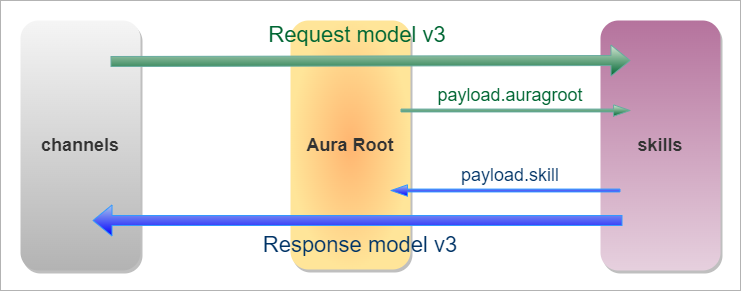
Versioning
Aura supports different versions of the Aura Request - Response Semantic Model.
channelData v1
In older Aura Platform releases, the default version was version 1, so some channels did not send the version of the channelData and aura-bot handled their requests as version 1.0.0.
There is an exception: in release Aerosmith, aura-bot included Living Apps handling as a platform feature.
➡️ Access to channelData v1 documentation
channelData v2
Afterwards, version 2 was created to extend the channelData property with new fields, such as actions and status, that with the regular communications with the channels are not needed or, in the case of the actions, are solved by other ad-hoc means.
In Greenday (6.0.1) release, Aura included a WhatsApp connector, the so-named aura-bridge and also channelData version 2 was used to access and to use the extra features of actions and status.
In these Aura Platform releases until Iron Maiden, aura-bot included a lazy definition of the channelData model, so, in fact, it handled almost a different version per channel.
➡️ Access to channelData v2 documentation
channelData v3
From Iron Maiden (7.2.0) onwards, we introduce the so-called channelData normalized version (version 3), an enriched version of channelData with new fields that provide a complete schema definition. This will enforce all channels to use the very same schema to access aura-groot.
➡️ Access to channelData v3 documentation
8.1 - channelData v3
channelData v3
Specification for channelData v3 model used by Aura Groot and skills to work with the different channels
Introduction
In channelData normalized version (version 3), both request and response follow the rules defined by Microsoft Direct Line v3.
Therefore, the type of message expected both from the channel and from the skill is an Activity of Direct Line.
channelData normalized version (version 3) is an enriched version of channelData that includes new fields with a complete schema definition, that will enforce all the channels to use the very same schema to access Aura.
Find detailed information regarding channelData v3 model in the following documents:
8.1.1 - Request model v3
Aura request semantic model v3
Version v3 of Aura request semantic model description
Introduction
The Aura Request Semantic Model defines the set of properties that can be included in the channelData property of the request activities sent from the Telefónica client side (channel) to the skills through aura-groot.
The properties of the Aura request semantic model corresponding to the v3 normalized version can be grouped into two categories:
Root channelData payload property
The payload property can be used by an external component to facilitate the sharing of information between the channels, aura-groot and the skills in order add extra information associated with the channel and, consequently, enrich the request.
The full content of channelData.payload will be sent from aura-groot to the skill, but the skill MUST send it back to aura-groot, without removing anything.
The skill can only add two fields, that are explained below: channel and skill:
channel is an optional open field, where the skill can share metadata with the channel. In Auraline, an external component can share metadata with the skill and/or get that information in the response.skill is an optional but recommended field that must be fulfilled by the skill to inform aura-groot about the user’s intention recognized by the skill.
Currently, the payload property is used by components that interact with aura-groot through aura-bridge, but it could be used by any component. Moreover, this field is used in the interaction between aura-groot and skills.
The payload model is valid for every channel’s request-response version: v1, v2 and v3.
{
"type": "message",
"text": "Hello!",
...
"channelData": {
"payload": {
// Extra channel information
}
}
}
Model definition
The complete model definition is located in the @telefonica/aura-utilities/lib/aura-models library (git repository: aura-models)
In the resources/channel-data folder of that repository, there is a scheme file with the definition in json schema format.
How to use the payload model
In order to use specific information from a channel (or communication that uses aura-bridge), certain steps are required:
- Define the property name that will be sent in
channeldata.payload.
- Define the data model in aura-models.
- Add/use the
channelData.payload information in the different Aura components.
channelData payload information property can be used by an external component to aura-groot in order to send information for the enrichment of the request. The information sent does not correspond to the Bot Framework communication model, but it is used by aura-groot and certain dialogs to complete processing. Currently it is used by components interacting with the bot through aura-bridge, but it could is used by any component.
The following table and sections below shown the current parameters defined in the payload:
| Property |
Type |
Description |
| bridge |
Bridge |
Information sent from aura-bridge |
| handover |
Handover |
Information sent from Handover |
| event |
PayloadEvent |
Information sent as an event |
| asyncCallback |
any |
Payload received in an async callback notification. The format is defined by the calling API. Only the dialog in charge of handling the request must validate the format |
| auraGroot |
AuraGrootPayLoad |
Information sent from aura-groot to the skill |
Bridge
Object with relevant information sent from aura-bridge.
| Property |
Type |
Description |
| accessToken |
string |
Bridge access token |
| answersCallback |
string |
URL to which the bridge will send the request back |
| channelId |
string |
ChannelId information |
| params |
any |
Open params |
| template |
Template |
Template information |
| user |
BridgeUser |
Information associated to the user who uses the bridge |
| whatsapp |
Whatsapp |
Information associated with the WhatsApp channel |
| resetGrootConversation |
Boolean |
Flag to indicate aura-groot that must create a new conversation with the skill |
| referral |
any |
Object that contains the whatsapp referral info |
BridgeUser
Bridge user information
| Property |
Type |
Description |
| name |
string |
Name associated with the user who makes the request to aura-bridge |
BridgeUserName (Enum)
Enum for BridgeUserName
| Property |
Type |
Description |
| System |
system |
Username used by aura-bridge |
Template
Template information
| Property |
Type |
Description |
| namespace |
string |
Namespace where the template is |
| name |
string |
Template’s name |
| language |
string |
Template’s language |
| parameters |
ParametersTemplate |
Template’s parameters |
ParametersTemplate
ParametersTemplate information
| Property |
Type |
Description |
| header |
string[] |
Parameters for header template |
| body |
string[] |
Parameters for body template |
| button |
CommandTemplate or string |
Parameters for buttons |
CommandTemplate
CommandTemplate information
| Property |
Type |
Description |
| intent |
string |
Intent associated to button |
| entities |
any[] |
Entities associated to button |
WhatsApp
Options to configure the WhatsApp channel in aura-bridge.
| Property |
Type |
Description |
| listOptions |
ListOptions |
It defines the conversion of prompts and suggestions that use HeroCard to WhatsApp lists. |
| allowEmpty |
boolean |
It indicates whether the texts of each of the messages received can be empty. By default: false |
| textConvert |
boolean |
It indicates whether the texts of each of the messages received must be converted to the WhatsApp markdown format. By default: true |
ListOptions
It defines the conversion of prompts and suggestions that use HeroCard to WhatsApp lists.
ListOptionsType (Enum)
Enum for ListOptionsType
| Property |
Type |
Description |
| Button |
button |
Reply Buttons. Messages including up to 3 options |
| EnumeratedList |
enumeratedList |
Enumerated text list |
| List |
list |
List Messages. Messages including a menu of up to 10 options |
ListOptionsRule
Conversion rules to WhatsApp lists
| Property |
Type |
Description |
| type |
ListOptionsType |
WhatsApp list type |
| resources |
Resource |
Definition of resources used in the WhatsApp lists |
Resource
Definition of the resources used in the WhatsApp lists
| Property |
Type |
Description |
| name |
string |
Resource name |
| resourceKey |
string |
Resource key (POEditor) |
Handover
Object with relevant information sent from the Handover
| Property |
Type |
Description |
| agentName |
string |
Handover agent name |
| participantType |
string |
Type of participant associated with the event. Example: system, agent |
| eventType |
string |
Event type. Example: participantJoined, participantLeft |
| chatEnded |
boolean |
It indicates whether the chat with the user has ended |
| quitReasonCode |
number |
If the chat has ended, this field indicates the closing reason |
| reasonForLeave |
string |
Reason associated with the ParticipantLeft event (eventType) |
| genesysCallback |
string |
Handover URL to which aura-bot must send calls |
PayloadEvent
Payload received in an async callback notification
| Property |
Type |
Description |
| message |
string |
Message associated with event |
| status |
number |
Status associated with event |
| type |
TypeEvent |
Event type |
TypeEvent (Enum)
Enum for TypeEvent
| Property |
Type |
Description |
| Log |
log |
Log event |
| EmptyResponse |
emptyResponse |
Direct Line empty response event (Event sent by aura-bot when no response activity is sent) |
AuraGrootPayLoad
Information sent from aura-groot to the skill. It is intended to facilitate the handling of activities by a skill. This field is only sent to the skill.
| Property |
Type |
Description |
| channelConversationId |
string |
ID of the directlineConversation handled by the channel |
| channelId |
string |
Identifier of the channel in Aura |
| accountNumber |
string |
AccountNumber from user received in aura-groot |
| conversationHistory |
ConversationHistory |
Conversation history of user |
ConversationHistory
Information sent from aura-groot to the skill regarding the conversation history of the user.
| Property |
Type |
Description |
| date |
Date |
Date of message |
| id |
string |
Id of message |
| type |
ConversationHistoryType |
Type of message |
| from |
string |
From of message |
| message |
string |
Message |
| intentResult |
string |
Intent result |
ConversationHistoryType (Enum)
| Property |
Type |
Description |
| Request |
request |
Request type |
| Response |
response |
Response type |
Payload examples
A complete example of the payload can found here.
Moreover, the example below shows the application of the auraGroot property:
{
"locale": "en-EN",
"type": "message",
"from": {
"id": "user1"
},
"text": "hello",
"channelData": {
"appContext": {
"channel": {
"id": "ca3f344f-b780-ef52-3c47-81daf07bb3d3",
"modality": "text"
}
"timestamp": "2023-03-01T10:15:30+01:00",
"timezone": "Europe/Madrid",
"payload":
"auraGroot": {
"channelConversationId": "<channelConversationId>", // id of the directlineConversation handled by the channel
"channelId": "<channelId>", // identifier of the channel in Aura
}
}
},
"version": "3",
"correlator": "19d63cd4-8f7e-4194-837d-c55991b1afcd"
}
}
8.1.2 - Response model v3
Aura response semantic model v3
Version v3 of Aura response semantic model description
Introduction
The Aura response semantic Model defines a set of properties which can be used as children of the Microsoft Azure Bot Service and Bot Framework activities channelData property included in the response activities.
Although the request and response models have some common fields, they are indeed different, so pay attention to both definitions.
The Aura response semantic model includes two properties: channelData and attachments properties:
Root attachments properties
Root attachments properties are an array of elements in the root of an activity that are intended to send specific responses from the skill to the channel. A single Aura response may contain different types of attachments. Find here more information regarding Direct Line attachment.
This field is kept as sent by the skill both by aura-groot and aura-bridge.
For third-party skills, the idea is to send here and attachment of contenType: application/json, although a devoted and specific contenType can be used, with the whole response of the skill to the user.
Root attachments properties are shown in the tables below. Mandatory sub-properties are highlighted in bold.
| Properties |
Type |
Description |
| contentType |
string |
Different values depending on the attachment type. Check them in contentType section. |
| version |
string |
Version of the specification |
| content |
content |
Content of the attachment itself. See sub-properties in content properties section. |
| name |
string |
Descriptive name for the attachment |
contentType properties
From the different types of attachments set above for the contentType property, the following table matches different Aura channels with the ones they support:
|
Movistar Plus |
STB |
Movistar Home |
| Adaptive Cards |
no |
no |
no |
| Hero Cards |
no |
no |
no |
| customData (JSON / ZIP) |
yes |
yes |
yes |
| customData (JSON-LA / ZIP) |
no |
no |
yes |
Adaptive card model
Adaptive Card is a customizable card that can contain any combination of text, speech, images, buttons and input fields. The standard version implemented is 1.5.
📄 Check the official website for Adaptive Cards.
An example of Adaptive Card format is shown below.
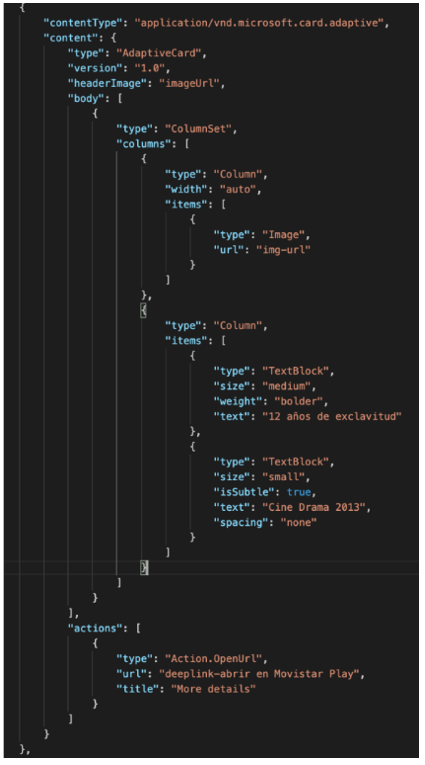
Hero card model
A Hero Card is a card that typically contains a single large image, one or more buttons and text.
An example of Hero Card format is shown below.
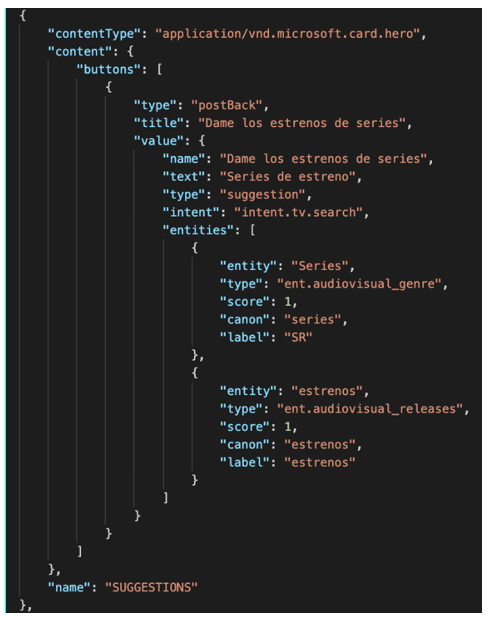
JSON response model
In this type of attachment, we only have three content properties:
-
type: type of JSON object. Currently, this field is only suitable for the actions specified in actions in channelData v3 although in further versions it can be implemented for other domains.
-
data: JSON data itself.
-
thirdParties: array of ThirdParty objects. This property includes information about the third-party or partner’s integrations that the channel should receive to correctly manage the request and the responses taking into account this partner. It follows the thirdParty type properties where the field data is an open object that depends on the specific third-party (See the thirdParty type properties in channeldata-3.0.0-response.schema.json.
This value is optional.
This response is intended for responses from underlying APIs, where the channel will be in charge of rendering the response.
{
"contentType": "application/json",
"content": {
"type": "",
"data": {}
},
"name": "AuraCustomData"
}
ZIP response model
In this case, the field content will include the ZIP file itself. This response is intended for responses which require downloading a file.
{
"contentType": "application/zip",
"content": "eJztnetu4sqWx18FWdqtGU0DLt/dUtSigfRmTkgygY66NdqKHKgk3m1stm3Snd3KI8yn8wTzAPNhNI/QLzaryjYYg4MNLsBpH22dcHHXf5Xrslb9KK/6wflPU8y940aO7WPbv7FMz+fecmPDN7h3PzgPW3fk74OL4S/34PvTd82m4/sjY/SAG2PnTmmMnElz4jzCPzTcqTXzmub0wbGx0AzL9JoeNtzRw/uJM8Ynj87YxX+almW8uTMtH7snHz7VW+
…
/dTpnei3d7XhaJabxyZtfninVQrIeKheBLSaUrtwW+1CQ5uaFSzOzm1z42u3RJhS/LGglWGyp/BdJSbaisWHYFmAsGzKXAl9lWqwyfAaf6sdcxdLnQ34wuSbh+fOSyYBZwsGfAiWlHQC1JXDE2fOPGGI9N0ux0qQgfGiM/iE373U6v1Rh0W1ft38NwaEZNGUHXgO8FelLXBHtecGDPYEYAqFcLalFz7mpX2IMo0KvVa7AUJQlxTPuOkNHn5+f/B5p62Oo=",
"name": "AuraCustomData"
}
Once the channel gets the ZIP file, it needs to be uncompressed. For example, for an Android application the process would be similar to the one below:
dataInflated = zlib.inflateSync(new Buffer(dataStringifiedAndDeflatedAndBase64, 'base64')).toString();
And for parsing:
object = JSON.parse(dataInflated);
For inflating and deflating in Android, you may use the classes called Inflater and Deflater.
Files sent from Aura Bot
A file is a special component that can be included in certain channels, such as WhatsApp. Constructors can configure a use case to send a file to the user by providing its URL. The file can be sent as a text message or as an attached file.
{
"contentType": "application/vnd.telefonica.aura.file",
"content": { "url": "https://link.com/file.pdf", "fileName": "file.pdf", "caption": "My file" }
}
Templates sent from Aura Bot
A template is defined as a combination of different elements (multimedia, buttons, different designs for texts, etc.) that can be used for sending proactive and enricher messages to the user in certain channels, such as WhatsApp. Constructors can configure a use case to send a template. Currently, templates can only be sent unidirectionally: from the channel to the user.
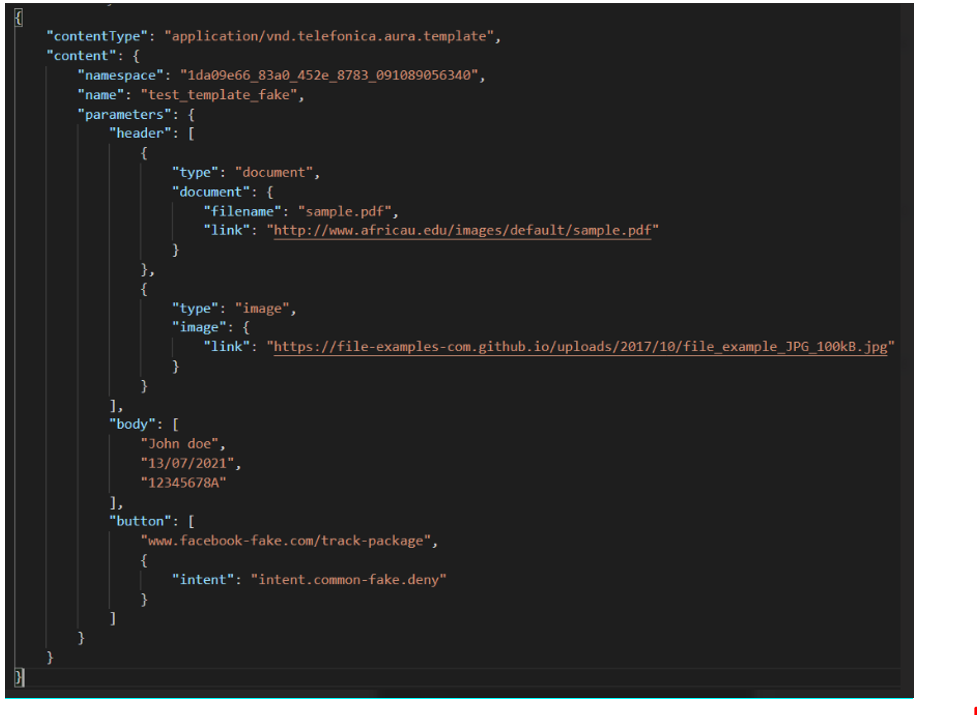
Suggestions v3 sent from Aura Bot
A suggestions v3 is defined to send as attachment with contentType: application/vnd.telefonica.aura.suggestion. Example:
{
contentType: AuraModels.AuraAttachmentContentType.AuraSuggestion,
content: {
suggestions
}
}
content properties
The properties of content type may include the following sub-properties in the table below.
We have included just certain properties as they depend on the content type.
| Property |
Type |
Description |
| type |
string |
For AdaptiveCard attachments: value: “AdaptiveCard”. |
| version |
string |
For AdaptiveCard attachments: version of the specification. For Aura internal attachments such as SingleActivity: version of the specification. |
| headerImage |
string |
For AdaptiveCard attachments: URL of the image in the header. |
| body |
body |
For AdaptiveCard attachments: body of the AdaptiveCards. |
| actions |
action[] |
For AdaptiveCard attachments: Actions available in the AdaptiveCard. They can be: action.OpenUrl, action.ShowCard, action.Submit |
| buttons |
button[] |
For HeroCard attachments: button that can be pressed by the user. |
| data |
JSON object |
For JSON attachments: JSON object. |
SkillPayload property
This field includes parameters with information generated from the skill to aura-groot. It allows aura-groot to handle and log properly the activities.
It contains the following property:
SkillPayloadIntentResult
intentResult contains the following sub-properties:
| Properties |
Type |
Description |
| name |
string |
Unique identifier of the user’s intention. It should be a human-understandable but machine-readable string |
| entities |
entities |
Type and extract of the entity |
Entities
entities contains the following sub-properties:
| Properties |
Type |
Description |
| type |
string |
String with a unique name to identify the entity type (i.e., ent.movie) |
| entity |
string |
String with the extract of the utterance that is handled as an entity for the recognizer (“the lord of the rings”) |
Check the associated fields in the examples below.
Response to send only a text
Activity to send only text
{
"locale":"en-EN",
"type":"message",
"from":{
"id":"user1"
},
"text":"Hi, how are you? Let me know how I can help you.",
"speak":"Hi, how are you? Let me know how I can help you.""channelData":{
"payload":{
"auraGroot":{
"channelConversationId":"<channelConversationId>",
"channelId":"<channelId>",
},
"skill":{
"intentResult":{
"name":"intention-of-the-user",
"entities":[
{
"type":"type-of-the-entity",
"entity":"part-of-the-utterance",
"the lord of the rings"")"
}
]
}
}
},
"version":"3",
"correlator":"19d63cd4-8f7e-4194-837d-c55991b1afcd"
}
}
Response to send more complex data
Activity with attachments
{
"locale":"en-EN",
"type":"message",
"from":{
"id":"user1"
},
"attachments":[
{
"contentType":"application/json",
"content":{
"The json response of your bot"
}
}
],
"text":"Hi, how are you? Let me know how I can help you.",
"speak":"Hi, how are you? Let me know how I can help you.""channelData":{
"payload":"auraGroot":{
"channelConversationId":"<channelConversationId>",
"channelId":"<channelId>",
},
"skill":{
"intentResult":{
"name":"intention-of-the-user",
"entities":[
{
"type":"type-of-the-entity",
"entity":"part-of-the-utterance",
"the lord of the rings"")"
}
]
}
}
},
"version":"3",
"correlator":"19d63cd4-8f7e-4194-837d-c55991b1afcd"
}
8.1.3 - Actions v3
Actions in channelData v3
List of the actions returned by Aura with channelData model v3
Introduction
Actions are the way of translating the Aura’s answer into a direct operation from the channel, i.e., Aura informs the channel how to act depending on the user’s intention and the result provided by aura-bot.
The following sections show the details of the response custom data depending on the domain of the user’s intention. The columns of the tables describe the action name, channel reaction and description.
The value N/A is included in case of “not apply” (no action sent or no content attached).
Cross actions
These actions can be added to any use case. The specific values will depend on the use case being resolved. The expectation in these cases is that the channel understands these actions with their possible values so that, regardless of which use case the user has requested, if the channel receives an action (for example, MAKE_SOUND) it will be able to trigger it.
This means that, although in the following tables an N/A (Not Apply) appears in the “Actions” column, the channel could always receive one of the cross actions.
| Channel reaction |
Description |
Intent result name |
Content type |
Content data |
Actions name |
Actions target |
Actions postback |
Actions params |
| Make a sound |
The use case result should be shown to the user with a positive sound |
N/A |
N/A |
N/A |
MAKE_SOUND |
channel |
{} |
{sound} |
| Click a key remotely |
Click a key remotely. The specific values of the keyCodes are defined above in each use case |
N/A |
N/A |
N/A |
SEND_KEY |
stb |
{} |
{keyCode, deviceId, levels} |
| Redirect |
Redirect command must send a message to the bot with the auraCommand sent in the action |
REDIRECT.COMMAND |
redirect |
AuraCommand |
N/A |
channel |
N/A |
N/A |
Examples are included in Cross action examples.
Small talk (a.k.a. common domain)
| Channel reaction |
Description |
Intent result name |
Content type |
Content data |
Actions name |
Actions target |
Actions postback |
Actions params |
| No reaction for Common. The channel shows what comes from Aura |
Greet the user |
COMMON.GREETINGS |
N/A |
N/A |
N/A |
N/A |
N/A |
N/A |
| No reaction for Common. The channel shows what comes from Aura |
Say goodbye to the user |
COMMON.GOODBYES |
N/A |
N/A |
N/A |
N/A |
N/A |
N/A |
| No reaction for Common. The channel shows what comes from Aura |
Thank the user |
COMMON.THANKYOUS |
N/A |
N/A |
N/A |
N/A |
N/A |
N/A |
| No reaction for Common. The channel shows what comes from Aura |
The user is angry with Aura |
COMMON.SWEARWORDS |
N/A |
N/A |
N/A |
N/A |
N/A |
N/A |
| No reaction for Common. The channel shows what comes from Aura |
Initialize tv use cases |
COMMON.INIT |
N/A |
N/A |
N/A |
N/A |
N/A |
N/A |
| The Help App is started |
The user is asking for help |
COMMON.HELP |
N/A |
N/A |
N/A |
N/A |
N/A |
N/A |
Generic questions
| Channel reaction |
Description |
Intent result name |
Content type |
Content data |
Actions name |
Actions target |
Actions postback |
Actions params |
| No reaction for Generic. The channel shows what comes from Aura |
The question of the user needs to be disambiguated |
DISAMBIGUATION |
N/A |
The disambiguation information will be included in the corresponding attachment with the array of options to be shown to the user |
N/A |
N/A |
N/A |
N/A |
Examples are included in Generic questions examples.
None
| Channel reaction |
Description |
Intent result name |
Content type |
Content data |
Actions name |
Actions target |
Actions postback |
Actions params |
| No reaction. The channel shows what comes from Aura |
When handling an unsupported intent by the current channel |
NONE |
N/A |
N/A |
N/A |
N/A |
N/A |
N/A |
Video
| Channel reaction |
Description |
Intent result name |
Content type |
Content data |
Actions name |
Actions target |
Actions postback |
Actions params |
| No reaction. The channel shows what comes from Aura (only text and suggestions) |
No content found. User wants to watch a channel on TV or a VOD content but it does not exist on catalog. |
MEDIA.SEARCH |
N/A |
N/A |
N/A |
N/A |
N/A |
N/A |
| Show content details |
User wants to watch content on TV. Content search with one result found. |
MEDIA.SEARCH |
details |
Object Kernel result |
N/A |
N/A |
N/A |
N/A |
| Content list |
User wants to watch content on TV. Content search with several results found. |
MEDIA.SEARCH |
content_list |
Array of object Kernel result |
N/A |
N/A |
N/A |
N/A |
| Content list |
User wants to search content in a third party platform (for example Netflix) |
MEDIA.SEARCH |
content_list |
Array of object Kernel result |
N/A |
N/A |
N/A |
N/A |
| No reaction, the channel shows what comes from Aura. (Only text and suggestions) |
Recommendation content to content with no contents found |
MEDIA.RECOMMENDATION_C2C |
N/A |
N/A |
N/A |
N/A |
N/A |
N/A |
| No reaction. The channel shows what comes from Aura |
Recommendation content to content with one content found |
MEDIA.RECOMMENDATION_C2C |
details |
Object Kernel result |
N/A |
N/A |
N/A |
N/A |
| No reaction. The channel shows what comes from Aura |
Recommendation content to content with contents found |
MEDIA.RECOMMENDATION_C2C |
content_list |
Array of object Kernel result |
N/A |
N/A |
N/A |
N/A |
| No reaction. The channel shows what comes from Aura |
Personalized recommendation with no content |
MEDIA.RECOMMENDATION_C2P |
N/A |
N/A |
N/A |
N/A |
N/A |
N/A |
| No reaction. The channel shows what comes from Aura |
Personalized recommendation with one content result |
MEDIA.RECOMMENDATION_C2P |
details |
Object Kernel result |
N/A |
N/A |
N/A |
N/A |
| Content list |
Content recommendation with results found. Similar to previous one but using the JSON coming from Kernel Recommendations API |
MEDIA.RECOMMENDATION_C2P |
content_list |
Array of object Kernel result |
N/A |
N/A |
N/A |
N/A |
| Show content details |
Get more details about the content displayed on the second device |
MEDIA.SHEET_SECOND_SCREEN |
details |
Object Kernel result |
N/A |
N/A |
N/A |
N/A |
| Show content details |
Get more details about the content displayed on TV |
MEDIA.SHEET_TV |
details |
Object Kernel result |
N/A |
N/A |
N/A |
N/A |
| Show content details |
User wants to play content, but it is not included in user’s subscription |
CONTENT.PLAY |
details |
Object Kernel result |
N/A |
N/A |
N/A |
N/A |
| Show content details |
User wants to watch a channel, but it is not included in user’s subscription |
CHANNEL.PLAY |
details |
Object Kernel result |
N/A |
N/A |
N/A |
N/A |
| Play content |
User wants to play a specific content |
CONTENT.PLAY |
details |
Object Kernel result |
REMOTEON.PLAYTO |
stb |
{} |
{deviceId, contentId, catalogType} |
| Play the content on focus |
Watch this VOD content |
CONTENT.PLAY |
details |
Object Kernel result |
REMOTEON.PLAYTO |
stb |
{} |
{deviceId, contentId, liveProgramId,catalogType, resumeTime} |
| Tune to channel |
User wants to tune a specific channel |
CHANNEL.PLAY |
details |
Object Kernel result |
REMOTEON.ZAPTO |
stb |
{} |
{deviceId, channeId, channelNumber} |
| Play the channel on focus |
Watch this channel |
CHANNEL.PLAY |
details |
Object Kernel result |
REMOTEON.ZAPTO |
stb |
{} |
{deviceId, channeId, channelNumber} |
| React to received Key |
Watch from the beginning |
FROM_BEGINNING |
N/A |
N/A |
SEND_KEY |
stb |
{} |
{keycode, deviceId, levels} |
| React to received Key |
Record content |
REC |
N/A |
N/A |
SEND_KEY |
stb |
{} |
{keycode, deviceId, levels} |
| React to received Key |
User wants to play a third-party content |
PLAY |
details |
Object Kernel result |
SEND_KEY |
stb |
{} |
{keycode, deviceId, levels} |
| Change play parameter |
Turn English audio and turn English subtitles on / Play in original version for a VOD content |
CONTENT.CONFIG_AUDIO_SUBTITLES |
N/A |
N/A |
REMOTEON.PLAYPARAMS |
stb |
{} |
{deviceId, contentId, liveProgramId,catalogType, audio, subtitles} |
| Change play parameter |
Turn English audio and turn English subtitles on / Play in original version for a channel |
CHANNEL.CONFIG_AUDIO_SUBTITLES |
N/A |
N/A |
REMOTEON.LIVEPARAMS |
stb |
{} |
{deviceId, channeId, channelNumber, audio, subtitles} |
| Change play parameter |
Turn English audio on / Play in original version for a VOD content |
CONTENT.CONFIG_AUDIO |
N/A |
N/A |
REMOTEON.PLAYPARAMS |
stb |
{} |
{deviceId, contentId, liveProgramId,catalogType, audio} |
| Change play parameter |
Turn English audio on / Play in original version for a channel |
CHANNEL.CONFIG_AUDIO |
N/A |
N/A |
REMOTEON.LIVEPARAMS |
stb |
{} |
{deviceId, channeId, channelNumber, audio} |
| Change play parameter |
Turn English subtitles on / Play in original version for a VOD content |
CONTENT.CONFIG_SUBTITLES |
N/A |
N/A |
REMOTEON.PLAYPARAMS |
stb |
{} |
{deviceId, contentId, liveProgramId,catalogType, subtitles} |
| Change play parameter |
Turn english subtitles on / Play in original version for a channel |
CHANNEL.CONFIG_SUBTITLES |
N/A |
N/A |
REMOTEON.LIVEPARAMS |
stb |
{} |
{deviceId, channeId, channelNumber, subtitles} |
| Change play parameter |
Turn off subtitles for a VOD content |
CONTENT.DEACTIVATE_SUBTITLES |
N/A |
N/A |
REMOTEON.PLAYPARAMS |
stb |
{} |
{deviceId, contentId, liveProgramId,catalogType, subtitles} |
| Change play parameter |
Turn off subtitles for a channel |
CHANNEL.DEACTIVATE_SUBTITLES |
N/A |
N/A |
REMOTEON.LIVEPARAMS |
stb |
{} |
{deviceId, channeId, channelNumber, subtitles} |
| Move channels down |
Move channels down |
CHANNEL_DOWN |
N/A |
N/A |
SEND_KEY |
stb |
{} |
{keycode, deviceId, levels} |
| Move channels up |
Move channels up |
CHANNEL_UP |
N/A |
N/A |
SEND_KEY |
stb |
{} |
{keycode, deviceId, levels} |
| Mute TV |
Mute TV |
MUTE |
N/A |
N/A |
SEND_KEY |
stb |
{} |
{keycode, deviceId} |
| Unmute TV |
Unmute TV |
UNMUTE |
N/A |
N/A |
SEND_KEY |
stb |
{} |
{keycode, deviceId} |
| Switch TV off |
Switch TV off |
SWITCH_OFF |
N/A |
N/A |
SEND_KEY |
stb |
{} |
{keycode, deviceId} |
| Switch TV on |
Switch TV on |
SWITCH_ON |
N/A |
N/A |
SEND_KEY |
stb |
{} |
{keycode, deviceId} |
| Pause TV |
Pause the current program being played |
PAUSE |
N/A |
N/A |
SEND_KEY |
stb |
{} |
{keycode, deviceId} |
| Resume TV |
Resume TV |
RESUME |
N/A |
N/A |
SEND_KEY |
stb |
{} |
{keycode, deviceId} |
| Stop TV |
Stop TV |
STOP |
N/A |
N/A |
SEND_KEY |
stb |
{} |
{keycode, deviceId} |
| Volume up TV |
Volume up |
VOLUME_UP |
N/A |
N/A |
SEND_KEY |
stb |
{} |
{keycode, deviceId, levels} |
| Volume down TV |
Volume down |
VOLUME_DOWN |
N/A |
N/A |
SEND_KEY |
stb |
{} |
{keycode, deviceId, levels} |
| Move forward |
Move forward |
MOVE_FORWARD |
N/A |
N/A |
SEND_KEY |
stb |
{} |
{keycode, deviceId, levels} |
| Move back |
Move back |
MOVE_BACK |
N/A |
N/A |
SEND_KEY |
stb |
{} |
{keycode, deviceId, levels} |
| Disable subtitles |
Disable subtitles |
REMOTEON_AUDIO_SUBTITLES |
N/A |
N/A |
REMOTEON.AUDIO_SUBTITLES |
stb |
{} |
{keycode, deviceId, subtitles} |
| Change language |
Change language |
REMOTEON_AUDIO_SUBTITLES |
N/A |
N/A |
REMOTEON.AUDIO_SUBTITLES |
stb |
{} |
{keycode, deviceId} |
| Go to app |
Navigate/open a section from a third party |
GOTOAPP |
N/A |
N/A |
GOTOAPP |
stb |
{} |
{name, id, deviceId} |
Examples are included in Video examples and can be easily accessed following the hyperlink defined in Actions Name column.
Communications
| Channel reaction |
Description |
Intent result name |
Content type |
Content data |
Actions name |
Actions target |
Actions postback |
Actions params |
| Call to the number the user sends afterwards |
Make a phone call |
COMMUNICATIONS.CALL |
N/A |
N/A |
COMMUNICATIONS.CALL |
channel |
{} |
{} |
| Call to the number sent by the user |
Make a phone call to the given phone number |
COMMUNICATIONS.CALL_NUMBER |
N/A |
N/A |
COMMUNICATIONS.CALL_NUMBER |
channel |
{} |
{items:[]} |
| Call to the contact name sent by the user |
Make a phone call to the given contact name |
COMMUNICATIONS.CALL_NAME |
N/A |
N/A |
COMMUNICATIONS.CALL_NAME |
channel |
{} |
{items: []} |
| Sent a voice mail |
Sent a voice mail to the given contact |
COMMUNICATIONS.VOICE_MAIL_CALL |
N/A |
N/A |
COMMUNICATIONS.VOICE_MAIL_CALL |
channel |
{} |
{} |
| Check incoming and outgoing calls |
Check calls |
COMMUNICATIONS.CHECK_ALL_CALLS |
N/A |
N/A |
COMMUNICATIONS.CHECK_ALL_CALLS |
channel |
{} |
{} |
| Ignore incoming call |
Mute the incoming call |
COMMUNICATIONS.IGNORE_INCOMING_CALL |
N/A |
N/A |
COMMUNICATIONS.IGNORE_INCOMING_CALL |
channel |
{} |
{} |
| Pick up incoming call |
Pick up incoming call |
COMMUNICATIONS.PICKUP |
N/A |
N/A |
COMMUNICATIONS.PICKUP |
channel |
{} |
{} |
| Redial last outgoing number |
Redial a number |
COMMUNICATIONS.REDIAL |
N/A |
N/A |
COMMUNICATIONS.REDIAL |
channel |
{} |
{} or 0 |
| Add contact to address book |
Add contact to address book |
CONFIG.ADD_CONTACT |
N/A |
N/A |
CONFIG.ADD_CONTACT |
channel |
{} |
{} |
| Disable silent mode |
Unmute the device |
CONFIG.SILENT_MODE_OFF |
N/A |
N/A |
CONFIG.SILENT_MODE_OFF |
channel |
{} |
{} |
| Enable silent mode |
Mute the device |
CONFIG.SILENT_MODE_ON |
N/A |
N/A |
CONFIG.SILENT_MODE_ON |
channel |
{} |
{} |
Examples are included in Communication actions examples.
Domotics
| Channel reaction |
Description |
Intent result name |
Content type |
Content data |
Actions name |
Actions target |
Actions postback |
Actions params |
| Switch off the lights |
Switch off the lights |
DOMOTICS.LIGHT_OFF |
N/A |
N/A |
DOMOTICS.LIGHT_OFF |
channel |
{} |
{actionCode, deviceId, levels} |
| Switch on the lights |
Switch on the lights |
DOMOTICS.LIGHT_ON |
N/A |
N/A |
DOMOTICS.LIGHT_ON |
channel |
{} |
{actionCode, deviceId, levels} |
Examples for each action are included in Domotics actions examples.
e-commerce
| Channel reaction |
Description |
Intent result name |
Content type |
Content data |
Actions name |
Actions target |
Actions postback |
Actions params |
| Add item to wish list |
Add item to wish list |
ECOMMERCE.ADD_TO_WISH_LIST |
N/A |
N/A |
ECOMMERCE.ADD_TO_WISH_LIST |
channel |
{} |
{} |
Miscellaneous
| Channel reaction |
Description |
Intent result name |
Content type |
Content data |
Actions name |
Actions target |
Actions postback |
Actions params |
| Turn the radio off |
Turn the radio off |
RADIO.OFF |
N/A |
N/A |
RADIO.OFF |
channel |
{} |
{} |
| Listen to the radio |
Turn the radio on with a specific station |
RADIO.LISTEN |
N/A |
N/A |
RADIO.LISTEN |
channel |
{} |
{stationId, stationName, stationText} |
| Listen to a podcast |
Listen to a podcast |
PODCAST.LISTEN |
N/A |
N/A |
PODCAST.LISTEN |
channel |
{} |
{podcastName} |
|
|
|
|
|
|
|
|
|
| Check time |
What time is it |
MISCELLANEOUS.TIME_CHECK |
N/A |
N/A |
MISCELLANEOUS.TIME_CHECK |
channel |
{} |
{} |
| Provide weather forecast |
Weather forecast |
MISCELLANEOUS.WEATHER |
N/A |
N/A |
MISCELLANEOUS.WEATHER |
channel |
{} |
{} |
| Start playing news |
Listen to news |
MISCELLANEOUS.NEWS_LISTEN |
N/A |
N/A |
MISCELLANEOUS.NEWS_LISTEN |
channel |
{} |
{} |
| Show wifi connection data |
Retrieve wifi connection data |
WIFI.GET_ACCESS |
wifi_info |
{status, ssid, password, bssid, channel, authentication} |
N/A |
N/A |
N/A |
N/A |
Examples are included in Miscellaneous actions examples.
Navigation
| Channel reaction |
Description |
Intent result name |
Content type |
Content data |
Actions name |
Actions target |
Actions postback |
Actions params |
| Go to the selected section |
Show the selected section |
NAVIGATION.SECTION_SHOW |
N/A |
N/A |
NAVIGATION.SECTION_SHOW |
stb |
{} |
{name, id, deviceId} |
| Like the back button was pressed by the user |
Go to previous page |
NAVIGATION.BACK |
N/A |
N/A |
SEND_KEY |
stb |
{} |
{keycode, deviceId} |
| Go to next item in the given carousel or list |
Go to next item in carousel |
MEDIA.CAROUSEL_NEXT |
N/A |
N/A |
MEDIA.CAROUSEL_NEXT |
channel |
{} |
{} |
| Go to previous item in the given carousel or list |
Go to previous item in carousel |
MEDIA.CAROUSEL_PREVIOUS |
N/A |
N/A |
MEDIA.CAROUSEL_PREVIOUS |
channel |
{} |
{} |
Examples are included in Navigation actions examples.
Actions examples
Cross action examples
Make sound
"channelData": {
"intentResult": {
"name": "COMMON.GREETINGS"
},
"actions": [{
"name": "MAKE_SOUND",
"target": "channel",
"params": {
"sound": "positive"
}
}],
}
Send remote key
"channelData": {
"intentResult":{
"name": "NAVIGATION.BACK"
},
"actions": [{
"name": "SEND_KEY",
"target": "stb",
"params": {
"keyCode": "BACK",
"devideId": "Mi-29283"
}
}],
Redirect command
"customData": {
"type": 'redirect',
"action": 'REDIRECT.COMMAND',
"data": {
"auraCommand": {
"type": "suggestion",
"value": {
"intent": "intent.common.greetings"
}
}
}
}
In this example, if aura-bridge receives this message, it must send an auraCommand with the intent intent.common.greetings to the bot.
Generic questions examples
"content": {
"data": {
"question": "¿Dónde puedo comprar un móvil?"
}
}
Video examples
Search content in a third-party platform
Access here to comprehensive information regarding Kernel definitions
"channelData": {
"intentResult": {
"name": "MEDIA.SEARCH",
"entities": []
},
"actions": []
}
"attachments": [
{
"content": {
"type": "content_list",
"data": [
{<JSON response from the **Kernel** search API>
}
],
"thirdParties ": [
{
"name": "netflix",
"data": {<headers response from the **Kernel** search API (To be defined by **Kernel** team)>
}
}
]
}
}
]
Play content
"channelData": {
"intentResult":{
"name": "CONTENT.PLAY"
},
"actions": [
{
"name": "REMOTEON.PLAYTO",
"target": "stb",
"params": {
"catalogType": "vod",
"contentId": "12345",
"deviceId": "Mi-29283"
}
}
]}
Play content on focus
"channelData": {
"intentResult":{
"name": "CONTENT.PLAY"
},
"actions": [
{
"name": "REMOTEON.PLAYTO",
"target": "stb",
"params": {
"catalogType": "l7d",
"contentId": "12345",
"liveProgramId": "54321",
"resumeTime": 24,
"deviceId": "Mi-29283"
}
}
]}
Play channel
"channelData": {
"intentResult":{
"name": "CHANNEL.PLAY"
},
"actions": [
{
"name": "REMOTEON.ZAPTO",
"target": "stb",
"params": {
"channelNumber": 1,
"channelId ": "123",
"deviceId": "Mi-29283"
}
}
From beginning
"channelData": {
"intentResult":{
"name": "FROM_BEGINNING"
},
"actions": [
{
"name": "SEND_KEY",
"target": "stb",
"params": {
"keyCode": "REDO",
"deviceId": "Mi-29283"
}
}
Recording
"channelData": {
"intentResult":{
"name": "REC"
},
"actions": [
{
"name": "SEND_KEY",
"target": "stb",
"params": {
"keyCode": "REC",
"deviceId": "Mi-29283"
}
}
Play a third-party content of focus
"channelData": {
"intentResult":{
"name": "PLAY"
},
"actions": [
{
"name": "SEND_KEY",
"target": "stb",
"params": {
"keyCode": "PLAY",
"deviceId": "Mi-29283"
}
}
Change audio and subtitles parameter for VOD content
"channelData": {
"intentResult":{
"name": "CONTENT.CONFIG_AUDIO_SUBTITLES"
},
"actions": [
{
"name": "REMOTEON.PLAYPARAMS",
"target": "stb",
"params": {
"catalogType": "l7d",
"contentId": "12345",
"liveProgramId": "54321",
"deviceId": "Mi-29283",
"audio": "eng",
"subtitles": "eng"
}
}
Change audio and subtitles for a channel
"channelData": {
"intentResult":{
"name": "CHANNEL.CONFIG_AUDIO_SUBTITLES"
},
"actions": [
{
"name": "REMOTEON.LIVEPARAMS",
"target": "stb",
"params": {
"channelNumber": 1,
"channelId ": "123",
"deviceId": "Mi-29283",
"audio": "eng",
"subtitles": "eng"
}
}
Change audio parameter for VOD content
"channelData": {
"intentResult":{
"name": "CONTENT.CONFIG_AUDIO"
},
"actions": [
{
"name": "REMOTEON.PLAYPARAMS",
"target": "stb",
"params": {
"catalogType": "l7d",
"contentId": "12345",
"liveProgramId": "54321",
"deviceId": "Mi-29283",
"audio": "eng"
}
Change audio parameter for channel
"channelData": {
"intentResult":{
"name": "CHANNEL.CONFIG_AUDIO"
},
"actions": [
{
"name": "REMOTEON.LIVEPARAMS",
"target": "stb",
"params": {
"channelNumber": 1,
"channelId ": "123",
"deviceId": "Mi-29283",
"audio": "eng"
}
}
Change subtitles parameter for VOD content
"channelData": {
"intentResult":{
"name": "CONTENT.CONFIG_SUBTITLES"
},
"actions": [
{
"name": "REMOTEON.PLAYPARAMS",
"target": "stb",
"params": {
"catalogType": "l7d",
"contentId": "12345",
"liveProgramId": "54321",
"deviceId": "Mi-29283",
"subtitles": "eng"
}
}
Change subtitles parameter for channel
"channelData": {
"intentResult":{
"name": "CHANNEL.CONFIG_SUBTITLES"
},
"actions": [
{
"name": "REMOTEON.LIVEPARAMS",
"target": "stb",
"params": {
"channelNumber": 1,
"channelId ": "123",
"deviceId": "Mi-29283",
"subtitles": "eng"
}
}
Deactivate subtitles parameter for VOD content
"channelData": {
"intentResult":{
"name": "CONTENT.DEACTIVATE_SUBTITLES"
},
"actions": [
{
"name": "REMOTEON.PLAYPARAMS",
"target": "stb",
"params": {
"catalogType": "l7d",
"contentId": "12345",
"liveProgramId": "54321",
"deviceId": "Mi-29283",
"subtitles": "void"
}
}
Deactivate subtitles parameter for channel
"channelData": {
"intentResult":{
"name": "CHANNEL.DEACTIVATE_SUBTITLES"
},
"actions": [
{
"name": "REMOTEON.LIVEPARAMS",
"target": "stb",
"params": {
"channelNumber": 1,
"channelId ": "123",
"deviceId": "Mi-29283",
"subtitles": "void"
}
}
Move channels down
"channelData": {
"intentResult": {
"name": "CHANNEL_DOWN"
},
"actions": [{
"name": "SEND_KEY",
"target": "stb",
"params": {
"keyCode": "P-",
"deviceId": "10.149.202.30_E0B70ADBE4CA",
"levels": "1"
}
}],
}
Move channels up
"channelData": {
"intentResult": {
"name": "CHANNEL_UP"
},
"actions": [{
"name": "SEND_KEY",
"target": "stb",
"params": {
"keyCode": "P+",
"deviceId": "10.149.202.30_E0B70ADBE4CA",
"levels": "1"
}
}],
}
Mute TV
"channelData": {
"intentResult": {
"name": "MUTE"
},
"actions": [{
"name": "SEND_KEY",
"target": "stb",
"params": {
"keyCode": "MUTE",
"deviceId": "10.149.202.30_E0B70ADBE4CA"
}
}],
}
Unmute TV
"channelData": {
"intentResult": {
"name": "UNMUTE"
},
"actions": [{
"name": "SEND_KEY",
"target": "stb",
"params": {
"keyCode": "UNMUTE",
"deviceId": "10.149.202.30_E0B70ADBE4CA"
}
}],
}
Switch TV off
"channelData": {
"intentResult": {
"name": "SWITCH_OFF"
},
"actions": [{
"name": "SEND_KEY",
"target": "stb",
"params": {
"keyCode": "STANDBY",
"deviceId": "10.149.202.30_E0B70ADBE4CA"
}
}],
}
Switch TV on
"channelData": {
"intentResult": {
"name": "SWITCH_ON"
},
"actions": [{
"name": "SEND_KEY",
"target": "stb",
"params": {
"keyCode": "STANDBY",
"deviceId": "10.149.202.30_E0B70ADBE4CA",
"levels": "1"
}
}],
}
Pause TV
"channelData": {
"intentResult": {
"name": "PAUSE"
},
"actions": [{
"name": "SEND_KEY",
"target": "stb",
"params": {
"keyCode": "PAUSE",
"deviceId": "10.149.202.30_E0B70ADBE4CA"
}
}],
}
Resume TV example
"channelData": {
"intentResult": {
"name": "RESUME"
},
"actions": [{
"name": "SEND_KEY",
"target": "stb",
"params": {
"keyCode": "PLAY",
"deviceId": "10.149.202.30_E0B70ADBE4CA",
}
}],
}
Stop TV
"channelData": {
"intentResult": {
"name": "STOP"
},
"actions": [{
"name": "SEND_KEY",
"target": "stb",
"params": {
"keyCode": "STOP",
"deviceId": "10.149.202.30_E0B70ADBE4CA"
}
}],
}
Volume up
"channelData": {
"intentResult": {
"name": "VOLUME_UP"
},
"actions": [{
"name": "SEND_KEY",
"target": "stb",
"params": {
"keyCode": "VOL+",
"deviceId": "10.149.202.30_E0B70ADBE4CA",
"levels": "5"
}
}],
}
Volume down
"channelData": {
"intentResult": {
"name": "VOLUME_DOWN"
},
"actions": [{
"name": "SEND_KEY",
"target": "stb",
"params": {
"keyCode": "VOL-",
"deviceId": "10.149.202.30_E0B70ADBE4CA",
"levels": "5"
}
}],
}
Move forward
"channelData": {
"intentResult": {
"name": "MOVE_FORWARD"
},
"actions": [{
"name": "SEND_KEY",
"target": "stb",
"params": {
"keyCode": "MOVE_FORWARD",
"deviceId": "10.149.202.30_E0B70ADBE4CA",
"levels": "60"
}
}],
Move back
"channelData": {
"intentResult": {
"name": "MOVE_BACK"
},
"actions": [{
"name": "SEND_KEY",
"target": "stb",
"params": {
"keyCode": "MOVE_BACK",
"deviceId": "10.149.202.30_E0B70ADBE4CA",
"levels": "60"
}
}],
Disable subtitles
"channelData": {
"intentResult": {
"name": "AUDIO_SUBTITLES",
"entities": []
},
"actions": [
{
"name": "AUDIO_SUBTITLES",
"target": "stb",
"params": {
"deviceId": "Mi-29283",
"subtitles": "None"
}
},
{
"name": "MAKE_SOUND",
"target": "channel",
"params": {
"sound": "positive"
}
}
],
Change language
"channelData": {
"intentResult": {
"name": "AUDIO_SUBTITLES",
"entities": []
},
"actions": [
{
"name": "REMOTEON.AUDIO_SUBTITLES",
"target": "stb",
"params": {
"deviceId": "Mi-29283"
}
},
{
"name": "MAKE_SOUND",
"target": "channel",
"params": {
"sound": "positive"
}
}
],
Go to app
"channelData": {
"correlator": "520f1e3a-f02b-4bf1-bcda-19d30e0cba0b",
"version": "3",
"intentResult": {
"name": "GOTOAPP",
"entities": [{
"type": "ent.tv_app",
"entity": "Netflix",
}]
},
"actions": [
{
"name": "GOTOAPP",
"target": "stb",
"params": {
"deviceId": "Mi-29283",
"name": "Netflix",
"id": "ID03242"
}
},
{
"name": "MAKE_SOUND",
"target": "channel",
"params": {
"sound": "positive"
}
}
],
"status": {
"code": "SUCCESS",
"message": "Success"
}
}
Communications examples
Call a number
"channelData": {
"actions": [{
"name": "COMMUNICATIONS.CALL_NUMBER",
"target": "channel",
"params": {
"items": [{
"type": "ent.phonenumber",
"value": "916547889"
}]
}],
"channelData": {
"actions": [{
"name": "COMMUNICATIONS.CALL_NAME",
"target": "channel",
"params": {
"items": [{
"type": "ent.com_name",
"value": "mamá"
}]
}],
Redial a number
"channelData": {
"actions": [{
"name": " COMMUNICATIONS.REDIAL",
"target": "channel",
"params": {
"items": [{
"type": "ent.phonenumber",
"value": "916547889"
}]
}],
Domotics examples
Switch off the lights
"channelData": {
"actions": [{
"name": "DOMOTICS.LIGHT_OFF",
"target": "channel",
"params": {
"actionCode": "LIGHT_OFF",
"deviceId": "",
"levels": "1"
}
}],
Switch on the lights
"channelData": {
"actions": [{
"name": "DOMOTICS.LIGHT_ON",
"target": "channel",
"params": {
"actionCode": "LIGHT_ON",
"deviceId": "",
"levels": "1"
}
}],
Miscellaneous examples
Get access to wifi
"content": {
"type": "wifi_info",
"data": {
"status": "ok",
"ssid": "xxxx",
"password": "yyyy",
"bssid": "zzzzzz",
"channel": "10",
"authentication": "WPA-2",
}
}
Navigation examples
Show selected section
"channelData": {
"actions": [
{
"name": "NAVIGATION.SECTION_SHOW",
"target": "stb",
"params": {
"deviceId": "Mi-29283",
"name": "Seccion1",
"id": "ID0666"
}
},
{
"name": "MAKE_SOUND",
"target": "channel",
"params": {
"sound": "positive"
}
}
]
}
Go back in navigation
"channelData": {
"intentResult":{
"name": "NAVIGATION.BACK"
},
"actions": [{
"name": "SEND_KEY",
"target": "stb",
"params": {
"keyCode": "BACK",
"devideId": "Mi-29283
}
}],
Constants values
This section includes the possible values that some fields could take. Specifically, the fields defined here are activeApp from the request, target from the actions and sound from the cross action MAKE_SOUND defined in Aura’s response.
Active app values
| App Name |
Description |
| movistar |
Telefonica TV platform. By default, application. |
| netflix |
Netflix TV platform. |
Action target values
| Target Name |
Description |
| channel |
The action must be executed by the channel sending the request. |
| stb |
The action must be executed over the Set-Top-Box. |
Sound values
| Sound |
Description |
| positive |
The channel might make a positive sound. |
| negative |
The channel might make a negative sound. |
The information included in this section represents a subset of an example of third-party request. Concretely, a request that a user makes to Aura from Netflix app and with the needed permissions to ask for Netflix content.
"channelData": {
"appContext": {
"application": {
"activeApp": "netflix",
"thirdParties": [
"name": "netflix",
"data": {
"third_deviceID": "ESN Value",
"persoParameters": {
"cookieList": [ {
"name": "ABCDEG",
"value": "XXXX"
},
{
"name": "nfvdid",
"value": "YYYYY"
}],
"tokenDET": "Recommendation Token",
"vdid": "VDID Value"
}
}]
}
}
}
8.1.4 - Status channelData v3
Status in channelData v3
List of the status returned by Aura with channelData model v3
Introduction
The status field represents how the request made to Aura has worked, trying to summarize if it has been successful or it has failed and the reason for it.
⚠️ All cases described as future-case are currently not implemented, although in future releases this could change.
How to use status in v3
import { AURA_STATUS_V3 } from '@telefonica/aura-utilities/lib/aura-models';
import { AuraResponseStatusV3 } from '@telefonica/aura-bot-utilities/lib/aura-bot-common';
channelData.status = new AuraResponseStatusV3(AURA_STATUS_V3.SUCCESS, correlator);
console.log(channelData.status);
/* Prints
{
code: 'SUCCESS',
message: 'Success'
}
*/
If you need a status with parameters, add it as a third parameter:
channelData.status = new AuraResponseStatusV3(AURA_STATUS_V3.ERROR.CHANNELDATA.VALIDATING, correlator, {appName: 'FakeApp'});
console.log(channelData.status);
/* Prints
{
code: 'ERROR.CHANNELDATA.VALIDATING',
message: 'App dialogs are not installed'
params: {
appName: 'FakeApp'
}
}
*/
Parameters should match the definition of the status. If not, some errors will be logged:
channelData.status = new AuraResponseStatusV3(AURA_STATUS_V3.ERROR.CHANNELDATA.VALIDATING, correlator);
/* Error logged
ERROR: `Missing parameter in status constructor`
STCK: {
status: {
code: 'ERROR.CHANNELDATA.VALIDATING',
message: 'App dialogs are not installed',
params: ['appName']
},
params: undefined
}
channelData.status = new AuraResponseStatusV3(AURA_STATUS_V3.ERROR.CHANNELDATA.VALIDATING, correlator, { appName: 'TestApp', reason: 'WRONG_REASON'});
/* Error logged
ERROR: `Invalid parameter reason in status constructor`
STCK: {
status: {
code: 'ERROR.CHANNELDATA.VALIDATING',
message: 'Error handling terms and conditions',
params: ['appName', { reason: [ 'CANNOT_CHECK', 'CANNOT_UPDATE']}]
},
params: { appName: 'TestApp', reason: 'WRONG_REASON'}
}
- With extra parameters, there is no error logged. You can add all the extra params you require:
channelData.status = new AuraResponseStatusV3(AURA_STATUS_V3.SUCCESS, correlator, { allOk: 'Yes, sure' });
console.log(channelData.status);
/* Prints
{
code: 'SUCCESS',
message: 'Success',
params: {
allOk: 'Yes, sure'
}
}
List of status returned by Aura Bot
Success status
| Code |
Message |
| SUCCESS |
Success |
TV Channel
| Code |
Message |
Description |
| SUCCESS.NO_CONTENT |
Success with no content |
This success occurs when the response does not include any content but the request was successful. |
Error status
ChannelData
| Code |
Params |
Message |
Description |
| ERROR.CHANNELDATA.VALIDATING |
errors (array of invalid fields/values in channelData) |
channelData validation error |
This error occurs when the channelData sent in the request does not follow the request channelData v3 schema. |
Context
| Code |
Params |
Message |
Description |
| ERROR.CONTEXT.VALIDATING |
errors (invalid fields/values) |
channelData context validation error |
future case. This error occurs when the context being validated has a wrong format. |
Target
| Code |
Params |
Message |
Description |
| ERROR.TARGET |
target
reason: [NOT_EXIST, NOT_ALLOWED, UNLIKED, OTHER]
[key:value] |
Action Target Error |
See Params cases for more information. |
Target error params cases
| Code |
Message |
Description |
| NOT_EXIST |
Action Target Error |
If there is no valid STB ID and channelData.appContext.location.logical === 'home', then NOT_EXIST is returned. |
| UNLIKED |
Action Target Error |
If STB ID exists and is valid and channelData.appContext.location.logical === 'home', but there is no channelData.appContext.application.playing. |
| OTHER |
Action Target Error |
future case. Other errors. |
Content
| Code |
Message |
Description |
| ERROR.CONTENT.NOT_INCLUDED |
Action Target Error |
future case. This error occurs when an action has no target. |
TV Channel
| Code |
Message |
Description |
| ERROR.TV_CHANNEL.NOT_INCLUDED |
TV Channel not included |
future case. This error occurs when the TV channel supplied in the request is not included. |
| ERROR.TV_CHANNEL.NOT_SUPPORTED |
TV Channel not supported |
future case. This error occurs when the TV channel supplied in the request is not supported. |
| ERROR.INVALID_REQUEST |
TV Channel invalid request |
future case. This error occurs when the request is not a valid request. |
| ERROR.CONTENT.NOT_FOUND |
TV Channel content not found |
future case. This error occurs when the TV channel supplied in the request is not found. |
Entities
| Code |
Params |
Message |
Description |
| ERROR.ENTITIES |
reason: [INCOMPATIBLE, NOT_SUPPORTED]
[type, entity] |
Entities Error |
future case. This error occurs if there is a problem with the entities provided. |
Intent
| Code |
Params |
Message |
Description |
| ERROR.INTENT |
reason: [NOT_SUPPORTED] |
Intent not Supported Error |
This error occurs if the intent informed in the request is not configured for the channel. |
User
| Code |
Params |
Message |
Description |
| ERROR.USER.UNAUTHENTICATED |
auraId |
Invalid aura user |
This error occurs if the user informed in the request is not correctly formatted or does not exist. |
| ERROR.USER.FORBIDDEN |
reason: error log |
User profile or consents error |
future case. This error occurs if the user has been forbidden. |
Internal
| Code |
Params |
Message |
Description |
| ERROR.INTERNAL |
reason: error log |
Internal Error |
This error occurs if an external API returns an error, which is being propagated in the reason param or there is an internal error in aura-bot. |
8.1.5 - Request model v3 JSON schema
JSON schema for channelData v3 request model
Description of the JSON schema for channelData v3 request model
General conventions
- Properties corresponding to the request model can be general (applicable for all channels) or specific for TV channels. In order to identify the type(s) of each property, regarding the abovementioned classification, the following symbols will be used in the JSON schemas:
| Types of properties |
Tags in JSON schemas |
| General property (applicable for all channels) |
No tag in description |
Specific property for TV channels
Currently: Movistar Plus, Movistar Home, STB |
Tag [TV] in description |
- The mandatory parameters are included in the field required of each property in the corresponding JSON files.
JSON schema for channelData v3 request model
{
"$schema": "http://json-schema.org/schema#",
"$id": "resource:/aura-models/channel-data/3.2.0/request/channeldata-3.2.0-request.schema#",
"$ref": "#/definitions/aura/bot/3.2.0/request/RequestChannelData",
"$version": "3.2.0",
"definitions": {
"aura": {
"bot": {
"3.2.0": {
"request": {
"RequestChannelData": {
"type": "object",
"description": "Properties corresponding to the request model can be general (applicable for all channels), specific for TV channels or specific for Living Apps. In order to identify the type(s) of each property, regarding the abovementioned classification, the following symbols will be used in the JSON schemas: General property (No tag in description), Specific property for TV channels Currently: Movistar Plus, Movistar Home, STB (Tag [TV] in description), Specific property for Living Apps (Tag [LA] in description).",
"additionalProperties": false,
"properties": {
"appContext": {
"description": "This property contains application context data to let the Aura bot instance adapt its response to the characteristics of the application being used by the Telefónica client to interact with Aura. It contains both general properties and specific properties for TV channels and Living Apps.",
"$ref": "#/definitions/aura/bot/3.2.0/request/AppContext"
},
"auraCommand": {
"description": "This property makes it possible to send a specific intent to the Aura bot on behalf of the Telefónica client interacting with Aura. Consequently, the message contents do not need to be analysed to recognize the Telefónica client intent.",
"$ref": "#/definitions/aura/bot/3.2.0/request/AuraCommand"
},
"correlator": {
"description": "This property contains an UUID uniquely identifying the concrete request sent through the channel. This unique identifier is of great help when doing cross system analysis, as a way to correlate the actions executed by distinct elements of the whole system associated to the fulfilment of the same request. In case the correlator property is not provided, the Aura bot will generate one and pass it over in any interaction with any external component.",
"type": "string",
"format": "uuid"
},
"imageSettings": {
"description": "This property makes it possible to provide information about the graphical screening capabilities exposed by the application used by the Telefónica client to interact with the Aura bot instance. The contents of this property are typically used to optimize the graphical content sent by the Aura bot instance to the application finally showing the graphical information sent.",
"$ref": "#/definitions/aura/bot/3.2.0/request/ImageSettings"
},
"version": {
"description": "This property encodes the version of the Aura Request - Response Semantic Model being used, so the structural dependencies and semantics of the data provided can be properly managed (e.g, 0.1, 0.2, 0.3, 1.0.0, 2.0.0, 3, 4, etc).",
"type": "string",
"pattern": "^[0-9]+(\\.[0-9]+){0,2}$"
},
"payload": {
"description": "Channel data payload information. This property can be used by an external component to aura-bot in order to send information for the enrichment of the request. Information is sent that does not correspond to the bot-framework communication model, but that aura-bot and certain dialogs use to complete processing. Currently it is used by components interacting with the bot through Aura bridge, but it could is used by any component.",
"type": "object"
}
},
"required": [
"appContext",
"version"
],
"title": "ChannelData"
},
"AppContext": {
"type": "object",
"additionalProperties": false,
"properties": {
"application": {
"description": "[TV] This property includes information about the characteristics of the application being used by the Telefónica client to interact with the Aura bot instance. It is optional but recommended. It contains both general sub-properties and specific ones for TV channels. In Spain it is a mandatory parameter for TV use cases. It is a general property, but for the current model, it is only applied for TV use cases. In fact, in Spain it is a mandatory parameter for TV use cases",
"$ref": "#/definitions/aura/bot/3.2.0/request/Application"
},
"channel": {
"description": "This property includes information about the channel being used by the Telefónica client to interact with the Aura bot instance.",
"$ref": "#/definitions/aura/bot/3.2.0/request/Channel"
},
"device": {
"description": "[TV] This property includes Information about the physical device used by the Telefónica client to interact with the Aura bot instance. It is optional but recommended. In Spain it is a mandatory parameter for TV use cases.",
"$ref": "#/definitions/aura/bot/3.2.0/request/Device"
},
"location": {
"description": "[TV] This property includes information about the location where the user is located. It is optional but recommended. In Spain, it is a mandatory parameter for TV use cases. If not sent, logical.unknown location will be used.",
"$ref": "#/definitions/aura/bot/3.2.0/request/Location"
},
"user": {
"description": "[TV] This property includes information about the user associated to the Telefónica client interacting with the Aura bot instance. This information can be used to customize the response sent back by the Aura bot instance to the specific Telefónica client. It is a general property, but for the current model, it is only applied for TV use cases. In fact, in Spain it is a mandatory parameter for TV use cases.",
"anyOf": [
{
"$ref": "#/definitions/aura/bot/3.2.0/request/TvUser"
}
]
},
"contextFilters": {
"description": "This property includes information in a string array format which may be used to filter the final response sent by the Aura bot instance back to the Telefónica client. For example, to determine the most appropriate answer to a generic question. The format of each entry of the array should be key:value, where both key and value are application dependant.contextfilters for more information.#contextfilters for more information.",
"type": "array",
"items": {
"type": "string"
}
},
"timestamp": {
"description": "This property includes an ISO 8601 formatted string with the exact local time instant when the request was sent. It should contain the local time including the corresponding time zone. For example: 2019-07-01T10:15:30+01:00, for a Europe/Madrid time.",
"type": "string",
"format": "date-time"
},
"timezone": {
"description": "This property includes the time zone from where the Telefónica client is interacting with the Aura bot instance according to the official time zones (https://en.wikipedia.org/wiki/List_of_tz_database_time_zones).",
"type": "string"
},
"livingApp": {
"description": "[LA] This property includes the time zone from where the Telefónica client is interacting with the Aura bot instance, according to the [official time zones](https://en.wikipedia.org/wiki/List_of_tz_database_time_zones).",
"$ref": "#/definitions/aura/bot/3.2.0/request/LivingApp"
}
},
"required": [
"channel",
"timestamp",
"timezone"
],
"title": "AppContext"
},
"Application": {
"type": "object",
"additionalProperties": false,
"properties": {
"activeApp": {
"description": "This property includes information about the application or third party that is opened in the channel. An example of this is 'netflix' or 'movistar'. The value of the application must be something stipulated between the channels and the developers of use cases in case they want to make a different logic based on this value and it should not depend on the environment. By default, the activeApp is 'movistar'.",
"type": "string"
},
"countryId": {
"description": "This property includes 2-letters country identifier as defined by the ISO-3166 specification (https://en.wikipedia.org/wiki/ISO_3166) where the Telefónica client is located.",
"type": "string"
},
"screen": {
"description": "[TV] This property includes information about the screen characteristics used by the Telefónica client to interact with the Aura bot instance.",
"$ref": "#/definitions/aura/bot/3.2.0/request/Screen"
},
"thirdParties": {
"description": "This property includes an array of third parties that are available in the application. Each third party is described by a name and an open object with the information that is necessary to interact with the third party.",
"type": "array",
"items": {
"$ref": "#/definitions/aura/bot/3.2.0/request/ThirdParty"
}
},
"thirdPartiesContent": {
"description": "Boolean where the channel indicates if contents from third parties are allowed or not in the response. It is an optional field, if not included it is considered as false",
"type": "boolean"
},
"playing": {
"description": "[TV] This property includes information about the content being played for the specific cases when the Telefónica client is interacting with the Aura bot instance through a media player such as a TV or a channel enabled to be linked with a TV.",
"$ref": "#/definitions/aura/bot/3.2.0/request/Playing"
},
"playMode": {
"description": "[TV] For the specific cases when the Telefónica client is interacting with the Aura bot instance through a media player (such as a TV), this property states if the access if being made by the concrete media player device or by an external app where the content is embedded and played. The property can have one on these values: 'locale', if content is played in the physical media player device; 'remote', if content is played in an external app.",
"type": "string",
"enum": [
"locale",
"remote"
]
}
},
"title": "Application"
},
"Screen": {
"type": "object",
"additionalProperties": false,
"properties": {
"elements": {
"description": "It contains both general sub-properties and specific ones for TV channels. For the specific cases when the Telefónica client is interacting with the Aura bot instance through a media player (such as a TV), this property includes information about what it is being shown in the screen.",
"type": "array",
"items": {
"$ref": "#/definitions/aura/bot/3.2.0/request/Element"
}
},
"name": {
"description": "This property includes an identifier of the screen or section of the screen the Telefónica customer is interacting through with the Aura bot. The value of this field is open, but it should follow this format: 'rootSection.[childrenSections].pageName'. It should contain a dot-separated list of the section's navigation tree, ending with the current page. For a common understanding, 'home' should be used for the main page of each section.",
"type": "string"
}
},
"title": "Screen"
},
"Element": {
"type": "object",
"additionalProperties": false,
"properties": {
"type": {
"description": "[TV] This property identifies the type of the element. It represents what is shown in the user's screen. In case the element that the channel is describing belongs to a third party (for example Netflix) the element type should be 'thirdPartyContent'.",
"type": "string",
"enum": [
"tvContent",
"thirdPartyContent"
]
},
"payload": {
"description": "General property (applicable for different channels), although in the current model it only includes sub-properties for TV channels and thirdParties.",
"anyOf": [
{
"$ref": "#/definitions/aura/bot/3.2.0/request/TvPayload"
},
{
"$ref": "#/definitions/aura/bot/3.2.0/request/ThirdPartyPayload"
},
{
"type": "object"
}
]
}
},
"required": [
"type",
"payload"
],
"title": "Element"
},
"TvPayload": {
"type": "object",
"additionalProperties": false,
"properties": {
"contentId": {
"description": "Content identifier.For live content, equivalent to show_id in Spain and schedule_id in GVP platform.",
"type": "string"
},
"vodAssociated": {
"description": "'true', if the content is available on Video on Demand; 'false' for all other content types.",
"type": "boolean"
},
"resumeTime": {
"description": "Time in seconds already watched by the user.",
"type": "integer"
},
"catalogType": {
"description": "Type of content being played. Possible values are: 'live' for broadcasted content; 'vod' for video on demmand; '17d' for last 7 days; 'record' for recordings. ",
"type": "string",
"enum": [
"live",
"vod",
"l7d",
"record"
]
},
"liveProgramId": {
"description": "This property includes an identifier of the airing of the show the Telefónica customer is watching. Only for U7D, live and recordings. Equivalent to CRID_id in Spain and program_id in GVP platform.",
"type": "string"
},
"season": {
"description": "Season number for recurrent content.",
"type": "integer"
},
"episode": {
"description": "Episode number for recurrent content.",
"type": "integer"
},
"title": {
"description": "Content title (title of the movie or of the specific episode)",
"type": "string"
},
"focus": {
"description": "'true', if the visual element is focused; 'false' if not.",
"type": "boolean"
}
},
"required": [
"contentId",
"catalogType"
],
"title": "TvPayload"
},
"ThirdPartyPayload": {
"type": "object",
"additionalProperties": false,
"properties": {
"thirdPartyId": {
"description": "Identifier of the application or third party to which the content belongs.",
"type": "string"
},
"thirdPartyName": {
"description": "Name of the application or third party to which the content belongs.",
"type": "string"
},
"contentId": {
"description": "Content identifier.",
"type": "string"
},
"catalogType": {
"description": "Type of content being played. Possible values are: 'live' for broadcasted content; 'vod' for video on demmand; '17d' for last 7 days; 'record' for recordings.",
"type": "string",
"enum": [
"live",
"vod",
"l7d",
"record"
]
},
"title": {
"description": "Content title (title of the movie or of the specific episode)",
"type": "string"
},
"focus": {
"description": "'true', if the visual element is focused; 'false' if not.",
"type": "boolean"
},
"deeplink": {
"description": "Content deeplink",
"type": "string"
}
},
"title": "ThirdPartyPayload"
},
"ThirdParty": {
"type": "object",
"additionalProperties": false,
"properties": {
"name": {
"description": "This property includes a name of the ThirdParty for which it contains information.",
"type": "string"
},
"data": {
"description": "This property includes an open object where the channel can put all the information that is necessary to interact with the ThirdParty.",
"type": "object"
}
},
"required": [
"name"
],
"title": "ThirdParty"
},
"Playing": {
"type": "object",
"additionalProperties": false,
"properties": {
"catalogType": {
"description": "Type of content being played. Possible values are: 'live' for broadcasted content; 'vod' for video on demmand; '17d' for last 7 days; 'record' for recordings.",
"type": "string",
"enum": [
"live",
"vod",
"l7d",
"record"
]
},
"audioList": {
"description": "This property includes an array whose values are 3-letters codes (ISO 639-2) stating the available audio language.",
"type": "array",
"items": {
"type": "string"
}
},
"currentAudioId": {
"description": "This property states the audio language selected by the Telefónica client to play the associated content. The value of this property must be one of the keys included in the audioList property.",
"type": "string"
},
"subtitlesList": {
"description": "This property includes an array whose values are 3-letters codes (ISO 639-2) stating the available languages for subtitles.",
"type": "array",
"items": {
"type": "string"
}
},
"currentSubtitlesId": {
"description": "This property states the subtitles language selected by the Telefónica client to play the associated content. The value of this property must be one of the keys included in the subtitlesList property. If no subtitles are selected, this property should not be included.",
"type": "string"
},
"recordingAllowed": {
"description": "This property indicates if the content can be recorded.The possible values of this property are: 'false', if the content cannot be recorded (unique possible value if 'type' is VoD); 'true', if the content can be recorded.",
"type": "boolean"
},
"resumeTime": {
"description": "Time in seconds already watched by the user.",
"type": "integer"
},
"channelNumber": {
"description": "In case the Telefónica customer is playing content on the TV device this property indicates the tuned dial the Telefónica customer is watching. Only for Live content.",
"type": "string"
},
"contentId": {
"description": "Content identifier.",
"type": "string"
},
"channelId": {
"description": "In case the Telefónica customer is playing content on an IPTV device, this property indicates the unique identifier of the channel the Telefónica customer is watching. Only for Live and recorded content.",
"type": "string"
},
"liveProgramId": {
"description": "Program id that allows to relate all the broadcasts of the same content. It is a Content ID.",
"type": "string"
},
"startOverAllowed": {
"description": "This property states if the associated content can be watched from the beginning or not. The possible values of this property are: 'false', if the content cannot be started again; 'true', if the content can be started again.",
"type": "boolean"
},
"season": {
"description": "Season number for recurrent content.",
"type": "integer"
},
"episode": {
"description": "Episode number for recurrent content.",
"type": "integer"
},
"movedBackward": {
"description": "This parameter is used to indicate that the user has moved the playback backwards, either with the 'view from the beginning' button or with the 'rewind' button. This parameter only makes sense when the user is watching a television channel, otherwise the value will be 'false'. It can take two values: 'false', if the user is watching a channel and has not moved its playback back; 'true' if he is watching a channel and has moved its playback backwards.",
"type": "boolean"
}
},
"required": [
"catalogType",
"contentId"
],
"title": "Playing"
},
"Channel": {
"type": "object",
"additionalProperties": false,
"properties": {
"id": {
"description": "This property includes a unique identifier in UUID format which uniquely identifies the channel in Aura. The UUID is the same for all OBs. This identifier must be provided by Aura Operations Team to the channel.",
"type": "string",
"format": "uuid"
},
"interfaceLanguage": {
"description": "This property includes a combination of ISO-3166 2-letters country codes and ISO 639-1 2-letter language code separated by a hyphen stating the language used by the Telefónica client to interact with the concrete Aura bot instance. For example, 'es-ES' for spanish used in Spain.",
"type": "string"
},
"modality": {
"description": "This property describes the way the Telefónica client used to interact with the Aura bot instance.",
"type": "string",
"enum": [
"audio",
"text",
"form"
]
}
},
"required": [
"id",
"modality"
],
"title": "Channel"
},
"Device": {
"type": "object",
"additionalProperties": false,
"properties": {
"id": {
"description": "This property includes a unique identifier of the device the Telefónica client used to interact with the Aura bot instance. This id must be already registered in the backends of the OB.",
"type": "string"
},
"type": {
"description": "This property states the type of device used by the Telefónica client used to interact with the Aura bot instance. The possible values should be aligned with the APIs backend to ensure that contents will be returned. Some values used nowadays are 'homebase', 'android.cell', 'remote', 'HB_TEF'",
"type": "string"
},
"platform": {
"description": "This property describes the specific platform the Telefónica client used to interact with the Aura bot instance.",
"type": "string",
"enum": [
"home",
"mobile",
"other",
"pc",
"stb",
"tablet",
"tv"
]
},
"maxQuality": {
"description": "Highest video quality of the device prepared to reproduce a content (physical media player device or external device). This field will have one of the following values: 'UHD_4K' for 4K content; 'HighDefinition' for HD content; 'StandardDefinicion' for SD content; 'LowDefinition' for LD content. These values are the same you can find in the 4P API for retrieving content (https://developers.baikalplatform.com/apis/video-contents/2.0.0/).",
"type": "string",
"enum": [
"HighDefinition",
"LowDefinition",
"StandardDefinition",
"UHD_4K"
]
},
"allowedCatalogTypes": {
"type": "string",
"description": "This property includes a comma-separated list of the catalog types that the device is able to play."
}
},
"required": [
"id",
"type"
],
"title": "Device"
},
"Location": {
"type": "object",
"additionalProperties": false,
"properties": {
"logical": {
"description": "This property describes the location from where the Telefónica client interacts with the Aura bot instance.",
"type": "string",
"enum": [
"home",
"outside",
"unknown"
]
},
"currentRegion": {
"description": "[TV] This property indicates which is the TV demarcation where the user is at the time of the request. It is used to return to the user only those channels that she can see, based on this region. Property only available for TV channels.",
"type": "string"
}
},
"title": "Location"
},
"TvUser": {
"type": "object",
"additionalProperties": false,
"properties": {
"accountNumber": {
"description": "This property includes an identifier uniquely identifying the Telefónica client interacting with the Aura bot instance.",
"type": "string"
},
"ageRating": {
"description": "This property includes the age rating code",
"type": "string"
},
"childProfile": {
"description": "This flag indicates if the profile for kids is enabled",
"type": "boolean"
},
"productList": {
"description": "This property includes a list of the products available in the active contract for the Telefónica client interacting with the Aura bot instance.",
"type": "array",
"items": {
"type": "string"
}
},
"profile": {
"description": "This property describes the commercial offer chosen by the Telefónica client interacting with the Aura bot instance. This property only applies in the case of Spain for STB, Movistar Home and Movistar Plus channels. Some possible values for this property are: 'anonimo', 'basico', 'iptv', 'junior' in Spain; '58|TVOD' in GVP Platform.",
"type": "string"
},
"purchaseList": {
"description": "List with the content purchased by the user (tVOD).",
"type": "array",
"items": {
"type": "string"
}
},
"STBList": {
"description": "This property includes the list of STBs which belongs to the Telefónica client interacting with the Aura bot instance.",
"type": "array",
"items": {
"$ref": "#/definitions/aura/bot/3.2.0/request/STBType"
}
},
"videoProfileName": {
"description": "This property includes an identifier of the content profile the Telefónica client has selected to interact with the Aura bot instance.",
"type": "string"
}
},
"required": [
"accountNumber",
"STBList"
],
"title": "TvUser"
},
"STBType": {
"type": "object",
"additionalProperties": false,
"properties": {
"id": {
"description": "This property includes the device identifier of the STB.",
"type": "string"
},
"model": {
"description": "This property includes the device model of the STB.",
"type": "string"
},
"prettyName": {
"description": "This property includes a printable name of the STB device. This can be modified by the user using the STB UI.",
"type": "string"
},
"remotePlayAllowed": {
"description": "This property includes a boolean value (this is, true or false) describing if the STB device allows the possibility of playing content launched from a remote entity such as a mobile application.",
"type": "boolean"
},
"remotePlayOn": {
"description": "This property includes a boolean value (this is, true or false) describing if the STB device is on or off.",
"type": "boolean"
},
"maxQuality": {
"description": "Highest video quality of the device. This field will have one of the following values: 'UHD_4K' for 4K content; 'HighDefinition' for HD content; 'StandardDefinition' for SD content; 'LowDefinition' for LD content. These values are the same you can find in the 4P API for retrieving contents (https://developers.baikalplatform.com/apis/video-contents/2.0.0/).",
"type": "string",
"enum": [
"HighDefinition",
"LowDefinition",
"StandardDefinition",
"UHD_4K"
]
}
},
"required": [
"id",
"model",
"maxQuality"
],
"title": "STBType"
},
"LivingApp": {
"type": "object",
"additionalProperties": false,
"properties": {
"id": {
"description": "[LA] This property includes an identifier uniquely identifying (UUID) the Living App in Aura.",
"type": "string",
"format": "uuid"
},
"name": {
"description": "[LA] This property includes a semantic identifier uniquely identifying the Living App in Aura.",
"type": "string"
},
"prefix": {
"description": "[LA] This property includes the short name associated to the Living App",
"type": "string"
},
"sessionId": {
"description": "[LA] This property includes an identifier uniquely identifying the session associated to the Living App in Aura. The sessionId property must be sent if it was previously received in the start-living-app event response message.",
"type": "string"
}
},
"required": [
"id",
"name",
"prefix",
"sessionId"
],
"title": "LivingApp"
},
"AuraCommand": {
"type": "object",
"additionalProperties": false,
"properties": {
"type": {
"description": "Type of Aura command sent on behalf of the Telefónica client interacting with the Aura bot instance. The possible values of this property are:\n -'intent': This type of Aura command is associated to sending an already known user intention.\n - 'suggestion': This type of Aura command is dedicated to send the suggestions provided by Aura Bot. The command must be returned as it was sent, without any change.\n - 'notification': this type of Aura command is associated to an intent generated by a notification sent by Aura Notifications System.\n - 'operation': this type of Aura command is associated to intents which need an already running dialog context in Aura. It is something like a sub-dialog within a main one.\n - 'text': type of Aura command intended for setting a given text in the value of the command. The result will be the same as setting the string as the text of the request.\n - 'event': this Aura command contains an event that happened in the channel and must be informed to Aura bot, so it can be handled properly: stored in the context or in Kpis, for example.",
"type": "string",
"enum": [
"intent",
"suggestion",
"notification",
"operation",
"text",
"event"
]
},
"value": {
"description": "This property includes the data needed to execute the command. Its content depends on the type of Aura command.",
"anyOf": [
{
"$ref": "#/definitions/aura/bot/3.2.0/request/SuggestionValue"
},
{
"$ref": "#/definitions/aura/bot/3.2.0/request/NotificationValue"
},
{
"$ref": "#/definitions/aura/bot/3.2.0/request/EventValue"
},
{
"type": "string"
}
]
},
"utm": {
"description": "It shows the exact interface element that was used by the user to launch the auraCommand.",
"$ref": "#/definitions/aura/bot/3.2.0/request/Utm"
}
},
"required": [
"type",
"value"
],
"title": "AuraCommand",
"allOf": [
{
"if": {
"properties": {
"type": {
"pattern": "intent|suggestion|operation"
}
}
},
"then": {
"properties": {
"value": {
"$ref": "#/definitions/aura/bot/3.2.0/request/SuggestionValue"
}
}
}
},
{
"if": {
"properties": {
"type": {
"const": "notification"
}
}
},
"then": {
"properties": {
"value": {
"$ref": "#/definitions/aura/bot/3.2.0/request/NotificationValue"
}
}
}
},
{
"if": {
"properties": {
"type": {
"const": "text"
}
}
},
"then": {
"properties": {
"value": {
"type": "string"
}
}
}
},
{
"if": {
"properties": {
"type": {
"const": "event"
}
}
},
"then": {
"properties": {
"value": {
"$ref": "#/definitions/aura/bot/3.2.0/request/EventValue"
}
}
}
}
]
},
"SuggestionValue": {
"type": "object",
"additionalProperties": false,
"properties": {
"intent": {
"description": "This property includes the Aura intention reference which will determine the Aura dialog to execute. The format of this property is: intent.<libraryId>.<intentId>.In case the prefix intent. is not included in the value of this property, it will be included by default.",
"type": "string"
},
"entities": {
"description": "This property includes an array of additional information the Aura bot instance needs to properly accomplish the intent of the Telefónica client. Every entity is a JSON object including 2 properties: 'type': this property includes a string stating the type of entity; 'entity': this property includes a string stating the value of the entity.",
"type": "array",
"items": {
"$ref": "#/definitions/aura/bot/3.2.0/request/Entity"
}
}
},
"required": [
"intent"
],
"title": "SuggestionValue"
},
"NotificationValue": {
"type": "object",
"additionalProperties": false,
"properties": {
"action": {
"description": "This property includes the Aura intention reference, that informs which dialog is executed to accomplish the Telefónica client intent. The format of this property is: <libraryId>.<intentId>. As with the rest of intents, the Aura bot instance will add by default the prefix 'intent.' to resolve it.",
"type": "string"
},
"notificationData": {
"description": "This property includes detailed information about the notification being sent to the Telefónica client. The data sent will let Aura predict unusual behaviour in clients billing, balance or data consumption. Depending on the action, the data included in this property will be one of the payloads defined in aura-insights-events API (https://developers.baikalplatform.com/apis/aura-bot-events/)",
"type": "object"
}
},
"required": [
"action",
"notificationData"
],
"title": "NotificationValue"
},
"EventValue": {
"type": "object",
"additionalProperties": false,
"properties": {
"intent": {
"description": "This property includes the Aura intention reference informing which dialog is executed to accomplish the Telefónica client intent. The format of this property is: <libraryId>.<intentId>. As with the rest of intents, the Aura bot instance will add by default the prefix 'intent.' to resolve it.",
"type": "string"
},
"entities": {
"description": "This property includes an array of additional information the Aura bot instance needs to properly accomplish the intent of the Telefónica client. Every entity is a JSON object including 2 properties: 'type': this property includes a string stating the type of entity; 'entity': this property includes a string stating the value of the entity.",
"type": "array",
"items": {
"$ref": "#/definitions/aura/bot/3.2.0/request/Entity"
}
},
"text": {
"description": "User utterance.",
"type": "string"
},
"type": {
"description": "Event type: local-grammar.",
"type": "string"
},
"payload": {
"description": "Specific per event type.",
"type": "object"
}
},
"required": [
"type"
],
"title": "EventValue"
},
"Utm": {
"type": "object",
"additionalProperties": false,
"properties": {
"source": {
"description": "It identifies which site sent the traffic. Please, use the channel name.",
"type": "string"
},
"medium": {
"description": "It identifies what type of link was used, such as cost per click or email.",
"type": "string"
},
"campaign": {
"description": "It identifies a specific product promotion or strategic campaign.",
"type": "string"
},
"term": {
"description": "It identifies search terms.",
"type": "string"
},
"content": {
"description": "It identifies what was specifically clicked to bring the user to the site, such as a banner ad or a text link.",
"type": "string"
}
},
"required": [
"source"
],
"title": "Utm"
},
"Entity": {
"type": "object",
"additionalProperties": false,
"properties": {
"canon": {
"description": " This property includes the canonical form of the entity sent on behalf of the Telefónica client interacting with the Aura bot instance.",
"type": "string"
},
"endIndex": {
"description": "The index at which this entity ends in the original user message.",
"type": "number"
},
"entity": {
"description": "This property includes the value of the entity sent on behalf of the Telefónica client interacting with the Aura bot instance.",
"type": "string"
},
"label": {
"description": "This property includes an internally used descriptive tag of the entity sent on behalf of the Telefónica client interacting with the Aura bot instance.",
"type": "string"
},
"score": {
"description": "This property includes the accuracy (in per 1 units) of the recognized entity sent on behalf of the Telefónica client interacting with the Aura bot instance. In the case of Aura commands this value should be 1 since in this case fully recognized intentions are sent.",
"type": "number"
},
"startIndex": {
"description": "The index at which this entity starts in the original user message.",
"type": "number"
},
"type": {
"description": "This property includes the type of the entity sent on behalf of the Telefónica client interacting with the Aura bot instance. The format used by this property is the following one: ent.<entityType>",
"type": "string"
}
},
"required": [
"canon",
"entity",
"score",
"type"
],
"title": "Entity"
},
"ImageSettings": {
"type": "object",
"additionalProperties": false,
"properties": {
"graphicsWidth": {
"description": "This property indicates the recommended width in pixels of the images the Aura bot instance should sent to the Telefónica client according to the communication means she is using to interact with Aura. The default value is 500.",
"type": "integer"
},
"resolution": {
"description": "This property indicates the recommended scaling factor the Aura bot instance should apply to the images sent to the Telefónica client. The possible values for this property are: 'mdpi': 1.0x; 'hdpi': 1.5x; 'xhdpi': 2.0x; 'xxhdpi': 3.0x; 'xxxhdpi': 4.0x. The default value is 'mdpi'.",
"type": "string",
"enum": [
"mdpi",
"hdpi",
"xhdpi",
"xxhdpi",
"xxxhdpi"
]
}
},
"title": "ImageSettings"
}
}
}
}
}
}
}
8.1.6 - Response model v3 JSON schema
JSON schema for channelData v3 response model
Description of the JSON schema for channelData v3 response model
General conventions
- Properties corresponding to the response model can be general (applicable for all channels) or specific for TV channels. In order to identify the type(s) of each property, regarding the abovementioned classification, the following symbols will be used in the JSON schemas:
| Types of properties |
Tags in JSOn schemas |
| General property (applicable for all channels) |
No tag in description |
Specific property for TV channels
Currently: Movistar Plus, Movistar Home, STB |
Tag [TV] in description |
- The mandatory parameters are included in the field required of each property in the corresponding JSON files.
JSON schema for channelData v3 response model
{
"$schema": "http://json-schema.org/schema#",
"$id": "resource:/aura-models/channel-data/3.1.0/response/channeldata-3.1.0-response.schema#",
"$ref": "#/definitions/aura/bot/3.1.0/response/ResponseChannelData",
"$version": "3.1.0",
"definitions": {
"aura": {
"bot": {
"3.1.0": {
"response": {
"ResponseChannelData": {
"type": "object",
"additionalProperties": false,
"properties": {
"intentResult": {
"description": "Information about the intent and entities recognized by Aura.",
"$ref": "#/definitions/aura/bot/3.1.0/response/IntentResult"
},
"actions": {
"description": "Array of Actions, the actions available for this Aura response. It contains both general sub-properties and specific ones.",
"type": "array",
"items": {
"$ref": "#/definitions/aura/bot/3.1.0/response/Action"
}
},
"status": {
"description": "Object describing the status of the request sent to the Aura bot instance.",
"$ref": "#/definitions/aura/bot/3.1.0/response/Status"
},
"version": {
"description": "This property encodes the version of the Aura Request - Response Semantic Model being used, so the structural dependencies and semantics of the data provided can be properly managed (e.g, 0.1, 0.2, 0.3, 1.0.0, 2.0.0, 3, 4, etc). Semantic versioning 2.0.0. (https://semver.org/) is used.",
"type": "string",
"pattern": "^[0-9]+(\\.[0-9]+){0,2}$"
},
"correlator": {
"description": "This property contains an UUID (https://en.wikipedia.org/wiki/Universally_unique_identifier) uniquely identifying the concrete request sent through the channel. This unique identifier is of great help when doing cross system analysis, as a way to correlate the actions executed by distinct elements of the whole system associated to the fulfilment of the same request.In case the correlator property is not provided, the Aura bot will generate one and pass it over in any interaction with any external component.",
"type": "string",
"format": "uuid"
},
"payload": {
"description": "Channel data payload information. This property can be used by an external component to aura-bot in order to send information for the enrichment of the request. Information is sent that does not correspond to the bot-framework communication model, but that aura-bot and certain dialogs use to complete processing. Currently it is used by components interacting with the bot through Aura bridge, but it could is used by any component.",
"type": "object"
}
},
"title": "ChannelData"
},
"IntentResult": {
"type": "object",
"additionalProperties": false,
"properties": {
"name": {
"description": "Intent name (the intent recognized, processed and resolved by Aura), such as STB_ACTION.PLAY_ON_TV or MEDIA.SEARCH.",
"type": "string"
},
"entities": {
"description": "Array of simplified entities detected by Aura (it may be empty)",
"type": "array",
"items": {
"$ref": "#/definitions/aura/bot/3.1.0/response/SimplifyEntity"
}
}
},
"required": [
"name"
],
"title": "IntentResult"
},
"SimplifyEntity": {
"type": "object",
"additionalProperties": false,
"properties": {
"entity": {
"description": "This property includes the value of the entity sent on behalf of the Telefónica client interacting with the Aura bot instance.",
"type": "string"
},
"type": {
"description": "This property includes the type of the entity sent on behalf of the Telefónica client interacting with the Aura bot instance. The format used by this property is the following one: ent.<entityType>",
"type": "string"
}
},
"required": [
"entity",
"type"
],
"title": "SimplifyEntity"
},
"Action": {
"type": "object",
"additionalProperties": false,
"properties": {
"name": {
"description": "Action to be performed. Some values that this property can take are: 'CALL', 'SOUND'.",
"type": "string"
},
"target": {
"description": "Target for the action, such as 'stb'. If the action should be executed by the device used by the user to interact with Aura, the value should be 'channel'. The STB team should consider the value 'stb' and 'channel' indistinctly.",
"type": "string"
},
"params": {
"description": "An object with the required params for the action.",
"oneOf": [
{
"type": "object"
}
]
},
"postBack": {
"description": "Action to be performed by the channel once the action is completed. Depending on the result, independent actions could be executed. This property may contain 2 possible exclusive properties: 'ok', containing auraCommand type properties; 'error', containing auraCommand type properties.",
"$ref": "#/definitions/aura/bot/3.1.0/response/PostBack"
}
},
"required": [
"name",
"target"
],
"title": "Action"
},
"PostBack": {
"type": "object",
"additionalProperties": false,
"properties": {
"ok": {
"description": "Contains the command to send to Aura if the actions finalized without errors.",
"$ref": "#/definitions/aura/bot/3.1.0/response/AuraCommand"
},
"error": {
"description": "Contains the command to send to Aura if the actions finalized with errors.",
"$ref": "#/definitions/aura/bot/3.1.0/response/AuraCommand"
}
},
"title": "PostBack"
},
"AuraCommand": {
"type": "object",
"additionalProperties": false,
"properties": {
"type": {
"description": "Type of Aura command sent on behalf of the Telefónica client interacting with the Aura bot instance. The possible values of this property are:\n - 'intent': This type of Aura command is associated to sending an already known user intention.\n - 'suggestion': This type of Aura command is dedicated to send the suggestions provided by Aura Bot. The command must be returned as it was sent, without any change.\n - 'notification': this type of Aura command is associated to an intent generated by a notification sent by Aura Notifications System.\n - 'operation': this type of Aura command is associated to intents which need an already running dialog context in Aura. It is something like a sub-dialog within a main one.\n - 'text': this type of Aura command is intended for setting a given text in the value of the command. The result will be the same as setting the string as the text of the request.\n - 'event': this type of Aura command contains an event that happened in the channel and that must be informed to Aura bot so it can be handled properly, stored in the context or kpis, for example.",
"type": "string",
"enum": [
"intent",
"suggestion",
"notification",
"operation",
"text",
"event"
]
},
"value": {
"description": "This property includes the data needed to execute the command. Its content depends on the type of Aura command.",
"anyOf": [
{
"$ref": "#/definitions/aura/bot/3.1.0/response/SuggestionValue"
},
{
"$ref": "#/definitions/aura/bot/3.1.0/response/NotificationValue"
},
{
"$ref": "#/definitions/aura/bot/3.1.0/response/EventValue"
},
{
"type": "string"
}
]
},
"utm": {
"description": "It shows the exact interface element that was used by the user to launch the auraCommand.",
"$ref": "#/definitions/aura/bot/3.1.0/response/Utm"
}
},
"required": [
"type",
"value"
],
"title": "AuraCommand",
"allOf": [
{
"if": {
"properties": {
"type": {
"pattern": "intent|suggestion|operation"
}
}
},
"then": {
"properties": {
"value": {
"$ref": "#/definitions/aura/bot/3.1.0/response/SuggestionValue"
}
}
}
},
{
"if": {
"properties": {
"type": {
"const": "notification"
}
}
},
"then": {
"properties": {
"value": {
"$ref": "#/definitions/aura/bot/3.1.0/response/NotificationValue"
}
}
}
},
{
"if": {
"properties": {
"type": {
"const": "text"
}
}
},
"then": {
"properties": {
"value": {
"type": "string"
}
}
}
},
{
"if": {
"properties": {
"type": {
"const": "event"
}
}
},
"then": {
"properties": {
"value": {
"$ref": "#/definitions/aura/bot/3.1.0/response/EventValue"
}
}
}
}
]
},
"SuggestionValue": {
"type": "object",
"additionalProperties": false,
"properties": {
"intent": {
"description": "This property includes the Aura intention reference which will determine the Aura dialog to execute. The format of this property is: intent.<libraryId>.<intentId>. In case the prefix 'intent.' is not included in the value of this property, it will be included by default.",
"type": "string"
},
"entities": {
"description": "This property includes an array of additional information the Aura bot instance needs to properly accomplish the intent of the Telefónica client. Every entity is a JSON object including 2 properties: 'type': this property includes a string stating the type of entity; 'entity': this property includes a string stating the value of the entity.",
"type": "array",
"items": {
"$ref": "#/definitions/aura/bot/3.1.0/response/Entity"
}
}
},
"required": [
"intent"
],
"title": "SuggestionValue"
},
"NotificationValue": {
"type": "object",
"additionalProperties": false,
"properties": {
"action": {
"description": "This property includes the Aura intention reference informing of which dialog is executed to accomplish the Telefónica client intent. The format of this property is: <libraryId>.<intentId>. As with the rest of intents, the Aura bot instance will add by default the prefix 'intent.' to resolve it.",
"type": "string"
},
"notificationData": {
"description": "This property includes detailed information about the notification being sent to the Telefónica client. The data sent will let Aura predict unusual behavior in clients billing, balance or data consumption. Depending on the action, the data included in this property will be one of the payloads defined in the aura-insights-events API (https://developers.baikalplatform.com/apis/aura-bot-events/)",
"type": "object"
}
},
"required": [
"action",
"notificationData"
],
"title": "NotificationValue"
},
"EventValue": {
"type": "object",
"additionalProperties": false,
"properties": {
"intent": {
"description": "This property includes the Aura intention reference informing which dialog is executed to accomplish the Telefónica client intent. The format of this property is: <libraryId>.<intentId>. In case the prefix 'intent.' is not included in the value of this property, it will be included by default.",
"type": "string"
},
"entities": {
"description": "This property includes an array of additional information the Aura bot instance needs to properly accomplish the intent of the Telefónica client. Every entity is a JSON object including 2 properties: 'type': this property includes a string stating the type of entity; 'entity': this property includes a string stating the value of the entity.",
"type": "array",
"items": {
"$ref": "#/definitions/aura/bot/3.1.0/response/Entity"
}
},
"text": {
"description": "User utterance.",
"type": "string"
},
"type": {
"description": "Event type: local-grammar.",
"type": "string"
},
"payload": {
"description": "Specific per event type.",
"type": "object"
}
},
"required": [
"type"
],
"title": "EventValue"
},
"Utm": {
"type": "object",
"additionalProperties": false,
"properties": {
"source": {
"description": "It identifies which site sent the traffic. Please, use the channel name.",
"type": "string"
},
"medium": {
"description": "It identifies what type of link was used, such as cost per click or email.",
"type": "string"
},
"campaign": {
"description": "It identifies a specific product promotion or strategic campaign.",
"type": "string"
},
"term": {
"description": "It identifies search terms.",
"type": "string"
},
"content": {
"description": "It identifies what was specifically clicked to bring the user to the site, such as a banner ad or a text link.",
"type": "string"
}
},
"required": [
"source"
],
"title": "Utm"
},
"Entity": {
"type": "object",
"additionalProperties": false,
"properties": {
"canon": {
"description": " This property includes the canonical form of the entity sent on behalf of the Telefónica client interacting with the Aura bot instance.",
"type": "string"
},
"endIndex": {
"description": "Index at which this entity ends in the original user message.",
"type": "number"
},
"entity": {
"description": "This property includes the value of the entity sent on behalf of the Telefónica client interacting with the Aura bot instance.",
"type": "string"
},
"label": {
"description": "This property includes an internally used descriptive tag of the entity sent on behalf of the Telefónica client interacting with the Aura bot instance.",
"type": "string"
},
"score": {
"description": "This property includes the accuracy (in per 1 units) of the recognized entity sent on behalf of the Telefónica client interacting with the Aura bot instance. In the case of Aura commands this value should be 1 since in this case fully recognized intentions are sent.",
"type": "number"
},
"startIndex": {
"description": "The index at which this entity starts in the original user message.",
"type": "number"
},
"type": {
"description": "This property includes the type of the entity sent on behalf of the Telefónica client interacting with the Aura bot instance. The format used by this property is the following one: ent.<entityType>",
"type": "string"
}
},
"required": [
"canon",
"entity",
"score",
"type"
],
"title": "Entity"
},
"Status": {
"type": "object",
"additionalProperties": false,
"properties": {
"code": {
"description": "Internal Aura status code. Get more info in @telefonica/aura-models, within the path src/channel-data/status/aura-status-codes-v3.ts",
"type": "string"
},
"message": {
"description": "Descriptive text with additional information.",
"type": "string"
},
"params": {
"description": "Extended information about the status, it may be empty or not sent. If exists, it will contain extra params needed to handle programmatically the status properly.",
"type": "object"
}
},
"required": [
"code",
"message"
],
"title": "Status"
}
}
}
}
}
}
}
8.2 - channelData v2
channelData v2
Specification for channelData v2 model used by Aura Bot to work with the different channels
Introduction
channelData is an open field in the activity, i.e., the message exchanged during a communication between a channel and a bot built on top of Microsoft BotFramework, that is devoted to define the specific format of the request needed by the bot to provide a proper response to the channel and thus to the user.
In Greenday Aura Platform release, channelData model was updated to version v2. This model was based in v1 version but including some extra features such as status in the bot response. This field represents how the request made to Aura has worked, trying to summarize if it has been successful or it has failed and the reason for it.
- Check the
statuscode here
JSON schema for channelData v2 request model
{
"$schema": "http://json-schema.org/draft-07/schema#",
"$id": "resource:/aura-models/channel-data/1.0.0/request/channeldata-1.0.0-request.schema#",
"$ref": "#/definitions/aura/bot/1.0.0/request/ChannelData",
"$version": "1.0.0",
"definitions": {
"aura": {
"bot": {
"1.0.0": {
"request": {
"ChannelData": {
"type": "object",
"additionalProperties": true,
"properties": {
"fullAura": {
"$ref": "#/definitions/aura/bot/1.0.0/request/FullAura"
},
"allowed": {
"type": "array",
"items": {
"type": "string"
}
},
"appContext": {
"description": "This property contains application context data to let the Aura bot instance adapt its response to the characteristics of the application being used by the Telefónica client to interact with Aura. It contains both general properties and specific properties for TV channels.",
"$ref": "#/definitions/aura/bot/1.0.0/request/AppContext"
},
"auraCommand": {
"description": "This property makes it possible to send a specific intent to the Aura bot on behalf of the Telefónica client interacting with Aura. Consequently, the message contents do not need to be analysed to recognize the Telefónica client intent.",
"$ref": "#/definitions/aura/bot/1.0.0/request/AuraCommand"
},
"auraMode": {
"$ref": "#/definitions/aura/bot/1.0.0/request/AuraMode"
},
"customAuraContent": {
"type": "boolean"
},
"imageMaxWidth": {
"type": "number"
},
"correlator": {
"description": "This property contains an UUID uniquely identifying the concrete request sent through the channel. This unique identifier is of great help when doing cross system analysis, as a way to correlate the actions executed by distinct elements of the whole system associated to the fulfilment of the same request. In case the correlator property is not provided, the Aura bot will generate one and pass it over in any interaction with any external component.",
"type": "string",
"format": "uuid"
},
"dialogContext": {
"description": "This property must only be included in the request every time the previous response from the AuraBot contains a dialogContext. The channel would just copy the very same object in its following request to AuraBot. The dialogContext contains extra information to contextualize the next request as part of a whole conversation (even as part of a set of conversations) so Aura bot is able to behave in a much more similar way to human's behaviour when establishing and maintaining conversations. If the dialogContext property is set in the request, it will be used during the bot recognition phase to find the intention of the user directly. It is as a hidden menu for the dialog being executed that allows extra straightforward recognitions.",
"$ref": "#/definitions/aura/bot/1.0.0/request/DialogContext"
},
"imageSettings": {
"description": "This property makes it possible to provide information about the graphical screening capabilities exposed by the application used by the Telefónica client to interact with the Aura bot instance. The contents of this property are typically used to optimize the graphical content sent by the Aura bot instance to the application finally showing the graphical information sent.",
"$ref": "#/definitions/aura/bot/1.0.0/request/ImageSettings"
},
"version": {
"description": "This property encodes the version of the Aura Request – Response Semantic Model being used, so the structural dependencies and semantics of the data provided can be properly managed.",
"type": "string",
"pattern": "^[0-9]+.[0-9]+.[0-9]+$"
}
},
"required": [
"appContext",
"dialogContext",
"version"
],
"title": "ChannelData"
},
"FullAura": {
"type": "object",
"additionalProperties": true,
"properties": {
"voice": {
"type": "boolean"
},
"fullScreenAdvisor": {
"type": "boolean"
},
"cards": {
"type": "string"
}
},
"title": "FullAura"
},
"AppContext": {
"type": "object",
"additionalProperties": true,
"properties": {
"application": {
"description": "This property includes information about the characteristics of the application being used by the Telefónica client to interact with the Aura bot instance. Also generally speaking is Optional (but recommended). It contains both general sub-properties and specific ones for TV channels In Spain it is a mandatory parameter for TV use cases.",
"$ref": "#/definitions/aura/bot/1.0.0/request/Application"
},
"channel": {
"description": "This property includes information about the channel being used by the Telefónica client to interact with the Aura bot instance.",
"$ref": "#/definitions/aura/bot/1.0.0/request/Channel"
},
"device": {
"description": "This property includes Information about the physical device used by the Telefónica client to interact with the Aura bot instance. Also generally speaking is optional (but recommended). In Spain it is a mandatory parameter for TV use cases.",
"$ref": "#/definitions/aura/bot/1.0.0/request/Device"
},
"location": {
"description": "This property includes information about the location where the user is located. Also generally speaking is optional (but recommended). In Spain, it is a mandatory parameter for TV use cases, if not sent logical.unknown location will be used.",
"$ref": "#/definitions/aura/bot/1.0.0/request/Location"
},
"userContext": {
"description": "[TV] This property includes information about the user associated to the Telefónica client interacting with the Aura bot instance. This information can be used to customize the response sent back by the Aura bot instance to the specific Telefónica client. Although generally speaking, this parameter is optional. It is a general property, but for the current model, it is only applied for TV use cases. In fact, in Spain it is a mandatory parameter for TV use cases.",
"$ref": "#/definitions/aura/bot/1.0.0/request/UserContext"
},
"contextFilters": {
"description": "This property includes information in a string array format which may be used to filter the final response sent by the Aura bot instance back to the Telefónica client. For example, to determine the most appropriate answer to a generic question. The format of each entry of the array should be key:value, where both key and value are application dependant.",
"type": "array",
"items": {
"type": "string"
}
},
"timestamp": {
"description": "This property includes an ISO 8601 formatted string with the exact local time instant when the request was sent. It should contain the local time including the corresponding time zone.",
"type": "string",
"format": "date-time"
},
"timezone": {
"description": "This property includes the time zone from where the Telefónica client is interacting with the Aura bot instance.",
"type": "string"
},
"livingApp": {
"description": "[LA] This property includes the time zone from where the Telefónica client is interacting with the Aura bot instance.",
"$ref": "#/definitions/aura/bot/1.0.0/request/LivingApp"
}
},
"required": [
"channel"
],
"title": "AppContext"
},
"Application": {
"type": "object",
"additionalProperties": true,
"properties": {
"playMode": {
"description": "[TV] For the specific cases when the Telefónica client is interacting with the Aura bot instance through a media player (such as a TV), this property states if the access if being made by the concrete media player device or by an external app where the content is embedded and played.",
"type": "string",
"enum": [
"LOCALE",
"REMOTE"
]
},
"type": {
"type": "string"
},
"playing": {
"description": "[TV] This property includes information about the content being played for the specific cases when the Telefónica client is interacting with the Aura bot instance through a media player such as a TV or a channel abled to be linked with a TV.",
"$ref": "#/definitions/aura/bot/1.0.0/request/Playing"
},
"screenId": {
"$ref": "#/definitions/aura/bot/1.0.0/request/ScreenId"
}
},
"title": "Application"
},
"ScreenId": {
"type": "object",
"additionalProperties": true,
"properties": {
"id": {
"type": "string"
},
"type": {
"type": "string"
},
"ucid": {
"type": "string"
},
"vod": {
"type": "boolean"
}
},
"title": "ScreenId"
},
"Playing": {
"type": "object",
"additionalProperties": true,
"properties": {
"id": {
"description": "This property indicates if the content can be recorded.The possible values of this property are: - false, if the content cannot be recorded. (unique possible value if 'type' is VoD) - true, if the content can be recorded.",
"type": "string"
},
"type": {
"description": "Type of content being played.",
"type": "string",
"enum": [
"live",
"vod",
"l7d",
"record"
]
},
"recordingAllowed": {
"description": "This property indicates if the content can be recorded.The possible values of this property are: - false, if the content cannot be recorded. (unique possible value if 'type' is VoD) - true, if the content can be recorded.",
"type": "number"
},
"startOver": {
"description": "This property indicates if the content can be recorded.The possible values of this property are: - false, if the content cannot be recorded. (unique possible value if 'type' is VoD) - true, if the content can be recorded.",
"type": "number"
},
"currentAudioID": {
"description": "This property states the audio language selected by the Telefónica client to play the associated content. The value of this property must be one of the keys included in the audioList property.",
"type": "string"
},
"currentSubtitlesID": {
"description": "This property states the subtitles language selected by the Telefónica client to play the associated content. The value of this property must be one of the keys included in the subtitlesList property. If no subtitles are selected, this property should not be included.",
"type": "string"
},
"audioList": {
"description": "This property includes an object whose values are 3-letters codes (ISO 639-2) stating the available audio language.",
"type": "object"
},
"subtitlesList": {
"description": "This property includes an object whose values are 3-letters codes (ISO 639-2) stating the available subtitles language.",
"type": "object"
}
},
"required": [
"type",
"id"
],
"title": "Playing"
},
"Channel": {
"type": "object",
"additionalProperties": true,
"properties": {
"appId": {
"description": "This property includes a unique identifier in UUID format which uniquely identifies the channel in Aura. The UUID is the same for all OBs. This identifier must be provided by Aura Operations Team to the channel.",
"type": "string",
"format": "uuid"
},
"name": {
"type": "string"
},
"modality": {
"description": "This property describes the way the Telefónica client used to interact with the Aura bot instance.",
"type": "string",
"enum": [
"AUDIO",
"VOICE",
"TEXT",
"TACTILE",
"COMMAND",
"FORM"
]
}
},
"required": [
"appId",
"modality"
],
"title": "Channel"
},
"Device": {
"type": "object",
"additionalProperties": true,
"properties": {
"deviceId": {
"description": "This property includes a unique identifier of the device the Telefónica client used to interact with the Aura bot instance. This id must be already registered in the backends of the OB.",
"type": "string"
},
"type": {
"description": "This property states the type of device used by the Telefónica client used to interact with the Aura bot instance. The possible values should be aligned with the APIs backend to ensure that contents will be returned.",
"type": "string"
},
"interfaceLanguage": {
"description": "This property includes a combination of ISO-3166 2-letters country codes and ISO 639-1 2-letter language code separated by a hyphen stating the language used by the Telefónica client to interact with the concrete Aura bot instance.",
"type": "string"
}
},
"required": [
"deviceId",
"type"
],
"title": "Device"
},
"Location": {
"type": "object",
"additionalProperties": true,
"properties": {
"logical": {
"description": "This property describes the location from where the Telefónica client interacts with the Aura bot instance.",
"type": "string",
"enum": [
"home",
"outside",
"unknown"
]
}
},
"title": "Location"
},
"UserContext": {
"type": "object",
"additionalProperties": true,
"properties": {
"userAccountNumber": {
"description": "This property includes an identifier uniquely identifying the Telefónica client interacting with the Aura bot instance.",
"type": "string"
},
"userProductList": {
"description": "This property includes a list of the products available in the active contract for the Telefónica client interacting with the Aura bot instance.",
"type": "string"
},
"userProfile": {
"description": "This property describes the commercial offer chosen by the Telefónica client interacting with the Aura bot instance. This property only applies in the case of Spain for STB, Movistar Home and Movistar Plus channels.",
"type": "string"
},
"userPurchaseList": {
"description": "List with the content purchased by the user (tVOD).",
"type": "string"
},
"userSTBList": {
"description": "This property includes the list of STBs which belongs to the Telefónica client interacting with the Aura bot instance.",
"type": "array",
"items": {
"$ref": "#/definitions/aura/bot/1.0.0/request/STBType"
}
}
},
"required": [
"userAccountNumber",
"userSTBList"
],
"title": "UserContext"
},
"STBType": {
"type": "object",
"additionalProperties": true,
"properties": {
"deviceId": {
"description": "This property includes the device identifier of the STB.",
"type": "string"
},
"model": {
"description": "This property includes the device model of the STB.",
"type": "string"
},
"friendlyName": {
"description": "This property includes a printable name of the STB device. This can be modified by the user using the STB UI.",
"type": "string"
},
"remote_play_allowed": {
"description": "This property includes a boolean value (this is, true or false) describing if the STB device allows the possibility of playing content launched from a remote entity such as a mobile application.",
"type": "boolean"
},
"remote_play_on": {
"description": "This property includes a boolean value (this is, true or false) describing if the STB device is on or off.",
"type": "boolean"
},
"maxQuality": {
"description": "Highest video quality of the device.",
"type": "string",
"enum": [
"highDefinition",
"lowDefinition",
"standardDefinition",
"UHD_4K"
]
}
},
"required": [
"deviceId"
],
"title": "STBType"
},
"LivingApp": {
"type": "object",
"additionalProperties": true,
"properties": {
"id": {
"description": "This property includes an identifier uniquely identifying (UUID) the Living App in Aura.",
"type": "string",
"format": "uuid"
},
"name": {
"description": "This property includes a semantic identifier uniquely identifying the Living App in Aura.",
"type": "string"
},
"prefix": {
"description": "This property includes the short name associated to the Living App",
"type": "string"
},
"sessionId": {
"description": "This property includes an identifier uniquely identifying the session associated to the Living App in Aura. The sessionId property must be sent if it was previously received in the start-living-appevent response message.",
"type": "string"
},
"prettyName": {
"type": "string"
}
},
"required": [
"id",
"name",
"prefix",
"sessionId"
],
"title": "LivingApp"
},
"AuraCommand": {
"type": "object",
"additionalProperties": true,
"properties": {
"type": {
"description": "This property includes the type of Aura command sent on behalf of the Telefónica client interacting with the Aura bot instance.",
"type": "string",
"enum": [
"intent",
"suggestion",
"notification",
"operation",
"text",
"event"
]
},
"value": {
"description": "This property includes the data needed to execute the command. Its content depends on the type of Aura command.",
"anyOf": [
{
"$ref": "#/definitions/aura/bot/1.0.0/request/SuggestionIntentOperationValue"
},
{
"$ref": "#/definitions/aura/bot/1.0.0/request/NotificationValue"
},
{
"$ref": "#/definitions/aura/bot/1.0.0/request/EventValue"
},
{
"type": "string"
}
]
},
"utm": {
"description": "It shows the exact interface element that was used by the user to launch the auraCommand.",
"$ref": "#/definitions/aura/bot/1.0.0/request/Utm"
}
},
"required": [
"type",
"value"
],
"title": "AuraCommand",
"allOf": [
{
"if": {
"properties": {
"type": {
"pattern": "intent|suggestion|operation"
}
}
},
"then": {
"properties": {
"value": {
"$ref": "#/definitions/aura/bot/1.0.0/request/SuggestionIntentOperationValue"
}
}
}
},
{
"if": {
"properties": {
"type": {
"const": "notification"
}
}
},
"then": {
"properties": {
"value": {
"$ref": "#/definitions/aura/bot/1.0.0/request/NotificationValue"
}
}
}
},
{
"if": {
"properties": {
"type": {
"const": "text"
}
}
},
"then": {
"properties": {
"value": {
"type": "string"
}
}
}
},
{
"if": {
"properties": {
"type": {
"const": "event"
}
}
},
"then": {
"properties": {
"value": {
"$ref": "#/definitions/aura/bot/1.0.0/request/EventValue"
}
}
}
}
]
},
"SuggestionIntentOperationValue": {
"type": "object",
"additionalProperties": true,
"properties": {
"intent": {
"description": "This property includes the Aura intention reference which will determine the Aura dialog to execute. The format of this property is: intent.<libraryId>.<intentId> In case the prefix intent. is not included in the value of this property, it will be included by default.",
"type": "string"
},
"entities": {
"description": "This property includes an array of additional information the Aura bot instance needs to properly accomplish the intent of the Telefónica client. Every entity is a JSON object including 2 properties: - type: this property includes a string stating the type of entity. - entity: this property includes a string stating the value of the entity.",
"type": "array",
"items": {
"$ref": "#/definitions/aura/bot/1.0.0/request/Entity"
}
}
},
"required": [
"intent"
],
"title": "SuggestionIntentOperationValue"
},
"NotificationValue": {
"type": "object",
"additionalProperties": true,
"properties": {
"action": {
"description": "This property includes the Aura intention reference informing of the dialog to be executed to accomplish the Telefónica client intent. The format of this property is: <libraryId>.<intentId>.",
"type": "string"
},
"notificationData": {
"description": "This property includes detailed information about the notification being sent to the Telefónica client. The data sent will let Aura predict unusual behaviour in clients billing, balance or data consumption.",
"type": "object"
}
},
"required": [
"action",
"notificationData"
],
"title": "NotificationValue"
},
"EventValue": {
"type": "object",
"additionalProperties": true,
"properties": {
"intent": {
"description": "This property includes the Aura intention reference informing of the dialog to be executed to accomplish the Telefónica client intent. The format of this property is: <libraryId>.<intentId>.",
"type": "string"
},
"entities": {
"description": "This property includes an array of additional information the Aura bot instance needs to properly accomplish the intent of the Telefónica client. Every entity is a JSON object including 2 properties: - type: this property includes a string stating the type of entity. - entity: this property includes a string stating the value of the entity.",
"type": "array",
"items": {
"$ref": "#/definitions/aura/bot/1.0.0/request/Entity"
}
},
"text": {
"description": "User utterance.",
"type": "string"
},
"type": {
"description": "Event type: local-grammar.",
"type": "string"
},
"payload": {
"description": "Specific per event type.",
"type": "object"
}
},
"required": [
"type"
],
"title": "EventValue"
},
"Utm": {
"type": "object",
"additionalProperties": true,
"properties": {
"source": {
"description": "It identifies which site sent the traffic. Please, use the channel name.",
"type": "string"
},
"medium": {
"description": "It identifies what type of link was used, such as cost per click or email.",
"type": "string"
},
"campaign": {
"description": "It identifies a specific product promotion or strategic campaign.",
"type": "string"
},
"term": {
"description": "It identifies search terms. We still need to define the content of this field.",
"type": "string"
},
"content": {
"description": "It identifies what specifically was clicked to bring the user to the site, such as a banner ad or a text link.",
"type": "string"
}
},
"required": [
"source"
],
"title": "Utm"
},
"AuraMode": {
"type": "object",
"additionalProperties": true,
"properties": {
"fullAura": {
"$ref": "#/definitions/aura/bot/1.0.0/request/FullAura"
}
},
"title": "AuraMode"
},
"DialogContext": {
"type": "object",
"additionalProperties": true,
"properties": {
"text": {
"description": "This property includes the word to be recognized. In forthcoming releases of Aura, the contents of this property will be upgraded to a pipe separated list of recognizable words.",
"type": "string"
},
"value": {
"description": "This property includes the data needed to execute the command.",
"$ref": "#/definitions/aura/bot/1.0.0/request/Value"
}
},
"title": "DialogContext"
},
"Value": {
"type": "object",
"additionalProperties": true,
"properties": {
"intent": {
"description": "This property includes the Aura intention reference which will determine the Aura dialog to execute. The format of this property is: intent.<libraryId>.<intentId>. In case the prefix intent. is not included in the value of this property, it will be included by default.",
"type": "string"
},
"entities": {
"description": "This property includes an array of additional information the Aura bot instance needs to properly accomplish the intent of the Telefónica client. Every entity is a JSON object including 2 properties: - type: this property includes a string stating the type of entity. - entity: this property includes a string stating the value of the entity.",
"type": "array",
"items": {
"$ref": "#/definitions/aura/bot/1.0.0/request/Entity"
}
}
},
"required": [
"intent",
"entities"
],
"title": "Value"
},
"Entity": {
"type": "object",
"additionalProperties": true,
"properties": {
"canon": {
"description": " This property includes the canonical form of the entity sent on behalf of the Telefónica client interacting with the Aura bot instance.",
"type": "string"
},
"endIndex": {
"description": "The index at which this entity ends in the original user message.",
"type": "number"
},
"entity": {
"description": "This property includes the value of the entity sent on behalf of the Telefónica client interacting with the Aura bot instance.",
"type": "string"
},
"label": {
"description": "This property includes an internally used descriptive tag of the entity sent on behalf of the Telefónica client interacting with the Aura bot instance.",
"type": "string"
},
"score": {
"description": "This property includes the accuracy (in per 1 units) of the recognized entity sent on behalf of the Telefónica client interacting with the Aura bot instance. In the case of Aura commands this value should be 1 since in this case fully recognized intentions are sent.",
"type": "number"
},
"startIndex": {
"description": "The index at which this entity starts in the original user message.",
"type": "number"
},
"type": {
"description": "This property includes the type of the entity sent on behalf of the Telefónica client interacting with the Aura bot instance. The format used by this property is the following one: ent.<entityType>",
"type": "string"
}
},
"required": [
"canon",
"entity",
"score",
"type"
],
"title": "Entity"
},
"ImageSettings": {
"type": "object",
"additionalProperties": true,
"properties": {
"graphicsWidth": {
"description": "his property indicates the recommended width in pixels of the images the Aura bot instance should sent to the Telefónica client according to the communication means she is using to interact with Aura. The default value is 500.",
"type": "number"
},
"resolution": {
"description": "This property indicates the recommended scaling factor the Aura bot instance should apply to the images sent to the Telefónica client. The default value is mdpi.",
"type": "string",
"enum": [
"mdpi",
"hdpi",
"xhdpi",
"xxhdpi",
"xxxhdpi"
]
}
},
"title": "ImageSettings"
}
}
}
}
}
}
}
8.3 - channelData v1
channelData v1
Specification for channelData v1 model used by Aura Bot to work with the different channels
Introduction
channelData is an open field in the activity, i.e., the message exchanged during a communication between a channel and a bot built on top of Microsoft BotFramework, that is devoted to define the specific format of the request needed by the bot to provide a proper response to the channel and thus to the user.
In older Aura Platform releases, the default version was version v1, so some channels did not send the version of the channelData and aura-bot handled their requests as version v1.
There is an exception: in release Aerosmith, aura-bot included Living Apps handling as a platform feature.
- Learn how to manage errors in v1 here
JSON schema for channelData v1 request model
{
"$schema": "http://json-schema.org/draft-07/schema#",
"$id": "resource:/aura-models/channel-data/1.0.0/request/channeldata-1.0.0-request.schema#",
"$ref": "#/definitions/aura/bot/1.0.0/request/ChannelData",
"$version": "1.0.0",
"definitions": {
"aura": {
"bot": {
"1.0.0": {
"request": {
"ChannelData": {
"type": "object",
"additionalProperties": true,
"properties": {
"fullAura": {
"$ref": "#/definitions/aura/bot/1.0.0/request/FullAura"
},
"allowed": {
"type": "array",
"items": {
"type": "string"
}
},
"appContext": {
"description": "This property contains application context data to let the Aura bot instance adapt its response to the characteristics of the application being used by the Telefónica client to interact with Aura. It contains both general properties and specific properties for TV channels.",
"$ref": "#/definitions/aura/bot/1.0.0/request/AppContext"
},
"auraCommand": {
"description": "This property makes it possible to send a specific intent to the Aura bot on behalf of the Telefónica client interacting with Aura. Consequently, the message contents do not need to be analysed to recognize the Telefónica client intent.",
"$ref": "#/definitions/aura/bot/1.0.0/request/AuraCommand"
},
"auraMode": {
"$ref": "#/definitions/aura/bot/1.0.0/request/AuraMode"
},
"customAuraContent": {
"type": "boolean"
},
"imageMaxWidth": {
"type": "number"
},
"correlator": {
"description": "This property contains an UUID uniquely identifying the concrete request sent through the channel. This unique identifier is of great help when doing cross system analysis, as a way to correlate the actions executed by distinct elements of the whole system associated to the fulfilment of the same request. In case the correlator property is not provided, the Aura bot will generate one and pass it over in any interaction with any external component.",
"type": "string",
"format": "uuid"
},
"dialogContext": {
"description": "This property must only be included in the request every time the previous response from the AuraBot contains a dialogContext. The channel would just copy the very same object in its following request to AuraBot. The dialogContext contains extra information to contextualize the next request as part of a whole conversation (even as part of a set of conversations) so Aura bot is able to behave in a much more similar way to human's behaviour when establishing and maintaining conversations. If the dialogContext property is set in the request, it will be used during the bot recognition phase to find the intention of the user directly. It is as a hidden menu for the dialog being executed that allows extra straightforward recognitions.",
"$ref": "#/definitions/aura/bot/1.0.0/request/DialogContext"
},
"imageSettings": {
"description": "This property makes it possible to provide information about the graphical screening capabilities exposed by the application used by the Telefónica client to interact with the Aura bot instance. The contents of this property are typically used to optimize the graphical content sent by the Aura bot instance to the application finally showing the graphical information sent.",
"$ref": "#/definitions/aura/bot/1.0.0/request/ImageSettings"
},
"version": {
"description": "This property encodes the version of the Aura Request – Response Semantic Model being used, so the structural dependencies and semantics of the data provided can be properly managed.",
"type": "string",
"pattern": "^[0-9]+.[0-9]+.[0-9]+$"
}
},
"required": [
"appContext",
"dialogContext",
"version"
],
"title": "ChannelData"
},
"FullAura": {
"type": "object",
"additionalProperties": true,
"properties": {
"voice": {
"type": "boolean"
},
"fullScreenAdvisor": {
"type": "boolean"
},
"cards": {
"type": "string"
}
},
"title": "FullAura"
},
"AppContext": {
"type": "object",
"additionalProperties": true,
"properties": {
"application": {
"description": "This property includes information about the characteristics of the application being used by the Telefónica client to interact with the Aura bot instance. Also generally speaking is Optional (but recommended). It contains both general sub-properties and specific ones for TV channels In Spain it is a mandatory parameter for TV use cases.",
"$ref": "#/definitions/aura/bot/1.0.0/request/Application"
},
"channel": {
"description": "This property includes information about the channel being used by the Telefónica client to interact with the Aura bot instance.",
"$ref": "#/definitions/aura/bot/1.0.0/request/Channel"
},
"device": {
"description": "This property includes Information about the physical device used by the Telefónica client to interact with the Aura bot instance. Also generally speaking is optional (but recommended). In Spain it is a mandatory parameter for TV use cases.",
"$ref": "#/definitions/aura/bot/1.0.0/request/Device"
},
"location": {
"description": "This property includes information about the location where the user is located. Also generally speaking is optional (but recommended). In Spain, it is a mandatory parameter for TV use cases, if not sent logical.unknown location will be used.",
"$ref": "#/definitions/aura/bot/1.0.0/request/Location"
},
"userContext": {
"description": "[TV] This property includes information about the user associated to the Telefónica client interacting with the Aura bot instance. This information can be used to customize the response sent back by the Aura bot instance to the specific Telefónica client. Although generally speaking, this parameter is optional. It is a general property, but for the current model, it is only applied for TV use cases. In fact, in Spain it is a mandatory parameter for TV use cases.",
"$ref": "#/definitions/aura/bot/1.0.0/request/UserContext"
},
"contextFilters": {
"description": "This property includes information in a string array format which may be used to filter the final response sent by the Aura bot instance back to the Telefónica client. For example, to determine the most appropriate answer to a generic question. The format of each entry of the array should be key:value, where both key and value are application dependant.",
"type": "array",
"items": {
"type": "string"
}
},
"timestamp": {
"description": "This property includes an ISO 8601 formatted string with the exact local time instant when the request was sent. It should contain the local time including the corresponding time zone.",
"type": "string",
"format": "date-time"
},
"timezone": {
"description": "This property includes the time zone from where the Telefónica client is interacting with the Aura bot instance.",
"type": "string"
},
"livingApp": {
"description": "[LA] This property includes the time zone from where the Telefónica client is interacting with the Aura bot instance.",
"$ref": "#/definitions/aura/bot/1.0.0/request/LivingApp"
}
},
"required": [
"channel"
],
"title": "AppContext"
},
"Application": {
"type": "object",
"additionalProperties": true,
"properties": {
"playMode": {
"description": "[TV] For the specific cases when the Telefónica client is interacting with the Aura bot instance through a media player (such as a TV), this property states if the access if being made by the concrete media player device or by an external app where the content is embedded and played.",
"type": "string",
"enum": [
"LOCALE",
"REMOTE"
]
},
"type": {
"type": "string"
},
"playing": {
"description": "[TV] This property includes information about the content being played for the specific cases when the Telefónica client is interacting with the Aura bot instance through a media player such as a TV or a channel abled to be linked with a TV.",
"$ref": "#/definitions/aura/bot/1.0.0/request/Playing"
},
"screenId": {
"$ref": "#/definitions/aura/bot/1.0.0/request/ScreenId"
}
},
"title": "Application"
},
"ScreenId": {
"type": "object",
"additionalProperties": true,
"properties": {
"id": {
"type": "string"
},
"type": {
"type": "string"
},
"ucid": {
"type": "string"
},
"vod": {
"type": "boolean"
}
},
"title": "ScreenId"
},
"Playing": {
"type": "object",
"additionalProperties": true,
"properties": {
"id": {
"description": "This property indicates if the content can be recorded.The possible values of this property are: - false, if the content cannot be recorded. (unique possible value if 'type' is VoD) - true, if the content can be recorded.",
"type": "string"
},
"type": {
"description": "Type of content being played.",
"type": "string",
"enum": [
"live",
"vod",
"l7d",
"record"
]
},
"recordingAllowed": {
"description": "This property indicates if the content can be recorded.The possible values of this property are: - false, if the content cannot be recorded. (unique possible value if 'type' is VoD) - true, if the content can be recorded.",
"type": "number"
},
"startOver": {
"description": "This property indicates if the content can be recorded.The possible values of this property are: - false, if the content cannot be recorded. (unique possible value if 'type' is VoD) - true, if the content can be recorded.",
"type": "number"
},
"currentAudioID": {
"description": "This property states the audio language selected by the Telefónica client to play the associated content. The value of this property must be one of the keys included in the audioList property.",
"type": "string"
},
"currentSubtitlesID": {
"description": "This property states the subtitles language selected by the Telefónica client to play the associated content. The value of this property must be one of the keys included in the subtitlesList property. If no subtitles are selected, this property should not be included.",
"type": "string"
},
"audioList": {
"description": "This property includes an object whose values are 3-letters codes (ISO 639-2) stating the available audio language.",
"type": "object"
},
"subtitlesList": {
"description": "This property includes an object whose values are 3-letters codes (ISO 639-2) stating the available subtitles language.",
"type": "object"
}
},
"required": [
"type",
"id"
],
"title": "Playing"
},
"Channel": {
"type": "object",
"additionalProperties": true,
"properties": {
"appId": {
"description": "This property includes a unique identifier in UUID format which uniquely identifies the channel in Aura. The UUID is the same for all OBs. This identifier must be provided by Aura Operations Team to the channel.",
"type": "string",
"format": "uuid"
},
"name": {
"type": "string"
},
"modality": {
"description": "This property describes the way the Telefónica client used to interact with the Aura bot instance.",
"type": "string",
"enum": [
"AUDIO",
"VOICE",
"TEXT",
"TACTILE",
"COMMAND",
"FORM"
]
}
},
"required": [
"appId",
"modality"
],
"title": "Channel"
},
"Device": {
"type": "object",
"additionalProperties": true,
"properties": {
"deviceId": {
"description": "This property includes a unique identifier of the device the Telefónica client used to interact with the Aura bot instance. This id must be already registered in the backends of the OB.",
"type": "string"
},
"type": {
"description": "This property states the type of device used by the Telefónica client used to interact with the Aura bot instance. The possible values should be aligned with the APIs backend to ensure that contents will be returned.",
"type": "string"
},
"interfaceLanguage": {
"description": "This property includes a combination of ISO-3166 2-letters country codes and ISO 639-1 2-letter language code separated by a hyphen stating the language used by the Telefónica client to interact with the concrete Aura bot instance.",
"type": "string"
}
},
"required": [
"deviceId",
"type"
],
"title": "Device"
},
"Location": {
"type": "object",
"additionalProperties": true,
"properties": {
"logical": {
"description": "This property describes the location from where the Telefónica client interacts with the Aura bot instance.",
"type": "string",
"enum": [
"home",
"outside",
"unknown"
]
}
},
"title": "Location"
},
"UserContext": {
"type": "object",
"additionalProperties": true,
"properties": {
"userAccountNumber": {
"description": "This property includes an identifier uniquely identifying the Telefónica client interacting with the Aura bot instance.",
"type": "string"
},
"userProductList": {
"description": "This property includes a list of the products available in the active contract for the Telefónica client interacting with the Aura bot instance.",
"type": "string"
},
"userProfile": {
"description": "This property describes the commercial offer chosen by the Telefónica client interacting with the Aura bot instance. This property only applies in the case of Spain for STB, Movistar Home and Movistar Plus channels.",
"type": "string"
},
"userPurchaseList": {
"description": "List with the content purchased by the user (tVOD).",
"type": "string"
},
"userSTBList": {
"description": "This property includes the list of STBs which belongs to the Telefónica client interacting with the Aura bot instance.",
"type": "array",
"items": {
"$ref": "#/definitions/aura/bot/1.0.0/request/STBType"
}
}
},
"required": [
"userAccountNumber",
"userSTBList"
],
"title": "UserContext"
},
"STBType": {
"type": "object",
"additionalProperties": true,
"properties": {
"deviceId": {
"description": "This property includes the device identifier of the STB.",
"type": "string"
},
"model": {
"description": "This property includes the device model of the STB.",
"type": "string"
},
"friendlyName": {
"description": "This property includes a printable name of the STB device. This can be modified by the user using the STB UI.",
"type": "string"
},
"remote_play_allowed": {
"description": "This property includes a boolean value (this is, true or false) describing if the STB device allows the possibility of playing content launched from a remote entity such as a mobile application.",
"type": "boolean"
},
"remote_play_on": {
"description": "This property includes a boolean value (this is, true or false) describing if the STB device is on or off.",
"type": "boolean"
},
"maxQuality": {
"description": "Highest video quality of the device.",
"type": "string",
"enum": [
"highDefinition",
"lowDefinition",
"standardDefinition",
"UHD_4K"
]
}
},
"required": [
"deviceId"
],
"title": "STBType"
},
"LivingApp": {
"type": "object",
"additionalProperties": true,
"properties": {
"id": {
"description": "This property includes an identifier uniquely identifying (UUID) the Living App in Aura.",
"type": "string",
"format": "uuid"
},
"name": {
"description": "This property includes a semantic identifier uniquely identifying the Living App in Aura.",
"type": "string"
},
"prefix": {
"description": "This property includes the short name associated to the Living App",
"type": "string"
},
"sessionId": {
"description": "This property includes an identifier uniquely identifying the session associated to the Living App in Aura. The sessionId property must be sent if it was previously received in the start-living-appevent response message.",
"type": "string"
},
"prettyName": {
"type": "string"
}
},
"required": [
"id",
"name",
"prefix",
"sessionId"
],
"title": "LivingApp"
},
"AuraCommand": {
"type": "object",
"additionalProperties": true,
"properties": {
"type": {
"description": "This property includes the type of Aura command sent on behalf of the Telefónica client interacting with the Aura bot instance.",
"type": "string",
"enum": [
"intent",
"suggestion",
"notification",
"operation",
"text",
"event"
]
},
"value": {
"description": "This property includes the data needed to execute the command. Its content depends on the type of Aura command.",
"anyOf": [
{
"$ref": "#/definitions/aura/bot/1.0.0/request/SuggestionIntentOperationValue"
},
{
"$ref": "#/definitions/aura/bot/1.0.0/request/NotificationValue"
},
{
"$ref": "#/definitions/aura/bot/1.0.0/request/EventValue"
},
{
"type": "string"
}
]
},
"utm": {
"description": "It shows the exact interface element that was used by the user to launch the auraCommand.",
"$ref": "#/definitions/aura/bot/1.0.0/request/Utm"
}
},
"required": [
"type",
"value"
],
"title": "AuraCommand",
"allOf": [
{
"if": {
"properties": {
"type": {
"pattern": "intent|suggestion|operation"
}
}
},
"then": {
"properties": {
"value": {
"$ref": "#/definitions/aura/bot/1.0.0/request/SuggestionIntentOperationValue"
}
}
}
},
{
"if": {
"properties": {
"type": {
"const": "notification"
}
}
},
"then": {
"properties": {
"value": {
"$ref": "#/definitions/aura/bot/1.0.0/request/NotificationValue"
}
}
}
},
{
"if": {
"properties": {
"type": {
"const": "text"
}
}
},
"then": {
"properties": {
"value": {
"type": "string"
}
}
}
},
{
"if": {
"properties": {
"type": {
"const": "event"
}
}
},
"then": {
"properties": {
"value": {
"$ref": "#/definitions/aura/bot/1.0.0/request/EventValue"
}
}
}
}
]
},
"SuggestionIntentOperationValue": {
"type": "object",
"additionalProperties": true,
"properties": {
"intent": {
"description": "This property includes the Aura intention reference which will determine the Aura dialog to execute. The format of this property is: intent.<libraryId>.<intentId> In case the prefix intent. is not included in the value of this property, it will be included by default.",
"type": "string"
},
"entities": {
"description": "This property includes an array of additional information the Aura bot instance needs to properly accomplish the intent of the Telefónica client. Every entity is a JSON object including 2 properties: - type: this property includes a string stating the type of entity. - entity: this property includes a string stating the value of the entity.",
"type": "array",
"items": {
"$ref": "#/definitions/aura/bot/1.0.0/request/Entity"
}
}
},
"required": [
"intent"
],
"title": "SuggestionIntentOperationValue"
},
"NotificationValue": {
"type": "object",
"additionalProperties": true,
"properties": {
"action": {
"description": "This property includes the Aura intention reference informing of the dialog to be executed to accomplish the Telefónica client intent. The format of this property is: <libraryId>.<intentId>.",
"type": "string"
},
"notificationData": {
"description": "This property includes detailed information about the notification being sent to the Telefónica client. The data sent will let Aura predict unusual behaviour in clients billing, balance or data consumption.",
"type": "object"
}
},
"required": [
"action",
"notificationData"
],
"title": "NotificationValue"
},
"EventValue": {
"type": "object",
"additionalProperties": true,
"properties": {
"intent": {
"description": "This property includes the Aura intention reference informing of the dialog to be executed to accomplish the Telefónica client intent. The format of this property is: <libraryId>.<intentId>.",
"type": "string"
},
"entities": {
"description": "This property includes an array of additional information the Aura bot instance needs to properly accomplish the intent of the Telefónica client. Every entity is a JSON object including 2 properties: - type: this property includes a string stating the type of entity. - entity: this property includes a string stating the value of the entity.",
"type": "array",
"items": {
"$ref": "#/definitions/aura/bot/1.0.0/request/Entity"
}
},
"text": {
"description": "User utterance.",
"type": "string"
},
"type": {
"description": "Event type: local-grammar.",
"type": "string"
},
"payload": {
"description": "Specific per event type.",
"type": "object"
}
},
"required": [
"type"
],
"title": "EventValue"
},
"Utm": {
"type": "object",
"additionalProperties": true,
"properties": {
"source": {
"description": "It identifies which site sent the traffic. Please, use the channel name.",
"type": "string"
},
"medium": {
"description": "It identifies what type of link was used, such as cost per click or email.",
"type": "string"
},
"campaign": {
"description": "It identifies a specific product promotion or strategic campaign.",
"type": "string"
},
"term": {
"description": "It identifies search terms. We still need to define the content of this field.",
"type": "string"
},
"content": {
"description": "It identifies what specifically was clicked to bring the user to the site, such as a banner ad or a text link.",
"type": "string"
}
},
"required": [
"source"
],
"title": "Utm"
},
"AuraMode": {
"type": "object",
"additionalProperties": true,
"properties": {
"fullAura": {
"$ref": "#/definitions/aura/bot/1.0.0/request/FullAura"
}
},
"title": "AuraMode"
},
"DialogContext": {
"type": "object",
"additionalProperties": true,
"properties": {
"text": {
"description": "This property includes the word to be recognized. In forthcoming releases of Aura, the contents of this property will be upgraded to a pipe separated list of recognizable words.",
"type": "string"
},
"value": {
"description": "This property includes the data needed to execute the command.",
"$ref": "#/definitions/aura/bot/1.0.0/request/Value"
}
},
"title": "DialogContext"
},
"Value": {
"type": "object",
"additionalProperties": true,
"properties": {
"intent": {
"description": "This property includes the Aura intention reference which will determine the Aura dialog to execute. The format of this property is: intent.<libraryId>.<intentId>. In case the prefix intent. is not included in the value of this property, it will be included by default.",
"type": "string"
},
"entities": {
"description": "This property includes an array of additional information the Aura bot instance needs to properly accomplish the intent of the Telefónica client. Every entity is a JSON object including 2 properties: - type: this property includes a string stating the type of entity. - entity: this property includes a string stating the value of the entity.",
"type": "array",
"items": {
"$ref": "#/definitions/aura/bot/1.0.0/request/Entity"
}
}
},
"required": [
"intent",
"entities"
],
"title": "Value"
},
"Entity": {
"type": "object",
"additionalProperties": true,
"properties": {
"canon": {
"description": " This property includes the canonical form of the entity sent on behalf of the Telefónica client interacting with the Aura bot instance.",
"type": "string"
},
"endIndex": {
"description": "The index at which this entity ends in the original user message.",
"type": "number"
},
"entity": {
"description": "This property includes the value of the entity sent on behalf of the Telefónica client interacting with the Aura bot instance.",
"type": "string"
},
"label": {
"description": "This property includes an internally used descriptive tag of the entity sent on behalf of the Telefónica client interacting with the Aura bot instance.",
"type": "string"
},
"score": {
"description": "This property includes the accuracy (in per 1 units) of the recognized entity sent on behalf of the Telefónica client interacting with the Aura bot instance. In the case of Aura commands this value should be 1 since in this case fully recognized intentions are sent.",
"type": "number"
},
"startIndex": {
"description": "The index at which this entity starts in the original user message.",
"type": "number"
},
"type": {
"description": "This property includes the type of the entity sent on behalf of the Telefónica client interacting with the Aura bot instance. The format used by this property is the following one: ent.<entityType>",
"type": "string"
}
},
"required": [
"canon",
"entity",
"score",
"type"
],
"title": "Entity"
},
"ImageSettings": {
"type": "object",
"additionalProperties": true,
"properties": {
"graphicsWidth": {
"description": "his property indicates the recommended width in pixels of the images the Aura bot instance should sent to the Telefónica client according to the communication means she is using to interact with Aura. The default value is 500.",
"type": "number"
},
"resolution": {
"description": "This property indicates the recommended scaling factor the Aura bot instance should apply to the images sent to the Telefónica client. The default value is mdpi.",
"type": "string",
"enum": [
"mdpi",
"hdpi",
"xhdpi",
"xxhdpi",
"xxxhdpi"
]
}
},
"title": "ImageSettings"
}
}
}
}
}
}
}
9 - Aura Authentication API
Aura Authentication API
aura-authentication-api is the component in charge of handling users in Aura.
Find in the current documents the description of this component, its architecture, components and processes.
Aura Virtual Assistant component
Introduction
aura-authentication-api is the component in charge of the management of the users’ authentication in Aura. It is a web server with several endpoints dedicated to handle users in Aura or to allow the access of the users to aura-bot.
The web server is built on Typescript 4.3 using Nodejs as engine. It is api-first designed, using Open API v3 to provide the API definition.
The authorization used in the server is based on an APIKey, which is ciphered for the environment and generated to access to a group of endpoints or only to a given path or a specific consumer.
Find detailed information regarding aura-authentication-api:
Communication protocol
aura-authentication-api communication protocol is completely synchronous, this means that the answer of a request is included in the HTTP response related to the incoming request.

Aura authentication API components

Server
The web server is implemented using express, that is the main web framework for Nodejs. It uses oas-tools on top of Express, to allow handling the Open API v3 file.
It is in charge of setting up all the rest of the components that are needed during a request processing, as well as reading the before mentioned swagger file and setting up all the routes defined in it.
Middlewares
Each route published in the API definition file is handled by a controller, but before a request lands on its controller, it goes through a series of middlewares, that provide some common steps needed by all the controllers of the server such as: request authorization, request validation, common parameters extraction, logging, metrics initialization, etc.
Controllers & Services
Then, the request lands on the controller. Each controller processes the request through a service in charge of implementing the logic. Once the request has been processed, the controller prepares and sends the response.
Database access
Some of the services of the aura-authentication-api access aura-users database to validate, get or update users’ information.
This database is a MongoDB one, with a collection that holds all the existing and valid Aura users. To access this collection, the server implements a data access object with the queries needed by the services. This object is a class called UserDao that provides a single access to the database, isolating the services from the real database schema and internal implementation.
The entity relationship diagram of this database is:
erDiagram
users {
string auraId
string id
string auraGlobalId
string channelId
string userId
string authorizationId
string authenticationType
string authenticationIdentifier
string idTokenHint
date created
date lastAccess
date expiresAt
}
aura-version-control {
string id
string name
string history
date timestamp
string version
}
Collections description
-
users:
_id: Internal MongoDB identifier. Not used by the service.auraId: Identifier of the user in Aura.auraGlobalId: Cross-channel identifier of the same authentication (type and identifier) of a user.channelId: UUID that univocally identifies the channel that lead the authentication session in Aura.userId: Kernel user identifierauthorizationId: Identifier of the authentication session in Kernel. UNIQUE.authenticationType: Type of authentication used by the user. Values: email, uid, network, phone_number.authenticationIdentifier: Identifier used by the user during the authentication.idTokenHint: Token generated during the authentication of internal channels.created: Date when the user was created.lastAccess: Last date access of the user.expiresAt: Time when the user authentication should be discarded.
-
aura-version-control:
_id: Internal MongoDB identifier.name: Name of the index being handled.history: Array of objects with all the versions already applied.timestamp: Date when the version was applied.version: Version of the database-index definition file applied.
Users database cache
Users collection data stored in MongoDB are also cached in Redis to increase request’s speed. The time to live of these documents
in cache is configurable with the aura-authentication-api environment variable AURA_REDIS_CACHE_TTL.
Anonymous users
aura-authentication-api can return auto-generated anonymous users if needed for anonymous KPIs instead of returning 404 if the user is anonymous.
To enable this feature, you should include two new headers when the call to the endpoint /aura-services/v1/users/{auraId} is done:
- return-anonymous: Boolean header to enable this feature.
- x-4p-channel-id: UUID which identifies the Aura channel. This is needed to generate a consistent user data for this anonymous user.
9.1 - Environment variables
Aura Authentication API environment variables
Notation
List of environment variables defined for Aura Authentication API
- Properties marked in bold are mandatory.
- Properties marked in italics are optional.
| Property |
Type |
Description |
Modifiable by OB? |
| AURA_AUTHENTICATION_BLOCK_MODE |
string |
DEPRECATED. No longer used during installations. Flag to indicate if the server allows users’ registration, users’ reading or everything. Possible values: write, writeread and unblocked. By default, unblocked. |
NO |
| AURA_AUTHORIZATION_HEADER |
string |
Complete authorization header to be sent to aura-authentication-api, with the following format: APIKEY xxxxxx. |
YES, but only if the previous APIKey was deprecated. |
| AURA_CHANNELS_CONFIGURATION_API_ENDPOINT |
string |
Endpoint for aura-configuration-api. |
NO |
| AURA_DEFAULT_LOCALE |
string |
Culture code to be used by default in the current deployment: de-de, en-gb, es-es, pt-br. |
NO |
| AURA_DEFAULT_TIME_ZONE |
string |
Timezone where the service is running. |
NO |
| AURA_DIRECTLINE_API_ENDPOINT |
string |
Direct Line API URL to create tokens and conversations in the current environment. By default, https://directline.botframework.com/v3/directline/conversations. |
NO |
| AURA_DIRECTLINE_SECRETS |
string |
Comma-separated list of strings with all the existing Direct Line secrets of the current instance to be used to generate tokens and conversations. |
NO |
| AURA_ENCRYPTION_ALGORITHM |
string |
Encryption algorithm that will be used to validate the APIKey. By default: aes-256-cbc. |
NO. It would break APIKey and state validation. |
| AURA_ENCRYPTION_IV_LENGTH |
number |
Size for the initialization vector used by the encryption algorithm that validates the APIKey and the state. |
NO. It would break APIKey and state validation. |
| AURA_ENCRYPTION_IV_POSITION |
number |
Position where to insert the initialization vector in the final string with the encrypted payload. By default: 35. |
NO. It would break APIKey and state validation. |
| AURA_ENCRYPTION_KEY |
string |
Encryption key or comma-separated list of encryption keys to be used in the environment. It is mainly used to decrypt the APIKeys or user state during login and to encrypt sensible data, such as async-callback parameters during login. |
NO. It would break database encrypted data and APIKey validation. |
| AURA_ENVIRONMENT_NAME |
string |
Name of the environment where the aura-authentication-api is deployed. For example: ap-next, es-dev or de-pre. |
NO |
| AURA_ERROR_CODES_CREDENTIALS |
string |
Credentials error codes returned by the IDP in error_codes field. Used to send the correct error response to the user. |
YES, if any code must return this type of response. |
| AURA_ERROR_CODES_TIMEOUT |
string |
Timeout error codes returned by the IDP in error_codes field. Used to send the correct error response. |
YES, if any code must return this type of response. |
| AURA_ERROR_DESCRIPTIONS_CREDENTIALS |
string |
Credentials error descriptions returned by IDP in error_description field. Used to send the correct error response. For example: IDPSEGU_ERROR 205, IDPSEGU_ERROR 424 |
YES, if any error description must return this type of response. |
| AURA_ERROR_DESCRIPTIONS_TIMEOUT |
string |
Timeout error descriptions returned by IDP in error_description field. Used to send the correct error response. For example: IDPSEGU_ERROR 300 |
YES, if any error description must return this type of response. |
| AURA_FP_AUTHSERVER_ENDPOINT |
string |
URL of the Kernel authentication server. It MUST end with / |
NO |
| AURA_FP_CLIENT_ID |
string |
Client ID to be logged in as Kernel .application. |
NO |
| AURA_FP_CLIENT_ISSUER |
string |
URL of endpoint where Aura public key is published. |
NO |
| AURA_FP_CLIENT_SECRET |
string |
Client password to be logged in as Kernel application. |
NO |
| AURA_FP_ISSUER |
string |
URL of the endpoint serving Aura’s public key of the environment. |
NO |
| AURA_FP_PRIVATE_KEY |
string |
Base64 string with the Aura private key used to cipher OpenId requests. |
NO |
| AURA_FP_PRIVATE_KEY_ID |
string |
ID to find the private key in the key storage of the docker container. It is also used to generate the proper output for the public key. By default, 8dfe2155bbfe54079ba640560ae930411e93a008. |
NO, it depends on the AURA_FP_PRIVATE_KEY |
| AURA_HTTP_KEEP_ALIVE |
boolean |
Flag to indicate whether not the outgoing HTTP connections should be established with keep alive or not. By default, true. |
NO |
| AURA_HTTP_KEEP_ALIVE_MSECS |
number |
Number of milliseconds to keep HTTP connections open. By default, 100000. |
NO |
| AURA_HTTP_MONKEY_PATCHER_ENABLED |
boolean |
Flag to indicate whether Monkey Patcher is used in service. |
NO |
| AURA_HTTP_PATHS_LOG_DISABLED |
string |
Comma-separated string with the outgoing path that should not be logged. By default, aura-kpis, static-resources, healthz, ping, aura-configuration. The paths in this variable will be added to the default ones. |
YES, add the values to be filtered as a comma-separated list of paths. |
| AURA_HTTP_REQUEST_MAX_SOCKETS |
number |
Maximum number of HTTP sockets open in the server. By default, 100 |
NO. Only if indicated by Aura Global Team. |
| AURA_HTTP_REQUEST_TIMEOUT |
number |
Number of milliseconds to wait for an HTTP request to be established. By default, 20000. |
NO. Only if indicated by Aura Global Team. |
| AURA_IGNORE_LOGGING_PATH |
string |
Comma-separated string with all the incoming paths which requests should not be logged. By default, /ping,/local-ping |
YES |
| AURA_IMAGE_SUCCESS |
string |
Path to the image file to be added in the HTML templates to indicate, in integrated authentication, that the process was successful. By default, no file is configured. It will be read from AURA_STATIC_RESOURCE_PROVIDER_ENDPOINT using AURA_STATIC_RESOURCE_PROVIDER_SAS_TOKEN as credentials. |
YES |
| AURA_INTERNAL_RETRIES |
number |
Number of retries for internal calls. By default, 1 |
NO, except if requested |
| AURA_LOCALE_FOLDER |
string |
Local path in the aura-authentication-api docker container where locale files are found. By default, ./locale. |
NO |
| AURA_LOCALE_FORCE_IMPORT |
boolean |
Flag to indicate whether or not remote locale files are to be used instead the local ones. By default, false. |
NO |
| AURA_LOCALE_REMOTE_BACKUP |
boolean |
Flag to indicate whether or not remote locale files are to be backup before overwriting them. By default, false. |
NO |
| AURA_LOCALE_REMOTE_CONTAINER |
string |
Azure Storage blob container where remote locale files are stored. By default, static-resources. |
NO |
| AURA_LOCALE_REMOTE_CONTAINER_PREFIX |
string |
Azure Storage blob container prefix where remote locale files are stored. By default, authentication/locale. |
NO |
| AURA_LOGGING_FORMAT |
string |
Format to be used in monitoring logs: json or dev(more visual format). By default: json. |
NO. Only for development, set it to dev. |
| AURA_LOGGING_LEVEL |
string |
Level to be used in monitoring logs, from more to less verbose: 'TRACE', 'DEBUG', 'INFO', 'WARN', 'ERROR', 'FATAL', 'OFF'. By default: INFO. |
YES, for development set it to DEBUG. In pre/production should be INFO or ERROR. For the analysis of an issue in pre/production it may be changed to DEBUG. |
| AURA_MAKEUP_MODE |
string |
Allow dev mode of the makeup with the value local. By default: full. |
NO, only for development, set it to local. |
| AURA_MICROSOFT_AZURE_STORAGE_COMMON_ACCESS_KEY |
string |
Microsoft Storage password of the common storage. Currently used for KPI storing. |
NO. Only if Operations Team changes it. |
| AURA_MICROSOFT_AZURE_STORAGE_COMMON_ACCOUNT |
string |
Microsoft Storage account of the common storage. Currently used for KPI storing. |
NO. Only if Operations Team changes it. |
| AURA_MICROSOFT_AZURE_STORAGE_ACCESS_KEY |
string |
Microsoft Storage password of the deployment. |
NO |
| AURA_MICROSOFT_AZURE_STORAGE_ACCOUNT |
string |
Microsoft Storage account of the environment. |
NO |
| AURA_MICROSOFT_AZURE_STORAGE_CONFIGURATION_CONTAINER |
string |
Aura configuration container name. Default: ‘aura-configuration’ |
NO |
| AURA_MONGODB_CACHE_COLLECTION |
string |
Name of the MongoDB collection where cache is stored. By default: dev-cache. |
NO |
| AURA_MONGODB_CACHE_INDEX |
string |
Index used in TwoLevelsCache of aura-behavior-manager. By default, id. |
YES, only for development environments. |
| AURA_MONGODB_CACHE_TTL |
number |
Lifetime of cache used by aura-behavior-manager. It MUST be disabled in PRE and PRO environments. By default, 3600 seconds (1h). |
YES, only for development environments. |
| AURA_MONGODB_PASSWORD |
string |
MongoDB password to access MONGODB_USER_DB in AURA_MONGODB_URI. |
NO. Only if the credentials must be updated. |
| AURA_MONGODB_POOL_SIZE |
number |
Number of connections open with the database in the pool. By default, 60. |
NO. Only if indicated by Aura Global Team. |
| AURA_MONGODB_SSL |
boolean |
Flag to indicate whether or not mongodb connection must use SSL. By default, false. |
NO |
| AURA_MONGODB_URI |
string |
MongoDB URI of the MongoDB server of the current environment. |
NO |
| AURA_MONGODB_USER_COLLECTION |
string |
Name of the MongoDB collection where aura users are stored. |
NO |
| AURA_MONGODB_USER_DB |
string |
Name of the MongoDB database where aura users are stored. |
NO |
| AURA_MONGODB_USER_LAST_ACCESS_UPDATE_INTERVAL |
number |
Number of milliseconds to wait to update the last access of user. By default: 86400000 milliseconds |
NO |
| AURA_MONGODB_USERNAME |
string |
MongoDB username to access MONGODB_USER_DB in AURA_MONGODB_URI. |
NO. Only if the credentials must be updated. |
| AURA_MONGODB_MAX_POOL_SIZE |
number |
Maximum number of connections in the MongoDB pool. By default, 60. |
NO |
| AURA_MONGODB_MIN_POOL_SIZE |
number |
Minimum number of connections in the MongoDB pool. By default, 2. |
NO |
| AURA_MONGODB_MAX_IDLE_TIME_MS |
number |
Maximum idle time in milliseconds for connections in the MongoDB pool. By default, 30000 (30 seconds). |
NO |
| AURA_MONGODB_RETRY_WRITES |
boolean |
true if retry writes are enabled in the MongoDB connection. By default, true. |
NO |
| AURA_MONGODB_RETRY_READS |
boolean |
true if retry reads are enabled in the MongoDB connection. By default, true. |
NO |
| AURA_MONGODB_HEARTBEAT_FREQUENCY_MS |
number |
Frequency in milliseconds of the heartbeat in the MongoDB connection. By default, 2000 (2 seconds). |
NO |
| AURA_MONGODB_SERVER_SELECTION_TIMEOUT_MS |
number |
Timeout in milliseconds for server selection in the MongoDB connection. By default, 5000 (5 seconds). |
NO |
| AURA_MONGODB_SOCKET_TIMEOUT_MS |
number |
Timeout in milliseconds for socket operations in the MongoDB connection. By default, 45000 (45 seconds). |
NO |
| AURA_CONNECTION_TIMEOUT_MS |
number |
Timeout in milliseconds for establishing a connection to the MongoDB server. By default, 10000 (10 seconds). |
NO |
| AURA_MONGODB_READ_PREFERENCE |
string |
Read preference for the MongoDB connection. By default, primaryPreferred. Possible values: primary, primaryPreferred, secondary, secondaryPreferred, nearest. |
NO |
| AURA_REDIRECT_URI |
string |
URL to redirect integrated authentication requests. |
NO |
| AURA_REDIS_MODE |
string |
Mode of Redis distribution. Values: CLUSTER, SENTINEL, SINGLE. By default: SENTINEL. |
NO |
| AURA_REDIS_SENTINEL_INSTANCE_NAME |
string |
Name of the Redis instance. Use in SENTINEL mode. |
NO |
| AURA_REDIS_HOSTS |
string |
A string with list of nodes separated by ‘,’, including host and port separated by ‘:’. For example: “localhost:port,localhost2:port2”. |
NO |
| AURA_REDIS_DATABASE |
number |
Database number for SINGLE or SENTINEL mode. By default: 0. |
YES |
| AURA_REDIS_PASSWORD |
string |
String with Redis password. |
YES |
| AURA_ENVIRONMENT_PREFIX |
string |
Prefix that will be used by all Redis keys when using redis-connector. This allows mixing in a single Redis service messages coming from different environments in the same Azure subscription. By default: ``. (empty) |
YES |
| AURA_REDIS_USE_CONNECTION_POOL |
string |
Use pool connections for Redis. By default: true. |
YES |
| AURA_REDIS_CACHE_TTL |
number |
Seconds to expire cache documents in Redis cache. By default: 3600 (1h). |
YES |
| AURA_REDIS_CONNECTION_POOL_MIN |
number |
Minimum number of connections in the pool. By default: 2. |
YES |
| AURA_REDIS_CONNECTION_POOL_MAX |
number |
Maximum number of connections in the pool. By default: 100. |
YES |
| AURA_REDIS_MAX_RECONNECT_RETRIES |
number |
Number of retries to connect to Redis. By default: 25 |
YES |
| AURA_REDIS_MAX_RECONNECT_INTERVAL |
number |
Time in milliseconds to wait before reconnecting to Redis. By default: 5000. |
YES |
| AURA_RESOURCES_FOLDER |
string |
Local path in the aura-authentication-api docker container where static resources are found. By default, ./settings/resources. |
NO |
| AURA_SEED_ID |
string |
Seed used to generate userIds for anonymous users. |
NO |
| AURA_SERVICE_ENVIRONMENT |
string |
Type of environment: 'DEV', 'PRE', 'PRO'. By default, DEV. It is used during locale translation, to get the correct text reference. |
NO |
| AURA_SERVICE_PORT |
number |
Port where the aura-authentication-api is listening. By default, 2367 |
NO |
| AURA_STATIC_RESOURCE_PROVIDER_ENDPOINT |
string (url) |
Azure Storage endpoint where static resources are stored. By default, it is not configured. Only needed if the environment handles integrated authentication and the files have to be uploaded to Azure Storage. |
NO |
| AURA_STATIC_RESOURCE_PROVIDER_SAS_TOKEN |
string |
Azure Storage SAS token to access the container where the static resources are stored. By default, it is not configured. Only needed if the environment handles integrated authentication and the files have to be uploaded to Azure Storage. |
NO. Only if the credentials have to be renewed. |
| AURA_STATIC_RESOURCES_CONTAINER |
string |
Azure Storage blob container where static resources are stored. By default, static-resources. |
NO |
| AURA_STATIC_RESOURCES_CONTAINER_PREFIX |
string |
Azure Storage blob container prefix where static resources are stored. By default, authentication/resources. |
NO |
| AURA_TRUSTED_HOSTNAMES |
string |
Comma-separated list of the trusted domains URL of the current environment, to validate non integrated signup and login requests. |
YES, all the trusted domains must be added. |
| AURA_VALID_REGISTER_STATE_MINUTES |
number |
Number of minutes to expire a received user state during integrated authentication. By default, 10. |
NO |
| AURA_SHUTDOWN_GRACEFUL_TTL |
string |
Number of milliseconds to wait until all aura-authentication-api tasks are done before shutting each pod down. By default 25000 (25 seconds) |
NO |
| AURA_VERSION |
string |
Number of the Aura’s release being executed. |
NO |
| DEV_AURA_AUTH_BEHAVIOR_MICROSOFT_AZURE_STORAGE_SETTINGS_FILE |
string |
Name of the configuration file route used by aura-behavior-manager. By default, aura-bot/aura-auth-behavior-manager.json. It is only valid for development environments. |
YES, in development environments |
| DEV_AURA_AUTH_BEHAVIOR_CRON_PATTERN |
string |
Cron pattern to set the refresh time of aura-behavior-manager configuration. By default, */5 * * * * (every 5 minutes). It is only valid for development environments. |
YES, in development environments. |
| DEV_AURA_BEHAVIOR_MANAGER_ACTIVE |
boolean |
Flag to indicate whether or not aura-behavior-manager module should be activated in the current deployment. It is only valid for development environments. |
YES, in development environments. |
9.2 - Endpoints
Aura Authentication API endpoints
Description of Aura Authentication API endpoints, categorized by how they can be accessed or by their usage
Endpoints by access
aura-authentication-api counts on:
- Internal endpoints: they are only allowed to APIKeys generated for aura-groot/aura-bot.
- Public endpoints: they are publicly open and all valid APIKeys for the current environment can access them.
- Endpoints published in Kernel, i.e. they are publicly open but they are only allowed to APIKeys generated for Kernel. Read Aura Services API published in Kernel for further information.
The following section explains every endpoint, showing whether it is internal, public, Kernel or a mix.
Endpoints by usage
Register new users
GET /users/aura-id: Endpoint published in Kernel, used by Aura Channels that handle their own authentication mechanisms. They must call this endpoint to get a valid authenticated Aura user to start a conversation. This method retrieves the already existing user if the data sent exists or create a new user with the data, otherwise. Authorized by APIKey.GET /users/aura-id/{auraId}: Internal method used only by aura-groot/aura-bot in order to create a new user when the auraId is based on the external service authentication, such as for WhatsApp users. Authorized by APIKey.GET /users/auraid/integrated: Endpoint used as callback during non-integrated authentication request. This endpoint is used by Aura clients account linking process without integrated authentication. It is called by Kernel after creating the authentication session, to add the Aura user record. No authorization header. Validation done by a ciphered query param.
Remove users
DELETE /admin/users/phone-numbers/{phone_number}: Endpoint published in Kernel, used by OB administrators to fulfill GDPR and remove users by phone number that are not longer Telefonica’s customers. Authorized by APIKey.GET /users/auraid/integrated/logout: Public endpoint used as callback during non-integrated logout request. This endpoint is used by Aura clients account unlinking process without integrated authentication. It is called by Kernel after removing the authentication session, to remove the Aura user record. No authorization header. Validation done by a ciphered queryparam.DELETE /users/{auraId}: Internal and also published in Kernel endpoint used by aura-bot and the non-integrated channels, to remove the information of an already logged in Aura user. Authorized by APIKey.
GET /users/{auraId}: Internal endpoint used by aura-groot/aura-bot to get and validate the information of an already logged in Aura user. Authorized by APIKey.GET /users/aura-id-global/{aura_id_global}: Endpoint published in Kernel, used to get the last valid auraId for the channel, generated for the given auraIdGlobal. Authorized by APIKey.
Retrieve a valid Direct Line token from the current Aura Bot instance and start a conversation with it
GET /token: Public endpoint used by Aura channels accessing by Direct Line, to get a valid Direct Line-Token to access the bot in the selected environment. This endpoint just returns the token and its expiration time. Authorized by APIKey.GET /token/wss: Public endpoint used by Aura channels accessing by Direct Line, to get a valid Direct Line-Token to access the bot in the selected environment. This endpoint returns the token, the websocket stream URL, the expiration time and some other fields returned by Direct Line API. Authorized by APIKey.
Public key (no APIKey)
GET /openid/issuer/.well-known/openid-configuration: Public endpoint to get the public key URL of aura-groot/aura-bot.GET /openid/jwk: Public endpoint to get the public key configuration of aura-groot/aura-bot. Used to validate the requests signed with aura-groot/aura-bot private key.
Monitoring methods
GET /healthz: Internal health check endpoint to validate the server status by the Kubernetes cluster. No authorization header needed.GET /ping: Endpoint published in Kernel to validate the server status.
Configuration method
GET /config: Public endpoint to return the name of the Azure Storage subdomain.
Metrics method
GET /metrics: Public endpoint where Prometheus requests the metrics.
9.3 - API definition
Aura Authentication API definition
Definition of APIs in aura-authentication-api component
Introduction
This section includes the API definition files that affects to the authentication processes in Aura:
9.3.1 - Aura Authentication API
Aura authentication API definition
Description of Aura Authentication API swagger
Download swagger file
9.3.2 - Terms and conditions API
Aura Terms and Conditions API
Description of Aura Terms and Conditions API
Introduction
Temporary implementation of the Kernel TermsAndConditions API.
This is an internal, privileged API that allows Aura to save the user’s acceptation.
As this API is not inside any secured deployment, an x-api-key header should be sent in every request.
This service is available in all the deployments with services needing Terms and Conditions handling, such as WhatsApp
Acceptance criteria
- There may be different versions for the service T&C.
- Only acceptations, not revocations, should be stored.
- There should be a way to allow deleting all acceptations for a user.
Database schema
Terms and Conditions database contains the services collection with the following structure:
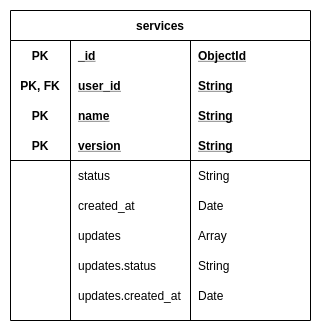
API
Create an acceptation for a service version T&C POST /v0/users/:user_id/services
POST /v0/users/9a47b037-825f-4ae7-bf55-6290efd5d036/services
Content-Type: application/json
x-api-key: 58e76225-d275-495b-a232-fdf3364ac277
{
"version": "1",
"name": "aura"
}
HTTP/1.1 201 Created
Content-Type: application/json
{
"user_id": "9a47b037-825f-4ae7-bf55-6290efd5d036",
"name": "aura",
"version": "1",
"status": "accepted",
"created_at": "2019-08-08T15:19:48.259Z"
}
List user acceptations GET /v0/users/:user_id/services
GET /v0/users/9a47b037-825f-4ae7-bf55-6290efd5d036/services
x-api-key: 58e76225-d275-495b-a232-fdf3364ac277
HTTP/1.1 200 OK
Content-Type: application/json
[
{
"user_id": "9a47b037-825f-4ae7-bf55-6290efd5d036",
"name": "aura",
"version": "1",
"status": "accepted",
"created_at": "2019-08-08T15:19:48.259Z"
}
]
get specific user acceptation GET /v0/users/:user_id/services/:name/:version
GET /v0/users/9a47b037-825f-4ae7-bf55-6290efd5d036/services/aura/1
x-api-key: 58e76225-d275-495b-a232-fdf3364ac277
HTTP/1.1 200 OK
Content-Type: application/json
{
"user_id": "9a47b037-825f-4ae7-bf55-6290efd5d036",
"name": "aura",
"version": "1",
"status": "accepted",
"created_at": "2019-08-08T15:19:48.259Z"
}
delete all user acceptations DELETE /v0/users/:user_id/services
DELETE /v0/users/9a47b037-825f-4ae7-bf55-6290efd5d036/services
x-api-key: 58e76225-d275-495b-a232-fdf3364ac277
HTTP/1.1 204 No Content
Create an entry with custom status for a service version T&C POST /v0/users/:user_id/services/:status
POST /v0/users/9a47b037-825f-4ae7-bf55-6290efd5d036/services/pending
Content-Type: application/json
x-api-key: 58e76225-d275-495b-a232-fdf3364ac277
{
"version": "1",
"name": "aura"
}
HTTP/1.1 201 Created
Content-Type: application/json
{
"user_id": "9a47b037-825f-4ae7-bf55-6290efd5d036",
"name": "aura",
"version": "1",
"status": "pending",
"created_at": "2019-08-08T15:19:48.259Z"
}
Update an entry with custom status for a service version T&C PUT /v0/users/:user_id/services/:status
PUT /v0/users/9a47b037-825f-4ae7-bf55-6290efd5d036/services/newStatus
Content-Type: application/json
x-api-key: 58e76225-d275-495b-a232-fdf3364ac277
{
"version": "1",
"name": "aura"
}
HTTP/1.1 201 Created
Content-Type: application/json
{
"n": 1,
"nModified": 1,
"ok": 1
}
Metrics
prometheus
GET /metrics
HTTP/1.1 200 OK
...txt...
liveness prove
GET /ping
HTTP/1.1 200 OK
Content-Type: application/json
{
"timestamp": 1567693845103,
"uptime": 7026,
"service": {
"name": "tac",
"version": "1.0.5"
}
}
Development
To clean database and start from scratch
docker-compose down -v
Configuration
The configuration comes from environment variables.
# the mongodb uri, including user/password and ssl configuration
export TAC_MONGODB_URI=mongodb://db:27017/tac
# API key that should be sent in every request in the `x-api-key` header
export TAC_APIKEY=58e76225-d275-495b-a232-fdf3364ac277
9.3.3 - Aura Services API in Kernel
Aura Services API published in Kernel
Description of Aura Authentication API endpoints published in Kernel
Introduction
As mentioned in the endpoints section, some of the endpoints of the aura-authentication-api are published in Kernel, while others are only for internal usage and others are published in Internet because they can be called by any other service, with the proper credentials.
This section is dedicated to those published in Kernel.
aura-services API definition in Kernel
The API published in Kernel is not strictly the same as the one published in aura-authentication-api. In the end, they represent the very same service, but the former needs to provide the layer of Kernel authentication.
The API definition can be found in Kernel developers site, where both the different versions deployed in every environment are presented.
How to consume this API
This is a regular Kernel API, so in order to consume it, just follow the same instructions as for the rest of Kernel APIs: consuming APIs.
10 - Aura Configuration API
Aura Configuration API server
aura-configuration-api is the component of Aura in charge of handling and centralizing configuration tasks.
Find in the current documents the description of this component, its architecture, components and processes.
Shared component between Aura Virtual Assistant and ATRIA
Introduction
aura-configuration-api is the component in charge of the management of all the configuration tasks in Aura. It is mainly a web server built on Typescript 4.3 using nodejs as engine. It is api-first designed, using OpenAPI v3 to provide the API definition.
aura-configuration-api server is divided into several modules and plugins, each of them managing different tasks, which are:
Modules
Administration: Administrative management module for general tasks such as exporting and importing configuration.Channel: Module in charge of managing the configuration of each Aura channel as well as the libraries associated with each channel (replacement for the bot-response.json configuration file).Skill: Module in charge of managing the configuration of each skill.Application: Module in charge of managing the configuration of each application.Component: Module in charge of managing the configuration of each Aura component.
Plugins
Preset: Module in charge of managing the configuration of each preset.Tv section: Module in charge of managing the configuration of each tv section.Suggestion: Module in charge of managing the configuration of each suggestions.Agent: Module in charge of managing the configuration of each agents.Agent base: Module in charge of managing the configuration of each agents base.Agent deployment: Module in charge of managing the configuration of each agents deployment.Routing filter: Module in charge of managing the configuration of each routing filters.Filter engine: Module in charge of managing filters engine.
Detailed information regarding aura-configuration-api is found in the following documents:
Aura configuration API architecture and components
The following figure shows the main components of the aura-configuration-api.

Server
The web server is implemented using express, which is the main web framework for NodeJS. It uses openapi-backend on top of express, to allow handling the OpenAPI v3 file.
It is in charge of setting up all the rest of the components that are needed during a request processing, as well as reading the aforementioned swagger file and setting up all the routes defined in it.
Middlewares
Each route published in the API definition file is handled by a controller, but before a request lands on its controller, it goes through a series of middlewares that provide some common steps needed by all the controllers of the server.
The following middlewares are executed at each request to the server:
Normal flow
helmet: Secure express app by setting various HTTP headers.body-parser (urlencoded): It parses URL-encoded bodies using querystring parsing (qs).body-parser (json): Maximum size of JSON body (current 50 MB).set-correlator: It sets the correlator to response header and response locals.log-http-request-response: Log HTTP request and response information.express-prom-bundle: It saves metrics information using Prometheus.oas_tools (swaggerMetadata): It interprets swagger resources and attaches metadata to request.oas_tools (swaggerValidator): It validates requests using swagger definition.oas_tools (swaggerRouter): It routes validated requests to appropriate controller.oas_tools (swaggerUi): It serves the swagger documents and Swagger UI.not-found-handler: It handles requests that have not been routed (Not Found).
Error flow
error-handler: Global error handler.
Controllers & Services
When the previous step is finished, the request lands on the controller. Each controller processes the request through a service, that is in charge of implementing the logic. Once the request has been processed, the controller prepares and sends the response.
There is a controller to manage requests associated with the server itself (generic controller) and a controller for each module, in charge of handling the requests of that module.
The event synchronization service can be enabled by setting the AURA_CONFIGURATION_EVENTS_ENABLED configuration variable to true.
Generic controller
As indicated above, the generic controller handles requests to provide information from the state of the server itself.
healthz: It is used to check if the server is online returning a simple status response: {"status": "ok"}.metrics: It gets Prometheus metrics information.heapStatistics: It gets memory usage information.heapSnapshot: It gets memory head snapshot from v8 engine.shutdown: Service to be invoked mainly by Kubernetes and allows to do a server graceful shutdown.
Modules controller
The controllers and services information of each module is described in the Modules section.
aura-configuration-api server is divided into several modules and plugins, each of them managing different tasks, which are:
Modules
Administration: Administrative management module for general tasks such as exporting and importing configuration.Channel: Module in charge of managing the configuration of each Aura channel as well as the libraries associated with each channel (replacement for the bot-response.json configuration file).Skill: Module in charge of managing the configuration of each skill.Application: Module in charge of managing the configuration of each application.Component: Module in charge of managing the configuration of each Aura component.
Access here detailed information of aura-configuration-api modules
Plugins
Preset: Plugin in charge of managing the configuration of each preset.TV section: Plugin responsible for the management of TV sections.Suggestion: Plugin responsible for the management of suggestions.Agent: Plugin in charge of managing the configuration of each agent.Agent base: Plugin in charge of managing the configuration of each agent base.Agent Deployment: Plugin responsible for managing the deployment of agents.Routing filter: Plugin responsible for managing the routing filters.Engine filter: Plugin responsible for managing the engine filter.
Access here detailed information of aura-configuration-api plugins
Database access
Most aura-configuration-api services access aura-configuration database to get or set the information of each module.
This database is a MongoDB one, with a collection for each module that stores information related to that module. To access this collection, the server implements a data access object with the queries needed by the services. This object follows the DAO (Data Access Object) pattern that provides a single access to the database, isolating the services from the real database schema and internals implementation.
Communication protocol
aura-configuration-api communication protocol is completely synchronous, this means that the answer of a request is included in the HTTP response related to the request.

10.1 - Environment variables
Aura Configuration API environment variables
List of environment variables handled by Aura Configuration API
- Properties marked in bold are mandatory.
- Properties marked in italics are optional.
| Property |
Type |
Description |
Modifiable by OB? |
| AURA_BRANDS |
string[] |
List of available Telefónica brands configured in Kernel. Check them in the document Telefónica brands management. |
YES |
| AURA_CONFIGURATION_APPLICATIONS_COLLECTION |
string |
Collection name to store Applications information. By default: applications. |
NO |
| AURA_CONFIGURATION_APPLICATIONS_ENCRYPTED_FIELDS |
string[] |
List of fields that will be saved encrypted in a application document. By default: ['callback']. |
YES, but only for adding fields |
| AURA_CONFIGURATION_CHANNELS_COLLECTION |
string |
Collection name to store channel information. By default: channels. |
NO |
| AURA_CONFIGURATION_CHANNELS_ENCRYPTED_FIELDS |
string[] |
List of fields that will be saved encrypted in a channel document. By default: ['security', 'whatsapp']. |
YES, but only for adding fields |
| AURA_CONFIGURATION_COMPONENTS_COLLECTION |
string |
Component name to store component information. By default: components. |
NO |
| AURA_CONFIGURATION_DATABASE_NAME |
string |
Aura channels configuration database name. By default: aura-configuration. |
NO |
| AURA_CONFIGURATION_EVENTS_ENABLED |
boolean |
Enable or disable the service synchronization by events. |
true |
| AURA_CONFIGURATION_MAX_LENGTH_TO_LOG_BODY_FIELD |
number |
Maximum characters length to display body field in logs. By default 1024 characters. |
NO |
| AURA_CONFIGURATION_SERVER_PORT |
number |
Aura channels configuration server port. By default: 8999. |
NO |
| AURA_CONFIGURATION_SKILLS_COLLECTION |
string |
Collection name to store Skills information. By default: skills. |
NO |
| AURA_CONFIGURATION_SKILLS_ENCRYPTED_FIELDS |
string[] |
List of fields that will be saved encrypted in a skill document. By default: []. |
YES, but only for adding fields |
| AURA_CONTACT_CHANNELS |
string[] |
List of contact channels that will be used. |
YES |
| AURA_ENCRYPTION_ALGORITHM |
string |
Encryption algorithm that will be used to validate the APIKey. By default: aes-256-cbc. |
NO |
| AURA_ENCRYPTION_IV_LENGTH |
number |
Size for the initialization vector used by the encryption algorithm that validates the APIKey. By default: 16. |
NO |
| AURA_ENCRYPTION_IV_POSITION |
number |
Position where to insert the initialization vector in the final string with the encrypted payload. By default: 35. |
NO |
| AURA_ENCRYPTION_KEY |
string |
Encryption key or comma-separated list of encryption keys to be used in the environment. It is mainly used to decrypt the APIKeys. |
NO. It would break database encrypted data and APIKey validation. |
| AURA_ENVIRONMENT_NAME |
string |
Name of the environment where aura-bridge is deployed. Used during aura-bridge make-up to handle the indexes of the database properly. For example: ap-next, es-dev, de-pre |
NO |
| AURA_HTTP_PATHS_LOG_DISABLED |
string[] |
Paths to be ignored in the logHttpRequestResponse middleware: By default: ['/metrics']. |
YES |
| AURA_HTTP_MAX_REQUEST_SIZE |
string |
Maximum size of incoming requests bodies in bytes allowed by the server. By default: 20mb. |
YES |
| AURA_LOGGING_FORMAT |
string |
Format to be used in monitoring logs: json or dev (more visual format). By default: json. |
NO. Only for development, set it to dev. |
| AURA_LOGGING_LEVEL |
string |
Level to be used in monitoring logs, from more to less verbose: 'TRACE', 'DEBUG', 'INFO', 'WARN', 'ERROR', 'FATAL', 'OFF'. By default: INFO. |
YES, for development set it to ‘DEBUG’. In pre/production should be ‘INFO’ or ‘ERROR’. For analysis of an issue in pre/production it may be changed to ‘DEBUG’ |
| AURA_MAKEUP_MODE |
string |
Allow dev mode of the makeup with the value local. By default: full. |
NO |
| AURA_MICROSOFT_AZURE_STORAGE_ACCESS_KEY |
string |
Microsoft Storage password of the deployment. |
NO |
| AURA_MICROSOFT_AZURE_STORAGE_ACCOUNT |
string |
Microsoft Storage account of the environment. |
NO |
| AURA_MICROSOFT_AZURE_STORAGE_AVRO_SCHEMAS_FOLDER |
string |
Contains the Microsoft Azure Storage Avro schemas folder. Default: ‘avro/schemas’. |
NO |
| AURA_MICROSOFT_AZURE_STORAGE_CONFIGURATION_CONTAINER |
string |
Aura configuration container name. Default: ‘aura-configuration’. |
NO |
| AURA_MONGODB_PASSWORD |
string |
MongoDB password to access AURA_MONGODB_BOT_DATABASE in AURA_MONGODB_URI. |
NO |
| AURA_MONGODB_SSL |
boolean |
true if access to AURA_MONGODB_URI is SSL. By default: false. |
NO |
| AURA_MONGODB_URI |
string |
MongoDB URI of the server handling AURA_MONGODB_BOT_DATABASE. |
NO |
| AURA_MONGODB_USERNAME |
string |
MongoDB username to access AURA_MONGODB_BOT_DATABASE in AURA_MONGODB_URI. |
NO |
| AURA_MONGODB_POOL_SIZE |
number |
Number of connections available in MongoDB pool. By default: 60. |
NO |
| AURA_MONGODB_MAX_POOL_SIZE |
number |
Maximum number of connections in the MongoDB pool. By default, 60. |
NO |
| AURA_MONGODB_MIN_POOL_SIZE |
number |
Minimum number of connections in the MongoDB pool. By default, 2. |
NO |
| AURA_MONGODB_MAX_IDLE_TIME_MS |
number |
Maximum idle time in milliseconds for connections in the MongoDB pool. By default, 30000 (30 seconds). |
NO |
| AURA_MONGODB_RETRY_WRITES |
boolean |
true if retry writes are enabled in the MongoDB connection. By default, true. |
NO |
| AURA_MONGODB_RETRY_READS |
boolean |
true if retry reads are enabled in the MongoDB connection. By default, true. |
NO |
| AURA_MONGODB_HEARTBEAT_FREQUENCY_MS |
number |
Frequency in milliseconds of the heartbeat in the MongoDB connection. By default, 2000 (2 seconds). |
NO |
| AURA_MONGODB_SERVER_SELECTION_TIMEOUT_MS |
number |
Timeout in milliseconds for server selection in the MongoDB connection. By default, 5000 (5 seconds). |
NO |
| AURA_MONGODB_SOCKET_TIMEOUT_MS |
number |
Timeout in milliseconds for socket operations in the MongoDB connection. By default, 45000 (45 seconds). |
NO |
| AURA_CONNECTION_TIMEOUT_MS |
number |
Timeout in milliseconds for establishing a connection to the MongoDB server. By default, 10000 (10 seconds). |
NO |
| AURA_MONGODB_READ_PREFERENCE |
string |
Read preference for the MongoDB connection. By default, primaryPreferred. Possible values: primary, primaryPreferred, secondary, secondaryPreferred, nearest. |
NO |
| AURA_REDIS_CONFIGURATION_PREFIX |
String |
Prefix for the key in Redis used to store configuration values. By default: aura-config:. |
No |
| AURA_REDIS_CONNECTION_POOL_MIN |
Number |
Minimum number of connections in the pool. Default: 2. |
No |
| AURA_REDIS_CONNECTION_POOL_MAX |
Number |
Maximum number of connections in the pool. Default: 100. |
|
| AURA_REDIS_DATABASE |
Number |
Database number for Single or Sentinel mode. By default: 0. |
|
| AURA_REDIS_HOSTS |
String |
String with a list of nodes (host:port) separated by comma. For example: “localhost:port,localhost2:port2”. Default: ‘127.0.0.0:6379’ |
No |
| AURA_REDIS_MAX_RECONNECT_INTERVAL |
Number |
Time in milliseconds to wait before reconnecting to Redis. By default: 5000. |
No |
| AURA_REDIS_MAX_RECONNECT_RETRIES |
Number |
Number of retries to connect to Redis. By default: 25. |
No |
| AURA_REDIS_MODE |
String |
Mode of Redis distribution. Values: Cluster, Sentinel or Single. By default: Single. |
No |
| AURA_REDIS_PASSWORD |
String |
A string with the password of Redis. |
No |
| AURA_REDIS_SENTINEL_INSTANCE_NAME |
String |
Name of the Redis instance. Used in Sentinel mode. |
No |
| AURA_REDIS_USE_CONNECTION_POOL |
Boolean |
Flag to indicate the use of a connection pool for Redis connections. Default: true. |
No |
| AURA_SERVER_REMOTE_CONTAINER_PREFIX |
string |
Remote container prefix. Default: aura-configuration-api. |
NO |
| AURA_SWAGGER_FROM_REMOTE |
boolean |
It indicates that swagger configuration will be loaded from remote. Default: true. |
NO |
| AURA_SWAGGER_LOCAL_PATH |
string |
Swagger local path. Default: swagger.yaml. |
NO |
| AURA_SWAGGER_PLUGIN_PATH |
string |
Swagger plugin path. Default: swagger.yaml. |
NO |
| AURA_SWAGGER_LOCAL_CORE_PATH |
string |
Swagger local core path. Default: swagger-core.yaml. |
NO |
| AURA_SWAGGER_REMOTE_CONTAINER_PREFIX |
string |
Remote container prefix to store the swagger information. Default: swagger. |
NO |
| AURA_SHUTDOWN_GRACEFUL_TTL |
number |
Time in milliseconds to complete the SHUTDOWN signal and process all the messages in queue before SIGTERM. By default: 25 * 1000. |
YES |
| AURA_VERSION |
string |
Aura release |
NO |
10.2 - Synchronization by events
Synchronization by events
Description of the synchronization by events process
Introduction
Event-driven synchronization is a system that allows updating the configuration of any module in the components in real time.
This is done through events, which are emitted when a certain module modifies its configuration data, and allows the Aura components that are subscribed to the events to update their configuration in real time.
The synchronization by events operates as follows:
- A service updates a certain configuration element.
- The new updated data is stored in MongoDB.
- An Event is published by the Event Manager. The current system supports two Event Managers, Redis Pub/Sub and DAPR.
When the event is issued, the services subscribed to the configuration events receive the Event.
- The changes are requested through the aura-configuration-api.
Event management can be activated or deactivated in both the event transmission and reception parts. The environment variable that has the aura-configuration-api and the components that support this system is called AURA_CONFIGURATION_EVENTS_ENABLED. The environment variable AURA_CONFIGURATION_EVENTS_MANAGER determines the engine used for event handling, possible values are “REDIS” or “DAPR”.
Using Redis as Event Manager
Publishers and subscribers
In order for a component to update the configuration data that has been modified by another service, two types of elements are required:
- Publishers, which are the ones that notify of the change
- Subscribers, which are the ones that will receive an event indicating that a change has occurred and where it has taken place.
All this is managed through the broadcasting of events in Redis through a specific channel using the Pub/Sub module.
Channel
The name of the channel has the following structure:
[AURA_REDIS_DATABASE]__:[AURA_REDIS_CONFIGURATION_PREFIX][ConfigCollectionName]*
This pattern will be used by most of the current components. If any of them need to manage identifiers within the channel, such as Agents, they will be subscribed to the channel:
[AURA_REDIS_DATABASE]__:[AURA_REDIS_CONFIGURATION_PREFIX][ConfigCollectionName]:[Id]
Being:
AURA_REDIS_DATABASE: Environment variable with the number of database in Redis.AURA_REDIS_CONFIGURATION_PREFIX: Environment variable whose default value is aura-config.ConfigCollectionName: One of the following values: ChannelConfiguration, ApplicationConfiguration, SkillConfiguration, TvSectionsConfiguration, PresetConfiguration, AgentConfiguration.
Example:
1__:aura-config:ChannelConfiguration
Event Message
When the event is sent, it has the following format:
{
collection: [ConfigCollectionName]
op: [OPERATION];
id: [IDENTIFIER];
configData: [CONFIGURATION_DATA];
metadata: [EVENT_METADATA] (Dapr)
pubSubName: [DAPR_PUBSUB_NAME]; (Dapr)
crc: [INTEGRITY]; (Not implemented)
}
The different types of operations are (EventConfigOperation):
Create: When a record is created in the configuration. It will carry the identifier of the new record.Update: When a record is modified in the configuration. It will carry the identifier of the updated record.Delete: When a record is deleted in the configuration. It will carry the identifier of the deleted record.
The configuration data contains the updated or new configuration data. This field is not mandatory, and if the configuration data is empty the subscriptor refreshes its configuration calling directly the configuration API.
Examples:
Without configuration data
{
"op":Create",
"id":"88834434"
}
With configuration data
{
"op":Create",
"id":"88834434",
"configData":
{
"name":"Expample1",
"id":"88834434",
....
}
}
Publishers
The publishers are inside the aura-configuration-api.
When one of the configuration models writes to the MongoDB database, the event must be generated through Redis. This is done by instantiating an element of the RedisEventPublisher class. The creation of these update records in Redis has two requirements that must be met:
- The API must contain an endpoint to obtain all the data from the model named
GetAll.
- The API must contain an endpoint to obtain an element of the model selected by its identifier named
GetById.
To write the records in Redis that will generate the events, we will use the DAO of the model, specifically the method writeConfigurationEvent that is in charge of generating the registry for the event in Redis.
// aura-configuration-api/src/common/dao.ts
/**
* Write configuration event.
* @param {EventConfigOperation} operation Operation type
* @param {string} id Id of the configuration
* @param {T} data Data to write
* @param {KeyValueType} metadata Metadata to write
*/
protected async writeConfigurationEvent(operation: EventConfigOperation, id?: string, data?: T, metadata?: KeyValueType) {
this.configurationEventPublish.op = operation;
this.configurationEventPublish.id = id;
this.configurationEventPublish.configData = data;
this.configurationEventPublish.metadata = Object.assign({}, this.configurationEventPublish.metadata, metadata);
await this.eventPublisher.publish(this.configurationEventPublish);
}}
The eventPublisher can be one of Redis or DAPR. For Redis, the class with the methods to publish the event is included in /aura-configuration-api/src/utils/event-publishers/redis-event-publisher.ts
Generate events
When an event is generated, the operation that has been performed is indicated with the identifier of the record affected by the change.
/**
* Update channel.
*
* @throws {NoDataError} When it hasn't been updated
* @throws {Error} When channel is invalid
* @param {ChannelConfiguration} channel Channel configuration
*/
public async update(channel: ChannelConfiguration) {
channel.metadata = {
...(await this.channelCollection.findOne<ChannelConfiguration>(
{ id: channel.id }, { projection: { metadata: 1 } })
)?.metadata,
...channel.metadata
};
const updateResult = await this.channelCollection.replaceOne(
{ id: channel.id }, this.prepareChannelToInsert(channel));
if (updateResult?.modifiedCount === 0) {
throw new NoDataError(`Channel with id: ${channel.id} cannot be found`);
} else {
await this.writeConfigurationEvent(EventConfigOperation.Update, channel.id);
}
}
Subscribers
Subscribers are inside the aura-utilities/aura-configuration library, and are the clients of each of the models in the aura-configuration-api.
These subscribers inherit their class from a base class BaseConfiguration that contains the necessary methods to manage the data. Some methods are common to all and others are specific. They include methods to manage the data locally, that is, if we receive the content of the changes in the event itself, we should be able to apply them on the current module without having to call the aura-configuration-api* to obtain them.
An example for the method of point 3 could be the following:
/**
* Update channel configuration.
*
* @param {Configuration} configuration Configuration object.
* @param {EventConfigModel} message Event configuration model.
* @returns {Promise<void>} Promise.
*/
public async updateConfiguration(message: EventConfigModel<T>): Promise<void> {
try {
this.logger.debug({
msg: 'UpdateChannelConfiguration executed', message,
corr: CorrelatorUtil.auraSystem
});
switch (message.op) {
case EventConfigOperation.Create:
try {
await this.createConfigurationById(message);
} catch (error) {
// if there is an error updating a single channel, update all the config with the current values
await this.load();
}
break;
case EventConfigOperation.Update: {
try {
await this.updateConfigurationById(message);
} catch (error) {
// if there is an error updating a single channel, update all the config with the current values
await this.load();
}
}
break;
case EventConfigOperation.Delete:
if (this.removeLocal(message.id)) {
this.logger.debug({
msg: `Channel removed with id: ${message.id}`, corr: CorrelatorUtil.auraSystem
});
} else {
this.logger.warning({
msg: `Channel not found to remove with id: ${message.id}`, corr: CorrelatorUtil.auraSystem
});
await this.load();
}
break;
default:
this.logger.warning({
msg: `Unknown operation: ${message.op} for configuration update: ${message.id}`,
corr: CorrelatorUtil.auraSystem
});
break;
}
} catch (error) {
this.logger.error({
msg: 'updateChannelConfiguration failed.', error: error.message, stck: error,
corr: CorrelatorUtil.auraSystem
});
}
}
The methods createConfigurationById and updateConfigurationById contain the logic to apply the changes locally or through the aura-configuration-api*.
/**
* Create channel configuration by id.
* @param {Configuration} configuration Configuration object.
* @param {EventConfigModel<ChannelConfiguration>} message Event configuration model.
* @returns {Promise<void>} Promise.
*/
private async createConfigurationById(message: EventConfigModel<T>): Promise<void> {
// if the message has the configuration data, create the channel directly.
if (message.configData && this.addLocal(message.configData)) {
this.logger.debug({
msg: `Channel added with new configuration: ${message.id}`, corr: CorrelatorUtil.auraSystem
});
} else {
await this.loadById(message.id);
}
}
Using DAPR as Event Manager
Publishers and subscribers
In order for a component to update the configuration data that has been modified by another service, two types of elements are required:
- Publishers, which are the ones that notify of the change.
- Subscribers, which are the ones that will receive an event indicating that a change has occurred and where it has taken place.
All this is managed through DAPR Pub/Sub block. The engine selected to manage the PubSub is Redis. Unlike the pure PubSub management in Redis, which has the problem that if a subscriber does not receive the event, it will not be resent, with DAPR this does not happen since it takes care of the Event lifetime internally and manages the retries if needed.
Channel
In the DAPR Pub/Sub block, the concept of a channel is not applicable. In order to subscribe to an event, the name of the Pub/Sub module and the topic to be subscribed are required.
pubsubname: AURA_DAPR_CONFIGURATION_PUBSUB_NAME
topic: ConfigCollectionName
Being:
AURA_DAPR_CONFIGURATION_PUBSUB_NAME: Name of PubSub module defined in DAPR for Configuration Events.ConfigCollectionName: One of the following values: ChannelConfiguration, ApplicationConfiguration, SkillConfiguration, TvSectionsConfiguration, PresetConfiguration, AgentConfiguration.
Event Message
DAPR uses a global event management model called CloudEvents. CloudEvents is a specification for describing event data in common formats to provide interoperability across services, platforms and systems.
For compatibility reasons with the Event Managr in Redis, the name of the model used for Redis has been included within the field data of CloudEvents.
Example CloudEvent
{
"data": {
"collection": "ChannelConfiguration",
"id": "c71dc728-5fe2-4735-927d-0c419b35ec59",
"metadata": {
"ttlInSeconds": "60"
},
"op": "Update",
"pubSubName": "pubsub-config-ap-four"
},
"datacontenttype": "application/json",
"expiration": "2025-06-30T08:16:05Z",
"id": "a8340fb8-9071-4da9-91d6-7a14a409d459",
"pubsubname": "pubsub-config-ap-four",
"source": "aura-configuration-api",
"specversion": "1.0",
"time": "2025-06-30T08:15:05Z",
"topic": "ChannelConfiguration",
"traceid": "00-00000000000000000000000000000000-0000000000000000-00",
"traceparent": "00-00000000000000000000000000000000-0000000000000000-00",
"tracestate": "",
"type": "com.dapr.event.sent"
}
Inside the data property, it has the following format:
{
collection: [ConfigCollectionName]
op: [OPERATION];
id: [IDENTIFIER];
configData: [CONFIGURATION_DATA];
metadata: [EVENT_METADATA] (Dapr)
pubSubName: [DAPR_PUBSUB_NAME]; (Dapr)
crc: [INTEGRITY]; (Not implemented)
}
The different types of operations are (EventConfigOperation):
Create: When a record is created in the configuration. It will carry the identifier of the new record.Update: When a record is modified in the configuration. It will carry the identifier of the updated record.Delete: When a record is deleted in the configuration. It will carry the identifier of the deleted record.
The configuration data contains the updated or new configuration data. This field is not mandatory and if the configuration data is empty, the subscriptor refreshes its configuration calling the aura-configuration-api.
The metadata is used to manage the behavior of the event. In this case it uses a { "ttlInSeconds": "60" } to set the expiration time of the event.
The pubSubName contains the AURA_DAPR_CONFIGURATION_PUBSUB_NAME.
Examples:
Without configuration data:
{
"collection": "ChannelConfiguration",
"id": "c71dc728-5fe2-4735-927d-0c419b35ec59",
"metadata": {
"ttlInSeconds": "60"
},
"op": "Update",
"pubSubName": "pubsub-config-ap-four"
}
With configuration data:
{
"collection": "ChannelConfiguration",
"id": "c71dc728-5fe2-4735-927d-0c419b35ec59",
"metadata": {
"ttlInSeconds": "60"
},
"op": "Update",
"pubSubName": "pubsub-config-ap-four",
"configData":
{
"name":"Expample1",
"id":"88834434",
....
}
}
Publishers
The publishers are inside the aura-configuration-api.
When one of the configuration models writes to the MongoDB database, the event must be generated through Redis. This is done by instantiating an element of the RedisEventPublisher class. The creation of these update records in Redis has two requirements that must be met:
- The API must contain an endpoint to obtain all the data from the model named
GetAll.
- The API must contain an endpoint to obtain an element of the model selected by its identifier named
GetById.
To write the records in Redis that will generate the events, we will use the DAO of the model.
The method writeConfigurationEvent generates the registry for the event in Redis.
// aura-configuration-api/src/common/dao.ts
/**
* Write configuration event.
* @param {EventConfigOperation} operation Operation type
* @param {string} id Id of the configuration
* @param {T} data Data to write
* @param {KeyValueType} metadata Metadata to write
*/
protected async writeConfigurationEvent(operation: EventConfigOperation, id?: string, data?: T, metadata?: KeyValueType) {
this.configurationEventPublish.op = operation;
this.configurationEventPublish.id = id;
this.configurationEventPublish.configData = data;
this.configurationEventPublish.metadata = Object.assign({}, this.configurationEventPublish.metadata, metadata);
await this.eventPublisher.publish(this.configurationEventPublish);
}
The eventPublisher can be Redis or DAPR. For DAPR, the class with the methods to publish the event is in /aura-configuration-api/src/utils/event-publishers/dapr-event-publisher.ts
Generate events
When an event is generated, the operation that has been performed is indicated with the identifier of the record affected by the change.
/**
* Update channel.
*
* @throws {NoDataError} When it hasn't been updated
* @throws {Error} When channel is invalid
* @param {ChannelConfiguration} channel Channel configuration
*/
public async update(channel: ChannelConfiguration) {
channel.metadata = {
...(await this.channelCollection.findOne<ChannelConfiguration>(
{ id: channel.id }, { projection: { metadata: 1 } })
)?.metadata,
...channel.metadata
};
const updateResult = await this.channelCollection.replaceOne(
{ id: channel.id }, this.prepareChannelToInsert(channel));
if (updateResult?.modifiedCount === 0) {
throw new NoDataError(`Channel with id: ${channel.id} cannot be found`);
} else {
await this.writeConfigurationEvent(EventConfigOperation.Update, channel.id);
}
}
Subscribers
Subscribers in DAPR can be created in several ways. In this case, the “Programatic” type is used, that is, we are going to include an endpoint in our components so that DAPR can subscribe them to the PubSub. The endpoint (/dapr/subscribe) must respond with a subscription model that contains the pubSubName, the topic and the endpoint that is going to be in charge of processing the event. This type of subscription forces us to define 2 methods for DAPR.
Example:
/**
* Dapr Subscriptions.
*
*/
public daprSubscriptions() {
this.app.get('/dapr/subscribe', (request: express.Request, response: express.Response) => {
const subscriptions =
[
{
pubsubname: ConfigurationManager.instance.environmentConfiguration.AURA_DAPR_CONFIGURATION_PUBSUB_NAME,
topic: ConfigCollectionName.ChannelConfiguration,
routes: {
default: '/dapr/processConfigurationEvents',
}
}
];
response.status(200).send(subscriptions);
});
}
In the previous example, we are going to subscribe to one topic, that will receive the events about the channel configuration collection.
Once the event is received, we can use the same library that we use in Redis, aura-utilities/aura-configuration, since we share the data model.
Example:
/**
* Process configuration events.
*
*/
public processConfigurationEvents() {
this.app.post('/dapr/processConfigurationEvents', async (request: express.Request, response: express.Response) => {
try {
const event = HTTP.toEvent({ headers: request.headers, body: request.body.toString() });
const cloudEvent = (event || {}) as CloudEvent;
const configModel = (cloudEvent.data || {}) as EventConfigModel<ChannelConfiguration>;
switch (configModel.collection) {
case ConfigCollectionName.ChannelConfiguration:
// Update current channels configuration
this.logger.debug({
msg: 'Processing channel configuration events',
corr: CorrelatorUtil.auraSystem
});
await AuraCurrentChannelsConfiguration.instance
.updateConfiguration(configModel as EventConfigModel<ChannelConfiguration>);
break;
default:
this.logger.warning({
msg: `Unknown collection in configuration event: ${configModel.collection}`,
corr: CorrelatorUtil.auraSystem
});
}
response.status(200).send({ status: DaprResponseStatus.SUCCESS });
} catch (error) {
this.logger.error({
msg: 'Error processing configuration events',
error: error.message,
corr: CorrelatorUtil.auraSystem
});
response.status(500).json({ status: DaprResponseStatus.DROP, error: 'Internal Server Error' });
}
});
}
It is important to indicate in the reponse that the event has been successfully processed.
10.3 - Modules
Aura Configuration API modules
Description of the different modules that compose Aura Configuration API
Introduction
Currently, aura-configuration-api contains the following modules:
Administration module
Module in charge of administration tasks:
- Export of complete server information.
- Export of information by modules.
- Import of complete server information.
- Import of information by modules.
Access detailed information about Administration module.
Channel module
Module responsible for managing all the information related to channels, including the configuration of each Aura channel as well as the libraries associated with each channel (replacement for the bot-response.json configuration file).
- Add channel
- Delete channel by id
- Get channel by id
- Get all channels
- Get changed channels
- Modify channel
- Update channel
Access detailed information about Channel module.
Component module
Module responsible for managing all the information related to components, including the configuration of each Aura component.
- Add new components
- Delete component by name
- Get component by name
- Get all components
- Update component by name
- Modify component by name
Access detailed information about Component module.
Skill module
Module responsible for managing all the information related to skills, defining the following operations:
- Add skill
- Delete skill by id
- Get skill by id
- Get all skills
- Get changed skills
- Modify skill
- Update skill
Access detailed information about Skill module.
Application module
Module responsible for managing all the information related to applications, defining the following operations:
- Add application
- Delete application by id
- Get application by id
- Get all applications
- Get changed applications
- Modify application
- Update application
Access detailed information about Application module.
Library
Module responsible for managing all the information related to libraries, defining the following operations:
- Add library by channel id
- Delete all libraries by channel id
- Delete library by id and channel id
- Get library by id and channel id
- Update library by channel id
From the functional point of view, this module depends on the aura-configuration-api channel module: server definition.
Prometheus
Module responsible for exposing metrics for monitoring and observability of Aura Configuration API using Prometheus. It provides metrics such as:
- Aura component version (gauge)
- Unhandled server errors (counter)
- Outgoing message duration (summary)
- Outgoing request duration (summary)
These metrics help track the health, performance, and errors of the API. Paths in metrics are normalized for aggregation. For more details, see the Prometheus metrics registration source code.
Access detailed information about Prometheus module.
10.3.1 - Admin module
Aura configuration API admin module
Admin module description for aura-configuration-api
Introduction
The administration module defines services associated with general administration tasks in aura-configuration-api server.
All these services are defined in the admin namespace (/admin).
Servers definition
By default, the servers defined in the swagger include the base path (for v2):
/aura-services/v2/configuration.
Therefore, in order to access the services, the base path and service path must be used.
Examples:
- aura-services/v2/configuration/admin/export
- aura-services/v2/configuration/admin/import
Endpoints
| Path |
Method |
Description |
| /admin/export |
GET |
Export configuration |
| /admin/import |
POST |
Import configuration |
You can read the complete documentation of each service in the aura-configuration-api swagger file.
Export modules
Export all
To export all configuration, a GET call to /admin/export path must be made.
curl --location --request GET 'http://aura-configuration-api:8999/aura-services/v2/configuration/admin/export' \
--header 'Accept: application/json' \
--header 'Authorization: APIKEY XXX'
The service will respond with an ExportModel type object:
export interface ExportModel {
/** Export metadata */
metadata?: ExportMetadata;
/** Export data */
data?: ExportModelData;
}
metadata: It contains information related to the export itself: export date (data), current API version (apiVersion), bot configuration version (version).data: Module data information indexed by module name.
Further information about ExportModel interface.
Export one or several specific modules
It is possible to export one or several modules using the module parameter in the call to /admin/export endpoint.
curl --location --request GET 'http://aura-configuration-api:8999/aura-services/v2/configuration/admin/export?modules=channels' \
--header 'Accept: application/json' \
--header 'Authorization: APIKEY XXX'
The result will have the same format as for complete export, but in the data field only includes the indicated modules.
Import modules
To import, data from a previous export must be used. The import can be from a complete or partial export of certain modules.
To import all configuration, a POST call to /admin/import path must be made.
curl --location --request POST 'http://aura-configuration-api:8999/aura-services/v2/configuration/admin/import' \
--header 'Accept: application/json' \
--header 'Authorization: APIKEY XXX' \
--header 'Content-Type: application/json' \
--data-raw 'PREVIOUS_EXPORT_DATA'
How is an import processed?
During the import process, the following tasks are performed:
- For each module to export, the
import method of each of those modules is called.
- The necessary
mappers are executed to adapt the export version to the current server version (if applicable).
- The objects of each module are validated with json schema.
- The objects are inserted in the appropriate collection.
flowchart TD
A[Import] --> B{Are there modules?}
B --> |Yes| Mappers[Apply mappers]
Mappers --> Validate[Validate using json schema]
Validate --> Add[Add to collection]
Add --> B
B ---->|No| E[End]
Result of the import process
The import service will respond with an ImportResult type object:
export interface ImportResult {
version: string;
fromVersion: string;
modules: ImportModuleResult[];
status: ProcessStatus;
}
export interface ImportModuleResult {
name: string;
patches?: ImportPatches;
result: ProcessResult;
}
export enum ProcessStatus {
Ok = 'Ok',
Error = 'Error'
}
version: Version to which the import has been made.fromVersion: Original import version.modules: array of ImportModuleResult with the result of the import of each module.status: Status with the overall result of the import process. If any module fails the result will be Error.
Database
The database to store the aura-configuration-api information must be named with the following format:
aura-configuration-<ENVIRONMENT_NAME>-<BOT_VERSION>
Example for the ap-next environment and 7.4.0 version:
aura-configuration-ap-next-7-4-0
As a general rule, all those modules that define a DAO will have a collection associated with that module.The currently existing collections are described in the following sections.
Channels collection
This collection stores channel information using channels collection.
Fields
| Field name |
Type |
Required |
| name |
string |
true |
| prefix |
string |
true |
| nlp |
{} |
true |
| nlp.enabled |
boolean |
true |
| auraBotCacheTTL |
number |
false |
| id |
string |
true |
| dialogLibraries |
Array<{}> |
false |
| actions |
{} |
false |
| actions.afterLogin |
{} |
false |
| actions.afterLogin.action |
string |
false |
| actions.afterLogin.type |
string |
false |
| actions.afterLogin.data |
{} |
false |
| actions.thirdPartyApp |
{} |
false |
| actions.thirdPartyApp.action |
string |
false |
| actions.thirdPartyApp.type |
string |
false |
| actions.thirdPartyApp.data |
{} |
false |
| actions.thirdPartyApp.contentType |
string |
false |
| rcs |
{} |
false |
| rcs.agentId |
string |
true |
| rcs.clientToken |
string |
true |
| rcs.email |
string |
true |
| rcs.privateKey |
string |
true |
| requestOptions |
{} |
false |
| requestOptions.fileAttachments |
{} |
false |
| requestOptions.fileAttachments.enabled |
boolean |
true |
| requestOptions.fileAttachments.enabledExtensions |
Array<string[]> |
false |
| requestOptions.fileAttachments.customProactiveDialogId |
string |
false |
| requestOptions.fileAttachments.validations |
{} |
false |
| requestOptions.requestOptionsVersion |
{} |
false |
| responseOptions |
{} |
false |
| responseOptions.dialogContext |
{} |
false |
| responseOptions.dialogContext.disabled |
boolean |
false |
| responseOptions.dialogContext.disabledMerge |
boolean |
false |
| responseOptions.dialogContext.normalizeTerms |
boolean |
false |
| responseOptions.dialogContext.defaultListType |
’none’,‘ordinalCardinal’,‘ordinal’,‘cardinal’ |
false |
| responseOptions.dialogContext.promptChoice |
{} |
false |
| responseOptions.dialogContext.promptChoice.generateList |
boolean |
false |
| responseOptions.dialogContext.promptChoice.generate |
’never’,‘always’,‘custom’ |
false |
| responseOptions.dialogContext.cardActions |
{} |
false |
| responseOptions.dialogContext.cardActions.generateList |
boolean |
false |
| responseOptions.dialogContext.cardActions.generate |
’never’,‘always’,‘custom’ |
false |
| responseOptions.dialogContext.returnToClient |
boolean |
false |
| responseOptions.dialogContext.processFromClient |
boolean |
false |
| responseOptions.versions |
{} |
false |
| responseOptions.needsEmptyResponseEvent |
boolean |
false |
| responseOptions.outputMessageFormat |
‘custom’,’enrich’,‘html5’,‘simple’,‘voice’ |
false |
| responseOptions.sendSpeak |
boolean |
false |
| responseOptions.disambiguationFormat |
‘disabled’,‘prompts’,‘suggestions’ |
false |
| responseOptions.textConvert |
boolean |
false |
| responseOptions.suggestionType |
‘actions’,‘attachment’ |
false |
| responseOptions.suggestionsNumber |
number |
false |
| responseOptions.tv.actions |
Array<Action[]> |
false |
| security |
{} |
false |
| security.anonymous |
‘anonymous’,‘identifiable’ |
false |
| security.allowUserProfile |
boolean |
false |
| security.channelId |
string |
false |
| security.authScopes |
string |
true |
| security.authPurposes |
string |
true |
| security.federatedAuthentication |
{} |
false |
| security.federatedAuthentication.loginUrl |
string |
false |
| security.federatedAuthentication.auraIdSeparator |
string |
false |
| security.federatedAuthentication.loginCallback |
{} |
false |
| security.federatedAuthentication.loginCallback.method |
string |
false |
| security.federatedAuthentication.loginCallback.integrated |
boolean |
false |
| security.federatedAuthentication.loginCallback.endpoint |
string |
false |
| security.federatedAuthentication.loginCallback.queryParams |
string |
false |
| security.federatedAuthentication.loginCallback.headers |
Array<string[]> |
false |
| security.federatedAuthentication.loginCallback.body |
string |
false |
| security.federatedAuthentication.logoutCallback |
{} |
false |
| security.federatedAuthentication.logoutCallback.method |
string |
false |
| security.federatedAuthentication.logoutCallback.integrated |
boolean |
false |
| security.federatedAuthentication.logoutCallback.endpoint |
string |
false |
| security.federatedAuthentication.logoutCallback.queryParams |
string |
false |
| security.federatedAuthentication.logoutCallback.headers |
Array<string[]> |
false |
| security.federatedAuthentication.logoutCallback.body |
string |
false |
| security.termsAndConditions |
{} |
false |
| security.termsAndConditions.authenticated |
{} |
false |
| security.termsAndConditions.authenticated.version |
string |
true |
| security.termsAndConditions.authenticated.service |
string |
true |
| security.termsAndConditions.anonymous |
{} |
false |
| security.termsAndConditions.anonymous.version |
string |
true |
| security.termsAndConditions.anonymous.service |
string |
true |
| whatsapp |
{} |
false |
| whatsapp.client |
{} |
false |
| whatsapp.client.id |
string |
true |
| whatsapp.client.secret |
string |
true |
| whatsapp.client.purposes |
string |
false |
| whatsapp.client.scopes |
string |
false |
| whatsapp.phoneNumber |
string |
false |
| whatsapp.listOptions |
{} |
false |
| whatsapp.listOptions.type |
‘button’,’enumeratedList’,’list’ |
false |
| whatsapp.listOptions.rules |
Array<{}> |
false |
| whatsapp.type |
‘whatsapp’ |
false |
| metadata |
{} |
false |
| metadata.version |
string |
false |
| metadata.createdAt |
string |
false |
| metadata.updatedAt |
string |
false |
Indexes
[
{
"version": 1,
"name": "idx_channel_id",
"keys": {
"id": 1
},
"unique": true
},
{
"version": 1.1,
"name": "idx_updated_at",
"keys": {
"metadata.updatedAt": -1
}
},
{
"version": 1,
"name": "idx_channel_library",
"keys": {
"id": 1,
"dialogLibraries.name": 1
}
}
]
skills collection
This collection stores skills information using skills collection.
Fields
| Field name |
Type |
Required |
| id |
string |
true |
| name |
string |
true |
| appId |
string |
true |
| skillEndpoint |
string |
true |
| channels |
Array<string[]> |
true |
| disabled |
boolean |
false |
| external |
boolean |
false |
| metadata |
{} |
false |
| metadata.version |
string |
false |
| metadata.createdAt |
string |
false |
| metadata.updatedAt |
string |
false |
Indexes
[
{
"version": 1.1,
"name": "idx_skill_id",
"keys": {
"id": 1
},
"unique": true
},
{
"version": 1.1,
"name": "idx_updated_at",
"keys": {
"metadata.updatedAt": -1
}
}
]
applications collection
This collection stores applications information using applications collection.
Fields
| Field name |
Type |
Required |
| id |
string |
true |
| name |
string |
true |
| brand |
string |
true |
| disabled |
boolean |
false |
| agents |
string[] |
false |
| nlp.channelId |
string |
false |
| models.level |
Level |
false |
| models.presets |
string[] |
true |
| metadata.version |
string |
false |
| metadata.createdAt |
string |
false |
| metadata.updatedAt |
string |
false |
Types
| Type name |
Type |
Options |
| Level |
string |
Set the different levels of access for the application. It can only be changed by Aura Global Team |
Indexes
[
{
"version": 1.5,
"name": "idx_app_id",
"keys": {
"id": 1
},
"unique": true
},
{
"version": 1.5,
"name": "idx_updated_at",
"keys": {
"metadata.updatedAt": -1
}
}
]
presets collection
This collection stores presets information using presets collection.
Fields
Root
| Field name |
Type |
Required |
| id |
string |
true |
| name |
string |
true |
| description |
string |
false |
| group |
string |
false |
| session |
Session |
false |
| generative |
Generative |
false |
| rag |
Rag |
false |
| metadata |
Metadata |
false |
Types
Action
| Field name |
Type |
Required |
| name |
string |
true |
| target |
string |
false |
| params |
object |
false |
| postBack |
object |
false |
Session
| Field name |
Type |
Required |
| session.window |
number |
false |
| session.timeout |
number |
false |
Generative
| Field name |
Type |
Required |
| generative.model.id |
string |
false |
| generative.model.parameters.max_tokens |
number |
false |
| generative.model.parameters.temperature |
number |
false |
| generative.model.parameters.top_p |
number |
false |
| generative.injectionMaxLength |
number |
false |
| generative.prompts.template |
string |
false |
| generative.prompts.preamble.text |
string |
false |
| generative.prompts.preamble.args.name |
string |
false |
| generative.prompts.examples |
string[] |
false |
| generative.prompts.promptRegexClean |
string |
false |
| generative.prompts.promptMaxLength |
number |
false |
RAG
| Field name |
Type |
Required |
| rag.type |
string |
false |
| rag.references.maximum |
number |
false |
| rag.references.baseUrl |
string |
false |
| rag.model.id |
string |
false |
| rag.model.parameters.max_tokens |
number |
false |
| rag.model.parameters.temperature |
number |
false |
| rag.model.parameters.top_p |
number |
false |
| rag.stages.language |
string |
false |
| rag.stages.security.heuristics.example |
string |
false |
| rag.stages.security.maxLength |
number |
false |
| rag.stages.translation.prompt |
string |
false |
| rag.stages.translation.language |
string |
false |
| rag.stages.clean.prompt.default |
string |
false |
| rag.stages.clean.prompt.es |
string |
false |
| rag.stages.context.prompts.recreatedQuestion.default |
string |
false |
| rag.stages.context.prompts.recreatedQuestion.es |
string |
false |
| rag.stages.context.prompts.sameContext.default |
string |
false |
| rag.stages.context.prompts.sameContext.es |
string |
false |
| rag.stages.context.stickyContext |
string |
false |
| rag.stages.retrieval.sourceDataId |
string |
false |
| rag.stages.postFiltering.candidatesPostFiltering |
string |
false |
| rag.stages.postFiltering.prompt.default |
string |
false |
| rag.stages.postFiltering.prompt.es |
string |
false |
| rag.stages.generative.ragStrategy |
string |
false |
| rag.stages.generative.prompts.stuff.default |
string |
false |
| rag.stages.generative.prompts.stuff.es |
string |
false |
| rag.stages.generative.prompts.refine.default |
string |
false |
| rag.stages.generative.prompts.refine.es |
string |
false |
| rag.outputRefine.candidates |
boolean |
false |
| rag.outputRefine.filterOutputMetadata.map.fileType |
string |
false |
| rag.outputRefine.filterOutputMetadata.map.pageNumber |
string |
false |
| rag.outputRefine.filterOutputMetadata.groupBy |
string |
false |
| rag.outputRefine.filterOutputMetadata.aggregate |
string |
false |
| rag.outputRefine.filterOutputMetadata.outputFilter |
string[] |
false |
| rag.outputRefine.filterOutputMetadata.root |
string[] |
false |
| Field name |
Type |
Required |
| metadata.version |
string |
false |
| metadata.createdAt |
string |
false |
| metadata.updatedAt |
string |
false |
Indexes
[
{
"version": 1.10,
"name": "idx_preset_id",
"keys": {
"id": 1
},
"unique": true
},
{
"version": 1.10,
"name": "idx_updated_at",
"keys": {
"metadata.updatedAt": -1
}
},
{
"version": 1.10,
"name": "idx_preset_name",
"keys": {
"name": 1
},
"unique": true
}
]
suggestions collection
This collection stores suggestion information using suggestions collection.
Fields
| Field name |
Type |
Required |
| id |
string |
true |
| name |
string |
true |
| intent |
string |
true |
| entities |
Array<{}> |
true |
| resources |
Array<{}> |
true |
Indexes
[
{
"version": 2.1,
"name": "idx_suggestion_id",
"keys": {
"id": 1
},
"unique": true
},
{
"version": 2.1,
"name": "idx_updated_at",
"keys": {
"metadata.updatedAt": -1
}
},
{
"version": 2.1,
"name": "idx_suggestion_name",
"keys": {
"name": 1
},
"unique": true
}
]
tv-section collection
This collection stores TV Section information using the tv-sections collection.
Fields
| Field name |
Type |
Required |
Description |
| id |
string |
true |
Unique identifier for the TV Section (UUID) |
| pid |
string |
false |
External or process identifier |
| name |
string |
false |
Name of the TV Section |
| canon |
string |
false |
Canonical name of the TV Section |
| type |
string |
false |
Section type (app or section) |
| metadata |
object |
false |
Document metadata (version, creation and update dates) |
| Field |
Type |
Description |
| version |
string |
Configuration version when the document was created |
| createdAt |
string |
Creation date (ISO 8601) |
| updatedAt |
string |
Update date (ISO 8601) |
Indexes
{
"version": 2.0,
"name": "idx_tvsections_id",
"keys": { "id": 1 },
"unique": true
},
{
"version": 2.0,
"name": "idx_tvsections_pid",
"keys": { "pid": 1 },
"unique": true
},
{
"version": 2.0,
"name": "idx_updated_at",
"keys": { "metadata.updatedAt": -1 }
},
{
"version": 2.0,
"name": "idx_tvsections_name",
"keys": { "name": 1 },
"unique": true
}
]
agents collection
This collection stores agent information using the agents collection.
Fields
| Field name |
Type |
Required |
Description |
| id |
string |
true |
UUID that identifies the agent univocally in Aura. |
| name |
string |
true |
Name that identifies the agent univocally in Aura. |
| description |
string |
false |
Agent description description. |
| communication |
object |
true |
Communication configuration of the agent. See communication object. |
| flowConfig |
object |
false |
Configuration of the agent flow. |
| deploymentName |
string |
false |
Name of the deployment where the agent is running. |
| metadata |
object |
false |
Document metadata (version, creation and update dates). See metadata object. |
communication object (HTTP)
| Field |
Type |
Description |
| endpoint |
string |
HTTP endpoint where the agent is listening to. |
| headers |
object |
HTTP headers associated with the agent. |
| communicationType |
string |
Communication type (http). |
| timeout |
number |
Timeout for the agent. |
| retries |
number |
Number of retries for the agent. |
| Field |
Type |
Description |
| version |
string |
Configuration version when the document was created |
| createdAt |
string |
Creation date (ISO 8601) |
| updatedAt |
string |
Update date (ISO 8601) |
Indexes
[
{
"version": 2.0,
"name": "idx_agent_id",
"keys": { "id": 1 },
"unique": true
},
{
"version": 2.0,
"name": "idx_updated_at",
"keys": { "metadata.updatedAt": -1 }
},
{
"version": 2.0,
"name": "idx_agent_name",
"keys": { "name": 1 },
"unique": true
}
]
routing filters collection
This collection stores routing filters information using the routing-filters collection.
Fields
| Field name |
Type |
Required |
Description |
| id |
string |
true |
UUID that uniquely identifies a routing filter in Aura. |
| name |
string |
true |
Name that uniquely identifies a routing filter in Aura. |
| description |
string |
false |
Routing Filter description. |
| type |
string |
true |
Contains the type of filter. Currently, there is only one type ‘userId’. |
| entities |
string[] |
true |
Contains at least one entity necessary to generate the data for the filter. |
| dataBase |
object |
true |
Contains an object with the collections necessary to store and process data. See database object. |
| vars |
object |
true |
Contains an object with the custom variables necessary for any phase of the filter. Encrypted field. |
| fields |
object |
true |
Contains the field mapping for grouping and its relationship with the previously defined entities. Encrypted field. |
| sourceFilters |
object |
false |
Contains an object to filter source data when loading from entity data. Encrypted field. |
| match |
object |
true |
Contains an object with the MongoDB aggregation format that must return grouped data. Encrypted field. |
| summary |
object |
true |
Contains an object with MongoDB command format to insert these obtained aggregates into a summary collection. Encrypted field. |
| actions |
object[] |
true |
Contains an array of objects with the actions to be performed on the filtered data. |
| summaryFilter |
object |
true |
Contains an object with MongoDB command format to select the records that meet the filter. Encrypted field. |
| metadata |
object |
false |
Document metadata (version, creation and update dates). See metadata object. |
database object
| Field |
Type |
Description |
| dataFilterCollection |
object |
Contains an object with the name of the collection for raw data and its expiration in seconds. See filterCollection object. |
| dataSummaryCollection |
object |
Contains an object with the name of the collection for summary data and its expiration in seconds. See filterCollection object. |
filterCollection object
| Field |
Type |
Description |
| collectionName |
string |
Contains the name of the collection. |
| expiration |
object |
Contains the value in seconds of the expiration of the collection data. |
| indexes |
object[] |
A optional array with indexes in mongodb format. Example: [{"seq1": 1}] |
| Field |
Type |
Description |
| version |
string |
Configuration version when the document was created |
| createdAt |
string |
Creation date (ISO 8601) |
| updatedAt |
string |
Update date (ISO 8601) |
Indexes
[
{
"version": 2.2,
"name": "idx_routing_filter_id",
"keys": {
"id": 1
},
"unique": true
},
{
"version": 2.2,
"name": "idx_updated_at",
"keys": {
"metadata.updatedAt": -1
}
},
{
"version": 2.2,
"name": "idx_routing_filter_name",
"keys": {
"name": 1
},
"unique": true
}
]
A example with a complete filter definition
{
"name": "preset-filter-stb-conversational-search",
"id": "4a879583-5f76-4e6b-87c1-6250e8743dda",
"description": "Limit the number of messages per user in a month for stb conversational search preset",
"type": "userId",
"entities": [
"GATEWAYMESSAGE"
],
"vars": {
"llm_execution_limit": 10
},
"dataBase": {
"dataFilterCollection": {
"collectionName": "dataFilterPreset",
"expiration": 5356800,
"indexes": [
{
"seqId": 1
}
]
},
"dataSummaryCollection": {
"collectionName": "dataSummaryStbConvSearch",
"expiration": 5356800,
"indexes": [
{
"month": 1,
"total": 1,
"year": 1
},
{
"itemId": 1,
"month": 1,
"year": 1
}
]
}
},
"fields": {
"MatchingValue": "^ef3d0603-3fef-4109-a577-0ab92f9060df$",
"forId": "USER_ID",
"forMatchingField": "AURA_PRESET_NAME",
"forTime": "MESSAGE_TM"
},
"sourceFilters": [
{
"field": "USER_ID",
"op": "notEqual",
"val": ""
}
],
"match": [
{
"$match": {
"fieldForMatch": "{{fields.forMatchingField}}",
"seqId": {
"$gt": "{{ctx.lastSeqId|number}}"
},
"valueForMatch": {
"$options": "i",
"$regex": "{{fields.MatchingValue}}"
}
}
},
{
"$group": {
"_id": {
"itemId": "$itemId",
"month": "$month",
"year": "$year"
},
"seqId": {
"$max": "$seqId"
},
"total": {
"$sum": 1
}
}
},
{
"$project": {
"_id": 0,
"itemId": "$_id.itemId",
"month": "$_id.month",
"seqId": 1,
"total": 1,
"year": "$_id.year"
}
}
],
"summary": {
"filter": {
"itemId": "{{doc.itemId}}",
"month": "{{doc.month|number}}",
"year": "{{doc.year|number}}"
},
"options": {
"upsert": true
},
"update": {
"$inc": {
"total": "{{doc.total|number}}"
},
"$set": {
"expiresAt": "{{ctx.expiration|expires}}",
"month": "{{doc.month|number}}",
"updatedAt": "{{__DATE_NOW__}}",
"year": "{{doc.year|number}}"
}
}
},
"summaryFilter": {
"filter": {
"month": "{{ctx.month|number}}",
"total": {
"$gt": "{{vars.llm_execution_limit|number}}"
},
"year": "{{ctx.year|number}}"
},
"options": {
"projection": {
"_id": 0,
"itemId": 1,
"month": 1,
"total": 1,
"year": 1
}
}
},
"metadata": {
"updatedAt": "2025-10-03T06:06:49.609Z",
"version": "10.5.0"
}
}
10.3.2 - Channel module
Aura Configuration API channel module
Description of the channel module in aura-configuration-api
Channel module
The channel module defines services associated with channel management in aura-configuration-api server.
All these services are defined in the channel namespace (/channel).
Servers definition
By default, the servers defined in the swagger include the base path (for v2):
/aura-services/v2/configuration.
Therefore, in order to access the services, the base path and service path must be used.
Examples:
- aura-services/v2/configuration/channels/
- aura-services/v2/configuration/channels/{channelId}/libraries
Endpoints
| Path |
Method |
Description |
| /channels/ |
GET |
Get all channels information |
| /channels/ |
POST |
Add a new channel |
| /channels/{channelId} |
GET |
Get channel information using channel id |
| /channels/{channelId} |
PUT |
Replace channel information associated to channel id |
| /channels/{channelId} |
PATCH |
Update some fields of channel information using channel id |
| /channels/{channelId} |
DELETE |
Delete channel information using channel id |
| /channels/{channelId}/libraries |
POST |
Add a new library configuration to channel id |
| /channels/{channelId}/libraries |
DELETE |
Remove all libraries configuration from channel id |
| /channels/{channelId}/libraries/{libraryId} |
GET |
Get library configuration from library id and channel id |
| /channels/{channelId}/libraries/{libraryId} |
PUT |
Replace library configuration associated to library and channel id |
| /channels/{channelId}/libraries/{libraryId} |
DELETE |
Delete library information using library and channel id |
You can read the complete documentation of each service in the aura-configuration-api swagger file.
It is possible to get only a specific list of fields for channel information, reducing the amount of data transmitted when necessary, using the includeFields query parameter.
curl --location --request GET 'http://aura-configuration-api:8999/aura-services/v2/configuration/channels?includeFields=name,prefix' \
--header 'correlator: urn:uuid:c8a604ee-29f8-7cda-2979-d2ae6189c360' \
--header 'Accept: application/json' \
--header 'Authorization: XXX'
Response example:
[
{
"id": "45494a5b-835a-4fff-a813-b3d2be529dbe",
"name": "novum-mytelco",
"prefix": "nov"
}
]
It is also possible to exclude channel information fields using the excludeFields query parameter.
curl --location --request GET 'http://aura-configuration-api:8999/aura-services/v2/configuration/channels?excludeFields=dialogLibraries,nlp,requestOptions,responseOptions' \
--header 'correlator: urn:uuid:c8a604ee-29f8-7cda-2979-d2ae6189c360' \
--header 'Accept: application/json' \
--header 'Authorization: APIKEY XXX'
Response example:
[
{
"id": "45494a5b-835a-4fff-a813-b3d2be529dbe",
"name": "novum-mytelco",
"prefix": "nov",
"security": {
"authPurposes": "customer-self-service identify-customer aura-technical-problems-purpose",
"authScopes": "",
"channelId": "novum-mytelco"
},
"metadata": {
"updatedAt": "2022-09-06T09:58:19.543Z",
"version": "7.4.0",
"createdAt": "2022-09-06T09:58:19.543Z"
}
}
]
Database
The complete definition of the data model can be found in the channels collection section in the Administration module.
10.3.3 - Component module
Aura configuration API component module
Component module description for aura-configuration-api
Introduction
The component module defines services associated with components management in aura-configuration-api server.
All these services are defined in the components namespace (/components).
Components will be automatically loaded with Aura deployments.
Servers definition
By default, the servers defined in the swagger include the base path (for v2):
/aura-services/v2/configuration.
Therefore, in order to access the services, the base path and service path must be used.
Examples:
- aura-services/v2/configuration/components/
- aura-services/v2/configuration/components/{name}
Endpoints
| Path |
Method |
Description |
| /components/ |
GET |
Get all components information |
| /components/ |
POST |
Add a new component |
| /components/{name} |
GET |
Get component information using name |
| /components/{name} |
DELETE |
Delete component information using name |
You can read the complete documentation of each service in the aura-configuration-api swagger file.
It is possible to get only a specific list of fields for component information, reducing the amount of data transmitted when necessary, using the includeFields query parameter.
curl --location --request GET 'http://aura-configuration-api:8999/aura-services/v2/configuration/components?includeFields=name,prefix' \
--header 'correlator: urn:uuid:c8a604ee-29f8-7cda-2979-d2ae6189c360' \
--header 'Accept: application/json' \
--header 'Authorization: XXX'
Response example:
[
{
"id": "ab09f8af-18e2-46ed-b103-934df78277c0",
"name": "aura-bot",
}
]
It is also possible to exclude components information fields using the excludeFields query parameter.
curl --location --request GET 'http://aura-configuration-api:8999/aura-services/v2/configuration/components?excludeFields=dialogLibraries,nlp,requestOptions,responseOptions' \
--header 'correlator: urn:uuid:c8a604ee-29f8-7cda-2979-d2ae6189c360' \
--header 'Accept: application/json' \
--header 'Authorization: APIKEY XXX'
Response example:
[
{
"id": "ab09f8af-18e2-46ed-b103-934df78277c0",
"name": "aura-bot"
}
]
Database
The complete definition of the data model can be found in components collection section within the Administration module.
10.3.4 - Skill module
Aura configuration API skill module
Skill module description for aura-configuration-api
Introduction
The skill module defines services associated with skills management in aura-configuration-api server.
All these services are defined in the skills namespace (/skills).
Servers definition
By default, the servers defined in the swagger include the base path (for v2):
/aura-services/v2/configuration.
Therefore, in order to access the services, the base path and service path must be used.
Examples:
- aura-services/v2/configuration/skills/
- aura-services/v2/configuration/skills/{skillId}
Endpoints
| Path |
Method |
Description |
| /skills/ |
GET |
Get all skills information |
| /skills/ |
POST |
Add a new skill |
| /skills/{skillId} |
GET |
Get skill information using skill id |
| /skills/{skillId} |
PUT |
Replace skill information associated to skill id |
| /skills/{skillId} |
PATCH |
Update some fields of skill information using skill id |
| /skills/{skillId} |
DELETE |
Delete skill information using skill id |
You can read the complete documentation of each service in the aura-configuration-api swagger file.
It is possible to get only a specific list of fields for skill information, reducing the amount of data transmitted when necessary, using the includeFields query parameter.
curl --location --request GET 'http://aura-configuration-api:8999/aura-services/v2/configuration/skills?includeFields=name,skillEndpoint' \
--header 'correlator: urn:uuid:c8a604ee-29f8-7cda-2979-d2ae6189c360' \
--header 'Accept: application/json' \
--header 'Authorization: XXX'
Response example:
[
{
"id": "45494a5b-835a-4fff-a813-b3d2be529dbe",
"name": "aura-bot-skill-1",
"skillEndpoint": "http://localhost:8081/api/messages"
},
{
"id": "71b626d0-099f-4184-8abb-b035d3aa4b16",
"name": "aura-bot-skill-2",
"skillEndpoint": "http://localhost:8082/api/messages"
}
]
It is also possible to exclude skills information fields using the excludeFields query parameter.
curl --location --request GET 'http://aura-configuration-api:8999/aura-services/v2/configuration/skills?excludeFields=skillEndpoint,metadata' \
--header 'correlator: urn:uuid:c8a604ee-29f8-7cda-2979-d2ae6189c360' \
--header 'Accept: application/json' \
--header 'Authorization: APIKEY XXX'
Response example:
[
{
"id": "45494a5b-835a-4fff-a813-b3d2be529dbe",
"name": "aura-bot-skill-1",
"apiId": "45494a5b-835a-4fff-a813-b3d2be529asd",
"channels": ["whatsapp"]
},
{
"id": "71b626d0-099f-4184-8abb-b035d3aa4b16",
"name": "aura-bot-skill-2",
"appId": "71b626d0-099f-4184-8abb-b035d3aa4f45",
"channels": ["novum"]
}
]
Database
The complete definition of the data model can be found in skills collection section within the administration module.
10.3.5 - Application module
Aura configuration API application module
Application module description for aura-configuration-api
Introduction
The application module defines services associated with the management of applications in aura-configuration-api server. Applications are external services that consume Aura services.
All these services are defined in the applications namespace (/applications).
Servers definition
By default, the servers defined in the swagger include the base path (for v2):
/aura-services/v2/configuration.
Therefore, in order to access the services, the base path and service path must be used.
Examples:
- aura-services/v2/configuration/applications/
- aura-services/v2/configuration/applications/{applicationId}
Endpoints
| Path |
Method |
Description |
| /applications/ |
GET |
Get all applications information |
| /applications/ |
POST |
Add a new application |
| /applications/{applicationId} |
GET |
Get application information using application id |
| /applications/{applicationId} |
PUT |
Replace application information associated to application id |
| /applications/{applicationId} |
PATCH |
Update some fields of application information using application id |
| /applications/{applicationId} |
DELETE |
Delete application information using application id |
You can read the complete documentation of each service in the aura-configuration-api swagger file.
Application model
Below are the main fields of the application model according to the swagger:
| Field |
Type |
Description |
| id |
string |
Unique identifier of the application |
| name |
string |
Name of the application |
| brand |
string |
Brand associated with the application |
| nlp |
object |
NLP configuration (optional) |
| models |
object |
Models configuration (optional) |
| metadata |
object |
Additional metadata (optional) |
| agents |
string[] |
List of agent identifiers associated with the application |
| suggestions |
array |
Suggestions associated with the application (optional) |
Note: The agents field is an array of strings containing the identifiers of the agents associated with the application. The agents referenced must exist in the system to be inserted. If an agent is deleted, all applications referencing it will be updated accordingly.
Example response (GET /applications/{applicationId})
{
"id": "962fedef-ee1b-470f-b460-b2a78e02bb36",
"name": "aura-sql",
"brand": "Movistar",
"agents": [
"agent-1",
"agent-2"
],
"suggestions": [
{
"id": "1",
"category": "suggestions.number-of-households-per-province-category",
"value": "suggestions.number-of-households-per-province-value"
}
]
}
Example request (POST /applications)
{
"id": "new-app-id",
"name": "new-app",
"brand": "Movistar",
"agents": ["agent-1", "agent-2"]
}
It is possible to get only a specific list of fields for application information, reducing the amount of data transmitted when necessary, using the includeFields query parameter.
curl --location --request GET 'http://aura-configuration-api:8999/aura-services/v2/configuration/applications?includeFields=name,brand' \
--header 'correlator: urn:uuid:c8a604ee-29f8-7cda-2979-d2ae6189c360' \
--header 'Accept: application/json' \
--header 'Authorization: XXX'
Response example:
{
"id": "8832550f-f03c-4e18-bdbe-7c6fc7adf5ff",
"name": "app",
"brand": "Movistar",
},
{
"id": "8832550f-f03c-4e18-bdbe-7c6fc7adf5fg",
"name": "app2",
"brand": "O2",
}
It is also possible to exclude applications information fields using the excludeFields query parameter.
curl --location --request GET 'http://aura-configuration-api:8999/aura-services/v2/configuration/applications?excludeFields=metadata' \
--header 'correlator: urn:uuid:c8a604ee-29f8-7cda-2979-d2ae6189c360' \
--header 'Accept: application/json' \
--header 'Authorization: APIKEY XXX'
Response example:
{
"id": "8832550f-f03c-4e18-bdbe-7c6fc7adf5ff",
"name": "app",
"disabled": false,
"brand": "Movistar",
"agents": [],
"nlp": {
"channelId": "1234"
},
"models": {
"level": "user",
"presets": ["atria-rag-gpt-4"]
}
}
Database
The complete definition of the data model can be found in applications collection section within the administration module.
10.4 - Plugins
Aura Configuration API plugins
Description of the different plugins that compose Aura Configuration API
Introduction
Currently, aura-configuration-api contains the following plugins:
Preset plugin
Plugin responsible for managing all the information related to channels, including the configuration of each Aura preset, as well as the libraries associated with each preset.
- Add preset
- Delete preset by id
- Get preset by id
- Get all presets
- Modify preset
- Update preset
Access detailed information about the preset plugin.
TV section plugin
Plugin responsible for managing all the information related to TV Sections.
- Add TV section
- Delete TV section by id
- Get TV section by id
- Get all TV sections
- Modify TV section
- Update TV section
Access detailed information about the TV section plugin.
Agent plugin
Plugin responsible for the management of agents.
Access detailed information about the agent plugin.
Agent base plugin
Plugin responsible for the management of agents base.
Access detailed information about the agent base plugin.
Agent deployment plugin
Plugin responsible for managing the deployment of agents.
Access detailed information about the agent deployment plugin.
Routing filter plugin
Plugin responsible for managing the routing filters.
Access detailed information about the routing filter plugin.
Filter engine plugin
Plugin responsible for managing the engine routing filters.
Access detailed information about the engine filter plugin.
10.4.1 - Preset plugin
Preset plugin
Preset plugin description for aura-configuration-api
Introduction
The preset plugin defines services associated with the management of presets in aura-configuration-api server.
All these services are defined in the presets namespace (/presets).
Servers definition
By default, the servers defined in the swagger include the base path (for v1):
/aura-services/v2/configuration.
Therefore, in order to access the services, the base path and service path must be used.
Examples:
- aura-services/v2/configuration/presets
- aura-services/v2/configuration/presets/{presetId}
Endpoints
| Path |
Method |
Description |
| /presets/ |
GET |
Get all presets information |
| /presets/ |
POST |
Add a new preset |
| /presets/{presetId} |
GET |
Get preset information using preset id |
| /presets/{presetId} |
PUT |
Replace preset information associated to preset id |
| /presets/{presetId} |
PATCH |
Update some fields of preset information using preset id |
| /presets/{presetId} |
DELETE |
Delete preset information using preset id |
You can read the complete documentation of each service in the aura-configuration-api swagger file.
It is possible to get only a specific list of fields for preset information, reducing the amount of data transmitted when necessary, using the includeFields query parameter.
curl --location --request GET 'http://aura-configuration-api:8999/aura-services/v2/configuration/presets?includeFields=id,name,generative' \
--header 'correlator: urn:uuid:c8a604ee-29f8-7cda-2979-d2ae6189c360' \
--header 'Accept: application/json' \
--header 'Authorization: XXX'
Response example:
[
{
"id": "ab744582-c5a6-48e1-95bb-f509bdb55512",
"name": "preset_2",
"generative": {
"model": {
"id": "gpt-4o-mini",
"parameters": {
"top_p": 1,
"max_tokens": 250,
"temperature": 1
}
},
"prompts": {
"template": "string",
"preamble": {
"text": "Hola.",
"args": {
"brand": "Movistar",
"country": "Spain",
"year": "2024"
}
},
"promptMaxLength": 1500
}
}
}
]
It is also possible to exclude presets information fields using the excludeFields query parameter.
curl --location --request GET 'http://aura-configuration-api:8999/aura-services/v2/configuration/presets?excludeFields=generative,metadata' \
--header 'correlator: urn:uuid:c8a604ee-29f8-7cda-2979-d2ae6189c360' \
--header 'Accept: application/json' \
--header 'Authorization: APIKEY XXX'
Response example:
[
{
"id": "ab744582-c5a6-48e1-95bb-f509bdb55512",
"name": "preset_2",
"session": {
"window": 8
}
}
]
Database
The complete definition of the data model can be found in presets collection section within the administration module.
10.4.2 - TV section plugin
TV section plugin
TV section plugin description for aura-configuration-api
Introduction
The tv-section plugin defines services associated with the management of TV sections in aura-configuration-api server.
All these services are defined in the tv-sections namespace (/tv/sections).
Servers definition
By default, the servers defined in the swagger include the base path (for v1):
/aura-services/v2/configuration.
Therefore, in order to access the services, the base path and service path must be used.
Examples:
- aura-services/v2/configuration/tv/sections
- aura-services/v2/configuration/tv/sections/{tvSectionId}
Endpoints
| Path |
Method |
Description |
| /tv/sections/ |
GET |
Get all TV section information |
| /tv/sections/ |
POST |
Add a new TV section |
| /tv/sections/{tvSectionId} |
GET |
Get TV section information using TV section id |
| /tv/sections/{tvSectionId} |
PUT |
Replace TV section information associated to TV section id |
| /tv/sections/{tvSectionId} |
PATCH |
Update some fields of TV section information using TV section id |
| /tv/sections/{tvSectionId} |
DELETE |
Delete TV section information using TV section id |
You can read the complete documentation of each service in the aura-configuration-api swagger file.
It is possible to get only a specific list of fields for TV section information, reducing the amount of data transmitted when necessary, using the includeFields query parameter.
curl --location --request GET 'http://aura-configuration-api:8999/aura-services/v2/configuration/tv/sections?includeFields=id,name,canon' \
--header 'correlator: urn:uuid:c8a604ee-29f8-7cda-2979-d2ae6189c360' \
--header 'Accept: application/json' \
--header 'Authorization: XXX'
Response example:
[
{
"id": "ab744582-c5a6-48e1-95bb-f509bdb55512",
"name": "tv-section-pid-1",
"canon": "tv-section-canon"
}
]
It is also possible to exclude TV section information fields using the excludeFields query parameter.
curl --location --request GET 'http://aura-configuration-api:8999/aura-services/v2/configuration/tv/sections?excludeFields=metadata,name' \
--header 'correlator: urn:uuid:c8a604ee-29f8-7cda-2979-d2ae6189c360' \
--header 'Accept: application/json' \
--header 'Authorization: APIKEY XXX'
Response example:
[
{
"id": "ab744582-c5a6-48e1-95bb-f509bdb55512",
"pid": "tv-section-pid-1"
}
]
Database
The complete definition of the data model can be found in TV section collection section within the administration module.
10.4.3 - Agent base plugin
Agent base plugin
Agent base plugin description for aura-configuration-api
Introduction
The agent-base plugin defines services associated with the management of agents base in aura-configuration-api server.
All these services are defined in the agents-base namespace (/agents-base).
Servers definition
By default, the servers defined in the swagger include the base path (for v2):
/aura-services/v2/configuration.
Therefore, in order to access the services, the base path and service path must be used.
Examples:
- aura-services/v2/configuration/agents-base
- aura-services/v2/configuration/agents-base/{agentBaseId}
Endpoints
| Path |
Method |
Description |
| /agents-base/ |
GET |
Get all agent base information |
| /agents-base/ |
POST |
Add a new agent base |
| /agents-base/{agentBaseId} |
GET |
Get agent base information using agent base id |
| /agents-base/{agentBaseId} |
PUT |
Replace agent base information associated to agent base id |
| /agents-base/{agentBaseId} |
PATCH |
Update some fields of agent base information using agent base id |
| /agents-base/{agentBaseId} |
DELETE |
Delete agent base information using agent base id |
You can read the complete documentation of each service in the aura-configuration-api agent base swagger file.
It is possible to get only a specific list of fields for agent base information, reducing the amount of data transmitted when necessary, using the includeFields query parameter.
curl --location --request GET 'http://aura-configuration-api:8999/aura-services/v2/configuration/agents-base?includeFields=id,name' \
--header 'correlator: urn:uuid:c8a604ee-29f8-7cda-2979-d2ae6189c360' \
--header 'Accept: application/json' \
--header 'Authorization: XXX'
Response example:
[
{
"id": "cd2b534c-16c3-4d89-a87e-ec45d3939232",
"name": "device-recommender-agent",
}
]
It is also possible to exclude agent base information fields using the excludeFields query parameter.
curl --location --request GET 'http://aura-configuration-api:8999/aura-services/v2/configuration/agents-base?excludeFields=metadata,name' \
--header 'correlator: urn:uuid:c8a604ee-29f8-7cda-2979-d2ae6189c360' \
--header 'Accept: application/json' \
--header 'Authorization: APIKEY XXX'
Response example:
[
{
"id": "cd2b534c-16c3-4d89-a87e-ec45d3939232",
"description": "An AI agent built with langgraph that provides personalized recommendations about devices by querying and analyzing data stored in a MongoDB database.",
"language": "python",
"version": "1.0.0"
}
]
It is possible to filter agent base information using the filter query parameter.
curl --location --request GET 'http://aura-configuration-api:8999/aura-services/v2/configuration/agents-base?filter=language:python' \
--header 'correlator: urn:uuid:c8a604ee-29f8-7cda-2979-d2ae6189c360' \
--header 'Accept: application/json' \
--header 'Authorization: APIKEY XXX'
Database
The complete definition of the data model can be found in agent base collection section within the administration module.
10.4.4 - Agent deployment plugin
Agent deployment plugin
Agent Deployment plugin description for aura-configuration-api
Introduction
The agent-deployment plugin defines services associated with the management of agents base in aura-configuration-api server.
All these services are defined in the _agents-deployment namespace (/agents-deployment).
Servers definition
By default, the servers defined in the swagger include the base path (for v2):
/aura-services/v2/configuration.
Therefore, in order to access the services, the base path and service path must be used.
Examples:
- aura-services/v2/configuration/agents-deployment
- aura-services/v2/configuration/agents-deployment/{agentDeploymentId}
Endpoints
| Path |
Method |
Description |
| /agents-deployment/ |
GET |
Get all agent deployment information |
| /agents-deployment/ |
POST |
Add a new agent deployment |
| /agents-deployment/{agentDeploymentId} |
GET |
Get agent deployment information using agent deployment id |
| /agents-deployment/{agentDeploymentId} |
PUT |
Replace agent deployment information associated to agent deployment id |
| /agents-deployment/{agentDeploymentId} |
PATCH |
Update some fields of agent deployment information using agent deployment id |
| /agents-deployment/{agentDeploymentId} |
DELETE |
Delete agent deployment information using agent deployment id |
You can read the complete documentation of each service in the aura-configuration-api agent deployment swagger file.
It is possible to get only a specific list of fields for agent deployment information, reducing the amount of data transmitted when necessary, using the includeFields query parameter.
curl --location --request GET 'http://aura-configuration-api:8999/aura-services/v2/configuration/agents-deployment?includeFields=id,name' \
--header 'correlator: urn:uuid:c8a604ee-29f8-7cda-2979-d2ae6189c360' \
--header 'Accept: application/json' \
--header 'Authorization: XXX'
Response example:
[
{
"id": "cd2b534c-16c3-4d89-a87e-ec45d3939232",
"name": "mongo-device-recommender-agent",
}
]
It is also possible to exclude agent deployment information fields using the excludeFields query parameter.
curl --location --request GET 'http://aura-configuration-api:8999/aura-services/v2/configuration/agents-deployment?excludeFields=metadata,name' \
--header 'correlator: urn:uuid:c8a604ee-29f8-7cda-2979-d2ae6189c360' \
--header 'Accept: application/json' \
--header 'Authorization: APIKEY XXX'
Response example:
[
{
"id": "1870fa4a-bcc4-4a7c-88fc-c0194555a076",
"config": {},
"secrets": {},
"image": "auraregistry.azurecr.io/aura/atria-agent-mongo-devices-recommender",
"tag": "1.0.0"
}
]
It is possible to filter agent deployment information using the filter query parameter.
curl --location --request GET 'http://aura-configuration-api:8999/aura-services/v2/configuration/agents-deployment?filter=tag:1.0.0' \
--header 'correlator: urn:uuid:c8a604ee-29f8-7cda-2979-d2ae6189c360' \
--header 'Accept: application/json' \
--header 'Authorization: APIKEY XXX'
Database
The complete definition of the data model can be found in agent deployment collection section within the administration module.
10.4.5 - Agent plugin
Agent plugin
Agent plugin description for aura-configuration-api
Introduction
The agent plugin defines services associated with the management of agents in aura-configuration-api server.
All these services are defined in the agents namespace (/agents).
Servers definition
By default, the servers defined in the swagger include the base path (for v1):
/aura-services/v2/configuration.
Therefore, in order to access the services, the base path and service path must be used.
Examples:
- aura-services/v2/configuration/agents
- aura-services/v2/configuration/agents/{agentId}
Endpoints
| Path |
Method |
Description |
| /agents/ |
GET |
Get all agent information |
| /agents/ |
POST |
Add a new agent |
| /agents/{agentId} |
GET |
Get agent information using agent id |
| /agents/{agentId} |
PUT |
Replace agent information associated to agent id |
| /agents/{agentId} |
PATCH |
Update some fields of agent information using agent id |
| /agents/{agentId} |
DELETE |
Delete agent information using agent id |
You can read the complete documentation of each service in the aura-configuration-api agent swagger file.
It is possible to get only a specific list of fields for agent information, reducing the amount of data transmitted when necessary, using the includeFields query parameter.
curl --location --request GET 'http://aura-configuration-api:8999/aura-services/v2/configuration/agents?includeFields=id,name' \
--header 'correlator: urn:uuid:c8a604ee-29f8-7cda-2979-d2ae6189c360' \
--header 'Accept: application/json' \
--header 'Authorization: XXX'
Response example:
[
{
"id": "ab744582-c5a6-48e1-95bb-f509bdb55512",
"name": "agent-pid-1"
}
]
It is also possible to exclude agent information fields using the excludeFields query parameter.
curl --location --request GET 'http://aura-configuration-api:8999/aura-services/v2/configuration/agents?excludeFields=metadata,name' \
--header 'correlator: urn:uuid:c8a604ee-29f8-7cda-2979-d2ae6189c360' \
--header 'Accept: application/json' \
--header 'Authorization: APIKEY XXX'
Response example:
[
{
"id": "ab744582-c5a6-48e1-95bb-f509bdb55512",
"name": "agent-pid-1"
}
]
Database
The complete definition of the data model can be found in Agent collection section within the administration module.
10.4.6 - Suggestion Plugin
Aura Configuration API Suggestion plugin
Description of the suggestion plugin in aura-configuration-api
suggestion plugin
The suggestion plugin defines services associated with suggestions management in aura-configuration-api server.
All these services are defined in the suggestions namespace (/suggestions).
Servers definition
By default, the servers defined in the swagger include the base path (for v1):
/aura-services/v1/configuration.
Therefore, in order to access the services, the base path and service path must be used.
Examples:
- aura-services/v1/configuration/suggestions/
Endpoints
| Path |
Method |
Description |
| /suggestions/ |
GET |
Get all suggestions information |
| /suggestions/ |
POST |
Add a new suggestion |
| /suggestions/ |
DELETE |
Delete all suggestions information |
| /suggestions/{suggestionId} |
GET |
Get suggestions information by suggestion id |
| /suggestions/{suggestionId} |
PUT |
Replace suggestion information using suggestion id |
| /suggestions/{suggestionId} |
PATH |
Updates some fields of suggestion information |
| /suggestions/{suggestionId} |
DELETE |
Delete suggestions information by suggestions id |
You can read the complete documentation of each service in the aura-configuration-api swagger file.
Getting suggestions
It is possible to get only a specific list of fields for suggestion information, reducing the amount of data transmitted when necessary, using the includeFields query parameter.
curl --location --request GET 'http://aura-configuration-api:8999/aura-services/v1/configuration/suggestions?includeFields=name' \
--header 'correlator: urn:uuid:c8a604ee-29f8-7cda-2979-d2ae6189c360' \
--header 'Accept: application/json' \
--header 'Authorization: APIKEY XXX'
Response example:
[
{
"id": "29d80c0e-dbe8-4e40-882b-fef148748cf2",
"name": "intent-tv-question_time_loc-ent-audiovisual_sports_team-valencia",
}
]
It is also possible to exclude suggestion information fields using the excludeFields query parameter.
curl --location --request GET 'http://aura-configuration-api:8999/aura-services/v1/configuration/suggestions?excludeFields=entities' \
--header 'correlator: urn:uuid:c8a604ee-29f8-7cda-2979-d2ae6189c360' \
--header 'Accept: application/json' \
--header 'Authorization: APIKEY XXX'
Response example:
[
{
"id" : "29d80c0e-dbe8-4e40-882b-fef148748cf2",
"intent" : "intent.tv.question_time_loc",
"name" : "intent-tv-question_time_loc-ent-audiovisual_sports_team-valencia",
"entities" : [
{
"canon" : "valencia",
"entity" : "Valencia",
"label" : "",
"score" : 1,
"type" : "ent.audiovisual_sports_team"
}
],
"resources" : [
{
"name" : "tv.searchSportContentByChannel.suggestion.title",
"params" : {
"teams" : "Valencia"
},
"type" : "title"
},
{
"name" : "tv.searchSportContentByChannel.suggestion.button",
"params" : {
"teams" : "Valencia"
},
"type" : "button"
}
]
}
]
Database
The complete definition of the data model can be found in suggestions collection section in the Administration plugin.
10.4.7 - Engine filter API plugin
Aura configuration API engine filter plugin
Engine filter API plugin description for aura-configuration-api
Introduction
The engine filter plugin defines services associated with the management of engine filter in aura-configuration-api server.
All these services are defined in the routing-filters namespace (/routing-filters).
Servers definition
By default, the servers defined in the swagger include the base path (for v2):
/aura-services/v2.
Therefore, in order to access the services, the base path and service path must be used.
Examples:
- aura-services/v2/configuration/routing-filters/summary/{filterType}
- aura-services/v2/configuration/routing-filters/{filterId}/items/{itemId}
Endpoints
| Path |
Method |
Description |
| /routing-filters/summary/{filterType} |
GET |
Get all summary for filter by type. |
| /routing-filters/entities/files |
POST |
Add entity data to engine filter. |
| /routing-filters/{filterId}/items/{itemId} |
GET |
Obtain the elements that have fulfilled the given filter for an itemId. |
You can read the complete documentation of each service in the aura-configuration-api swagger file.
Engine filters steps
When a filter has been created, it is associated to one or more entities. Each time data is uploaded from a service for one of these entities, this data is also uploaded to the dataFilterCollection via the /routing-filters/entities/files endpoint.
This data is stored in the filter’s raw data collection and is periodically processed to obtain the summaries that are stored in the filter’s dataSummaryCollection.
This processing period is defined by the AURA_ROUTING_FILTER_SUMMARY_GENERATION_INTERVAL environment variable which defaults to 30 seconds. Note that data that has been summarized in previous processes is no longer processed again.
An example of raw data could be the following:
{
"seqId" : 1758107048147.0,
"itemId" : "NsPjrmwbT-WJSlgImZ9NKg",
"year" : 2025,
"month" : 8,
"day" : 13,
"fieldForMatch" : "MESSAGE",
"valueForMatch" : "{\"type\":\"suggestion\",\"value\":{\"intent\":\"intent.core-dialogs.ping\",\"entities\":[]}}",
"expiresAt" : "2025-09-17T11:05:37.147+0000"
},
{
"seqId" : 1758107048147.0,
"itemId" : "IN-ewXp7S8u4mL0RlKJStA",
"year" : 2025,
"month" : 8,
"day" : 13,
"fieldForMatch" : "MESSAGE",
"valueForMatch" : "{\"type\":\"tv.init.type\",\"value\":{\"intent\":\"tv.init\",\"entities\":[{\"type\":\"tv.init.type\",\"value\":\"post_start\",\"score\":1}]}}",
"expiresAt" : "2025-09-17T11:05:37.147+0000"
},
{
"seqId" : 1758107048147.0,
"itemId" : "fh-71N2FRGKyXL-bCzhQkQ",
"year" : 2025,
"month" : 8,
"day" : 13,
"fieldForMatch" : "MESSAGE",
"valueForMatch" : "Poner subtítulos",
"expiresAt" : "2025-09-17T11:05:37.147+0000"
}
....
And an example of the data already grouped would be:
...
{
"itemId" : "alrBKOZzQ1CYVHLZ70k6GQ",
"month" : 8,
"year" : 2025,
"expiresAt" : "2025-09-17T11:06:08.069+0000",
"total" : 3,
"updatedAt" : "2025-09-17T11:04:39.069+0000"
},
{
"itemId" : "aQLB8B3vQ6COn7s6caLpew",
"month" : 8,
"year" : 2025,
"expiresAt" : "2025-09-17T11:06:08.070+0000",
"total" : 12,
"updatedAt" : "2025-09-17T11:04:39.070+0000"
},
{
"itemId" : "OcjR3z8lQU-DnFpHV1W1qQ",
"month" : 8,
"year" : 2025,
"expiresAt" : "2025-09-17T11:06:08.071+0000",
"total" : 1,
"updatedAt" : "2025-09-17T11:04:39.071+0000"
}
...
When the grouped data is generated, a cache is generated in memory containing the ItemId that match the filter, this is necessary to improve performance when querying items to see if they match a given filter.
Check if a user matches a filter
You can validate whether a user matches a certain filter, and if so, whether they have a predetermined action to perform.
curl --location 'http://aura-configuration-api:8999/aura-services/v2/routing-filters/[FILTER_ID]/items/[ITEM_ID] ' \
--header 'correlator: 1a25aac1-d5fa-42af-9930-3e5706288cea' \
--header 'Authorization: SECRET_API_KEY' \
--header 'Accept: application/json' \
Response example:
{
"value": false,
"actions": []
}
It is possible to get only a specific list of fields for engine filter information, reducing the amount of data transmitted when necessary, using the includeFields query parameter.
curl --location 'http://aura-configuration-api:8999/aura-services/v2/routing-filters/summary/userId ' \
--header 'correlator: 1a25aac1-d5fa-42af-9930-3e5706288cea' \
--header 'Authorization: SECRET_API_KEY' \
--header 'Accept: application/json' \
Response example:
[
{
"data": {
"preset-filter-conversational-search-es": {
"data": [
{
"month": 8,
"itemId": "ksRuPPkRS4ax0IdaZdoFHA",
"year": 2025,
"total": 40
},
{
"month": 8,
"itemId": "alrBKOZzQ1CYVHLZ70k6GQ",
"year": 2025,
"total": 120
},
{
"month": 8,
"itemId": "bk3iI3GwQWO2-4YI0etc0w",
"year": 2025,
"total": 40
},
{
"month": 8,
"itemId": "DYoM_OOPSZ-EMNxiFxWe4w",
"year": 2025,
"total": 40
}
],
"actions": [
{
"type": "CUSTOM_MESSAGE",
"params": {
"intent": "internal.send.custom.message",
"entities": [{
"type": "message",
"value": "core:limit.exceed.llm"
}]
}
]
}
}
}
]
Database
The complete definition of the data model can be found in routing-filters collection section within the administration module.
10.4.8 - Routing filter plugin
Aura configuration API routing filter plugin
Routing filter plugin description for aura-configuration-api
Introduction
The routing filter plugin defines services associated with the management of routing filter in aura-configuration-api server.
All these services are defined in the routing-filters namespace (/routing-filters).
Servers definition
By default, the servers defined in the swagger include the base path (for v2):
/aura-services/v2/configuration.
Therefore, in order to access the services, the base path and service path must be used.
Examples:
- aura-services/v2/configuration/routing-filters
- aura-services/v2/configuration/routing-filters/{filterId}
Endpoints
| Path |
Method |
Description |
| /routing-filters/ |
GET |
Get all routing filters information |
| /routing-filters/ |
POST |
Add a new routing filter |
| /routing-filters/{filterId} |
GET |
Get routing filter information using filter id |
| /routing-filters/{filterId} |
PUT |
Replace routing filter information associated to filter id |
| /routing-filters/{filterId} |
PATCH |
Update some fields of routing filter information using filter id |
| /routing-filters/{filterId} |
DELETE |
Delete routing filter information using filter id |
| /routing-filters/entities |
GET |
Get all entities associated with routing filters |
You can read the complete documentation of each service in the aura-configuration-api swagger file.
Database for routing filters data
A database will be created, if it does not exist, to add the necessary collections for the filters to work. The database name is set in the environment variable AURA_ROUTING_FILTERS_DATA_DB and has as default value routing-filters-data-ENV.
Filters collections
Each filter has two collections associated with it, one for the raw data, which can be shared with other filters, and one for the summaries. These collections are created when the filter is created, and are deleted when the filter is deleted. The shared collection will only be deleted if there are no filters using it. The names for these collections are within the filter model.
......
"dataBase": {
"dataFilterCollection": { <---- Raw Data
"collectionName": "dataFilterTest",
"expiration": 5184000, <-- seconds to expire data
"indexes": [
{
"seqId": 1
}
]
},
"dataSummaryCollection": { <---- Summary Data>
"collectionName": "dataSummaryTest",
"expiration": 5184000, <-- seconds to expire data
"indexes": [
{
"itemId": 1
},
{
"total": 1,
"month": 1,
"year": 1
}
]
}
}
.....
Collections must have an expiration time so that the data does not remain permanently in Mongodb. The value of the expiration field is set to seconds. If create indexes is needed, these can be defined in “indexes” property.
It is possible to get only a specific list of fields for routing filter information, reducing the amount of data transmitted when necessary, using the includeFields query parameter.
curl --location --request GET 'http://aura-configuration-api:8999/aura-services/v2/configuration/routing-filters?includeFields=id,name' \
--header 'correlator: urn:uuid:c8a604ee-29f8-7cda-2979-d2ae6189c360' \
--header 'Accept: application/json' \
--header 'Authorization: XXX'
Response example:
[
{
"id": "b6340f13-34af-4891-8a88-22bdffe9485b",
"name": "UserId_LLM_Limits"
}
]
It is also possible to exclude filters information fields using the excludeFields query parameter.
curl --location --request GET 'http://aura-configuration-api:8999/aura-services/v2/configuration/routing-filters?excludeFields=name,vars,match,metadata,applyFilter, fields, sourceFilters,summary,summaryFilter' \
--header 'correlator: urn:uuid:c8a604ee-29f8-7cda-2979-d2ae6189c360' \
--header 'Accept: application/json' \
--header 'Authorization: APIKEY XXX'
Response example:
[
{
"id": "b6340f13-34af-4891-8a88-22bdffe9485b",
"description": "Limit the number of messages per user in a month for triage preset",
"type": "userId",
"entities": [
"GATEWAYMESSAGE"
],
"dataBase": {
"dataFilterCollection": {
"collectionName": "dataFilterTriage",
"expiration": 89
},
"dataSummaryCollection": {
"collectionName": "dataSummaryTriage",
"expiration": 89
}
}
}
]
Database
The complete definition of the data model can be found in routing-filters collection section within the administration module.
10.5 - Telefónica brands management
Telefónica brands management
List of available Telefónica brands defined in Kernel
Introduction
The aura-configuration-api is responsible for the management of the different Telefónica brands for the identification of Aura channels and applications.
These brands are defined in Kernel within the D_Gbl_Brand global dimension entity.
The current document shows the available ones and the identifier, description and date for each of them.
Available brands
List of brands defined in Kernel D_Gbl_Brand global dimension entity.
| ID |
Description |
Date |
| 0101 |
O2 (Germany) GmbH & Co - DE |
20211018T000000 |
| 0102 |
Merit - DE |
20211018T000000 |
| 0103 |
Blau - DE |
20211018T000000 |
| 0104 |
FONIC - DE |
20211018T000000 |
| 0105 |
Ortel - DE |
20211018T000000 |
| 0106 |
Ay Yildiz - DE |
20211018T000000 |
| 0107 |
NetzClub - DE |
20211018T000000 |
| 0108 |
NettoKom - DE |
20211018T000000 |
| 0109 |
MSD SuperSelect (Media Saturn = Metro Group) - DE |
20211018T000000 |
| 0110 |
Kaufland (k-classic mobil) - DE |
20211018T000000 |
| 0111 |
WhatsAppSIM - DE |
20211018T000000 |
| 0112 |
TürkeiSIM (previously: Tuerk Telekom) - DE |
20211018T000000 |
| 0113 |
blauworld - DE |
20211018T000000 |
| 0114 |
Whitelabel - DE |
20211018T000000 |
| 0115 |
EinfachPrepaid (previously: Schlecker) - DE |
20211018T000000 |
| 0116 |
Mobilka (Ortel) - DE |
20211018T000000 |
| 0117 |
novamobil (previously: Norma) - DE |
20211018T000000 |
| 0118 |
blauworld (Ortel) - DE |
20211018T000000 |
| 0119 |
Tchibo Mobilfunk GmbH & Co KG - DE |
20211018T000000 |
| 0120 |
Mobilka - DE |
20211018T000000 |
| 0121 |
Aldi Talk - DE |
20241018T000000 |
| 0201 |
Vivo - BR |
20211018T000000 |
| 0202 |
Terra - BR |
20211018T000000 |
| 0301 |
Movistar - AR |
20211018T000000 |
| 0302 |
Tuenti - AR |
20211018T000000 |
| 0401 |
Movistar - ES |
20211018T000000 |
| 0402 |
Tuenti - ES |
20211018T000000 |
| 0403 |
O2 - ES |
20211018T000000 |
| 0501 |
O2 - GB |
20211018T000000 |
| 0502 |
GiffGaff - GB |
20211018T000000 |
| 0601 |
Movistar - CL |
20211018T000000 |
| 0701 |
Movistar - CO |
20211018T000000 |
| 0801 |
Movistar - MX |
20211018T000000 |
| 0901 |
Movistar - PE |
20211018T000000 |
| 1001 |
Movistar - UY |
20211018T000000 |
| 1101 |
Movistar - VE |
20211018T000000 |
| 1201 |
Movistar - EC |
20211018T000000 |
| 1202 |
Tuenti - EC |
20211018T000000 |
| 10000 |
Other - Unknown |
20211018T000000 |
Brands by environment
List of brands defined in Kernel D_Gbl_Brand global dimension entity organized by environment.
ap-* environments
Channels for ap-* environments.
| ID |
Brand |
Date |
| 0101 |
O2 (Germany) GmbH & Co - DE |
20211018T000000 |
| 0103 |
Blau - DE |
20211018T000000 |
| 0201 |
Vivo - BR |
20211018T000000 |
| 0401 |
Movistar - ES |
20211018T000000 |
| 0403 |
O2 - ES |
20211018T000000 |
| 0501 |
O2 - GB |
20211018T000000 |
| 10000 |
Other - Unknown |
20211018T000000 |
es-* environments
Channels for es-* environments.
| ID |
Brand |
Date |
| 0401 |
Movistar - ES |
20211018T000000 |
| 0403 |
O2 - ES |
20211018T000000 |
| 10000 |
Other - Unknown |
20211018T000000 |
br-* environments
Channels for br-* environments.
| ID |
Brand |
Date |
| 0201 |
Vivo - BR |
20211018T000000 |
| 10000 |
Other - Unknown |
20211018T000000 |
de-* environments
Channels for de-* environments.
| ID |
Brand |
Date |
| 0101 |
O2 (Germany) GmbH & Co - DE |
20211018T000000 |
| 0103 |
Blau - DE |
20211018T000000 |
| 10000 |
Other - Unknown |
20211018T000000 |
10.6 - Contact channels management
List of available Telefónica contact channels defined in Kernel
Introduction
The aura-configuration-api is responsible for the management of the different Telefónica contact channels for the identification of Aura channels.
These contact channels are defined in Kernel within the D_Gbl_Contact_Channel global dimension entity.
The current document shows the available ones and the identifier, description and date for each of them.
List of contact channels defined in Kernel D_Gbl_Contact_Channel global dimension entity.
| ID |
Contact Channel |
Date |
| 1 |
OnLine (Website) |
20220210T000000 |
| 2 |
Mobile App (Novum) |
20220210T000000 |
| 3 |
Telephone (Voice) |
20220210T000000 |
| 4 |
SMS |
20220210T000000 |
| 5 |
MMS |
20220210T000000 |
| 6 |
EMAIL |
20220210T000000 |
| 7 |
WhatsApp |
20220210T000000 |
| 8 |
Shop |
20220210T000000 |
| 9 |
Facebook |
20220210T000000 |
| 10 |
Facebook Messenger |
20220210T000000 |
| 11 |
Twitter |
20220210T000000 |
| 12 |
Instagram |
20220210T000000 |
| 13 |
Tik Tok |
20220210T000000 |
| 14 |
Social Network |
20220210T000000 |
| 15 |
White Mail |
20220210T000000 |
| 16 |
TV |
20220210T000000 |
| 17 |
Distributor |
20220210T000000 |
| 18 |
Partner |
20220210T000000 |
| 19 |
Logistics |
20220210T000000 |
| 20 |
Task force |
20220210T000000 |
| 100 |
Other |
20220210T000000 |
List of contact channels defined in Kernel D_Gbl_Contact_Channel global dimension entity organized by environment.
ap-* environments
Channels for ap-* environments.
| ID |
Channel |
Date |
| 1 |
OnLine (Website) |
20220210T000000 |
| 2 |
Mobile App (Novum) |
20220210T000000 |
| 3 |
Telephone (Voice) |
20220210T000000 |
| 7 |
WhatsApp |
20220210T000000 |
| 9 |
Facebook |
20220210T000000 |
| 10 |
Facebook Messenger |
20220210T000000 |
| 16 |
TV |
20220210T000000 |
es-* environments
Channels for es-* environments.
| ID |
Channel |
Date |
| 1 |
OnLine (Website) |
20220210T000000 |
| 2 |
Mobile App (Novum) |
20220210T000000 |
| 3 |
Telephone (Voice) |
20220210T000000 |
| 7 |
WhatsApp |
20220210T000000 |
| 16 |
TV |
20220210T000000 |
br-* environments
Channels for br-* environments.
| ID |
Channel |
Date |
| 1 |
OnLine (Website) |
20220210T000000 |
| 2 |
Mobile App (Novum) |
20220210T000000 |
| 7 |
WhatsApp |
20220210T000000 |
| 9 |
Facebook |
20220210T000000 |
| 10 |
Facebook Messenger |
20220210T000000 |
| 16 |
TV |
20220210T000000 |
de-* environments
Channels for de-* environments.
| ID |
Channel |
Date |
| 1 |
OnLine (Website) |
20220210T000000 |
| 2 |
Mobile App (Novum) |
20220210T000000 |
| 9 |
Facebook |
20220210T000000 |
| 10 |
Facebook Messenger |
20220210T000000 |
10.7 - API definition
Aura Configuration APIs definition
Description of API swaggers for Aura Configuration
Introduction
The following API swaggers are available in aura-configuration-api:
10.7.1 - Aura Configuration API
Aura Configuration API definition
Description of Aura configuration API swagger
Download swagger file
10.7.2 - Agent Deployment API
Agent Deployment API
This document provides the API definition for the agent-deployment plugin, which is responsible for managing the deployment of agents within the agents-manager.
10.7.3 - Aura Configuration API core
Aura Configuration API core definition
Description of Aura configuration API core swagger
Download swagger file
10.7.4 - Aura Configuration API Engine Filter API
Aura Configuration API Engine Filter definition
Description of Aura configuration API Engine Filter swagger
Download swagger file
10.7.5 - Aura Configuration API preset
Aura Configuration API Preset definition
Description of Aura configuration API Preset swagger
Download swagger file
10.7.6 - Aura Configuration API Routing Filter
Aura Configuration API Routing Filter definition
Description of Aura configuration API Routing Filter swagger
Download swagger file
10.7.7 - Aura Configuration API TV Section
Aura Configuration API TV Section definition
Description of Aura configuration API TV Section swagger
Download swagger file
10.7.8 - Aura Configuration API Agent
Aura Configuration API Agent definition
Description of Aura configuration API Agent swagger
Download swagger file
10.7.9 - Aura Configuration API Agent base
Aura Configuration API Agent base definition
Description of Aura configuration API Agent base swagger
Download swagger file
10.7.10 - Aura Configuration API Suggestion
Aura Configuration API Suggestion definition
Description of Aura configuration API Suggestion swagger
Download swagger file
11 - Aura Context
Aura Context
Aura Context, Aura’s short-term memory, is a key component that allows the enrichment of the responses provided to the users with information from their previous experiences.
Find in the current documents the description of this component, its architecture, components and processes.
Aura Virtual Assistant component
Introduction to Aura Context
In previous Aura Platform releases, Aura experiences had a lack of memory, as every time the user interacted with Aura, the system took it as a first interaction and, once it had finished, Aura forgot it.
In this framework, Aura Global Team has introduced the concept of context, defined as information surrounding a user interaction. Aura Context aims to enhance the Aura-user interaction by providing the system with short-term memory. This capability enables Aura to understand, act and learn based on recent interactions with the user.
Through the storage of key information regarding the user’s previous experiences and environment in a temporary, high-available, low-latency database during a configurable period of time and its further integration in the conversational flow due to the real-time recovery of data with no lateness, Aura is able to better understand the user. This, in turn, allows it to provide more comprehensive responses and adjust its actions based on this information. The stored data is specific to one user and one interaction of that user.
Aura Context is not a critical module for use cases development but can be used optionally for the enrichment of the overall experience.
Aura Context stakeholders
In Aura Context framework there are two main stakeholders, with differentiated roles:
-
Aura Global Team
- Management of the Aura Context data model
- Edition of the Aura Context global data model
- Feeding of the database with data from different Aura components
- Use of Aura Context by global developers
-
Aura Local Team (OBs)
- Mainly consumers of Aura Context data (although they can also carry out certain modifications over the global data model)
- Storage of data in the Aura Context database
- Making queries to the database
ℹ️ The current documents are focused on the use of Aura Context for Aura Local Teams
What is included in Aura Context v1?
From the general definition and scope of Aura Context included in the previous section, the current version of this component, Aura Context v1 constitutes the first approach of the end-to-end product.
Currently, the context generated by Aura is able to retrieve the following information:
- What has Aura understood?
- What is the current status of the channel/device from which the user is interacting?
For this purpose, Aura Context v1 includes the following basic functionalities:
-
Each OB can create its own agent to start working with Aura context in the aura-bot dialogs.
-
Through this agent, the OB can perform the following actions:
- Queries to the context database in order to retrieve key user’s information.
- Creation of custom context fields, if it is needed to store and query information that is not included in the context data model.
- Storage of data in context, for further use in use case development.
Every information included in the context module is stored in Kernel, so datasets are available for analytical purposes or to create intelligent models upon it, as long as you have the right consent to do so.
11.1 - Architecture and operation
Aura Context architecture and operation
Discover Aura Context functional architecture and its operational process
Functional architecture
Aura Context v1 functional architecture contains the following components:
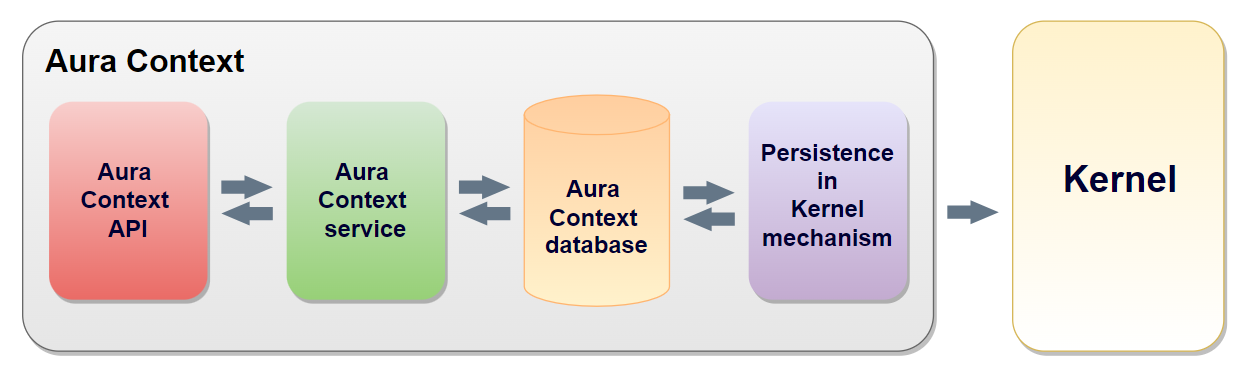
-
Context broker & server API
Server API in Aura Context for uploading, updating and recovering context data by different Aura sub-systems.
-
Aura Context Service
Core module of Aura Context in charge of gathering data from the context API, uploading it into de context database and data recovery.
-
Aura Context cache/database
Temporary high-performance database placed inside the Aura instance that is able to storage user’s data corresponding to the user’s previous experiences or environment. Data is available in the context database for a limited period of time and it cannot be recovered once this period expires.
The key features of Aura Context database are shown below:
- 360 approach: Aura Context aims to gather all type of information from an Aura interaction, including data coming from channels.
- High-available database: real-time recovery during the user’s interaction, with no lateness.
- Temporary data storage: data available only for an established period of time.
- Data persistence in Kernel for historical data exploitation purposes.
-
Context Kernel persistence mechanism
First basic version of the Kernel persistence mechanism. Within a one-direction flow, context data stored in the database is sent to Kernel for an unlimited period of time. Data on Kernel can be checked or processed following the same procedure as for Aura data.
Aura Context performance
The following steps schematically shows the process carried out by Aura Context:
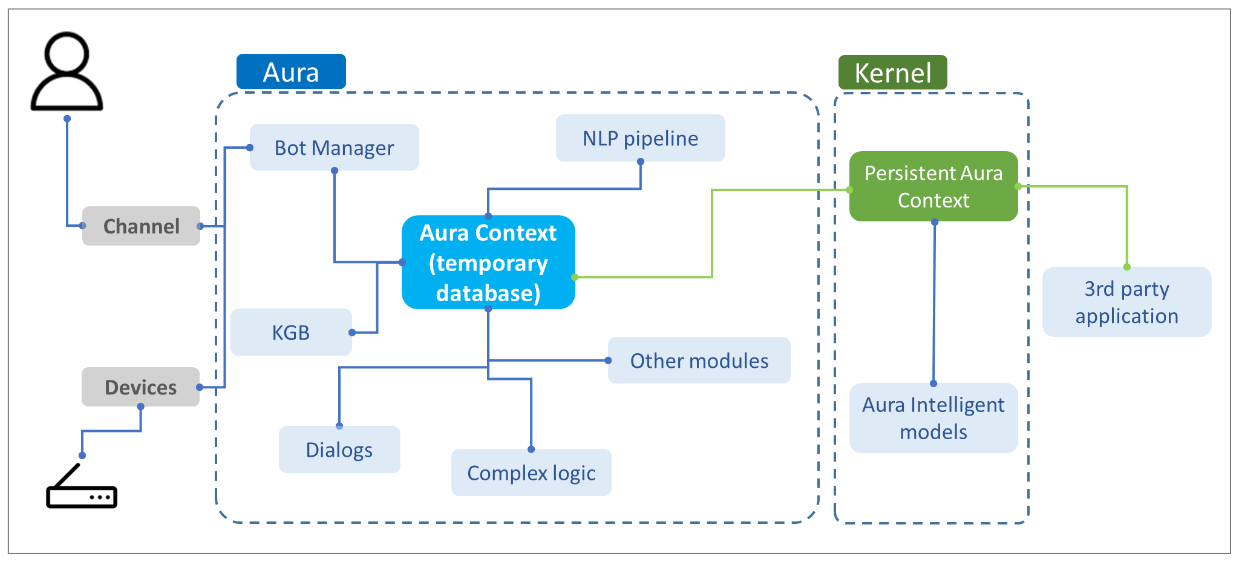
-
Context data is sent to Kernel where it is stored for an unlimited period of time.
-
This information can be retrieved by an external stakeholder just by calling the corresponding API.
-
Developers can consume data in the Aura Context database when developing a use case. For this purpose, the aura-bot dialog must call the corresponding API in order to retrieve context data and include it in the response to the user.
Aura Context operational flowchart
Before facing this section, it is recommended to read the document Aura Context components.
Considering the Aura Context components, the following flowchart shows the operational process carried out by the context:
- An external component makes a request to Aura Context API (POST HTTP request) for carrying out a specific operation:
- Create: creation of a data entry in Aura Context
- Upsert: modification of a data entry in Aura Context
- Fetch: data recovery from Aura Context
- The context API sends the request to Aura Context service.
- The request transform converts input data into data suitable with the Aura Context global data model.
- The specific operation is performed: Create / Upsert / Fetch.
- Output data from the operation is converted into data compatible with the user’s data model through the response transform.
- The response is sent back to the context API and provided to the external component.
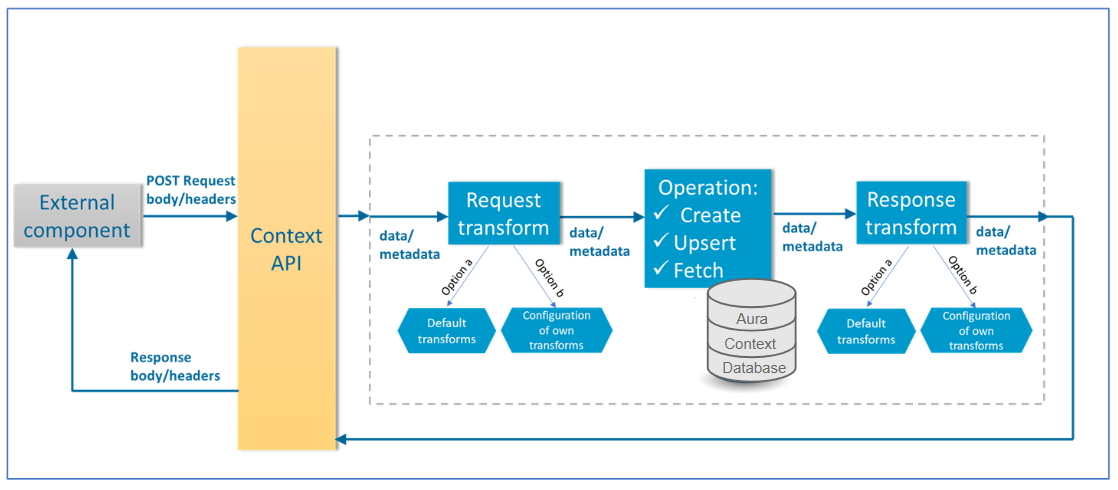
11.2 - Components
Aura Context components
Definition of the main concepts and components in Aura Context
Introduction
The current document defines the key components in Aura Context:
Agent
Definition and sub-components
An agent is defined as a specific profile for accessing and using Aura Context.
This profile provides a unique layout of the information included in Aura Context, so the different fields included in the context database are shown or not or can be displayed with one specific structure or another.
An agent contains two main components: transforms and fields schema. When an agent is created, it includes by default a set of predefined transforms and fields schema that define how data is handled by the agent:
-
Transform
Component that defines the behavior of the agent when performing different operations.
It includes the default configuration for the agent using the Aura Context global data model.
If developers require the modification of fields in the global data model, it must be done via transform.
-
Fields schema
Component that defines and validates the agent’s own data fields. It is a JSON file named fields_schema.json, which is empty when creating an agent. It must be edited if developers want to include new fields in the global data model.
After creating an agent, developers can start using Aura Context with its default transforms.
However, if the Aura Context global data model does not fit the developer’s model, it can be modified through these two components of the agent.
Agents can perform three different data handling operations:
-
create_context
- Operation for the creation of a data entry in Aura Context. If a data entry already exists, it overwrites it.
- The URL has the following format:
<agent_name>/create
-
upsert_context
- Operation for the modification of a data entry in Aura Context. Depending on the existing data, this operation works to update or insert data.
- The URL has the following format:
<agent_name>/upsert
-
fetch_context
- Operation for data recovery in Aura Context.
- The URL has the following format:
<agent_name>/fetch
- There are three different procedures for data fetching:
- Retrieving data using a correlator (
corrId field in the Aura Context global data model)
- Retrieving data with user and date
- Retrieving user’s N latest data
These endpoints are fixed, but the user can configure how each endpoint is summoned.
Definition
In Aura Context Framework, a transform is a component that defines the behavior of an agent for the performance of different operations.
It allows the adaptation of data provided by a user into data compatible with the Aura Context data model. The transform defines the request to the API, so every agent can decide how to send data by defining the appropriate transforms.
When a developer wants to use Aura Context, she is provided with a default set of transforms, that correspond to the format suitable with the Aura Context global data model:
Find here Aura Context default transforms.
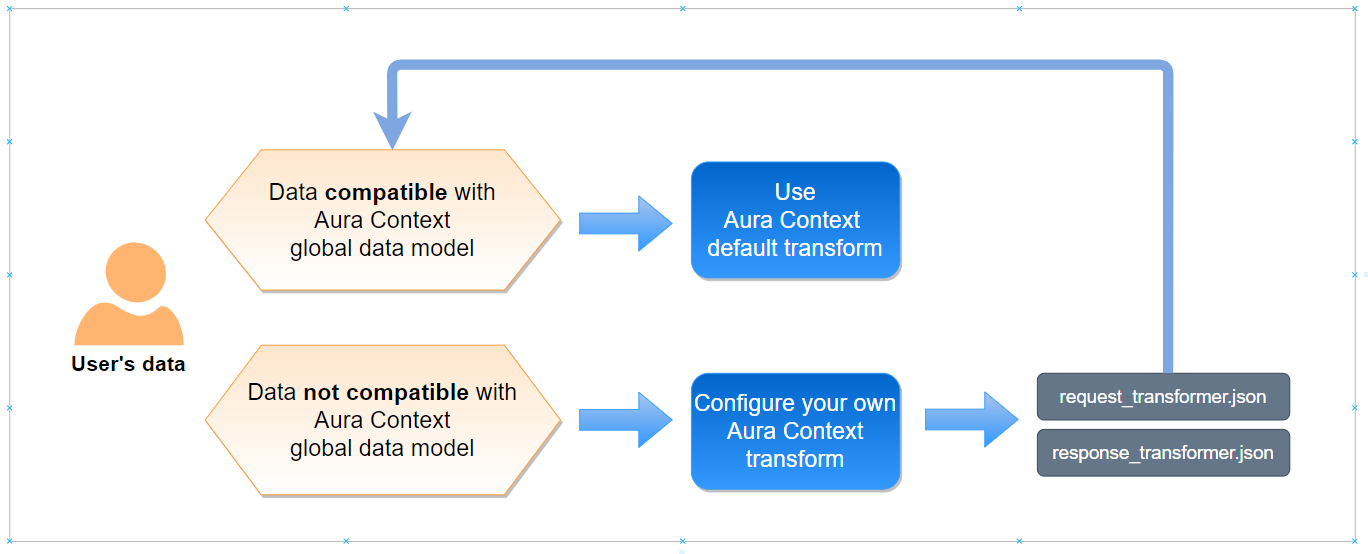
-
If the user’s data is compatible with the global data model, the developer can use the default transforms and start working with Aura Context. This situation corresponds to the API specifications set in the swagger.
-
However, if the developer requires the conversion of data with specific format into data compatible with the Aura Context global data model, he must configure his own transform. In this situation, API specifications will change. This provides a great flexibility to Aura Context, so every developer can upload his own data (in different formats or with different fields) to the Context database and the homogeneity of the uploaded data is guaranteed.
The following examples show a practical use of a transform:
-
Scenario A
- Agent bot generates data A (integer).
- Data must be stored in the context database as a string.
- The developer converts data A from integer to string via transform.
-
Scenario B
- Agent NLP has a field named “applicationId_2”
- This field is named as “applicationId” in the context database
- The developer converts the name of this field to be compatible with the context database via transform.
Files
Each transform includes two different files:
request_transformer.json:
This file allows sending free-formatted fields to be included in Aura Context through the API. Data will be transformed later on, so the resulting data is suitable with the Aura Context global data model.
The file includes the data/metadata in the request from Aura Context API:
- “data” corresponds to the request body
- “metadata” corresponds with the request header
response_transformer.json:
This file allows transforming the result data from a specific operation, which fits with the context global data model, into data suitable with the input component.
The file includes the data/metadata in the response from Aura Context API:
- “data” corresponds to the response body
- “metadata” corresponds with the response header
Each type of operation performed by the agent must include these two files. Therefore, the following combination of operations and files will be generated:
[working_directory]/agents/transformations/[agent_name]/create_context/request_transformer.json
[working_directory]/agents/transformations/[agent_name]/create_context/response_transformer.json
[working_directory]/agents/transformations/[agent_name]/fetch_context/request_transformer.json
[working_directory]/agents/transformations/[agent_name]/fetch_context/response_transformer.json
[working_directory]/agents/transformations/[agent_name]/upsert_context/request_transformer.json
[working_directory]/agents/transformations/[agent_name]/upsert_context/response_transformer.json
[working_directory]/agents/fields_schemas/[agent_name]/fields_schema.json
Types of Aura Context Transforms
Depending on the goal to be achieved with the transformation of the agent, there are three different types of Aura Context transforms: inferred / injected / imported. All of them has certain mandatory files:
This transform allows reusing common content from other transforms. The transform is imported if it is loaded from a JSON file.
Mandatory fields for this transform are included in the tables of the section fields of Aura Context transforms.
An example is shown below:
[
{
"t_type": "imported",
"relative_file_path": "../../transformer.json"
}
]
This transform is used to enter a forced value from the transform itself, through the o_value field. It is used when you need to load a value that is not found in the origin data or in metadata.
Mandatory fields for this transform are included in the tables of the section fields of Aura Context transforms.
An example is shown below:
[
{
"t_type": "injected",
"a_trans": [],
"o_value": "100",
"o_basic_type": "str",
"o_collection_type": "simple",
"d_path": "metadata.database.field1",
"d_basic_type": "str",
"d_collection_type": "simple",
"required": true,
"o_nullable": false,
"d_nullable": false
}
]
The output of this transform is:
metadata = {
'database': {
'field1': '100'
}
}
The field d_path is used to define the new field name, and o_value corresponds to the origin value.
This transform is used to get the value from data/metadata sent in the request and transform it. For example, if the initial data is:
data = {
'information': {
'name': 'test',
}
}
And it is required to change the field path information by info, the following transform can be used:
[
{
't_type': 'inferred',
'a_trans': [],
'o_path': 'data.information.name',
'o_basic_type': 'str',
'o_collection_type': 'simple',
'd_path': 'data.info.name',
'd_basic_type': 'str',
'd_collection_type': 'simple',
'required': True,
'o_nullable': False,
'd_nullable': False
}
]
The results will be:
data = {
'info': {
'name': 'test',
}
}
The field d_path is used to define the new destination field name.
Mandatory fields for this transform are included in the tables of the section fields of Aura Context transforms.
Fields of Aura Context transforms
The definition of a transform includes several mandatory fields, depending on the transform type:
- Fields beginning with
o_: data corresponding to the transform input (origin)
- Fields beginning with
d_: data corresponding to the transform output (destination)
Fields in Aura Context transforms
The following table shows the existing fields in Aura Context transforms. They can be mandatory or optional depending on the type of transform.
| Field |
Description |
t_type |
Field that indicates the transform type (imported, injected or inferred). |
relative_file_path |
Path that indicates the location of the origin JSON file with the transforms. This file needs to be included in the agent. |
a_trans |
It indicates an additional transform and can be a list composed of the following elements: to_str, to_int, to_float, uniques, to_list, sum, average, from_json, to_json, min, max, round, round_floor or round_ceil. |
o_value |
Field value. |
o_path |
Origin field name. It must be a string formed from ASCII letters, numbers, ‘.’, ‘@’, ‘_’ and ‘-’ |
o_basic_type |
Field data type. It can be str, bool, float, int, nested or date |
nested_transformations |
It indicates a nested transform. It is mandatory if o_basic_type or d_basic_type is nested |
o_collection_type |
It indicates whether the field is a collection or a simple string. It can be list or simple |
d_basic_type |
Destination field data type in the JSON file. It can be str, bool, float, int, nested or date |
d_collection_type |
It indicates whether the field is a collection or a simple string. It can be list or simple |
d_path |
Destination field name. It must be a string formed from ASCII letters, numbers, ‘.’, ‘@’, ‘_’ |
required |
Boolean field (true / false) |
o_nullable |
It indicates that the field can be nullable before transformation (origin). It is a boolean field (true / false) |
d_nullable |
Mandatory field in injected and inferred transforms. It indicates that the field can be nullable after transformation (destination). It is a boolean field (true / false) |
The table below summarizes the mandatory fields ( ) for each type of transform:
| Fields |
Imported transform |
Injected transform |
Inferred transform |
t_type |
|
|
|
relative_file_path |
|
.. |
.. |
a_trans |
.. |
|
|
o_value |
.. |
|
.. |
vo_path |
.. |
.. |
|
o_basic_type |
.. |
|
|
nested_transformations |
.. |
If o_basic_type or
d_basic_type is nested |
if o_basic_type or
d_basic_type is nested |
o_collection_type |
.. |
|
|
d_basic_type |
.. |
|
|
d_collection_type |
.. |
|
|
d_path |
.. |
|
|
required |
.. |
|
|
o_nullable |
.. |
|
|
d_nullable |
.. |
|
|
Additional Aura Context transforms
Aura Context also allow certain additional transforms that can be applied to the fields. They are indicated in the field a_trans and applied in the order they have been defined. The output of a transform is the input to the following one.
They are listed below:
to_str: It converts the field to a string.
For example: 2 –> “2”, [“hello”] –> “[“hello”]”to_int: It converts the field to an integer.
For example: “2” –> 2, 3.2 –> 3to_float: It converts the field to an integer.
For example: “2,6” –> 2.6, 3 –> 3.0uniques: It receives a list of strings and remove duplicate items.
For example: [“hello”, “hello”] -> [“hello”]to_list: It converts the field to a list.
For example: “hello” -> [“hello”]sum: It receives a list of integers or floats and sum the elements. It returns an integer if all elements are integer and otherwise, returns a float. In case of empty list, it returns none.average: It calculates the average of the elements of a list. It returns a float. In case of empty list, it returns none.from_json: It deserializes the field in a JSON.to_json: It converts the field in a serializable JSON.min: It gets the minimum of the elements in a list. It returns a float or an integer depending on the type of element. In case of empty list, it returns none.max: It gets the maximum of the elements in a list. It returns a float or an integer depending on the type of element. In case of empty list, it returns none.round: Round up. It returns an integer.round_floor: Round down. It returns an integer.round_ceil: Round up. It returns an integer.
It is also possible to define multiple additional transforms in the a_trans field.
For example:
{
"a_trans": ["sum", "to_int"],
}
If you have the following data:
data = [2.1, 3.0]
-
- All elements are added
-
- It converts the result into an integer. So, the result will be 5.
Data availability
Aura Context works with data and metadata for every operation to be performed (create, upsert or fetch).
In order to perform these operations, it is required to know how the Aura Context API matches input data (data sent via API) with data/metadata for Aura Context and vice versa (how internal data/metadata used by Aura Context for each operation is transformed into response data).
Currently, the three permitted operations correspond to the HTTP POST request method:
-
HTTP POST request’s body and headers will be matched with the input data and metadata of the request transform respectively.
- Field
data: request body
- Field
metadata: request headers
-
After the execution of the corresponding operation, the data/metadata in the response transform will be matched with the HTTP body and headers respectively:
- Field
data: response body
- Field
metadata: response headers
The following figure shows the match between HTTP request/response and Aura Context data/metadata:
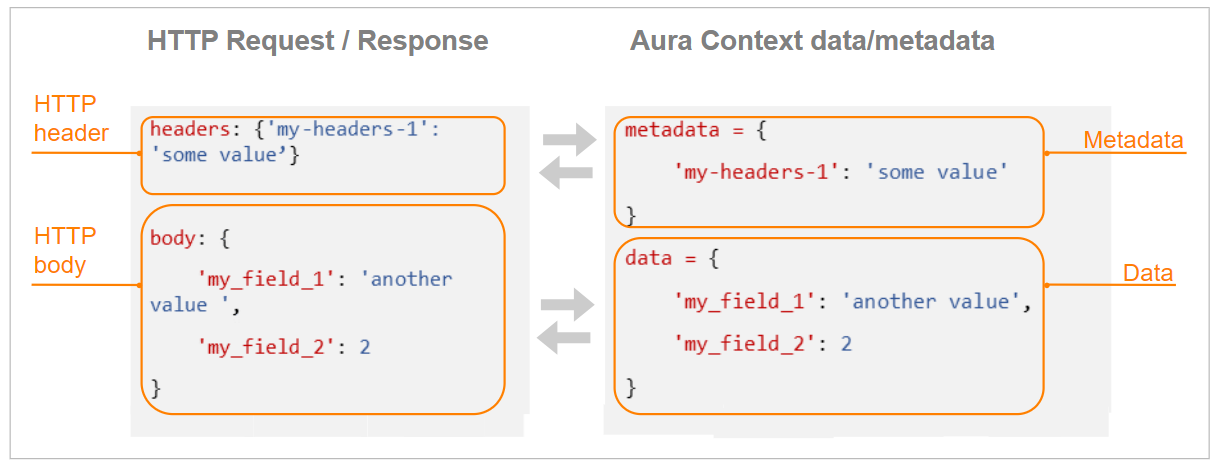
As an example, if the following request is sent:
headers: {'my-headers-1': 'some value'}
body: {
'my_field_1': 'another value',
'my_field_2': 2
}
Then, the following data and metadata will be available to be used in the request transforms:
data = {
'my_field_1': 'another value',
'my_field_2': 2
}
metadata = {
'my-headers-1': 'some value'
}
Therefore, a transform containing the following input fields can be generated:
{
'o_path': 'data.my_field_1',
'o_collection_type': 'simple',
'o_basic_type': 'str'
}
Apart from these general considerations for the use of data and metadata in Aura Context, each specific operation (create, upsert, fetch) require certain data/metadata for the request and for the response. They are described in the following sections.
Remember that this section is useful just for generating your own transforms, as the default ones already include this content
request_transformer.json
- Data and metadata required for the create/upsert operations must be transformed in a specific way so as to be a valid input for these operations:
- Data: Document to be inserted in the context database, following the requirements of the global data model. Therefore, each field must match with the fields of the global database (column “Name in database”).
- Metadata: Automatically generated.
response_transformer.json
- Once data is created/modified in the context database, these two operations generates another data/metadata with the result of the corresponding operation.
- These data and metadata can be used as input fields for the
response_transformer.json file, with the following mandatory fields:
- Data:
results: List including true/false value for the result of the process of inserting/modifying data (upsert operation)
- Metadata:
db_execution_time: Duration of the operation execution in the database
An example is shown below:
{
'o_path': 'metadata.db_execution_time',
'o_collection_type': 'simple',
'o_basic_type': 'float',
'd_path': 'data.execution_time',
'o_collection_type': 'simple',
'o_basic_type': 'float'
}
In this example, the body of the response to the request includes a new field execution_time, with the value of the operation duration.
The fetch operation includes different procedures, each of them requiring different data and metadata depending on the type of query to the database.
The content of data and metadata on each operation is described in the following sections.
Common data and metadata for the three different procedures in the request_transformer.json file.
- Data
projection (optional): this field filters specific fields from each document fetched from the context database
- Metadata
page_size (optional): number of documents to be retrieved from the context database (applicable in case of queries including page numbering)page (optional): page to be retrieved from the context database (applicable in case of queries including page numbering)
Fetch by correlator
Apart from the common data and metadata, the following mandatory data/metadata must be included in the request_transformer.json:
- Metadata
corr: correlator ID to be fetched from the context database, together with the aura_id_global parameter.
Fetch by user’s N latest data
Apart from the common data and metadata, the following mandatory data/metadata must be included in the request_transformer.json:
- Data
last_n: number of documents to be retrieved from the context database
Fetch by date range
Apart from the common data and metadata, the following mandatory data/metadata must be included in the request_transformer.json:
- Data
start_date: starting date of the date rangeend_date: ending date of the date range
When the fetch operation is executed, the data and metadata from the response, which follow the format from the global data model, can be transformed to fit with the user’s data model in the response_transformer.json file. In this transform, only data from the response documents can be modified, the remaining data are provided back by default (this is fully specified in the Aura Context swagger).
Fields schema
Definition
The fields schema is the second component of an Aura Context agent. It is used for the definition of new fields on the Aura Context global data model if it is required by the developer.
When an agent is created, it includes the empty JSON file fields_schema.json.
Find here Aura Context default fields schema.
If the developer requires the generation of a new field in the global data model to be adapted to his own data, he must modify the fields schema:
- Edition of the
fields_schema.json to include the necessary modifications.
- Definition of the modifications in the transform: Once the fields schema file has been modified, these variations must also be reflected on the agent’s transform.
The file fields_schema.json is a dictionary of dictionaries that includes the different types of fields that must be used in the agent’s transform.
These fields must have the following format:
<data | metadata>. <agent_name> @ <field_name>
Where:
<data | metadata>: origin of the field (data or metadata)<agent_name>: name of the agent<field_name>: name of the field
Each new field is characterized by two main parameters:
basic_type: it can be str, bool, int, float, nested and date.collection_type: it can be of type simple or list.
It is important to bear in mind that new fields in the Aura Context global data model must be created in a new table, as it is not possible to add a field to an existing table such as Application, Environment, etc.
11.3 - Global data model
Aura Context global data model
Description of the global model in which Aura Context data is structured
Introduction
Aura Context data is structured in context fields, each of them defined by a pair name-value.
This model is common for all developers willing to use Aura Context: Aura Global Team defines and manages the model and uploads data from Aura modules, channels or devices into the Aura Context database.
An Aura Context developer:
- Can consume this data directly, if the global data model is fully compatible with his own data model, or
- Can use a transform or a file schema in order to modify or add new fields to the database
Certain key considerations regarding the Aura Context global data model are included below:
- Different Aura components, channels or devices can upload data to certain specific fields of the global database.
- It is possible to have fields with no filled data in the database due to several reasons. For example: in a specific lapse of time, information has not been sent from a module, channel or device; a specific channel is not available, thus its associated fields are not of application, etc.
- However, there are certain mandatory fields that correspond to the table “Identification fields” of the database that must be always filled. These fields cannot be modified via an Aura Context transform.
- The storage of data into the database is always based on:
- A user, identified by the field
aura:idGlobal
- An interaction, identified by the field
aura:corrId
- The name of the field is different from the name of the field that is stored in the database. Both are included in columns 1 and 2 of the following tables.
Identification fields
| Name |
Name in database |
Format |
Semantics |
Current Aura Context version |
aura:idGlobal |
aura_id_global |
string (UUID) |
aura_id_global for the user |
✔️ |
aura:userId |
user_id |
string (UUID) |
userId in the OB |
✔️ |
aura:corrId |
corr |
string (UUID) |
corr_id corresponding to the current interaction |
✔️ |
aura:timestamp |
timestamp |
ISO 8601 (UTC, with milliseconds) |
First transaction storage timestamp |
✔️
(automatically filled) |
aura:timestampLastUpdate |
timestamp_last_update |
ISO 8601 (UTC, with milliseconds) |
Last timestamp update of this interaction |
✔️
(automatically filled) |
aura:activeMsisdn |
active_msisdn |
string (country prefix and MSISDN integer number) |
Currently active MSISDN of the interaction.
Empty if a MultiMSISDN user is logged with user/pass. |
✔️
(phoneNumber) |
aura:userType |
data.user_type |
enum string: monoMSISDN, multiMSISDN, anonymous, etc. |
Type of Aura user |
✔️ |
aura:subscriptionType |
subscription_type |
enum string: prepaid, postpaid, control, other |
Type of user subscription.
Empty, if a multiMSISDN user is logged with user/pass. |
✔️ |
aura:accountNumber |
account_number |
string |
User AccountNumber in TV use cases.
Empty for other use cases. |
✔️ |
Application
| Name |
Name in database |
Format |
Semantics |
Current Aura Context version |
application:id |
application_app_id |
string (UUID or similar) |
Unique identifier for the application (it changes with each application version) |
✔️ |
application:channelName |
application_app_channel_name |
string |
Canonic name of the channel where the request is sent by the user |
✔️ (prefix format) |
application:contextFilters |
application_app_context_filters |
Array of strings |
application:contextFilters semantics. String to filter the final response sent by aura-bot instance back to the Telefónica client. I.e., to determine the most appropriate answer to a generic question. The format of each entry of the array should be key:value, where both key and value are application dependant. |
✔️ |
application:playId |
application_app_play_id |
string (integer, UUID or similar) |
Identifier for the content being played (local or remote) |
✔️ |
application:playMode |
application_app_play_mode |
string: local or remote |
Content playing mode set in the application |
✔️ |
application:playType |
application_app_play_type |
string: live, catchup, vod, etc. |
Content type being played |
✔️ |
application:playServiceId |
application_app_play_service_id |
string |
Identifier of the service to be played |
✔️ |
application:playServiceUID |
application_app_play_service_uid |
string |
Unique Identifier of the service being played |
✔️ |
application:playLiveProgramId |
application_app_play_live_program_id |
string |
Identifier of the show being played |
✔️ |
application:timezone |
application_app_timezone |
IANA timezone |
Timezone configured at the application/client |
✔️ |
application:userAction |
application_app_user_action |
string, app-dependent. Eg: playContent, searchContent, viewAccountDetails, phoneCall, etc. |
A token describing the action the user was carrying on in the device that generated the request when the Aura request was launched |
Field currently not filled |
application:interfaceLanguage |
application_app_interface_language |
string: ISO 639-1 + ISO 3166 (joined by underscore) |
Language in which the application is configured |
✔️ |
application:channelDataVersion |
application_app_channel_data_version |
string |
Version sent in the channel request |
✔️ |
device:id |
application_device_id |
string (UUID or similar) |
Unique identifier for the device running the application |
✔️ (from device) |
device:type |
application_device_type |
string: homebase, ios.cell, android.cell, ios.tablet, android.tablet, pc |
Device class |
✔️ (from device) |
application:screenId |
application_app_screen_id |
string (application dependent) |
Identifier designating the application section/screen where the Aura request came from |
✔️ |
application:screenElements |
application_app_screen_elements
Name in the database for internal sub-fields:
ucid; type; resume_time; live_program_id; focus |
Array of maps showing content in the device.
Each map has these fields: ucid: string; type: string; resumeTime: string; liveProgramId: string; focus: boolean |
List of elements that appears in the application screen. It could be empty. |
✔️ |
output:showSuggestions |
application_output_show_suggestions
Name in the database for internal sub-fields:
suggestion_id; intent; entities; type; value; canon; label; score; text; timestamp; show_to_user |
Array of maps with suggestions sent to the channel: suggestion_id: string; intent: string; entities: array of maps; type: entity-type; value: entity-value; canon: canon-value; label: label-value; score: score-value; text: string; timestamp: ISO 8601; show_to_user: boolean |
List of suggestions shown to the user. Each has a unique identifier (suggestion_id) to correlate the effect on the next user’s action and contains a timestamp of the approximate moment when it was shown to the user. The rest of elements are the suggestion components, including intent, entity types (useful for further semantic analysis on analytical models), entities and the current text shown. The field show_to_user tells whether the suggestion has been shown to user by the channel. |
Field currently not filled |
Environment
| Name |
Name in database |
Format |
Semantics |
Current Aura Context version |
location:logical |
environment_location_logical |
string: home, outsidehome |
Current logical location for the user |
✔️ |
Conversation
| Name |
Name in database |
Format |
Semantics |
Current Aura Context version |
input:modality |
conversation_input_modality |
string: voice, text, form |
Modality for the input user interaction |
✔️ |
input:utterance |
conversation_input_utterance |
string |
Utterance sent by the user. Empty if auraCommand. |
✔️ |
input:command |
conversation_input_command |
string |
Stringified of the auraCommand object |
✔️ |
recog:module |
conversation_recog_module |
string: nlp, value, text, command |
A string identifying the module that was responsible for the NLP decision |
✔️ |
recog:domain |
conversation_recog_domain |
string |
Domain recognized by NLP |
Field currently not filled |
recog:resultList |
conversation_recog_result_list
Name for internal sub-fields:
id; score |
id: string; score: number |
List of recognized results (up to 3), ordered by they corresponding scores. |
✔️ |
recog:entities |
conversation_recog_entities
Name for internal sub-fields:
type; value; canon; label; score |
Array of maps: type: entity-type; value: entity-value; canon: canon-value; label: label-value; score: score-value |
List of recognized entities, regarding only to the first intent returned during the main recognition phase |
✔️ |
recog:negativity |
conversation_recog_negativity |
double: value in [0, 1] |
Level of negative sentiment identified by a trained model |
Field currently not filled |
dialog:intents |
conversation_dialog_intents |
array of strings |
Each intent redirection made by the bot will add the name of the intent to the list. |
Currently, only redirections with contex-filter are stored |
dialog:ids |
conversation_dialog_ids |
array of strings |
Each dialog redirection made by the bot will add the id of the dialog to the list. |
Currently, only first dialog id is stored |
output:text |
conversation_output_text |
string |
Message sent back to the user |
✔️ |
output:speak |
conversation_output_speak |
string |
Spoken message sent back to the user |
✔️ |
output:suggestions |
conversation_output_suggestions
Name for internal sub-fields from ‘suggestions’: type; value; canon; label; score |
Array of suggestion results. A suggestion is a map with type, id and (optionally) an array of entities as a map. The entities array contains: type: entity-type; value: entity-value; canon: canon-value; label: label-value; score: score-value |
Produced list of suggestions |
✔️ |
User
| Name |
Name in database |
Format |
Semantics |
Current Aura Context version |
userProductList |
user_user_product_list |
array of strings |
List of products/services contracted by the user |
Field currently not filled |
videoProfileName |
user_video_profile_name |
string |
The video profile assigned to the user |
Field currently not filled |
Data model in Kernel
The process of data storage in Kernel is automatic and transparent for developers.
Information is stored in Kernel datasets using URM format. These specific datasets are:
Aura_Agent_Context
{
"namespace": "com.plainAVRO",
"name": "Aura_Agent_Context",
"type": "record",
"doc": "Contains the data for Aura context stored by agents for each user and correlator",
"x-fp-version": "5.9.0",
"fields": [
{
"name": "OPERATOR_ID",
"aliases": [
"operator_id"
],
"type": [
"null",
"string"
],
"doc": "Global Operator Identifier (Operator acting as owner of the information present in the current entity)"
},
{
"name": "USER_4P_ID",
"aliases": [
"user_4p_id"
],
"type": {
"type": "string",
"x-fp-user-id": true
},
"doc": "Identifier of the user in 4th Platform (as returned by the OB in the 4th Platform APIs)"
},
{
"name": "RECORD_ID",
"aliases": [
"record_id"
],
"type": "string",
"doc": "Id for the record in context"
},
{
"name": "AGENT_DES",
"aliases": [
"agent_des"
],
"type": "string",
"doc": "Agent name using context"
},
{
"name": "FIELD_DES",
"aliases": [
"field_des"
],
"type": "string",
"doc": "Agent stored field name"
},
{
"name": "VALUE_DES",
"aliases": [
"value_des"
],
"type": [
"null",
"string"
],
"doc": "Agent stored field value"
},
{
"name": "PARTITION_TM",
"aliases": [
"partition_tm"
],
"type": {
"type": "string",
"logicalType": "datetime"
},
"doc": "Date-time of the record, for data partitioning purposes"
}
]
}
Aura_Context
{
"name": "APPLICATION_APP_PLAY_ID",
"aliases": [
"application_app_play_id"
],
"type": [
"null",
"string"
],
"doc": "Identifier for the content being played"
},
{
"name": "APPLICATION_APP_PLAY_MODE_DES",
"aliases": [
"application_app_play_mode_des"
],
"type": [
"null",
"string"
],
"doc": "Content playing mode set in the application"
},
{
"name": "APPLICATION_APP_PLAY_TYPE_DES",
"aliases": [
"application_app_play_type_des"
],
"type": [
"null",
"string"
],
"doc": "Content type being played"
},
{
"name": "APPLICATION_APP_PLAY_SERVICE_ID",
"aliases": [
"application_app_play_service_id"
],
"type": [
"null",
"string"
],
"doc": "Identifier of the service being used to played"
},
{
"name": "APPLICATION_APP_PLAY_SERVICE_U_ID",
"aliases": [
"application_app_play_service_u_id"
],
"type": [
"null",
"string"
],
"doc": "Unique identifier of the service being played"
},
{
"name": "APPLICATION_APP_PLAY_LIVE_PROGRAM_ID",
"aliases": [
"application_app_play_live_program_id"
],
"type": [
"null",
"string"
],
"doc": "Identifier of the show being played"
},
{
"name": "APPLICATION_APP_TIMEZONE_DES",
"aliases": [
"application_app_timezone_des"
],
"type": [
"null",
"string"
],
"doc": "Timezone configured at the application/client"
},
{
"name": "APPLICATION_APP_USER_ACTION_DES",
"aliases": [
"application_app_user_action_des"
],
"type": [
"null",
"string"
],
"doc": "A token describing the action the user was carrying on in the device that generated the request when the AURA request was launched"
},
{
"name": "APPLICATION_APP_INTERFACE_LANG_ID",
"aliases": [
"application_app_interface_lang_id"
],
"type": [
"null",
"string"
],
"doc": "Language the application is configured in"
},
{
"name": "APPLICATION_APP_CHANNEL_DATA_VERSION_DES",
"aliases": [
"application_app_channel_data_version_des"
],
"type": [
"null",
"string"
],
"doc": "Version sent in the request of the channel"
},
{
"name": "APPLICATION_APP_SCREEN_ID",
"aliases": [
"application_app_screen_id"
],
"type": [
"null",
"string"
],
"doc": "An identifier designating the application section/screen where the AURA request came from"
},
{
"name": "APPLICATION_APP_SCREEN_ELEMENTS_ID",
"aliases": [
"application_app_screen_elements_id"
],
"type": [
"null",
"string"
],
"doc": "Elements that appear in the screen of the application"
},
{
"name": "APPLICATION_DEVICE_ID",
"aliases": [
"application_device_id"
],
"type": [
"null",
"string"
],
"doc": "A unique identifier for the device running the application"
},
{
"name": "APPLICATION_DEVICE_TYPE_DES",
"aliases": [
"application_device_type_des"
],
"type": [
"null",
"string"
],
"doc": "The device class"
},
{
"name": "APPLICATION_OUTPUT_SHOW_SUGGESTIONS_DES",
"aliases": [
"application_output_show_suggestions_des"
],
"type": [
"null",
"string"
],
"doc": "Suggestions shown to the user"
},
{
"name": "ENVIRONMENT_LOCATION_LOGICAL_DES",
"aliases": [
"environment_location_logical_des"
],
"type": [
"null",
"string"
],
"doc": "Current logical location for the user"
},
{
"name": "CONVERSATION_INPUT_MODALITY_DES",
"aliases": [
"conversation_input_modality_des"
],
"type": [
"null",
"string"
],
"doc": "Modality for the input user interaction"
},
{
"name": "CONVERSATION_INPUT_UTTERANCE_DES",
"aliases": [
"conversation_input_utterance_des"
],
"type": [
"null",
"string"
],
"doc": "Utterance sent by the user"
},
{
"name": "CONVERSATION_INPUT_COMMAND_DES",
"aliases": [
"conversation_input_command_des"
],
"type": [
"null",
"string"
],
"doc": "Stringified of the Aura Command object"
},
{
"name": "CONVERSATION_RECOG_MODULE_DES",
"aliases": [
"conversation_recog_module_des"
],
"type": [
"null",
"string"
],
"doc": "A string identifying the module that was responsible for the NLP decision"
},
{
"name": "CONVERSATION_RECOG_DOMAIN_DES",
"aliases": [
"conversation_recog_domain_des"
],
"type": [
"null",
"string"
],
"doc": "Domain recognized by NLP"
},
{
"name": "CONVERSATION_RECOG_RESULT_TYPE_DES",
"aliases": [
"conversation_recog_result_type_des"
],
"type": [
"null",
"string"
],
"doc": "Type of result produced by NLP"
},
{
"name": "CONVERSATION_RECOG_RESULT_LIST_DES",
"aliases": [
"conversation_recog_result_list_des"
],
"type": [
"null",
"string"
],
"doc": "Recognized results with their scores"
},
{
"name": "CONVERSATION_RECOG_ENTITIES_DES",
"aliases": [
"conversation_recog_entities_des"
],
"type": [
"null",
"string"
],
"doc": "Recognized entities"
},
{
"name": "CONVERSATION_RECOG_NEGATIVITY_QT",
"aliases": [
"conversation_recog_negativity_qt"
],
"type": [
"null",
"float"
],
"doc": "Grade of negative sentiment identified by a trained model"
},
{
"name": "CONVERSATION_DIALOG_INTENTS_DES",
"aliases": [
"conversation_dialog_intents_des"
],
"type": [
"null",
"string"
],
"doc": "Each intent redirection made by the bot"
},
{
"name": "CONVERSATION_DIALOG_IDS_DES",
"aliases": [
"conversation_dialog_ids_des"
],
"type": [
"null",
"string"
],
"doc": "Each dialog redirection made by the bot"
},
{
"name": "CONVERSATION_OUTPUT_TEXT_DES",
"aliases": [
"conversation_output_text_des"
],
"type": [
"null",
"string"
],
"doc": "Message sent back to the user"
},
{
"name": "CONVERSATION_OUTPUT_SPEAK_DES",
"aliases": [
"conversation_output_speak_des"
],
"type": [
"null",
"string"
],
"doc": "Message to be spoken sent back to the user"
},
{
"name": "CONVERSATION_OUTPUT_SUGGESTIONS_DES",
"aliases": [
"conversation_output_suggestions_des"
],
"type": [
"null",
"string"
],
"doc": "Produced suggestions"
},
{
"name": "USER_USER_PRODUCT_LIST_DES",
"aliases": [
"user_user_product_list_des"
],
"type": [
"null",
"string"
],
"doc": "Products/services contracted by the user"
},
{
"name": "USER_VIDEO_PROFILE_NAME",
"aliases": [
"user_video_profile_name"
],
"type": [
"null",
"string"
],
"doc": "The video profile assigned to the user"
},
{
"name": "PARTITION_TM",
"aliases": [
"partition_tm"
],
"type": {
"type": "string",
"logicalType": "datetime"
},
"doc": "Date-time of the record, for data partitioning purposes"
}
12 - Aura entities
Aura entities
Description of entities in Aura and components in charge of managing these entities
Aura entities belongs to both Aura Virtual Assistant and ATRIA
Introduction
Aura entities are files stored by different Aura components that contain relevant information related to key system processes or actions: user messages, Aura components interactions, message handling, applications, etc.
They are useful to measure and evaluate the performance of the system against defined objectives through the generation of KPIs, processes tracking, identification of issues and decision-making.
Each Aura component generates a series of entities which are uploaded into Azure Storage for different purposes.
aura-kpis-uploader is the component in charge of the management of entities for every Aura component. On an hourly basis, it uploads all the generated files to Kernel datasets. Once there, specific algorithms are executed to calculate the KPIs of each instance or for other purposes.
Detailed information regarding Aura entities is found in the following documents:
Types of logs in Aura
aura-bot writes two different types of logs:
-
Operational logs
Operational logs are written using AuraLogger that writes each row, by default, in JSON format in the standard output of the POD running each instance of aura-bot.
These logs are used to monitor or debug aura-bot. The standard output of each POD is aggregated to be stored in an ElasticSearch cluster, to make it available in Kibana.
-
Entities logs
An entity is a specific definition of one of the actors involved in the processing of each activity in aura-bot. So, the bot is in charge of writing the corresponding rows for each activity on each entity.
This section aims to describe how the entities are handled by aura-bot and how the rows are written and included in the entity files.
Logs are written in a blob file: a blob container in Azure Storage using an internal library aura-kpi-handler, that provides classes and utilities to decouple Aura components: how the rows are written from how the needed information is gathered.
The database Aura entities definition includes the different entities currently used in Aura. Entities are generated by different Aura’s modules, each of them in charge of performing a different task: aura-bot, aura-groot, aura-services, etc.
Currently, these logs are used to generate KPIs for the measurement of Aura performance, tracking processes or identifying issues.
Aura KPIs blob container
The following figures show the Aura KPIs blob container and an example of content of the blob container for aura-bot.
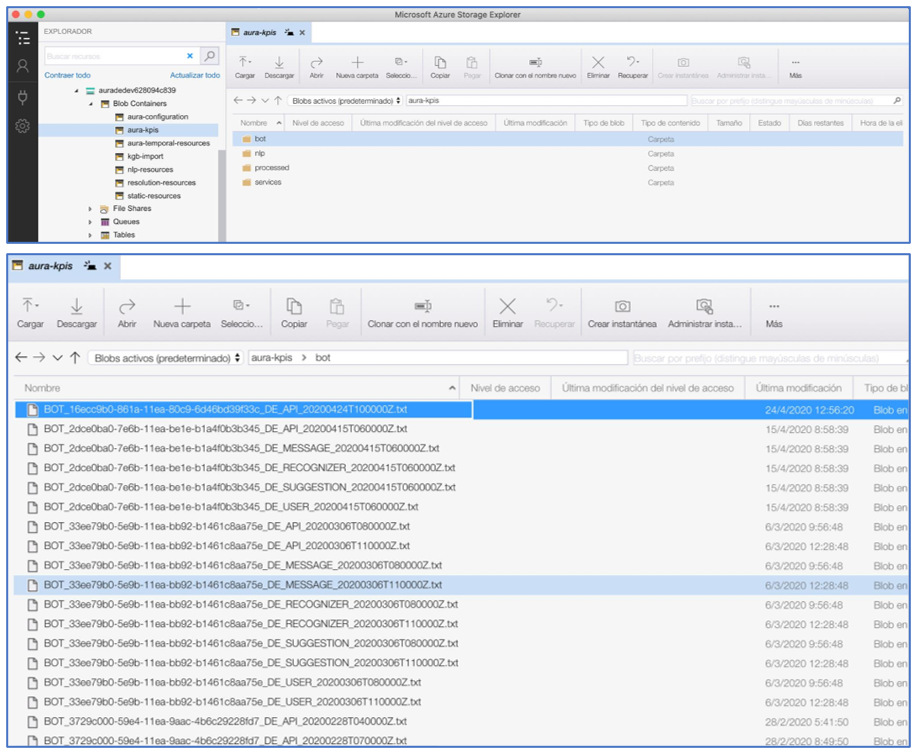
12.1 - Aura entities definition
Aura entities definition
Aura entities definition versions:
- Version 5.0.0 for those entities using CSV format
- Version 6.0.0 for those entities using Avro format
Introduction
Aura entities definition includes the different entities currently written in Aura and required to calculate Aura KPIs and generate Aura’s invoices.
Entities are organized by types, as shown in the table below, together with the definition, how they are generated and its format, currently, CSV or Avro.
| Entities types |
Description |
Generation |
Format |
| Dimensions |
They are Aura’s configuration settings that are needed to understand Aura’s entities |
They are generated directly by aura-kpis-uploader from the content of the aura-configuration-api. |
Avro |
| Message |
Message entity is used to store information about the messages handled by aura-bot and the actions performed on them. |
They are created in aura-bot. |
CSV |
| Recognizer |
Recognizer entity is used to store the request to any of the recognizers during the utterance recognition phase of the messages. |
They are created by aura-groot, aura-bot and aura-nlp. |
CSV |
| Extended Message |
Extended Message entity is used to store extra information of a Message. |
They are created in aura-bot. |
CSV |
| Groot Message |
Groot Message entity is used to store information about the messages handled by aura-groot. |
They are created in aura-groot. |
CSV |
| Gateway Message |
Gateway Message entity is used to store information about the messages handled by aura-gateway-api. |
They are created by aura-gateway-api. |
Avro |
| Audit |
Audit entity is used to store information about the interactions handled by Aura components. They will be used to generate Aura’s invoices. |
They are created by aura-kpis-uploader based on the information received in Groot Message and Gateway Message. |
Avro |
Entities generation
Until Aura’s release 9.3.0 (Gwen Stefani), all entities in Aura were generated in CSV format.
The full procedure is explained in Aura Entities in CSV format.
In release 9.4.0 (Hannah Montana), the process to migrate Aura entities format from CSV to full-URM-compliant Avro format started. It is going to be a phased process, with entities being migrated in small groups to minimize the impact on services already consuming Aura entities in CSV.
The full procedure is explained in Aura Entities in Avro format.
12.1.1 - Aura entities definition in Avro
Aura entities definition version 6.0.0 (entities using Avro format), URM-compliant.
Introduction
The Aura entities definition includes the different entities currently written in Aura in Avro format, URM-compliant.
For further information regarding Kernel Avro datasets access the following links:
| Entities types |
Description |
Generation |
| Aura_Atria_Message |
Summary of Aura’s interactions handled by aura-rag-server, aura-groot and aura-bot |
Generated by aura-gateway-api |
| Aura_Audit |
Entity used to store information about the interactions handled by Aura components. It will be used to generate Aura’s invoices. |
Created by aura-kpis-uploader based on the information received in Groot Message and Gateway Message |
| Aura_Gateway_Message |
Entity used to store information about the messages handled by aura-gateway-api. |
Created by aura-gateway-api. |
| Aura_Message |
Entity that contains the summary of Aura’s interactions handled by aura-bridge, aura-groot and aura-bot |
Created directly by aura-groot and aura-bot |
| D_Aura_Dimensionals |
They are Aura’s configuration settings that are needed to understand Aura’s entities |
Generated directly by aura-kpis-uploader from the content of the aura-configuration-api. |
Entities generation
Avro Entities tables nomenclature
Position: Field order in the Avro schema definition.Field: Name of the field being defined. Usually, capitalized, although more aliases will be available in the schema definition.PK: Parameter that indicates if the field is a Primary Key or not, that is, a value that uniquely identifies this field.Referenced Entity: When the field references a value from another dataset, indicating that a join must be defined in the schema, this parameter contains the name of the dataset.Referenced Entity Field: When the field references a value from another dataset, indicating that a join must be defined in the schema, this parameter contains the name of the field of the other dataset.Type: Type of the field. It can be one of Avro logical types defined in Kernel.Doc: Brief description of the field.Nullable doc: If the field can be null, it should contain the cases when a null value is valid.
12.1.1.1 - Aura_Atria_Message
Aura_Atria_Message v6.0.0
Description of entities included in the entity type Aura_Atria_Message
Under implementation
This entity contains the summary of Aura’s interactions handled by aura-rag-server, aura-groot and aura-bot
Avro schema definition published in Kernel - TO BE COMPLETED
| POSITION |
FIELD |
PK |
Referenced Entity |
Referenced Entity Field |
TYPE |
DESCRIPTION |
NULLABLE_DES |
| 1 |
MESSAGE_ID |
YES |
|
|
“type”:[“string”, “x-fp-unique-constraint”] |
Unique ID of the current message. |
|
| 2 |
MESSAGE_TM |
|
|
|
“type”: “string”
“logicalType”: “datetime” |
Timestamp when the message is processed. |
|
| 3 |
AURA_APP_ID |
|
D_Aura_App |
AURA_APP_ID |
“type”: “string” |
Identifier of the Aura application used by the user to interact with Aura. If due to an error, the application sent a wrongly formatted string without app_id, it will be set to null. |
Null if due to an error, we are not capable of getting the incoming application. |
| 4 |
COUNTRY_3_ALPHA_CD |
|
D_Gbl_Country |
COUNTRY_3_ALPHA_CD |
“type”: “string” |
Country of the operator running the current Aura deployment
Three letters (alpha-3) code element of the country name (e.g. DEU) defined in ISO 3166-1 |
|
| 5 |
CORR_ID |
|
|
|
“type”: “string” |
Cross service transaction identifier that allows tracking a request through all the services and components. |
|
| 6 |
AURA_PRESET_NAME |
|
D_Aura_Preset |
AURA_PRESET_NAME |
“type”: “string” |
Configuration used by the app to access Aura AI services. |
|
| 7 |
SESSION_ID |
|
|
|
“type”: “string” |
Session identifier. |
|
| 8 |
STAGE_NAME |
|
|
|
“type”: [“null”, “string”] |
Name of RAG stage |
Null in the full request. |
| 9 |
STAGE_EXECUTION_NUM |
|
|
|
“type”: “int” |
Stage execution counter. |
|
| 10 |
STAGE_SEQUENCE_NUM |
|
|
|
“type”: “int” |
Stage execution order. |
|
| 11 |
COMPLETION_TOKENS_NUM |
|
|
|
“type”: “int” |
Number of tokens the model used to respond to your request. |
|
| 12 |
PROMPTS_TOKENS_NUM |
|
|
|
“type”: “int” |
Tokens used to represent the text sent in the request. |
|
| 13 |
INPUT_QUERY_DESC |
|
|
|
“type”: “string” |
Stage input text. |
|
| 14 |
OUTPUT_QUERY_DESC |
|
|
|
“type”: [“null”, “string”] |
Stage output text. |
|
| 15 |
DURATION_QT |
|
|
|
“type”: “string”
logicalType: “duration” |
Time spent per stage. |
Null in error cases. |
| 16 |
STATUS_CD |
|
|
|
“type”: “string” |
Aura status code. Values: SUCCESS or ERROR. |
|
| 17 |
AURA_COMPONENT_ID |
|
D_Aura_Component |
AURA_COMPONENT_ID |
“type”: “string” |
Identifier of the Aura component that handled the current request, usually the name of the deployment running the corresponding Aura service. This name is consistent over time. |
|
| 18 |
AURA_VERSION_ID |
|
|
|
“type”: “string” |
Aura platform version that produces this data. |
|
| 19 |
DAY_DT |
|
|
|
“type”: “string”, “logicalType”: “iso-date” |
Year, month and day of the interaction. |
|
12.1.1.2 - Aura_Audit
Aura_Audit v6.0.0
Within the different entities currently used in Aura, this document describes those included in the entity type Aura_Audit
This entity contains the summary of Aura’s interactions intended for accountability purposes.
Avro schema definition published in Kernel
| Position |
Field |
PK |
Referenced entity |
Referenced entity field |
Type |
Doc |
Nullable Doc |
| 1 |
INTERACTION_ID |
YES |
|
|
string; x-fp-unique-constraint:1 |
Unique ID of the current interaction. First part of the compound primary key of the dataset. |
|
| 2 |
AURA_TM |
|
|
|
string;datetime |
Timestamp when the interaction happens. |
|
| 3 |
AURA_CHANNEL_ID |
|
D_Aura_Channel |
AURA_CHANNEL_ID |
string;null |
Identifier of the Aura channel used by the user to interact with Aura. |
If due to an error the channel sent a wrongly formatted string without channelId or auraId, it will be set to null. |
| 4 |
AURA_APP_ID |
|
D_Aura_App |
AURA_APP_ID |
string;null |
Identifier of the Aura application used by the user to interact with Aura. If due to an error the application sent a wrongly formatted string without app_id, it will be set to null. |
It will be null if due to an error, we are not capable of getting the incoming application. Also, if the request goes through aura-groot or aura-bridge |
| 5 |
COUNTRY_3_ALPHA_CD |
|
D_Gbl_Country |
COUNTRY_3_ALPHA_CD |
string |
Three letters (alpha-3) code element of the country name (e.g. DEU) defined in ISO 3166-1 |
|
| 6 |
AURA_SERVICE_NAME_CD |
|
|
|
enum;[message,nlpaas,ai,other] |
Specific service consumed during the interaction.message: if the interaction happens in aura-grootai: if the interaction calls generative servicesnlpaas: if the interaction calls Aura’s NLP as a service endpointother: future use, for extra cases. |
|
| 7 |
AURA_PRESET_NAME |
|
D_Aura_Preset |
AURA_PRESET_NAME |
string;null |
Preset used for the interaction, if using an AI service |
It will be null for interactions not using AI services |
| 8 |
AURA_COMPONENT_ID |
|
D_Aura_Component |
AURA_COMPONENT_ID |
string;x-fp-unique-constraint:1 |
Identifier of the Aura component handling the incoming request of the user. Second part of the compound primary key of the dataset. |
|
| 9 |
AURA_COMPONENT_HOST_ID |
|
|
|
string |
An identifier of the Aura component host that handled the current request, usually the pod identifier running the corresponding Aura service. This name changes every time a pod is reinitiated. |
|
| 10 |
AURA_VERSION_ID |
|
|
|
string |
Aura platform version that produces this data. |
|
| 11 |
DAY_DT |
|
|
|
string;iso-date;partition-key |
Year, month and day of the interaction. |
|
| 12 |
BRAND_ID |
|
D_Gbl_Brand |
GBL_BRAND_ID |
string |
Brand id. Join with D_Gbl_Brand. |
|
12.1.1.3 - Aura_Gateway_Message
Aura_Gateway_Message v6.0.0
Within the different entities currently used in Aura, this document describes those included in the entity type Aura_Gateway_Message
This entity contains the summary of Aura’s interactions handled by aura-gateway-api.
Avro schema definition published in Kernel
| Position |
Field |
PK |
Referenced entity |
Referenced entity field |
Type |
Doc |
Nullable Doc |
| 1 |
MESSAGE_ID |
YES |
|
|
string; x-fp-unique-constraint |
Unique ID of the current message. |
|
| 2 |
MESSAGE_TM |
|
|
|
string;datetime |
Timestamp when the message is processed |
|
| 3 |
AURA_APP_ID |
|
D_Aura_App |
AURA_APP_ID |
string;null |
Identifier of the Aura application used by the user to interact with Aura. If due to an error the application sent a wrongly formatted string without app_id, it will be set to null. |
It will be null if due to an error we are not capable of getting the incoming application. |
| 4 |
COUNTRY_3_ALPHA_CD |
|
D_Gbl_Country |
COUNTRY_3_ALPHA_CD |
string |
Three letters (alpha-3) code element of the country name (e.g. DEU) defined in ISO 3166-1 |
|
| 5 |
CORR_ID |
|
|
|
string |
Cross service transaction identifier that allows tracking a request through all the services and components. |
|
| 6 |
AURA_NLP_IND |
|
|
|
boolean |
Flag indicating whether or not this interaction goes to ATRIA NLP as a Service. |
|
| 7 |
AURA_PRESET_NAME |
|
D_Aura_Preset |
AURA_PRESET_NAME |
string;null |
Configuration used by the app to access Aura AI services |
If it is a NLP access no preset will be defined |
| 8 |
AURA_COMPONENT_HOST_ID |
|
|
|
string |
An identifier of the aura component host that handled the current request, usually the pod identifier running the corresponding aura service. This name changes every time a pod is reinitiated. |
|
| 9 |
AURA_COMPONENT_ID |
|
D_Aura_Component |
AURA_COMPONENT_ID |
string |
An identifier of the aura component that handled the current request, usually the name of the deployment running the corresponding aura service. This name is consistent over time. |
|
| 10 |
AURA_VERSION_ID |
|
|
|
string |
Aura platform version that produces this data. |
|
| 11 |
DAY_DT |
|
|
|
string;iso-date;partition-key |
Year, month and day of the interaction |
|
| 12 |
BRAND_ID |
|
D_Gbl_Brand |
GBL_BRAND_ID |
string |
Brand id. Join with D_Gbl_Brand |
|
12.1.1.4 - Aura_Message
Aura_Message v6.0.0
Within the different entities currently used in Aura, this document describes those included in the entity type Aura_Message
Under implementation
This entity contains the summary of Aura’s interactions handled by aura-bridge, aura-groot and aura-bot
Avro schema definition published in Kernel - TO BE COMPLETED
| Position |
Field |
PK |
Referenced Entity |
Referenced Entity |
Type |
Description |
Nullable_Des |
| 1 |
MESSAGE_ID |
Yes |
|
|
“type”: “string”
{x-fp-unique-constraint} |
Unique ID of the current message. |
|
| 2 |
MESSAGE_TM |
|
|
|
“type”:“string”
“logicalType”: “datetime” |
Timestamp when the message happens. |
|
| 3 |
ACTION_CD |
|
|
|
“type”:“enum”
“values”: [‘send’, ‘receive’, ’event’, ‘audit’] |
Code of the action that produces the data. |
|
| 4 |
AURA_ID |
|
|
|
“type”: [“null”, “string”]
“x-fp-data-protection”: “pseudonymize” |
Unique user login ID in Aura. User might have a new AURA_ID with each logging in the channel or when the previous authorization in Kernel expires. |
Null if the channel fails to send it |
| 5 |
AURA_CHANNEL_ID |
|
D_Aura_Channel |
AURA_CHANNEL_ID |
“type”: [“null”, “string”] |
Identifier of the Aura channel used by the user to interact with Aura. |
Null if the channel wrongly sends a string without channelId or auraId |
| 6 |
COUNTRY_3_ALPHA_CD |
|
D_Gbl_Country |
COUNTRY_3_ALPHA_CD |
“type”:“string” |
Country of the operator running the current Aura deployment. |
|
| 7 |
CORR_ID |
|
|
|
“type”: “string” |
Cross-service transaction ID for tracking requests through all services and components. |
|
| 8 |
AURA_COMPONENT_HOST_ID |
|
|
|
“type”: “string” |
Identifier of the Aura component host handling the request, usually the pod identifier running the corresponding Aura service. This name changes with each pod restart. |
|
| 9 |
AURA_COMPONENT_ID |
|
D_Aura_Component |
AURA_COMPONENT_ID |
“type”: “string” |
Identifier of the Aura component handling the request (usually, the deployment running the corresponding Aura service). This name is consistent over time. |
|
| 10 |
AURA_VERSION_ID |
|
|
|
“type”: “string” |
Aura platform version that produces this data. |
|
| 11 |
DURATION_QT |
|
|
|
type": “string”
logicalType: “duration”
default: “PT0S” |
Duration of the action to handle the current message. For inbound, it is 0 (it only logs that message is in the system); For Outbound, it logs the number of milliseconds to process message and send response back to the channel. |
|
| 12 |
AURA_STATUS_CD |
|
|
|
“type”: “string” |
Aura status code. “SUCCESS” for inbound; For outbound, it sends the corresponding status. For v1 requests, if no status nor error is provided, then SUCCESS is sent. |
|
| 13 |
AURA_SKILL_ID |
|
D_Aura_Skill |
AURA_SKILL_ID |
“type”: “string”, null |
Identifier of the skill handling the message. |
Null if no skill-bot is available to handle the message due to an error. |
| 14 |
AURA_CHANNEL_CONVERSATION_ID |
|
|
|
“type”: “string” |
Identifier of the conversation in the channel. |
|
| 15 |
AURA_SKILL_CONVERSATION_ID |
|
|
|
“type”: “string”,null |
Identifier of the conversation in the skill. |
Null for incoming messages or outgoing ones in case of error. |
| 16 |
WIN_RECOGNIZER_ID |
|
D_Aura_Recognizer |
AURA_RECOGNIZER_ID |
“type”: “string”,null |
Identifier of the recognizer that returns the top score. |
Null for incoming messages. |
| 17 |
WIN_RECOGNIZER_SCORE_QT |
|
|
|
“type”:“float” |
Score of the recognizer with higher score for this message. |
|
| 18 |
RESULT_INTENT_NAME |
|
|
|
“type”: “string”,null |
Intent resolved by the recognizer, that is, the Aura action that resolves the intention of the user, related with the use case triggered by the user utterance. As example, in the sentence: “I want to see a movie of Lars von Trier”, NLP would return “intent.tv.play” as user intention. |
Null for incoming messages. |
| 19 |
RESULT_INTENT_ENTITIES_ARRAY |
|
|
|
“type”: “array[RESULT_INTENT_ENTITIES_ARRAY_ITEM]”, null |
Recognized entities, as part of the action in Aura to resolve the user’s intention. For instance, in TV use cases, recognizable entities can be: movies, actors, directors, series. As example, in the sentence: “I want to see a movie of Lars von Trier”, NLP would return two entities: one of type audiovisual_content with “movie” as name, and one of type movie_director with “lars von trier” as name. |
Null for incoming messages and for those intents that do not define them. |
| 19.1 |
RESULT_INTENT_ENTITIES_ARRAY_ITEM.INTENT_ENTITY_NAME |
|
|
|
“type”: “string” |
Entity name handled by Aura services. It corresponds with the string extracted from the user’s utterance that matches any of the defined entities of any of the types. See example above. |
|
| 19.2 |
RESULT_INTENT_ENTITIES_ARRAY_ITEM.INTENT_ENTITY_TYPE_DES |
|
|
|
“type”: “string” |
Entity type handled by Aura services. It corresponds with the type of the entity extracted from the user’s utterance that matches any of the defined entities of any of the types. See example above. |
|
| 19.3 |
RESULT_INTENT_ENTITIES_ARRAY_ITEM.INTENT_ENTITY_CANON_NAME |
|
|
|
“type”: “string” |
Entity type handled by Aura services. It corresponds with the canonical value of the entity extracted from the user’s utterance that matches any of the defined entities of any of the types. In the previous example: entity of type audiovisual_content: “movie” as name and “film” as canon; entity of type “movie_director”: “lars von trier” as name and “Lars von Trier” as canon. |
|
| 19.4 |
RESULT_INTENT_ENTITIES_ARRAY_ITEM.INTENT_ENTITY_LABEL_NAME |
|
|
|
type: string, null |
Entity type handled by Aura services. It corresponds with a common alias of the entity type extracted from the user’s utterance that matches any of the defined entities of any of the types. In the previous example: entity of type audiovisual_content (“movie” as name, “movie” as canon and “MOV” as label; entity of type “movie_director”: “lars von trier” as name,“Lars von Trier” as canon, and without label). |
Labels for entities must have been introduced in the training set. |
| 20 |
ENRICHMENT_ARRAY |
|
|
|
“type”: “array[ENRICHMENT_ARRAY_ITEM]”, null |
Contextual information to enrich the request to get a more efficient recognition. |
Null for incoming messages and for those messages where no enrichment pipeline was executed. |
| 20.1 |
ENRICHMENT_ARRAY_ITEM.ENRICHMENT_TYPE_NAME |
|
|
|
string |
Type of data added as contextual information. For instance: sentiment, profile, language (not a closed list). |
|
| 20.2 |
ENRICHMENT_ARRAY_ITEM.ENRICHMENT_PROVIDER_NAME |
|
|
|
type: string |
Specific component executed that provides meaningful information for this request. For instance, regarding language, a provider to detect the language or to translate it. |
|
| 20.3 |
ENRICHMENT_ARRAY_ITEM.ENRICHMENT_VALUE_DES |
|
|
|
type: string |
Specific value returned by the enricher. For instance, in sentiment analysis: happy, sad, angry. |
|
| 20.4 |
ENRICHMENT_ARRAY_ITEM.ENRICHMENT_VALUE_DURATION_QT |
|
|
|
“type”: “string”, “logicalType”: “duration”,default: “PT0S” |
Duration of the request execution to obtain this contextual information. |
|
| 21 |
MESSAGE_DES |
|
|
|
“type”: “string”, null |
Incoming/outgoing information sent by the user or by Aura.
Incoming: it can contain: text sent by the user, for simpler cases; auraCommand sent by the channel; prompt option clicked or selected by the user when responding to a prompt; response of any asynchronous API called by aura-bot, such as when calling handover systems.
Outgoing: text sent by Aura, titles, texts and button values of the cards sent as attachments, name of files sent as attachments. |
Null if no message is sent back and forth. |
| 22 |
MODALITY_CD |
|
|
|
“type”: “enum”
“values”: [“form”, “text”, “voice”] |
The form used by the user to send the interaction to Aura. Values: “form”, if the user clicks a button to send the message; “text”, if the input is a written text; “voice”, if the user sends an utterance, regardless of whether it was passed to text before calling Aura. |
|
| 23 |
CHANNEL_DATA_VERSION_NUM |
|
|
|
“type”: “integer” |
channelData request and response version used by the channel. If none is sent, the default version handled by Aura is assumed. |
|
| 24 |
AURA_GLOBAL_ID |
|
|
|
“type”: “string”
“x-fp-data-protection”: “pseudonymize” |
It identifies the user id logged in Kernel (USER_4P_ID) with the same authentication method. If there is no information regarding the AURA_ID, a value based on the default AURA_ID will be set, but calculated with the same method as any other AURA_GLOBAL_ID |
|
| 25 |
USER_4P_ID |
|
|
|
“type”: “string”
“x-fp-user-id”: true,
“x-fp-data-protection”: “pseudonymize” |
Unique identifier of the user (data owner) in Kernel platform. This identifier must coincide with the user_id parameter of the Kernel APIs, as they both refer to the same concept. Example values: “3706277557884218994”, “-6189348075566519429”. |
|
| 26 |
USER_IDENTIFICATION_CD |
|
|
|
“type”: “enum”
“values”: [“anonymous”, “identifiable”, “authenticated”] |
Flag to indicate if the user can be identified univocally. If she is already authenticated (her user_4p_id is a a real one), or it is not authenticated, (the user_4p_id is generated based on her aura_id and, in this case, shows if the aura_id is completely random (anonymous, for example, based on a cookie of a webpage) or corresponds to a unique user (identifiable, for example, based on the whatsapp_id of a user). |
|
| 27 |
ADMINISTRATIVE_NUMBER |
|
|
|
“type”: “string”, null |
Identifier of customer in video platform. A user may have more than one administrative number, if she has more than one video product. |
|
| 28 |
EXT_APP_ID |
|
|
|
“type”: “string”, null |
Identifier of the application that is calling Aura. |
It will be null if the application does not send it to Aura. |
| 29 |
EXT_APP_SESSION_ID |
|
|
|
“type”: “string”, null |
Identifier of the session handled by the application that is calling Aura. |
Null if the application does not send it to Aura. |
| 30 |
DAY_DT |
|
|
|
“type”: “string”
“logicalType”:“iso-date” partition key |
Year, month and day of the interaction. |
|
| 31 |
BRAND_ID |
|
D_Gbl_Brand |
GBL_BRAND_ID |
“type”: “string” |
Commercial brand global identifier (codified according to D_Gbl_Brand) used to differentiate among different brands in the same OB. |
|
12.1.1.5 - D_Aura_Dimensional
Aura Dimensional entities
Within the different entities currently used in Aura, this document describes those included as dimensions, that hold the configuration of each Aura instance.
D_Aura_App schema definition v6.0.0
This entity contains the list of possible Apps defined in Aura.
Avro schema definition published in Kernel
| Position |
Field |
PK |
Referenced entity |
Referenced entity field |
Type |
Doc |
Nullable Doc |
| 1 |
AURA_APP_ID |
YES |
|
|
string; x-fp-unique-constraint:1 |
Unique identifier of the Aura application. |
|
| 2 |
AURA_APP_NAME |
|
|
|
string; x-fp-unique-constraint:2 |
Name of the Aura application. |
|
| 3 |
AURA_NLP_CHANNEL_ID |
|
D_Aura_Channel |
AURA_CHANNEL_ID |
string;null |
Identifier of the Aura channel configured for this application. |
It will be null if the application does not count on nlpaas configuration. |
| 4 |
AURA_PRESET_NAMES_ARRAY |
|
D_Aura_Preset |
AURA_PRESET_NAME |
Array[string];null |
List of presets available for the current application. |
It will be null if the application does not count on LLM configuration. |
| 5 |
EXTRACTION_TM |
|
|
|
string; datetime |
Timestamp of the data. |
|
| 6 |
BRAND_ID |
|
D_Gbl_Brand |
GBL_BRAND_ID |
string |
Brand id. Join with D_Gbl_Brand |
|
D_Aura_Channel v6.0.0
This entity contains the list of possible channels defined in Aura
Avro schema definition published in Kernel
| Position |
Field |
PK |
Referenced entity |
Referenced entity field |
Type |
Doc |
Nullable Doc |
| 1 |
AURA_CHANNEL_ID |
YES |
|
|
string; x-fp-unique-constraint:1 |
Identifier of the Aura channel |
|
| 2 |
AURA_CHANNEL_NAME |
|
|
|
string; x-fp-unique-constraint:2 |
Name of the Aura channel |
|
| 3 |
AURA_CHANNEL_SHORT_NAME |
|
|
|
string |
Short name of the Aura channel |
|
| 4 |
AURA_SKILL_ID |
|
D_Aura_SKill |
AURA_SKILL_ID |
string |
Identifier of the skill that handles this channel |
|
| 5 |
AURA_NLP_STAGES_ARRAY |
|
|
|
Array[string];null |
List of the nlp stages configured for this channel |
The value can be null if the channel does not count on nlp configuration |
| 6 |
GBL_CONTACT_CHANNEL_ID |
|
D_Gbl_Contact_Channel |
GBL_CONTACT_CHANNEL_ID |
string |
Identifier of the contact channel. Join with D_Gbl_Contact_Channel v5 |
|
| 7 |
BRAND_ID |
|
D_Gbl_Brand |
GBL_BRAND_ID |
string |
Brand id. Join with D_Gbl_Brand v6 |
|
| 5 |
EXTRACTION_TM |
|
|
|
string; datetime |
Timestamp of the data. |
|
D_Aura_Component v6.0.0
This entity contains the list of possible components defined by Aura
Avro schema definition published in Kernel
| Position |
Field |
PK |
Referenced entity |
Referenced entity field |
Type |
Doc |
Nullable Doc |
| 1 |
AURA_COMPONENT_ID |
YES |
|
|
string; x-fp-unique-constraint:1 |
Aura identifier for each component available in Aura. |
|
| 2 |
AURA_COMPONENT_NAME |
|
|
|
string; x-fp-unique-constraint:2 |
Aura component name |
|
| 3 |
EXTRACTION_TM |
|
|
|
string; datetime |
Timestamp of the data. |
|
D_Aura_Preset v6.0.0
This entity contains the list of possible presets defined by Aura
Avro schema definition published in Kernel
| Position |
Field |
PK |
Referenced entity |
Referenced entity field |
Type |
Doc |
Nullable Doc |
| 1 |
AURA_PRESET_ID |
YES |
|
|
string; x-fp-unique-constraint:1 |
Unique identifier of the Aura preset. |
|
| 2 |
AURA_PRESET_NAME |
|
|
|
string; x-fp-unique-constraint:2 |
Aura preset name |
|
| 3 |
AURA_MODEL_ID |
|
|
|
string |
Identifier of the model that will run with this preset |
|
| 4 |
AURA_PRESET_GROUP_NAME_CD |
|
|
|
enum;[simple_ai,enriched_ai] |
Type of the preset that means the underlying models and stages that will run with this preset |
|
| 5 |
EXTRACTION_TM |
|
|
|
string; datetime |
Timestamp of the data. |
|
D_Aura_Recognizer v6.0.0
This entity contains the list of possible recognizers defined by Aura
Avro schema definition published in Kernel
| Position |
Field |
PK |
Referenced entity |
Referenced entity field |
Type |
Doc |
Nullable Doc |
| 1 |
AURA_RECOGNIZER_ID |
YES |
|
|
string; x-fp-unique-constraint:1 |
Identifier of the exact recognizer |
|
| 2 |
AURA_RECOGNIZER_NAME |
|
|
|
string; x-fp-unique-constraint:2 |
Recognizer code |
|
| 3 |
EXTRACTION_TM |
|
|
|
string; datetime |
Timestamp of the data. |
|
D_Aura_Skill v6.0.0
This entity contains the list of possible skills defined by Aura
Avro schema definition published in Kernel
| Position |
Field |
PK |
Referenced entity |
Referenced entity field |
Type |
Doc |
Nullable Doc |
| 1 |
AURA_SKILL_ID |
YES |
|
|
string; x-fp-unique-constraint:1 |
Unique identifier |
|
| 2 |
AURA_SKILL_NAME |
|
|
|
string; x-fp-unique-constraint:2 |
Skill code |
|
| 3 |
EXTERNAL_SKILL_IND |
|
|
|
boolean |
Flag to indicate whether it is an internal skill based in aura-bot or an external skill, done using any technology. |
|
| 4 |
EXTRACTION_TM |
|
|
|
string; datetime |
Timestamp of the data. |
|
12.1.2 - Aura entities definition in CSV
Aura entities definition in CSV format version 5.0.0.
Introduction
The Aura entities definition includes the different entities currently written in Aura in CSV and required to calculate Aura KPIs or by any other team in their data processes.
| Entities types |
Description |
Generation |
| Message |
Message entity is used to store information about the messages handled by aura-bot and the actions performed on them. |
They are created in aura-bot. |
| Recognizer |
Recognizer entity is used to store the request to any of the recognizers during the utterance recognition phase of the messages. |
They are created by aura-groot, aura-bot and aura-nlp. |
| Extended Message |
Extended Message entity is used to store extra information of a Message. |
They are created in aura-bot. |
| Groot Message |
Groot Message entity is used to store information about the messages handled by aura-groot. |
They are created in aura-groot. |
Entities generation
Until release 9.3.0 (Gwen Stefani), all entities in Aura were generated in CSV format. They were also uploaded into Kernel storage in CSV format. Although using a script provided by and running in Kernel, some of them are converted to Avro entities (in a deprecated Avro format, not URM compliant).
In particular, the following conversions are provided:
As can be seen, the entities in Avro are duplicated to hold authenticated and anonymous users interactions separately, because the field USER_4P_ID cannot be null if it exists in a dataset definition.
All entities’ files must be created following these rules:
- File format: UNIX. UTF8 without BOM
- Date format: ISO8601
- Date: 2018-05-02
- Datetime: 2018-05-02T15:18:11Z => Always UTC
Usually, these kinds of files are stored in .txt and zipped, before uploading.
-
Entities used for the calculation of KPIs are stored in a Kernel bucket. Each entity must be included in a different folder, with files distributed by months, in the path:
[OB]/[ENTITY]/YYYYMM
-
Files generated in aura-bot can be stored as needed.
Filename: BOT_[HOST_ID]_[OB]_[ENTITY]_YYYYMMDDTHH0000Z.txt
-
Files generated in aura-services (authentication) can be stored as needed.
Filename: SERVICES_[HOST_ID]_[OB]_[ENTITY]_YYYYMMDDTHH0000Z.txt
-
Files generated in Aura NLP components can be stored as needed:
Filename: NLP_<HOST_ID>_<OB>_<ENTITY>_YYYYMMDDTHH0000Z.txt
-
Dimensions entities:
Path: [OB]/DIMENSIONS/YYYYMM
Filename: [OB]_DIM_[DIM_NAME]_YYYYMMDDTHH0000Z.txt
For example: ES_DIM_CHANNEL_20180612T160000Z.txt
All the files are refreshed every day.
CSV Entities tables nomenclature
- #: Field ID
- FIELD: Specific field of the entity type
- PK: Parameter that indicates if the field is a Primary Key or not, that is, a value that uniquely identifies this field.
- NULLABLE: Parameter that indicates if a field is allowed to have a null value or not.
- TYPE: Type of the field. It can be one of: text, date, number, boolean
- DESCRIPTION: Brief description of the field
- FORMAT: Field mandatory format, if applicable
- ALLOWED VALUES: Prefixed values permitted for this field
- EXAMPLE: Example of application
The following considerations must be taken into account:
- Numeric values are rounded to two decimal positions
- The amount of money must be included in local currency
12.1.2.1 - Aura_Gateway_Message
Aura_Gateway_Message v6.0.0
Within the different entities currently used in Aura, this document describes those included in the entity type Aura_Gateway_Message
NOTE: This entity is not used in production environments.
This entity contains the summary of Aura’s interactions handled by aura-gateway-api.
| Position |
Field |
PK |
Referenced entity |
Referenced entity field |
Type |
Doc |
Nullable Doc |
| 1 |
MESSAGE_ID |
YES |
|
|
string; x-fp-unique-constraint |
Unique ID of the current message. |
|
| 2 |
MESSAGE_TM |
|
|
|
string;datetime |
Timestamp when the message is processed |
|
| 3 |
AURA_APP_ID |
|
D_Aura_App |
AURA_APP_ID |
string;null |
Identifier of the Aura application used by the user to interact with Aura. If due to an error the application sent a wrongly formatted string without app_id, it will be set to null. |
It will be null if due to an error we are not capable of getting the incoming application. |
| 4 |
COUNTRY_3_ALPHA_CD |
|
D_Gbl_Country |
COUNTRY_3_ALPHA_CD |
string |
Three letters (alpha-3) code element of the country name (e.g. DEU) defined in ISO 3166-1 |
|
| 5 |
CORR_ID |
|
|
|
string |
Cross service transaction identifier that allows tracking a request through all the services and components. |
|
| 6 |
AURA_NLP_IND |
|
|
|
boolean |
Flag indicating whether or not this interaction goes to ATRIA NLP as a Service. |
|
| 7 |
AURA_PRESET_NAME |
|
D_Aura_Preset |
AURA_PRESET_NAME |
string;null |
Configuration used by the app to access Aura AI services |
If it is a NLP access no preset will be defined |
| 8 |
AURA_COMPONENT_HOST_ID |
|
|
|
string |
An identifier of the aura component host that handled the current request, usually the pod identifier running the corresponding aura service. This name changes every time a pod is reinitiated. |
|
| 9 |
AURA_COMPONENT_ID |
|
D_Aura_Component |
AURA_COMPONENT_ID |
string |
An identifier of the aura component that handled the current request, usually the name of the deployment running the corresponding aura service. This name is consistent over time. |
|
| 10 |
AURA_VERSION_ID |
|
|
|
string |
Aura platform version that produces this data. |
|
| 11 |
DAY_DT |
|
|
|
string;iso-date;partition-key |
Year, month and day of the interaction |
|
| 12 |
BRAND_ID |
|
D_Gbl_Brand |
GBL_BRAND_ID |
string |
Brand id. Join with D_Gbl_Brand |
|
| 13 |
USER_ID |
|
|
|
string |
Identifier of the user sending the message |
YES |
12.1.2.2 - Message
Message
Within the different entities currently used in Aura, this document describes those included in the entity type Message
| # |
FIELD |
PK |
NULLABLE |
TYPE |
DESCRIPTION |
FORMAT |
ALLOWED VALUES |
EXAMPLE |
| 1 |
USER_ID |
NO |
NO |
Text |
Unique User ID in the OB Systems or unique generated one for anonymous users |
Format depends on the OB |
— |
|
| 2 |
MSG_DT |
NO |
NO |
Date |
Timestamp of the data in UTC time |
ISO 8601 |
— |
|
| 3 |
MSG_ID |
YES |
NO |
Text |
Unique ID of the message |
UUID |
— |
|
| 4 |
ACTION_CD |
NO |
NO |
Text |
Code of the action that produces the data |
— |
send, receive, event |
— |
| 5 |
AURA_ID |
NO |
YES |
Text |
User logging ID in Aura
Starting in this version, the user will have a new aura_id each time she logs in Aura |
UUID |
— |
|
| 6 |
PHONE_ID |
NO |
YES |
Text |
Phone number of the user |
Phone number including international prefix |
— |
|
| 7 |
CHANNEL_CD |
NO |
YES |
Text |
Code of the channel where the action happened |
— |
Same values as AURA_CHANNEL_NAME field in the dimensional entity D_Aura_Channel |
|
| 8 |
SUBSCRIPTION_CD |
NO |
YES |
Text |
Code of the subscription type of the user in the OB |
— |
PREPAID, POSTPAID, CONTROL |
— |
| 9 |
DOMAIN_CD |
NO |
YES |
Text |
Code of the domain where the action happened
⚠️ Future use |
— |
— |
|
| 10 |
CATEGORY_CD |
NO |
YES |
Text |
Code of the category where the action happened
⚠️ Future use |
— |
— |
|
| 11 |
COUNTRY_CD |
NO |
NO |
Text |
ISO code of the country |
ISO 3166 |
— |
|
| 12 |
CORR_ID |
NO |
NO |
Text |
Correlator ID of the request that produces the data |
UUID |
— |
|
| 13 |
IS_CACHED |
NO |
NO |
Boolean |
It shows if the entity content was already cached or not |
— |
true/false |
— |
| 14 |
STATUS_CD |
NO |
YES |
Text |
Status code of the action, if meaningful |
HTTP status code of the response |
— |
|
| 15 |
REASON |
NO |
YES |
Text |
Result of the action in error case: error code |
— |
— |
|
| 16 |
VERSION_ID |
NO |
NO |
Text |
Aura version that produces this data |
X.Y.Z |
— |
8.2.0. |
| 17 |
LANG_CD |
NO |
YES |
Text |
Language configured by the user for the communication |
- ISO 639 two-letter lowercase culture code
- ISO 3166 two-letter lowercase subculture code associated with a country or region |
— |
|
| 18 |
TZ_CD |
NO |
NO |
Text |
Timezone where the communication happened |
UTC offset of the TZ. TZ codes |
— |
|
| 19 |
DURATION_NU |
NO |
YES |
Number |
Duration of the action in milliseconds |
Natural number |
— |
|
| 20 |
MESSAGE |
NO |
NO |
Text |
Content of the message |
— |
— |
|
| 21 |
DIALOG_ID |
NO |
YES |
Text |
Id of the dialog where the message happens |
— |
— |
|
| 22 |
CONVERSATION_ID |
NO |
NO |
Text |
Id of the conversation where the message happens |
UUID |
— |
|
| 23 |
WIN_RECOGNIZER_CD |
NO |
YES |
Text |
Code of the recognizer that wins for this message |
|
Same values as AURA_RECOGNIZER_NAME field in the dimensional entity D_Aura_Recognizer |
|
| 24 |
WIN_RECOGNIZER_SCORE_NU |
NO |
YES |
Number |
Score of the recognizer that wins for this message |
— |
— |
|
| 25 |
INTENT |
NO |
YES |
Text |
Selected intent |
— |
— |
|
| 26 |
ENTITIES |
NO |
YES |
Text |
List of entities determined by the recognizer |
— |
— |
|
| 27 |
MODALITY_CD |
NO |
YES |
Text |
It explains how the user communicates with Aura |
— |
text, voice, form |
— |
| 28 |
AURA_ID_GLOBAL |
NO |
YES |
Text |
It identifies the same user_id logged with the same authentication method |
— |
— |
|
| 29 |
ACCOUNT_NUMBER |
NO |
YES |
Text |
Unique account number of the user
Mandatory only for Spain. But it can be null also in Spain because it is only available in aura-bot, not in aura-services |
— |
— |
|
12.1.2.3 - Recognizer
Recognizer
Within the different entities currently used in Aura, this document describes those included in the entity type Recognizer
| # |
FIELD |
PK |
NULLABLE |
TYPE |
DESCRIPTION |
FORMAT |
ALLOWED VALUES |
EXAMPLE |
| 1 |
USER_ID |
NO |
NO |
Text |
Unique User ID in the OB Systems or unique generated one for anonymous users |
Format depends on the OB |
— |
|
| 2 |
RECOGNIZER_DT |
NO |
NO |
Date |
Timestamp of the data in UTC time |
ISO 8601 |
— |
|
| 3 |
RECOGNIZER_ID |
YES |
NO |
Text |
Unique ID of the recognizer |
UUID |
— |
|
| 4 |
ACTION_CD |
NO |
NO |
Text |
Code of the action that produces the data |
— |
recognize |
— |
| 5 |
AURA_ID |
NO |
YES |
Text |
User logging ID in Aura
Starting in this version, the user will have a new aura_id each time she logs in Aura. |
UUID |
— |
|
| 6 |
PHONE_ID |
NO |
YES |
Text |
Phone number of the user |
Phone number including international prefix |
— |
|
| 7 |
CHANNEL_CD |
NO |
YES |
Text |
Code of the channel where the action happened |
— |
Same values as AURA_CHANNEL_NAME field in the dimensional entity D_Aura_Channel |
|
| 8 |
DOMAIN_CD |
NO |
YES |
Text |
Code of the domain where the action happened
⚠️ Future use |
— |
— |
|
| 9 |
CATEGORY_CD |
NO |
YES |
Text |
Code of the category where the action happened
⚠️ Future use |
— |
— |
|
| 10 |
COUNTRY_CD |
NO |
NO |
Text |
ISO code of the country |
ISO 3166 |
— |
|
| 11 |
CORR_ID |
NO |
NO |
Text |
Correlator ID of the request that produces the data |
UUID |
— |
|
| 12 |
IS_CACHED |
NO |
NO |
Boolean |
It shows if the entity content was already cached or not |
— |
true/false |
— |
| 13 |
STATUS_CD |
NO |
YES |
Text |
Status code of the action, if meaningful |
HTTP status code of the response |
— |
|
| 14 |
REASON |
NO |
YES |
Text |
Result of the action in error case: error code |
— |
— |
|
| 15 |
VERSION_ID |
NO |
NO |
Text |
Aura version that produces the data |
X.Y.Z |
— |
8.2.0. |
| 16 |
LANG_CD |
NO |
YES |
Text |
Language configured by the user for the communication |
- ISO 639 two-letter lowercase culture code
- ISO 3166 two-letter lowercase subculture code associated with a country or region |
— |
|
| 17 |
TZ_CD |
NO |
YES |
Text |
Timezone where the communication happened |
UTC offset of the TZ. TZ codes |
— |
|
| 18 |
DURATION_NU |
NO |
NO |
Number |
Duration in milliseconds of the action |
Natural number |
— |
|
| 19 |
SCORE_NU |
NO |
NO |
Number |
Score returned by the recognizer |
Real number from 0 to 1 |
— |
|
| 20 |
INPUT |
NO |
YES |
Text |
User input sent to the recognizer
null if incoming message is an auraCommand |
— |
— |
|
| 21 |
OUTPUT |
NO |
YES |
Text |
Complete output generated by the recognizer |
— |
— |
|
| 22 |
INTENT |
NO |
YES |
Text |
Intent returned by the recognizer |
Format depends on the OB |
— |
|
| 23 |
ENTITIES |
NO |
YES |
Text |
Entities returned by the recognizer due to the intent |
— |
— |
|
| 24 |
COMMON_THRESHOLD_NU |
NO |
YES |
Number |
Common threshold used to determine the best answer of all recognizers |
Real number from 0 to 1 |
— |
|
| 25 |
THRESHOLD |
NO |
YES |
Number |
Established threshold for the recognizer |
Real number from 0 to 1 |
— |
|
| 26 |
EXPECTED_INTENT |
NO |
YES |
Text |
Intent expected to be returned by the recognizer |
— |
— |
|
| 27 |
EXPECTED_ENTITIES |
NO |
YES |
Text |
Entities expected to be returned by the recognizer due to the intent |
— |
— |
|
| 28 |
AURA_ID_GLOBAL |
NO |
YES |
Text |
It identifies the same user_id logged with the same authentication method |
— |
— |
|
| 29 |
ACCOUNT_NUMBER |
NO |
YES |
Text |
Unique account number of the user
Mandatory only for Spain. But it can be null also in Spain because it is only available in aura-bot, not in aura-services |
— |
— |
|
12.1.2.4 - Extended Message
Extended Message
Within the different entities currently used in Aura, this document describes those included in the entity type extended message
| # |
FIELD |
PK |
NULLABLE |
TYPE |
DESCRIPTION |
FORMAT |
ALLOWED VALUES |
EXAMPLE |
| 1 |
USER_ID |
NO |
NO |
Text |
Unique User ID in the OB Systems or unique generated one for anonymous users |
Format depends on the OB |
— |
|
| 2 |
MSG_DT |
NO |
NO |
Date |
Timestamp of the data in UTC time |
ISO 8601 |
— |
|
| 3 |
MSG_ID |
YES |
NO |
Text |
Unique ID of the message |
UUID |
— |
|
| 4 |
ACTION_CD |
NO |
NO |
Text |
Code of the action that produces data |
— |
send, receive, event |
— |
| 5 |
AURA_ID |
NO |
YES |
Text |
User logging ID in Aura
Starting in this version, the user will have a new aura_id each time she logs in Aura |
UUID |
— |
|
| 6 |
PHONE_ID |
NO |
YES |
Text |
Phone number of the user |
Phone number including international prefix |
— |
|
| 7 |
CHANNEL_CD |
NO |
YES |
Text |
Code of the channel where the action happened |
— |
Same values as AURA_CHANNEL_NAME field in the dimensional entity D_Aura_Channel |
— |
| 8 |
SUBSCRIPTION_CD |
NO |
YES |
Text |
Code of the subscription type of the user in the OB |
— |
PREPAID, POSTPAID, CONTROL |
— |
| 9 |
DOMAIN_CD |
NO |
YES |
Text |
Code of the domain where the action happened
⚠️ Future use |
— |
— |
|
| 10 |
CATEGORY_CD |
NO |
YES |
Text |
Code of the category where the action happened
⚠️ Future use |
— |
— |
|
| 11 |
COUNTRY_CD |
NO |
NO |
Text |
ISO code of the country |
ISO 3166 |
— |
|
| 12 |
CORR_ID |
NO |
NO |
Text |
Correlator ID of the request that produces the data |
UUID |
— |
|
| 13 |
IS_CACHED |
NO |
NO |
Boolean |
It shows if the entity content was already cached or not |
— |
true/false |
— |
| 14 |
STATUS_CD |
NO |
YES |
Text |
Status code of the action, if meaningful |
HTTP status code of the response |
— |
|
| 15 |
REASON |
NO |
YES |
Text |
Result of the action in error case: error code |
— |
— |
|
| 16 |
VERSION_ID |
NO |
NO |
Text |
Aura version that produces this data |
X.Y.Z |
— |
8.2.0. |
| 17 |
LANG_CD |
NO |
YES |
Text |
Language configured by the user for the communication |
- ISO 639 two-letter lowercase culture code
- ISO 3166 two-letter lowercase subculture code associated with a country or region |
— |
|
| 18 |
TZ_CD |
NO |
NO |
Text |
Timezone where the communication happened |
UTC offset of the TZ. TZ codes |
— |
|
| 19 |
DURATION_NU |
NO |
YES |
Number |
Duration of the action in milliseconds |
Natural number |
— |
|
| 20 |
MESSAGE |
NO |
NO |
Text |
Content of the message |
— |
— |
|
| 21 |
DIALOG_ID |
NO |
YES |
Text |
Id of the dialog where the message happens |
— |
— |
|
| 22 |
CONVERSATION_ID |
NO |
NO |
Text |
Id of the conversation where the message happens |
UUID |
— |
|
| 23 |
WIN_RECOGNIZER_CD |
NO |
YES |
Text |
Code of the recognizer that wins for this message |
|
Same values as AURA_RECOGNIZER_NAME field in the dimensional entity D_Aura_Recognizer |
|
| 24 |
WIN_RECOGNIZER_SCORE_NU |
NO |
YES |
Number |
Score of the recognizer that wins for this message |
— |
— |
|
| 25 |
INTENT |
NO |
YES |
Text |
Selected intent |
— |
— |
|
| 26 |
ENTITIES |
NO |
YES |
Text |
List of entities determined by the recognizer |
— |
— |
|
| 27 |
MODALITY_CD |
NO |
YES |
Text |
It explains how the user communicates with Aura |
— |
text, voice, form |
— |
| 28 |
AURA_ID_GLOBAL |
NO |
YES |
Text |
It identifies the same user_id logged with the same authentication method |
— |
— |
|
| 29 |
ACCOUNT_NUMBER |
NO |
YES |
Text |
Unique account number of the user
Mandatory only for Spain. But it can be null also in Spain because it is only available in aura-bot, not in aura-services |
— |
— |
|
12.1.2.5 - Groot message
Groot message
Within the different entities currently used in Aura, this document describes those included in the entity type groot message
| # |
FIELD |
PK |
NULLABLE |
TYPE |
DESCRIPTION |
FORMAT |
ALLOWED VALUES |
EXAMPLE |
| 1 |
USER_ID |
NO |
NO |
Text |
Unique User ID in the OB Systems or unique generated one for anonymous users |
Format depends on the OB |
— |
|
| 2 |
MSG_DT |
NO |
NO |
Date |
Timestamp of the data in UTC time |
ISO 8601 |
— |
|
| 3 |
MSG_ID |
YES |
NO |
Text |
Unique ID of the message |
UUID |
— |
|
| 4 |
ACTION_CD |
NO |
NO |
Text |
Code of the action that produces data |
— |
send, receive, event |
— |
| 5 |
AURA_ID |
NO |
YES |
Text |
User logging ID in Aura
Starting in this version, the user will have a new aura_id each time she logs in Aura |
UUID |
— |
|
| 6 |
PHONE_ID |
NO |
YES |
Text |
Phone number of the user |
Phone number including international prefix |
— |
|
| 7 |
CHANNEL_CD |
NO |
YES |
Text |
Code of the channel where the action happened |
— |
Same values as AURA_CHANNEL_NAME field in the dimensional entity D_Aura_Channel |
— |
| 8 |
DOMAIN_CD |
NO |
YES |
Text |
Code of the domain where the action happened
⚠️ Future Use |
— |
— |
|
| 9 |
CATEGORY_CD |
NO |
YES |
Text |
Code of the category where the action happened
⚠️ Future Use |
— |
— |
|
| 10 |
COUNTRY_CD |
NO |
NO |
Text |
ISO code of the country |
ISO 3166 |
— |
|
| 11 |
CORR_ID |
NO |
NO |
Text |
Correlator ID of the request that produces data |
UUID |
— |
|
| 12 |
IS_CACHED |
NO |
NO |
Boolean |
It shows if the entity content was already cached or not |
— |
true/false |
— |
| 13 |
STATUS_CD |
NO |
YES |
Text |
Status code of the API request |
HTTP status of the response |
— |
|
| 14 |
REASON |
NO |
YES |
Text |
Result of the action in error case: error code |
— |
— |
|
| 15 |
VERSION_ID |
NO |
NO |
Text |
Aura version that produces data |
X.Y.Z |
— |
8.2.0. |
| 16 |
LANG_CD |
NO |
YES |
Text |
Language configured by the user for the communication |
- ISO 639 two-letter lowercase culture code
- ISO 3166 two-letter lowercase subculture code associated with a country or region |
— |
|
| 17 |
TZ_CD |
NO |
YES |
Text |
Timezone where the communication happened |
UTC offset of the TZ. TZ codes |
— |
|
| 18 |
DURATION_NU |
NO |
NO |
Number |
Duration in milliseconds of the action |
Natural number |
|
|
| 19 |
MESSAGE |
NO |
NO |
Text |
Content of the message |
— |
— |
|
| 20 |
CHANNEL_CONVERSATION_CD |
NO |
NO |
Text |
Identifier of the conversation in the channel (conversationId in aura-groot) |
— |
— |
|
| 21 |
SKILL_CONVERSATION_CD |
NO |
NO |
Text |
Identifier of the conversation in the skill |
— |
—- |
|
| 22 |
WIN_RECOGNIZER_CD |
NO |
YES |
Text |
Code of the recognizer that wins for this message |
— |
Same values as AURA_RECOGNIZER_NAME field in the dimensional entity D_Aura_Recognizer |
|
| 23 |
WIN_RECOGNIZER_SCORE_NU |
NO |
YES |
Number |
Score of the recognizer that wins for this message |
— |
— |
|
| 24 |
AURA_ID_GLOBAL |
NO |
YES |
Text |
It identifies the same user_id logged with the same authentication method |
— |
— |
|
| 25 |
ACCOUNT_NUMBER |
NO |
YES |
Text |
Unique account number of the user
Mandatory only for Spain, but it can be null also in this country because it is only available in aura-bot, not in aura-services |
— |
— |
|
| 26 |
SKILL_CD |
No |
No |
Text |
Identifier of the skill |
— |
Same values as AURA_SKILL_NAME field in the dimensional entity D_Aura_Skill |
|
| 27 |
AURA_COMPONENT_ID |
No |
No |
Text |
Identifier of the Aura component |
— |
Same values as AURA_COMPONENT_NAME field in the dimensional entity D_Aura_Component |
|
| 28 |
AURA_COMPONENT_HOST_ID |
No |
No |
Text |
Identifier of the host running the specific component |
— |
|
|
| 29 |
BRAND_ID |
No |
No |
Text |
Identifier of the Telefonica’s brand |
— |
Same values as BRAND_ID field in D_GBL_BRAND |
|
12.2 - Aura KPIs uploader
Aura KPIs uploader
Aura KPIs uploader is the component in charge of the management of Aura entities and KPIs dimensions
Introduction
aura-kpis-uploader is the component responsible for handling entities and KPIs dimensions in Aura.
Currently, it manages both CSV entities and AVRO ones, that coexist in Aura.
aura-kpis-uploader-cli is an executable script that uploads KPIs in the storage location indicated in the destination config. It is a cron-job deployed in Aura’s cluster that is executed every hour (although it is configurable in the range from 1h to 24h). It is developed with Node 14.
Detailed information regarding aura-kpis-uploader-cli is found in the following documents:
. Architecture and main components
. How does Aura KPIs uploader work?
. How to use Aura KPIs uploader?
. Environment variables
. KPIs dimensions and Aura entities processing
. Troubleshooting
Aura KPIs uploader architecture
In the following diagram the architecture of aura-kpis-uploader-cli is represented, including its main components, which are described in the following sections.

Aura KPIs uploader components
ConfigurationManager
ConfigurationManager is a handler for configuration, obtained through a channel configuration or environment variables.
Main process
Main process is referred to the process that a cron-job executes in Aura’s cluster.
KPI Upload
It contains the logic to perform the upload of KPIs dimensions and Aura entities in parallel mode to Kernel Azure Storage Account.
This process is in charge of converting Aura entity files to Avro format, so that they can be imported in Kernel DataLake and be consumed by third-party teams, such as Network Tokenization or BI of each OB. Aura DataSet Importer can only handle blobs of type Block Blob.
KPIs Processes
The processes are defined in a configuration file configured in AURA_SOURCE_PATH_AVRO_ADAPTERS and they are classified into:
Storage File Manager
This module is used to download and upload files from and to Azure Storage.
Aura KPIs uploader operation
The execution flowchart of aura-kpis-uploader-cli is shown in the following image:
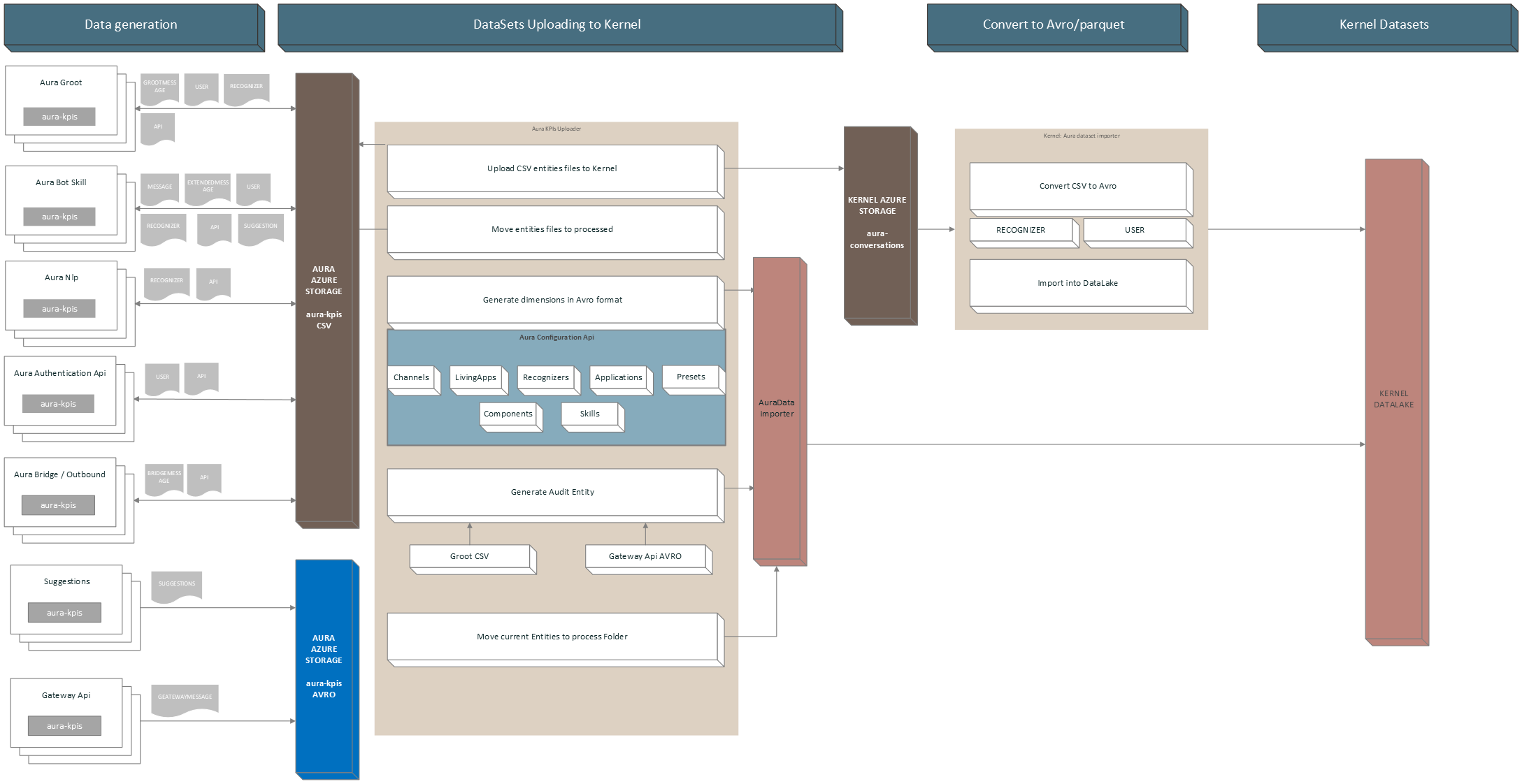
aura-kpis-uploader-cli is responsible for copying the CSV files in Aura KPIs container (environment variables: AURA_MICROSOFT_AZURE_STORAGE_COMMON_ACCOUNT) to the correspondent container in Kernel Azure Storage (environment variable: AURA_KPI_UPLOADER_MICROSOFT_AZURE_STORAGE_CONTAINER_DESTINATION).
Once the files are copied, the local copy is moved to a folder inside the container (environment variables: AURA_MICROSOFT_AZURE_STORAGE_COMMON_ACCOUNT/AURA_KPI_UPLOADER_PROCESSED_FOLDER) and kept there during a fixed time, for recovering purposes.
The configured time by default is 7 days and is set in installer aurak8s in the template lifecycle.json.j2:
{
"name": "retention-kpis-processed-policy",
"enabled": true,
"type": "Lifecycle",
"definition": {
"filters": {
"blobTypes": [ "blockBlob" ],
"prefixMatch": [ "{{ kpi_blob_container_name_processed }}" ]
},
"actions": {
"baseBlob": {
"delete": { "daysAfterModificationGreaterThan": {{ backup_retention_time | default(7) }} }
}
}
}
}
Independently of when it runs, aura-kpis-uploader-cli always performs the same process:
- It gets all the files in KPIs container (environment variable:
AURA_MICROSOFT_AZURE_STORAGE_COMMON_ACCOUNT).
- Firstly, it verifies the number of files to process in order not to overload the memory. This is given by the environment variable
AURA_KPI_NUM_MAX_FILES_FOR_EXECUTION. If the number of files exceeds this number, it will adapt the dates until it gets a range that fulfills the condition. The initial date is determined by AURA_DAYS_INTERVAL and the final date is calculated by subtracting the hours indicated in AURA_KPI_HOURS_TO_SUBTRACT_TO_GET_NUM_MAX_FILES.
- When the number of files condition is fulfilled, all the aura-kpis-uploader processes will use that date range, except for the generation of the
AUDIT file, since this file is generated at run time and must be moved to the entities folder if everything has proceeded successfully, with the current date.
It can also be launched manually to process old files that have not been processed in the regular execution, due to lack of communication with Kernel or any other error.
Furthermore, aura-kpis-uploader-cli generates for dimensions of entity type files: Channels, Skills, Presets, Applications, Components and Recognizers. You can see more information in KPIs dimensions.
12.2.1 - User guide
Aura KPIs uploader user guide
Guidelines including the orderly steps to use aura-kpis-uploader
1. Prepare your CONFIG_FILE
First, review and prepare your environment variables in order to create your CONFIG_FILE.
An example is shown below:
AURA_AUTHORIZATION_HEADER=${AURA_AUTHORIZATION_HEADER}
AURA_CHANNELS_CONFIGURATION_API_ENDPOINT=${AURA_CHANNELS_CONFIGURATION_API_ENDPOINT}
AURA_DEFAULT_LOCALE=${AURA_DEFAULT_LOCALE}
AURA_ENVIRONMENT_NAME=${AURA_ENVIRONMENT_NAME}
AURA_MICROSOFT_AZURE_STORAGE_COMMON_ACCESS_KEY=${AURA_MICROSOFT_AZURE_STORAGE_COMMON_ACCESS_KEY}
AURA_MICROSOFT_AZURE_STORAGE_COMMON_ACCOUNT=${AURA_MICROSOFT_AZURE_STORAGE_COMMON_ACCOUNT}
AURA_MICROSOFT_AZURE_STORAGE_ACCESS_KEY_DESTINATION=${AURA_MICROSOFT_AZURE_STORAGE_ACCESS_KEY_DESTINATION}
AURA_MICROSOFT_AZURE_STORAGE_ACCOUNT_DESTINATION=${AURA_MICROSOFT_AZURE_STORAGE_ACCOUNT_DESTINATION}
AURA_MICROSOFT_AZURE_STORAGE_CONTAINER_DESTINATION=${AURA_MICROSOFT_AZURE_STORAGE_CONTAINER_DESTINATION}
AURA_VERSION=${AURA_VERSION}
2. Launch Aura KPIs uploader
There are two methods for launching the aura-kpis-uploader
- Directly with the source code: to launch it in your local environment
- As a docker container: to use it with the already generated Docker image.
$ cd aura-kpis-uploader
$ npm install
$ export CONFIG_FILE=[PATH_TO_MY_CONFIG_FILE]
$ npm run start
2.2.1. Pull image from repository
This method needs login first.
docker pull auraregistry.azurecr.io/aura/aura-kpis-uploader
2.2.2. Run Docker container
There are two options for running the Docker container:
-
With .env file:
Change $VERSION accordingly, exporting it or changing the string in the commands.
If $VERSION is not present, it will use the latest default tag.
docker run --rm -e CONFIG_FILE=/opt/aura-kpis-uploader/env/config_file.env \
-v $(pwd):/opt/aura-kpis-uploader/env \
auraregistry.azurecr.io/aura/aura-kpis-uploader:$VERSION
-
With environmental variables in command:
Note that host.docker.internal only works for MACOS/Windows systems:
docker run -e AURA_AUTHORIZATION_HEADER=${AURA_AUTHORIZATION_HEADER} \
-e AURA_CHANNELS_CONFIGURATION_API_ENDPOINT=${AURA_CHANNELS_CONFIGURATION_API_ENDPOINT} \
-e AURA_DEFAULT_LOCALE=${AURA_DEFAULT_LOCALE} \
-e AURA_ENVIRONMENT_NAME=${AURA_ENVIRONMENT_NAME} \
-e AURA_MICROSOFT_AZURE_STORAGE_COMMON_ACCESS_KEY=${AURA_MICROSOFT_AZURE_STORAGE_COMMON_ACCESS_KEY} \
-e AURA_MICROSOFT_AZURE_STORAGE_COMMON_ACCOUNT=${AURA_MICROSOFT_AZURE_STORAGE_COMMON_ACCOUNT} \
-e AURA_MICROSOFT_AZURE_STORAGE_ACCESS_KEY_DESTINATION=${AURA_MICROSOFT_AZURE_STORAGE_ACCESS_KEY_DESTINATION} \
-e AURA_MICROSOFT_AZURE_STORAGE_ACCOUNT_DESTINATION=${AURA_MICROSOFT_AZURE_STORAGE_ACCOUNT_DESTINATION} \
-e AURA_MICROSOFT_AZURE_STORAGE_CONTAINER_DESTINATION=${AURA_MICROSOFT_AZURE_STORAGE_CONTAINER_DESTINATION} \
-e AURA_VERSION=${AURA_VERSION} \
-v ${HOST_DIRECTORY}:/opt/aura-kpis-uploader/logs \
auraregistry.azurecr.io/aura/aura-kpis-uploader:$VERSION
3. Execution Dependencies
With the addition of the new component aura-databricks-jobs, now for Avro entities, the execution of aura-kpis-uploader depends on aura-databricks-jobs being executed correctly.
This is done to avoid duplicating KPIs when they are processed by aura-databricks-jobs, and an error has occurred.
3.1 Evaluation of conditions for execution
If avro-to-dataset-job-cli has been executed correctly, it will write a file to the default avro folder containing a date. If this file exists and the date it contains does not exceed the time set for the scheduled run in Databricks, aura-kpis-uploader-cli will run its processes.
If avro-to-dataset-job-cli has generated any error in its execution, it will generate a file in the same folder containing internally the error(s) that have occurred.
Environment variables involved:
- AURA_KPIS_AVRO_DESTINATION_PATH: Default value is
avro.
- AURA_DATABRICKS_ERROR_FILENAME: Default value is
databricks.ERROR.
- AURA_DATABRICKS_EXECUTION_PERIOD: Default value is
24 hours.
The flow that Aura KPIs Uploader follows to validate if it is going to be executed is as follows:

4 Generate Reports
By default, aura-kpis-uploader generates reports if any error has occurred in the upload process.
These reports are available in the Azure Storage defined in AURA_MICROSOFT_AZURE_STORAGE_COMMON_ACCOUNT, path aura-kpis/reports/.
If you want to change the behavior and generate reports of all uploaded files or disable their generation, you can do it by changing the environment variable AURA_KPIS_REPORTS_MODE. If the value is set to all, it will generate a report for each of the processed files and if it is set to none, it will not generate any report. The default value is error.
4.1 Report upload Files
When an error occurs, the system will send an event to Prometheus to alert about the error.
this.prometheusHandler.addSummary(
{
metricId: PrometheusMetrics.auraKpisUploaderReportErrorSummary,
start: this.startTimer
},
{
reportError: reportLink },
this.corr
);
The event will contain the metricId auraKpisUploaderReportErrorSummary, when an error occurs and a link to the report containing the error.
4.1.1 Report Model
A report will contain the following template in JSON format:
- numberOfFiles: Number of files processed.
- numberOfFilesSkipped: Number of files that have been skipped because they have not yet been processed.
- NumberOfFilesMovedToProcessed: Number of files that have been moved to the processed folder.
- numberOfFilesUploaded : Number of files that have been successfully uploaded.
- NumberOfFilesDeleted: Number of files that have been deleted from the main folder.
- numberOfFilesUploadValidated: Number of files that have been verified as successfully uploaded.
If errors have occurred, it will contain an errors property with the files that have failed, arranged as properties:
- key: Name of the file that has failed.
- step: It indicates in which phase it has failed. The possible ones are “UPLOADING”, “CHECK_IF_UPLOADED”, “MOVING_TO_PROCESSED” AND “REMOVING”.
- error: Error message obtained.
- corr: Associated correlator.
Example:
{
"numberOfFiles": 43,
"numberOfFilesSkipped": 0,
"numberOfFilesMovedToProcessed": 41,
"numberOfFilesUploaded": 41,
"numberOfFilesDeleted": 41,
"numberOfFilesUploadValidated": 41,
"errors": {
"BOT_da5df187-8aa9-55b7-94d6-50586bd6b0b8_CR_API_20240216T080000Z.txt": {
"step": "UPLOADING",
"error": "getaddrinfo ENOTFOUND aurautils-test.blob.core.windows.net",
"corr": "ec4978ee-0021-4633-a28f-a933759d0250"
},
"BOT_b8efccfd-f2bd-5ef0-a19d-b2414ab94dc8_CR_API_20240215T160000Z.txt": {
"step": "UPLOADING",
"error": "getaddrinfo ENOTFOUND aurautils-test.blob.core.windows.net",
"corr": "ec4978ee-0021-4633-a28f-a933759d0250"
}
}
}
4.2 Report Generating Avro KPIs
When an error occurs, the system will send an event to Prometheus to alert about the error.
this.prometheusHandler.addSummary(
{
metricId: PrometheusMetrics.auraKpisGeneratedReportErrorSummary,
start: this.startTimer
},
{
reportError: reportLink },
this.corr
);
The event will contain the metricId auraKpisGeneratedReportErrorSummary, when an error occurs and a link to the report containing the error.
4.2.1 Report Model
A report will contain the following template in JSON format.
- numberBlobsLoaded: Number of blobs loaded.
- numberDataRowsLoaded: Number of total lines loaded from blobs.
- numberDataRowsGenerated: Number of Avro registers generated.
- numberEntitiesGenerated: Number of entities generated.
- numberDimensionalGenerated: Number of dimensional files generated.
If errors have occurred, it will contain an errors property with the files that have failed, arranged as properties:
- key: The id of the source. Example: ‘AUDIT’.
- error: Error message obtained.
- corr: Associated correlator.
Example:
{
"numberBlobsLoaded": 13,
"numberDataRowsLoaded": 0,
"numberDataRowsGenerated": 141,
"numberEntitiesGenerated": 2,
"numberDimensionalGenerated": 7,
"errors": {
"GATEWAY": {
"error": "Error parsing data. Field name does not exist in source",
"corr": "ec4978ee-0021-4633-a28f-a933759d0250"
},
"AUDIT": {
"error": "Error parsing data. Field id cannot be empty",
"corr": "ec4978ee-0021-4633-a28f-a933759d0250"
}
}
}
12.2.2 - Adapter Manager
Aura KPIs Adapter Manager
Module to manage the copy of CSV files to Kernel and to generate Avro dimensional files and Avro Entity files.
⚠️ Although the definition of the module refers to Avro files, it also handles CSV files, until all CSV files are migrated to Avro in upcoming releases
Definition
Set of classes that will be in charge of processing the necessary operations to copy the KPIs in CSV format to Kernel and to process or generate the KPIs of the entities and dimensions in Avro format.
This is done from a definition file that, by default, is called aura-avro-adapter.json and is defined in the AURA_SOURCE_PATH_AVRO_ADAPTERS environment variable. This file is remotely loaded from the Storage AURA_MICROSOFT_AZURE_STORAGE_COMMON_ACCOUNT and the path AURA_KPIS_ENTITIES_CONTAINER/schemas/AURA_SOURCE_PATH_AVRO_ADAPTERS. If the file does not exist remotely, a local one is loaded by default.
Adapter Definition File Model
For each KPI file to be managed, a model is defined containing an array with all the adaptation operations to be performed. The content format of this file is JSON.
| Name |
Type |
Definition |
| name |
string |
Name of the adapter. To manage Avro files, this field contains the name of the Avro schema itself |
| schema |
AvroAdapterSchema |
Type of KPI, entity or dimensional |
| avroSchema |
string |
If the destination file is an Avro file, this field contains the Avro schema to generate the file. |
| source |
AvroAdapterSource |
Contains the necessary data from where you are going to copy or transform the data, if applicable. |
| fields |
AvroAdapterField |
Contains a set of properties with a model defined in AvroAdapterFieldModel |
| targetType |
AvroAdapterTargetType |
Type file to generate. Values: csv or avro. |
| versionSchema |
string |
If the file to generate is Avro, this field contains the version of its schema |
| stopWithErrors |
boolean |
When true, if another adapter has generated an error, this one will not be executed |
| expiresAt |
date |
If set, it indicates which date the intended KPI will no longer be processed. This is used when there are different versions of AVRO templates and you want to keep both versions until the end of a cycle, which is usually monthly. |
| order |
number |
Contains the execution order, the order 1 will be the first to execution. By default the order is MAX_SAFE_INTEGER. |
AvroAdapterSchema
| Name |
type |
Definition |
| dimensional |
string |
Type of KPI is dimensional. |
| entity |
string |
Type of KPI is an entity. |
AvroAdapterSource
| Name |
type |
Definition |
| data |
AvroAdapterSourceDataType |
Type of file to use as source. |
| id |
any |
KPI identifier, for example: GATEWAY, AUDIT, BOT, etc. |
| avroSchema |
string |
Name of the schema file. Required if the source is an Avro file, as its schema needs to read it. |
| avroSchemaVersion |
string |
Version of the schema, required if the source is an Avro file. |
| csvFolder |
string |
Name of the folder where this CSV is stored, required if the source is a partial CSV. |
| entityName |
string |
Entity name of the CSV to load, required if the source is a partial CSV. |
| useDefaultTimeFilter |
boolean |
If true, the adapter will ignore the pre-calculated date range at the beginning of the process and will use the default one, which is calculated based on AURA_DAYS_INTERVAL as the start date and the end date by subtracting AURA_KPIS_TIME_FILE_IS_IN_USE_AMOUNT * AURA_KPIS_TIME_FILE_IS_IN_USE_UNIT from the current date. The default is 30 days prior to the current time. |
| version |
string |
Version of the adapter. It is used to propagate changes in a release and to update the remote file where the adapter models are stored in aura-avro-adapter.json. Format: x.y.z |
| removeAfterProcessing |
boolean |
Remove source data after processing. The data won’t store in processed data folder. |
AvroAdapterSourceDataType
| Name |
type |
Definition |
| avro |
string |
Name of the source file for Avro. |
| object |
string |
Name of the source file for the Javascript object. |
| csv |
string |
Name of the source file for CSV. |
| partialCsv |
string |
Name of the source file when it is referred to specific data from a CSV file. |
AvroAdapterField
AvroAdapterFieldModel
| Name |
type |
Definition |
| sourceName |
string |
Name of the source field from which data is obtained. |
| nullable |
boolean |
It indicates whether the target field can be null or not. |
| preCalculated |
AvroPreCalculatedType |
String that indicates the type of calculation needed. For example, the required format for dates or numbers. |
| targetType |
Avrofieldbasetype |
Type of data for the target data. |
| defaultValue |
string |
number |
| symbols |
any[] |
Array with the values searched in the origin data. If the data does not match one of those values, it will generate an error. |
| format |
string |
Specific format to be sent, for precalculated fields. |
| description |
string |
Human-readable description of the field. |
| symbolsValues |
string |
If we want to change the value of the destination based on the values defined in the symbols field, we can define it in this field in the form of an object. |
| valueIfExist |
string |
If the source data exists, it will be changed to the one defined in this field. |
AvroPreCalculatedType
| Name |
type |
Definition |
| DATE_ISO_8691 |
string |
Format used for dates. The input date will be converted to this format. If there is no input date, the current date is obtained. |
| CUSTOM_DATE_FORMAT |
string |
Custom format for dates. Example: MM/DD/YYY |
| DURATION_ISO_8601 |
string |
Format used to set a duration. |
| COUNTRY_ISO_3166_ALPHA_3 |
string |
Format to indicate a country that complies with the ISO 3166 format. |
Avrofieldbasetype
| Name |
type |
Definition |
| string |
string |
Type string. |
| number |
string |
Type number. |
| enum |
string |
Type enumerable. |
| array |
string |
Type array. |
| boolean |
string |
Type boolean. |
AvroAdapterTargetType
| Name |
type |
Definition |
| csv |
string |
CSV file. |
| avro |
string |
Avro file. |
Types of adapters
The Adapter manager can perform several types of processes, that will be explained in the following sections.
Copy CSV files
This adapter will copy the CSV files generated from the Aura servers (aura-bot, aura-groot, aura-nlp, etc.) to the Kernel storage.
{
"version": "1.0.0",
"name": "E_Aura_BOT",
"schema": "entity",
"avroSchema": "",
"source": {
"data": "csv",
"id": "BOT"
},
"targetType": "csv",
"fields": {}
}
Generate Dimensional KPIs in Avro
This adapter will generate an Avro file with Aura available RECOGNIZER data, as they are defined only in aura-kpis-uploader and not in aura-configuration-api.
{
"version": "1.0.0",
"name": "D_Aura_Recognizer",
"schema": "dimensional",
"avroSchema": "aura-recognizer-asvc.json",
"versionSchema": "6.0.0",
"source": {
"data": "object",
"id": "RECOGNIZER"
},
"targetType": "avro",
"fields": {
"AURA_RECOGNIZER_ID": {
"sourceName": "id",
"targetType": "string"
},
"AURA_RECOGNIZER_NAME": {
"sourceName": "name",
"targetType": "string"
},
"EXTRACTION_TM": {
"sourceName": "EXTRACTION_TM",
"targetType": "string",
"preCalculated": "DATE_ISO_8691"
}
}
}
Copy Avro files
This adapter copies the KPIs generated in Avro by aura-gateway-api to be processed by aura-databricks-jobs.
{
"version": "1.0.0",
"name": "Aura_Gateway_Message",
"schema": "entity",
"avroSchema": "aura-gateway-message-asvc.json",
"versionSchema": "6.0.0",
"source": {
"data": "object",
"id": "GATEWAY"
},
"targetType": "avro",
"fields": {}
}
Generate Avro from another Avro
This is an adapter that generates an AURA_AUDIT file based on the data from the AVRO file of the aura-gateway-api KPIs.
{ "version": "1.0.0",
"name": "Aura_Audit",
"stopWithErrors": true,
"schema": "entity",
"avroSchema": "aura-audit-asvc.json",
"versionSchema": "6.0.0",
"source": {
"data": "avro",
"id": "AUDIT",
"avroSchema": "aura-gateway-message-asvc.json",
"avroSchemaVersion": "6.0.0"
},
"targetType": "avro",
"fields": {
"INTERACTION_ID": {
"sourceName": "CORR_ID",
"targetType": "string"
},
"AURA_TM": {
"sourceName": "MESSAGE_TM",
"targetType": "string",
"preCalculated": "DATE_ISO_8691"
},
"AURA_CHANNEL_ID": {
"sourceName": "AURA_CHANNEL_ID",
"targetType": "string",
"nullable": "true"
},
"AURA_APP_ID": {
"sourceName": "AURA_APP_ID",
"targetType": "string"
},
"COUNTRY_3_ALPHA_CD": {
"sourceName": "COUNTRY_3_ALPHA_CD",
"targetType": "string",
"preCalculated": "COUNTRY_ISO_3166_ALPHA_3"
},
"AURA_SERVICE_NAME_CD": {
"sourceName": "AURA_PRESET_NAME",
"targetType": "string",
"defaultValue": "nlpaas",
"valueIfExist" : "ai"
},
"AURA_PRESET_NAME": {
"sourceName": "AURA_PRESET_NAME",
"targetType": "string",
"nullable": "true"
},
"AURA_COMPONENT_ID": {
"sourceName": "AURA_COMPONENT_ID",
"targetType": "string"
},
"AURA_COMPONENT_HOST_ID": {
"sourceName": "AURA_COMPONENT_HOST_ID",
"targetType": "string"
},
"AURA_VERSION_ID": {
"sourceName": "AURA_VERSION_ID",
"targetType": "string"
},
"DAY_DT": {
"sourceName": "DAY_DT",
"targetType": "string",
"preCalculated": "CUSTOM_DATE_FORMAT",
"format": "YYYY-MM-DD"
},
"BRAND_ID": {
"sourceName": "BRAND_ID",
"targetType": "string"
}
}
}
Generate Avro from data in CSV file
This is an adapter that generates an AURA_AUDIT file based on the data from the CSV file of the aura-groot Message KPIs.
{
"version": "1.0.0",
"name": "Aura_Audit",
"stopWithErrors": true,
"order": 2,
"schema": "entity",
"avroSchema": "aura-audit-asvc.json",
"versionSchema": "6.0.0",
"source": {
"data": "partialCsv",
"id": "AUDIT",
"csvFolder": "groot",
"entityName":"GROOTMESSAGE"
},
"targetType": "avro",
"fields": {
"INTERACTION_ID": {
"sourceName": "CORR_ID",
"targetType": "string"
},
"AURA_TM": {
"sourceName": "MSG_DT",
"targetType": "string",
"preCalculated": "DATE_ISO_8691"
},
"AURA_CHANNEL_ID": {
"sourceName": "CHANNEL_ID",
"targetType": "string",
"nullable": "true"
},
"AURA_APP_ID": {
"sourceName": "AURA_APP_ID",
"targetType": "string",
"nullable": "true"
},
"COUNTRY_3_ALPHA_CD": {
"sourceName": "COUNTRY_CD",
"targetType": "string",
"preCalculated": "COUNTRY_ISO_3166_ALPHA_3"
},
"AURA_SERVICE_NAME_CD": {
"sourceName": "AURA_SERVICE_NAME_CD",
"targetType": "string",
"defaultValue": "message"
},
"AURA_PRESET_NAME": {
"sourceName": "AURA_PRESET_NAME",
"targetType": "string",
"nullable": "true"
},
"AURA_COMPONENT_ID": {
"sourceName": "AURA_COMPONENT_ID",
"targetType": "string"
},
"AURA_COMPONENT_HOST_ID": {
"sourceName": "AURA_COMPONENT_HOST_ID",
"targetType": "string"
},
"AURA_VERSION_ID": {
"sourceName": "VERSION_ID",
"targetType": "string"
},
"DAY_DT": {
"sourceName": "MSG_DT",
"targetType": "string",
"preCalculated": "CUSTOM_DATE_FORMAT",
"format": "YYYY-MM-DD"
},
"BRAND_ID": {
"sourceName": "BRAND_ID",
"targetType": "string"
}
}
}
Another example, deleting CSV source file data when the adapter finalize its execution.
{
"version":"1.0.1",
"name": "Aura_Gateway_Message_converter",
"stopWithErrors": true,
"order": 1,
"schema": "entity",
"avroSchema": "aura-gateway-message-asvc.json",
"versionSchema": "6.0.0",
"source": {
"data": "partialCsv",
"id": "GATEWAY",
"csvFolder": "gwapi",
"entityName": "GATEWAYMESSAGE",
"removeAfterProcessing": true
},
"targetType": "avro",
"fields": {
"MESSAGE_ID": {
"sourceName": "MESSAGE_ID",
"targetType": "string",
"defaultValue": "NO_MESSAGE_ID"
},
"MESSAGE_TM": {
"sourceName": "MESSAGE_TM",
"targetType": "string",
"preCalculated": "DATE_ISO_8691"
},
"AURA_APP_ID": {
"sourceName": "AURA_APP_ID",
"targetType": "string",
"nullable": "true"
},
"COUNTRY_3_ALPHA_CD": {
"sourceName": "COUNTRY_3_ALPHA_CD",
"targetType": "string",
"preCalculated": "COUNTRY_ISO_3166_ALPHA_3"
},
"AURA_PRESET_NAME": {
"sourceName": "AURA_PRESET_NAME",
"targetType": "string",
"nullable": "true"
},
"DAY_DT": {
"sourceName": "MESSAGE_TM",
"targetType": "string",
"preCalculated": "CUSTOM_DATE_FORMAT",
"format": "YYYY-MM-DD"
},
"BRAND_ID": {
"sourceName": "BRAND_ID",
"targetType": "string"
},
"AURA_NLP_IND": {
"sourceName": "AURA_NLP_IND",
"targetType": "boolean"
},
"CORR_ID": {
"sourceName": "CORR_ID",
"targetType": "string",
"defaultValue": "NO_CORR_ID"
}
}
}
Use filters in Avro files
With this model, it is possible to filter records from the Avro files that should not be loaded into these files:
export interface AvroAdapterSource {
data: AvroAdapterSourceDataType;
id: any;
avroSchema?: string;
avroSchemaVersion?: string;
csvFolder: string;
entityName: string;
filter?: (SourceFilter | LogicalFilter);
}
export interface SourceFilter {
field: string;
value: any;
operator: FilterOperator;
}
export interface LogicalFilter {
logic: LogicalOperator.and | LogicalOperator.or;
filters: (SourceFilter | LogicalFilter)[];
}
export enum FilterOperator {
equal = 'equal',
notEqual = 'notEqual',
greaterThan = 'greaterThan',
lessThan = 'lessThan'
}
export enum LogicalOperator {
and = 'and',
or = 'or'
}
These filters could be configured in aura-avro-adapter.json in two ways:
-
With logical filter, with several conditions. For example:
{
"version": "1.0.0",
"name": "Aura_Audit",
"stopWithErrors": true,
"schema": "entity",
"avroSchema": "aura-audit-asvc.json",
"versionSchema": "6.0.0",
"source": {
"data": "partialCsv",
"id": "AUDIT",
"csvFolder": "groot",
"entityName": "GROOTMESSAGE",
"filter": {
"logic": "and",
"filters": [
{
"field": "CHANNEL_ID",
"value": "",
"operator": "notEqual"
},
{
"field": "ACTION_CD",
"value": "receive",
"operator": "equal"
}
]
}
}
-
Or it could be configured in aura-avro-adapter.json with simple filter. For example:
{
"version": "1.0.0",
"name": "Aura_Audit",
"stopWithErrors": true,
"schema": "entity",
"avroSchema": "aura-audit-asvc.json",
"versionSchema": "6.0.0",
"source": {
"data": "avro",
"id": "AUDIT",
"avroSchema": "aura-gateway-message-asvc.json",
"avroSchemaVersion": "6.0.0",
"filter": {
"field": "AURA_APP_ID",
"value": null,
"operator": "notEqual"
}
},
"targetType": "avro",
"fields": {
"INTERACTION_ID": {
"sourceName": "CORR_ID",
"targetType": "string"
},
"AURA_TM": {
"sourceName": "MESSAGE_TM",
"targetType": "string",
"preCalculated": "DATE_ISO_8691"
},
"AURA_CHANNEL_ID": {
"sourceName": "AURA_CHANNEL_ID",
"targetType": "string",
"nullable": "true"
},
"AURA_APP_ID": {
"sourceName": "AURA_APP_ID",
"targetType": "string",
"nullable": "true"
},
"COUNTRY_3_ALPHA_CD": {
"sourceName": "COUNTRY_3_ALPHA_CD",
"targetType": "string"
},
"AURA_SERVICE_NAME_CD": {
"sourceName": "AURA_PRESET_NAME",
"targetType": "string",
"defaultValue": "nlpaas",
"valueIfExist": "ai"
},
"AURA_PRESET_NAME": {
"sourceName": "AURA_PRESET_NAME",
"targetType": "string",
"nullable": "true"
},
"AURA_COMPONENT_ID": {
"sourceName": "AURA_COMPONENT_ID",
"targetType": "string"
},
"AURA_COMPONENT_HOST_ID": {
"sourceName": "AURA_COMPONENT_HOST_ID",
"targetType": "string"
},
"AURA_VERSION_ID": {
"sourceName": "AURA_VERSION_ID",
"targetType": "string"
},
"DAY_DT": {
"sourceName": "DAY_DT",
"targetType": "string",
"preCalculated": "CUSTOM_DATE_FORMAT",
"format": "YYYY-MM-DD"
},
"BRAND_ID": {
"sourceName": "BRAND_ID",
"targetType": "string"
}
}
},
12.2.3 - Environment variables
Aura KPIs Uploader environment variables
List of environment variables handled by Aura KPIs uploader
- Properties marked in bold are mandatory.
- Properties marked in italics are optional.
| Property |
Type |
Description |
Modifiable by OB? |
| AURA_AUTHORIZATION_HEADER |
string |
Complete authorization header to be sent to AURA_CHANNELS_CONFIGURATION_API_ENDPOINT, with the following format: APIKEY xxxxxx |
YES, but only if the previous APIKey was deprecated |
| AURA_CHANNELS_CONFIGURATION_API_ENDPOINT |
string |
Complete URL where aura-bot should get the configuration of all the channels available in the environment. |
YES, but only if the generated SAS token was deprecated. |
| AURA_DAYS_INTERVAL |
number |
Interval of days to get the processed KPIs files. By default: 30 |
NO |
| AURA_DEFAULT_LOCALE |
string |
Culture code to be used by default in the current deployment: de-de, en-gb, es-es, pt-br. |
NO |
| AURA_ENVIRONMENT_NAME |
string |
Name of the environment where aura-kpis-uploader is deployed. For example: ap-next, es-dev, de-pre |
NO |
| AURA_FILES_PREFIX |
string |
Paths where aura-bot, aura-nlp or aura-authentication-api entity KPIs files are stored. |
NO |
| AURA_FOLDER_DESTINATION |
string |
Root folder name in destination where the KPIs files are stored. By default: AURA_DATA. |
NO |
| AURA_KPIS_ENTITIES_CONTAINER |
string |
Name of the Azure Blob container to store Aura entities files. By default, aura-kpis. It MUST be the same than the AURA_KPIS_STORE_CONTAINER configured in aura-bot, aura-authentication-api, aura-kpis and aura-nlp. |
NO |
| AURA_KPI_FILES_EXTENSION |
string |
Extension to be used in KPIs files. Default: txt. It MUST be the same than the AURA_KPI_TO_DSV_EXTENSION configured in aura-bot, aura-authentication-api, aura-kpis and aura-nlp. |
NO |
| AURA_KPI_FILES_NOT_TO_UPLOAD |
string |
String separated by comma with the files to not upload to the destination folder with format Component:Entity. For example: BOT:MESSAGE,BOT:API |
NO |
| AURA_KPIS_TIME_FILE_IS_IN_USE_AMOUNT |
number |
Contains the amount of time it considers a file to be in use and does not process it. By default: 1 |
|
| AURA_KPIS_TIME_FILE_IS_IN_USE_UNIT |
string |
Time unit that together with AURA_KPIS_TIME_FILE_IS_IN_USE_AMOUNT determines whether or not a file should be processed: Values: “year”, “years”, “y”, “month”, “months”, “M”, “week”, “weeks”, “w”, “day”, “days”, “d”, “hour”, “hours”, “h”, “minute”, “minutes”, “m”. By default: hour |
|
| AURA_LOGGING_FORMAT |
string |
Format to be used in monitoring logs: json or dev (which is a more visual format). By default: json. |
NO. Only for development, set it to dev. |
| AURA_LOGGING_LEVEL |
string |
Level to be used in monitoring logs, from more to less verbose: 'TRACE', 'DEBUG', 'INFO', 'WARN', 'ERROR', 'FATAL', 'OFF'. By default: 'INFO'. |
YES, for development environment, set it to debug. In pre/production environment, it should be ‘INFO’ or ‘ERROR’. For analysis of an issue in pre/production, it may be changed to ‘DEBUG’. |
| AURA_MICROSOFT_AZURE_STORAGE_COMMON_ACCESS_KEY |
string |
Microsoft Storage password of the source deployment. |
NO. Only if Operations Team changes it. |
| AURA_MICROSOFT_AZURE_STORAGE_COMMON_ACCOUNT |
string |
Microsoft Storage account of the source environment. |
NO. Only if Operations Team changes it. |
| AURA_MICROSOFT_AZURE_STORAGE_ACCESS_KEY_DESTINATION |
string |
Microsoft Storage password of destination. |
NO |
| AURA_MICROSOFT_AZURE_STORAGE_ACCOUNT_DESTINATION |
string |
Microsoft Storage account of destination. |
NO |
| AURA_MICROSOFT_AZURE_STORAGE_CONTAINER_DESTINATION |
string |
Microsoft Storage container of destination. |
NO |
| AURA_VERSION |
string |
Number of Aura release being executed. |
NO |
| PUSHGATEWAY_ENDPOINT |
string |
Prometheus push gateway endpoint. |
NO |
| PROMETHEUS_JOB_NAME |
string |
Prometheus job name. By default: aura_kpi_uploader_job. |
NO |
| AURA_SOURCE_PATH_AVRO_ADAPTERS |
string |
Relative path to file with the dimensions and entities to transform Avro. |
NO |
| AURA_KPIS_AVRO_DESTINATION_PATH |
string |
Path to store the Avro files in Aura Azure Container. Default: ‘avro’ |
YES |
| AURA_KPIS_REPORTS_DESTINATION_PATH |
string |
Path to store the reports in Aura Azure Container. Default: ‘reports’ |
YES |
| AURA_KPIS_REPORTS_MODE |
string |
Behavior of aura-kpis-uploader regarding the generation of reports. Possible values: all: a report is generated for each processed file; none: it will not generate any report; error: it generates a report if an error has occurred. By default: error. |
NO |
| AURA_SOURCE_PATH_AVRO_ADAPTERS |
string |
Adapters to transform data, ‘/schemas/aura-csv-adapter.json’ for CSV transform and ‘/schemas/aura-avro-adapter.json’ to transform in CSV and Avro. By default: schemas/aura-csv-adapter.json. |
YES |
| AURA_SAS_STORAGE_FILE_TTL |
number |
TTL in minutes for SAS when generates URL to File Storage. By default: 15. |
YES |
| AURA_KPIS_BLOB_TIME_WAIT_IF_EXISTS |
number |
Time to wait in milliseconds if the KPIs blob exists to avoid duplicate headers. By default: 1000. |
YES |
| AURA_KPIS_REPORTS_SAS_EXPIRATION |
number |
Time to expiration in minutes for the report SAS URL generated when an error occurs. Default: 43200 (30 days). |
YES |
| AURA_DATABRICKS_OK_FILENAME |
string |
Name of the file to validate if DataBricks process was successful. Inside the file, there is a date to validate last success execution. Default: databricks.OK |
YES |
| AURA_DATABRICKS_ERROR_FILENAME |
string |
Name of the file to validate if DataBricks process was failed. Default: databricks.ERROR |
YES |
| AURA_DATABRICKS_EXECUTION_PERIOD |
number |
Period of DataBricks execution in hours. By default: 24. |
YES |
| AURA_KPIS_AVRO_SIZE_REPORT_FILENAME |
string |
Contains the name of the file to store size of AVRO files. By default: sizeReport.json. |
YES |
| AURA_KPI_MAX_BLOCK_SIZE_FOR_APPEND_BLOB |
number |
Maximum buffer size for append blob uploading. Default: 100000000 (100MiB) |
YES. It can be changed by a value lower than the maximum one established by default |
| AURA_KPI_NUM_MAX_FILES_FOR_EXECUTION |
number |
Number of files by entity to process in a single execution. Default: 12 |
YES |
| AURA_KPI_HOURS_TO_SUBTRACT_TO_GET_NUM_MAX_FILES |
number |
Number of hours to subtract in order to get the number of files to process in a single execution. Default: 10 |
YES |
12.2.4 - Aura KPIs dimensions
Aura KPIs dimensions
Processing of Aura KPIs dimensions generated in aura-kpis-uploader
All of them will be generated in Avro format.
Introduction
aura-kpis-uploader-cli component generates the following types of KPIs dimensions:
. Channel type dimensions
. Recognizers type dimensions
. Skill type dimensions
. Components type dimensions
. Presets type dimensions
. Applications type dimensions
All of them are stored into the correspondent container in Aura Common Azure Storage (environment variable: AURA_KPIS_STORE_COMMON_CONTAINER).
Once the files are copied, the local copy is moved to a folder inside the container (environment variables: AURA_KPIS_STORE_COMMON_CONTAINER/ AURA_KPI_UPLOADER_PROCESSED_FOLDER) and kept there during a time, for recovering issues.
Types of KPIDimensionType:
export enum KPIDimensionTypes {
KPIS_DIMENSIONS_CHANNEL = 'CHANNEL',
KPIS_DIMENSIONS_RECOGNIZER = 'RECOGNIZER',
KPIS_DIMENSIONS_SKILL = 'SKILL',
KPIS_DIMENSIONS_APP = 'APP',
KPIS_DIMENSIONS_PRESETS = 'PRESETS',
KPIS_DIMENSIONS_COMPONENT = 'COMPONENT'
}
The path and filename should follow these patterns:
- Path:
AURA_KPIS_ENTITIES_CONTAINER/avro/dimensional/<avro_schema: name>/<avro_schema: x-fp-version>
- Filename:
<OB>_DIM_<DIM_NAME>_YYYYMMDDTHH0000Z.<AURA_KPI_FILES_EXTENSION>
The filename of the file is obtained as follows:
export function getDimensionFileName(KPIDimensionType: string) {
return \`${getCountry().toUpperCase()}_\` +
'DIM_' + \`${KPIDimensionType}_\` +
\`${moment()
.toISOString()
.substring(0, 13)
.replace(/-/g, '')
.replace(/:/g, '') + '0000Z'}\` +
\`${ConfigurationManager.instance.environmentConfiguration.AURA_KPI_FILES_EXTENSION}\`;
}
Channel type dimensions
aura-kpis-uploader-cli gets the list of channels configured in the environment through the aura-configuration-api channels endpoint.
It generates a file with the following schema:
The Adapter format:
{
"name": "D_Aura_Channel",
"schema": "dimensional",
"avroSchema": "aura-channel-asvc.json",
"versionSchema": "6.0.0",
"source": {
"data": "object",
"id": "CHANNEL"
},
"targetType": "avro",
"fields": {
"AURA_CHANNEL_ID": {
"sourceName": "id",
"targetType": "string"
},
"AURA_CHANNEL_NAME": {
"sourceName": "name",
"targetType": "string"
},
"AURA_CHANNEL_SHORT_NAME": {
"sourceName": "prefix",
"targetType": "string"
},
"AURA_SKILL_ID": {
"sourceName": "skillId",
"targetType": "string",
"defaultValue": "NO_SKILL"
},
"AURA_NLP_STAGES_ARRAY": {
"sourceName": "nlp.stages",
"targetType": "array",
"nullable": "true"
},
"EXTRACTION_TM": {
"sourceName": "EXTRACTION_TM",
"targetType": "string",
"preCalculated": "DATE_ISO_8691"
},
"GBL_CONTACT_CHANNEL_ID": {
"sourceName": "contact",
"targetType": "string"
},
"BRAND_ID": {
"sourceName": "brand",
"targetType": "string"
}
}
}
Recognizers type dimensions
aura-kpis-uploader-cli gets the recognizers configuration through the file configured in the project:
aura-kpis-uploader/src/dimensions/resource/recognizers.json
It generates a file with the following schema:
The Adapter format:
{
"version": "1.0.0",
"name": "D_Aura_Recognizer",
"schema": "dimensional",
"avroSchema": "aura-recognizer-asvc.json",
"versionSchema": "6.0.0",
"source": {
"data": "object",
"id": "RECOGNIZER"
},
"targetType": "avro",
"fields": {
"AURA_RECOGNIZER_ID": {
"sourceName": "id",
"targetType": "string"
},
"AURA_RECOGNIZER_NAME": {
"sourceName": "name",
"targetType": "string"
},
"EXTRACTION_TM": {
"sourceName": "EXTRACTION_TM",
"targetType": "string",
"preCalculated": "DATE_ISO_8691"
}
}
}
Skill type dimensions
aura-kpis-uploader-cli gets the skill configuration through the aura-configuration-api Skills endpoint.
It generates a file with the following schema:
The Adapter format:
{
"version": "1.0.0",
"name": "D_Aura_Skill",
"schema": "dimensional",
"avroSchema": "aura-skill-asvc.json",
"versionSchema": "6.0.0",
"source": {
"data": "object",
"id": "SKILL"
},
"targetType": "avro",
"fields": {
"AURA_SKILL_ID": {
"sourceName": "id",
"targetType": "string"
},
"AURA_SKILL_NAME": {
"sourceName": "name",
"targetType": "string"
},
"EXTERNAL_SKILL_IND": {
"sourceName": "external",
"targetType": "boolean"
},
"EXTRACTION_TM": {
"sourceName": "EXTRACTION_TM",
"targetType": "string",
"preCalculated": "DATE_ISO_8691"
}
}
}
Components type dimensions
aura-kpis-uploader-cli gets the components configuration through the aura-configuration-api Components endpoint.
It generates a file with the following schema:
The Adapter format:
{
"version": "1.0.0",
"name": "D_Aura_Component",
"schema": "dimensional",
"avroSchema": "aura-component-asvc.json",
"versionSchema": "6.0.0",
"source": {
"data": "object",
"id": "COMPONENT"
},
"targetType": "avro",
"fields": {
"AURA_COMPONENT_ID": {
"sourceName": "id",
"targetType": "string"
},
"AURA_COMPONENT_NAME": {
"sourceName": "name",
"targetType": "string"
},
"EXTRACTION_TM": {
"sourceName": "EXTRACTION_TM",
"targetType": "string",
"preCalculated": "DATE_ISO_8691"
}
}
}
Presets type dimensions
aura-kpis-uploader-cli gets the presets configuration through the atria-model-gateway presets endpoint.
It generates a file with the following schema:
The Adapter format:
{
"version": "1.0.0",
"name": "D_Aura_Preset",
"schema": "dimensional",
"avroSchema": "aura-preset-asvc.json",
"versionSchema": "6.0.0",
"source": {
"data": "object",
"id": "PRESETS"
},
"targetType": "avro",
"fields": {
"AURA_PRESET_ID": {
"sourceName": "preset.id",
"targetType": "string"
},
"AURA_PRESET_NAME": {
"sourceName": "preset.name",
"targetType": "string"
},
"AURA_MODEL_ID": {
"sourceName": "model.id",
"targetType": "string"
},
"AURA_PRESET_GROUP_NAME_CD": {
"sourceName": "preset.group",
"targetType": "enum",
"symbols": [
"enriched_ai",
"simple_ai"
]
},
"EXTRACTION_TM": {
"sourceName": "EXTRACTION_TM",
"targetType": "string",
"preCalculated": "DATE_ISO_8691"
}
}
}
Applications type dimensions
aura-kpis-uploader-cli gets the applications configuration through the aura-configuration-api Applications endpoint.
It generates a file with the following schema:
The Adapter format:
{
"version": "1.0.0",
"name": "D_Aura_App",
"schema": "dimensional",
"avroSchema": "aura-app-asvc.json",
"versionSchema": "6.0.0",
"source": {
"data": "object",
"id": "APP"
},
"targetType": "avro",
"fields": {
"AURA_APP_ID": {
"sourceName": "id",
"targetType": "string"
},
"AURA_APP_NAME": {
"sourceName": "name",
"targetType": "string"
},
"AURA_NLP_CHANNEL_ID": {
"sourceName": "nlp.channeId",
"targetType": "string",
"nullable": "true"
},
"AURA_PRESET_NAMES_ARRAY": {
"sourceName": "models.presets",
"targetType": "array",
"nullable": "true"
},
"EXTRACTION_TM": {
"sourceName": "EXTRACTION_TM",
"targetType": "string",
"preCalculated": "DATE_ISO_8691"
},
"BRAND_ID": {
"sourceName": "brand",
"targetType": "string"
}
}
}
12.2.5 - Aura entities processing
Aura entities processing
How Aura entities files are processed by aura-kpis-uploader and uploaded to Telefónica Kernel storage
Introduction
Currently, Aura entities processing is done both for CSV and Avro entities, that coexist in Aura.
These two processes are described in the following sections:
Aura entities processing for CSV files
Check Aura entities definition in CSV format here
aura-kpis-uploader-cli component aims to copy Aura’s entities files into Telefónica Kernel data storage.
It iterates all the folders where Aura servers store the entities files ( the aura-kpis container in the source Azure Storage account), copying them into the destination Azure Storage account (usually a Telefónica Kernel container).
Afterwards, the processed files are moved to the processed folder within the source container and, finally, the original files are removed.
sequenceDiagram
Title: Normal flow for a source component of Aura entities
actor Cronjob
participant uploadEntities
participant processKPIS
participant processBlobs
participant processRemoteKPI
participant StorageFileManager
participant Azure Storage
Cronjob ->> uploadEntities: Start process
uploadEntities ->> processKPIS: Launch upload KPIS
loop
processKPIS ->> StorageFileManager: Get container client and blobs
StorageFileManager ->> Azure Storage:
Azure Storage ->> StorageFileManager: OK
StorageFileManager ->> processKPIS: OK
processKPIS ->> processBlobs: Send all blobs to process
processBlobs ->> processRemoteKPI: Filter and format blobs
loop
processRemoteKPI ->> StorageFileManager: Copy source blobs to destination container
StorageFileManager ->> Azure Storage:
Azure Storage ->> StorageFileManager: OK
StorageFileManager ->> processRemoteKPI: OK
processRemoteKPI ->> StorageFileManager: Copy source blobs to source processed folder
StorageFileManager ->> Azure Storage:
Azure Storage ->> StorageFileManager: OK
StorageFileManager ->> processRemoteKPI: OK
processRemoteKPI ->> StorageFileManager: Delete source blobs
StorageFileManager ->> Azure Storage:
Azure Storage ->> StorageFileManager: OK
StorageFileManager ->> processRemoteKPI: OK
end
end
The Adapter CSV entities definitions:
{
"version": "1.0.0",
"name": "E_Aura_BOT",
"schema": "entity",
"avroSchema": "",
"source": {
"data": "csv",
"id": "BOT"
},
"targetType": "csv",
"fields": {}
},
{
"version": "1.0.0",
"name": "E_Aura_CLF",
"schema": "entity",
"avroSchema": "",
"source": {
"data": "csv",
"id": "CLF"
},
"targetType": "csv",
"fields": {}
},
{
"version": "1.0.0",
"name": "E_Aura_GROOT",
"schema": "entity",
"avroSchema": "",
"source": {
"data": "csv",
"id": "GROOT"
},
"targetType": "csv",
"fields": {}
},
{
"version": "1.0.0",
"name": "E_Aura_NLP",
"schema": "entity",
"avroSchema": "",
"source": {
"data": "csv",
"id": "NLP"
},
"targetType": "csv",
"fields": {}
}
Aura entities processing for AVRO files
Check Aura entities definition in Avro format here
There are two ways in which KPIs entities are created:
- One is through a component, for example, aura-gateway-api generates its KPIs while it is running.
- The other way is with the aura-kpis-uploader itself through the transformations of other KPIS already stored, for example
AUDIT, which is generated through the aura-gateway-api count in AVRO format and through the aura-groot KPI, which is in CSV format.
When generating KPIS in AVRO for entities, it is not done in the default folder for each entity AURA_KPIS_ENTITIES_CONTAINER/avro/entity/<avro_schema: name>/<avro_schema: x-fp-version>, but a temporary folder named current is used: AURA_KPIS_ENTITIES_CONTAINER/avro/current/entity/<avro_schema: name>/<avro_schema: x-fp-version>. This is done to separate the files already generated from those currently being generated. When the KPIS Uploader is run, it moves the files that have already been generated to the default folder and converts them to BlockBlob.
aura-gateway-api Message Entity KPI
It generates a file with the following schema:
Aura Gateway API Schema Definition
First the CSV data must be transformed into avro format:
{
"version":"1.0.1",
"name": "Aura_Gateway_Message_converter",
"stopWithErrors": true,
"order": 1,
"schema": "entity",
"avroSchema": "aura-gateway-message-asvc.json",
"versionSchema": "6.0.0",
"source": {
"data": "partialCsv",
"id": "GATEWAY",
"csvFolder": "gwapi",
"entityName": "GATEWAYMESSAGE",
"removeAfterProcessing": true
},
"targetType": "avro",
"fields": {
"MESSAGE_ID": {
"sourceName": "MESSAGE_ID",
"targetType": "string",
"defaultValue": "NO_MESSAGE_ID"
},
"MESSAGE_TM": {
"sourceName": "MESSAGE_TM",
"targetType": "string",
"preCalculated": "DATE_ISO_8691"
},
"AURA_APP_ID": {
"sourceName": "AURA_APP_ID",
"targetType": "string",
"nullable": "true"
},
"COUNTRY_3_ALPHA_CD": {
"sourceName": "COUNTRY_3_ALPHA_CD",
"targetType": "string",
"preCalculated": "COUNTRY_ISO_3166_ALPHA_3"
},
"AURA_PRESET_NAME": {
"sourceName": "AURA_PRESET_NAME",
"targetType": "string",
"nullable": "true"
},
"DAY_DT": {
"sourceName": "MESSAGE_TM",
"targetType": "string",
"preCalculated": "CUSTOM_DATE_FORMAT",
"format": "YYYY-MM-DD"
},
"BRAND_ID": {
"sourceName": "BRAND_ID",
"targetType": "string"
},
"AURA_NLP_IND": {
"sourceName": "AURA_NLP_IND",
"targetType": "boolean"
},
"CORR_ID": {
"sourceName": "CORR_ID",
"targetType": "string",
"defaultValue": "NO_CORR_ID"
}
}
}
The next adapter process the Gateway from current folder to entity destination folder.
{
"version": "1.0.0",
"name": "Aura_Gateway_Message",
"schema": "entity",
"avroSchema": "aura-gateway-message-asvc.json",
"versionSchema": "6.0.0",
"source": {
"data": "object",
"id": "GATEWAY"
},
"targetType": "avro",
"fields": {}
}
AUDIT Entity KPI
It generates a file with the following schema:
Audit Schema Definition
The Adapters format is shown below:
From current folder to entity destination folder:
{
"version": "1.0.0",
"name": "Aura_Audit",
"schema": "entity",
"avroSchema": "aura-audit-asvc.json",
"versionSchema": "6.0.0",
"source": {
"data": "object",
"id": "AUDIT",
"useDefaultTimeFilter": true
},
"targetType": "avro",
"fields": {}
}
From aura-gateway-api Message Entity KPI:
{
"version": "1.0.0",
"name": "Aura_Audit",
"stopWithErrors": true,
"schema": "entity",
"avroSchema": "aura-audit-asvc.json",
"versionSchema": "6.0.0",
"source": {
"data": "avro",
"id": "AUDIT",
"avroSchema": "aura-gateway-message-asvc.json",
"avroSchemaVersion": "6.0.0"
},
"targetType": "avro",
"fields": {
"INTERACTION_ID": {
"sourceName": "CORR_ID",
"targetType": "string"
},
"AURA_TM": {
"sourceName": "MESSAGE_TM",
"targetType": "string",
"preCalculated": "DATE_ISO_8691"
},
"AURA_CHANNEL_ID": {
"sourceName": "AURA_CHANNEL_ID",
"targetType": "string",
"nullable": "true"
},
"AURA_APP_ID": {
"sourceName": "AURA_APP_ID",
"targetType": "string"
},
"COUNTRY_3_ALPHA_CD": {
"sourceName": "COUNTRY_3_ALPHA_CD",
"targetType": "string",
"preCalculated": "COUNTRY_ISO_3166_ALPHA_3"
},
"AURA_SERVICE_NAME_CD": {
"sourceName": "AURA_PRESET_NAME",
"targetType": "string",
"defaultValue": "nlpaas",
"valueIfExist" : "ai"
},
"AURA_PRESET_NAME": {
"sourceName": "AURA_PRESET_NAME",
"targetType": "string",
"nullable": "true"
},
"AURA_COMPONENT_ID": {
"sourceName": "AURA_COMPONENT_ID",
"targetType": "string"
},
"AURA_COMPONENT_HOST_ID": {
"sourceName": "AURA_COMPONENT_HOST_ID",
"targetType": "string"
},
"AURA_VERSION_ID": {
"sourceName": "AURA_VERSION_ID",
"targetType": "string"
},
"DAY_DT": {
"sourceName": "DAY_DT",
"targetType": "string",
"preCalculated": "CUSTOM_DATE_FORMAT",
"format": "YYYY-MM-DD"
},
"BRAND_ID": {
"sourceName": "BRAND_ID",
"targetType": "string"
}
}
}
From aura-groot Message Entity KPI:
{
"version": "1.0.0",
"name": "Aura_Audit",
"stopWithErrors": true,
"schema": "entity",
"avroSchema": "aura-audit-asvc.json",
"versionSchema": "6.0.0",
"source": {
"data": "partialCsv",
"id": "AUDIT",
"csvFolder": "groot",
"entityName":"GROOTMESSAGE"
},
"targetType": "avro",
"fields": {
"INTERACTION_ID": {
"sourceName": "CORR_ID",
"targetType": "string"
},
"AURA_TM": {
"sourceName": "MSG_DT",
"targetType": "string",
"preCalculated": "DATE_ISO_8691"
},
"AURA_CHANNEL_ID": {
"sourceName": "CHANNEL_ID",
"targetType": "string",
"nullable": "true"
},
"AURA_APP_ID": {
"sourceName": "AURA_APP_ID",
"targetType": "string",
"nullable": "true"
},
"COUNTRY_3_ALPHA_CD": {
"sourceName": "COUNTRY_CD",
"targetType": "string",
"preCalculated": "COUNTRY_ISO_3166_ALPHA_3"
},
"AURA_SERVICE_NAME_CD": {
"sourceName": "AURA_SERVICE_NAME_CD",
"targetType": "string",
"defaultValue": "message"
},
"AURA_PRESET_NAME": {
"sourceName": "AURA_PRESET_NAME",
"targetType": "string",
"nullable": "true"
},
"AURA_COMPONENT_ID": {
"sourceName": "AURA_COMPONENT_ID",
"targetType": "string"
},
"AURA_COMPONENT_HOST_ID": {
"sourceName": "AURA_COMPONENT_HOST_ID",
"targetType": "string"
},
"AURA_VERSION_ID": {
"sourceName": "VERSION_ID",
"targetType": "string"
},
"DAY_DT": {
"sourceName": "MSG_DT",
"targetType": "string",
"preCalculated": "CUSTOM_DATE_FORMAT",
"format": "YYYY-MM-DD"
},
"BRAND_ID": {
"sourceName": "BRAND_ID",
"targetType": "string"
}
}
}
12.2.6 - Troubleshooting
Aura KPIs uploader troubleshooting
Most common errors in aura-kpis-uploader together with the generated logs and recommendations for errors fixing
Required environment variables
Situation produced due to missing configuration of the mandatory environment variables.
If any of the mandatory environment variables is missing, an error message appears in the aura-kpis-uploader logs similar to the one shown below:
{"module":"Orchestrator","corr":"aura-system","error":"\"AURA_AUTHORIZATION_HEADER\" is required.
\"AURA_CHANNELS_CONFIGURATION_API_ENDPOINT\" is required.
\"AURA_DEFAULT_LOCALE\" is required.
\"AURA_ENVIRONMENT_NAME\" is required.
\"AURA_MICROSOFT_AZURE_STORAGE_ACCESS_KEY_DESTINATION\" is required.
\"AURA_MICROSOFT_AZURE_STORAGE_ACCOUNT_DESTINATION\" is required.
\"AURA_MICROSOFT_AZURE_STORAGE_CONTAINER_DESTINATION\" is required.
\"AURA_MICROSOFT_AZURE_STORAGE_COMMON_ACCESS_KEY\" is required.
\"AURA_MICROSOFT_AZURE_STORAGE_COMMON_ACCOUNT\" is required.
\"AURA_VERSION\" is required:
ValidationError:
\"AURA_AUTHORIZATION_HEADER\" is required.
\"AURA_CHANNELS_CONFIGURATION_API_ENDPOINT\" is required.
\"AURA_DEFAULT_LOCALE\" is required.
\"AURA_ENVIRONMENT_NAME\" is required.
\"AURA_MICROSOFT_AZURE_STORAGE_ACCESS_KEY_DESTINATION\" is required.
\"AURA_MICROSOFT_AZURE_STORAGE_ACCOUNT_DESTINATION\" is required.
\"AURA_MICROSOFT_AZURE_STORAGE_CONTAINER_DESTINATION\" is required.
\"AURA_MICROSOFT_AZURE_STORAGE_COMMON_ACCESS_KEY\" is required.
\"AURA_MICROSOFT_AZURE_STORAGE_COMMON_ACCOUNT\" is required.
\"AURA_VERSION\" is required"
,"stck":{},"version":"not-reachable","app":"aura-kpis-uploader","host":"PC-516378","time":"2022-10-17T21:31:49.850Z","lvl":"ERROR","msg":"Error initializing configuration manager"}
Errors in origin
The failure in the source Azure account will cause errors in the KPIs entities files loading process, but will not affect the loading of KPIs dimensions files.
Three types of errors can be generated:
Error in the Azure Blob container that stores KPIs entities files
The value of AURA_KPIS_ENTITIES_CONTAINER environment variable is not correct, as the container does not exist.
In the aura-kpis-uploader logs, an error message similar to this will appear:
{"module":"StorageFileManager","corr":"578543a2-73ce-430a-b949-af8a054dce85","version":"7.4.0","app":"aura-kpis-uploader","host":"PC-516378","time":"2022-10-18T13:36:58.165Z","lvl":"INFO","msg":"Try to connect to container-error"}
{"module":"StorageFileManager","error":"The specified container does not exist.\nRequestId:77c28402-101e-0039-63f6-e2cdd3000000\nTime:2022-10-18T13:36:58.1896965Z, stck: RestError: The specified container does not exist.\nRequestId:77c28402-101e-0039-63f6-e2cdd3000000\nTime:2022-10-18T13:36:58.1896965Z","corr":"578543a2-73ce-430a-b949-af8a054dce85","version":"7.4.0","app":"aura-kpis-uploader","host":"PC-516378","time":"2022-10-18T13:36:58.205Z","lvl":"ERROR","msg":"Container container-error doesn't exist."}
{"module":"AuraKpisUploaderStorageManager","error":"Container container-error doesn't exist.","stck":{},"corr":"578543a2-73ce-430a-b949-af8a054dce85","version":"7.4.0","app":"aura-kpis-uploader","host":"PC-516378","time":"2022-10-18T13:36:58.206Z","lvl":"ERROR","msg":"Error in getBlobsList: container-error/services"}
{"module":"AuraKpisUploaderUploadKPIS","containerName":"container-error","blobName":"services","corr":"578543a2-73ce-430a-b949-af8a054dce85","version":"7.4.0","app":"aura-kpis-uploader","host":"PC-516378","time":"2022-10-18T13:36:58.206Z","lvl":"INFO","msg":"No blobs found"}
Error in the source Microsoft Storage account
The value of AURA_MICROSOFT_AZURE_STORAGE_COMMON_ACCOUNT environment variable is not correct.
In the aura-kpis-uploader logs, an error message similar to this will appear, where aura-kpis is the default value for AURA_KPIS_ENTITIES_CONTAINER:
{"module":"StorageFileManager","error":"request to https://auraapnext4bbfcc3773error.blob.core.windows.net/aura-kpis?restype=container failed, reason: getaddrinfo ENOTFOUND auraapnext4bbfcc3773error.blob.core.windows.net, stck: RestError: request to https://auraapnext4bbfcc3773error.blob.core.windows.net/aura-kpis?restype=container failed, reason: getaddrinfo ENOTFOUND auraapnext4bbfcc3773error.blob.core.windows.net","corr":"91d31b7a-fe0b-44f9-8ce9-1da9e5705d6f","version":"7.4.0","app":"aura-kpis-uploader","host":"PC-516378","time":"2022-10-18T13:41:38.536Z","lvl":"ERROR","msg":"Error getting remote container: aura-kpis"}
{"module":"AuraKpisUploaderStorageManager","error":"Error getting remote container: aura-kpis","stck":{},"corr":"91d31b7a-fe0b-44f9-8ce9-1da9e5705d6f","version":"7.4.0","app":"aura-kpis-uploader","host":"PC-516378","time":"2022-10-18T13:41:38.536Z","lvl":"ERROR","msg":"Error in getContainerClient: aura-kpis"}
Error in the source Microsoft Storage password
The value of AURA_MICROSOFT_AZURE_STORAGE_COMMON_ACCESS_KEY environment variable is not correct.
In the aura-kpis-uploader logs, an error message similar to this will appear:
{"module":"StorageFileManager","error":"Server failed to authenticate the request. Make sure the value of Authorization header is formed correctly including the signature.\nRequestId:b120fd76-a01e-0013-1cf7-e212c3000000\nTime:2022-10-18T13:43:27.8675929Z, stck: RestError: Server failed to authenticate the request. Make sure the value of Authorization header is formed correctly including the signature.\nRequestId:b120fd76-a01e-0013-1cf7-e212c3000000\nTime:2022-10-18T13:43:27.8675929Z","corr":"700a4fab-6ec3-487b-adec-de558b08fd45","version":"7.4.0","app":"aura-kpis-uploader","host":"PC-516378","time":"2022-10-18T13:43:27.916Z","lvl":"ERROR","msg":"Error getting remote container: aura-kpis"}
{"module":"AuraKpisUploaderStorageManager","error":"Error getting remote container: aura-kpis","stck":{},"corr":"700a4fab-6ec3-487b-adec-de558b08fd45","version":"7.4.0","app":"aura-kpis-uploader","host":"PC-516378","time":"2022-10-18T13:43:27.917Z","lvl":"ERROR","msg":"Error in getContainerClient: aura-kpis"}
Errors in destination
This failure in the destination Azure account will cause the failure both in the loading of the KPIs files of entities and dimensions.
Error in the destination Azure Blob container
The value of AURA_MICROSOFT_AZURE_STORAGE_CONTAINER_DESTINATION environment variable is not correct, as the container does not exist.
In the aura-kpis-uploader logs, an error message similar to this will appear, where aura-kpis-dest is the value of the environment variable AURA_MICROSOFT_AZURE_STORAGE_CONTAINER_DESTINATION:
{"module":"StorageFileManager","error":"The specified container does not exist.\nRequestId:2da2f410-701e-005d-2bdb-e23c4b000000\nTime:2022-10-18T10:22:13.3171521Z, stck: RestError: The specified container does not exist.\nRequestId:2da2f410-701e-005d-2bdb-e23c4b000000\nTime:2022-10-18T10:22:13.3171521Z","corr":"fb07d24e-abb8-44bb-9a22-62907d571bf6","version":"7.4.0","app":"aura-kpis-uploader","host":"PC-516378","time":"2022-10-18T10:22:13.359Z","lvl":"ERROR","msg":"Container aura-kpis-dest doesn't exist."}
Error in the destination Microsoft Storage account
The value of AURA_MICROSOFT_AZURE_STORAGE_ACCOUNT_DESTINATION environment variable is not correct.
In the aura-kpis-uploader logs, an error message similar to this will appear:
{"module":"StorageFileManager","error":"request to https://auraapcurrent81dc0acde7.blob.core.windows.net/aura-kpis-dest?restype=container failed, reason: getaddrinfo ENOTFOUND auraapcurrent81dc0acde7.blob.core.windows.net, stck: RestError: request to https://auraapcurrent81dc0acde7.blob.core.windows.net/aura-kpis-dest?restype=container failed, reason: getaddrinfo ENOTFOUND auraapcurrent81dc0acde7.blob.core.windows.net","corr":"e29992b5-0421-43ad-9dde-c3a7f523c934","version":"7.4.0","app":"aura-kpis-uploader","host":"PC-516378","time":"2022-10-18T09:18:14.980Z","lvl":"ERROR","msg":"Error getting remote container: aura-kpis-dest"}
Error in destination Microsoft Storage password
The value of AURA_MICROSOFT_AZURE_STORAGE_ACCESS_KEY_DESTINATION environment variable is not correct.
In the aura-kpis-uploader logs, an error message similar to this will appear to upload entities files or to obtain dimensions files:
{"module":"StorageFileManager","error":"Server failed to authenticate the request. Make sure the value of Authorization header is formed correctly including the signature.\nRequestId:4866760e-f01e-006c-7df8-e2dd58000000\nTime:2022-10-18T13:50:59.4208890Z, stck: RestError: Server failed to authenticate the request. Make sure the value of Authorization header is formed correctly including the signature.\nRequestId:4866760e-f01e-006c-7df8-e2dd58000000\nTime:2022-10-18T13:50:59.4208890Z","corr":"e98b397e-c0a7-41e6-a8eb-d9a1ddc1bff6","version":"7.4.0","app":"aura-kpis-uploader","host":"PC-516378","time":"2022-10-18T13:50:59.432Z","lvl":"ERROR","msg":"Error getting remote container: aura-kpis-dest"}
{"module":"StorageFileManager","error":"Error getting remote container: aura-kpis-dest","stck":{},"corr":"e98b397e-c0a7-41e6-a8eb-d9a1ddc1bff6","version":"7.4.0","app":"aura-kpis-uploader","host":"PC-516378","time":"2022-10-18T13:50:59.433Z","lvl":"ERROR","msg":"Error copyFromBlobToBlob file from aura-kpis/services/SERVICES_1bc69ce0-4ebd-11ed-91cc-e3d43fca9661_CR_USER_20221018T130000Z.txt to aura-kpis-dest/AURA-DATA/CR/USER/202210/SERVICES_1bc69ce0-4ebd-11ed-91cc-e3d43fca9661_CR_USER_20221018T130000Z.txt"}
{"module":"AuraKpisUploaderStorageManager","error":"Error getting remote container: aura-kpis-dest","stck":{},"corr":"e98b397e-c0a7-41e6-a8eb-d9a1ddc1bff6","version":"7.4.0","app":"aura-kpis-uploader","host":"PC-516378","time":"2022-10-18T13:50:59.433Z","lvl":"ERROR","msg":"Error in copyRemote: aura-kpis/services/SERVICES_1bc69ce0-4ebd-11ed-91cc-e3d43fca9661_CR_USER_20221018T130000Z.txt"}
The URL stored in AURA_CHANNELS_CONFIGURATION_API_ENDPOINT environment is not correct or endpoint is not reachable.
In the aura-kpis-uploader logs, an error message similar to this will appear:
{"module":"Orchestrator","corr":"aura-system","version":"7.4.0","app":"aura-kpis-uploader","host":"PC-516378","time":"2022-10-18T09:13:53.486Z","lvl":"DEBUG","msg":"AuraChannelsConfiguration starting"}
{"module":"channels-configuration","error":"getaddrinfo ENOTFOUND aura-configuration-api.aura-ap-next.svc.cluster.local","stck":{"errno":-3008,"code":"ENOTFOUND","syscall":"getaddrinfo","hostname":"aura-configuration-api.aura-ap-next.svc.cluster.local"},"version":"7.4.0","app":"aura-kpis-uploader","host":"PC-516378","time":"2022-10-18T09:13:58.507Z","lvl":"DEBUG","msg":"Get channels configuration failed."}
{"module":"Orchestrator","corr":"aura-system","error":"An error occurred while loading the channel information","stck":{},"version":"7.4.0","app":"aura-kpis-uploader","host":"PC-516378","time":"2022-10-18T09:13:58.508Z","lvl":"DEBUG","msg":"Module AuraChannelsConfiguration has not started."}
{"module":"Orchestrator","corr":"aura-system","error":"An error occurred while loading the channel information","stck":{},"version":"7.4.0","app":"aura-kpis-uploader","host":"PC-516378","time":"2022-10-18T09:13:58.509Z","lvl":"ERROR","msg":"Server cannot start"}
{"module":"Orchestrator","corr":"aura-system","version":"7.4.0","app":"aura-kpis-uploader","host":"PC-516378","time":"2022-10-18T09:13:58.509Z","lvl":"DEBUG","msg":"Server closing process started"}
The value of AURA_AUTHORIZATION_HEADER environment variable with authorization header to be sent to AURA_CHANNELS_CONFIGURATION_API_ENDPOINT is not correct.
In the aura-kpis-uploader logs, an error message similar to this will appear:
{"module":"channels-configuration","error":"Unauthorized","stck":{"status":401,"response":{"req":{"method":"GET","url":"http://localhost:8999/aura-services/v2/configuration/channels?excludeFields=dialogLibraries%2Cmetadata&includeFields&legacyMode=false","headers":{"content-type":"application/json","accept":"application/json","authorization":"APIKEY {{your apikey}}","correlator":"aura-system"}},"header":{"content-security-policy":"default-src 'self';base-uri 'self';block-all-mixed-content;font-src 'self' https: data:;frame-ancestors 'self';img-src 'self' data:;object-src 'none';script-src 'self';script-src-attr 'none';style-src 'self' https: 'unsafe-inline';upgrade-insecure-requests","x-dns-prefetch-control":"off","expect-ct":"max-age=0","x-frame-options":"SAMEORIGIN","strict-transport-security":"max-age=15552000; includeSubDomains","x-download-options":"noopen","x-content-type-options":"nosniff","x-permitted-cross-domain-policies":"none","referrer-policy":"no-referrer","x-xss-protection":"0","correlator":"aura-system","content-type":"application/json; charset=utf-8","content-length":"58","etag":"W/\"3a-LdGaUpp2yAiBlUgLhIWTUTcDhfM\"","date":"Wed, 19 Oct 2022 08:54:31 GMT","connection":"close"},"status":401,"text":"{\"code\":\"401\",\"message\":\"Given credentials are not valid\"}"}},"version":"7.4.0","app":"aura-kpis-uploader","host":"PC-516378","time":"2022-10-19T08:54:31.661Z","lvl":"DEBUG","msg":"Get channels configuration failed."}
Days intervals configuration
The value of AURA_DAYS_INTERVAL has an incorrect format.
In the aura-kpis-uploader logs, an error message similar to this will appear:
ERROR Error initializing configuration manager {
module: 'Orchestrator',
corr: 'aura-system',
error: '"AURA_DAYS_INTERVAL" must be a number: ValidationError: "AURA_DAYS_INTERVAL" must be a number',
stck: Error: "AURA_DAYS_INTERVAL" must be a number: ValidationError: "AURA_DAYS_INTERVAL" must be a number
at Function.validateConfiguration (/home/cx02114/programacion/git/aura-kpis-uploader/lib/config/configuration-manager.js:104:19)
at Function.init (/home/cx02114/programacion/git/aura-kpis-uploader/lib/config/configuration-manager.js:56:22)
at Orchestrator.prepareConfigurationManager (/home/cx02114/programacion/git/aura-kpis-uploader/node_modules/@telefonica/aura-orchestrator/lib/orchestrator.js:33:49)
at /home/cx02114/programacion/git/aura-kpis-uploader/lib/index.js:24:31
at Object.<anonymous> (/home/cx02114/programacion/git/aura-kpis-uploader/lib/index.js:34:3)
at Module._compile (internal/modules/cjs/loader.js:1085:14)
at Object.Module._extensions..js (internal/modules/cjs/loader.js:1114:10)
at Module.load (internal/modules/cjs/loader.js:950:32)
at Function.Module._load (internal/modules/cjs/loader.js:790:12)
at Function.executeUserEntryPoint [as runMain] (internal/modules/run_main.js:75:12),
version: 'not-reachable',
app: 'aura-kpis-uploader',
host: 'PC-516378'
}
ERROR Error in Orchestrator {
module: 'StartService',
error: '"AURA_DAYS_INTERVAL" must be a number: ValidationError: "AURA_DAYS_INTERVAL" must be a number',
stck: Error: "AURA_DAYS_INTERVAL" must be a number: ValidationError: "AURA_DAYS_INTERVAL" must be a number
at Function.validateConfiguration (/home/cx02114/programacion/git/aura-kpis-uploader/lib/config/configuration-manager.js:104:19)
at Function.init (/home/cx02114/programacion/git/aura-kpis-uploader/lib/config/configuration-manager.js:56:22)
at Orchestrator.prepareConfigurationManager (/home/cx02114/programacion/git/aura-kpis-uploader/node_modules/@telefonica/aura-orchestrator/lib/orchestrator.js:33:49)
at /home/cx02114/programacion/git/aura-kpis-uploader/lib/index.js:24:31
at Object.<anonymous> (/home/cx02114/programacion/git/aura-kpis-uploader/lib/index.js:34:3)
at Module._compile (internal/modules/cjs/loader.js:1085:14)
at Object.Module._extensions..js (internal/modules/cjs/loader.js:1114:10)
at Module.load (internal/modules/cjs/loader.js:950:32)
at Function.Module._load (internal/modules/cjs/loader.js:790:12)
at Function.executeUserEntryPoint [as runMain] (internal/modules/run_main.js:75:12),
corr: 'aura-system',
version: 'not-reachable',
app: 'aura-kpis-uploader',
host: 'PC-516378'
}
12.3 - Aura Databricks Jobs
Aura Databricks Jobs
aura-databricks-jobs is a component based on Databricks. Discover in the current section its technical description and main components.
Introduction
aura-databricks-jobs is a component based on Databricks for the optimization of data processing and the training of ML-based models.
Currently, its primary function is to import Avro-formatted files into Kernel datasets. For this purpose, we will see later that it is necessary to configure a run job in the Databricks environment. Find the method of the job in avro_to_dataset_job.py.
aura-to-dataset-job-cli is an executable script that imports Avro KPIs into the storage location indicated in the Kernel dataset destination config. It is configured in a Databricks cluster that is executed every day (although it is configurable in the job schedule). It is developed with Python and uses the Kernel Spark SDK to read the Avro files and write in Kernel datasets.
Detailed information regarding aura-databricks-jobs is found in the following documents:
. Architecture and main components
. How does aura-databricks-jobs work?
. aura-databricks-jobs configuration
. How to use aura-databricks-jobs?
. Environment variables
. Troubleshooting
Aura Databricks Jobs architecture
In the following diagram, the architecture of aura-to-dataset-job-cli is represented, including its main components, which are described in the following sections.

Avro to Dataset Job components
ConfigManager
ConfigManager is a handler for configuration that is gathered from input config_dict to fulfill the variables needed in the import process. It also validates the configuration. In any error case, the process is not executed.
AuraLogging
AuraLogging is a wrapper of LoggerWrapper class imported from aura-pytraces library. It used to register logs adding the required items such as version, app, stck etc.
The behavior of logs in the file logging.cfg is internally configurable, following the format established by the aura-pytraces library.
This configuration may be overwritten:
level of handler config by environment variable AURA_LOGGING_LEVEL. By default, INFO value.formatter of handler config by environment variable AURA_LOGGING_FORMAT. By default, simple value.version by environment variable AURA_VERSION. By default, not-reachable value.
Avro to Dataset Job
It is referred to the process that a cron-job executes in the Databricks.
It contains the logic to configure coroutines to import Avro files by type of dataset with asyncio library.
The result of each coroutine is a report. When all the coroutines are finished, the reports are processed, generating a single one with the information of all the import process and including Spark processing info.
Avro KPI importer
It contains the logic to import Avro-formatted files by type of dataset. If there are not Avro-formatted files of this type of dataset, this coroutine finishes.
The result of each routine is the report of the importation process of the specific type of dataset.
Azure Storage Manager
This module is used to download and upload files from and to Azure Storage.
Spark SDK Manager
This module is used to load data as a Dataframe from Azure Storage and write in dataset of Kernel Datalake.
Aura Databricks Job operation
The execution flowchart of avro-to-dataset-job-cli is shown in the following image:

avro-to-dataset-job-cli
It is responsible for importing the Avro-formatted files in Aura KPIs container (job’s variable: AURA_MICROSOFT_AZURE_STORAGE_KPIS_CONTAINER_NAME) to the correspondent dataset in Kernel.
The information necessary to import the Avro-formatted files with the same Avro schema to their corresponding dataset is obtained from the configuration file stored in the Azure KPIs container, specifically the file path configured in the job’s variable: AURA_KPI_AVRO_ADAPTER_CONFIG_PATH.
In addition, there is a file that will provide us with the average size of the files by type of dataset, specifically the file path configured in the job’s variable: AURA_KPI_AVRO_SOURCE_SIZE_REPORT_PATH. This information will be useful when writing in Kernel datasets with the Spark tool to correctly indicate how the data should be partitioned to improve performance.
From this file, we will obtain all the schemas that are imported. For this purpose, it is required that targetType is set with avro value in each item.
Below, it is defined the information that the job gathers for each Avro schema:
name: dataset_id used to import into Kernel. For example, D_Aura_Channel.schema: type of schema. For example, dimensional or entity.versionSchema: Version of avroSchema. For example, 6.0.0. The major version will be used in the Spark stage to write in Kernel dataset.avroSchema: name of the schema stored in the container within the folder configured in the AURA_KPI_AVRO_SCHEMAS_PATH variable. The Avro schema necessary when reading the files in spark is obtained from the path configured in the job variable: AURA_KPI_AVRO_SCHEMAS_PATH and extra parameters: $AURA_KPI_AVRO_SCHEMAS_PATH/$schema/$versionSchema/$avroSchema. Example: schemas/dimensional/6.0.0/aura-channel-asvc.json.
Sample of Aura Avro adapter file:
[
{
"name": "D_Aura_Channel",
"schema": "dimensional",
"avroSchema": "aura-channel-asvc.json",
"versionSchema": "6.0.0",
"source": {
"data": "object",
"id": "CHANNEL"
},
"targetType": "avro",
"fields": {
"AURA_CHANNEL_ID": {
"sourceName": "id",
"targetType": "string"
},
"AURA_CHANNEL_NAME": {
"sourceName": "name",
"targetType": "string"
},
"AURA_CHANNEL_SHORT_NAME": {
"sourceName": "prefix",
"targetType": "string"
}
}
},
{
"name": "D_Aura_Recognizer",
"schema": "dimensional",
"avroSchema": "aura-recognizer-asvc.json",
"versionSchema": "6.0.0",
"source": {
"data": "object",
"id": "RECOGNIZER"
},
"targetType": "avro",
"fields": {
"AURA_RECOGNIZER_ID": {
"sourceName": "id",
"targetType": "string"
},
"AURA_RECOGNIZER_NAME": {
"sourceName": "name",
"targetType": "string"
},
"EXTRACTION_TM": {
"sourceName": "EXTRACTION_TM",
"targetType": "string",
"preCalculated": "DATE_ISO_8691"
}
}
}
]
The job will run the import process for each schema type, running in coroutines and using the asyncio library.
The following process is carried out for each type of schema:
-
Check if there are schemas configured not to be loaded. The job variable where this configuration is configured is: AURA_KPI_AVRO_SCHEMAS_NOT_TO_UPLOAD.
The format is a list formatted as schema_1:dataset_id_1,schema_1:dataset_id_2,schema_2;dataset_id_3. Example: dimensional:D_Aura_Channel,entity:E_Aura_GROOT.
The number of files that have been skipped for that type are recorded in a report.
-
Check if there are files of that type to import in its corresponding folder. The path where the Avro-formatted files are stored is: AURA_KPI_AVRO_SOURCE_PATH.
Within this path, the files are stored by their corresponding $schema/$dataset/$version. Example dimensional/6.0.0/D_Aura_Channel.
If there are no files, the coroutine ends up generating a report without uploaded files.
-
If there are files, the reading will be carried out with Spark, indicating the Azure Blob where the files with the same Avro schema are located. Additionally, they will be written to its corresponding dataset of Kernel Datalake.
This step is configured with locking using asyncio to prevent asyncio.Lock() from protecting read and write operations on a DataFrame.
-
Once the files are imported, the local copy is moved to a folder inside the container (job’s variables: AURA_MICROSOFT_AZURE_STORAGE_KPIS_CONTAINER_NAME/AURA_KPI_AVRO_PROCESSED_FOLDER_PATH) and kept there during a fixed time, for recovering purposes.
All the details of the process are recorded in a report that is stored in the job variable: AURA_KPI_AVRO_REPORTS_DESTINATION_PATH/aura-avro-kpis-report-{iso-date}.json.
Depending on the configured report mode, AURA_KPI_AVRO_REPORTS_MODE will be generated only when errors occur, always or never.
Independently of when it runs, avro-to-dataset-job-cli always performs the same process: it gets all the Avro-formatted files in KPIs container (job variable: AURA_MICROSOFT_AZURE_STORAGE_KPIS_CONTAINER_NAME) from the last upload executed by the aura-kpis-uploader component.
When running independently on the Databricks cluster, Prometheus alerts cannot be configured. Therefore, the process information will be obtained from the report generated along with the following generated files:
12.3.1 - Configuration
Aura Databricks Jobs configuration
This document describes the internal configuration of the aura-databricks-jobs component that will be enabled in every Aura release from the current one onwards.
⚠️ The users can modify this configuration at a certain extent, described in Aura Databricks Jobs user guide
Prerequisites
1. Configuration of the Databricks cluster
Firstly, it is necessary to follow the steps defined in Kernel documentation for the correct installation of the cluster: Create a Databricks cluster.
In addition, to configure our environment and Python package in the Databricks cluster, it is necessary to configure a docker image that we will have previously registered:
docker_image: auraregistry.azurecr.io/aura/tools/aura-databricks-jobs:$VERSION
Configuration example obtained by applying the steps in the Kernel documentation and configuring docker image URL:
{
"spark_version": "12.2.x-scala2.12",
"spark_conf": {
"spark.driver.memory": "4g",
"spark.jars.packages": "com.telefonica.baikal:spark-sdk_2.12:2.2.1,org.apache.spark:spark-avro_2.12:3.3.2",
"spark.jars.repositories": "https://4p-public-artifacts.s3.amazonaws.com/baikal/releases/,https://repo.osgeo.org/repository/release/",
"spark.debug.maxToStringFields": "100"
},
"spark_env_vars": {
"PYSPARK_PYTHON": "/databricks/python3/bin/python3",
"JNAME": "zulu11-ca-amd64"
},
"init_scripts": [
{
"workspace": { "destination": "/InitScripts//init_script.sh"}
}
],
"docker_image": {
"url": "auraregistry.azurecr.io/aura/tools/aura-databricks-jobs:{$VERSION}",
"basic_auth": {
"username": "$USERNAME",
"password": "$PASSWORD"
}
}
}
Example of configuring the init script as indicated in the Kernel documentation:
#!/bin/bash
wget -O /databricks/jars/config-1.3.4.jar https://repo1.maven.org/maven2/com/typesafe/config/1.3.4/config-1.3.4.jar
rm -f /databricks/jars/*--com.typesafe__config__1.2.1.jar
2. Configuration of the job’s variables
The job will be configured with some input parameters that are included in the variable: config_dict.
You can review all variables in Job’s variables.
config_dict = {
'AURA_ENVIRONMENT_NAME': 'DEV',
'AURA_DATABRICKS_EXECUTION_PERIOD': 24,
'AURA_FP_SPARK_BASE_URL': '',
'AURA_FP_SPARK_CLIENT_ID': 'aura-bot-xxx',
'AURA_FP_SPARK_CLIENT_SECRET': '',
'AURA_FP_SPARK_PURPOSES': '',
'AURA_FP_SPARK_SCOPES': '',
'AURA_FP_SPARK_JARS_PACKAGES': 'com.telefonica.baikal:spark-sdk_2.12:2.2.1,org.apache.spark:spark-avro_2.12:2.2.1',
'AURA_FP_SPARK_JARS_REPOSITORIES':
'https://4p-public-artifacts.s3.amazonaws.com/baikal/releases/,https://repo.osgeo.org/repository/release/',
'AURA_FP_SPARK_SUFFIX_DATASET_TEST': '',
'AURA_KPI_AVRO_SOURCE_PATH': 'avro',
'AURA_KPI_AVRO_REPORTS_DESTINATION_PATH': 'avro/reports',
'AURA_MICROSOFT_AZURE_STORAGE_COMMON_ACCOUNT': '',
'AURA_MICROSOFT_AZURE_STORAGE_COMMON_ACCESS_KEY': '',
'AURA_MICROSOFT_AZURE_STORAGE_KPIS_CONTAINER_NAME': 'aura-kpis',
'AURA_KPI_AVRO_SCHEMAS_NOT_TO_UPLOAD': 'entity:E_Aura_GROOT',
'AURA_KPI_AVRO_PROCESSED_FOLDER_PATH': 'processed'
}
if __name__ == "__main__":
asyncio.run(import_avro_files_job(config_dict))
3. Configuration of job in Databricks cluster
To execute the job in Databricks, you should create a new job, following the guidelines Create and run Databricks Jobs and copying the template avro_to_dataset_job_cli.py without these unnecessary params:
AURA_FP_SPARK_JARS_PACKAGESAURA_FP_SPARK_JARS_REPOSITORIES
To install Apache Spark on your local machine and run Python scripts, follow the steps below.
1. Install Java 11
Apache Spark requires Java to run. We recommend using Java 11, as indicated in the Kernel documentation Spark SDK.
You can install Java 11 using a package manager or downloading the installer: Download.
sudo apt update
sudo apt install openjdk-11-jdk
- On macOS (using Homebrew):
- On Windows: Download the JRE installer from the Oracle website, run the installer and follow the on-screen instructions.
Finally, verify the installation with:
2. Install requirements via pip
pip install -r requirements.txt
These requirements include PySpark library and automatically includes a lightweight version of Spark, so you can run Spark jobs locally without needing to install Spark separately.
3. Config spark Session
By default, the Databricks cluster is configured with the required jar files and packages. But in local mode, you must indicate this configuration when you create the Spark session using the jobs variables: AURA_FP_SPARK_JARS_PACKAGES and AURA_FP_SPARK_JARS_REPOSITORIES.
Example:
AURA_FP_SPARK_JARS_PACKAGES = 'com.telefonica.baikal:spark-sdk_2.12:2.2.1,org.apache.spark:spark-avro_2.12:3.3.2'
AURA_FP_SPARK_JARS_REPOSITORIES = 'https://4p-public-artifacts.s3.amazonaws.com/baikal/releases/,https://repo.osgeo.org/repository/release/'
4. Execute job
You can execute the job with the configured variables:
python avro_to_dataset_job_cli.py
12.3.2 - Environment variables
Environment variables
List of environment variables handled by aura-databricks-jobs and avro-to-dataset-job-cli
Aura Databricks Jobs variables
List of environment variables handled by aura-databricks-jobs.
- Properties marked in bold are mandatory
- Properties marked in italics are optional
| Property |
Type |
Description |
Modifiable by OB? |
| AURA_LOGGING_FORMAT |
string |
Format to be used in monitoring logs: console, json, string or simple. By default: simple. |
NO. |
| AURA_LOGGING_LEVEL |
string |
Level to be used in monitoring logs, from more to less verbose: 'DEBUG', 'INFO', 'WARN', 'ERROR', 'FATAL', 'OFF', 'NOTSET', 'CRITICAL. By default: INFO. |
YES, for development set it to DEBUG. In pre/production, it should be INFO or ERROR. For the analysis of an issue in pre/production, it may be changed to DEBUG. |
| AURA_VERSION |
string |
Number of the Aura’s release being executed. |
NO |
Avro to Dataset job cli variables
List of job’s variables handled by avro-to-dataset-job-cli
- Properties marked in bold are mandatory
- Properties marked in italics are optional
| Property |
Type |
Description |
Modifiable by OB? |
| AURA_ENVIRONMENT_NAME |
string |
Name of the environment where aura-databricks-jobs is deployed. For example: ap-next, es-dev, de-pre |
NO |
| AURA_FP_SPARK_BASE_URL |
string |
Base URL for Kernel Spark SDK. |
NO |
| AURA_FP_SPARK_CLIENT_ID |
string |
Client ID for Kernel Spark SDK. |
NO |
| AURA_FP_SPARK_CLIENT_SECRET |
string |
Client secret for Kernel Spark SDK. |
NO |
| AURA_FP_SPARK_JARS_PACKAGES |
string |
The jar packages configured only for local run, because in Databricks cluster this configuration is set previously. |
NO |
| AURA_FP_SPARK_JARS_REPOSITORIES |
string |
The repositories configured only for local run, because in Databricks cluster this configuration is set previously. |
NO |
| AURA_FP_SPARK_SCOPES |
string |
Scopes for Kernel Spark SDK. |
NO |
| AURA_FP_SPARK_PURPOSES |
string |
Purposes for Kernel Spark SDK. |
NO |
| AURA_FP_SPARK_SUFFIX_DATASET_TEST |
string |
Suffix used in tests with Kernel Spark SDK. By default: ``. |
NO. It is used for testing in the development environment. |
| AURA_KPI_AVRO_ADAPTER_CONFIG_PATH |
string |
File path for getting Aura Avro adapter configuration. |
NO |
| AURA_KPI_AVRO_PROCESS_ERROR_FILENAME |
string |
File name that records an error in the last execution. By default: databricks.ERROR. |
NO |
| AURA_KPI_AVRO_PROCESSED_FOLDER_PATH |
string |
Destination path for the processed KPIs Avro files. |
NO |
| AURA_KPI_AVRO_SOURCE_PATH |
string |
Source path for the KPIs Avro data. |
NO |
| AURA_KPI_AVRO_SOURCE_SIZE_REPORT_PATH |
string |
The file path for getting size report. By default: avro/sizeReport.json. |
NO |
| AURA_KPI_AVRO_REPORTS_MODE |
string |
Behavior of avro-to-dataset-job-cli regarding the generation of reports. Possible values: all: a report is generated for each processed file; none: it does not generate any report; error: it generates a report if an error has occurred. By default: all. |
NO |
| AURA_KPI_AVRO_REPORTS_DESTINATION_PATH |
string |
Destination path for the KPIs Avro reports. |
YES |
| AURA_KPI_AVRO_REPORTS_SAS_EXPIRATION |
integer |
Time to expiration in minutes for the report SAS URL generated when an error occurs. Default: 43200 (30 days). |
NO |
| AURA_KPI_AVRO_SCHEMAS_NOT_TO_UPLOAD |
string |
Schemas not to be uploaded in the KPIs Avro data, included in a list formatted as follows: schema_1:dataset_id_1,schema_1:dataset_id_2,schema_2;dataset_id_3 Example: dimensional:D_Aura_Channel,entity:E_Aura_GROOT. |
NO |
| AURA_KPI_AVRO_SCHEMAS_PATH |
string |
Schema path where Avro schemas are stored. By default, schemas. |
NO |
| AURA_MICROSOFT_AZURE_RETRY_TOTAL |
integer |
Total number of allowed retries. Default value: 3. |
NO |
| AURA_MICROSOFT_AZURE_RETRY_BACKOFF_FACTOR |
float |
Backoff factor to apply between attempts after the second try (most errors are resolved immediately by a second try without a delay). In ’exponential’ mode, retry policy will sleep for: {backoff factor} * (2 ** ({number of total retries} - 1)) seconds. If the backoff_factor is 0.1, then the retry will sleep for [0.0s, 0.2s, 0.4s, …] between retries. The default value is 0.3. |
NO |
| AURA_MICROSOFT_AZURE_RETRY_BACKOFF_MAX |
integer |
Maximum backoff time in seconds. Default value: 5. |
NO |
| AURA_MICROSOFT_AZURE_STORAGE_COMMON_ACCOUNT |
string |
Microsoft Storage account of the environment. |
NO |
| AURA_MICROSOFT_AZURE_STORAGE_COMMON_ACCESS_KEY |
string |
Microsoft Storage password of the deployment. |
NO |
| AURA_MICROSOFT_AZURE_STORAGE_KPIS_CONTAINER_NAME |
string |
Name of the container where the KPIs are stored. |
NO |
| SPARK_CONTEXT_LOG_LEVEL |
string |
Log level for the Spark context. |
NO |
12.3.3 - User guide
Aura Databricks Jobs user guide
Guidelines including the orderly steps to use Aura Databricks Jobs
Prerequisites
-
Python version 3.9 or higher.
# determine python version
python --version
-
Installed aura-pytraces: Aura repository for Python traces functionalities.
-
Prerequisites in Aura installer:
- Databricks must be enabled in Aura installer
- Databricks cluster node type must be configured
- Databricks job execution must be configured
-
Configure Kernel datasets. See more details in Kernel datasets configuration.
Flow
The flow that aura-databricks-jobs follows to validate if it is going to be executed is as follows:

Generate Reports
By default, aura-databricks-jobs generates a report in the import process. This report is available in the Azure Storage defined in AURA_MICROSOFT_AZURE_STORAGE_COMMON_ACCOUNT, and path AURA_KPI_AVRO_REPORTS_DESTINATION_PATH with the file name: aura-avro-kpis-report-{iso-date}.json.
If you want to change the behavior and generate reports of all uploaded files or disable their generation, you can do it by changing the environment variable AURA_KPIS_REPORTS_MODE. If the value is set to all, it will generate a report for each of the processed files, if it is set to none, it will not generate any report and if it set to error, the report will be generated only when there are errors in the process. The default value is all.
3.1 Report Model
A report will contain the following template in JSON format.
{
"num_files_kernel_uploaded": 30,
"num_files_moved_to_processed": 30,
"num_files_deleted": 30,
"num_files_skipped": 0,
"num_errors": 0,
"summary": {
"D_Aura_Channel": {
"dataset_id": "D_Aura_Channel",
"schema": "dimensional",
"version": "6.0.0",
"step": "FINISH",
"num_files_kernel_uploaded": 4,
"num_files_moved_to_processed": 4,
"num_files_deleted": 4,
"num_files_skipped": 0,
"num_errors": 0,
"errors": [],
"spark_executions": {
"dataset_id": "D_Aura_Channel",
"version": 6,
"correlator": "55fc318d-b9cd-4070-ae6e-0407ef4b871e",
"resource_id": "8fb3e408-2ce0-42f4-8bbf-5b0974b44108",
"request_type": "writes",
"status": "finished",
"metrics": {
"total_records_written": 116,
"local_spark_write_discards": 0,
"local_spark_write_discards_total": 0,
"malformed_records_written": 0,
"total_records_filtered_by_gdpr": 0,
"local_spark_bytes_written_total": 14640,
"total_malformed_records_by_partition_written": [],
"partitions_written": [],
"total_malformed_records_written": 0,
"total_malformed_records_by_column_written": [],
"total_records_by_partition_written": [],
"total_not_informed_records_by_partition_written": [],
"records_read": 116,
"local_spark_records_written_total": 116,
"total_not_informed_records_written": 0,
"records_written": 116,
"total_malformed_records_discarded": 0,
"records_discarded": 0,
"data_access_audit": {
"partitions_num": 1,
"wasb_type": "avro_fp"
},
"total_executor_cpu_millis": 1,
"total_executor_memory": 593913446,
"total_bytes_written": 4796
}
},
"files_uploaded": [
"avro_test/dimensional/D_Aura_Channel/6.0.0/CR_DIM_CHANNEL_20241017T070000Z.avro",
"avro_test/dimensional/D_Aura_Channel/6.0.0/CR_DIM_CHANNEL_20241017T080000Z.avro",
"avro_test/dimensional/D_Aura_Channel/6.0.0/CR_DIM_CHANNEL_20241017T090000Z.avro",
"avro_test/dimensional/D_Aura_Channel/6.0.0/CR_DIM_CHANNEL_20241017T100000Z.avro"
],
"duration_seconds": 141.32
},
"D_Aura_Recognizer": {
"dataset_id": "D_Aura_Recognizer",
"schema": "dimensional",
"version": "6.0.0",
"step": "FINISH",
"num_files_kernel_uploaded": 4,
"num_files_moved_to_processed": 4,
"num_files_deleted": 4,
"num_files_skipped": 0,
"num_errors": 0,
"errors": [],
"spark_executions": {
"dataset_id": "D_Aura_Recognizer",
"version": 6,
"correlator": "55fc318d-b9cd-4070-ae6e-0407ef4b871e",
"resource_id": "415fb219-6ef4-4b21-9e14-c10347f1d2fa",
"request_type": "writes",
"status": "finished",
"metrics": {
"total_records_written": 376,
"local_spark_write_discards": 0,
"local_spark_write_discards_total": 0,
"malformed_records_written": 0,
"total_records_filtered_by_gdpr": 0,
"local_spark_bytes_written_total": 49744,
"total_malformed_records_by_partition_written": [],
"partitions_written": [],
"total_malformed_records_written": 0,
"total_malformed_records_by_column_written": [],
"total_records_by_partition_written": [],
"total_not_informed_records_by_partition_written": [],
"records_read": 376,
"local_spark_records_written_total": 376,
"total_not_informed_records_written": 0,
"records_written": 376,
"total_malformed_records_discarded": 0,
"records_discarded": 0,
"data_access_audit": {
"partitions_num": 1,
"wasb_type": "avro_fp"
},
"total_executor_cpu_millis": 1,
"total_executor_memory": 593913446,
"total_bytes_written": 9055
}
},
"files_uploaded": [
"avro_test/dimensional/D_Aura_Recognizer/6.0.0/CR_DIM_RECOGNIZER_20241017T070000Z.avro",
"avro_test/dimensional/D_Aura_Recognizer/6.0.0/CR_DIM_RECOGNIZER_20241017T080000Z.avro",
"avro_test/dimensional/D_Aura_Recognizer/6.0.0/CR_DIM_RECOGNIZER_20241017T090000Z.avro",
"avro_test/dimensional/D_Aura_Recognizer/6.0.0/CR_DIM_RECOGNIZER_20241017T100000Z.avro"
],
"duration_seconds": 94.75
},
"D_Aura_Component": {
"dataset_id": "D_Aura_Recognizer",
"schema": "dimensional",
"version": "6.0.0",
"step": "FINISH",
"num_files_kernel_uploaded": 4,
"num_files_moved_to_processed": 4,
"num_files_deleted": 4,
"num_files_skipped": 0,
"num_errors": 0,
"errors": [],
"spark_executions": {
"dataset_id": "D_Aura_Component",
"version": 6,
"correlator": "55fc318d-b9cd-4070-ae6e-0407ef4b871e",
"resource_id": "340c90a8-00d5-4868-a746-5ec0f8342a90",
"request_type": "writes",
"status": "finished",
"metrics": {
"total_records_written": 28,
"local_spark_write_discards": 0,
"local_spark_write_discards_total": 0,
"malformed_records_written": 0,
"total_records_filtered_by_gdpr": 0,
"local_spark_bytes_written_total": 2108,
"total_malformed_records_by_partition_written": [],
"partitions_written": [],
"total_malformed_records_written": 0,
"total_malformed_records_by_column_written": [],
"total_records_by_partition_written": [],
"total_not_informed_records_by_partition_written": [],
"records_read": 28,
"local_spark_records_written_total": 28,
"total_not_informed_records_written": 0,
"records_written": 28,
"total_malformed_records_discarded": 0,
"records_discarded": 0,
"data_access_audit": {
"partitions_num": 1,
"wasb_type": "avro_fp"
},
"total_executor_cpu_millis": 1,
"total_executor_memory": 593913446,
"total_bytes_written": 1255
}
},
"files_uploaded": [
"avro_test/dimensional/D_Aura_Component/6.0.0/CR_DIM_COMPONENT_20241017T070000Z.avro",
"avro_test/dimensional/D_Aura_Component/6.0.0/CR_DIM_COMPONENT_20241017T080000Z.avro",
"avro_test/dimensional/D_Aura_Component/6.0.0/CR_DIM_COMPONENT_20241017T090000Z.avro",
"avro_test/dimensional/D_Aura_Component/6.0.0/CR_DIM_COMPONENT_20241017T100000Z.avro"
],
"duration_seconds": 105.14
},
"D_Aura_Skill": {
"dataset_id": "D_Aura_Skill",
"schema": "dimensional",
"version": "6.0.0",
"step": "FINISH",
"num_files_kernel_uploaded": 4,
"num_files_moved_to_processed": 4,
"num_files_deleted": 4,
"num_files_skipped": 0,
"num_errors": 0,
"errors": [],
"spark_executions": {
"dataset_id": "D_Aura_Skill",
"version": 6,
"correlator": "55fc318d-b9cd-4070-ae6e-0407ef4b871e",
"resource_id": "60da9e25-0767-4097-ab9a-2bf388d8daa7",
"request_type": "writes",
"status": "finished",
"metrics": {
"total_records_written": 16,
"local_spark_write_discards": 0,
"local_spark_write_discards_total": 0,
"malformed_records_written": 0,
"total_records_filtered_by_gdpr": 0,
"local_spark_bytes_written_total": 1280,
"total_malformed_records_by_partition_written": [],
"partitions_written": [],
"total_malformed_records_written": 0,
"total_malformed_records_by_column_written": [],
"total_records_by_partition_written": [],
"total_not_informed_records_by_partition_written": [],
"records_read": 16,
"local_spark_records_written_total": 16,
"total_not_informed_records_written": 0,
"records_written": 16,
"total_malformed_records_discarded": 0,
"records_discarded": 0,
"data_access_audit": {
"partitions_num": 1,
"wasb_type": "avro_fp"
},
"total_executor_cpu_millis": 1,
"total_executor_memory": 593913446,
"total_bytes_written": 1246
}
},
"files_uploaded": [
"avro_test/dimensional/D_Aura_Skill/6.0.0/CR_DIM_SKILL_20241017T070000Z.avro",
"avro_test/dimensional/D_Aura_Skill/6.0.0/CR_DIM_SKILL_20241017T080000Z.avro",
"avro_test/dimensional/D_Aura_Skill/6.0.0/CR_DIM_SKILL_20241017T090000Z.avro",
"avro_test/dimensional/D_Aura_Skill/6.0.0/CR_DIM_SKILL_20241017T100000Z.avro"
],
"duration_seconds": 95.97
},
"D_Aura_Preset": {
"dataset_id": "D_Aura_Preset",
"schema": "dimensional",
"version": "6.0.0",
"step": "FINISH",
"num_files_kernel_uploaded": 4,
"num_files_moved_to_processed": 4,
"num_files_deleted": 4,
"num_files_skipped": 0,
"num_errors": 0,
"errors": [],
"spark_executions": {
"dataset_id": "D_Aura_Preset",
"version": 6,
"correlator": "55fc318d-b9cd-4070-ae6e-0407ef4b871e",
"resource_id": "8b143625-9bf7-484a-8a05-671a6cff72fe",
"request_type": "writes",
"status": "finished",
"metrics": {
"total_records_written": 64,
"local_spark_write_discards": 0,
"local_spark_write_discards_total": 0,
"malformed_records_written": 0,
"total_records_filtered_by_gdpr": 0,
"local_spark_bytes_written_total": 5020,
"total_malformed_records_by_partition_written": [],
"partitions_written": [],
"total_malformed_records_written": 0,
"total_malformed_records_by_column_written": [],
"total_records_by_partition_written": [],
"total_not_informed_records_by_partition_written": [],
"records_read": 64,
"local_spark_records_written_total": 64,
"total_not_informed_records_written": 0,
"records_written": 64,
"total_malformed_records_discarded": 0,
"records_discarded": 0,
"data_access_audit": {
"partitions_num": 1,
"wasb_type": "avro_fp"
},
"total_executor_cpu_millis": 1,
"total_executor_memory": 593913446,
"total_bytes_written": 2001
}
},
"files_uploaded": [
"avro_test/dimensional/D_Aura_Preset/6.0.0/CR_DIM_PRESETS_20241017T070000Z.avro",
"avro_test/dimensional/D_Aura_Preset/6.0.0/CR_DIM_PRESETS_20241017T080000Z.avro",
"avro_test/dimensional/D_Aura_Preset/6.0.0/CR_DIM_PRESETS_20241017T090000Z.avro",
"avro_test/dimensional/D_Aura_Preset/6.0.0/CR_DIM_PRESETS_20241017T100000Z.avro"
],
"duration_seconds": 72.97
},
"D_Aura_App": {
"dataset_id": "D_Aura_App",
"schema": "dimensional",
"version": "6.0.0",
"step": "FINISH",
"num_files_kernel_uploaded": 4,
"num_files_moved_to_processed": 4,
"num_files_deleted": 4,
"num_files_skipped": 0,
"num_errors": 0,
"errors": [],
"spark_executions": {
"dataset_id": "D_Aura_App",
"version": 6,
"correlator": "55fc318d-b9cd-4070-ae6e-0407ef4b871e",
"resource_id": "f99b5dac-47ce-4525-aa86-6d3bbb3b67f5",
"request_type": "writes",
"status": "finished",
"metrics": {
"total_records_written": 28,
"local_spark_write_discards": 0,
"local_spark_write_discards_total": 0,
"malformed_records_written": 0,
"total_records_filtered_by_gdpr": 0,
"local_spark_bytes_written_total": 5192,
"total_malformed_records_by_partition_written": [],
"partitions_written": [],
"total_malformed_records_written": 0,
"total_malformed_records_by_column_written": [],
"total_records_by_partition_written": [],
"total_not_informed_records_by_partition_written": [],
"records_read": 28,
"local_spark_records_written_total": 28,
"total_not_informed_records_written": 0,
"records_written": 28,
"total_malformed_records_discarded": 0,
"records_discarded": 0,
"data_access_audit": {
"partitions_num": 1,
"wasb_type": "avro_fp"
},
"total_executor_cpu_millis": 1,
"total_executor_memory": 593913446,
"total_bytes_written": 2742
}
},
"files_uploaded": [
"avro_test/dimensional/D_Aura_App/6.0.0/CR_DIM_APP_20241017T070000Z.avro",
"avro_test/dimensional/D_Aura_App/6.0.0/CR_DIM_APP_20241017T080000Z.avro",
"avro_test/dimensional/D_Aura_App/6.0.0/CR_DIM_APP_20241017T090000Z.avro",
"avro_test/dimensional/D_Aura_App/6.0.0/CR_DIM_APP_20241017T100000Z.avro"
],
"duration_seconds": 93.86
},
"Aura_Audit": {
"dataset_id": "Aura_Audit",
"schema": "entity",
"version": "6.0.0",
"step": "FINISH",
"num_files_kernel_uploaded": 2,
"num_files_moved_to_processed": 2,
"num_files_deleted": 2,
"num_files_skipped": 0,
"num_errors": 0,
"errors": [],
"spark_executions": {
"dataset_id": "Aura_Audit",
"version": 6,
"correlator": "55fc318d-b9cd-4070-ae6e-0407ef4b871e",
"resource_id": "3013424c-4ef1-4bdb-b4fc-a02540f9b1f8",
"request_type": "writes",
"status": "finished",
"metrics": {
"total_records_written": 63,
"local_spark_write_discards": 0,
"local_spark_write_discards_total": 0,
"malformed_records_written": 0,
"total_records_filtered_by_gdpr": 0,
"local_spark_bytes_written_total": 12452,
"total_malformed_records_by_partition_written": [],
"partitions_written": [
[
[
"DAY_DT",
"2024-10-04"
]
],
[
[
"DAY_DT",
"2024-10-07"
]
]
],
"total_malformed_records_written": 0,
"total_malformed_records_by_column_written": [],
"total_records_by_partition_written": [
[
"DAY_DT=2024-10-04",
53
],
[
"DAY_DT=2024-10-07",
10
]
],
"total_not_informed_records_by_partition_written": [],
"records_read": 63,
"local_spark_records_written_total": 63,
"total_not_informed_records_written": 0,
"records_written": 63,
"total_malformed_records_discarded": 0,
"records_discarded": 0,
"data_access_audit": {
"partitions_num": 1,
"wasb_type": "avro_fp"
},
"total_executor_cpu_millis": 1,
"total_executor_memory": 593913446,
"total_bytes_written": 6854
}
},
"files_uploaded": [
"avro_test/entity/Aura_Audit/6.0.0/AURA_062a0ab0-d0bd-5347-98bf-d88977af622f_CR_AUDIT_20241007T090000Z.avro",
"avro_test/entity/Aura_Audit/6.0.0/AURA_1d43887a-f368-51ce-abee-60f5b25387ad_CR_AUDIT_20241004T110000Z.avro"
],
"duration_seconds": 100.70
},
"Aura_Gateway_Message": {
"dataset_id": "Aura_Gateway_Message",
"schema": "entity",
"version": "6.0.0",
"step": "NOT_PROCESSED",
"num_files_kernel_uploaded": 0,
"num_files_moved_to_processed": 0,
"num_files_deleted": 0,
"num_files_skipped": 0,
"num_errors": 0,
"errors": [],
"spark_executions": {},
"files_uploaded": [],
"duration_seconds": 0.07
}
},
"start_time": "2024-10-23T15:18:30.098166Z",
"end_time": "2024-10-23T15:36:57.161532Z",
"duration_seconds": 1107.06,
"step": "FINISH",
"status": "successfully"
}
The parameters are defined as follows:
-
dataset_id: Kernel dataset id to load.
-
schema: Type of schema to load.
-
version: Dataset version to load.
-
step: Stage of loading process. It could be:
- INIT: In this stage, the necessary Azure and Spark connections are created and a report is created.
- CHECK_PREVIOUS_ERRORS: In this stage, it is checked if there were errors in the last execution; the errors of the datasets that cannot be recovered are marked and those that can be recovered will be executed again.
- WRITING_KERNEL_STAGE: Stage for reading files and writing data to the Kernel datasets.
- MOVING_PROCESSED_BLOBS_STAGE: Stage for moving files to the processed folder.
- FINISH: This stage indicates that the process has been completed.
-
num_files_kernel_uploaded: Number of files that have been verified as successfully uploaded in Kernel Datalake.
-
num_files_moved_to_processed: Number of files that have been moved to the processed folder.
-
num_files_deleted : Number of files that have been deleted from the main folder.
-
num_files_skipped: Number of files that have been skipped. This is because they have not yet been processed due to match with pattern defined in job’s variable: AURA_KPI_AVRO_SCHEMAS_NOT_TO_UPLOAD
-
num_errors: Total of errors reported. It may indicate an error when loading the source files contained in one of the Avro-formatted folders. So it does not correspond to the number of erroneous files.
-
start_time: Date in ISO format with start time
-
end_time: Date in ISO format with end time
-
duration_seconds: duration in seconds of the import process.
-
status: It contains the status of process. The value will be failed or successfully.
-
summary: It contains the information of each coroutine processed that is responsible for loading a folder with files that have the same Avro schema and the same version. If there is a general error prior to the coroutines, it will also appear in the summary in the process_error field.
It contains for each dataset id:
- num_files_kernel_uploaded: Number of files that have been verified as successfully uploaded in Kernel Datalake for this dataset id.
- num_files_moved_to_processed: Number of files that have been moved to the processed folder for this dataset id.
- num_files_deleted: Number of files that have been deleted from the main folder for this dataset id.
- num_errors: Number of errors reported for this dataset id.
- errors: Produced errors for this dataset id. With elements:
error, corr, step.
- error: Description or exception of error obtained.
- corr: Correlator used in process.
- step: It indicates the phase of the process for each Kernel dataset.
- MOVING_BLOBS_TO_PROCESSED_WITH_PREVIOUS_ERRORS: In this stage, the processed files that were pending to move due to an error are now moved.
- REMOVING_BLOBS_WITH_PREVIOUS_ERRORS: In this stage, the processed files that were pending to be deleted due to an error are now deleted.
- NOT_PROCESSED_PREVIOUS_ERRORS: Errors that occurred in a previous process that are not recoverable. For example, if the writing has malformed or discarded records, they must be reviewed manually and should not be written to the dataset. Or if after trying to move the files to be processed again they fail again, it would be necessary to specifically check what happens with those files.
- READING_BLOBS: In this stage, the files are read to create data to be written to the dataset.
- WRITING_DATASET: This stage proceeds to write data to the dataset.
- WRITING_DATASET_OK: At this stage, the data has already been correctly written to the dataset.
- WRITING_DATASET_ERROR_NOT_RECOVERABLE: In the writing process, malformed or discarded records have been detected that must be checked manually.
- MOVING_BLOBS_TO_PROCESSED: At this stage, the files are moved to the processed folder.
- REMOVING_BLOBS: At this stage, the files are deleted from the processed folder.
- NOT_PROCESSED: The dataset has no data and will not be processed.
- FINISH: The dataset uploading has been completed correctly.
- spark_executions: Spark report for that dataset id. Included info such as records read, written, discarded, etc.
- files_uploaded: List of files that have been uploaded in Kernel for this dataset id.
Example of one coroutine executed for ´D_Aura_Channel´ dataset:
{
"D_Aura_Channel": {
"dataset_id": "D_Aura_Channel",
"schema": "dimensional",
"version": "6.0.0",
"step": "FINISH",
"num_files_kernel_uploaded": 156,
"num_files_moved_to_processed": 156,
"num_files_deleted": 156,
"num_files_skipped": 0,
"num_errors": 0,
"errors": [],
"spark_executions": {
"dataset_id": "D_Aura_Channel",
"version": 6,
"correlator": "d558b080-f261-4e6b-9adc-a7503f3e51a9",
"resource_id": "36417c66-a276-4107-bcb8-3792bccb076c",
"request_type": "writes",
"status": "finished",
"metrics": {
"total_records_written": 4967,
"local_spark_write_discards": 0,
"local_spark_write_discards_total": 0,
"malformed_records_written": 0,
"total_records_filtered_by_gdpr": 0,
"local_spark_bytes_written_total": 4049495,
"total_malformed_records_by_partition_written": [],
"partitions_written": [],
"total_malformed_records_written": 0,
"total_records_by_partition_written": [],
"total_not_informed_records_by_partition_written": [],
"records_read": 4967,
"local_spark_records_written_total": 4967,
"total_not_informed_records_written": 0,
"records_written": 4967,
"total_malformed_records_discarded": 0,
"records_discarded": 0,
"data_access_audit": {
"partitions_num": 1,
"wasb_type": "avro_fp"
},
"total_executor_cpu_millis": 1,
"total_executor_memory": 593913446,
"total_bytes_written": 394038
}
},
"duration_seconds": 112.05
}
}
12.3.4 - Troubleshooting
Aura Databricks Jobs troubleshooting
Most common errors in Aura Databricks Jobs, along with the generated logs and recommendations for error fixing
Required environment variables
Situation produced due to missing configuration of the mandatory environment variables.
If any of the mandatory environment variables is missing, an error message appears in the aura-databricks-jobs logs similar to the one shown below:
marshmallow.exceptions.ValidationError: {'AURA_MICROSOFT_AZURE_STORAGE_COMMON_ACCOUNT': ['AURA_MICROSOFT_AZURE_STORAGE_COMMON_ACCOUNT is required.'], 'AURA_MICROSOFT_AZURE_STORAGE_COMMON_ACCESS_KEY': ['AURA_MICROSOFT_AZURE_STORAGE_COMMON_ACCESS_KEY is required.'], 'AURA_MICROSOFT_AZURE_STORAGE_KPIS_CONTAINER_NAME': ['AURA_MICROSOFT_AZURE_STORAGE_KPIS_CONTAINER_NAME is required.']}
The value of AURA_MICROSOFT_AZURE_STORAGE_KPIS_CONTAINER_NAME in the job’s variable is not correct, as the container does not exist. To solve it, review the credentials in the aura-conversations bucket/blob container in Kernel.
In the aura-databricks-jobs logs, an error message similar to this will appear:
azure.core.exceptions.ResourceNotFoundError: The specified container does not exist.
RequestId:2dfad4cd-401e-0083-31cf-190020000000
Time:2024-10-08T22:11:23.1996799Z
ErrorCode:ContainerNotFound
Content: <?xml version="1.0" encoding="utf-8"?><Error><Code>ContainerNotFound</Code><Message>The specified container does not exist.
RequestId:2dfad4cd-401e-0083-31cf-190020000000
Time:2024-10-08T22:11:23.1996799Z</Message></Error>
Errors in the source Microsoft Storage account
-
The value of AURA_MICROSOFT_AZURE_STORAGE_COMMON_ACCOUNT in the job’s variable is not correct. To solve it, review the credentials in the aura-conversations bucket/blob container in Kernel.
In the aura-databricks-jobs logs, an error message similar to this will appear:
azure.core.exceptions.ServiceRequestError: <urllib3.connection.HTTPSConnection object at 0x10276ebe0>: Failed to establish a new connection: [Errno 8] nodename nor servname provided, or not known
-
The value of AURA_MICROSOFT_AZURE_STORAGE_COMMON_ACCOUNT in the job’s variable is empty. In the aura-databricks-jobs logs, an error message similar to this will appear:
azure.core.exceptions.ServiceRequestError: URL has an invalid label.
Error in the source Microsoft Storage password
-
The value of AURA_MICROSOFT_AZURE_STORAGE_COMMON_ACCESS_KEY in the job’s variable is not correct. To solve it, review the credentials in the aura-conversations bucket/blob container in Kernel.
In the aura-databricks-jobs logs, an error message similar to this will appear:
azure.storage.blob._shared.authentication.AzureSigningError: Invalid base64-encoded string: number of data characters (81) cannot be 1 more than a multiple of 4
-
The value of AURA_MICROSOFT_AZURE_STORAGE_COMMON_ACCESS_KEY in the job’s variable is empty. In the aura-databricks-jobs logs, an error message similar to this will appear:
azure.core.exceptions.ServiceRequestError: <urllib3.connection.HTTPSConnection object at 0x10284bac0>: Failed to establish a new connection: [Errno 8] nodename nor servname provided, or not known
Errors in Spark configuration
Error in dataset id option
The value of dataset.id configured in the Kernel dataset write statement is not correct for the aura-bot Kernel app.
To solve it, review the configuration of the file configured in the job’s variable: AURA_KPI_AVRO_ADAPTER_CONFIG_PATH. This file contains the list of datasets to be imported. If this dataset is not included, contact Kernel Operations team and request them to add this dataset with a specific version and include the new scope in purpose configured for the corresponding application.
For more detail: Kernel datasets configuration
In the aura-databricks-jobs logs, an error message similar to this will appear:
com.telefonica.baikal.spark.exceptions.InvalidDataSourceConfigException: An error occurred trying to recover dataset D_Aura_LivingApp_ERROR-6: ErrorResponse(NOT_FOUND,Dataset D_Aura_LivingApp_ERROR version 6 not found,None). Configured data source options Map(client.purposes -> aura-kpi-data-write-purpose, 4p.baseurl -> global-int-current.baikalplatform.com, writemode -> append, dataset.id -> D_Aura_LivingApp_ERROR, correlator -> df776bdc-a7d9-482e-8364-8c617afc75be, client.scopes -> , repartition.enabled -> true, client.id -> aura-bot, skipunpseudonymize -> true, repartition.compressedrecordsize -> 1403, client.secret -> ********, dataset.version -> 6)
Error in version of dataset option
-
The value of dataset.version configured in the Kernel dataset write statement is not correct for the aura-bot Kernel app.
To solve it, review the configuration of the file configured in the job’s variable: AURA_KPI_AVRO_ADAPTER_CONFIG_PATH. This file contains the list of datasets, together with their versions, to be imported.
-
The value of dataset.version is not correct for the aura-bot Kernel app because the format is not number. In the aura-databricks-jobs logs, an error message similar to this will appear:
pyspark.sql.utils.IllegalArgumentException: For input string: "version_error"
-
The value of dataset.version is not correct for the aura-bot Kernel app because this version does not exist. In the aura-databricks-jobs logs, an error message similar to this will appear:
py4j.protocol.Py4JJavaError: An error occurred while calling o123.save.
: com.telefonica.baikal.spark.exceptions.InvalidDataSourceConfigException: An error occurred trying to recover dataset D_Aura_LivingApp_PRUEBAS_AURA-8: ErrorResponse(NOT_FOUND,Dataset D_Aura_LivingApp_PRUEBAS_AURA version 8 not found,None). Configured data source options Map(client.purposes -> aura-kpi-data-write-purpose, 4p.baseurl -> global-int-current.baikalplatform.com, writemode -> append, dataset.id -> D_Aura_LivingApp_PRUEBAS_AURA, correlator -> 09c988c5-4d45-4590-9c76-847b7f3d1579, client.scopes -> , repartition.enabled -> true, client.id -> aura-bot, skipunpseudonymize -> true, repartition.compressedrecordsize -> 1403, client.secret -> ********, dataset.version -> 8)
Error in base URL option
The value of AURA_FP_SPARK_BASE_URL in the job’s variable used to set 4p.baseurl in the Kernel dataset write statement is not correct for the aura-bot Kernel app.
To solve it, contact Kernel Operations team to review the value of the variable. In the aura-databricks-jobs logs, an error message similar to this will appear:
[WARN] [10/09/2024 10:45:56.456] [spark-sdk-akka.actor.default-dispatcher-4] [spark-sdk/Pool(shared->https://auth.global-int-current.baikalplatform.com.error:443)] Connection attempt failed. Backing off new connection attempts for at least 100 milliseconds.
[WARN] [10/09/2024 10:46:01.495] [spark-sdk-akka.actor.default-dispatcher-3] [spark-sdk/Pool(shared->https://auth.global-int-current.baikalplatform.com.error:443)] Connection attempt failed. Backing off new connection attempts for at least 200 milliseconds.
[WARN] [10/09/2024 10:46:06.545] [spark-sdk-akka.actor.default-dispatcher-7] [spark-sdk/Pool(shared->https://auth.global-int-current.baikalplatform.com.error:443)] Connection attempt failed. Backing off new connection attempts for at least 400 milliseconds.
[WARN] [10/09/2024 10:46:11.569] [spark-sdk-akka.actor.default-dispatcher-3] [spark-sdk/Pool(shared->https://auth.global-int-current.baikalplatform.com.error:443)] Connection attempt failed. Backing off new connection attempts for at least 800 milliseconds.
[WARN] [10/09/2024 10:46:16.600] [spark-sdk-akka.actor.default-dispatcher-7] [spark-sdk/Pool(shared->https://auth.global-int-current.baikalplatform.com.error:443)] Connection attempt failed. Backing off new connection attempts for at least 1600 milliseconds.
[WARN] [10/09/2024 10:46:21.633] [spark-sdk-akka.actor.default-dispatcher-3] [spark-sdk/Pool(shared->https://auth.global-int-current.baikalplatform.com.error:443)] Connection attempt failed. Backing off new connection attempts for at least 3200 milliseconds.
[WARN] [10/09/2024 10:46:26.673] [spark-sdk-akka.actor.default-dispatcher-45] [spark-sdk/Pool(shared->https://auth.global-int-current.baikalplatform.com.error:443)] Connection attempt failed. Backing off new connection attempts for at least 6400 milliseconds.
[WARN] [10/09/2024 10:46:39.154] [spark-sdk-akka.actor.default-dispatcher-48] [spark-sdk/Pool(shared->https://auth.global-int-current.baikalplatform.com.error:443)] Connection attempt failed. Backing off new connection attempts for at least 12800 milliseconds.
[WARN] [10/09/2024 10:46:52.129] [spark-sdk-akka.actor.default-dispatcher-48] [spark-sdk/Pool(shared->https://auth.global-int-current.baikalplatform.com.error:443)] Connection attempt failed. Backing off new connection attempts for at least 25600 milliseconds.
[WARN] [10/09/2024 10:47:19.988] [spark-sdk-akka.actor.default-dispatcher-48] [spark-sdk/Pool(shared->https://auth.global-int-current.baikalplatform.com.error:443)] Connection attempt failed. Backing off new connection attempts for at least 51200 milliseconds.
24/10/09 10:47:19 ERROR DefaultOAuthService: An error occurred trying to connect with http service
akka.stream.StreamTcpException: Tcp command [Connect(auth.global-int-current.baikalplatform.com.error:443,None,List(),Some(10 seconds),true)] failed because of java.net.UnknownHostException: auth.global-int-current.baikalplatform.com.error
Caused by: java.net.UnknownHostException: auth.global-int-current.baikalplatform.com.error
Error in client id option
The value of AURA_FP_SPARK_CLIENT_ID in the job’s variable used to set client.id in the Kernel dataset write statement is not correct for the aura-bot Kernel app.
To solve it, review the credentials in the aura-conversations bucket/blob container in Kernel.
In the aura-databricks-jobs logs, an error message similar to this will appear, and a timeout of the job will occur since it will remain trying to execute that statement until the job is stopped by the databricks manager.
24/10/09 10:38:48 ERROR OAuthTokenActor: Invalid authentication: invalid_client, Bad credentials
24/10/09 10:38:48 ERROR OAuthTokenActor: Could not update token, rescheduling in PT5S
Error in client secret option
The value of AURA_FP_SPARK_CLIENT_SECRET in the job’s variable used to set client.secret in the Kernel dataset write statement is not correct for the aura-bot Kernel app.
To solve it, review the credentials with Kernel operations team for the aura-bot Kernel app.
In the aura-databricks-jobs logs, an error message similar to this will appear, and a timeout of the job will occur since it will remain trying to execute that statement until the job is stopped by the databricks manager.
24/10/09 10:58:51 ERROR OAuthTokenActor: Invalid authentication: invalid_client, Bad credentials
24/10/09 10:58:51 ERROR OAuthTokenActor: Could not update token, rescheduling in PT5S
Error in purposes option
The value of AURA_FP_SPARK_PURPOSES in the job’s variable used to set client.purposes in the Kernel dataset write statement is not correct for the aura-bot Kernel app.
To solve it, contact Kernel operations team and request them to add the purpose for the corresponding application. In the happening that the purpose is not created follow these guides to create them: Kernel datasets configuration.
In the aura-databricks-jobs logs, an error message similar to this will appear, and a timeout of the job will occur since it will remain trying to execute that statement until the job is stopped by the databricks manager.
24/10/09 10:56:38 ERROR OAuthTokenActor: Invalid authentication: invalid_purpose, Invalid purpose: aura-kpi-data-write-purpose-error for client_credentials
24/10/09 10:56:38 ERROR OAuthTokenActor: Could not update token, rescheduling in PT5S
Token retrieval error: Kernel service not available
The configuration is correct but the Kernel service is not available at that time. A timeout occurs in the job when making several retries, since the Spark session is not closed by Kernel.
In this case, it is necessary to contact Kernel Operations team and wait for the service to be restored and to rerun the job.
In the aura-databricks-jobs logs, an error message similar to this will appear, and a timeout of the job will occur since it will remain trying to execute that statement until the job is stopped by the databricks manager.
- Standard error: It is waiting to connect to the Kernel client.
2024-10-26 06:05:35,846 INFO 1016 /databricks/python/lib/python3.9/site-packages/aura_pytraces/aura_logging/base_logger.py msg="Writing blobs of avro blob path: "avro/dimensional/D_Aura_Channel/6.0.0" to dataset_id: "D_Aura_Channel""
- Log4j output file: Information about error trying to get token to connect in Kernel, as in the following example:
24/10/26 06:59:32 INFO OAuthTokenActor: Token not set yet [52698445-1943-4d62-9425-8451637736b7]
24/10/26 06:59:32 INFO OAuthTokenActor: Token not set yet [52698445-1943-4d62-9425-8451637736b7]
24/10/26 06:59:32 INFO OAuthTokenActor: Token not set yet [52698445-1943-4d62-9425-8451637736b7]
24/10/26 06:59:32 INFO OAuthTokenActor: Token not set yet [52698445-1943-4d62-9425-8451637736b7]
24/10/26 06:59:32 INFO OAuthTokenActor: Token not set yet [52698445-1943-4d62-9425-8451637736b7]
24/10/26 06:59:32 INFO OAuthTokenActor: Token not set yet [52698445-1943-4d62-9425-8451637736b7]
24/10/26 06:59:32 INFO OAuthTokenActor: Token not set yet [52698445-1943-4d62-9425-8451637736b7]
24/10/26 06:59:32 INFO OAuthTokenActor: Token not set yet [52698445-1943-4d62-9425-8451637736b7]
24/10/26 06:59:32 INFO OAuthTokenActor: Token not set yet [52698445-1943-4d62-9425-8451637736b7]
24/10/26 06:59:33 INFO OAuthTokenActor: Token not set yet [52698445-1943-4d62-9425-8451637736b7]
24/10/26 06:59:33 INFO OAuthTokenActor: Token not set yet [52698445-1943-4d62-9425-8451637736b7]
24/10/26 06:59:33 INFO OAuthTokenActor: Token not set yet [52698445-1943-4d62-9425-8451637736b7]
24/10/26 06:59:33 INFO OAuthTokenActor: Token not set yet [52698445-1943-4d62-9425-8451637736b7]
Error in scopes option
The value of AURA_FP_SPARK_SCOPES in the job’s variable used to set client.scopes in the Kernel dataset write statement is not correct for the aura-bot Kernel app.
The most common behavior is that a purpose is created with a list of scopes added, so this variable would not need to be configured. If it is necessary to use this variable and a scope is not defined, an error will be produced. To solve it, review the configuration of the scopes reflected in: Kernel datasets configuration.
In the aura-databricks-jobs logs, an error message similar to this will appear, and a timeout of the job will occur since it will remain trying to execute that statement until the job is stopped by the databricks manager.
24/10/09 11:00:59 ERROR OAuthTokenActor: Invalid authentication: invalid_scope, Invalid scope 'scopes-error' requested for client 'aura-bot-six'
24/10/09 11:00:59 ERROR OAuthTokenActor: Could not update token, rescheduling in PT5S
com.telefonica.baikal.services.exceptions.InvalidOAuthAuthException: Invalid authentication: invalid_scope, Invalid scope 'scopes-error' requested for client 'aura-bot-six'
Errors in Spark execution
Error trying to import dataset with Avro files with schema error
This error is produced in the WRITING_DATASET step because there are Avro files to import with an error schema.
To solve it, review the specific error of the schema indicated in logs.
To check the problem, review the schema configuration for the failing dataset:
- First, get the path of the schema defined in the file configured in the job’s variable:
AURA_KPI_AVRO_ADAPTER_CONFIG_PATH.
- Afterwards, with the path, get the schema definition.
Depending on the indicated error, you must validate the data of files that do not follow the schema specification.
In the aura-databricks-jobs logs, an error message similar to this will appear:
24/10/09 15:58:53 ERROR Executor: Exception in task 0.0 in stage 63.0 (TID 553)
org.apache.avro.AvroTypeException: Found com.telefonica.urm.Digital_Products.Aura.Aura_Suggestion, expecting com.telefonica.urm.Digital_Products.Aura.Aura_Suggestion, missing required field AURA_MODEL_VERSION_ID
A new file will be created with the name configured in the job’s variable: AURA_KPI_AVRO_PROCESS_ERROR_FILENAME. The file content will be similar to:
{
"time": "2024-10-09T15:47:41.507980Z",
"report_link": "https://commauradevstorage.blob.core.windows.net/aura-kpis-ap-six/avro_test/reports/aura-avro-kpis-report-2024-10-09T16%3A01%3A34.247575Z.json?se=2024-11-08T14%3A01%3A46Z&sp=r&sv=2021-08-06&sr=b&sig=GmHLQ/F5rk4Bob5OrbAZBpBs6z/CXiUjI4KLyticGzg%3D"
}
A new report will be created and stored in the path configured in the job’s variable: AURA_KPI_AVRO_SOURCE_SIZE_REPORT_PATH. The report will indicate the error in Aura_Suggestion dataset and will be similar to:
{
"num_files_kernel_uploaded": 182,
"num_files_moved_to_processed": 182,
"num_files_deleted": 182,
"num_files_skipped": 0,
"num_errors": 1,
"summary": {
"D_Aura_Channel": {
"dataset_id": "D_Aura_Channel",
"schema": "dimensional",
"version": "6.0.0",
"step": "FINISH",
"num_files_kernel_uploaded": 25,
"num_files_moved_to_processed": 25,
"num_files_deleted": 25,
"num_files_skipped": 0,
"num_errors": 0,
"errors": [],
"spark_executions": {
"dataset_id": "D_Aura_Channel",
"version": 6,
"correlator": "5f19247e-40b2-4643-8ed1-b1e0f6c0d759",
"resource_id": "1aabef7e-03f6-40f5-9812-263e49c1d4b0",
"request_type": "writes",
"status": "finished",
"metrics": {
"total_records_written": 775,
"local_spark_write_discards": 0,
"local_spark_write_discards_total": 0,
"malformed_records_written": 0,
"total_records_filtered_by_gdpr": 0,
"local_spark_bytes_written_total": 697275,
"total_malformed_records_by_partition_written": [],
"partitions_written": [],
"total_malformed_records_written": 0,
"total_malformed_records_by_column_written": [],
"total_records_by_partition_written": [],
"total_not_informed_records_by_partition_written": [],
"records_read": 775,
"local_spark_records_written_total": 775,
"total_not_informed_records_written": 0,
"records_written": 775,
"total_malformed_records_discarded": 0,
"records_discarded": 0,
"data_access_audit": {
"partitions_num": 1,
"wasb_type": "avro_fp"
},
"total_executor_cpu_millis": 1,
"total_executor_memory": 593913446,
"total_bytes_written": 68804
}
},
"files_uploaded": [
"avro_test/dimensional/D_Aura_Channel/6.0.0/CR_DIM_CHANNEL_20241017T070000Z.avro",
"avro_test/dimensional/D_Aura_Channel/6.0.0/CR_DIM_CHANNEL_20241017T080000Z.avro",
"avro_test/dimensional/D_Aura_Channel/6.0.0/CR_DIM_CHANNEL_20241017T090000Z.avro",
"avro_test/dimensional/D_Aura_Channel/6.0.0/CR_DIM_CHANNEL_20241017T100000Z.avro"
],
"duration_seconds": 141.32
},
"Aura_Suggestion": {
"dataset_id": "Aura_Suggestion",
"schema": "entity",
"version": "6.0.0",
"step": "WRITING_DATASET",
"num_files_kernel_uploaded": 0,
"num_files_moved_to_processed": 0,
"num_files_deleted": 0,
"num_files_skipped": 0,
"num_errors": 1,
"errors": [
{
"step": "WRITING_DATASET",
"description": "avro_test/entity/Aura_Suggestion/6.0.0",
"error": "An error occurred while calling o208.save.\n: org.apache.spark.SparkException: Job aborted due to stage failure: Task 0 in stage 63.0 failed 1 times, most recent failure: Lost task 0.0 in stage 63.0 (TID 553) (192.168.1.71 executor driver): org.apache.avro.AvroTypeException: Found com.telefonica.urm.Digital_Products.Aura.Aura_Suggestion, expecting com.telefonica.urm.Digital_Products.Aura.Aura_Suggestion, missing required field AURA_MODEL_VERSION_ID\n\tat org.apache.avro.io.ResolvingDecoder.doAction(ResolvingDecoder.java:308)\n\tat org.apache.avro.io.parsing.Parser.advance(Parser.java:86)\n\tat org.apache.avro.io.ResolvingDecoder.readFieldOrder(ResolvingDecoder.java:127)\n\tat org.apache.avro.generic.GenericDatumReader.readRecord(GenericDatumReader.java:240)\n\tat org.apache.avro.specific.SpecificDatumReader.readRecord(SpecificDatumReader.java:123)\n\tat org.apache.avro.generic.GenericDatumReader.readWithoutConversion(GenericDatumReader.java:180)\n\tat org.apache.avro.generic.GenericDatumReader.read(GenericDatumReader.java:161)\n\tat org.apache.avro.generic.GenericDatumReader.read(GenericDatumReader.java:154)\n\tat org.apache.avro.file.DataFileStream.next(DataFileStream.java:251)\n\tat org.apache.avro.mapreduce.AvroRecordReaderBase.nextKeyValue(AvroRecordReaderBase.java:126)\n\tat org.apache.avro.mapreduce.AvroKeyRecordReader.nextKeyValue(AvroKeyRecordReader.java:55)\n\tat org.apache.spark.rdd.NewHadoopRDD$$anon$1.hasNext(NewHadoopRDD.scala:251)\n\tat org.apache.spark.InterruptibleIterator.hasNext(InterruptibleIterator.scala:37)\n\tat scala.collection.Iterator$$anon$10.hasNext(Iterator.scala:460)\n\tat scala.collection.Iterator$$anon$10.hasNext(Iterator.scala:460)\n\tat scala.collection.Iterator$$anon$10.hasNext(Iterator.scala:460)\n\tat scala.collection.Iterator$$anon$10.hasNext(Iterator.scala:460)\n\tat scala.collection.Iterator$$anon$10.hasNext(Iterator.scala:460)\n\tat scala.collection.Iterator$$anon$12.hasNext(Iterator.scala:513)\n\tat scala.collection.Iterator$$anon$10.hasNext(Iterator.scala:460)\n\tat scala.collection.Iterator$SliceIterator.hasNext(Iterator.scala:268)\n\tat scala.collection.Iterator.foreach(Iterator.scala:943)\n\tat scala.collection.Iterator.foreach$(Iterator.scala:943)\n\tat scala.collection.AbstractIterator.foreach(Iterator.scala:1431)\n\tat scala.collection.generic.Growable.$plus$plus$eq(Growable.scala:62)\n\tat scala.collection.generic.Growable.$plus$plus$eq$(Growable.scala:53)\n\tat scala.collection.mutable.ArrayBuffer.$plus$plus$eq(ArrayBuffer.scala:105)\n\tat scala.collection.mutable.ArrayBuffer.$plus$plus$eq(ArrayBuffer.scala:49)\n\tat scala.collection.TraversableOnce.to(TraversableOnce.scala:366)\n\tat scala.collection.TraversableOnce.to$(TraversableOnce.scala:364)\n\tat scala.collection.AbstractIterator.to(Iterator.scala:1431)\n\tat scala.collection.TraversableOnce.toBuffer(TraversableOnce.scala:358)\n\tat scala.collection.TraversableOnce.toBuffer$(TraversableOnce.scala:358)\n\tat scala.collection.AbstractIterator.toBuffer(Iterator.scala:1431)\n\tat scala.collection.TraversableOnce.toArray(TraversableOnce.scala:345)\n\tat scala.collection.TraversableOnce.toArray$(TraversableOnce.scala:339)\n\tat scala.collection.AbstractIterator.toArray(Iterator.scala:1431)\n\tat org.apache.spark.rdd.RDD.$anonfun$take$2(RDD.scala:1470)\n\tat org.apache.spark.SparkContext.$anonfun$runJob$5(SparkContext.scala:2278)\n\tat org.apache.spark.scheduler.ResultTask.runTask(ResultTask.scala:90)\n\tat org.apache.spark.scheduler.Task.run(Task.scala:136)\n\tat org.apache.spark.executor.Executor$TaskRunner.$anonfun$run$3(Executor.scala:548)\n\t... 1 more\n",
"corr": "5f19247e-40b2-4643-8ed1-b1e0f6c0d759"
}
],
"spark_executions": {}
},
},
"start_time": "2024-10-09T15:47:41.507980Z",
"end_time": "2024-10-09T16:01:34.247575Z",
"duration_seconds": 832.73,
"step": "FINISH",
"status": "failed"
}
This error is produced in the WRITING_DATASET step because there is a wrong Avro dataset schema configured in Kernel. This can happen if the configured schema for an Avro dataset and its specific version have not been properly published in Kernel’s environment.
For instance, Aura_Audit dataset for v6.0.0 in Kernel does not have the latest schema changes indicated in 4p-datasets codebase repository, for example, Aura_Audit dataset for v6.0.0 in 4p-datasets.
In the aura-databricks-jobs logs, error messages similar to the ones below will appear in different files:
-
Standard error file: Information on the general import process.
2024-10-14 13:08:53,922 ERROR 1110 /databricks/python/lib/python3.9/site-packages/aura_pytraces/aura_logging/base_logger.py msg="Error writing DATASET_ID: "Aura_Audit", there are local spark write discards that must be reviewed."
-
Log4j output file: Information about Spark operations and detail of the records with errors that will be ignored, as in the following example:
24/10/14 13:05:50 ERROR WasbAvroProducer: Unable to transform [c3a5b3ef-c968-4cf5-8c65-41d62b1a1562,2024-10-14 07:57:37.577,null,92e76dd4-a5c2-4672-a6c5-ba613e229c19,CRI,ai,d18c3ad3-6c7b-5739-8bcd-02e6d49b28bb,aura-gateway-api-6ddc48797-pnvl9,9.4.0,2024-10-14,0401] to avro message at partition 0 (ignoring it)
org.apache.spark.sql.avro.IncompatibleSchemaException: Cannot write "ai" since it's not defined in enum "rag", "generative", "message", "other", "nlpaas"
at org.apache.spark.sql.avro.BaikalAvroSerializer.$anonfun$newConverter$12(BaikalAvroSerializer.scala:123)
at org.apache.spark.sql.avro.BaikalAvroSerializer.$anonfun$newConverter$12$adapted(BaikalAvroSerializer.scala:120)
at org.apache.spark.sql.avro.BaikalAvroSerializer.$anonfun$newStructConverter$2(BaikalAvroSerializer.scala:258)```
A new file will be created with the name configured in the job’s variable: AURA_KPI_AVRO_PROCESS_ERROR_FILENAME. The file content will be similar to:
{
"time": "2024-10-09T15:47:41.507980Z",
"report_link": "https://commauradevstorage.blob.core.windows.net/aura-kpis-ap-six/avro_test/reports/aura-avro-kpis-report-2024-10-09T16%3A01%3A34.247575Z.json?se=2024-11-08T14%3A01%3A46Z&sp=r&sv=2021-08-06&sr=b&sig=GmHLQ/F5rk4Bob5OrbAZBpBs6z/CXiUjI4KLyticGzg%3D"
}
A new report will be created and stored in the path configured in the job’s variable: AURA_KPI_AVRO_SOURCE_SIZE_REPORT_PATH. The report will indicate the error in Aura_Suggestion dataset and will be similar to:
{
"num_files_kernel_uploaded": 20,
"num_files_moved_to_processed": 20,
"num_files_deleted": 20,
"num_files_skipped": 0,
"num_errors": 1,
"summary": {
"Aura_Audit": {
"dataset_id": "Aura_Audit",
"schema": "entity",
"version": "6.0.0",
"step": "WRITING_DATASET_ERROR_NOT_RECOVERABLE",
"num_files_kernel_uploaded": 9,
"num_files_moved_to_processed": 9,
"num_files_deleted": 9,
"num_files_skipped": 0,
"num_errors": 1,
"errors": [
{
"step": "WRITING_DATASET_ERROR_NOT_RECOVERABLE",
"key": "WRITING_DATASET_DISCARDED_RECORDS",
"description": "Local spark discarded records",
"error": "Error writing DATASET_ID: \"Aura_Audit\", there are local spark write discards that must be reviewed.",
"corr": "3ef2ac10-726f-4f07-a6ae-5407c2b02fb2"
}
],
"spark_executions": {
"dataset_id": "Aura_Audit",
"version": 6,
"correlator": "3ef2ac10-726f-4f07-a6ae-5407c2b02fb2",
"resource_id": "e03a1c5b-cd69-4fef-92fb-d80d3f8dd92a",
"request_type": "writes",
"status": "finished",
"metrics": {
"total_records_written": 1083,
"local_spark_write_discards": 9,
"local_spark_write_discards_total": 9,
"malformed_records_written": 0,
"total_records_filtered_by_gdpr": 0,
"local_spark_bytes_written_total": 208945,
"total_malformed_records_by_partition_written": [],
"partitions_written": [
[
[
"DAY_DT",
"2024-10-10"
]
],
[
[
"DAY_DT",
"2024-10-14"
]
],
[
[
"DAY_DT",
"2024-10-11"
]
]
],
"total_malformed_records_written": 0,
"total_malformed_records_by_column_written": [],
"total_records_by_partition_written": [
[
"DAY_DT=2024-10-14",
981
],
[
"DAY_DT=2024-10-10",
47
],
[
"DAY_DT=2024-10-11",
55
]
],
"total_not_informed_records_by_partition_written": [],
"records_read": 1083,
"local_spark_records_written_total": 1083,
"total_not_informed_records_written": 0,
"records_written": 1083,
"total_malformed_records_discarded": 0,
"records_discarded": 0,
"data_access_audit": {
"partitions_num": 1,
"wasb_type": "avro_fp"
},
"total_executor_cpu_millis": 1,
"total_executor_memory": 593913446,
"total_bytes_written": 63165
}
},
"files_uploaded": [
"avro_test/entity/Aura_Audit/6.0.0/AURA_062a0ab0-d0bd-5347-98bf-d88977af622f_CR_AUDIT_20241007T090000Z.avro",
"avro_test/entity/Aura_Audit/6.0.0/AURA_1d43887a-f368-51ce-abee-60f5b25387ad_CR_AUDIT_20241004T110000Z.avro"
]
}
},
"start_time": "2024-10-14T12:55:38.427732Z",
"end_time": "2024-10-14T13:08:41.567204Z",
"duration_seconds": 783.13,
"step": "WRITING_KERNEL_STAGE",
"status": "failed"
}
To resolve these errors, several steps must be performed:
-
Contact Kernel Operations team and specify the dataset id and version that must be republished, so that the environment is updated.
-
Before the job is run again, check if the problem in the schema has caused errors in some specific records that have not been loaded. They could have these messages in the error report:
- Local Spark discarded records:
{
"step": "WRITING_DATASET",
"description": "Local spark discarded records",
"error": "Error writing DATASET_ID: \"{DATASET_ID}\", there are local spark write discards that must be reviewed.",
"corr": "3ef2ac10-726f-4f07-a6ae-5407c2b02fb2"
}
{
"step": "WRITING_DATASET",
"description": "Malformed records",
"error": "Error writing DATASET_ID: \"{DATASET_ID}\", there are malformed records written that must be reviewed.",
"corr": "3ef2ac10-726f-4f07-a6ae-5407c2b02fb2"
}
{
"step": "WRITING_DATASET",
"description": "Malformed records",
"error": "Error writing DATASET_ID: \"{DATASET_ID}\", there are records discarded written that must be reviewed.",
"corr": "3ef2ac10-726f-4f07-a6ae-5407c2b02fb2"
}
For these cases, the wrong records must be manually corrected and reloaded independently of the rest of the records that were loaded correctly, to avoid duplicated data in the Kernel datasets. To correct the errors of schema, the information can be obtained from the Databricks’s logs, as explained before.
-
When these records have been resolved, the file will be deleted so that the job can be run again normally. Remove the file that was created with the name configured in the job’s variable: AURA_KPI_AVRO_PROCESS_ERROR_FILENAME.
Error trying to import dataset with missing schema
This error is produced in the READING_BLOBS step due to a missing Avro schema in configuration.
To solve it, review the schema path error indicated in logs and check if that path is valid in the file configured in the job’s variable: AURA_KPI_AVRO_ADAPTER_CONFIG_PATH. If you know the correct path to modify, you could change it in this file.
In the aura-databricks-jobs logs, an error message similar to this will appear:
py4j.protocol.Py4JJavaError: An error occurred while calling o39.load.
: java.io.FileNotFoundException: Could not read schema. You provided a path that does not exists: wasbs://aura-kpis-ap-six@commauradevstorage.blob.core.windows.net/avro_test/schemas/dimensional/6.0.0/aura-channel-asvc.json. Make sure that the filename and extension are in the path.
2024-10-09 11:13:15,924 ERROR 84269 .venv/../base_logger.py msg="Error processed avro_type_schema: "dimensional" and dataset_id: "D_Aura_Channel""
A new file will be created with the name configured in the job’s variable: AURA_KPI_AVRO_PROCESS_ERROR_FILENAME. The file content will be similar to:
{
"time": "2024-10-09T15:47:41.507980Z",
"report_link": "https://commauradevstorage.blob.core.windows.net/aura-kpis-ap-six/avro_test/reports/aura-avro-kpis-report-2024-10-09T16%3A01%3A34.247575Z.json?se=2024-11-08T14%3A01%3A46Z&sp=r&sv=2021-08-06&sr=b&sig=GmHLQ/F5rk4Bob5OrbAZBpBs6z/CXiUjI4KLyticGzg%3D"
}
A new report will be created and stored in the path configured in the job’s variable: AURA_KPI_AVRO_SOURCE_SIZE_REPORT_PATH. The report will indicate the error in Aura_Suggestion dataset and will be similar to:
{
"num_files_kernel_uploaded": 0,
"num_files_moved_to_processed": 0,
"num_files_deleted": 0,
"num_files_skipped": 0,
"num_errors": 1,
"summary": {
"D_Aura_Channel": {
"dataset_id": "D_Aura_Channel",
"schema": "dimensional",
"version": "6.0.0",
"step": "READING_BLOBS",
"num_files_kernel_uploaded": 0,
"num_files_moved_to_processed": 0,
"num_files_deleted": 0,
"num_files_skipped": 0,
"num_errors": 1,
"errors": [
{
"step": "READING_BLOBS",
"description": "avro_test/dimensional/D_Aura_Channel/6.0.0",
"error": "An error occurred while calling o39.load.\n: java.io.FileNotFoundException: Could not read schema. You provided a path that does not exists: wasbs://aura-kpis-ap-six@commauradevstorage.blob.core.windows.net/avro_test/schemas/dimensional/6.0.0/aura-channel-asvc.json. Make sure that the filename and extension are in the path.\n\tat com.telefonica.baikal.spark.sources.telefonica.external.write.TelefonicaExternalSourceRelationProvider.readSchema(TelefonicaExternalSourceRelationProvider.scala:75)\n\tat com.telefonica.baikal.spark.sources.telefonica.external.write.TelefonicaExternalSourceRelationProvider.readSchema$(TelefonicaExternalSourceRelationProvider.scala:66)\n\tat com.telefonica.baikal.spark.sources.telefonica.external.TelefonicaExternalSource.readSchema(TelefonicaExternalSource.scala:33)\n\tat com.telefonica.baikal.spark.sources.telefonica.external.TelefonicaExternalSource.$anonfun$getTable$2(TelefonicaExternalSource.scala:65)\n\tat scala.collection.MapLike.getOrElse(MapLike.scala:131)\n\tat scala.collection.MapLike.getOrElse$(MapLike.scala:129)\n\tat org.apache.spark.sql.catalyst.util.CaseInsensitiveMap.getOrElse(CaseInsensitiveMap.scala:30)\n\tat com.telefonica.baikal.spark.sources.telefonica.external.TelefonicaExternalSource.getTable(TelefonicaExternalSource.scala:63)\n\tat org.apache.spark.sql.execution.datasources.v2.DataSourceV2Utils$.getTableFromProvider(DataSourceV2Utils.scala:92)\n\tat org.apache.spark.sql.execution.datasources.v2.DataSourceV2Utils$.loadV2Source(DataSourceV2Utils.scala:140)\n\tat org.apache.spark.sql.DataFrameReader.$anonfun$load$1(DataFrameReader.scala:209)\n\tat scala.Option.flatMap(Option.scala:271)\n\tat org.apache.spark.sql.DataFrameReader.load(DataFrameReader.scala:207)\n\tat org.apache.spark.sql.DataFrameReader.load(DataFrameReader.scala:185)\n\tat java.base/jdk.internal.reflect.NativeMethodAccessorImpl.invoke0(Native Method)\n\tat java.base/jdk.internal.reflect.NativeMethodAccessorImpl.invoke(NativeMethodAccessorImpl.java:62)\n\tat java.base/jdk.internal.reflect.DelegatingMethodAccessorImpl.invoke(DelegatingMethodAccessorImpl.java:43)\n\tat java.base/java.lang.reflect.Method.invoke(Method.java:566)\n\tat py4j.reflection.MethodInvoker.invoke(MethodInvoker.java:244)\n\tat py4j.reflection.ReflectionEngine.invoke(ReflectionEngine.java:357)\n\tat py4j.Gateway.invoke(Gateway.java:282)\n\tat py4j.commands.AbstractCommand.invokeMethod(AbstractCommand.java:132)\n\tat py4j.commands.CallCommand.execute(CallCommand.java:79)\n\tat py4j.ClientServerConnection.waitForCommands(ClientServerConnection.java:182)\n\tat py4j.ClientServerConnection.run(ClientServerConnection.java:106)\n\tat java.base/java.lang.Thread.run(Thread.java:834)\n",
"corr": "4f4db627-1de8-4436-80c9-95ade4788559"
}
],
"spark_executions": {}
}
},
"start_time": "2024-10-09T16:23:01.483043Z",
"end_time": "2024-10-09T16:23:39.137639Z",
"duration_seconds": 37.65,
"step": "WRITING_KERNEL_STAGE",
"status": "failed"
}
Error trying to init Spark session
In the event of a possible error in the initialization of the spark context. To solve it, we must re-execute the job to check if this momentary connection problem with the cluster is resolved. If the error continues to occur, it would be necessary to contact Kernel operations team.
In the aura-databricks-jobs logs, an error message similar to this will appear:
24/10/09 13:18:28 WARN TransportChannelHandler: Exception in connection from /192.168.1.71:59460
java.lang.IllegalArgumentException: Too large frame: 5785721462170058752
at org.sparkproject.guava.base.Preconditions.checkArgument(Preconditions.java:119)
at org.apache.spark.network.util.TransportFrameDecoder.decodeNext(TransportFrameDecoder.java:148)
at org.apache.spark.network.util.TransportFrameDecoder.channelRead(TransportFrameDecoder.java:98)
at io.netty.channel.AbstractChannelHandlerContext.invokeChannelRead(AbstractChannelHandlerContext.java:379)
at io.netty.channel.AbstractChannelHandlerContext.invokeChannelRead(AbstractChannelHandlerContext.java:365)
at io.netty.channel.AbstractChannelHandlerContext.fireChannelRead(AbstractChannelHandlerContext.java:357)
at io.netty.channel.DefaultChannelPipeline$HeadContext.channelRead(DefaultChannelPipeline.java:1410)
at io.netty.channel.AbstractChannelHandlerContext.invokeChannelRead(AbstractChannelHandlerContext.java:379)
at io.netty.channel.AbstractChannelHandlerContext.invokeChannelRead(AbstractChannelHandlerContext.java:365)
at io.netty.channel.DefaultChannelPipeline.fireChannelRead(DefaultChannelPipeline.java:919)
at io.netty.channel.nio.AbstractNioByteChannel$NioByteUnsafe.read(AbstractNioByteChannel.java:166)
at io.netty.channel.nio.NioEventLoop.processSelectedKey(NioEventLoop.java:722)
at io.netty.channel.nio.NioEventLoop.processSelectedKeysOptimized(NioEventLoop.java:658)
at io.netty.channel.nio.NioEventLoop.processSelectedKeys(NioEventLoop.java:584)
at io.netty.channel.nio.NioEventLoop.run(NioEventLoop.java:496)
at io.netty.util.concurrent.SingleThreadEventExecutor$4.run(SingleThreadEventExecutor.java:986)
at io.netty.util.internal.ThreadExecutorMap$2.run(ThreadExecutorMap.java:74)
at io.netty.util.concurrent.FastThreadLocalRunnable.run(FastThreadLocalRunnable.java:30)
at java.base/java.lang.Thread.run(Thread.java:834)
24/10/09 13:18:28 ERROR TransportResponseHandler: Still have 1 requests outstanding when connection from /192.168.1.71:59460 is closed
24/10/09 13:18:28 ERROR SparkContext: Error initializing SparkContext.
A new file will be created with the name configured in the job’s variable: AURA_KPI_AVRO_PROCESS_ERROR_FILENAME. The file content will be similar to:
{
"time": "2024-10-09T13:18:08.119222Z",
"report_link": "https://{account_name}}.blob.core.windows.net/{container_name}/avro/reports/aura-avro-kpis-report-2024-10-09T13%3A18%3A28.761361Z.json?{signature}",
"error": [
"An error occurred in sparkSDKManager. An error occurred while calling None.org.apache.spark.api.java.JavaSparkContext.\n: java.lang.IllegalArgumentException: Too large frame: 5785721462170058752\n\tat org.sparkproject.guava.base.Preconditions.checkArgument(Preconditions.java:119)\n\tat org.apache.spark.network.util.TransportFrameDecoder.decodeNext(TransportFrameDecoder.java:148)\n\tat org.apache.spark.network.util.TransportFrameDecoder.channelRead(TransportFrameDecoder.java:98)\n\tat io.netty.channel.AbstractChannelHandlerContext.invokeChannelRead(AbstractChannelHandlerContext.java:379)\n\tat io.netty.channel.AbstractChannelHandlerContext.invokeChannelRead(AbstractChannelHandlerContext.java:365)\n\tat io.netty.channel.AbstractChannelHandlerContext.fireChannelRead(AbstractChannelHandlerContext.java:357)\n\tat io.netty.channel.DefaultChannelPipeline$HeadContext.channelRead(DefaultChannelPipeline.java:1410)\n\tat io.netty.channel.AbstractChannelHandlerContext.invokeChannelRead(AbstractChannelHandlerContext.java:379)\n\tat io.netty.channel.AbstractChannelHandlerContext.invokeChannelRead(AbstractChannelHandlerContext.java:365)\n\tat io.netty.channel.DefaultChannelPipeline.fireChannelRead(DefaultChannelPipeline.java:919)\n\tat io.netty.channel.nio.AbstractNioByteChannel$NioByteUnsafe.read(AbstractNioByteChannel.java:166)\n\tat io.netty.channel.nio.NioEventLoop.processSelectedKey(NioEventLoop.java:722)\n\tat io.netty.channel.nio.NioEventLoop.processSelectedKeysOptimized(NioEventLoop.java:658)\n\tat io.netty.channel.nio.NioEventLoop.processSelectedKeys(NioEventLoop.java:584)\n\tat io.netty.channel.nio.NioEventLoop.run(NioEventLoop.java:496)\n\tat io.netty.util.concurrent.SingleThreadEventExecutor$4.run(SingleThreadEventExecutor.java:986)\n\tat io.netty.util.internal.ThreadExecutorMap$2.run(ThreadExecutorMap.java:74)\n\tat io.netty.util.concurrent.FastThreadLocalRunnable.run(FastThreadLocalRunnable.java:30)\n\tat java.base/java.lang.Thread.run(Thread.java:834)\n"
]
}
It will be created a new report stored in path configured in the job’s variable: AURA_KPI_AVRO_SOURCE_SIZE_REPORT_PATH. The report will be similar to:
{
"num_files_kernel_uploaded": 0,
"num_files_moved_to_processed": 0,
"num_files_deleted": 0,
"num_files_skipped": 0,
"num_errors": 1,
"summary": {
"process_error": "An error occurred in sparkSDKHandler. An error occurred while calling None.org.apache.spark.api.java.JavaSparkContext.\n: java.lang.IllegalArgumentException: Too large frame: 5785721462170058752\n\tat org.sparkproject.guava.base.Preconditions.checkArgument(Preconditions.java:119)\n\tat org.apache.spark.network.util.TransportFrameDecoder.decodeNext(TransportFrameDecoder.java:148)\n\tat org.apache.spark.network.util.TransportFrameDecoder.channelRead(TransportFrameDecoder.java:98)\n\tat io.netty.channel.AbstractChannelHandlerContext.invokeChannelRead(AbstractChannelHandlerContext.java:379)\n\tat io.netty.channel.AbstractChannelHandlerContext.invokeChannelRead(AbstractChannelHandlerContext.java:365)\n\tat io.netty.channel.AbstractChannelHandlerContext.fireChannelRead(AbstractChannelHandlerContext.java:357)\n\tat io.netty.channel.DefaultChannelPipeline$HeadContext.channelRead(DefaultChannelPipeline.java:1410)\n\tat io.netty.channel.AbstractChannelHandlerContext.invokeChannelRead(AbstractChannelHandlerContext.java:379)\n\tat io.netty.channel.AbstractChannelHandlerContext.invokeChannelRead(AbstractChannelHandlerContext.java:365)\n\tat io.netty.channel.DefaultChannelPipeline.fireChannelRead(DefaultChannelPipeline.java:919)\n\tat io.netty.channel.nio.AbstractNioByteChannel$NioByteUnsafe.read(AbstractNioByteChannel.java:166)\n\tat io.netty.channel.nio.NioEventLoop.processSelectedKey(NioEventLoop.java:722)\n\tat io.netty.channel.nio.NioEventLoop.processSelectedKeysOptimized(NioEventLoop.java:658)\n\tat io.netty.channel.nio.NioEventLoop.processSelectedKeys(NioEventLoop.java:584)\n\tat io.netty.channel.nio.NioEventLoop.run(NioEventLoop.java:496)\n\tat io.netty.util.concurrent.SingleThreadEventExecutor$4.run(SingleThreadEventExecutor.java:986)\n\tat io.netty.util.internal.ThreadExecutorMap$2.run(ThreadExecutorMap.java:74)\n\tat io.netty.util.concurrent.FastThreadLocalRunnable.run(FastThreadLocalRunnable.java:30)\n\tat java.base/java.lang.Thread.run(Thread.java:834)\n"
},
"start_time": "2024-10-09T13:18:08.119222Z",
"end_time": "2024-10-09T13:18:28.761361Z",
"duration_seconds": 20.64,
"step": "INIT",
"status": "failed"
}
Writing error in dataset due to out of memory error
In this scenario, certain stage in Spark is not executed due to some Java heap space or error, so the files of that dataset are not imported.
To correct it, delete the error file configured in the job’s variable: AURA_KPI_AVRO_PROCESS_ERROR_FILENAME and run the job again, so that the data from the files that were not imported are now loaded.
In the aura-databricks-jobs logs, an error message similar to this will appear in the Log4j output file:
An error occurred while calling o582.save.\n: com.telefonica.baikal.spark.exceptions.WriteStatusException: The writing process has failed with resourceId 10543db5-cb35-446e-8cc7-349a3c6cbffb and dataset (D_Aura_App, 6)
at com.telefonica.baikal.spark.sources.telefonica.config.DatasetServiceComponents.$anonfun$waitWriterStatus$2(DatasetServiceComponents.scala:344)
A new report is generated and stored in path configured in the job’s variable: AURA_KPI_AVRO_SOURCE_SIZE_REPORT_PATH. The report will be similar to:
{
"num_files_kernel_uploaded": 0,
"num_files_moved_to_processed": 0,
"num_files_deleted": 0,
"num_files_skipped": 0,
"num_errors": 1,
"summary": {
"D_Aura_App": {
"errors": [
{
"step": "WRITING_DATASET",
"description": "avro/dimensional/D_Aura_App/6.0.0",
"error": "An error occurred while calling o582.save.\n: com.telefonica.baikal.spark.exceptions.WriteStatusException: The writing process has failed with resourceId 10543db5-cb35-446e-8cc7-349a3c6cbffb and dataset (D_Aura_App, 6)\n\tat com.telefonica.baikal.spark.sources.telefonica.config.DatasetServiceComponents.$anonfun$waitWriterStatus$2(DatasetServiceComponents.scala:344)\n\tat com.telefonica.baikal.spark.sources.telefonica.config.DatasetServiceComponents.$anonfun$waitWriterStatus$2$adapted(DatasetServiceComponents.scala:341)\n\tat scala.util.Success.$anonfun$map$1(Try.scala:255)\n\tat scala.util.Success.map(Try.scala:213)\n\tat scala.concurrent.Future.$anonfun$map$1(Future.scala:292)\n\tat scala.concurrent.impl.Promise.liftedTree1$1(Promise.scala:33)\n\tat scala.concurrent.impl.Promise.$anonfun$transform$1(Promise.scala:33)\n\tat scala.concurrent.impl.CallbackRunnable.run(Promise.scala:64)\n\tat java.base/java.util.concurrent.ForkJoinTask$RunnableExecuteAction.exec(ForkJoinTask.java:1426)\n\tat java.base/java.util.concurrent.ForkJoinTask.doExec(ForkJoinTask.java:290)\n\tat java.base/java.util.concurrent.ForkJoinPool$WorkQueue.topLevelExec(ForkJoinPool.java:1020)\n\tat java.base/java.util.concurrent.ForkJoinPool.scan(ForkJoinPool.java:1656)\n\tat java.base/java.util.concurrent.ForkJoinPool.runWorker(ForkJoinPool.java:1594)\n\tat java.base/java.util.concurrent.ForkJoinWorkerThread.run(ForkJoinWorkerThread.java:183)\n",
"corr": "21fe54f6-6c34-499a-993c-9dfe30e9e717"
}
],
"spark_executions": {
"dataset_id": "D_Aura_App",
"version": 6,
"correlator": "21fe54f6-6c34-499a-993c-9dfe30e9e717",
"resource_id": "10543db5-cb35-446e-8cc7-349a3c6cbffb",
"request_type": "writes",
"status": "failed",
"metrics": {
"local_spark_bytes_written_total": 44596,
"local_spark_records_written_total": 241,
"local_spark_write_discards_total": 0,
"local_spark_write_discards": 0
}
}
}
},
"start_time": "2024-10-09T13:18:08.119222Z",
"end_time": "2024-10-09T13:18:28.761361Z",
"duration_seconds": 20.64,
"step": "WRITING_KERNEL_STAGE",
"status": "failed"
Error trying to import datasets with timeout in Spark execution
This error is produced in the WRITING_DATASET step because the configurations of the spark partitions are not correct.
The spark process runs for two hours and then terminates without writing the data to the dataset.
To solve it, contact Kernel Operations team to review the file configured in the job’s variable: AURA_KPI_AVRO_SOURCE_SIZE_REPORT_PATH and modify the value of averageFileSize in each dataset.
In the aura-databricks-jobs logs, a message similar to this will appear, and no trace will continue afterwards since the process will end with a timeout.
{"corr":"8be82aec-6559-4fc9-be74-74dfc56de615","msg":"Writing blobs of avro blob path: \"avro/entity/D_Aura_Audit/6.0.0\" to dataset_id: \"D_Aura_LivingApp\"","lvl":"INFO","time":"2024-12-18T12:17:51.056Z","app":"aura-databricks-jobs","version":"9.6.0","module":"avro-kpis-manager","host":"1218-120721-e3l79q40-192-168-64-10","pid":1278,"caller_info":"/databricks/python/lib/python3.9/site-packages/aura_databricks_jobs/avro_kpis/avro_kpis_manager.py:70"}
A new file will be created with the name configured in the job’s variable: AURA_KPI_AVRO_PROCESS_ERROR_FILENAME. The file content will be similar to:
{
"time": "2024-10-09T15:47:41.507980Z",
"report_link": "https://commauradevstorage.blob.core.windows.net/aura-kpis-ap-six/avro_test/reports/aura-avro-kpis-report-2024-10-09T16%3A01%3A34.247575Z.json?se=2024-11-08T14%3A01%3A46Z&sp=r&sv=2021-08-06&sr=b&sig=GmHLQ/F5rk4Bob5OrbAZBpBs6z/CXiUjI4KLyticGzg%3D"
}
A new report will be created and stored in the path configured in the job’s variable: AURA_KPI_AVRO_SOURCE_SIZE_REPORT_PATH. The report will indicate the process will not finish in the FINISH stage but in WRITING_DATASET_STAGE stage. In the next execution, it will try to load the files again.
{
"num_files_kernel_uploaded": 0,
"num_files_moved_to_processed": 0,
"num_files_deleted": 0,
"num_files_skipped": 0,
"num_errors": 0,
"summary": {
"D_Aura_Channel": {
"dataset_id": "D_Aura_Audit",
"schema": "entity",
"version": "6.0.0",
"step": "WRITING_DATASET",
"num_files_kernel_uploaded": 0,
"num_files_moved_to_processed": 0,
"num_files_deleted": 0,
"num_files_skipped": 0,
"num_errors": 0,
"errors": [],
},
"files_uploaded": [
"avro_test/dimensional/D_Aura_Channel/6.0.0/CR_DIM_CHANNEL_20241017T070000Z.avro",
"avro_test/dimensional/D_Aura_Channel/6.0.0/CR_DIM_CHANNEL_20241017T080000Z.avro",
"avro_test/dimensional/D_Aura_Channel/6.0.0/CR_DIM_CHANNEL_20241017T090000Z.avro",
"avro_test/dimensional/D_Aura_Channel/6.0.0/CR_DIM_CHANNEL_20241017T100000Z.avro"
],
"duration_seconds": 1411.32
}
},
"start_time": "2024-10-09T15:47:41.507980Z",
"end_time": "2024-10-09T16:01:34.247575Z",
"duration_seconds": 832.73,
"step": "WRITING_DATASET_STAGE",
"status": "succesfully"
}
Reports SAS Expiration configuration
The value of AURA_KPI_AVRO_REPORTS_SAS_EXPIRATION has an incorrect format. To solve it, indicate an integer with the time to expiration in minutes to be configured.
In the aura-databricks-jobs logs, an error message similar to this will appear:
2024-10-09 11:04:29,495 ERROR 83383 .venv/../base_logger.py msg="Error in configuration: {'AURA_KPI_AVRO_REPORTS_SAS_EXPIRATION': ['Not a valid integer.']}"
Error copying files to processed folder
This error is produced in the MOVING_BLOBS_TO_PROCESSED step due to, for example, a connection error with Azure or permissions problems when copying the destination folder.
To resolve it, move manually the files from the path with the error to the processed folder configured in the job’s variable: AURA_KPI_AVRO_PROCESSED_FOLDER_PATH.
In the aura-databricks-jobs logs, an error message similar to this will appear:
2024-10-09 11:23:15,924 ERROR 84269 .venv/../base_logger.py msg="Detected 2 errors when trying copying files in "avro/processed/avro/dimensional/D_Aura_Channel/6.0.0". Review generated report for more detail.
A new report will be created and stored in the path configured in the job’s variable: AURA_KPI_AVRO_SOURCE_SIZE_REPORT_PATH. The report will be similar to:
{
"num_files_kernel_uploaded": 2,
"num_files_moved_to_processed": 0,
"num_files_deleted": 0,
"num_files_skipped": 0,
"num_errors": 2,
"summary": {
"D_Aura_Channel": {
"dataset_id": "D_Aura_Channel",
"schema": "dimensional",
"version": "6.0.0",
"step": "MOVING_BLOBS_TO_PROCESSED",
"num_files_kernel_uploaded": 2,
"num_files_moved_to_processed": 0,
"num_files_deleted": 0,
"num_files_skipped": 0,
"num_errors": 2,
"errors": [
{
"step": "MOVING_BLOBS_TO_PROCESSED",
"description": "avro_test/dimensional/D_Aura_Channel/6.0.0/CR_DIM_CHANNEL_20240920T120000Z.avro",
"error": "Error copy blob: \"avro_test/dimensional/D_Aura_Channel/6.0.0/CR_DIM_CHANNEL_20240920T120000Z.avro\" to \"avro_test/processed/avro/dimensional/D_Aura_Channel/6.0.0/CR_DIM_CHANNEL_20240920T120000Z.avro\" and container: \"aura-kpis-ap-six\". Error: Server failed to authenticate the request. Make sure the value of Authorization header is formed correctly including the signature.\nRequestId:ae99a5cf-501e-009f-5b62-195240000000\nTime:2024-10-08T09:11:13.7634974Z\nErrorCode:CannotVerifyCopySource\nContent: <?xml version=\"1.0\" encoding=\"utf-8\"?><Error><Code>CannotVerifyCopySource</Code><Message>Server failed to authenticate the request. Make sure the value of Authorization header is formed correctly including the signature.\nRequestId:ae99a5cf-501e-009f-5b62-195240000000\nTime:2024-10-08T09:11:13.7634974Z</Message></Error>",
"corr": "no-correlator"
},
{
"step": "MOVING_BLOBS_TO_PROCESSED",
"description": "avro_test/dimensional/D_Aura_Channel/6.0.0/CR_DIM_CHANNEL_20240920T130000Z.avro",
"error": "Error copy blob: \"avro_test/dimensional/D_Aura_Channel/6.0.0/CR_DIM_CHANNEL_20240920T130000Z.avro\" to \"avro_test/processed/avro/dimensional/D_Aura_Channel/6.0.0/CR_DIM_CHANNEL_20240920T130000Z.avro\" and container: \"aura-kpis-ap-six\". Error: Server failed to authenticate the request. Make sure the value of Authorization header is formed correctly including the signature.\nRequestId:ae99a5fb-501e-009f-0262-195240000000\nTime:2024-10-08T09:11:13.8156074Z\nErrorCode:CannotVerifyCopySource\nContent: <?xml version=\"1.0\" encoding=\"utf-8\"?><Error><Code>CannotVerifyCopySource</Code><Message>Server failed to authenticate the request. Make sure the value of Authorization header is formed correctly including the signature.\nRequestId:ae99a5fb-501e-009f-0262-195240000000\nTime:2024-10-08T09:11:13.8156074Z</Message></Error>",
"corr": "no-correlator"
}
]
}
},
"start_time": "2024-09-03T17:56:26.464890Z",
"end_time": "2024-09-03T18:21:17.115379Z",
"duration_seconds": 1490.65,
"step": "MOVING_PROCESSED_BLOBS_STAGE",
"status": "failed"
}
Error deleting processed files
This error is produced in the REMOVING_BLOBS step due to, for example, a connection error with Azure or permissions problems when copying the destination folder. To resolve it, delete manually the files from the path with the error.
In the aura-databricks-jobs logs, an error message similar to this will appear:
2024-10-09 12:13:15,924 ERROR 84269 .venv/../base_logger.py msg="Detected 2 errors when trying remove files in "avro/dimensional/D_Aura_Channel/6.0.0". Review generated report for more detail.
A new report will be created and stored in the path configured in the job’s variable: AURA_KPI_AVRO_SOURCE_SIZE_REPORT_PATH. The report will be similar to:
{
"num_files_kernel_uploaded": 2,
"num_files_moved_to_processed": 2,
"num_files_deleted": 0,
"num_files_skipped": 0,
"num_errors": 2,
"summary": {
"D_Aura_Channel": {
"dataset_id": "D_Aura_Channel",
"schema": "dimensional",
"version": "6.0.0",
"step": "REMOVING_BLOBS",
"num_files_kernel_uploaded": 2,
"num_files_moved_to_processed": 2,
"num_files_deleted": 0,
"num_files_skipped": 0,
"num_errors": 2,
"errors": [
{
"step": "REMOVING_BLOBS",
"description": "avro/dimensional/D_Aura_Channel/6.0.0/CR_DIM_CHANNEL_20240920T120000Z.avro",
"error": "Error deleting the blob: \"avro/dimensional/D_Aura_Channel/6.0.0/CR_DIM_CHANNEL_20240920T120000Z.avro\". Error: Server failed to authenticate the request. Make sure the value of Authorization header is formed correctly including the signature.\nRequestId:ae99a5cf-501e-009f-5b62-195240000000\nTime:2024-10-08T09:11:13.7634974Z\nErrorCode:CannotVerifyCopySource\nContent: <?xml version=\"1.0\" encoding=\"utf-8\"?><Error><Code>CannotVerifyCopySource</Code><Message>Server failed to authenticate the request. Make sure the value of Authorization header is formed correctly including the signature.\nRequestId:ae99a5cf-501e-009f-5b62-195240000000\nTime:2024-10-08T09:11:13.7634974Z</Message></Error>",
"corr": "no-correlator"
},
{
"step": "REMOVING_BLOBS",
"description": "avro/dimensional/D_Aura_Channel/6.0.0/CR_DIM_CHANNEL_20240920T130000Z.avro",
"error": "Error deleting the blob: \"avro/dimensional/D_Aura_Channel/6.0.0/CR_DIM_CHANNEL_20240920T130000Z.avro\". Error: Server failed to authenticate the request. Make sure the value of Authorization header is formed correctly including the signature.\nRequestId:ae99a5cf-501e-009f-5b62-195240000000\nTime:2024-10-08T09:11:13.7634974Z\nErrorCode:CannotVerifyCopySource\nContent: <?xml version=\"1.0\" encoding=\"utf-8\"?><Error><Code>CannotVerifyCopySource</Code><Message>Server failed to authenticate the request. Make sure the value of Authorization header is formed correctly including the signature.\nRequestId:ae99a5cf-501e-009f-5b62-195240000000\nTime:2024-10-08T09:11:13.7634974Z</Message></Error>",
"corr": "no-correlator"
}
]
}
},
"start_time": "2024-09-03T17:56:26.464890Z",
"end_time": "2024-09-03T18:21:17.115379Z",
"duration_seconds": 1490.65,
"step": "MOVING_PROCESSED_BLOBS_STAGE",
"status": "failed"
}
Error in adapter configuration
There is an error in the process to obtain adapter information of the file configured in the variable AURA_KPI_AVRO_ADAPTER_CONFIG_PATH.
To correct it, check that the file is generated by aura-kpis-uploader in this path.
In the aura-databricks-jobs logs, a warning message similar to this will appear:
2024-10-09 16:19:39,994 ERROR 52315 msg="It could not obtain the configuration of the schemas to import in schemas/aura-avro-adapter.json"
There are elements configured in AURA_KPI_AVRO_ADAPTER_CONFIG_PATH that are not defined as Avro schema to import in Kernel datasets.
In the aura-databricks-jobs logs, a warn message similar to this will appear:
2024-10-09 16:23:36,914 WARN 12400 .venv/../base_logger.py msg="The schema type "E_Aura_BOT" is not avro format and is not imported"
2024-10-09 16:23:36,914 WARN 12400 .venv/../base_logger.py msg="The schema type "E_Aura_CLF" is not avro format and is not imported"
2024-10-09 16:23:36,914 WARN 12400 .venv/../base_logger.py msg="The schema type "E_Aura_GROOT" is not avro format and is not imported"
2024-10-09 16:23:36,914 WARN 12400 .venv/../base_logger.py msg="The schema type "E_Aura_NLP" is not avro format and is not imported"
2024-10-09 16:23:36,914 WARN 12400 .venv/../base_logger.py msg="The schema type "E_Aura_SERVICES" is not avro format and is not imported"
Error in size report configuration
There is an error when obtaining adapter information of a file configured in variable AURA_KPI_AVRO_ADAPTER_CONFIG_PATH.
To correct it, you must check the file is generated by aura-kpis-uploader in this path.
In the aura-databricks-jobs logs, a warn message similar to this will appear:
2024-10-09 18:29:39,023 ERROR 52395 msg="It could not obtain the configuration of the size report to import in "avro/sizeReport.json""
Message indicating no Avro files to load in dataset
There are elements configured in AURA_KPI_AVRO_ADAPTER_CONFIG_PATH as Avro schema that there are not Avro files to import in Kernel datasets.
In the aura-databricks-jobs logs, an info message similar to this will appear:
2024-10-09 16:23:37,972 INFO 12400 .venv/../base_logger.py msg="Import files from directory "avro_test/dimensional/D_Aura_Recognizer/6.0.0""
2024-10-09 16:23:38,115 INFO 12400 .venv/../base_logger.py msg="There are no avro files to load for the path: "avro_test/dimensional/D_Aura_Recognizer/6.0.0""
A new report will be created and stored in the path configured in the job’s variable: AURA_KPI_AVRO_SOURCE_SIZE_REPORT_PATH. The report will be similar to:
{
"num_files_kernel_uploaded": 0,
"num_files_moved_to_processed": 0,
"num_files_deleted": 0,
"num_files_skipped": 0,
"num_errors": 0,
"summary": {
"D_Aura_Channel": {
"dataset_id": "D_Aura_Channel",
"schema": "dimensional",
"version": "6.0.0",
"step": "NOT_PROCESSED",
"num_files_kernel_uploaded": 0,
"num_files_moved_to_processed": 0,
"num_files_deleted": 0,
"num_files_skipped": 0,
"num_errors": 0,
"errors": [],
"spark_executions": {}
},
"D_Aura_Recognizer": {
"dataset_id": "D_Aura_Recognizer",
"schema": "dimensional",
"version": "6.0.0",
"step": "NOT_PROCESSED",
"num_files_kernel_uploaded": 0,
"num_files_moved_to_processed": 0,
"num_files_deleted": 0,
"num_files_skipped": 0,
"num_errors": 0,
"errors": [],
"spark_executions": {}
}
},
"start_time": "2024-09-03T17:56:26.464890Z",
"end_time": "2024-09-03T18:21:17.115379Z",
"duration_seconds": 1490.65,
"step": "FINISH"
"status": "successfully"
}
12.4 - KPI entity handler
KPI entity handler
Description of the KPI entity handler, a module in charge of calling aura-kpi-handler utility.
It is used by aura-authentication-api, aura-bot and aura-groot.
Introduction
One of the elements ready to be used across aura-bot is the kpi-handler, that is the aura-bot module in charge of calling aura-kpi-handler utility.
This kpi-handler is a singleton module that, during its initialization, starts a KpiHandler used to write the rows in the corresponding blob.
Methods
The kpi-handler provides a method to write each entity row that is used at the different stages of the activity processing:
aura-bridge-outbound .
incomingMessage: generates a MessageEntity with the information available when the message enters aura-bot, if the user is properly authenticated.extendedIncomingMessage: generates a ExtendedMessageEntity with the information available when the message enters aura-bot, if the user is properly authenticated.unauthenticatedIncomingMessage: generates a ExtendedMessageEntity with the information available when the message enters aura-bot, if there is any error during the user’s authentication.outgoingMessage: it is called once per activity returned by aura-bot as response of an incoming activity. It fills all the data generated during the activity processing.extendedOutgoingMessage: it is called once per activity returned by aura-bot as response of an incoming activity. It fills all the data generated during the activity processing.unauthenticatedOutgoingMessage: generates a MessageEntity with the information available when *aura-bot sends the response, if there is any error during the user’s authentication.recognize: generates a RecognizerEntity row with the information of the execution of every recognizer called during the activity processing, this kpi is written by both the aura-bot and the aura-groot.incomingGrootMessage: generates a GrootMessageEntity with the information available when the message enters aura-groot.outgoingGrootMessage: it is called once per activity returned by aura-groot as response of an incoming activity. It fills all the data generated during the activity processing.
All the above-mentioned methods work following the same process:
- The information is gathered from their incoming parameters, from the
TurnContext and from ConversationState and UserStage .
- Data is converted into the values and formats needed by aura-kpi-handler.
- The corresponding event handled by aura-kpi-handler is emitted, that is in charge of writing the row in the corresponding blob.
- aura-kpi-handler receives the event, processes the data in the corresponding entity and pushes it to the entity buffer stream. This stream is appended to the corresponding BlobFile every 10 seconds (configurable).
- If the POD is stopped, all the content in the buffer stream is appended automatically to the log.
12.5 - Status codes
Status codes stored in KPIs entities
Description of the aura-bot status codes which are stored in the Aura entities
KPI response codes
List of response codes stored in KPIs by aura-bot classified by KPI type:
| Type |
StatusCodes |
Reason |
| MESSAGE / GROOT MESSAGE |
[ 200, any (only in events) ] |
[ 200 ] : https://github.com/Telefonica/aura-bot-platform/blob/master/src/utils/kpi-handler.ts#L88 https://github.com/Telefonica/aura-bot-platform/blob/master/src/utils/kpi-handler.ts#L120 https://github.com/Telefonica/aura-bot-platform/blob/master/src/utils/kpi-handler.ts#L167 https://github.com/Telefonica/aura-bot-platform/blob/master/src/utils/kpi-handler.ts#L200
[any] : https://github.com/Telefonica/aura-bot-platform/blob/master/src/utils/kpi-handler.ts#L625 |
| EXTENDED_MESSAGE |
[ 200, any (only in events) ] |
[ 200 ] : https://github.com/Telefonica/aura-bot-platform/blob/master/src/utils/kpi-handler.ts#L471 https://github.com/Telefonica/aura-bot-platform/blob/master/src/utils/kpi-handler.ts#L120 https://github.com/Telefonica/aura-bot-platform/blob/master/src/utils/kpi-handler.ts#L563 https://github.com/Telefonica/aura-bot-platform/blob/master/src/utils/kpi-handler.ts#L200
[any] : https://github.com/Telefonica/aura-bot-platform/blob/master/src/utils/kpi-handler.ts#L625 |
| RECOGNIZER |
[ 200, 400, 404, 424, 500, 502, 504 ] |
[ 200, 400, 404, 500, 502, 504 ] : https://github.com/Telefonica/aura-clients/blob/master/packages/aura-nlp-client/swagger/aura-nlp-client.json https://github.com/Telefonica/aura-bot-platform/blob/master/src/utils/kpi-handler.ts#L411
[ 200, 424 ]: https://github.com/Telefonica/aura-bot-platform/blob/master/src/middlewares/recognizers/base-recognizer.ts#L55 |
13 - Aura file manager
Aura file manager
aura-file-manager is the microservice in charge of uploading a file to a temporary repository, validating it and returning a link as validation result.
Find in the current documents the description of this component, its architecture, components and processes.
Aura Virtual Assistant component
Introduction
aura-file-manager is a microservice based on a REST API with the capability of uploading a file to a temporary repository, validating it, and returning a direct download link as validation result.
aura-file-manager uses an utility, aura-file-validator for the validation of files.
Find detailed information regarding Aura file manager in the following documents:
. Architecture and main components
. Communication protocol
. Executed process flowchart and API functionalities
. Environment variables
. API definition
⚠️ In order to use aura-file-manager, it is necessary to activate it previously.
Learn how in Aura File Manager activation.
Aura file manager architecture
In the following diagram, the architecture and main components of aura-file-manager are shown:

Internal components
ConfigurationManager
ConfigurationManager is a handler for configuration, obtained through a configuration file or environment variables.
FileService
FileService is where the main functionality of the microservice resides. It is where file upload and validation is done.
HTTP server
Microservice is implemented as an HTTP server (FileManagerServer) that exposes an API to receive the files to be validated.
Middlewares
The route published in the API definition file is handled by a controller but, before a request lands on its controller, it goes through a series of middlewares that provides some common steps needed by all the controllers of the server such as: request validation, common parameters extraction, logging, metrics initialization, etc.
Queue messages processing
Queuing system that allows tolerance to server failures, storing the received files in a DB and processing them later.
Communication protocol
aura-file-manager communication protocol is completely asynchronous, this means that the answer of a request is not included in the HTTP response related to the request, but it is sent as a new HTTP request to the callback aura-bridge.

13.1 - Processes
Aura file manager processes flowchart
Sequential flowchart for Aura file manager processes and API functionalities
Initialization sequence
sequenceDiagram
participant A as Orchestrator
participant B as HttpMonkeyPatcher
participant C as AuraChannelsConfiguration
participant D as AuraMongoDb.Connector
participant E as FileQueueDao
participant F as FileService
participant G as FileManagerServer
participant H as ClientOAuthToken4P
participant I as StorageFileManager
participant J as 4P Whatsapp API
participant K as Aura Global Azure storage
participant L as QueueManager
participant M as QueueAgent
A ->>+ B: init
B -->>- A: instance
A ->>+ C: init
C ->>+ K: loadChannelsConfiguration
K -->>- C: Channels configuration
C -->>- A: instance
A ->>+ D: init
D -->>- A: instance
A ->>+ E: init
E -->>- A: instance
A ->>+ F: init
F ->>+ H: init
loop 4P oauth tokens
H ->>+ J: grantClient
J -->>- H: TokenSet
end
H -->>- F :initialized
F ->>+ I: new
I -->>- F: instance
F -->>- A: instance
A ->>+ G: init
G -->>- A: instance
A ->>+ L: init
L -->>- A: instance
A ->>+ M: init
M -->>- A: instance
Sequence explanation
- HttpMonkeyPatcher utility is loaded, mostly to monitor HTTP traffic through Prometheus.
AuraChannelsConfiguration is loaded, which retrieves channels configuration from Aura Global Azure storage.
Aura file manager needs it in order to retrieve validation configuration for the selected channel.AuraMongoDb.Connector and FileQueueDao are loaded to access MongoDB.FileService initializes other different services.
ClientOauthToken4P: It connects to Kernel WhatsApp API and retrieves tokens for different channels (WhatsApp).StorageFileManager: It initializes and configures the connection against Aura Global Azure storage.
- Queue components are started: QueueManager and QueueAgent, in charge of message management.
- FileManagerServer is started, which exposes aura-file-manager API.
API functionalities
In this section, aura-file-manager functionalities are documented using sequence diagrams.
Detailed information about these endpoints can be found in the aura-file-manager API definition.
Upload and validate files
GET /aura-services/v1/files
Upload and validate operation. It allows to upload and validate a file based on previously defined validations.
sequenceDiagram
actor User as Channel user
participant K as Groot
participant A as Bot (FileManagerRecognizer)
participant B as Bridge (AsyncCallback plugin)
participant C as FileManagerServer
participant D as FileController
participant E as FileService
participant I as FileQueueDao
participant J as QueueManager
participant F as ClientOauthToken4P
participant G as Aura Global Azure storage
participant H as FileValidator
User->>+K: Unprocessed attachment
K->>-User: 204
K->>+A: Unprocessed attachment
A-->>-K: 204
A->>+C: POST /files
C-->>-A: 204
C->>+D: uploadAndValidateFiles
D->>+E: storeFiles
E->>+I: insertIncomingFileRequest
I-->>-E: Ok
E->>+J: addTask
J-->>-E: Ok
D-->>-C: 204
alt Have queue space?
J->>+E: processFile
loop multiple attachments
E->>+F: getTokenByClientId
F-->>-E: Token
E->>+G: uploadFile
G-->>-E: Upload result
E->>+G: getFileContents
G-->>-E: File contents
E->>+H: validateFile
H-->>-E: Validation
E->>+G: getSasUrl
G-->>-E: Url
E-->>-E: Attachment data
end
D-->>C: Attachments data
C-->>B: Attachments data
B-->>K: Attachments data
K-->>A: Attachments data
A-->>K: Attachments data
K-->>User: Attachments data
end
Actors
- Channel user: User that is interacting with the dialog.
- Groot: aura-groot main bot over distributed architecture .
- Bot: aura-bot responsible of handling the attachments processing. It is done through the aura-file-manager recognizer.
- Bridge: aura-bridge responsible of handling attachments once processed and sending data back to aura-bot.
- FileManager microservice: Microservice responsible of processing attachments.
- FileManagerServer: Server responsible of handling request to the microservice.
- File: Controller that handles requests of attachments processing.
- FileService: Service where the attachments files are validated and uploaded to Aura Global Azure storage.
- ClientOauthToken4P: Small utility to retrieve and maintain authorization Kernel tokens.
- FileQueueDao: Decentralized autonomous organization (DAO) to manage BD operations.
- QueueManager: Component in charge of managing queue messages.
- Aura Global Azure storage: Repository where the files are going to be stored temporarily. By default, they are accessible for one hour.
- aura-file-validator utility: Utility responsible for validating files content.
Sequence explanation
- A channel user has uploaded a file/s as requested by a dialog that supports attachments.
- When the attachments are detected by aura-bot (through the aura-file-manager recognizer), the attachments are sent to aura-file-manager microservice to be processed.
- Once the attachments are received by Aura file manager, basic checks are done synchronously (all parameters needed are present and have correct format), the request added in queue is stored and a ACK is sent to the aura-file-manager recognizer.
- After sending the ACK, the real attachments processing starts asynchronously.
- If queue is not full, the attachments begin to process.
- The direct link is sent directly to Aura Global Azure storage, delegating on it the responsibility of its uploading.
- If the repository uploads the file correctly, then aura-file-manager downloads it and, through the use of the aura-file-validator utility, validates its content.
- Once the file is validated, a direct download link is retrieved from the repository, and the data is sent to aura_bridge
asyncCallback endpoint.
- aura-bridge translates the message and sends it to aura-groot.
- aura-groot translates the message and sends it to aura-bot, where aura-file-manager recognizer will forward it to the originating dialog.
- If queue is full, when one aura-file-manager pod has space enough, the attachments will be processed by QueueAgent.
13.2 - Environment variables
Aura file manager environment variables
List of environment variables used by aura-file-manager
- Properties marked in bold are mandatory.
- Properties marked in italics are optional.
| Property |
Type |
Description |
Modifiable by OB |
| AURA_4P_TOKEN_DELAY_RETRY |
number |
When retrieving a Kernel token, if an error occurs, delay time in milliseconds between retries. Default value: 100. |
NO |
| AURA_AUTHORIZATION_HEADER |
string |
Complete authorization header to be sent to aura_bridge, with the following format: APIKEY xxxxxx. |
YES, but only if the previous APIKey was deprecated. |
| AURA_BRIDGE_ASYNC_CALLBACK_PATH |
string |
Path of async-callback. By default: aura-services/v1/async-callback/notifications. |
NO |
| AURA_BRIDGE_APIKEY |
string |
APIKey needed to call aura-bridge. |
NO |
| AURA_BRIDGE_CALLBACK_RETRIES |
number |
Number of retries made by aura-bridge in case of error in an HTTP request. By default: 3. |
NO, only if checked and validated with Aura Global Team. |
| AURA_BRIDGE_CALLBACK_RETRY_DELAY |
number |
Delay between retries in case of error. By default: 100. |
NO, only if checked and validated with Aura Global Team. |
| AURA_BRIDGE_CALLBACK_RETRY_FACTOR |
number |
Factor to multiply delay for every HTTP request retried. By default: 10. |
NO, only if checked and validated with Aura Global Team. |
| AURA_BRIDGE_ENDPOINT |
string |
Endpoint for aura-bridge. |
NO |
| AURA_CHANNELS_CONFIGURATION_API_ENDPOINT |
string |
Endpoint for aura-configuration-api. |
NO |
| AURA_ENCRYPTION_ALGORITHM |
string |
Encryption algorithm that will be used to encrypt async-callback parameters. By default: aes-256-cbc |
NO. It would break APIKey validation. |
| AURA_ENCRYPTION_IV_LENGTH |
number |
Size for the initialization vector used by the encryption algorithm. By default: 16 |
NO. It would break APIKey validation. |
| AURA_ENCRYPTION_IV_POSITION |
number |
Position where to insert the initialization vector in the final string with the encrypted payload. By default: 35. |
NO. It would break APIKey validation. |
| AURA_ENCRYPTION_KEY |
string |
Encryption key or comma-separated list of encryption keys to be used in the environment. It is mainly used to encrypt sensible data, such as async-callback parameters. |
NO. It would break database encrypted data and APIKey validation. |
| AURA_ENVIRONMENT_NAME |
string |
Name of the environment where the aura-authentication-api is deployed. For example: ap-next, es-dev or de-pre. |
NO |
| AURA_ENVIRONMENT_PREFIX |
string |
Prefix that will be used by all Redis keys when using redis-connector. This allows mixing in a single Redis service messages coming from different environments in the same Azure subscription. By default: ``. (empty) |
YES |
| AURA_FILE_MANAGER_SERVER_PORT |
number |
Port where the API is listening. By default, 8015 |
NO |
| AURA_FILE_MANAGER_TYPES |
string[] |
Array with the valid default file types, it can be overriden by the channel configuration. Default value: ['pdf', 'docx', 'pptx', 'xlsx', 'aac', 'm4a', 'amr', 'mp3', 'ogg', 'mp4', '3gpp', 'jpg', 'jpeg', 'png'] |
NO, it must be done through channel config. |
| AURA_FILE_MANAGER_MONGODB_COLLECTION_FILES_QUEUE |
string |
Collection where the files objects will be stored. By default: files-queue. |
NO |
| AURA_FILE_MANAGER_MONGODB_DATABASE_NAME |
string |
Database name where will be included all the aura-file-manager collections. By default: aura-file-manager. |
NO |
| AURA_FILE_MANAGER_MONGODB_MAX_RETRIES_QUEUE |
number |
Number of file processing attempts. Not to be confused with message sending retries. By default: 3. |
NO |
| AURA_FILE_MANAGER_MONGODB_MAX_PROCESSING_TIME |
number |
Maximum time in milliseconds that the file is in the PROCESSING state before trying to process it again. By default: 300000 milliseconds. |
NO |
| AURA_FP_AUTHSERVER_ENDPOINT |
string |
URL of the Kernel authentication server. It MUST end with / |
NO |
| AURA_HTTP_KEEP_ALIVE |
boolean |
Flag to indicate whether or not the outgoing HTTP connections should be established with keep alive or not. By default, true. |
NO |
| AURA_HTTP_KEEP_ALIVE_MSECS |
number |
Number of milliseconds to keep HTTP connections open. By default, 100000. |
NO |
| AURA_HTTP_KEEP_MAX_SOCKETS |
number |
Number of sockets to keep HTTP connections open. By default, 200. |
NO |
| AURA_HTTP_MAX_REQUEST_SIZE |
string |
Maximum size in bytes of body request. Allowed values must indicate the units: 10 mb, 200 kb, etc. By default, 50mb. |
NO |
| AURA_HTTP_PATHS_LOG_DISABLED |
string |
Comma-separated string with the outgoing path that should not be logged. By default, .well-known/openid-configuration, aura-configuration, metrics, healthz. The paths in this variable will be added to the default ones. |
YES, add the values to be filtered as a comma-separated list of paths. |
| AURA_INTERNAL_RETRIES |
number |
Number of retries for internal calls. By default, 1 |
NO, except if requested |
| AURA_LOGGING_FORMAT |
string |
Format to be used in monitoring logs: json or dev, the latter a more visual format. By default: json. |
NO. Only for development, set it to dev. |
| AURA_LOGGING_LEVEL |
string |
Level to be used in monitoring logs, from more to less verbose: 'TRACE', 'DEBUG', 'INFO', 'WARN', 'ERROR', 'FATAL', 'OFF'. By default: INFO. |
YES, for development set it to DEBUG. In pre/production should be INFO or ERROR. For analysis of an issue in pre/production it may be changed to DEBUG. |
| AURA_MAKEUP_MODE |
string |
It allows dev mode of the make-up with the value local. By default: full. |
NO, only for development, set it to local. |
| AURA_MAKEUP_MONGODB_INDEX_FILE |
string |
Name of the file that contains the definition of Mongo indexes. By default: aura-file-manager-mongodb-indexes.json |
NO |
| AURA_MAX_FILE_SIZE_BYTES |
number |
Maximum file size in bytes by default. It can be overridden by channel configuration. Default value: 16384000. |
NO, it must be done through channel config. |
| AURA_MICROSOFT_AZURE_STORAGE_ACCESS_KEY |
string |
Microsoft Storage password of the deployment. |
NO. Only if operations team changes it. |
| AURA_MICROSOFT_AZURE_STORAGE_ACCOUNT |
string |
Microsoft Storage account of the environment. |
NO. Only if operations team changes it. |
| AURA_MICROSOFT_AZURE_STORAGE_CONFIGURATION_CONTAINER |
string |
Name of the container where basic aura-bot configuration files are stored: Mongo indexes descriptor, behavior manager, etc. By default, aura-configuration. |
NO |
| AURA_MICROSOFT_AZURE_STORAGE_SAS_URL_VALIDITY |
number |
Number of milliseconds of validity for generated SAS tokens. By default: 3600000 |
YES, if Operations Team prefers another duration time. |
| AURA_MICROSOFT_AZURE_STORAGE_STATIC_CONTAINER_NAME |
string |
Name of Azure blob container to be used as repository. |
NO. Only if Operations Team changes it. |
| AURA_MIN_FILE_SIZE_BYTES |
number |
Minimum file size in bytes by default. It can be overridden by channel configuration. Default value: 256. |
NO, it must be done through channel config. |
| AURA_MONGODB_PASSWORD |
string |
MongoDB password to access AURA_MONGODB_BOT_DATABASE in AURA_MONGODB_URI. |
NO |
| AURA_MONGODB_POOL_SIZE |
number |
Number of connections available in MongoDB pool. By default, 60. |
NO |
| AURA_MONGODB_SSL |
boolean |
true if access to AURA_MONGODB_URI is SSL. By default, false. |
NO |
| AURA_MONGODB_SUFFIX |
string |
Suffix of Mongo database name. Its value at run-time will be the value from AURA_ENVIRONMENT_NAME-AURA_VERSION.replace(/./g,’-’)`. |
NO |
| AURA_MONGODB_URI |
string |
MongoDB URI of the server handling AURA_MONGODB_BOT_DATABASE. |
NO |
| AURA_MONGODB_USERNAME |
string |
MongoDB username to access AURA_MONGODB_BOT_DATABASE in AURA_MONGODB_URI. |
NO |
| AURA_QUEUE_MANAGER_CHECK_QUEUE_INTERVAL_TTL |
number |
In milliseconds. The time interval used by the queue manager to check if the queue system has pending messages. By default, 1000. |
NO |
| AURA_QUEUE_MANAGER_CONCURRENT_TASK |
number |
Number of concurrently processed tasks. By default, 5. |
NO |
| AURA_QUEUE_MANAGER_INTERVAL |
number |
In milliseconds. Time interval for processing messages in the queue. By default: 200.. |
NO |
| AURA_QUEUE_MANAGER_MAX_ELEMENTS |
number |
Maximum number of elements in the queue. By default: 4. |
NO |
| AURA_QUEUE_MANAGER_AGENT_INTERVAL |
number |
Time interval in milliseconds for the queue agent to check if the queue system has pending messages. By default: 20000. |
NO |
| AURA_QUEUE_TYPE |
string |
Type of queue system to be used (MONGO/REDIS). By default: REDIS. |
NO |
| AURA_REDIS_COMPONENT_CONFIG_PREFIX |
string |
Prefix for Redis configuration keys. By default: aura-config:. |
NO |
| AURA_REDIS_MODE |
string |
Mode of Redis distribution. Values: CLUSTER, SENTINEL, SINGLE. By default: SENTINEL. |
NO |
| AURA_REDIS_PREFIX |
string |
Redis prefix. |
NO |
| AURA_REDIS_SENTINEL_INSTANCE_NAME |
string |
Name of the Redis instance. Used in SENTINEL mode. |
NO |
| AURA_REDIS_HOSTS |
string |
String with a list of nodes separated by ‘,’, including host and port separated by ‘:’. For example: “localhost:port,localhost2:port2”. |
NO |
| AURA_REDIS_DATABASE |
number |
Database number for SINGLE or SENTINEL mode. By default: 0. |
YES |
| AURA_REDIS_PASSWORD |
string |
String with Redis password. |
YES |
| AURA_REDIS_USE_CONNECTION_POOL |
boolean |
Use pool connections for Redis. By default: true. |
YES |
| AURA_REDIS_CONNECTION_POOL_MIN |
number |
Minimum number of connections in the pool. By default: 2. |
YES |
| AURA_REDIS_CONNECTION_POOL_MAX |
number |
Maximum number of connections in the pool. By default: 100. |
YES |
| AURA_REDIS_MAX_RECONNECT_RETRIES |
number |
Number of retries to connect to Redis. By default: 25 |
YES |
| AURA_REDIS_MAX_RECONNECT_INTERVAL |
number |
Time in milliseconds to wait before reconnecting to Redis. By default: 5000. |
YES |
| AURA_REDIS_QUEUE_PREFIX |
number |
Prefix for Redis keys used by the queue system. By default: file_manager:queue:. |
YES |
| AURA_REDIS_QUEUE_SHARD_COUNT |
number |
Number of shards to generate lists for store unprocessed context. By default: 5 |
YES |
| AURA_SHUTDOWN_GRACEFUL_TTL |
string |
Number of milliseconds to wait until all authentication-api tasks are done before shutting each pod down. By default 25000 (25 seconds) |
NO |
| AURA_VERSION |
string |
Number of the Aura release being executed. |
NO |
| AURA_KPIS_BLOB_TIME_WAIT_IF_EXISTS |
number |
Time to wait in milliseconds if the KPIs blob exists to avoid duplicate headers. By default: 1000. |
YES |
13.3 - API definition
Aura file manager API definition
Description of aura-file-manager API, microservice responsible for handling attached files storage and validations at channel level
Download swagger file
14 - Aura Complex Logic Framework
Aura Complex Logic Framework
Aura Complex Logic Framework (CLF) is the component in charge of the resolution of complex use cases in Aura.
Find in the current documents the description of this component, its architecture, components and processes.
Aura Virtual Assistant component
What’s Aura Complex Logic Framework?
The resolution of complex experiences in Aura requires that, once the user’s intent has been recognized by Aura NLP (Natural Language Processing), the dialog triggered by this intent summons the Complex Logic Framework (CLF) that allows developers to improve use cases, creating and integrating plugins in Aura Platform to be consumed by the aura-bot dialogs and extend their logic for the resolution of complex users’ requests.
Therefore, it will be a key Aura component for the resolution of use cases, for example, for TV platformization.
Throughout the CLF documentation, you will discover:
- CLF architecture and components: Description of CLF architecture and main components.
- CLF configuration: General configuration and configuration of plugins.
- CLF files: Description of Aura CLF files and libraries.
- CLF global plugins: CLF global plugins developed by Aura Global Team.
- CLF API definition: The Complex Logic Framework is based on Python plugins and is able to access Kernel APIs and other internal APIs exposed by other internal Aura components. Check here the main swagger for all the CLF plugins.
Interaction of CLF with Aura
The interaction of the Complex Logic Framework with Aura is shown in the following figure and explained below:
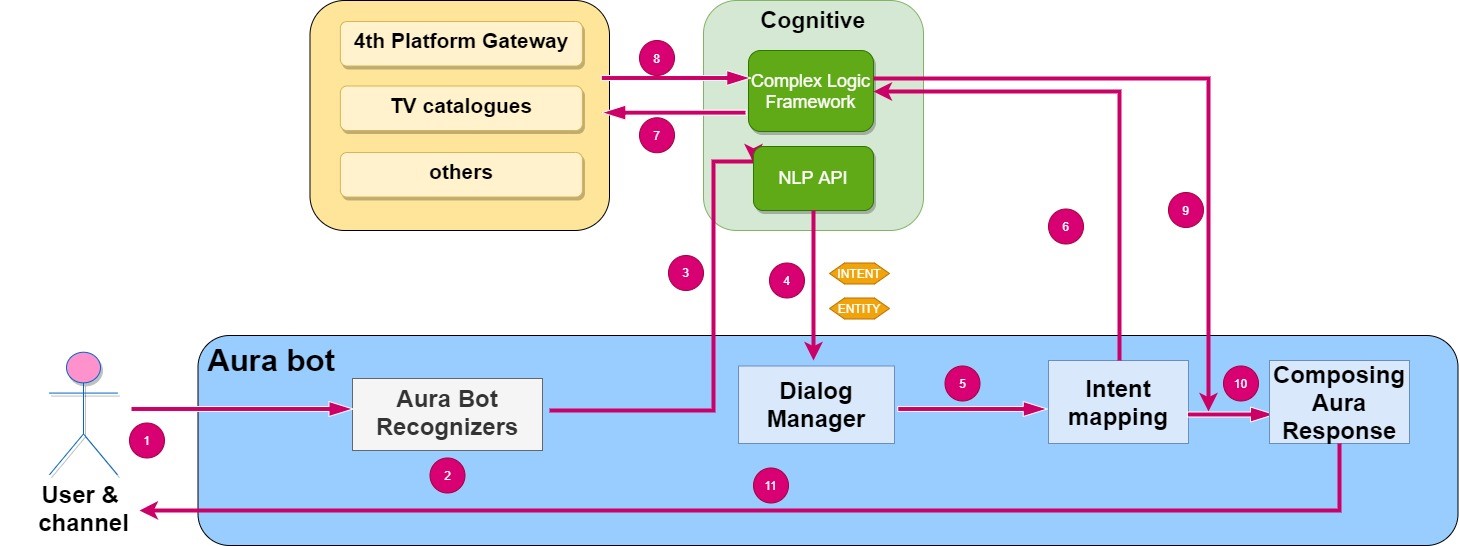
- An Aura user asks for a service/request (utterance) through a specific channel.
- aura-bot receives the user´s request. Firstly, aura-bot recognizers come into play.
- The corresponding recognizer summons Aura NLP for the recognition of the user’s utterance (in certain situations corresponding to auraCommands, the user’s request is understood directly by the bot).
- NLP returns the intent and associated entities in the user’s utterance.
- The recognized intent triggers a specific aura-bot dialog, in charge of the logic for the resolution of the use case.
- The dialog recognizes the complexity of the use case and, if required, summons the Complex Logic Framework.
Depending on the type of plugins, the bot will call a different API.
After that, the Complex Logic Framework selects the appropriate plugin among the ones existing on this specific type, based on the identified intent (mapping the intent with the plugin).
- The plugin executes the programmed tasks and calls different modules (Aura’s internal data, Kernel data, external databases, etc.) in order to fetch the information.
- The Complex Logic Framework receives the required data.
- The information is sent back to aura-bot.
- aura-bot composes the response to the user’s request.
- The response is provided to the user.
14.1 - Architecture and components
Aura Complex Logic Framework architecture and components
Architecture and main components that you should handle when working over Aura Complex Logic Framework
CLF architecture
Aura Complex Logic Framework is a docker container, meaning that it is configured as a lightweight, stand-alone, executable package of software that includes all the required elements to run an application.
The Complex Logic Framework architecture is schematically shown in the following figure, containing different elements described in the succeeding sections.
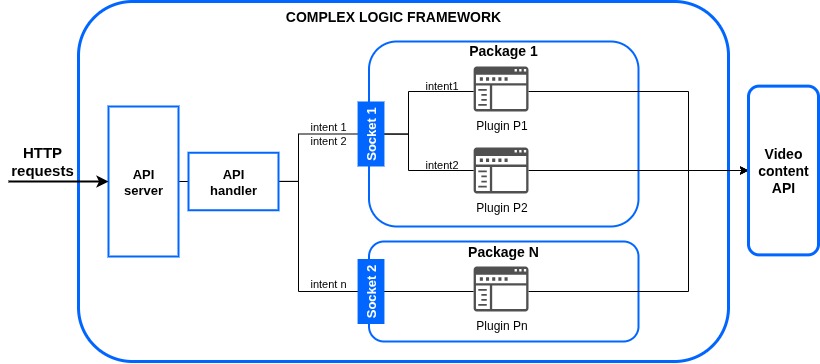
CLF main components
Sandbox
A sandbox is an isolated testing environment that enables users to run programs or execute files without affecting the application, system or platform on which they run and to test new programming code.
Plugins
Plugins in Aura Complex Logic Framework are components that add a specific feature to an existing computer program, enabling its customization.
The role of plugins within the Complex Logic Framework is to receive data, make the required computations and return an adequate response to the handler.
CLF manages different types of plugins, which are encapsulated in the sandbox. Moreover, it contains several global plugins, but it is possible for developers to add custom ones.
Some key features of CLF plugins are defined below:
-
Architecture allows each package of plugins to be deployed in its own environment: it is possible to have an isolated container deployed in an independent way containing all the plugins of a specific package (for instance, global plugins).
-
Each package is isolated by being run as a different process by a unique user with randomized name. The rationale behind this is to provide an isolated sandbox to make sure no package of plugins is a security risk. Thereby, each user has limited privileges and computational resources (memory, file descriptors and CPU time) and only runs one process for package.
-
The running packages can only receive data from a socket, and the appropriate plugin is then executed depending on both the plugin type and the intent contained in the data. The API handler is in charge of forwarding the data to the package, acting as a proxy, but it also checks the requests and transforms the responses back.
To ease working with this architecture, packages, users and sockets have the same random name. This name also appears in the information and error log files.
-
OBs can develop their own custom plugins in the Aura Complex Logic Global repository, with each plugin implemented as a class that inherits from PluginBase and overwrites run method. This method receives the request data and contains the logic of the plugin. It must also generate a response that will be returned to the API handler.
When a request is performed, depending on the intent, the request data will be forwarded to the corresponding plugin automatically. Note that two intents can trigger the same plugin but it is not possible to trigger two plugins with the same intent.
-
Each package of plugins is watched by a supervisor. If the package process crashes, it will be restarted automatically by supervisor. The causes of abrupt exit could be excessive consumption of resources (CPU time, memory or file descriptors) or plugin internal malfunction.
Stub
A stub, in the context of distributed computing, is a piece of code that is used to convert parameters during a remote procedure call (RPC). An RPC allows a client computer to remotely call procedures on a server computer.
The parameters used in a function call have to be converted because the client and server computers use different address spaces. Stubs perform this conversion so that the remote server computer perceives the RPC as a local function call.
API server
API server is the process that listens for requests. This API server is based on the cognitive API package and, in this case, is configured to run the Complex Logic module.
HTTP requests will be passed to the package API handlers according to the CLF configuration.
It is also important to mention that API server process is watched by supervisor (meaning that it is fault-tolerant).
API handler
In Aura Complex Logic Framework, API handlers are classes that inherit from BaseComplexLogicAPIHandler. They are responsible for dealing with HTTP requests through the following methods:
- Checking the request is valid.
- Checking that the response is in the correct format.
- Making a new request to the corresponding package process, which contains a group of plugins.
The first two items are implemented by the declaration of schemas that define the query request and the response. Plugin API handlers are only responsible for defining which request schema is accepted and which response is valid (also by using a schema).
The request to a specific package is made automatically by the system as long as the specific intent that summons the trigger is recognized. The configuration is described in plugins configuration.
API plugin
API plugin is an internal component based on the cognitive API package. It exposes the plugins contained in a package.
Kernel is the database where Telefónica stores all the data of its customers in a safe and reliable way, allowing users to control their data at the same time.
These data can be consulted through a Kernel API with the necessary permissions. From the Complex Logic Framework, the only way to access Kernel is through our connectors. The connectors are used, for example, to obtain customer invoices or offer the catalog of devices and services.
These connectors provide total security in order to avoid problems of wrong, malicious or not careful use by third party developers. For this purpose, prior to any request to Kernel, a check of the required permits is made.
CLF Sequence diagram
The following sequence diagram shows the functional flow of the Complex Logic Framework, starting with the request from aura-bot to the Complex Logic module.
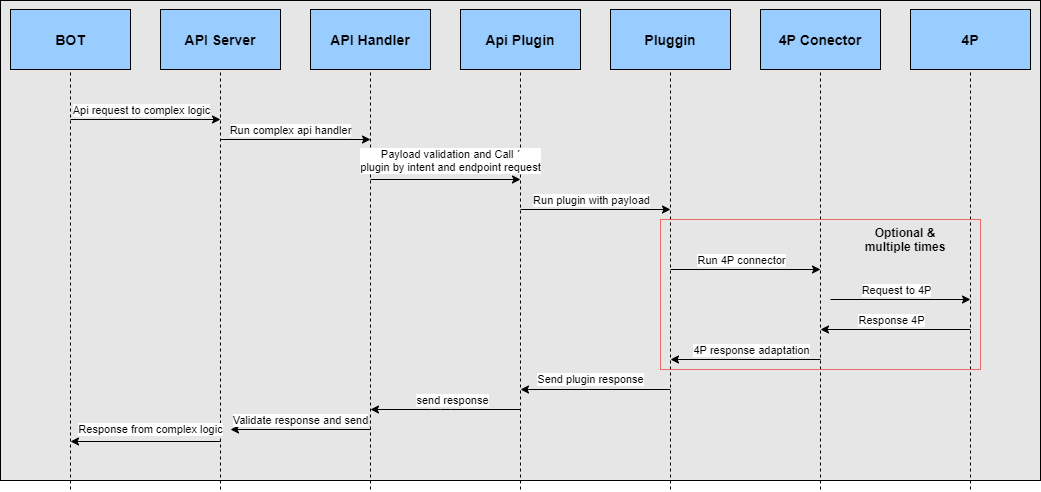
14.2 - Configuration
Aura Complex Logic Framework configuration
Description of the configuration required by the Complex Logic Framework, both operational configuration and configuration of plugins
Introduction
The configuration of the Complex Logic Framework has two different purposes, each of them supported by a configuration file:
General operational configuration
The file bootstrap.cfg contains the Complex Logic Framework operational config sections. This file is included in the CLF repository, within the folder:
~/aura-complex-logic-[country_code]/config/etc/bootstrap.cfg
⚠️ OBs must not modify these fields. If any modification is required, it must be adjusted after approval by the Aura Platform Team
The file follows the general structure shown hereunder:
[logging]
handlers = { . . . }
loggers = { . . . }
root = { . . . }
Logging
[logging]
handlers = {
'hdl1':{
'class':'logging.StreamHandler',
'formatter':'console',
'level': 'DEBUG'
},
'hdl2':{
'class':'logging.StreamHandler',
'formatter': 'simple',
'level': 'DEBUG'
}
}
loggers = {
'plugins': {
'level': 'DEBUG',
'handlers':[
'hdl1'
],
'filters': [],
'propagate': False
}
}
root = {
'level': 'DEBUG',
'handlers':[
'hdl2'
]
}
The main fields are explained below. However, for more details, developers are kindly requested to read the Python logging documentation.
-
handlers: This field configures a dictionary with different logging handlers. Each key is the name of a handler, and is composed of the following parameters:
class: It is configured with Python logging handlers (See Python documentation).formatter: It configures the format of logs. It must be filled with the labels json, string, console or simple.level: It is referred to the level of the logging event. It must be filled with the labels INFO, ERROR, WARN or DEBUG.
-
loggers: The corresponding value is a Python dictionary in which each key is a logger name and each value is a dictionary that describes how to configure the corresponding Logger instance:
level (optional parameter): Level of the logger.handlers (optional parameter): List of IDs of the handlers for this logger.filters (optional parameter): List of IDs of the filters for this logger.
-
root: This field includes the configuration for the root logger.
level (optional parameter): Level of the logger.handlers (optional parameter): List of IDs of the handlers for this logger.
Plugins Configuration
The file complex_logic.json includes the specific configuration for each plugin. It is included in the following path of the CLF repository:
~/aura-complex-logic-[country_code]/config/plugins/complex_logic.json
⚠️ OBs must not modify these files. If any modification is required, it must be adjusted after approval by the Aura Platform Team
{
"aura_clf_XX.plugins.plugin_1_name.plugin_1_class_name": {
"config": {
"sound_disabled_channels": ["channel_1", "channel_2"],
}
},
...
"aura_clf_XX.plugins.plugin_N_name.plugin_N_class_name": {}
}
Each plugin requires a specific configuration. This will be defined in a JSON file with the following structure:
- Class path: Path and identifier for the plugin.
- Open dictionary including the specific configuration of the plugin.
Enabling/disabling sound responses
Within the configuration dictionary of each plugin, you can include the sound_disabled_channels field to specify in which channels sound responses (both positive and negative) should be disabled for that plugin. This field must be a list of channel prefixes.
For example, if a channel prefix is included in this list, the plugin will not play any sound in its responses when the interaction occurs through that channel.
Currently, the configuration added in this file is not included in the production phase, therefore this file should only list the Plugins class path and keep an empty dictionary as configuration.
Disabling contingency or fallback modes for tv search use case
For the tv search use case, in the configuration dictionary of the plugin aura_clf_video.plugins.tv_search_plugin.TvSearchPlugin, you can include the contingency_disabled_channels field to specify if the contingency or fallback search mode is disabled for a specific channel. This field must be a list of channel prefixes.
{
"aura_clf_video.plugins.tv_search_plugin.TvSearchPlugin": {
"config": {
"contingency_disabled_channels": ["channel_1", "channel_2"],
}
},
...
}
14.3 - Files and libraries
Aura Complex Logic Framework files and libraries
Description of the files and libraries that integrate the Complex Logic Framework
requirements.txt file
This file contains Python module dependencies. By default, it includes two own libraries:
And other external ones used in the testing and verification stages:
flake8-htmlPylintpytest-pylintpytest-html
It is possible to include new dependencies in this file if required for the development of new plugins.
auracog-lib
auracog-lib library is a Python package containing a few basic classes & modules intended as helpers for Aura Cognitive applications, specifically:
- Configuration: it contains
AuConfig, wrapper for the standard Python ConfigParser with certain added functionality.
- Logging: it contains
LoggerWrapper, wrapper for the standard Python logging with certain added functionality.
- Testing: it contains functionality used in test development.
auracog-plugins-lib
auracog-plugins-lib contains the necessary utilities for all the plugins, such as validators and metrics used in verification and performance scripts or plugin_base, the base class of all the plugins.
plugin_base.py file
This is an essential internal file in Aura Complex Logic Framework for its proper performance. This file contains the base class PluginBase, from which all the plugins that are developed will inherit.
All the plugins developed will be initialized with a configuration and a logger that will be passed to them as a parameter and they will have to necessarily develop an asynchronous run method. The run method is the main method of the plugin and will develop the activity for which the plugin has been designed. This method receives data, a dict with the JSON request as a parameter and it will return the JSON response as a dict.
It is also possible to use other auxiliary methods if developers consider it.
from typing import Dict
from auracog_lib.aura_logging import logger_wrapper
from auracog_lib.code_utilities.type_hints_utilities import TypeHintsUtilitie
from auracog_lib.utils.exception import AuraAbstractException
class PluginBase:
def __init__(self, cfg: Dict, log: logger_wrapper.LoggerWrapper):
"""
Init method. No overload is required.
:param cfg: a dict with the configuration for plugins.
:param log: a logger object that implements the usual info, debug and error methods.
"""
self.cfg = cfg
self.log = log
async def run(self, data: TypeHintsUtilities.Json) -> TypeHintsUtilities.Json:
"""
Overload this methods in your custom plugins.
:param data: A dict with the JSON request.
:return: The JSON response that will be returned as a dict.
"""
raise AuraAbstractException
14.4 - Global plugins
Aura Complex Logic Framework global plugins
Global plugins developed in Aura Complex Logic Framework
Introduction
Plugins in Aura Complex Logic framework are components that add a specific feature, thus enabling its customization. They receive data, make the required computations and return an adequate response to the handler
Aura CLF contains several global plugins, but it is possible for developers to add custom ones in the Aura Complex Logic global repository.
This section describes the current catalog of Aura CLF global plugins developed by Aura Global Team. Currently, CLF only contains video plugins, suitable for TV use cases.
Aura CLF video plugins
This is a swagger whose role is the validation of the input for video plugins. It includes a sub-section for each plugin, corresponding to a specific TV use case.
The purpose of this swagger is to show the description models and examples for possible video plugin requests and responses.
ℹ️ Check the multiple example response of plugins: Success, Error invalid request, etc.
Access here to Input validation video plugin
TV search plugin
Plugin for the TV search use case:
TV display plugin
Plugin for the TV display use case:
TV content get info plugin
Plugin for the TV content get info use case:
Plugin for the TV vod epg information use case:
14.4.1 - Input validation video plugin
14.5 - API definition
Aura Complex Logic API
Complex Logic Framework API swagger documentation, which is the main swagger for all CLF plugins
Download swagger file
15 - Aura Redis Mongo Synchronizer
Aura Redis Mongo Synchronizer (ARMS)
aura-redis-mongo-synch (ARMS) is a service that allows the use of Redis and MongoDB to create a Bot Framework Context management as a two-level cache.
Find in the current documents the description of this component, its architecture, components and processes.
Aura Virtual Assistant component
Introduction
To implement a two-level cache strategy:
- Redis will be used as the first-level cache, with a short expiration time to speed up writing operations.
- MongoDB will be used as the second-level cache, with a high expiration time.
aura-redis-mongo-synchronizer (ARMS) will be responsible for transferring expired data from Redis to MongoDB.
The service is implemented as a web server just to make it easier to handle it and to connect with Aura monitoring systems, such as Prometheus. It is in charge of managing the expired data in Redis using the Pub/Sub system provided by Redis.
Aura Redis Mongo Synchronizer components
The following figure shows the main components of the aura-redis-mongo-sync.
Server
The web server is implemented using fastify, a very fast web framework for NodeJS.
The web server works only as the service controller, while all the synchronization tasks are performed by a module outside the service called aura-redis-mongo-sync or ARMS.
Modules
Redis Mongo Sync
It is responsible for synchronizing data between Redis and MongoDB.
It uses a publish/subscribe system provided by Redis to notify the module when to synchronize data from Redis to MongoDB, based on events generated by Redis regarding the changes in the status of the documents.
Controllers & Services
When the previous step is finished, the request lands on the controller.
Each controller processes the request through a service in charge of implementing the logic. Once the request has been processed, the controller prepares and sends the response.
There is a controller to manage requests associated with the server itself (generic controller) and a controller for each module, in charge of handling the requests of that specific module.
Generic controller
As indicated above, the generic controller handles requests to retrieve information of the status of the server itself.
healthz: It is used to check if the server is online returning a simple status response: {"status": "ok"}.lastevent: It returns the date of the last synchronization between Redis and MongoDB: { status: 'ok', lastEvent: DATE };shutdown: Service to be invoked mainly by Kubernetes cluster to perform a server graceful shutdown.
Data Storage
A new class has been created that implements the Bot Framework storage interface called RedisMongoDbStorage.
This class writes the context data to Redis and firstly, it reads the data from Redis. If this data does not exist in Redis, it fetches it from MongoDB.
This class is included in the aura-common-utilities repository. Check the Github repository for further details.
Data structure in Redis
Redis stores its data in key:value structures. This value can support different data structures.
In the following sections, the ones used to store the bot context are explained.
These structures support an expiration time so that Redis deletes them when the expiration time is reached, so the content has expired. The expiration of a record in Redis emits an specific event, of expired type, that can be handled by an external module.
Context (Bot Framework Context)
The bot context is stored in a key:string structure:
Key: context:[MONGO DATABASE NAME]:[MONGO COLLECTION NAME]:[MONGO CONTEXT INDEX KEY]
Value: The content of the context is stored in a string obtained by converting the Object context in JSON to string.
Expiration: [EXPIRATION]
Where:
- MONGO DATABASE NAME: Name of the database to use when ARMS writes this data in MongoDB.
- MONGO COLLECTION NAME: Name of the collection to use when ARMS writes this data in MongoDB.
- MONGO CONTEXT INDEX KEY: Key to use when ARMS writes this data in MongoDB.
When a key:value data expires in Redis, an event is emitted indicating which key contained the expired record (event => expired). The data can no longer be retrieved because Redis deletes value data before emitting the event and if this event is not processed, it will not recur, forcing us to use some auxiliary data structures in order to recover the expired data.
Shadow Keys
A Shadow Key is a key:void structure used to emit the event. As the expiration event returns a key, that will contain the current key of the context containing the data.
To improve efficiency, this shadow-key contains the key SHARD, which allows ARMS to subscribe only to certain shards to improve performance.
The number of shards is defined in the variable AURA_REDIS_CONTEXT_CACHE_SHARD_COUNT, which indicates that the algorithm to calculate the shard based on the key will generate numbers between 1 and the value of the variable.
It is important to notice that the number of shards configured in AURA_REDIS_CONTEXT_CACHE_SHARD_COUNT must be the same as the number of pods configured in the aura-redis-mongo-synchronizer.
Key: shadow-key:[SHARD]:context:[MONGO DATABASE NAME]:[MONGO COLLECTION CONTEXT]:[MONGO CONTEXT INDEX KEY]
Value: empty
Expiration: [REDIS CONTEXT DATABASE EXPIRATION]
When the service receives the expiration of this key, we can extract the shard and the real value from the context.
Active Context List
To ensure all data is synchronized, we need to keep in a list all the active context keys. By doing that, if an error occurs in the service and the expiration notifications are lost, we can recover data by periodically checking this list.
The data structure to be used is key: score-List. The score list contains a list of values with a string field and a numeric field by which the data can be sorted. The string field is used to store the key and the numeric field to store the expiration date.
In this way, we can retrieve those expired records that have not been processed, as items are removed from the list once they are synchronized.
Key: active-context:[SHARD_VALUE]
context:[MONGO DATABASE NAME]:[MONGO COLLECTION CONTEXT]:[MONGO CONTEXT INDEX KEY 1] DATE_1
context:[MONGO DATABASE NAME]:[MONGO COLLECTION CONTEXT]:[MONGO CONTEXT INDEX KEY 2] DATE_2
...
context:[MONGO DATABASE NAME]:[MONGO COLLECTION CONTEXT]:[MONGO CONTEXT INDEX KEY N] DATE_N
To store these elements, we will use partitioned lists in SHARD mode, that is, they will be included in the list that corresponds to them according to their KEY. The SHARD_VALUE is a number that is calculated from the key and the module obtained by dividing this number by the number of partitions that are configured.
For example, there is a series of lists to avoid collisions between PODS of the service (ARMS). That is, if the KEY1 key returns 301 (this data is obtained by performing an operation on the content of the key) this is divided by the number of partitions, 5 for example, and the module +1 is obtained, to avoid the 0. This indicates that the list where it will be stored will be active-context:2.
The execution of this process is based on the current system load. The variables associated to the execution period are:
- AURA_REDIS_CONTEXT_CACHE_CACHE_CHECK_UNPROCESSED_INTERVAL_MIN, which indicates in seconds the minimum time that will be set.
- AURA_REDIS_CONTEXT_CACHE_CACHE_CHECK_UNPROCESSED_INTERVAL_MAX, which indicates in seconds the maximum time for the interval.
The system will recalculate the next run based on the load. If the number of elements to be processed is very high, the interval will be reduced until it reaches the minimum, while if the load is low, the interval will be increased until it reaches the maximum.
SHARD variables
To manage the SHARD and the list to be selected by the ARMS, two variables come into play in Redis stored in the key:string structure.
- AURA_REDIS_CONTEXT_CACHE_SHARD_COUNT : Number of lists to generate (partitions).
- AURA_REDIS_CONTEXT_LAST_SHARD_PROCESSED: Partition to manage at that moment, that is, when a service requests this data, one is added to it so that the next service that requests it can access the next partition, and so on.
- AURA_REDIS_CONTEXT_LAST_INDEX_SHARD_PROCESSED: This variable is used to assign event subscriptions in an orderly fashion. For example, if we have two ARMS services and the AURA_REDIS_CONTEXT_CACHE_SHARD_COUNT is set to four, then the first service will subscribe to 1 and 2 and the second service to 3 and 4. This order of assignment is done by incrementing this environment variable.
Synchronization Flows
Read Data
The Bot Framework components will read data in the following order:
- They will try to read data from Redis.
- If Redis does not return data, they will try it in MongoDB.
ARMS will read data in two situations:
- When an expiration event is issued, ARMS reads the corresponding data, obtaining the context key contained in the expired KEY.
- When the active context control service runs (it does it periodically) and it has some expired context that must be synchronized.
Write Data
- Bot Framework components will write all their data in Redis.
- ARMS will write the synchronized records in MongoDB.
NOTE: ARMS also writes data in Redis but only to control its core and internal behavior, incrementing SHARD, updating active context lists, etc.
Distribution of the event subscription
As previously mentioned, every time a Shadow-Key expires in Redis, it emits an event that will be received by the ARMS services that are subscribed to that event.
Now, as the Shadow-Key contains the SHARD of the real key of the data, we can distribute the events among different ARMS to improve performance and avoid network overload.
For the assignment of the events to subscribe, there is a method that is executed every certain time. The value is in the variable AURA_REDIS_CONTEXT_CACHE_CHECK_INDEX_SHARD_INTERVAL and is measured in seconds.
Steps to generate event subscription
- Save the current state of the service: This saves, in a Redis structure, the identifier of the current ARMS and the current time.
- Consult the number of ARMS services available: This is done by consulting the previous structure, obtaining those services that have been recently updated.
- Calculate the number of events to subscribe: This is done by dividing AURA_REDIS_CONTEXT_CACHE_SHARD_COUNT, which contains the number of partitions, by the number of services. There is a variable that can limit this assignment, AURA_REDIS_CONTEXT_CACHE_MIN_SHARD_BY_NODE: if this variable is greater than the previous result, the value of the variable is used. For example, if the result is 1, but this variable has the value 2, the service must subscribe to 2 events.
- Assign the events: Once the number of events to subscribe to is determined, the AURA_REDIS_CONTEXT_LAST_INDEX_SHARD_PROCESSED variable is consulted and incremented. The value to assign is the module between the returned value and the value of AURA_REDIS_CONTEXT_CACHE_SHARD_COUNT. In this way, it will assign consecutive values between 1 and the AURA_REDIS_CONTEXT_CACHE_SHARD_COUNT.
- Subscription to Redis: Once the SHARDs to be subscribed have been assigned, we only need to disconnect the events that do not match the current selection and connect the ones we do not have connected.
To obtain an optimal performance, ideally the number of AURA_REDIS_CONTEXT_CACHE_SHARD_COUNT should at least match the number of ARMS services.
Example of distribution for AURA_REDIS_CONTEXT_CACHE_SHARD_COUNT = 5, and adding ARMS services until reaching 5.
15.1 - Environment variables
Aura Redis Mongo Synchronizer environment variables
Notation
List of environment variables defined for aura-redis-mongo-sync component
- Properties marked in bold are mandatory.
- Properties marked in italics are optional.
| Property |
Type |
Description |
Modifiable by OB? |
| AURA_LOGGING_EXTRA_TIME_METRICS |
Boolean |
Extra time metrics for logging. By default: false. |
No |
| AURA_LOGGING_LEVEL |
String |
Level to be used in monitoring logs, from more to less verbose: 'TRACE', 'DEBUG', 'INFO', 'WARN', 'ERROR', 'FATAL', 'OFF'. By default: INFO. |
Yes |
| AURA_MONGODB_BOT_COLLECTION_CACHES_INDEX_TTL |
Number |
Lifetime, in seconds, for the index of the caches collection. By default: 3600 |
No. Only if validated with Aura Global team, because it is related to other values. |
| AURA_MONGODB_BOT_COLLECTION_CONTEXT |
String |
Name of the collection where the context is stored. By default: aura-context. |
No |
| AURA_MONGODB_BOT_DATABASE |
String |
Name of the database where the bot collections are stored. By default: aura-bot |
No |
| AURA_MONGODB_PASSWORD |
String |
Password of the user that accesses MongoDB. |
No. Only if MongoDB credentials must be changed. |
| AURA_MONGODB_POOL_SIZE |
Number |
Pool size of the MongoDB. By default: 60. |
No. |
| AURA_MONGODB_SSL |
Boolean |
Flag to indicate if MongoDB connection uses SSL or not. By default: true. |
No |
| AURA_MONGODB_URI |
String |
URI of the MongoDB |
No |
| AURA_MONGODB_USERNAME |
String |
Username of the MongoDB |
No |
| AURA_REDIS_CONFIGURATION_PREFIX |
String |
Prefix for Redis configuration keys. By default: aura-config: |
No |
| AURA_REDIS_CONTEXT_CACHE_PREFIX |
String |
Prefix for Redis context cache keys. By default: context: |
No |
| AURA_REDIS_SUBSCRIPTIONS_EVENTS |
String |
Comma-separated list of the types of Redis messages to trigger subscriptions events. By default: expired,evicted |
No |
| AURA_REDIS_CONTEXT_CACHE_SHADOW_KEY_PREFIX |
String |
Prefix for Redis shadow key cache keys. By default: shadow-key: |
No |
| AURA_REDIS_CONTEXT_CACHE_ACTIVE_CONTEXT_PREFIX |
String |
Prefix for Redis active context cache keys. By default: active-context: |
No |
| AURA_REDIS_CONTEXT_CACHE_LOCK_PREFIX |
String |
Prefix for Redis lock context cache keys. By default: lock-context: |
No |
| AURA_REDIS_CONTEXT_CACHE_MIN_SHARD_BY_NODE |
Number |
Number of minimal shards assigned to a service. By default: 1 |
No |
| AURA_REDIS_CONTEXT_CACHE_CHECK_INDEX_SHARD_INTERVAL |
Number |
Number of seconds to wait before recalculate shards to subscribe events. By default: 60. |
No |
| AURA_REDIS_CONTEXT_CACHE_CHECK_UNPROCESSED_INTERVAL_MIN |
Number |
Minimum number of seconds to wait before checking unprocessed contexts. By default: 10. |
No |
| AURA_REDIS_CONTEXT_CACHE_CHECK_UNPROCESSED_INTERVAL_MAX |
Number |
Maximum number of seconds to wait before checking unprocessed contexts. By default: 120. |
No |
| AURA_REDIS_CONTEXT_CACHE_CHECK_UNPROCESSED_FACTOR |
Number |
Factor to increment or decrement interval to check unprocessed contexts. By default: 1.1. |
No |
| AURA_REDIS_CONTEXT_CACHE_UNPROCESSED_RANGE |
Number |
Number of unprocessed contexts to check by turn. By default: 10. |
No |
| AURA_REDIS_CONTEXT_CACHE_UNPROCESSED_RANGE_FACTOR |
Number |
Factor to divide the unprocessed range. By default: 5. |
No |
| AURA_REDIS_CONTEXT_CACHE_SHARD_COUNT |
Number |
Number of shards to generate lists for storing unprocessed context. For performance reasons, it is important to configure the same number as the number of pods of the aura-redis-mongo-synchronizer. |
No |
| AURA_REDIS_CONTEXT_CACHE_TTL |
Number |
Time in seconds to store a context in cache. By default: 60. |
No |
| AURA_REDIS_LOCK_CONTEXT_CACHE_TTL |
Number |
Time in seconds to store a lock context in cache. By default: 60. |
No |
| AURA_REDIS_MODE |
String |
Mode of Redis distribution. Values: Cluster, Sentinel or Single. By default: Single. |
No |
| AURA_REDIS_PREFIX |
String |
Prefix that will be used by all Redis keys when using redis-connector. This allows mixing in a single Redis service messages coming from different environments in the same Azure subscription. |
No |
| AURA_REDIS_SENTINEL_INSTANCE_NAME |
String |
Name of the Redis instance. Used in Sentinel mode. |
No |
| AURA_REDIS_HOSTS |
String |
A string with a list of nodes (host:port) separated by comma. For example: “localhost:port,localhost2:port2”. Default: ‘127.0.0.0:6379’ |
No |
| AURA_REDIS_DATABASE |
Number |
Database number for Single or Sentinel mode. By default: 0. |
|
| AURA_REDIS_PASSWORD |
String |
A string with the password of Redis. |
No |
| AURA_REDIS_MAX_RECONNECT_RETRIES |
Number |
Number of retries to connect to Redis. By default: 25. |
No |
| AURA_REDIS_MAX_RECONNECT_INTERVAL |
Number |
Time in milliseconds to wait before reconnecting to Redis. By default: 5000. |
No |
| AURA_REDIS_USE_CONNECTION_POOL |
Boolean |
Flag to indicate to use a connection pool for Redis connections. Default: true. |
No |
| AURA_REDIS_CONNECTION_POOL_MIN |
Number |
Minimum number of connections in the pool. Default: 2. |
No |
| AURA_REDIS_CONNECTION_POOL_MAX |
Number |
Maximum number of connections in the pool. Default: 100. |
No |
| AURA_REQUEST_TIMEOUT |
Number |
Number of seconds to wait a request. By default: 30 * 1000. |
No |
| AURA_SERVER_PORT |
Number |
Port where the server will be listening. By default: 8989 |
No |
| AURA_SERVER_RETRIES |
Number |
Number of retries made by the server in case of error in an HTTP request. By default: 3. |
No |
| AURA_SERVER_RETRY_DELAY |
Number |
Delay between retries in case of error. By default: 100. |
No |
| AURA_SERVER_RETRY_FACTOR |
Number |
Factor to multiply delay for every HTTP request retried. By default: 10. |
No |
| AURA_SERVICE_ENVIRONMENT |
Number |
Type of environment: 'DEV', 'PRE', 'PRO'. By default, DEV. It is used during locale translation, to get the correct text reference. |
No |
| AURA_SHUTDOWN_GRACEFUL_TTL |
Number |
Time in milliseconds to complete the SHUTDOWN signal and p process all the messages in queue before SIGTERM. By default: 25 * 1000 |
No |
| AURA_VERSION |
String |
Aura version. It is set by the deployment process. |
No |
16 - Aura microfrontend base
Aura microfrontend base
Description of aura-microfrontend-base, foundational component for the development of user interfaces in Aura ecosystem
Aura Virtual Assistant component
Introduction
aura-microfrontend-base is a foundational component that provides a common structure and libraries for the development of user interfaces in Aura ecosystem (Aura Virtual Assistant and ATRIA).
Its microfrontend component is a small, self-contained element that is part of a larger microfrontend architecture. It follows the same principles as microservices, but for the frontend, allowing independent development, deployment and scaling of different parts of a web application.
As defined before, this is a base component over which certain interfaces will be developed, but it will not be directly productized.
Technical foundations
This is a Next.js project bootstrapped with create-next-app.
The project leverages the following technologies and tools:
- React: A JavaScript library for building user interfaces, used as the core framework for component development.
- @telefonica/mistica: A design system and component library that provides a set of reusable UI components and styles, ensuring consistency and best practices in UI development.
- Tailwind CSS: A utility-first CSS framework for styling components and layouts.
- TypeScript: A strongly typed programming language that builds on JavaScript, ensuring type safety and better developer experience.
- Microfrontend Architecture: Enables independent development, deployment, and scaling of frontend components.
- Dynamic Imports: Used to load microfrontend components at runtime, improving modularity and performance.
- Environment Variables: Configuration is managed through environment variables like
AURA_SITE_CONFIG_PATH to ensure flexibility and adaptability across environments.
These foundations ensure scalability, maintainability, and a seamless developer experience.
Architecture and components
aura-microfrontend-base is composed of two main components:
- Core Framework: The foundational Next.js structure that handles routing, rendering, and component lifecycle.
- Dynamic Component Loader: The system responsible for loading and rendering components based on the site configuration.
Basic architecture diagram
sequenceDiagram
participant Project as user request
participant Config as site-config.json
participant Pages as Page Manager
participant Layout as Layout Engine
participant ComponentLoader as Component Loader
participant DOM as Browser DOM
Project->>Config: read site configuration
Config-->>Project: return site structure
Note over Project: site path or default page
Project->>Pages: setup page routes from config
Pages->>Layout: process page layout configuration
Layout->>Layout: setup container with containerClass
Layout->>Layout: create grid with gridClass
Note over Layout: process components by position
loop for each component
Layout->>ComponentLoader: request component by importType
alt importType is "internal"
ComponentLoader->>ComponentLoader: load from local components folder
else importType is "external"
ComponentLoader->>ComponentLoader: load from library dependency
else importType is "microfrontend"
ComponentLoader->>ComponentLoader: load dynamically from remote source
end
ComponentLoader-->>Layout: Return component
Layout->>Layout: Apply className and position
Layout->>Layout: Inject attributes and props
Layout->>DOM: Render component in grid position
DOM-->>Layout: Component rendered
end
Layout-->>Pages: Page layout rendered
Pages-->>Project: page configured and route ready
Project->>Project: start listening for navigation
Server features
The server component of aura-microfrontend-base provides:
- Dynamic Routing: Routes are generated based on the configuration file and mapped to corresponding components.
- Server-Side Rendering (SSR): Components can be rendered on the server for improved performance and SEO.
- API Integration: Built-in capabilities for connecting to backend services and APIs.
- Environment Variable Management: Configuration is handled through environment variables for different deployment environments.
- Development Server: Local development environment with hot-reloading for a smooth development experience.
Configuration
The AURA_SITE_CONFIG_PATH environment variable must be set to point to your project’s configuration file, as in the example below:
AURA_SITE_CONFIG_PATH=site-config.json npm run dev
aura-microfrontend-base configuration file must be a valid JSON that defines the structure of the site, including the layout of the pages and the components to render.
The configuration file must follow this structure:
{
"mainPage": "home",
"pages": [
{
"id": "home",
"name": "Home",
"path": "/home",
"layout": {
"containerClass": "min-h-screen flex flex-col container mx-auto",
"gridClass": "grid grid-cols-1 grid-rows-[200px_1fr] flex-1",
"components": [
{
"library": "@telefonica/example-library",
"componentName": "Header",
"position": 1,
"importType": "external",
"className": "col-span-2 row-span-1"
},
{
"componentName": "TestComponent",
"position": 2,
"importType": "internal",
"className": "h-full col-span-1 row-span-2"
},
{
"componentName": "TestPlugin",
"position": 3,
"importType": "microfrontend",
"className": "h-full col-span-1 row-span-2",
"attributes": {
"API_ENDPOINT": "${AURA_MICROFRONTENDS_SERVER_HOST}/api/plugin-test",
"REFRESH_INTERVAL": "1000"
}
}
]
}
}
]
}
Configuration fields
mainPage: Default page ID to load when accessing the root pathpages: Array of page configurations
id: Unique identifier for the pagename: Display name of the pagepath: URL path for the pagelayout: Container configuration
- containerClass: Tailwind classes for the main container
- gridClass: Tailwind classes for the grid layout
- components: Array of component configurations
- library: (Optional) External library name
- componentName: Name of the component to render
- position: Order in the layout
- importType: Type of component (internal, external, or microfrontend)
- internal: Components that are part of the current project and are located in the components directory
- external: Components from external libraries (like @telefonica packages) that are installed as dependencies
- microfrontend: Components that are loaded dynamically from a remote server, allowing for runtime integration of independent applications
- className: Tailwind classes for the component
- attributes: (Optional) Additional component properties
Technical guidelines
Guides to manage the aura-microfrontend-base component:
17 - Aura widget
This section contains the technical documentation of Aura widget components.
⚠️ This component is not available in the current Aura Platform release
The current documentation about Aura widget component includes:
- Aura channels factory in charge of the integration of aura-bot in web and mobile environments (iOS and Android).
17.1 - Aura channels factory
Aura channels factory
Description of the list of Aura channels factory component
Introduction
Aura channels factory is a component that allows an easy integration of aura-bot in web and mobile environments (iOS and Android).

Class diagrams
@telefonica/aura-channels-cli
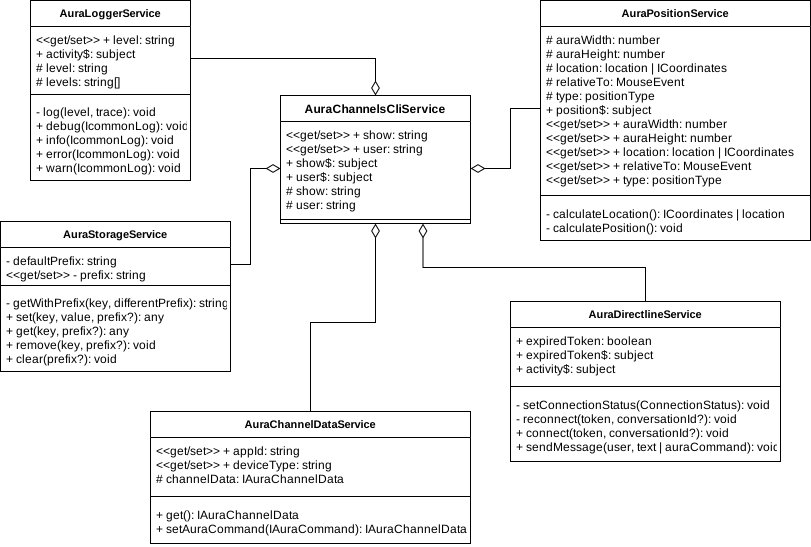
@telefonica/aura-channels-views
// TODO:…
Communication flow
Request flow of a message to aura-bot from a web container or native app.
sequenceDiagram
web/app ->> container: message
container ->> cli: command(message)
cli -->> aura: request directline
aura -->> cli: response directline
cli ->> container: subscribe(message)
container ->> view: emit message
note over container, view: parser and render message
view ->> container: render view
container ->> web/app: view response
How to use
Here are some examples of use. You can see the documentation of all available commands.
Add webcomponent
Here is an example of how to add the component to your website.
<!-- add this code in body tag of your website -->
<aura-component></aura-component>
<script type="text/javascript" src="http://<end-point>/aura-component.js"></script>
Entry point
It is possible to change position of default entry point. For example:
aura.position.location = 'top-left';
Or generate our own entry point, example:
<!-- add this code inside your html -->
<button onclick="myEntryPoint(event)">Relative to this element</button>
// add this function inside the scripts of your page.
function myEntryPoint(event) {
aura.position.type = 'fixed';
aura.position.relativeTo = event;
aura.position.location = 'bottom-left';
aura.show = !!aura.show;
}
Setting up a channel
The following is an example of how to set up communication for a channel. For example:
window.onload = () => { // you need to wait until the component is loaded.
// channel user.
aura.user = '<user>';
// channel identifier.
aura.channel.appId = '<channelId>';
// directLine token.
aura.directline.connect('<token>');
// send an message.
aura.directline.sendMessage('Hi!');
// send an command.
aura.directLine.sendMessage({ title: 'onBoarding', value: { intent: 'intent.getOnboarding' }});
};
aura.user: property to define a user. Otherwise, the system will provide an anonymous user.aura.channel.appId: property to define a Aura channel. By default, the system will provide with ‘default’.aura.directline.connect(): function to connect to Aura environment. DirectLine token is required.aura.directline.sendMessage(): function to send message to aura-bot.
To obtain a DirectLine token, you can use the Aura services. For example:
curl --location --request GET 'https://<environment>.auracognitive.com/aura-services/v1/token' \
--header 'Authorization: <api-key>' \
--header 'Access-Control-Allow-Origin: *'
Messages types:
| Type |
Value |
Description |
| CLEAN |
|
Clean previus messages. |
| LARGE.TEXT |
string |
Used as a title introducing an specific view, brief and direct. |
| MEDIUM.BOLD.TEXT |
string |
It is mainly used to format the transcription of what the user says. Always in the top of the screen. |
| MEDIUM.TEXT |
string |
Mainly used to format Aura´s responses but can also be found in the onboarding and help preceded by a title component. |
| SMALL.ITALIC.TEXT |
string |
It is used when Aura quotes voice commands as no clickable suggestions. Always in between quotation marks. |
| EXTRA.SMALL.TEXT |
string |
Different than Aura´s insight, smaller and used to clarify some concepts, within conversation but outside the dialog with Aura. |
| BUTTONS |
object |
Used to render buttons. |
| ADAPTIVECARD |
adaptive schema |
Used as a rich text card, more information |
| HEROCARD |
coming soon |
Used as a rich text card. It allows to have a title, text, image and buttons. |
| ALFRED |
object |
Used to render Alfred response. |
Rendering clean and text messages
The owner and containers can create messages in the following way:
aura.container.render({ type: 'CLEAN' }); // Clean messages.
aura.container.render({ type: 'MEDIUM.BOLD.TEXT', value: 'hello' }); // User message.
aura.container.render({ type: 'MEDIUM.TEXT', value: 'Hi!' }); // Aura response.
// Or send an array of messages:
aura.container.render([
{ type: 'CLEAN' },
{ type: 'MEDIUM.BOLD.TEXT', value: 'hello' },
{ type: 'MEDIUM.TEXT', value: 'Hi!' }
]);
The owner and containers can create buttons in the following way:
aura.container.render({
type: 'BUTTONS',
value: [
{
type: 'postBack',
title: 'Suggestion button',
value: {
type: 'suggestion',
intent: 'intent.command',
entities: []
}
},
{
type: 'openUrl',
title: 'xternal link button',
value: 'https://www.google.com/'
},
{
type: 'imBack',
title: 'title button',
value: 'value button',
channelData: {
substyle: 'hightlighted'
}
}
]
});
BUTTON TYPE
| Button |
Type |
Description |
| Suggestions |
postback |
Generation of recommended basic suggestions |
| Actions |
imback |
Generation of Yes / No actions |
| External Links |
posturl |
Link to external page |
BUTTON TITLE
Text rendered inside the button
BUTTON VALUE
On Suggestions and Actions, the message sent to Aura when the user clicks the button
On External Links, the url opened when the user clicks the button
BUTTON SUBSTYLE
In channelData object, we can add as many properties as we wish. In substyle property, we are indicating if the button has a highlighted style. If we don’t include this substyle indication, the button appearance will be the default.
Rendering alfred response
The owner and containers can create buttons in the following way:
aura.container.render({
type: 'ALFRED',
value: {
greetings: 'Ich kann dir mit diesen Themen helfen',
elements: [
{
text: 'Rechnung',
display_text: 'Rechnung',
icon: 'https://auraapcurrent16f444bd7c.blob.core.windows.net/static-resources/libraries/alfred/default/images/xxxhdpi/icn-al-assistant-bill.png?sv=2018-11-09&si=static-resources-policy-ap-current&sr=c&sig=Pam5HyRzlW43cpM/pJTdswam2qAG9zD8xdV641iMtjY%3D',
is_suggestion: false,
user_type: [ 'monomsisdn'],
subscription_type: [ 'postpaid', 'control'],
type: 'navigation',
elements: [
{
text: 'Letzte Rechnung',
display_text: 'Letzte Rechnung',
type: 'button',
is_suggestion: true,
user_type: [ 'monomsisdn' ],
value: {
intent: 'intent.billing.check',
entities: []
},
subscription_type: ['postpaid', 'control']
},
{
text: 'Higher charges, why?',
display_text: 'Higher charges, why?',
type: 'button',
is_suggestion: true,
user_type: [ 'monomsisdn'],
value: {
intent: 'intent.billing.unusual',
entities: []
},
subscription_type: ['postpaid', 'control']
}
]
},
{
text: 'FAQs',
display_text: 'Puedo ayudarte con',
icon: 'https://auraapcurrent16f444bd7c.blob.core.windows.net/static-resources/libraries/alfred/default/images/xxxhdpi/icn-al-assistant-faqs.png?sv=2018-11-09&si=static-resources-policy-ap-current&sr=c&sig=Pam5HyRzlW43cpM/pJTdswam2qAG9zD8xdV641iMtjY%3D',
is_suggestion: false,
user_type: ['all'],
subscription_type: ['all'],
type: AlfredElementType.Navigation,
elements: [
{
text: 'Wo finde ich den Einzelverbindungsnachweis?',
display_text: 'Wo finde ich den Einzelverbindungsnachweis?',
type: 'text',
is_suggestion: false,
user_type: ['all'],
subscription_type: ['all']
},
{
text: 'Aparelho bloqueado',
display_text: 'Aparelho bloqueado',
type: 'text',
is_suggestion: false,
user_type: ['all'],
subscription_type: ['all']
}
]
}
]
}
});
ELEMENT TYPE
| Element render |
Type |
Description |
| NavigationButton |
navigation |
Navigation button |
| Button |
button |
Clickable suggestions |
| Text |
text |
Non clickable suggestions |
ELEMENT TEXT
Test sent to aura
ELEMENT DISPLAY_TEXT
Text rendered as title
ELEMENT ICON
Icon url rendered as image on navigation button
ELEMENT IS_SUGGESTION
Flag to check if is a suggestion
ELEMENT USER_TYPE
Type of user
ELEMENT SUBSCRIPTION_TYPE
Type of subscription
ELEMENT VALUE
On Suggestions and Actions, the message sent to Aura when the user clicks the button
ELEMENT ELEMENTS
Array of child elements
STYLES ARQUITECTURE
One of the requirements of the project is the owner must have the chance to change styles like colors, fonts, etc. Some of these styles are on libraries (cli and views) and we have to import them to the containers (web and native) and share them on dist folder.
HOW WE DO THE DISTRIBUTION
The owner will have different ways to modify or add skins, these ways are explained above. To allow these features our sass structure is:
Cli library styles:
On CLI library, inside assets folder, we define the different themes of Telefonica: Default, O2, Vivo, Movistar. All these sass files are distributed for their use on containers.
Views library styles:
In this library we have defined the aura components such as buttons, text, cards… There are some styles of those components (colors, fonts, backgrounds) allowed to change by the owner. All of these dynamic styles are on assets/skins/skin.sass. If in the future we create more components, we need to include dynamic styles here. Not-dynamic styles (withs, paddings, margins…) are added on the corresponding sass file on each component.
Containers styles (web and native)
On containers the organization is very similar to the Views library: Not-dynamic styles are added on the corresponding sass file on each component. Dynamic styles are all on skins/default.sass. In this file, we import as well the default theme from cli library and dynamics styles from views library. The file skin.sass is a skin provided for the owner use.
Further, on containers we save on dist directory different skins files for each theme coming from cli library. On dist/assets/skins we have vivo, movistar, o2, default and skin. These files contain all the styles coming on skin/default.sass but applying the different themes. We also convert them to css. All this process is made on built.ts file.
HOW THE OWNERS CAN CHANGE STYLES
Owner wants to change the main theme
When the owner wants to change to another theme like o2 or vivo, they just need to choose the desired theme we provide on dist folder. Right now, these styles are not defined yet and inside there is fake data. But in the future, we will define these themes with the corresponding corporative colors and fonts
Owner wants to change a few styles or colors
Owner can modify the CSS provided on dist folder. In this case, they just need to modify the desired styles on default.css file.
Owner wants to create a completely personalized theme and styles
Owners can add their own style on dist/assets/skins/skin.css. They can change as well the main font family. Then, they need to execute the function:
aura.skin.change({
style: 'skin.css',
fonts:[
{
fileName: 'OfficinaSerifITCTTBook.woff',
family: 'OfficinaSerifITCTTBook',
weight: 500,
style: normal
format: 'woff'
},
{
fileName: 'OfficinaSerifITCTTBold.woff',
family: 'OfficinaSerifITCTTBold',
style: italic
weight: 800,
format: 'woff'
}
]
});
18 - APIs documentation
APIs documentation
Index of Aura Virtual Assistant and ATRIA APIs definition documents
APIs belong to both Aura Virtual Assistant and ATRIA
Introduction
An application programming interface (API) is a software interface that allows two applications to interact with each other without any user intervention. The API is composed of a collection of software functions and procedures for creation of applications to access features or data of a system, application or other service.
This section contains all the information related to Aura APIs, both the ones focused on internal use and others used by Aura’s channels and users to handle their conversations.
Most of our services lay on OpenAPI definitions v3.
APIs documentation is provided within the documentation for each specific component. Select the component of your interest and find the available APIs.
Select the specific API in the left menu and access to the corresponding section to find the API definition document.
Available APIs