This is the multi-page printable view of this section.
Click here to print.
Return to the regular view of this page.
Aura Bot as a skill
Aura Bot as a skill
aura-bot is Aura’s neuronal network in charge of core features in Aura Virtual Assistant.
Find in the current documents the description of this component, its architecture, components and processes.
Aura Virtual Assistant component
Introduction
aura-bot is an HTTP server, based on Microsoft Bot Framework. It is built in Typescript using the node.js SDK of Bot Framework. As an HTTP server, it uses Express.js.
aura-bot is Aura’s neuronal network, where it can be considered as a Bot Development Platform itself. In the recent distributed architecture, aura-bot is the only skill on the system that handles all requests, although the new entry point to the system is now the root bot called aura-groot, that redirects all requests to the only skill in order to access Aura through diverse communication channels and interacts with every Aura system or component in order to provide Aura users with the intended answer or requested service.
The following flowchart shows the complete conversational process executed by aura-bot.

Aura Bot functionalities
The main functionalities in charge of aura-bot are users’ sign up, authentication validation process and conversational process.
Apart from them, there are other processes managed by aura-bot that can be executed in order to customize the bot, activate other components, etc.
Find here all the information related to Aura Bot processes.
Aura Bot components
aura-bot components can be classified into different categories:
- Aura Bot Platform components, which are components aura-bot has as a BotFramework bot: dialogs, middlewares, recognizers, Bot framework adapter, Activity Handler, etc.
- Other components that have been developed within aura-bot to provide it with a specific functionality, such as plugin manager or routing manager.
- Moreover, the databases used by aura-bot.
Find detailed information of all of them in Aura Bot components.
The repository aura-bot-platform has a folder layout inside the src folder, to organize the code according to functionality groups.
In the src root folder, only main files should be placed, such as index.ts, or main server file server.ts (it was app.ts in aura-bot).
src/bots
At the beginning, only the file aura-bot.ts is hold here, that is the main ActivityHandler (a kind of replace of previous UniversalBot).
In a near future, more Bot Builder adapters could be located here.
src/config
This folder contains files that load configurations and that are required in other places, such as channel configuration, environment variables, etc.
src/db
This folder contains files that manage and connect to databases, such as MongoDB.
src/events
The files handling events (such as ModuleObserver subclasses) should be placed in this folder.
src/dialogs
This folder contains the main dialog (main.ts) and custom prompts, as use case dialogs will be located in libraries, loaded as dependencies.
src/make
This folder contains the code related with joining all the library-specific data with global one during the make-up process.
src/middlewares
This folder contains abstract middleware base classes, and specific middleware implementation (final classes).
src/middlewares/recognizers
This folder contains all the recognizers, such as NLP recognizer, Aura Command recognizer, etc.
src/models
Files located within this folder will have exported types and interfaces required in different parts of the code (types and interfaces required only within a file could be self contained).
src/modules
This folder contains independent code blocks, that could be exported as a reusable packages if required in different components, such as cache manager, locale manager, etc.
src/plugin
This folder contains the modules in charge of loading plugins: charging dialogs, middlewares, delivery configuration for these components, etc.
src/routing
This folder contains the code related with intent-to-dialog routing, as this is not part of Bot Builder anymore.
src/utils
This folder contains utility classes and methods that are not part or any other block. We should maintain this folder organized and tidy, to avoid lots of unspecific files.
1 - Architecture
Aura Bot architecture
Description of Aura Bot architecture and starting components
Introduction to Bot Framework service
A bot is an application, particularly an HTTP server, that allows interaction with users in a conversational way. Different means of interaction are available, such as text, cards with images, video or audio and speech.
Users interact with the bot through a given channel, that is the final application used directly by the users. For instance, the bot can be accessible from Facebook, WhatsApp or from any private application, such as My O2 or Mi Movistar. Every message exchanged between the user and the bot is called an activity.
Microsoft Bot Framework Service, that is the main component of Azure Bot Service, is responsible for sending the user’s request to the particular bot instance, in this case, to the corresponding instance of aura-bot. Channels communicating with a bot should include additional information required by this specific bot to handle the message in the body of the request, i.e., in the activity. aura-bot provides a definition of the channelData field of the activity, so channels are able to send and receive this information needed to handle Aura use cases.
aura-bot, as a bot based on Microsoft Bot Framework, understands different types of activities.
The most basic types of activities used by aura-bot are:
- Message: Means to transmit the user’s needs to the bot.
- Event: Events are in charge of the end-to-end communication between aura-bot and channels. They are managed by the incoming-event-middleware.
- ConversationUpdate: Activity that describes a change in conversation’s members, description, existence, etc.
Communication between BotFramework Service and aura-bot is based on HTTP. BotFramework Service sends an HTTP POST request to the bot, with the incoming activity from the user. The bot should respond with a 200 HTTP status code to this request. In aura-bot, this is executed before going on with the processing of the activity, so the echo message of the user is returned before the activity generated as an answer. These activities are sent to BotFramework Service as HTTP POST request, that is responded with 200 HTTP status code, too.
Once an activity arrives at the bot, the HTTP server should pass it to the BotFramework Adapter, that starts the activity processing.
At this moment, a turn starts, that refers to all the steps done from the moment that an activity enters the bot until all the answer activities are returned to the user. Each turn lays on a TurnContext, that holds all the information about the current activity. Bot Framework automatically includes in the TurnContext object some information, but aura-bot extends this object with extra information that makes it easier to provide a response to the user.
Please, check detailed information about Microsoft Bot Framework Service and the related SDK.
Aura Bot core architecture
The following diagram shows all the components running in any aura-bot instance. They are shown as they are loaded during bot start-up.
| Legend |
Blue boxes: singleton components
Yellow boxes within them: components that are handled the same way
Middlewares:
- M: mandatory ones
- O: optional, executed only if they are properly configured
Execution mode:
- F: execution flow stops when middleware fails
- T: execution continues when middleware fails |

Aura Bot messages flowchart
As explained before, messages are a type of activities that manage requests from the users: aura-bot receives a request from a user and provides an answer back.
The following diagram include the messages flow through aura-bot.

Aura Bot starting components and modules: Aura orchestrator
Currently, aura-bot includes an orchestrator that controls how the system is loaded and indicates which components and modules are required for the bot start-up.
The orchestrator handles a sorted array of components that must implement a series of methods that may receive the bot configuration if necessary. Modules are then initialized asynchronously, although they were synchronous.
This behavior simplifies both the definition of the singleton modules and how the orchestrator initializes them, with a minimum loss of performance during start-up.
        const orderedModules = [ModuleA, ModuleB, ModuleC];
        // Instantiate the Service App.
        const appOrchestrator = new Orchestrator();
        // Add configuration, that will be required by almost all other modules
        appOrchestrator.setConfigurationManager(Configuration);
        // Add the dependent modules in order.
        appOrchestrator.addModules(sortedModules);
        // Initiate the App.
        await appOrchestrator.init();
The orchestrator module is created during the server start-up with the following parameters:
Class that handles aura-bot configuration, that is the component in charge of loading the environment variables.
They are: MiniBotServiceMock, AuraChannelsConfiguration, AuraMongoDb.Connector, KpiHandler, HttpMonkeyPatcher, PluginManager, LocaleManager, AuraCacheManagement, AuraBotServer.
These modules are loaded in the given order. If any of these modules does not start correctly, aura-bot does not start. Otherwise, AuraBotServer is up and running at the end of the process. All these modules are available all along the bot.
- MiniBotServiceMock is only started if the bot is running locally through Aura minibot.
How to define singleton modules in Aura
In order to develop a new singleton module that can be used by aura-bot both internally and during the dialog execution, developers should keep in mind the following issues:
- All modules added to the orchestrator need and publish a static variable called
instance, that holds the singleton instance of that module.
- Modules must have a public static method:
init, that could be async or not depending on the needs of the module start-up. This method creates the singleton instance (and sets it to then instance variable). This method should only be called once by module or must throw an exception. It is only called by the orchestrator.
- It is also recommended to provide an empty private constructor that avoids the creation of new instances of the module.
An example of implementation is shown below:
export class Class1 {
    public static instance: Class1;
    private constructor() {
        // Stuff here...
    }
    public static async init(config: Configuration): Promise<Class1 > {
        if (!Class1 .instance) {
            Class1 .instance = new Class1 ();
            // More stuff here

            return Class1 .instance;
        } else {
            throw new Error('An instance of Class1  already exists');
        }
    }
}
To use any of these modules:
- Import its dependency.
- Access the module
instance property and call the required method.
The following example shows how to get a text translated by the LocaleManager.
import { LocaleManager } from '@telefonica/aura-utilities/lib/aura-locale-manager';
…
LocaleManager.instance.getText('errors:error.invalidScopes', auraUser, corr);
2 - Components
Aura Bot components
Description and role of the main Aura Bot components
aura-bot components can be categorized into three main groups for documentary purposes:
Aura Bot Platform components
Components aura-bot has, as a BotFramework bot:
Aura Bot functional modules
Components that have been built over aura-bot to provide it with specific functionalities.
Aura Bot databases
Databases used by aura-bot:
Aura Bot ActivityHandler
This is properly the core of the bot, i.e., the message dispatcher. aura-bot just extends the ActivityHandler provided by BotFramework to handle activities properly.
It overwrites the following events, that are executed just after all incoming middlewares finish:
onTurn: to update the states of the turn properly: conversationState, userState, userAuthState.onMessage: to run the main dialog, just after states have been updated.onDialog: it is executed after the whole main dialog ends and updates the states of the turn.
2.1 - Recognizers
Aura Bot recognizers
Description of the different Aura Bot recognizers, components in charge of the identification of the user’s intention
What are Aura Bot recognizers?
Recognizers in aura-bot are a specific type of middlewares that are executed in a certain stage of the message flow. They are in charge of the recognition of the user’s intention based on the data sent in the request.
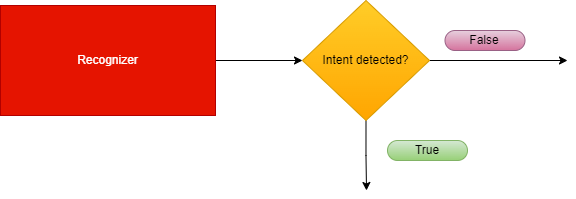
Recognizers inherit from the abstract class called BaseRecognizerMiddleware.
There are two types of recognizers, internal and external:
Internal recognizers
aura-bot own components that are able to recognize the intention of the user directly from the incoming message.
Currently, they are:
External recognizers
Responsible for calling an external API to obtain an intention.
Currently, the only external recognizer is nlp-recognizer-middleware, in charge of detecting the intention of the user from all the training of the environment.
Apart from the ones mentioned above, the finalize-recognizers-middleware is in charge of finalizing the recognition process.
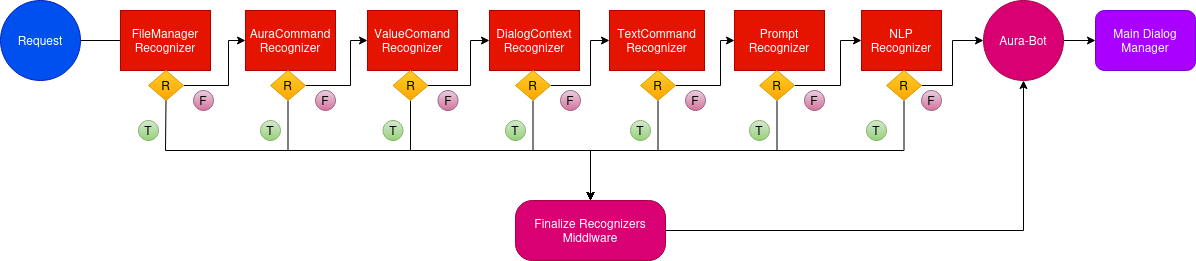
Recognizers are executed sequentially in the order previously defined during the bot start-up.
Recognizers flow
The following figure shows the execution flowchart for aura-bot recognizers, including the recognizers included in aura-bot by default. They are executed sequentially.
-
If one specific recognizer has obtained an intention, then the flow redirects to the finalize-recognizers-middleware, that provides the result to aura-bot in order to trigger the corresponding dialog.
-
If the recognizer in execution does not get the intention, then the flow continues and the succeeding recognizer is executed.
-
As can be seen in the flowchart, the last recognizer to be executed is the external one, nlp-recognizer-middleware. This is because aura-bot should only request it if no other recognizer gets the intention of the user.
-
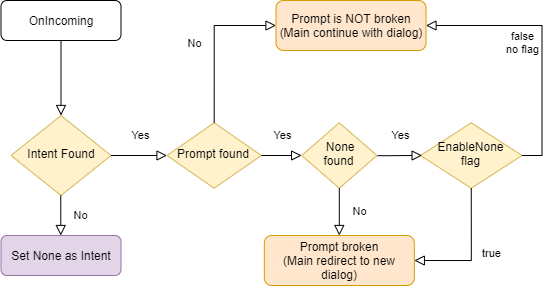
The finalize-recognizers-middleware is in charge of deciding, in case there is any active prompt, whether to continue with the prompt or to remove the prompt from the dialog stack and process the attempt to start a new dialog otherwise.
2.1.1 - Base recognizer
Base recognizer
Description of base-recognizer
Introduction
Recognizers are middlewares that inherit from the abstract class called BaseRecognizerMiddleware.
export abstract class BaseRecognizerMiddleware implements Middleware, Recognizer {
    protected name: string;
    protected id: string;
    protected type: RecognizerType;
    constructor(name: string, id: string, type?: RecognizerType) {
        this.type = type || RecognizerType.Asynchronous;
        this.name = name;
        this.id = id;
    }
The source code of this recognizer is included in Aura Bot Platform recognizers - Github repository.
base-recognizer parameters
| Parameters |
Type |
Description |
| name |
property |
Name of the middleware. |
| id |
property |
Unique identifier for middleware. |
| type |
property |
Type of execution (async or sync) to execute the recognizer method. |
| recognize |
method |
Abstract method that must be implemented in the recognizer. If the recognizer detects an intent, it must save the intent result in the turn context. |
| onTurn |
method |
Private method executed when the activity is processed by the adapter. |
| processIntent |
method |
Protected method to process the intent and entities and store the intentResult and the intent in AuraCommand format. |
|
|
|
IntentResult model
| Name |
Type |
Description |
| text |
string |
Utterance sent to the recognizer. |
| alteredText |
string |
If the original text is changed due to mistakes such as spelling typos, the altered version is included here. |
| intents |
Object |
Map of intent names to an object with score is returned. Format: [name: string]: {score: number;}; |
| entities |
Entity |
Entities recognized. |
| promptCheck |
boolean |
If true, the finalize-recognizers-middleware evaluates if exits a prompt in the stack and decides whether it needs to pop from the stack or continues. |
|
|
|
2.1.2 - Aura Command recognizer middleware
Aura Command recognizer middleware
Description of aura-command-recognizer-middleware, in charge of identifying Aura commands.
Introduction
aura-command-recognizer-middleware checks the auraCommand property inside an activity.
This component is able to identify the so-called auraCommands, recognizing the user’s intent and associated entities from the messages reaching an aura-bot instance.
By default, it is the recognizer with more priority. The score for the intent is always 1.0.
The source code of this recognizer is included in Aura Bot Platform recognizers - Github repository.
An example is shown below:
Incoming activity with an auraCommand
{
  "activity": {
    "channelData": {
      "auraCommand": {
        "type": "suggestion",
        "value": {
          "intent": "intent.usage.check",
          "entities":[{
            "type": "measure",
            "entity" : "megabytes"
          }]
        }
      }
    }
  }
}
Recognizer Result
{
  "text": "check data usage",
  "intents":
    "intent.usage.check": {
      "score": 1.0
    }
  },
  "entities": [
    {
      "type": "measure",
      "entity": "megabytes"
    }
  ]
}
2.1.3 - Dialog context recognizer middleware
Dialog context recognizer middleware
Description of dialog-context-recognizer-middleware, that manages the recognition process when there are different options in the response
Introduction
dialog-context-recognizer-middleware uses a model to facilitate the recognition when Aura response is composed of several options, which have either been generated automatically when a Prompt Choice or a list of CardActions has been processed or generated manually.
This model is defined in dialogContext model.
The source code of this recognizer is included in Aura Bot Platform recognizers - Github repository.
The behavior of this recognizer is channel-specific. The dialogContext configuration for each channel follows the model defined in the channel model sub-property.
This recognizer first checks if a cache exists with the dialogContext generated by the last message sent to the user. If it does not exist, then it checks the dialogContext information saved in aura-bot cache, in greater detail in property auraData.conversationData.dialogContext.
This differs with past versions where this information was obtained from channelData property in the activity, which now is defined in the processFromClient property.
The recognition is performed by proximity between the user’s phrase and the dialogContext values to be evaluated.
If Aura has sent several dialogContext messages, the last message will be the one containing a single dialogContext with all the previous ones merged.
If the dialogContext value exists in the cache, it is deleted once fetched. If another recognizer beats the dialog-context-recognizer-middleware, this process is performed inside the finalize-recognizers-middleware.
Environment variables
Three aura-bot environment variables come into play in the process:
AURA_DIALOG_CONTEXT_THRESHOLD: minimum threshold to validate the recognition (by default: 0.8).AURA_DIALOG_CONTEXT_THRESHOLD_RELATION_UTTERANCE: Microsoft uses in its algorithm a fixed value of 0.5. If the value is not set, then the value will be calculated based on the words of the user’s phrase divided by the words of the phrase to be compared. (by default: not set).AURA_DIALOG_CONTEXT_ORDINAL_CARDINAL_THRESHOLD: if the client phrase contains a number or the dialogContext values are enumerated by cardinals or/and ordinals, this threshold will be used instead of AURA_DIALOG_CONTEXT_THRESHOLD. This is done to prevent numbers within the phrase from being confused with the position of the items in the options list.(by default: 0.95).
The dialogContext can be generated automatically based on Prompt Choices or CardActions. This is configurable per channel, but developers could add the dialogContext object to the channelData with the expected actions.
Example
An example is shown below: a user asks for a recommendation in Movistar +. If these recommendations are included in a dialogContext, it gives the user the possibility to precisely select one of the options using voice:
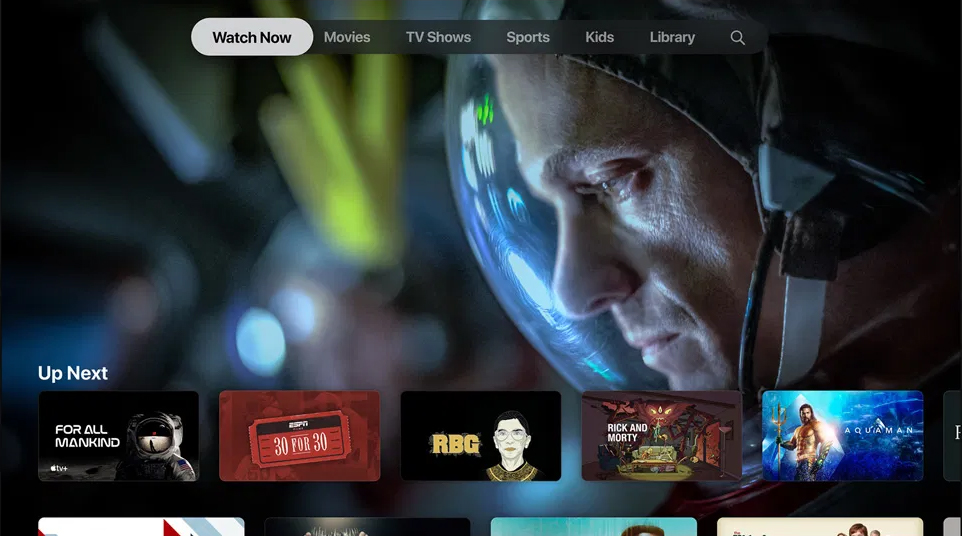
dialogContext stored for an Aura response:
{
  "dialogContext": [
    {
      "text": "I want to see the movie for all mankind|1|one|the first|first",
      "value": {
        "name": "I want to see the movie for all mankind",
        "text": "See for all mankindo",
        "type": "suggestion",
        "intent": "intent.tv.search",
        "entities": [
          {
            "type": "ent.audiovisual_film_title",
            "entity": "for all mankind",
            "canon": "for all mankind",
            "label": "",
            "score": 1
          },
          {
            "type": "ent.audiovisual_genre",
            "entity": "film",
            "canon": "films",
            "label": "CN",
            "score": 1
          }
        ]
      }
    },
     {
      "text": "I want to see the movie 30 for 30|two|second|the second|",
      "value": {
        "name": "I want to see the movie 30 for 30",
        "text": "See 30 for 30",
        "type": "suggestion",
        "intent": "intent.tv.search",
        "entities": [
          {
            "type": "ent.audiovisual_film_title",
            "entity": "30 for 30",
            "canon": "30 for 30",
            "label": "",
            "score": 1
          },
          {
            "type": "ent.audiovisual_genre",
            "entity": "film",
            "canon": "films",
            "label": "CN",
            "score": 1
          }
        ]
      }
    },
      {
      "text": "I want to see the movie rgb|3|three|the third|third",
      "value": {
        "name": "I want to see the movie rgb",
        "text": "See for all mankindo",
        "type": "suggestion",
        "intent": "intent.tv.search",
        "entities": [
          {
            "type": "ent.audiovisual_film_title",
            "entity": "rgb",
            "canon": "rgb",
            "label": "",
            "score": 1
          },
          {
            "type": "ent.audiovisual_genre",
            "entity": "film",
            "canon": "films",
            "label": "CN",
            "score": 1
          }
        ]
      }
    },
    .....
  ]
}
2.1.4 - attachment recognizer middleware
Attachment recognizer middleware
Description of the attachment-recognizer-middleware, in charge of managing some attachment types sent to aura-bot
Introduction to attachment recognizer middleware
attachment-recognizer manages messages that include attachments. Currently, only two types of attachment content types are handled:
application/vnd.telefonica.aura.whatsapp.orderapplication/vnd.telefonica.aura.whatsapp.context
These types are mapped by channel configuration in the field requestOptions.defaultIntentByAttachment and the intent set in this configuration
will be the intent set by this recognizer.
An example of defaultIntentByAttachment configuration is included below:
{
  "requestOptions": {
    "defaultIntentByAttachment": {
      "application/vnd.telefonica.aura.whatsapp.order": "intent.factotum-test.whatsapp-catalog-handler",
      "application/vnd.telefonica.aura.whatsapp.context": "intent.factotum-test.whatsapp-catalog-handler"
    }
  }
}
When one of these attachments is found in the activity but the configuration for this type is not found in the channel configuration,
the intent set in the environment variable AURA_ROOT_INTENT (None by default) will be set.
2.1.5 - File manager recognizer
File manager recognizer
Description of the file-manager-recognizer-middleware, in charge of managing files in use cases messages
Introduction to file-manager recognizer
file-manager recognizer manages messages that include files, both as text messages or as attachments. Although it is not a real recognizer, it is included in the list of recognizers because it is executed in the same way as the rest of them, and it is in charge of managing files, that are handled in the same way as intents.
The source code of this recognizer is included in Aura Bot Platform recognizers - Github repository.
Depending on which dialog is running (PromptAttachment, BypassDialog, none) and whether the channel is ready for managing files, these files can be:
- Used by the dialog that requested it.
- Processed and validated by the aura-file-manager API.
- Sent to the unexpected-file dialog.
- Other situations beyond the happy path.
This recognizer checks the attachments property or the property channelData.payload.asyncCallback.attachments inside an activity. The reason behind searching for two different properties has to do with its execution flow. The first one is used to send files from the user to aura-bot and the second one is used to send files from file-manager back to aura-bot, once they are validated.
It is the recognizer with more priority, (the first to be executed after the initialization middleware), so if it finds an intention, it will win, because its resulting score for the recognized intent will be always 1.0, i.e., a perfect recognition.
Example of an activity with a file attachment:
{
  "attachments": [
    {
      "contentType": "image/png",
      "contentUrl": "https://example.com/image.png"
    }
  ]
}
Example of an activity with a validated file attached in the channelData.payload.asyncCallback.attachments.
{
  "channelData": {
    "payload": {
      "asyncCallback": {
        "attachments": [
          {
            "contentUrl": "https://<host>/fromId/messageId_1646724898352?sv=2020-10-02&se=2022-03-08T08%3A34%3A59Z&sr=b&sp=r&sig=GTCdk%2B9lU4IkYTJVH1%2BpEMBAKHWmaOjMB026Qxxw1ZU%3D",
            "name": "messageId_1646724898352",
            "content": {
              "processed": true,
              "typeValidation": {
                "valid": true,
                "value": "png"
              },
              "sizeValidation": {
                "valid": true,
                "value": 40663
              },
              "status": [
                {
                  "code": "OK",
                  "message": ""
                }
              ]
            },
            "contentType": "image/png"
          }
        ]
      }
    }
  }
}
aura-bot includes the content-type of the incoming attachment in its request to the file-manager, so a proper extension can be inferred in all the cases.
file-manager recognizer flow
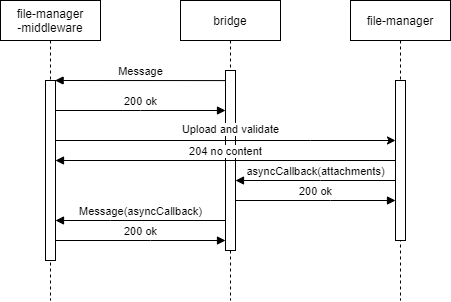
- The recognizer first checks if attachments data is present in the
activity.
- Then, the recognizer checks if the
channelData has file configuration enabled.
- The recognizer searchs for an active
PromptAttachment or bypass with file treatment.
- If it is found, then we will be on the case of an expected file and the processing will continue.
- If not, the processing will be redirected to the unexpected-file dialog.
- If we have an active
PromptAttachment or bypass with file treatment, the recognizer will send the data to be asynchronously processed by the file-manager API (a microservice with the only purpose of validating and upload files to a local repository).
- Through aura-bridge, the recognizer will receive the data processed by the file-manager API: (
channelData.payload.asyncCallback.attachments). In this stage, data with validations will be passed to the dialog where it can use it to do extra validations.
The following figures shows the different scenarios that can arise:
- The use case requests one file
sequenceDiagram
Title: Normal flow one file requested
    User/Kernel->>+Bridge: Phrase to init UC file dialog
    Bridge->>+Groot/Bot: Phrase to init UC file dialog
    Groot/Bot->>+NLP: Phrase user
    NLP->>+Groot/Bot: Intent dialog
    Groot/Bot->>+File Dialog: Start UC file dialog
    File Dialog->>+Bridge: Send me a file
    Bridge->>+User/Kernel: Send me a file
    User/Kernel->>+Bridge: Send a file
    Bridge->>+Groot/Bot: Send the attachment
    Groot/Bot->>+File Api: Validate / process the attachment
    File Api->>+Bridge: Attachment processed, validated and ready
    Bridge->>+Groot/Bot: Send attachment processed
    Groot/Bot->>+File Dialog: Send attachment processed
    File Dialog->>+Bridge: Ok
    Bridge->>+User/Kernel: Ok
- The use case requests one file but the user decides to send more than one file
sequenceDiagram
Title: One file requested, user send more
    User/Kernel->>+Bridge: Phrase to init UC file dialog
    Bridge->>+Groot/Bot: Phrase to init UC file dialog
    Groot/Bot->>+NLP: Phrase user
    NLP->>+Groot/Bot: Intent dialog
    Groot/Bot->>+File Dialog: Start UC file dialog
    File Dialog->>+Bridge: Send me a file
    Bridge->>+User/Kernel: Send me a file
    User/Kernel->>+Bridge: Send a file
    Bridge->>+Groot/Bot: Send the attachment
    Groot/Bot->>+File Api: Validate / process the attachment
    alt Processing file
    User/Kernel->>+Bridge: Send a file
    Bridge->>+Groot/Bot: Send the attachment
    Groot/Bot->>+File Dialog: Processing file & New attachment no validated send it
    File Dialog->>+Bridge: Processing file, don't send me more files
    Bridge->>+User/Kernel: Processing file, don't send me more files
    end
    File Api->>+Bridge: Attachment processed, validated and ready
    Bridge->>+Groot/Bot: Send attachment processed
    Groot/Bot->>+File Dialog: Send attachment processed
    File Dialog->>+Bridge: Ok
    Bridge->>+User/Kernel: Ok
- The use case requests several files: Files will arrive to the dialog as they are processed.
sequenceDiagram
Title: User send multiples files
    User/Kernel->>+Bridge: Phrase to init UC file dialog
    Bridge->>+Groot/Bot: Phrase to init UC file dialog
    Groot/Bot->>+NLP: Phrase user
    NLP->>+Groot/Bot: Intent dialog
    Groot/Bot->>+File Dialog: Start UC file dialog
    File Dialog->>+Bridge: Send me 3 files
    Bridge->>+User/Kernel: Send me 3 files
    User/Kernel->>+Bridge: Send 3 files
    alt Process attachment 2
    Bridge->>+Groot/Bot: Send attachment 2
    Groot/Bot->>+File Api: Validate / process the attachment 2
    File Api->>+Bridge: Attachment 2 processed, validated and ready
    Bridge->>+Groot/Bot: Send attachment 2 processed
    Groot/Bot->>+File Dialog: Receive 1/3 files processed
    end
    alt Process attachment 1
    Bridge->>+Groot/Bot: Send attachment 1
    Groot/Bot->>+File Api: Validate / process the attachment 1
    File Api->>+Bridge: Attachment 1 processed, validated and ready
    Bridge->>+Groot/Bot: Send attachment 1 processed
    Groot/Bot->>+File Dialog: Receive 2/3 files processed
    end
    alt Process attachment 3
    Bridge->>+Groot/Bot: Send attachment 3
    Groot/Bot->>+File Api: Validate / process the attachment 3
    File Api->>+Bridge: Attachment 3 processed, validated and ready
    Bridge->>+Groot/Bot: Send attachment 3 processed
    Groot/Bot->>+File Dialog: Receive 3/3 files processed
    end
    File Dialog->>+Bridge: Ok
    Bridge->>+User/Kernel: Ok
- In case of unexpected file:
sequenceDiagram
Title: Unexpected File
    User/Kernel->>+Bridge: Send a file
    Bridge->>+Groot/Bot: Send the attachment
    Groot/Bot->>+Unexpected File: Send the attachment
    Unexpected File->>+Bridge: Unexpected file
    Bridge->>+User/Kernel: Unexpected file
- Different problems may arise in reference to unavailable file-manager* API or aura-bridge:
sequenceDiagram
Title: File Api No Available
    User/Kernel->>+Bridge: Phrase to init UC file dialog
    Bridge->>+Groot/Bot: Phrase to init UC file dialog
    Groot/Bot->>+NLP: Phrase user
    NLP->>+Groot/Bot: Intent dialog
    Groot/Bot->>+File Dialog: Start UC file dialog
    File Dialog->>+Bridge: Send me a file
    Bridge->>+User/Kernel: Send me a file
    User/Kernel->>+Bridge: Send a file
    Bridge->>+Groot/Bot: Send the attachment
    alt Retries with File API
    Groot/Bot-xFile Api: Validate / process the attachment
    Groot/Bot-xFile Api: Validate / process the attachment
    Groot/Bot-xFile Api: Validate / process the attachment
    end
    Groot/Bot->>+File Dialog: Attachment no processed with problem explanation
sequenceDiagram
Title: Bridge no available
    User/Kernel->>+Bridge: Phrase to init UC file dialog
    Bridge->>+Groot/Bot: Phrase to init UC file dialog
    Groot/Bot->>+NLP: Phrase user
    NLP->>+Groot/Bot: Intent dialog
    Groot/Bot->>+File Dialog: Start UC file dialog
    File Dialog->>+Bridge: Send me a file
    Bridge->>+User/Kernel: Send me a file
    User/Kernel->>+Bridge: Send a file
    Bridge->>+Groot/Bot: Send the attachment
    Groot/Bot->>+File Api: Validate / process the attachment
    alt Bridge no reachable
    File Api-xBridge: Attachment processed, validated and ready
    File Api-xBridge: Attachment processed, validated and ready
    File Api-xBridge: Attachment processed, validated and ready
    end
    User/Kernel->>+Bridge: Aura, what's going on?
    Bridge->>+Groot/Bot: Aura, what's going on?
    Groot/Bot->>+File Dialog: Aura, what's going on? / Cut PromptAttachment or Bypass
    File Dialog->>+Bridge: Try again later / Other message
    Bridge->>+User/Kernel: Try again later / Other message
Environment variables
Practical process for managing files in a use case
Currently, it is only available for WhatsApp channels. Follow the guidelines in Use of files in WhatsApp.
2.1.6 - Prompt check recognizer middleware
Prompt check recognizer middleware
Description of prompt-check-recognizer-middleware, that manages the scenario when a user is requested to chose between different options
Introduction
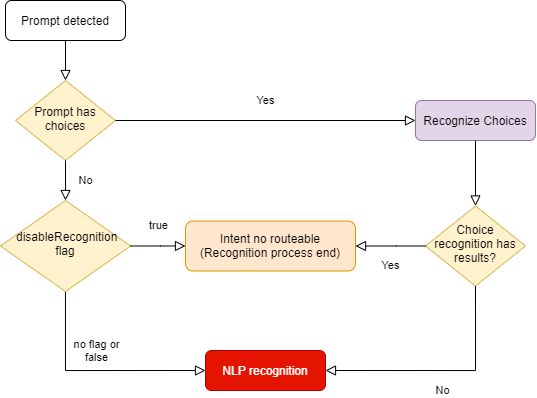
The prompt-check-recognizer-middleware checks whether there is a prompt dialog currently active and, if so, evaluates the input message to check if there is a match (the user has selected one of the options offered by the choice prompt). In this situation, a temporary recognizerResult is generated to prevent the nlp-recognizer-middleware from running.
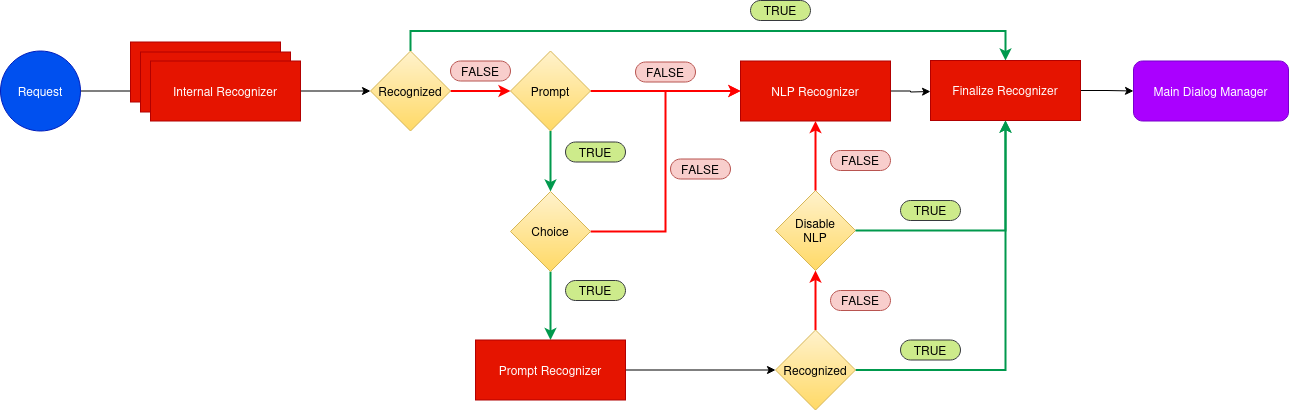
prompt-check-recognizer-middleware has a disableRecognition flag to disable the recognition when prompt has not choices.
The source code of this recognizer is included in Aura Bot Platform recognizers - Github repository.
prompt-check-recognizer-middleware flow
The following diagram shows in detail the internal logic of the prompt-check-recognizer-middleware.
2.1.7 - Value command recognizer middleware
Value command recognizer middleware
Description of the value-command-recognizer-middleware, that checks the value property of the activity
Introduction
This recognizer checks the value property inside activity. The score for the intent is always 1.0.
The source code of this recognizer is included in Aura Bot Platform recognizers - Github repository.
An example is shown below:
Activity:
{
  "activity": {
    "value": {
      "intent": "intent.usage.check",
      "entities": [
        {
          "type": "measure",
          "entity": "megabytes"
        }
      ]
    }
  }
}
Recognizer Result:
{
  "text": "check data usage",
  "intents": {
    "intent.usage.check": {
      "score": 1.0
    }
  },
  "entities": [
    {
      "type": "measure",
      "entity": "megabytes"
    }
  ]
}
2.1.8 - Text command recognizer middleware
Text command recognizer middleware
Description of text-command-recognizer-middleware, used in Facebook channel
Introduction
This recognizer checks the text property inside of the activity and evaluates if this field contains an intent object in string format.
The source code of this recognizer is included in Aura Bot Platform recognizers - Github repository.
Its use is not recommended. Currently, it only applies to handle the Aura menu in Facebook apps.
Example
Incoming activity with a TextCommand
{
  "activity": {
    "text": "{\"intent\":\"intent.usage.check\",\"entities\":[{\"type\":\"measure\",\"entity\":\"megabytes\"}]}"
  }
}
Recognizer Result
{
  "text": "check data usage",
  "intents": {
    "intent.usage.check": {
      "score": 1.0
    }
  },
  "entities": [
    {
      "type": "measure",
      "entity": "megabytes"
    }
  ]
}
2.1.9 - Nlp recognizer middleware
Nlp recognizer middleware
Description of nlp-recognizer-middleware, responsible for calling an external API in an attempt to obtain the user’s intent.
Introduction
The main objective of the recognizer is to call aura-nlp API and process its response.
The environment variable AURA_COGNITIVE_ENDPOINT contains the URL of Aura NLP API.
It should not be requested from outside the NLP recognizer.
Aura NLP will not be requested if the channel is not configured to use it. This is configured in the channel collection in the Aura Configuration API:
{
    "name": "movistar-plus",
    "prefix": "mp",
    "nlp": {
        "enabled": false
    }
}
In this case, the NLP Recognizer will return an intent None with a score of 1.0. in the IntentResult.
Further information regarding channels’ configuration can be found in the Channels section.
The source code of this recognizer is included in Aura Bot Platform recognizers - Github repository.
Disambiguation case
In aura-bot platform, NLP response is processed and formatted in the nlp-recognizer-middleware. In this middleware, a request to the domainClassifier API is executed:
domainClassifier = (await nlpApi.domainClassifierDefaultQuery(domainClassifierDefaultRequest, correlator, options)).body;
The response received in case there is disambiguation has the following structure:
{
    query: 'original Phrase',
    channel: 'mp',
    intent_result: {
        entities: [],
        top_result: { intent: 'intent.disambiguation', score: 1.0 },
        intents: [
            { intent: 'intent.disambiguation', score: 1.0 }
        ]
    },
    domain_result: {},
    options: [
        {
            query: 'original Phrase',
            channel: 'mp',
            intent_result: {
                entities: [
                    {
                        entity: '14', type: 'faq', score: 0.90, start_index: 1, end_index: 1, canon: '14', label: null
                    }
                ],
                intents: [
                ]
            },
            domain_result: {},
            options: []
        }
    ]
}
As for the disambiguation case, information about the recognition process is obtained from the value options: [] shown in the example above. Otherwise, recognition’s response will be captured from the value intent_result: {}.
This value will be formatted and propagated into other components using the actual context:
ContextUtils.setIntentResult(context, result, context.activity.text, true)
Where result.entities will be formatted to avoid missing or empty arrays.
Following with the disambiguation example, information regarding it will be stored in result.disambiguationOptions with the following type IntentResult[].
2.1.10 - Triage recognizer middleware
Triage recognizer middleware
Description of triage-recognizer-middleware, responsible for calling an external API in an attempt to obtain the user’s intent.
Enabling the triage recognizer
The triage-recognizer-middleware is an optional recognizer that can be added to the environment variable AURA_ACTIVE_MIDDLEWARES to enable it.
AURA_ACTIVE_MIDDLEWARES=TriageRecognizerMiddleware
Once enabled, the middleware will only run if the following conditions are met:
- There is no intent already recognized in the context.
- The intent is included in the list of intents defined in the environment variable
AURA_INTENTS_NONE. By default, this variable contains the value ['None', 'intent.none', 'intent.tv.none'].
Adding the necessary configuration for the channel
To use this recognizer, it is necessary to add the configuration for the channel in the channel collection in the aura-configuration-api.
The configuration must include the applicationId and presetId for the TriageRecognizer in the atria.recognizers object.
For example, if the channel is movistar-plus, the configuration should look like this:
{
    "name": "movistar-plus",
    "prefix": "mp",
    "atria": {
        "recognizers": {
            "TriageRecognizer": {
                "applicationId": "816bdab6-3ea3-4a77-bdea-12945d6d7053",
                "presetId": "67cb30a2-aec7-448c-a2a6-18faaa9d1820"
            }
        }
    }
}
How the triage recognizer works
The triage-recognizer-middleware is responsible for calling an external API, ATRIA, to obtain the user’s intent using a Large Language Model (LLM) system.
The triage-recognizer-middleware uses the AiService to call the Atria generative API with the message received in the request and the configuration defined for the channel in the channel collection in the aura-configuration-api (see the section Adding the necessary configuration for the channel).
If triage middleware is enabled but the channel does not contain the config for the TriageRecognizer, the middleware will not be executed.
For each call, the previous session information associated with the user is sent, if it exists. The session information is stored in the context for future requests.
Finally, the intent is extracted from the response received from ATRIA and fills the IntentResult with the recognized intent.
2.1.11 - Finalize recognizers middleware
Finalize recognizers middleware
Description of finalize-recognizers-middleware, in charge of finalizing the recognition process.
Introduction
This middleware is not a recognizer itself, as it simply takes care of making the final adjustments to the recognition process, such as:
- Establish the final name of the attempt. It is necessary to put the prefix of the current channel.
- Remove the prompt from the stack if the conditions are met.
The source code of this recognizer is included in Aura Bot Platform recognizers - Github repository.
finalize-recognizers-middleware flow
Internal Recognizer Result:
Intent Type |
Prompt Check |
Execute NLP Recognizer |
Remove Prompt from Stack |
suggestion |
false |
false |
true |
operation |
false |
false |
false |
text |
false |
false |
false |
| No Intent detected |
true if Prompt |
If Prompt evaluation fails |
If NLP intent score >= 0.95 and if none is detected and enabled.
Customizable value, 0.95 is the default value of AURA_MIN_INTENT_SCORE_THRESHOLD_TO_CLEAN_STACK variable, that controls this behavior. |
By default, if there is a prompt and there has been NLP recognition, then if none intent is found it will not be enough to break the prompt unless enableNone is activated to break it.
2.2 - Middlewares
Aura Bot middlewares
Description of the different Aura Bot middlewares, components in charge of the messages flow
Introduction to Aura Bot middlewares
Middlewares in aura-bot are software components in charge of the messages flow. In fact, they are just classes executed between the bot adapter and aura-bot logic.
Middlewares are defined by Microsoft BotFramework, thus Aura just adds as many middlewares as needed in order to make the bot handle messages appropriately.
Find here further information about middlewares in BotFramework.
There are two types of middlewares defined in aura-bot:
- Middlewares that are always executed following a specific order established by the bot.
- Middlewares that are optional and are activated by configuration, through the environment variable
AURA_ACTIVE_MIDDLEWARES.
The following figure schematically shows the aura-bot middlewares flow for messages, indicating their category and the orderly execution of all of them.
| Classification criteria |
Categories |
| When they are executed |
- INPUT (turquoise): if they are an input to aura-bot, in order to summon a dialog.
- OUTPUT (orange): they are an output from aura-bot, leading to the output message generation.
- INPUT-OUTPUT: (half turquoise/half orange), if they have methods to be run before executing the dialog and methods to be executed after it. |
| Mandatory / optional |
- M: mandatory
- O: optional |
| Execution mode: flow stops when middleware fails |
- False: Execution flow stops when middleware fails
- True: execution continues when middleware fails |
To configure the optional middlewares, they should be added to the environment variable AURA_ACTIVE_MIDDLEWARES that should contain the name/s of the needed optional middlewares. It should contain a comma separated list with all or a set of the following names:
- batch-outgoing-message-middleware
- speak-processor-middleware

2.2.1 - Incoming Event middleware
Incoming Event middleware
Description of incoming-event-middleware, executed in event activity types.
Introduction
The incoming-event-middleware is in charge of managing events, that is, activities for the end-to-end communication between aura-bot and channels.
Channels can send events to aura-bot to inform about any relevant event happening on their side.
In particular, aura-bridge sends an event to aura-bot, when the transformation from bot activity to WhatsApp message fails, that is handled by this middleware.
When aura-bot receives an event, this middleware prevents the execution of the rest of the middlewares by completing the request flow.
There are two types of events:
- Log type: the channel asks aura-bot to log certain information
- emptyResponse type: Event sent by the bot when no response activity is sent. Currently, it is internally used for aura-bot towards aura-bridge.
export enum TypeEvent {
    /**
     * Log event
     */
    Log = 'log',
    /**
     * Directline empty response event (Event sent by the bot when no response activity is sent)
     */
    EmptyResponse = 'emptyResponse'
}
This middleware is executed once the HTTP request arrives at the server to the POST /api/messages endpoint and the Direct Line authentication executed by the Adapter is successful.
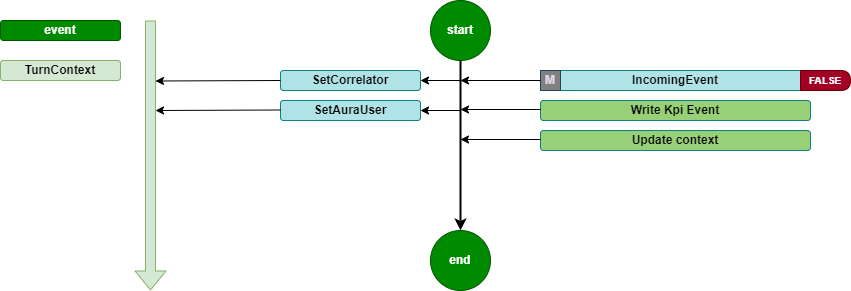
It is a Turn middleware, so it is executed during turn initialization. It is only executed if the type of the activity is event. In this case, the middleware records the KPIs and updates the context.
The source code of this middleware is included in Aura Bot Platform middlewares - Github repository.
Incoming Event flow diagram
The incoming-event-middleware flowchart is included below:
2.2.2 - Init middleware
Init middleware
Description of init-middleware, the very first one to be executed once the HTTP request arrives at the server
Introduction
The init-middleware is the first to be executed once the HTTP request arrives at the server to the POST /api/messages endpoint and the Direct Line authentication executed by the Adapter is successful.
It is a Turn middleware, so it is executed during turn initialization.
It launches the execution of all the following middlewares, in the order declared during aura-bot initialization. It is only executed if the type of the activity is message.
The source code of this middleware is included in Aura Bot Platform middlewares - Github repository.
init-middleware flowchart
The orderly steps for the management of this middleware are detailed below:
- Set a proper correlator in the
TurnContext, that will be used during the whole processing of the activity throughout aura-bot.
This means that:
- If a correlator is received in the
channelData of the activity, this one is used.
- If the channel does not send a correlator, a new one is generated at this point, to be used the same way.
ContextUtils.setCorrelator(context, ContextUtils.getCorrelatorFromChannelData(context));
/**
 * Get correlator from channel data, if exist there, or creates a new one.
    * @param context Context where the channel data will be taken from
    */
static getCorrelatorFromChannelData(context) {
    if (!context.activity.channelData || !context.activity.channelData.correlator) {
        context.activity.channelData = { ...context.activity.channelData || {}, correlator: uuid.v4() };
    }
    return context.activity.channelData.correlator;
}
-
Push the auraId, received in the from.id of the activity, to the TurnContext, to make it available in all the activity execution steps. The getAuraId method sets the auraId based on the channel type, if the channel is integrated. Then, the auraId is prefixed with the channel prefix.
This is necessary because the auraId is the key to the user cache and, if it is not formatted properly, it will fail to fetch the user from the cache and will re-request the user’s data from the services.
ContextUtils.setAuraId(context, ChannelDataUtils.getAuraId(context, AuraChannelsConfiguration.instance));
-
Initialize the data accessors of the conversational context in the TurnContext: conversationState, userState and authenticationState.
ContextUtils.setAuraPersistentDataAccesors(context, this.dataAccessors);
-
Initialize the conversationState. This is necessary to avoid errors when a user accesses through several channels simultaneously.
ContextUtils.setConversationState(context, this.conversationState);
-
Set activity locale with the default value.
context.activity.locale = ConfigurationManager.instance.environmentConfiguration.AURA_DEFAULT_LOCALE;
At this stage, two scenarios can happen:
-
If the activity processing is executed properly, the following middleware is executed.
-
In the happening of an unexpected error during the activity processing, the error makes all its way back to this initialization middleware error handling, in order to return the user a response activity including the most appropriate text related to the error.
One of the possible errors landing in this middleware during the activity processing, happens when the size of the response is bigger than the ones allowed by Direct Line protocol, that must not exceed 256K characters, the response is bypassed and a generic text explaining that there are too many results is returned to the user: (errors:error.message.oversize).
2.2.3 - Fourth Platform Authorization middleware
Description of fourth-platform-authorization-middleware, in charge of the validation of the user’s credentials
Introduction
fourth-platform-authorization-middleware validates the user’s credentials and the authorization of the auraId sent by the channel, in order to provide all the information of the user needed before the execution of any Aura use case.
It is always executed just after the init-middleware.
For further details about Aura authentication, please go to Aura authentication, in order to understand the different types of Aura users regarding authentication.
Modules
fourth-platform-authorization-middleware lays on two modules:
-
FourthPlatformAuth: class that must implement IAuraAuthenticator interface. This class provides all the methods and properties required to handle Kernel authorization mechanisms.
-
AuraUser: generic class depending on the authenticator provided, in this case FourthPlatformAuth, and that implements AuraUserBaseModel<IAuraAuthenticator>.
The first step is to try to get the user details from the aura-bot cache. In order to improve performance, we try to get it from the local cache of the server and only go to the remote cache if needed. This is done both if the user is authenticated or anonymous, but reading from different caches.
The source code of this middleware is included in Aura Bot Platform middlewares - Github repository.
If the user’s authentication information is cached, the next step is to validate it. If valid, then kpi-handler is called to write the USER entity row, and the next middleware is called. If user’s authentication information is neither cached nor valid, then the authentication process is launched:
-
Get user’s information by auraId from Aura AuthenticationService, getting both the data of the user stored in Aura users database and her channel configuration.
-
If it is a valid authenticated user, then read user’s authorization data from Kernel.
-
The first step in Kernel authentication is to have a valid accessToken, granted for the scopes and purposes needed by the use cases managed by the channel.
-
Then, if the channel needs it, UserProfile is read from Kernel API. Out of it, the AuraUserType is calculated in order to know if the user is monomsisdn, multimsisdn, nomsisdn.
-
The last step is to get the introspection token to obtain a complete view of the user’s identification, related to her authorization_id. Then, all the scopes in the introspection will be merged together and added to the information of the user.
-
After data from Aura AuthenticationService and Kernel is read and processed, there is a valid AuraUser object that is stored in the userDataCache and in the corresponding UserState of aura-bot.
-
Then, the next middleware is executed.
-
Error cases:
-
If a new accessToken cannot be obtained because authorization_id is not valid, then aura-bot stops message processing and returns an activity with an UNAUTHENTICATED code in the channelData to the channel, indicating that the channel must relaunch user authentication with Kernel.
-
Any other error generating accessToken or getting UserProfile or IntrospectionToken will return an INTERNAL code error in the channel, so it should retry the communication after a while.
-
If the given auraId does not exist in Aura’s database, it is validated if the user can be treated as anonymous.
In all the cases, before leaving the fourth-platform-authorization-middleware, the kpi-handler will be called to write a new row in the USER entity file, with the result of the authentication.
The flow diagram of the process is included below:

2.2.4 - Incoming KPI middleware
Incoming KPI middleware
Description of incoming-KPI-middleware, in charge of writing the KPI when a message is received
Introduction
The incoming-KPI-middleware extends BotFramework class IncomingMessageMiddleware, meaning that certain code is executed on incoming message.
This middleware is always executed just after the fourth-platform-authorization-middleware.
This middleware is in charge of writing a row in the MESSAGE entity file with the action received. This row is only written if the type of the received activity is message; otherwise, it is ignored.
In the happening of an error writing this information, the activity processing stops here, and an activity is sent to the user with an unexpected error text (errors:error.unexpected).
The source code of this middleware is included in Aura Bot Platform middlewares - Github repository.
2.2.5 - Bypass Mode middleware
Bypass Mode middleware
Description of bypass-mode-middleware, that when Aura Bot is in bypass mode, sends any input message directly to an external service
Introduction
The main functionality of bypass mode, is that once we are in this mode within a conversation, any input message to aura-bot will be directly sent to the external service, without any recognition made by the bot.
Likewise, any message from the external service will be shown to the user without going through aura-bot recognition system.
The source code of this middleware is included in Aura Bot Platform middlewares - Github repository.
The bypass-mode-middleware extends BotFramework class IncommingMessageMiddleware, meaning that certain code is executed on incoming message.
flowchart TD
    A[Request] --> InitMiddleware (Middlewares)
    subgraph Middlewares
        direction LR
        InitMiddleware[...] --> BypassMode
        BypassMode -->|disable| NLPRecognizer
        BypassMode -->|enable| FinalizeRecognizer
        NLPRecognizer --> FinalizeRecognizer
        FinalizeRecognizer --> EndMiddlewares[...]
    end
    EndMiddlewares --> AuraBot[Aura Bot]
    style BypassMode fill:#800,stroke:#300,stroke-width:1px
The bypass-mode-middleware skips the execution of nlp-recognizer-middleware, setting the value of intentResult in the TurnContext to the same that started the bypass mode.
In case of Init state, all the following middlewares are skipped. The dialog can find these messages in channelData conversationHistory.
⚠️ This is an incoming message middleware, so it only handles incoming messages.
📃 Find here practical guidelines for the configuration of aura-bot in bypass mode.
When using the bypass mode
The bypass mode can be used when all messages in a conversation want to be managed by the same dialog, without the bot recognizer system redirecting the request to another dialog.
The bypass mode ensures that, once active, all requests will be sent to the dialog that started this mode and will continue to receive all requests until the bypass mode is deactivated.
The bypass mode can be useful in multiple use cases:
- Chat with external systems. For example, the handover dialog directly forwards to Genesys (call center) all the messages the user sends once the communication between Aura and Genesys is established.
When the Bypass mode is finished
There are three different ways to exit the bypass mode:
-
It can be decided by the handover dialog itself, using closeBypass method in the bypass object stored in the TurnContext.
-
When certain time (configurable using de expirationTime field in the bypass object) passes without any exchange of messages.
-
When a user message sends one text defined as closeString. Currently, the user can close bypass indicating keywords defined by the bypass_model (using the closeString field). In the bypass model (saved in conversationData), it is possible to indicate the words that close the bypass mode. By default: core:bypass.close.words.
How does it work
The bypass-mode-middleware checks for each request if there is a bypass variable in the user’s conversationData. If the bypass variable exists (type @telefonica/aura-bot-common/models/bypass-model) and its status is different from Off, the middleware will perform the operations depending on the state.
The different possible bypass states are defined in BypassState enum:
export enum BypassState {
    Init = 'init',
    Bypass = 'bypass',
    Closed = 'closed',
    Paused = 'paused',
    Off = 'off'
}
Behavior depending on the state
As previously indicated, the bypass-mode-middleware performs operations based on the state of the bypass variable, which can be modified by the dialog according to the needs:
Init
Perform as in Bypass state. It allows the dialog to execute boot actions.
Bypass
By default, the bypass-mode-middleware sets the intentResult in TurnContext with the intent to start the bypass mode (bypass.intent), so that the dialog can manage the message.
If the bypass has not expired, the last access information (using updateLastAccess method) will be updated, restarting the expiration time again. In this state, the middleware does not close the bypass, this work is delegated to the dialog itself.
In the Bypass state, it is possible to execute an action using an channelData.auraCommand with the following format in the intent field (activity.channelData.auraCommand.value.intent):
<intent>.<action>
The possible actions that can be executed are defined in BypassAction enum:
export declare enum BypassAction {
    Init = "init",
    Start = "start",
    Close = "close",
    Pause = "pause",
    None = "none"
}
Currently, only the following actions have an effect on bypass-mode-middleware:
- Close. Set bypass in
Closed state and continues the normal execution.
As an example, we can send an auraCommand with the example-intent.close value on intent field to close the bypass and send to the dialog that handles the example-intent intent.
{
    "auraCommand": {
        ...
        "value": {
            "intent": "example-intent.close",
            "entities": [
                ...
            ]
        }
    }
}
Closed
Close bypass removing it from conversationData.
Paused
Currently it has no effect, although in the future it will temporarily stop bypass mode and resume it again.
Off
It has no effect.
Bypass model
The bypass model contains the following information:
export interface BypassModel {
    state: BypassState
    intent: Intent;
    duration: number;
    recipient: ChannelAccount;
    userId: string;
    data: any;
    closeReason: BypassCloseReason;
    payloadName: string;
    closeString: string | string[];
    expirationTime: number;
    recognizersEnabled: boolean;
    recognizersBreakIntents: Map<string, string[]>;
}
| Property |
Description |
| BypassState |
Current Bypass State |
| intent |
Intent that initiates the Bypass |
| duration |
Bypass life time in minutes |
| recipient |
Recipient to return the message to |
| userId |
Identifier of the user who activated the Bypass |
| data |
Specify information for dialog |
| closeReason |
Reason for closure. If unknown, the dialog must find out what the cause was |
| payloadName |
Name of the property in the channelData.payload. Used to send data to the bypass.ex: ‘handover’ |
| closeString |
Comma-separated string or array of string with the words that directly close the bypass |
| expirationTime |
Date of timeout for bypass |
| recognizersEnabled |
Flag to indicate whether or not recognizers must be executed and the final result stored, although the bypass is enabled. |
| recognizersBreakIntents |
Recognized intents to replace dialog with |
State diagram
The following diagram shows the state transition of bypass mode:
stateDiagram-v2
    [*] --> Init : Dialog init bypass (Bypass.initialize)
    Init --> Bypass : Dialog update
    Bypass --> Closed : Dialog update or BypassAction.Close is received
    Init --> Closed : Dialog update or BypassAction.Close is received
    Closed --> [*] : Bypass model is removed
    %% note left of Init : Dialog perform startup tasks
    %% note left of Bypass : Dialog manages all incoming conversation requests
Examples
Dialog using bypass
Starting bypass mode
In an initial state, the user’s conversationData does not have bypass information. The dialog must create the bypass object to start the bypass mode.
sequenceDiagram
    actor User
    Note right of User: No bypass
    User->>Bot: "First message"
    Bot->>BypassModeMiddleware: request context
    Note right of BypassModeMiddleware: does nothing (no bypass model)
    BypassModeMiddleware->>NLPRecognizerMiddleware: recognize from context
    NLPRecognizerMiddleware->>NLPRecognizerMiddleware: recognized intent: "intent.example"
    NLPRecognizerMiddleware->>ExampleDialog: request context
    ExampleDialog->>ExampleDialog: OnInit
    Note right of ExampleDialog: Create bypass model (bypass state: Init)
Receiving messages with Init or Bypass state
The bypass mode can remain in Init state until the dialog itself ends up performing startup tasks, or it can directly set the Bypass state (if the dialog does not have to execute any task).
In this state, nlp-recognizer will not do anything, since the bypass-mode-middleware will have set intentResult with the intent.example value.
sequenceDiagram
    actor User
    loop
        Note right of User: Bypass on Init/Bypass state
        User->>Bot: "New message X"
        Bot->>BypassModeMiddleware: request context
        Note right of BypassModeMiddleware: intentResult = "intent.example"
        BypassModeMiddleware->>NLPRecognizerMiddleware: does nothing
        Note right of NLPRecognizerMiddleware: does nothing
        NLPRecognizerMiddleware->>ExampleDialog: request context
        Note right of ExampleDialog: Message received
    end
    ExampleDialog->>ExampleDialog: OnBypass
    Note right of ExampleDialog: When the dialog finishes startup tasks, it can change the bypass state (state: Bypass)
Close bypass
The bypass mode can be closed directly by the dialog, when it has completed its tasks, or by sending the auraCommand with the value intent.example.close:
sequenceDiagram
    actor User

    Note right of User: Bypass on Init/Bypass state
    User->>Bot: "Message with auraCommand: intent.example.close"
    Bot->>BypassModeMiddleware: request context
    Note right of BypassModeMiddleware: Close bypass and set intentResult to "intent.example"
    BypassModeMiddleware->>NLPRecognizerMiddleware: does nothing
    Note right of NLPRecognizerMiddleware: does nothing
    NLPRecognizerMiddleware->>ExampleDialog: request context
    Note right of ExampleDialog: Message received
    ExampleDialog->>ExampleDialog: OnClose
    Note right of ExampleDialog: Execute close tasks
Recognizers enabled
The bypass mode, by default, is designed to avoid the execution of the recognizers of aura-bot, but starting in release 9.10.0 (delivered in March 25) it can be configured, using the dialog flag recognizersEnabled, to allow the execution of the recognizers, but the result is just stored in the context to be available for the dialog, and not to overwrite the bypassed dialog execution.
sequenceDiagram
    actor User

    Note right of User: Bypass on Bypass state
    User->>Bot: "Message from the user: I want to watch channel four"
    Bot->>BypassModeMiddleware: request context
    BypassModeMiddleware->>NLPRecognizerMiddleware: call to nlp
    FinalizeRecognizers->>BypassModeMiddleware: Store the IntentResult for intent.tv.display_channel
    Note right of ExampleDialog: Message received
    ExampleDialog->>ExampleDialog: Execute next step of the bypass dialog
    ExampleDialog->>ExampleDialog: Check if IntentResult is in recognizersBreakIntents
    ExampleDialog->>ExampleDialog: Close bypass
    ExampleDialog->>DisplayChannelDialog: Execute dialog
    DisplayChannelDialog->>Bot: Return display channel response
    Bot->>User: Return display channel response
2.2.6 - Outgoing channelData Normalizer middleware
Outgoing channelData Normalizer middleware
Description of outgoing-channeldata-normalizer-middleware, in charge of making the channelData conversion to the normalized version
Description
The outgoing-channeldata-normalizer-middleware transforms the outgoing channelData property of the Aura request-response model returned by the dialogs to the normalized version (if isn’t yet) to be read and modified if needed by outgoing dialogs (that work in normalized version).
AURA_CHANNELDATA_VALIDATION should be true and the dialog’s channelData version from dialogSettings.channelDataVersion should be lower than AURA_CHANNELDATA_CURRENT_VERSION to make the conversion. The conversion to original version again will be done in the Aura BotFramework adapter.
The source code of this middleware is included in Aura Bot Platform middlewares - Github repository.
2.2.7 - Speak Processor middleware
Speak Processor middleware
Description of speak-processor-middleware, in charge of setting and supporting the speak property to the activity in case the channel requires it
Description
The speak-processor-middleware extends BotFramework class OutgoingMessageMiddleware, meaning that certain code is executed on message outgoing.
The source code of this middleware is included in Aura Bot Platform middlewares - Github repository.
Depending on the configuration of the channel and the value of modality and fullAura.voice in the request channelData, it assures that a speakable sentence is provided in the activity.speak field.
-
If channel.alwaysSpeak is true or activity.channelData.modality is voice or activity.channelData auraMode.fullAura.voice is true, then:
-
If the activity does not have the speak field, then activity.text is processed applying the rules configured in AURA_MIDDLEWARE_SPEAK_PROCESSOR to clean up the text of unwanted characters and make it speakable.
-
If the activity already counts on a speak field, nothing is done.
-
If no rules are configured, nothing is done.
-
Otherwise, speak field is removed from the activity, because the channel will not wait for it.
2.2.8 - Outgoing middleware
Outgoing middleware
Description of outgoing-middleware, that formats the outgoing message
Description
The outgoing-middleware properly formats the outgoing message with all the common properties needed in an Aura’s response.
The source code of this middleware is included in Aura Bot Platform middlewares - Github repository.
It extends the BotFramework class OutgoingMessageMiddleware, meaning that certain code is executed on message outgoing.
-
Firstly, it sets the correlator in activity.channelData.correlator.
-
Then, it sends the outgoing MESSAGE entity row to the KPI handler.
-
Then, it updates Aura Context with the last information of the message processing.
-
If there is any error both during these steps or in any other step, that would be stored in the TurnContext, it would be properly added to the activity.channelData. Any activity with an error would contain:
-
The error text as activity.text.
-
As activity.speak, the already set activity.speak or activity.text.
-
activity.inputHint=acceptingInput
-
activity.channelData.hasMoreMessages = false
2.2.9 - Batch Outgoing Message middleware
Batch Outgoing Message middleware
Description of batch-outgoing-message-middleware, in charge of handling all the activities within one response jointly
Introduction
batch-outgoing-message-middleware implements BotFramework class Middleware.
It is executed after the aura-bot recognizers, whenever a new turn is started. Then, it waits for the execution of all the middlewares and the rest of the components of aura-bot, and thus it is the last element to be executed.
The goal of this middleware is to handle all the activities within one response jointly, to avoid issues with activity.inputHint. setting also activity.channelData.hasMoreMessages field properly, if the channel request needs it (for example, if channelData version is lower than 2).
The source code of this middleware is included in Aura Bot Platform middlewares - Github repository.
The flow of the middleware is explained as follows:
-
First of all, batch-outgoing-message-middleware looks for any error stored in the TurnContext.
-
If there is no error, it would check if the bot is configured to use always batch processing of the activities being returned or if the channel needs it.
-
If some error exists in the TurnContext, nothing is done.
-
If there is no error and the bot or channel implies batch activities processing, it would get all the activities to be sent from TurnContext activities queue and handle them to:
-
Set inputHint properly in each activity. There are 3 different values, defined by BotFramework:
-
IgnoringInput: it should be sent when the answer of the bot counts on several activities in all of them but the last one, so it indicates the channel to ignore the messages of the user until the last activity arrives.
-
AcceptingInput: it should be sent in the last activity of the answer of the bot, except if there’s a prompt. It indicates the channel that could start handling user messages again.
-
ExpectingInput: it should be sent if the last activity of the answer of the bot if there’s a prompt in it, it indicates the channel that the bot has asked something to the user and it is waiting for her response.
-
It also includes in the channelData of each activity the proper value for hasMoreMessages field, if the channel is configured to use it and the channelData version of the request (from version 2 onwards).
-
Finally, it calls the AuraBotAdapter method to send all the stored activities. In case the size of the response for any activity is larger than allowed by the Direct Line protocol, that must not exceed 256K characters, the response is ignored and a generic text explaining that there are too many results is returned to the user (errors:error.message.oversize).
2.2.10 - Extended Incoming Kpi middleware
Extended Incoming Kpi middleware
Description of extended-incoming-kpi-middleware, in charge of writing the KPI when a message is received. This is an extension of incoming-kpi-middleware
Introduction
extended-incoming-kpi-middleware extends BotFramework class IncomingMessageMiddleware, meaning that certain code is executed on the incoming message.
It is in charge of writing the row in the MESSAGE and EXTENDED_MESSAGE entity files with the action received. This row is only written if the type of the received activity is message; otherwise it is ignored.
In the happening of an error writing this information, the activity processing stops here and an activity is sent to the user with an unexpected error text (errors:error.unexpected).
This middleware is always executed just after the incoming-kpi-middleware.
The source code of this middleware is included in Aura Bot Platform middlewares - Github repository.
2.2.11 - Extended Outgoing middleware
Extended Outgoing middleware
Description of extended-outgoing-middleware, that formats the outgoing message
Description
The aim of extended-outgoing-middleware is to properly format the outgoing message with all the common properties needed in Aura’s response. This is an extension of the outgoing-middleware.
This middleware extends the BotFramework class OutgoingMessageMiddleware, meaning that certain code is executed on message outgoing.
-
Firstly, it sets the correlator in activity.channelData.correlator.
-
Then, it sends the outgoing EXTENDED_MESSAGE entity row to the KPI handler.
-
Then, it updates Aura Context with the last information of the message processing.
-
If there is any error both during these steps or in any other step, that would be stored in the TurnContext, it would be properly added to the activity.channelData. Any activity with an error would contain:
-
The error text as activity.text.
-
As activity.speak, the already set activity.speak or activity.text.
-
activity.inputHint=acceptingInput
-
activity.channelData.hasMoreMessages = false
The source code of this middleware is included in Aura Bot Platform middlewares - Github repository.
2.3 - Dialogs
Aura Bot dialogs
Description of Aura Bot dialogs, components in charge of the conversational flow with the users, its role in the bot and the different types of dialogs in Aura
Introduction
Dialogs are aura-bot components in charge of the use cases’ logic for establishing a conversational flow with the user and, if required, summoning Kernel or third-party APIs in order to fetch specific data and provide an appropriate response back to the user.
aura-bot dialogs are integrated into a library, which is a node.js package with a particular structure that can contain one or several dialogs plus i18n strings, environment variables, configuration files and graphical resources. Libraries are deployed in the bot as plugins.
Currently, aura-bot supports the Microsoft Bot Framework SDK v4 for JavaScript as the internal bot engine. For the dialogs development over aura-bot, developers are kindly requested to read the Microsoft documentation Send and receive text message.
Types of Aura Bot dialogs
aura-bot contains different types of dialogs:
-
Main dialog: dialog in charge of routing from the recognized intent to its specific dialog. Find detailed information here.
-
Core dialogs: the current core dialogs are described here.
-
Dialogs from global libraries that include the logic of Aura global use cases.
Local dialogs: Moreover, in the case of local experiences, which are developed by the OBs from scratch or inspired in global use cases, it is required to build a new local dialog with the logic of the use case. Learn how to build an Aura bot dialog.
2.3.1 - Aura Bot main dialog
Aura Bot main dialog
Description of the main dialog, one Aura Bot core dialog that maps the recognized intent with a specific dialog
Introduction
The main dialog is one of the aura-bot core dialogs in charge of routing from the recognized intention of the user to the specific dialog that provides the functionality required in an intended channel.
main dialog extends ComponentDialog, as all the rest of the dialogs. It is an internal dialog that contains all the intents-to-dialog routing map. It is loaded during the AuraBotserver start-up to be injected as a property in aura-bot and used after each intent recognition to execute the selected dialog.
At this stage, it is both instantiated and initialized, through these steps:
- First, the whole list of plugins to be loaded in the system are passed to the dialog.
- It also counts on the instance of the Aura BotFramework adapter, used during this start-up phase.
- Then the
WaterfallDialog with all the steps managed by the main dialog is added to the dialog.
- After that, it is initialized:
- A
RoutingMap is created.
- All the configured plugins are registered:
- First of all, internal dialogs are included as dialogs: context-filter dialog and suggestions dialog.
- Then, all the plugins configured in
plugins-config are looped to add the routes of all their dialogs in the RoutingMap property of the main dialog, used during the activities processing to map the recognized intent to the corresponding dialog.
During the activity processing, the ActivityHandler calls MainDialog.run method to handle the incoming activity (in the form of a TurnContext), that passes it through the dialog system. If no dialog is active, it starts the default dialog. If there is any error in the TurnContext, the processing stops here and is sent to the channel.
At this stage, the main dialog is in charge of:
- Routing the recognized intent to the dialog that handles it for the current channel.
- Update Aura Context information of the current activity to include the dialog information.
- If the dialog includes a
contextFilter that fits the user’s context, then the dialog executed is the internal context-filter dialog.
- If the user’s context does not match with the
contextFilter of the dialog or the dialog does not have any contextFilter, then the next step of the main dialog is executed to validate if the Kernel accessToken of the user includes the scopes and purposes needed to execute the dialog.
- If the
accessToken has no permissions to access it, then an error is returned, notifying the channel that the user has not consented aura-bot to access the specific API.
- If authorization is correct, then the specific dialog is executed.
- When it ends, the next step of the main dialog is executed to check whether or not the dialog needs suggestions. If the dialog is configured to send suggestions and the user’s settings support them, then the internal
SuggestionsDialog is executed.
- When it ends, the main dialog also ends and an outgoing message flow is started.
Find here detailed information regarding the Routing Manager.
2.3.2 - Aura Bot core dialogs
Aura Bot core dialogs
Aura Bot core dialogs are internal global dialogs that are deployed within a specific Aura Platform release
Introduction
The following aura-bot core dialogs are global ones designed and developed by Aura Platform Team that are at the OBs’ disposal to build experiences in Aura. OBs cannot modify their logic but use them as they are.
These dialogs are deployed jointly with the corresponding Aura Platform release.
As intended for Aura global experiences, they are named below but fully described in the section Global use cases together with other global dialogs.
2.4 - Aura Bot Adapter
Aura Bot ADapter
Description of aura-bot-adapter component, that extends the CloudAdapter class, the new implementation offered by Microsoft Bot Framework, which implements the Bot Framework Protocol and substitutes the deprecated BotFrameworkAdapter
Introduction
CloudAdapter is the new implementation offered by Microsoft Bot Framework, which implements the Bot Framework Protocol and substitutes the deprecated BotFrameworkAdapter class (deprecated since version 4.16.0).
The aura-bot component aura-bot-adapter now extends the CloudAdapter class and applies new methods to facilitate deployments on cloud’s environments.
aura-bot-adapter has the following roles:
- It overwrites the
sendActivities method of its parent to provide the feature of having all the activities returned in a turn in a single queue, so they can be handled properly by the batch-outgoing-message-middleware.
Implementation
The main changes that have been implemented during CloudAdapter modification are explained in the following sections:
Initialization
In CloudAdapter, there are differences on how to initialize the adapter. Configuration authentication variables are divided into ConfigurationServiceClientCredentialFactory and ConfigurationBotFrameworkAuthenticationOptions.
BotFrameworkAdapter (deprecated)
const adapter = new AuraBotAdapter({
        appId: this.configuration.AURA_MICROSOFT_APP_ID,
        appPassword: this.configuration.AURA_MICROSOFT_APP_PASSWORD,
        channelService: this.configuration.AURA_MICROSOFT_CHANNEL_SERVICE,
        openIdMetadata: this.configuration.AURA_MICROSOFT_OPEN_ID_METADATA,
        authConfig
    });
CloudAdapter
const credentialsFactory: ConfigurationServiceClientCredentialFactory = new ConfigurationServiceClientCredentialFactory({
    MicrosoftAppId: this.configuration.AURA_MICROSOFT_APP_ID,
    MicrosoftAppPassword: this.configuration.AURA_MICROSOFT_APP_PASSWORD
});
const botFrameworkAuthConfig: ConfigurationBotFrameworkAuthenticationOptions = {
    ChannelService: this.configuration.AURA_MICROSOFT_CHANNEL_SERVICE,
    BotOpenIdMetadata: this.configuration.AURA_MICROSOFT_OPEN_ID_METADATA
};
const botFrameworkAuthentication = new ConfigurationBotFrameworkAuthentication(botFrameworkAuthConfig, credentialsFactory, authConfig);
const adapter = new CloudAdapter(botFrameworkAuthentication);
processActivity vs process
The CloudAdapter class introduces a new method which processes the incoming request and applies a logic afterwards.
In aura-bot platform, this logic is focused on forwarding incoming petitions to the ActivityHandler.
BotFrameworkAdapter (deprecated)
await adapter.processActivity(req, res, async (context: TurnContext) => {});
CloudAdapter
await adapter.process(req, res, async (context: TurnContext) => {});
2.5 - Plugin Manager
Plugin Manager
Description of Aura Bot plugin manager, module in charge of loading all the information from external libraries
Introduction
Plugin Manager is the aura-bot module in charge of loading all the dialogs libraries (from now on, libraries will be referred as plugins) to make them available to answer the users’ requests in a use case.
Plugins interface is the definition object that could be consumed by other modules. We can found dialogs and middlewares from external libraries to be imported in aura-bot.
The interface that handles the Plugin Manager for each aura-bot library is:
export interface Plugins {
    middlewares?: Array<MiddlewareExecution<TurnContext>>;
    dialogs: Dialog[];
}
Loading process
The following information is read during the loading process for each plugin (in case the plugin provides it):
configSchema: it contains joi schema of local libraries variable. Find more information in libraries configuration.dialogs: dialogs of the library to resolve the use case.middlewares: future use.
In the same event loop using architect to get each plugin, the first step will be to load the configSchema of the plugin and validate it. If there are no errors, the next step will be to load the dialogs and middlewares defined in the plugin.
If the schema validation process throws any error, the plugin will be stopped by the Plugin Manager and the process will go on loading the rest of the plugins. Errors will be gathered during the whole loading process and will be shown at once at the end.
Configuration delivery to dialogs and middlewares
Plugin Manager is in charge of preparing and delivering configuration of external dialogs and middlewares. By now, in this first approach, all variables will be passed to all loaded modules. In this point all variables can be easily filtered, if needed.
Regarding libraries configuration, each library/plugin may count on a @hapi/joi schema. If a library has one, then it will be validated with process.env, that contains all the environment variables from aura-bot and from every configured library merged during configuration process.
Further information is found in configuration basics.
If the plugin has no schema defined, the Plugin Manager will deliver all global configuration variables directly to the plugin, by constructor argument.
Apart from the variables delivered, it can be found other variables from other plugins and global variables that are not required by the specific plugin.
2.6 - Routing Manager
Aura Bot routing manager
Description of Aura Bot routing manager, in charge of returning a dialog routing configuration
Introduction
The routing manager is an aura-bot module independent from the bot builder framework. It has the only goal to return a dialog routing configuration, where the main part has to be the address of the dialog matching the incoming recognizer object.
The recognizer object (incoming routing request) and the trigger conditions (configuration of an address) models are co-dependent.
- Recognition object example:
{
    "intents": {
        "intent.*": {
            "score": 1
        }
    },
    "entities": [
        {
            "entity": "*",
            "score": 1
        }
    ]
}
- Trigger condition example:
[
    {
      "intent": "intent.trigger",
    }
]
Trigger condition and Dialog registration
Dialogs and trigger dependence
The trigger condition and the registered dialog are also co-dependant. We can define several trigger conditions per dialog to be registered. Once the dialog to register is ready, we can start binding all the trigger conditions related to the dialog.
Resulting map of the binding process
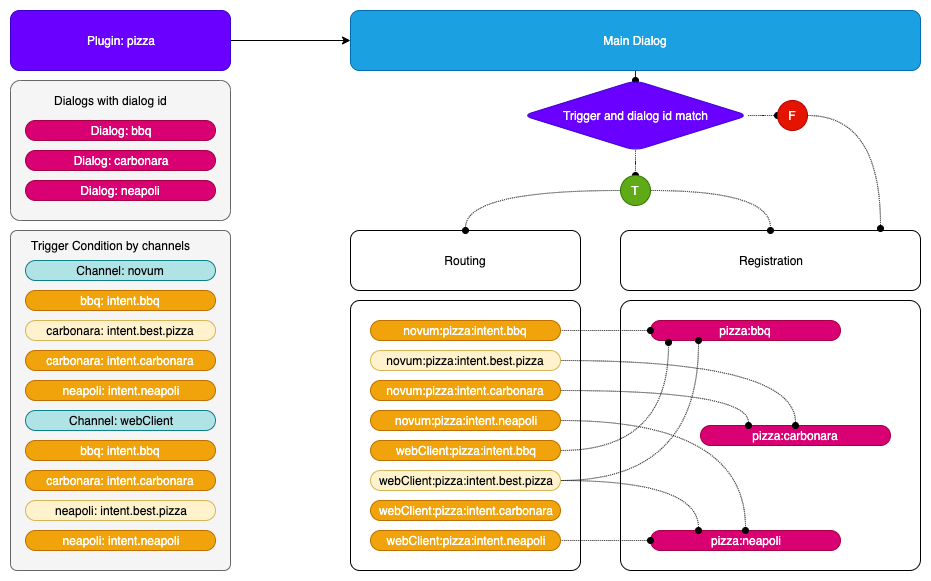
The incoming request is bound to a channel and a recognizer intent field and the resulting address to the library (or plugin) and the id provided by the dialog configuration.
Registering a dialog
-
If a dialog is inserted as a plugin:
- It has to be accessible by a trigger condition if it is located at the plugin configuration.
- It has to be accessible by a trigger condition if it has the property
triggerCondition in the dialog class, accessible across all channels.
- It has to be accessible by calling it directly with its
id if it has an autoRegister property set to true, no routing will be involved.
-
Register the dialog with the library and dialog id, forming the address.
- Combination of library and dialog
id: library:dialogId
- The extra control of the library is because we do not have control over the dialog naming, so we can be sure that each library can implement the name we want and the system will have an unique address.
-
Bind all the trigger conditions with the resulting address.
- The trigger conditions will be implemented for this address also by channel.
- The model forming the address accessor will be:
channel:intent
- The incoming recognizer result will have to match this model.
Internal intent
When we have an internal intent, it has to be accessible across all the channel. We have to register the trigger condition with no channel distinction.
Trigger condition:
// channel id = telefonica
"triggerConditions":[
    {
        "intent": "intent.internal.wifi"
    }
],
id: "dialogId"
Address map:
// the channel of the incoming petition will be ignored
{"intent.wifi": "libraryId:dialogId"}
Flow examples:
Class usage
Register a dialog with trigger conditions:
export interface RouteDialogConfiguration {
    suggestions?: boolean;
    triggers: TriggerCondition[];
    channelDataVersion?: string;
}

/**
* @deprecated This interface should not be used in favor of using RouteConfigurationElementMap interface,
* which improves the efficiency of getting route configuration.
 */
export interface RouteConfiguration {
    [library: string]: RouteConfigurationElement
}

/**
 * Route configuration value of map using to return route Configurations.
 */
export interface RouteConfigurationElement {
    channel: string;
    dialogs: {
        [dialog: string]: RouteDialogConfiguration
    }
}

const router = new RoutingMap();

// public addRoute(
//    routeDialogConfiguration: RouteDialogConfiguration,
//    dialogId: string,
//    channel?: string
// ): any {
router.addRoute(
    {showSuggestion: true, triggers: [{intent: intent.pizza}, {intent: intent.best.pizza}},
    'pizzaCompany:bestPizza',
    'novum')
    );
Obtain a route from a recognition:
//    public getRoute(
//        recognizerResult: { intent: string, entities?: Entity[] },
//        channel?: string
//    ): { id: string, showSuggestions: boolean }
const dialogConfig: {id: 'string', showSuggestion: boolean} = router.getRoute({intent: 'pizza'}, 'novum');
contextFilters
contextFilters are applied in the routing phase.
Context filter conditions will be checked using spleen library. These conditions can be as simple as 1 eq 1 (a context filter with this condition will be always executed) or can be more complex such as /authData/subscriptionType neq 'postpaid'
(that will be executed when the subscription type of the user be different than postpaid). In this case, we only can check properties of AuraUserBaseModel.
More examples of context filters are included below:
- If the user is anonymous, redirect it to intent
intent.account.linking
{
  "name": "Anonymous redirect to linking",
  "type": "type",
  "conditions": "/type eq 'anonymous'",
    "true": {
      "name": "Anonymous redirect to linking",
      "breakDialogExecution": true,
      "breakFilterEval": true,
      "redirectToIntent": "intent.account.linking",
      "suggestions": false
    }
}
- If the user is
multimsisdn, send him a message
{
  "name": "user_type_multimsisdn_not_allowed",
  "type": "user_type_filter",
  "conditions": "/type eq 'multimsisdn'",
  "true": {
    "name": "user_type_not_allowed_action_true",
    "breakDialogExecution": true,
    "breakFilterEval": true,
    "resource": "context-filter:multimsisdn-users-intent-not-allowed.text",
    "suggestions": false
  }
}
- If the user’s subscription type is
postpaid, send him a message.
In this example, we are checking user.authData.subscriptionType, because our user type is AuraUserBaseModel<FourthPlatformAuth>, so user.authData type is FourthPlatformAuth
{
  "name": "user_type_postpaid_not_allowed",
  "type": "user_type_filter",
  "conditions": "/authData/subscriptionType eq 'postpaid'",
  "true": {
    "name": "user_type_postpaid_not_allowed_action_true",
    "breakDialogExecution": true,
    "breakFilterEval": true,
    "resource": "bill:bill.balance.postpaid",
    "suggestions": true
  }
}
2.7 - Aura Bot databases
Aura Bot databases
Description of databases used by Aura Bot
Introduction
Currently, aura-bot uses two databases, described below:
MongoDB
In order to reuse the code, and clarify the development, all classes related with MongoDB connections are stored in the mongodb-storage.ts file within aura-bot-platform repository.
Here it can be found generic “connection” class, that is mongodb-connection.ts, that will handle the connection request, pooling them
and configuring according the configuration (config is mandatory when initializing).
We can find also several “DAO” files, that will couple with a specific MongoDB database and collection, and will create optionally
indexes or any other thing required in a specific domain.
MongoDbConnection
There will be only one instance of MongoDbConnection, creating it in the first call to getInstance (requiring config param) and
returning the same instance in subsequent calls (where the config param is not required).
To create the instance properly, the following configuration variables are used:
| Var name |
Description |
Required/Optional |
| AURA_MONGODB_URI |
URI to connect to MongoDB, for example mongodb://localhost:27017/?authSource=admin |
Required |
| AURA_MONGODB_USERNAME |
User name to authenticate connection to MongoDB |
Required |
| AURA_MONGODB_PASSWORD |
Password to authenticate connection to MongoDB |
Required |
| AURA_MONGODB_POOL_SIZE |
MongoDB pool size |
Optional (Default: 10) |
| AURA_MONGODB_SSL |
Use SSL or not when connecting to MongoDB |
Optional (Default: false) |
This singleton module should be loaded the first time automatically by the system, and then could be accessed just by calling getInstance
method, like:
const connection = await MongoDbConnection.getInstance();
const db = connection.dbConnect(DATABASE);
const collection = db.collection(COLLECTION);
MongoDbStorage
This DAO class will be used by Bot Builder v4 to store the conversation and user data. An index is created to delete documents older than 24
hours (specified by config var AURA_MONGODB_BOT_COLLECTION_CONTEXT_INDEX_TTL).
Following config variables are used to initialize this class:
| Var name |
Description |
Required/Optional |
| AURA_MONGODB_BOT_DATABASE |
Database name where the documents will be stored |
Required |
| AURA_MONGODB_BOT_COLLECTION_CONTEXT |
Collection name where the documents will be stored |
Required |
| AURA_MONGODB_BOT_COLLECTION_CONTEXT_INDEX_TTL |
Time (in seconds) that will exist the documents without updates, before being deleted |
Optional (Default: 86440) |
To create and initialize a MongoDbStorage, a code like following could be used:
const storage = await new MongoDbStorage().init(configuration);
Cache module
The cache module allows the generation of different types of cache:
AuraCacheLocal: only used for local data.AuraCacheRemote: only used for remote data.AuraCacheRemoteLocal: used for remote and local data, with priority for remote.AuraCacheLocalRemote: used for local and remote data, with priority for local.
How to use cache module
It is possible to use any of the caches through the following commands:
// cache local.
const auraCacheLocal = new AuraCacheLocal('nameCacheLocal');
// cache remote.
const auraCacheRemote = new AuraCacheRemote('nameCacheRemote');
// cache local-remote
const auraCacheLocalRemote = new AuraCacheLocalRemote('nameCacheLocalRemote');
// cache remote-local.
const auraCacheRemoteLocal = new AuraCacheRemoteLocal('nameCacheRemoteLocal');
Variables for AuraCacheLocal
Only for local cache (AuraCacheLocal), it is possible to define a series of options:
- stdTTL: standard TTL as number in seconds for every generated cache element. By default,
0 (0 = unlimited).
- compressedData: data is to be compressed in remote cache. By default,
false.
- deleteOnExpire: boolean value that indicates whether variables will be deleted automatically when they expire or not. If
true, the variable will be deleted. If false, the variable will remain. By default, true. You are encouraged to handle the variable upon the event expired by yourself.
const options = { stdTTL: 100, encryptData: true };
const auraCacheLocal = new AuraCacheLocal('nameCacheLocal', options);
Store a key
The following code sets a key value pair. It is possible to define a TTL (in seconds).
It returns true on success.
const auraCacheLocal = new AuraCacheLocal('nameCacheLocal');
auraCacheLocal.set('key', 'value');

const auraCacheRemote = new AuraCacheRemote('nameCacheRemote');
await auraCacheRemote.set('key', 'value', 1800); // -> data expire at 30m.
Retrieve a key
The following code gets a saved value from the cache.
It returns undefined if the value is not found or has expired. If the value is found, it returns an object with the corresponding key value pair.
const auraCacheLocal = new AuraCacheLocal('nameCacheLocal');
auraCacheLocal.set('key', 'value');
auraCacheLocal.get('key'); // -> value.

const auraCacheRemote = new AuraCacheRemote('nameCacheRemote');
await auraCacheRemote.set('key', 'value');
await auraCacheRemote.get('key'); // -> value.
For caches such as AuraCacheLocalRemote and AuraCacheRemoteLocal, it is possible to force it to obtain data different from the priority:
// cache local-remote
const auraCacheLocalRemote = new AuraCacheLocalRemote('nameCacheLocalRemote');
await auraCacheLocalRemote.set('key', 'value');
await auraCacheLocalRemote.getRemote('key'); // -> value.
auraCacheRemote.getLocal('key');
// cache remote-local.
const auraCacheRemoteLocal = new AuraCacheRemoteLocal('nameCacheRemoteLocal');
await auraCacheRemoteLocal.set('key', 'value');
auraCacheRemoteLocal.getLocal('key'); // -> value.
await auraCacheRemoteLocal.getRemote('key'); // -> value.
Delete a key
The following code deletes a key. It returns the number of deleted entries. A delete will never fail.
const auraCacheLocal = new AuraCacheLocal('nameCacheLocal');
auraCacheLocal.set('key', 'value');
auraCacheLocal.get('key'); // -> value.
auraCacheLocal.del('key'); // -> 1.
auraCacheLocal.get('key'); // -> undefined.

const auraCacheRemote = new AuraCacheRemote('auraCacheRemote');
await auraCacheRemote.set('key', 'value');
await auraCacheRemote.get('key'); // -> value.
await auraCacheRemote.del('key'); // -> 1.
await auraCacheRemote.get('key'); // -> undefined.
Flush all data
The following code deletes all data from a store.
const auraCacheLocal = new AuraCacheLocal('nameCacheLocal');
auraCacheLocal.set('key', 'value');
auraCacheLocal.get('key'); // -> value.
auraCacheLocal.flush(); // -> true.
auraCacheLocal.get('key'); // -> undefined.

const auraCacheRemote = new AuraCacheRemote('auraCacheRemote');
await auraCacheRemote.set('key', 'value');
await auraCacheRemote.get('key'); // -> value.
await auraCacheRemote.flush(); // -> true.
await auraCacheRemote.get('key'); // -> undefined.
Redis + MongoDB
If the configuration variable AURA_BOT_CONTEXT_DATABASE is set to REDIS-MONGODB, aura-bot uses a two-level cache to store the context through Aura Redis Mongo Synchronizer.
The following environment variables must be set for the two databases.
Variables
| Var name |
Description |
Required/Optional |
| AURA_MONGODB_BOT_COLLECTION_CONTEXT |
Name of the collection where the context is stored. By default: aura-context. |
Required |
| AURA_MONGODB_BOT_DATABASE |
Name of the database where the bot collections are stored. By default: aura-bot |
Required |
| AURA_MONGODB_PASSWORD |
Password of the MongoDB. Required |
Required |
| AURA_MONGODB_POOL_SIZE |
Pool size of the MongoDB. By default: 60. |
Required |
| AURA_MONGODB_SSL |
Boolean value indicating if MongoDB connection uses SSL or not. By default: true. |
Required |
| AURA_MONGODB_URI |
URI of the MongoDB |
Required |
| AURA_MONGODB_USERNAME |
Username of the MongoDB |
Required |
| AURA_REDIS_CONFIGURATION_PREFIX |
Prefix for Redis configuration keys. By default: aura-config: |
Required |
| AURA_REDIS_CONTEXT_CACHE_PREFIX |
Prefix for Redis context cache keys. By default: context: |
Required |
| AURA_REDIS_CONTEXT_CACHE_SHADOW_KEY_PREFIX |
Prefix for Redis shadow key cache keys. By default: shadow-key: |
Required |
| AURA_REDIS_CONTEXT_CACHE_ACTIVE_CONTEXT_PREFIX |
Prefix for Redis active context cache keys. By default: active-context: |
Required |
| AURA_REDIS_CONTEXT_CACHE_SHARD_COUNT |
Number of shards to generate lists for storing unprocessed context. |
Required |
| AURA_REDIS_CONTEXT_CACHE_TTL |
Time in seconds to store a context in cache. By default: 60. |
Required |
| AURA_REDIS_MODE |
Mode of Redis distribution (Cluster, Sentinel or Single). By default: Single. |
Required |
| AURA_REDIS_PREFIX |
Prefix that will be used by all redis keys when using redis-connector. This allow mixing in a single redis service messages coming from different environments in the same Azure subscription. |
Required |
| AURA_REDIS_SENTINEL_INSTANCE_NAME |
Name of the Redis instance. Use in sentinel mode. |
Optional |
| AURA_REDIS_HOSTS |
A string with list of nodes (host:port) separate by comma. For example: “localhost:port,localhost2:port2”. Default: ‘127.0.0.0:6379’ |
Required |
| AURA_REDIS_DATABASE |
Database number for Single or Sentinel mode. By default: 0. |
|
| AURA_REDIS_PASSWORD |
A string with the password of Redis. |
Required |
| AURA_REDIS_MAX_RECONNECT_RETRIES |
Number of retries to connect to Redis. By default: 25. |
Required |
| AURA_REDIS_MAX_RECONNECT_INTERVAL |
Time in milliseconds to wait before reconnecting to Redis. By default: 5000. |
Required |
| AURA_REDIS_USE_CONNECTION_POOL |
Used connection pool for Redis connections. Default: true. |
Required |
| AURA_REDIS_CONNECTION_POOL_MIN |
Minimum number of connections in the pool. Default: 2. |
Required |
| AURA_REDIS_CONNECTION_POOL_MAX |
Maximum number of connections in the pool. Default: 100. |
Required |
3 - Configuration
Aura Bot configuration
Description of Aura Bot configuration basics, nomenclature, environment variables and libraries configuration
Introduction
The current section includes:
Configuration basics
Process and priorities
Aura components environment configuration will be loaded merging the variables defined in the environment of the host running the server and those defined in a configuration file, that will be passed to the server as an environment variable named CONFIG_FILE.
Variable values defined in the host environment will take precedence to those defined in the CONFIG_FILE.
Finally, variables collected by the make-up process of the external libraries .env.libraries will be loaded with less priority (as if they had been defined in the environment or in the CONFIG_FILE, they will have more priority).
Afterwards, all variables are joined together and, in case the same variable key is used twice, the priority will be as follows (the higher in the list, the more priority):
- Vars from the environment
- Vars from the file pointed by
CONFIG_FILE
- Vars from
.env.libraries (in aura-bot root, autogenerated file)
Nomenclature
-
Environment variables names should start with AURA_ in main Aura components, to avoid problems with the overlapping of system variables.
-
Environment variables used in aura-bot libraries should start with the name of the library (BILL_), to isolate variable names and avoid overwriting between different libraries.
Note:
Review carefully with the DevOps Team variable names that are set automatically by kubernetes, such as [APP_NAME]_PORT that has the docker host of the k8s cluster.
In the case of aura-bot pods, it will be: AURA_BOT_PORT. So, this variable must not be used internally.
Configuration validation
aura-bot counts on a @hapi/joi validation schema that will contain the variables used by it.
During the start-up process, if the validation of global configuration fails, the full list of variables to fix will be shown and the bot will not start. See libraries configuration for further information.
Once the configuration is loaded and the instance created, it will count on the property environmentConfiguration, that contains all the variables set in the system. The names of the variables will be the same than the environment variables, just the type will be set during the schema validation.
For a complete list of environment variables in the system, check aura-bot environment variables.
Passing configuration to our internal libraries
aura-bot internal modules such as the server, middlewares and all of our internal libraries (aura-kpis, aura-logging, aura-locale-manager, etc.) must be prepared to get the configuration when creating an instance.
They should provide a constructor or an init method, with a configuration argument, to receive the environment configuration, for example:
export class SingletonModule {

    /** Private constructor to avoid unwanted instances */
    private constructor() { }

    readonly id: string = 'SingletonModule';

    public static init(configuration: Configuration): SingletonModule {
         if (!SingletonModule.instance) {
            // Do initializing stuff
            return SingletonModule.instance;
        } else {
            throw new Error('An instance of SingletonModule already exists');
        }
    }

    /** Module internal instance */
    private static instance: SingletonModule;
}
Aura Channels configuration
The list of channels available in the environment includes the channel name, id, basic channel configuration, response type, enabled purposes in Kernel, etc. This setting is configured in aura-configuration-api server.
In principle, this setting should not be modified by the OB developers, as it is automatically modified during the make-up phase. However, it is recommended recommended that local developers use their own aura-configuration API server and can make changes for local testing purposes.
You can find detailed information regarding the channel configuration file in Channel Model section.
AuraChannelsConfiguration is a singleton class that contains utils to obtain information about the channels. This module is initialized at server start-up like other singleton modules. To use it, you should use the instance already created:
const configuration = {
    AURA_CHANNELS_CONFIGURATION_API_ENDPOINT: 'http://...' // Mandatory.
};

AuraChannelsConfiguration.init(configuration);
The variable AURA_CHANNELS_CONFIGURATION_API_ENDPOINT contains the URL to access aura-configuration-api service. AuraChannelsConfiguration uses the following methods:
getChannelByName
Get channel configuration value by name of channel.
AuraChannelsConfiguration.instance.getChannelByName('channelName');
getChannelByPrefix
Get channel configuration value by prefix of channel.
AuraChannelsConfiguration.instance.getChannelByPrefix('channelPrefix');
getChannelById
Get channel configuration value by id of channel.
AuraChannelsConfiguration.instance.getChannelById('channelId');`
getChannels
Get all channels configuration.
AuraChannelsConfiguration.instance.getChannels();
3.1 - Components configuration
Aura Bot components configuration
Configuration of Aura bot dialogs and middlewares
Configuration delivery to dialogs and middlewares
Configuration delivery to dialogs and middlewares is executed by the plugin manager.
aura-bot has the control to prepare and manage all configuration variables and make validations to get ready. In case that any validation fails, the set of libraries wrongly loaded will be shown and the bot will not start. If there is a problem with the scheme of an external library, the broken library should be extracted or fixed.
Configuration of libraries
The configuration of aura-bot libraries is fully defined in libraries configuration.
3.2 - Environment variables
Aura Bot environment variables
Updated list of Aura Bot environment variables
- Properties marked in bold are mandatory.
- Properties marked in italics are optional.
| Property |
Type |
Description |
Modifiable by OB? |
| AURA_ACCESS_TOKEN_EXPIRATION_MARGIN |
number |
Time in milliseconds as margin to validate access token expiration. Default: 300000. |
NO |
| AURA_ACTIVATE_MINI_BOT |
boolean |
Flag to activate minibot mode. By default: false. |
NO. Only valid during development to run Aura minibot. |
| AURA_ACTIVE_MIDDLEWARES |
string |
List of configurable middlewares. Order in list is not taken into account. Name/id middlewares cannot have spaces. Example: BatchOutgoingMessage, Facebook. |
NO. Only guided by Global Team. |
| AURA_BOT_APIKEY_PATH |
string |
Path to validate channel APIKey authorization. |
NO |
| AURA_HTTP_KEEP_ALIVE_MSECS |
number |
Number of milliseconds to keep alive HTTP connections. Used in HTTPMonkeyPatcher module. |
NO |
| AURA_HTTP_KEEP_ALIVE |
boolean |
Boolean value that indicates the use of keep-alive in HTTP connections. Used in HTTPMonkeyPatcher module. |
NO |
| AURA_HTTP_KEEP_MAX_SOCKETS |
number |
Maximum number of sockets. Used in HTTPMonkeyPatcher module. |
NO |
| AURA_HTTP_GOT_REQUEST_LOG_ENABLED |
boolean |
Enable or disable the monkey patching of the HTTP and HTTPs modules using Got library. By default, false. |
YES |
| AURA_HTTP_MAX_REQUEST_SIZE |
string |
Maximum size in bytes of the request body. It is a string because, the allowed values must indicate the units: 10 mb, 200 kb, etc. By default, 20 mb. |
YES, in order to decrease it if it is considered too high. For this purpose, both local and global Operations Teams must review it, because it could lead to DDoS attacks easily. |
| AURA_AUTHORIZATION_ENDPOINT |
string |
aura-authentication-api base endpoint. |
NO. In any case, it must be the internal k8s URL pointing to the aura-authentication-api. |
| AURA_AUTHORIZATION_HEADER |
string |
Complete authorization header to be sent to aura-authentication-api, with the following format: APIKEY xxxxxx. |
YES, but only if the previous APIKey was deprecated. |
| AURA_BRIDGE_ENDPOINT |
string |
Bridge endpoint that will be used by aura-bot to send the use cases responses. |
NO |
| AURA_BRIDGE_ASYNC_CALLBACK_PATH |
string |
Bridge path that will be used by async-callback responses. Default value: aura-services/v1/async-callback/notifications. |
NO |
| AURA_CHANNELDATA_CURRENT_VERSION |
string |
channelData version used internally by aura-bot. By default, 3. |
NO |
| AURA_CHANNELDATA_DEFAULT_VERSION |
string |
channelData version returned by default in all messages. By default, 1.0.0. |
NO |
| AURA_CHANNELDATA_RESPONSE_VALIDATION |
boolean |
Flag to indicate that response validation should be done. By default, true. |
NO |
| AURA_CHANNELDATA_VALIDATION |
boolean |
Flag to indicate that request validation should be done. By default, true. |
NO |
| AURA_CHANNELDATA_VALIDATION_VERSIONS |
string |
channelData versions that will be validated. By default, 3. |
NO |
| AURA_CHANNELDATA_VALIDATION_MIN_VERSION |
string |
Minimal version to validate. By default, 3. |
NO |
| AURA_CHANNELS_CONFIGURATION_API_ENDPOINT |
string |
Complete URL where aura-bot should get the configuration of all the channels available in the environment. It should provide an array of channels fitting Aura channel model. |
YES, but only if the generated sas token was |
| AURA_COGNITIVE_ENDPOINT |
string |
URL of Aura NLP API. |
NO. In any case, it must be the internal k8s URL pointing to the api-gw. |
| AURA_DEFAULT_LOCALE |
string |
Culture code to be used by default in the current deployment: de-de, en-gb, es-es, pt-br. |
NO |
| AURA_DEFAULT_TIME_ZONE |
string |
Default time zone. For example: Europe/Madrid |
NO |
| AURA_DIALOG_CONTEXT_THRESHOLD |
number |
Minimal score to considered valid a dialogContext option. By default, 0.8 |
NO without the advice of a language expert that validates the new threshold. |
| AURA_DIALOG_CONTEXT_ORDINAL_CARDINAL_THRESHOLD |
number |
Threshold that will be used in case the dialogContext elements are in list form and also if the input phrase has some number. By default, 0.95 |
NO without the advice of a language expert that validates the new threshold. It must be deeply validated by the Global Team, in the happening of an error in the dialog context recognition. |
| AURA_DIALOG_CONTEXT_THRESHOLD_RELATION_UTTERANCE |
number |
If its value is greater than 0, it will be used to evaluate the relationship between value and utterance by characters and tokens. |
NO without the advice of a language expert that validates the new threshold. It must be deeply validated by the Global Team, in the happening of an error in the dialog context recognition. |
| AURA_ENCRYPTION_ALGORITHM |
string |
Encryption algorithm used to validate the APIKey. |
NO. It would break database encrypted data and APIKey validation. |
| AURA_ENCRYPTION_IV_LENGTH |
number |
Size for the initialization vector used by the encryption algorithm that validates the APIKey |
NO. It would break database encrypted data and APIKey validation. |
| AURA_ENCRYPTION_IV_POSITION |
number |
Position where to insert the initialization vector in the final string with the encrypted payload. Future use. |
NO. It would break database encrypted data and APIKey validation. |
| AURA_EXTENDED_KPI_GENERIC_QUESTION_INTENT |
string |
Generic question intent used to extract options from entities field. |
NO |
| AURA_EXTENDED_KPI_HANDOVER_DIALOG_PREFIX |
string |
Dialog prefix for handover dialog. |
NO. |
| AURA_EXTENDED_KPI_REMOVE_HTML_TAGS |
boolean |
Flag that indicates if it is necessary or not to remove HTML tags from the text. |
NO. |
| AURA_EXTENDED_KPI_SKIP_AURA_ACTION |
boolean |
Skip message if it is an aura-action. |
NO. |
| AURA_ENCRYPTION_KEY |
string |
Encryption key or comma-separated list of encryption keys to be used in the environment. It is mainly used to decrypt the APIKeys. |
NO. It would break database encrypted data and APIKey validation. |
| AURA_FILE_ENDPOINT |
string |
URL of the files microservice. |
NO. |
| AURA_FP_AUTHSERVER_ENDPOINT |
string |
URL of the Kernel authentication server, used to get valid access_token or introspect_token to handle calls to Kernel data APIS. It MUST end with / |
NO |
| AURA_FP_CLIENT_CRED_PURPOSES |
string |
Purposes used in 2-legged user profile queries in Kernel. |
YES |
| AURA_FP_CLIENT_CRED_SCOPES |
string |
Scopes used in 2-legged user profile queries in Kernel |
YES |
| AURA_FP_CLIENT_ID |
string |
Client ID to be logged in as Kernel application. |
NO |
| AURA_FP_CLIENT_SECRET |
string |
Client password to be logged in as Kernel application. |
NO |
| AURA_FP_ISSUER |
string |
URL of the endpoint serving Aura’s public key of the environment. |
NO |
| AURA_FP_PRIVATE_KEY |
string |
Base64 encoded string of the private key of the environment. |
NO |
| AURA_FP_USER_PROFILE_ENDPOINT |
string |
URL of Kernel UserProfile API. |
NO |
| AURA_SHUTDOWN_GRACEFUL_TTL |
number |
Number of milliseconds to wait until all bot tasks are done before shutting each pod down. By default, 25000 (25 seconds) |
NO |
| AURA_GATEWAY_API_ENDPOINT |
URI string |
Endpoint to access the locally deployed ATRIA aura-gateway-api |
NO |
| AURA_GATEWAY_API_ISSUER_URL |
string |
Aura issuer URL. It is automatically fulfilled by the installer. |
NO |
| AURA_INTENTS_NONE |
string |
None intents separated by commas. Default: None,intent.none,intent.tv.none. Used in the main-dialog. |
YES. The default values are always added to the provided list. |
| AURA_INTERNAL_RETRIES |
number |
Number of retries for internal calls. By default: 1 |
NO, except if requested. |
| AURA_KPI_FILE_PREFIX |
string |
String with the prefix used in the KPIs entities files of this service. |
NO |
| AURA_KPIS_LOG_API_REQUEST_BODY |
boolean |
Flag to log or not the request body of the API calls. Default: true |
YES. Once disabled, to enable run performance tests to validate if it is possible to write them. |
| AURA_KPIS_LOG_API_RESPONSE_BODY |
boolean |
Flag to log or not the response body of the API calls. Default: true |
YES. Once disabled, to enable run performance tests to validate if it is possible to write them. |
| AURA_KPI_REMOVE_SPECIAL_CHARACTERS |
string |
Regular expression on removing special characters. Default:\n\r |
NO |
| AURA_KPI_STORE_MODE |
string |
Destination of the KPIs entities files. Default: blob. If file, they will be stored locally in the instance, in the folder shown in KPI_TO_DSV_LOCAL_FILES_DIRECTORY. For development purposes. If blob, they will be stored remotely in the Azure blob container shown in KPIS_STORE_CONTAINER. Mandatory in environments running on k8s. |
NO, only configurable when running the bot locally. |
| AURA_KPI_TO_DSV_CACHE_TTL |
number |
Number with the amount of milliseconds to cache existing requests to calculate their duration. Default: 1800. |
NO |
| AURA_KPI_TO_DSV_DELIMITER |
string |
Field delimiter to be used in KPIs entities files. Default: | |
NO. It will break all the analysis and processes running on top of these files. |
| AURA_KPI_TO_DSV_EXTENSION |
string |
The extension to be used in KPIs entities files. Default: txt |
NO. If changed without changing aura-kpis-uploader, the files will not be uploaded to Kernel. |
| AURA_KPIS_BLOB_STORE_INTERVAL |
number |
Time interval in milliseconds to upload asyncrhonously logs to the KPIS_STORE_CONTAINER. Default: 60000. Only needed if KPI_STORE_MODE==blob. |
NO. In pre/production it must be blob so the files will be uploaded to Kernel instance afterwards. Setting file for development is recommended. |
| AURA_KPIS_STORE_CONTAINER |
string |
The name of the Azure Blob container to store KPIs entities files. By default, aura-kpis. It MUST be the same than the one configured in KPIS_UPLOADER module. Only needed if KPI_STORE_MODE==blob. |
NO. If changed without changing aura-kpis-uploader, the files will not be uploaded to Kernel. |
| AURA_LOCALE_FOLDER |
string |
Full path to the local folder where locale files are stored. By default, ./locale. |
NO |
| AURA_LOCALE_FORCE_IMPORT |
boolean |
true if locale remote loading must be carried out although there were validation errors. By default, false. |
YES |
| AURA_LOCALE_REMOTE_BACKUP |
boolean |
true, if after updating locale files with the remote version, a backup of the former local files should be stored in Azure Storage. By default, false. |
YES |
| AURA_LOCALE_REMOTE_CONTAINER_PREFIX |
string |
Path within AURA_LOCALE_REMOTE_CONTAINER where the locale files are stored. By default, locale. |
NO |
| AURA_LOCALE_REMOTE_CONTAINER |
string |
Name of the Azure Storage Blob Container where the locale files will be stored. By default, static-resources. |
NO |
| AURA_LOGGING_FORMAT |
string |
Format to be used in monitoring logs: json or dev(more visual format). By default, json. |
NO. Only for development, set it to dev. |
| AURA_LOGGING_LEVEL |
string |
Level to be used in monitoring logs, from more to less verbose: 'TRACE', 'DEBUG', 'INFO', 'WARN', 'ERROR', 'FATAL', 'OFF'. By default, INFO. |
YES, for development set it to DEBUG. In pre/production should be INFO or ERROR. For analysis of an issue in pre/production it may be changed to DEBUG. |
| AURA_LOGGING_EXTRA_TIME_METRICS |
boolean |
true if the time metrics should be logged in the monitoring logs. By default: false. |
NO |
| AURA_MAX_ATTACHMENT_JSON_SIZE |
number |
Maximum size from which Aura response attachments will be zipped. By default, 10000 (10 KB) |
NO |
| AURA_MAX_HISTORY_CHAT_ITERATIONS |
number |
Maximum number of messages saved in the history conversation. |
YES |
| AURA_MICROSOFT_APP_ID |
string |
ID of the Microsoft bot application to be used in the deployment. |
NO. Only if Operations Team changes it. |
| AURA_MICROSOFT_APP_PASSWORD |
string |
Password of the Microsoft bot application to be used in the deployment. |
NO. It must be changed by Operations Team. |
| AURA_MICROSOFT_AZURE_STORAGE_COMMON_ACCESS_KEY |
string |
Microsoft Storage password of the common storage. Currently used for KPI storing. |
NO. Only if Operations Team changes it. |
| AURA_MICROSOFT_AZURE_STORAGE_COMMON_ACCOUNT |
string |
Microsoft Storage account of the common storage. Currently used for KPI storing. |
NO. Only if Operations Team changes it. |
| AURA_MICROSOFT_AZURE_STORAGE_ACCESS_KEY |
string |
Microsoft Storage password of the deployment. |
NO. It must be changed by Operations Team. |
| AURA_MICROSOFT_AZURE_STORAGE_ACCOUNT |
string |
Microsoft Storage account of the environment. |
NO. It must be changed by Operations Team. |
| AURA_MICROSOFT_AZURE_STORAGE_CONFIGURATION_CONTAINER |
string |
Name of the container where basic bot configuration files are stored: Mongo indexes descriptor, aura-behavior-manager configuration, etc. By default, aura-configuration. |
NO |
| AURA_MICROSOFT_AZURE_STORAGE_SUGGESTION_TABLE_TTL |
number |
Number of seconds to store the users’ suggestions. By default, 86400 (one day). |
NO |
| AURA_MICROSOFT_AZURE_STORAGE_SUGGESTION_TABLE |
string |
Name of the Azure Storage table where users’ sent suggestions will be stored. By default, AuraUserSuggestionTable |
NO |
| AURA_MICROSOFT_CHANNEL_SERVICE |
string |
Microsoft Channel Service. |
NO. It must be changed by Operations Team. |
| AURA_MICROSOFT_OPEN_ID_METADATA |
string |
Metadata used in Microsoft OpendId validation. |
NO. It must be changed by Operations Team. |
| AURA_MIDDLEWARE_SPEAK_PROCESSOR |
string |
Used to enable speak property text substitution on the outgoing messages, to produce speakable text. Regular expression of substitution format example: [["\\*"," asterisk "],["\\#"," hash "]] |
YES. Include all the needed changes to be done automatically between the written and the spoken text. |
| AURA_MIN_INTENT_SCORE_THRESHOLD_TO_CLEAN_STACK |
number |
Minimal score to clean the dialog stack in a prompt case. By default, 0.95 |
NO. Environment configuration should be delivered with a validated threshold, currently 0, meaning that any valid NLP result will break the prompt and move the user to the new dialog. Do not change it without validating it with Aura Global Team. |
| AURA_MONGODB_BOT_COLLECTION_CACHES_INDEX_TTL |
number |
Number of seconds to keep the user’s data available in aura-bot cache. By default, 3600. |
NO |
| AURA_MONGODB_BOT_COLLECTION_CACHES |
string |
MongoDB collection name where aura-bot will store the remote caches used during request processing. By default, aura-caches. |
NO |
| AURA_MONGODB_BOT_COLLECTION_CONTEXT_INDEX_TTL |
number |
Number of seconds to keep the context data available in aura-bot context cache. By default, 3600. |
NO |
| AURA_MONGODB_BOT_COLLECTION_CONTEXT |
string |
MongoDB collection name where aura-bot will store the context of the users. By default, aura-context. |
NO |
| AURA_MONGODB_BOT_DATABASE |
string |
MongoDB database name where aura-bot will store all the data needed to handle requests. By default, aura-bot. |
NO |
| AURA_MONGODB_CACHE_TTL |
number |
Lifetime of cache used by aura-behavior-manager. It MUST be disabled in PRE and PRO environments. By default, 3600 seconds (1h). |
YES, only for development environments. |
| AURA_MONGODB_CACHE_DATABASE |
string |
Database used in cache of aura-behavior-manager. By default, aura-bot-caches. |
YES, only for development environments. |
| AURA_MONGODB_CACHE_COLLECTION_DL |
string |
Collection used in cache of aura-behavior-manager. By default, dev-cache. |
YES, only for development environments. |
| AURA_MONGODB_CACHE_INDEX_DL |
string |
Index used in TwoLevelsCache of aura-behavior-manager. By default, id. |
YES, only for development environments. |
| AURA_MONGODB_PASSWORD |
string |
MongoDB password to access AURA_MONGODB_BOT_DATABASE in AURA_MONGODB_URI. |
NO |
| AURA_MONGODB_POOL_SIZE |
number |
Number of connections available in MongoDB pool. By default, 60. |
NO |
| AURA_MONGODB_SSL |
boolean |
true if access to AURA_MONGODB_URI is SSL. By default, false. |
NO |
| AURA_MONGODB_URI |
string |
MongoDB URI of the server handling. AURA_MONGODB_BOT_DATABASE. |
NO |
| AURA_MONGODB_USERNAME |
string |
MongoDB username to access AURA_MONGODB_BOT_DATABASE in AURA_MONGODB_URI. |
NO |
| AURA_MONGODB_MAX_POOL_SIZE |
number |
Maximum number of connections in the MongoDB pool. By default, 60. |
NO |
| AURA_MONGODB_MIN_POOL_SIZE |
number |
Minimum number of connections in the MongoDB pool. By default, 2. |
NO |
| AURA_MONGODB_MAX_IDLE_TIME_MS |
number |
Maximum idle time in milliseconds for connections in the MongoDB pool. By default, 30000 (30 seconds). |
NO |
| AURA_MONGODB_RETRY_WRITES |
boolean |
true if retry writes are enabled in the MongoDB connection. By default, true. |
NO |
| AURA_MONGODB_RETRY_READS |
boolean |
true if retry reads are enabled in the MongoDB connection. By default, true. |
NO |
| AURA_MONGODB_HEARTBEAT_FREQUENCY_MS |
number |
Frequency in milliseconds of the heartbeat in the MongoDB connection. By default, 2000 (2 seconds). |
NO |
| AURA_MONGODB_SERVER_SELECTION_TIMEOUT_MS |
number |
Timeout in milliseconds for server selection in the MongoDB connection. By default, 5000 (5 seconds). |
NO |
| AURA_MONGODB_SOCKET_TIMEOUT_MS |
number |
Timeout in milliseconds for socket operations in the MongoDB connection. By default, 45000 (45 seconds). |
NO |
| AURA_CONNECTION_TIMEOUT_MS |
number |
Timeout in milliseconds for establishing a connection to the MongoDB server. By default, 10000 (10 seconds). |
NO |
| AURA_MONGODB_READ_PREFERENCE |
string |
Read preference for the MongoDB connection. By default, primaryPreferred. Possible values: primary, primaryPreferred, secondary, secondaryPreferred, nearest. |
NO |
| AURA_PHONE_COUNTRY_CODE |
string |
Two letters ISO-3166 country code to obtain phonenumber without country prefix. It must be one of BR, DE, ES, UK. |
YES, if the expected country code is not correctly configured. |
| AURA_PROMETHEUS_REGEX |
string |
Stringified object that contains regex to apply to prometheus paths in order to group equivalent requests in prometheus. Example: '{"subscribed_products/$1/users/*/products": "/subscribed_products\\/(v\\d)\\/users\\/.*\\/products/"}'. By default: '{}' |
YES |
| AURA_PRESUGGESTIONS_INTENT |
string |
Intent that forces to ask for pre-suggestions in the suggestions dialog. By default: 'intent.getOnboarding' |
NO, only if another intent was configured to obtain presuggestions. |
| AURA_REQUEST_ENABLE_NAGLE |
boolean |
Boolean to enable Nagle. By default: false. |
NO |
| AURA_REQUEST_TIMEOUT |
number |
Number of milliseconds to wait for a request. By default: 30000, 30 seconds. |
YES, in case of network issues. |
| AURA_RETRIES_CODES |
string[] |
Array of strings with error codes. By default: [‘ECONNRESET’]. |
NO, except if requested. |
| AURA_SEED_ID |
string |
Seed used to generate userIds for anonymous users. |
NO |
| AURA_ROOT_INTENT |
string |
Default intent that aura-bot sets if it has not been possible to determine the user’s intention during recognition/routing process. By default, the none intent will be returned. |
NO |
| AURA_SERVER_PORT |
number |
Port where aura-bot will be listening to requests. By default, 8080. |
NO |
| AURA_SERVICE_ENVIRONMENT |
string |
Type of environment: 'DEV', 'PRE', 'PRO'. By default, DEV. It is used during locale translation, to get the correct text reference and, in development environments, to allow aura-behavior-manager execution. |
NO |
| AURA_SERVICE_URL_DIRECTLINE |
string |
Default URL for Direct Line services. By default, https://directline.botframework.com/. |
NO |
| AURA_STATIC_RESOURCE_ENDPOINT |
string |
URL of the server publishing aura-bot static resources. |
NO |
| AURA_STATIC_RESOURCE_SAS_TOKEN |
string |
Credentials to access the server publishing aura-bot static resources. |
NO. Only if Operations Team needs to change it. |
| AURA_SUGGESTIONS_V3_NUMBER |
number |
Number of suggestions configured to be returned in channelData version 3. By default, 5. |
No, only changed if the Global Team or the LCDO Dev Team requires it. |
| AURA_SUPERAGENT_DEADLINE_TIMEOUT |
number |
Number of milliseconds to wait until the superagent deadline timeout, as specified here. It is optional and, by default, it is not configured. |
No, only changed if the Global Team or the LCDO Dev Team requires it. |
| AURA_SUPERAGENT_RESPONSE_TIMEOUT |
number |
Number of milliseconds to wait until the superagent response timeout, as specified here. It is optional and, by default, it is not configured. |
No, only changed if the Global Team or the LCDO Dev Team requires it. |
| AURA_SUPERAGENT_RETRY_ATTEMPTS |
number |
Number of retry attempts (not counting the first attempt) to be applied on superagent requests, as specified here. It is optional and, by default, it is not configured. |
No, only changed if the Global Team or the LCDO Dev Team requires it. |
| AURA_TEMPORARY_REMOTE_CONTAINER |
string |
Container to upload temporary resources. By default, aura-temporary-resources |
NO |
| AURA_TERMS_AND_CONDITIONS_API_KEY |
string |
APIKey to call Aura Terms and Conditions API. |
NO |
| AURA_TERMS_AND_CONDITIONS_ENDPOINT |
string |
Aura Terms and Conditions API basic endpoint. |
NO |
| AURA_TERMS_AND_CONDITIONS_EXPIRATION |
number |
Terms and conditions expiration time. By default, 86400000 (1 day). |
NO, only changed if the Global Team requires it. |
| AURA_URL_SAS_EXPIRATION |
number |
Expiration time for sas URLs generated for temporary resources. By default, 600 (minutes). |
YES if LCDO or Operations Team prefer another duration time. |
| AURA_USER_ENCRYPT_CACHE |
boolean |
true to encrypt data stored in users’ cache. By default, true. |
NO |
| AURA_USER_LOCAL_CACHE_TTL |
number |
Number of seconds to keep the user’s data available in aura-bot users’ local cache. By default, 300 sec. |
NO |
| AURA_VERSION |
string |
Number of the Aura release being executed. |
NO |
| AURA_HTTP_PATHS_LOG_DISABLED |
string |
HTTP paths separated by commas which requests would not be logged. By default: aura-kpis,static-resources. Used in http-monkey-patcher. |
YES, if there is a path that should not be logged. The default values are always added to the provided list. |
| DEV_AURA_BOT_BEHAVIOR_CRON_PATTERN |
string |
Cron pattern to set the refresh time of aura-behavior-manager configuration. By default, */5 * * * * (every 5 minutes). It is only valid for development environments. |
YES, in development environments. |
| DEV_AURA_BOT_BEHAVIOR_MICROSOFT_AZURE_STORAGE_SETTINGS_FILE |
string |
Name of the configuration file route used by aura-behavior-manager. By default, aura-bot/aura-bot-behavior-manager.json. It is only valid for development environments. |
YES, in development environments |
| DEV_AURA_BEHAVIOR_MANAGER_ACTIVE |
boolean |
Flag to indicate whether or not aura-behavior-manager module should be activated in the current deployment. It is only valid for development environments. |
YES, in development environments. |
| AURA_KPIS_BLOB_TIME_WAIT_IF_EXISTS |
number |
Time to wait in milliseconds if the KPIs blob exists to avoid duplicate headers. By default: 1000. |
YES |
4 - Processes
Aura Bot processes
Description of the main functionalities carried by Aura Bot and the different processes that can be executed for its management
The main functionalities in charge of aura-bot as Aura’s neuronal network are listed below:
-
Aura users’ sign up:
Different ways of registering users in Aura, depending on the channel. Find detailed information in channel authentication.
-
Aura authentication validation process
Aura supports different types of users, each of them with access to specific services and use cases: authenticated users and anonymous users. The authentication process carried out by aura-bot is fully explained in Users authentication.
-
Aura conversational process
aura-bot is in charge of managing the conversational flow with the user, from receiving her request and understand it to fetch the required data to compose the most appropriate response and provide it back to the user.
Find detailed information in Aura conversational flow.
Apart from these core tasks in Aura’s performance, there are other processes that can be executed over aura-bot in order to customize it or access to different components.
4.1 - Users authentication
Users authentication
Description of users’ authentication process in Aura Bot. Discover the different types of users and how they can authenticate in Aura
Introduction
aura-bot supports different types of users, each of them with access to specific services and use cases:
- Authenticated users
- Anonymous users
In the authentication process, aura-bot carries out the following summarized steps:
- Obtains information from the users
- Validates it
- If the validation is successful, and depending on the type of user, aura-bot allows accessing to different services
- Stores the user’s data
The detailed process is described in users’ authentication flow.
The authentication of a user implies the acceptance of Terms and Conditions, which are handled by aura-bot.
In certain scenarios (use cases) where the user is unauthenticated, it is required to redirect specific intents that need authentication. Find here the complete information regarding login redirections.
4.1.1 - Authentication flow
Aura authentication flow
Description of the authentication flow for Aura users
The authentication validation process
Before starting a conversation with aura-bot, the channel needs to set a valid auraId and a fresh DirectLine token, if accessing via Direct Line, that should be sent as authorization header of bearer type in the request to the bot.
Find further information about Direct Line request in MS DirectLine API description.
Authentication validation in aura-bot consists of two phases:
-
Validate that the Direct Line token is a valid one, generated by the bot instance running behind aura-bot.
-
Validate the Aura credentials of the user, currently only based on Kernel authentication. If request authentication fails, the message is no longer processed, and an unauthenticated error response is returned to the channel.
An Aura channel should send its auraId in the from.id field of the request to the bot. Once the Direct Line token has been validated, aura-bot reads the from.id field to validate it:
-
Firstly, aura-bot checks if the auraId exists in the AuraUsers database and, if exists, then goes on with the authentication in Kernel.
-
If the channel allows anonymous users: In the happening that the received auraId does not exist in the AuraUsers database, then the user is marked as anonymous and the Kernel authentication validation is not launched.
-
If the channel does not allow anonymous users, then an UNAUTHENTICATED error is sent to the channel, informing that the Kernel authentication process must be relaunched before going on.
-
Kernel authentication validation:
-
A new fresh Kernel accessToken is requested for the userId and authorizationId related to the auraId.
-
If the authorizationId is invalid or no longer exists in Kernel, then an UNAUTHENTICATED error is sent to the channel, informing that the Kernel authentication process must be relaunched before going on.
-
Then a fresh Kernel introspect token is requested, so deeper information about the user identities and permissions for aura-bot is obtained.
-
Finally, the Kernel UserProfile info is obtained and processed to obtain further information about the user’s contract, for instance, its subscription type.
-
After that, all this information is stored in a cache during the time when Kernel accessToken is valid. During this period, the authentication validation process is avoided.
-
Besides, all this information is set in the AuraUser model and stored in the conversation context of the bot to be available during the rest of the conversation messages processing.
The authentication process is managed by the fourth-platform-authorization-middleware.
Users data storage
Authenticated users
Users database
When a user authenticates with the basic authentication mechanism of a channel, the user’s information is created/updated in MongoDB and aura-bot accesses it through the aura-authentication-api API Aura Services API published in Kernel.
For instance, in WhatsApp, when the user authenticates with SMS-OTP, her information is stored in AuraUsers database.
Local cache
It is the node cache that each pod has with information from the users.
The information is saved on each request and expires in 5 minutes, configurable via AURA_USER_LOCAL_CACHE_TTL environment variable.
Remote cache
Mongo cache with aura-bot users’ information. It is shared by all pods.
The information is saved on each request and expires in 1 hour, configurable via AURA_MONGODB_BOT_COLLECTION_CACHES_INDEX_TTL environment variable.
Anonymous users
Local cache
Node cache to store anonymous users’ information, who are accessing each pod.
The information expires in 5 minutes, configurable via AURA_USER_LOCAL_CACHE_TTL environment variable.
Both types of users
BotFramework conversational cache
This is the conversational cache of BotFramework, which is called internally in aura-bot persistentData.
It is a MongoDB cache with three parts: ConversationData, UserData and AuthData. Therefore, as this section is related to users’ information, it is stored in the last two sections.
Find more information about cache module.
How does the authenticated user’s cache expire?
The expiration of the cache depends on different factors:
- The TTL of each cache element.
- Kernel accessToken is no longer valid.
- If the
accountRemovalTimestamp of the conversational cache is greater than the timestamp of the cache
Authentication process flowchart
The following flowchart shows the authentication process:
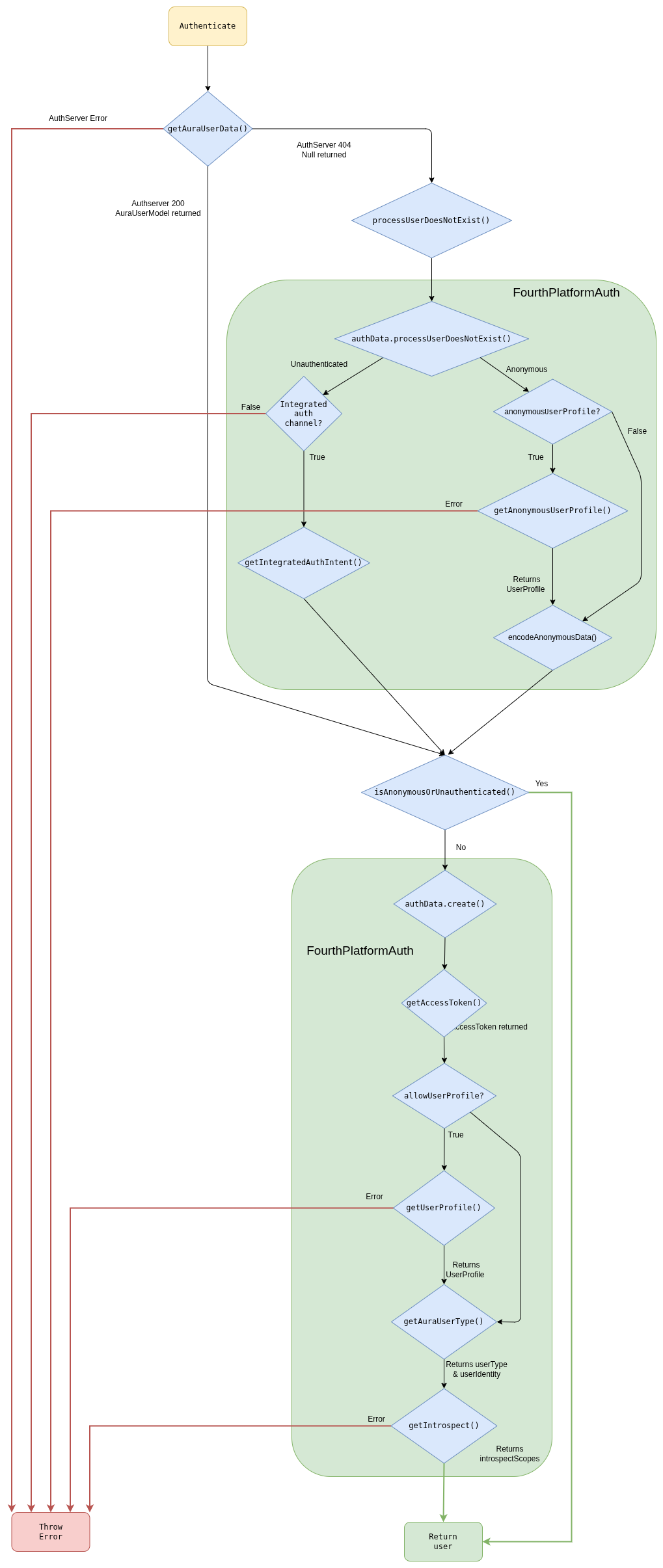
Authentication steps
getUserData()
This function gets the user’s data from AuraUsers database, accessing through the Aura Services API published in Kernel.
If the endpoint returns a 404 error, null is returned by the function because in this case the user is anonymous, but it depends on the channel configuration to mark it as an error, if the channel does not support anonymous users ( for example, novum-mytelco channel), or as a valid anonymous users, for channels that allowed them (such as WhatsApp or Aura Webclient).
If other error is returned, the function throws an error and the authentication flow ends.
In the normal flow, the endpoint returns a user and the function returns a AuraUserModel object:
{
   "userAuraId":"c2aa81f0-abd9-444f-b7cb-47c179f10556",
   "userAuraIdGlobal":"d065dba31c79090a9e3c5afa94558d0c39ffa90c8e136931a5a12069418efad5",
   "userChannel":{
      "id":"45494a5b-835a-4fff-a813-b3d2be529dbe",
      "dialogs":[

      ],
      "outputMessageFormat":null,
      "allowAnonymous":null,
      "name":null,
      "shortName":null,
      "fpaAuthIntegrated":null
   },
   "authorizationId":"",
   "userPhoneNumber":"+34600000003",
   "userClientId":"up24456789",
   "timestamp":1575366984,
   "userPhoneType":null,
   "userSubscriptionType":null,
   "userAccessToken":null,
   "introspectScopes":null,
   "userProfile":null,
   "userType":null,
   "userAccountNumber":null
}
getChannelConfiguration()
This method returns an ChannelConfiguration object. This function tries to obtain the channel configuration by the
channelId or channelName passed as parameters.
{
  "dialogLibraries": [
    {
      "name": "common",
      "dialogs": [
        {
          "id": "greetings",
          "allowAnonymous": true,
          "triggerConditions": [
            {
              "intent": "intent.common.greetings"
            }
          ]
        }
      ]
    }
  ],
  "id": "45494a5b-835a-4fff-a813-b3d2be529dbe",
  "name": "novum-mytelco",
  "nlp": {
    "enabled": true,
      "enabled": true
    }
  },
  "prefix": "nov",
  "requestOptions": {
    "requestOptionsVersion": {
      "1": {
        "channel": "directline"
      }
    }
  },
  "responseOptions": {
    "dialogContext": {
      "cardActions": {
        "generate": "always",
        "generateList": true
      },
      "defaultListType": "ordinalCardinal",
      "disabled": false,
      "normalizeTerms": true,
      "processFromClient": true,
      "promptChoice": {
        "generate": "always",
        "generateList": true
      },
      "returnToClient": false
    }
  },
  "security": {
    "authPurposes": "customer-self-service identify-customer aura-technical-problems-purpose",
    "channelId": "novum-mytelco"
  }
}
getInitialUserType()
This method returns an initial approach of the userType, because at this point some user types cannot be inferred.
Depending on the channel configuration and the user returned by getUserData(), there are four possible scenarios:
getUserData() returns a valid user
- The user has
userType
User.userType is returned
- The user does not have
userType
getUserData() returns null
- The channel allows anonymous
- The channel does not allow anonymous
Unauthenticated is returned
At this point, we can have three different flows:
- If the user is
anonymous, it is returned with the minimal data available.
- If the user is
unauthenticated and the channel have integrated auth, getIntegratedAuthIntent() is called but if the channel does not have integrated auth, an error is returned and the authentication ends.
- If the user is
undefined or other type, it starts the flow to obtain the data from Kernel.
getIntegratedAuthIntent() (Only unauthenticated users)
This method returns the intent to redirect to the integrated authentication.
This intent is returned in user.redirectIntent provided by the authentication function.
getUserAccessToken()
This method constructs the options object with scopes, purposes, authorizationId, deviceId, security.channelId and userId. Afterwards, it makes the request and obtain the token.
If an error occurs, the function will throw an error and the authentication ends with error.
security.channelId is added when requesting the jwt-bearer.
getUserProfile()
This method returns the user profile from Kernel. If there is any error, it will be thrown and the authentication will end with error.
{
    "id": "up24456789",
    "name": "ESP - Usuario de Prueba 2 - prepago",
    "id_document": {
      "country": "ESP",
      "type": "NIF",
      "value": "712724440A"
    },
    "identities": [
      {
        "type": "phone_number",
        "id": "+34600000003",
        "services": ["mobile_prepaid"],
        "roles": ["owner", "admin"]
      }
    ]
}
getAnonymousUserProfile()
This method returns the user profile from Kernel, for anonymous users. If there is any error, it will be thrown and the authentication will end with error.
[
  {
    "identities": [
      {
        "roles": [
          "owner"
        ],
        "id": "12SIME16",
        "services": [
          "authentication"
        ],
        "type": "uid"
      },
      {
        "roles": [
          "owner",
          "basic",
          "admin"
        ],
        "id": "+34680395460",
        "services": [
          "mobile_postpaid"
        ],
        "type": "phone_number"
      },
      {
        "roles": [
          "owner",
          "basic",
          "admin"
        ],
        "id": "+34911725467",
        "services": [
          "landline",
          "internet"
        ],
        "type": "phone_number"
      },
      {
        "id": "CD53D6C5285CB60DD8E50052C1DBFADDDA033613",
        "type": "uid",
        "roles": [
          "owner"
        ],
        "services": [
          "authentication"
        ]
      }
    ],
    "id": "CD53D6C5285CB60DD8E50052C1DBFADDDA033613"
  }
]
encodeAnonymousData()
This method sets the userId and auraIdGlobal for anonymous users. These values are needed to be stored in KPIs.
{
  "userId": "76661cf96c2bda27c4fb016627f2d74af1c3cee496b76cf5d7bc2b2ad8a38cb2",
  "auraIdGlobal": "8eeb101175bfe9c247e9d10669c0d1696e8034f8e1a12b25b54780e00de0e1c1!616e6f6e796d6f7573"
}
getAuraUserType()
This method returns the final userType and the userIdentity.
- First of all, identities are filtered and only the type
phone_number with services prepaid, postpaid, control, hybrid or internet are returned.
- After that, we need to select the phone number of the user among the numbers filtered.
- If we have more than 1 number and
userData do not have userPhoneNumber (the user has not been logged with phone number), the userType returned is multimsisdn and userIdentity is undefined.
- If there is only 1 phone number,
userType is monomsisdn.
- If there are many phones but we also have
userPhoneNumber in userData, this phone is searched in phones array and if found, the user is considered monomsisdn although it is multimsisdn.
Monomsisdn users return userType (prepaid, postpaid or control) and userIdentity filled:
{
   "type":"phone_number",
   "id":"+34600000003",
   "services":[
      "mobile_prepaid"
   ],
   "roles":[
      "owner",
      "admin"
   ],
   "phone_type":"mobile",
   "subscription_type":"prepaid",
   "identifier":"+34600000003"
}
getIntrospect()
This method returns the scopes, purposes and boundScopes for this user from Kernel.
{
   "scopes":[
      "event-low-data-read",
      "insights-data-usage-result-read",
      "mobile-balance-transfer-write",
      "auraid-read",
      "webviews-phone-number-read",
      ...
   ],
   "purposes":[
      "sim-upgrade-suggestion",
      "identify-customer",
      "customer-self-service",
      "aura-read-insight-events",
      "device-recommendations",
      "detect-abnormal-usage"
   ],
   "identifierBoundScopes":[

   ]
}
4.1.2 - Users types
Aura users types
Description of the different users types existing in Aura
Introduction
Aura supports different types of users: authenticated and anonymous, each of them with access to specific services and use cases. The following sections include detailed information about each type.
Authenticated users
Aura securely knows the identity of the users, as they must have successfully completed the authentication flow.
They can be classified into different groups regarding their type of subscription. This classification depends on the different countries, but in general terms, there are three main types of authenticated users: postpaid, prepaid, hybrid / control.
Authenticated users can access any use case in Aura, providing that the use case supports authenticated users or the specific subscription type of the user, defined through context filters.
In case the authorization process of an Aura user fails:
- If the channel does not allow anonymous users, then the request is marked as failed and a status with the unauthenticated error is returned to the channel. This indicates that the channel should relaunch the authentication of the user to get a valid auraId.
Anonymous users
Anonymous users are unauthenticated users but with authorized access to certain Aura’s use cases: to those which support the anonymous user’s type. In every case, Aura’s experience is different for each type of users.
Within anonymous users, there is a specific type named identifiable users in which the channel auraId univocally identifies a user in the channel.
It also depends on the channel, as different Aura channels can support both types of users (anonymous-identifiable and authenticated) or only authenticated ones.
Due to some restrictions in Kernel, from Kiss release onwards, anonymous users also have userId and auraGlobalId. These fields, in contrast to authenticated users, are not obtained from Kernel but auto-generated by aura-bot and aura-authentication-api in some cases, to be stored in KPIs. The values are generated to maintain the same value between channels to allow the user identification if possible.
4.1.3 - Login redirections
Login redirections
Description of the process for redirecting intents that need authentication in cases where the user is unauthenticated.
Global authentication dialogs
There are 2 different dialogs to authenticate the user according to the channel:
Login redirection process
To redirect to login dialogs, we need a contextFilter with the redirectToIntent field set with the intent of the authentication dialog that we want to redirect.
This is done in the channel model:
triggerCondition model > conditionValidation model
For example, if we want to redirect to authentication in a channel, we need to add a configuration in the dialog as shown below:
{
  "name": "bill",
  "dialogs": [
    {
      "id": "balance-check",
      "triggerConditions": [
        {
          "intent": "intent.balance.check",
          "contextFilters": [
            {
              "name": "Anonymous redirect to linking",
              "type": "type",
              "conditions": "/type eq 'anonymous'",
              "true": {
                "name": "Anonymous redirect to linking",
                "breakDialogExecution": true,
                "breakFilterEval": true,
                "redirectToIntent": "intent.account.linking",
                "suggestions": false
              }
            }
          ]
        }
      ]
    }
  ]
}
In WhatsApp channel, the contextFilter will be the same but changing the redirectToIntent to the intent for WhatsApp authentication (intent.authentication.login):
{
  "triggerConditions": [
    {
      "intent": "intent.factotum-test.whatsapp-auth",
      "contextFilters": [
        {
          "name": "Anonymous redirect to linking",
          "type": "type",
          "conditions": "/type eq 'anonymous'",
          "true": {
            "name": "Anonymous redirect to linking",
            "breakDialogExecution": true,
            "breakFilterEval": true,
            "redirectToIntent": "intent.authentication.login",
            "suggestions": false
          }
        }
      ]
    }
  ]
}
4.1.4 - Terms & Conditions
Terms and Conditions
Description of Terms and Conditions handled in Aura Bot Platform
Terms and conditions flow
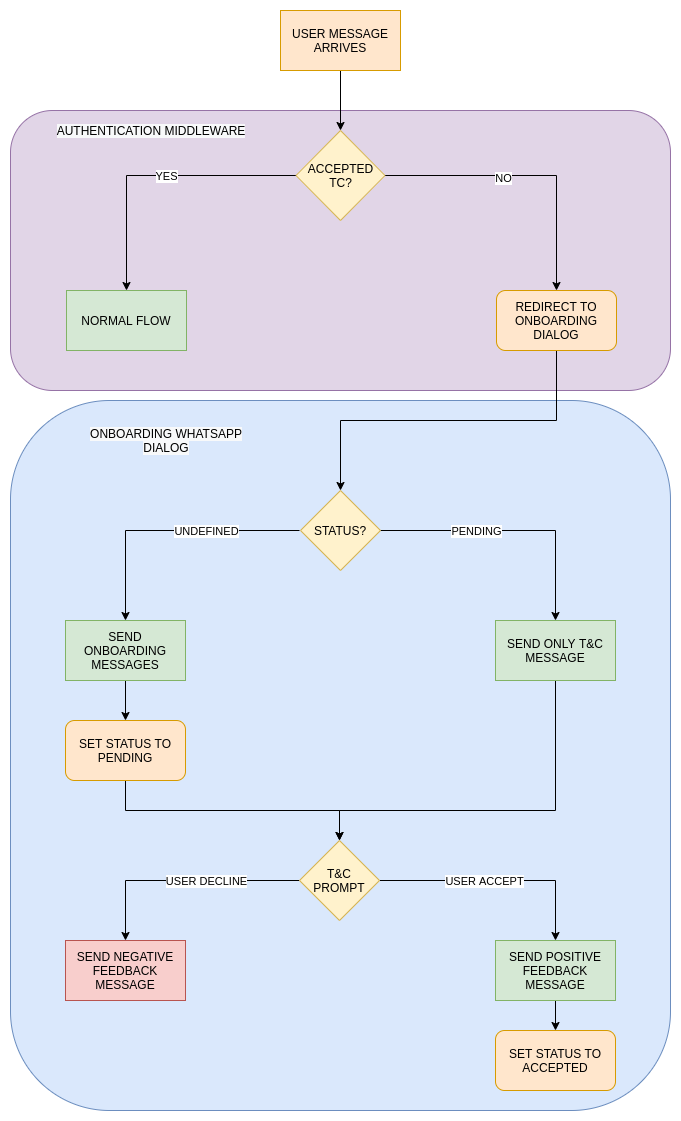
When a user message arrives, the first step in authentication is to check if it is in cache. In case that it
is not found, Terms & Conditions API is checked and if the user does not exist or has a pending status, it is redirected to T&C dialog.
Obviously, all the users with accepted status continue with the normal flow. In the Terms and Conditions dialog a record with status pending is stored in the T&C API if does not exist yet and the terms and conditions prompt is shown. If the user accepts, the status accepted is set in T&C API.
Anonymous and authenticated users have different T&C, so if both are configured, users should accept T&C twice: after the first message as anonymous and after the authentication.
Terms and conditions settings
Terms and Conditions settings
In Aura channel model, T&C are set in the termsAndConditionsconfiguration model. It is added to channels who need to enable this feature.
There are two fields with different configurations inside: authenticated and anonymous. Each of these settings will be used according to the type of user. It defines the version and service used in T&C API.
{
  "channel_id": "f7fd1021-41cd-588a-a461-387cc24be223",
  "name": "whatsapp",
  "termsAndConditions": {
    "authenticated": {
      "version": "1",
      "service": "whatsappAuth"
    },
    "anonymous": {
      "version": "1",
      "service": "whatsappAnonymous"
    }
  }
}
4.2 - Conversational flow
Aura Bot conversational flow
Description of users’ authentication process in Aura Bot. Discover the different types of users and how they can authenticate in Aura.
Aura conversational process
Once the user’s authentication is validated, aura-bot starts the message processing.
-
Firstly, all incoming message middlewares are executed, in the order established in the bot set-up.
-
Then, recognizers come into play in order to recognize the user’s intention.
Depending on the type of input message, the process is different. For instance, aura-bot is able to recognize the user’s intent itself if the message is an auraCommand or requires summoning Aura Cognitive Services for this purpose.
Recognizers are executed sequentially and, after one of them recognizes an intention, the rest are not executed.
-
Once the intent and entities are identified, the next step is to route the message to the dialog in charge of that intent for the current channel. This step is done by the main dialog. This special and core dialog is responsible for:
- Getting the dialog that handles the recognized intent for the current channel. If it does not exist, an error is returned to the channel.
- Validating if the user’s context matches with the context filters configured in the selected dialog. If that is the case, then the context filter dialog is executed.
- Validating the authorization settings of the dialog to be executed with the AuraUser authentication model.
In the case of Kernel authentication, it checks that the scopes and purposes of the user contain the mandatory ones to execute the dialog.
This validation improves aura-bot performance, avoiding external requests to Kernel that will return a permissions error. If the user is anonymous, this step is not executed.
-
The specific dialog selected is started during one of the steps of the main dialog, and thus the execution is now managed directly by that specific dialog.
-
The dialog must get the information needed to provide a proper response to the user through Aura NLP, Complex Logic API or Kernel Telco APIs in order to generate the expected answer.
-
The response is now ready to be provided to the user and will start its way through the outgoing middlewares.
-
After that, the execution flow continues to the next step of the MainDialog, that is checking whether or not the dialog must include suggestions.
To do so, it will check that the proper dialog settings are stored in the context. If suggestions are needed, the suggestions API will be called, the resulting activity will be prepared following the UX Guidelines.
-
In the end, a complete response consisting of several ordered activities will be provided to the channel, that will read them from Direct Line and the result will be rendered to the user.
Conversational process flowchart
The following flowchart schematically shows the components involved in the process.
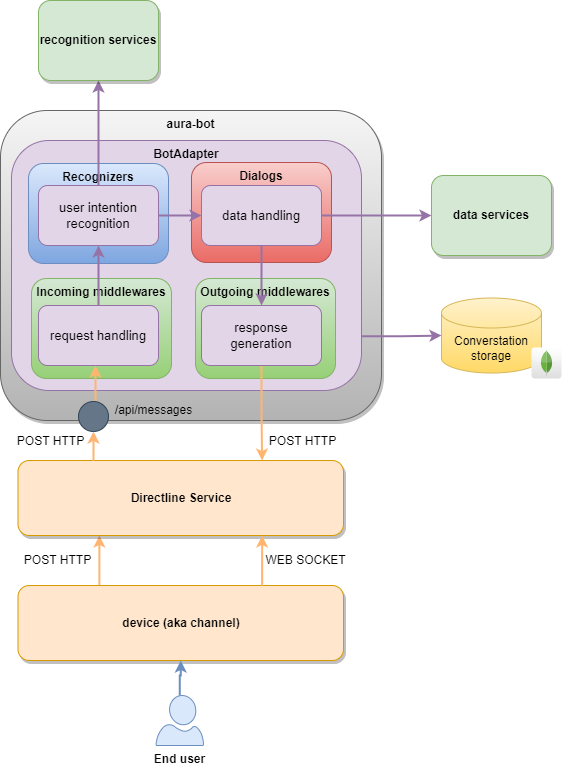
Check here the complete Aura Bot conversational process flowchart.
4.3 - channelData management
Aura Bot channelData
How Aura Bot manages the channelData property used by Aura to define the Aura request-response semantic model
The current section details the management by aura-bot skill of the channelData property used by Aura to define the Aura Request – Response Semantic Model.
The Aura semantic application model defines a set of properties that can be used as secondary elements of the Microsoft Azure Bot Service and Bot Framework Activities property included in the application activities.
channelData is an open field in the activity, i.e., the message exchanged during a communication between a channel and a bot built on top of Microsoft Bot Framework, that is devoted to define the specific format of the request needed by the specific bot to provide a proper response to the channel and, thus, to the user.
The current section will describe the specific channelData aspects related to aura-bot, such as:
4.3.1 - Handling channelData versions
Handling channelData versions
Description of components that make Aura Bot capable of working with different channelData versions.
UML diagram
@startuml
title ChannelData handling diagram
actor User
participant AuraGroot
participant ChannelDataValidatorMiddleware #76bbe7
participant AuraBot #ebdff7
participant Routing #ebdff7
participant MainDialog #1add4d
participant Dialog #1c733b
participant OutgoingChannelDataNormalizerMiddleware #73c1c3
participant Adapter #1bcad5
participant AuraChannelDataHandler #ebba65
User -> AuraGroot: User request
AuraGroot -> ChannelDataValidatorMiddleware: request reaches validation middleware
alt AURA_CHANNELDATA_VALIDATION === true
    ChannelDataValidatorMiddleware -> AuraChannelDataHandler: isValidatableVersion checks if channelData request version is validatable
    AuraChannelDataHandler -> ChannelDataValidatorMiddleware: isValidatableVersion returns if version is valid
    alt isValidatableVersion === true
        ChannelDataValidatorMiddleware -> AuraChannelDataHandler: getRequestValidator validates channelData request
        AuraChannelDataHandler -> ChannelDataValidatorMiddleware: getRequestValidator returns validation
    end
end
ChannelDataValidatorMiddleware -> AuraBot
AuraBot -> MainDialog: Route to main dialog
MainDialog -> Routing: MainDialog routing step
alt channelDataRequest <= v3
    Routing -> Routing: Add information to triggerCondition
end
alt channelDataRequest >= v3
    Routing -> Routing: Add information to triggerCondition (intent.vX)
end
Routing -> MainDialog: checkLegacyDialogStep check if a conversion to legacy channel data is needed
alt channelDataRequest <= v3
    MainDialog -> AuraChannelDataHandler: getNormalized normalizes request to supported aura-bot channelData
end
MainDialog -> Dialog: Reach dialog by intent if exists
alt channelDataRequest === v3 && channelDataVersion === v3
    Dialog -> AuraChannelDataHandler: formatChannelDataV3 formats response to be compatible with v3 version
    AuraChannelDataHandler -> Dialog: formatChannelDataV3 returns formatted v3 channelData
end
Dialog -> OutgoingChannelDataNormalizerMiddleware: Pass activity formed in dialog to outgoingMiddlewares
alt channelDataRequest <= v3
    OutgoingChannelDataNormalizerMiddleware -> AuraChannelDataHandler: getNormalized Normalizes activity (output) and request (input) to be compatible with supported aura-bot version
    AuraChannelDataHandler -> OutgoingChannelDataNormalizerMiddleware: getResponseChannelData Gets original response channel data
end
OutgoingChannelDataNormalizerMiddleware -> Adapter: Middleware's pipeline is finished and result is received by the adapter
alt AURA_CHANNELDATA_RESPONSE_VALIDATION === true
    Adapter -> AuraChannelDataHandler: isValidatableVersion checks if channelData response version is validatable
    AuraChannelDataHandler -> Adapter: isValidatableVersion returns if version is valid
    alt isValidatableVersion === true
        Adapter -> AuraChannelDataHandler: getResponseValidator gets validation for the response version
    end
end
alt channelDataRequest >= v3
    Adapter -> Adapter: Add version parameter to response.
end
alt channelDataRequest < v3
    Adapter -> Adapter: getResponseChannelData gets transformed channel data from correct version (removes version field)
end
Adapter -> AuraBot: Activity is processed and ready to be sent
AuraBot -> User: Bot response
@enduml
The version format will be a semantic versioning, (MAJOR.MINOR.PATCH). However, aura-bot will work exclusively with the MAJOR version:
If a customer sends the version 3.1.0, for Aura the version is 3.
Aura will keep the original version from the request in the response. That is, if the client sends version 3.0.0, but Aura is currently working with version 3.5.1 as Aura works with the older one, there is no problem and Aura will keep the version that the client sent, 3.0.0, in the response.
For versions greater or equal to 3.0.0, aura-bot accepts either SemVer versioning (3.0.0) or major versioning (3) in channelData.version property.
Request channelData validation
The channeldata-validator-middleware executes request channelData validations. aura-bot receives the request which contains information about the channelData version. With that information, different validations are made.
More information regarding validations being made and utilities that used for this flow can be found in channelData validation.
Aura Bot channelData versions behavior
- aura-bot is able to work with channelData versions
v1, v2 and v3.
- If a channel does not specify the version, it is assumed to be working with version
v1.
- Version
v2 was specific for living-apps, and version v3 is the first version of the normalized channelDatamodel.
- Use cases created for
channelData version v1 will not be able to execute dialogs created with the v3 model and vice versa.
The format for intents in channelData version v3 only changes internally.
Therefore, when defining an intent, it is not necessary to specify its version, the dialog loading system will do it internally.
Dialog configuration
From channelData v3 onwards, it is necessary to specify the version to be used in the channelData dialogs.
If no version is specified, it is understood that they work in v1 mode for classic use cases.
If you want to work with the channelData normalized version (v3), specify it in the use case dialog configuration file.
Example:
{
  "name": "packageLibTest",
  "dialogs": [
    {
      "id": "channel-data-V3-dialog-example",
      "channelDataVersion": "v3",   <-  It's mandatory specific version for ChannelData v3
      "triggerConditions": [
        {
          "intent": "intent.factotum-test.channel-data-model"
        }
      ]
    }
  ]
}
When a dialog has specified its channelData version through the channelDataVersion property, it can only be executed if the client has specified that version in the request. Otherwise, the system will return an “I don’t understand you”.
A client can have two dialogs for the same use case with different versions, but it is mandatory that the names of the dialogs are different. The intents must be called exactly the same for v3 and for others, as the format of the intents is set internally and it is not necessary to specify anything.
{
  "name": "packageLibTest",
  "dialogs": [
    {
      "id": "channel-data-V1-dialog-example",
      "triggerConditions": [
        {
          "intent": "intent.factotum-test.channel-data-model"
        }
      ]
    }
  ]
}
This configuration contains the same intent as the previous one, but the dialog is for channelData version v1, as its version has not been set. It should be noted that if you set a version channelDataVersion: v1 it will also work in v1 mode.
Routing to version v3
Loading Dialogs configuration
The first step to set the intents to their proper version must be done during the dialogs loading. This is done inside the aura-configuration package in the document channels-configuration-current.ts.
    private buildAuraChannel(channelConfiguration: ChannelConfiguration): ChannelConfiguration {
        ........

        // NORMALIZATION. Assign the intent to the channel Data Version
        channelConfiguration.dialogLibraries?.forEach((library) => {
            library.dialogs.forEach((dialog) => {
                const channelDataVersion = this.getChannelDataVersionMajor(dialog.channelDataVersion);
                if (channelDataVersion > 2) {
                    dialog.triggerConditions.forEach((triggerCondition) => {
                        triggerCondition.intent = this.getIntentByChannelDataVersion(triggerCondition.intent, dialog.channelDataVersion);
                    });
                }
            });
        });

        .......
Routing configuration
Intents whose dialogs have the property channelDataVersion with a value greater than or equal to v3 will name their intents with the corresponding version.
Example:
-
“channelDataVersion”: “v3” -> intent.[intent_name].v3
-
“channelDataVersion”: “v2” -> intent.[intent_name]
-
“channelDataVersion”: “v1” -> intent.[intent_name]
-
“No channelDataVersion” -> intent.[intent_name]
For the previous example, the dialog routing would be as follows:
Establishment of intent versioning in recognizers
When a channel sets a version of the channelData greater or equal to v3, the routing step will set intent format in getIntentByChannelDataVersion(), which can be found in aura-configuration.
  public static setIntentResult(context: TurnContext, intentResult: any, utterance: string, promptCheck: boolean,
        ......
        intentResult.intent = AuraChannelsConfiguration.instance.getIntentByChannelDataVersion(intentResult.intent, ChannelDataUtils.getChannelDataVersion(context));
        ......
    }
Routing to v3 dialog
Once the routing and the recognizers steps are executed, based of the result obtained, it will be routed to a v3 dialog if channelDataVersion: "v3" and there is match in the recognized intent.
Dialogs in v3
Currently, only certain dialogs have been migrated to channelData v3 version,as specified in the following sections.
Greetings v3 dialog
Greetings dialog, which is included in common library, has been migrated to v3.
For more information about this implementation, check Create/migrate a dialog to channelData v3.
didntUnderstand special case
There is a particular case: a request needs a V3 dialog and this is not implemented. In this case, None dialog should be triggered.
At the moment, None has not being migrated to v3 so this type of requests are redirected to bot’s fallback case didntUnderstand.
This occurs due to routing appending v3 to None intent and not finding a match. This case returns an activity with the resource core:core.cancel
Prompt case
In this particular case, the last message processed by the dialog must have the channelData correct version.
Firstly, the prompt is displayed to the user going through the mainDialog, but user’s response to that prompt does not follow the same path.
During this stage, channelData is converted into v3 for compatibility with aura-bot core.
If the dialog is in version v1, channelData will not need to be modified, so the channeldata-validator-middleware will check if the dialog is legacy and will convert its response channelData to v1.
Outgoing middlewares
Once aura-bot responds, this response is being processed by certain middlewares that work in v3 version. Hence, there are two possible flows:
-
User is requesting a v1 dialog
In this case, the response from the v1 dialog is converted into v3 immediately after the activity is created.
Once the activity is being processed by the middleware’s pipeline, it is converted from v3 to v1 by the outgoingchannelDataNormalizer middleware, that performs the same actions in reverse order than incomingchannelDataNormalizer middleware.
Once the activity is being processed by the middleware’s pipeline, it is converted from v3 to v1 in the Aura BotFramework adapter.
-
User is requesting a v3 dialog
In this case, the response from the v3 dialog is already in the current supported version, so there is no need to merge to other version.
Adapter
Before sending the response to the user, there are a number of extra steps which are performed inside the Aura BotFramework adapter.
channelData validation
As done in the request stage, there is another validation in the response, before sending the resulting activity to the user, checking if the sent schema is valid for the activity version.
Find more information about which validations are made and utilities used for this flow in channelData validations.
Activity merging
For more information about how channelData merges are processed, check channelData mapping.
4.3.2 - channelData mapping
channelData mapping
channelData mapping in Aura response
Introduction
Currently, Aura supports dialogs able to provide responses in v1, v2 and v3 channelData versions. These responses are mapped to be handled by the bot output middlewares as v3, but after that, dialogs are mapped again to the original response version to be returned to the client.
However, incoming middlewares are able to work with different request channelData versions v1, v2 and v3, indistinctly.

Request
The request is currently not transformed and is accessed using channelData utils from the aura-bot-common library.
These utils make transparent the access to all channelData properties needed in v1 or v3.
Response
The response returned by the dialog is normalized in the outgoingchannelDataNormalizer middleware, the first outgoing middleware executed after the dialog.
This normalization is done if the channelData version returned is lower than the current version.
The middleware calls ChannelDataResponseMapper.getResponseChannelData with:
- The normalized version (currently,
v3) as first parameter.
- The channelData in the old version as second parameter.
This mapper function will return a normalized version of the channelData.
After all the middlewares are executed, in the adapter, the response should be transformed to the version returned by dialog again.
To do this, ChannelDataResponseMapper.getResponseChannelData
is called again with:
- The version originally returned by the dialog as first parameter.
- The
channelData as second parameter.
- The original
channelData returned by the dialog as third parameter. This third parameter is needed because in the conversion from old versions to the normalized version certain fields may disappear, so we need to merge the normalized channelData (maybe modified by the outgoing middlewares) with the original returned by the dialog.
Channels using a BotService adapter
Channels such as Facebook that use a BotService Adapter will always use a channelData without version, which internally is translated to v1.
This means that the request will have to be mapped for good. The major implication is that channelData version v3 must take into account the fields needed by these adapters, so the communication and the user’s experience are kept the same.
Currently, aura-bot is only validated to be accessed through the Facebook Messenger adapter. In this case, the protocol allows the exchange of HeroCards, but the way they are sent to the channel is a bit different than in Direct Line channels: they are sent as attachments of the channelData instead of attachments of the activity.
So, in order to allow Aura use cases to send buttons or a complete HeroCard to a user, the attachments field of the channelData must be kept during the version mapping.
4.3.3 - channelData validations
channelData validations
channelData validations done both in the request and the response, according to a certain configuration
Validations in request channelData
Request channelData will be validated if its version is greater than or equal to AURA_CHANNELDATA_VALIDATION_MIN_VERSION, that is always v3 (prior versions will never validate and will get all the channelData “as they are”).
That means, that any version from v3 onwards will be validated (even non existing versions, such as 99, will try to be validated).
Versions from v3 onwards will only use the major as a string (e.g., 3), but also semver is understood (e.g., 3.0.0), but note that minor and patch will be ignored (e.g., 3.2.1 === 3.0.0) when looking for a validator.
Logic location
The validation is done in the channeldata-validator-middleware, that must be one of the first middlewares, to ensure that no other logic is fetching data from channelData before validating it.
Errors
There are two types of errors on request validation:
- Validation error: the request
channelData does not comply the schema for that version. The error is stored in requestValidationErrors property within the thrown error.
- Missing validator error: the specified version does not have a matching validator, so
channelData is invalid.
Validations in response channelData
Response channelData will be validated if AURA_CHANNELDATA_RESPONSE_VALIDATION environment variable is set to true.
In that case, all outgoing activities will have their channelData validated, even the error messages, before sending to the user.
The validation must be done after the channelData is transformed into the final version (that could be or not the “internal” version).
Logic location
The response validation is done in Aura Groot, in AuraCloudAdapter class.
Errors
There are two types of errors on response validation:
- Validation error: the response
channelData does not comply the schema for that version and the error is stored in responseValidationErrors property within the thrown error.
- Missing validator error: the specified version does not have a matching validator, so the
channelData is invalid.
5 - Aura Bot object, data types and models
Aura Bot object, data types and models
Description of the different types of data and models supported by Aura Bot
aura-bot supports several data models, compatible with different languages or structures in order to execute the conversational flow.
The current document includes the description of the different models supported by Aura Bot platform, currently:
auraCommand model
The use of auraCommands, that is, pre-defined options that the user can select from Aura’s interface, is managed by the auraCommand model.
dialogContext model
Aura supports the dialogContext model, a structure that facilitates the recognition of CardActions and prompts without the need of training.
Aura API Key
Aura counts on API Keys to connect to available API endpoints. They are based on an encrypted APIKey data model, which is included in aura-validate-apikey utility.
5.1 - auraCommand model
auraCommand model
Description of the auraCommand model suitable for sending intents directly to Aura with no recognition stage
Introduction
An auraCommand is an structure to send intents directly to Aura. It includes specific messages consisting on pre-defined options that the user can select from Aura’s interface as part of the response to her request.
These messages come from channels using Direct Line format. Currently, they correspond to notifications and suggestions.
The aura-bot recognizer in charge of auraCommand is aura-command-recognizer-middleware. This recognizer detects if the message matches auraCommand format and then processes the message and extract the intent and entities from it.
An auraCommand should be sent within the channelData of the request to aura-bot in an optional property called auraCommand.
AuraCommand property in channelData
It is the channelData property called AuraCommand, which value should fit an AuraCommand Model.
| Property |
Type |
Description |
| auraCommand |
AuraCommand |
This property contains an auraCommand object. |
AuraCommand Model
| Property |
Type |
Description |
| type |
string |
AuraCommand type: - suggestion: used to send a common intent. The prefix of the intent must be
intent.. Its the type by default. - operation: It represents an intent that needs a context in Aura. The prefix of the intent must be
operation. - notification: It represents an intent generated by notification. The prefix must be
intent. - text: The value of the
auraCommand contains directly a string with the text to be recognized by NLP. - event: The value of the AuraCommand contains and event that aura-bot recognizes to carry out an action.
|
| value |
Intent model or string |
Object intent or text. |
| utm |
Utm model |
Source that contains the AuraCommand. |
| actions |
Action model |
Array of actions. |
Intent model
| Property |
Type |
Description |
| intent |
string |
Name of the intent. If this name does not contain the prefix intent., Aura will add the it. |
| entities |
Entity model |
Array with the entities. This array can be empty. |
Entity model
| Property |
Type |
Description |
| type |
string |
Name of the intent. If this name does not contain the prefix intent., Aura will add it. |
| entity |
string |
Name of the entity. If this name does not contain the prefix ent. Aura will add it. |
| canon |
string |
|
| score |
float |
Array with the entities. This array can be empty. |
Utm model
| Property |
Type |
Description |
| source |
string |
It identifies which site sent the traffic. In Aura, use the channel name. |
| medium |
string |
It identifies what type of link was used, such as cost per click or email. In Aura, use banner, button, etc. |
| campaign |
string |
It identifies a specific product, promotion or strategic campaign. |
| term |
string |
It identifies search terms. |
| content |
string |
It identifies what was specifically clicked to bring the user to the site, such as a banner ad or a text link. |
5.2 - dialogContext model
dialogContext model
Description of the dialogContext model, for the management of different existing options in the response
Introduction
A dialogContext is a structure that facilitates the recognition of CardActions and prompts without the need of training.
It has the following characteristics:
- It can be autogenerated when a prompt is active.
- It can be autogenerated when there is a
CardAction.
- It can be created manually in a dialog but with certain restrictions.
- It is stored in the conversation cache.
- It is processed by the dialog-context-recognizer-middleware.
- It is auto-generated and stored by the aura-bot adapter.
- It can be configured at channel level, prompt level and
CardAction level.
- It facilitates the recognition of
CardActions if a user, instead of pressing the button, types the button text.
- It facilitates the recognition of numbered lists either by ordinals or cardinals.
- It uses a proximity search algorithm.
- It solves the problems of the recognition of numbers and ordinals that the current Bot Framework prompt has.
Existing models
dialogContext model
| Property |
Type |
Description |
| text |
String |
Text or texts (separated by ‘|’) with the options to be matched. |
| value |
Object |
Object of IntentResult or other with the action to carry out if the option is validated. |
Example:
"dialogContext": [
                    {
                        "text": "Hello",
                        "value": {
                            "intent": "intent.factotum-test.dialog-context",
                            "entities": [
                                {
                                    "entity": "greetings",
                                    "type": "ent.dialog-context",
                                    "score": 1
                                }
                            ]
                        }
                    },
                    {
                        "text": "Bye bye mi picolissima dama",
                        "value": {
                            "intent": "intent.factotum-test.dialog-context",
                            "entities": [
                                {
                                    "entity": "goodbyes",
                                    "type": "ent.dialog-context",
                                    "score": 1
                                }
                            ]
                        }
                    }
                ]
Channel model
The dialogContext model at the channel level applies to all dialog components.
This model has the highest priority, i.e., in case of conflict between models, the channel model has the highest weight.
This model is inside the responseOptions.dialogContext property. Check it in Aura channel model: ResponseOptions model.
An example is shown below:
channel: {
...
        responseOptions: {
            dialogContext: {
                normalizeTerms: true,
                disabled: false,
                disabledMerge: false,
                processFromClient: false,
                returnToClient: false,
                defaultListType: 'none',
                promptChoice: {
                    generate: 'never',
                    generateList: false
                },
                cardActions: {
                    generate: 'never',
                    generateList: false
                }
            }
        }
    },
...
Prompt model
The options of dialogContext for a prompt can be included inside the property validations of Prompt Options within its sub-property dialogContext.
When generating the list of options, the system takes into account two properties of the prompt: recognizeNumbers and recognizeOrdinals.
In these cases:
- If the prompt has
recognizeNumbers=false and we have activated the list of options, only the ordinal values of each option will be generated.
- If the option
recognizeOrdinals=false, then only the cardinal options will be generated.
- If both are set to
false, no list items will be generated.
By default, the prompt has both properties set to true.
| Property |
Type |
Description |
| originalFindChoicesOptions |
Object |
Original prompt findChoiceOptions. Used if the dialogContext recognizer needs to change it, the prompt would be restored to the original state. |
| originalStored |
Boolean |
It indicates whether the dialogContext recognizer had to overwrite the original prompt values. Default: false. |
| enabled |
Boolean |
It indicates whether the generation of ordinal and cardinal lists for prompt options is active. Default: Inherited from the channel configuration. |
| listType |
DefaultListType |
Type of list to enumerate the prompt options. Default: OrdinalCardinal. |
Example of prompt options:
{
  "Choices": [
    {
      "value": "Lunes",
      "synonyms": [
        "El lunes"
      ]
    },
    {
      "value": "martes"
    }
  ],
  "validations": {
    "dialogContext": {
      "enabled": true,
      "listType": "ordinal "
    }
  }
}
CardAction model
The options of dialogContext for a CardAction can be included inside the property channelData of button options, within the sub-property dialogContext.
| Property |
Type |
Description |
| enabled |
Boolean |
It indicates whether the generation of ordinal and cardinal lists for CardAction options is active. Default: Inherited from the channel configuration. |
| listType |
DefaultListType |
Type of the list to enumerate the CardAction buttons. Default: OrdinalCardinal. |
| synonyms |
String[] |
Array of strings with synonyms of the title. |
{
  "buttons": [
    {
      "type": "postBack",
      "title": "Monday",
      "value": {
        "intent": "monday"
      },
      "channelData": {
        "dialogContext": {
          "enabled": true,
          "listType": "ordinalCardinal"
        }
      }
    },
    {
      "type": "postBack",
      "title": "Wednesday",
      "value": {
        "intent": "wednesday"
      },
      "channelData": {
        "dialogContext": {
          "enabled": true,
          "listType": "ordinalCardinal",
          "synonyms": [
            "X"
          ]
        }
      }
    }
  ]
}
Custom dialogContext
It is possible to add in the channelData a dialogContext manually. If the channel configuration allows it, this will be merged with the _dialogContext that is generated automatically.
The following rules must be taken into account when including our own dialogContext:
- Do not generate the list values, that is, do not add ordinals and/or cardinals, as this will be done by the system.
- The options of a custom
dialogContext are included right at the top of the list.
How does dialogContext work?
The dialogContext flowchart includes two differentiate phases: recognition phase and build phase, described below.

Recognition phase
When validating if the user has entered a phrase that matches the dialogContext that we have generated from the previous answer, take into account that the comparison is done by proximity.
The match value will be reported in a score field that goes from 0 to 1. Valid values will be those that are greater or equal to a given threshold. For a dialogContext we have two thresholds.
AURA_DIALOG_CONTEXT_THRESHOLD: Default threshold when comparing two strings. Default value: 0.80.AURA_DIALOG_CONTEXT_ORDINAL_CARDINAL_THRESHOLD: Threshold used in case dialogContext elements are in list form and also if the input phrase includes a number. By default, 0.95.
This value is so high because if the user writes ‘11’ or ’the 11’, and there are only 5 elements in the list, the comparison could give us a very high value, since comparing 11 with 1 has a threshold higher than 0.80, which means that writing 11 would select the first option. To avoid this kind of cases when there are numbers in the user input and the list is enumerated, then the threshold should be stricter.
Another thing to take into account is that if the dialogContext does not get a valid match, if we have an active prompt choice, the system will override its recognizeNumbers and recognizeOrdinals properties, as long as we are working with enumerated elements.
This is done because when MS Bot Framework detects an ordinal number in a sentence, it ignores the rest of the sentence, which can lead to many errors. These values are restored every time the prompt is regenerated if it has not been resolved.
In the recognition phase, the dialogContext recognizer compares value to value, and in the case that one of them meets the conditions, the intention associated with the value is established. It also assigns to the input text the value expected by the prompt, in case there is one.
Example:
DialogContext
[
  {
    "text": "1|the 1|one|the one|first|the first|Monday",
    "value": {
      "intent": "monday"
    }
  },
  {
    "text": "2|the 2|two|the two|second|the second|Tuesday",
    "value": {
      "intent": "tuesday"
    }
  },
  {
    "text": "3|the 3|three|the three|third|the third|X|Wednesday",
    "value": {
      "intent": "wednesday"
    }
  },
  {
    "text": "4|the 4|four|the four|fourth|the fourth|Thursday",
    "value": "The Thursday"
  },
  {
    "text": "5|the 5|five|the five|fifth|the fifth|Friday",
    "value": "Friday"
  }
]
User Input: the 4
- In this case, as the list is numbered and the user has entered a number in his sentence, the selected threshold will be
AURA_DIALOG_CONTEXT_ORDINAL_CARDINAL_THRESHOLD.
- The elements of each option will be compared with the user’s value:
   1 ≅ the 4  -> Score 0
   the 1 ≅ the 4  -> Score 0.80
   ......
   the 4 ≅ the 4  -> Score 1.0   -> Option Selected
- If the selected option has value, the value is assigned to the activity text. In other case, the assigned value is the last value of the text, in this case ‘Thursday’.
- If there is a prompt choice, the validations
recognizeNumbers and recognizeOrdinals are set to false.
Build phase
The build phase is responsible for collecting the customized dialogContext (if any) and, in turn, for generating the dialogContext of the CardActions and Prompt in the different activities that make up the output message.
The enumeration of the elements depends on the configuration of the channel and the respective components. Once generated, it is stored in the user’s conversation cache.
The module in charge of this procedure is the Aura Bot Adapter.
6 - Response message formats
Description of the different response message formats supported by Aura Bot
By default, aura-bot uses Directline protocol to send the responses to the channels.
But it contains different response formats depending on the channel, to be able to deliver the responses in the most appropriate way for each channel.
The current available formats for Aura responses are:
For information regarding which channelData version is returned in Aura response, check the document Version in responses
6.1 - HTML5
HTML5
Description of HTML5 model supported by Aura
Introduction
Hypertext Markup Language revision 5 (HTML5) is markup language for the structure and presentation of World Wide Web content.
Aura Platform supports HTML5 model, therefore, it is possible to develop experiences that include HTML content in the response.
HTML5 components
There are two main components in the HTML5 model:
- HTML attachments: set of models whose main property is that the content of the elements to render are composed of HTML5 tags.
- HTML5 custom tags: different types of custom tags generated to send commands to Aura.
6.1.1 - Attachments
HTML5 attachments
Types of HTML attachments for Microsoft Bot Framework
Introduction
HTML attachments are a set of models whose main property is that the content of the elements to render are composed of HTML5 tags.
Aura’s HTML5 attachment template is used to send HTML5 snippets as a response template.
Custom Attachment Model
The custom attachment model contains a free format model.
Bot Framework Attachment Properties
- Properties marked in bold are mandatory.
- Properties marked in italics are optional.
| Property |
Type |
Description |
| contentType |
string |
Content type name.
Value: application/vnd.telefonica.aura.html.custom |
| content |
AuraHtmlCustomContent |
Model of the object where the HTML5 is |
| version |
string |
Attachment model version model |
| name |
string |
Attachment name (optional) |
Aura HTML Custom Content
HTML container
The HTML container contains an identifier and the content of HTML.
Content may be self-contained or referenced. If it is self-contained, the property data will contain the HTML. Otherwise, the property url-data will contain the URL to download the HTML.
| Property |
Type |
Description |
| id |
string |
Identifier of tag where the content data will be placed. |
| encoded |
EncodedFormat |
How the HTML5 code is encoded in data properties. Values: none, base64 or zip |
| data |
string |
HTML5 data. |
| url-data |
string |
URL where the HTML to assign to the given container id should be downloaded. The encoded field in this case is ignored. |
| content-type |
string |
Type of source: html, javascript, css or json.
- If url-data has a URL, the AuraSDK will insert:
. <link href="[url-data]" rel="stylesheet" type="text/css" /> for css.
. <script src="[url-data]"></script> for js.
- If you do not use the Aura SDK, you must insert it manually.
Default value: html
Note: Javascript content cannot be unloaded once loaded into the browser, unless you reload the page or iframe. |
| Property |
Description |
| none |
The data is sent in HTML format |
| base64 |
The data is encoded in Base64 |
| zip |
The data is compressed in zip format |
Example
{
  "attachments": [
    {
      "contentType": "application/vnd.telefonica.aura.html.custom",
      "version": "1.0.0",
      "content": {
        "containers": [
          {
            "id": "id-background",
            "url-data":"https://telepizza.com/containers/background?id=334"
          },
          {
            "id": "id-footer",
            "encoded": "base64",
            "data":"PGgyPkhUTUwgTGlua3M8L2gyPgo8cD5IVE1MIGxpbmtzIGFyZSBkZWZpbmVkIHdpdGggdGhlIGEgdGFnOjwvcD4KCjxhIGhyZWY9Imh0dHBzOi8vd3d3Lnczc2Nob29scy5jb20iPlRoaXMgaXMgYSBsaW5rPC9hPg=="
          }
        ]
      }
    }
  ]
}
Building Aura response through HTML5
To include HTML content in Aura’s responses, two conditions must be satisfied:
- First, generate a response with an attachment whose content has the HTML code.
- Second, the client must support the model of this type of attachments.
Check how to add attachments into messages in MS Bot Framework.
Generate Response with an HTML5 attachment
In order to generate responses with HTML content, it is necessary to follow the model created for it: Attachment Models.
To do this, simply generate an message attachment with the new model.
For example, if we want to send the word “Hello World” in HTML format:
- Generate the necessary HTML code: Hello World! .
- Include this code inside the model and assign a container to it, so that the client knows in which part of the webpage he must go. The assignation of a container is mandatory and needs the target Id of HTML element where the content will be rendered.
var message = new Message(session)
    .addAttachment({
        contentType: "application/vnd.telefonica.aura.html.custom",
	  version: "1.0.0"
        content: {
		containers:[
		{
			id: "aura-body",
			data: "<span> Hello World! <span>"
		}
	     ]
	   }
	});
The content can be encoded to avoid problems with HTML code characters or to compress content if it is large. To inform the client of the type of encoding, use the encoded property.
var message = new Message(session)
    .addAttachment({
        contentType: "application/vnd.telefonica.aura.html.custom",
	  version: "1.0.0"
        content: {
		containers:[
		{
			id: "aura-body",
			encoded: "base64",
			data: "PHNwYW4+IEhlbGxvIFdvcmxkISA8c3Bhbj4="
		}
	     ]
	   }
  });
6.1.2 - Custom tags
Custom tags generated to send commands to Aura
Introduction
Discover the different types of custom tags supported by Aura.
Find here general information regarding custom elements.
The function of this set of tags is to encapsulate all the interactions within the HTML that is sent in the attachment. Any iteration that occurs within the HTML code must generate an event. In this way, the channel only has to manage the events that occur from these tags.
Capabilities:
- Action tags define the type of event triggered:
- External as auracommand
- Internal as internal channel capability
- etc.
- Action tags define the trigger to activate the action by voice.
- Action tags define the targets of HTML elements that is associated to this action by an event.
Aura action: <aura-action>
This tag contains a collection of sub-tags in which the targets, triggers and events necessary to perform this action will be determined.
| Property |
Description |
| id |
Optional identifier |
| name |
Custom name of the action |
Example:
<aura-action name="selectSeat">

</aura-action>
Aura action trigger: <aura-action-trigger> (Not implemented yet)
This tag is used to identify an action based on a voice message from the user.
Initially, are only two types:
The recognition of the intention of this voice message may be associated with entities.
| Property |
Description |
| id |
Optional identifier. |
| type |
Recognizer type: Regex: A regular expression engine is executed to determine if the value of reg expression matches with the message of voice. This expression may contain groups to identify entities. Proximity: This type uses a proximity phrase comparison algorithm. Based on a minimum resemblance value (min-threshold), it will determine if the event will be triggered. You can include entities in the entity field.
|
| value |
Text to compare. If the type is Regex, this text must be a regular expression. |
| entity |
It represents one o more entities to send to the event if the trigger is activated. |
| entity-field |
In the case of a regular expression, it represents an entity calculated on the basis of the regular expression. |
Examples:
    <aura-action-trigger type="regex" value="/select seat ([1-500])/" entity-field="$1">  </aura-action-trigger>
    <aura-action-trigger type="proximity" min-threshold="0.99" value="select seat 1C" entity="32">  </aura-action-trigger>
Aura action target: <aura-action-target>
It defines the targets of HTML elements that are associated to this action by an HTML event.
| Property |
Description |
| id |
Optional identifier. |
| target |
Pattern to determine the identifiers of the tags from the elements that compose the HTML. The format of the pattern is a querySelector syntax. |
| event |
HTML event to which the action should be associated. For example: click |
| evalue |
JSON Object to validate. The JSON object has the properties field and value. The evaluation returns true if the field contains the value.
Example: {"field":"checked", "value":true} |
| mode |
Modality of target element: submit, single or multiple. - submit: this value indicates that the composition of the aura-event will be done after the event is launched.
- single: this value indicates that you only need to evaluate one element independently.
- multiple: this value indicates that the final composition depends on a set of elements.
|
| entity-field |
It represents a property in the target element to be used as entity. |
| voice-field |
It represents a property in the target element to be used for dialogContext models. This value can contain multiple string fields separated by pipes (\, ` |
| canon-field |
It represents a property in the target element to be used as canon. |
| entity-type |
It represents the type property of the entity model |
| entity-default |
Used to set a entity by default when the command is build. |
| canon-default |
Used to set a canon by default when the command is built. |
| voice-default |
Used as an alternative for voice-field. |
Aura action event: <aura-action-event>
It contains the event that will be generated if the action is activated. This event is associated with a data model that contains the information related to the event.
| Property |
Description |
| id |
Optional identifier. Optional |
| type |
Type of event generated if the action is launched. Values: auraCommand. |
| intent |
Intent of the command. |
| command-type |
Type of auraCommand. Values: intent, operation or text. |
| event-hook |
Event to hook the result of the event. It is used to add an event listener to capture the event and result of an aura-action-event.
Example: aura-la-event.
Example of capture: document.body.addEventListener("aura-la-event", customFunction, true). |
Examples
To capture the events:
<script>
  /** To capture the event
  /* 1.- Add the listener
  **/
  document.body.addEventListener("seatSelected", customFunction, true);
  /* 2.- create the function to execute */
  function customFunction(e) {
    console.log(e.detail);
}
</script>
<input type="button" id="b-1" data-seat="1A" value="Seat 1A" />
<input type="button" id="b-2" data-seat="1B" value="Seat 1B" />
<input type="button" id="b-3" data-seat="1C" value="Seat 1C" />
<input type="button" id="b-4" data-seat="1E" value="Seat 1E" />
<input type="button" id="b-5" data-seat="1F" value="Seat 1F" />
<!--Aura custom tags-->
<aura-action id="selectSingleButton">
   <aura-action-target target="[id^=b-]" event="click" entity-field="value" canon-field="data-seat" entity-type="seat" mode='submit'> </aura-action-target>
   <aura-action-event type="auraCommand" intent="operation.select.seat" command-type="operation" event-hook="aura-la-event"> </aura-action-event>
</aura-action>
Result if button with id=b-1 was clicked:
{
    "auraCommand": {
        "type": "operation",
        "value": {
            "intent": "operation.select.seat",
            "entities": [
                {
                    "entity": "1A",
                    "type": "seat",
                    "canon": "Seat 1A"
                }
            ]
        }
    }
}
<input type="button" id="bm-1" data-seat="1A" value="Seat 1A" class="unselected" onclick="switchStyle(this)" />
<input type="button" id="bm-2" data-seat="1B" value="Seat 1B" class="unselected" onclick="switchStyle(this)" />
<input type="button" id="bm-3" data-seat="1C" value="Seat 1C" class="unselected" onclick="switchStyle(this)" />
<input type="button" id="bm-4" data-seat="1D" value="Seat 1D" class="unselected" onclick="switchStyle(this)" />
<input type="button" id="bm-5" data-seat="1E" value="Seat 1E" class="unselected" onclick="switchStyle(this)" /> <br /> <br />
<input type="button" id="sbm" data-seat="send" value="Submit" />
<!--Aura tags-->
<aura-action id="selectMultipleButton">
   <aura-action-target target="[id^=bm-]" event="click" entity-field="value" canon-field="data-seat" entity-type="seat" mode='multiple'> </aura-action-target>
   <aura-action-target target="[id^=sbm]" event="click" mode='submit'> </aura-action-target>
   <aura-action-event type="auraCommand" intent="operation.select.seat" command-type="operation" event-hook="aura-la-event"> </aura-action-event>
</aura-action>
<input type="radio" name="rbseat" data-seat="1A" value="Seat 1A" />Seat 1A <br />
<input type="radio" name="rbseat" data-seat="1B" value="Seat 1B" />Seat 1B <br />
<input type="radio" name="rbseat" data-seat="1C" value="Seat 1C" />Seat 1C <br />
<input type="radio" name="rbseat" data-seat="1D" value="Seat 1D" />Seat 1D <br />
<input type="radio" name="rbseat" data-seat="1E" value="Seat 1E" />Seat 1E <br /> <br />
<input type="button" id="srbseat" data-seat="send" value="Submit" />
<!--Aura tags-->
<aura-action id="selectSimpleRadio">
   <aura-action-target target="[name^=rbseat]"  entity-field="value" canon-field="data-seat" entity-type="seat" mode='single'  evalue='{"field":"checked", "value":true}'> </aura-action-target>
   <aura-action-target target="[id^=srbseat]" event="click" mode='submit'> </aura-action-target>
   <aura-action-event type="auraCommand" intent="operation.select.seat" command-type="operation" event-hook="aura-la-event"> </aura-action-event>
</aura-action>
<input type="checkbox" name="chkseat" data-seat="1A" value="Seat 1A" />Seat 1A <br />
<input type="checkbox" name="chkseat"  data-seat="1B" value="Seat 1B" />Seat 1B <br />
<input type="checkbox" name="chkseat" data-seat="1C" value="Seat 1C" />Seat 1C <br />
<input type="checkbox" name="chkseat" data-seat="1D" value="Seat 1D" />Seat 1D <br />
<input type="checkbox" name="chkseat" data-seat="1E" value="Seat 1E" />Seat 1E <br /> <br />
<input type="button" id="schkseat" data-seat="send" value="Submit" />
<!--Aura tags-->
<aura-action id="selectByCheckboxMultiple">
   <aura-action-target target="[name^=chkseat]" event="click" entity-field="value" canon-field="data-seat" entity-type="seat" mode='multiple'> </aura-action-target>
   <aura-action-target target="[id^=schkseat]" event="click" mode='submit'> </aura-action-target>
   <aura-action-event type="auraCommand" intent="operation.select.seat" command-type="operation" event-hook="aura-la-event"> </aura-action-event>
</aura-action>
Result if the first and the last checkboxes were checked:
{
    "auraCommand": {
        "type": "operation",
        "value": {
            "intent": "operation.select.seat",
            "entities": [
                {
                    "entity": "1A",
                    "type": "seat",
                    "canon": "Seat 1A"
                },
                {
                    "entity": "1E",
                    "type": "seat",
                    "canon": "Seat 1E"
                }
            ]
        }
    }
}
Select Single
<select name="selectOpt">
   <option id="op-1" label="Seat 1A" value="1A">Seat 1A</option>
   <option id="op-2" label="Seat 1B" value="1B">Seat 1B</option>
   <option id="op-3" label="Seat 1C" value="1C">Seat 1C</option>
   <option id="op-4" label="Seat 1D" value="1D">Seat 1D</option>
   <option id="op-5" label="Seat 1E" value="1E">Seat 1E</option>
</select>
<!--Aura tags-->
<aura-action id="selectSingleOption">
   <aura-action-target target="[id^=op-]" evalue='{"field":"selected", "value":true}' entity-field="label" canon-field="value" entity-type="seat" mode='single' > </aura-action-target>
   <aura-action-target target="[name^=selectOpt]" event="change" mode='submit'> </aura-action-target>
   <aura-action-event type="auraCommand" intent="operation.select.seat" command-type="operation" event-hook="aura-la-event"> </aura-action-event>
</aura-action>
Select Multiple
<select name="selectOpt">
   <option id="op-1" label="Seat 1A" value="1A">Seat 1A</option>
   <option id="op-2" label="Seat 1B" value="1B">Seat 1B</option>
   <option id="op-3" label="Seat 1C" value="1C">Seat 1C</option>
   <option id="op-4" label="Seat 1D" value="1D">Seat 1D</option>
   <option id="op-5" label="Seat 1E" value="1E">Seat 1E</option>
</select>
 <input type="button" id="smop" data-seat="send" value="Submit" />
<!--Aura tags-->
<aura-action id="selectMultipleOption">
   <aura-action-target target="[id^=mop-]" evalue='{"field":"selected", "value":true}' entity-field="label" canon-field="value" entity-type="seat" mode='multiple' > </aura-action-target>
   <aura-action-target target="[id^=smop]" event="click" mode='submit'> </aura-action-target>
   <aura-action-event type="auraCommand" intent="operation.select.seat" command-type="operation" event-hook="aura-la-event"> </aura-action-event>
</aura-action>
Input Text
<input type="text" id="textSelect" />
<input type="button" id="textType" data-seat="send" value="Submit" />
<!--Aura tags-->
<aura-action id="selectText">
   <aura-action-target target="[id^=textSelect]" entity-field="value" canon-field="value" evalue="" entity-type="seat" mode='single'> </aura-action-target>
   <aura-action-target target="[id^=textType]" event="click" mode='submit'> </aura-action-target>
   <aura-action-event type="auraCommand" intent="operation.select.seat" command-type="operation" event-hook="aura-la-event"> </aura-action-event>
</aura-action>
All In One
<body>
   <section>
      <input type="button" id="bm-1" data-seat="1A" value="Seat 1A" class="unselected" onclick="switchStyle(this)" />
      <input type="button" id="bm-2" data-seat="1B" value="Seat 1B" class="unselected" onclick="switchStyle(this)" />
      <input type="button" id="bm-3" data-seat="1C" value="Seat 1C" class="unselected" onclick="switchStyle(this)" />
      <input type="button" id="bm-4" data-seat="1D" value="Seat 1D" class="unselected" onclick="switchStyle(this)" />
      <input type="button" id="bm-5" data-seat="1E" value="Seat 1E" class="unselected" onclick="switchStyle(this)" />
   </section>
   <section>
      <input type="radio" name="rbseat" data-seat="1A" value="Seat 1A" />Seat 1A <br />
      <input type="radio" name="rbseat" data-seat="1B" value="Seat 1B" />Seat 1B <br />
      <input type="radio" name="rbseat" data-seat="1C" value="Seat 1C" />Seat 1C <br />
      <input type="radio" name="rbseat" data-seat="1D" value="Seat 1D" />Seat 1D <br />
      <input type="radio" name="rbseat" data-seat="1E" value="Seat 1E" />Seat 1E <br />
   </section>
   <section>
      <input type="checkbox" name="chkseat" data-seat="1A" value="Seat 1A" />Seat 1A <br />
      <input type="checkbox" name="chkseat" data-seat="1B" value="Seat 1B" />Seat 1B <br />
      <input type="checkbox" name="chkseat" data-seat="1C" value="Seat 1C" />Seat 1C <br />
      <input type="checkbox" name="chkseat" data-seat="1D" value="Seat 1D" />Seat 1D <br />
      <input type="checkbox" name="chkseat" data-seat="1E" value="Seat 1E" />Seat 1E <br />
   </section>
   <section>
      <select name="selectOpt">
         <option value=""></option>
         <option id="op-1" label="Seat 1A" value="1A">Seat 1A</option>
         <option id="op-2" label="Seat 1B" value="1B">Seat 1B</option>
         <option id="op-3" label="Seat 1C" value="1C">Seat 1C</option>
         <option id="op-4" label="Seat 1D" value="1D">Seat 1D</option>
         <option id="op-5" label="Seat 1E" value="1E">Seat 1E</option>
      </select>
   </section>
   <section>
      <select name="mselectOpt" multiple>
         <option id="mop-1" label="Seat 1A" value="1A">Seat 1A</option>
         <option id="mop-2" label="Seat 1B" value="1B">Seat 1B</option>
         <option id="mop-3" label="Seat 1C" value="1C">Seat 1C</option>
         <option id="mop-4" label="Seat 1D" value="1D">Seat 1D</option>
         <option id="mop-5" label="Seat 1E" value="1E">Seat 1E</option>
      </select>
      <br />
   </section>
   <section>
      <input type="text" id="textSelect" />
      <input type="button" id="textType" data-seat="send" value="Submit" />
   </section>
   <!--Aura tags-->
   <aura-action id="selectSeat">
      <aura-action-target target="[id^=bm-]" event="click" entity-field="data-seat" canon-field="value" entity-type="seat2" mode='multiple'> </aura-action-target>
      <aura-action-target target="[name^=rbseat]" entity-field="value" canon-field="data-seat" entity-type="seat3" mode='single' evalue='{"field":"checked", "value":true}'> </aura-action-target>
      <aura-action-target target="[name^=chkseat]" event="click" entity-field="value" canon-field="data-seat" entity-type="seat4" mode='multiple'> </aura-action-target>
      <aura-action-target target="[id^=op-]" evalue='{"field":"selected", "value":true}' entity-field="label" canon-field="value" entity-type="seat5" mode='single'> </aura-action-target>
      <aura-action-target target="[id^=mop-]" evalue='{"field":"selected", "value":true}' entity-field="label" canon-field="value" entity-type="seat6" mode='multiple'> </aura-action-target>
      <aura-action-target target="[id^=textSelect]" entity-field="value" evalue="" canon-field="value" entity-type="seat7" mode='single'> </aura-action-target>
      <aura-action-target target="[id^=textType]" event="click"  mode='submit'> </aura-action-target>
      <aura-action-event type="auraCommand" intent="operation.select.seat" command-type="operation" event-hook="aura-la-event"> </aura-action-event>
   </aura-action>
</body>
6.2 - Single Messages
Description of the single message format, that allows sending a batch of messages at once
Introduction
The single message format consists on a way to send a batch of messages at once (in one single activity). Both the sender and the receiver should be capable of handling it, that is, “merging” several messages into a single one when sending, and do the reverse process when receiving.
When a channel enables singleMessage activity, it has to be prepared to process the activities sent, as they are not standard. This means doing the reverse process done in the bot, taking a single message and process every activity contained within as if they would have come
one by one. Note that if the content type is application/vnd.telefonica.aura.message.single.zip, the content must be unzipped first.
Configuration
To enable single message functionality in a channel, it must be configured with singleMessage property set to true.
This property belongs to Aura channel model: ResponseOptionsVersionParameters model.
Following is an example configuration of one channel with enabled singleMessage:
[
  (...)
  {
    "responseOptions": {
      "versions": {
        "v1": {
          "singleMessage": true,
        }
      }
    },
    "channel_id": "1234",
    "name": "example"
    (...)
  }
  (...)
]
If we want to send two simple messages, by default they will be processed as a batch, as explained in batch messages format, in order to ensure inputHint is correct.
We will, in this example, send two activities:
{
  "type": "message",
  "recipient": {
    "id": "my-user",
    "name": "test-user"
  },
  "text": "Primer mensaje",
  "channelData": {
    "correlator": "5555",
    "answersCallback": "http://localhost:3000"
  },
  "inputHint": "ignoringInput"
}
and
{
  "type": "message",
  "recipient": {
    "id": "my-user",
    "name": "test-user"
  },
  "text": "Segundo mensaje",
  "channelData": {
    "correlator": "5555",
    "answersCallback": "http://localhost:3000"
  },
  "inputHint": "acceptingInput"
}
However, if we active the single message mode as explained before (singleMessage: true) and try to send the same two messages in a batch, we will merge them together, in a container activity, and will send only this one:
{
  "type": "message",
  "recipient": {
    "id": "my-user",
    "name": "test-user"
  },
  "channelData": {
    "correlator": "5555",
    "answersCallback": "http://localhost:3000"
  },
  "inputHint": "acceptingInput",
  "attachments": [
    {
      "contentType": "application/vnd.telefonica.aura.message.single",
      "content": [
        {
          "type": "message",
          "recipient": {
            "id": "my-user",
            "name": "test-user"
          },
          "text": "Primer mensaje",
          "channelData": {
            "correlator": "5555",
            "answersCallback": "http://localhost:3000"
          },
          "inputHint": "ignoringInput"
        },
        {
          "type": "message",
          "recipient": {
            "id": "my-user",
            "name": "test-user"
          },
          "text": "Segundo mensaje",
          "channelData": {
            "correlator": "5555",
            "answersCallback": "http://localhost:3000"
          },
          "inputHint": "acceptingInput"
        }
      ],
      "name": "singleMessage"
    }
  ]
}
Note that all the activities in the batch are stored together in the content of one single attachment, with application/vnd.telefonica.aura.message.single content type and always inputHint set to acceptingInput. The channelData from the container activity (the outer-most), and therefore the correlator and dialogContext are copied from the last activity in the array (the last in the batch).
Single message mode (zipped)
If the content of a single message is big enough (specified in AURA_MAX_ATTACHMENT_JSON_SIZE env var, 10KB by default), the content will be zipped, and the content type will be application/vnd.telefonica.aura.message.single.zip.
With the previous example, we will send:
{
  "type": "message",
  "recipient": {
    "id": "my-user",
    "name": "test-user"
  },
  "channelData": {
    "correlator": "5555",
    "answersCallback": "http://localhost:3000"
  },
  "inputHint": "acceptingInput",
  "attachments": [
    {
      "contentType": "application/vnd.telefonica.aura.message.single.zip",
      "content": "eJztks1y0zAQx1/F6Bw7NnY+mhNMykxT6MAhDIdODmtpHYvYkiKtHUrww3DlNfpiSEmhDMxwgOGGTpb/uz/tx//2yAg/EFuw18395yfRC0e6i2DfyciAhQjedwJspHS07zDqNb//EhmLXDqwCRsxqUxHV1IFgtwqbaXarsI/r/EalMJmJbwmpE+iRir0gkPbS45vbeOVmsi4xXj8GJGUmioLLR603SVct+MA06pH64CkVmxxZDJQr/cf3z3PD8t6up5fTd9kl1V/8XISAxtGrLK6/R4InYVY9qCeSZEt7fJ68uqw81TlX/lRDomhOyMxtPQtOxMZZLM8zp9Oq7goOI8vsCziuchFXlTzNK34I6zz7Z0+TyzT3K316nfFfkpPp/AEujOB0KJzsD1NyiDs/ng5Dwu4BILQC9fWYgOkrSdWZcZhVk5inE8mcZEXGMM8z2Mh8pSnOMtmWe4RNbgbbfHmXJFjC7IdDsPo+GutQAS8bv3gfNhteE6Rv6zPcWBMI/lpfeNeiaSV3GqnK0o4WJHUaPV5y/Qw+bIj0iqgNsOwGbEGSgx+cd3WFxI47if/Aedo6L8B/8KA/8IxFTTOW2bzFZX1doo=",
      "name": "singleMessage"
    }
  ]
}
6.3 - Batch Messages
Description of batch messages response format
Introduction
aura-bot has two working modes for sending messages: immediate mode and batch mode, than can be selected by channel configuration.
We can configure aura-bot in immediate or batch mode by channel, in the responseOptions.versions.vX.batchMessages property, where:
vX: channelData version (v3 for channelData 3.0.0).
Configuring it this way, we are able to send batch messages only in certain channels.
In immediate mode, when a message is sent by a dialog or middleware, it is sent directly to the user (after executing the outgoing middlewares), without delays.
Batch mode
In batch mode, aura-bot intercepts and stores all the sending messages (after being processed by
the outgoing middlewares), and sends them all at once on turn end.
When using batch mode and all the messages are gathered from the bot message queue and processed together to assure that the inputHint is correct in all of them, then the behavior is as follows:
All but the last message is set to ignoringInput, as the specification says, and the last message maintains the status set by the dialog or, if it has not been defined (undefined), is set to acceptingInput.
Note that if a dialog sends a prompt, it is its responsibility to send the proper inputHint, in this case expectingInput.
The activities array may contain messages for multiple channels, we can use the method filterByConversationId that returns activities classified by conversationId. This classification allows setting the inputHint correctly for each channel.
The legacy hasMoreMessages flag in channelData is also set when batch processing the messages, but this flag will disappear in near future.
6.4 - Files Message
Description of the capability of Aura use cases to exchange files with the customers
Introduction
Aura integrates the capability of managing files in certain channels. Currently, WhatsApp channels.
This feature is available in a bidirectional way:
- A WhatsApp use case can send a file to the user
- A user can send a file to a WhatsApp use case
Access the documentation in Use of files in WhatsApp.
6.5 - Templates Messages
Description of the capability of Aura use cases to send templates to the customers
Introduction
Aura integrates the capability of including templates in a use case for the enrichment of the response provided to the users through the combination of different elements (multimedia, buttons, different designs for texts, etc.).
Currently, this feature is available in WhatsApp channels and unidirectionally: from WhatsApp to the user.
Access the documentation in Use of templates in WhatsApp.
6.6 - Error Messages
Error messages v2
Description of errors messages response format
Introduction
When an error happens in a use case in channelData version 2 or higher, it is necessary to set the error in the context status.
const status: AuraResponseStatus = new AuraResponseStatus(AURA_STATUS.ERROR.OTHER.GENERAL, 'Error Whatsapp');
ContextUtils.setStatus(stepContext.context, status);
The activity will be sent as usual.
This is an example of an error when a use case sends a file.
    const status: AuraResponseStatus = new AuraResponseStatus(AURA_STATUS.ERROR.FILE.ERROR_GENERATE_SAS_URL, 'Error Whatsapp file retrieval');
    const attachment: Attachment = {
        contentType: 'application/vnd.telefonica.aura.file',
        content: {
            url: null,
            fileName: null
        }
    };
    const activity: Partial<Activity> = {
        type: 'message', attachments: [attachment],
        inputHint: InputHints.AcceptingInput,
        channelData: {}
    };
    ContextUtils.setStatus(stepContext.context, status);
    await stepContext.context.sendActivity(activity);
All error status are defined in https://github.com/Telefonica/aura-bot-common/blob/master/src/models/aura-status/aura-status-codes.ts
6.7 - Version in response messages
Version in response messages
Table to show if the version is returned in channelData according to some parameters
Table
| Channel Id in incoming channelData? |
Valid auraId? |
LegacyUC set version? |
Input version |
Message returned by |
Returned version in response channelData? |
| - |
- |
- |
3 |
aura-bot &
aura-groot |
|
| - |
|
(MH UCs) |
1 |
aura-bot |
|
| - |
|
(Normal UCs) |
1 |
aura-bot |
|
|
|
- |
1 |
aura-bot |
|
|
|
- |
1 |
aura-groot |
|
If any field is empty in any row, it means that this value does not affect to the final result.