This is the multi-page printable view of this section.
Click here to print.
Return to the regular view of this page.
Aura Global use cases
Aura Global use cases
Discover the Global use cases developed by Aura Platform Team and put at the OB’s disposal and the global libraries and dialogs that contain the logic for different experiences
Aura Virtual Assistant components
Introduction
Global use cases are experiences already designed, developed and tested by Aura Platform Team.
OBs cannot modify their logic but use them as they are or get inspired for deploying their own experiences.
The current section includes:
-
Global dialogs / libraries, that contain the logic for the management of different experiences:
-
Global use cases, as experiences that reach the final users:
-
Aura video use cases, that provide different experiences for Telefónica customers related to video services.
-
Use cases for testing Aura: libraries used by Aura Global Team for testing Aura Platform functionalities.
📃 Find guidelines for installing and using global experiences in your Aura system: Use global use cases.
ℹ️ With the introduction of the channelData normalized version (v3), these global dialogs will be progressively adapted to be compatible with this version.
This information is included in the documentation of the specific dialogs where two versions (v1 and v3) are already available, together with the changes in the dialogs’ functionality that, for example, affect to video use cases.
Libraries configuration
aura-bot has the control to prepare and manage all configuration variables and make validations to get ready. In case that any validation fails, the set of libraries wrongly loaded will be shown and the bot will not start. If there is a problem with the scheme of an external library, the broken library should be extracted or fixed.
In order to validate schemas of the variables used in external libraries, it is optional that each library has an accessible scheme with the names of THEIR variables, default values, etc.
For example, there is a library that exposes a variable that contains a threshold that can be modified from outside that library. The developer´s library should create a schema (using @hapi/joi) specifying the name of the variable with the prefix of the library name (for example: LIBRARYNAME_THRESHOLD).
It is suggested that at the library level and within the src/ folder, a file named configuration-schema.ts is created, containing the configuration scheme like the one shown below:
import * as joi from 'joi';


const configurationSchema = {
    LIBRARYNAME_DEFAULT_GREETINGS: joi.string().default('hello'),
    LIBRARYNAME_COMMON_COUNT_GREETINGS: joi.number().default(1800)
};

export default configurationSchema;
In this first approach, there is no name validation (checking the prefix name of the variables).
Nomenclature for libraries variables
The naming of local library environment variables must follow these instructions:
- Follow the structure:
LIBRARYNAME_*.
- If the environment variable is an endpoint:
LIBRARYNAME_*_ENDPOINT.
- If the environment variable is a Kernel endpoint:
AURA_FP_*_ENDPOINT.
- If the environment variable is a Kernel endpoint and is only used in one library or the use case uses a different API version than the global one:
LIBRARYNAME_FP_*_ENDPOINT
Each library in this section includes its own variables.
1 - Authentication dialogs
Global authentication dialogs
Global authentication dialogs support different types of authentication in Aura
Global authentication dialogs include:
1.1 - account-linking dialog
account-linking dialog
Description of the account-linking dialog, one of the dialogs that handles users’ account linking
Introduction
The account-linking dialog is included in the global linking library.
It is in charge of handling user’s account linking for channels using integrated authentication, that is, channels that already have a proper user’s identifier that should be linked with the corresponding auraId and that cannot handle Kernel authentication directly:
- WebClient
- Facebook
- WhatsApp
This dialog launches authentication in Kernel based on browser navigation. It includes several steps to validate the Terms and Conditions of the services and to launch the user’s autentication in the OB authenticator and in Kernel that, in the end, would register the auraId in Aura users’ database.
Environment variables
| Property |
Type |
Scope |
Description |
| LINKING_FP_ACCESS_SESSIONS_ENDPOINT |
string |
Local |
URL to Kernel Access Sessions API |
| LINKING_FP_CALLBACK_LOGIN_URL |
string |
Local |
URL to redirect to authentification login |
| LINKING_FP_CALLBACK_LOGOUT_URL |
string |
Local |
URL to redirect to authentification logout |
| LINKING_TERMS_AND_CONDITIONS_URL |
string |
Local |
URL to terms and conditions HTML file. By default: /documents/termsandconditions.html |
| SAFETY_CHECK_ENDPOINT |
string |
Local |
URL API client endpoint |
1.2 - get-oauth-url dialog
get-oauth-url dialog
Description of the get-oauth-url dialog, one of the dialogs that handles users’ account linking
The get-oauth-url dialog is included in the global linking library.
This dialog returns to the channel the oauth URL to launch the account linking.
1.3 - account-remove dialog
account-remove dialog
Description of the account-remove dialog, one of the dialogs that handles users’ account linking
The account-remove dialog is included in the global linking library.
This dialog launches the logout process in Kernel based on browser navigation.
It includes several steps to remove the login session from Kernel and in the OB authenticator that, in the end, would remove the auraId from the Aura Users’ database.
1.4 - seamless-account-remove dialog
seamless-account-remove dialog
Description of the seamless-account-remove dialog, one of the dialogs that handles users’ account linking
The seamless-account-remove dialog is included in the global linking library.
This dialog launches seamless logout in Kernel.
It counts on several steps to remove the login session from Kernel and in the OB authenticator that, in the end, would remove the auraId from the Aura users’ database.
1.5 - onboarding-whatsapp dialog
onboarding-whatsapp dialog
Description of the global onboarding-whatsapp dialog for WhatsApp channel
Introduction
The onboarding-whatsapp dialog is a simple dialog that returns some personalized messages for WhatsApp or other channel.
The dialog returns three messages with all the information necessary for the user’s onboarding and the Terms and Conditions acceptance.
According to the type of user (authenticated or anonymous), the messages will be different:
For anonymous users, the messages returned will be:
onboarding:onboarding.welcomeonboarding:onboarding.privacyonboarding:onboarding.terms-and-conditions
For authenticated users, the returned messages will be:
onboarding:onboarding.auth.welcomeonboarding:onboarding.auth.privacyonboarding:onboarding.auth.terms-and-conditions
If one of these texts are filled with " " in the locales, this message will not be sent, excepting terms-and-conditions text, which is mandatory. The first two messages, welcome and privacy, are only sent the first time this user arrives to the dialog. In succeeding interactions, only terms-and-conditions message will be returned.
Terms and conditions
aura-bot redirects to this dialog when Terms and Conditions settings are set, and the user has not accepted them yet.
More info about Terms and Conditions settings and flows here.
1.6 - whatsapp-otp-login dialog
whatsapp-otp-login dialog
Description of the whatsapp-otp-login dialog, that handles SMS-OTP authentication in this channel
Introduction
The whatsapp-otp-login dialog is a global dialog to make the user login in the WhatApp channel.
Currently, it only supports SMS-OTP authentication.
Access to the Kernel WhatsApp API.
📃 Check the dialog’s code in the aura-bot-libraries Github repository.
Flows
The dialog flow is divided in several steps, which are described in the following sections.
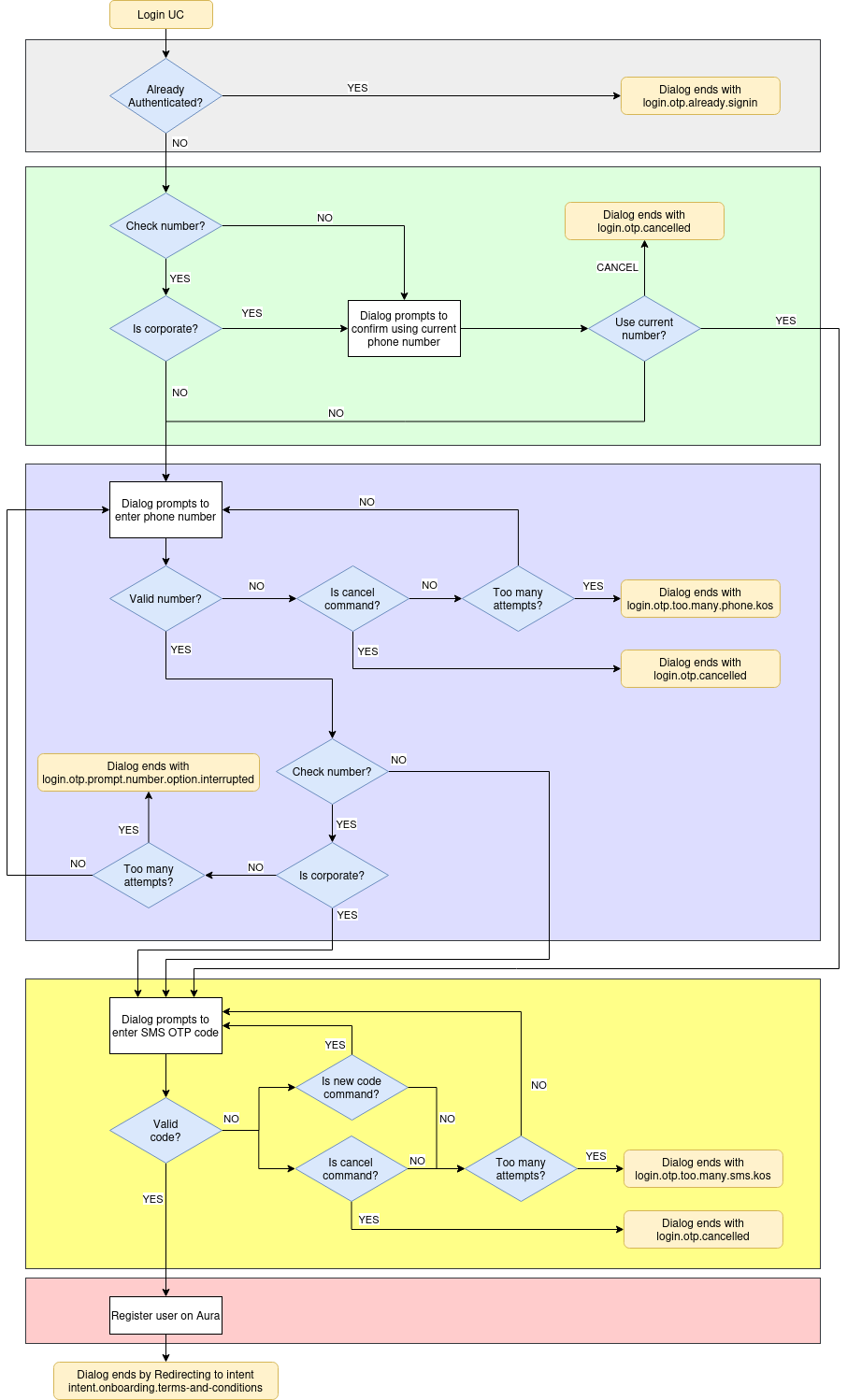
Additionally, a sequence flow is included in Operational flowcharts: WhatsApp OTP (LoA2) authentication.
Check if the user is already authenticated
When the dialog flow starts, it checks if the current user is already authenticated, verifying if the type of user is anonymous.
If so, the dialog flow ends with the text resource login.otp.already.signin. If not, it starts a sub-dialog to verify the phone number to send the SMS code.
Check if current number is corporate
In this step, if configured so, the system checks if the current phone number is corporate, to allow using it in next steps.
- If check is not enabled or user is not corporate, go to the following step for prompting a new phone number.
- Otherwise, ask the user if she wants to use current number.
Prompt a phone number
This step prompts the user to enter the phone number he wants to log in with in Aura, thus the dialog will send the SMS-OTP code to that phone number.
- If the phone number format is correct:
- If configured to check the prompted number and the number is not corporate, ask for a new phone number (until max number of retries is reached).
- Otherwise, it starts a sub-dialog to verify the SMS authcode.
- If the format is wrong, the dialog will prompt again to enter with correct format until the maximum number of attempts is reached (See settings section). When the user reaches this maximum, the dialog ends with the text resource
login.otp.too.many.phone.kos.
To send this code to the user phone, the send code endpoint from Kernel is called. This endpoint returns an authentication_id that will be used in the next step to validate the OTP code.
Insert SMS OTP code
This step prompts the user to enter the SMS authcode sent to phone number provided on the previous step.
- When the user enters the correct code, the dialog starts the following step in order to register the user.
- If the authcode is wrong, the dialog will prompt again to enter the correct authcode until the maximum number of attempts is reached (See settings section).
When the user reaches the maximum authcode attempts the dialog ends with the text resource login.otp.too.many.sms.kos. A new code can be sent by sending the text resource login.otp.newCode.command which makes the bot to send a new auth code to the phone number provided.
To validate the code, the Kernel validate code endpoint is called with the code received by the user and the authentication_id returned in the previous api call. This call returns all the necessary data to register the user in Aura.
Register user
This step registers the user in Aura ecosystem and redirects to onboarding T&C with the intent intent.onboarding.terms-and-conditions or the requested intent before authentication if T&C are already accepted.
To do this registry, the method GET /users/aura-id/{auraId} from aura-authentication-api is called and the user is registered with the data obtained from Kernel in the previous step.
The redirect to onboarding (or the intent set) is done if the field actions.afterLogin is present in the channel configuration. An example of this configuration is shown below:
 {
  "name": "whatsapp",
  "prefix": "wa",
  "type": "whatsapp",
  "responseOptions": {
      "versions": {
          "v1": {
            "singleMessage": true,
          }
      }
  }
  .
  .
  .
  "actions":
    "afterLogin": {
        "type": "redirect",
        "action": "REDIRECT.COMMAND",
        "data": {
            "auraCommand": {
            "type": "suggestion",
            "value": {
                "intent": "intent.onboarding.terms-and-conditions"
            }
            }
        }
    }
  }
  .
  .
  .
This configuration is used to generate the redirect command that will be sent to launch the intent. If there is an intent requested before authentication and the T&C are already accepted, the intent set in configuration will be overwritten with the requested intent.
NOTE The user can cancel login flow at any moment by sending the text resource login.otp.cancel.command.
Sequence diagram
sequenceDiagram
    autonumber
    participant user
    participant auraBridge
    participant auraBot
    participant 4p
    participant auraAuth
    participant T&C API
    rect rgb(255, 255, 230)
    Note left of user: USER REQUESTS AN AUTHENTICATED UC
    user->>auraBridge: I want to see my billing data
    auraBridge->>auraBot:
    auraBot->>auraBot: Dialog needs auth and user is anonymous. Redirect to whatsapp login
    auraBot->>auraBridge:
    auraBridge->>user: login.otp.phone.number: Please enter your phone number
    user->>auraBridge: +34665762892
    auraBridge->>auraBot:
    auraBot->>4p: Aura requests a new OTP sms
    4p->>user: (SMS) login.otp.sms.code.message: Your verification code is 6789
    4p->>auraBot: authorization_id
    auraBot->>auraBridge:
    auraBridge->>user: login.otp.sms.sent.message: Please insert the code
    user->>auraBridge: 6789
    auraBridge->>auraBot:
    auraBot->>4p: Aura validates the code
    4p->>auraBot: Returns user data
    auraBot->>auraAuth: Register user
    auraAuth->>auraBot: 200 OK
    alt
        Note left of T&C API: User already accepted authenticated T&C
        auraBot->>T&C API: Checks terms and conditions
        T&C API->>auraBot: 200 OK
        auraBot->>auraBridge: Response + Redirect intent
        auraBridge->>user: login.otp.success: Great! you are now signed in
        auraBridge->>auraBot: intent.billing from redirect intent
        auraBot->>auraBot: authenticates the user and executes the billing dialog
        auraBot->>auraBridge:
        auraBridge->>user: "Here is your billing data"
    else
        Note left of T&C API: User needs to accept authenticated T&C
        auraBot->>T&C API: Checks terms and conditions
        T&C API->>auraBot: 404 Not found
        auraBot->>auraBridge: Response + Redirect intent
        auraBridge->>user: login.otp.success: Great! you are now signed in
        auraBridge->>auraBot: intent.onboarding.terms-and-conditions from redirect intent
        auraBot->>auraBot: authenticates the user and executes T&C dialog
        auraBot->>auraBridge:
        auraBridge->>user: onboarding:onboarding.auth.welcome
        auraBridge->>user: onboarding:onboarding.auth.privacy
        auraBridge->>user: onboarding:onboarding.auth.terms-and-conditions
    else
        Note left of T&C API: Channel doesn't have terms and conditions config
        auraBot->>auraBridge: Response + Redirect intent
        auraBridge->>user: login.otp.success: Great! you are now signed in
        auraBridge->>auraBot: intent.billing from redirect intent
        auraBot->>auraBot: authenticates the user and executes the billing dialog
        auraBot->>auraBridge:
        auraBridge->>user: "Here is your billing data"
    end
end
BotResponse settings
Currently, the dialog has a main intent intent.authentication.login and three auxiliary intents: otp-confirm-user-phone-number-dialog, intent.authentication.otp.phone.number and intent.authentication.otp.auth.code. These auxiliary intents are necessary to enable the flow between sub-dialogs.
        {
            "id": "whatsapp-otp-login-dialog",
            "triggerConditions": [
                {
                    "intent": "intent.authentication.login"
                }
            ]
        },
        {
            "id": "otp-confirm-user-phone-number-dialog",
            "triggerConditions": [
                {
                    "intent": "intent.otp.confirm.user.phone.number.dialog"
                }
            ]
        },
        {
            "id": "otp-phone-number-dialog",
            "triggerConditions": [
                {
                    "intent": "intent.authentication.otp.phone.number"
                }
            ]
        },
        {
            "id": "otp-sms-auth-code-dialog",
            "triggerConditions": [
                {
                    "intent": "intent.authentication.otp.auth.code"
                }
            ]
        }
Settings
This section lists and describes all the variables the whatsapp-otp-login dialog uses and that can be configured to adapt the environment:
| Property |
Type |
Description |
Default value |
| LINKING_FP_WHATSAPP_ENDPOINT |
string |
WhatsApp API endpoint |
|
| LINKING_WA_MAX_FP_SEND_SMS_RETRIES |
number |
Maximum SMS retries. |
3 |
| LINKING_WA_MAX_AUTHCODE_RETRIES |
number |
Maximum authcode retries. |
3 |
| LINKING_WA_MAX_PHONENUMBER_RETRIES |
number |
Maximum phonenumber retries. |
3 |
1.7 - whatsapp-logout dialog
whatsapp-logout dialog
Description of the whatsapp-logout dialog, that handles the log out process for this channel
Introduction
The whatsapp-logout dialog is a global dialog in charge of the user’s logout in the WhatsApp channel.
📃 Check the dialog’s code in the aura-bot-libraries Github repository.
Flows
The flow of this dialog is simple. In the first step, a prompt is returned to the user to confirm if he wants to logout.
After that, if he accepts, certain actions are performed:
- The user is deleted in Aura database calling the aura services API. If this call fails, an error will be returned, and the logout will fail.
- The user is deleted in Kernel calling the logout endpoint. If this call fails, the flow continues normally returning a success message to the user and only showing an error log.
- If the user is logged with LoA3, access session is deleted in Kernel calling access session delete endpoint. If this call fails, the flow continues normally returning a success message and only showing the error in logs.
- The local cache is set to invalid to force the refresh next time the user interacts with Aura.
2 - Conversational dialog
Conversational dialog
Description of the conversational-dialog global use case available for Aiwi
Introduction
The conversational-dialog allows users to interact with an LLM with a predefined prompt.
This prompt should return a json formatted object to be mapped in a standard Aiwi response message.
Specific configuration
The conversational-dialog is designed to handle user’s requests using LLMs in ATRIA.
Currently, this dialog is available for Aura channelData V1 version and can only be used for the channel AIWI.
For this use case, the required specific configuration is set below:
    {
      "name": "conversational",
      "dialogs": [
        {
          "id": "conversational-dialog",
          "allowAnonymous": true,
          "triggerConditions": [
            {
              "intent": "None"
            }
          ],
          "bypass": {
            "duration": 30,
            "payloadName": "conversational",
            "initialData": {},
            "recognizersEnabled": false,
            "recognizersBreakIntents": {}
          }
        }
      ]
    }
Specific values
| Key |
Value |
Description |
| bypass.duration |
30 (minutes) |
This value overwrites the default aura-bot value for bypass lasting 10 minutes. |
| bypass.payloadName |
conversational |
Name of the interface that will be used as bypass payload for this dialog. |
| bypass.initialData |
empty |
It should contain any data needed by the dialog to be initialized. |
| bypass.recognizersEnabled |
false |
This value overwrites the default aura-bot way of working with recognizers when it is in bypass mode. If it is set to true, recognizers are executed, and their result is stored in the bypass payload to be used, if needed, afterwards. |
| bypass.recognizersBreakIntents |
empty |
Used to handle when the user requested any other use case during the execution of the dialog. To enable this config, bypass.recognizersEnabled should be enabled. |
Environment variables
| Property |
Type |
Description |
Modifiable by OB? |
| AURA_GATEWAY_API_ENDPOINT |
URI string |
Endpoint to access the locally deployed ATRIA aura-gateway-api |
NO |
| AURA_GATEWAY_API_ISSUER_URL |
string |
Aura issuer URL. It is automatically fulfilled by the installer. |
NO |
| CONVERSATIONAL_COMMAND_KEY |
string |
Key of the command in the returned json from prompt. |
YES |
| CONVERSATIONAL_MESSAGE_KEY |
string |
Key of the message in the returned json from prompt. |
YES |
Configuration by channel
From Prince’s release onwards, the configuration of applicationId and presetId per channel and intent has been added to the channel model.
For this use case, the required specific configuration per channel is set below (added dialogs section under atria property at Main-Recognizer-Video-Triage-29855):
{
  "atria": {
    "dialogs":{
      "None": {
        "applicationId": "816bdab6-3ea3-4a77-bdea-12945d6d7053",
        "presetId": "ef3d0603-3fef-4109-a577-0ab92f9060df"
      }
    }
  }
}
Specific values by channel
| Intent |
Key |
Value |
Description |
Modifiable by OB? |
| intent.tv.custom_recommendation |
applicationId |
1eb11727-14f2-447f-acc0-a2211ab55870 |
ATRIA application identifier |
NO |
| intent.tv.custom_recommendation |
presetId |
e0cdcae2-025d-4624-8096-d6bf4b5eaaff |
ATRIA preset identifier to be used within the use case. |
NO |
3 - generic-ai-dialog
Aura bot generic-ai-dialog
Description of Aura bot generic-ai-dialog, that allows managing several experiences for TV channels using AI services and complex logic resolution.
Introduction
The aura-bot-generic-ai-library library includes the following list of dialogs:
3.1 - Generic AI Dialog v1
Aura Bot generic-ai-dialog-v1
Description of Aura bot generic-ai-dialog-v1, that allows managing several experiences for TV channels using AI services and complex logic resolution.
Introduction
The generic-ai-dialog-v1 allows OBs to implement search and recommendation use cases for TV channels based on AI services and complex logic resolution for channelData v1 channels.
You can check its source code in Github: generic-ai-dialog-v1.ts.
Environment variables
| Property |
Type |
Description |
Mandatory |
| AURA_AUTHORIZATION_HEADER |
string |
Authorization header to be sent to AURA_GATEWAY_API_ENDPOINT |
yes |
| AURA_COMPLEX_LOGIC_ENDPOINT |
string |
URL of Complex Logic endpoint to interact with resolution API. |
yes |
| AURA_GATEWAY_API_ENDPOINT |
string |
URL of Aura Gateway API endpoint |
yes |
| AURA_GATEWAY_API_ISSUER_URL |
string |
Issuer URL for token info |
yes |
| AURA_CHANNELDATA_DEFAULT_VERSION |
string |
Default version of channelData. By default 1.0.0. |
no |
| AURA_CHANNELDATA_LA_DEFAULT_VERSION |
string |
Default version of channelData for Latin America. By default 2.0.0. |
no |
| GENERIC_MP_RESOLUTION_NO_RESULT_CODE |
string[] |
List of resolution codes that indicate no results found. By default ['211', '462']. |
no |
How it works
The dialog works in a similar way to the generic-ai-dialog-v3 but adapted to the structure of channelData v1.
Complex Logic proxy is used to interact with Complex Logic resolution API, which returns a response similar to Movistar Plus Resolution API. This adaptation is only valid for TVSearch responses for STB channel, because only a subset of fields has been mapped from normalized TV API to legacy TV API.
3.2 - Generic AI Dialog v3
Aura Bot generic-ai-dialog-v3
Description of Aura bot generic-ai-dialog-v3, that allows managing several experiences for TV channels using AI services and complex logic resolution.
Introduction
The generic-ai-dialog-v3 allows OBs to implement search and recommendation use cases for TV channels based on AI services and complex logic resolution for channelData v3 channels.
You can check its source code in Github: generic-ai-dialog-v3.ts.
Environment variables
| Property |
Type |
Description |
Mandatory |
| AURA_AUTHORIZATION_HEADER |
string |
Authorization header to be sent to AURA_GATEWAY_API_ENDPOINT |
yes |
| AURA_COMPLEX_LOGIC_ENDPOINT |
string |
URL of Complex Logic endpoint to interact with resolution API. |
yes |
| AURA_GATEWAY_API_ENDPOINT |
string |
URL of Aura Gateway API endpoint |
yes |
| AURA_GATEWAY_API_ISSUER_URL |
string |
Issuer URL for token info |
yes |
| AURA_CHANNELDATA_DEFAULT_VERSION |
string |
Default version of channelData. By default 1.0.0. |
no |
| AURA_CHANNELDATA_LA_DEFAULT_VERSION |
string |
Default version of channelData for Latin America. By default 2.0.0. |
no |
Adding configurations for the AI Service
To use the AI Service, you need to add the intent configurations to the channel settings. The configurations should be added in the following format:
{
    "atria": {
        "dialogs": {
            "intent.tv.retrieve": {
                "applicationId": "816bdab6-3ea3-4a77-bdea-12945d6d7053",
                "presetId": "5d06f26c-a8d8-4f45-a999-102aaa8b191b"
            }
        }
    }
}
With this configuration, when the generic-ia-dialog-v3 is called with the intent intent.tv.retrieve, it will use the specified applicationId and presetId to call the generative API.
How it works
Steps
- The dialog starts by retrieving the intent information from the context and logging the start of the dialog.
- Then, it calls the AI service to get a generative response based on the intent and the current session ID. The session ID is updated in the context for future requests.
- Next, it calls the complex logic service to get a resolution based on the intent and entities from the generative response.
- If the resolution indicates no content found, it redirects to the conversational-search dialog.
- Otherwise, it builds an activity to be sent to the user using the intent result, intent settings, and resolution.
- If any error occurs during these steps, it logs the error, sets the error in the context, and builds an activity from the error.
- Finally, it sends the activity to the user and ends the dialog.
Sequence diagram
sequenceDiagram
    autonumber
    participant User
    participant Dialog
    participant AI Services
    participant Complex Logic
    participant Conversational Search
    Dialog->>Dialog: Retrieve intent information from context
    Dialog->>AI Services: Call AI service with intent and session ID
    AI Services->>Dialog: Return generative response and session ID
    Dialog->>Complex Logic: Call complex logic service with intent and entities
    Complex Logic->>Dialog: Return resolution
    alt No content found in resolution
        Dialog->>Conversational Search: Redirect to conversational-search dialog
    else Content found
        Dialog->>Dialog: Build activity with intent result, intent settings, and resolution
        Dialog->>User: Send activity to user
    end
    Dialog->>Dialog: End dialog
4 - generic-dialog
Aura bot generic-dialog
Description of Aura bot generic-dialog, that allows managing several experiences for TV channels based on a simple configuration
Find here details regarding the global generic library and dialogs’ versions and the condition for a use case to be generic
Related documents
📄 Guidelines for the development of experiences through the generic-dialog
Introduction
The generic-dialog allows OBs to implement certain local use cases for Movistar Home, Movistar Plus and Set-top Box (STB) channels in an autonomous, agile and simple way with no code development, only by means of configuration.
Different versions compatible with channelData v1 and v3 are available:
Aura global generic-dialog
The generic-dialog responds to the intention of having a single dialog based on configuration that allows managing several intents whose behavior is similar.
Therefore, it allows the development of certain types of use cases in a simple and autonomous way, with no associated code development and simply by means of configuration.
The global generic-dialog file, generic-dialog.ts includes the logic for the use case execution, where configuration is recovered and the output message is generated with the defined parameters.
Besides this global generic-dialog, there are several plugins based on the same dialog, all of them working as the global one and with similar code. In this framework, each OB have a specific generic-dialog in its corresponding library generic-[OB]/ which must be used when developing a local use case.
The global library that includes the generic dialog is named generic and has been designed for the management of different types of dialogs.
You can find it here.
Conditions for a use case to be generic
In order to consider a use case as part of the generic-dialog, it must fulfil these conditions:
✅ Local use cases developed from scratch by the OBs.
✅ Use cases with intents that can be managed by Movistar Plus, Movistar Home or Set-Top-Box (STB) channels.
✅ Dialog with only one interaction with the user: only one message from the user and one response from the bot are allowed. For example: greetings dialog.
✅ There is a direct transformation from intent to action (you may or may not call the API Movistar Resolution for this purpose). For example: tv-remote-actions use cases).
✅ Use cases that require the conversion of input parameters through a function to get the correct payload. For example: conversion on entities. For example: move_forward.
✅ Currently, only one text response is allowed:
settings.locale.success when all works fine.settings.locale.error when something goes wrong.- Also, the text can be set in the response from the resolution API but, if required for example a variable text depending on the response of the API or the recognized entity, then developers must create another dialog.
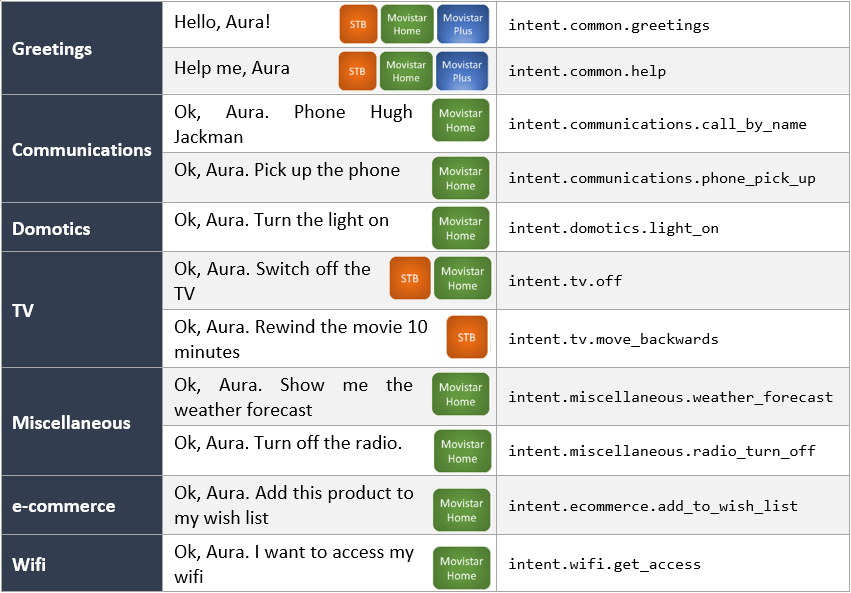
Merely as examples of the potential of aura-bot generic dialog, below you can find different use cases for the channels Movistar Plus, Movistar Home or STB channels that can be developed through it. Use them as a reference for developing your own local experiences!
4.1 - generic-dialog v1
Aura Bot generic-dialog v1
Dialog based on a simple configuration that allows managing several experiences for TV channels. This version is compatible with channelData v1.
Introduction
The generic-dialog allows OBs to implement certain local use cases for Movistar Home, Movistar Plus and Set-top Box (STB) channels in an autonomous, agile and simple way with no code development, only by means of configuration.
Use this generic-dialog if your channelData version is v1.
You can check its source code in Github: generic-dialog.ts.
Included intents
The next table shows current intents available on generic-dialog and the previous library where the intent was set.
| Intent |
Previous library |
| intent.common.goodbyes |
common |
| intent.common.greetings |
common |
| intent.common.help |
common |
| intent.common.swearwords |
common |
| intent.common.thankyous |
common |
| intent.communications.silent_mode_on |
communications |
| intent.communications.silent_mode_off |
communications |
| intent.communications.call_voicemail |
communications |
| intent.communications.add_contact |
communications |
| intent.communications.phone_pick_up |
communications |
| intent.communications.call |
communications |
| intent.communications.call_by_number |
communications |
| intent.communications.call_by_name |
communications |
| intent.communications.check_calls |
communications |
| intent.communications.redial |
communications |
| intent.communications.ignore_calls |
communications |
| intent.domotics.light_on |
domotics |
| intent.domotics.light_off |
domotics |
| intent.ecommerce.add_to_wish_list |
ecommerce |
| intent.miscellaneous.radio_turn_off |
miscellaneous |
| intent.miscellaneous.time_check |
miscellaneous |
| intent.miscellaneous.weather_forecast |
miscellaneous |
| intent.miscellaneous.news_listen |
miscellaneous |
| intent.navigation.section_show |
navigation |
| intent.navigation.back |
navigation |
| intent.navigation.next |
navigation |
| intent.navigation.previous |
navigation |
| intent.carousel.info |
tv |
| intent.tv.details |
tv |
| intent.tv.help |
tv |
| intent.tv.init |
tv |
| intent.tv.from_beginning |
tv |
| intent.tv.record |
tv |
| intent.tv.channel_down |
tv |
| intent.tv.channel_up |
tv |
| intent.tv.move_backwards |
tv |
| intent.tv.move_forwards |
tv |
| intent.tv.mute |
tv |
| intent.tv.unmute |
tv |
| intent.tv.stop |
tv |
| intent.tv.off |
tv |
| intent.tv.on |
tv |
| intent.tv.pause |
tv |
| intent.tv.resume |
tv |
| intent.tv.volume_down |
tv |
| intent.tv.volume_up |
tv |
| intent.tv.c2c |
tv |
| intent.tv.content_get_info |
tv |
| intent.tv.none |
tv |
| intent.tv.question_time_loc |
tv |
| intent.tv.search |
tv |
| intent.tv.search_similar |
tv |
| intent.tv.vod_epq_information |
tv |
| intent.tv.watching_now |
tv |
| intent.tv.suggestions |
tv |
| intent.wifi.get_access |
wifi |
Generic indexed text
Generic dialog implements an algorithm, which based on a dialog configuration, can customize its response. The getIndexedText function returns a POEditor resource based on the dialog configuration’s setting indexedResourceBase and the value entity.entity obtained from the first entity. This functionality relies in those two values and will return an error if they are not present.
{
    "intent": "intent.exact-match.faq",
    "settings": {
        "indexedResourceBase": "generic:faq-answer.",
        "functions": {
            "params": [
                "context",
                "currentIntent",
                "persistentData"
            ],
            "algorithm": "getIndexedText"
        }
    }
}
In this example, the reference that will be searched in POEditor will be generic:faq-answer.X, where X is the identifier gathered from the first entity.
Keep in mind that in function.params there has to be an array of parameters that will be used in getIndexedText.
Enabling AI resolution
To enable the AI-based fallback mechanism, add the flag enableAIResolution to true inside the dialog configuration for the intent. This setting allows the dialog to use the ai recognizer when the NLP resolution returns no entities or when the Movistar Plus resolution returns no results.
Example configuration:
{
    "intent": "intent.tv.search",
    "settings": {
        "locales": {
            "error": [
                "core:flc.answer.error"
            ]
        },
        "enableAIResolution": true,
        "needTvResolution": true
    }
}
AI fallback resolution
When using generic-dialog v1 and needTvResolution is set to true, a fallback mechanism using AI services is available if enableAIResolution is set to true in the dialog configuration.
If NLP resolution returns no entities or when the Movistar Plus resolution returns no results, the system applies an AI-based fallback strategy (“triage”). This ensures robustness and continuity of the dialog flow.
The fallback is triggered in two scenarios:
-
No entities detected
If the intent requires TV resolution and no entities are returned by the NLP (intentResult.entities?.length === 0), the dialog calls the recognizeUsingAI function.
If a new intent is successfully recognized, the current dialog is replaced by the new one.
-
Movistar Plus resolution returns no results
When the intent and entities are passed to Movistar Plus Resolution but no valid result is obtained (GENERIC_MP_RESOLUTION_NO_RESULT_CODE), the system again invokes recognizeUsingAI.
A new intent will be attempted and, if available, the dialog is redirected accordingly.
In both cases, the interaction origin is marked as InteractionOriginType.NoResults.
4.2 - generic-dialog-v3
Aura Bot generic-dialog-v3
Dialog based on a simple configuration that allows managing several experiences for TV channels. This version is compatible with channelData v3.
Introduction
The generic-dialog-v3 allows OBs to implement certain local use cases for channelData v3 channels in an autonomous, agile and simple way with no code development, only by means of configuration.
You can check its source code in Github: generic-v3-dialog.ts.
Differences between generic dialog v1 and v3
These are the main differences in comparison with the generic-dialog v1:
-
Deprecated fields in dialog’s settings (dialogLibraries.dialogs.triggerConditions.settings):
type, action, payload, addEntitiesToPayload, sound, payloadType and isFullScreen are no longer used.action, payload and sound configurations will be transformed to the new actions format and added to the new field actions.
-
New field actions: This field contains the configuration of all the actions returned inside the channelData.
Generic dialog environment variables
Generic
| Property |
Type |
Scope |
Description |
| TV_VOLUME_LEVELS_UP_DOWN |
number |
Local |
Number of points at which the volume can be raised and lowered. By default 5. |
| TV_MOVE_SECONDS_BACKWARD_FORWARD |
number |
Local |
Number of seconds in which user can forward or rewind a video. By default 60. |
| WIFI_FP_SMART_WIFI_ENDPOINT |
string |
Local |
URL Kernel endpoint endpoint to interact with smart wifi API. |
| TV_TIMER_RECOGNIZER_FIRST_ENTITY_CONFIG |
string |
Local |
Configuration of the recognition of entities with timer content in first position to calculate number of seconds. By default: 1 4:0.25,3 4s:0.75,4 de hora:0.25,hora:1.0,media:0.5,medio:0.5,minuto:1.0,un:1.0,un 4:0.25,una:1.0. |
| TV_TIMER_RECOGNIZER_SECOND_ENTITY_CONFIG | string | Local | Configuration of recognition of entities with timer content in second position to calculate number of seconds. By default: 1 4:0.25,3 4s:0.75,4 de hora:0.25,hora:1.0,media:0.5,medio:0.5,minuto:1.0,un:1.0,un 4:0.25,una:1.0,4:0.25. |
Generic dialog utilities
There are several functions that implement different requirements for the generic-dialog such as:
calculateSecondLevels: Calculate the value in seconds in case the entity type is not expressed in this format: ent.time_length_sec.
Right now it only converts minutes into seconds.getIndexedText: Get the text’s reference with information about the entity value.getInfoWifiPlus: Retrieve Wi-Fi info.getSecondsLevelsWithTimerRecognizer: Calculates the total number of seconds, based on the provided timer entities, making a recognition and conversion of them depending on the configuration of each country. The configuration is added in the environment variables: TV_TIMER_RECOGNIZER_FIRST_ENTITY_CONFIG and TV_TIMER_RECOGNIZER_SECOND_ENTITY_CONFIG.getWifiInfo: Manage Wi-Fi data by setting the persistentData and the value of movistarPlusResolution.
AI fallback resolution
The configuration and fallback mechanism for AI resolution in generic-dialog-v3 are the same as in generic-dialog v1.
The only difference is in the second fallback condition:
- In generic-dialog v1, the fallback is triggered when Movistar Plus resolution returns no results.
- In generic-dialog v3, the fallback is triggered when the complex logic resolution process returns no results.
All other aspects (configuration with enableAIResolution, marking the interaction origin as InteractionOriginType.NoResults, and redirecting to the new dialog) remain exactly the same.
5 - Miscellaneous
Aura global dialogs: miscellaneous
Aura Global dialogs belonging to different fields of application in terms of users’ experiences
Introduction
This section includes both global dialogs/libraries that can be installed by the OB as well as core dialogs that are deployed within the corresponding Aura Platform release:
5.1 - context-filter dialog
context-filter dialog
Description of the global context-filter dialog that manages contextFilters to configure the behavior of a specific dialog.
Introduction
ℹ️ The context-filter dialog is an aura-bot core dialog, deployed jointly with the corresponding Aura Platform release.
Find the source code of this dialog in its different versions:
The context-filter dialog handles the execution of all the contextFilters configured in each dialog, evaluating all the properties of the contextFilter, within the triggerCondition model.
-
Does the current contextFilter break the dialog execution? If breakDialogExecution is true, then the response to the request is just handled by the contextFilter, as the dialog is not executed.
-
Does the current contextFilter break the rest of the contextFilters evaluation? If breakFilterEval is true, then the rest of the configured contextFilters are not evaluated.
-
resource: if the contextFilter condition is matched, then the configured resource is returned to the user.
-
redirectToIntent: if the contextFilter condition is matched, then the execution passes to the dialog in charge of the configured intent for the current channel.
-
suggestions: flag to indicate whether or not the response handled by the contextFilter should return suggestions to the user.
Example: Scenario 1
- Couple of
contextFilter, both of them break the dialog execution and only return a resource.
- None of them break the rest of the
contextFilter evaluation, so the last matching contextFilter resource is returned.
In this case, if the user is prepaid, the response is bill:bill.check.prepaid with suggestions; if the user is multimisdn, the response is context-filter:multimsisdn-users-intent-not-allowed.text without suggestions. It works the same than setting breakFilterEval to true, what it is in fact recommended, to avoid performance loss.
"triggerConditions": [
                {
                    "intent": "intent.billing.check",
                    "contextFilters": [
                        {
                            "name": "subscription_type_prepaid_invoice",
                            "type": "subscription_type_filter",
                      "conditions": "/authData/subscriptionType eq 'prepaid'",
                            "true": {
                                "name": "subscription_type_prepaid_invoice_true",
                                "breakDialogExecution": true,
                                "breakFilterEval": false,
                                "resource": "bill:bill.check.prepaid",
                                "suggestions": true
                            }
                        },
{
                            "name": "Multimsisdn Not Allowed",
                            "type": "UserType",
                            "conditions": "/type eq 'multimsisdn'",
                            "true": {
                                "name": "Return_resource_not_multimsisdn_allowed",
                                "breakDialogExecution": true,
                                "breakFilterEval": false,
                                "resource": "context-filter:multimsisdn-users-intent-not-allowed.text",
                                "suggestions": false
                            }
                        }

]
Example: Scenario 2
-
Single filter configured, that matches whether the user is anonymous or not.
If the user is anonymous, then the dialog execution is broken and the rest of the contextFilter are not evaluated. The execution is redirected to the dialog that handles intent.account.linking for the current channel.
-
Redirect to the dialog indicated in the contextFilter of the dialog settings:
"contextFilters": [
        {
            "name": "Anonymous redirect to linking",
            "type": "type",
            "conditions": "/type eq 'anonymous'",
            "true": {
                "name": "Anonymous redirect to linking",
                "breakDialogExecution": true,
                "breakFilterEval": true,
                "redirectToIntent": "intent.account.linking",
                "suggestions": false
            }
        }
    ]
5.2 - mocks-v3 dialog
mocks-v3 dialog
Description of the mocks-v3 dialog, responsible for handling mocked responses in use cases
Introduction to the mocks-v3 dialog
The mocks-v3 dialog is a new dialog that returns mocked responses of use cases to be used by developers.
These responses are returned in channelData V3 format.
Find here the source code of the dialog’s file mocks-dialog.ts.
How it works
The mocks-v3 dialog gets a mocked response from a blob in Azure Storage, it formats the response in a message with a channelData in version v3 and send it to the user. This mocked responses are part of the library resources and are uploaded to Azure Blob Storage during the make-up process, but new ones could be uploaded directly to Azure Blob Storage and will be returned by the dialog.
The mocks-v3 dialog updates the mock files cache if it is older than 2 minutes (or the configured value in MOCKSV3_ACCESS_AZURE_CONTAINER_TIMEOUT_MS environment variable).
These mocked files are stored in the static-resources container of Aura’s Azure Storage instance of the deployment, within the path:
libraries/mocks/${channelPrefix}/${intent}
The files will have the entities values, alphabetically sorted and joined with - as filename.
For example, if the mocked response has these values:
{
  "intent": "intent.tv.search",
  "entities": [
    {
"entity": "temporada 3",
"type": "ent.audiovisual_tv_season_number",
"score": 0.0,
"start_index": 29,
"end_index": 41,
"canon": "3 temporada",
"label": null
    },
    {
"entity": "episodio 1",
"type": "ent.audiovisual_tv_episode_number",
"score": 0.0,
"start_index": 16,
"end_index": 28,
"canon": "1 capítulo",
"label": null
    }
  ]
}
Then, the name of the file will be episodio_1-temporada_3.json and if the channel is set-top-box the complete route will be:
static-resources/libraries/mocks/stb/intent.tv.search/episodio_1-temporada_3.json
With these names, the mock will match the recognized intents and entities to find the correct mocked response to be returned.
The next table shows current responses configured in the mocks-v3 dialog:
| Intent |
Entity |
Aura Command |
Phrase |
Response |
intent.tv.search |
La Resistencia |
"auraCommand": { "type": "suggestion", "value": { "intent": "intent.tv.search","entities": [{ "entity": "La Resistencia", "type": "ent.audiovisual_tvshow_title", "canon": "La Resistencia", "score": 1 }]}} |
Busca La Resistencia |
Tv search with 0 results |
intent.tv.search |
fútbol |
"auraCommand": { "type": "suggestion", "value": { "intent": "intent.tv.search", "entities": [{ "entity": "fútbol","type": "ent.audiovisual_sports", "canon": "fútbol", "score": 1 }]}} |
Busca fútbol |
Tv search with 1 result (catalog_type=LIVE and content_type=live_episode) |
intent.tv.search |
Virtual Hero |
"auraCommand": { "type": "suggestion", "value": { "intent": "intent.tv.search", "entities": [ { "entity": "Virtual Hero", "type": "ent.audiovisual_tvseries_title", "canon": "Virtual Hero", "score": 1 }]}} |
Busca Virtual Hero |
Tv search with multiple results |
intent.tv.search |
Star Wars |
"auraCommand": { "type": "suggestion", "value": { "intent": "intent.tv.search", "entities": [{ "entity": "Star Wars", "type": "ent.audiovisual_film_title", "canon": "Star Wars","score": 1 }]}} |
Búscame Star Wars |
tv.search with multiple third party results |
intent.tv.search |
Closer |
"auraCommand": { "type": "suggestion", "value": { "intent": "intent.tv.search", "entities": [{ "entity": "Closer", "type": "ent.audiovisual_film_title", "canon": "Closer", "score": 1 }]}} |
Búscame Closer |
tv.search with third party result |
intent.tv.display |
Star Wars |
"auraCommand": { "type": "suggestion", "value": { "intent": "auraCommand", "entities": [{ "entity": "star wars", "type": "ent.audiovisual_film_title", "canon": "Star Wars", "score": 1 }]}} |
Pon Star Wars |
tv.display with CONTENT.PLAY action and third party result |
intent.tv.display |
La princesa prometida |
"auraCommand": { "type": "suggestion", "value": { "intent": "intent.tv.display", "entities": [{ "entity": "La princesa prometida", "type": "ent.audiovisual_film_title", "canon": "La princesa prometida"," score": 1 }]}} |
Pon La princesa prometida |
tv.display with CONTENT.PLAY action |
intent.tv.display |
Telecinco |
"auraCommand": {"type": "suggestion", "value": {"intent": "intent.tv.display","entities": [ {"entity": "telecinco","type": "ent.audiovisual_channel","canon": "Telecinco","score": 1}] }} |
Pon Telecinco |
tv.display with CHANNEL.PLAY action |
Environment variables
| Name |
Default value |
Description |
| MOCKSV3_ACCESS_AZURE_CONTAINER_TIMEOUT_MS |
120000 |
Time to refresh Azure blob storage files cache |
| AURA_RESOURCES_PREFIX |
libraries |
Base folder in static-resources where dialog files are stored |
Dates and country codes
-
⚠️ Dates
Date fields like start, end, release_date and expiration_date should be formatted to ISO-8601 UTC according to Kernel documentation.
Currently, in Kernel response, start and end do not match the format and these fields are modified in mock responses manually.
-
⚠️ Country codes
Country fields like original_language_code, audios and subtiltes should follow the ISO 639-2 format, but
currently, none of these fields follow this standard in Kernel responses. Therefore, these fields are modified in mock responses to follow the standard.
default_language_order is not present in current mock responses but should be a combination between two ISO 639-1 country codes.
5.3 - suggestions dialog V3
suggestions dialog v3
Description of the suggestions dialog v3 that allows sending suggestions to the user
Introduction
ℹ️ This is an aura-bot core dialog, deployed jointly with the corresponding Aura Platform release.
The aim of the suggestions dialog v3 is precisely to send suggestions to the user related to the current conversation. This can help the user get the information he needs quickly using these suggestions.
This dialog is closely related to the main dialog. The main dialog will execute the suggestions dialog if the suggestions property is true in aura-configuration-api server or suggestions property is true in settings of triggerConditions of generic-dialog-v3 dialog.
Find here the source code of the dialog’s file suggestions-v3.ts.
Settings
The suggestions dialog v3 is part of the aura-bot core, so it does not have a specific section in the ChannelConfiguration model.
As previously indicated, each dialog can activate suggestions using the suggestions field in its own section.
An extract of the dialog-config.json file is included below:
Example for generic-dialog-v3 dialog:
        {
            "id": "generic-dialog-v3",
            "channelDataVersion": "v3",
            "triggerConditions": [
            {
                    "intent": "intent.tv.init",
                    "settings": {
                        "locales": {
                            "success": [
                                "tv:tv.init.start"
                            ],
                            "error": [
                                "tv:tv.error.fpaOrCognitive"
                            ]
                        },
                        "sound": "positive",
                        "needPlayingContent": false,
                        "payloadType": "tv",
                        "suggestions": true
                    }
                }
            ]
        }
This snippet shows how to execute the suggestions dialog v3 after the generic-v3-dialog dialog is executed.
Example for none-v3 dialog:
    {
      "triggerConditions": [
        {
          "intent": "None"
        }
      ],
      "id": "none-v3",
      "channelDataVersion": "v3",
      "suggestions": true
    }
This snippet shows how to execute the suggestions dialog v3 after the none-v3-dialog dialog is executed.
How it works
If the suggestions property is true for the running dialog, the main dialog will pass the conversational flow to suggestions dialog v3 in the suggestions step.
Currently, the dialog get suggestions data of aura-configuration-api, Obtaining suggestions randomly, the number of suggestions configured globally or per channel.
Configuration variables used globally
This section lists all the variables that the suggestions dialog v3 uses and can be configured to adapt the environment:
| Property |
Type |
Description |
| AURA_SUGGESTIONS_V3_NUMBER |
string |
Number of suggestions configured to be returned in channel data version 3. By default, 5. |
Configuration variables used per channel
responseOptions.suggestionsNumber has been added to the channel response optionally, so if it is not configured, the global configuration prevails.
Configuration template suggestions
the suggestions dialog v3 return suggestion data as an attachment with a new template defined with contentType: application/vnd.telefonica.aura.suggestion
Example response:
{
    "type": "message",
    "attachments": [
        {
            "contentType": "application/vnd.telefonica.aura.suggestion",
            "content": {
                "suggestions": [
                    {
                        "title": "suggestions:tv.search.byGenderViaChannel.suggestion.button",
                        "value": {
                            "intent": "intent.tv.content_get_info",
                            "entities": [
                                {
                                    "canon": "Discovery",
                                    "entity": "Discovery",
                                    "label": "",
                                    "score": 1,
                                    "type": "ent.audiovisual_channel"
                                },
                                {
                                    "canon": "documentales",
                                    "entity": "Documentales",
                                    "label": "DC",
                                    "score": 1,
                                    "type": "ent.audiovisual_genre"
                                }
                            ]
                        }
                    },
                    {
                        "title": "suggestions:tv.searchSportByTeam.suggestion.button",
                        "value": {
                            "intent": "intent.tv.search",
                            "entities": [
                                {
                                    "canon": "estudiantes",
                                    "entity": "Estudiantes",
                                    "label": "",
                                    "score": 1,
                                    "type": "ent.audiovisual_sports_team"
                                }
                            ]
                        }
                    },
                    {
                        "title": "suggestions:tv.search.byGenderViaChannel.suggestion.button",
                        "value": {
                            "intent": "intent.tv.content_get_info",
                            "entities": [
                                {
                                    "canon": "Telecinco",
                                    "entity": "Telecinco",
                                    "label": "",
                                    "score": 1,
                                    "type": "ent.audiovisual_channel"
                                },
                                {
                                    "canon": "programas de televisión",
                                    "entity": "Programas",
                                    "label": "PR",
                                    "score": 1,
                                    "type": "ent.audiovisual_genre"
                                }
                            ]
                        }
                    },
                    {
                        "title": "suggestions:tv.search.byGender.suggestion.button",
                        "value": {
                            "intent": "intent.tv.search",
                            "entities": [
                                {
                                    "canon": "películas",
                                    "entity": "película",
                                    "label": "CN",
                                    "score": 1,
                                    "type": "ent.audiovisual_genre"
                                }
                            ]
                        }
                    },
                    {
                        "title": "suggestions:tv.search.byActor.suggestion.button",
                        "value": {
                            "intent": "intent.tv.search",
                            "entities": [
                                {
                                    "canon": "Mario Casas",
                                    "entity": "Mario Casas",
                                    "label": "",
                                    "score": 1,
                                    "type": "ent.audiovisual_actor"
                                },
                                {
                                    "canon": "películas",
                                    "entity": "películas",
                                    "label": "CN",
                                    "score": 1,
                                    "type": "ent.audiovisual_genre"
                                }
                            ]
                        }
                    }
                ]
            }
        }
    ]
}
I18n
| key |
description |
suggestions:${titleResource.name} |
Used to get cardAction title name from suggestion when the suggestion resource is button type |
5.4 - unexpected-file dialog
unexpected-file dialog
Description of the unexpected-file dialog for the management of unforeseen files
Introduction
ℹ️ This is an aura-bot core dialog, deployed jointly with the corresponding Aura Platform release.
The aim of the unexpected-file dialog is to be triggered when a attachment is received on aura-bot, but it is not being expected.
The prerequisite for a file being expected is either a active bypass dialog that accept attachments or a dialog with an active AttachmentPrompt.
Find here the source code of the dialog’s file unexpected-file.ts.
I18n
| key |
description |
core:unexpected.file |
Error message of file attachments not supported |
Flow
The unexpected-file dialog is closely related to file-manager recognizer.
When the recognizer detects a valid attachments data and the channel supports attachments, then it will check if a dialog capable of handling attachments is executing. Otherwise, it will pass the attachment to the unexpected-file dialog
6 - Video use cases
Aura video use cases
Discover the global experiences developed by Aura Platform Team for video channels
Aura global video use cases provide different experiences to Telefónica customers for video services. Those video services could be provided by two platforms (BoB, for Spain or GVP, currently in Brazil) and through different channels, like Set-Top-Box, mobile apps or Movistar Home.
Experiences provided by Aura video use cases are related to searching or playing TV content, TV channels tuning, TV program guide information, reproduction control (move forwards/back, pause, resume, etc.), menu navigation, language and subtitles changing, actions to control (switch on/off, move channels up/down, mute/unmute, volume up/down) and more.
Those use cases are currently available in Spain legacy video platform for MH, STB and MP channels, but from now on, Aura Global Team will progressively migrate and adapt them in three ways:
- Use cases will be migrated to a new Aura Platform component called Complex Logic Framework
- Use cases will be adapted to normalized Aura v3 request-response model
- Use cases will be adapted to use Video Contents normalized Kernel API
ℹ️ The objective and focus of all the documentation you can find here is for normalized Aura Global Video use cases (v3).
Access the left menu and discover the available video global experiences.
In addition, related with video plugins, there is a Postman collection available in Video Contents Kernel API.
6.1 - TV search use case
TV search use case
Global use case developed by Aura Platform Team that allows users to search specific TV content in Aura
Introduction
The TV search use case is a global experience designed and developed by Aura Global Team that allows Telefónica customers to ask Aura for TV content using a vocal interface.
Find additional information in following the documents:
Specifications
Kernel API
In order to resolve the user’s search request, Aura uses Video Contents normalized Kernel API.
Request-response model
TV search use case is adapted to the new request-response normalized model v3.
Available channels
Once TV search v3 use case is fully normalized, it will be available for any channel that implements normalized v3 request-response model including TV related data.
Search features
Currently, the normalized TV search use case includes basic search features and smart answers for entertainment content:
- Search by title
- Search by genre (movie, series, documentaries, programs, short films and games)
- Search by subgenre (action, scare, love, etc)
- Search by actor or director
In addition to these search features, the use case includes a contingency or fallback search mode used in case the Video Contents API does not provide any answer to Aura request. The contingency or fallback search mode could be deactivated by configuration.
🆕 As a novelty in the current release, the use case is able to provide the users with smart answers features, meaning that the entities included in the user’s requests can be included in the answer.
Therefore, the answer could be of this type:
“That’s what I’ve found about [$title, $participant, $genre, $subgenre]
For example:
- The user asks for a specific title: “Play a film starring Brad Pitt”
- In previous versions, Aura sends the content provided by the API as “That’s what I’ve found for you”
- Now, the entity can be included in the answer, giving the user a most personalized answer: “That’s what I’ve found about Brad Pitt”
Current limitations
Currently, the TV search use case does not include these features:
- Request for a specific season o episode of a TV Series.
- Search content from third-parties (content must belong to Aura’s catalog).
- Search including temporary entities or time intervals.
- Search sport content based on entities.
Use case development
The TV search use case development includes these components:
Understanding features
| Entity |
Example |
ent.audiovisual_film_title |
“Busca La princesa prometida” |
ent.audiovisual_documental_title |
“Busca ABBA Forever” |
ent.audiovisual_tvshow_title |
“Busca Late Motiv” |
ent.audiovisual_tvseries_title |
“Busca Hierro” |
ent.audiovisual_subgenre |
“Busca una comedia” |
ent.audiovisual_genre |
“Busca una película” |
ent.audiovisual_actor |
“Busca algo de Brad Pitt” |
ent.audiovisual_director |
“Busca algo de Almodóvar” |
⚠️ Other entities in the user’s request are not taken into account in the searching process.
In order to understand users’ requests (utterances), Aura is trained with:
- NLP expression to recognize the user’s utterance and detect her intention.
- TV catalog in order to understand TV content (titles, actors, director) in the user’s utterance and detect them as Aura entities.
- Other content like genre or subgenre.
Use case logic
Once Aura has recognized the user’s utterance based on NLP components, the use case should be resolved based on:
6.1.1 - Dialog configuration
Configuration of the generic-dialog for TV search use case
How the generic-dialog must be configured for this use case
Specific configuration
The TV search use case is triggered by the generic-dialog-v3.
For this use case, the required specific configuration is set below:
{
    "id": "generic-dialog-v3",
    "channelDataVersion": "v3",
    "triggerConditions": [
        {
            "intent": "intent.tv.search",
            "settings": {
                "locales": {
                    "error": [
                        "core:flc.answer.error"
                    ]
                },
                "needTvResolution": true,
                "payloadType": "tv"
            }
        }
    ],
    "onlyIn": [
        "movistar-plus",
        "set-top-box"
    ]
}
Specific values
| Key |
Value |
Description |
| triggerConditions[?].settings.needTvResolution |
true |
Get resolution from resolution api |
6.1.2 - TV search plugin
TV search plugin
Complex Logic Framework plugin for the TV search use case
Introduction
The TV search plugin resolves the request from a user searching a video content.
It includes some key steps described in the following sections.
This step validates that the input request fulfills all the requirements from the input schema.
If the input data has an error the resource returned is:
tv:video.model-validation.request.error.
Filter invalid entities
The TV search plugin executes the step for entities validation listed below and prepares data before resolving the request:
- Check that season/episode entity contains a number. In other case, it removes this entity.
Entertainment Search
The search of video content is based in the received entities.
The search stage follows the following steps:
Build the search_query param
The search builds a search_query param using label values of entities to prioritize the searched video content. If the label value is null for an entity, then the canon value is used.
Entities used to search are grouped by:
- Title entities:
ent.audiovisual_documental_title, ent.audiovisual_film_title, ent.audiovisual_tvseries_title and ent.audiovisual_tvshows_title
- Participant entities:
ent.audiovisual_actor and ent.audiovisual_director
- Genre entities:
ent.audiovisual_genre and ent.audiovisual_subgenre
The priority to search using these entities is described as follows:
- If there are title entities and other entities, then the
search_query parameter is built only using title entities.
- For instance:
title: ("Matrix" OR "La princesa prometida")
- If there are participant entities and other entities, then the
search_query parameter is built only using participant entities.
- All entities (
ent.audiovisual_actor and ent.audiovisual_director) are used for fields actor and director.
- For instance:
actor: ("Tom Cruise" OR "Martin Scorsese") OR director: ("Tom Cruise" OR "Martin Scorsese")
- If there are genre entities and other entities, then the
search_query parameter is built only using genre entities.
- The
ent.audiovisual_genre is used with the field content_category and the ent.audiovisual_subgenre with field genre.
- For instance:
content_category: ("MOV" OR "SER" OR "DOC") AND genre: ("TE" OR "AC")
- If there are not any entities allowed, then a query param to search is not built.
With this prioritization, the system builds a search_query param that will be used to call the API video query for searching purposes.
API video query
After preparing the search_query parameter, we will make a query to the Telefonica Kernel video API by searching through all the possible fields with the remaining words.
To make this API call, several parameters are needed, which are described below:
user_id: Input data[aura_user][user_id]administrative_number: Input data[app_context][user][account_number]access_token: Input data[aura_user][access_token]scopes: Input data[aura_user][scopes]purposes: Input data[aura_user][purposes]device_type: Input data[app_context][device][type]catalog_types: List of allowed catalog types. The value can now be a list of catalog types provided by the device, as long as the values are one of the following predefined identifiers: VOD, LIVE, L7D, LCH, LSR.search_query: String with a custom search query based in the received entities.show_series: series.profile: Input data[app_context][user][video_profile_name].
This field may not be implemented in certain cases and this could give the error 501 Not Implemented in the video API according to the documentation.
To prevent this problem we should send this field only when input data has this value.commercialization_types: List made by SVOD.max_quality: Input data[app_context][device][max_quality]
Search response
When performing a search, the following possible scenarios can occur for the response received by the search:
a. Receive an API error. The returned resource is tv:video.api.answer.error.
b. Receive no results at all. Then, it executes the contingency search if it isn’t disabled by configuration. If it is disabled by configuration, the returned resource is tv:video.search.no-results.
c. Receive a single result by searching for one title entity. The returned resource is tv:video.search.by-title.simple-result and params with the value of the title searched for.
d. Receive several results by searching for one title entity. The returned resource is tv:video.search.by-title.multiple-results and params with the value of the title searched for.
e. Receive a single result by searching for one actor/director entity. The returned resource is tv:video.search.by-participant.simple-result and params with the value of the participant searched for.
f. Receive several results by searching for one actor/director entity. The returned resource is tv:video.search.by-participant.multiple-results and params with the value of the participant searched for.
g. Receive a single result by searching for one genre entity. The returned resource is tv:video.search.by-genre.simple-result and params with the value of the genre searched for.
h. Receive several results by searching for one genre entity. The returned resource is tv:video.search.by-genre.multiple-results and params with the value of the genre searched for.
i. Receive a single result by searching for one genre and one subgenre entity. The returned resource is tv:video.search.by-subgenre.simple-result and params with the value of the genre and subgenre searched for.
j. Receive several results by searching for one genre and one subgenre entity. The returned resource is tv:video.search.by-subgenre.multiple-results and params with the value of the genre and subgenre searched for.
k. Receive a single result in all other cases. The returned resource is tv:video.search.by-default.simple-result.
l. Receive several results in all other cases. The returned resource is tv:video.search.by-default.multiple-results.
Contingency search
The contingency search is a more in-depth search to get, at least, one response. This search uses the entire utterance in every search field.
Contingency search is based on the following steps:
Normalization section
When a request is made by the user, it is possible to find certain words with no real value for Aura, so the system is not able to redirect them to obtain a response. For this reason, a list of forbidden words known as “ignore-words” will be declared, which will be eliminated.
The first step is to transform the entire utterance received as input to lowercase, removing all non-alphanumeric characters and separators. Once the utterance has been normalized, the words that belong to the list of “ignore-words” are eliminated.
This list is declared in a resource file called normalizer_rules.json. This file can be found in the following path:
src.aura_clf_video.resources.[language].normalizer_rules.json
Where [language] must be replaced by each language, for example: es-es.
If the language does not have the normalizer rule defined, it will be redirected to a default folder:
src.aura_clf_video.resources.default.normalizer_rules.json
If, for example, the language is Spanish, the path to the resource where the normalization rules are defined will be:
src.aura_clf_video.resources.es-es.normalizer_rules.json
-
Normalizer rules structure
It is a dictionary where all the items are declared in a list as shown below:
{
  "ignore_items": [
    "ignore item 1",
    "ignore item 2"
  ]
}
-
Validation of resource content
The normalization is done sequentially, a previous rule cannot affect a succeeding one.
For example:
- The utterance is “ok aura some”.
- We define “aura” and also “ok aura” in the “ignore-words” list.
- If we remove “aura” firstly from the original utterance, we obtain the following normalized utterance: “ok some”. In this case, “ok aura” does not have any effect.
- In short, the correct order should be: first, remove “ok aura” and, after that, remove “aura”. In this case, we will obtain the final utterance as “some”.
“Ignore-words” will be automatically validated in order to prevent this behavior in every Pull Request.
If after normalization the normalized phrase is empty, the resource returned is:
tv:video.search.contingency.no-results
API video query
After normalizing, we will query the Telefonica Kernel video API by searching through all possible fields with the remaining words.
To make this API call, a series of parameters are going to be needed, which are described below:
user_id: Input data[aura_user][user_id]administrative_number: Input data[app_context][user][account_number]access_token: Input data[aura_user][access_token]scopes: Input data[aura_user][scopes]purposes: Input data[aura_user][purposes]device_type: Input data[app_context][device][type]catalog_types: List of allowed catalog types. The value can now be a list of catalog types provided by the device, as long as the values are one of the following predefined identifiers: VOD, LIVE, L7D, LCH, LSR.search_query: Is a joint of the normalized phrase by OR operator. Use this format to search by any fields. Example: “La resistencia Shameless” the search_query is “(La OR resistencia OR Shameless)”.show_series: series.profile: Input data[app_context][user][video_profile_name]. This field may not be implemented in some cases and this could give the error 501 Not Implemented in the video API according to the documentation.
To prevent this problem, we should send this field only when input data has this value.commercialization_types: List made by SVOD.max_quality: Input data[app_context][device][max_quality]current_region: Input data[app_context][location][currentRegion] if exists. Otherwise, do not use this param.
Contingency search response
When performing a contingency search, there are four possible scenarios for the response received by the search:
a. Receive an API error. The returned resource is tv:video.api.answer.error
b. Receive no results at all. The returned resource is tv:video.search.contingency.no-results
c. Receive a single result. The returned resource is tv:video.search.contingency.single-result
d. Receive several results. The returned resource is tv:video.search.contingency.multiple-results
Response
The response follows this response schema.
Where:
-
intent: input intent.
-
entities: input entities.
-
result_intent: This field is always MEDIA.SEARCH because it is the response associated to this domain.
-
resources: List of response resources that includes three main parameters:
-
payload: Information provided by the Kernel API, when we make the search request.
If we receive a response. This field includes the following parameters:
type: The value of this field depends on the type of data included in the field data (info returned by the API):
- If it is a value:
details
- If it is a list:
content_list
data: It returns the information provided by the Kernel API.
-
status: Final status request. this field includes field the following parameters:
code: Status code.message: Status message, which describes the status code.params: Parameter that sends details of status. This field does not appear if it is empty.
-
actions: Actions to follow with the result of request.
-
conditions: Condition for the actions to be applied.
6.1.3 - TV search resources
TV search use case resources
Resources used by the TV search use case
Introduction
The TV search use case will use three different types of resources:
Specific resources for the use case: tv.search
The resources associated to the TV search plugin are defined below:
| Specific resources for tv.search use case |
Definition |
Example |
Managed by |
Scope |
tv:video.search.by-title.simple-result |
Resource returned when the search finds one result by searching for one title entity |
He encontrado esto sobre $title |
tv.search plugin |
Use case-specific |
tv:video.search.by-title.multiple-results |
Resource returned when the search finds more than one result by searching for one title entity |
He encontrado estos contenidos sobre $title |
tv.search plugin |
Use case-specific |
tv:video.search.by-participant.simple-result |
Resource returned when the search finds one result by searching for one actor/director entity |
En este contenido participa $participant |
tv.search plugin |
Use case-specific |
tv:video.search.by-participant.multiple-results |
Resource returned when the search finds more than one result by searching for one actor/director entity |
En estos contenidos participa $participant |
tv.search plugin |
Use case-specific |
tv:video.search.by-genre.simple-result |
Resource returned when the search finds one result by searching for one genre entity |
Mira lo que he encontrado sobre $genre |
tv.search plugin |
Use case-specific |
tv:video.search.by-genre.multiple-results |
Resource returned when the search finds more than one result by searching for one genre entity |
Estos son los contenidos que he encontrado sobre $genre |
tv.search plugin |
Use case-specific |
tv:video.search.by-subgenre.simple-result |
Resource returned when the search finds one result by searching for one genre and one subgenre entity |
Mira lo que he encontrado sobre $genre de $subgenre |
tv.search plugin |
Use case-specific |
tv:video.search.by-subgenre.multiple-results |
Resource returned when the search finds more than one result by searching for one genre and one subgenre entity |
Estos son los contenidos que he encontrado sobre $genre de $subgenre |
tv.search plugin |
Use case-specific |
tv:video.search.by-default.simple-result |
Resource returned when the search finds one result |
Aquí tienes este contenido |
tv.search plugin |
Use case-specific |
tv:video.search.by-default.multiple-results |
Resource returned when the search finds more than one result |
Aquí tienes estos contenidos |
tv.search plugin |
Use case-specific |
tv:video.search.contingency.no-results |
Resource returned when the contingency search does not find any result |
No he encontrado nada |
tv.search plugin |
Use case-specific |
tv:video.search.contingency.single-result |
Resource returned when the contingency search finds one result |
Este es el resultado que he encontrado |
tv.search plugin |
Use case-specific |
tv:video.search.contingency.multiple-results |
Resource returned when the contingency search finds more than one result |
Estos son los resultados que he encontrado |
tv.search plugin |
Use case-specific |
tv:video.search.no-results |
Resource when the contingency search is disabled and does not find any result |
No he encontrado lo que dices |
tv.search plugin |
Use case-specific |
6.1.4 - NLP configuration by OB
NLP configuration by OB
NLP configuration by OB for the TV search use case
Introduction
The current document includes the configuration of the NLP model for the TV search use case in the OBs where it is available.
Brazil
The aura-nlpdata repository structure in Brazil is organized by channel: aura-nlpdata-br-[channel]. Each repository will contain the files for the available use cases in this channel.
The following configuration corresponds to the STB channel, which is included in the repository: https://github.com/Telefonica/aura-nlpdata-br-stb
Intent
intent.tv.search
Entities
ent.audiovisual_actorent.audiovisual_directorent.audiovisual_documental_titleent.audiovisual_film_titleent.audiovisual_genreent.audiovisual_subgenreent.audiovisual_tvseries_titleent.audiovisual_tvshow_title
Pipeline stages
The following stages of STB’s pipeline have been used to develop this UC:
CluRecognizerWrapperEntityTaggerAdapterWrapper
The whole pipeline.jsonfile is available at: https://github.com/Telefonica/aura-nlpdata-br-stb/blob/master/data/pt-br/stb/pipeline.json
Spain
The TV search use case is available for three channels: Movistar Plus, Movistar Home and STB.
Intent
intent.tv.search
Entities
ent.audiovisual_actorent.audiovisual_bestent.audiovisual_directorent.audiovisual_documental_titleent.audiovisual_film_titleent.audiovisual_genreent.audiovisual_most_watchedent.audiovisual_releasesent.audiovisual_sportsent.audiovisual_sports_circuitent.audiovisual_sports_player_driverent.audiovisual_sports_player_riderent.audiovisual_sports_seasonent.audiovisual_sports_season_motorent.audiovisual_sports_teament.audiovisual_sports_unitent.audiovisual_subgenreent.audiovisual_tv_episode_numberent.audiovisual_tv_season_numberent.audiovisual_tvseries_titleent.audiovisual_tvshow_titleent.device_mobileent.device_tvent.time_instantent.time_intervalent.time_interval_futureent.time_interval_past
Pipeline stages
The following stages of STB’s pipeline have been used to develop this UC:
CluRecognizerWrapperPygrapeGrammarWrapperEntityTaggerAdapterWrapper
The whole pipeline.json files can be checked here for each channel:
6.2 - TV display use case
TV display use case
Global use case developed by Aura Platform Team that allows users to display specific TV channels in Aura
Introduction
The TV display use case is a global experience designed and developed by Aura Global Team that allows Telefónica customers to ask Aura for a TV channel or other entities using a vocal interface.
Find additional information in following the documents:
Specifications
Kernel API
In order to resolve the user’s display request, Aura uses Video Contents normalized Kernel API.
Request-response model
TV display use case is adapted to the new request-response normalized model v3.
Available channels
Once TV display v3 use case is fully normalized, it will be available for any channel that implements normalized v3 request-response model including TV related data.
Display features
Currently, the normalized TV display use case includes the following display features:
- Display by channel (both for Brazil and Spain OBs)
- Display by content: title, genre, subgenre, actor or director (for Spain OB)
Therefore, the answer could be of this type:
“This is what they are broadcasting now on that channel”
Use case development
The TV display use case development includes these components:
Understanding features
In order to understand users’ requests (utterances), Aura is trained with:
- NLP expression to recognize the user’s utterance and detect her intention.
- TV catalog in order to understand TV content (channels, titles, genres, subgenres, actors, directors) in the user’s utterance and detect them as Aura entities.
Use case logic
Once Aura has recognized the user’s utterance based on NLP components, the use case should be resolved based on:
6.2.1 - Dialog configuration
Configuration of the generic-dialog for TV display use case
How the generic-dialog must be configured for this use case
Specific configuration
The TV display use case is triggered by the generic-dialog-v3.
For this use case, the required specific configuration is set below:
{
    "id": "generic-dialog-v3",
    "channelDataVersion": "v3",
    "triggerConditions": [
        {
            "intent": "intent.tv.display",
            "settings": {
                "locales": {
                    "error": [
                        "core:flc.answer.error"
                    ]
                },
                "needTvResolution": true
            }
        }
    ],
    "onlyIn": [
        "movistar-plus",
        "set-top-box"
    ]
}
Specific values
| Key |
Value |
Description |
| triggerConditions[?].settings.needTvResolution |
true |
Get resolution from resolution API |
6.2.2 - TV display plugin
TV display plugin
Complex Logic Framework plugin for the TV display use case
Introduction
The TV display plugin resolves the request from a user displaying a channel or content.
It includes some key steps described in the following sections.
This step validates that the input request fulfills all the requirements from the input schema.
If the input data has an error, the resource returned is:
tv:video.model-validation.request.error.
Display channel or content
The display channel or content is based in the received entities.
The display stage follows the steps set below:
Build the search_query param
The display plugin builds a search_query param using label values of entities to prioritize the searched channel content or video content. If the label value is null for an entity, then the canon value is used.
Entities used to search are grouped by:
- Channel entities:
ent.audiovisual_channel
- Title entities:
ent.audiovisual_documental_title, ent.audiovisual_film_title, ent.audiovisual_tvseries_title and ent.audiovisual_tvshow_title
- Participant entities:
ent.audiovisual_actor and ent.audiovisual_director
- Genre entities:
ent.audiovisual_genre and ent.audiovisual_subgenre
The priority to search using these entities is described as follows:
- If there are channel entities and other entities, then the
search_query parameter is built only using the first channel entity.
- For instance:
channel_name: "La 1"
- If there are title entities and other entities, then the
search_query parameter is built only using title entities.
- For instance:
title: ("Matrix" OR "La princesa prometida")
- If there are participant entities and other entities, then the
search_query parameter is built only using participant entities.
- All entities (
ent.audiovisual_actor and ent.audiovisual_director) are used for fields actor and director.
- For instance:
actor: ("Tom Cruise" OR "Martin Scorsese") OR director: ("Tom Cruise" OR "Martin Scorsese")
- If there are genre entities and other entities, then the
search_query parameter is built only using genre entities.
- The
ent.audiovisual_genre is used with the field content_category and the ent.audiovisual_subgenre with field genre.
- For instance:
content_category: ("MOV" OR "SER" OR "DOC") AND genre: ("Terror" OR "Acción")
- If there are not any entities allowed, then a query param to search is not built.
With this prioritization, the system builds a search_query param that will be used to call the API video query for searching purposes.
Video query API
After preparing the search_query parameter, we will make a query to Video Contents normalized Kernel API by searching through all the possible fields with the remaining words.
To make this API call, several parameters are needed, which are described below:
user_id: Input data[aura_user][user_id]administrative_number: Input data[app_context][user][account_number]access_token: Input data[aura_user][access_token]scopes: Input data[aura_user][scopes]purposes: Input data[aura_user][purposes]device_type: Input data[app_context][device][type]catalog_types: use LIVE value if there are channel entities, else use VOD,LIVE,L7D value for title entities, participant entities or genre entities.search_query: String with a custom search query based in the received entities.show_series: series.commercialization_types: List made by SVOD.max_quality: Input data[app_context][device][max_quality]order: personalcommercial_offer: Input data[app_context][user][profile] if exists. Otherwise, do not use this param.live_at: if there are channel entities use UTC current time at which the request is made. Otherwise, do not use this param.profile: Input data[app_context][user][video_profile_name] if exists. Otherwise, do not use this param.current_region: Input data[app_context][location][currentRegion] if exists. Otherwise, do not use this param.
The fields current_region and profile may not be implemented in certain cases and this could give the error 501 Not Implemented in the video API according to the documentation.
To prevent this problem, we should send these fields only when input data has this value.
Display response
When a user requests for displaying a channel, the following possible scenarios can occur for the response:
a. Receive no results at all. Then, it executes the contingency search.
b. Receive content with channel info. The returned resource is tv:video.display.by-channel.single-result
c. Receive content with channel info has already been broadcast or recieve a video content. The returned resource is video.display.by-default.single-result
d. Receive content with channel info that has not been broadcast yet or the content does not have enough information to be played. The returned resource is video.display.by-default.detail-result
e. Receive more than one type of content with channel info or video content. The returned resource is tv:video.display.by-default.multiple-results
f. Receive an API error. The returned resource is tv:video.api.answer.error
Contingency search
The contingency search is a more in-depth search to get, at least, one response. This search uses the entire utterance in every search field.
Contingency search is based on the following steps:
Normalization section
When a request is made by the user, it is possible to find certain words with no real value for Aura, so the system is not able to redirect them to obtain a response. For this reason, a list of forbidden words known as “ignore-words” will be declared, which will be eliminated.
The first step is to transform the entire utterance received as input to lowercase, removing all non-alphanumeric characters and separators. Once the utterance has been normalized, the words that belong to the list of “ignore-words” are eliminated.
This list is declared in a resource file called normalizer_rules.json. This file can be found in the following path:
src.aura_clf_video.resources.[language].normalizer_rules.json
Where [language] must be replaced by each language, for example: es-es.
If the language does not have the normalizer rule defined, it will be redirected to a default folder:
src.aura_clf_video.resources.default.normalizer_rules.json
If, for example, the language is Spanish, the path to the resource where the normalization rules are defined will be:
src.aura_clf_video.resources.es-es.normalizer_rules.json
-
Normalizer rules structure
It is a dictionary where all the items are declared in a list as shown below:
{
  "ignore_items": [
    "ignore item 1",
    "ignore item 2"
  ]
}
-
Validation of resource content
The normalization is done sequentially, a previous rule cannot affect a succeeding one.
For example:
- The utterance is “ok aura some”.
- We define “aura” and also “ok aura” in the “ignore-words” list.
- If we remove “aura” firstly from the original utterance, we obtain the following normalized utterance: “ok some”. In this case, “ok aura” does not have any effect.
- In short, the correct order should be: first, remove “ok aura” and, after that, remove “aura”. In this case, we will obtain the final utterance as “some”.
“Ignore-words” will be automatically validated in order to prevent this behavior in every Pull Request.
If after normalization the normalized phrase is empty, the resource returned is:
tv:video.display.contingency.no-results
API video query
After normalizing, we will query the Telefonica Kernel video API by searching through all possible fields with the remaining words.
To make this API call, a series of parameters are going to be needed, which are described below:
user_id: Input data[aura_user][user_id]administrative_number: Input data[app_context][user][account_number]access_token: Input data[aura_user][access_token]scopes: Input data[aura_user][scopes]purposes: Input data[aura_user][purposes]device_type: Input data[app_context][device][type]catalog_types: List that is made by VOD, LIVE and L7D.search_query: Is a joint of the normalized phrase by OR operator. Use this format to search by any fields. Example: “La resistencia Shameless” the search_query is “(La OR resistencia OR Shameless)”.show_series: series.profile: Input data[app_context][user][video_profile_name]. This field may not be implemented in some cases and this could give the error 501 Not Implemented in the video API according to the documentation.
To prevent this problem, we should send this field only when input data has this value.commercialization_types: List made by SVOD.max_quality: Input data[app_context][device][max_quality]order: personalcurrent_region: Input data[app_context][location][currentRegion] if exists. Otherwise, do not use this param.
Contingency search response
When performing a contingency search, there are four possible scenarios for the response received by the search:
a. Receive an API error. The returned resource is tv:video.api.answer.error
b. Receive no results at all. The returned resource is tv:video.display.contingency.no-results
c. Receive a single result. The returned resource is tv:video.display.contingency.single-result
d. Receive several results. The returned resource is tv:video.display.contingency.multiple-results
Response
The response follows this response schema.
Where:
-
intent: input intent.
-
entities: input entities.
-
result_intent: This field is always MEDIA.SEARCH except when the resource is:
video.display.by-channel.single-result, then the field value is CHANNEL.PLAYvideo.display.by-default.single-result, then the field value is CONTENT.PLAY
-
resources: List of response resources that includes three main parameters:
-
payload: Information provided by the Kernel API, when we make the display request.
If we receive a response, this field includes the following parameters:
type: The value of this field depends on the type of data included in the field data (info returned by the API):
- If it is a value:
details
- If it is a list:
content_list
data: It returns the information provided by the Kernel API.
-
status: Final status request. This field includes the following parameters:
code: Status code.message: Status message, which describes the status code.params: Parameter that sends details of status. This field does not appear if it is empty.
-
actions: Actions to follow with the result of request. This plugin could include the following actions:
REMOTEON.ZAPTO: The target for this action is stb and its parameters are:
channelId, channelNumber and deviceId when we have the resource tv:video.display.by-channel.single-result
REMOTEON.PLAYTO: The target for this action is stb and its parameters are:
contentId, deviceId, liveProgramId and catalogType when we have the resource video.display.by-default.single-result and content has already been broadcast.contentId, deviceId and catalogType when we have the resource video.display.by-default.single-result and content is a video content.
MAKE_SOUND: The target for this action is channel and its unique parameter is sound with the value:
positive when we have the resource tv:video.display.by-channel.single-result, video.display.by-default.single-result, video.display.by-default.detail-result, tv:video.display.by-default.multiple-results, tv:video.display.contingency.single-result, tv:video.display.contingency.multiple-resultsnegative when we have the resource tv:video.display.contingency.no-results and tv:video.api.answer.error.
-
conditions: Condition for the actions to be applied.
6.2.3 - TV display resources
TV display use case resources
Resources used by the TV display use case
Introduction
The TV display use case will use three different types of resources:
Specific resources for the use case: tv.display
The resources associated to the TV display plugin are defined below:
| Specific resources for tv.display use case |
Definition |
Example |
Managed by |
Scope |
video.display.by-channel.single-result |
Resource returned when the search finds one channel and is broadcasting |
Esto es lo que están emitiendo ahora en ese canal |
tv.display plugin |
Use case-specific |
video.display.by-default.single-result |
Resource returned when the search finds one channel content has already been broadcast or finds a video content |
Voy a ello, dame un segundo |
tv.display plugin |
Use case-specific |
video.display.by-default.detail-result |
Resource returned when the search finds one channel content or video content that has not been broadcast yet, or the content does not have enough information to be played |
Mira, he encontrado este contenido |
tv.display plugin |
Use case-specific |
tv:video.display.by-default.multiple-results |
Resource returned when the search finds more than one channel content or content on demand |
He encontrado estos contenidos relacionados con tu petición |
tv.display plugin |
Use case-specific |
tv:video.display.contingency.single-result |
Resource returned when the contingency search finds one result |
He encontrado este contenido relacionado |
tv.display plugin |
Use case-specific |
tv:video.display.contingency.multiple-results |
Resource returned when the contingency search finds more than one result |
He encontrado estos contenidos relacionados |
tv.display plugin |
Use case-specific |
tv:video.display.contingency.no-results |
Resource returned when the contingency search does not find any result |
Lo siento, no encuentro lo que dices |
tv.display plugin |
Use case-specific |
6.2.4 - NLP configuration by OB
NLP configuration by OB
NLP configuration by OB for the TV display use case
Introduction
The current document includes the configuration of the NLP model for the normalized TV display use case in the OBs where it is available.
Brazil
The aura-nlpdata repository structure in Brazil is organized by channel: aura-nlpdata-br-[channel]. Each repository will contain the files for the available use cases in this channel.
The following configuration corresponds to the STB channel, which is included in the repository: https://github.com/Telefonica/aura-nlpdata-br-stb
Intent
intent.tv.display
Entities
| ent.audiovisual_channel | “Quiero ver La 1” |
Pipeline stages
The following stages of STB’s pipeline have been used to develop this UC:
CluRecognizerWrapperPygrapeGrammarWrapperEntityTaggerAdapterWrapper
The whole pipeline.jsonfile is available at: https://github.com/Telefonica/aura-nlpdata-br-stb/blob/master/data/pt-br/stb/pipeline.json
Spain
The TV display use case is available for three channels: Movistar Plus, Movistar Home and STB.
Intent
intent.tv.display
Entities
| ent.audiovisual_channel | “Quiero ver La 1” |
| ent.audiovisual_*_title | “Ver Titanic” |
| ent.audiovisual_subgenre | “Pon esta comedia” |
| ent.audiovisual_genre | “Pon la película” |
| ent.audiovisual_actor | “Quiero ver la peli de Brad Pitt” |
| ent.audiovisual_director | “Ver el documental de Almodóvar” |
Pipeline stages
The following stages of STB’s pipeline have been used to develop this UC:
CluRecognizerWrapperPygrapeGrammarWrapperEntityTaggerAdapterWrapper
The whole pipeline.json files can be checked here for each channel:
6.3 - TV content get info use case
TV content get info use case
Global use case developed by Aura Platform Team that allows users to get content info specific TV channels in Aura
Introduction
The TV content get info use case is a global experience designed and developed by Aura Global Team that allows Telefónica customers to ask Aura for a TV channel information using a vocal interface.
Find additional information in following the documents:
Specifications
Kernel API
In order to resolve the user’s request, Aura uses Video Contents normalized Kernel API.
Request-response model
TV content get info use case is adapted to the new request-response normalized model v3.
Available channels
Once TV content get info v3 use case is fully normalized, it will be available for any channel that implements normalized v3 request-response model including TV related data.
Currently, STB channels in ES are already available.
Display features
Currently, the normalized TV content get info use case includes basic get content information features for channels:
- Content get info by channel
Therefore, the answer could be of this type:
“This is what they are broadcasting now on that channel”
Use case development
The TV content get info use case development includes these components:
Understanding features
| Entity |
Example |
ent.audiovisual_channel |
“What’s on in channel 1?” |
⚠️ Other entities in the user’s request are not taken into account in the get content info process.
In order to understand users’ requests (utterances), Aura is trained with:
- NLP expression to recognize the user’s utterance and detect her intention.
- TV catalog in order to understand TV content (channels) in the user’s utterance and detect them as Aura entities.
Use case logic
Once Aura has recognized the user’s utterance based on NLP components, the use case should be resolved based on:
6.3.1 - Dialog configuration
Configuration of the generic dialog for TV content get info use case
How the generic dialog must be configured for this use case
Specific configuration
The TV content get info use case is triggered by the generic dialog v3.
For this use case, the required specific configuration is set below:
{
    "id": "generic-dialog-v3",
    "channelDataVersion": "v3",
    "triggerConditions": [
        {
            "intent": "intent.tv.content_get_info",
            "settings": {
                "locales": {
                    "error": [
                        "core:flc.answer.error"
                    ]
                },
                "needTvResolution": true
            }
        }
    ],
    "onlyIn": [
        "movistar-plus",
        "set-top-box"
    ]
}
Specific values
| Key |
Value |
Description |
| triggerConditions[?].settings.needTvResolution |
true |
Get resolution from resolution API |
6.3.2 - TV content get info plugin
TV content get info plugin
Complex Logic Framework plugin for the TV content get info use case
Introduction
The TV content get info plugin resolves the request from a user getting information about channel.
It includes some key steps described in the following sections.
This step validates that the input request fulfills all the requirements from the input schema.
If the input data has an error, the resource returned is:
tv:video.model-validation.request.error.
Get content info about a channel
The content get info about a channel is based in the received entities.
The content get info stage follows the steps set below:
Build the search_query param
The content get info builds a search_query param using label values of first entity ent.audiovisual_channel to prioritize channels searching. If the label value is null for an entity, then the canon value is used.
Entity used to search is: ent.audiovisual_channel
The entity will be used as follows:
- If there are channel entities and other entities, then the
search_query parameter is built only using the first channel entity.
- For instance:
channel_name: "La 1"
- If there are not entities allowed, then a query param to content get info is not built.
With this prioritization, the system builds a search_query param that will be used to call the video query API for searching purposes.
Video query API
After preparing the search_query parameter, we will make a query to Video Contents normalized Kernel API by searching through all the possible fields with the remaining words.
To make this API call, several parameters are needed, which are described below:
user_id: Input data[aura_user][user_id]administrative_number: Input data[app_context][user][account_number]access_token: Input data[aura_user][access_token]scopes: Input data[aura_user][scopes]purposes: Input data[aura_user][purposes]device_type: Input data[app_context][device][type]catalog_types: LIVE.search_query: String with a custom search query based in the received entities.show_series: series.commercialization_types: List made by SVOD.max_quality: Input data[app_context][device][max_quality]order: personalcommercial_offer: Input data[app_context][user][profile] if exists. Otherwise, do not use this param.live_at: UTC current time at which the request is made.profile: Input data[app_context][user][video_profile_name] if exists. Otherwise, do not use this param.current_region: Input data[app_context][location][currentRegion] if exists. Otherwise, do not use this param.
The fields current_region and profile may not be implemented in certain cases and this could give the error 501 Not Implemented in the video API according to the documentation.
To prevent this problem, we should send these fields only when input data has this value.
Content get info response
When a user requests for getting content information about a channel, the following possible scenarios can occur for the response:
a. No content with channel info is received. The returned resource is tv:video.content-get-info.by-channel.no-results
b. Receive content with channel info. The returned resource is tv:video.content-get-info.by-channel.single-result
c. More than one type of content is received. The returned resource is tv:video.content-get-info.by-channel.multiple-results
d. The request does not contain any ent.audiovisual_channel entity. The returned resource is tv:video.content-get-info.by-channel.no-results
e. Receive an API error. The returned resource is tv:video.api.answer.error
Response
The response follows this response schema.
Where:
-
intent: input intent.
-
entities: input entities.
-
result_intent: This field is always MEDIA.SEARCH.
-
resources: List of response resources that includes three main parameters:
-
payload: Information provided by the Kernel API, when we make the content get info request.
If we receive a response, this field includes the following parameters:
type: The value of this field depends on the type of data included in the field data (info returned by the API):
- If it is a value:
details
- If it is a list:
content_list
data: It returns the information provided by the Kernel API.
-
status: Final status request. This field includes the following parameters:
code: Status code.message: Status message, which describes the status code.params: Parameter that sends details of status. This field does not appear if it is empty.
-
actions: Actions to follow with the result of request. This plugin could include the following actions:
MAKE_SOUND: The target for this action is channel and its unique parameter is sound (with negative value assigned). This action is returned when we have the resource tv:video.content-get-info.by-channel.no-results
-
conditions: Condition for the actions to be applied.
6.3.3 - TV content get info resources
TV content get info use case resources
Resources used by the TV content get info use case
The TV content get info use case will use three different types of resources:
Specific resources for the use case: tv.content_get_info
The resources associated to the TV content get info plugin are defined below:
| Specific resources for tv.content_get_info use case |
Definition |
Example |
Managed by |
Scope |
tv:video.content-get-info.by-channel.no-results |
Resource returned when the search does not find any result with channel info |
Lo siento, no encuentro lo que dices |
tv.content_get_info plugin |
Use case-specific |
tv:video.content-get-info.by-channel.single-result |
Resource returned when the search finds one channel |
Esto es lo que están emitiendo ahora en ese canal |
tv.content_get_info plugin |
Use case-specific |
tv:video.content-get-info.by-channel.multiple-results |
Resource returned when the search finds more than one channel |
He encontrado estos contenidos que se estan emitiendo |
tv.content_get_info plugin |
Use case-specific |
6.3.4 - NLP configuration by OB
NLP configuration by OB
NLP configuration by OB for the TV content get info use case
Introduction
The current document includes the configuration of the NLP model for the TV content get info use case in the OBs where it is available.
Brazil
The aura-nlpdata repository structure in Brazil is organized by channel: aura-nlpdata-br-[channel]. Each repository will contain the files for the available use cases in this channel.
The following configuration corresponds to the STB channel, which is included in the repository: https://github.com/Telefonica/aura-nlpdata-br-stb
Intent
intent.tv.content_get_info
Entities
ent.audiovisual_actorent.audiovisual_actorent.audiovisual_bestent.audiovisual_channelent.audiovisual_directorent.audiovisual_documental_titleent.audiovisual_film_titleent.audiovisual_genreent.audiovisual_most_watchedent.audiovisual_releasesent.audiovisual_sportsent.audiovisual_sports_circuitent.audiovisual_sports_player_driverent.audiovisual_sports_player_riderent.audiovisual_sports_seasonent.audiovisual_sports_season_motorent.audiovisual_sports_teament.audiovisual_sports_unitent.audiovisual_subgenreent.audiovisual_tv_episode_numberent.audiovisual_tv_season_numberent.audiovisual_tvseries_titleent.audiovisual_tvshow_titleent.device_mobileent.device_tvent.time_instantent.time_intervalent.time_interval_futureent.time_interval_past
Pipeline stages
The following stages of STB’s pipeline have been used to develop this UC:
PygrapeGrammarWrapperEntityTaggerAdapterWrapper
The whole pipeline.jsonfile is available at: https://github.com/Telefonica/aura-nlpdata-br-stb/blob/master/data/pt-br/stb/pipeline.json
6.4 - TV move backwards use case
TV move backwards use case
Global use case developed by Aura Platform Team that allows users to move the content backwards on the TV by using Aura
Introduction
The TV move backwards use case is a global experience designed and developed by Aura Global Team that allows Telefónica customers to move the content backwards on the TV using a vocal interface.
Find additional information in following the documents:
Specifications
Request-response model
TV move backwards use case is adapted to the new request-response normalized model v3.
Available channels
Once TV move backwards v3 use case is fully normalized, it will be available for any channel that implements normalized v3 request-response model including TV related data.
Currently, STB channel in ES is available for channelData V1. And channelData V3 is suitable for STB in Brazil with time entity recognition: ent.time_length_hour.
Display features
Currently, the normalized TV move backwards use case includes basic move backwards features for some entities:
- Move the TV content backwards
- Move backwards by specifying the desired time
This UC also includes specific verbs without entities. For AP repository the key verbs are: “retroceder”, “retornar” and “rebobinar”. For Brazil, they are “recuar” and “retroceder”.
Therefore, the answer could be of this type:
“Okay, I’ll rewind the TV content.”
Use case development
The TV move backwards use case development includes these components:
Understanding features
| Entity |
Example |
ent.audiovisual_genre |
“Move the movie backwards” |
ent.time_length_hour |
“Move the movie backwards 2 hours” |
ent.time_length_min |
“Move the movie backwards 2 minutes” |
ent.time_length_sec |
“Move the movie backwards 2 seconds” |
ent.time_instant |
“Move it backwards now” |
⚠️ Other entities in the user’s request are not taken into account in the move backwards process.
In order to understand users’ requests (utterances), Aura is trained with:
- NLP expression to recognize the user’s utterance and detect the user’s intention.
Use case logic
Once Aura has recognized the user’s utterance based on NLP components, the use case should be resolved based on:
6.4.1 - Dialog configuration
Configuration of the generic dialog for TV move backwards use case
How the generic dialog must be configured for this use case
Specific configuration
The TV move backwards use case is triggered by the generic dialog v3.
For this use case, the required specific configuration is set below:
- Configuration for Brazil OB in STB channel. In this configuration, no default value is defined, as the STB device will resolve it when receiving an empty value in the parameter
levels. A new entity is now recognized: ent.time_length_hour. Additional recognition was required by the aura-bot in order to obtain the total number of seconds to be returned in the parameter levels. To obtain that convertion into seconds, a new function has been created in utiles called: getSecondsLevelsWithTimerRecognizer.
{
    "id": "generic-dialog-v3",
    "channelDataVersion": "v3",
    "suggestions": false,
    "triggerConditions": [
        {
            "intent": "intent.tv.move_backwards",
            "settings": {
                "locales": {
                    "success": [
                        "tv:tv.moveBackwards"
                    ],
                    "error": [
                        "core:flc.answer.error"
                    ]
                },
                "actions": [
                    {
                        "name": "SEND_KEY"
                    },
                    {
                        "name": "MAKE_SOUND"
                    }
                ],
                "payloadType": "tv",
                "functions": {
                    "params": [
                        "currentIntent",
                        "persistentData",
                        "genericUtils",
                        "configuration"
                    ],
                    "algorithm": "return new Promise(async (resolve, reject) => { try { const params = { levels: await genericUtils.getSecondsLevelsWithTimerRecognizer(currentIntent, configuration) }; persistentData.dialogData.actionParams['SEND_KEY'] = params; resolve(); } catch (error) { reject(error); } });"
                }
            }
        }
    ],
    "onlyIn": [
        "set-top-box"
    ]
}
6.4.2 - TV move backwards resources
TV move backwards use case resources
Resources used by the TV move backwards use case
The TV move backwards use case will use two different types of resources:
6.4.3 - NLP configuration by OB
NLP configuration by OB
NLP configuration by OB for the TV move backwards use case
Introduction
The current document includes the configuration of the NLP model for the TV move backwards use case in the OBs where it is available.
Brazil
The aura-nlpdata repository structure in Brazil is organized by channel: aura-nlpdata-br-[channel]. Each repository will contain the files for the available use cases in this channel.
The following configuration corresponds to the STB channel, which is included in the repository: https://github.com/Telefonica/aura-nlpdata-br-stb
Intent
intent.tv.move_backwards
Entities
ent.audiovisual_genreent.time_length_secent.time_length_minent.time_length_hourent.time_instant
Pipeline stages
The following stages of STB’s pipeline have been used to develop this UC:
PygrapeGrammarWrapperEntityTaggerAdapterWrapper
The whole pipeline.jsonfile is available at: https://github.com/Telefonica/aura-nlpdata-br-stb/blob/master/data/pt-br/stb/pipeline.json
6.5 - TV move forwards use case
TV move forwards use case
Global use case developed by Aura Platform Team that allows users to move the content forwards on the TV by using Aura
Introduction
The TV move forwards use case is a global experience designed and developed by Aura Global Team that allows Telefónica customers to move the content forwards on the TV using a vocal interface.
Find additional information in following the documents:
Specifications
Request-response model
TV move forwards use case is adapted to the new request-response normalized model v3.
Available channels
Once TV move forwards v3 use case is fully normalized, it will be available for any channel that implements normalized v3 request-response model including TV related data.
Currently, MH and STB channels in ES are already available for channelData V3 version and MP is available for channelData V1. But for these channels, time entity recognition: ent.time_length_hour is not yet available. It would be available for STB in Brazil.
Display features
Currently, the normalized TV move forwards use case includes basic move forwards features for some entities:
- Move the TV content forwards
- Move forwards by specifying the desired time
This UC also includes specific verbs without entities. For AP repository the key verbs are: “avanzar” and “adelantar”. For Brazil, they are “adiantar” and “avançar”.
Therefore, the answer could be of this type:
“Ok, I’ll fast forward the content a little”
Use case development
The TV move forwards use case development includes these components:
Understanding features
| Entity |
Example |
ent.audiovisual_genre |
“Move the movie forwards” |
ent.time_length_hour |
“Move the movie forwards 2 hours” |
ent.time_length_min |
“Move the movie forwards 2 minutes” |
ent.time_length_sec |
“Move the movie forwards 2 seconds” |
ent.time_instant |
“Move it forwards now” |
⚠️ Other entities in the user’s request are not taken into account in the move forwards process.
In order to understand users’ requests (utterances), Aura is trained with:
- NLP expression to recognize the user’s utterance and detect the user’s intention.
Use case logic
Once Aura has recognized the user’s utterance based on NLP components, the use case should be resolved based on:
6.5.1 - Dialog configuration
Configuration of the generic dialog for TV move forwards use case
How the generic dialog must be configured for this use case
Specific configuration
The TV move forwards use case is triggered by the generic dialog v3.
For this use case, the required specific configuration is set below:
- Configuration for Spain OB in MP, MH and STB channels. In this configuration, there is still a default value of 60 seconds if no time entity is identified. Only the minutes and seconds entities are handled.
{
    "id": "generic-dialog-v3",
    "channelDataVersion": "v3",
    "suggestions": false,
    "triggerConditions": [
        {
            "intent": "intent.tv.move_forwards",
            "settings": {
                "locales": {
                    "success": [
                        "tv:tv.moveForwards"
                    ],
                    "error": [
                        "core:flc.answer.error"
                    ]
                },
                "actions": [
                    {
                        "name": "SEND_KEY",
                        "params": {
                            "keyCode": "MOVE_FORWARD",
                            "levels": "60"
                        }
                    },
                    {
                        "name": "MAKE_SOUND"
                    }
                ],
                "payloadType": "tv",
                "functions": {
                    "params": [
                        "currentIntent",
                        "persistentData"
                    ],
                    "algorithm": "currentIntent.entities.map((ent) => { if (!isNaN(ent.entity)) { persistentData.dialogData.actionParams.SEND_KEY = { levels: ent.type === 'ent.time_length_sec' ? Number(ent.entity) : Number(ent.entity) * 60}}})"
                }
            }
        }
    ],
    "onlyIn": [
        "movistar-plus",
        "set-top-box"
    ]
}
- Configuration for Brazil OB in STB channel. In this configuration, no default value is defined, as the STB device will resolve it when receiving an empty value in the parameter
levels. A new entity is now recognized: ent.time_length_hour. Additional recognition was required by the aura-bot in order to obtain the total number of seconds to be returned in the parameter levels. To obtain that convertion into seconds, a new function has been created in utiles called: getSecondsLevelsWithTimerRecognizer.
{
    "id": "generic-dialog-v3",
    "channelDataVersion": "v3",
    "suggestions": false,
    "triggerConditions": [
        {
            "intent": "intent.tv.move_forwards",
            "settings": {
                "locales": {
                    "success": [
                        "tv:tv.moveForwards"
                    ],
                    "error": [
                        "core:flc.answer.error"
                    ]
                },
                "actions": [
                    {
                        "name": "SEND_KEY"
                    },
                    {
                        "name": "MAKE_SOUND"
                    }
                ],
                "payloadType": "tv",
                "functions": {
                    "params": [
                        "currentIntent",
                        "persistentData",
                        "genericUtils",
                        "configuration"
                    ],
                    "algorithm": "return new Promise(async (resolve, reject) => { try { const params = { levels: await genericUtils.getSecondsLevelsWithTimerRecognizer(currentIntent, configuration) }; persistentData.dialogData.actionParams['SEND_KEY'] = params; resolve(); } catch (error) { reject(error); } });"
                }
            }
        }
    ],
    "onlyIn": [
        "set-top-box"
    ]
}
6.5.2 - TV move forwards resources
TV move forwards use case resources
Resources used by the TV move forwards use case
The TV move forwards use case will use two different types of resources:
6.5.3 - NLP configuration by OB
NLP configuration by OB
NLP configuration by OB for the TV move forwards use case
Introduction
The current document includes the configuration of the NLP model for the TV move forwards use case in the OBs where it is available.
Brazil
The aura-nlpdata repository structure in Brazil is organized by channel: aura-nlpdata-br-[channel]. Each repository will contain the files for the available use cases in this channel.
The following configuration corresponds to the STB channel, which is included in the repository: https://github.com/Telefonica/aura-nlpdata-br-stb
Intent
intent.tv.move_forwards
Entities
ent.audiovisual_genreent.time_length_secent.time_length_minent.time_length_hourent.time_instant
Pipeline stages
The following stages of STB’s pipeline have been used to develop this UC:
PygrapeGrammarWrapperEntityTaggerAdapterWrapper
The whole pipeline.jsonfile is available at: https://github.com/Telefonica/aura-nlpdata-br-stb/blob/master/data/pt-br/stb/pipeline.json
6.6 - TV VOD EPG information use case
Global use case developed by Aura Platform Team that allows users to get VOD EPG information about the playing content.
Introduction
The TV VOD EPG information use case is a global experience designed and developed by Aura Global Team that allows Telefónica customers to ask Aura about what they are watching on TV at that specific moment using a vocal interface. The use case answers with the name of the TV content being broadcasted.
- A user interacts with Aura through a normalized video channel
- She asks about the content currently playing: “What am I watching?”, “What’s on?”
- Aura recognizes the request and provides back to the channel the information required to answer the request
Find additional information in following the documents:
Specifications
Kernel API
In order to resolve the user’s request, Aura uses Video Contents normalized Kernel API.
Request-response model
TV VOD EPG information use case is adapted to the new request-response normalized model v3.
Available channels
TV VOD EPG information use case could be available for any channel that implements normalized v3 request-response model including TV related data.
Currently, STB channels in BR are already available.
Display features
Currently, the normalized TV VOD EPG information use case includes basic VOD EPG information features for content:
- VOD EPG information by content
Therefore, the questions could be of this type:
“What am I watching?”
“Which actors are involved?”
Use case development
The TV VOD EPG information use case development includes these components:
Understanding features
| Entity |
Example |
ent.device_tv |
“¿Qué estoy viendo en la tele?” |
ent.device_mobile |
“¿Qué estoy viendo en el móvil?” |
ent.device_phone |
“¿Qué estoy viendo en el teléfono?” |
In order to understand users’ requests (utterances), Aura is trained with:
- NLP expression to recognize the user’s utterance and detect the user’s intention.
Use case logic
Once Aura has recognized the user’s utterance based on NLP components, the use case should be resolved based on:
6.6.1 - Dialog configuration
How the generic dialog must be configured for this use case
Specific configuration
The TV VOD EPG information use case is triggered by the generic dialog v3.
For this use case, the required specific configuration is set below:
{
    "id": "generic-dialog-v3",
    "channelDataVersion": "v3",
    "triggerConditions": [
        {
            "intent": "intent.tv.vod_epg_information",
            "settings": {
                "locales": {
                    "error": [
                        "core:flc.answer.error"
                    ]
                },
                "payloadType" : "tv",
                "functions" : {
                    "params" : [
                        "currentIntent",
                        "persistentData"
                    ],
                    "algorithm" : "const entityType = currentIntent?.entities?.[0]?.type; switch (entityType) { case 'ent.device_tv': case 'ent.device_mobile': case 'ent.device_phone': persistentData.dialogData.dialogSetting.forcedIntentResult = { name: 'MEDIA.SHEET_TV', entities: [ { type: entityType, entity: currentIntent.entities?.[0]?.entity } ] }; break; default: persistentData.dialogData.dialogSetting.forcedIntentResult = { name: 'MEDIA.SHEET_SECOND_SCREEN', entities: [] }; break; }"
                }
            }
        }
    ],
    "onlyIn": [
        "set-top-box"
    ]
}
Specific values
| Key |
Value |
Description |
| triggerConditions[?].settings.functions.params |
String[] |
Params for algorithm |
| triggerConditions[?].settings.functions.algorithm |
String |
Logic to get intentResult by entities |
6.6.2 - TV VOD EPG information plugin
Complex Logic Framework plugin for the TV VOD EPG information use case
Introduction
The TV VOD EPG information plugin resolves the request from a user getting information about the TV content broadcasted in this specific moment
It includes some key steps described in the following sections.
This step validates that the input request fulfills all the requirements from the input schema.
If the input data has an error, the resource returned is:
tv:video.model-validation.request.error.
Get VOD EPG information about a playing content
The VOD EPG information about a playing content is based in the catalog type and content id.
To retrieve content information stage follows the steps set below:
Video query API
We will make a query to Video Contents normalized Kernel API to retrieve content.
To make this API call, several parameters are needed, which are described below:
user_id: Input data[aura_user][user_id]access_token: Input data[aura_user][access_token]catalog_type: Input data[app_context][playing][catalog_type] where “vod” is “VOD”, “l7d” and “record” is “L7D”, and “live” is “LIVE”.administrative_number: Input data[app_context][user][account_number]content_id: Input data[app_context][playing][content_id]scopes: Input data[aura_user][scopes]purposes: Input data[aura_user][purposes]device_type: Input data[app_context][device][type]
When a user requests for getting playing EPG information about a specific content, the following possible scenarios can occur for the response:
a. Receive a content with the EPG information and the request contain devices entities (ent.device_tv, ent.device_mobile, ent.device_phone). The returned resource is tv:tv.moreInfoTvDetail
b. Receive a content with the EPG information and the request does not contain any devices entities (ent.device_tv, ent.device_mobile, ent.device_phone). The returned resource is tv:carousel.info.contentDetail
c. Not received or not found in API any content with the EPG information and the request does not contain any devices entities (ent.device_tv, ent.device_mobile, ent.device_phone). The returned resource is tv:tv.moreInfoTvNotAllowed
d. Not received or not found in API any content with the EPG information and the request contain devices entities (ent.device_tv, ent.device_mobile, ent.device_phone). The returned resource is tv:tv.more_info.notAllowed
e. Receive an API error. The returned resource is tv:video.api.answer.error
Response
The response follows this response schema.
Where:
-
intent: input intent.
-
entities: input entities.
-
result_intent: This field is always MEDIA.SHEET_TV except when the resource is tv:carousel.info.contentDetail or tv:tv.more_info.notAllowed. In this case this field is MEDIA.SHEET_SECOND_SCREEN.
-
resources: List of response resources that includes three main parameters:
type: Type of the response resource.name: Name of the response resource. Example: tv:tv.moreInfoTvDetailparams: This field returns any required parameter in the resource.
-
payload: Information provided by the Kernel API, when we make the VOD EPG information request.
For this case, If we receive a response, it is a value and then this field includes the following parameters:
type: detailsdata: It returns the information provided by the Kernel API.
-
status: Final status request. This field includes the following parameters:
code: Status code.message: Status message, which describes the status code.params: Parameter that sends details of status. This field does not appear if it is empty.
-
actions: Actions to follow with the result of request.
-
conditions: Condition for the actions to be applied.
6.6.3 - TV VOD EPG information resources
Resources used by the TV VOD EPG information use case
The TV VOD EPG information use case will use three different types of resources:
The resources associated to the TV VOD EPG information plugin are defined below:
| Specific resources for tv.vod_epg_information use case |
Definition |
Example |
Managed by |
Scope |
tv:tv.moreInfoTvDetail |
Resource returned when content is retrieved with some device entities (ent.device_tv, ent.device_mobile, ent.device_phone) |
Esto es lo que se está reproduciendo en la televisión |
tv.vod_epg_information plugin |
Use case-specific |
tv:carousel.info.contentDetail |
Resource returned when content is retrieved without any device entity (ent.device_tv, ent.device_mobile, ent.device_phone) |
Aquí tienes más detalles |
tv.vod_epg_information plugin |
Use case-specific |
tv:tv.moreInfoTvNotAllowed |
No resource returned when content is retrieved with some device entities (ent.device_tv, ent.device_mobile, ent.device_phone) |
Vaya, parece que no puedo darte más información de lo que estás viendo en la televisión |
tv.vod_epg_information plugin |
Use case-specific |
tv:tv.more_info.notAllowed |
No resource returned when content is retrieced without any device entity (ent.device_tv, ent.device_mobile, ent.device_phone) |
Vaya, parece que no puedo hacer eso |
tv.vod_epg_information plugin |
Use case-specific |
6.6.4 - NLP configuration by OB
NLP configuration by OB
NLP configuration by OB for the TV VOD EPG information use case
Introduction
The current document includes the configuration of the NLP model for the TV VOD EPG information use case in the OBs where it is available.
Brazil
The aura-nlpdata repository structure in Brazil is organized by channel: aura-nlpdata-br-[channel]. Each repository will contain the files for the available use cases in this channel.
The following configuration corresponds to the STB channel, which is included in the repository: https://github.com/Telefonica/aura-nlpdata-br-stb
Intent
intent.tv.vod_epg_information
Entities
ent.device_tvent.device_mobileent.device_phone
Pipeline stages
The following stages of STB’s pipeline have been used to develop this UC:
- “ExactMatchRecognizerWrapper”
- “PygrapeGrammarWrapper”
- “EntityTaggerAdapterWrapper”
The whole pipeline.jsonfile is available at: https://github.com/Telefonica/aura-nlpdata-br-stb/blob/master/data/pt-br/stb/pipeline.json
6.7 - TV none use case
TV none use case
Global use case developed by Aura Platform Team that allows searching content related with the user’s utterance when the intent is intent.tv.none
Introduction
The TV none use case is a global experience designed and developed by Aura Global Team that allows Telefónica customers to ask Aura using a vocal interface.
Find additional information in following the documents:
Specifications
Kernel API
In order to resolve the user’s request, Aura uses Video Contents normalized Kernel API.
Request-response model
TV none use case is adapted to the new request-response normalized model v3.
Available channels
Once TV none v3 use case is fully normalized, it will be available for any channel that implements normalized v3 request-response model including TV related data.
Currently, STB channels in BR are already available.
Display features
Currently, the normalized TV none use case includes basic search features for content/channels:
- none search content/channels with user normalized utterance
Therefore, the answer could be any provided by the recognized intent: intent.tv.none
Use case development
The TV none use case development includes these components:
Understanding features
-
TV none use case intent: intent.tv.none
-
TV none use case entities: Ignore the entities for search content/channels, use normalized utterance for contigency search.
In order to understand users’ requests (utterances), Aura is trained with:
- NLP expression to recognize the user’s utterance and detect her intention.
- TV catalog in order to understand TV content (channels) in the user’s utterance and detect them as Aura entities.
Use case logic
Once Aura has recognized the user’s utterance based on NLP components, the use case should be resolved based on:
6.7.1 - Dialog configuration
Configuration of the generic dialog for TV none use case
How the generic dialog must be configured for this use case
Specific configuration
The TV none use case is triggered by the generic dialog v3.
For this use case, the required specific configuration is set below:
{
    "id": "generic-dialog-v3",
    "channelDataVersion": "v3",
    "triggerConditions": [
        {
            "intent": "intent.tv.none",
            "settings": {
                "locales": {
                    "error": [
                        "core:flc.answer.error"
                    ]
                },
                "needTvResolution": true
            }
        }
    ],
    "onlyIn": [
        "set-top-box"
    ]
}
Specific values
| Key |
Value |
Description |
| triggerConditions[?].settings.needTvResolution |
true |
Get resolution from resolution API |
6.7.2 - TV None plugin
TV none plugin
Complex Logic Framework plugin for the TV none use case
Introduction
The TV none plugin resolves the request from a user getting information about channel.
It includes some key steps described in the following sections.
This step validates that the input request fulfills all the requirements from the input schema.
If the input data has an error, the resource returned is:
tv:video.model-validation.request.error.
Contingency Search
The contingency search is a more in-depth search to get, at least, one response. This search uses the entire utterance in every search field.
Contingency search is based on the following steps:
Normalization section
When a request is made by the user, it is possible to find certain words with no real value for Aura, so the system is not able to redirect them to obtain a response. For this reason, a list of forbidden words known as “ignore-words” will be declared, which will be eliminated.
The first step is to transform the entire utterance received as input to lowercase, removing all non-alphanumeric characters and separators. Once the utterance has been normalized, the words that belong to the list of “ignore-words” are eliminated.
This list is declared in a resource file called normalizer_rules.json. This file can be found in the following path:
src.aura_clf_video.resources.[language].normalizer_rules.json
Where [language] must be replaced by each language, for example: es-es.
If the language does not have the normalizer rule defined, it will be redirected to a default folder:
src.aura_clf_video.resources.default.normalizer_rules.json
If, for example, the language is Spanish, the path to the resource where the normalization rules are defined will be:
src.aura_clf_video.resources.es-es.normalizer_rules.json
-
Normalizer rules structure:
It is a dictionary where all the items are declared in a list as shown below:
{
  "ignore_items": [
    "ignore item 1",
    "ignore item 2"
  ]
}
-
Validation of resource content:
The normalization is done sequentially, a previous rule cannot affect a succeeding one.
For example:
- The utterance is “ok aura some”.
- We define “aura” and also “ok aura” in the “ignore-words” list.
- If we remove “aura” firstly from the original utterance, we obtain the following normalized utterance: “ok some”. In this case, “ok aura” does not have any effect.
- In short, the correct order should be: first, remove “ok aura” and, after that, remove “aura”. In this case, we will obtain the final utterance as “some”.
“Ignore-words” will be automatically validated in order to prevent this behavior in every Pull Request.
If after normalization the normalized phrase is empty, the resource returned is:
tv:video.search.contingency.no-results
API video query
After normalizing, we will query the Telefonica Kernel video API by searching through all possible fields with the remaining words.
To make this API call, a series of parameters are going to be needed, which are described below:
user_id: Input data[aura_user][user_id]administrative_number: Input data[app_context][user][account_number]access_token: Input data[aura_user][access_token]scopes: Input data[aura_user][scopes]purposes: Input data[aura_user][purposes]device_type: Input data[app_context][device][type]catalog_types: List that is made by VOD, LIVE and L7D.search_query: Is a joint of the normalized phrase by OR operator. Use this format to search by any fields. Example: “La resistencia Shameless” the search_query is “(La OR resistencia OR Shameless)”.show_series: series.profile: Input data[app_context][user][video_profile_name]. This field may not be implemented in some cases and this could give the error 501 Not Implemented in the video API according to the documentation.
To prevent this problem, we should send this field only when input data has this value.commercialization_types: List made by SVOD.max_quality: Input data[app_context][device][max_quality]order: personalcurrent_region: Input data[app_context][location][currentRegion] if exists. Otherwise, do not use this param.
Contingency search response
When performing a contingency search, there are four possible scenarios for the response received by the search:
a. Receive an API error. The returned resource is tv:video.api.answer.error
b. Receive no results at all. The returned resource is tv:video.search.contingency.no-results
c. Receive a single result. The returned resource is tv:video.search.contingency.single-result
d. Receive several results. The returned resource is tv:video.search.contingency.multiple-results
Response
The response follows this response schema.
Where:
-
intent: input intent.
-
entities: input entities.
-
result_intent: This field is always MEDIA.SEARCH because it is the response associated to this domain.
-
resources: List of response resources that includes three main parameters:
-
payload: Information provided by the Kernel API, when we make the search request.
If we receive a response. This field includes the following parameters:
type: The value of this field depends on the type of data included in the field data (info returned by the API):
- If it is a value:
details
- If it is a list:
content_list
data: It returns the information provided by the Kernel API.
-
status: Final status request. this field includes field the following parameters:
code: Status code.message: Status message, which describes the status code.params: Parameter that sends details of status. This field does not appear if it is empty.
-
actions: Actions to follow with the result of request.
-
conditions: Condition for the actions to be applied.
6.7.3 - TV none resources
TV none use case resources
Resources used by the TV none use case
The TV none use case will use three different types of resources:
Specific resources for the use case: tv.none
The resources associated to the TV none plugin are defined below:
| Specific resources for tv.none use case |
Definition |
Example |
Managed by |
Scope |
tv:video.search.contingency.no-results |
Resource returned when the contingency search does not find any result |
No he encontrado nada |
tv.none plugin |
Use case-specific |
tv:video.search.contingency.single-result |
Resource returned when the contingency search finds one result |
Este es el resultado que he encontrado |
tv.none plugin |
Use case-specific |
tv:video.search.contingency.multiple-results |
Resource returned when the contingency search finds more than one result |
Estos son los resultados que he encontrado |
tv.none plugin |
Use case-specific |
6.7.4 - NLP configuration by OB
NLP configuration by OB
NLP configuration by OB for the TV None use case
Introduction
The current document includes the configuration of the NLP model for the TV None use case in the OBs where it is available.
Brazil
The aura-nlpdata repository structure in Brazil is organized by channel: aura-nlpdata-br-[channel]. Each repository will contain the files for the available use cases in this channel.
The following configuration corresponds to the STB channel, which is included in the repository: https://github.com/Telefonica/aura-nlpdata-br-stb
Intent
intent.tv.none
Entities
- No use specific entities to obtain results.
Pipeline stages
The following stages of STB’s pipeline have been used to develop this UC:
The whole pipeline.jsonfile is available at: https://github.com/Telefonica/aura-nlpdata-br-stb/blob/master/data/pt-br/stb/pipeline.json
6.8 - Audiovisual App Opening use case
Audiovisual App Opening use case
Global use case developed by Aura Platform Team that allows users accessing third-party apps
Introduction
The Audiovisual App Opening use case is a global experience designed and developed by Aura Global Team that allows Telefónica customers to open different third-party apps that are considered audiovisual apps.
- A user interacts with Aura through a normalized video channel
- The user requests: “I want to put this
<app> on the TV”, where <app> is a third-party app
- Aura recognizes the request and provides back to the channel the information required to open this app
For example:
- “Open Amazon Prime Video app”
- “Access TikTok”
- “Put Disney on TV”
Find additional information in the following documents:
Specifications
Kernel API
In order to resolve the user’s request, Aura uses Video Contents normalized Kernel API.
Request-response model
Audiovisual App Opening use case is adapted to the request-response normalized model v3.
Available channels
- STB (aura-nlpdata-br-stb)
- GVP (aura-nlpdata-ap)
Use case development
The Audiovisual App Opening use case development includes these components:
Understanding features
| Entity |
Example |
ent.audiovisual_app |
“Open Disney” |
In order to understand users’ requests (utterances), Aura is trained with:
- NLP expression to recognize the user’s utterance and detect its intention.
- TV catalog in order to understand audiovisual apps in the user’s utterance and detect them as Aura entities.
Use case logic
Once Aura has recognized the user’s utterance based on NLP components, the use case should be resolved based on:
6.8.1 - Dialog configuration
Configuration of the generic-dialog for the Audiovisual App Opening use case
How the generic-dialog must be configured for this use case
Specific configuration
The Audiovisual App Opening use case is triggered by the generic-dialog-v3.
For this use case, the required specific configuration is set below:
{
    "id": "generic-dialog-v3",
    "channelDataVersion": "v3",
    "triggerConditions": [
        {
            "intent": "intent.tv.app_open",
            "settings": {
                "locales": {
                    "error": [
                        "tv:video.section.not_available"
                    ]
                },
                "actions": [
                    {
                        "name": "GOTOAPP"
                    },
                    {
                        "name": "MAKE_SOUND"
                    }
                ],
                "sound": "positive",
                "needPlayingContent": false,
                "payloadType": "tv"
            }
        }
    ],
    "onlyIn": [
        "set-top-box"
    ]
}
6.8.2 - Audiovisual App Opening resources
Audiovisual App Opening use case resources
Resources used by the Audiovisual App Opening use case
Introduction
The Audiovisual App Opening use case will use three different types of resources:
Specific resources for the use case
The resources associated to the Audiovisual App Opening plugin are defined below:
| Specific resources for intent.tv.app_open use case |
Definition |
Example |
Managed by |
Scope |
|
|
|
|
|
tv:video.section.not_available |
Resource returned when the section is not available |
|
tv.app_open plugin |
Use case-specific |
6.8.3 - NLP configuration by OB
NLP configuration by OB
NLP configuration by OB for the Audiovisual App Opening use case
Introduction
The current document includes the configuration of the NLP model for the Audiovisual App Opening use case in the OBs where it is available.
Brazil
The aura-nlpdata repository structure in Brazil is organized by channel: aura-nlpdata-br-[channel]. Each repository will contain the files for the available use cases in this channel.
The following configuration corresponds to the STB channel, which is included in the repository: https://github.com/Telefonica/aura-nlpdata-br-stb
Intent
intent.tv.app_open
Entities
ent.audiovisual_app
Pipeline stages
The following stages of STB’s pipeline have been used to develop this UC:
PygrapeGrammarWrapperEntityTaggerAdapterWrapper
The whole pipeline.jsonfile is available at: https://github.com/Telefonica/aura-nlpdata-br-stb/blob/master/data/pt-br/stb/pipeline.json
6.9 - Change language use case
Change language use case
Global use case developed by Aura Platform Team that allows users to change the language on TV
Introduction
The Change language use case is a global video experience designed and developed by Aura Global Team that allows Telefónica customers to change the language on TV.
-
A user interacts with Aura through a normalized video channel
-
The user requests: “Change subtitles to English”
-
Aura recognizes the request and provides back to the channel the information required
For example:
Find additional information in the following documents:
Specifications
Kernel API
In order to resolve the user’s request, Aura uses Video Contents normalized Kernel API.
Request-response model
Change language use case is adapted to the request-response normalized model v3.
Available channels
- STB (aura-nlpdata-br-stb)
- GVP (aura-nlpdata-ap)
Use case development
The Change language use case development includes these components:
Understanding features
- Change language use case intent:
intent.tv.language_change
Use case logic
Once Aura has recognized the user’s utterance based on NLP components, the use case should be resolved based on:
6.9.1 - Dialog configuration
Configuration of the generic-dialog for Change language use case
How the generic-dialog must be configured for this use case
Specific configuration
The Change language use case is triggered by the generic-dialog-v3.
For this use case, the required specific configuration is set below:
{
    "id": "generic-dialog-v3",
    "channelDataVersion": "v3",
    "triggerConditions": [
        {
            "intent": "intent.tv.language_change",
            "settings": {
                "locales": {
                    "error": [
                        "tv:tv.error.fpaOrCognitive"
                    ]
                },
                "actions": [
                    {
                        "name": "REMOTEON_AUDIO_SUBTITLES"
                    },
                    {
                        "name": "MAKE_SOUND"
                    }
                ],
                "payloadType": "tv"
            }
        }
    ],
    "onlyIn": [
        "set-top-box"
    ]
}
6.9.2 - Change language resources
Change language use case resources
Resources used by the Change language use case
Introduction
The Change language use case will use three different types of resources:
6.9.3 - NLP configuration by OB
NLP configuration by OB
NLP configuration by OB for the TV Change language use case
Introduction
The current document includes the configuration of the NLP model for the TV Change language use case in the OBs where it is available.
Brazil
The aura-nlpdata repository structure in Brazil is organized by channel: aura-nlpdata-br-[channel]. Each repository will contain the files for the available use cases in this channel.
The following configuration corresponds to the STB channel, which is included in the repository: https://github.com/Telefonica/aura-nlpdata-br-stb
Intent
intent.tv.language_change
Entities
No entities are handled for this intent.
Commands
Currently, the commands that trigger this intent are:
        "Audio em língua estrangeira",
        "Colocar legendas em espanhol",
        "Legendas em inglês",
        "Som em original"
Pipeline stages
Since there is a closed list of commands that could trigger this UC, the stage involved in its recognition is a deterministic one:
"ExactMatchRecognizerWrapper",
The whole pipeline.jsonfile is available at: https://github.com/Telefonica/aura-nlpdata-br-stb/blob/master/data/pt-br/stb/pipeline.json
6.10 - Section Show
Section Show use case
Global use case developed by Aura Platform Team that allows users accessing sections
Introduction
The Section Show use case is a global experience designed and developed by Aura Global Team that allows Telefónica customers to open different sections and navigate through them.
- A user interacts with Aura through a normalized video channel
- The user requests: “I want to put this
<section> on the TV”
- Aura recognizes the request and provides back to the channel the information required to open this section
For example:
- “Open aventura”
- “Access Kids”
- “Put films on TV”
Find additional information in the following documents:
Specifications
Kernel API
In order to resolve the user’s request, Aura uses Video Contents normalized Kernel API.
Request-response model
Section Show use case is adapted to the request-response normalized model v3.
Available channels
- STB (aura-nlpdata-br-stb)
- GVP (aura-nlpdata-ap)
Use case development
The Section Show use case development includes these components:
Understanding features
| Entity |
Example |
ent.section |
“Open Films” |
In order to understand users’ requests (utterances), Aura is trained with:
- NLP expression to recognize the user’s utterance and detect its intention.
- TV catalog in order to understand audiovisual sections in the user’s utterance and detect them as Aura entities.
Use case logic
Once Aura has recognized the user’s utterance based on NLP components, the use case should be resolved based on:
6.10.1 - Dialog configuration
Configuration of the generic-dialog for Section Show use case
How the generic-dialog must be configured for this use case
Specific configuration
The Section Show use case is triggered by the generic-dialog-v3.
For this use case, the required specific configuration is set below:
{
    "id": "generic-dialog-v3",
    "channelDataVersion": "v3",
    "triggerConditions": [
        {
            {
                "intent": "intent.navigation.section_show",
                "settings": {
                    "locales": {
                        "error": [
                            "tv:tv.error.fpaOrCognitive"
                        ]
                    },
                    "actions": [
                        {
                            "name": "NAVIGATION_SECTION_SHOW"
                        },
                        {
                            "name": "MAKE_SOUND"
                        }
                    ],
                    "sound": "positive",
                    "needPlayingContent": false,
                    "payloadType": "tv"
                }
            }
        }
    ],
    "onlyIn": [
        "set-top-box"
    ]
}
6.10.2 - Section Show resources
Section Show use case resources
Resources used by the Section Show use case
Introduction
The Section Show use case will use three different types of resources:
Specific resources for the use case: tv.display
There are no specific resources for TV section show in V3. For v1, the resources associated are defined below:
| Specific resources for tv.display use case |
Definition |
Example |
Managed by |
Scope |
navigation:navigation.section_show |
Resource returned when the navigation section show is successfully |
|
navigation.section_show plugin |
Use case-specific |
6.10.3 - NLP configuration by OB
NLP configuration by OB
NLP configuration by OB for the Section Show use case
Introduction
The current document includes the configuration of the NLP model for the Section Show use case in the OBs where it is available.
Brazil
The aura-nlpdata repository structure in Brazil is organized by channel: aura-nlpdata-br-[channel]. Each repository will contain the files for the available use cases in this channel.
The following configuration corresponds to the STB channel, which is included in the repository: https://github.com/Telefonica/aura-nlpdata-br-stb
Intent
intent.navigation.section_show
Entities
ent.section
Pipeline stages
The following stages of STB’s pipeline have been used to develop this UC:
PygrapeGrammarWrapperEntityTaggerAdapterWrapper
The whole pipeline.jsonfile is available at: https://github.com/Telefonica/aura-nlpdata-br-stb/blob/master/data/pt-br/stb/pipeline.json
6.11 - Subtitles remove use case
Subtitles remove use case
Global use case developed by Aura Platform Team that allows users to remove the subtitles
Introduction
The Subtitles remove use case is a global experience designed and developed by Aura Global Team that allows Telefónica customers to remove the subtitles.
- A user interacts with Aura through a normalized video channel
- The user requests: “Remove subtitles from the film”.
- Aura recognizes the request and provides back to the channel the information required
For example:
- “Remove subtitles from the movie”
- “Remove subtitles from this episode”
Find additional information in the following documents:
Specifications
Kernel API
In order to resolve the user’s request, Aura uses Video Contents normalized Kernel API.
Request-response model
Subtitles remove use case is adapted to the request-response normalized model v3.
Available channels
- STB (aura-nlpdata-br-stb)
- GVP (aura-nlpdata-ap)
Use case development
The Subtitles remove use case development includes these components:
Understanding features
- Subtitles remove use case intent:
intent.tv.subtitles_remove
Use case logic
Once Aura has recognized the user’s utterance based on NLP components, the use case should be resolved based on:
6.11.1 - Dialog configuration
Configuration of the generic-dialog for Subtitles remove use case
How the generic-dialog must be configured for this use case
Specific configuration
The Subtitles remove use case is triggered by the generic-dialog-v3.
For this use case, the required specific configuration is set below:
{
    "id": "generic-dialog-v3",
    "channelDataVersion": "v3",
    "triggerConditions": [
        {
            "intent": "intent.tv.subtitles_remove",
            "settings": {
                "locales": {
                    "error": [
                        "tv:tv.error.fpaOrCognitive"
                    ]
                },
                "actions": [
                    {
                        "name": "REMOTEON_AUDIO_SUBTITLES",
                        "params": {
                            "subtitles": "None"
                        }
                    },
                    {
                        "name": "MAKE_SOUND"
                    }
                ],
                "payloadType": "tv"
            }
        }
    ],
    "onlyIn": [
        "set-top-box"
    ]
}
6.11.2 - Subtitles remove resources
Subtitles remove use case resources
Resources used by the Subtitles remove use case
Introduction
The Subtitles remove use case will use three different types of resources:
6.11.3 - NLP configuration by OB
NLP configuration by OB
NLP configuration by OB for the TV Subtitles remove use case
Introduction
The current document includes the configuration of the NLP model for the TV Subtitles remove use case in the OBs where it is available.
Brazil
The aura-nlpdata repository structure in Brazil is organized by channel: aura-nlpdata-br-[channel]. Each repository will contain the files for the available use cases in this channel.
The following configuration corresponds to the STB channel, which is included in the repository: https://github.com/Telefonica/aura-nlpdata-br-stb
Intent
intent.tv.subtitles_remove
Entities
No entities are handled for this intent.
Commands
Currently, the commands that trigger this intent are:
        "Desativar legendas",
        "Remova as legendas"
Pipeline stages
Since there is a closed list of commands that could trigger this UC, the stage involved in its recognition is a deterministic one:
"ExactMatchRecognizerWrapper",
The whole pipeline.jsonfile is available at: https://github.com/Telefonica/aura-nlpdata-br-stb/blob/master/data/pt-br/stb/pipeline.json
6.12 - Global resources for TV use cases
Global resources for TV use cases
This document describes the global resources shared among global TV use cases
Introduction
Apart from the specific resources for each TV-related use case, there are two types of global resources that can be used by any global experience for TV channels, which are described below:
- Aura Platform global resources
- Common resources for video use cases
The Aura Platform global resources that can be used by global TV experiences are:
| Aura Platform Global resources |
Definition |
Example |
Managed by |
Scope |
core:core.model-validation.request.error |
Error generated in the validation of input fields of the request-response v3 model |
Lo siento, ha ocurrido un error inesperado |
aura-bot |
Used by all Aura global use cases |
core:core.model-validation.answer.error |
Error generated in the validation of output fields from the request-response v3 model |
Lo siento, ha ocurrido un error inesperado |
aura-bot |
Used by all Aura global use cases |
core:core.cancel |
Error generated when the request is adapted to normalized format but the triggered dialog is not migrated to v3 |
Vaya, parece que no soy capaz de entenderte. Inténtalo de nuevo |
aura-bot |
Used by all Aura global use cases |
core:core.model-validation.version.error |
Error generated when the request is sent with a format version not supported by the channel |
Lo siento, ha ocurrido un error inesperado |
aura-bot |
Used by all Aura global use cases |
core:flc.answer.error |
Error generated by aura-bot in case the CLF API does not respond |
Lo siento, ha ocurrido un error inesperado |
aura-bot |
Used by Aura global use cases using the Complex Logic Framework |
Common resources for video use cases
The general video use cases resources that can be used by global TV experiences are:
| Common resources for video use cases |
Definition |
Example |
Managed by |
Scope |
tv:video.model-validation.request.error |
Error generated when the input request validation fails |
Algo no ha ido bien, inténtalo de nuevo |
CLF |
Used by global video use cases |
tv:video.api.answer.error |
Error generated when API request fails |
Lo sentimos, ha ocurrido un error inesperado |
CLF |
Used by global video use cases |
6.13 - Legacy Video API for Spain
Legacy Video API for Spain
Description of Legacy Video API.
Download swagger file
6.14 - Adapter request-response model v1 to v3
Adapter request-response model v1 to v3
This document describes the adapter use cases with request-response model v1 and v3.
Introduction
Adapter use cases allow to work with request-response model v1 to adapt to systems that do not support v3 yet.
Mainly, this adapter receives a request in v1 format and internally transforms it to v3 format to process it with the corresponding TV CLF plugin. Then, the response in v3 format is transformed back to v1 format to send the response.
Dialog Configuration
Specific configuration
The adapter use case is triggered by the generic dialog v1.
For this use case, the required specific configuration is set below:
- Configuration for Spain OB in STB channel.
{
    "id": "generic-dialog-v1",
    ...
}
Adapter use cases
The adapter use case is intended to work with the following TV use cases:
7 - AI use cases
Aura AI use cases
Discover the AI global experiences developed by Aura Platform Team for video channels
Aura AI global cases provide different experiences to Telefónica customers for video services. Those video services could be provided by two platforms (one in Spain and GVP, currently in Brazil) and through different media, like Set-Top-Box and mobile apps, Movistar Plus.
Access the left menu and discover the available AI global experiences.
7.1 - TV LLM Conversational None UC
TV LLM Conversational None UC
Global Use Case developed by Aura Platform Team that informs users of the platform’s available actions, ensuring correct invocation for proper system understanding.
Introduction
The video LLM Conversational None use case is a global experience designed and developed by Aura Global Team that provides Telefónica customers guidance on gaining knowledge of available platform actions and how to perform them correctly.
Find additional information in the following documents:
Specifications
Request-response model
The TV LLM Conversational None UC is adapted to both request-response V1 and to its normalized model V3.
Available channels
The TV LLM Conversational None UC can be enabled in any channel in both v1 and v3 and TV-related payloads.
Use case development
The TV LLM Conversational None UC includes the following components:
Understanding features
- Intent:
intent.conversational.none
Use case logic
Once Aura recognizes the user’s utterance, the UC is resolved via:
7.1.1 - Dialog configuration
Configuration of the generic-ai-dialog for TV LLM Conversational None UC
How the generic-ai-dialog must be configured for this use case
Specific configuration
The TV LLM Conversational None UC is triggered by the generic-ai-dialog-v1 for channelData v1 or generic-ai-dialog-v3 for channelData v3.
For this use case, the required specific configuration is set below:
Example v1:
    {
    "name": "generic-ai",
    "dialogs": [
        {
            "id": "generic-ai-dialog-v1",
            "onlyIn": [
                "set-top-box"
            ],
            "triggerConditions": [
                {
                    "intent": "intent.conversational.none",
                    "settings": {
                        "locales": {
                            "error": [
                                "tv.error.fpaOrCognitive"
                            ]
                        }
                    }
                }
            ]
        }
    ]
    }
Example v3:
    {
        "channelDataVersion": "v3",
        "id": "generic-ai-dialog-v3",
        "onlyIn": [
            "set-top-box",
            "global-video-platform"
        ],
        "triggerConditions": [
            {
                "intent": "intent.conversational.none",
                "settings": {
                    "locales": {
                        "error": [
                            "core:flc.answer.error"
                        ]
                    }
                }
            }
        ]
    }
7.1.2 - AI configuration by OB
AI configuration by OB
The following information applies to both Spain and Brazil; there will not be separate blocks for each OB.
Introduction
LLMs UCs are configured and located within the aura-config-provision repository. See the TV LLM Conversational None Preset (notice that in the url, the field [ob] needs to be replaced by [es] or [br])
LLM use cases have been designed to provide a fallback mechanism for user requests that are not currently understood, i.e. return a ‘None’ intent, or when no content is found in the video platform related to it, offering a second chance for classification and response generation.
Intent
The Conversational None Use Case has different invocation points:
- From triage: when the LLM fails to map the user’s input to any known intent often due to ambiguous, incomplete or broad queries (“Uno hacia abajo”, “Sintoniza el canal”, “Cambia cómo suena”).
- From failures or KOs occurring in other supported use cases.
Once the user’s input is classified as intent.conversational.none, the request is routed to the Conversational None Agent, an LLM-based conversational module designed to handle unclassified or unsupported queries with the goal of guiding the user toward valid flows or supported actions within the platform by suggesting possible next steps or rephrasing options.
The conversation is considered complete once the LLM returns a response to the user. Subsequent user inputs will be reprocessed through the full recognition pipeline, including both deterministic and LLM-based intent classifiers.
In the output format, the LLM returns a structured JSON response based on predefined Use Cases configured within the field use_cases in the preset (in args). These Use Cases follow a structured format that includes three fields separated by a pipe (|):
- NAME (mandatory): The name of the Use Case.
- DESCRIPTION (optional): A short explanation or instruction. This field may be empty.
- EXAMPLE (mandatory): A representative user utterance for that Use Case.
Sample extract from use case information:
| NAME |
DESCRIPTION |
EXAMPLE |
| abrir una sección |
Para abrir una sección es necesario mencionar el nombre de la sección que deseas consultar. Algunas son: Deportes, Cine o Series. |
Abrir la sección Deportes |
| Desativar o som |
|
Silencie a TV |
Based on this information and according to matching criteria with the user’s request, the LLM constructs its output response by returning two fields:
- “speak”: intended for voice output to be spoken by the system.
- “text”: displayed on screen as visual feedback within the Video Platform interface.
The content of these fields varies depending on the type of match between user’s input and the predefined Use Cases:
- Single Use Case Match:
- If the Use Case has a description:
- “speak”: this field references the name of the Use Case related to the request, describes its invocation process and includes a relevant example.
- “text”: this field mirrors the example used in “speak”.
- If the Use Case has no description:
- “speak”: this field mentions the name of the Use Case linked to the request and the corresponding example.
- “text”: this field mirrors the example used in “speak”.
- Multiple Use Cases Match:
- “speak”: this field mentions the ambiguity and shows two likely Use Cases with examples.
- “text”: this field includes the same two examples.
- No match:
- “speak”: this field explains the uncertainty and suggests two random valid Use Cases with examples.
- “text”: this field repeats only the examples pertaining to the Use Cases shown in “speak”.
This conditional behavior ensures that the assistant gives relevant, helpful responses tailored to the context of the user’s request.
Examples in Castilian Spanish:
| Type of match |
Input |
Output |
| “Single Use Case no description” |
“Pon la peli desde el principio” |
{{"name": "llm_conversational_none", "arguments": {{ "speak": "Parece que quieres poner un contenido desde el principio. Por ejemplo, prueba a decir Pon Titanic desde el principio.", "text": "Pon Titanic desde el principio"}}}} |
| “Single Use Case with description” |
“Pon cualquier canal” |
{{"name": "llm_conversational_none", "arguments": {{ "speak": "Parece que quieres cambiar de canal. Para cambiar de canal es necesario mencionar el nombre del canal que quieres sintonizar o indicar el número de dial asociado a ese canal. Por ejemplo, prueba a decir Pon el canal Antena 3.", "text": "Pon el canal Antena 3"}}}} |
| “Multiple Use Cases” |
“Volumen” |
{{"name": "llm_conversational_none", "arguments": {{ "speak": "Creo que quieres ejecutar alguna acción relacionada con el volumen. Podría ser bajar el volumen o subir el volumen. Por ejemplo, prueba a decir Baja un poco el volumen o Sube un poco el volumen", "text": "Baja un poco el volumen, Sube un poco el volumen"}}}} |
| “No match” |
“Cántame una canción” |
{{"name": "llm_conversational_none", "arguments": {{ "speak": "No tengo claro a qué te refieres pero sí que puedo cambiar de canal o abrir una sección. Por ejemplo, prueba a decir Pon el canal Antena 3 o Abrir la sección Deportes", "text": "Pon el canal Antena 3, Abrir la sección Deportes"}}}} |
Examples in Brazilian Portuguese:
| Type of match |
Input |
Output |
| “Single Use Case no description” |
“Coloque o filme desde o começo” |
{{"name": "llm_conversational_none", "arguments": {{ "speak": "Parece que você quer colocar um conteúdo desde o começo. Por exemplo, tente dizer Começar desde o início.", "text": "Começar desde o início"}}}} |
| “Single Use Case with description” |
“Coloque qualquer canal |
{{"name": "llm_conversational_none", "arguments": {{ "speak": "Parece que você quer mudar de canal. Para mudar de canal é necessário mencionar o nome do canal que deseja sintonizar. Por exemplo, tente dizer Mudar para o SBT.", "text": "Mudar para o SBT"}}}} |
| “Multiple Use Cases” |
“Volume” |
{{"name": "llm_conversational_none", "arguments": {{ "speak": "Creo que você quer executar alguma ação relacionada ao volume. Pode ser abaixar o volume ou subir o volume. Por exemplo, tente dizer Abaixe o volume ou Suba o volume", "text": "Abaixe o volume, Suba o volume"}}}} |
| “No match” |
“Canta-me uma canção” |
{{"name": "llm_conversational_none", "arguments": {{ "speak": "Não tenho certeza do que você está se referindo mas eu posso mudar de canal ou abrir uma seção. Por exemplo, tente dizer Mudar para o SBT ou Abra Filmes", "text": "Mudar para o SBT, Abra Filmes"}}}} |
7.2 - TV LLM Conversational Search UC
TV LLM Conversational Search UC
Global use case developed by Aura Platform Team that allows users searching for recommendations by holding a conversation with Aura
Introduction
The video LLM Conversational Search use case is a global experience designed and developed by Aura Global Team that allows Telefónica customers to hold a conversation with Aura for having TV content recommendations using a voice interface.
Find additional information in the following documents:
Specifications
Kernel API
To resolve the user’s request, Aura uses the normalized Video Contents Kernel API.
Request-response model
The Conversational search use case is adapted to both request-response normalized model v3 and v1.
Available channels
The Conversational search use case can be enabled in any channel in both v1 and v3 and TV-related payloads.
Use case development
The Conversational search use case includes the following components:
Understanding features
- Intent:
intent.conversational.search
Use case logic
Once Aura recognizes the user’s utterance, the UC is resolved via:
7.2.1 - tv-conversational-search-dialog
Description of Aura bot conversational-search-dialog, that is specifically designed to resolve the advanced TV recommendation using LLMs in ATRIA and complex logic resolution.
Introduction
The conversational-search-dialog is specifically designed to resolve the advanced recommendation, using LLMs in ATRIA. Specifically the LLM configured for TV Conversational Search UC.
You can check its source code in Github:
For this use case, the required specific configuration is set below:
{
            "channelDataVersion": "v3", // Only in Aura channelData V3 version
            "id": "conversational-search-dialog-v3",
            "allowAnonymous": true,
            "triggerConditions": [
                {
                    "intent": "intent.conversational.search",
                    "settings": {
                        "locales": {
                            "error": [
                                "core:flc.answer.error"
                            ]
                        },
                        "needTvResolution": true
                    }
                }
            ],
            "bypass": {
                "duration": 60,
                "payloadName": "openai",
                "initialData": {},
                "recognizersEnabled": true,
                "recognizersBreakIntents": {
                    "intent.tv.display": [],
                    "intent.navigation.section_show": []
                }
            }
        }
Specific values
| Key |
Value |
Description |
| bypass.duration |
60 (minutes) |
This value overwrites the default aura-bot value for bypass lasting 10 minutes. |
| bypass.payloadName |
openai |
Name of the interface that will be used as bypass payload for this dialog. |
| bypass.initialData |
empty |
It should contain any data needed by the dialog to be initialized. |
| bypass.recognizersEnabled |
true |
This value overwrites the default aura-bot way of working with recognizers when it is in bypass mode. If it is set to true, recognizers are executed, and their result is stored in the bypass payload to be used, if needed, afterwards. |
| bypass.recognizersBreakIntents |
Array of intents |
Used to handle when the user requested any other use case during the execution of the TV Conversational Search UC. |
Configuration by channel
For this dialog it is necessary to add the configuration of applicationId and presetId per channel and intent in the channel model.
For this use case, the required specific configuration per channel is set below:
{
    "atria": {
        "dialogs": {
            "intent.conversational.search": {
                "applicationId": "816bdab6-3ea3-4a77-bdea-12945d6d7053",
                "presetId": "acdef02f-f810-4474-8143-6b2a04a042f8"
            }
        }
    }
}
Environment variables
| Property |
Type |
Description |
Mandatory |
| AURA_AUTHORIZATION_HEADER |
string |
Authorization header to be sent to AURA_GATEWAY_API_ENDPOINT |
yes |
| AURA_COMPLEX_LOGIC_ENDPOINT |
string |
URL of Complex Logic endpoint to interact with resolution API. |
yes |
| AURA_GATEWAY_API_ENDPOINT |
string |
URL of Aura Gateway API endpoint |
yes |
| AURA_GATEWAY_API_ISSUER_URL |
string |
Issuer URL for token info |
yes |
| AURA_CHANNELDATA_DEFAULT_VERSION |
string |
Default version of channelData. By default 1.0.0. |
no |
| AURA_CHANNELDATA_LA_DEFAULT_VERSION |
string |
Default version of channelData for Latin America. By default 2.0.0. |
no |
| CONVERSATIONAL_SEARCH_MAX_TAGS |
number |
Default number of max tags to manage in the dialog. By default 4. |
no |
| CONVERSATIONAL_SEARCH_TAGS_SCORE_THRESHOLD |
number |
Default number with minimum score threshold required for a tag to be considered relevant in a TV Conversational Search. Value of this variable oscillates between 0 and 1. By default 0. |
no |
How it works
Steps
- The dialog starts by init bypass mode.
- Then, it checks if the iteration comes from the Triage recognizer, by setting the user’s text to the fixed phase of resource:
tv-conversational-search:command.recommend and then calling the AI service.
- If the iteration originated because there were no results, it will return the text obtained from the resource:
tv-conversational-search:command.no-results to the user.
- Then, it calls the AI service to get a generative response based on the intent and the current session ID. The session ID is updated in the context for future requests.
- Next, with the response obtained from the LLM, the user will be composed of the following:
- If the generative response returns command info, It will be checked if the command is
EXIT so the bypass will be closed and the resource: tv-conversational-search:command.exit will be returned to the user.
- If the generative response returns tags info, it calls the complex logic service to get a resolution based on the intent and tags from the generative response. If the tags are not valid or not meet a threshold or there are no results, the resource will be returned:
tv-conversational-search:command.no-results. Instead, ff content exists, it will be returned in the channel data, but the text of the result shown to the user will always be the one obtained from generative response.
- If the generative response returns text info, this text is included in response of user, unless there are no results, as we indicated in the previous paragraph, a specific resource will be returned.
- Finally, it sends the activity to the user and ends the dialog.
- The bypass will only be closed if these two conditions are met:
- The ‘EXIT’ command is detected.
- A new user intent configured that match those configured in the dialog in field:
recognizersBreakIntents.
Sequence diagram
sequenceDiagram
    autonumber
    participant User
    participant Dialog
    participant AI Services
    participant Complex Logic

    Dialog->>Dialog: Open dialog
    Dialog->>Dialog: Init bypass mode and check interaction origin
    alt interaction origin is no-results
        Dialog->>User: Send activity to user with command no-results text
        Dialog->>Dialog: End dialog
    else interaction origin is triage
        Dialog->>Dialog: set text to send LLM with command recommend.
    end
    Dialog->>Dialog: continue bypass
    alt user intent recognized match with break intent configured
        Dialog->>Dialog: Close bypass
        Dialog->>User: Send activity to user with command exit text
    else user intent is not break intent configured
        Dialog->>Dialog: continue bypass
        Dialog->>AI Services: Call AI service with intent and session ID
        AI Services->>Dialog: Return generative response and session ID
        alt generative response contains a 'EXIT' command
            Dialog->>Dialog: Close bypass
            Dialog->>User: Send activity to user with command exit text
            Dialog->>Dialog: End dialog
        else generative response contains tags
            alt tags are valid
                Dialog->>Complex Logic: Call complex logic service with intent and tags
                Complex Logic->>Dialog: Return resolution
                alt No content found in resolution
                    Dialog->>User: Send activity to user with command no-results text
                else Content found
                    Dialog->>User: Send activity to user with text of generative response and resolution
                end
            else tags are invalid
                Dialog->>User: Send activity to user with command no-results text
            end
        else generative response contains text
                Dialog->>User: Send activity to user with text of generative response
        end
    end
    Dialog->>Dialog: End dialog
7.2.2 - TV Conversational Search plugin
Complex Logic Framework plugin for the TV Conversational Search use case
TV Conversational Search plugin
Complex Logic Framework plugin for the TV Conversational Search use case
Introduction
The TV Conversational Search plugin resolves requests from a user to obtain personalized recommendations for audiovisual content from Telefónica catalogs.
- Intent:
intent.conversational.search
- Main result intents:
MEDIA.SEARCH (default), CHANNEL.PLAY (when zapping to a live channel).
This step validates that the input request fulfills all the requirements from the input schema.
If the input data is invalid, the resource returned is:
Entities used for search
The plugin works with the following entity types:
| Entity type |
Usage in search |
Notes |
ent.audiovisual_query |
Yes |
Free text query, multiple values accepted with ||. |
Multiple entities & values:
You can repeat the same entity type multiple times and/or provide several values in a single entity using the \|\| separator.
Building the search query
The plugin constructs two query strings:
-
search_query → technical query sent to Kernel API:
- Group query and channel entities in parentheses.
- Joins different entity types with
AND.
- Query: split on ||, trim each value, and join with OR inside the parentheses (no quotes).
- Example:
(mystery OR series)
-
search_query_response → a simplified, user-readable query string included in the payload and telemetry.
If no entities are present, the plugin returns a no results response.
API video query (Handler 4P)
Plugin calls Handler4P.tv_4p_handler.get_user_content_search(...) with the following parameters:
user_id: data[aura_user][user_id]administrative_number: data[app_context][user][account_number]access_token: data[aura_user][access_token]scopes: data[aura_user][scopes]purposes: data[aura_user][purposes]device_type: data[app_context][device][type]catalog_types:
- Default:
VOD, LIVE, L7D
- Allowed:
VOD, LIVE, L7D, LCH, LSR
- Filtered according to
allowed_catalog_types of the device
search_query: built as explained aboveshow_series: seriesprofile: data[app_context][user][video_profile_name] (optional; only if present to avoid API 501 errors)commercialization_types: [SVOD]max_quality: data[app_context][device][max_quality] (optional)current_region: data[app_context][location][currentRegion] (optional)order: personal
Response logic
Depending on the number and type of results, the plugin builds different responses:
1. No results
- Plays negative sound unless the channel is disabled in the
sound_disabled_channels configuration
result_intent: MEDIA.SEARCH- Resource:
tv:video.conversational.search.no-results
- Status:
SUCCESS.NO_CONTENT
2. One result
- Live channel:
- Payload:
{ type: details, data: <channel info> }
- Action:
REMOTEON.ZAPTO (with params channelId and deviceId)
- Plays positive sound
result_intent: CHANNEL.PLAY- Resource:
tv:video.conversational.search.single-result
- Non-live content (VOD, L7D, etc.):
- Payload: details of the single item
- Plays positive sound unless the channel is disabled in the
sound_disabled_channels configuration
result_intent: MEDIA.SEARCH- Resource:
tv:video.conversational.search.by-default.simple-result
3. Multiple results
- Payload: list of items
- Plays positive sound unless the channel is disabled in the
sound_disabled_channels configuration
result_intent: MEDIA.SEARCH- Resource:
tv:video.conversational.search.multiple-results (with param query_displayed)
Resources returned
The TV Recommend plugin may return the following resources:
tv:video.model-validation.request.error → input validation errortv:video.api.answer.error → API Video errortv:video.conversational.search.no-results → no content foundtv:video.conversational.search.by-default.simple-result → one non-live resulttv:video.conversational.search.multiple-results → multiple resultstv:video.conversational.search.display.single-result → one live channel (tune channel)
Payload and actions
-
Payload:
type: details (single item) or content_list (multiple items)data: item(s) from Kernel API- For multiple results: includes
search_query (human-readable string)
-
Actions:
- Sound feedback (positive/negative)
- For a single live channel:
{"name": "REMOTEON.ZAPTO", "params": {"channelId": "$channelId", "deviceId": "$deviceId"}, "target": "stb"}
Status codes
status: Final status request. This field includes the following parameters:
code: Status code with value: SUCCESS, SUCCESS.NO_CONTENT or ERROR.INTERNAL.message: Status message, which describes the status code.params: Parameter that sends details of status. This field does not appear if it is empty.
Example behavior
- “Recommend me something”
- for a single live channel result →
CHANNEL.PLAY tune channel with live channel.
- for a multiple results →
MEDIA.SEARCH with tv:video.conversational.search.multiple-results.
- for any results →
tv:video.conversational.search.no-results.
7.2.3 - TV Conversational Search UC resources
TV LLM Conversational Search UC resources
Resources used by the TV LLM Conversational Search UC
Introduction
The TV LLM Conversational Search UC will use three different types of resources:
Specific resources for the use case: TV LLM Conversational Search
In case the LLM Conversational Search does not return the text to be shown to the user, the resources from TV Conversational Search plugin would be used
The resources associated to aura-bot are defined below:
| Specific resources for TV LLM Conversational Search use case |
Definition |
Example |
Managed by |
Scope |
tv-conversational-search:command.exit |
Resource returned when the user sends a message to stop the dialog and launch a different UC |
Entendido. Recuerda que puedes volver a probarlo diciendo “Recomendador avanzado" |
conversational-search dialog |
Use case-specific |
tv-conversational-search:command.close.words |
Resource returned when the user sends a message to stop the dialog. By default, it is not configured. |
Salir, cerrar, goodbye, exit, quit |
conversational-search dialog dialog |
Use case-specific |
tv-conversational-search:command.no-results |
Resource returned in case there is no results |
Ahora mismo no encuentro resultados, pero si me dices un género o tu estado de ánimo te sugiero algo. |
conversational-search dialog |
Use case-specific |
tv-conversational-search:command.recommend |
Resource used to call the LLM with a fixed phrase when the request comes from triage |
Recomendación avanzada |
conversational-search dialog |
Use case-specific |
The resources associated to the TV LLM Conversational Search plugin are defined below:
| Specific resources for TV LLM Conversational Search use case |
Definition |
Example |
Managed by |
Scope |
tv:video.conversational.by-default.simple-result |
Resource returned when finds one result as recommendation |
Here is a suggestion |
tv.recommend plugin |
Use case-specific |
tv:video.conversational.multiple-results |
Resource returned when finds more than one result as recommendation |
Here are some suggestions |
tv.recommend plugin |
Use case-specific |
tv:video.conversational.display.single-result |
Resource returned when one live channel is recommended and starts playback |
Tuning to channel |
tv.recommend plugin |
Use case-specific |
tv:video.conversational.no-results |
Resource returned when does not find any result as recommendation |
Nothing found |
tv.recommend plugin |
Use case-specific |
7.2.4 - AI configuration by OB
AI configuration by OB
The following information applies to both Spain and Brazil; there will not be separate blocks for each OB.
Introduction
LLMs UCs are configured and located within the aura-config-provision repository. See the TV LLM Conversational Search Preset (notice that in the url, the field [ob] needs to be replaced by [es] or [br])
LLM use cases have been designed to provide a fallback mechanism for user requests that are not currently understood, i.e. return a ‘None’ intent, or when no content is found in the video platform related to it, offering a second chance for classification and response generation.
Intent
The Conversational Search use case has different invocation points:
- From triage: when the LLM identifies that the user’s intention is to perform an open search or to get an advanced recommendation (“Recomiéndame algo para ver”, “Quiero ver algo divertido”, “Ponme con el recomendador”)
- Fallback for the TV Search deterministic use case and for the TV LLM Search UC for user’s requests with 0 results or KO.
Once the user’s request is classified under intent.conversational.search, the user will enter into a conversation with the LLM Conversational Search agent. During this conversation, the agent will attempt to refine the user’s search criteria to try to lead the user to content that is available on the platform according to the available thematic categories also called tags (e.g., “Amor imposible”, “Persecuciones”, “Psicópatas”).
The conversation can be ended through various means:
- By breaking intents:
- ES:
intent.tv.display (contents & channels) and intent.navigation.section_show (sections, apps…)
- BR:
intent.tv.display (channels), intent.tv.app_open (apps/third party platforms) and intent.navigation.section_show (sections)
-
By breaking command: EXIT (“Salir”, “Abandonar”, “Quiero irme ya”, “Eu quero sair daqui”, “Terminei”)
-
When the user clicks on one of the contents that appears on the screen in response to their request
In the output format, the identified categories, their score, and the text for the user will be included without exceeding the 115-character limit.
The number of tags will vary depending on different cases:
- Returning 0 when it is identified that the user wants to leave the conversation (breaking command)
- Returning 1 when the category mentioned by the user matches one from the available list
- Returning 3 for cases such as:
- No categories are identified in the user’s request
- The user wants to see the full list of categories or any recommendation in general
The list of thematic categories is configured within the field tags in the preset (in args) with a format of comma-separated items enclosed in square brackets ([tag1, tag2, tag3, tag4…]).
Examples:
| Input |
Output |
| “Suficiente, quiero salir” |
{"name": "llm_conversational_search", "arguments": {"command": "EXIT"} |
| “Me apetece ver algo de amor” |
{"name": "llm_conversational_search", "arguments": {"text": "Aquí tienes algo sobre la temática: Amor", "command": "", "tags":[{ "tag": "Amor", "score": 0.98 }]}} |
| “Me gustaría ver contenido de aviones” |
{"name": "llm_conversational_search", "arguments": {"text": "No he encontrado nada relacionado pero puedes explorar categorías como: Épico, Bélico o Crimen fallido", "command": "", "tags":[{ "tag": "Épico", "score": 0.98 }, { "tag": "Bélico", "score": 0.92 }, { "tag": "Crimen fallido", "score": 0.89}]}} |
| “¿Qué categorías tienes disponibles?” |
{"name": "llm_conversational_search", "arguments": {"text": "Estas son algunas de las categorías que puedes explorar: Amor, Crisis de pareja o Reencuentros amorosos","command": "", "tags":[{ "tag": "Amor", "score": 0.93 }, { "tag": "Crisis de pareja", "score": 0.87 }, { "tag": "Reencuentros amorosos", "score": 0.77 }]}} |
7.3 - TV LLM Recommend UC
TV LLM Recommend UC
Global use case developed by Aura Platform Team that allows users to get personalized TV/video recommendations in Aura
Introduction
The video LLM Recommend use case is a global experience designed and developed by Aura Global Team that allows Telefónica customers to ask Aura for content recommendations (live channels and catalog items) using a voice interface.
Find additional information in the following documents:
Specifications
Kernel API
To resolve the user’s request, Aura uses the normalized Video Contents Kernel API.
Request-response model
The TV LLM Recommend UC is available only when using the normalized request-response model v3.
Available channels
The TV LLM Recommend UC can be enabled in any channel implementing the normalized v3 request-response model and TV-related payloads.
TV LLM Recommend features
The normalized TV LLM Recommend UC includes personalized recommendations:
- Suggest a single live channel (with a zap action).
- Suggest a single catalog item (e.g., VOD).
- Suggest a list of items when multiple results are available.
- Return no content when the API returns no results.
Current limitations
Currently, the TV LLM Recommend UC does not include:
- Fallback/contingency search (as in TV search).
- Filters customized (as persons, genres, participants, …).
- Third-party catalogs outside Aura/Kernel scope.
Use case development
The TV LLM Recommend UC includes these components:
Understanding features
- Intent:
intent.tv.recommend
Use case logic
Once Aura recognizes the user’s utterance, the UC is resolved via:
Response
The response follows the standard video plugin response schema.
Where:
-
intent: input intent.
-
entities: input entities as received.
-
result_intent: usually MEDIA.SEARCH; CHANNEL.PLAY is used when returning a single live channel.
-
resources: List of response resources that includes three main parameters:
type: Type of the response resource.name: Name of the response resource. Example: tv:video.recommend.multiple-results, tv:video.recommend.by-default.simple-result, tv:video.recommend.display.single-result, tv:video.recommend.no-results.params: This field returns any required parameter in the resource. Example: channelId or deviceId for tv:video.recommend.display.single-result.
-
payload: Information provided by the Kernel API, when we make the content get info request.
If we receive a response, this field includes the following parameters:
type: The value of this field depends on the type of data included in the field data (info returned by the API):
- If it is a value:
details
- If it is a list:
content_list
data: It returns the information provided by the Kernel API.
-
status: Final status request. This field includes the following parameters:
code: Status code.message: Status message, which describes the status code.params: Parameter that sends details of status. This field does not appear if it is empty.
-
actions: Actions to follow with the result of request. This plugin could include the following actions:
REMOTEON.ZAPTO: Used to tune a live channel on STB.
-
conditions: conditions for actions to be applied.
7.3.1 - Dialog configuration
Configuration of the generic-dialog for TV Recommend use case
How the generic-dialog must be configured for this use case
Specific configuration
The TV Recommend use case is triggered by the generic-dialog-v3.
For this use case, the required configuration is:
{
  "id": "generic-dialog-v3",
  "channelDataVersion": "v3",
  "triggerConditions": [
    {
      "intent": "intent.tv.recommend",
      "settings": {
        "locales": {
          "error": [
            "core:flc.answer.error"
          ]
        },
        "needTvResolution": true,
        "payloadType": "tv"
      }
    }
  ]
}
7.3.2 - TV Recommend plugin
Complex Logic Framework plugin for the TV Recommend use case
TV Recommend plugin
Complex Logic Framework plugin for the TV Recommend use case
Introduction
The TV Recommend plugin resolves requests from a user to obtain personalized recommendations for audiovisual content from Telefónica catalogs.
- Intent:
intent.tv.recommend
- Main result intents:
MEDIA.SEARCH (default), CHANNEL.PLAY (when zapping to a live channel).
This step validates that the input request fulfills all the requirements from the input schema.
If the input data is invalid, the resource returned is:
Entities used for search
The plugin works with the following entity types:
| Entity type |
Usage in search |
Notes |
ent.audiovisual_channel |
Yes |
Multiple values accepted, separated by ||. |
ent.audiovisual_person |
Yes |
For participants (actors, directors, presenters, etc.), multiple values accepted with ||. |
ent.audiovisual_query |
Yes |
Free text query, multiple values accepted with ||. |
Multiple entities & values:
You can repeat the same entity type multiple times and/or provide several values in a single entity using the \|\| separator.
Building the search query
The plugin constructs two query strings:
-
search_query → technical query sent to Kernel API:
-
search_query_response → a simplified, user-readable query string included in the payload and telemetry.
If no entities are present, the plugin returns a no results response.
API video query (Handler 4P)
Plugin calls Handler4P.tv_4p_handler.get_user_content_search(...) with the following parameters:
user_id: data[aura_user][user_id]administrative_number: data[app_context][user][account_number]access_token: data[aura_user][access_token]scopes: data[aura_user][scopes]purposes: data[aura_user][purposes]device_type: data[app_context][device][type]catalog_types:
- Default:
VOD, LIVE, L7D
- Allowed:
VOD, LIVE, L7D, LCH, LSR
- Filtered according to
allowed_catalog_types of the device
search_query: built as explained aboveshow_series: seriesprofile: data[app_context][user][video_profile_name] (optional; only if present to avoid API 501 errors)commercialization_types: [SVOD]max_quality: data[app_context][device][max_quality] (optional)current_region: data[app_context][location][currentRegion] (optional)order: personal
Response logic
Depending on the number and type of results, the plugin builds different responses:
1. No results
- Plays negative sound unless the channel is disabled in the
sound_disabled_channels configuration
result_intent: MEDIA.SEARCH- Resource:
tv:video.recommend.no-results
- Status:
SUCCESS.NO_CONTENT
2. One result
- Live channel:
- Payload:
{ type: details, data: <channel info> }
- Action:
REMOTEON.ZAPTO (with params channelId and deviceId)
- Plays positive sound unless the channel is disabled in the
sound_disabled_channels configuration
result_intent: CHANNEL.PLAY- Resource:
tv:video.recommend.display.single-result
- Non-live content (VOD, L7D, etc.):
- Payload: details of the single item
- Plays positive sound
result_intent: MEDIA.SEARCH- Resource:
tv:video.recommend.by-default.simple-result
3. Multiple results
- Payload: content list and
search_query (search query response string)
- Plays positive sound unless the channel is disabled in the
sound_disabled_channels configuration
result_intent: MEDIA.SEARCH- Resource:
tv:video.recommend.multiple-results (with param query_displayed)
Resources returned
The TV Recommend plugin may return the following resources:
tv:video.model-validation.request.error → input validation errortv:video.api.answer.error → API Video errortv:video.recommend.no-results → no content foundtv:video.recommend.by-default.simple-result → one non-live resulttv:video.recommend.multiple-results → multiple resultstv:video.recommend.display.single-result → one live channel (tune channel)
Payload and actions
-
Payload:
type: details (single item) or content_list (multiple items)data: item(s) from Kernel API- For multiple results: includes
search_query (human-readable string)
-
Actions:
- Sound feedback (positive/negative)
- For a single live channel:
{"name": "REMOTEON.ZAPTO", "params": {"channelId": "$channelId", "deviceId": "$deviceId"}, "target": "stb"}
Status codes
status: Final status request. This field includes the following parameters:
code: Status code with value: SUCCESS, SUCCESS.NO_CONTENT or ERROR.INTERNAL.message: Status message, which describes the status code.params: Parameter that sends details of status. This field does not appear if it is empty.
Example behavior
- “Recommend me something”
- for a single live channel result →
CHANNEL.PLAY tune channel with live channel.
- for a multiple results →
MEDIA.SEARCH with tv:video.recommend.multiple-results.
- for any results →
tv:video.recommend.no-results.
7.3.3 - TV LLM Recommend UC resources
TV LLM Recommend UC resources
Resources used by the TV LLM Recommend UC
Introduction
The TV LLM Recommend UC will use three different types of resources:
Specific resources for the use case: TV LLM Recommend
The resources associated to the TV LLM Recommend plugin are defined below:
| Specific resources for TV LLM Search use case |
Definition |
Example |
Managed by |
Scope |
tv:video.recommend.by-default.simple-result |
Resource returned when finds one result as recommendation |
Here is a suggestion |
tv.recommend plugin |
Use case-specific |
tv:video.recommend.multiple-results |
Resource returned when finds more than one result as recommendation |
Here are some suggestions |
tv.recommend plugin |
Use case-specific |
tv:video.recommend.display.single-result |
Resource returned when one live channel is recommended and starts playback |
Tuning to channel |
tv.recommend plugin |
Use case-specific |
tv:video.recommend.no-results |
Resource returned when does not find any result as recommendation |
Nothing found |
tv.recommend plugin |
Use case-specific |
7.3.4 - AI configuration by OB
AI configuration by OB
The following information applies to both Spain and Brazil; there will not be separate blocks for each OB.
Introduction
LLMs UCs are configured and located within the aura-config-provision repository. See the TV LLM Search Preset (notice that in the url, the field [ob] needs to be replaced by [es] or [br])
LLM use cases have been designed to provide a fallback mechanism for user requests that currently return a ‘None’ intent or zero results, offering a second chance for classification and response generation.
Intent
intent.tv.recommend: This intent will be returned when the user seeks TV content recommendations and explicitly refers to entities such as genres, subgenres, titles, sports-related content, directors, or actors. Example: “¿Qué documentales me recomiendas?”.
Entities
Three different entities can be returned if mentioned by the user:
entities.channel: This entity will be returned whenever there is a mention of a TV channel or a third-party TV platform in the user’s request.entities.person: This entity will be returned whenever a proper name belonging to an actor, actress, director, driver, boxer, or other public figure is mentioned in the user’s request.entities.query: This entity will be returned when any relevant information for performing a search on the platform is mentioned in the user’s request. (e.g., TV titles, genres, subgenres)
Examples:
| Input |
Output |
| “Recomiéndame algún documental sobre historia” |
{"intent": "intent.tv.recommend", "entities.query": "documental||historia"} |
| “¿Qué películas de acción me recomiendas?” |
{"intent": "intent.tv.recommend", "entities.query": "películas||acción"} |
7.4 - TV LLM Search UC
TV LLM Search UC
Global use case developed by Aura Platform Team that allows users to search specific TV content in Aura
Introduction
The video LLM Search use case is a global experience designed and developed by Aura Global Team that allows Telefónica customers to ask Aura for TV content (live content and catalog items) using a voice interface.
Find additional information in the following documents:
Specifications
Kernel API
To resolve the user’s request, Aura uses the normalized Video Contents Kernel API.
Request-response model
The TV LLM Search UC is adapted to the normalized request-response model v3.
Available channels
The TV LLM Search UC can be enabled in any channel implementing the normalized v3 request-response model and TV-related payloads.
TV LLM Search features
The normalized TV LLM Search UC includes basic retrieval features for entertainment content:
- Search by channel (including live channels and third-party streaming platforms).
- Search by person (e.g., presenters/actors).
- Search by free-form query strings. (e.g., TV content titles, genres, subgenres, …).
- Support for multiple values per entity.
When a single live content is unambiguously found, the plugin can trigger a channel tune action (REMOTEON.ZAPTO) to start playback on the STB.
Current limitations
Currently, the TV LLM Search UC does not include:
- Contingency/fallback search mode (no secondary search if zero results).
- Temporal filters (time intervals).
- Third-party catalogs outside Aura/Kernel scope.
Use case development
The TV LLM Search UC includes the following components:
Understanding features
| Entity |
Example (utterance) |
Notes |
ent.audiovisual_channel |
“Pon #0” / “Abrir Movistar LaLiga” |
Multiple channels allowed via canon with ` |
ent.audiovisual_person |
“Lo de Broncano” |
Multiple persons allowed via canon with ` |
ent.audiovisual_query |
“noticias Oviedo” |
Multiple tokens allowed via canon with ` |
⚠️ NLP should provide the canon field concatenated with || (double pipe) when multiple values are recognized (see NLP configuration)
⚠️ Other entities (e.g., time, devices, etc.) are not used by this plugin and should be omitted for this UC.
Use case logic
Once Aura recognizes the user’s utterance, the UC is resolved via:
Response
The response follows the standard video plugin response schema.
Where:
-
intent: input intent.
-
entities: input entities as received.
-
result_intent: usually MEDIA.SEARCH; CHANNEL.PLAY is used when returning a single live channel.
-
resources: List of response resources that includes three main parameters:
type: Type of the response resource.name: Name of the response resource. Example: tv:video.retrieve.multiple-results, tv:video.retrieve.by-default.simple-result, tv:video.retrieve.display.single-result, tv:video.retrieve.no-results.params: This field returns any required parameter in the resource. Example: queryDisplayed.
-
payload: Information provided by the Kernel API, when we make the content get info request.
If we receive a response, this field includes the following parameters:
type: The value of this field depends on the type of data included in the field data (info returned by the API):
- If it is a value:
details
- If it is a list:
content_list
data: It returns the information provided by the Kernel API.
-
status: Final status request. This field includes the following parameters:
code: Status code.message: Status message, which describes the status code.params: Parameter that sends details of status. This field does not appear if it is empty.
-
actions: Actions to follow with the result of request. This plugin could include the following actions:
REMOTEON.ZAPTO: Used to tune a live channel on STB.
-
conditions: conditions for actions to be applied.
7.4.1 - Dialog configuration
Configuration of the generic-ai-dialog for TV LLM Search UC
How the generic-ai-dialog must be configured for this use case
Specific configuration
The TV LLM Search UC is triggered by the generic-ai-dialog-v1 for channelData v1 or generic-ai-dialog-v3 for channelData v3.
For this use case, the required specific configuration is set below:
Example v1:
    {
        "id": "generic-ai-dialog-v3",
        "onlyIn": [
            "movistar-plus"
        ],
        "triggerConditions": [
            {
                "intent": "intent.tv.retrieve",
                "settings": {
                    "locales": {
                        "error": [
                            "tv:tv.error.fpaOrCognitive"
                        ]
                    },
                    "payloadType": "tv"
                }
            }
        ]
    }
Example v3:
    {
        "id": "generic-ai-dialog-v1",
        "onlyIn": [
            "movistar-plus"
        ],
        "triggerConditions": [
            {
                "intent": "intent.tv.retrieve",
                "settings": {
                    "locales": {
                        "error": [
                            "tv:tv.error.fpaOrCognitive"
                        ]
                    },
                    "payloadType": "tv"
                }
            }
        ]
    }
7.4.2 - TV Retrieve plugin for LLM Search UC
Complex Logic Framework TV Retrieve plugin for the TV LLM Search UC
TV Retrieve plugin for LLM Search UC
Complex Logic Framework TV Retrieve plugin for the TV LLM Search UC
Introduction
The TV Retrieve plugin for LLM Search UC resolves requests from a user to search and retrieve audiovisual content from Telefónica catalogs.
- Intent:
intent.tv.retrieve
- Main result intents:
MEDIA.SEARCH (default), CHANNEL.PLAY (when zapping to a live channel).
This step validates that the input request fulfills all the requirements from the input schema.
If the input data is invalid, the resource returned is:
Entities used for search
The plugin works with the following entity types:
| Entity type |
Usage in search |
Notes |
ent.audiovisual_channel |
Yes |
Multiple values accepted, separated by ||. |
ent.audiovisual_person |
Yes |
For participants (actors, directors, presenters, etc.), multiple values accepted with ||. |
ent.audiovisual_query |
Yes |
Free text query, multiple values accepted with ||. |
Multiple entities & values:
You can repeat the same entity type multiple times and/or provide several values in a single entity using the \|\| separator.
Building the search query
The plugin constructs two query strings:
-
search_query → technical query sent to Kernel API:
-
search_query_response → a simplified, user-readable query string included in the payload and telemetry.
If no entities are present, the plugin returns a no results response.
API video query (Handler 4P)
Plugin calls Handler4P.tv_4p_handler.get_user_content_search(...) with the following parameters:
user_id: data[aura_user][user_id]administrative_number: data[app_context][user][account_number]access_token: data[aura_user][access_token]scopes: data[aura_user][scopes]purposes: data[aura_user][purposes]device_type: data[app_context][device][type]catalog_types:
- Default:
VOD, LIVE, L7D
- Allowed:
VOD, LIVE, L7D, LCH, LSR
- Filtered according to
allowed_catalog_types of the device
search_query: built as explained aboveshow_series: seriesprofile: data[app_context][user][video_profile_name] (optional; only if present to avoid API 501 errors)commercialization_types: [SVOD]max_quality: data[app_context][device][max_quality] (optional)current_region: data[app_context][location][currentRegion] (optional)
Response logic
Depending on the number and type of results, the plugin builds different responses:
1. No results
- Plays negative sound unless the channel is disabled in the
sound_disabled_channels configuration
result_intent: MEDIA.SEARCH- Resource:
tv:video.retrieve.no-results
- Status:
SUCCESS.NO_CONTENT
2. One result
- Live channel:
- Payload:
{ type: details, data: <channel info> }
- Action:
REMOTEON.ZAPTO (with params channelId and deviceId)
- Plays positive sound unless the channel is disabled in the
sound_disabled_channels configuration
result_intent: CHANNEL.PLAY- Resource:
tv:video.retrieve.display.single-result
- Non-live content (VOD, L7D, etc.):
- Payload: details of the single item
- Plays positive sound
result_intent: MEDIA.SEARCH- Resource:
tv:video.retrieve.by-default.simple-result
3. Multiple results
- Payload: content list and
search_query (search query response string)
- Plays positive sound unless the channel is disabled in the
sound_disabled_channels configuration
result_intent: MEDIA.SEARCH- Resource:
tv:video.retrieve.multiple-results (with param query_displayed)
Resources returned
The TV Retrieve plugin for LLM Search UC may return the following resources:
tv:video.model-validation.request.error → input validation errortv:video.api.answer.error → API Video errortv:video.retrieve.no-results → no content foundtv:video.retrieve.by-default.simple-result → one non-live resulttv:video.retrieve.multiple-results → multiple resultstv:video.retrieve.display.single-result → one live channel (tune channel)
Payload and actions
-
Payload:
type: details (single item) or content_list (multiple items)data: item(s) from Kernel API- For multiple results: includes
search_query (human-readable string)
-
Actions:
- Sound feedback (positive/negative)
- For a single live channel:
{"name": "REMOTEON.ZAPTO", "params": {"channelId": "$channelId", "deviceId": "$deviceId"}, "target": "stb"}
Status codes
status: Final status request. This field includes the following parameters:
code: Status code with value: SUCCESS, SUCCESS.NO_CONTENT or ERROR.INTERNAL.message: Status message, which describes the status code.params: Parameter that sends details of status. This field does not appear if it is empty.
Example behavior
-
“Put La 1” → detects ent.audiovisual_channel with value "La 1" → single live channel result → CHANNEL.PLAY tune channel with live channel.
-
“I want something with Brad Pitt” → detects ent.audiovisual_person with value "Brad Pitt" → multiple results → MEDIA.SEARCH with tv:video.retrieve.multiple-results.
-
“Mystery series” → detects audiovisual_query with value "Mystery series" → if no results → tv:video.retrieve.no-results.
7.4.3 - TV LLM Search UC resources
TV LLM Search UC resources
Resources used by the TV LLM Search UC
Introduction
The TV LLM Search UC will use three different types of resources:
Specific resources for the use case: TV LLM Search
The resources associated to the TV LLM Search plugin are defined below:
| Specific resources for TV LLM Search use case |
Definition |
Example |
Managed by |
Scope |
tv:video.retrieve.by-default.simple-result |
Resource returned when the search finds one result |
Here is the content I found |
tv.retrieve plugin |
Use case-specific |
tv:video.retrieve.multiple-results |
Resource returned when the search finds more than one result |
Here are the contents I found |
tv.retrieve plugin |
Use case-specific |
tv:video.retrieve.display.single-result |
Resource returned when the search finds a single live channel and starts playback |
Tuning to channel with live channel |
tv.retrieve plugin |
Use case-specific |
tv:video.retrieve.no-results |
Resource returned when the search does not find any result |
I haven’t found anything |
tv.retrieve plugin |
Use case-specific |
7.4.4 - AI configuration by OB
AI configuration by OB
The following information applies to both Spain and Brazil; there will not be separate blocks for each OB.
Introduction
LLMs UCs are configured and located within the aura-config-provision repository. See the TV LLM Search Preset (notice that in the url, the field [ob] needs to be replaced by [es] or [br])
LLM use cases have been designed to provide a fallback mechanism for user requests that currently return a ‘None’ intent or zero results, offering a second chance for classification and response generation.
Intents
Once the triage has classified the user’s petition under the intent intent.tv.retrieve, the user’s petition can be further classified into the following intents or UCs:
intent.tv.recommend: This intent will be returned when the user seeks TV content recommendations and explicitly refers to entities such as genres, subgenres, titles, sports-related content, directors, or actors. Example: “¿Qué documentales me recomiendas?”.intent.tv.retrieve: This intent will be returned when the user is searching for either generic or specific TV content. Example: “Muestra películas dirigidas por Quentin Tarantino”.intent.tv.none: This intent will be returned for any request that is not covered by the two use cases outlined above. Examples: “Cambia a Telecinco”, “Avanza 5 minutos”, “Pon una alarma”.
Entities
Three different entities can be returned if mentioned by the user:
entities.channel: This entity will be returned whenever there is a mention of a TV channel or a third-party TV platform in the user’s request.entities.person: This entity will be returned whenever a proper name belonging to an actor, actress, director, driver, boxer, or other public figure is mentioned in the user’s request.entities.query: This entity will be returned when any relevant information for performing a search on the platform is mentioned in the user’s request. (e.g., TV titles, genres, subgenres)
In the output format, the only mandatory field is that of the intent.
Entities are optional, as they may or may not be mentioned in the user’s request. If multiple values are present for an entity type, values must be separated by a double pipe “||”.
Examples:
| Input |
Output |
| “Pon películas de Netflix de Almodovar y Tarantino” |
{"intent": "intent.tv.retrieve", "entities.channel": "Netflix", "entities.person": "Almodovar||Tarantino", "entities.query": "películas"} |
| “Pon la película Titanic” |
{"intent": "intent.tv.retrieve", "entities.query": "película||Titanic"} |
| “Pon antena 3” |
{"intent": "intent.tv.none", "entities.channel": "antena 3"} |
| “¿Qué películas de acción me recomiendas?” |
{"intent": "intent.tv.recommend", "entities.query": "películas||acción"} |
7.5 - TV LLM Triage UC
TV LLM Triage UC
Global use case developed by Aura Platform Team that routes unanswered or unclassified requests to different LLMs
Introduction
The video LLM Triage use case is a global experience designed and developed by Aura Global Team that routes unanswered or unclassified requests to different LLMs to improve the chances of returning relevant results to the user.
Find additional information in the following documents:
7.5.1 - AI configuration by OB
AI configuration by OB
The following information applies to both Spain and Brazil; there will not be separate blocks for each OB.
Introduction
LLMs UCs are configured and located within the aura-config-provision repository. See the TV LLM Triage Preset (notice that in the url, the field [ob] needs to be replaced by [es] or [br])
LLM use cases have been designed to provide a fallback mechanism for user requests that currently return a ‘None’ intent or zero results, offering a second chance for classification and response generation.
Intents
This UC can classify the user’s query into three different intents:
intent.tv.retrieve: This intent will be returned when the user is searching for either generic or specific TV content or when the user seeks TV content recommendations and explicitly refers to TV content entities. Examples: “Muestra películas dirigidas por Quentin Tarantino”, “¿Qué documentales me recomiendas?”.intent.conversational.search: This intent will be returned for user queries involving generic searches or advanced suggestions that do not explicitly reference TV content entities. Examples: “Recomendaciones avanzadas”, “Quiero ver algo en la tele”.intent.none: This intent will be returned for any request that is not covered by the two use cases outlined above. Examples: “Cambia a Telecinco”, “Avanza 5 minutos”, “Pon una alarma”.
Examples:
| Input |
Output |
| “Recomendador avanzado” |
{"intent": "intent.conversational.search"} |
| “Pon películas de Netflix de Almodovar y Tarantino” |
{"intent": "intent.tv.retrieve"} |
| “Patatas fritas” |
{"intent": "intent.none"} |
7.6 - TV Custom Recommendation UC
TV Custom Recommendation UC
Global use case developed by Aura Platform Team that allows users to launch a custom recommendation based on Large Language Models (LLMs), through the use of ATRIA
Introduction
The TV Custom Recommendation use case is a global experience designed and developed by Aura Global Team that allows Telefónica customers to ask Aura for a TV recommendation based on their mood and likes, using a vocal interface.
Find additional information in the following documents:
Specifications
Kernel API
In order to resolve the user’s request, Aura uses Video Contents normalized Kernel API.
Request-response model
TV custom recommendation UC is available for use in both the deprecated request-response model v1 and the current request-response model v3.
Available channels
The TV Custom Recommendation UC is available for STB channel both in Spain and in Brazil.
Custom recommendation features
Currently, the TV custom recommendation use case includes:
- A conversation flow to identify the user’s likes and mood
- Once all the information is captured and treated by the LLM, a search by topic is launched to the TV APIs
Use case development
The TV custom recommendation use case development includes these components:
Understanding features
- TV custom recommendation use case intent:
intent.tv.custom-recommendation
In order to understand users’ requests (utterances), Aura is trained with:
- NLP expression to recognize the user’s utterance and detect the user’s intention.
Use case logic
Once Aura has recognized the user’s utterance based on NLP components, the use case should be resolved based on:
Use case configuration
Check the section Configuration of the TV Custom Recommendation use case in order to know the required configuration for the TV Custom Recommendation experience for each OB.
7.6.1 - Dialog configuration
Configuration of the tv-custom-recommendation-dialog
How the tv-custom-recommendation-dialog must be configured for this use case
Specific configuration
The tv-custom-recommendation-dialog is specifically designed to resolve the advanced TV recommendation, using LLMs in ATRIA.
Currently, this dialog is available for Aura channelData V1 and V3 versions.
For this use case, the required specific configuration is set below:
    {
      "id": "tv-custom-recommendation",
      "channelDataVersion": "v3", // Only in Aura channelData V3 version
      "triggerConditions": [
        {
          "intent": "intent.tv.custom_recommendation"
        }
      ],
      "bypass": {
        "duration": 4,
        "payloadName": "openai",
        "initialData": {},
        "recognizersEnabled": true,
        "recognizersBreakIntents": {
          "intent.tv.display": [
            "[Display Channel]",
            "[Display Contents]"
          ],
          "intent.navigation.section_show": [
            "[Sections]"
          ]
        }
      }
    }
Specific values
| Key |
Value |
Description |
| bypass.duration |
4 (minutes) |
This value overwrites the default aura-bot value for bypass lasting 10 minutes. |
| bypass.payloadName |
openai |
Name of the interface that will be used as bypass payload for this dialog. |
| bypass.initialData |
empty |
It should contain any data needed by the dialog to be initialized. |
| bypass.recognizersEnabled |
true |
This value overwrites the default aura-bot way of working with recognizers when it is in bypass mode. If it is set to true, recognizers are executed, and their result is stored in the bypass payload to be used, if needed, afterwards. |
| bypass.recognizersBreakIntents |
Array of intents and their tagged topic matches |
Used to handle when the user requested any other use case during the execution of the advanced custom recommendation. |
Environment variables
| Property |
Type |
Description |
Modifiable by OB? |
| AURA_GATEWAY_API_ENDPOINT |
URI string |
Endpoint to access the locally deployed ATRIA aura-gateway-api |
NO |
| AURA_GATEWAY_API_ISSUER_URL |
string |
Aura issuer URL. It is automatically fulfilled by the installer. |
NO |
| TVCUSTOMRECOMMENDATION_COMMAND_REGEXP |
string |
Regex to match the command for TV custom recommendation |
NO |
| TVCUSTOMRECOMMENDATION_GET_TOPIC_REGEXP |
string |
Regex to match the topic command for TV custom recommendation |
NO |
| TVCUSTOMRECOMMENDATION_CLEAN_TOPIC_REGEXP |
string |
Regex to replace the command by text for TV custom recommendation response |
NO |
| TVCUSTOMRECOMMENDATION_MAX_ITERATIONS |
number |
Maximum number of question and answer cycles allowed by the dialog, to avoid an infinite conversation between the user and the LLM. By default, 5. |
YES |
Configuration by channel
From Prince’s release onwards, the configuration of applicationId and presetId per channel and intent has been added to the channel model.
For this use case, the required specific configuration per channel is set below (added dialogs section under atria property at Main-Recognizer-Video-Triage-29855):
    ...,
    "atria": {
      "dialogs": {
        "intent.tv.custom_recommendation": {
          "applicationId": "816bdab6-3ea3-4a77-bdea-12945d6d7053",
          "presetId": "ef3d0603-3fef-4109-a577-0ab92f9060df"
        }
      }
    }
Specific values by channel
| Intent |
Key |
Value |
Description |
Modifiable by OB? |
| intent.tv.custom_recommendation |
applicationId |
816bdab6-3ea3-4a77-bdea-12945d6d7053 |
ATRIA application identifier |
NO |
| intent.tv.custom_recommendation |
presetId |
ef3d0603-3fef-4109-a577-0ab92f9060df |
ATRIA preset identifier to be used within the use case. |
NO |
Dialog flows
The following diagrams are a simplification of the whole flow, this means that not all the components of Aura or Kernel are included, for the sake of the readability of the diagrams.
Please, take into account, that:
- AuraBot includes DirectLine, aura-groot and aura-bot components.
- ATRIA includes aura-gateway-api, atria-model-gw and OpenAI models calls.
- AuraTVAPI includes the calls to Kernel.
Standard execution
actor User
participant STB #ebdff7
participant AuraBot
participant AuraNLP
participant Atria
participant AuraTVAPI

User -> STB ++:  Recomendación personalizada
STB -> AuraBot ++: sendActivity("Recomendación personalizada")
AuraBot -> STB: 200 OK
AuraBot -> AuraNLP ++: recognize("Recomendación personalizada")
AuraNLP -> AuraBot --: 200 OK (intent.tv.custom_recommendation)
AuraBot -> AuraBot: openDialog("custom_recommendation")
group custom_recommendation dialog
AuraBot -> AuraBot: init bypass mode
AuraBot -> Atria ++: prompt(app, preset, "custom_recommendation")
Atria -> AuraBot: "¡Hola! ¿En qué puedo ayudarte hoy? ¿Qué tipo de contenido estás buscando?" 200 OK
AuraBot -> AuraBot: sendToUser("¡Hola! ¿En qué puedo ayudarte hoy? ¿Qué tipo de contenido estás buscando?")
end
AuraBot -> STB: sendActivity("¡Hola! ¿En qué puedo ayudarte hoy? ¿Qué tipo de contenido estás buscando?")
User -> STB: Estoy tristón y quiero animarme
STB -> AuraBot: sendActivity("Estoy tristón y quiero animarme")
AuraBot -> STB: 200 OK
group custom_recommendation dialog
AuraBot -> Atria: prompt(app, preset, "Estoy tristón y quiero animarme")
Atria -> AuraBot: "¿Te gustaría ver algo emocionante o prefieres algo más relajado?" 200 OK
AuraBot -> AuraBot: sendToUser("¿Te gustaría ver algo emocionante o prefieres algo más relajado?")
end
AuraBot -> STB: sendActivity("¿Te gustaría ver algo emocionante o prefieres algo más relajado?")
User -> STB: Emocionante
STB -> AuraBot: sendActivity("Emocionante")
AuraBot -> STB: 200 OK
group custom_recommendation dialog
AuraBot -> Atria: prompt(app, preset, "Emocionante")
Atria -> AuraBot: "¿Te gustan las historias de héroes o tal vez algo de alto voltaje? O quizás prefieres persecuciones y carreras." 200 OK
AuraBot -> AuraBot: sendToUser("¿Te gustan las historias de héroes o tal vez algo de alto voltaje? O quizás prefieres persecuciones y carreras.")
end
AuraBot -> STB: sendActivity("¿Te gustan las historias de héroes o tal vez algo de alto voltaje? O quizás prefieres persecuciones y carreras.")
User -> STB: Héroes
STB -> AuraBot: sendActivity("Héroes")
AuraBot -> STB: 200 OK
group custom_recommendation dialog
AuraBot -> Atria: prompt(app, preset, "Héroes")
Atria -> AuraBot: "¿Quieres ver algo sobre héroes salvando el mundo o más bien sobre héroes en situaciones peligrosas?" 200 OK
AuraBot -> AuraBot: sendToUser("¿Quieres ver algo sobre héroes salvando el mundo o más bien sobre héroes en situaciones peligrosas?")
end
AuraBot -> STB: sendActivity("¿Quieres ver algo sobre héroes salvando el mundo o más bien sobre héroes en situaciones peligrosas?")
User -> STB: Salvando el mundo
STB -> AuraBot: sendActivity("Salvando el mundo")
AuraBot -> STB: 200 OK
group custom_recommendation dialog
AuraBot -> Atria: prompt(app, preset, "Salvando el mundo")
Atria -> AuraBot --: "[RESULT TAG]" 200 OK
AuraBot -> AuraTVAPI ++: searchTVContentByTag("[RESULT TAG]")
AuraTVAPI -> AuraBot --: contents 200 OK
AuraBot -> AuraBot: sendToUser("Este es el contenido que puedo recomendarte", contents)
end
AuraBot -> STB: sendActivity("Este es el contenido que puedo recomendarte", contents)
The user requests another use case while the recommendation dialog is open
actor User
participant STB #ebdff7
participant AuraBot
participant AuraNLP
participant Atria
participant AuraTVAPI

User -> STB ++:  Recomendación personalizada
STB -> AuraBot ++: sendActivity("Recomendación personalizada")
AuraBot -> STB: 200 OK
AuraBot -> AuraNLP ++: recognize("Recomendación personalizada")
AuraNLP -> AuraBot --: 200 OK (intent.tv.custom_recommendation)
AuraBot -> AuraBot: openDialog("custom_recommendation")
group custom_recommendation dialog
AuraBot -> AuraBot: init bypass recognizing mode
AuraBot -> Atria ++: prompt(app, preset, "custom_recommendation")
Atria -> AuraBot: "¿Qué tipo de emociones prefieres experimentar al ver una película o serie?" 200 OK
AuraBot -> AuraBot: sendToUser("¿Qué tipo de emociones prefieres experimentar al ver una película o serie?")
end
AuraBot -> STB: sendActivity("¿Qué tipo de emociones prefieres experimentar al ver una película o serie?")
User -> STB: Emociones fuertes
STB -> AuraBot: sendActivity("Emociones fuertes")
AuraBot -> STB: 200 OK
AuraBot -> AuraNLP ++: recognize("Emociones fuertes")
AuraNLP -> AuraBot --: None 200 OK
AuraBot -> AuraBot: storeIntentResolutionInContext(None)
group custom_recommendation dialog
AuraBot -> Atria: prompt(app, preset, "Emociones fuertes")
Atria -> AuraBot: "¿Prefieres historias de acción intensa o situaciones peligrosas en las que los protagonistas tienen que luchar por sobrevivir?" 200 OK
AuraBot -> AuraBot: sendToUser("¿Prefieres historias de acción intensa o situaciones peligrosas en las que los protagonistas tienen que luchar por sobrevivir?")
end
AuraBot -> STB: sendActivity("¿Prefieres historias de acción intensa o situaciones peligrosas en las que los protagonistas tienen que luchar por sobrevivir?")
User -> STB: Abre Netflix por favor
STB -> AuraBot: sendActivity("Abre Netflix por favor")
AuraBot -> STB: 200 OK
AuraBot -> AuraNLP ++: recognize("Abre Netflix por favor")
AuraNLP -> AuraBot --: {intent: intent.navigation.section_show, entities: [section: netflix]} 200 OK
AuraBot -> AuraBot: storeIntentResolutionInContext({intent: intent.navigation.section_show, entities: [section: netflix]})
group custom_recommendation dialog
AuraBot -> Atria: prompt(app, preset, "Abre Netflix por favor")
Atria -> AuraBot: "[Sections]" 200 OK
AuraBot -> AuraBot: redirectToDialog({intent: intent.navigation.section_show, entities: [section: netflix]})
end
group section_show dialog
AuraBot -> AuraBot: sendToUser(openSectionNetflix)
end
AuraBot -> STB: sendActivity(openSectionNetflix)
7.6.2 - TV Custom Recommendation resources
TV Custom Recommendation use case resources
Resources used by the TV Custom Recommendation use case
Introduction
The TV Custom Recommendation use case will use three different types of resources:
Specific resources for the use case: tv.custom_recommendation
The resources associated to the TV Custom Recommendation plugin are defined below:
| Specific resources for tv.custom-recommendation use case |
Definition |
Example |
Managed by |
Scope |
tv-custom-recommendation:command.exit |
Resource returned when the user sends a message to stop the dialog and launch a different UC |
Entendido. Recuerda que puedes volver a probarlo diciendo “Recomendador avanzado" |
tv.custom_recommendation dialog |
Use case-specific |
tv-custom-recommendation:command.close.words |
Resource returned when the user sends a message to stop the dialog. By default, it is not configured. |
Salir, cerrar, goodbye, exit, quit |
tv.custom_recommendation dialog |
Use case-specific |
tv-custom-recommendation:error.message |
Resource returned in the happening of an error |
Algo no ha ido bien, inténtalo de nuevo |
tv.custom_recommendation dialog |
Use case-specific |
tv-custom-recommendation:command.none |
Resource returned when ATRIA does not recognize what the user is saying and returns a topic of “[None]” |
Uy, no tengo claro a qué te refieres |
tv.custom_recommendation dialog |
Use case-specific |
tv-custom-recommendation:command.unknown-error |
Resource returned when ATRIA returns a tagged topic that is not matched in the dialog. |
Algo no ha ido bien, inténtalo de nuevo |
tv.custom_recommendation dialog |
Use case-specific |
7.6.3 - NLP configuration by OB
NLP configuration by OB
NLP configuration by OB for the TV Custom Recommendation use case
Introduction
The current document includes the configuration of the NLP model for the normalized TV Custom Recommendation use case in the OBs where it is available.
Spain
The TV Custom Recommendation use case is accessible in STB channel.
Intent
intent.tv.custom_recommendation
Entities
No entities are handled for this intent.
Pipeline stages
Since there is a closed list of commands that could trigger this UC, the stage involved in its recognition is a deterministic one:
- “ExactMatchRecognizerWrapper”
The whole pipeline.jsonfile is available at https://github.com/Telefonica/aura-nlpdata-es/blob/master/data/es-es/stb/pipeline.json
Commands
Currently, the commands that trigger this intent are:
      "Abre el recomendador avanzado",
      "Abre el recomendador personalizado",
      "Abre la recomendación avanzada",
      "Abre la recomendación personalizada",
      "Abre recomendación avanzada",
      "Abre recomendación personalizada",
      "Abre recomendador avanzado",
      "Abre recomendador personalizado",
      "Abrir el recomendador avanzado",
      "Abrir el recomendador personalizado",
      "Abrir la recomendación avanzada",
      "Abrir la recomendación personalizada",
      "Abrir recomendación avanzada",
      "Abrir recomendación personalizada",
      "Abrir recomendador avanzado",
      "Abrir recomendador personalizado",
      "Recomendación avanzada",
      "Recomendación personalizada",
      "Recomendador avanzado",
      "Recomendador personalizado"
Brazil
The aura-nlpdata repository structure in Brazil is organized by channel: aura-nlpdata-br-[channel]. Each repository will contain the files for the available use cases in this channel.
The following configuration corresponds to the STB channel, which is included in the repository: https://github.com/Telefonica/aura-nlpdata-br-stb
Intent
intent.tv.custom_recommendation
Entities
No entities are handled for this intent.
Pipeline stages
Since there is a closed list of commands that could trigger this UC, the stage involved in its recognition is a deterministic one:
- “ExactMatchRecognizerWrapper”
The whole pipeline.jsonfile is available at: https://github.com/Telefonica/aura-nlpdata-br-stb/blob/master/data/pt-br/stb/pipeline.json
Commands
Currently, the commands that trigger this intent are:
      "Abra o recomendador avançado",
      "Abra o recomendador personalizado",
      "Abra a recomendação avançada",
      "Abra a recomendação personalizada",
      "Abra recomendação avançada",
      "Abra recomendação personalizada",
      "Abra recomendador avançado",
      "Abra recomendador personalizado",
      "Abrir o recomendador avançado",
      "Abrir o recomendador personalizado",
      "Abrir a recomendação avançada",
      "Abrir a recomendação personalizada",
      "Abrir recomendação avanzada",
      "Abrir recomendação personalizada",
      "Abrir recomendador avançado",
      "Abrir recomendador personalizado",
      "Recomendação avançada",
      "Recomendação personalizada",
      "Recomendador avançado",
      "Recomendador personalizado"
7.6.4 - NLP configuration by OB
NLP configuration by OB
NLP configuration by OB for the TV Custom Recommendation use case
Introduction
The current document includes the configuration of the NLP model for the normalized TV Custom Recommendation use case in the OBs where it is available.
Spain
The TV Custom Recommendation use case is accessible in STB channel.
Intent
intent.tv.custom_recommendation
Entities
No entities are handled for this intent.
Pipeline stages
Since there is a closed list of commands that could trigger this UC, the stage involved in its recognition is a deterministic one:
- “ExactMatchRecognizerWrapper”
The whole pipeline.jsonfile is available at https://github.com/Telefonica/aura-nlpdata-es/blob/master/data/es-es/stb/pipeline.json
Commands
Currently, the commands that trigger this intent are:
      "Abre el recomendador avanzado",
      "Abre el recomendador personalizado",
      "Abre la recomendación avanzada",
      "Abre la recomendación personalizada",
      "Abre recomendación avanzada",
      "Abre recomendación personalizada",
      "Abre recomendador avanzado",
      "Abre recomendador personalizado",
      "Abrir el recomendador avanzado",
      "Abrir el recomendador personalizado",
      "Abrir la recomendación avanzada",
      "Abrir la recomendación personalizada",
      "Abrir recomendación avanzada",
      "Abrir recomendación personalizada",
      "Abrir recomendador avanzado",
      "Abrir recomendador personalizado",
      "Recomendación avanzada",
      "Recomendación personalizada",
      "Recomendador avanzado",
      "Recomendador personalizado"
Brazil
The aura-nlpdata repository structure in Brazil is organized by channel: aura-nlpdata-br-[channel]. Each repository will contain the files for the available use cases in this channel.
The following configuration corresponds to the STB channel, which is included in the repository: https://github.com/Telefonica/aura-nlpdata-br-stb
Intent
intent.tv.custom_recommendation
Entities
No entities are handled for this intent.
Pipeline stages
Since there is a closed list of commands that could trigger this UC, the stage involved in its recognition is a deterministic one:
- “ExactMatchRecognizerWrapper”
The whole pipeline.jsonfile is available at: https://github.com/Telefonica/aura-nlpdata-br-stb/blob/master/data/pt-br/stb/pipeline.json
Commands
Currently, the commands that trigger this intent are:
      "Abra o recomendador avançado",
      "Abra o recomendador personalizado",
      "Abra a recomendação avançada",
      "Abra a recomendação personalizada",
      "Abra recomendação avançada",
      "Abra recomendação personalizada",
      "Abra recomendador avançado",
      "Abra recomendador personalizado",
      "Abrir o recomendador avançado",
      "Abrir o recomendador personalizado",
      "Abrir a recomendação avançada",
      "Abrir a recomendação personalizada",
      "Abrir recomendação avanzada",
      "Abrir recomendação personalizada",
      "Abrir recomendador avançado",
      "Abrir recomendador personalizado",
      "Recomendação avançada",
      "Recomendação personalizada",
      "Recomendador avançado",
      "Recomendador personalizado"
8 - Use cases for testing Aura
Use cases for testing Aura
Libraries for testing different Aura Platform functionalities
Introduction
The Github library aura-bot-libraries-test contains different libraries and dialogs used by the Aura Global Team for testing Aura.
Check the Github repository:
https://github.com/Telefonica/aura-bot-libraries-test/tree/master/packages
It includes several examples generated by APE for testing the use of certain Aura features and the factotum library that integrates test dialogs related to Aura core functionalities.
Within the factotum library, several dialogs are included for the management of the handover use case for the WhatsApp channel:
The different dialogs from the GitHub repository will be progressively documented here in upcoming releases
8.1 - handover-genesys dialogs
handover-genesys dialogs
Description of the handover-genesys dialogs that use the bypass mode. Currently, these dialogs are only available for WhatsApp channel.
Introduction
The Github repository handover-genesys includes the available family of dialogs for the management of the handover use case for WhatsApp channel.
The dialog handover-bypass-dialog.ts uses the bypass mode to allow a direct connection with Genesys and, once activated, aura-bot directly sends the communication to a Genesys’ agent.
Remember that the main functionality of bypass mode, is that once we are in bypass mode within a conversation, any input message to the aura-bot will be directly sent to the external service. Likewise, any message from the external service will be shown to the user without going through aura-bot recognition system.
Settings
This section describes the configuration of handover-bypass-dialog.ts dialog in aura-configuration-api.
Currently, this dialog is exclusively configured for WhatsApp channel and certain intents. Check the configuration in the settings/ repository, by OB and language.
An extract of the dialog-config.json file is included below:
{
      "id": "handover-bypass",
      "suggestions": false,
      "triggerConditions": [
        {
          "intent": "intent.common.handover"
        },
        {
          "intent": "intent.common.help"
        },
        {
          "intent": "intent.miscellaneous.advice"
        }
      ],
      "onlyIn": [
        "whatsapp",
        "whatsapp2"
      ]
    },
I18n
| key |
example (es-cr) |
handover:handover.connect-to-agent |
Debido a la naturaleza de tu petición, vamos a intentar ponerte en contacto con un agente de nuestro servicio de atención. |
handover:handover.end-of-handover |
Recuerda que puedo seguir ayudándote. |
handover:handover.error-connecting-to-agent |
Se ha producido un error y no podemos contactar con los agentes, recuerda que seguimos atendiéndote en el 1004 y Movistar.es. También puedes intentarlo más tarde. |
handover:handover.error-message-to-genesys |
Se ha producido un error al enviar tu mensaje. |
handover:handover.off-hours-message |
Recuerda que seguimos atendiéndote en el 1004 y Movistar.es. |
handover:handover.unexpected-error |
Se ha producido un error y no podemos contactar con los agentes, recuerda que seguimos atendiéndote en el 1004 y Movistar.es. También puedes intentarlo más tarde. |
Flows
If the recognized intent for a user’s message is handled by handover-genesys dialogs, the main dialog will pass the conversational flow to it.
Validating the incoming message
aura-bridge sends all messages from Handover with auraCommand information in channelData. The auraCommand has the following format:
{
   type: AuraCommandType.Suggestion,
   value: { intent: env.AURA_GENESYS_AURA_COMMAND_DEFAULT_INTENT }
}
Therefore, if the AURA_GENESYS_AURA_COMMAND_DEFAULT_INTENT environment variable value is set with the intent associated with this dialog, all messages from Handover will be managed by this one regardless of the bypass state (the aura-bot recognizers will send it directly to the associated dialog with the intent).
This also implies that a Handover message can arrive and there is not a chat session opened with Handover. To deal with this behavior, a new step has been added: validatorMessageStep.
In this previous step to validate the incomming message, if the message has been sent from Handover and the bypass model is not in conversationData (bypass not created), then the message is ignored. Otherwise, the message will be processed by the next step: startStep.
Start bypass mode
The first time a user accesses this dialog, the cached information about bypass mode will not exist in the conversationData, so the OnInit step of the dialog will be invoked to start the communication with the Handover system.
At the beginning of the process, the dialog will create the bypass model with the following initial values:
- Bypass state:
Init
- Genesys connection state:
Connecting
- Bypass model TTL: Value of the
HANDOVER_BYPASS_MODEL_TTL variable
Afterwards, the dialog will send a information message to the user (handover:handover.connect-to-agent) and you will make a request to the Genesys Request Chat endpoint using genesis-api-client.
The request to connect with Genesys contains the following information:
{
      "nickname": "", // Obtained from the information sent by the bridge or at its defect activity.from.id
      "userData": {}  // Detailed in "User Data profiles" section
}
If the connection was made correctly, we will have a new chat to communicate with Handover identified by the field chatId. Immediately, and using the information obtained in the previous step, the previous message exchanged between the user and Aura will be sent to Genesys using Genesys Send Message endpoint.
Format is described in Message history format
Finally, the dialog will keep the bypass model in conversationData as follows:
- Bypass state:
Bypass
- Genesys connection state:
Connected
- Session: Chat information obtained in response to the call
Genesys Request Chat
If the variable HANDOVER_ALWAYS_USE_REMOTE_CACHE is configured to true, data will be saved remotely in the cache.
@startuml
title Start bypass mode

actor User
participant Channel #2f9c3c
participant Bridge #3275a8
participant Bot #ebba65
participant NLPRecognizerMiddleware
participant BypassModeMiddleware
participant BypassDialog
participant Genesys #ebdff7

User->Channel: Write: "I want to speak with agent"
Channel->Bridge: Channel Message Request
Note right of Channel: <example>
Bridge->Bot: DL Message
Note right of Bridge: <example>
Bot->NLPRecognizerMiddleware: recognize from context
NLPRecognizerMiddleware->NLPRecognizerMiddleware: recognized intent: intent.common.handover
NLPRecognizerMiddleware->BypassModeMiddleware: request context
Note right of BypassModeMiddleware: does nothing
BypassModeMiddleware->BypassDialog: request context
BypassDialog->BypassDialog: OnInit
BypassDialog->Bot:
Bot->Bridge:
Bridge->Channel:
Channel->User: Message: "handover:WA.handover.connect-to-agent"
Note right of BypassDialog: Set bypass to "Init" state
BypassDialog->Genesys: Request Chat
Genesys->BypassDialog:
BypassDialog->Genesys: Send Message (message history)
Genesys->BypassDialog:
Note right of BypassDialog: Set bypass to "Bypass" state
Genesys->Bridge: PushNotification - Conversation starter messages with genesys
Bridge->Bot:
Note right of Bot: For simplicity, we did not add the full bot sequence diagram
Bot->Bridge:
Bridge->Channel:
Channel->User: Conversation starter messages with genesys

@enduml
Error connecting with Handover
In case of error when the request is made to the Genesys Request Chat endpoint using genesis-api-client, the bypass model information will be deleted in conversationData, error logs informations will be generated and the message handover:handover.error-connecting-to-agent to the user will be sent.
@startuml
title Error connecting with handover

actor User
participant Channel #2f9c3c
participant Bridge #3275a8
participant Bot #ebba65
participant NLPRecognizerMiddleware
participant BypassModeMiddleware
participant BypassDialog
participant Genesys #ebdff7

User->Channel: Write: "I want to speak with agent"
Channel->Bridge: Channel Message Request
Note right of Channel: <example>
Bridge->Bot: DL Message
Note right of Bridge: <example>
Bot->NLPRecognizerMiddleware: recognize from context
NLPRecognizerMiddleware->NLPRecognizerMiddleware: recognized intent: intent.handover.bypass.init
NLPRecognizerMiddleware->BypassModeMiddleware: request context
Note right of BypassModeMiddleware: does nothing
BypassModeMiddleware->BypassDialog: request context
BypassDialog->BypassDialog: OnInit
BypassDialog->Bot:
Bot->Bridge:
Bridge->Channel:
Channel->User: Message: "handover:WA.handover.connect-to-agent"
BypassDialog->Genesys: Request Chat
Genesys->BypassDialog:
BypassDialog->BypassDialog: Capture and log error
BypassDialog->Bot:
Bot->Bridge:
Bridge->Channel:
Channel->User: Message: "handover:WA.handover.error-connecting-to-agent"

@enduml
Sending user messages
Being in a bypass state, any message received in the dialog will be processed by the onByPass method.
Once the bypass mode has started (see Start bypass mode), any user message will be sent to Genesys using sendGenesysMessageToAgent (genesis-api-client).
Then, the bypass model is updated with the alias field returned by the previous call.
If an error occurs, error logs will be generated and an error message will be sent to the user with handover:handover.error-message-to-genesys key.
Receiving agent or system messages
Being in a bypass state, any message received in the dialog will be processed by the onByPass method.
When a message is received from Genesys, the message handler returns a function to handle this message using participantType and eventType fields.
Messages currently handled (using eventType) for agent or system:
- message. Debug logs will be generated and the message of
context.activity.text is sent to the user using sendActivity.
@startuml
title Agent or System send information

actor User
participant Agent #ebdff7
participant Channel #2f9c3c
participant Bridge #3275a8
participant Bot #ebba65
participant BypassModeMiddleware
participant BypassDialog

Agent->Bridge: Write: "Hello, I am an Agent, how can I help you?"
Bridge->Bot: DL Message
Bot->BypassModeMiddleware: request context
Note right of BypassModeMiddleware: bypass state (continue)
BypassModeMiddleware->BypassDialog: request context
BypassDialog->BypassDialog: OnBypass
BypassDialog->BypassDialog: externalMessageHandler.message
BypassDialog->Bot:
Bot->Bridge:
Bridge->Channel:
Channel->User: Message: "Hello, I am an Agent, how can I help you?"

@enduml
Conversation close
The conversation can only be closed by Genesys. To close the conversation, Genesys will send a closing message with quit-reason-code information (GCTI_SYSTEM field).
When the dialog receives this information, the message handler returns a function to handle this message using participantType (Client) and eventType (ParticipantLeft) fields:
- participantLeft. It closes the bypass (the bypass model information will be deleted in
conversationData) and sends activity to the user with handover:handover.end-of-handover message.
The Handover offhours section describes the closing process in detail.
Handover offhours
When Genesys is in offhours state, the connection will normally be done as described by the process Start bypass mode, but it will immediately send information indicating that it is in offhours state.
Any information message sent by Genesys will be sent to the user using sendActivity. After this, Genesys will send a closing message with quit-reason-code equal to 5 (GCTI_SYSTEM field).
{
   "from": {
         "nickname": "UserNickname",
         "participantId": 1,
         "type": "Client"
   },
   "index": 4,
   "type": "ParticipantLeft",
   "utcTime": 1616662697000,
   "eventAttributes": {
         "GCTI_SYSTEM": {
            "quit-reason-code": "5"
         }
   }
}
In this case, the message handler returns a function to handle this message using participantType (Client) and eventType (ParticipantLeft) fields.
- participantLeft. It closes the bypass (the bypass model information will be deleted in
conversationData) and sends activity to user with handover:handover.off-hours-message message.
@startuml
title Handover off hours

actor User
participant Channel #2f9c3c
participant Bridge #3275a8
participant Bot #ebba65
participant NLPRecognizerMiddleware
participant BypassModeMiddleware
participant BypassDialog
participant Genesys #ebdff7

User->Channel: Write: "I want to speak with agent"
Channel->Bridge: Channel Message Request
Bridge->Bot: DL Message
Bot->NLPRecognizerMiddleware: recognize from context
NLPRecognizerMiddleware->NLPRecognizerMiddleware: recognized intent: intent.handover.bypass.init
NLPRecognizerMiddleware->BypassModeMiddleware: request context
Note right of BypassModeMiddleware: does nothing
BypassModeMiddleware->BypassDialog: request context
BypassDialog->BypassDialog: OnInit
BypassDialog->Bot:
Bot->Bridge:
Bridge->Channel:
Channel->User: Message: "handover:WA.handover.connect-to-agent"
BypassDialog->Genesys: Request Chat
Genesys->BypassDialog:
Note right of BypassDialog: Create conversationData.bypassMode with default data and status BYPASS
Genesys->Bridge: Hello! Yes, this is an automated message because we are not available right now ...
Bridge->Bot: DL Message
Bot->BypassModeMiddleware: request context
Note right of BypassModeMiddleware: bypass state (continue)
BypassModeMiddleware->BypassDialog: request context
BypassDialog->BypassDialog: OnBypass
BypassDialog->BypassDialog: externalMessageHandler.message
BypassDialog->Bot:
Bot->Bridge:
Bridge->Channel:
Channel->User: Message: "Hello! Yes, this is an automated ..."

Genesys->Bridge: ParticipantLeft (quit-reason-code: "5")
Bridge->Bot: DL Message
Bot->BypassModeMiddleware: request context
Note right of BypassModeMiddleware: bypass state (continue)
BypassModeMiddleware->BypassDialog: request context
BypassDialog->BypassDialog: OnBypass
BypassDialog->BypassDialog: clientMessageHandler.participantLeft
Note right of BypassDialog: close bypass
BypassDialog->Bot:
Bot->Bridge:
Bridge->Channel:
Channel->User: Message: "handover:handover.off-hours-message"

@enduml
Non-controlled exceptions
If an error not indicated previously in the flows occurs in any procedure, error logs information will be generated and the message handover:handover.unexpected-error to the user will be sent.
Settings
This section lists and describes all the variables the handover-genesys dialog uses and that can be configured to adapt the environment:
| Property |
Type |
Description |
| HANDOVER_BYPASS_MODEL_TTL |
number |
Bypass model TTL. By default: 25 |
| HANDOVER_CHAT_SERVICE_NAME |
string |
Genesys chat service name. By default: request-whatsapp-aura |
| HANDOVER_CHECK_STATUS_CHAT_SERVICE_NAME |
string |
Genesys chat service name to testing. By default: request-whatsapp-testaura |
| HANDOVER_USERDATA_GCTI_GMS_NODEGROUP |
string |
userData value to GCTI_GMS_NODEGROUP. By default: GMS_Cluster |
| HANDOVER_CLIENT_BASIC_AUTH_NAME |
string |
User for basic authentication in genesys api. By default `` |
| HANDOVER_CLIENT_BASIC_AUTH_PASSWORD |
string |
Password for basic authentication in genesys-api. By default `` |
| HANDOVER_CLIENT_BASE_PATH_URL |
string |
Base path to genesis-api-client. |
| HANDOVER_ALWAYS_USE_REMOTE_CACHE |
boolean |
Always use remote cache to keep conversation. By default: false |
Message history format
As mentioned above, after connecting with Genesys, the message history is sent as an ordinary message. This message must meet the following format:
(<DATE_ISO_FORMAT>)[<Usuario|AURA>]:<MESSAGE>
Example of message historic in the correct format:
   (2021-03-15T09:48:23)[Usuario]:Hola
   (2021-03-15T09:48:24)[AURA]:Hola. ¿Qué puedo hacer por ti?
   (2021-03-15T09:48:26)[Usuario]:¿Cuál es el importe de mi factura?
Connection’s profiles
The dialog can use a different profile to send specific data in userData on the request to Genesys Request Chat for each OB.
Currently, only the configuration for es is available.
es
| userData field |
value |
| userData[GCTI_GMS_PushDeviceId] |
AuraConversationData model in base64 |
| userData[GCTI_GMS_NodeGroup] |
Value of HANDOVER_USERDATA_GCTI_GMS_NODEGROUP variable |
| userData[GCTI_Chat_AsyncMode] |
true |
| userData[GCTI_Chat_PushSubscribe] |
true |
| userData[GCTI_GMS_PushDeviceType] |
customhttp |
| userData[GCTI_GMS_NotifyRequestor] |
true |
| userData[GCTI_GMS_PushIncludePayload] |
true |
| userData[GCTI_GMS_PushDebug] |
true |
| userData[nickname] |
Obtained from the information sent by the bridge or, failing that, from activity.from.id |
| userData[telefono] |
activity.from.id |
| userData[TipoAtencion] |
‘GP_Atencion’ |
| userData[Origen_N1] |
‘Whatsapp’ |
| userData[RoutingEspecifico] |
'' |
the field userData[GCTI_GMS_PushDeviceId] is an object that must implement the auraConversationData interface (defined in @telefonica/aura-utilities/lib/aura-models), but it is coded in base64 to be sent in the request as a string.
/**
 * @interface AuraConversationData
 * @description Information needed to keep the conversation between handover and the bot.
 */
export interface AuraConversationData {
    auraId: string;
    auraChannelId: string;
    conversationId: string;
    correlator: string;
    answerCallback?: string;
}
This field, therefore, must be decoded in base64 to be managed correctly.