This is the multi-page printable view of this section.
Click here to print.
Return to the regular view of this page.
Functional description
Aura Virtual Assistant functional description
Discover in this document the fundamentals of Aura Virtual Assistant architecture from a functional point of view and a high-level overview of its main components
Foundation: Microsoft skills architecture
Aura architecture is conceived as a multi-bot system based on Microsoft Bot Framework skills architecture.
In this framework, the architecture is composed of a root bot, that can call one or more skill bots, which are specific to a knowledge area or topic.
The user interacts directly with the root bot, and it delegates the conversational logic to a skill to provide the user with the intended service or response.
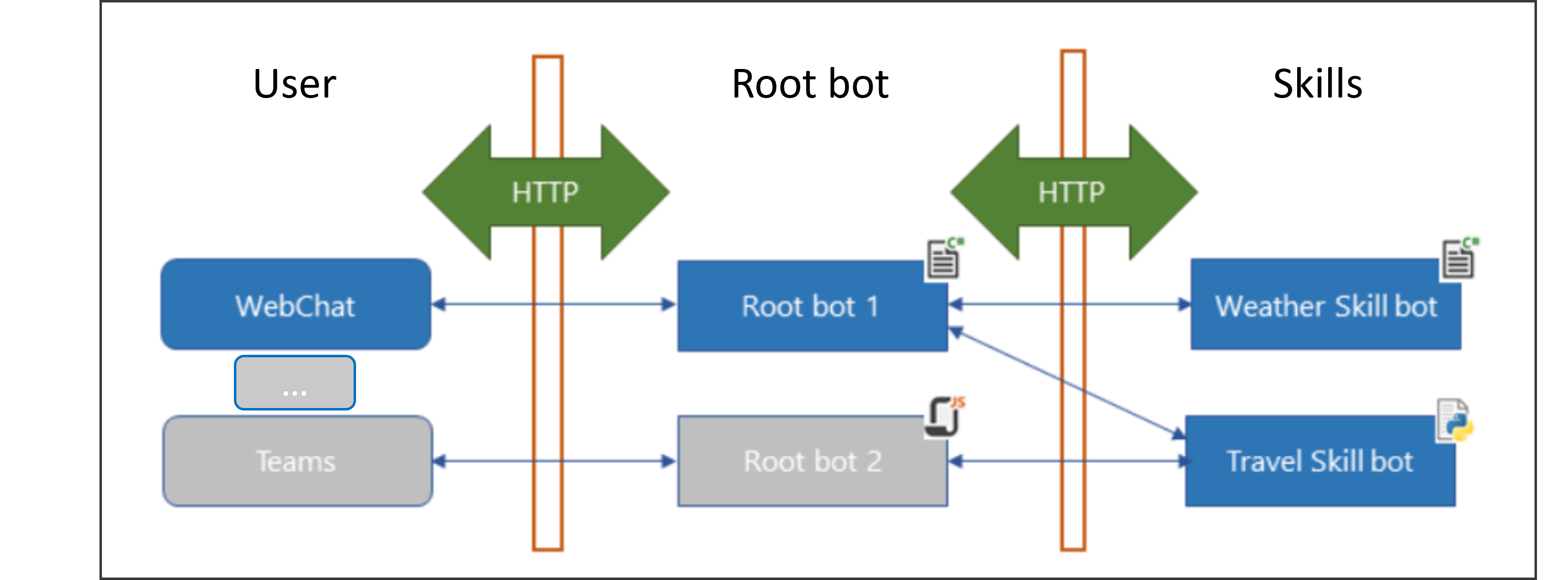
Figure 3. Microsoft skills
Access Microsoft Skills documentation.
Aura Assistant functional overview
Starting from the functional overview flowchart (Figure 2), the current section zooms in and shows a deeper detail of the functional operation of Aura Virtual Assistant.
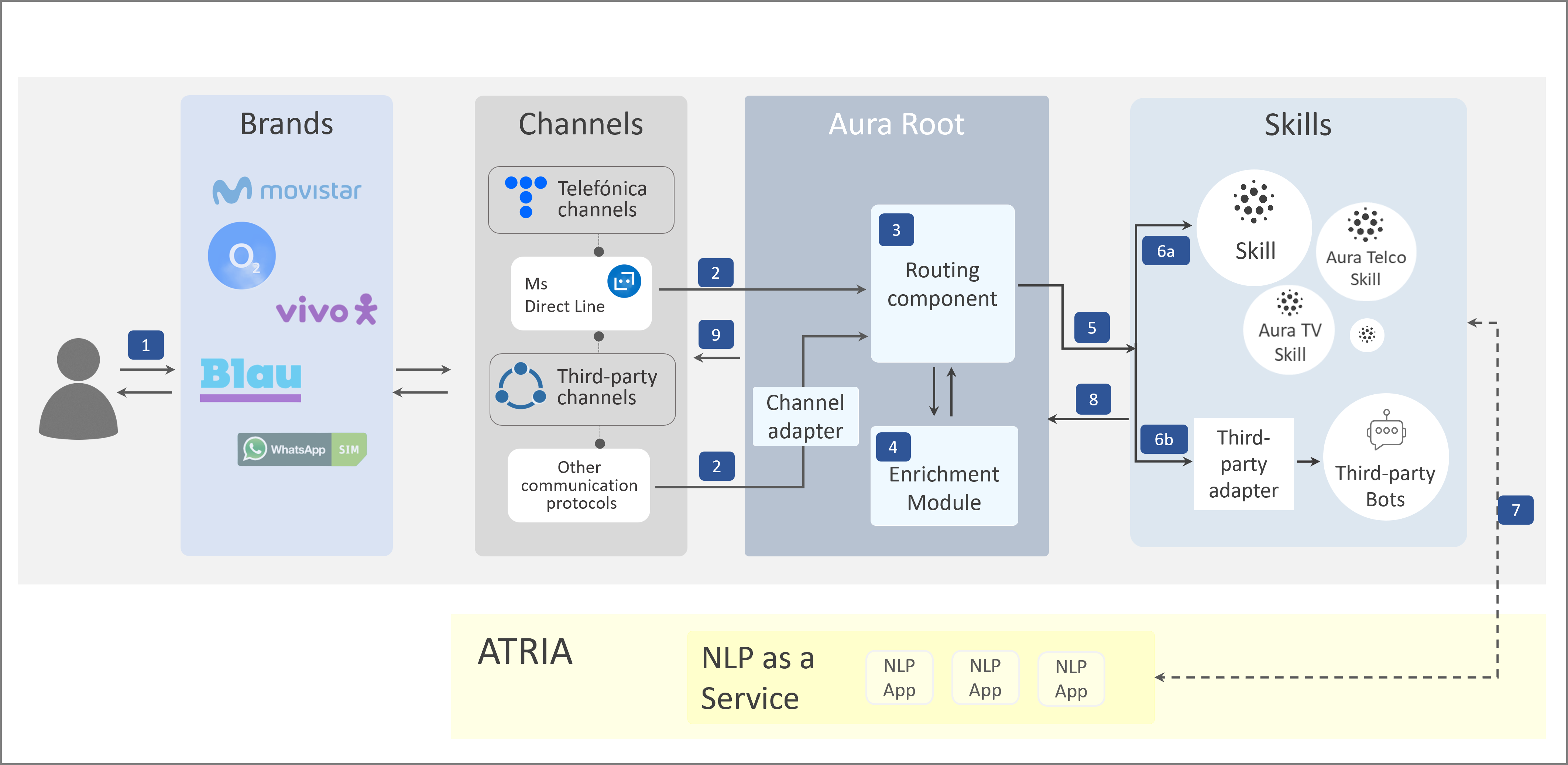 Figure 4. Aura Virtual Assistant functional operation
-
The user accesses a specific Telefónica brand and sends a request to Aura through a channel.
-
The channel connects to Aura Root.
Two scenarios arise here:
- If the channel “speaks” a language Aura understands, that is, it supports Direct Line protocol: direct connection.
- If the channel “does not speak” a language Aura understands: the incoming request must be converted into a standard Aura message through an adapter.
-
Aura Root makes the decision about what is the best skill (bot) to answer the user’s request in a routing component.
-
Optionally, it is possible to add additional information to the request through an enrichment module, with data coming from Aura context, algorithms, analytical models, insights, etc.
-
Aura Root sends the request to a specific skill, depending on the selected domain.
-
The specific skill (domain-bot) routed by Aura Root receives the request and handles it.
At this stage, two scenarios can arise:
- 6.a. The skill receives the request in Direct Line format.
- 6.b. If the routed bot is not part of the Microsoft ecosystem (third-party bots), the request must be transformed through a third-party adapter to be understood by the bot (and the other way around with answers).
Strictly speaking these adapters are not part of Aura Root and could be integrated through different strategies by the OBs. For instance, the conversion could be performed in a specific skill connected to the third-party bot.
-
The skill calls NLP as a Service capability in ATRIA for the recognition of the user’s intention and entities.
- Currently, aura-bot as a skill works as in the previous architecture, calling Aura NLP for recognition purposes.
-
The response to the user’s request is built and sent back to Aura Root.
-
Aura Root provides the answer back to the channel. If required, the channel adapter converts again the Aura message to the format compatible with the channel.
Take into account that the current document only shows a functional representation in order to make the new architecture more understandable for readers.
The underlying technical components and processes are explained in the documents:
1 - Introduction to Aura channels
Introduction to Aura channels
Overview of Aura Virtual Assistant channels, foundations and available ones
The current document includes content with low technical complexity.
For in-depth, low-level technical content related to channels, access the section channels technical documentation.
Introduction
An Aura channel is a communication means a Telefonica client may use to interact with Aura Assistant, to request for products or services.
Aura Virtual Assistant is multi-channel, as it is designed to communicate through different types channels to make requests and receive responses.
In any case, it is able to adapt to the channel’s specific requirements, providing a consistent and engaging experience across different environments while maintaining its personality and tone.
What languages do Aura Assistant talk?
To be able for a channel to communicate with Aura Virtual Assistant, it has to “speak” a language Aura can understand. As Aura platform is based on Microsoft Azure Bot Service and Bot Framework, it uses the general-purpose communication mechanism called Direct Line API, provided by Microsoft.
In this framework, Aura Virtual Assistant is able to communicate:
- Directly with channels that “talk” Microsoft Direct Line
- Directly through communication protocols based on Direct Line, such as Auraline
- Through the use of adapters for channels that do not support Direct Line.
Direct Line
As Aura platform is based on Microsoft Azure Bot Service and Bot Framework, it uses a general-purpose communication mechanism called Direct Line, provided by Microsoft.
However, having a connection means is not enough, and Aura Virtual Assistant has designed a normalized semantic model built on top of the Direct Line protocol, to optimize the communication of Aura with channels or services: Aura Request - Response Semantic Model.
Do you need more technical details regarding Microsoft Direct Line? Access the document Direct Line communication protocol
Discover the Aura Request - Response Semantic Model.
Auraline
Aura Platform Team has developed a proprietary communication protocol: Auraline, based on Direct Line but eliminating the dependency on Microsoft Azure Bot Service.
Auraline provides significant advantages, including cost saving, higher flexibility, easy integration for channels and the ability to plan future developments according to specific needs. Additionally, it enables addressing new backend-to-backend scenarios, such as managing a channels aggregator system or responding across multiple channels or applications instead of a single one.
As the Direct Line protocol, Auraline uses the Aura Request - Response Semantic Model, within the version v3 of the channelData property.
Find detailed information regarding Auraline communication protocol
Use of adapters
For channels that do not support Direct Line, it is required to use an adapter that “translates” the information coming from the channel to a language Aura can understand. This is the case of WhatsApp channels.
The adapters are provided by aura-bridge and are based on the last version of the standard Aura request/response model.
Which channels are currently supported by Aura?
The following table shows the channels currently supported by Aura Assistant for each of the three communication protocols explained in the previous section and organized by its origin: Telefónica channels or third-party channels.
Mobile apps (Meu Vivo)
Meu Vivo is a key Vivo channel that currently supports Direct Line protocol.
This app offers complete Telco experiences in Vivo, with an intuitive interface and easy interaction and with all the potential of this channel for showing both text and visual elements. The current application is built as a set of WebViews embedded in a native container. And the communication with Aura is done through Direct Line protocol based on a JSON model attached in the activity of the Bot.
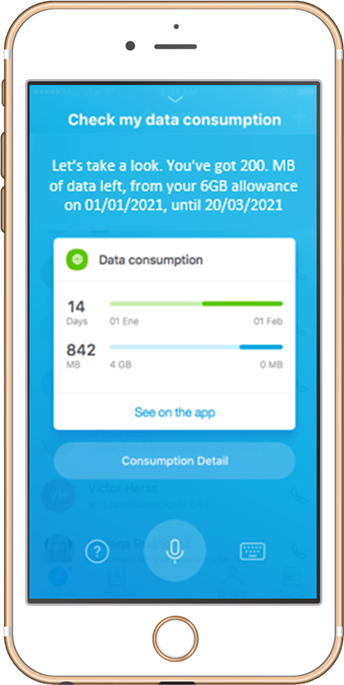
Aura in Meu Vivo channel
Movistar Plus
Movistar Plus is a Telefónica proprietary channel that supports Direct Line and Auraline protocols.
Aura is integrated in Movistar Plus mobile app, providing a fast and easy interaction with the customers focused on TV experiences, mainly for searching for TV content and launching them on TV.
Although text messaging is available, the use of voice control boosts the agility of TV searching.
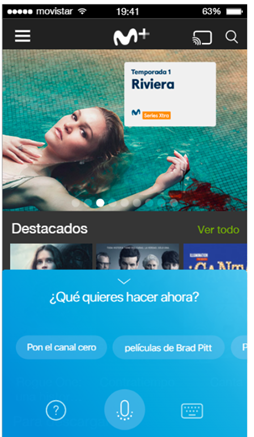
Aura in Movistar Plus channel
IPTV (STB+desco)
IPTV (STB+desco) is a Telefónica proprietary channel that supports Direct Line and Auraline protocols.
Aura is integrated in Movistar+ vocal remote control, offering TV experiences such as searching for TV content, navigating through menu sections, asking for recommendations, changing language, subtitles activation or open Movistar Apps.
It allows users to interact with the M+ service using only their voice, helping them to look for content faster and controlling the reproduction while keeping their privacy safe (it only listens when users keep pressing the mic button).
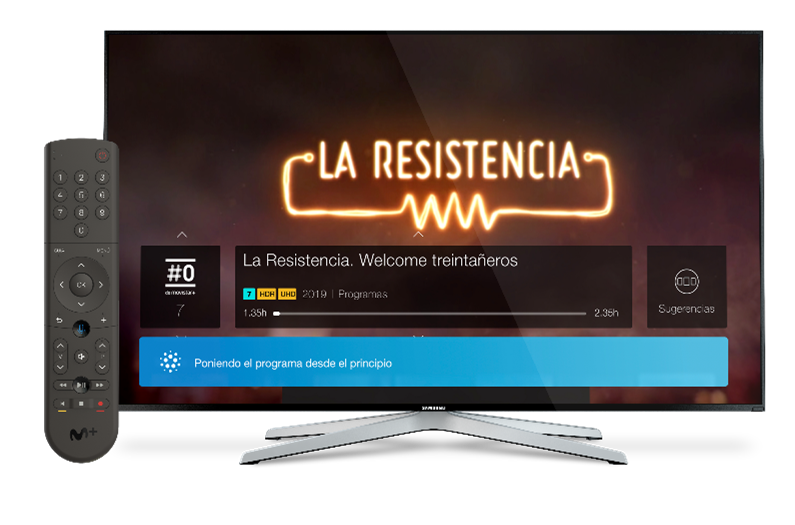
Aura IPTV
WhatsApp
Aura is available on a widespread and close at hand channel such as WhatsApp. It offers an easy and agile interaction, with key benefits:
- Direct and concise text responses to the users
- High speed interaction with the user
- Better engagement Aura-user, as WhatsApp channel is widely used by most of our users and always available in the mobile phone
Presently, Aura contains the functionalities listed below in WhatsApp. Moreover, OBs can build their own use cases in this channel.
- Global use cases: onboarding, authentication, handover use case (the user asks for an agent to solve her request).
- Small Talk (greetings, goodbyes, thank yous, swearwords)
- Use of files and templates in experiences
- Use of interactive messages in experiences
- Use of emoticons in experiences
- Use of footer in experiences
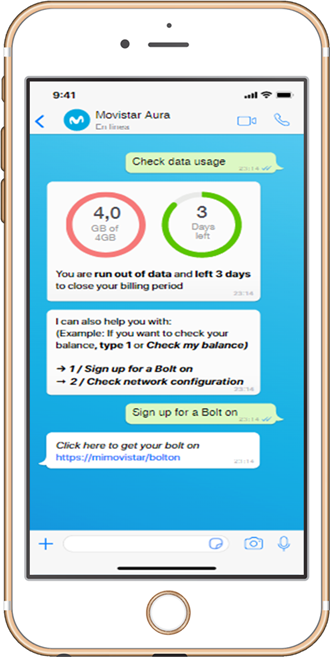
Aura in WhatsApp
Do you need technical details regarding WhatsApp experiences in Aura?
Descriptive documentation related to WhatsApp channel in Aura
Guidelines for the activation of WhatsApp channel
Guidelines for use cases development in WhatsApp
Aura WhatsApp design toolkit
Google RCS Business Messaging
Rich Communication Services (RCS) is a communication protocol designed to enhance traditional SMS and MMS messaging. The channel Google RCS Business Messaging allows sending different types of messages to the user, such as texts, suggested replies, suggested actions, etc. Additionally, RCS enables its users to incorporate richer content through features like video, images, cards, carousels and other interactive elements.
Aura allows Google RCS Business Messaging channel to communicate with the users through an application installed by default in their phones, with lower costs than WhatsApp.
Do you need technical details regarding Google RCS Business Messaging channel?
Google RCS Business Messaging channel descriptive documentation
Guidelines for the activation of Google RCS Business Messaging channel
Guidelines for use cases development in Google RCS Business Messaging channel
Channels technical documentation
Are you a highly-skilled technician?
Do you need low-level technical documentation regarding channels?
Access these documents:
Descriptive channels documentation
Guidelines for managing channels in Aura
2 - Introduction to Aura Root
Introduction to Aura Root
The current document includes an overview of Aura Root and general information regarding this Aura Virtual Assistant functional component.
Moreover, it includes links to low-level technical documentation for highly-skilled technicians.
Introduction
Aura Root constitutes the core functional block of Aura Virtual Assistant and is responsible for connecting channels with skills (bots).
It carries out the following key tasks:
-
Receives requests from the channels.
-
If required, it adapts the incoming request from a channel that Aura is able to understand through an adapter.
-
Makes the decision about what is the best skill (bot) to answer the user’s request and routes this petition to the corresponding domain bot in a routing component. Currently, routing is only done by channels or channels groups.
-
Is able to enrich both the request and the answer with additional information coming from Aura context and different models in a enrichment module. (In the current version, no enrichment is available).
-
Can have multiple skills connected, and one of them could be the current aura-bot functioning as a skill.
-
Generates entities files with relevant information regarding each interaction, that will be afterwards uploaded to Kernel.
Aura Root functional components
From a functional point of view, Aura Root includes the following features:
Routing
The user’s request is routed to a specific skill (domain bot) able to best respond to this query.
Currently, routing is done only by channels or group of channels (no configuration options are available).
Channel adapter
If the channel does not support a language that Aura understands (Microsoft Direct Line protocol), an adapter is required to establish the communication.
Enrichment
Enrichment adds additional data to enrich both request and response through context information, algorithms, analytical models, insights, etc.
This feature will be available in further releases.
Aura Root technical components
As explained before, Aura Root is a functional representation in order to make the new architecture more understandable for readers.
The technical component that manages the functionalities above defined is aura-groot.
3 - Aura multibrand feature
Introduction to Aura multibrand feature
Description of Aura multibrand feature, based on a multitenant architecture
Introduction
The OBs commercialize their Telefónica services through different brands (Movistar, O2, Vivo, Blau, Whatsapp SIM, etc.).
To align with this scenario, Aura (both Aura Virtual Assistant and ATRIA) is now designed as a multibrand virtual assistant, capable of providing services to multiple brands through a shared infrastructure.
The communication flow is similar to the one previous to the implementation of the multibrand feature (see Figure 2).
- A user can access Aura through the different Telefónica brands available in her country.
- Within a specific brand, the connection to Aura is done through a particular channel.
- The user can now submit a request (use case) and have it resolved, as long as the use case is available in this specific channel.
Overview of the multitenant architecture
Aura multibrand feature is based on a multitenant architecture.
In the multitenant architecture, we introduce the concept of tenant, defined as the deployment associated to a specific brand.
Aura multibrand feature operates in different scenarios:
- In Aura Virtual Assistant (use cases resolved by a bot or skill)
- In ATRIA (use cases resolved by AI-powered LLM models)
In both scenarios, Aura Virtual Assistant and ATRIA are structured in different tenants, each of them associated to a specific brand and with isolated deployment and operation.
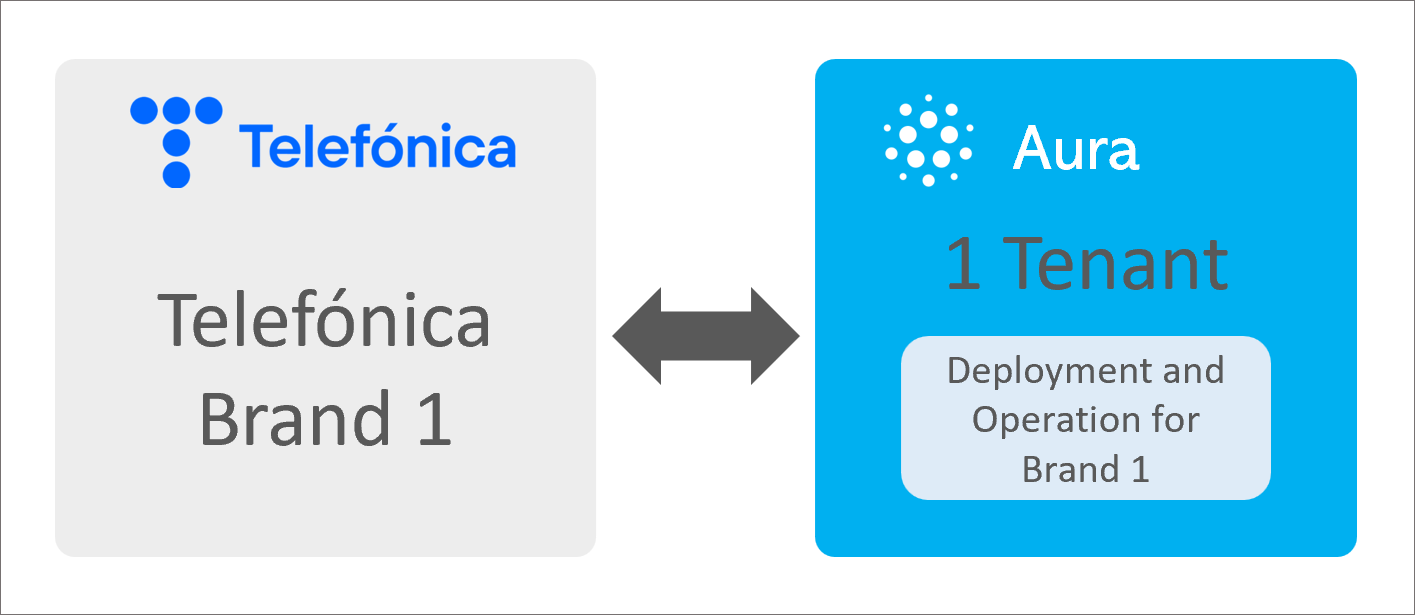
Relationship between brand and tenant
There is not physical separation between Aura components in each brand, but logical separation.
As well as Aura, Kernel also supports a multitenant architecture. A tenant in Kernel is defined as a logical way of isolating resources within a Kernel instance.
A use case submitted from a specific brand will be resolved using the Kernel tenant associated to this brand.
See more details of the specific behavior of the multitenant architecture in:
Functional multitenant architecture in Aura Virtual Assistant
An overview of the functional operation of the multibrand feature based on multitenant architecture in Aura Virtual Assistant is shown and explained below:
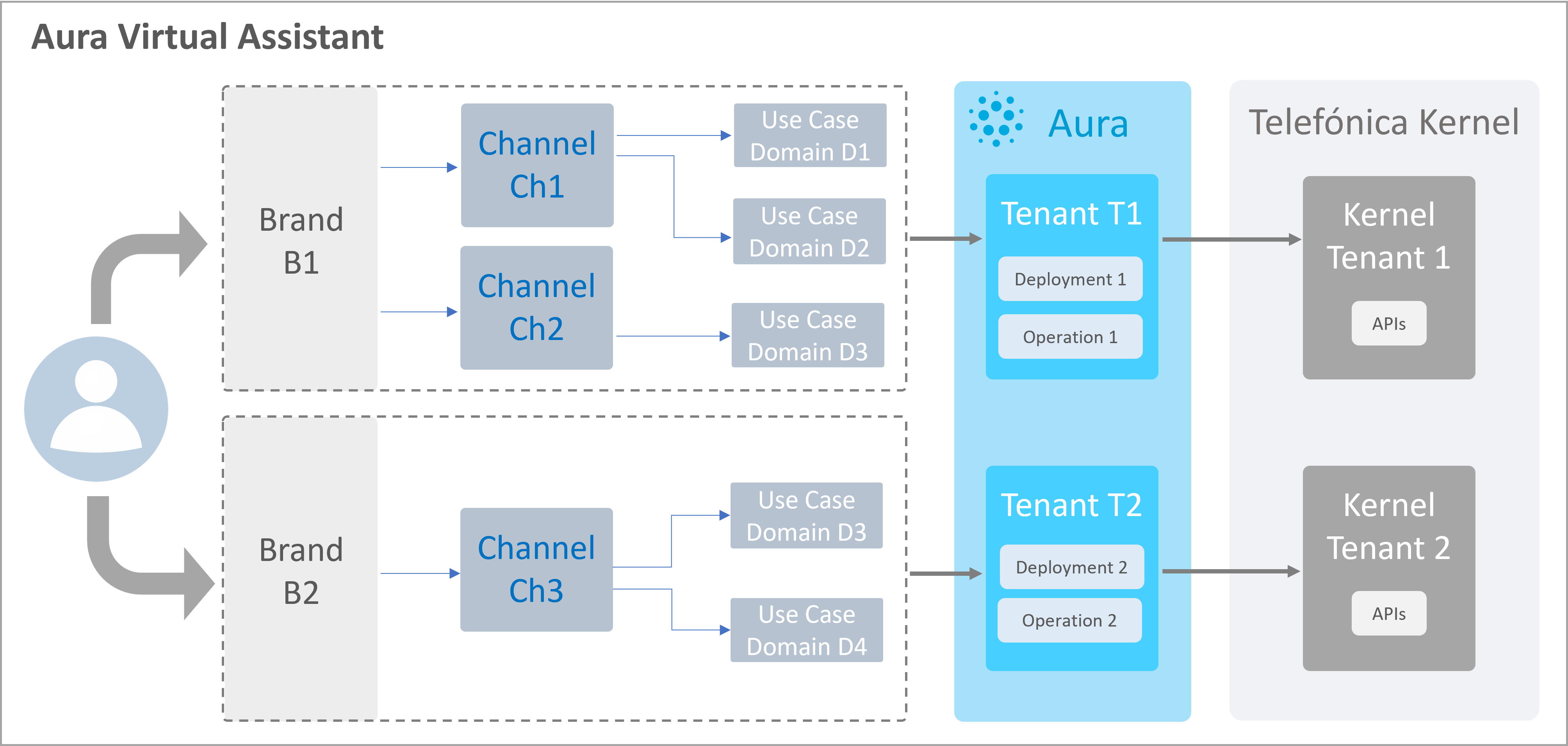
Overview of multitenant architecture in Aura Virtual Assistant
- Aura Virtual Assistant supports different brands
- Each brand is associated to several channels
- Each channel allows accessing to use cases in a specific domain
- Use cases in a specific brand are operated by a particular Aura tenant
- These use cases will be resolved using the Kernel tenant associated to this brand
An exception to this Aura Virtual Assistant behavior is for authentication. In this task, the authentication request enters firstly through a Kernel tenant, and once the user is authorized, it passes to the corresponding Aura tenant.
Comprehensive technical documents
Multitenant configuration in Aura installer
Aura installer: Multitenant configuration: Guidelines for the configuration of different tenants when several brands are available in the OB.
Descriptive documents and guidelines
Once the user accesses through a specific Telefónica brand, the technical behavior of the corresponding Aura tenant is similar to the one before the implementation of the multitenant architecture. Therefore, there are no specific descriptive documents or guidelines for the multitenant architecture.
4 - Introduction to skills
Introduction to skills
The current document includes an overview of Aura skills and general information regarding these components.
Moreover, it includes links to low-level technical documentation for highly-skilled technicians.
Introduction
Skills are bots able to perform a specific function or capability in a coordinated and efficient manner designed to handle particular tasks or provide information on a focused topic.
In Aura Virtual Assistant, skills can communicate with Aura Root.
In Aura Virtual Assistant, skills are bots based on Microsoft skills protocol or can be external bots built with any technology available on the market.
In any case, currently they are domain bots, each of them able to manage a different type of request from the user. Therefore, each skill will contain the use cases corresponding to its domain.
Skills can communicate with Aura Root to receive a user’s request and resolve it, to provide the user with the most accurate answer or service and can be trained (each skill will invoke Aura Cognitive Services) and deployed independently.
Types of skills
Within Aura, there are three different types of skills:
Skills developed over Aura cluster
They are proprietary skills that follow Microsoft Bot Framework Direct Line protocol.
Currently, aura-bot is a skill itself.
Skills developed outside Aura cluster with Microsoft-compatible technologies
These skills are developed outside Aura with a technology compatible with Microsoft Bot Framework (Composer, etc.).
Third-party bots, developed with other technologies
They are bots developed with other technologies different from Microsoft ones (Google Assistant, Teneo, etc.).
They require an adapter for its communication with Aura Root.
These third-party adapters are skills that must be developed by the OBs willing to connect their external bots with Aura Root.
Aura Bot as a skill
In the current phase of development of Aura Virtual Assistant, aura-bot is a skill itself but, in general terms, it behaves the same way as in the previous architecture.
Currently, all the existing use cases are placed in aura-bot skill in order to assure backward compatibility, excepting Germany, that has migrated its use cases to an external bot.
Due to the migration of aura-bot component to a skill, certain components have suffered from modifications to be adapted to it and other ones have moved to aura-groot. For example: aura-bot-adapter now extends the Microsoft Bot Framework class cloudAdapter.
Find comprehensive documentation here: Aura Bot as a skill
Skills technical documentation
Are you a highly-skilled technician?
Do you need low-level technical documentation regarding skills?
Access these documents:
Manage skills