This is the multi-page printable view of this section.
Click here to print.
Return to the regular view of this page.
Aura entities
Aura entities
Description of entities in Aura and components in charge of managing these entities
Aura entities belongs to both Aura Virtual Assistant and ATRIA
Introduction
Aura entities are files stored by different Aura components that contain relevant information related to key system processes or actions: user messages, Aura components interactions, message handling, applications, etc.
They are useful to measure and evaluate the performance of the system against defined objectives through the generation of KPIs, processes tracking, identification of issues and decision-making.
Each Aura component generates a series of entities which are uploaded into Azure Storage for different purposes.
aura-kpis-uploader is the component in charge of the management of entities for every Aura component. On an hourly basis, it uploads all the generated files to Kernel datasets. Once there, specific algorithms are executed to calculate the KPIs of each instance or for other purposes.
Detailed information regarding Aura entities is found in the following documents:
Types of logs in Aura
aura-bot writes two different types of logs:
-
Operational logs
Operational logs are written using AuraLogger that writes each row, by default, in JSON format in the standard output of the POD running each instance of aura-bot.
These logs are used to monitor or debug aura-bot. The standard output of each POD is aggregated to be stored in an ElasticSearch cluster, to make it available in Kibana.
-
Entities logs
An entity is a specific definition of one of the actors involved in the processing of each activity in aura-bot. So, the bot is in charge of writing the corresponding rows for each activity on each entity.
This section aims to describe how the entities are handled by aura-bot and how the rows are written and included in the entity files.
Logs are written in a blob file: a blob container in Azure Storage using an internal library aura-kpi-handler, that provides classes and utilities to decouple Aura components: how the rows are written from how the needed information is gathered.
The database Aura entities definition includes the different entities currently used in Aura. Entities are generated by different Aura’s modules, each of them in charge of performing a different task: aura-bot, aura-groot, aura-services, etc.
Currently, these logs are used to generate KPIs for the measurement of Aura performance, tracking processes or identifying issues.
Aura KPIs blob container
The following figures show the Aura KPIs blob container and an example of content of the blob container for aura-bot.
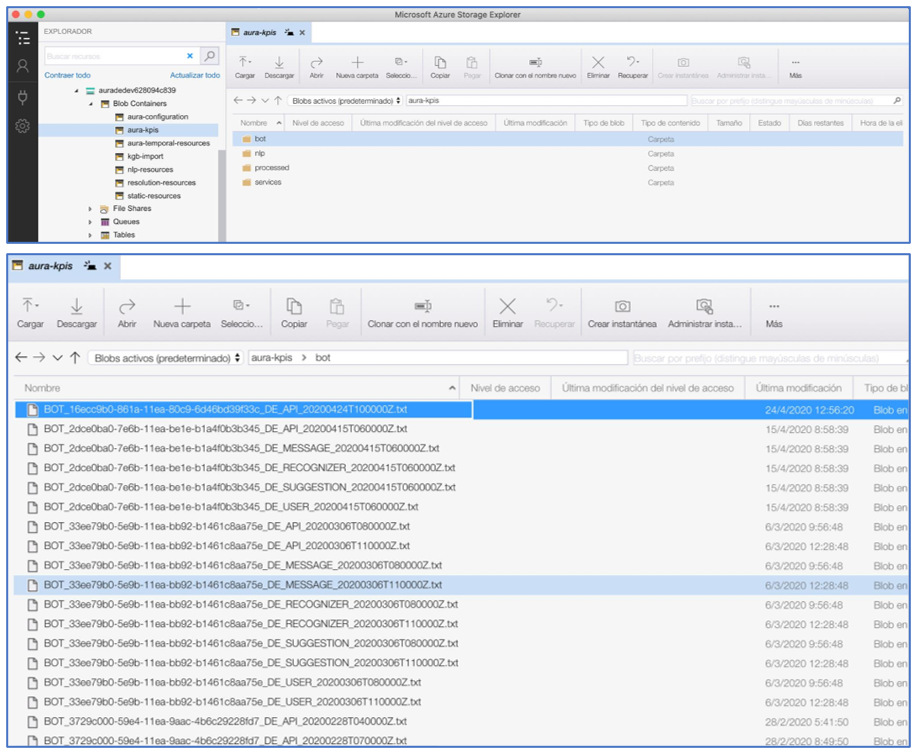
1 - Aura entities definition
Aura entities definition
Aura entities definition versions:
- Version 5.0.0 for those entities using CSV format
- Version 6.0.0 for those entities using Avro format
Introduction
Aura entities definition includes the different entities currently written in Aura and required to calculate Aura KPIs and generate Aura’s invoices.
Entities are organized by types, as shown in the table below, together with the definition, how they are generated and its format, currently, CSV or Avro.
| Entities types |
Description |
Generation |
Format |
| Dimensions |
They are Aura’s configuration settings that are needed to understand Aura’s entities |
They are generated directly by aura-kpis-uploader from the content of the aura-configuration-api. |
Avro |
| Message |
Message entity is used to store information about the messages handled by aura-bot and the actions performed on them. |
They are created in aura-bot. |
CSV |
| Recognizer |
Recognizer entity is used to store the request to any of the recognizers during the utterance recognition phase of the messages. |
They are created by aura-groot, aura-bot and aura-nlp. |
CSV |
| Extended Message |
Extended Message entity is used to store extra information of a Message. |
They are created in aura-bot. |
CSV |
| Groot Message |
Groot Message entity is used to store information about the messages handled by aura-groot. |
They are created in aura-groot. |
CSV |
| Gateway Message |
Gateway Message entity is used to store information about the messages handled by aura-gateway-api. |
They are created by aura-gateway-api. |
Avro |
| Audit |
Audit entity is used to store information about the interactions handled by Aura components. They will be used to generate Aura’s invoices. |
They are created by aura-kpis-uploader based on the information received in Groot Message and Gateway Message. |
Avro |
Entities generation
Until Aura’s release 9.3.0 (Gwen Stefani), all entities in Aura were generated in CSV format.
The full procedure is explained in Aura Entities in CSV format.
In release 9.4.0 (Hannah Montana), the process to migrate Aura entities format from CSV to full-URM-compliant Avro format started. It is going to be a phased process, with entities being migrated in small groups to minimize the impact on services already consuming Aura entities in CSV.
The full procedure is explained in Aura Entities in Avro format.
1.1 - Aura entities definition in Avro
Aura entities definition version 6.0.0 (entities using Avro format), URM-compliant.
Introduction
The Aura entities definition includes the different entities currently written in Aura in Avro format, URM-compliant.
For further information regarding Kernel Avro datasets access the following links:
| Entities types |
Description |
Generation |
| Aura_Atria_Message |
Summary of Aura’s interactions handled by aura-rag-server, aura-groot and aura-bot |
Generated by aura-gateway-api |
| Aura_Audit |
Entity used to store information about the interactions handled by Aura components. It will be used to generate Aura’s invoices. |
Created by aura-kpis-uploader based on the information received in Groot Message and Gateway Message |
| Aura_Gateway_Message |
Entity used to store information about the messages handled by aura-gateway-api. |
Created by aura-gateway-api. |
| Aura_Message |
Entity that contains the summary of Aura’s interactions handled by aura-bridge, aura-groot and aura-bot |
Created directly by aura-groot and aura-bot |
| D_Aura_Dimensionals |
They are Aura’s configuration settings that are needed to understand Aura’s entities |
Generated directly by aura-kpis-uploader from the content of the aura-configuration-api. |
Entities generation
Avro Entities tables nomenclature
Position: Field order in the Avro schema definition.Field: Name of the field being defined. Usually, capitalized, although more aliases will be available in the schema definition.PK: Parameter that indicates if the field is a Primary Key or not, that is, a value that uniquely identifies this field.Referenced Entity: When the field references a value from another dataset, indicating that a join must be defined in the schema, this parameter contains the name of the dataset.Referenced Entity Field: When the field references a value from another dataset, indicating that a join must be defined in the schema, this parameter contains the name of the field of the other dataset.Type: Type of the field. It can be one of Avro logical types defined in Kernel.Doc: Brief description of the field.Nullable doc: If the field can be null, it should contain the cases when a null value is valid.
1.1.1 - Aura_Atria_Message
Aura_Atria_Message v6.0.0
Description of entities included in the entity type Aura_Atria_Message
Under implementation
This entity contains the summary of Aura’s interactions handled by aura-rag-server, aura-groot and aura-bot
Avro schema definition published in Kernel - TO BE COMPLETED
| POSITION |
FIELD |
PK |
Referenced Entity |
Referenced Entity Field |
TYPE |
DESCRIPTION |
NULLABLE_DES |
| 1 |
MESSAGE_ID |
YES |
|
|
“type”:[“string”, “x-fp-unique-constraint”] |
Unique ID of the current message. |
|
| 2 |
MESSAGE_TM |
|
|
|
“type”: “string”
“logicalType”: “datetime” |
Timestamp when the message is processed. |
|
| 3 |
AURA_APP_ID |
|
D_Aura_App |
AURA_APP_ID |
“type”: “string” |
Identifier of the Aura application used by the user to interact with Aura. If due to an error, the application sent a wrongly formatted string without app_id, it will be set to null. |
Null if due to an error, we are not capable of getting the incoming application. |
| 4 |
COUNTRY_3_ALPHA_CD |
|
D_Gbl_Country |
COUNTRY_3_ALPHA_CD |
“type”: “string” |
Country of the operator running the current Aura deployment
Three letters (alpha-3) code element of the country name (e.g. DEU) defined in ISO 3166-1 |
|
| 5 |
CORR_ID |
|
|
|
“type”: “string” |
Cross service transaction identifier that allows tracking a request through all the services and components. |
|
| 6 |
AURA_PRESET_NAME |
|
D_Aura_Preset |
AURA_PRESET_NAME |
“type”: “string” |
Configuration used by the app to access Aura AI services. |
|
| 7 |
SESSION_ID |
|
|
|
“type”: “string” |
Session identifier. |
|
| 8 |
STAGE_NAME |
|
|
|
“type”: [“null”, “string”] |
Name of RAG stage |
Null in the full request. |
| 9 |
STAGE_EXECUTION_NUM |
|
|
|
“type”: “int” |
Stage execution counter. |
|
| 10 |
STAGE_SEQUENCE_NUM |
|
|
|
“type”: “int” |
Stage execution order. |
|
| 11 |
COMPLETION_TOKENS_NUM |
|
|
|
“type”: “int” |
Number of tokens the model used to respond to your request. |
|
| 12 |
PROMPTS_TOKENS_NUM |
|
|
|
“type”: “int” |
Tokens used to represent the text sent in the request. |
|
| 13 |
INPUT_QUERY_DESC |
|
|
|
“type”: “string” |
Stage input text. |
|
| 14 |
OUTPUT_QUERY_DESC |
|
|
|
“type”: [“null”, “string”] |
Stage output text. |
|
| 15 |
DURATION_QT |
|
|
|
“type”: “string”
logicalType: “duration” |
Time spent per stage. |
Null in error cases. |
| 16 |
STATUS_CD |
|
|
|
“type”: “string” |
Aura status code. Values: SUCCESS or ERROR. |
|
| 17 |
AURA_COMPONENT_ID |
|
D_Aura_Component |
AURA_COMPONENT_ID |
“type”: “string” |
Identifier of the Aura component that handled the current request, usually the name of the deployment running the corresponding Aura service. This name is consistent over time. |
|
| 18 |
AURA_VERSION_ID |
|
|
|
“type”: “string” |
Aura platform version that produces this data. |
|
| 19 |
DAY_DT |
|
|
|
“type”: “string”, “logicalType”: “iso-date” |
Year, month and day of the interaction. |
|
1.1.2 - Aura_Audit
Aura_Audit v6.0.0
Within the different entities currently used in Aura, this document describes those included in the entity type Aura_Audit
This entity contains the summary of Aura’s interactions intended for accountability purposes.
Avro schema definition published in Kernel
| Position |
Field |
PK |
Referenced entity |
Referenced entity field |
Type |
Doc |
Nullable Doc |
| 1 |
INTERACTION_ID |
YES |
|
|
string; x-fp-unique-constraint:1 |
Unique ID of the current interaction. First part of the compound primary key of the dataset. |
|
| 2 |
AURA_TM |
|
|
|
string;datetime |
Timestamp when the interaction happens. |
|
| 3 |
AURA_CHANNEL_ID |
|
D_Aura_Channel |
AURA_CHANNEL_ID |
string;null |
Identifier of the Aura channel used by the user to interact with Aura. |
If due to an error the channel sent a wrongly formatted string without channelId or auraId, it will be set to null. |
| 4 |
AURA_APP_ID |
|
D_Aura_App |
AURA_APP_ID |
string;null |
Identifier of the Aura application used by the user to interact with Aura. If due to an error the application sent a wrongly formatted string without app_id, it will be set to null. |
It will be null if due to an error, we are not capable of getting the incoming application. Also, if the request goes through aura-groot or aura-bridge |
| 5 |
COUNTRY_3_ALPHA_CD |
|
D_Gbl_Country |
COUNTRY_3_ALPHA_CD |
string |
Three letters (alpha-3) code element of the country name (e.g. DEU) defined in ISO 3166-1 |
|
| 6 |
AURA_SERVICE_NAME_CD |
|
|
|
enum;[message,nlpaas,ai,other] |
Specific service consumed during the interaction.message: if the interaction happens in aura-grootai: if the interaction calls generative servicesnlpaas: if the interaction calls Aura’s NLP as a service endpointother: future use, for extra cases. |
|
| 7 |
AURA_PRESET_NAME |
|
D_Aura_Preset |
AURA_PRESET_NAME |
string;null |
Preset used for the interaction, if using an AI service |
It will be null for interactions not using AI services |
| 8 |
AURA_COMPONENT_ID |
|
D_Aura_Component |
AURA_COMPONENT_ID |
string;x-fp-unique-constraint:1 |
Identifier of the Aura component handling the incoming request of the user. Second part of the compound primary key of the dataset. |
|
| 9 |
AURA_COMPONENT_HOST_ID |
|
|
|
string |
An identifier of the Aura component host that handled the current request, usually the pod identifier running the corresponding Aura service. This name changes every time a pod is reinitiated. |
|
| 10 |
AURA_VERSION_ID |
|
|
|
string |
Aura platform version that produces this data. |
|
| 11 |
DAY_DT |
|
|
|
string;iso-date;partition-key |
Year, month and day of the interaction. |
|
| 12 |
BRAND_ID |
|
D_Gbl_Brand |
GBL_BRAND_ID |
string |
Brand id. Join with D_Gbl_Brand. |
|
1.1.3 - Aura_Gateway_Message
Aura_Gateway_Message v6.0.0
Within the different entities currently used in Aura, this document describes those included in the entity type Aura_Gateway_Message
This entity contains the summary of Aura’s interactions handled by aura-gateway-api.
Avro schema definition published in Kernel
| Position |
Field |
PK |
Referenced entity |
Referenced entity field |
Type |
Doc |
Nullable Doc |
| 1 |
MESSAGE_ID |
YES |
|
|
string; x-fp-unique-constraint |
Unique ID of the current message. |
|
| 2 |
MESSAGE_TM |
|
|
|
string;datetime |
Timestamp when the message is processed |
|
| 3 |
AURA_APP_ID |
|
D_Aura_App |
AURA_APP_ID |
string;null |
Identifier of the Aura application used by the user to interact with Aura. If due to an error the application sent a wrongly formatted string without app_id, it will be set to null. |
It will be null if due to an error we are not capable of getting the incoming application. |
| 4 |
COUNTRY_3_ALPHA_CD |
|
D_Gbl_Country |
COUNTRY_3_ALPHA_CD |
string |
Three letters (alpha-3) code element of the country name (e.g. DEU) defined in ISO 3166-1 |
|
| 5 |
CORR_ID |
|
|
|
string |
Cross service transaction identifier that allows tracking a request through all the services and components. |
|
| 6 |
AURA_NLP_IND |
|
|
|
boolean |
Flag indicating whether or not this interaction goes to ATRIA NLP as a Service. |
|
| 7 |
AURA_PRESET_NAME |
|
D_Aura_Preset |
AURA_PRESET_NAME |
string;null |
Configuration used by the app to access Aura AI services |
If it is a NLP access no preset will be defined |
| 8 |
AURA_COMPONENT_HOST_ID |
|
|
|
string |
An identifier of the aura component host that handled the current request, usually the pod identifier running the corresponding aura service. This name changes every time a pod is reinitiated. |
|
| 9 |
AURA_COMPONENT_ID |
|
D_Aura_Component |
AURA_COMPONENT_ID |
string |
An identifier of the aura component that handled the current request, usually the name of the deployment running the corresponding aura service. This name is consistent over time. |
|
| 10 |
AURA_VERSION_ID |
|
|
|
string |
Aura platform version that produces this data. |
|
| 11 |
DAY_DT |
|
|
|
string;iso-date;partition-key |
Year, month and day of the interaction |
|
| 12 |
BRAND_ID |
|
D_Gbl_Brand |
GBL_BRAND_ID |
string |
Brand id. Join with D_Gbl_Brand |
|
1.1.4 - Aura_Message
Aura_Message v6.0.0
Within the different entities currently used in Aura, this document describes those included in the entity type Aura_Message
Under implementation
This entity contains the summary of Aura’s interactions handled by aura-bridge, aura-groot and aura-bot
Avro schema definition published in Kernel - TO BE COMPLETED
| Position |
Field |
PK |
Referenced Entity |
Referenced Entity |
Type |
Description |
Nullable_Des |
| 1 |
MESSAGE_ID |
Yes |
|
|
“type”: “string”
{x-fp-unique-constraint} |
Unique ID of the current message. |
|
| 2 |
MESSAGE_TM |
|
|
|
“type”:“string”
“logicalType”: “datetime” |
Timestamp when the message happens. |
|
| 3 |
ACTION_CD |
|
|
|
“type”:“enum”
“values”: [‘send’, ‘receive’, ’event’, ‘audit’] |
Code of the action that produces the data. |
|
| 4 |
AURA_ID |
|
|
|
“type”: [“null”, “string”]
“x-fp-data-protection”: “pseudonymize” |
Unique user login ID in Aura. User might have a new AURA_ID with each logging in the channel or when the previous authorization in Kernel expires. |
Null if the channel fails to send it |
| 5 |
AURA_CHANNEL_ID |
|
D_Aura_Channel |
AURA_CHANNEL_ID |
“type”: [“null”, “string”] |
Identifier of the Aura channel used by the user to interact with Aura. |
Null if the channel wrongly sends a string without channelId or auraId |
| 6 |
COUNTRY_3_ALPHA_CD |
|
D_Gbl_Country |
COUNTRY_3_ALPHA_CD |
“type”:“string” |
Country of the operator running the current Aura deployment. |
|
| 7 |
CORR_ID |
|
|
|
“type”: “string” |
Cross-service transaction ID for tracking requests through all services and components. |
|
| 8 |
AURA_COMPONENT_HOST_ID |
|
|
|
“type”: “string” |
Identifier of the Aura component host handling the request, usually the pod identifier running the corresponding Aura service. This name changes with each pod restart. |
|
| 9 |
AURA_COMPONENT_ID |
|
D_Aura_Component |
AURA_COMPONENT_ID |
“type”: “string” |
Identifier of the Aura component handling the request (usually, the deployment running the corresponding Aura service). This name is consistent over time. |
|
| 10 |
AURA_VERSION_ID |
|
|
|
“type”: “string” |
Aura platform version that produces this data. |
|
| 11 |
DURATION_QT |
|
|
|
type": “string”
logicalType: “duration”
default: “PT0S” |
Duration of the action to handle the current message. For inbound, it is 0 (it only logs that message is in the system); For Outbound, it logs the number of milliseconds to process message and send response back to the channel. |
|
| 12 |
AURA_STATUS_CD |
|
|
|
“type”: “string” |
Aura status code. “SUCCESS” for inbound; For outbound, it sends the corresponding status. For v1 requests, if no status nor error is provided, then SUCCESS is sent. |
|
| 13 |
AURA_SKILL_ID |
|
D_Aura_Skill |
AURA_SKILL_ID |
“type”: “string”, null |
Identifier of the skill handling the message. |
Null if no skill-bot is available to handle the message due to an error. |
| 14 |
AURA_CHANNEL_CONVERSATION_ID |
|
|
|
“type”: “string” |
Identifier of the conversation in the channel. |
|
| 15 |
AURA_SKILL_CONVERSATION_ID |
|
|
|
“type”: “string”,null |
Identifier of the conversation in the skill. |
Null for incoming messages or outgoing ones in case of error. |
| 16 |
WIN_RECOGNIZER_ID |
|
D_Aura_Recognizer |
AURA_RECOGNIZER_ID |
“type”: “string”,null |
Identifier of the recognizer that returns the top score. |
Null for incoming messages. |
| 17 |
WIN_RECOGNIZER_SCORE_QT |
|
|
|
“type”:“float” |
Score of the recognizer with higher score for this message. |
|
| 18 |
RESULT_INTENT_NAME |
|
|
|
“type”: “string”,null |
Intent resolved by the recognizer, that is, the Aura action that resolves the intention of the user, related with the use case triggered by the user utterance. As example, in the sentence: “I want to see a movie of Lars von Trier”, NLP would return “intent.tv.play” as user intention. |
Null for incoming messages. |
| 19 |
RESULT_INTENT_ENTITIES_ARRAY |
|
|
|
“type”: “array[RESULT_INTENT_ENTITIES_ARRAY_ITEM]”, null |
Recognized entities, as part of the action in Aura to resolve the user’s intention. For instance, in TV use cases, recognizable entities can be: movies, actors, directors, series. As example, in the sentence: “I want to see a movie of Lars von Trier”, NLP would return two entities: one of type audiovisual_content with “movie” as name, and one of type movie_director with “lars von trier” as name. |
Null for incoming messages and for those intents that do not define them. |
| 19.1 |
RESULT_INTENT_ENTITIES_ARRAY_ITEM.INTENT_ENTITY_NAME |
|
|
|
“type”: “string” |
Entity name handled by Aura services. It corresponds with the string extracted from the user’s utterance that matches any of the defined entities of any of the types. See example above. |
|
| 19.2 |
RESULT_INTENT_ENTITIES_ARRAY_ITEM.INTENT_ENTITY_TYPE_DES |
|
|
|
“type”: “string” |
Entity type handled by Aura services. It corresponds with the type of the entity extracted from the user’s utterance that matches any of the defined entities of any of the types. See example above. |
|
| 19.3 |
RESULT_INTENT_ENTITIES_ARRAY_ITEM.INTENT_ENTITY_CANON_NAME |
|
|
|
“type”: “string” |
Entity type handled by Aura services. It corresponds with the canonical value of the entity extracted from the user’s utterance that matches any of the defined entities of any of the types. In the previous example: entity of type audiovisual_content: “movie” as name and “film” as canon; entity of type “movie_director”: “lars von trier” as name and “Lars von Trier” as canon. |
|
| 19.4 |
RESULT_INTENT_ENTITIES_ARRAY_ITEM.INTENT_ENTITY_LABEL_NAME |
|
|
|
type: string, null |
Entity type handled by Aura services. It corresponds with a common alias of the entity type extracted from the user’s utterance that matches any of the defined entities of any of the types. In the previous example: entity of type audiovisual_content (“movie” as name, “movie” as canon and “MOV” as label; entity of type “movie_director”: “lars von trier” as name,“Lars von Trier” as canon, and without label). |
Labels for entities must have been introduced in the training set. |
| 20 |
ENRICHMENT_ARRAY |
|
|
|
“type”: “array[ENRICHMENT_ARRAY_ITEM]”, null |
Contextual information to enrich the request to get a more efficient recognition. |
Null for incoming messages and for those messages where no enrichment pipeline was executed. |
| 20.1 |
ENRICHMENT_ARRAY_ITEM.ENRICHMENT_TYPE_NAME |
|
|
|
string |
Type of data added as contextual information. For instance: sentiment, profile, language (not a closed list). |
|
| 20.2 |
ENRICHMENT_ARRAY_ITEM.ENRICHMENT_PROVIDER_NAME |
|
|
|
type: string |
Specific component executed that provides meaningful information for this request. For instance, regarding language, a provider to detect the language or to translate it. |
|
| 20.3 |
ENRICHMENT_ARRAY_ITEM.ENRICHMENT_VALUE_DES |
|
|
|
type: string |
Specific value returned by the enricher. For instance, in sentiment analysis: happy, sad, angry. |
|
| 20.4 |
ENRICHMENT_ARRAY_ITEM.ENRICHMENT_VALUE_DURATION_QT |
|
|
|
“type”: “string”, “logicalType”: “duration”,default: “PT0S” |
Duration of the request execution to obtain this contextual information. |
|
| 21 |
MESSAGE_DES |
|
|
|
“type”: “string”, null |
Incoming/outgoing information sent by the user or by Aura.
Incoming: it can contain: text sent by the user, for simpler cases; auraCommand sent by the channel; prompt option clicked or selected by the user when responding to a prompt; response of any asynchronous API called by aura-bot, such as when calling handover systems.
Outgoing: text sent by Aura, titles, texts and button values of the cards sent as attachments, name of files sent as attachments. |
Null if no message is sent back and forth. |
| 22 |
MODALITY_CD |
|
|
|
“type”: “enum”
“values”: [“form”, “text”, “voice”] |
The form used by the user to send the interaction to Aura. Values: “form”, if the user clicks a button to send the message; “text”, if the input is a written text; “voice”, if the user sends an utterance, regardless of whether it was passed to text before calling Aura. |
|
| 23 |
CHANNEL_DATA_VERSION_NUM |
|
|
|
“type”: “integer” |
channelData request and response version used by the channel. If none is sent, the default version handled by Aura is assumed. |
|
| 24 |
AURA_GLOBAL_ID |
|
|
|
“type”: “string”
“x-fp-data-protection”: “pseudonymize” |
It identifies the user id logged in Kernel (USER_4P_ID) with the same authentication method. If there is no information regarding the AURA_ID, a value based on the default AURA_ID will be set, but calculated with the same method as any other AURA_GLOBAL_ID |
|
| 25 |
USER_4P_ID |
|
|
|
“type”: “string”
“x-fp-user-id”: true,
“x-fp-data-protection”: “pseudonymize” |
Unique identifier of the user (data owner) in Kernel platform. This identifier must coincide with the user_id parameter of the Kernel APIs, as they both refer to the same concept. Example values: “3706277557884218994”, “-6189348075566519429”. |
|
| 26 |
USER_IDENTIFICATION_CD |
|
|
|
“type”: “enum”
“values”: [“anonymous”, “identifiable”, “authenticated”] |
Flag to indicate if the user can be identified univocally. If she is already authenticated (her user_4p_id is a a real one), or it is not authenticated, (the user_4p_id is generated based on her aura_id and, in this case, shows if the aura_id is completely random (anonymous, for example, based on a cookie of a webpage) or corresponds to a unique user (identifiable, for example, based on the whatsapp_id of a user). |
|
| 27 |
ADMINISTRATIVE_NUMBER |
|
|
|
“type”: “string”, null |
Identifier of customer in video platform. A user may have more than one administrative number, if she has more than one video product. |
|
| 28 |
EXT_APP_ID |
|
|
|
“type”: “string”, null |
Identifier of the application that is calling Aura. |
It will be null if the application does not send it to Aura. |
| 29 |
EXT_APP_SESSION_ID |
|
|
|
“type”: “string”, null |
Identifier of the session handled by the application that is calling Aura. |
Null if the application does not send it to Aura. |
| 30 |
DAY_DT |
|
|
|
“type”: “string”
“logicalType”:“iso-date” partition key |
Year, month and day of the interaction. |
|
| 31 |
BRAND_ID |
|
D_Gbl_Brand |
GBL_BRAND_ID |
“type”: “string” |
Commercial brand global identifier (codified according to D_Gbl_Brand) used to differentiate among different brands in the same OB. |
|
1.1.5 - D_Aura_Dimensional
Aura Dimensional entities
Within the different entities currently used in Aura, this document describes those included as dimensions, that hold the configuration of each Aura instance.
D_Aura_App schema definition v6.0.0
This entity contains the list of possible Apps defined in Aura.
Avro schema definition published in Kernel
| Position |
Field |
PK |
Referenced entity |
Referenced entity field |
Type |
Doc |
Nullable Doc |
| 1 |
AURA_APP_ID |
YES |
|
|
string; x-fp-unique-constraint:1 |
Unique identifier of the Aura application. |
|
| 2 |
AURA_APP_NAME |
|
|
|
string; x-fp-unique-constraint:2 |
Name of the Aura application. |
|
| 3 |
AURA_NLP_CHANNEL_ID |
|
D_Aura_Channel |
AURA_CHANNEL_ID |
string;null |
Identifier of the Aura channel configured for this application. |
It will be null if the application does not count on nlpaas configuration. |
| 4 |
AURA_PRESET_NAMES_ARRAY |
|
D_Aura_Preset |
AURA_PRESET_NAME |
Array[string];null |
List of presets available for the current application. |
It will be null if the application does not count on LLM configuration. |
| 5 |
EXTRACTION_TM |
|
|
|
string; datetime |
Timestamp of the data. |
|
| 6 |
BRAND_ID |
|
D_Gbl_Brand |
GBL_BRAND_ID |
string |
Brand id. Join with D_Gbl_Brand |
|
D_Aura_Channel v6.0.0
This entity contains the list of possible channels defined in Aura
Avro schema definition published in Kernel
| Position |
Field |
PK |
Referenced entity |
Referenced entity field |
Type |
Doc |
Nullable Doc |
| 1 |
AURA_CHANNEL_ID |
YES |
|
|
string; x-fp-unique-constraint:1 |
Identifier of the Aura channel |
|
| 2 |
AURA_CHANNEL_NAME |
|
|
|
string; x-fp-unique-constraint:2 |
Name of the Aura channel |
|
| 3 |
AURA_CHANNEL_SHORT_NAME |
|
|
|
string |
Short name of the Aura channel |
|
| 4 |
AURA_SKILL_ID |
|
D_Aura_SKill |
AURA_SKILL_ID |
string |
Identifier of the skill that handles this channel |
|
| 5 |
AURA_NLP_STAGES_ARRAY |
|
|
|
Array[string];null |
List of the nlp stages configured for this channel |
The value can be null if the channel does not count on nlp configuration |
| 6 |
GBL_CONTACT_CHANNEL_ID |
|
D_Gbl_Contact_Channel |
GBL_CONTACT_CHANNEL_ID |
string |
Identifier of the contact channel. Join with D_Gbl_Contact_Channel v5 |
|
| 7 |
BRAND_ID |
|
D_Gbl_Brand |
GBL_BRAND_ID |
string |
Brand id. Join with D_Gbl_Brand v6 |
|
| 5 |
EXTRACTION_TM |
|
|
|
string; datetime |
Timestamp of the data. |
|
D_Aura_Component v6.0.0
This entity contains the list of possible components defined by Aura
Avro schema definition published in Kernel
| Position |
Field |
PK |
Referenced entity |
Referenced entity field |
Type |
Doc |
Nullable Doc |
| 1 |
AURA_COMPONENT_ID |
YES |
|
|
string; x-fp-unique-constraint:1 |
Aura identifier for each component available in Aura. |
|
| 2 |
AURA_COMPONENT_NAME |
|
|
|
string; x-fp-unique-constraint:2 |
Aura component name |
|
| 3 |
EXTRACTION_TM |
|
|
|
string; datetime |
Timestamp of the data. |
|
D_Aura_Preset v6.0.0
This entity contains the list of possible presets defined by Aura
Avro schema definition published in Kernel
| Position |
Field |
PK |
Referenced entity |
Referenced entity field |
Type |
Doc |
Nullable Doc |
| 1 |
AURA_PRESET_ID |
YES |
|
|
string; x-fp-unique-constraint:1 |
Unique identifier of the Aura preset. |
|
| 2 |
AURA_PRESET_NAME |
|
|
|
string; x-fp-unique-constraint:2 |
Aura preset name |
|
| 3 |
AURA_MODEL_ID |
|
|
|
string |
Identifier of the model that will run with this preset |
|
| 4 |
AURA_PRESET_GROUP_NAME_CD |
|
|
|
enum;[simple_ai,enriched_ai] |
Type of the preset that means the underlying models and stages that will run with this preset |
|
| 5 |
EXTRACTION_TM |
|
|
|
string; datetime |
Timestamp of the data. |
|
D_Aura_Recognizer v6.0.0
This entity contains the list of possible recognizers defined by Aura
Avro schema definition published in Kernel
| Position |
Field |
PK |
Referenced entity |
Referenced entity field |
Type |
Doc |
Nullable Doc |
| 1 |
AURA_RECOGNIZER_ID |
YES |
|
|
string; x-fp-unique-constraint:1 |
Identifier of the exact recognizer |
|
| 2 |
AURA_RECOGNIZER_NAME |
|
|
|
string; x-fp-unique-constraint:2 |
Recognizer code |
|
| 3 |
EXTRACTION_TM |
|
|
|
string; datetime |
Timestamp of the data. |
|
D_Aura_Skill v6.0.0
This entity contains the list of possible skills defined by Aura
Avro schema definition published in Kernel
| Position |
Field |
PK |
Referenced entity |
Referenced entity field |
Type |
Doc |
Nullable Doc |
| 1 |
AURA_SKILL_ID |
YES |
|
|
string; x-fp-unique-constraint:1 |
Unique identifier |
|
| 2 |
AURA_SKILL_NAME |
|
|
|
string; x-fp-unique-constraint:2 |
Skill code |
|
| 3 |
EXTERNAL_SKILL_IND |
|
|
|
boolean |
Flag to indicate whether it is an internal skill based in aura-bot or an external skill, done using any technology. |
|
| 4 |
EXTRACTION_TM |
|
|
|
string; datetime |
Timestamp of the data. |
|
1.2 - Aura entities definition in CSV
Aura entities definition in CSV format version 5.0.0.
Introduction
The Aura entities definition includes the different entities currently written in Aura in CSV and required to calculate Aura KPIs or by any other team in their data processes.
| Entities types |
Description |
Generation |
| Message |
Message entity is used to store information about the messages handled by aura-bot and the actions performed on them. |
They are created in aura-bot. |
| Recognizer |
Recognizer entity is used to store the request to any of the recognizers during the utterance recognition phase of the messages. |
They are created by aura-groot, aura-bot and aura-nlp. |
| Extended Message |
Extended Message entity is used to store extra information of a Message. |
They are created in aura-bot. |
| Groot Message |
Groot Message entity is used to store information about the messages handled by aura-groot. |
They are created in aura-groot. |
Entities generation
Until release 9.3.0 (Gwen Stefani), all entities in Aura were generated in CSV format. They were also uploaded into Kernel storage in CSV format. Although using a script provided by and running in Kernel, some of them are converted to Avro entities (in a deprecated Avro format, not URM compliant).
In particular, the following conversions are provided:
As can be seen, the entities in Avro are duplicated to hold authenticated and anonymous users interactions separately, because the field USER_4P_ID cannot be null if it exists in a dataset definition.
All entities’ files must be created following these rules:
- File format: UNIX. UTF8 without BOM
- Date format: ISO8601
- Date: 2018-05-02
- Datetime: 2018-05-02T15:18:11Z => Always UTC
Usually, these kinds of files are stored in .txt and zipped, before uploading.
-
Entities used for the calculation of KPIs are stored in a Kernel bucket. Each entity must be included in a different folder, with files distributed by months, in the path:
[OB]/[ENTITY]/YYYYMM
-
Files generated in aura-bot can be stored as needed.
Filename: BOT_[HOST_ID]_[OB]_[ENTITY]_YYYYMMDDTHH0000Z.txt
-
Files generated in aura-services (authentication) can be stored as needed.
Filename: SERVICES_[HOST_ID]_[OB]_[ENTITY]_YYYYMMDDTHH0000Z.txt
-
Files generated in Aura NLP components can be stored as needed:
Filename: NLP_<HOST_ID>_<OB>_<ENTITY>_YYYYMMDDTHH0000Z.txt
-
Dimensions entities:
Path: [OB]/DIMENSIONS/YYYYMM
Filename: [OB]_DIM_[DIM_NAME]_YYYYMMDDTHH0000Z.txt
For example: ES_DIM_CHANNEL_20180612T160000Z.txt
All the files are refreshed every day.
CSV Entities tables nomenclature
- #: Field ID
- FIELD: Specific field of the entity type
- PK: Parameter that indicates if the field is a Primary Key or not, that is, a value that uniquely identifies this field.
- NULLABLE: Parameter that indicates if a field is allowed to have a null value or not.
- TYPE: Type of the field. It can be one of: text, date, number, boolean
- DESCRIPTION: Brief description of the field
- FORMAT: Field mandatory format, if applicable
- ALLOWED VALUES: Prefixed values permitted for this field
- EXAMPLE: Example of application
The following considerations must be taken into account:
- Numeric values are rounded to two decimal positions
- The amount of money must be included in local currency
1.2.1 - Aura_Gateway_Message
Aura_Gateway_Message v6.0.0
Within the different entities currently used in Aura, this document describes those included in the entity type Aura_Gateway_Message
NOTE: This entity is not used in production environments.
This entity contains the summary of Aura’s interactions handled by aura-gateway-api.
| Position |
Field |
PK |
Referenced entity |
Referenced entity field |
Type |
Doc |
Nullable Doc |
| 1 |
MESSAGE_ID |
YES |
|
|
string; x-fp-unique-constraint |
Unique ID of the current message. |
|
| 2 |
MESSAGE_TM |
|
|
|
string;datetime |
Timestamp when the message is processed |
|
| 3 |
AURA_APP_ID |
|
D_Aura_App |
AURA_APP_ID |
string;null |
Identifier of the Aura application used by the user to interact with Aura. If due to an error the application sent a wrongly formatted string without app_id, it will be set to null. |
It will be null if due to an error we are not capable of getting the incoming application. |
| 4 |
COUNTRY_3_ALPHA_CD |
|
D_Gbl_Country |
COUNTRY_3_ALPHA_CD |
string |
Three letters (alpha-3) code element of the country name (e.g. DEU) defined in ISO 3166-1 |
|
| 5 |
CORR_ID |
|
|
|
string |
Cross service transaction identifier that allows tracking a request through all the services and components. |
|
| 6 |
AURA_NLP_IND |
|
|
|
boolean |
Flag indicating whether or not this interaction goes to ATRIA NLP as a Service. |
|
| 7 |
AURA_PRESET_NAME |
|
D_Aura_Preset |
AURA_PRESET_NAME |
string;null |
Configuration used by the app to access Aura AI services |
If it is a NLP access no preset will be defined |
| 8 |
AURA_COMPONENT_HOST_ID |
|
|
|
string |
An identifier of the aura component host that handled the current request, usually the pod identifier running the corresponding aura service. This name changes every time a pod is reinitiated. |
|
| 9 |
AURA_COMPONENT_ID |
|
D_Aura_Component |
AURA_COMPONENT_ID |
string |
An identifier of the aura component that handled the current request, usually the name of the deployment running the corresponding aura service. This name is consistent over time. |
|
| 10 |
AURA_VERSION_ID |
|
|
|
string |
Aura platform version that produces this data. |
|
| 11 |
DAY_DT |
|
|
|
string;iso-date;partition-key |
Year, month and day of the interaction |
|
| 12 |
BRAND_ID |
|
D_Gbl_Brand |
GBL_BRAND_ID |
string |
Brand id. Join with D_Gbl_Brand |
|
| 13 |
USER_ID |
|
|
|
string |
Identifier of the user sending the message |
YES |
1.2.2 - Message
Message
Within the different entities currently used in Aura, this document describes those included in the entity type Message
| # |
FIELD |
PK |
NULLABLE |
TYPE |
DESCRIPTION |
FORMAT |
ALLOWED VALUES |
EXAMPLE |
| 1 |
USER_ID |
NO |
NO |
Text |
Unique User ID in the OB Systems or unique generated one for anonymous users |
Format depends on the OB |
— |
|
| 2 |
MSG_DT |
NO |
NO |
Date |
Timestamp of the data in UTC time |
ISO 8601 |
— |
|
| 3 |
MSG_ID |
YES |
NO |
Text |
Unique ID of the message |
UUID |
— |
|
| 4 |
ACTION_CD |
NO |
NO |
Text |
Code of the action that produces the data |
— |
send, receive, event |
— |
| 5 |
AURA_ID |
NO |
YES |
Text |
User logging ID in Aura
Starting in this version, the user will have a new aura_id each time she logs in Aura |
UUID |
— |
|
| 6 |
PHONE_ID |
NO |
YES |
Text |
Phone number of the user |
Phone number including international prefix |
— |
|
| 7 |
CHANNEL_CD |
NO |
YES |
Text |
Code of the channel where the action happened |
— |
Same values as AURA_CHANNEL_NAME field in the dimensional entity D_Aura_Channel |
|
| 8 |
SUBSCRIPTION_CD |
NO |
YES |
Text |
Code of the subscription type of the user in the OB |
— |
PREPAID, POSTPAID, CONTROL |
— |
| 9 |
DOMAIN_CD |
NO |
YES |
Text |
Code of the domain where the action happened
⚠️ Future use |
— |
— |
|
| 10 |
CATEGORY_CD |
NO |
YES |
Text |
Code of the category where the action happened
⚠️ Future use |
— |
— |
|
| 11 |
COUNTRY_CD |
NO |
NO |
Text |
ISO code of the country |
ISO 3166 |
— |
|
| 12 |
CORR_ID |
NO |
NO |
Text |
Correlator ID of the request that produces the data |
UUID |
— |
|
| 13 |
IS_CACHED |
NO |
NO |
Boolean |
It shows if the entity content was already cached or not |
— |
true/false |
— |
| 14 |
STATUS_CD |
NO |
YES |
Text |
Status code of the action, if meaningful |
HTTP status code of the response |
— |
|
| 15 |
REASON |
NO |
YES |
Text |
Result of the action in error case: error code |
— |
— |
|
| 16 |
VERSION_ID |
NO |
NO |
Text |
Aura version that produces this data |
X.Y.Z |
— |
8.2.0. |
| 17 |
LANG_CD |
NO |
YES |
Text |
Language configured by the user for the communication |
- ISO 639 two-letter lowercase culture code
- ISO 3166 two-letter lowercase subculture code associated with a country or region |
— |
|
| 18 |
TZ_CD |
NO |
NO |
Text |
Timezone where the communication happened |
UTC offset of the TZ. TZ codes |
— |
|
| 19 |
DURATION_NU |
NO |
YES |
Number |
Duration of the action in milliseconds |
Natural number |
— |
|
| 20 |
MESSAGE |
NO |
NO |
Text |
Content of the message |
— |
— |
|
| 21 |
DIALOG_ID |
NO |
YES |
Text |
Id of the dialog where the message happens |
— |
— |
|
| 22 |
CONVERSATION_ID |
NO |
NO |
Text |
Id of the conversation where the message happens |
UUID |
— |
|
| 23 |
WIN_RECOGNIZER_CD |
NO |
YES |
Text |
Code of the recognizer that wins for this message |
|
Same values as AURA_RECOGNIZER_NAME field in the dimensional entity D_Aura_Recognizer |
|
| 24 |
WIN_RECOGNIZER_SCORE_NU |
NO |
YES |
Number |
Score of the recognizer that wins for this message |
— |
— |
|
| 25 |
INTENT |
NO |
YES |
Text |
Selected intent |
— |
— |
|
| 26 |
ENTITIES |
NO |
YES |
Text |
List of entities determined by the recognizer |
— |
— |
|
| 27 |
MODALITY_CD |
NO |
YES |
Text |
It explains how the user communicates with Aura |
— |
text, voice, form |
— |
| 28 |
AURA_ID_GLOBAL |
NO |
YES |
Text |
It identifies the same user_id logged with the same authentication method |
— |
— |
|
| 29 |
ACCOUNT_NUMBER |
NO |
YES |
Text |
Unique account number of the user
Mandatory only for Spain. But it can be null also in Spain because it is only available in aura-bot, not in aura-services |
— |
— |
|
1.2.3 - Recognizer
Recognizer
Within the different entities currently used in Aura, this document describes those included in the entity type Recognizer
| # |
FIELD |
PK |
NULLABLE |
TYPE |
DESCRIPTION |
FORMAT |
ALLOWED VALUES |
EXAMPLE |
| 1 |
USER_ID |
NO |
NO |
Text |
Unique User ID in the OB Systems or unique generated one for anonymous users |
Format depends on the OB |
— |
|
| 2 |
RECOGNIZER_DT |
NO |
NO |
Date |
Timestamp of the data in UTC time |
ISO 8601 |
— |
|
| 3 |
RECOGNIZER_ID |
YES |
NO |
Text |
Unique ID of the recognizer |
UUID |
— |
|
| 4 |
ACTION_CD |
NO |
NO |
Text |
Code of the action that produces the data |
— |
recognize |
— |
| 5 |
AURA_ID |
NO |
YES |
Text |
User logging ID in Aura
Starting in this version, the user will have a new aura_id each time she logs in Aura. |
UUID |
— |
|
| 6 |
PHONE_ID |
NO |
YES |
Text |
Phone number of the user |
Phone number including international prefix |
— |
|
| 7 |
CHANNEL_CD |
NO |
YES |
Text |
Code of the channel where the action happened |
— |
Same values as AURA_CHANNEL_NAME field in the dimensional entity D_Aura_Channel |
|
| 8 |
DOMAIN_CD |
NO |
YES |
Text |
Code of the domain where the action happened
⚠️ Future use |
— |
— |
|
| 9 |
CATEGORY_CD |
NO |
YES |
Text |
Code of the category where the action happened
⚠️ Future use |
— |
— |
|
| 10 |
COUNTRY_CD |
NO |
NO |
Text |
ISO code of the country |
ISO 3166 |
— |
|
| 11 |
CORR_ID |
NO |
NO |
Text |
Correlator ID of the request that produces the data |
UUID |
— |
|
| 12 |
IS_CACHED |
NO |
NO |
Boolean |
It shows if the entity content was already cached or not |
— |
true/false |
— |
| 13 |
STATUS_CD |
NO |
YES |
Text |
Status code of the action, if meaningful |
HTTP status code of the response |
— |
|
| 14 |
REASON |
NO |
YES |
Text |
Result of the action in error case: error code |
— |
— |
|
| 15 |
VERSION_ID |
NO |
NO |
Text |
Aura version that produces the data |
X.Y.Z |
— |
8.2.0. |
| 16 |
LANG_CD |
NO |
YES |
Text |
Language configured by the user for the communication |
- ISO 639 two-letter lowercase culture code
- ISO 3166 two-letter lowercase subculture code associated with a country or region |
— |
|
| 17 |
TZ_CD |
NO |
YES |
Text |
Timezone where the communication happened |
UTC offset of the TZ. TZ codes |
— |
|
| 18 |
DURATION_NU |
NO |
NO |
Number |
Duration in milliseconds of the action |
Natural number |
— |
|
| 19 |
SCORE_NU |
NO |
NO |
Number |
Score returned by the recognizer |
Real number from 0 to 1 |
— |
|
| 20 |
INPUT |
NO |
YES |
Text |
User input sent to the recognizer
null if incoming message is an auraCommand |
— |
— |
|
| 21 |
OUTPUT |
NO |
YES |
Text |
Complete output generated by the recognizer |
— |
— |
|
| 22 |
INTENT |
NO |
YES |
Text |
Intent returned by the recognizer |
Format depends on the OB |
— |
|
| 23 |
ENTITIES |
NO |
YES |
Text |
Entities returned by the recognizer due to the intent |
— |
— |
|
| 24 |
COMMON_THRESHOLD_NU |
NO |
YES |
Number |
Common threshold used to determine the best answer of all recognizers |
Real number from 0 to 1 |
— |
|
| 25 |
THRESHOLD |
NO |
YES |
Number |
Established threshold for the recognizer |
Real number from 0 to 1 |
— |
|
| 26 |
EXPECTED_INTENT |
NO |
YES |
Text |
Intent expected to be returned by the recognizer |
— |
— |
|
| 27 |
EXPECTED_ENTITIES |
NO |
YES |
Text |
Entities expected to be returned by the recognizer due to the intent |
— |
— |
|
| 28 |
AURA_ID_GLOBAL |
NO |
YES |
Text |
It identifies the same user_id logged with the same authentication method |
— |
— |
|
| 29 |
ACCOUNT_NUMBER |
NO |
YES |
Text |
Unique account number of the user
Mandatory only for Spain. But it can be null also in Spain because it is only available in aura-bot, not in aura-services |
— |
— |
|
1.2.4 - Extended Message
Extended Message
Within the different entities currently used in Aura, this document describes those included in the entity type extended message
| # |
FIELD |
PK |
NULLABLE |
TYPE |
DESCRIPTION |
FORMAT |
ALLOWED VALUES |
EXAMPLE |
| 1 |
USER_ID |
NO |
NO |
Text |
Unique User ID in the OB Systems or unique generated one for anonymous users |
Format depends on the OB |
— |
|
| 2 |
MSG_DT |
NO |
NO |
Date |
Timestamp of the data in UTC time |
ISO 8601 |
— |
|
| 3 |
MSG_ID |
YES |
NO |
Text |
Unique ID of the message |
UUID |
— |
|
| 4 |
ACTION_CD |
NO |
NO |
Text |
Code of the action that produces data |
— |
send, receive, event |
— |
| 5 |
AURA_ID |
NO |
YES |
Text |
User logging ID in Aura
Starting in this version, the user will have a new aura_id each time she logs in Aura |
UUID |
— |
|
| 6 |
PHONE_ID |
NO |
YES |
Text |
Phone number of the user |
Phone number including international prefix |
— |
|
| 7 |
CHANNEL_CD |
NO |
YES |
Text |
Code of the channel where the action happened |
— |
Same values as AURA_CHANNEL_NAME field in the dimensional entity D_Aura_Channel |
— |
| 8 |
SUBSCRIPTION_CD |
NO |
YES |
Text |
Code of the subscription type of the user in the OB |
— |
PREPAID, POSTPAID, CONTROL |
— |
| 9 |
DOMAIN_CD |
NO |
YES |
Text |
Code of the domain where the action happened
⚠️ Future use |
— |
— |
|
| 10 |
CATEGORY_CD |
NO |
YES |
Text |
Code of the category where the action happened
⚠️ Future use |
— |
— |
|
| 11 |
COUNTRY_CD |
NO |
NO |
Text |
ISO code of the country |
ISO 3166 |
— |
|
| 12 |
CORR_ID |
NO |
NO |
Text |
Correlator ID of the request that produces the data |
UUID |
— |
|
| 13 |
IS_CACHED |
NO |
NO |
Boolean |
It shows if the entity content was already cached or not |
— |
true/false |
— |
| 14 |
STATUS_CD |
NO |
YES |
Text |
Status code of the action, if meaningful |
HTTP status code of the response |
— |
|
| 15 |
REASON |
NO |
YES |
Text |
Result of the action in error case: error code |
— |
— |
|
| 16 |
VERSION_ID |
NO |
NO |
Text |
Aura version that produces this data |
X.Y.Z |
— |
8.2.0. |
| 17 |
LANG_CD |
NO |
YES |
Text |
Language configured by the user for the communication |
- ISO 639 two-letter lowercase culture code
- ISO 3166 two-letter lowercase subculture code associated with a country or region |
— |
|
| 18 |
TZ_CD |
NO |
NO |
Text |
Timezone where the communication happened |
UTC offset of the TZ. TZ codes |
— |
|
| 19 |
DURATION_NU |
NO |
YES |
Number |
Duration of the action in milliseconds |
Natural number |
— |
|
| 20 |
MESSAGE |
NO |
NO |
Text |
Content of the message |
— |
— |
|
| 21 |
DIALOG_ID |
NO |
YES |
Text |
Id of the dialog where the message happens |
— |
— |
|
| 22 |
CONVERSATION_ID |
NO |
NO |
Text |
Id of the conversation where the message happens |
UUID |
— |
|
| 23 |
WIN_RECOGNIZER_CD |
NO |
YES |
Text |
Code of the recognizer that wins for this message |
|
Same values as AURA_RECOGNIZER_NAME field in the dimensional entity D_Aura_Recognizer |
|
| 24 |
WIN_RECOGNIZER_SCORE_NU |
NO |
YES |
Number |
Score of the recognizer that wins for this message |
— |
— |
|
| 25 |
INTENT |
NO |
YES |
Text |
Selected intent |
— |
— |
|
| 26 |
ENTITIES |
NO |
YES |
Text |
List of entities determined by the recognizer |
— |
— |
|
| 27 |
MODALITY_CD |
NO |
YES |
Text |
It explains how the user communicates with Aura |
— |
text, voice, form |
— |
| 28 |
AURA_ID_GLOBAL |
NO |
YES |
Text |
It identifies the same user_id logged with the same authentication method |
— |
— |
|
| 29 |
ACCOUNT_NUMBER |
NO |
YES |
Text |
Unique account number of the user
Mandatory only for Spain. But it can be null also in Spain because it is only available in aura-bot, not in aura-services |
— |
— |
|
1.2.5 - Groot message
Groot message
Within the different entities currently used in Aura, this document describes those included in the entity type groot message
| # |
FIELD |
PK |
NULLABLE |
TYPE |
DESCRIPTION |
FORMAT |
ALLOWED VALUES |
EXAMPLE |
| 1 |
USER_ID |
NO |
NO |
Text |
Unique User ID in the OB Systems or unique generated one for anonymous users |
Format depends on the OB |
— |
|
| 2 |
MSG_DT |
NO |
NO |
Date |
Timestamp of the data in UTC time |
ISO 8601 |
— |
|
| 3 |
MSG_ID |
YES |
NO |
Text |
Unique ID of the message |
UUID |
— |
|
| 4 |
ACTION_CD |
NO |
NO |
Text |
Code of the action that produces data |
— |
send, receive, event |
— |
| 5 |
AURA_ID |
NO |
YES |
Text |
User logging ID in Aura
Starting in this version, the user will have a new aura_id each time she logs in Aura |
UUID |
— |
|
| 6 |
PHONE_ID |
NO |
YES |
Text |
Phone number of the user |
Phone number including international prefix |
— |
|
| 7 |
CHANNEL_CD |
NO |
YES |
Text |
Code of the channel where the action happened |
— |
Same values as AURA_CHANNEL_NAME field in the dimensional entity D_Aura_Channel |
— |
| 8 |
DOMAIN_CD |
NO |
YES |
Text |
Code of the domain where the action happened
⚠️ Future Use |
— |
— |
|
| 9 |
CATEGORY_CD |
NO |
YES |
Text |
Code of the category where the action happened
⚠️ Future Use |
— |
— |
|
| 10 |
COUNTRY_CD |
NO |
NO |
Text |
ISO code of the country |
ISO 3166 |
— |
|
| 11 |
CORR_ID |
NO |
NO |
Text |
Correlator ID of the request that produces data |
UUID |
— |
|
| 12 |
IS_CACHED |
NO |
NO |
Boolean |
It shows if the entity content was already cached or not |
— |
true/false |
— |
| 13 |
STATUS_CD |
NO |
YES |
Text |
Status code of the API request |
HTTP status of the response |
— |
|
| 14 |
REASON |
NO |
YES |
Text |
Result of the action in error case: error code |
— |
— |
|
| 15 |
VERSION_ID |
NO |
NO |
Text |
Aura version that produces data |
X.Y.Z |
— |
8.2.0. |
| 16 |
LANG_CD |
NO |
YES |
Text |
Language configured by the user for the communication |
- ISO 639 two-letter lowercase culture code
- ISO 3166 two-letter lowercase subculture code associated with a country or region |
— |
|
| 17 |
TZ_CD |
NO |
YES |
Text |
Timezone where the communication happened |
UTC offset of the TZ. TZ codes |
— |
|
| 18 |
DURATION_NU |
NO |
NO |
Number |
Duration in milliseconds of the action |
Natural number |
|
|
| 19 |
MESSAGE |
NO |
NO |
Text |
Content of the message |
— |
— |
|
| 20 |
CHANNEL_CONVERSATION_CD |
NO |
NO |
Text |
Identifier of the conversation in the channel (conversationId in aura-groot) |
— |
— |
|
| 21 |
SKILL_CONVERSATION_CD |
NO |
NO |
Text |
Identifier of the conversation in the skill |
— |
—- |
|
| 22 |
WIN_RECOGNIZER_CD |
NO |
YES |
Text |
Code of the recognizer that wins for this message |
— |
Same values as AURA_RECOGNIZER_NAME field in the dimensional entity D_Aura_Recognizer |
|
| 23 |
WIN_RECOGNIZER_SCORE_NU |
NO |
YES |
Number |
Score of the recognizer that wins for this message |
— |
— |
|
| 24 |
AURA_ID_GLOBAL |
NO |
YES |
Text |
It identifies the same user_id logged with the same authentication method |
— |
— |
|
| 25 |
ACCOUNT_NUMBER |
NO |
YES |
Text |
Unique account number of the user
Mandatory only for Spain, but it can be null also in this country because it is only available in aura-bot, not in aura-services |
— |
— |
|
| 26 |
SKILL_CD |
No |
No |
Text |
Identifier of the skill |
— |
Same values as AURA_SKILL_NAME field in the dimensional entity D_Aura_Skill |
|
| 27 |
AURA_COMPONENT_ID |
No |
No |
Text |
Identifier of the Aura component |
— |
Same values as AURA_COMPONENT_NAME field in the dimensional entity D_Aura_Component |
|
| 28 |
AURA_COMPONENT_HOST_ID |
No |
No |
Text |
Identifier of the host running the specific component |
— |
|
|
| 29 |
BRAND_ID |
No |
No |
Text |
Identifier of the Telefonica’s brand |
— |
Same values as BRAND_ID field in D_GBL_BRAND |
|
2 - Aura KPIs uploader
Aura KPIs uploader
Aura KPIs uploader is the component in charge of the management of Aura entities and KPIs dimensions
Introduction
aura-kpis-uploader is the component responsible for handling entities and KPIs dimensions in Aura.
Currently, it manages both CSV entities and AVRO ones, that coexist in Aura.
aura-kpis-uploader-cli is an executable script that uploads KPIs in the storage location indicated in the destination config. It is a cron-job deployed in Aura’s cluster that is executed every hour (although it is configurable in the range from 1h to 24h). It is developed with Node 14.
Detailed information regarding aura-kpis-uploader-cli is found in the following documents:
. Architecture and main components
. How does Aura KPIs uploader work?
. How to use Aura KPIs uploader?
. Environment variables
. KPIs dimensions and Aura entities processing
. Troubleshooting
Aura KPIs uploader architecture
In the following diagram the architecture of aura-kpis-uploader-cli is represented, including its main components, which are described in the following sections.

Aura KPIs uploader components
ConfigurationManager
ConfigurationManager is a handler for configuration, obtained through a channel configuration or environment variables.
Main process
Main process is referred to the process that a cron-job executes in Aura’s cluster.
KPI Upload
It contains the logic to perform the upload of KPIs dimensions and Aura entities in parallel mode to Kernel Azure Storage Account.
This process is in charge of converting Aura entity files to Avro format, so that they can be imported in Kernel DataLake and be consumed by third-party teams, such as Network Tokenization or BI of each OB. Aura DataSet Importer can only handle blobs of type Block Blob.
KPIs Processes
The processes are defined in a configuration file configured in AURA_SOURCE_PATH_AVRO_ADAPTERS and they are classified into:
Storage File Manager
This module is used to download and upload files from and to Azure Storage.
Aura KPIs uploader operation
The execution flowchart of aura-kpis-uploader-cli is shown in the following image:
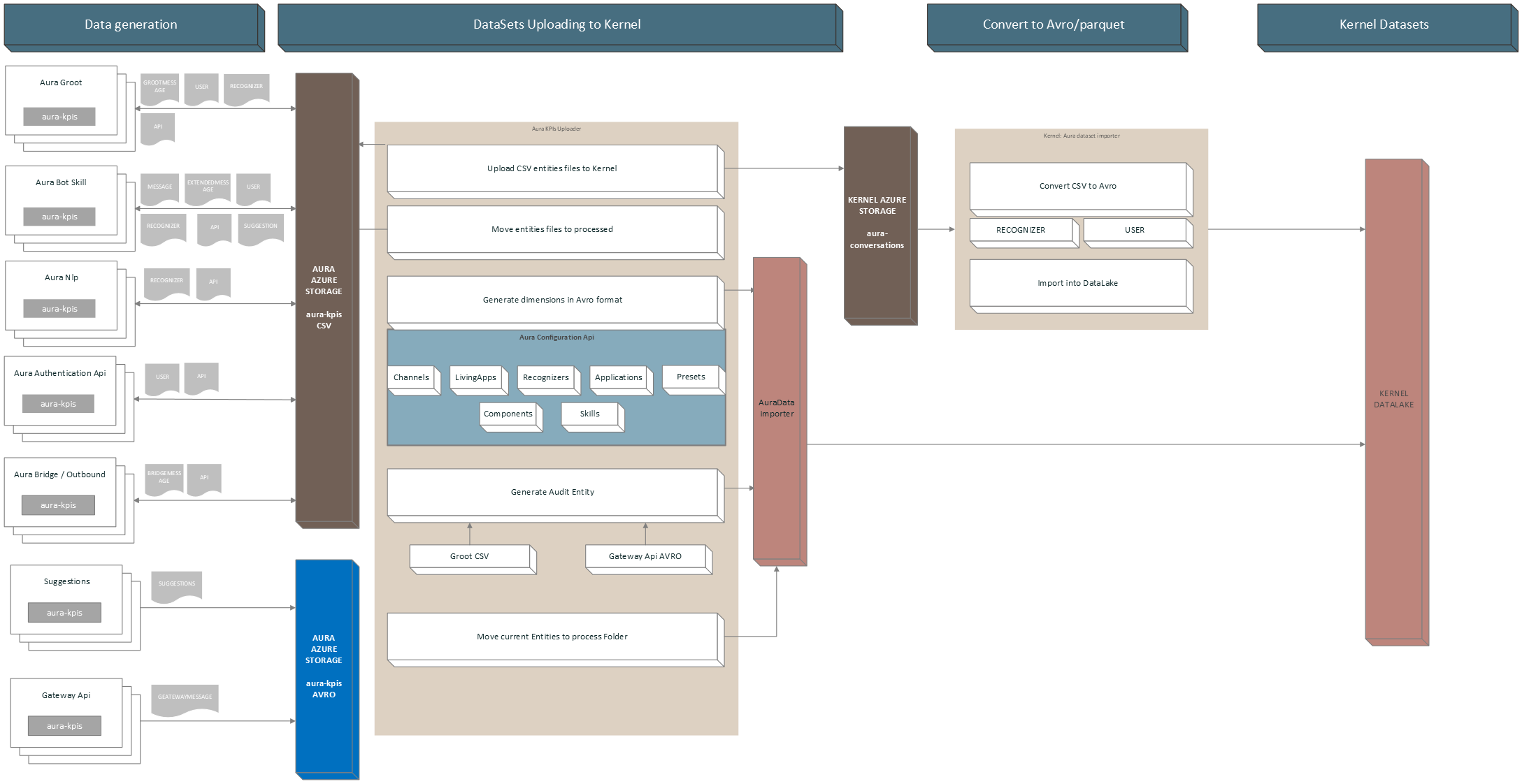
aura-kpis-uploader-cli is responsible for copying the CSV files in Aura KPIs container (environment variables: AURA_MICROSOFT_AZURE_STORAGE_COMMON_ACCOUNT) to the correspondent container in Kernel Azure Storage (environment variable: AURA_KPI_UPLOADER_MICROSOFT_AZURE_STORAGE_CONTAINER_DESTINATION).
Once the files are copied, the local copy is moved to a folder inside the container (environment variables: AURA_MICROSOFT_AZURE_STORAGE_COMMON_ACCOUNT/AURA_KPI_UPLOADER_PROCESSED_FOLDER) and kept there during a fixed time, for recovering purposes.
The configured time by default is 7 days and is set in installer aurak8s in the template lifecycle.json.j2:
    {
      "name": "retention-kpis-processed-policy",
      "enabled": true,
      "type": "Lifecycle",
      "definition": {
        "filters": {
          "blobTypes": [ "blockBlob" ],
          "prefixMatch": [ "{{ kpi_blob_container_name_processed }}" ]
        },
        "actions": {
          "baseBlob": {
            "delete": { "daysAfterModificationGreaterThan": {{ backup_retention_time | default(7) }} }
          }
        }
      }
    }
Independently of when it runs, aura-kpis-uploader-cli always performs the same process:
- It gets all the files in KPIs container (environment variable:
AURA_MICROSOFT_AZURE_STORAGE_COMMON_ACCOUNT).
- Firstly, it verifies the number of files to process in order not to overload the memory. This is given by the environment variable
AURA_KPI_NUM_MAX_FILES_FOR_EXECUTION. If the number of files exceeds this number, it will adapt the dates until it gets a range that fulfills the condition. The initial date is determined by AURA_DAYS_INTERVAL and the final date is calculated by subtracting the hours indicated in AURA_KPI_HOURS_TO_SUBTRACT_TO_GET_NUM_MAX_FILES.
- When the number of files condition is fulfilled, all the aura-kpis-uploader processes will use that date range, except for the generation of the
AUDIT file, since this file is generated at run time and must be moved to the entities folder if everything has proceeded successfully, with the current date.
It can also be launched manually to process old files that have not been processed in the regular execution, due to lack of communication with Kernel or any other error.
Furthermore, aura-kpis-uploader-cli generates for dimensions of entity type files: Channels, Skills, Presets, Applications, Components and Recognizers. You can see more information in KPIs dimensions.
2.1 - User guide
Aura KPIs uploader user guide
Guidelines including the orderly steps to use aura-kpis-uploader
1. Prepare your CONFIG_FILE
First, review and prepare your environment variables in order to create your CONFIG_FILE.
An example is shown below:
AURA_AUTHORIZATION_HEADER=${AURA_AUTHORIZATION_HEADER}
AURA_CHANNELS_CONFIGURATION_API_ENDPOINT=${AURA_CHANNELS_CONFIGURATION_API_ENDPOINT}
AURA_DEFAULT_LOCALE=${AURA_DEFAULT_LOCALE}
AURA_ENVIRONMENT_NAME=${AURA_ENVIRONMENT_NAME}
AURA_MICROSOFT_AZURE_STORAGE_COMMON_ACCESS_KEY=${AURA_MICROSOFT_AZURE_STORAGE_COMMON_ACCESS_KEY}
AURA_MICROSOFT_AZURE_STORAGE_COMMON_ACCOUNT=${AURA_MICROSOFT_AZURE_STORAGE_COMMON_ACCOUNT}
AURA_MICROSOFT_AZURE_STORAGE_ACCESS_KEY_DESTINATION=${AURA_MICROSOFT_AZURE_STORAGE_ACCESS_KEY_DESTINATION}
AURA_MICROSOFT_AZURE_STORAGE_ACCOUNT_DESTINATION=${AURA_MICROSOFT_AZURE_STORAGE_ACCOUNT_DESTINATION}
AURA_MICROSOFT_AZURE_STORAGE_CONTAINER_DESTINATION=${AURA_MICROSOFT_AZURE_STORAGE_CONTAINER_DESTINATION}
AURA_VERSION=${AURA_VERSION}
2. Launch Aura KPIs uploader
There are two methods for launching the aura-kpis-uploader
- Directly with the source code: to launch it in your local environment
- As a docker container: to use it with the already generated Docker image.
$ cd aura-kpis-uploader
$ npm install
$ export CONFIG_FILE=[PATH_TO_MY_CONFIG_FILE]
$ npm run start
2.2.1. Pull image from repository
This method needs login first.
docker pull auraregistry.azurecr.io/aura/aura-kpis-uploader
2.2.2. Run Docker container
There are two options for running the Docker container:
-
With .env file:
Change $VERSION accordingly, exporting it or changing the string in the commands.
If $VERSION is not present, it will use the latest default tag.
docker run --rm -e CONFIG_FILE=/opt/aura-kpis-uploader/env/config_file.env \
        -v $(pwd):/opt/aura-kpis-uploader/env \
        auraregistry.azurecr.io/aura/aura-kpis-uploader:$VERSION
-
With environmental variables in command:
Note that host.docker.internal only works for MACOS/Windows systems:
docker run -e AURA_AUTHORIZATION_HEADER=${AURA_AUTHORIZATION_HEADER} \
        -e AURA_CHANNELS_CONFIGURATION_API_ENDPOINT=${AURA_CHANNELS_CONFIGURATION_API_ENDPOINT} \
        -e AURA_DEFAULT_LOCALE=${AURA_DEFAULT_LOCALE} \
        -e AURA_ENVIRONMENT_NAME=${AURA_ENVIRONMENT_NAME} \
        -e AURA_MICROSOFT_AZURE_STORAGE_COMMON_ACCESS_KEY=${AURA_MICROSOFT_AZURE_STORAGE_COMMON_ACCESS_KEY} \
        -e AURA_MICROSOFT_AZURE_STORAGE_COMMON_ACCOUNT=${AURA_MICROSOFT_AZURE_STORAGE_COMMON_ACCOUNT} \
        -e AURA_MICROSOFT_AZURE_STORAGE_ACCESS_KEY_DESTINATION=${AURA_MICROSOFT_AZURE_STORAGE_ACCESS_KEY_DESTINATION} \
        -e AURA_MICROSOFT_AZURE_STORAGE_ACCOUNT_DESTINATION=${AURA_MICROSOFT_AZURE_STORAGE_ACCOUNT_DESTINATION} \
        -e AURA_MICROSOFT_AZURE_STORAGE_CONTAINER_DESTINATION=${AURA_MICROSOFT_AZURE_STORAGE_CONTAINER_DESTINATION} \
        -e AURA_VERSION=${AURA_VERSION} \
        -v ${HOST_DIRECTORY}:/opt/aura-kpis-uploader/logs \
        auraregistry.azurecr.io/aura/aura-kpis-uploader:$VERSION
3. Execution Dependencies
With the addition of the new component aura-databricks-jobs, now for Avro entities, the execution of aura-kpis-uploader depends on aura-databricks-jobs being executed correctly.
This is done to avoid duplicating KPIs when they are processed by aura-databricks-jobs, and an error has occurred.
3.1 Evaluation of conditions for execution
If avro-to-dataset-job-cli has been executed correctly, it will write a file to the default avro folder containing a date. If this file exists and the date it contains does not exceed the time set for the scheduled run in Databricks, aura-kpis-uploader-cli will run its processes.
If avro-to-dataset-job-cli has generated any error in its execution, it will generate a file in the same folder containing internally the error(s) that have occurred.
Environment variables involved:
- AURA_KPIS_AVRO_DESTINATION_PATH: Default value is
avro.
- AURA_DATABRICKS_ERROR_FILENAME: Default value is
databricks.ERROR.
- AURA_DATABRICKS_EXECUTION_PERIOD: Default value is
24 hours.
The flow that Aura KPIs Uploader follows to validate if it is going to be executed is as follows:

4 Generate Reports
By default, aura-kpis-uploader generates reports if any error has occurred in the upload process.
These reports are available in the Azure Storage defined in AURA_MICROSOFT_AZURE_STORAGE_COMMON_ACCOUNT, path aura-kpis/reports/.
If you want to change the behavior and generate reports of all uploaded files or disable their generation, you can do it by changing the environment variable AURA_KPIS_REPORTS_MODE. If the value is set to all, it will generate a report for each of the processed files and if it is set to none, it will not generate any report. The default value is error.
4.1 Report upload Files
When an error occurs, the system will send an event to Prometheus to alert about the error.
 this.prometheusHandler.addSummary(
                        {
                        metricId: PrometheusMetrics.auraKpisUploaderReportErrorSummary,
                        start: this.startTimer
                        },
                        {
                        reportError: reportLink },
                        this.corr
                        );
The event will contain the metricId auraKpisUploaderReportErrorSummary, when an error occurs and a link to the report containing the error.
4.1.1 Report Model
A report will contain the following template in JSON format:
- numberOfFiles: Number of files processed.
- numberOfFilesSkipped: Number of files that have been skipped because they have not yet been processed.
- NumberOfFilesMovedToProcessed: Number of files that have been moved to the processed folder.
- numberOfFilesUploaded : Number of files that have been successfully uploaded.
- NumberOfFilesDeleted: Number of files that have been deleted from the main folder.
- numberOfFilesUploadValidated: Number of files that have been verified as successfully uploaded.
If errors have occurred, it will contain an errors property with the files that have failed, arranged as properties:
- key: Name of the file that has failed.
- step: It indicates in which phase it has failed. The possible ones are “UPLOADING”, “CHECK_IF_UPLOADED”, “MOVING_TO_PROCESSED” AND “REMOVING”.
- error: Error message obtained.
- corr: Associated correlator.
Example:
{
 "numberOfFiles": 43,
 "numberOfFilesSkipped": 0,
 "numberOfFilesMovedToProcessed": 41,
 "numberOfFilesUploaded": 41,
 "numberOfFilesDeleted": 41,
 "numberOfFilesUploadValidated": 41,
 "errors": {
   "BOT_da5df187-8aa9-55b7-94d6-50586bd6b0b8_CR_API_20240216T080000Z.txt": {
     "step": "UPLOADING",
     "error": "getaddrinfo ENOTFOUND aurautils-test.blob.core.windows.net",
     "corr": "ec4978ee-0021-4633-a28f-a933759d0250"
   },
   "BOT_b8efccfd-f2bd-5ef0-a19d-b2414ab94dc8_CR_API_20240215T160000Z.txt": {
     "step": "UPLOADING",
     "error": "getaddrinfo ENOTFOUND aurautils-test.blob.core.windows.net",
     "corr": "ec4978ee-0021-4633-a28f-a933759d0250"
   }
 }
}
4.2 Report Generating Avro KPIs
When an error occurs, the system will send an event to Prometheus to alert about the error.
 this.prometheusHandler.addSummary(
                        {
                        metricId: PrometheusMetrics.auraKpisGeneratedReportErrorSummary,
                        start: this.startTimer
                        },
                        {
                        reportError: reportLink },
                        this.corr
                        );
The event will contain the metricId auraKpisGeneratedReportErrorSummary, when an error occurs and a link to the report containing the error.
4.2.1 Report Model
A report will contain the following template in JSON format.
- numberBlobsLoaded: Number of blobs loaded.
- numberDataRowsLoaded: Number of total lines loaded from blobs.
- numberDataRowsGenerated: Number of Avro registers generated.
- numberEntitiesGenerated: Number of entities generated.
- numberDimensionalGenerated: Number of dimensional files generated.
If errors have occurred, it will contain an errors property with the files that have failed, arranged as properties:
- key: The id of the source. Example: ‘AUDIT’.
- error: Error message obtained.
- corr: Associated correlator.
Example:
{
 "numberBlobsLoaded": 13,
 "numberDataRowsLoaded": 0,
 "numberDataRowsGenerated": 141,
 "numberEntitiesGenerated": 2,
 "numberDimensionalGenerated": 7,
 "errors": {
   "GATEWAY": {
     "error": "Error parsing data. Field name does not exist in source",
     "corr": "ec4978ee-0021-4633-a28f-a933759d0250"
   },
   "AUDIT": {
     "error": "Error parsing data. Field id cannot be empty",
     "corr": "ec4978ee-0021-4633-a28f-a933759d0250"
   }
 }
}
2.2 - Adapter Manager
Aura KPIs Adapter Manager
Module to manage the copy of CSV files to Kernel and to generate Avro dimensional files and Avro Entity files.
⚠️ Although the definition of the module refers to Avro files, it also handles CSV files, until all CSV files are migrated to Avro in upcoming releases
Definition
Set of classes that will be in charge of processing the necessary operations to copy the KPIs in CSV format to Kernel and to process or generate the KPIs of the entities and dimensions in Avro format.
This is done from a definition file that, by default, is called aura-avro-adapter.json and is defined in the AURA_SOURCE_PATH_AVRO_ADAPTERS environment variable. This file is remotely loaded from the Storage AURA_MICROSOFT_AZURE_STORAGE_COMMON_ACCOUNT and the path AURA_KPIS_ENTITIES_CONTAINER/schemas/AURA_SOURCE_PATH_AVRO_ADAPTERS. If the file does not exist remotely, a local one is loaded by default.
Adapter Definition File Model
For each KPI file to be managed, a model is defined containing an array with all the adaptation operations to be performed. The content format of this file is JSON.
| Name |
Type |
Definition |
| name |
string |
Name of the adapter. To manage Avro files, this field contains the name of the Avro schema itself |
| schema |
AvroAdapterSchema |
Type of KPI, entity or dimensional |
| avroSchema |
string |
If the destination file is an Avro file, this field contains the Avro schema to generate the file. |
| source |
AvroAdapterSource |
Contains the necessary data from where you are going to copy or transform the data, if applicable. |
| fields |
AvroAdapterField |
Contains a set of properties with a model defined in AvroAdapterFieldModel |
| targetType |
AvroAdapterTargetType |
Type file to generate. Values: csv or avro. |
| versionSchema |
string |
If the file to generate is Avro, this field contains the version of its schema |
| stopWithErrors |
boolean |
When true, if another adapter has generated an error, this one will not be executed |
| expiresAt |
date |
If set, it indicates which date the intended KPI will no longer be processed. This is used when there are different versions of AVRO templates and you want to keep both versions until the end of a cycle, which is usually monthly. |
| order |
number |
Contains the execution order, the order 1 will be the first to execution. By default the order is MAX_SAFE_INTEGER. |
AvroAdapterSchema
| Name |
type |
Definition |
| dimensional |
string |
Type of KPI is dimensional. |
| entity |
string |
Type of KPI is an entity. |
AvroAdapterSource
| Name |
type |
Definition |
| data |
AvroAdapterSourceDataType |
Type of file to use as source. |
| id |
any |
KPI identifier, for example: GATEWAY, AUDIT, BOT, etc. |
| avroSchema |
string |
Name of the schema file. Required if the source is an Avro file, as its schema needs to read it. |
| avroSchemaVersion |
string |
Version of the schema, required if the source is an Avro file. |
| csvFolder |
string |
Name of the folder where this CSV is stored, required if the source is a partial CSV. |
| entityName |
string |
Entity name of the CSV to load, required if the source is a partial CSV. |
| useDefaultTimeFilter |
boolean |
If true, the adapter will ignore the pre-calculated date range at the beginning of the process and will use the default one, which is calculated based on AURA_DAYS_INTERVAL as the start date and the end date by subtracting AURA_KPIS_TIME_FILE_IS_IN_USE_AMOUNT * AURA_KPIS_TIME_FILE_IS_IN_USE_UNIT from the current date. The default is 30 days prior to the current time. |
| version |
string |
Version of the adapter. It is used to propagate changes in a release and to update the remote file where the adapter models are stored in aura-avro-adapter.json. Format: x.y.z |
| removeAfterProcessing |
boolean |
Remove source data after processing. The data won’t store in processed data folder. |
AvroAdapterSourceDataType
| Name |
type |
Definition |
| avro |
string |
Name of the source file for Avro. |
| object |
string |
Name of the source file for the Javascript object. |
| csv |
string |
Name of the source file for CSV. |
| partialCsv |
string |
Name of the source file when it is referred to specific data from a CSV file. |
AvroAdapterField
AvroAdapterFieldModel
| Name |
type |
Definition |
| sourceName |
string |
Name of the source field from which data is obtained. |
| nullable |
boolean |
It indicates whether the target field can be null or not. |
| preCalculated |
AvroPreCalculatedType |
String that indicates the type of calculation needed. For example, the required format for dates or numbers. |
| targetType |
Avrofieldbasetype |
Type of data for the target data. |
| defaultValue |
string |
number |
| symbols |
any[] |
Array with the values searched in the origin data. If the data does not match one of those values, it will generate an error. |
| format |
string |
Specific format to be sent, for precalculated fields. |
| description |
string |
Human-readable description of the field. |
| symbolsValues |
string |
If we want to change the value of the destination based on the values defined in the symbols field, we can define it in this field in the form of an object. |
| valueIfExist |
string |
If the source data exists, it will be changed to the one defined in this field. |
AvroPreCalculatedType
| Name |
type |
Definition |
| DATE_ISO_8691 |
string |
Format used for dates. The input date will be converted to this format. If there is no input date, the current date is obtained. |
| CUSTOM_DATE_FORMAT |
string |
Custom format for dates. Example: MM/DD/YYY |
| DURATION_ISO_8601 |
string |
Format used to set a duration. |
| COUNTRY_ISO_3166_ALPHA_3 |
string |
Format to indicate a country that complies with the ISO 3166 format. |
Avrofieldbasetype
| Name |
type |
Definition |
| string |
string |
Type string. |
| number |
string |
Type number. |
| enum |
string |
Type enumerable. |
| array |
string |
Type array. |
| boolean |
string |
Type boolean. |
AvroAdapterTargetType
| Name |
type |
Definition |
| csv |
string |
CSV file. |
| avro |
string |
Avro file. |
Types of adapters
The Adapter manager can perform several types of processes, that will be explained in the following sections.
Copy CSV files
This adapter will copy the CSV files generated from the Aura servers (aura-bot, aura-groot, aura-nlp, etc.) to the Kernel storage.
{
        "version": "1.0.0",
        "name": "E_Aura_BOT",
        "schema": "entity",
        "avroSchema": "",
        "source": {
            "data": "csv",
            "id": "BOT"
        },
        "targetType": "csv",
        "fields": {}
    }
Generate Dimensional KPIs in Avro
This adapter will generate an Avro file with Aura available RECOGNIZER data, as they are defined only in aura-kpis-uploader and not in aura-configuration-api.
  {
        "version": "1.0.0",
        "name": "D_Aura_Recognizer",
        "schema": "dimensional",
        "avroSchema": "aura-recognizer-asvc.json",
        "versionSchema": "6.0.0",
        "source": {
            "data": "object",
            "id": "RECOGNIZER"
        },
        "targetType": "avro",
        "fields": {
            "AURA_RECOGNIZER_ID": {
                "sourceName": "id",
                "targetType": "string"
            },
            "AURA_RECOGNIZER_NAME": {
                "sourceName": "name",
                "targetType": "string"
            },
            "EXTRACTION_TM": {
                "sourceName": "EXTRACTION_TM",
                "targetType": "string",
                "preCalculated": "DATE_ISO_8691"
            }
        }
    }
Copy Avro files
This adapter copies the KPIs generated in Avro by aura-gateway-api to be processed by aura-databricks-jobs.
    {
        "version": "1.0.0",
        "name": "Aura_Gateway_Message",
        "schema": "entity",
        "avroSchema": "aura-gateway-message-asvc.json",
        "versionSchema": "6.0.0",
        "source": {
            "data": "object",
            "id": "GATEWAY"
        },
        "targetType": "avro",
        "fields": {}
    }
Generate Avro from another Avro
This is an adapter that generates an AURA_AUDIT file based on the data from the AVRO file of the aura-gateway-api KPIs.
{       "version": "1.0.0",
        "name": "Aura_Audit",
        "stopWithErrors": true,
        "schema": "entity",
        "avroSchema": "aura-audit-asvc.json",
        "versionSchema": "6.0.0",
        "source": {
            "data": "avro",
            "id": "AUDIT",
            "avroSchema": "aura-gateway-message-asvc.json",
            "avroSchemaVersion": "6.0.0"
        },
        "targetType": "avro",
        "fields": {
            "INTERACTION_ID": {
                "sourceName": "CORR_ID",
                "targetType": "string"
            },
            "AURA_TM": {
                "sourceName": "MESSAGE_TM",
                "targetType": "string",
                "preCalculated": "DATE_ISO_8691"
            },
            "AURA_CHANNEL_ID": {
                "sourceName": "AURA_CHANNEL_ID",
                "targetType": "string",
                "nullable": "true"
            },
            "AURA_APP_ID": {
                "sourceName": "AURA_APP_ID",
                "targetType": "string"
            },
            "COUNTRY_3_ALPHA_CD": {
                "sourceName": "COUNTRY_3_ALPHA_CD",
                "targetType": "string",
                "preCalculated": "COUNTRY_ISO_3166_ALPHA_3"
            },
            "AURA_SERVICE_NAME_CD": {
                "sourceName": "AURA_PRESET_NAME",
                "targetType": "string",
                "defaultValue": "nlpaas",
                "valueIfExist" : "ai"
            },
            "AURA_PRESET_NAME": {
                "sourceName": "AURA_PRESET_NAME",
                "targetType": "string",
                "nullable": "true"
            },
            "AURA_COMPONENT_ID": {
                "sourceName": "AURA_COMPONENT_ID",
                "targetType": "string"
            },
            "AURA_COMPONENT_HOST_ID": {
                "sourceName": "AURA_COMPONENT_HOST_ID",
                "targetType": "string"
            },
            "AURA_VERSION_ID": {
                "sourceName": "AURA_VERSION_ID",
                "targetType": "string"
            },
            "DAY_DT": {
                "sourceName": "DAY_DT",
                "targetType": "string",
                "preCalculated": "CUSTOM_DATE_FORMAT",
                "format": "YYYY-MM-DD"
            },
            "BRAND_ID": {
                "sourceName": "BRAND_ID",
                "targetType": "string"
            }
        }
    }
Generate Avro from data in CSV file
This is an adapter that generates an AURA_AUDIT file based on the data from the CSV file of the aura-groot Message KPIs.
{
        "version": "1.0.0",
        "name": "Aura_Audit",
        "stopWithErrors": true,
        "order": 2,
        "schema": "entity",
        "avroSchema": "aura-audit-asvc.json",
        "versionSchema": "6.0.0",
        "source": {
            "data": "partialCsv",
            "id": "AUDIT",
            "csvFolder": "groot",
            "entityName":"GROOTMESSAGE"
        },
        "targetType": "avro",
        "fields": {
            "INTERACTION_ID": {
                "sourceName": "CORR_ID",
                "targetType": "string"
            },
            "AURA_TM": {
                "sourceName": "MSG_DT",
                "targetType": "string",
                "preCalculated": "DATE_ISO_8691"
            },
            "AURA_CHANNEL_ID": {
                "sourceName": "CHANNEL_ID",
                "targetType": "string",
                  "nullable": "true"
            },
            "AURA_APP_ID": {
                "sourceName": "AURA_APP_ID",
                "targetType": "string",
                "nullable": "true"
            },
            "COUNTRY_3_ALPHA_CD": {
                "sourceName": "COUNTRY_CD",
                "targetType": "string",
                "preCalculated": "COUNTRY_ISO_3166_ALPHA_3"
            },
            "AURA_SERVICE_NAME_CD": {
                "sourceName": "AURA_SERVICE_NAME_CD",
                "targetType": "string",
                "defaultValue": "message"

            },
            "AURA_PRESET_NAME": {
                "sourceName": "AURA_PRESET_NAME",
                "targetType": "string",
                "nullable": "true"
            },
            "AURA_COMPONENT_ID": {
                "sourceName": "AURA_COMPONENT_ID",
                "targetType": "string"
            },
            "AURA_COMPONENT_HOST_ID": {
                "sourceName": "AURA_COMPONENT_HOST_ID",
                "targetType": "string"
            },
            "AURA_VERSION_ID": {
                "sourceName": "VERSION_ID",
                "targetType": "string"
            },
            "DAY_DT": {
                "sourceName": "MSG_DT",
                "targetType": "string",
                "preCalculated": "CUSTOM_DATE_FORMAT",
                "format": "YYYY-MM-DD"
            },
            "BRAND_ID": {
                "sourceName": "BRAND_ID",
                "targetType": "string"
            }
        }
    }
Another example, deleting CSV source file data when the adapter finalize its execution.
{
        "version":"1.0.1",
        "name": "Aura_Gateway_Message_converter",
        "stopWithErrors": true,
        "order": 1,
        "schema": "entity",
        "avroSchema": "aura-gateway-message-asvc.json",
        "versionSchema": "6.0.0",
        "source": {
            "data": "partialCsv",
            "id": "GATEWAY",
            "csvFolder": "gwapi",
            "entityName": "GATEWAYMESSAGE",
            "removeAfterProcessing": true
        },
        "targetType": "avro",
        "fields": {
                "MESSAGE_ID": {
                "sourceName": "MESSAGE_ID",
                "targetType": "string",
                "defaultValue": "NO_MESSAGE_ID"
            },
            "MESSAGE_TM": {
                "sourceName": "MESSAGE_TM",
                "targetType": "string",
                "preCalculated": "DATE_ISO_8691"
            },
            "AURA_APP_ID": {
                "sourceName": "AURA_APP_ID",
                "targetType": "string",
                "nullable": "true"
            },
            "COUNTRY_3_ALPHA_CD": {
                "sourceName": "COUNTRY_3_ALPHA_CD",
                "targetType": "string",
                "preCalculated": "COUNTRY_ISO_3166_ALPHA_3"
            },
            "AURA_PRESET_NAME": {
                "sourceName": "AURA_PRESET_NAME",
                "targetType": "string",
                "nullable": "true"
            },
            "DAY_DT": {
                "sourceName": "MESSAGE_TM",
                "targetType": "string",
                "preCalculated": "CUSTOM_DATE_FORMAT",
                "format": "YYYY-MM-DD"
            },
            "BRAND_ID": {
                "sourceName": "BRAND_ID",
                "targetType": "string"
            },
            "AURA_NLP_IND": {
                "sourceName": "AURA_NLP_IND",
                "targetType": "boolean"
            },
            "CORR_ID": {
                "sourceName": "CORR_ID",
                "targetType": "string",
                "defaultValue": "NO_CORR_ID"
            }
        }
    }
Use filters in Avro files
With this model, it is possible to filter records from the Avro files that should not be loaded into these files:
export interface AvroAdapterSource {
    data: AvroAdapterSourceDataType;
    id: any;
    avroSchema?: string;
    avroSchemaVersion?: string;
    csvFolder: string;
    entityName: string;
    filter?: (SourceFilter | LogicalFilter);

}
export interface SourceFilter {
    field: string;
    value: any;
    operator: FilterOperator;
}
export interface LogicalFilter {
    logic: LogicalOperator.and | LogicalOperator.or;
    filters: (SourceFilter | LogicalFilter)[];
}
export enum FilterOperator {
    equal = 'equal',
    notEqual = 'notEqual',
    greaterThan = 'greaterThan',
    lessThan = 'lessThan'
}
export enum LogicalOperator {
    and = 'and',
    or = 'or'
}
These filters could be configured in aura-avro-adapter.json in two ways:
-
With logical filter, with several conditions. For example:
    {
        "version": "1.0.0",
        "name": "Aura_Audit",
        "stopWithErrors": true,
        "schema": "entity",
        "avroSchema": "aura-audit-asvc.json",
        "versionSchema": "6.0.0",
        "source": {
            "data": "partialCsv",
            "id": "AUDIT",
            "csvFolder": "groot",
            "entityName": "GROOTMESSAGE",
            "filter": {
                "logic": "and",
                "filters": [
                    {
                        "field": "CHANNEL_ID",
                        "value": "",
                        "operator": "notEqual"
                    },
                    {
                        "field": "ACTION_CD",
                        "value": "receive",
                        "operator": "equal"
                    }
                ]
            }
        }
-
Or it could be configured in aura-avro-adapter.json with simple filter. For example:
{
        "version": "1.0.0",
        "name": "Aura_Audit",
        "stopWithErrors": true,
        "schema": "entity",
        "avroSchema": "aura-audit-asvc.json",
        "versionSchema": "6.0.0",
        "source": {
            "data": "avro",
            "id": "AUDIT",
            "avroSchema": "aura-gateway-message-asvc.json",
            "avroSchemaVersion": "6.0.0",
            "filter": {
                "field": "AURA_APP_ID",
                "value": null,
                "operator": "notEqual"
            }
        },
        "targetType": "avro",
        "fields": {
            "INTERACTION_ID": {
                "sourceName": "CORR_ID",
                "targetType": "string"
            },
            "AURA_TM": {
                "sourceName": "MESSAGE_TM",
                "targetType": "string",
                "preCalculated": "DATE_ISO_8691"
            },
            "AURA_CHANNEL_ID": {
                "sourceName": "AURA_CHANNEL_ID",
                "targetType": "string",
                "nullable": "true"
            },
            "AURA_APP_ID": {
                "sourceName": "AURA_APP_ID",
                "targetType": "string",
                "nullable": "true"
            },
            "COUNTRY_3_ALPHA_CD": {
                "sourceName": "COUNTRY_3_ALPHA_CD",
                "targetType": "string"
            },
            "AURA_SERVICE_NAME_CD": {
                "sourceName": "AURA_PRESET_NAME",
                "targetType": "string",
                "defaultValue": "nlpaas",
                "valueIfExist": "ai"
            },
            "AURA_PRESET_NAME": {
                "sourceName": "AURA_PRESET_NAME",
                "targetType": "string",
                "nullable": "true"
            },
            "AURA_COMPONENT_ID": {
                "sourceName": "AURA_COMPONENT_ID",
                "targetType": "string"
            },
            "AURA_COMPONENT_HOST_ID": {
                "sourceName": "AURA_COMPONENT_HOST_ID",
                "targetType": "string"
            },
            "AURA_VERSION_ID": {
                "sourceName": "AURA_VERSION_ID",
                "targetType": "string"
            },
            "DAY_DT": {
                "sourceName": "DAY_DT",
                "targetType": "string",
                "preCalculated": "CUSTOM_DATE_FORMAT",
                "format": "YYYY-MM-DD"
            },
            "BRAND_ID": {
                "sourceName": "BRAND_ID",
                "targetType": "string"
            }
        }
    },
2.3 - Environment variables
Aura KPIs Uploader environment variables
List of environment variables handled by Aura KPIs uploader
- Properties marked in bold are mandatory.
- Properties marked in italics are optional.
| Property |
Type |
Description |
Modifiable by OB? |
| AURA_AUTHORIZATION_HEADER |
string |
Complete authorization header to be sent to AURA_CHANNELS_CONFIGURATION_API_ENDPOINT, with the following format: APIKEY xxxxxx |
YES, but only if the previous APIKey was deprecated |
| AURA_CHANNELS_CONFIGURATION_API_ENDPOINT |
string |
Complete URL where aura-bot should get the configuration of all the channels available in the environment. |
YES, but only if the generated SAS token was deprecated. |
| AURA_DAYS_INTERVAL |
number |
Interval of days to get the processed KPIs files. By default: 30 |
NO |
| AURA_DEFAULT_LOCALE |
string |
Culture code to be used by default in the current deployment: de-de, en-gb, es-es, pt-br. |
NO |
| AURA_ENVIRONMENT_NAME |
string |
Name of the environment where aura-kpis-uploader is deployed. For example: ap-next, es-dev, de-pre |
NO |
| AURA_FILES_PREFIX |
string |
Paths where aura-bot, aura-nlp or aura-authentication-api entity KPIs files are stored. |
NO |
| AURA_FOLDER_DESTINATION |
string |
Root folder name in destination where the KPIs files are stored. By default: AURA_DATA. |
NO |
| AURA_KPIS_ENTITIES_CONTAINER |
string |
Name of the Azure Blob container to store Aura entities files. By default, aura-kpis. It MUST be the same than the AURA_KPIS_STORE_CONTAINER configured in aura-bot, aura-authentication-api, aura-kpis and aura-nlp. |
NO |
| AURA_KPI_FILES_EXTENSION |
string |
Extension to be used in KPIs files. Default: txt. It MUST be the same than the AURA_KPI_TO_DSV_EXTENSION configured in aura-bot, aura-authentication-api, aura-kpis and aura-nlp. |
NO |
| AURA_KPI_FILES_NOT_TO_UPLOAD |
string |
String separated by comma with the files to not upload to the destination folder with format Component:Entity. For example: BOT:MESSAGE,BOT:API |
NO |
| AURA_KPIS_TIME_FILE_IS_IN_USE_AMOUNT |
number |
Contains the amount of time it considers a file to be in use and does not process it. By default: 1 |
|
| AURA_KPIS_TIME_FILE_IS_IN_USE_UNIT |
string |
Time unit that together with AURA_KPIS_TIME_FILE_IS_IN_USE_AMOUNT determines whether or not a file should be processed: Values: “year”, “years”, “y”, “month”, “months”, “M”, “week”, “weeks”, “w”, “day”, “days”, “d”, “hour”, “hours”, “h”, “minute”, “minutes”, “m”. By default: hour |
|
| AURA_LOGGING_FORMAT |
string |
Format to be used in monitoring logs: json or dev (which is a more visual format). By default: json. |
NO. Only for development, set it to dev. |
| AURA_LOGGING_LEVEL |
string |
Level to be used in monitoring logs, from more to less verbose: 'TRACE', 'DEBUG', 'INFO', 'WARN', 'ERROR', 'FATAL', 'OFF'. By default: 'INFO'. |
YES, for development environment, set it to debug. In pre/production environment, it should be ‘INFO’ or ‘ERROR’. For analysis of an issue in pre/production, it may be changed to ‘DEBUG’. |
| AURA_MICROSOFT_AZURE_STORAGE_COMMON_ACCESS_KEY |
string |
Microsoft Storage password of the source deployment. |
NO. Only if Operations Team changes it. |
| AURA_MICROSOFT_AZURE_STORAGE_COMMON_ACCOUNT |
string |
Microsoft Storage account of the source environment. |
NO. Only if Operations Team changes it. |
| AURA_MICROSOFT_AZURE_STORAGE_ACCESS_KEY_DESTINATION |
string |
Microsoft Storage password of destination. |
NO |
| AURA_MICROSOFT_AZURE_STORAGE_ACCOUNT_DESTINATION |
string |
Microsoft Storage account of destination. |
NO |
| AURA_MICROSOFT_AZURE_STORAGE_CONTAINER_DESTINATION |
string |
Microsoft Storage container of destination. |
NO |
| AURA_VERSION |
string |
Number of Aura release being executed. |
NO |
| PUSHGATEWAY_ENDPOINT |
string |
Prometheus push gateway endpoint. |
NO |
| PROMETHEUS_JOB_NAME |
string |
Prometheus job name. By default: aura_kpi_uploader_job. |
NO |
| AURA_SOURCE_PATH_AVRO_ADAPTERS |
string |
Relative path to file with the dimensions and entities to transform Avro. |
NO |
| AURA_KPIS_AVRO_DESTINATION_PATH |
string |
Path to store the Avro files in Aura Azure Container. Default: ‘avro’ |
YES |
| AURA_KPIS_REPORTS_DESTINATION_PATH |
string |
Path to store the reports in Aura Azure Container. Default: ‘reports’ |
YES |
| AURA_KPIS_REPORTS_MODE |
string |
Behavior of aura-kpis-uploader regarding the generation of reports. Possible values: all: a report is generated for each processed file; none: it will not generate any report; error: it generates a report if an error has occurred. By default: error. |
NO |
| AURA_SOURCE_PATH_AVRO_ADAPTERS |
string |
Adapters to transform data, ‘/schemas/aura-csv-adapter.json’ for CSV transform and ‘/schemas/aura-avro-adapter.json’ to transform in CSV and Avro. By default: schemas/aura-csv-adapter.json. |
YES |
| AURA_SAS_STORAGE_FILE_TTL |
number |
TTL in minutes for SAS when generates URL to File Storage. By default: 15. |
YES |
| AURA_KPIS_BLOB_TIME_WAIT_IF_EXISTS |
number |
Time to wait in milliseconds if the KPIs blob exists to avoid duplicate headers. By default: 1000. |
YES |
| AURA_KPIS_REPORTS_SAS_EXPIRATION |
number |
Time to expiration in minutes for the report SAS URL generated when an error occurs. Default: 43200 (30 days). |
YES |
| AURA_DATABRICKS_OK_FILENAME |
string |
Name of the file to validate if DataBricks process was successful. Inside the file, there is a date to validate last success execution. Default: databricks.OK |
YES |
| AURA_DATABRICKS_ERROR_FILENAME |
string |
Name of the file to validate if DataBricks process was failed. Default: databricks.ERROR |
YES |
| AURA_DATABRICKS_EXECUTION_PERIOD |
number |
Period of DataBricks execution in hours. By default: 24. |
YES |
| AURA_KPIS_AVRO_SIZE_REPORT_FILENAME |
string |
Contains the name of the file to store size of AVRO files. By default: sizeReport.json. |
YES |
| AURA_KPI_MAX_BLOCK_SIZE_FOR_APPEND_BLOB |
number |
Maximum buffer size for append blob uploading. Default: 100000000 (100MiB) |
YES. It can be changed by a value lower than the maximum one established by default |
| AURA_KPI_NUM_MAX_FILES_FOR_EXECUTION |
number |
Number of files by entity to process in a single execution. Default: 12 |
YES |
| AURA_KPI_HOURS_TO_SUBTRACT_TO_GET_NUM_MAX_FILES |
number |
Number of hours to subtract in order to get the number of files to process in a single execution. Default: 10 |
YES |
2.4 - Aura KPIs dimensions
Aura KPIs dimensions
Processing of Aura KPIs dimensions generated in aura-kpis-uploader
All of them will be generated in Avro format.
Introduction
aura-kpis-uploader-cli component generates the following types of KPIs dimensions:
. Channel type dimensions
. Recognizers type dimensions
. Skill type dimensions
. Components type dimensions
. Presets type dimensions
. Applications type dimensions
All of them are stored into the correspondent container in Aura Common Azure Storage (environment variable: AURA_KPIS_STORE_COMMON_CONTAINER).
Once the files are copied, the local copy is moved to a folder inside the container (environment variables: AURA_KPIS_STORE_COMMON_CONTAINER/ AURA_KPI_UPLOADER_PROCESSED_FOLDER) and kept there during a time, for recovering issues.
Types of KPIDimensionType:
export enum KPIDimensionTypes {
    KPIS_DIMENSIONS_CHANNEL = 'CHANNEL',
    KPIS_DIMENSIONS_RECOGNIZER = 'RECOGNIZER',
    KPIS_DIMENSIONS_SKILL = 'SKILL',
    KPIS_DIMENSIONS_APP = 'APP',
    KPIS_DIMENSIONS_PRESETS = 'PRESETS',
    KPIS_DIMENSIONS_COMPONENT = 'COMPONENT'
}
The path and filename should follow these patterns:
- Path:
AURA_KPIS_ENTITIES_CONTAINER/avro/dimensional/<avro_schema: name>/<avro_schema: x-fp-version>
- Filename:
<OB>_DIM_<DIM_NAME>_YYYYMMDDTHH0000Z.<AURA_KPI_FILES_EXTENSION>
The filename of the file is obtained as follows:
export function getDimensionFileName(KPIDimensionType: string) {
    return \`${getCountry().toUpperCase()}_\` +
        'DIM_' + \`${KPIDimensionType}_\` +
        \`${moment()
            .toISOString()
            .substring(0, 13)
            .replace(/-/g, '')
            .replace(/:/g, '') + '0000Z'}\` +
        \`${ConfigurationManager.instance.environmentConfiguration.AURA_KPI_FILES_EXTENSION}\`;
}
Channel type dimensions
aura-kpis-uploader-cli gets the list of channels configured in the environment through the aura-configuration-api channels endpoint.
It generates a file with the following schema:
The Adapter format:
 {
        "name": "D_Aura_Channel",
        "schema": "dimensional",
        "avroSchema": "aura-channel-asvc.json",
        "versionSchema": "6.0.0",
        "source": {
            "data": "object",
            "id": "CHANNEL"
        },
        "targetType": "avro",
        "fields": {
            "AURA_CHANNEL_ID": {
                "sourceName": "id",
                "targetType": "string"
            },
            "AURA_CHANNEL_NAME": {
                "sourceName": "name",
                "targetType": "string"
            },
            "AURA_CHANNEL_SHORT_NAME": {
                "sourceName": "prefix",
                "targetType": "string"
            },
            "AURA_SKILL_ID": {
                "sourceName": "skillId",
                "targetType": "string",
                "defaultValue": "NO_SKILL"
            },
            "AURA_NLP_STAGES_ARRAY": {
                "sourceName": "nlp.stages",
                "targetType": "array",
                "nullable": "true"
            },
            "EXTRACTION_TM": {
                "sourceName": "EXTRACTION_TM",
                "targetType": "string",
                "preCalculated": "DATE_ISO_8691"
            },
            "GBL_CONTACT_CHANNEL_ID": {
                "sourceName": "contact",
                "targetType": "string"
            },
            "BRAND_ID": {
                "sourceName": "brand",
                "targetType": "string"
            }
        }
    }
Recognizers type dimensions
aura-kpis-uploader-cli gets the recognizers configuration through the file configured in the project:
aura-kpis-uploader/src/dimensions/resource/recognizers.json
It generates a file with the following schema:
The Adapter format:
  {
        "version": "1.0.0",
        "name": "D_Aura_Recognizer",
        "schema": "dimensional",
        "avroSchema": "aura-recognizer-asvc.json",
        "versionSchema": "6.0.0",
        "source": {
            "data": "object",
            "id": "RECOGNIZER"
        },
        "targetType": "avro",
        "fields": {
            "AURA_RECOGNIZER_ID": {
                "sourceName": "id",
                "targetType": "string"
            },
            "AURA_RECOGNIZER_NAME": {
                "sourceName": "name",
                "targetType": "string"
            },
            "EXTRACTION_TM": {
                "sourceName": "EXTRACTION_TM",
                "targetType": "string",
                "preCalculated": "DATE_ISO_8691"
            }
        }
    }
Skill type dimensions
aura-kpis-uploader-cli gets the skill configuration through the aura-configuration-api Skills endpoint.
It generates a file with the following schema:
The Adapter format:
{
        "version": "1.0.0",
        "name": "D_Aura_Skill",
        "schema": "dimensional",
        "avroSchema": "aura-skill-asvc.json",
        "versionSchema": "6.0.0",
        "source": {
            "data": "object",
            "id": "SKILL"
        },
        "targetType": "avro",
        "fields": {
            "AURA_SKILL_ID": {
                "sourceName": "id",
                "targetType": "string"
            },
            "AURA_SKILL_NAME": {
                "sourceName": "name",
                "targetType": "string"
            },
            "EXTERNAL_SKILL_IND": {
                "sourceName": "external",
                "targetType": "boolean"
            },
            "EXTRACTION_TM": {
                "sourceName": "EXTRACTION_TM",
                "targetType": "string",
                "preCalculated": "DATE_ISO_8691"
            }
        }
    }
Components type dimensions
aura-kpis-uploader-cli gets the components configuration through the aura-configuration-api Components endpoint.
It generates a file with the following schema:
The Adapter format:
{
        "version": "1.0.0",
        "name": "D_Aura_Component",
        "schema": "dimensional",
        "avroSchema": "aura-component-asvc.json",
        "versionSchema": "6.0.0",
        "source": {
            "data": "object",
            "id": "COMPONENT"
        },
        "targetType": "avro",
        "fields": {
            "AURA_COMPONENT_ID": {
                "sourceName": "id",
                "targetType": "string"
            },
            "AURA_COMPONENT_NAME": {
                "sourceName": "name",
                "targetType": "string"
            },
            "EXTRACTION_TM": {
                "sourceName": "EXTRACTION_TM",
                "targetType": "string",
                "preCalculated": "DATE_ISO_8691"
            }
        }
    }
Presets type dimensions
aura-kpis-uploader-cli gets the presets configuration through the atria-model-gateway presets endpoint.
It generates a file with the following schema:
The Adapter format:
    {
        "version": "1.0.0",
        "name": "D_Aura_Preset",
        "schema": "dimensional",
        "avroSchema": "aura-preset-asvc.json",
        "versionSchema": "6.0.0",
        "source": {
            "data": "object",
            "id": "PRESETS"
        },
        "targetType": "avro",
        "fields": {
            "AURA_PRESET_ID": {
                "sourceName": "preset.id",
                "targetType": "string"
            },
            "AURA_PRESET_NAME": {
                "sourceName": "preset.name",
                "targetType": "string"
            },
            "AURA_MODEL_ID": {
                "sourceName": "model.id",
                "targetType": "string"
            },
            "AURA_PRESET_GROUP_NAME_CD": {
                "sourceName": "preset.group",
                "targetType": "enum",
                "symbols": [
                    "enriched_ai",
                    "simple_ai"
                ]
            },
            "EXTRACTION_TM": {
                "sourceName": "EXTRACTION_TM",
                "targetType": "string",
                "preCalculated": "DATE_ISO_8691"
            }
        }
    }
Applications type dimensions
aura-kpis-uploader-cli gets the applications configuration through the aura-configuration-api Applications endpoint.
It generates a file with the following schema:
The Adapter format:
    {
        "version": "1.0.0",
        "name": "D_Aura_App",
        "schema": "dimensional",
        "avroSchema": "aura-app-asvc.json",
        "versionSchema": "6.0.0",
        "source": {
            "data": "object",
            "id": "APP"
        },
        "targetType": "avro",
        "fields": {
            "AURA_APP_ID": {
                "sourceName": "id",
                "targetType": "string"
            },
            "AURA_APP_NAME": {
                "sourceName": "name",
                "targetType": "string"
            },
            "AURA_NLP_CHANNEL_ID": {
                "sourceName": "nlp.channeId",
                "targetType": "string",
                "nullable": "true"
            },
            "AURA_PRESET_NAMES_ARRAY": {
                "sourceName": "models.presets",
                "targetType": "array",
                "nullable": "true"
            },
            "EXTRACTION_TM": {
                "sourceName": "EXTRACTION_TM",
                "targetType": "string",
                "preCalculated": "DATE_ISO_8691"
            },
            "BRAND_ID": {
                "sourceName": "brand",
                "targetType": "string"
            }
        }
    }
2.5 - Aura entities processing
Aura entities processing
How Aura entities files are processed by aura-kpis-uploader and uploaded to Telefónica Kernel storage
Introduction
Currently, Aura entities processing is done both for CSV and Avro entities, that coexist in Aura.
These two processes are described in the following sections:
Aura entities processing for CSV files
Check Aura entities definition in CSV format here
aura-kpis-uploader-cli component aims to copy Aura’s entities files into Telefónica Kernel data storage.
It iterates all the folders where Aura servers store the entities files ( the aura-kpis container in the source Azure Storage account), copying them into the destination Azure Storage account (usually a Telefónica Kernel container).
Afterwards, the processed files are moved to the processed folder within the source container and, finally, the original files are removed.
sequenceDiagram
Title: Normal flow for a source component of Aura entities
    actor Cronjob
    participant uploadEntities
    participant processKPIS
    participant processBlobs
    participant processRemoteKPI
    participant StorageFileManager
    participant Azure Storage
    Cronjob ->> uploadEntities: Start process
    uploadEntities ->> processKPIS: Launch upload KPIS
    loop
      processKPIS ->> StorageFileManager: Get container client and blobs
      StorageFileManager ->> Azure Storage:
      Azure Storage ->> StorageFileManager: OK
      StorageFileManager ->> processKPIS: OK
      processKPIS ->> processBlobs: Send all blobs to process
      processBlobs ->> processRemoteKPI: Filter and format blobs
      loop
        processRemoteKPI ->> StorageFileManager: Copy source blobs to destination container
        StorageFileManager ->> Azure Storage:
        Azure Storage ->> StorageFileManager: OK
        StorageFileManager ->> processRemoteKPI: OK
        processRemoteKPI ->> StorageFileManager: Copy source blobs to source processed folder
        StorageFileManager ->> Azure Storage:
        Azure Storage ->> StorageFileManager: OK
        StorageFileManager ->> processRemoteKPI: OK
        processRemoteKPI ->> StorageFileManager: Delete source blobs
        StorageFileManager ->> Azure Storage:
        Azure Storage ->> StorageFileManager: OK
        StorageFileManager ->> processRemoteKPI: OK
      end
    end
The Adapter CSV entities definitions:
{
        "version": "1.0.0",
        "name": "E_Aura_BOT",
        "schema": "entity",
        "avroSchema": "",
        "source": {
            "data": "csv",
            "id": "BOT"
        },
        "targetType": "csv",
        "fields": {}
    },
    {
        "version": "1.0.0",
        "name": "E_Aura_CLF",
        "schema": "entity",
        "avroSchema": "",
        "source": {
            "data": "csv",
            "id": "CLF"
        },
        "targetType": "csv",
        "fields": {}
    },
    {
        "version": "1.0.0",
        "name": "E_Aura_GROOT",
        "schema": "entity",
        "avroSchema": "",
        "source": {
            "data": "csv",
            "id": "GROOT"
        },
        "targetType": "csv",
        "fields": {}
    },
    {
        "version": "1.0.0",
        "name": "E_Aura_NLP",
        "schema": "entity",
        "avroSchema": "",
        "source": {
            "data": "csv",
            "id": "NLP"
        },
        "targetType": "csv",
        "fields": {}
    }
Aura entities processing for AVRO files
Check Aura entities definition in Avro format here
There are two ways in which KPIs entities are created:
- One is through a component, for example, aura-gateway-api generates its KPIs while it is running.
- The other way is with the aura-kpis-uploader itself through the transformations of other KPIS already stored, for example
AUDIT, which is generated through the aura-gateway-api count in AVRO format and through the aura-groot KPI, which is in CSV format.
When generating KPIS in AVRO for entities, it is not done in the default folder for each entity AURA_KPIS_ENTITIES_CONTAINER/avro/entity/<avro_schema: name>/<avro_schema: x-fp-version>, but a temporary folder named current is used: AURA_KPIS_ENTITIES_CONTAINER/avro/current/entity/<avro_schema: name>/<avro_schema: x-fp-version>. This is done to separate the files already generated from those currently being generated. When the KPIS Uploader is run, it moves the files that have already been generated to the default folder and converts them to BlockBlob.
aura-gateway-api Message Entity KPI
It generates a file with the following schema:
Aura Gateway API Schema Definition
First the CSV data must be transformed into avro format:
{
        "version":"1.0.1",
        "name": "Aura_Gateway_Message_converter",
        "stopWithErrors": true,
        "order": 1,
        "schema": "entity",
        "avroSchema": "aura-gateway-message-asvc.json",
        "versionSchema": "6.0.0",
        "source": {
            "data": "partialCsv",
            "id": "GATEWAY",
            "csvFolder": "gwapi",
            "entityName": "GATEWAYMESSAGE",
            "removeAfterProcessing": true
        },
        "targetType": "avro",
        "fields": {
                "MESSAGE_ID": {
                "sourceName": "MESSAGE_ID",
                "targetType": "string",
                "defaultValue": "NO_MESSAGE_ID"
            },
            "MESSAGE_TM": {
                "sourceName": "MESSAGE_TM",
                "targetType": "string",
                "preCalculated": "DATE_ISO_8691"
            },
            "AURA_APP_ID": {
                "sourceName": "AURA_APP_ID",
                "targetType": "string",
                "nullable": "true"
            },
            "COUNTRY_3_ALPHA_CD": {
                "sourceName": "COUNTRY_3_ALPHA_CD",
                "targetType": "string",
                "preCalculated": "COUNTRY_ISO_3166_ALPHA_3"
            },
            "AURA_PRESET_NAME": {
                "sourceName": "AURA_PRESET_NAME",
                "targetType": "string",
                "nullable": "true"
            },
            "DAY_DT": {
                "sourceName": "MESSAGE_TM",
                "targetType": "string",
                "preCalculated": "CUSTOM_DATE_FORMAT",
                "format": "YYYY-MM-DD"
            },
            "BRAND_ID": {
                "sourceName": "BRAND_ID",
                "targetType": "string"
            },
            "AURA_NLP_IND": {
                "sourceName": "AURA_NLP_IND",
                "targetType": "boolean"
            },
            "CORR_ID": {
                "sourceName": "CORR_ID",
                "targetType": "string",
                "defaultValue": "NO_CORR_ID"
            }
        }
    }
The next adapter process the Gateway from current folder to entity destination folder.
{
        "version": "1.0.0",
        "name": "Aura_Gateway_Message",
        "schema": "entity",
        "avroSchema": "aura-gateway-message-asvc.json",
        "versionSchema": "6.0.0",
        "source": {
            "data": "object",
            "id": "GATEWAY"
        },
        "targetType": "avro",
        "fields": {}
    }
AUDIT Entity KPI
It generates a file with the following schema:
Audit Schema Definition
The Adapters format is shown below:
From current folder to entity destination folder:
    {
        "version": "1.0.0",
        "name": "Aura_Audit",
        "schema": "entity",
        "avroSchema": "aura-audit-asvc.json",
        "versionSchema": "6.0.0",
        "source": {
            "data": "object",
            "id": "AUDIT",
            "useDefaultTimeFilter": true
        },
        "targetType": "avro",
        "fields": {}
    }
From aura-gateway-api Message Entity KPI:
 {
        "version": "1.0.0",
        "name": "Aura_Audit",
        "stopWithErrors": true,
        "schema": "entity",
        "avroSchema": "aura-audit-asvc.json",
        "versionSchema": "6.0.0",
        "source": {
            "data": "avro",
            "id": "AUDIT",
            "avroSchema": "aura-gateway-message-asvc.json",
            "avroSchemaVersion": "6.0.0"
        },
        "targetType": "avro",
        "fields": {
            "INTERACTION_ID": {
                "sourceName": "CORR_ID",
                "targetType": "string"
            },
            "AURA_TM": {
                "sourceName": "MESSAGE_TM",
                "targetType": "string",
                "preCalculated": "DATE_ISO_8691"
            },
            "AURA_CHANNEL_ID": {
                "sourceName": "AURA_CHANNEL_ID",
                "targetType": "string",
                "nullable": "true"
            },
            "AURA_APP_ID": {
                "sourceName": "AURA_APP_ID",
                "targetType": "string"
            },
            "COUNTRY_3_ALPHA_CD": {
                "sourceName": "COUNTRY_3_ALPHA_CD",
                "targetType": "string",
                "preCalculated": "COUNTRY_ISO_3166_ALPHA_3"
            },
            "AURA_SERVICE_NAME_CD": {
                "sourceName": "AURA_PRESET_NAME",
                "targetType": "string",
                "defaultValue": "nlpaas",
                "valueIfExist" : "ai"
            },
            "AURA_PRESET_NAME": {
                "sourceName": "AURA_PRESET_NAME",
                "targetType": "string",
                "nullable": "true"
            },
            "AURA_COMPONENT_ID": {
                "sourceName": "AURA_COMPONENT_ID",
                "targetType": "string"
            },
            "AURA_COMPONENT_HOST_ID": {
                "sourceName": "AURA_COMPONENT_HOST_ID",
                "targetType": "string"
            },
            "AURA_VERSION_ID": {
                "sourceName": "AURA_VERSION_ID",
                "targetType": "string"
            },
            "DAY_DT": {
                "sourceName": "DAY_DT",
                "targetType": "string",
                "preCalculated": "CUSTOM_DATE_FORMAT",
                "format": "YYYY-MM-DD"
            },
            "BRAND_ID": {
                "sourceName": "BRAND_ID",
                "targetType": "string"
            }
        }
    }
From aura-groot Message Entity KPI:
{
        "version": "1.0.0",
        "name": "Aura_Audit",
        "stopWithErrors": true,
        "schema": "entity",
        "avroSchema": "aura-audit-asvc.json",
        "versionSchema": "6.0.0",
        "source": {
            "data": "partialCsv",
            "id": "AUDIT",
            "csvFolder": "groot",
            "entityName":"GROOTMESSAGE"
        },
        "targetType": "avro",
        "fields": {
            "INTERACTION_ID": {
                "sourceName": "CORR_ID",
                "targetType": "string"
            },
            "AURA_TM": {
                "sourceName": "MSG_DT",
                "targetType": "string",
                "preCalculated": "DATE_ISO_8691"
            },
            "AURA_CHANNEL_ID": {
                "sourceName": "CHANNEL_ID",
                "targetType": "string",
                  "nullable": "true"
            },
            "AURA_APP_ID": {
                "sourceName": "AURA_APP_ID",
                "targetType": "string",
                "nullable": "true"
            },
            "COUNTRY_3_ALPHA_CD": {
                "sourceName": "COUNTRY_CD",
                "targetType": "string",
                "preCalculated": "COUNTRY_ISO_3166_ALPHA_3"
            },
            "AURA_SERVICE_NAME_CD": {
                "sourceName": "AURA_SERVICE_NAME_CD",
                "targetType": "string",
                "defaultValue": "message"

            },
            "AURA_PRESET_NAME": {
                "sourceName": "AURA_PRESET_NAME",
                "targetType": "string",
                "nullable": "true"
            },
            "AURA_COMPONENT_ID": {
                "sourceName": "AURA_COMPONENT_ID",
                "targetType": "string"
            },
            "AURA_COMPONENT_HOST_ID": {
                "sourceName": "AURA_COMPONENT_HOST_ID",
                "targetType": "string"
            },
            "AURA_VERSION_ID": {
                "sourceName": "VERSION_ID",
                "targetType": "string"
            },
            "DAY_DT": {
                "sourceName": "MSG_DT",
                "targetType": "string",
                "preCalculated": "CUSTOM_DATE_FORMAT",
                "format": "YYYY-MM-DD"
            },
            "BRAND_ID": {
                "sourceName": "BRAND_ID",
                "targetType": "string"
            }
        }
    }
2.6 - Troubleshooting
Aura KPIs uploader troubleshooting
Most common errors in aura-kpis-uploader together with the generated logs and recommendations for errors fixing
Required environment variables
Situation produced due to missing configuration of the mandatory environment variables.
If any of the mandatory environment variables is missing, an error message appears in the aura-kpis-uploader logs similar to the one shown below:
{"module":"Orchestrator","corr":"aura-system","error":"\"AURA_AUTHORIZATION_HEADER\" is required.
\"AURA_CHANNELS_CONFIGURATION_API_ENDPOINT\" is required.
\"AURA_DEFAULT_LOCALE\" is required.
\"AURA_ENVIRONMENT_NAME\" is required.
\"AURA_MICROSOFT_AZURE_STORAGE_ACCESS_KEY_DESTINATION\" is required.
\"AURA_MICROSOFT_AZURE_STORAGE_ACCOUNT_DESTINATION\" is required.
\"AURA_MICROSOFT_AZURE_STORAGE_CONTAINER_DESTINATION\" is required.
\"AURA_MICROSOFT_AZURE_STORAGE_COMMON_ACCESS_KEY\" is required.
\"AURA_MICROSOFT_AZURE_STORAGE_COMMON_ACCOUNT\" is required.
\"AURA_VERSION\" is required:
ValidationError:
\"AURA_AUTHORIZATION_HEADER\" is required.
\"AURA_CHANNELS_CONFIGURATION_API_ENDPOINT\" is required.
\"AURA_DEFAULT_LOCALE\" is required.
\"AURA_ENVIRONMENT_NAME\" is required.
\"AURA_MICROSOFT_AZURE_STORAGE_ACCESS_KEY_DESTINATION\" is required.
\"AURA_MICROSOFT_AZURE_STORAGE_ACCOUNT_DESTINATION\" is required.
\"AURA_MICROSOFT_AZURE_STORAGE_CONTAINER_DESTINATION\" is required.
\"AURA_MICROSOFT_AZURE_STORAGE_COMMON_ACCESS_KEY\" is required.
\"AURA_MICROSOFT_AZURE_STORAGE_COMMON_ACCOUNT\" is required.
\"AURA_VERSION\" is required"
,"stck":{},"version":"not-reachable","app":"aura-kpis-uploader","host":"PC-516378","time":"2022-10-17T21:31:49.850Z","lvl":"ERROR","msg":"Error initializing configuration manager"}
Errors in origin
The failure in the source Azure account will cause errors in the KPIs entities files loading process, but will not affect the loading of KPIs dimensions files.
Three types of errors can be generated:
Error in the Azure Blob container that stores KPIs entities files
The value of AURA_KPIS_ENTITIES_CONTAINER environment variable is not correct, as the container does not exist.
In the aura-kpis-uploader logs, an error message similar to this will appear:
{"module":"StorageFileManager","corr":"578543a2-73ce-430a-b949-af8a054dce85","version":"7.4.0","app":"aura-kpis-uploader","host":"PC-516378","time":"2022-10-18T13:36:58.165Z","lvl":"INFO","msg":"Try to connect to container-error"}
{"module":"StorageFileManager","error":"The specified container does not exist.\nRequestId:77c28402-101e-0039-63f6-e2cdd3000000\nTime:2022-10-18T13:36:58.1896965Z, stck: RestError: The specified container does not exist.\nRequestId:77c28402-101e-0039-63f6-e2cdd3000000\nTime:2022-10-18T13:36:58.1896965Z","corr":"578543a2-73ce-430a-b949-af8a054dce85","version":"7.4.0","app":"aura-kpis-uploader","host":"PC-516378","time":"2022-10-18T13:36:58.205Z","lvl":"ERROR","msg":"Container container-error doesn't exist."}
{"module":"AuraKpisUploaderStorageManager","error":"Container container-error doesn't exist.","stck":{},"corr":"578543a2-73ce-430a-b949-af8a054dce85","version":"7.4.0","app":"aura-kpis-uploader","host":"PC-516378","time":"2022-10-18T13:36:58.206Z","lvl":"ERROR","msg":"Error in getBlobsList: container-error/services"}
{"module":"AuraKpisUploaderUploadKPIS","containerName":"container-error","blobName":"services","corr":"578543a2-73ce-430a-b949-af8a054dce85","version":"7.4.0","app":"aura-kpis-uploader","host":"PC-516378","time":"2022-10-18T13:36:58.206Z","lvl":"INFO","msg":"No blobs found"}
Error in the source Microsoft Storage account
The value of AURA_MICROSOFT_AZURE_STORAGE_COMMON_ACCOUNT environment variable is not correct.
In the aura-kpis-uploader logs, an error message similar to this will appear, where aura-kpis is the default value for AURA_KPIS_ENTITIES_CONTAINER:
{"module":"StorageFileManager","error":"request to https://auraapnext4bbfcc3773error.blob.core.windows.net/aura-kpis?restype=container failed, reason: getaddrinfo ENOTFOUND auraapnext4bbfcc3773error.blob.core.windows.net, stck: RestError: request to https://auraapnext4bbfcc3773error.blob.core.windows.net/aura-kpis?restype=container failed, reason: getaddrinfo ENOTFOUND auraapnext4bbfcc3773error.blob.core.windows.net","corr":"91d31b7a-fe0b-44f9-8ce9-1da9e5705d6f","version":"7.4.0","app":"aura-kpis-uploader","host":"PC-516378","time":"2022-10-18T13:41:38.536Z","lvl":"ERROR","msg":"Error getting remote container: aura-kpis"}
{"module":"AuraKpisUploaderStorageManager","error":"Error getting remote container: aura-kpis","stck":{},"corr":"91d31b7a-fe0b-44f9-8ce9-1da9e5705d6f","version":"7.4.0","app":"aura-kpis-uploader","host":"PC-516378","time":"2022-10-18T13:41:38.536Z","lvl":"ERROR","msg":"Error in getContainerClient: aura-kpis"}
Error in the source Microsoft Storage password
The value of AURA_MICROSOFT_AZURE_STORAGE_COMMON_ACCESS_KEY environment variable is not correct.
In the aura-kpis-uploader logs, an error message similar to this will appear:
{"module":"StorageFileManager","error":"Server failed to authenticate the request. Make sure the value of Authorization header is formed correctly including the signature.\nRequestId:b120fd76-a01e-0013-1cf7-e212c3000000\nTime:2022-10-18T13:43:27.8675929Z, stck: RestError: Server failed to authenticate the request. Make sure the value of Authorization header is formed correctly including the signature.\nRequestId:b120fd76-a01e-0013-1cf7-e212c3000000\nTime:2022-10-18T13:43:27.8675929Z","corr":"700a4fab-6ec3-487b-adec-de558b08fd45","version":"7.4.0","app":"aura-kpis-uploader","host":"PC-516378","time":"2022-10-18T13:43:27.916Z","lvl":"ERROR","msg":"Error getting remote container: aura-kpis"}
{"module":"AuraKpisUploaderStorageManager","error":"Error getting remote container: aura-kpis","stck":{},"corr":"700a4fab-6ec3-487b-adec-de558b08fd45","version":"7.4.0","app":"aura-kpis-uploader","host":"PC-516378","time":"2022-10-18T13:43:27.917Z","lvl":"ERROR","msg":"Error in getContainerClient: aura-kpis"}
Errors in destination
This failure in the destination Azure account will cause the failure both in the loading of the KPIs files of entities and dimensions.
Error in the destination Azure Blob container
The value of AURA_MICROSOFT_AZURE_STORAGE_CONTAINER_DESTINATION environment variable is not correct, as the container does not exist.
In the aura-kpis-uploader logs, an error message similar to this will appear, where aura-kpis-dest is the value of the environment variable AURA_MICROSOFT_AZURE_STORAGE_CONTAINER_DESTINATION:
{"module":"StorageFileManager","error":"The specified container does not exist.\nRequestId:2da2f410-701e-005d-2bdb-e23c4b000000\nTime:2022-10-18T10:22:13.3171521Z, stck: RestError: The specified container does not exist.\nRequestId:2da2f410-701e-005d-2bdb-e23c4b000000\nTime:2022-10-18T10:22:13.3171521Z","corr":"fb07d24e-abb8-44bb-9a22-62907d571bf6","version":"7.4.0","app":"aura-kpis-uploader","host":"PC-516378","time":"2022-10-18T10:22:13.359Z","lvl":"ERROR","msg":"Container aura-kpis-dest doesn't exist."}
Error in the destination Microsoft Storage account
The value of AURA_MICROSOFT_AZURE_STORAGE_ACCOUNT_DESTINATION environment variable is not correct.
In the aura-kpis-uploader logs, an error message similar to this will appear:
{"module":"StorageFileManager","error":"request to https://auraapcurrent81dc0acde7.blob.core.windows.net/aura-kpis-dest?restype=container failed, reason: getaddrinfo ENOTFOUND auraapcurrent81dc0acde7.blob.core.windows.net, stck: RestError: request to https://auraapcurrent81dc0acde7.blob.core.windows.net/aura-kpis-dest?restype=container failed, reason: getaddrinfo ENOTFOUND auraapcurrent81dc0acde7.blob.core.windows.net","corr":"e29992b5-0421-43ad-9dde-c3a7f523c934","version":"7.4.0","app":"aura-kpis-uploader","host":"PC-516378","time":"2022-10-18T09:18:14.980Z","lvl":"ERROR","msg":"Error getting remote container: aura-kpis-dest"}
Error in destination Microsoft Storage password
The value of AURA_MICROSOFT_AZURE_STORAGE_ACCESS_KEY_DESTINATION environment variable is not correct.
In the aura-kpis-uploader logs, an error message similar to this will appear to upload entities files or to obtain dimensions files:
{"module":"StorageFileManager","error":"Server failed to authenticate the request. Make sure the value of Authorization header is formed correctly including the signature.\nRequestId:4866760e-f01e-006c-7df8-e2dd58000000\nTime:2022-10-18T13:50:59.4208890Z, stck: RestError: Server failed to authenticate the request. Make sure the value of Authorization header is formed correctly including the signature.\nRequestId:4866760e-f01e-006c-7df8-e2dd58000000\nTime:2022-10-18T13:50:59.4208890Z","corr":"e98b397e-c0a7-41e6-a8eb-d9a1ddc1bff6","version":"7.4.0","app":"aura-kpis-uploader","host":"PC-516378","time":"2022-10-18T13:50:59.432Z","lvl":"ERROR","msg":"Error getting remote container: aura-kpis-dest"}
{"module":"StorageFileManager","error":"Error getting remote container: aura-kpis-dest","stck":{},"corr":"e98b397e-c0a7-41e6-a8eb-d9a1ddc1bff6","version":"7.4.0","app":"aura-kpis-uploader","host":"PC-516378","time":"2022-10-18T13:50:59.433Z","lvl":"ERROR","msg":"Error copyFromBlobToBlob file from aura-kpis/services/SERVICES_1bc69ce0-4ebd-11ed-91cc-e3d43fca9661_CR_USER_20221018T130000Z.txt to aura-kpis-dest/AURA-DATA/CR/USER/202210/SERVICES_1bc69ce0-4ebd-11ed-91cc-e3d43fca9661_CR_USER_20221018T130000Z.txt"}
{"module":"AuraKpisUploaderStorageManager","error":"Error getting remote container: aura-kpis-dest","stck":{},"corr":"e98b397e-c0a7-41e6-a8eb-d9a1ddc1bff6","version":"7.4.0","app":"aura-kpis-uploader","host":"PC-516378","time":"2022-10-18T13:50:59.433Z","lvl":"ERROR","msg":"Error in copyRemote: aura-kpis/services/SERVICES_1bc69ce0-4ebd-11ed-91cc-e3d43fca9661_CR_USER_20221018T130000Z.txt"}
The URL stored in AURA_CHANNELS_CONFIGURATION_API_ENDPOINT environment is not correct or endpoint is not reachable.
In the aura-kpis-uploader logs, an error message similar to this will appear:
{"module":"Orchestrator","corr":"aura-system","version":"7.4.0","app":"aura-kpis-uploader","host":"PC-516378","time":"2022-10-18T09:13:53.486Z","lvl":"DEBUG","msg":"AuraChannelsConfiguration starting"}
{"module":"channels-configuration","error":"getaddrinfo ENOTFOUND aura-configuration-api.aura-ap-next.svc.cluster.local","stck":{"errno":-3008,"code":"ENOTFOUND","syscall":"getaddrinfo","hostname":"aura-configuration-api.aura-ap-next.svc.cluster.local"},"version":"7.4.0","app":"aura-kpis-uploader","host":"PC-516378","time":"2022-10-18T09:13:58.507Z","lvl":"DEBUG","msg":"Get channels configuration failed."}
{"module":"Orchestrator","corr":"aura-system","error":"An error occurred while loading the channel information","stck":{},"version":"7.4.0","app":"aura-kpis-uploader","host":"PC-516378","time":"2022-10-18T09:13:58.508Z","lvl":"DEBUG","msg":"Module AuraChannelsConfiguration has not started."}
{"module":"Orchestrator","corr":"aura-system","error":"An error occurred while loading the channel information","stck":{},"version":"7.4.0","app":"aura-kpis-uploader","host":"PC-516378","time":"2022-10-18T09:13:58.509Z","lvl":"ERROR","msg":"Server cannot start"}
{"module":"Orchestrator","corr":"aura-system","version":"7.4.0","app":"aura-kpis-uploader","host":"PC-516378","time":"2022-10-18T09:13:58.509Z","lvl":"DEBUG","msg":"Server closing process started"}
The value of AURA_AUTHORIZATION_HEADER environment variable with authorization header to be sent to AURA_CHANNELS_CONFIGURATION_API_ENDPOINT is not correct.
In the aura-kpis-uploader logs, an error message similar to this will appear:
{"module":"channels-configuration","error":"Unauthorized","stck":{"status":401,"response":{"req":{"method":"GET","url":"http://localhost:8999/aura-services/v2/configuration/channels?excludeFields=dialogLibraries%2Cmetadata&includeFields&legacyMode=false","headers":{"content-type":"application/json","accept":"application/json","authorization":"APIKEY {{your apikey}}","correlator":"aura-system"}},"header":{"content-security-policy":"default-src 'self';base-uri 'self';block-all-mixed-content;font-src 'self' https: data:;frame-ancestors 'self';img-src 'self' data:;object-src 'none';script-src 'self';script-src-attr 'none';style-src 'self' https: 'unsafe-inline';upgrade-insecure-requests","x-dns-prefetch-control":"off","expect-ct":"max-age=0","x-frame-options":"SAMEORIGIN","strict-transport-security":"max-age=15552000; includeSubDomains","x-download-options":"noopen","x-content-type-options":"nosniff","x-permitted-cross-domain-policies":"none","referrer-policy":"no-referrer","x-xss-protection":"0","correlator":"aura-system","content-type":"application/json; charset=utf-8","content-length":"58","etag":"W/\"3a-LdGaUpp2yAiBlUgLhIWTUTcDhfM\"","date":"Wed, 19 Oct 2022 08:54:31 GMT","connection":"close"},"status":401,"text":"{\"code\":\"401\",\"message\":\"Given credentials are not valid\"}"}},"version":"7.4.0","app":"aura-kpis-uploader","host":"PC-516378","time":"2022-10-19T08:54:31.661Z","lvl":"DEBUG","msg":"Get channels configuration failed."}
Days intervals configuration
The value of AURA_DAYS_INTERVAL has an incorrect format.
In the aura-kpis-uploader logs, an error message similar to this will appear:
ERROR Error initializing configuration manager {
        module: 'Orchestrator',
        corr: 'aura-system',
        error: '"AURA_DAYS_INTERVAL" must be a number: ValidationError: "AURA_DAYS_INTERVAL" must be a number',
        stck: Error: "AURA_DAYS_INTERVAL" must be a number: ValidationError: "AURA_DAYS_INTERVAL" must be a number
            at Function.validateConfiguration (/home/cx02114/programacion/git/aura-kpis-uploader/lib/config/configuration-manager.js:104:19)
            at Function.init (/home/cx02114/programacion/git/aura-kpis-uploader/lib/config/configuration-manager.js:56:22)
            at Orchestrator.prepareConfigurationManager (/home/cx02114/programacion/git/aura-kpis-uploader/node_modules/@telefonica/aura-orchestrator/lib/orchestrator.js:33:49)
            at /home/cx02114/programacion/git/aura-kpis-uploader/lib/index.js:24:31
            at Object.<anonymous> (/home/cx02114/programacion/git/aura-kpis-uploader/lib/index.js:34:3)
            at Module._compile (internal/modules/cjs/loader.js:1085:14)
            at Object.Module._extensions..js (internal/modules/cjs/loader.js:1114:10)
            at Module.load (internal/modules/cjs/loader.js:950:32)
            at Function.Module._load (internal/modules/cjs/loader.js:790:12)
            at Function.executeUserEntryPoint [as runMain] (internal/modules/run_main.js:75:12),
        version: 'not-reachable',
        app: 'aura-kpis-uploader',
        host: 'PC-516378'
      }
ERROR Error in Orchestrator {
        module: 'StartService',
        error: '"AURA_DAYS_INTERVAL" must be a number: ValidationError: "AURA_DAYS_INTERVAL" must be a number',
        stck: Error: "AURA_DAYS_INTERVAL" must be a number: ValidationError: "AURA_DAYS_INTERVAL" must be a number
            at Function.validateConfiguration (/home/cx02114/programacion/git/aura-kpis-uploader/lib/config/configuration-manager.js:104:19)
            at Function.init (/home/cx02114/programacion/git/aura-kpis-uploader/lib/config/configuration-manager.js:56:22)
            at Orchestrator.prepareConfigurationManager (/home/cx02114/programacion/git/aura-kpis-uploader/node_modules/@telefonica/aura-orchestrator/lib/orchestrator.js:33:49)
            at /home/cx02114/programacion/git/aura-kpis-uploader/lib/index.js:24:31
            at Object.<anonymous> (/home/cx02114/programacion/git/aura-kpis-uploader/lib/index.js:34:3)
            at Module._compile (internal/modules/cjs/loader.js:1085:14)
            at Object.Module._extensions..js (internal/modules/cjs/loader.js:1114:10)
            at Module.load (internal/modules/cjs/loader.js:950:32)
            at Function.Module._load (internal/modules/cjs/loader.js:790:12)
            at Function.executeUserEntryPoint [as runMain] (internal/modules/run_main.js:75:12),
        corr: 'aura-system',
        version: 'not-reachable',
        app: 'aura-kpis-uploader',
        host: 'PC-516378'
      }
3 - Aura Databricks Jobs
Aura Databricks Jobs
aura-databricks-jobs is a component based on Databricks. Discover in the current section its technical description and main components.
Introduction
aura-databricks-jobs is a component based on Databricks for the optimization of data processing and the training of ML-based models.
Currently, its primary function is to import Avro-formatted files into Kernel datasets. For this purpose, we will see later that it is necessary to configure a run job in the Databricks environment. Find the method of the job in avro_to_dataset_job.py.
aura-to-dataset-job-cli is an executable script that imports Avro KPIs into the storage location indicated in the Kernel dataset destination config. It is configured in a Databricks cluster that is executed every day (although it is configurable in the job schedule). It is developed with Python and uses the Kernel Spark SDK to read the Avro files and write in Kernel datasets.
Detailed information regarding aura-databricks-jobs is found in the following documents:
. Architecture and main components
. How does aura-databricks-jobs work?
. aura-databricks-jobs configuration
. How to use aura-databricks-jobs?
. Environment variables
. Troubleshooting
Aura Databricks Jobs architecture
In the following diagram, the architecture of aura-to-dataset-job-cli is represented, including its main components, which are described in the following sections.

Avro to Dataset Job components
ConfigManager
ConfigManager is a handler for configuration that is gathered from input config_dict to fulfill the variables needed in the import process. It also validates the configuration. In any error case, the process is not executed.
AuraLogging
AuraLogging is a wrapper of LoggerWrapper class imported from aura-pytraces library. It used to register logs adding the required items such as version, app, stck etc.
The behavior of logs in the file logging.cfg is internally configurable, following the format established by the aura-pytraces library.
This configuration may be overwritten:
level of handler config by environment variable AURA_LOGGING_LEVEL. By default, INFO value.formatter of handler config by environment variable AURA_LOGGING_FORMAT. By default, simple value.version by environment variable AURA_VERSION. By default, not-reachable value.
Avro to Dataset Job
It is referred to the process that a cron-job executes in the Databricks.
It contains the logic to configure coroutines to import Avro files by type of dataset with asyncio library.
The result of each coroutine is a report. When all the coroutines are finished, the reports are processed, generating a single one with the information of all the import process and including Spark processing info.
Avro KPI importer
It contains the logic to import Avro-formatted files by type of dataset. If there are not Avro-formatted files of this type of dataset, this coroutine finishes.
The result of each routine is the report of the importation process of the specific type of dataset.
Azure Storage Manager
This module is used to download and upload files from and to Azure Storage.
Spark SDK Manager
This module is used to load data as a Dataframe from Azure Storage and write in dataset of Kernel Datalake.
Aura Databricks Job operation
The execution flowchart of avro-to-dataset-job-cli is shown in the following image:

avro-to-dataset-job-cli
It is responsible for importing the Avro-formatted files in Aura KPIs container (job’s variable: AURA_MICROSOFT_AZURE_STORAGE_KPIS_CONTAINER_NAME) to the correspondent dataset in Kernel.
The information necessary to import the Avro-formatted files with the same Avro schema to their corresponding dataset is obtained from the configuration file stored in the Azure KPIs container, specifically the file path configured in the job’s variable: AURA_KPI_AVRO_ADAPTER_CONFIG_PATH.
In addition, there is a file that will provide us with the average size of the files by type of dataset, specifically the file path configured in the job’s variable: AURA_KPI_AVRO_SOURCE_SIZE_REPORT_PATH. This information will be useful when writing in Kernel datasets with the Spark tool to correctly indicate how the data should be partitioned to improve performance.
From this file, we will obtain all the schemas that are imported. For this purpose, it is required that targetType is set with avro value in each item.
Below, it is defined the information that the job gathers for each Avro schema:
name: dataset_id used to import into Kernel. For example, D_Aura_Channel.schema: type of schema. For example, dimensional or entity.versionSchema: Version of avroSchema. For example, 6.0.0. The major version will be used in the Spark stage to write in Kernel dataset.avroSchema: name of the schema stored in the container within the folder configured in the AURA_KPI_AVRO_SCHEMAS_PATH variable. The Avro schema necessary when reading the files in spark is obtained from the path configured in the job variable: AURA_KPI_AVRO_SCHEMAS_PATH and extra parameters: $AURA_KPI_AVRO_SCHEMAS_PATH/$schema/$versionSchema/$avroSchema. Example: schemas/dimensional/6.0.0/aura-channel-asvc.json.
Sample of Aura Avro adapter file:
[
    {
        "name": "D_Aura_Channel",
        "schema": "dimensional",
        "avroSchema": "aura-channel-asvc.json",
        "versionSchema": "6.0.0",
        "source": {
            "data": "object",
            "id": "CHANNEL"
        },
        "targetType": "avro",
        "fields": {
            "AURA_CHANNEL_ID": {
                "sourceName": "id",
                "targetType": "string"
            },
            "AURA_CHANNEL_NAME": {
                "sourceName": "name",
                "targetType": "string"
            },
            "AURA_CHANNEL_SHORT_NAME": {
                "sourceName": "prefix",
                "targetType": "string"
            }
        }
    },
    {
        "name": "D_Aura_Recognizer",
        "schema": "dimensional",
        "avroSchema": "aura-recognizer-asvc.json",
        "versionSchema": "6.0.0",
        "source": {
            "data": "object",
            "id": "RECOGNIZER"
        },
        "targetType": "avro",
        "fields": {
            "AURA_RECOGNIZER_ID": {
                "sourceName": "id",
                "targetType": "string"
            },
            "AURA_RECOGNIZER_NAME": {
                "sourceName": "name",
                "targetType": "string"
            },
            "EXTRACTION_TM": {
                "sourceName": "EXTRACTION_TM",
                "targetType": "string",
                "preCalculated": "DATE_ISO_8691"
            }
        }
    }
]
The job will run the import process for each schema type, running in coroutines and using the asyncio library.
The following process is carried out for each type of schema:
-
Check if there are schemas configured not to be loaded. The job variable where this configuration is configured is: AURA_KPI_AVRO_SCHEMAS_NOT_TO_UPLOAD.
The format is a list formatted as schema_1:dataset_id_1,schema_1:dataset_id_2,schema_2;dataset_id_3. Example: dimensional:D_Aura_Channel,entity:E_Aura_GROOT.
The number of files that have been skipped for that type are recorded in a report.
-
Check if there are files of that type to import in its corresponding folder. The path where the Avro-formatted files are stored is: AURA_KPI_AVRO_SOURCE_PATH.
Within this path, the files are stored by their corresponding $schema/$dataset/$version. Example dimensional/6.0.0/D_Aura_Channel.
If there are no files, the coroutine ends up generating a report without uploaded files.
-
If there are files, the reading will be carried out with Spark, indicating the Azure Blob where the files with the same Avro schema are located. Additionally, they will be written to its corresponding dataset of Kernel Datalake.
This step is configured with locking using asyncio to prevent asyncio.Lock() from protecting read and write operations on a DataFrame.
-
Once the files are imported, the local copy is moved to a folder inside the container (job’s variables: AURA_MICROSOFT_AZURE_STORAGE_KPIS_CONTAINER_NAME/AURA_KPI_AVRO_PROCESSED_FOLDER_PATH) and kept there during a fixed time, for recovering purposes.
All the details of the process are recorded in a report that is stored in the job variable: AURA_KPI_AVRO_REPORTS_DESTINATION_PATH/aura-avro-kpis-report-{iso-date}.json.
Depending on the configured report mode, AURA_KPI_AVRO_REPORTS_MODE will be generated only when errors occur, always or never.
Independently of when it runs, avro-to-dataset-job-cli always performs the same process: it gets all the Avro-formatted files in KPIs container (job variable: AURA_MICROSOFT_AZURE_STORAGE_KPIS_CONTAINER_NAME) from the last upload executed by the aura-kpis-uploader component.
When running independently on the Databricks cluster, Prometheus alerts cannot be configured. Therefore, the process information will be obtained from the report generated along with the following generated files:
3.1 - Configuration
Aura Databricks Jobs configuration
This document describes the internal configuration of the aura-databricks-jobs component that will be enabled in every Aura release from the current one onwards.
⚠️ The users can modify this configuration at a certain extent, described in Aura Databricks Jobs user guide
Prerequisites
1. Configuration of the Databricks cluster
Firstly, it is necessary to follow the steps defined in Kernel documentation for the correct installation of the cluster: Create a Databricks cluster.
In addition, to configure our environment and Python package in the Databricks cluster, it is necessary to configure a docker image that we will have previously registered:
docker_image: auraregistry.azurecr.io/aura/tools/aura-databricks-jobs:$VERSION
Configuration example obtained by applying the steps in the Kernel documentation and configuring docker image URL:
{
"spark_version": "12.2.x-scala2.12",
"spark_conf": {
"spark.driver.memory": "4g",
"spark.jars.packages": "com.telefonica.baikal:spark-sdk_2.12:2.2.1,org.apache.spark:spark-avro_2.12:3.3.2",
"spark.jars.repositories": "https://4p-public-artifacts.s3.amazonaws.com/baikal/releases/,https://repo.osgeo.org/repository/release/",
"spark.debug.maxToStringFields": "100"
},
"spark_env_vars": {
"PYSPARK_PYTHON": "/databricks/python3/bin/python3",
"JNAME": "zulu11-ca-amd64"
},
"init_scripts": [
{
"workspace": { "destination": "/InitScripts//init_script.sh"}
}
],
"docker_image": {
"url": "auraregistry.azurecr.io/aura/tools/aura-databricks-jobs:{$VERSION}",
"basic_auth": {
"username": "$USERNAME",
"password": "$PASSWORD"
}
}
}
Example of configuring the init script as indicated in the Kernel documentation:
#!/bin/bash
wget -O /databricks/jars/config-1.3.4.jar https://repo1.maven.org/maven2/com/typesafe/config/1.3.4/config-1.3.4.jar
rm -f /databricks/jars/*--com.typesafe__config__1.2.1.jar
2. Configuration of the job’s variables
The job will be configured with some input parameters that are included in the variable: config_dict.
You can review all variables in Job’s variables.
config_dict = {
'AURA_ENVIRONMENT_NAME': 'DEV',
'AURA_DATABRICKS_EXECUTION_PERIOD': 24,
'AURA_FP_SPARK_BASE_URL': '',
'AURA_FP_SPARK_CLIENT_ID': 'aura-bot-xxx',
'AURA_FP_SPARK_CLIENT_SECRET': '',
'AURA_FP_SPARK_PURPOSES': '',
'AURA_FP_SPARK_SCOPES': '',
'AURA_FP_SPARK_JARS_PACKAGES': 'com.telefonica.baikal:spark-sdk_2.12:2.2.1,org.apache.spark:spark-avro_2.12:2.2.1',
'AURA_FP_SPARK_JARS_REPOSITORIES':
'https://4p-public-artifacts.s3.amazonaws.com/baikal/releases/,https://repo.osgeo.org/repository/release/',
'AURA_FP_SPARK_SUFFIX_DATASET_TEST': '',
'AURA_KPI_AVRO_SOURCE_PATH': 'avro',
'AURA_KPI_AVRO_REPORTS_DESTINATION_PATH': 'avro/reports',
'AURA_MICROSOFT_AZURE_STORAGE_COMMON_ACCOUNT': '',
'AURA_MICROSOFT_AZURE_STORAGE_COMMON_ACCESS_KEY': '',
'AURA_MICROSOFT_AZURE_STORAGE_KPIS_CONTAINER_NAME': 'aura-kpis',
'AURA_KPI_AVRO_SCHEMAS_NOT_TO_UPLOAD': 'entity:E_Aura_GROOT',
'AURA_KPI_AVRO_PROCESSED_FOLDER_PATH': 'processed'
}
if __name__ == "__main__":
asyncio.run(import_avro_files_job(config_dict))
3. Configuration of job in Databricks cluster
To execute the job in Databricks, you should create a new job, following the guidelines Create and run Databricks Jobs and copying the template avro_to_dataset_job_cli.py without these unnecessary params:
AURA_FP_SPARK_JARS_PACKAGESAURA_FP_SPARK_JARS_REPOSITORIES
To install Apache Spark on your local machine and run Python scripts, follow the steps below.
1. Install Java 11
Apache Spark requires Java to run. We recommend using Java 11, as indicated in the Kernel documentation Spark SDK.
You can install Java 11 using a package manager or downloading the installer: Download.
sudo apt update
sudo apt install openjdk-11-jdk
- On macOS (using Homebrew):
- On Windows: Download the JRE installer from the Oracle website, run the installer and follow the on-screen instructions.
Finally, verify the installation with:
2. Install requirements via pip
pip install -r requirements.txt
These requirements include PySpark library and automatically includes a lightweight version of Spark, so you can run Spark jobs locally without needing to install Spark separately.
3. Config spark Session
By default, the Databricks cluster is configured with the required jar files and packages. But in local mode, you must indicate this configuration when you create the Spark session using the jobs variables: AURA_FP_SPARK_JARS_PACKAGES and AURA_FP_SPARK_JARS_REPOSITORIES.
Example:
AURA_FP_SPARK_JARS_PACKAGES = 'com.telefonica.baikal:spark-sdk_2.12:2.2.1,org.apache.spark:spark-avro_2.12:3.3.2'
AURA_FP_SPARK_JARS_REPOSITORIES = 'https://4p-public-artifacts.s3.amazonaws.com/baikal/releases/,https://repo.osgeo.org/repository/release/'
4. Execute job
You can execute the job with the configured variables:
python avro_to_dataset_job_cli.py
3.2 - Environment variables
Environment variables
List of environment variables handled by aura-databricks-jobs and avro-to-dataset-job-cli
Aura Databricks Jobs variables
List of environment variables handled by aura-databricks-jobs.
- Properties marked in bold are mandatory
- Properties marked in italics are optional
| Property |
Type |
Description |
Modifiable by OB? |
| AURA_LOGGING_FORMAT |
string |
Format to be used in monitoring logs: console, json, string or simple. By default: simple. |
NO. |
| AURA_LOGGING_LEVEL |
string |
Level to be used in monitoring logs, from more to less verbose: 'DEBUG', 'INFO', 'WARN', 'ERROR', 'FATAL', 'OFF', 'NOTSET', 'CRITICAL. By default: INFO. |
YES, for development set it to DEBUG. In pre/production, it should be INFO or ERROR. For the analysis of an issue in pre/production, it may be changed to DEBUG. |
| AURA_VERSION |
string |
Number of the Aura’s release being executed. |
NO |
Avro to Dataset job cli variables
List of job’s variables handled by avro-to-dataset-job-cli
- Properties marked in bold are mandatory
- Properties marked in italics are optional
| Property |
Type |
Description |
Modifiable by OB? |
| AURA_ENVIRONMENT_NAME |
string |
Name of the environment where aura-databricks-jobs is deployed. For example: ap-next, es-dev, de-pre |
NO |
| AURA_FP_SPARK_BASE_URL |
string |
Base URL for Kernel Spark SDK. |
NO |
| AURA_FP_SPARK_CLIENT_ID |
string |
Client ID for Kernel Spark SDK. |
NO |
| AURA_FP_SPARK_CLIENT_SECRET |
string |
Client secret for Kernel Spark SDK. |
NO |
| AURA_FP_SPARK_JARS_PACKAGES |
string |
The jar packages configured only for local run, because in Databricks cluster this configuration is set previously. |
NO |
| AURA_FP_SPARK_JARS_REPOSITORIES |
string |
The repositories configured only for local run, because in Databricks cluster this configuration is set previously. |
NO |
| AURA_FP_SPARK_SCOPES |
string |
Scopes for Kernel Spark SDK. |
NO |
| AURA_FP_SPARK_PURPOSES |
string |
Purposes for Kernel Spark SDK. |
NO |
| AURA_FP_SPARK_SUFFIX_DATASET_TEST |
string |
Suffix used in tests with Kernel Spark SDK. By default: ``. |
NO. It is used for testing in the development environment. |
| AURA_KPI_AVRO_ADAPTER_CONFIG_PATH |
string |
File path for getting Aura Avro adapter configuration. |
NO |
| AURA_KPI_AVRO_PROCESS_ERROR_FILENAME |
string |
File name that records an error in the last execution. By default: databricks.ERROR. |
NO |
| AURA_KPI_AVRO_PROCESSED_FOLDER_PATH |
string |
Destination path for the processed KPIs Avro files. |
NO |
| AURA_KPI_AVRO_SOURCE_PATH |
string |
Source path for the KPIs Avro data. |
NO |
| AURA_KPI_AVRO_SOURCE_SIZE_REPORT_PATH |
string |
The file path for getting size report. By default: avro/sizeReport.json. |
NO |
| AURA_KPI_AVRO_REPORTS_MODE |
string |
Behavior of avro-to-dataset-job-cli regarding the generation of reports. Possible values: all: a report is generated for each processed file; none: it does not generate any report; error: it generates a report if an error has occurred. By default: all. |
NO |
| AURA_KPI_AVRO_REPORTS_DESTINATION_PATH |
string |
Destination path for the KPIs Avro reports. |
YES |
| AURA_KPI_AVRO_REPORTS_SAS_EXPIRATION |
integer |
Time to expiration in minutes for the report SAS URL generated when an error occurs. Default: 43200 (30 days). |
NO |
| AURA_KPI_AVRO_SCHEMAS_NOT_TO_UPLOAD |
string |
Schemas not to be uploaded in the KPIs Avro data, included in a list formatted as follows: schema_1:dataset_id_1,schema_1:dataset_id_2,schema_2;dataset_id_3 Example: dimensional:D_Aura_Channel,entity:E_Aura_GROOT. |
NO |
| AURA_KPI_AVRO_SCHEMAS_PATH |
string |
Schema path where Avro schemas are stored. By default, schemas. |
NO |
| AURA_MICROSOFT_AZURE_RETRY_TOTAL |
integer |
Total number of allowed retries. Default value: 3. |
NO |
| AURA_MICROSOFT_AZURE_RETRY_BACKOFF_FACTOR |
float |
Backoff factor to apply between attempts after the second try (most errors are resolved immediately by a second try without a delay). In ’exponential’ mode, retry policy will sleep for: {backoff factor} * (2 ** ({number of total retries} - 1)) seconds. If the backoff_factor is 0.1, then the retry will sleep for [0.0s, 0.2s, 0.4s, …] between retries. The default value is 0.3. |
NO |
| AURA_MICROSOFT_AZURE_RETRY_BACKOFF_MAX |
integer |
Maximum backoff time in seconds. Default value: 5. |
NO |
| AURA_MICROSOFT_AZURE_STORAGE_COMMON_ACCOUNT |
string |
Microsoft Storage account of the environment. |
NO |
| AURA_MICROSOFT_AZURE_STORAGE_COMMON_ACCESS_KEY |
string |
Microsoft Storage password of the deployment. |
NO |
| AURA_MICROSOFT_AZURE_STORAGE_KPIS_CONTAINER_NAME |
string |
Name of the container where the KPIs are stored. |
NO |
| SPARK_CONTEXT_LOG_LEVEL |
string |
Log level for the Spark context. |
NO |
3.3 - User guide
Aura Databricks Jobs user guide
Guidelines including the orderly steps to use Aura Databricks Jobs
Prerequisites
-
Python version 3.9 or higher.
# determine python version
python --version
-
Installed aura-pytraces: Aura repository for Python traces functionalities.
-
Prerequisites in Aura installer:
- Databricks must be enabled in Aura installer
- Databricks cluster node type must be configured
- Databricks job execution must be configured
-
Configure Kernel datasets. See more details in Kernel datasets configuration.
Flow
The flow that aura-databricks-jobs follows to validate if it is going to be executed is as follows:

Generate Reports
By default, aura-databricks-jobs generates a report in the import process. This report is available in the Azure Storage defined in AURA_MICROSOFT_AZURE_STORAGE_COMMON_ACCOUNT, and path AURA_KPI_AVRO_REPORTS_DESTINATION_PATH with the file name: aura-avro-kpis-report-{iso-date}.json.
If you want to change the behavior and generate reports of all uploaded files or disable their generation, you can do it by changing the environment variable AURA_KPIS_REPORTS_MODE. If the value is set to all, it will generate a report for each of the processed files, if it is set to none, it will not generate any report and if it set to error, the report will be generated only when there are errors in the process. The default value is all.
3.1 Report Model
A report will contain the following template in JSON format.
{
"num_files_kernel_uploaded": 30,
"num_files_moved_to_processed": 30,
"num_files_deleted": 30,
"num_files_skipped": 0,
"num_errors": 0,
"summary": {
"D_Aura_Channel": {
"dataset_id": "D_Aura_Channel",
"schema": "dimensional",
"version": "6.0.0",
"step": "FINISH",
"num_files_kernel_uploaded": 4,
"num_files_moved_to_processed": 4,
"num_files_deleted": 4,
"num_files_skipped": 0,
"num_errors": 0,
"errors": [],
"spark_executions": {
"dataset_id": "D_Aura_Channel",
"version": 6,
"correlator": "55fc318d-b9cd-4070-ae6e-0407ef4b871e",
"resource_id": "8fb3e408-2ce0-42f4-8bbf-5b0974b44108",
"request_type": "writes",
"status": "finished",
"metrics": {
"total_records_written": 116,
"local_spark_write_discards": 0,
"local_spark_write_discards_total": 0,
"malformed_records_written": 0,
"total_records_filtered_by_gdpr": 0,
"local_spark_bytes_written_total": 14640,
"total_malformed_records_by_partition_written": [],
"partitions_written": [],
"total_malformed_records_written": 0,
"total_malformed_records_by_column_written": [],
"total_records_by_partition_written": [],
"total_not_informed_records_by_partition_written": [],
"records_read": 116,
"local_spark_records_written_total": 116,
"total_not_informed_records_written": 0,
"records_written": 116,
"total_malformed_records_discarded": 0,
"records_discarded": 0,
"data_access_audit": {
"partitions_num": 1,
"wasb_type": "avro_fp"
},
"total_executor_cpu_millis": 1,
"total_executor_memory": 593913446,
"total_bytes_written": 4796
}
},
"files_uploaded": [
"avro_test/dimensional/D_Aura_Channel/6.0.0/CR_DIM_CHANNEL_20241017T070000Z.avro",
"avro_test/dimensional/D_Aura_Channel/6.0.0/CR_DIM_CHANNEL_20241017T080000Z.avro",
"avro_test/dimensional/D_Aura_Channel/6.0.0/CR_DIM_CHANNEL_20241017T090000Z.avro",
"avro_test/dimensional/D_Aura_Channel/6.0.0/CR_DIM_CHANNEL_20241017T100000Z.avro"
],
"duration_seconds": 141.32
},
"D_Aura_Recognizer": {
"dataset_id": "D_Aura_Recognizer",
"schema": "dimensional",
"version": "6.0.0",
"step": "FINISH",
"num_files_kernel_uploaded": 4,
"num_files_moved_to_processed": 4,
"num_files_deleted": 4,
"num_files_skipped": 0,
"num_errors": 0,
"errors": [],
"spark_executions": {
"dataset_id": "D_Aura_Recognizer",
"version": 6,
"correlator": "55fc318d-b9cd-4070-ae6e-0407ef4b871e",
"resource_id": "415fb219-6ef4-4b21-9e14-c10347f1d2fa",
"request_type": "writes",
"status": "finished",
"metrics": {
"total_records_written": 376,
"local_spark_write_discards": 0,
"local_spark_write_discards_total": 0,
"malformed_records_written": 0,
"total_records_filtered_by_gdpr": 0,
"local_spark_bytes_written_total": 49744,
"total_malformed_records_by_partition_written": [],
"partitions_written": [],
"total_malformed_records_written": 0,
"total_malformed_records_by_column_written": [],
"total_records_by_partition_written": [],
"total_not_informed_records_by_partition_written": [],
"records_read": 376,
"local_spark_records_written_total": 376,
"total_not_informed_records_written": 0,
"records_written": 376,
"total_malformed_records_discarded": 0,
"records_discarded": 0,
"data_access_audit": {
"partitions_num": 1,
"wasb_type": "avro_fp"
},
"total_executor_cpu_millis": 1,
"total_executor_memory": 593913446,
"total_bytes_written": 9055
}
},
"files_uploaded": [
"avro_test/dimensional/D_Aura_Recognizer/6.0.0/CR_DIM_RECOGNIZER_20241017T070000Z.avro",
"avro_test/dimensional/D_Aura_Recognizer/6.0.0/CR_DIM_RECOGNIZER_20241017T080000Z.avro",
"avro_test/dimensional/D_Aura_Recognizer/6.0.0/CR_DIM_RECOGNIZER_20241017T090000Z.avro",
"avro_test/dimensional/D_Aura_Recognizer/6.0.0/CR_DIM_RECOGNIZER_20241017T100000Z.avro"
],
"duration_seconds": 94.75
},
"D_Aura_Component": {
"dataset_id": "D_Aura_Recognizer",
"schema": "dimensional",
"version": "6.0.0",
"step": "FINISH",
"num_files_kernel_uploaded": 4,
"num_files_moved_to_processed": 4,
"num_files_deleted": 4,
"num_files_skipped": 0,
"num_errors": 0,
"errors": [],
"spark_executions": {
"dataset_id": "D_Aura_Component",
"version": 6,
"correlator": "55fc318d-b9cd-4070-ae6e-0407ef4b871e",
"resource_id": "340c90a8-00d5-4868-a746-5ec0f8342a90",
"request_type": "writes",
"status": "finished",
"metrics": {
"total_records_written": 28,
"local_spark_write_discards": 0,
"local_spark_write_discards_total": 0,
"malformed_records_written": 0,
"total_records_filtered_by_gdpr": 0,
"local_spark_bytes_written_total": 2108,
"total_malformed_records_by_partition_written": [],
"partitions_written": [],
"total_malformed_records_written": 0,
"total_malformed_records_by_column_written": [],
"total_records_by_partition_written": [],
"total_not_informed_records_by_partition_written": [],
"records_read": 28,
"local_spark_records_written_total": 28,
"total_not_informed_records_written": 0,
"records_written": 28,
"total_malformed_records_discarded": 0,
"records_discarded": 0,
"data_access_audit": {
"partitions_num": 1,
"wasb_type": "avro_fp"
},
"total_executor_cpu_millis": 1,
"total_executor_memory": 593913446,
"total_bytes_written": 1255
}
},
"files_uploaded": [
"avro_test/dimensional/D_Aura_Component/6.0.0/CR_DIM_COMPONENT_20241017T070000Z.avro",
"avro_test/dimensional/D_Aura_Component/6.0.0/CR_DIM_COMPONENT_20241017T080000Z.avro",
"avro_test/dimensional/D_Aura_Component/6.0.0/CR_DIM_COMPONENT_20241017T090000Z.avro",
"avro_test/dimensional/D_Aura_Component/6.0.0/CR_DIM_COMPONENT_20241017T100000Z.avro"
],
"duration_seconds": 105.14
},
"D_Aura_Skill": {
"dataset_id": "D_Aura_Skill",
"schema": "dimensional",
"version": "6.0.0",
"step": "FINISH",
"num_files_kernel_uploaded": 4,
"num_files_moved_to_processed": 4,
"num_files_deleted": 4,
"num_files_skipped": 0,
"num_errors": 0,
"errors": [],
"spark_executions": {
"dataset_id": "D_Aura_Skill",
"version": 6,
"correlator": "55fc318d-b9cd-4070-ae6e-0407ef4b871e",
"resource_id": "60da9e25-0767-4097-ab9a-2bf388d8daa7",
"request_type": "writes",
"status": "finished",
"metrics": {
"total_records_written": 16,
"local_spark_write_discards": 0,
"local_spark_write_discards_total": 0,
"malformed_records_written": 0,
"total_records_filtered_by_gdpr": 0,
"local_spark_bytes_written_total": 1280,
"total_malformed_records_by_partition_written": [],
"partitions_written": [],
"total_malformed_records_written": 0,
"total_malformed_records_by_column_written": [],
"total_records_by_partition_written": [],
"total_not_informed_records_by_partition_written": [],
"records_read": 16,
"local_spark_records_written_total": 16,
"total_not_informed_records_written": 0,
"records_written": 16,
"total_malformed_records_discarded": 0,
"records_discarded": 0,
"data_access_audit": {
"partitions_num": 1,
"wasb_type": "avro_fp"
},
"total_executor_cpu_millis": 1,
"total_executor_memory": 593913446,
"total_bytes_written": 1246
}
},
"files_uploaded": [
"avro_test/dimensional/D_Aura_Skill/6.0.0/CR_DIM_SKILL_20241017T070000Z.avro",
"avro_test/dimensional/D_Aura_Skill/6.0.0/CR_DIM_SKILL_20241017T080000Z.avro",
"avro_test/dimensional/D_Aura_Skill/6.0.0/CR_DIM_SKILL_20241017T090000Z.avro",
"avro_test/dimensional/D_Aura_Skill/6.0.0/CR_DIM_SKILL_20241017T100000Z.avro"
],
"duration_seconds": 95.97
},
"D_Aura_Preset": {
"dataset_id": "D_Aura_Preset",
"schema": "dimensional",
"version": "6.0.0",
"step": "FINISH",
"num_files_kernel_uploaded": 4,
"num_files_moved_to_processed": 4,
"num_files_deleted": 4,
"num_files_skipped": 0,
"num_errors": 0,
"errors": [],
"spark_executions": {
"dataset_id": "D_Aura_Preset",
"version": 6,
"correlator": "55fc318d-b9cd-4070-ae6e-0407ef4b871e",
"resource_id": "8b143625-9bf7-484a-8a05-671a6cff72fe",
"request_type": "writes",
"status": "finished",
"metrics": {
"total_records_written": 64,
"local_spark_write_discards": 0,
"local_spark_write_discards_total": 0,
"malformed_records_written": 0,
"total_records_filtered_by_gdpr": 0,
"local_spark_bytes_written_total": 5020,
"total_malformed_records_by_partition_written": [],
"partitions_written": [],
"total_malformed_records_written": 0,
"total_malformed_records_by_column_written": [],
"total_records_by_partition_written": [],
"total_not_informed_records_by_partition_written": [],
"records_read": 64,
"local_spark_records_written_total": 64,
"total_not_informed_records_written": 0,
"records_written": 64,
"total_malformed_records_discarded": 0,
"records_discarded": 0,
"data_access_audit": {
"partitions_num": 1,
"wasb_type": "avro_fp"
},
"total_executor_cpu_millis": 1,
"total_executor_memory": 593913446,
"total_bytes_written": 2001
}
},
"files_uploaded": [
"avro_test/dimensional/D_Aura_Preset/6.0.0/CR_DIM_PRESETS_20241017T070000Z.avro",
"avro_test/dimensional/D_Aura_Preset/6.0.0/CR_DIM_PRESETS_20241017T080000Z.avro",
"avro_test/dimensional/D_Aura_Preset/6.0.0/CR_DIM_PRESETS_20241017T090000Z.avro",
"avro_test/dimensional/D_Aura_Preset/6.0.0/CR_DIM_PRESETS_20241017T100000Z.avro"
],
"duration_seconds": 72.97
},
"D_Aura_App": {
"dataset_id": "D_Aura_App",
"schema": "dimensional",
"version": "6.0.0",
"step": "FINISH",
"num_files_kernel_uploaded": 4,
"num_files_moved_to_processed": 4,
"num_files_deleted": 4,
"num_files_skipped": 0,
"num_errors": 0,
"errors": [],
"spark_executions": {
"dataset_id": "D_Aura_App",
"version": 6,
"correlator": "55fc318d-b9cd-4070-ae6e-0407ef4b871e",
"resource_id": "f99b5dac-47ce-4525-aa86-6d3bbb3b67f5",
"request_type": "writes",
"status": "finished",
"metrics": {
"total_records_written": 28,
"local_spark_write_discards": 0,
"local_spark_write_discards_total": 0,
"malformed_records_written": 0,
"total_records_filtered_by_gdpr": 0,
"local_spark_bytes_written_total": 5192,
"total_malformed_records_by_partition_written": [],
"partitions_written": [],
"total_malformed_records_written": 0,
"total_malformed_records_by_column_written": [],
"total_records_by_partition_written": [],
"total_not_informed_records_by_partition_written": [],
"records_read": 28,
"local_spark_records_written_total": 28,
"total_not_informed_records_written": 0,
"records_written": 28,
"total_malformed_records_discarded": 0,
"records_discarded": 0,
"data_access_audit": {
"partitions_num": 1,
"wasb_type": "avro_fp"
},
"total_executor_cpu_millis": 1,
"total_executor_memory": 593913446,
"total_bytes_written": 2742
}
},
"files_uploaded": [
"avro_test/dimensional/D_Aura_App/6.0.0/CR_DIM_APP_20241017T070000Z.avro",
"avro_test/dimensional/D_Aura_App/6.0.0/CR_DIM_APP_20241017T080000Z.avro",
"avro_test/dimensional/D_Aura_App/6.0.0/CR_DIM_APP_20241017T090000Z.avro",
"avro_test/dimensional/D_Aura_App/6.0.0/CR_DIM_APP_20241017T100000Z.avro"
],
"duration_seconds": 93.86
},
"Aura_Audit": {
"dataset_id": "Aura_Audit",
"schema": "entity",
"version": "6.0.0",
"step": "FINISH",
"num_files_kernel_uploaded": 2,
"num_files_moved_to_processed": 2,
"num_files_deleted": 2,
"num_files_skipped": 0,
"num_errors": 0,
"errors": [],
"spark_executions": {
"dataset_id": "Aura_Audit",
"version": 6,
"correlator": "55fc318d-b9cd-4070-ae6e-0407ef4b871e",
"resource_id": "3013424c-4ef1-4bdb-b4fc-a02540f9b1f8",
"request_type": "writes",
"status": "finished",
"metrics": {
"total_records_written": 63,
"local_spark_write_discards": 0,
"local_spark_write_discards_total": 0,
"malformed_records_written": 0,
"total_records_filtered_by_gdpr": 0,
"local_spark_bytes_written_total": 12452,
"total_malformed_records_by_partition_written": [],
"partitions_written": [
[
[
"DAY_DT",
"2024-10-04"
]
],
[
[
"DAY_DT",
"2024-10-07"
]
]
],
"total_malformed_records_written": 0,
"total_malformed_records_by_column_written": [],
"total_records_by_partition_written": [
[
"DAY_DT=2024-10-04",
53
],
[
"DAY_DT=2024-10-07",
10
]
],
"total_not_informed_records_by_partition_written": [],
"records_read": 63,
"local_spark_records_written_total": 63,
"total_not_informed_records_written": 0,
"records_written": 63,
"total_malformed_records_discarded": 0,
"records_discarded": 0,
"data_access_audit": {
"partitions_num": 1,
"wasb_type": "avro_fp"
},
"total_executor_cpu_millis": 1,
"total_executor_memory": 593913446,
"total_bytes_written": 6854
}
},
"files_uploaded": [
"avro_test/entity/Aura_Audit/6.0.0/AURA_062a0ab0-d0bd-5347-98bf-d88977af622f_CR_AUDIT_20241007T090000Z.avro",
"avro_test/entity/Aura_Audit/6.0.0/AURA_1d43887a-f368-51ce-abee-60f5b25387ad_CR_AUDIT_20241004T110000Z.avro"
],
"duration_seconds": 100.70
},
"Aura_Gateway_Message": {
"dataset_id": "Aura_Gateway_Message",
"schema": "entity",
"version": "6.0.0",
"step": "NOT_PROCESSED",
"num_files_kernel_uploaded": 0,
"num_files_moved_to_processed": 0,
"num_files_deleted": 0,
"num_files_skipped": 0,
"num_errors": 0,
"errors": [],
"spark_executions": {},
"files_uploaded": [],
"duration_seconds": 0.07
}
},
"start_time": "2024-10-23T15:18:30.098166Z",
"end_time": "2024-10-23T15:36:57.161532Z",
"duration_seconds": 1107.06,
"step": "FINISH",
"status": "successfully"
}
The parameters are defined as follows:
-
dataset_id: Kernel dataset id to load.
-
schema: Type of schema to load.
-
version: Dataset version to load.
-
step: Stage of loading process. It could be:
- INIT: In this stage, the necessary Azure and Spark connections are created and a report is created.
- CHECK_PREVIOUS_ERRORS: In this stage, it is checked if there were errors in the last execution; the errors of the datasets that cannot be recovered are marked and those that can be recovered will be executed again.
- WRITING_KERNEL_STAGE: Stage for reading files and writing data to the Kernel datasets.
- MOVING_PROCESSED_BLOBS_STAGE: Stage for moving files to the processed folder.
- FINISH: This stage indicates that the process has been completed.
-
num_files_kernel_uploaded: Number of files that have been verified as successfully uploaded in Kernel Datalake.
-
num_files_moved_to_processed: Number of files that have been moved to the processed folder.
-
num_files_deleted : Number of files that have been deleted from the main folder.
-
num_files_skipped: Number of files that have been skipped. This is because they have not yet been processed due to match with pattern defined in job’s variable: AURA_KPI_AVRO_SCHEMAS_NOT_TO_UPLOAD
-
num_errors: Total of errors reported. It may indicate an error when loading the source files contained in one of the Avro-formatted folders. So it does not correspond to the number of erroneous files.
-
start_time: Date in ISO format with start time
-
end_time: Date in ISO format with end time
-
duration_seconds: duration in seconds of the import process.
-
status: It contains the status of process. The value will be failed or successfully.
-
summary: It contains the information of each coroutine processed that is responsible for loading a folder with files that have the same Avro schema and the same version. If there is a general error prior to the coroutines, it will also appear in the summary in the process_error field.
It contains for each dataset id:
- num_files_kernel_uploaded: Number of files that have been verified as successfully uploaded in Kernel Datalake for this dataset id.
- num_files_moved_to_processed: Number of files that have been moved to the processed folder for this dataset id.
- num_files_deleted: Number of files that have been deleted from the main folder for this dataset id.
- num_errors: Number of errors reported for this dataset id.
- errors: Produced errors for this dataset id. With elements:
error, corr, step.
- error: Description or exception of error obtained.
- corr: Correlator used in process.
- step: It indicates the phase of the process for each Kernel dataset.
- MOVING_BLOBS_TO_PROCESSED_WITH_PREVIOUS_ERRORS: In this stage, the processed files that were pending to move due to an error are now moved.
- REMOVING_BLOBS_WITH_PREVIOUS_ERRORS: In this stage, the processed files that were pending to be deleted due to an error are now deleted.
- NOT_PROCESSED_PREVIOUS_ERRORS: Errors that occurred in a previous process that are not recoverable. For example, if the writing has malformed or discarded records, they must be reviewed manually and should not be written to the dataset. Or if after trying to move the files to be processed again they fail again, it would be necessary to specifically check what happens with those files.
- READING_BLOBS: In this stage, the files are read to create data to be written to the dataset.
- WRITING_DATASET: This stage proceeds to write data to the dataset.
- WRITING_DATASET_OK: At this stage, the data has already been correctly written to the dataset.
- WRITING_DATASET_ERROR_NOT_RECOVERABLE: In the writing process, malformed or discarded records have been detected that must be checked manually.
- MOVING_BLOBS_TO_PROCESSED: At this stage, the files are moved to the processed folder.
- REMOVING_BLOBS: At this stage, the files are deleted from the processed folder.
- NOT_PROCESSED: The dataset has no data and will not be processed.
- FINISH: The dataset uploading has been completed correctly.
- spark_executions: Spark report for that dataset id. Included info such as records read, written, discarded, etc.
- files_uploaded: List of files that have been uploaded in Kernel for this dataset id.
Example of one coroutine executed for ´D_Aura_Channel´ dataset:
{
  "D_Aura_Channel": {
            "dataset_id": "D_Aura_Channel",
            "schema": "dimensional",
            "version": "6.0.0",
            "step": "FINISH",
            "num_files_kernel_uploaded": 156,
            "num_files_moved_to_processed": 156,
            "num_files_deleted": 156,
            "num_files_skipped": 0,
            "num_errors": 0,
            "errors": [],
            "spark_executions": {
                "dataset_id": "D_Aura_Channel",
                "version": 6,
                "correlator": "d558b080-f261-4e6b-9adc-a7503f3e51a9",
                "resource_id": "36417c66-a276-4107-bcb8-3792bccb076c",
                "request_type": "writes",
                "status": "finished",
                "metrics": {
                    "total_records_written": 4967,
                    "local_spark_write_discards": 0,
                    "local_spark_write_discards_total": 0,
                    "malformed_records_written": 0,
                    "total_records_filtered_by_gdpr": 0,
                    "local_spark_bytes_written_total": 4049495,
                    "total_malformed_records_by_partition_written": [],
                    "partitions_written": [],
                    "total_malformed_records_written": 0,
                    "total_records_by_partition_written": [],
                    "total_not_informed_records_by_partition_written": [],
                    "records_read": 4967,
                    "local_spark_records_written_total": 4967,
                    "total_not_informed_records_written": 0,
                    "records_written": 4967,
                    "total_malformed_records_discarded": 0,
                    "records_discarded": 0,
                    "data_access_audit": {
                        "partitions_num": 1,
                        "wasb_type": "avro_fp"
                    },
                    "total_executor_cpu_millis": 1,
                    "total_executor_memory": 593913446,
                    "total_bytes_written": 394038
                }
            },
            "duration_seconds": 112.05
        }
}
3.4 - Troubleshooting
Aura Databricks Jobs troubleshooting
Most common errors in Aura Databricks Jobs, along with the generated logs and recommendations for error fixing
Required environment variables
Situation produced due to missing configuration of the mandatory environment variables.
If any of the mandatory environment variables is missing, an error message appears in the aura-databricks-jobs logs similar to the one shown below:
marshmallow.exceptions.ValidationError: {'AURA_MICROSOFT_AZURE_STORAGE_COMMON_ACCOUNT': ['AURA_MICROSOFT_AZURE_STORAGE_COMMON_ACCOUNT is required.'], 'AURA_MICROSOFT_AZURE_STORAGE_COMMON_ACCESS_KEY': ['AURA_MICROSOFT_AZURE_STORAGE_COMMON_ACCESS_KEY is required.'], 'AURA_MICROSOFT_AZURE_STORAGE_KPIS_CONTAINER_NAME': ['AURA_MICROSOFT_AZURE_STORAGE_KPIS_CONTAINER_NAME is required.']}
The value of AURA_MICROSOFT_AZURE_STORAGE_KPIS_CONTAINER_NAME in the job’s variable is not correct, as the container does not exist. To solve it, review the credentials in the aura-conversations bucket/blob container in Kernel.
In the aura-databricks-jobs logs, an error message similar to this will appear:
azure.core.exceptions.ResourceNotFoundError: The specified container does not exist.
RequestId:2dfad4cd-401e-0083-31cf-190020000000
Time:2024-10-08T22:11:23.1996799Z
ErrorCode:ContainerNotFound
Content: <?xml version="1.0" encoding="utf-8"?><Error><Code>ContainerNotFound</Code><Message>The specified container does not exist.
RequestId:2dfad4cd-401e-0083-31cf-190020000000
Time:2024-10-08T22:11:23.1996799Z</Message></Error>
Errors in the source Microsoft Storage account
-
The value of AURA_MICROSOFT_AZURE_STORAGE_COMMON_ACCOUNT in the job’s variable is not correct. To solve it, review the credentials in the aura-conversations bucket/blob container in Kernel.
In the aura-databricks-jobs logs, an error message similar to this will appear:
azure.core.exceptions.ServiceRequestError: <urllib3.connection.HTTPSConnection object at 0x10276ebe0>: Failed to establish a new connection: [Errno 8] nodename nor servname provided, or not known
-
The value of AURA_MICROSOFT_AZURE_STORAGE_COMMON_ACCOUNT in the job’s variable is empty. In the aura-databricks-jobs logs, an error message similar to this will appear:
azure.core.exceptions.ServiceRequestError: URL has an invalid label.
Error in the source Microsoft Storage password
-
The value of AURA_MICROSOFT_AZURE_STORAGE_COMMON_ACCESS_KEY in the job’s variable is not correct. To solve it, review the credentials in the aura-conversations bucket/blob container in Kernel.
In the aura-databricks-jobs logs, an error message similar to this will appear:
azure.storage.blob._shared.authentication.AzureSigningError: Invalid base64-encoded string: number of data characters (81) cannot be 1 more than a multiple of 4
-
The value of AURA_MICROSOFT_AZURE_STORAGE_COMMON_ACCESS_KEY in the job’s variable is empty. In the aura-databricks-jobs logs, an error message similar to this will appear:
azure.core.exceptions.ServiceRequestError: <urllib3.connection.HTTPSConnection object at 0x10284bac0>: Failed to establish a new connection: [Errno 8] nodename nor servname provided, or not known
Errors in Spark configuration
Error in dataset id option
The value of dataset.id configured in the Kernel dataset write statement is not correct for the aura-bot Kernel app.
To solve it, review the configuration of the file configured in the job’s variable: AURA_KPI_AVRO_ADAPTER_CONFIG_PATH. This file contains the list of datasets to be imported. If this dataset is not included, contact Kernel Operations team and request them to add this dataset with a specific version and include the new scope in purpose configured for the corresponding application.
For more detail: Kernel datasets configuration
In the aura-databricks-jobs logs, an error message similar to this will appear:
com.telefonica.baikal.spark.exceptions.InvalidDataSourceConfigException: An error occurred trying to recover dataset D_Aura_LivingApp_ERROR-6: ErrorResponse(NOT_FOUND,Dataset D_Aura_LivingApp_ERROR version 6 not found,None). Configured data source options Map(client.purposes -> aura-kpi-data-write-purpose, 4p.baseurl -> global-int-current.baikalplatform.com, writemode -> append, dataset.id -> D_Aura_LivingApp_ERROR, correlator -> df776bdc-a7d9-482e-8364-8c617afc75be, client.scopes -> , repartition.enabled -> true, client.id -> aura-bot, skipunpseudonymize -> true, repartition.compressedrecordsize -> 1403, client.secret -> ********, dataset.version -> 6)
Error in version of dataset option
-
The value of dataset.version configured in the Kernel dataset write statement is not correct for the aura-bot Kernel app.
To solve it, review the configuration of the file configured in the job’s variable: AURA_KPI_AVRO_ADAPTER_CONFIG_PATH. This file contains the list of datasets, together with their versions, to be imported.
-
The value of dataset.version is not correct for the aura-bot Kernel app because the format is not number. In the aura-databricks-jobs logs, an error message similar to this will appear:
pyspark.sql.utils.IllegalArgumentException: For input string: "version_error"
-
The value of dataset.version is not correct for the aura-bot Kernel app because this version does not exist. In the aura-databricks-jobs logs, an error message similar to this will appear:
py4j.protocol.Py4JJavaError: An error occurred while calling o123.save.
: com.telefonica.baikal.spark.exceptions.InvalidDataSourceConfigException: An error occurred trying to recover dataset D_Aura_LivingApp_PRUEBAS_AURA-8: ErrorResponse(NOT_FOUND,Dataset D_Aura_LivingApp_PRUEBAS_AURA version 8 not found,None). Configured data source options Map(client.purposes -> aura-kpi-data-write-purpose, 4p.baseurl -> global-int-current.baikalplatform.com, writemode -> append, dataset.id -> D_Aura_LivingApp_PRUEBAS_AURA, correlator -> 09c988c5-4d45-4590-9c76-847b7f3d1579, client.scopes -> , repartition.enabled -> true, client.id -> aura-bot, skipunpseudonymize -> true, repartition.compressedrecordsize -> 1403, client.secret -> ********, dataset.version -> 8)
Error in base URL option
The value of AURA_FP_SPARK_BASE_URL in the job’s variable used to set 4p.baseurl in the Kernel dataset write statement is not correct for the aura-bot Kernel app.
To solve it, contact Kernel Operations team to review the value of the variable. In the aura-databricks-jobs logs, an error message similar to this will appear:
[WARN] [10/09/2024 10:45:56.456] [spark-sdk-akka.actor.default-dispatcher-4] [spark-sdk/Pool(shared->https://auth.global-int-current.baikalplatform.com.error:443)] Connection attempt failed. Backing off new connection attempts for at least 100 milliseconds.
[WARN] [10/09/2024 10:46:01.495] [spark-sdk-akka.actor.default-dispatcher-3] [spark-sdk/Pool(shared->https://auth.global-int-current.baikalplatform.com.error:443)] Connection attempt failed. Backing off new connection attempts for at least 200 milliseconds.
[WARN] [10/09/2024 10:46:06.545] [spark-sdk-akka.actor.default-dispatcher-7] [spark-sdk/Pool(shared->https://auth.global-int-current.baikalplatform.com.error:443)] Connection attempt failed. Backing off new connection attempts for at least 400 milliseconds.
[WARN] [10/09/2024 10:46:11.569] [spark-sdk-akka.actor.default-dispatcher-3] [spark-sdk/Pool(shared->https://auth.global-int-current.baikalplatform.com.error:443)] Connection attempt failed. Backing off new connection attempts for at least 800 milliseconds.
[WARN] [10/09/2024 10:46:16.600] [spark-sdk-akka.actor.default-dispatcher-7] [spark-sdk/Pool(shared->https://auth.global-int-current.baikalplatform.com.error:443)] Connection attempt failed. Backing off new connection attempts for at least 1600 milliseconds.
[WARN] [10/09/2024 10:46:21.633] [spark-sdk-akka.actor.default-dispatcher-3] [spark-sdk/Pool(shared->https://auth.global-int-current.baikalplatform.com.error:443)] Connection attempt failed. Backing off new connection attempts for at least 3200 milliseconds.
[WARN] [10/09/2024 10:46:26.673] [spark-sdk-akka.actor.default-dispatcher-45] [spark-sdk/Pool(shared->https://auth.global-int-current.baikalplatform.com.error:443)] Connection attempt failed. Backing off new connection attempts for at least 6400 milliseconds.
[WARN] [10/09/2024 10:46:39.154] [spark-sdk-akka.actor.default-dispatcher-48] [spark-sdk/Pool(shared->https://auth.global-int-current.baikalplatform.com.error:443)] Connection attempt failed. Backing off new connection attempts for at least 12800 milliseconds.
[WARN] [10/09/2024 10:46:52.129] [spark-sdk-akka.actor.default-dispatcher-48] [spark-sdk/Pool(shared->https://auth.global-int-current.baikalplatform.com.error:443)] Connection attempt failed. Backing off new connection attempts for at least 25600 milliseconds.
[WARN] [10/09/2024 10:47:19.988] [spark-sdk-akka.actor.default-dispatcher-48] [spark-sdk/Pool(shared->https://auth.global-int-current.baikalplatform.com.error:443)] Connection attempt failed. Backing off new connection attempts for at least 51200 milliseconds.
24/10/09 10:47:19 ERROR DefaultOAuthService: An error occurred trying to connect with http service
akka.stream.StreamTcpException: Tcp command [Connect(auth.global-int-current.baikalplatform.com.error:443,None,List(),Some(10 seconds),true)] failed because of java.net.UnknownHostException: auth.global-int-current.baikalplatform.com.error
Caused by: java.net.UnknownHostException: auth.global-int-current.baikalplatform.com.error
Error in client id option
The value of AURA_FP_SPARK_CLIENT_ID in the job’s variable used to set client.id in the Kernel dataset write statement is not correct for the aura-bot Kernel app.
To solve it, review the credentials in the aura-conversations bucket/blob container in Kernel.
In the aura-databricks-jobs logs, an error message similar to this will appear, and a timeout of the job will occur since it will remain trying to execute that statement until the job is stopped by the databricks manager.
24/10/09 10:38:48 ERROR OAuthTokenActor: Invalid authentication: invalid_client, Bad credentials
24/10/09 10:38:48 ERROR OAuthTokenActor: Could not update token, rescheduling in PT5S
Error in client secret option
The value of AURA_FP_SPARK_CLIENT_SECRET in the job’s variable used to set client.secret in the Kernel dataset write statement is not correct for the aura-bot Kernel app.
To solve it, review the credentials with Kernel operations team for the aura-bot Kernel app.
In the aura-databricks-jobs logs, an error message similar to this will appear, and a timeout of the job will occur since it will remain trying to execute that statement until the job is stopped by the databricks manager.
24/10/09 10:58:51 ERROR OAuthTokenActor: Invalid authentication: invalid_client, Bad credentials
24/10/09 10:58:51 ERROR OAuthTokenActor: Could not update token, rescheduling in PT5S
Error in purposes option
The value of AURA_FP_SPARK_PURPOSES in the job’s variable used to set client.purposes in the Kernel dataset write statement is not correct for the aura-bot Kernel app.
To solve it, contact Kernel operations team and request them to add the purpose for the corresponding application. In the happening that the purpose is not created follow these guides to create them: Kernel datasets configuration.
In the aura-databricks-jobs logs, an error message similar to this will appear, and a timeout of the job will occur since it will remain trying to execute that statement until the job is stopped by the databricks manager.
24/10/09 10:56:38 ERROR OAuthTokenActor: Invalid authentication: invalid_purpose, Invalid purpose: aura-kpi-data-write-purpose-error for client_credentials
24/10/09 10:56:38 ERROR OAuthTokenActor: Could not update token, rescheduling in PT5S
Token retrieval error: Kernel service not available
The configuration is correct but the Kernel service is not available at that time. A timeout occurs in the job when making several retries, since the Spark session is not closed by Kernel.
In this case, it is necessary to contact Kernel Operations team and wait for the service to be restored and to rerun the job.
In the aura-databricks-jobs logs, an error message similar to this will appear, and a timeout of the job will occur since it will remain trying to execute that statement until the job is stopped by the databricks manager.
- Standard error: It is waiting to connect to the Kernel client.
2024-10-26 06:05:35,846 INFO 1016 /databricks/python/lib/python3.9/site-packages/aura_pytraces/aura_logging/base_logger.py msg="Writing blobs of avro blob path: "avro/dimensional/D_Aura_Channel/6.0.0" to dataset_id: "D_Aura_Channel""
- Log4j output file: Information about error trying to get token to connect in Kernel, as in the following example:
24/10/26 06:59:32 INFO OAuthTokenActor: Token not set yet [52698445-1943-4d62-9425-8451637736b7]
24/10/26 06:59:32 INFO OAuthTokenActor: Token not set yet [52698445-1943-4d62-9425-8451637736b7]
24/10/26 06:59:32 INFO OAuthTokenActor: Token not set yet [52698445-1943-4d62-9425-8451637736b7]
24/10/26 06:59:32 INFO OAuthTokenActor: Token not set yet [52698445-1943-4d62-9425-8451637736b7]
24/10/26 06:59:32 INFO OAuthTokenActor: Token not set yet [52698445-1943-4d62-9425-8451637736b7]
24/10/26 06:59:32 INFO OAuthTokenActor: Token not set yet [52698445-1943-4d62-9425-8451637736b7]
24/10/26 06:59:32 INFO OAuthTokenActor: Token not set yet [52698445-1943-4d62-9425-8451637736b7]
24/10/26 06:59:32 INFO OAuthTokenActor: Token not set yet [52698445-1943-4d62-9425-8451637736b7]
24/10/26 06:59:32 INFO OAuthTokenActor: Token not set yet [52698445-1943-4d62-9425-8451637736b7]
24/10/26 06:59:33 INFO OAuthTokenActor: Token not set yet [52698445-1943-4d62-9425-8451637736b7]
24/10/26 06:59:33 INFO OAuthTokenActor: Token not set yet [52698445-1943-4d62-9425-8451637736b7]
24/10/26 06:59:33 INFO OAuthTokenActor: Token not set yet [52698445-1943-4d62-9425-8451637736b7]
24/10/26 06:59:33 INFO OAuthTokenActor: Token not set yet [52698445-1943-4d62-9425-8451637736b7]
Error in scopes option
The value of AURA_FP_SPARK_SCOPES in the job’s variable used to set client.scopes in the Kernel dataset write statement is not correct for the aura-bot Kernel app.
The most common behavior is that a purpose is created with a list of scopes added, so this variable would not need to be configured. If it is necessary to use this variable and a scope is not defined, an error will be produced. To solve it, review the configuration of the scopes reflected in: Kernel datasets configuration.
In the aura-databricks-jobs logs, an error message similar to this will appear, and a timeout of the job will occur since it will remain trying to execute that statement until the job is stopped by the databricks manager.
24/10/09 11:00:59 ERROR OAuthTokenActor: Invalid authentication: invalid_scope, Invalid scope 'scopes-error' requested for client 'aura-bot-six'
24/10/09 11:00:59 ERROR OAuthTokenActor: Could not update token, rescheduling in PT5S
com.telefonica.baikal.services.exceptions.InvalidOAuthAuthException: Invalid authentication: invalid_scope, Invalid scope 'scopes-error' requested for client 'aura-bot-six'
Errors in Spark execution
Error trying to import dataset with Avro files with schema error
This error is produced in the WRITING_DATASET step because there are Avro files to import with an error schema.
To solve it, review the specific error of the schema indicated in logs.
To check the problem, review the schema configuration for the failing dataset:
- First, get the path of the schema defined in the file configured in the job’s variable:
AURA_KPI_AVRO_ADAPTER_CONFIG_PATH.
- Afterwards, with the path, get the schema definition.
Depending on the indicated error, you must validate the data of files that do not follow the schema specification.
In the aura-databricks-jobs logs, an error message similar to this will appear:
24/10/09 15:58:53 ERROR Executor: Exception in task 0.0 in stage 63.0 (TID 553)
org.apache.avro.AvroTypeException: Found com.telefonica.urm.Digital_Products.Aura.Aura_Suggestion, expecting com.telefonica.urm.Digital_Products.Aura.Aura_Suggestion, missing required field AURA_MODEL_VERSION_ID
A new file will be created with the name configured in the job’s variable: AURA_KPI_AVRO_PROCESS_ERROR_FILENAME. The file content will be similar to:
{
    "time": "2024-10-09T15:47:41.507980Z",
    "report_link": "https://commauradevstorage.blob.core.windows.net/aura-kpis-ap-six/avro_test/reports/aura-avro-kpis-report-2024-10-09T16%3A01%3A34.247575Z.json?se=2024-11-08T14%3A01%3A46Z&sp=r&sv=2021-08-06&sr=b&sig=GmHLQ/F5rk4Bob5OrbAZBpBs6z/CXiUjI4KLyticGzg%3D"
}
A new report will be created and stored in the path configured in the job’s variable: AURA_KPI_AVRO_SOURCE_SIZE_REPORT_PATH. The report will indicate the error in Aura_Suggestion dataset and will be similar to:
{
    "num_files_kernel_uploaded": 182,
    "num_files_moved_to_processed": 182,
    "num_files_deleted": 182,
    "num_files_skipped": 0,
    "num_errors": 1,
    "summary": {
        "D_Aura_Channel": {
            "dataset_id": "D_Aura_Channel",
            "schema": "dimensional",
            "version": "6.0.0",
            "step": "FINISH",
            "num_files_kernel_uploaded": 25,
            "num_files_moved_to_processed": 25,
            "num_files_deleted": 25,
            "num_files_skipped": 0,
            "num_errors": 0,
            "errors": [],
            "spark_executions": {
                "dataset_id": "D_Aura_Channel",
                "version": 6,
                "correlator": "5f19247e-40b2-4643-8ed1-b1e0f6c0d759",
                "resource_id": "1aabef7e-03f6-40f5-9812-263e49c1d4b0",
                "request_type": "writes",
                "status": "finished",
                "metrics": {
                    "total_records_written": 775,
                    "local_spark_write_discards": 0,
                    "local_spark_write_discards_total": 0,
                    "malformed_records_written": 0,
                    "total_records_filtered_by_gdpr": 0,
                    "local_spark_bytes_written_total": 697275,
                    "total_malformed_records_by_partition_written": [],
                    "partitions_written": [],
                    "total_malformed_records_written": 0,
                    "total_malformed_records_by_column_written": [],
                    "total_records_by_partition_written": [],
                    "total_not_informed_records_by_partition_written": [],
                    "records_read": 775,
                    "local_spark_records_written_total": 775,
                    "total_not_informed_records_written": 0,
                    "records_written": 775,
                    "total_malformed_records_discarded": 0,
                    "records_discarded": 0,
                    "data_access_audit": {
                        "partitions_num": 1,
                        "wasb_type": "avro_fp"
                    },
                    "total_executor_cpu_millis": 1,
                    "total_executor_memory": 593913446,
                    "total_bytes_written": 68804
                }
            },
            "files_uploaded": [
                "avro_test/dimensional/D_Aura_Channel/6.0.0/CR_DIM_CHANNEL_20241017T070000Z.avro",
                "avro_test/dimensional/D_Aura_Channel/6.0.0/CR_DIM_CHANNEL_20241017T080000Z.avro",
                "avro_test/dimensional/D_Aura_Channel/6.0.0/CR_DIM_CHANNEL_20241017T090000Z.avro",
                "avro_test/dimensional/D_Aura_Channel/6.0.0/CR_DIM_CHANNEL_20241017T100000Z.avro"
            ],
            "duration_seconds": 141.32
        },
        "Aura_Suggestion": {
            "dataset_id": "Aura_Suggestion",
            "schema": "entity",
            "version": "6.0.0",
            "step": "WRITING_DATASET",
            "num_files_kernel_uploaded": 0,
            "num_files_moved_to_processed": 0,
            "num_files_deleted": 0,
            "num_files_skipped": 0,
            "num_errors": 1,
            "errors": [
                {
                    "step": "WRITING_DATASET",
                    "description": "avro_test/entity/Aura_Suggestion/6.0.0",
                    "error": "An error occurred while calling o208.save.\n: org.apache.spark.SparkException: Job aborted due to stage failure: Task 0 in stage 63.0 failed 1 times, most recent failure: Lost task 0.0 in stage 63.0 (TID 553) (192.168.1.71 executor driver): org.apache.avro.AvroTypeException: Found com.telefonica.urm.Digital_Products.Aura.Aura_Suggestion, expecting com.telefonica.urm.Digital_Products.Aura.Aura_Suggestion, missing required field AURA_MODEL_VERSION_ID\n\tat org.apache.avro.io.ResolvingDecoder.doAction(ResolvingDecoder.java:308)\n\tat org.apache.avro.io.parsing.Parser.advance(Parser.java:86)\n\tat org.apache.avro.io.ResolvingDecoder.readFieldOrder(ResolvingDecoder.java:127)\n\tat org.apache.avro.generic.GenericDatumReader.readRecord(GenericDatumReader.java:240)\n\tat org.apache.avro.specific.SpecificDatumReader.readRecord(SpecificDatumReader.java:123)\n\tat org.apache.avro.generic.GenericDatumReader.readWithoutConversion(GenericDatumReader.java:180)\n\tat org.apache.avro.generic.GenericDatumReader.read(GenericDatumReader.java:161)\n\tat org.apache.avro.generic.GenericDatumReader.read(GenericDatumReader.java:154)\n\tat org.apache.avro.file.DataFileStream.next(DataFileStream.java:251)\n\tat org.apache.avro.mapreduce.AvroRecordReaderBase.nextKeyValue(AvroRecordReaderBase.java:126)\n\tat org.apache.avro.mapreduce.AvroKeyRecordReader.nextKeyValue(AvroKeyRecordReader.java:55)\n\tat org.apache.spark.rdd.NewHadoopRDD$$anon$1.hasNext(NewHadoopRDD.scala:251)\n\tat org.apache.spark.InterruptibleIterator.hasNext(InterruptibleIterator.scala:37)\n\tat scala.collection.Iterator$$anon$10.hasNext(Iterator.scala:460)\n\tat scala.collection.Iterator$$anon$10.hasNext(Iterator.scala:460)\n\tat scala.collection.Iterator$$anon$10.hasNext(Iterator.scala:460)\n\tat scala.collection.Iterator$$anon$10.hasNext(Iterator.scala:460)\n\tat scala.collection.Iterator$$anon$10.hasNext(Iterator.scala:460)\n\tat scala.collection.Iterator$$anon$12.hasNext(Iterator.scala:513)\n\tat scala.collection.Iterator$$anon$10.hasNext(Iterator.scala:460)\n\tat scala.collection.Iterator$SliceIterator.hasNext(Iterator.scala:268)\n\tat scala.collection.Iterator.foreach(Iterator.scala:943)\n\tat scala.collection.Iterator.foreach$(Iterator.scala:943)\n\tat scala.collection.AbstractIterator.foreach(Iterator.scala:1431)\n\tat scala.collection.generic.Growable.$plus$plus$eq(Growable.scala:62)\n\tat scala.collection.generic.Growable.$plus$plus$eq$(Growable.scala:53)\n\tat scala.collection.mutable.ArrayBuffer.$plus$plus$eq(ArrayBuffer.scala:105)\n\tat scala.collection.mutable.ArrayBuffer.$plus$plus$eq(ArrayBuffer.scala:49)\n\tat scala.collection.TraversableOnce.to(TraversableOnce.scala:366)\n\tat scala.collection.TraversableOnce.to$(TraversableOnce.scala:364)\n\tat scala.collection.AbstractIterator.to(Iterator.scala:1431)\n\tat scala.collection.TraversableOnce.toBuffer(TraversableOnce.scala:358)\n\tat scala.collection.TraversableOnce.toBuffer$(TraversableOnce.scala:358)\n\tat scala.collection.AbstractIterator.toBuffer(Iterator.scala:1431)\n\tat scala.collection.TraversableOnce.toArray(TraversableOnce.scala:345)\n\tat scala.collection.TraversableOnce.toArray$(TraversableOnce.scala:339)\n\tat scala.collection.AbstractIterator.toArray(Iterator.scala:1431)\n\tat org.apache.spark.rdd.RDD.$anonfun$take$2(RDD.scala:1470)\n\tat org.apache.spark.SparkContext.$anonfun$runJob$5(SparkContext.scala:2278)\n\tat org.apache.spark.scheduler.ResultTask.runTask(ResultTask.scala:90)\n\tat org.apache.spark.scheduler.Task.run(Task.scala:136)\n\tat org.apache.spark.executor.Executor$TaskRunner.$anonfun$run$3(Executor.scala:548)\n\t... 1 more\n",
                    "corr": "5f19247e-40b2-4643-8ed1-b1e0f6c0d759"
                }
            ],
            "spark_executions": {}
        },

    },
    "start_time": "2024-10-09T15:47:41.507980Z",
    "end_time": "2024-10-09T16:01:34.247575Z",
    "duration_seconds": 832.73,
    "step": "FINISH",
    "status": "failed"
}
This error is produced in the WRITING_DATASET step because there is a wrong Avro dataset schema configured in Kernel. This can happen if the configured schema for an Avro dataset and its specific version have not been properly published in Kernel’s environment.
For instance, Aura_Audit dataset for v6.0.0 in Kernel does not have the latest schema changes indicated in 4p-datasets codebase repository, for example, Aura_Audit dataset for v6.0.0 in 4p-datasets.
In the aura-databricks-jobs logs, error messages similar to the ones below will appear in different files:
-
Standard error file: Information on the general import process.
2024-10-14 13:08:53,922 ERROR 1110 /databricks/python/lib/python3.9/site-packages/aura_pytraces/aura_logging/base_logger.py msg="Error writing DATASET_ID: "Aura_Audit", there are local spark write discards that must be reviewed."
-
Log4j output file: Information about Spark operations and detail of the records with errors that will be ignored, as in the following example:
24/10/14 13:05:50 ERROR WasbAvroProducer: Unable to transform [c3a5b3ef-c968-4cf5-8c65-41d62b1a1562,2024-10-14 07:57:37.577,null,92e76dd4-a5c2-4672-a6c5-ba613e229c19,CRI,ai,d18c3ad3-6c7b-5739-8bcd-02e6d49b28bb,aura-gateway-api-6ddc48797-pnvl9,9.4.0,2024-10-14,0401] to avro message at partition 0 (ignoring it)
org.apache.spark.sql.avro.IncompatibleSchemaException: Cannot write "ai" since it's not defined in enum "rag", "generative", "message", "other", "nlpaas"
    at org.apache.spark.sql.avro.BaikalAvroSerializer.$anonfun$newConverter$12(BaikalAvroSerializer.scala:123)
    at org.apache.spark.sql.avro.BaikalAvroSerializer.$anonfun$newConverter$12$adapted(BaikalAvroSerializer.scala:120)
    at org.apache.spark.sql.avro.BaikalAvroSerializer.$anonfun$newStructConverter$2(BaikalAvroSerializer.scala:258)```
A new file will be created with the name configured in the job’s variable: AURA_KPI_AVRO_PROCESS_ERROR_FILENAME. The file content will be similar to:
{
    "time": "2024-10-09T15:47:41.507980Z",
    "report_link": "https://commauradevstorage.blob.core.windows.net/aura-kpis-ap-six/avro_test/reports/aura-avro-kpis-report-2024-10-09T16%3A01%3A34.247575Z.json?se=2024-11-08T14%3A01%3A46Z&sp=r&sv=2021-08-06&sr=b&sig=GmHLQ/F5rk4Bob5OrbAZBpBs6z/CXiUjI4KLyticGzg%3D"
}
A new report will be created and stored in the path configured in the job’s variable: AURA_KPI_AVRO_SOURCE_SIZE_REPORT_PATH. The report will indicate the error in Aura_Suggestion dataset and will be similar to:
{
    "num_files_kernel_uploaded": 20,
    "num_files_moved_to_processed": 20,
    "num_files_deleted": 20,
    "num_files_skipped": 0,
    "num_errors": 1,
    "summary": {
        "Aura_Audit": {
            "dataset_id": "Aura_Audit",
            "schema": "entity",
            "version": "6.0.0",
            "step": "WRITING_DATASET_ERROR_NOT_RECOVERABLE",
            "num_files_kernel_uploaded": 9,
            "num_files_moved_to_processed": 9,
            "num_files_deleted": 9,
            "num_files_skipped": 0,
            "num_errors": 1,
            "errors": [
                {
                    "step": "WRITING_DATASET_ERROR_NOT_RECOVERABLE",
                    "key": "WRITING_DATASET_DISCARDED_RECORDS",
                    "description": "Local spark discarded records",
                    "error": "Error writing DATASET_ID: \"Aura_Audit\", there are local spark write discards that must be reviewed.",
                    "corr": "3ef2ac10-726f-4f07-a6ae-5407c2b02fb2"
                }
            ],
            "spark_executions": {
                "dataset_id": "Aura_Audit",
                "version": 6,
                "correlator": "3ef2ac10-726f-4f07-a6ae-5407c2b02fb2",
                "resource_id": "e03a1c5b-cd69-4fef-92fb-d80d3f8dd92a",
                "request_type": "writes",
                "status": "finished",
                "metrics": {
                    "total_records_written": 1083,
                    "local_spark_write_discards": 9,
                    "local_spark_write_discards_total": 9,
                    "malformed_records_written": 0,
                    "total_records_filtered_by_gdpr": 0,
                    "local_spark_bytes_written_total": 208945,
                    "total_malformed_records_by_partition_written": [],
                    "partitions_written": [
                        [
                            [
                                "DAY_DT",
                                "2024-10-10"
                            ]
                        ],
                        [
                            [
                                "DAY_DT",
                                "2024-10-14"
                            ]
                        ],
                        [
                            [
                                "DAY_DT",
                                "2024-10-11"
                            ]
                        ]
                    ],
                    "total_malformed_records_written": 0,
                    "total_malformed_records_by_column_written": [],
                    "total_records_by_partition_written": [
                        [
                            "DAY_DT=2024-10-14",
                            981
                        ],
                        [
                            "DAY_DT=2024-10-10",
                            47
                        ],
                        [
                            "DAY_DT=2024-10-11",
                            55
                        ]
                    ],
                    "total_not_informed_records_by_partition_written": [],
                    "records_read": 1083,
                    "local_spark_records_written_total": 1083,
                    "total_not_informed_records_written": 0,
                    "records_written": 1083,
                    "total_malformed_records_discarded": 0,
                    "records_discarded": 0,
                    "data_access_audit": {
                        "partitions_num": 1,
                        "wasb_type": "avro_fp"
                    },
                    "total_executor_cpu_millis": 1,
                    "total_executor_memory": 593913446,
                    "total_bytes_written": 63165
                }
            },
            "files_uploaded": [
                "avro_test/entity/Aura_Audit/6.0.0/AURA_062a0ab0-d0bd-5347-98bf-d88977af622f_CR_AUDIT_20241007T090000Z.avro",
                "avro_test/entity/Aura_Audit/6.0.0/AURA_1d43887a-f368-51ce-abee-60f5b25387ad_CR_AUDIT_20241004T110000Z.avro"
            ]
        }
    },
    "start_time": "2024-10-14T12:55:38.427732Z",
    "end_time": "2024-10-14T13:08:41.567204Z",
    "duration_seconds": 783.13,
    "step": "WRITING_KERNEL_STAGE",
    "status": "failed"
}
To resolve these errors, several steps must be performed:
-
Contact Kernel Operations team and specify the dataset id and version that must be republished, so that the environment is updated.
-
Before the job is run again, check if the problem in the schema has caused errors in some specific records that have not been loaded. They could have these messages in the error report:
- Local Spark discarded records:
    {
        "step": "WRITING_DATASET",
        "description": "Local spark discarded records",
        "error": "Error writing DATASET_ID: \"{DATASET_ID}\", there are local spark write discards that must be reviewed.",
        "corr": "3ef2ac10-726f-4f07-a6ae-5407c2b02fb2"
    }
    {
        "step": "WRITING_DATASET",
        "description": "Malformed records",
        "error": "Error writing DATASET_ID: \"{DATASET_ID}\", there are malformed records written that must be reviewed.",
        "corr": "3ef2ac10-726f-4f07-a6ae-5407c2b02fb2"
    }
    {
        "step": "WRITING_DATASET",
        "description": "Malformed records",
        "error": "Error writing DATASET_ID: \"{DATASET_ID}\", there are records discarded written that must be reviewed.",
        "corr": "3ef2ac10-726f-4f07-a6ae-5407c2b02fb2"
    }
For these cases, the wrong records must be manually corrected and reloaded independently of the rest of the records that were loaded correctly, to avoid duplicated data in the Kernel datasets. To correct the errors of schema, the information can be obtained from the Databricks’s logs, as explained before.
-
When these records have been resolved, the file will be deleted so that the job can be run again normally. Remove the file that was created with the name configured in the job’s variable: AURA_KPI_AVRO_PROCESS_ERROR_FILENAME.
Error trying to import dataset with missing schema
This error is produced in the READING_BLOBS step due to a missing Avro schema in configuration.
To solve it, review the schema path error indicated in logs and check if that path is valid in the file configured in the job’s variable: AURA_KPI_AVRO_ADAPTER_CONFIG_PATH. If you know the correct path to modify, you could change it in this file.
In the aura-databricks-jobs logs, an error message similar to this will appear:
py4j.protocol.Py4JJavaError: An error occurred while calling o39.load.
: java.io.FileNotFoundException: Could not read schema. You provided a path that does not exists: wasbs://aura-kpis-ap-six@commauradevstorage.blob.core.windows.net/avro_test/schemas/dimensional/6.0.0/aura-channel-asvc.json. Make sure that the filename and extension are in the path.
2024-10-09 11:13:15,924 ERROR 84269 .venv/../base_logger.py msg="Error processed avro_type_schema: "dimensional" and dataset_id: "D_Aura_Channel""
A new file will be created with the name configured in the job’s variable: AURA_KPI_AVRO_PROCESS_ERROR_FILENAME. The file content will be similar to:
{
    "time": "2024-10-09T15:47:41.507980Z",
    "report_link": "https://commauradevstorage.blob.core.windows.net/aura-kpis-ap-six/avro_test/reports/aura-avro-kpis-report-2024-10-09T16%3A01%3A34.247575Z.json?se=2024-11-08T14%3A01%3A46Z&sp=r&sv=2021-08-06&sr=b&sig=GmHLQ/F5rk4Bob5OrbAZBpBs6z/CXiUjI4KLyticGzg%3D"
}
A new report will be created and stored in the path configured in the job’s variable: AURA_KPI_AVRO_SOURCE_SIZE_REPORT_PATH. The report will indicate the error in Aura_Suggestion dataset and will be similar to:
{
    "num_files_kernel_uploaded": 0,
    "num_files_moved_to_processed": 0,
    "num_files_deleted": 0,
    "num_files_skipped": 0,
    "num_errors": 1,
    "summary": {
        "D_Aura_Channel": {
            "dataset_id": "D_Aura_Channel",
            "schema": "dimensional",
            "version": "6.0.0",
            "step": "READING_BLOBS",
            "num_files_kernel_uploaded": 0,
            "num_files_moved_to_processed": 0,
            "num_files_deleted": 0,
            "num_files_skipped": 0,
            "num_errors": 1,
            "errors": [
                {
                    "step": "READING_BLOBS",
                    "description": "avro_test/dimensional/D_Aura_Channel/6.0.0",
                    "error": "An error occurred while calling o39.load.\n: java.io.FileNotFoundException: Could not read schema. You provided a path that does not exists: wasbs://aura-kpis-ap-six@commauradevstorage.blob.core.windows.net/avro_test/schemas/dimensional/6.0.0/aura-channel-asvc.json. Make sure that the filename and extension are in the path.\n\tat com.telefonica.baikal.spark.sources.telefonica.external.write.TelefonicaExternalSourceRelationProvider.readSchema(TelefonicaExternalSourceRelationProvider.scala:75)\n\tat com.telefonica.baikal.spark.sources.telefonica.external.write.TelefonicaExternalSourceRelationProvider.readSchema$(TelefonicaExternalSourceRelationProvider.scala:66)\n\tat com.telefonica.baikal.spark.sources.telefonica.external.TelefonicaExternalSource.readSchema(TelefonicaExternalSource.scala:33)\n\tat com.telefonica.baikal.spark.sources.telefonica.external.TelefonicaExternalSource.$anonfun$getTable$2(TelefonicaExternalSource.scala:65)\n\tat scala.collection.MapLike.getOrElse(MapLike.scala:131)\n\tat scala.collection.MapLike.getOrElse$(MapLike.scala:129)\n\tat org.apache.spark.sql.catalyst.util.CaseInsensitiveMap.getOrElse(CaseInsensitiveMap.scala:30)\n\tat com.telefonica.baikal.spark.sources.telefonica.external.TelefonicaExternalSource.getTable(TelefonicaExternalSource.scala:63)\n\tat org.apache.spark.sql.execution.datasources.v2.DataSourceV2Utils$.getTableFromProvider(DataSourceV2Utils.scala:92)\n\tat org.apache.spark.sql.execution.datasources.v2.DataSourceV2Utils$.loadV2Source(DataSourceV2Utils.scala:140)\n\tat org.apache.spark.sql.DataFrameReader.$anonfun$load$1(DataFrameReader.scala:209)\n\tat scala.Option.flatMap(Option.scala:271)\n\tat org.apache.spark.sql.DataFrameReader.load(DataFrameReader.scala:207)\n\tat org.apache.spark.sql.DataFrameReader.load(DataFrameReader.scala:185)\n\tat java.base/jdk.internal.reflect.NativeMethodAccessorImpl.invoke0(Native Method)\n\tat java.base/jdk.internal.reflect.NativeMethodAccessorImpl.invoke(NativeMethodAccessorImpl.java:62)\n\tat java.base/jdk.internal.reflect.DelegatingMethodAccessorImpl.invoke(DelegatingMethodAccessorImpl.java:43)\n\tat java.base/java.lang.reflect.Method.invoke(Method.java:566)\n\tat py4j.reflection.MethodInvoker.invoke(MethodInvoker.java:244)\n\tat py4j.reflection.ReflectionEngine.invoke(ReflectionEngine.java:357)\n\tat py4j.Gateway.invoke(Gateway.java:282)\n\tat py4j.commands.AbstractCommand.invokeMethod(AbstractCommand.java:132)\n\tat py4j.commands.CallCommand.execute(CallCommand.java:79)\n\tat py4j.ClientServerConnection.waitForCommands(ClientServerConnection.java:182)\n\tat py4j.ClientServerConnection.run(ClientServerConnection.java:106)\n\tat java.base/java.lang.Thread.run(Thread.java:834)\n",
                    "corr": "4f4db627-1de8-4436-80c9-95ade4788559"
                }
            ],
            "spark_executions": {}
        }
    },
    "start_time": "2024-10-09T16:23:01.483043Z",
    "end_time": "2024-10-09T16:23:39.137639Z",
    "duration_seconds": 37.65,
    "step": "WRITING_KERNEL_STAGE",
    "status": "failed"
}
Error trying to init Spark session
In the event of a possible error in the initialization of the spark context. To solve it, we must re-execute the job to check if this momentary connection problem with the cluster is resolved. If the error continues to occur, it would be necessary to contact Kernel operations team.
In the aura-databricks-jobs logs, an error message similar to this will appear:
24/10/09 13:18:28 WARN TransportChannelHandler: Exception in connection from /192.168.1.71:59460
java.lang.IllegalArgumentException: Too large frame: 5785721462170058752
	at org.sparkproject.guava.base.Preconditions.checkArgument(Preconditions.java:119)
	at org.apache.spark.network.util.TransportFrameDecoder.decodeNext(TransportFrameDecoder.java:148)
	at org.apache.spark.network.util.TransportFrameDecoder.channelRead(TransportFrameDecoder.java:98)
	at io.netty.channel.AbstractChannelHandlerContext.invokeChannelRead(AbstractChannelHandlerContext.java:379)
	at io.netty.channel.AbstractChannelHandlerContext.invokeChannelRead(AbstractChannelHandlerContext.java:365)
	at io.netty.channel.AbstractChannelHandlerContext.fireChannelRead(AbstractChannelHandlerContext.java:357)
	at io.netty.channel.DefaultChannelPipeline$HeadContext.channelRead(DefaultChannelPipeline.java:1410)
	at io.netty.channel.AbstractChannelHandlerContext.invokeChannelRead(AbstractChannelHandlerContext.java:379)
	at io.netty.channel.AbstractChannelHandlerContext.invokeChannelRead(AbstractChannelHandlerContext.java:365)
	at io.netty.channel.DefaultChannelPipeline.fireChannelRead(DefaultChannelPipeline.java:919)
	at io.netty.channel.nio.AbstractNioByteChannel$NioByteUnsafe.read(AbstractNioByteChannel.java:166)
	at io.netty.channel.nio.NioEventLoop.processSelectedKey(NioEventLoop.java:722)
	at io.netty.channel.nio.NioEventLoop.processSelectedKeysOptimized(NioEventLoop.java:658)
	at io.netty.channel.nio.NioEventLoop.processSelectedKeys(NioEventLoop.java:584)
	at io.netty.channel.nio.NioEventLoop.run(NioEventLoop.java:496)
	at io.netty.util.concurrent.SingleThreadEventExecutor$4.run(SingleThreadEventExecutor.java:986)
	at io.netty.util.internal.ThreadExecutorMap$2.run(ThreadExecutorMap.java:74)
	at io.netty.util.concurrent.FastThreadLocalRunnable.run(FastThreadLocalRunnable.java:30)
	at java.base/java.lang.Thread.run(Thread.java:834)
24/10/09 13:18:28 ERROR TransportResponseHandler: Still have 1 requests outstanding when connection from /192.168.1.71:59460 is closed
24/10/09 13:18:28 ERROR SparkContext: Error initializing SparkContext.
A new file will be created with the name configured in the job’s variable: AURA_KPI_AVRO_PROCESS_ERROR_FILENAME. The file content will be similar to:
{
    "time": "2024-10-09T13:18:08.119222Z",
    "report_link": "https://{account_name}}.blob.core.windows.net/{container_name}/avro/reports/aura-avro-kpis-report-2024-10-09T13%3A18%3A28.761361Z.json?{signature}",
    "error": [
        "An error occurred in sparkSDKManager. An error occurred while calling None.org.apache.spark.api.java.JavaSparkContext.\n: java.lang.IllegalArgumentException: Too large frame: 5785721462170058752\n\tat org.sparkproject.guava.base.Preconditions.checkArgument(Preconditions.java:119)\n\tat org.apache.spark.network.util.TransportFrameDecoder.decodeNext(TransportFrameDecoder.java:148)\n\tat org.apache.spark.network.util.TransportFrameDecoder.channelRead(TransportFrameDecoder.java:98)\n\tat io.netty.channel.AbstractChannelHandlerContext.invokeChannelRead(AbstractChannelHandlerContext.java:379)\n\tat io.netty.channel.AbstractChannelHandlerContext.invokeChannelRead(AbstractChannelHandlerContext.java:365)\n\tat io.netty.channel.AbstractChannelHandlerContext.fireChannelRead(AbstractChannelHandlerContext.java:357)\n\tat io.netty.channel.DefaultChannelPipeline$HeadContext.channelRead(DefaultChannelPipeline.java:1410)\n\tat io.netty.channel.AbstractChannelHandlerContext.invokeChannelRead(AbstractChannelHandlerContext.java:379)\n\tat io.netty.channel.AbstractChannelHandlerContext.invokeChannelRead(AbstractChannelHandlerContext.java:365)\n\tat io.netty.channel.DefaultChannelPipeline.fireChannelRead(DefaultChannelPipeline.java:919)\n\tat io.netty.channel.nio.AbstractNioByteChannel$NioByteUnsafe.read(AbstractNioByteChannel.java:166)\n\tat io.netty.channel.nio.NioEventLoop.processSelectedKey(NioEventLoop.java:722)\n\tat io.netty.channel.nio.NioEventLoop.processSelectedKeysOptimized(NioEventLoop.java:658)\n\tat io.netty.channel.nio.NioEventLoop.processSelectedKeys(NioEventLoop.java:584)\n\tat io.netty.channel.nio.NioEventLoop.run(NioEventLoop.java:496)\n\tat io.netty.util.concurrent.SingleThreadEventExecutor$4.run(SingleThreadEventExecutor.java:986)\n\tat io.netty.util.internal.ThreadExecutorMap$2.run(ThreadExecutorMap.java:74)\n\tat io.netty.util.concurrent.FastThreadLocalRunnable.run(FastThreadLocalRunnable.java:30)\n\tat java.base/java.lang.Thread.run(Thread.java:834)\n"
    ]
}
It will be created a new report stored in path configured in the job’s variable: AURA_KPI_AVRO_SOURCE_SIZE_REPORT_PATH. The report will be similar to:
{
    "num_files_kernel_uploaded": 0,
    "num_files_moved_to_processed": 0,
    "num_files_deleted": 0,
    "num_files_skipped": 0,
    "num_errors": 1,
    "summary": {
        "process_error": "An error occurred in sparkSDKHandler. An error occurred while calling None.org.apache.spark.api.java.JavaSparkContext.\n: java.lang.IllegalArgumentException: Too large frame: 5785721462170058752\n\tat org.sparkproject.guava.base.Preconditions.checkArgument(Preconditions.java:119)\n\tat org.apache.spark.network.util.TransportFrameDecoder.decodeNext(TransportFrameDecoder.java:148)\n\tat org.apache.spark.network.util.TransportFrameDecoder.channelRead(TransportFrameDecoder.java:98)\n\tat io.netty.channel.AbstractChannelHandlerContext.invokeChannelRead(AbstractChannelHandlerContext.java:379)\n\tat io.netty.channel.AbstractChannelHandlerContext.invokeChannelRead(AbstractChannelHandlerContext.java:365)\n\tat io.netty.channel.AbstractChannelHandlerContext.fireChannelRead(AbstractChannelHandlerContext.java:357)\n\tat io.netty.channel.DefaultChannelPipeline$HeadContext.channelRead(DefaultChannelPipeline.java:1410)\n\tat io.netty.channel.AbstractChannelHandlerContext.invokeChannelRead(AbstractChannelHandlerContext.java:379)\n\tat io.netty.channel.AbstractChannelHandlerContext.invokeChannelRead(AbstractChannelHandlerContext.java:365)\n\tat io.netty.channel.DefaultChannelPipeline.fireChannelRead(DefaultChannelPipeline.java:919)\n\tat io.netty.channel.nio.AbstractNioByteChannel$NioByteUnsafe.read(AbstractNioByteChannel.java:166)\n\tat io.netty.channel.nio.NioEventLoop.processSelectedKey(NioEventLoop.java:722)\n\tat io.netty.channel.nio.NioEventLoop.processSelectedKeysOptimized(NioEventLoop.java:658)\n\tat io.netty.channel.nio.NioEventLoop.processSelectedKeys(NioEventLoop.java:584)\n\tat io.netty.channel.nio.NioEventLoop.run(NioEventLoop.java:496)\n\tat io.netty.util.concurrent.SingleThreadEventExecutor$4.run(SingleThreadEventExecutor.java:986)\n\tat io.netty.util.internal.ThreadExecutorMap$2.run(ThreadExecutorMap.java:74)\n\tat io.netty.util.concurrent.FastThreadLocalRunnable.run(FastThreadLocalRunnable.java:30)\n\tat java.base/java.lang.Thread.run(Thread.java:834)\n"
    },
    "start_time": "2024-10-09T13:18:08.119222Z",
    "end_time": "2024-10-09T13:18:28.761361Z",
    "duration_seconds": 20.64,
    "step": "INIT",
    "status": "failed"
}
Writing error in dataset due to out of memory error
In this scenario, certain stage in Spark is not executed due to some Java heap space or error, so the files of that dataset are not imported.
To correct it, delete the error file configured in the job’s variable: AURA_KPI_AVRO_PROCESS_ERROR_FILENAME and run the job again, so that the data from the files that were not imported are now loaded.
In the aura-databricks-jobs logs, an error message similar to this will appear in the Log4j output file:
An error occurred while calling o582.save.\n: com.telefonica.baikal.spark.exceptions.WriteStatusException: The writing process has failed with resourceId 10543db5-cb35-446e-8cc7-349a3c6cbffb and dataset (D_Aura_App, 6)
at com.telefonica.baikal.spark.sources.telefonica.config.DatasetServiceComponents.$anonfun$waitWriterStatus$2(DatasetServiceComponents.scala:344)
A new report is generated and stored in path configured in the job’s variable: AURA_KPI_AVRO_SOURCE_SIZE_REPORT_PATH. The report will be similar to:
{
    "num_files_kernel_uploaded": 0,
    "num_files_moved_to_processed": 0,
    "num_files_deleted": 0,
    "num_files_skipped": 0,
    "num_errors": 1,
    "summary": {
        "D_Aura_App": {
            "errors": [
                {
                    "step": "WRITING_DATASET",
                    "description": "avro/dimensional/D_Aura_App/6.0.0",
                    "error": "An error occurred while calling o582.save.\n: com.telefonica.baikal.spark.exceptions.WriteStatusException: The writing process has failed with resourceId 10543db5-cb35-446e-8cc7-349a3c6cbffb and dataset (D_Aura_App, 6)\n\tat com.telefonica.baikal.spark.sources.telefonica.config.DatasetServiceComponents.$anonfun$waitWriterStatus$2(DatasetServiceComponents.scala:344)\n\tat com.telefonica.baikal.spark.sources.telefonica.config.DatasetServiceComponents.$anonfun$waitWriterStatus$2$adapted(DatasetServiceComponents.scala:341)\n\tat scala.util.Success.$anonfun$map$1(Try.scala:255)\n\tat scala.util.Success.map(Try.scala:213)\n\tat scala.concurrent.Future.$anonfun$map$1(Future.scala:292)\n\tat scala.concurrent.impl.Promise.liftedTree1$1(Promise.scala:33)\n\tat scala.concurrent.impl.Promise.$anonfun$transform$1(Promise.scala:33)\n\tat scala.concurrent.impl.CallbackRunnable.run(Promise.scala:64)\n\tat java.base/java.util.concurrent.ForkJoinTask$RunnableExecuteAction.exec(ForkJoinTask.java:1426)\n\tat java.base/java.util.concurrent.ForkJoinTask.doExec(ForkJoinTask.java:290)\n\tat java.base/java.util.concurrent.ForkJoinPool$WorkQueue.topLevelExec(ForkJoinPool.java:1020)\n\tat java.base/java.util.concurrent.ForkJoinPool.scan(ForkJoinPool.java:1656)\n\tat java.base/java.util.concurrent.ForkJoinPool.runWorker(ForkJoinPool.java:1594)\n\tat java.base/java.util.concurrent.ForkJoinWorkerThread.run(ForkJoinWorkerThread.java:183)\n",
                    "corr": "21fe54f6-6c34-499a-993c-9dfe30e9e717"
                }
            ],
            "spark_executions": {
                "dataset_id": "D_Aura_App",
                "version": 6,
                "correlator": "21fe54f6-6c34-499a-993c-9dfe30e9e717",
                "resource_id": "10543db5-cb35-446e-8cc7-349a3c6cbffb",
                "request_type": "writes",
                "status": "failed",
                "metrics": {
                    "local_spark_bytes_written_total": 44596,
                    "local_spark_records_written_total": 241,
                    "local_spark_write_discards_total": 0,
                    "local_spark_write_discards": 0
                }
            }
        }
    },
    "start_time": "2024-10-09T13:18:08.119222Z",
    "end_time": "2024-10-09T13:18:28.761361Z",
    "duration_seconds": 20.64,
    "step": "WRITING_KERNEL_STAGE",
    "status": "failed"
Error trying to import datasets with timeout in Spark execution
This error is produced in the WRITING_DATASET step because the configurations of the spark partitions are not correct.
The spark process runs for two hours and then terminates without writing the data to the dataset.
To solve it, contact Kernel Operations team to review the file configured in the job’s variable: AURA_KPI_AVRO_SOURCE_SIZE_REPORT_PATH and modify the value of averageFileSize in each dataset.
In the aura-databricks-jobs logs, a message similar to this will appear, and no trace will continue afterwards since the process will end with a timeout.
{"corr":"8be82aec-6559-4fc9-be74-74dfc56de615","msg":"Writing blobs of avro blob path: \"avro/entity/D_Aura_Audit/6.0.0\" to dataset_id: \"D_Aura_LivingApp\"","lvl":"INFO","time":"2024-12-18T12:17:51.056Z","app":"aura-databricks-jobs","version":"9.6.0","module":"avro-kpis-manager","host":"1218-120721-e3l79q40-192-168-64-10","pid":1278,"caller_info":"/databricks/python/lib/python3.9/site-packages/aura_databricks_jobs/avro_kpis/avro_kpis_manager.py:70"}
A new file will be created with the name configured in the job’s variable: AURA_KPI_AVRO_PROCESS_ERROR_FILENAME. The file content will be similar to:
{
    "time": "2024-10-09T15:47:41.507980Z",
    "report_link": "https://commauradevstorage.blob.core.windows.net/aura-kpis-ap-six/avro_test/reports/aura-avro-kpis-report-2024-10-09T16%3A01%3A34.247575Z.json?se=2024-11-08T14%3A01%3A46Z&sp=r&sv=2021-08-06&sr=b&sig=GmHLQ/F5rk4Bob5OrbAZBpBs6z/CXiUjI4KLyticGzg%3D"
}
A new report will be created and stored in the path configured in the job’s variable: AURA_KPI_AVRO_SOURCE_SIZE_REPORT_PATH. The report will indicate the process will not finish in the FINISH stage but in WRITING_DATASET_STAGE stage. In the next execution, it will try to load the files again.
{
    "num_files_kernel_uploaded": 0,
    "num_files_moved_to_processed": 0,
    "num_files_deleted": 0,
    "num_files_skipped": 0,
    "num_errors": 0,
    "summary": {
        "D_Aura_Channel": {
            "dataset_id": "D_Aura_Audit",
            "schema": "entity",
            "version": "6.0.0",
            "step": "WRITING_DATASET",
            "num_files_kernel_uploaded": 0,
            "num_files_moved_to_processed": 0,
            "num_files_deleted": 0,
            "num_files_skipped": 0,
            "num_errors": 0,
            "errors": [],
            },
            "files_uploaded": [
                "avro_test/dimensional/D_Aura_Channel/6.0.0/CR_DIM_CHANNEL_20241017T070000Z.avro",
                "avro_test/dimensional/D_Aura_Channel/6.0.0/CR_DIM_CHANNEL_20241017T080000Z.avro",
                "avro_test/dimensional/D_Aura_Channel/6.0.0/CR_DIM_CHANNEL_20241017T090000Z.avro",
                "avro_test/dimensional/D_Aura_Channel/6.0.0/CR_DIM_CHANNEL_20241017T100000Z.avro"
            ],
            "duration_seconds": 1411.32
        }

    },
    "start_time": "2024-10-09T15:47:41.507980Z",
    "end_time": "2024-10-09T16:01:34.247575Z",
    "duration_seconds": 832.73,
    "step": "WRITING_DATASET_STAGE",
    "status": "succesfully"
}
Reports SAS Expiration configuration
The value of AURA_KPI_AVRO_REPORTS_SAS_EXPIRATION has an incorrect format. To solve it, indicate an integer with the time to expiration in minutes to be configured.
In the aura-databricks-jobs logs, an error message similar to this will appear:
2024-10-09 11:04:29,495 ERROR 83383 .venv/../base_logger.py msg="Error in configuration: {'AURA_KPI_AVRO_REPORTS_SAS_EXPIRATION': ['Not a valid integer.']}"
Error copying files to processed folder
This error is produced in the MOVING_BLOBS_TO_PROCESSED step due to, for example, a connection error with Azure or permissions problems when copying the destination folder.
To resolve it, move manually the files from the path with the error to the processed folder configured in the job’s variable: AURA_KPI_AVRO_PROCESSED_FOLDER_PATH.
In the aura-databricks-jobs logs, an error message similar to this will appear:
2024-10-09 11:23:15,924 ERROR 84269 .venv/../base_logger.py msg="Detected 2 errors when trying copying files in "avro/processed/avro/dimensional/D_Aura_Channel/6.0.0". Review generated report for more detail.
A new report will be created and stored in the path configured in the job’s variable: AURA_KPI_AVRO_SOURCE_SIZE_REPORT_PATH. The report will be similar to:
{
    "num_files_kernel_uploaded": 2,
    "num_files_moved_to_processed": 0,
    "num_files_deleted": 0,
    "num_files_skipped": 0,
    "num_errors": 2,
    "summary": {
        "D_Aura_Channel": {
            "dataset_id": "D_Aura_Channel",
            "schema": "dimensional",
            "version": "6.0.0",
            "step": "MOVING_BLOBS_TO_PROCESSED",
            "num_files_kernel_uploaded": 2,
            "num_files_moved_to_processed": 0,
            "num_files_deleted": 0,
            "num_files_skipped": 0,
            "num_errors": 2,
            "errors": [
                {
                    "step": "MOVING_BLOBS_TO_PROCESSED",
                    "description": "avro_test/dimensional/D_Aura_Channel/6.0.0/CR_DIM_CHANNEL_20240920T120000Z.avro",
                    "error": "Error copy blob: \"avro_test/dimensional/D_Aura_Channel/6.0.0/CR_DIM_CHANNEL_20240920T120000Z.avro\" to \"avro_test/processed/avro/dimensional/D_Aura_Channel/6.0.0/CR_DIM_CHANNEL_20240920T120000Z.avro\" and container: \"aura-kpis-ap-six\". Error: Server failed to authenticate the request. Make sure the value of Authorization header is formed correctly including the signature.\nRequestId:ae99a5cf-501e-009f-5b62-195240000000\nTime:2024-10-08T09:11:13.7634974Z\nErrorCode:CannotVerifyCopySource\nContent: <?xml version=\"1.0\" encoding=\"utf-8\"?><Error><Code>CannotVerifyCopySource</Code><Message>Server failed to authenticate the request. Make sure the value of Authorization header is formed correctly including the signature.\nRequestId:ae99a5cf-501e-009f-5b62-195240000000\nTime:2024-10-08T09:11:13.7634974Z</Message></Error>",
                    "corr": "no-correlator"
                },
                {
                    "step": "MOVING_BLOBS_TO_PROCESSED",
                    "description": "avro_test/dimensional/D_Aura_Channel/6.0.0/CR_DIM_CHANNEL_20240920T130000Z.avro",
                    "error": "Error copy blob: \"avro_test/dimensional/D_Aura_Channel/6.0.0/CR_DIM_CHANNEL_20240920T130000Z.avro\" to \"avro_test/processed/avro/dimensional/D_Aura_Channel/6.0.0/CR_DIM_CHANNEL_20240920T130000Z.avro\" and container: \"aura-kpis-ap-six\". Error: Server failed to authenticate the request. Make sure the value of Authorization header is formed correctly including the signature.\nRequestId:ae99a5fb-501e-009f-0262-195240000000\nTime:2024-10-08T09:11:13.8156074Z\nErrorCode:CannotVerifyCopySource\nContent: <?xml version=\"1.0\" encoding=\"utf-8\"?><Error><Code>CannotVerifyCopySource</Code><Message>Server failed to authenticate the request. Make sure the value of Authorization header is formed correctly including the signature.\nRequestId:ae99a5fb-501e-009f-0262-195240000000\nTime:2024-10-08T09:11:13.8156074Z</Message></Error>",
                    "corr": "no-correlator"
                }
              ]
        }
    },
    "start_time": "2024-09-03T17:56:26.464890Z",
    "end_time": "2024-09-03T18:21:17.115379Z",
    "duration_seconds": 1490.65,
    "step": "MOVING_PROCESSED_BLOBS_STAGE",
    "status": "failed"
}
Error deleting processed files
This error is produced in the REMOVING_BLOBS step due to, for example, a connection error with Azure or permissions problems when copying the destination folder. To resolve it, delete manually the files from the path with the error.
In the aura-databricks-jobs logs, an error message similar to this will appear:
2024-10-09 12:13:15,924 ERROR 84269 .venv/../base_logger.py msg="Detected 2 errors when trying remove files in "avro/dimensional/D_Aura_Channel/6.0.0". Review generated report for more detail.
A new report will be created and stored in the path configured in the job’s variable: AURA_KPI_AVRO_SOURCE_SIZE_REPORT_PATH. The report will be similar to:
{
    "num_files_kernel_uploaded": 2,
    "num_files_moved_to_processed": 2,
    "num_files_deleted": 0,
    "num_files_skipped": 0,
    "num_errors": 2,
    "summary": {
        "D_Aura_Channel": {
           "dataset_id": "D_Aura_Channel",
           "schema": "dimensional",
           "version": "6.0.0",
           "step": "REMOVING_BLOBS",
           "num_files_kernel_uploaded": 2,
           "num_files_moved_to_processed": 2,
           "num_files_deleted": 0,
           "num_files_skipped": 0,
           "num_errors": 2,
           "errors": [
                {
                    "step": "REMOVING_BLOBS",
                    "description": "avro/dimensional/D_Aura_Channel/6.0.0/CR_DIM_CHANNEL_20240920T120000Z.avro",
                    "error": "Error deleting the blob: \"avro/dimensional/D_Aura_Channel/6.0.0/CR_DIM_CHANNEL_20240920T120000Z.avro\". Error: Server failed to authenticate the request. Make sure the value of Authorization header is formed correctly including the signature.\nRequestId:ae99a5cf-501e-009f-5b62-195240000000\nTime:2024-10-08T09:11:13.7634974Z\nErrorCode:CannotVerifyCopySource\nContent: <?xml version=\"1.0\" encoding=\"utf-8\"?><Error><Code>CannotVerifyCopySource</Code><Message>Server failed to authenticate the request. Make sure the value of Authorization header is formed correctly including the signature.\nRequestId:ae99a5cf-501e-009f-5b62-195240000000\nTime:2024-10-08T09:11:13.7634974Z</Message></Error>",
                    "corr": "no-correlator"
                },
                {
                    "step": "REMOVING_BLOBS",
                    "description": "avro/dimensional/D_Aura_Channel/6.0.0/CR_DIM_CHANNEL_20240920T130000Z.avro",
                    "error": "Error deleting the blob: \"avro/dimensional/D_Aura_Channel/6.0.0/CR_DIM_CHANNEL_20240920T130000Z.avro\". Error: Server failed to authenticate the request. Make sure the value of Authorization header is formed correctly including the signature.\nRequestId:ae99a5cf-501e-009f-5b62-195240000000\nTime:2024-10-08T09:11:13.7634974Z\nErrorCode:CannotVerifyCopySource\nContent: <?xml version=\"1.0\" encoding=\"utf-8\"?><Error><Code>CannotVerifyCopySource</Code><Message>Server failed to authenticate the request. Make sure the value of Authorization header is formed correctly including the signature.\nRequestId:ae99a5cf-501e-009f-5b62-195240000000\nTime:2024-10-08T09:11:13.7634974Z</Message></Error>",
                    "corr": "no-correlator"
                }
              ]
        }
    },
    "start_time": "2024-09-03T17:56:26.464890Z",
    "end_time": "2024-09-03T18:21:17.115379Z",
    "duration_seconds": 1490.65,
    "step": "MOVING_PROCESSED_BLOBS_STAGE",
    "status": "failed"
}
Error in adapter configuration
There is an error in the process to obtain adapter information of the file configured in the variable AURA_KPI_AVRO_ADAPTER_CONFIG_PATH.
To correct it, check that the file is generated by aura-kpis-uploader in this path.
In the aura-databricks-jobs logs, a warning message similar to this will appear:
2024-10-09 16:19:39,994 ERROR 52315 msg="It could not obtain the configuration of the schemas to import in schemas/aura-avro-adapter.json"
There are elements configured in AURA_KPI_AVRO_ADAPTER_CONFIG_PATH that are not defined as Avro schema to import in Kernel datasets.
In the aura-databricks-jobs logs, a warn message similar to this will appear:
2024-10-09 16:23:36,914 WARN 12400 .venv/../base_logger.py msg="The schema type "E_Aura_BOT" is not avro format and is not imported"
2024-10-09 16:23:36,914 WARN 12400 .venv/../base_logger.py msg="The schema type "E_Aura_CLF" is not avro format and is not imported"
2024-10-09 16:23:36,914 WARN 12400 .venv/../base_logger.py msg="The schema type "E_Aura_GROOT" is not avro format and is not imported"
2024-10-09 16:23:36,914 WARN 12400 .venv/../base_logger.py msg="The schema type "E_Aura_NLP" is not avro format and is not imported"
2024-10-09 16:23:36,914 WARN 12400 .venv/../base_logger.py msg="The schema type "E_Aura_SERVICES" is not avro format and is not imported"
Error in size report configuration
There is an error when obtaining adapter information of a file configured in variable AURA_KPI_AVRO_ADAPTER_CONFIG_PATH.
To correct it, you must check the file is generated by aura-kpis-uploader in this path.
In the aura-databricks-jobs logs, a warn message similar to this will appear:
2024-10-09 18:29:39,023 ERROR 52395 msg="It could not obtain the configuration of the size report to import in "avro/sizeReport.json""
Message indicating no Avro files to load in dataset
There are elements configured in AURA_KPI_AVRO_ADAPTER_CONFIG_PATH as Avro schema that there are not Avro files to import in Kernel datasets.
In the aura-databricks-jobs logs, an info message similar to this will appear:
2024-10-09 16:23:37,972 INFO 12400 .venv/../base_logger.py msg="Import files from directory "avro_test/dimensional/D_Aura_Recognizer/6.0.0""
2024-10-09 16:23:38,115 INFO 12400 .venv/../base_logger.py msg="There are no avro files to load for the path: "avro_test/dimensional/D_Aura_Recognizer/6.0.0""
A new report will be created and stored in the path configured in the job’s variable: AURA_KPI_AVRO_SOURCE_SIZE_REPORT_PATH. The report will be similar to:
{
    "num_files_kernel_uploaded": 0,
    "num_files_moved_to_processed": 0,
    "num_files_deleted": 0,
    "num_files_skipped": 0,
    "num_errors": 0,
    "summary": {
        "D_Aura_Channel": {
            "dataset_id": "D_Aura_Channel",
            "schema": "dimensional",
            "version": "6.0.0",
            "step": "NOT_PROCESSED",
            "num_files_kernel_uploaded": 0,
            "num_files_moved_to_processed": 0,
            "num_files_deleted": 0,
            "num_files_skipped": 0,
            "num_errors": 0,
            "errors": [],
            "spark_executions": {}
        },
        "D_Aura_Recognizer": {
            "dataset_id": "D_Aura_Recognizer",
            "schema": "dimensional",
            "version": "6.0.0",
            "step": "NOT_PROCESSED",
            "num_files_kernel_uploaded": 0,
            "num_files_moved_to_processed": 0,
            "num_files_deleted": 0,
            "num_files_skipped": 0,
            "num_errors": 0,
            "errors": [],
            "spark_executions": {}
        }
    },
    "start_time": "2024-09-03T17:56:26.464890Z",
    "end_time": "2024-09-03T18:21:17.115379Z",
    "duration_seconds": 1490.65,
    "step": "FINISH"
    "status": "successfully"
}
4 - KPI entity handler
KPI entity handler
Description of the KPI entity handler, a module in charge of calling aura-kpi-handler utility.
It is used by aura-authentication-api, aura-bot and aura-groot.
Introduction
One of the elements ready to be used across aura-bot is the kpi-handler, that is the aura-bot module in charge of calling aura-kpi-handler utility.
This kpi-handler is a singleton module that, during its initialization, starts a KpiHandler used to write the rows in the corresponding blob.
Methods
The kpi-handler provides a method to write each entity row that is used at the different stages of the activity processing:
aura-bridge-outbound .
incomingMessage: generates a MessageEntity with the information available when the message enters aura-bot, if the user is properly authenticated.extendedIncomingMessage: generates a ExtendedMessageEntity with the information available when the message enters aura-bot, if the user is properly authenticated.unauthenticatedIncomingMessage: generates a ExtendedMessageEntity with the information available when the message enters aura-bot, if there is any error during the user’s authentication.outgoingMessage: it is called once per activity returned by aura-bot as response of an incoming activity. It fills all the data generated during the activity processing.extendedOutgoingMessage: it is called once per activity returned by aura-bot as response of an incoming activity. It fills all the data generated during the activity processing.unauthenticatedOutgoingMessage: generates a MessageEntity with the information available when *aura-bot sends the response, if there is any error during the user’s authentication.recognize: generates a RecognizerEntity row with the information of the execution of every recognizer called during the activity processing, this kpi is written by both the aura-bot and the aura-groot.incomingGrootMessage: generates a GrootMessageEntity with the information available when the message enters aura-groot.outgoingGrootMessage: it is called once per activity returned by aura-groot as response of an incoming activity. It fills all the data generated during the activity processing.
All the above-mentioned methods work following the same process:
- The information is gathered from their incoming parameters, from the
TurnContext and from ConversationState and UserStage .
- Data is converted into the values and formats needed by aura-kpi-handler.
- The corresponding event handled by aura-kpi-handler is emitted, that is in charge of writing the row in the corresponding blob.
- aura-kpi-handler receives the event, processes the data in the corresponding entity and pushes it to the entity buffer stream. This stream is appended to the corresponding BlobFile every 10 seconds (configurable).
- If the POD is stopped, all the content in the buffer stream is appended automatically to the log.
5 - Status codes
Status codes stored in KPIs entities
Description of the aura-bot status codes which are stored in the Aura entities
KPI response codes
List of response codes stored in KPIs by aura-bot classified by KPI type:
| Type |
StatusCodes |
Reason |
| MESSAGE / GROOT MESSAGE |
[ 200, any (only in events) ] |
[ 200 ] : https://github.com/Telefonica/aura-bot-platform/blob/master/src/utils/kpi-handler.ts#L88 https://github.com/Telefonica/aura-bot-platform/blob/master/src/utils/kpi-handler.ts#L120 https://github.com/Telefonica/aura-bot-platform/blob/master/src/utils/kpi-handler.ts#L167 https://github.com/Telefonica/aura-bot-platform/blob/master/src/utils/kpi-handler.ts#L200
[any] : https://github.com/Telefonica/aura-bot-platform/blob/master/src/utils/kpi-handler.ts#L625 |
| EXTENDED_MESSAGE |
[ 200, any (only in events) ] |
[ 200 ] : https://github.com/Telefonica/aura-bot-platform/blob/master/src/utils/kpi-handler.ts#L471 https://github.com/Telefonica/aura-bot-platform/blob/master/src/utils/kpi-handler.ts#L120 https://github.com/Telefonica/aura-bot-platform/blob/master/src/utils/kpi-handler.ts#L563 https://github.com/Telefonica/aura-bot-platform/blob/master/src/utils/kpi-handler.ts#L200
[any] : https://github.com/Telefonica/aura-bot-platform/blob/master/src/utils/kpi-handler.ts#L625 |
| RECOGNIZER |
[ 200, 400, 404, 424, 500, 502, 504 ] |
[ 200, 400, 404, 500, 502, 504 ] : https://github.com/Telefonica/aura-clients/blob/master/packages/aura-nlp-client/swagger/aura-nlp-client.json https://github.com/Telefonica/aura-bot-platform/blob/master/src/utils/kpi-handler.ts#L411
[ 200, 424 ]: https://github.com/Telefonica/aura-bot-platform/blob/master/src/middlewares/recognizers/base-recognizer.ts#L55 |