Current catalog of stages, connectors and normalization pipelines existing in the Aura Platform release that can be used to compose the NLP pipeline
Aura NLP pipelines are the basis for the generation of an understanding model.
Linguists must design their pipeline through the most appropriate combination of stages for the recognition of intents and entities in the use case and join these stages through different types of connectors in order to set a specific behavior in the pipeline flow. They can also use nested normalization pipelines in order to homogenize the input request.
Afterwards, aura-bot will receive the recognized intent and the entity ID as an output from the NLP stage.
Review that all the included IDs in this file are existing in the corresponding sources and the matching between the intents and entities for this ID.
Review that the intent name is previously defined.
Include the intents in alphabetical order.
It is recommended to include in the E2E tests phrases to validate that the mapping is correctly done.
Configuration
This stage requires the following configuration in the nlp.json configuration file, in which the field intent_template should point to the use case intent.
As an example, if Exact match is the intent recognizer stage, it can be:
"intent_template":"intent.exact-match.faq"}
Intent Entity Mapper
Description
It can be used in:
Personalized experiences to configure a particular entity based on a specific intent.
In both scenarios:
An intent recognition stage (CLU, Exact match, Grammars, etc.) recognizes the user’s intent.
Intent Entity Mapper adapter is trained to map the intent with an entity name and label.
Aura NLP provides as an output the recognized intent and entity.
None Handler is a stage used when the intent recognized by the pipeline stages is None.
It modifies the None intent by the intent predefined in the file none_mapper.json for the specific domain. You can select any intent defined in the system to be pointed in this adapter.
None Handler requires one file: none_mapper.json that indicates, within a specific domain, which intent must be set if the recognized intent is None.
Therefore, if the domain is already defined and the system recognizes the intent None, then the intent is replaced by the value indicated in the file.
In this file:
Keys: different domains
Values: value for each key is the intent mapped with this domain.
Developers can select any intent defined in the system to be pointed in this adapter.
In the example, if the domain is domain.tv_content and the system recognizes the intent None, then this intent is replaced by intent.tv.none.
Configuration
This stage does not require any configuration.
Standard Threshold
Description
Standard Threshold allows the establishment of a threshold for the scores provided by preceding pipeline stages.
If the score obtained by the previous stages is lower than the established threshold, the Standard Threshold provides score 0 and the intent is replaced by the default value set in the configuration.
This stage is useful to prevent false positives and can be included in any place of the pipeline. The NLP Global Team recommends to set this threshold to 0.6.
threshold: value between 0 and 1 indicating the limit that triggers the action of the adapter.
This field can be defined per intent, thus having a different threshold for each intent.
The default intent must be always specified and, additionally, you can define a different threshold for other specific intent in order to improve the recognition process.
The NLP Global Team recommends to set this threshold to 0.6.
intent: this field contains an internal string identifier, that is associated if the score value is lower than the threshold.
In the previous example, the default config applies to every intent, with accuracy 0.1 and intent intent.default. But, specifically for the intent intent.test, the applied configuration has accuracy 0.8 and the associated intent is None.
Entity Tagger Adapter
Description
Entity Tagger Adapter is a stage that allows entities tagging through the definition of aliases and labels on them.
Where default represents the default value if the entity type is not included in the dictionary. The default field is not mandatory if all the entity types are defined in the file.
When a new entity is added, it must be included in the ner_entity_translation.json file with the expected behavior for the canon and label. Likewise, if the behavior for canon and label of an entity changes, it is required to update this file.
As best practices, entities should be ordered alphabetically.
ner_aliases.json
ner_aliases.json is an optional file required if you need to match/map the canon value to some other value requested by an API or search engine (currently, it is used by Spain to search content in the M+ database).
It is a JSON dictionary that must be generated manually, where:
Keys: entity types.
The value of each key includes another key-value pair:
Keys: labels
Value for each key: list of values contemplating just the canonical form(s) of the entity label
When adding a new entity, in case the entity should have a label, the label has to be assigned to the canons that we want to be identified by this label.
An example of ner_aliases dictionary is shown below:
The following example shows the mapping between alias-canon-label and their corresponding files:
docu (`sdict_aliases`) -> documentary (`sdict_items`)-> DC (`ner_aliases`)
Best practices for the edition of ner_aliases.json
Canon names should be expressed as in sdict_items.json, including capitalization, diacritic marks and punctuation.
Entities should be ordered alphabetically.
Labels inside entities should be ordered alphabetically.
Configuration
No configuration is required.
Description
If the disambiguation process cannot discern between multiple entities, then the intent returned by Aura NLP to the bot will be a disambiguation intent as a top intent at first level. In this intent, each option is composed of the original top intent and one entity per option. These options will be presented to the user for him to choose the most appropriate one.
The input for this stage includes: a list of intents; 1 top intent (intent recognized with the higher score); a list of entities.
The output from this stage includes: the top intent and different options (options in the data model) of recognized entities.
Here is an example of the input and output data models for the disambiguation by entities stage, where entities are IDs.
The fields determine how the disambiguation process is carried out:
intent_template: This field contains an internal string identifier corresponding to the intent resulting from this stage if no disambiguation can be carried out.
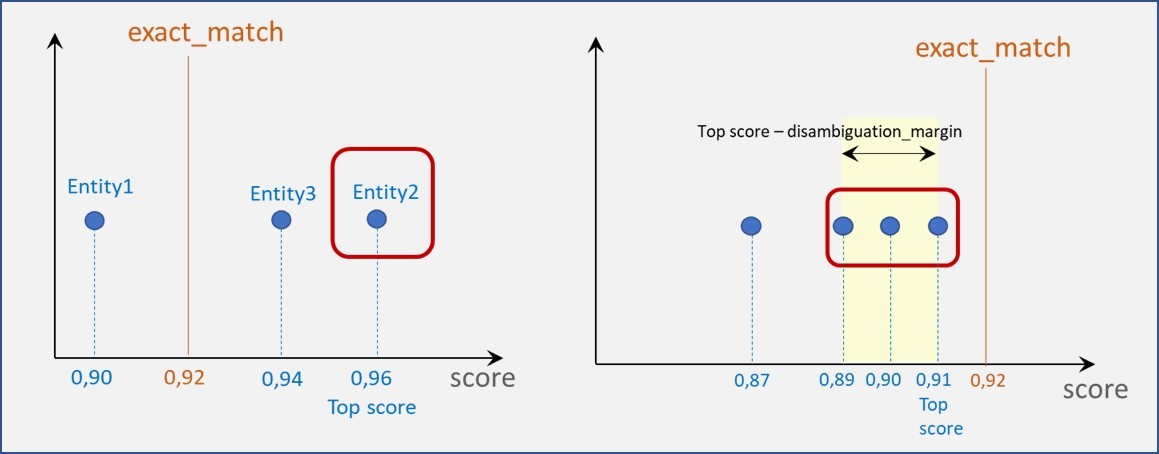
exact_match: value between 0 and 1. This value is used to check if any recognized entity score is above this value.
disambiguation_margin: value between 0 and 1 used to set an interval.
The combination of these two last parameters provides different scenarios:
The score of certain entities is equal or higher than exact_match (left graphic).
Only the entity with the best score is considered.
In case of tie (more than one entity with the highest score), all of them are returned.
The score of all entities is below the exact_match (right graphic).
Only those entities whose score is in the interval:
([top score], [top score - disambiguation_margin]) (both included) are considered.
Intent Disambiguation Adapter
Description
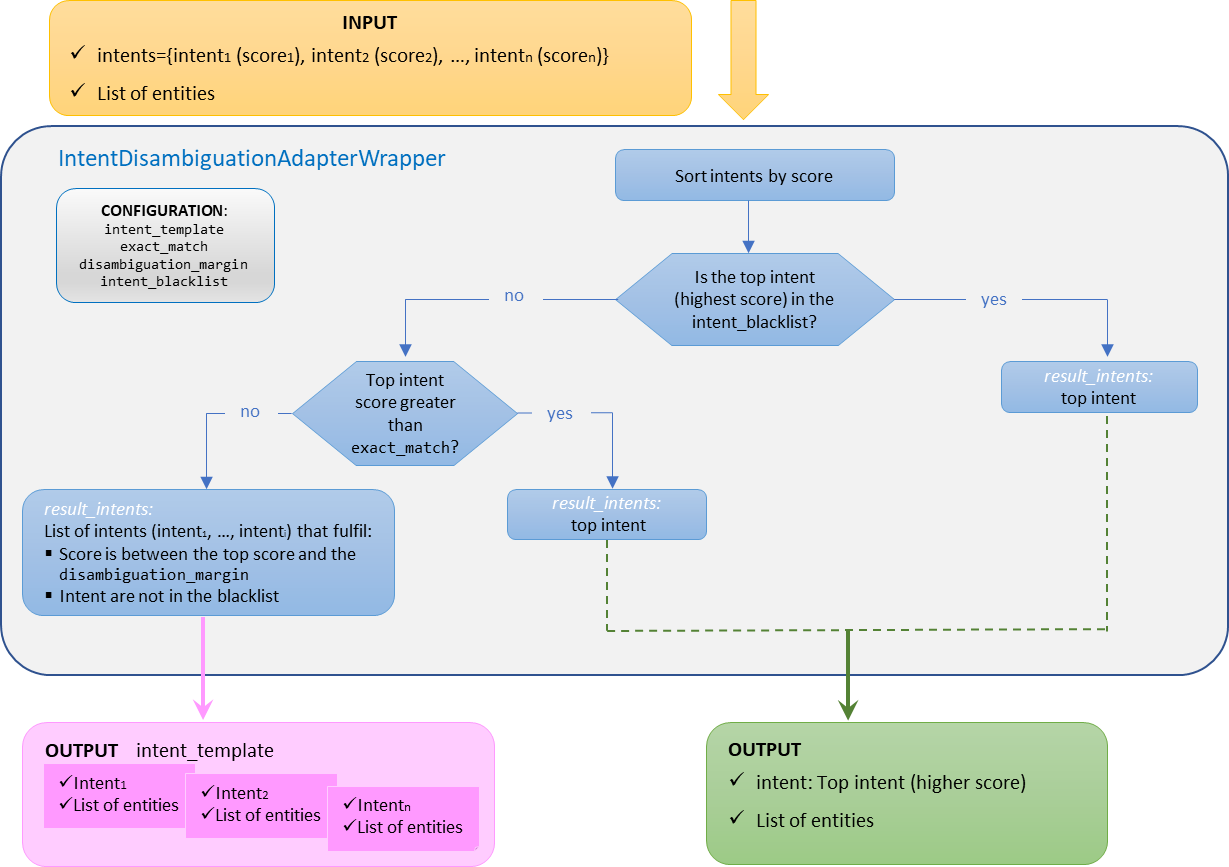
The goal of this stage is to disambiguate when, in an utterance, several intents are recognized.
If the disambiguation process cannot discern between multiple intents, then the intent returned by this stage will be a disambiguation intent as a top intent at first level. In this intent, each option is composed of one intent (that fulfils the conditions to be disambiguated) and a list of entities. These options will be presented to the user to choose the most appropriate one.
The general behavior of this stage is explained below:
The input for this stage includes: a list of intents and a list of entities.
The output for this stage includes: the different options for intents recognized during the disambiguation (options in the data model) and the original list of entities.
However, if black lists are defined, the behavior is explained in the following sub-section.
Intent disambiguation with a blacklist of intents
Aura NLP allows the integration of configurable blacklists of intents for a custom behavior of disambiguation.
In this case, the disambiguation mechanisms will not apply for the intents included in the blacklist. The use case constructors can edit a blacklist of intents in the nlp.json configuration file, filling the parameter intent_blacklist.
When there is a blacklist of intents, the disambiguation process behaves as explained below:
a. If the top scored intent is included in the intent_blacklist, the pipeline will return this unique intent (no disambiguation is launched).
b. If the top scored intent is not included in the intent_blacklist, then the predefined values of the configuration parameters come into play:
If the score of the top scored intent is higher than exact_match, then this intent is returned. In case of tie (more than one intent with the highest score), all of them are returned.
If the score of the top scored intent is lower than exact_match, then all the intents whose score is in the interval between the top score and the disambiguation_margin and are not in the intent_blacklist are returned.
In this case, the final intent will be the one described in intent_template (with a score of 1.0) and the selected intents will be placed in the options of the result.
This stage requires the following configuration in the nlp.json file for each country and channel, within the key intent_disambiguation.
The following parameters are required for this stage:
exact_match: Float number, value between 0 and 1. If the intent with the highest score is greater than this value, the result is this intent (if this intent is not included in the intent_blacklist).
disambiguation_margin: Float number. Margin between the highest score and the lower score considered for the response.
intent_template: String. Name of the intent that the stage returns when there are multiple options as response.
intent_blacklist: List of intents for which the disambiguation mechanisms will not apply. This parameter is mandatory. If there are no blacklisted intents, it will have to be an empty list.
⚠️ none intent must always be included in the blacklist, as it is not going to be offered as an option to disambiguate.
See an example of nlp.json file configuration for this stage:
General behavior of intent disambiguation stage (with no blacklist of intents)
Here is an example of the input and output data models for the intent disambiguation stage, belonging to the OpenAI embeddings stage, where the disambiguation margin is 0.2:
Output data model: the top intent is not included in the blacklist and more than one intent fulfil the condition for disambiguation » The options in the blacklist are ignored and the remaining intents are disambiguated.
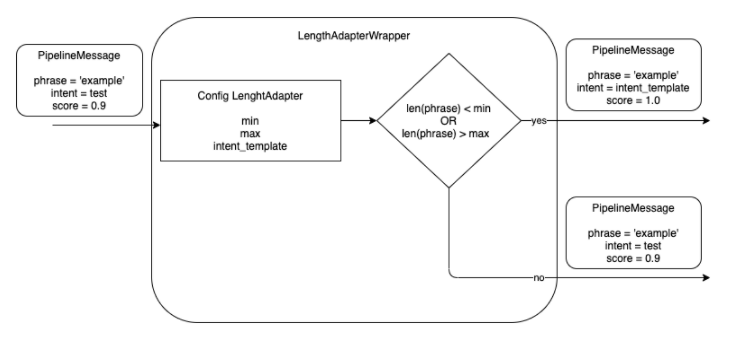
The objective of this stage is to control the maximum and minimum length of a phrase in order to avoid it to be too short or too long. The maximum/minimum number of characters is configurable.
The stage discards the out-of-range phrases, as they are not recognized properly by Aura NLP, thus saving time and resources in the recognition process.
The Length Adapter returns a configurable intent template if the length of the received phrase in the pipeline message is higher than the maximum number of configurable characters or lower than the minimum one. The intent template is also configurable.
This stage requires a specific configuration in the pipeline configuration file pipeline.json, within the args section of this file, that contains the following fields:
max: maximum number of characters in the phrase of the received pipeline message.
min: minimum number of characters in the phrase of the received pipeline message.
intent_template: intent name to be returned if the number of characters is lower than the min value or higher than max value.
You can also configure more than one stage of the Length Adapter to return different intents for max or min length characters.
1.2 - Normalizers
Aura NLP normalizers
What are Aura NLP normalizers
Text normalization is the process of transforming an Aura user’s utterance (expressed in natural language) into a standardized one to be more easily recognized by Aura NLP.
During the normalization process, certain characters are replaced/removed in order to reduce the input diversity that does not provide relevant information to Aura, such as replacing uppercase by lowercase letters, removal of punctuation marks, etc.
Within Aura NLP, there are different normalization stages which are handled as simple stages, taking part of a pipeline. Additionally, it is possible to define pipelines composed only by normalization stages suitable to be nested into another pipeline.
The following sections show the Aura NLP normalizers included in the current catalog.
Cardinality
The cardinality normalizer replaces ordinal or cardinal numbers expressed in text characters by digits. It cannot be used for percentages. For this purpose, the normalizer uses a fork of the library Microsoft.Recognizers.Text.
Example: “Put the second $” –> “Put the 2$”; “$Give me ten results” –> “$ Give me 10 results”.
This normalizer does not require any file or configuration.
This normalizer provides an appropriate format to the amount and currency in an utterance, separating the currency symbol from the amount with a single space. The implementation of this normalizer can be consulted in
https://github.com/Telefonica/Recognizers-Text.
It is able to read the following currencies: $, € and £.
Split Punct normalizer tokenizes the utterance splitting by words and punctuation marks using the NLTK framework. This framework uses NLTK recommended word tokenizer (currently an improved TreebankWordTokenizer that uses regular expressions to tokenize the text, together with PunktSentenceTokenizer that builds a model for abbreviations, collocations and words starting sentences.
The model is used to find sentence boundaries. The result is the utterance split by words separated by single spaces.
Example: “Please!!, get out now… right?” –> “Please ! ! , get out now … right ?”.
This normalizer does not require any file or configuration.
The stop words normalizer removes stop words, defined as commonly used words such as “the”, “is”, “at”, “which”, or “on” from the user’s utterance. This normalizer is able to recognize stop words from different languages using the NLTK framework.
Example: “its ok, I prefer the first or second option too” –> “ok prefer first second option”
This normalizer does not require any file or configuration.
While the previous normalizer identifies predefined stop words from a database, the current normalizer allows the generation of a customized list of stop words, leading to a more accurate recognition of the user’s utterance.
The stop words from file normalizer requires the edition of the stop_words.json file to define a list of personalized stop words for each language and channel. This file must be placed at: aura-nlpdata-[country_code]/data/[language]/[channel]/stop_words.json
The stop_words.json file performs the following tasks during the training process:
- Transforms each word to lowercase
- Removes repeated words
This normalized file is saved in a new file normalized_stop_words.json, in a temporary directory.
When Aura receives a request from the user, the behavior of the stop words from file normalizer is shown below for a specific example:
Utterance: “its ok, I prefer the first or second option too” –> “ok prefer first second option too”
⚠️ When this normalizer is used, the words to be included in the stop_words.json file must be already normalized.
⚠️ The normalization does not validate if the defined “stop word” in the file is composed by only one word. Therefore, a “stop word” could be composed by more than one word.
The Word replacer from file normalizer allows the exchange of words in the utterance.
The word replacer from file normalizer requires the edition of the word_replacer_mapper.json file to define a mapper containing the final words as a key and the list of words to replace as a value for each language and channel. This file must be placed at: aura-nlpdata-[country_code]/data/[language]/[channel]/word_replacer_mapper.json
The word_replacer_mapper.json file performs the following tasks during the training process:
- Transforms each word to lowercase
- Removes repeated words in word values
This normalized file is saved in a new file normalized_word_replacer_mapper.json, in a temporary directory.
When Aura receives a request from the user, the behavior of the word replacer from file normalizer is shown below for a specific example:
Utterance: “howdy, i want the second alternative” –> “hello, i want the second option”
⚠️ When this normalizer is used, the words to be included in the word_replacer_mapper.json file must be already normalized.
⚠️ All values should be only composed by one word. If a value contains more than one word, the normalizer raises an error in the training process. If multiple words are allowed, the normalization process is not idempotent.
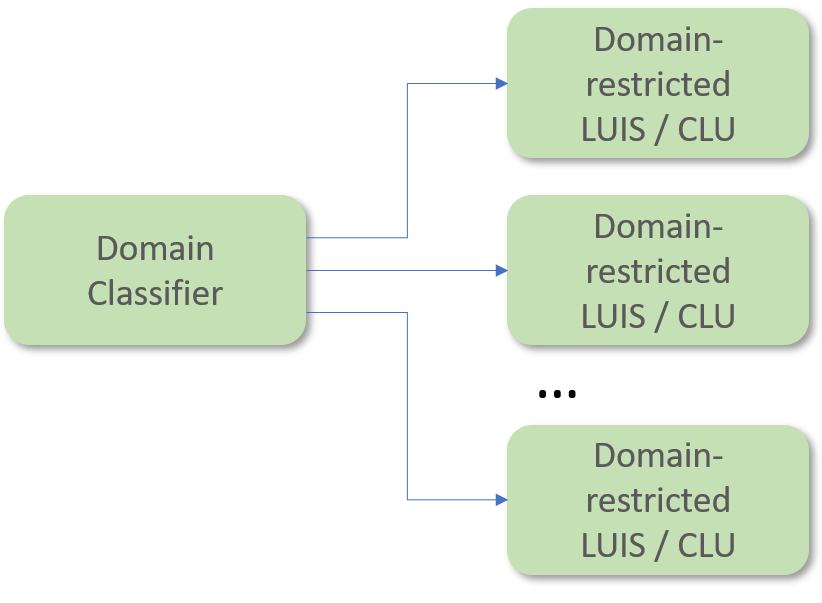
Aura NLP can include the Domain Classifier stage preceding CLU.
The Domain Classifier stage has the objective of providing a coarse and probabilistic classification of intents per pre-defined service domains (TV services, telecom services, etc.).
Including a Domain Classifier just before the CLU stage allows to have several apps, each of them expert on a specific domain (domain-restricted CLU). Once the user’s query is classified in its corresponding domain, it will be finely recognized by the CLU app pointed out by the Domain Classifier.
The Domain Classifier requires one training file called dispatcher.tef.json.
This file has the following fields:
metadata: metainformation such as name, modification date, domain or country of the linguistic model under consideration.
intents: dictionary, where:
Keys: domain name
Values: list of all the training statements (sentences, phrases or isolated words) under that particular domain.
The defined domains and statements must be the same as the ones used to train CLU in different instances. However, whereas each domain is trained in a different CLU app, the training for the Domain Classifier consists of all the training examples condensed in a single file and, instead of having the intent names as dictionary keys, it will have the domain names as dictionary keys.
To add a new domain, it is necessary to append it in the instance_map property of CLU configuration.
In addition, the training and test set files for the CLU stage must be generated including the new domain and this domain must be included, together with the statements, in the dispatcher.tef.json file.
It is recommendable to add comments (using double hash ‘## intent_name ##’) with the intent name, instead of removing it. In this way, it would be easier to know where the training statements of a given intent start from.
Put intents and utterances in the same order as in the CLU training. In that way, it would be easier to control changes.
Update the date of the file in order to know when the last modification was made.
Configuration
This stage requires the following configuration in the nlp.json file:
model_name: name of the algorithm used to train the model. NBayes, Rlogistica and RandomForest are the only values allowed.
apply_cv: this field indicates if the training uses cross-validation or not through true/false values.
n_cv_folds: number of folds for cross-validation.
fit_params: this field can have true/false values. If true, at the end of the training a file is created with the params used.
model_params: used as optional arguments for the algorithm selected.
tv_ratio: value between 0 and 1 indicating the percentage of test statements (sentences, phrases or isolated words) that composes the test set file.
pseudo_seed: value to initialize the seed in order to split training/test sets.
ngram_min: minimum ngrams used for internal term frequency.
ngram_max: maximum ngrams used for internal term frequency.
1.4 - Grammars
Grammars stage
Description of Grammars
Grammars provide an exact and lightweight utterance’s recognition method that offers a deterministic approach: specific utterances from the users are recognized if they are included in Grammars.
This approach makes Grammars interesting for Aura NLP, due to the existence of specific utterances from Aura users that must be recognized by Aura (such as common utterances from users or difficult ones that are hardly recognized by an intent recognition stage such as CLU).
This stage needs the following training files for each language and channel:
Dico: .dic files. These files include standardized content and must not be modified.
Grammar: .grf files, generated by Unitex.
[entity_extraction_mapper.json]
In addition, if local grammars are used, you must generate two additional files in order to evaluate the compatibility between the global and the local grammars. These two files are placed in the test_grammar folder:
commons/testset.json. This file is used for checking that both grammars, global and local, recognize the same test set statements. You must fill in the test set with key statements, as shown in the following example:
["call 600586375","turn on the light"]
disjoints/testset.json. This file is used for checking that the test set statements are only recognized by the global grammar (if the statements do not apply to the local grammar scope). You must fill in the test set with key statements, as shown in the following example:
["watch coco on tv"]
Configuration
This stage requires one of the following configurations per channel in the nlp.json file:
Use this configuration to define a single intent prefix with a pre-defined string.
In this example, the string intent is defined as the intent prefix in the mp channel.
Use this configuration to define a list of possible intent prefixes for the intent name.
The items passed inside the list intent_matches can be explicit strings or regular expressions written in string
format that the intent name must start with, according to the pattern passed in the regex. In order to define a regex
for the intent prefix, start the string with the keyword regex: and then add the regular expression.
In this example, the strings tef.int. or intent. are the two possible intent prefixes that the intent name must
start with in the mp channel.
There are two mutually exclusive allowed parameters per channel in the configuration file. They are defined below:
intent_prefix: prefix to be added to the intent determined by the grammar.
intent_matches: a list of strings with possible prefixes to be added to the intent determined by the grammar.
The strings passed can be explicit strings or regex written in string format. If a regex is passed, it must contain
the keyword regex: at the beginning of the string to be processed as a regular expression.
1.5 - Standard NER
Standard NER stage
What is Standard NER?
Standard Named Entity Recognition (Standard NER) is a process based on machine learning for information extraction that seeks to locate and classify named entities in a text into pre-defined categories.
The input for Standard NER is the normalized user’s utterance. It searches for entities in the utterance and categorizes the recognized words in pre-defined categories (labelling).
The first step when using Standard NER is the creation of dictionaries of entities that are knowledge bases (KB) used to train the NER to recognize, extract and label entities from the user’s utterance. Once the NER is properly trained, it will act as an intelligent system able to think by itself and recognize entities not previously existing in the dictionaries.
Moreover, Standard NER takes into account the entity context (considering not only the analysis of the isolated word but also the left and right words).
Which movies do you have with Clint Eastwood as actor?
Which movies do you have with Clint Eastwood as director?
Standard NER training flow
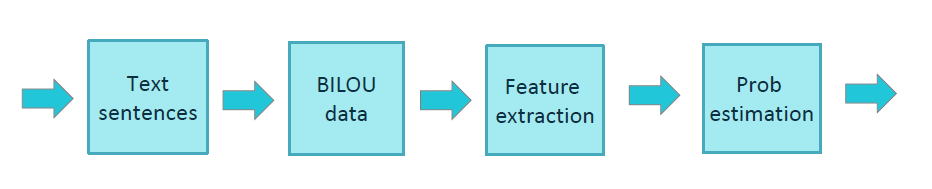
The training process for Standard NER is schematically shown in the figure below.
Aura Standard NER uses the BILOU tagging scheme for encoding information in a set of labels. BILOU encodes the Beginning, Inside and Last token of multi-token chunks while differentiates them from unit-length chunks.
The feature extraction phase extracts features from tokens, therefore helping their characterization and recognition. This process uses diverse ways to discriminate tokens with the purpose of extracting named entities: Cases; Numbers; Part of speech (PoS); Dictionary entries; Word itself. The feature extraction can also use features from adjacent words in order to take into account the entity context in the decision-making.
When the tokens are recognized as pre-defined entities, Standard NER replaces these tokens by labels. Therefore, the output generated is the user’s utterance tagged in the following way:
Standard NER input
Standard NER output
I want to watch the movie The Matrix
I want to watch the [ent.audiovisual_genre] [ent.audiovisual_film_title]
Standard NER is also capable of recognizing multi-token entities. (i.e., “Out of Africa”). However, Standard NER has a limitation: It can recognize an entity composed of a maximum of 6 tokens.
In the previous example the format indicates that, in the NLP recognition process, four stages are in charge of the entity extraction: Standard NER, Grammar, CLU and Gazetteer NER. But for a specific entity type, ent.audiovisual_film_title, the entity extraction is only done by CLU, and the stages Standard NER, Gazetteer NER and Grammar ignore it.
The name of the corresponding stage must be defined as shown in the example above.
The default key is not mandatory. If a specific entity type is not declared specifically or there is no default key within the entity_extraction_mapper.json file, then every entity of this type is discarded.
Configuration
This stage requires the following configuration in the nlp.json file.
The Standard NER config is distributed between the training-sner section (config fields for the training stage) and the ner section (fields for the production phase), with the following fields:
apply_cv: this field indicates if the training uses cross-validation or not through (true/false).
n_cv_folds: number of folds for cross-validation.
fit_params: this field can have true/false values. If true, at the end of the training a file is created with the params used.
model_params: used as optional arguments for the algorithm selected.
algorithm: name of the training algorithm, with the next allowed values:
lbfgs: gradient descent using the L-BFGS method
l2sgd: stochastic Gradient Descent with L2 regularization term
ap: averaged Perceptron
pa: passive Aggressive (PA)
arow: adaptive Regularization of Weight Vector (AROW)
verbose: boolean value to enable trainer verbose mode.
max_iterations: integer value with the maximum number of iterations for optimization algorithms.
tv_ratio: value between 0 and 1 indicating the percentage of statements (sentences, phrases or isolated words) that composes the test set file.
pseudo_seed: value to initialize the seed in order to split training/test sets.
explore_n_features: parameter used for the model evaluation.
repeat: parameter of BILOU algorithm that defines the number of repetitions for each value.
n_context_words: number of context words used in the BILOU algorithm.
phone_number_entity_type: type of entity to be assigned to an entity recognizer as phone number.
Additionally, for the configuration of dictionaries, two aditional fields can be included optionally:
urm_type_entities: from all the URM entities, in this section developers should indicate which ones they want to be downloaded.
headers_ignore: list with all the headers to be ignored.
1.6 - Gazetteer NER
Gazetteer NER stage
What is Gazetteer NER?
Gazetteer NER is a stage defined in the NLP recognition process as an alternative engine to NER for entities recognition. This stage is based on deterministic entity detection: it recognizes entities only based on their presence in the dictionaries, matching terms in the dictionaries with a user’s utterance.
Moreover, Gazetteer NER has been designed with entity-level discrimination capabilities, therefore enhancing its selectiveness by allowing it to detect only instances for a given entity type.
Gazetteer NER stage can appear in a pipeline in parallel to Standard NER (merging both results according to a fixed criteria) or sequentially (letting one engine detect entities not covered by the previous NER engine).
This stage is also capable of recognizing multi-token entities. (i.e “Out of Africa”). However, it has a limitation, as Gazetteer NER can recognize an entity composed of a maximum of 6 tokens.
No configuration is required for the Gazetteer NER in the nlp.json file.
1.7 - Full Entity
Full entity stage
What is Full Entity?
Full Entity is defined as a token or a multi-token that univocally corresponds to a specific Aura entity, this is the case when an entire utterance corresponds to a unique entity.
An example of Full Entity is the case of a user’s utterance as “Frozen” or “Ice Age”.
When part of an NLP pipeline, the Full Entity stage develops the following process:
The pipeline searches in the EntityMapper, that is, a database where Aura Full Entities are pre-defined.
If the utterance is recognized as a “full entity”, then the score is 1.0.
If the utterance is not recognized as a “full entity”, then the score is 0 and the pipeline proceeds through another path for the entity recognition.
The Full Entity Recognition is always preceded by NER, meaning that the input to Full Entity is a normalized user’s utterance, with labelled and classified entities.
Moreover, the Full Entity recognizer is able to identify the user’s intent, if the entity is associated to an established domain of intents (i.e., if the recognized entity is a film title, Full Entity identifies the intent as search). This process is done through a mapping file mapper_entities_intent.json which is defined in the correspondent configuration section.
Full entity stage requires the file mapper_entities_intent.json. It is a dictionary where:
Keys: entity types
Values: intent mapped with this entity type in case the user’s input corresponds to the entity at issue.
There can be four situations in which Full Entity is not be able to map the entity with an intent. Therefore, the pipeline flow continues to the next stage for the recognition of the intent:
Value is an empty string "" (entity with no intent assigned)
Value is null
Value is false
Entity type is not declared in file
Any other value, including the intent None, is recognized with score 1.0.
NLP Global Team recommends including always all entity types and being consistent when assigning the option.
If an entity should map None, declare it by adding None to ensure that there are no wrong potential recognitions.
OpenAI embeddings is a stage capable of recognizing the user’s statement and finding the one that most resembles it.
This stage allows using semantic search technology based on OpenAI capabilities, thus improving clearly Aura recognition capabilities.
This semantic search uses embeddings, which are real-valued vectors of numbers that represent the meaning and the context of tokens (in the case of Aura, text blocks) in such a way that words with similar meaning are expected to have similar vector representation. Embeddings work with concepts rather than with keywords. The information structured in these vectors allows OpenAI algorithms to make an optimized semantic recognition of the input texts.
To do so, it is necessary to use the embeddings method of OpenAI, a Microsoft service in charge of working with Machine Learning models and to use the Qdrant database to be able to feed all the frequently asked questions (FAQs).
The user’s utterance recognition through OpenAI embeddings has two major steps:
Training: Sets of structured questions and answers are extracted from data sources such as FAQs; afterwards, the OpenAI embeddings process is performed on those questions and, finally, the Qdrant knowledge base is fed with all of them.
Matching: Once the knowledge base has been loaded, it is necessary to publish it. This enables an endpoint to the Qdrant knowledge base, which can be used in the client application. This endpoint accepts a user’s question, performs the OpenAI embedding process and queries within Qdrant responding with the best answer from the knowledge base, along with a confidence score of the match.
⚠️ In the current release, this stage must not compete in parallel with other NLP recognition stages (CLU, Exact match, etc.) in the pipeline, in the way that the scores of each stage are compared.
⚠️ In order to use the OpenAI embeddings stage, it has to be previously enabled in the aurak8s installer, following the guidelines in the document Enable OpenAI deployment.
In terms of time, obtaining the embeddings through OpenAI and storing them in the Qdrant database is fast. Note that when training from the package, embeddings are not recalculated.
⚠️ In order to use the OpenAI embeddings stage, OpenAI has to be previously enabled in the aurak8s installer, following the guidelines in the document Enable OpenAI deployment.
On the other hand, if new training files are uploaded to Azure, all the embeddings are recalculated.
For OpenAI embeddings recognizer, two kinds of files are required: training and testing ones:
On one hand, training files placed in folder: aura-nlpdata-[country_code]/data/[language]/[channel]/openai-embeddings/training/ with extension .xlsx or .xls are used for training.
On the other hand, test files placed in folder: aura-nlpdata-[country_code]/data/[language]/[channel]/openai-embeddings/test/ with extension .xlsx or .xls are used for testing.
Configuration
This stage requires the following configuration in the nlp.json file:
openai_embeddings_recognizer: This field is used to configure the OpenAI embeddings recognizer stage.
openai: Specifies the OpenAI model to be used. This variable supports the following values:
model_base: Base model to be used. Check azure documentation to know more about values supported.
model_version: Version of the model to be used.
subscription_key: This value is replace automatically in training process.
deployment_name: This value is replace automatically in training process.
search_params: Specifies the parameters to be used in the database search process.
knn: Number of nearest neighbors to return.
exact: If set to true, will perform exact search, which will be slower but more accurate.
distance: Type of distance to calculate between vectors. This variable supports the following values: Cosine, Euclid, Dot.
database: Database to be used. This variable supports the following values: qdrant.
dataset_name: Dataset to be used. This value will change automatically.
intent_template: Intent name to return the response.
entity_label_template: Entity label to return the response.
entity_type_template: Entity type to return the response.
score_factor: Parameter used to weight the score of the response returned by OpenAI to be used during the winning response selection.
1.9 - Exact Match
Exact Match stage
What is Exact Match?
Exact match is a deterministic stage. Its purpose is to recognize the users’ requests with a 100% accuracy so as to match them with a specific and unequivocal intent.
When part of an NLP pipeline, the Exact Match stage develops the following process:
The pipeline loads the exact_match.json file, that defines certain intents and their associated utterances.
If the utterance is recognized as an “exact match”, then the score will be 1.
If the utterance is not recognized as an “exact match”, then the score will be 0 and the pipeline will proceed through another path.
As explained in the Exact Match description, this stage requires the file exact_match.json, that must include:
Specific intents.
Utterances that we want to be recognized as these specific intents.
An example of exact_match.json is shown below, for the case of several specific utterances such as “more information regarding control plans” or “discover control plans in Vivo” that we want Aura to recognize as the intent.plans.portability intent.
{'intents':{'intent.plans.portability':['more information regarding control plans','discover control plans','discover control plans in Vivo']'intent.tracking.waterfall':['intelipost eco berrini']}}
Configuration
No configuration is required.
1.10 - CLU
Conversational Language Understanding (CLU) stage
What is Microsoft CLU?
Intent recognizers are defined as specific NLP stages used to detect the intent in a user’s utterance.
Conversational Language Understanding (CLU) is a cloud-based API service that applies custom machine-learning intelligence to a user’s conversational and natural language text to predict the overall meaning and pull out relevant and detailed information.
CLU interprets the user’s goals (intents) and extracts valuable information from the utterance (entities),
for a high quality, nuanced language model.
Currently, Aura NLP includes two CLU features to recognize the user’s intent and associated entities:
Intent recognition: statistical recognition.
Entity recognition: declared CLU entities.
Therefore, from the user’s utterance, CLU returns the user’s intent and entities as an output, as well as the score
(number between 0 and 1 that shows the accuracy of the recognition process).
Regarding the stage training, the duration depends on the specific project, although in certain scenarios in can take up to four hours.
On the other hand, in CLU allows:
- Training all domains in parallel, so the maximum training time corresponds to the time taken by the “slowest” project.
- Reuse trainings, so if only one domain is changed, the rest are not retrained.
Specific CLU behavior of CLU with entities
CLU Azure services are able to recognize differents entities over the same part of the utterance or share parts of a utterance between
differents entities but for consistency, CLU stage applies the following rules in these cases:
When an entity is completely a substring of another entity, that is removed and the longest entity is preserved.
When any entity has partial collisions (share parts of utterance or similar), preserve both entities.
When two entities have exactly the same text but different types, preserve both entities.
When two entities have exactly the same text and same type, preserve the entity with more info (the one that has different canon that text/name).
intent_confidence_threshold: Float between 0.0 (by default) and 1.0 used by CLU to set a score threshold to determine the validity of a recognized intent.
domain: Domain name of this training file.
intents: JSON dictionary, where:
Keys: Intents.
Values: List with statements (sentences, phrases, words) to train the model.
These statements could contain entities, using 2 formats:
If an external entity extractor is used: [entity_type]
If CLU is used to extract entities using learned entities: [entity_value:entity_type]. This way of adding entities, build a set of entities of learned type.
entities: JSON dictionary, where:
Keys: Entities.
Values: Dict entities parameters to train the model. The feasible values (combination, lists, regex, prebuilts, learned) correspond to entity types for CLU and are described below:
lists: Dict field to include entities of list component type.
required: Boolean field to indicate if it is necessary to recognize an entity using this component. By default, is false, so in this case it is not necessary to include it.
values: Dict with canon as key and aliases as values.
regex: Dict field to include entities of regex component type.
required: Boolean field to indicate if it is necessary to recognize an entity using this component. By default, is false, so in this case it is not necessary to include it.
values: Dict with all regex components used to recognize this entity.
required: Boolean field to indicate if it is necessary to recognize an entity using this component. By default, is false, so in this case it is not necessary to include it.
values: List with all prebuilt components used to recognize this entity.
required: Boolean field to indicate if it is necessary to recognize an entity using this component. By default, is false, so in this case it is not necessary to include it.
The entities defined as learned are not necessarily defined as list, regex or prebuilts and vice versa.
Example of clu_trainingset.[domain].tef.json:
{"metadata":{"language":"es-es","description":"CLU trainingset for test domain","version":"dev","date":"2023-10-11","intent_confidence_threshold":0,"domain":"domain.default"},"intents":{"intent.common.greetings":["Hi","Hi, how are you?","Hello, what is up?"]},"entities":{"ent.audiovisual_sports_circuit":{"combination":true,"lists":{"values":{"names":["Le Mans","Misano"]}},"regex":{"values":{"expression-1":"circuito de [a-zA-Zãéíó]+( [a-zA-Zãéíó]+)*"}}}}}
Complete example of clu_trainingset.[domain].tef.json
{"metadata":{"language":"es-es","description":"CLU trainingset for test domain","version":"dev","date":"2023-10-11","intent_confidence_threshold":0,"domain":"domain.default"},"intents":{"intent.default.test1":["## comment","# Lanza este canal,","Esta [película:ent.audiovisual_genre] lánzala a la [tele:ent.device_tv] [ahora:ent.time_instant]","Quiero que me lances este [capítulo:ent.audiovisual_tv_episode_number] de la [temporada 3:ent.audiovisual_tv_season_number] a mi [tv:ent.device_tv]","¿Puedes lanzarme la [etapa:ent.audiovisual_sports_unit] del [Dakar:ent.audiovisual_sports_season_motor] a la [tele:ent.device_tv]?"],"intent.default.test2":["[ent.audiovisual_best]","Busca algún [ent.audiovisual_genre]","Dime alguna [ent.audiovisual_subgenre] por favor","Me gustaría ver una [ent.audiovisual_genre] que protagonice [ent.audiovisual_actor]","Ponme algún [ent.audiovisual_genre]","Quiero una [ent.audiovisual_genre] chula entre las de [ent.audiovisual_releases]","[ent.audiovisual_genre] sobre [ent.audiovisual_subgenre] y poder","¿Puedo ver [ent.audiovisual_actor]?","¿Tienes algo de [ent.audiovisual_subgenre] por favor?","Nos apetecería ver [ent.audiovisual_tvseries_title] [ent.audiovisual_tv_season_number] [ent.audiovisual_tv_episode_number]","¿Me puedes encontrar de la [ent.audiovisual_tv_season_number] el [ent.audiovisual_tv_episode_number] de [ent.audiovisual_tvseries_title]?","Busca la de [ent.audiovisual_sports_circuit]","Me gustaría ver algún [ent.audiovisual_sports_unit] de [ent.audiovisual_sports_unit], ¿cuál puedo ver?","Quería ver los [ent.audiovisual_sports_unit]","[ent.audiovisual_sports_player_driver] [ent.audiovisual_sports_circuit]","Hazme alguna recomendación con [ent.audiovisual_actor]","¿Qué [ent.audiovisual_genre] recomiendas?","Recomiéndame una [ent.audiovisual_sports_unit] de [ent.audiovisual_sports] o [ent.audiovisual_sports] para ver en la [ent.device_tv]","Recomiéndanos una [ent.audiovisual_subgenre] para [ent.time_interval]","¿Puedes recomendarme algo de [ent.audiovisual_genre] de [ent.audiovisual_subgenre] del [ent.time_interval_future]?"],"intent.default.test3":["Comenzar a reproducir","Aura vete al [ent.audiovisual_channel]","¿Podrías ponerme [ent.audiovisual_channel]?","Déjame ver de la [ent.audiovisual_tv_season_number] el [ent.audiovisual_tv_episode_number] de [ent.audiovisual_tvseries_title]","Necesito que me pases el [ent.audiovisual_tv_episode_number] de la [ent.audiovisual_tv_season_number] de [ent.audiovisual_tvseries_title] al [ent.device_tv]","Prefiero la [ent.audiovisual_subgenre] [ent.audiovisual_film_title]","Ver el [ent.audiovisual_genre] de [ent.audiovisual_documental_title]","¿Puedo ver [ent.audiovisual_film_title]?","Estoy interesado en ver esta [ent.audiovisual_tv_season_number]","Preferiríamos la [ent.audiovisual_tv_season_number] de esta [ent.audiovisual_genre]","Ver la [ent.audiovisual_tv_season_number]","Dame la que es en [ent.audiovisual_sports_circuit]","Pon a reproducir el [ent.audiovisual_sports_unit] del [ent.audiovisual_sports_team]","Quiero que reproduzcas la [ent.audiovisual_sports_unit] de [ent.audiovisual_sports_team]","¿Puedo ver la [ent.audiovisual_sports_unit]?","Que pongas la [ent.audiovisual_sports_season] [ent.time_instant]","Quiero que pongas la [ent.audiovisual_sports_unit] del [ent.time_interval]","¿Se puede ver la [ent.audiovisual_sports_unit] de [ent.audiovisual_sports_player_rider] de la [ent.time_interval_past]?"],"intent.default.test4":["Afín a [ent.audiovisual_tvshow_title]","Del estilo [ent.audiovisual_tvshow_title]","[ent.audiovisual_genre] que sean iguales a [ent.audiovisual_tvshow_title]"],"intent.default.test5":["Empieza de nuevo en el [ent.device_mobile]","Ponme el principio en la [ent.device_tv]","Ponme esta [ent.audiovisual_tv_season_number] desde el comienzo","Reproducir desde el principio la [ent.audiovisual_genre]","Inicia la reproducción de [ent.audiovisual_documental_title] desde el comienzo","Quiero que reinicies de [ent.audiovisual_documental_title]","Volver al principio de [ent.audiovisual_tvshow_title]","Vuelve a poner el [ent.audiovisual_sports_unit] de [ent.audiovisual_sports_season]"],"None":["6587234578164589234729878432874624","Pillata micropoliz gusta","gracioso y lento","graciosa y lenta","gracisa lenta","graciso lento","gtgt","gustan y gusy gusanillo di"]},"entities":{"ent.audiovisual_sports":{"combination":true,"lists":{"values":{"teamed":["baloncesto","fútbol"],"individual":["golf","tenis"]}}},"ent.audiovisual_sports_circuit":{"combination":true,"lists":{"values":{"names":["Le Mans","Misano"]}},"regex":{"values":{"expression-1":"circuito de [a-zA-Zãéíó]+( [a-zA-Zãéíó]+)*"}}},"ent.audiovisual_tv_episode_number":{"combination":true,"regex":{"required":false,"values":{"expression-1":"[0-9]+ capítulo","expression-2":"[a-z]*(último)* capítulo"}}},"ent.time_interval":{"combination":false,"prebuilts":{"required":true,"values":["DateTime"]}}}}
clu_testset.[domain].tef.json
JSON file where the statements for testing CLU must be included when the training_kind property in CLU configuration
is set to manual.
The extension .tef.json identifies these files as both JSON files and TEF format.
If there is only one domain, the file is named as: clu_testset.default.tef.json
The test set is a JSON file where:
Keys: Intents.
Values: List with testing utterances.
The testing statements must not be part of the training set, they should include linguistic variations of the training phrases and as authentic as possible (user’s logs).
Each domain declared in this file must be defined in the instance_map property of CLU configuration.
CLU testset should be saved in the same directory as the training file(s).
All intents must be represented in the testset, including the None intent.
Example of clu_testset.[domain].json:
{"intent.common.greetings":["Hello","What is up?","Hola","Good morning","Hello there"]}
Configuration
This stage requires the following configuration in the nlp.json file.
fetch_entities: It indicates whether you want to receive the entities from CLU or not.
score_factor: Parameter used to weight the score of the response returned by CLU to be used during the winning response selection. For example, if score_factor = 0,5 and the score returned by CLU is 1, the final score is 1*0,5=0,5.
n_clu_responses: Number of recognized intents that CLU can provide. By default, it is 1. It is used in the intent disambiguation stage, where CLU offers more than one intent that can be disambiguated afterward.
training_kind: Kind of evaluation training. Values manual and percentage are defined below:
percentage: a percent (defined in test_split_percentage field) of training set will be used to test train.
test_split_percentage: If we set training_kind as percentage, it is required to fill this field to set the percentage of training phrases that will be used to test this stage.
This field accepts an integer between 0 and 100.
instance_map: It replaces the project_name and subscription_key with the appropriate value of the CLU service. This replacement process is performed automatically.
project_name: Name of the project that contains CLU application. This field is automatically generated.
subscription_key: key needed to connect to CLU. This field is automatically generated.
1.11 - Embeddings Domain Classifier
Embeddings Domain Classifier stage
What is Embeddings Domain Classifier?
The Embeddings Domain Classifier stage is capable of classifying an input request into specific service domains (TV services, telecom services, etc.) from the ones pre-defined in Aura. This will help Aura NLP better understand the user’s requests and, ultimately, to more accurately resolve each received utterance.
A use case can include the Embeddings Domain Classifier stage at the beginning of an Aura NLP pipeline, before an intent recognition stage, so a user’s request (i.e., “I have problems with my wifi”) is firstly classified as belonging to a specific domain (in the example, “wifi”). Once classified as described, it can be precisely recognized by the most appropriate intent recognition stage for that domain.
The Embeddings Domain Classifier is based on OpenAI semantic search technology for the recognition of the domain in the user’s request. This semantic search uses embeddings, which are real-valued vectors of numbers that represent the meaning and the context of tokens (in the case of Aura, text blocks) in such a way that words with similar meaning are expected to have similar vector representation. Embeddings work with concepts rather than with keywords. The information structured in these vectors allows OpenAI algorithms to make an optimized semantic recognition of the input texts.
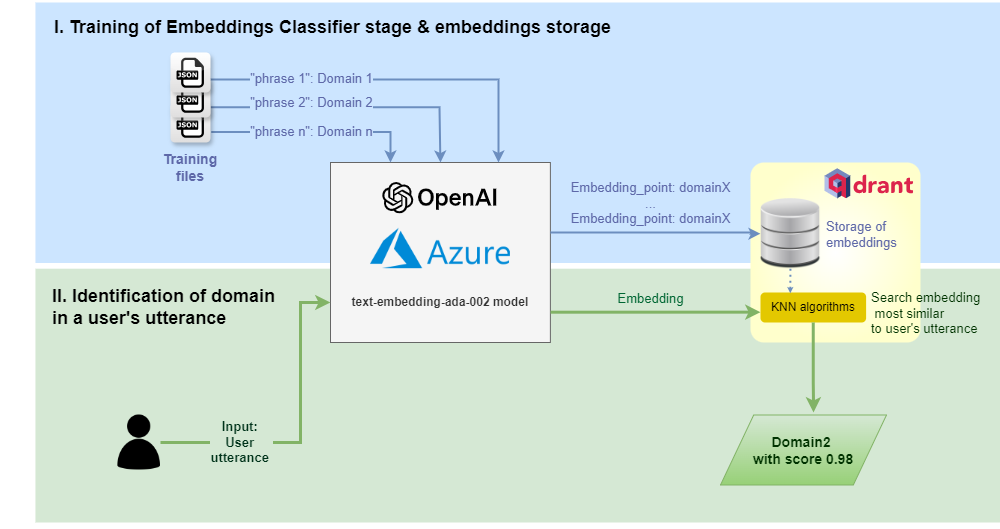
The process is schematically shown in the figure below and explained afterwards:
The Embeddings Domain Classifier stage is trained to map utterances with domains.
The Azure OpenAI embeddings model text-embedding-ada-002 generates embeddings (vectors) from the training statements.
If Aura receives a request from the user, Azure OpenAI generates an embedding from the input utterance.
This embedding is sent to Qdrant and returns the k-nearest neighbors (KNN). A search is done for the identification of the embedding (domain) more closely aligned with the user’s utterance embedding, together with its score. Different ways can be used to calculate the distance between vectors, which are defined in the configuration.
The output from Qdrant is the identified domain and the associated score.
⚠️ In order to use the Embeddings domain classifier, OpenAI has to be previously enabled in the aurak8s installer, following the guidelines in the document Enable OpenAI deployment.
The following sections include the necessary path and configuration for the Embeddings Domain Classifier stage, as well as the files required to train it.
The Embeddings Domain Classifier stage requires one training file called dce_training.json and one testing file called dce_testset.json.
These files have the following fields:
metadata: metainformation such as name, modification date, domain or country of the linguistic model under consideration.
intents: dictionary, where:
Keys: domain name
Values: list of all the training statements (sentences, phrases or isolated words) under that particular domain.
These files placed in folder: aura-nlpdata-[country_code]/data/[language]/[channel]/domain_classifier_embeddings.
The defined domains and statements must be the same as the ones used to train CLU in different instances. However, whereas each domain is trained in a different CLU app, the training for the Embeddings Domain Classifier consists of all the training examples condensed in a single file and, instead of having the intent names as dictionary keys, it will have the domain names as dictionary keys.
To add a new domain, it is necessary to append it in the instance_map property of CLU configuration.
In addition, the training and test set files for the CLU stage must be generated including the new domain and this domain must be included, together with the statements, in the dce_training.json file.
It is recommendable to add comments (using double hash ‘## intent_name ##’) with the intent name, instead of removing it. In this way, it would be easier to know where the training statements of a given intent start from.
Put intents and utterances in the same order as in the CLU training. In that way, it would be easier to control changes.
Update the date of the file in order to know when the last modification was made.
It is recommended to avoid writing duplicate intents in the same domain and also to avoid duplicate intents after normalisation. In case this happens, one of the intents shall be omitted.
It is important not to write the same intent for different domains and also to avoid duplicate intents after normalisation. In this case an error will occur and the training stage will fail.
Configuration
This stage requires the following configuration in the nlp.json file:
openai_embeddings_domain_classifier: This field is used to configure the Embeddings Domain Classifier stage.
openai: Specifies the OpenAI model to be used. This variable supports the following values:
model_base: Base model to be used. Check Azure documentation to know more about supported values.
model_version: Version of the model to be used.
subscription_key: This value is replaced automatically in the training process.
deployment_name: This value is replaced automatically in the training process.
search_params: Parameters to be used in the database search process.
knn: Number of nearest neighbors to return.
exact: If set to true, it will perform an exact search, which will be slower but more accurate.
distance: Type of distance to calculate between vectors. This variable supports the following values: Cosine, Euclid, Dot.
database: Database to be used. This variable supports the following values: qdrant.
dataset_name: Dataset to be used. This value will change automatically.
2 - NLP connectors
Catalog of NLP connectors
NLP connectors to compose the NLP pipeline
Aura Platform Team has implemented different types connectors to join NLP stages in order to configure the pipeline.
Select your intended connector in the left menu. Each of them is characterized by its description, path, files and configuration.
Section
Content
Role in the NLP process
Description
Identification and objective of the stage in the recognition process
Descriptive purpose of the stage in the recognition process
Path
Class path (Python class) of an element (stage or connector)
The path of each stage of the pipeline must be included in the file pipeline.json for building up the NLP dynamic pipeline
File
Specific training files and test set files for the NLP stage required to train and validate the NLP model
Linguists must generate these files for the training and the validation of the NLP model during the data resources definition
Configuration
Required configuration for each NLP stage
Configuration of each stage of the NLP model
2.1 - Logical connectors
Logical connectors
Introduction
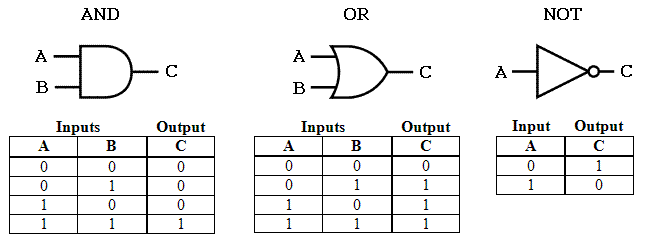
Connectors are components that connect different NLP stages and control the flow of the pipeline. Specifically, logical connectors use the logical connectives to combine different stages.
The purpose of this connector is to execute in sequential order the stages that the connector contains and to return the status false.
This connector ignores the status of the different stages which are contained.
The purpose of this connector is to execute in sequential order the stages that the connector contains and to return the status true.
This connector ignores the status of the different stages which are contained.
These connectors work as follows: Stage B input is the output of its preceding stage A, with stage B output the result of summing both stages result.
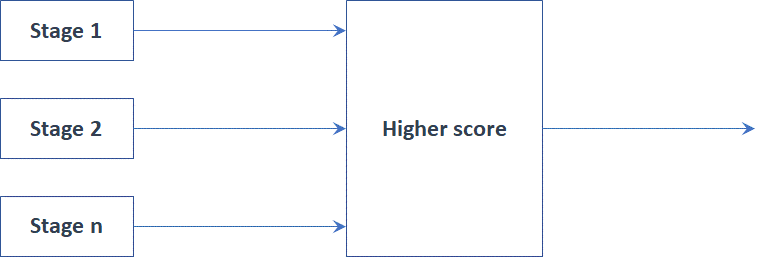
The way the different stages are connected defines how the interactions between them are carried out. For example, two or more stages can run in a simultaneous competitive way, in which the winner is the stage with higher score or stages can be executed in a sequentially way in which a first stage generates information used by the succeeding stage.
BasePipeline
Description
BasePipeline is the simplest connector in charge of the sequential execution of the different stages composing the pipeline. These stages are executed in the specified order.
Path
auracog_pipelines.pipelines.base.BasePipeline
Configuration
No configuration is required
2.2 - Selection connectors
Selection connectors
Introduction
Selector connectors allow, when included on a pipeline, to specify which path of the pipeline is applied depending on a certain parameter.
Currently, only one selection connector is developed in Aura NLP: Domain selector connector.
Domain selector connector
Description
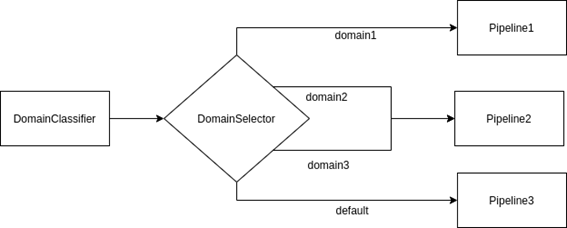
The domain selector connector allows specifying which path of the pipeline is applied depending on the recognized domain. Therefore, it has to be preceded by a domain classifier step.
In this example, once the Domain Classifier has recognized the domain, the Domain Selector stage comes into play. In case the recognized domain is “domain1”, the flow continues to “Pipeline1”. Otherwise, if domain is “domain2” or “domain3”, “Pipeline2” or “Pipeline 3” are selected respectively as the following stage.
If domain is 1, then pipeline continues with element defined in position 0.
If domain is 2, then pipeline continues with element defined in position 1.
2.3 - Disambiguation connector
Disambiguation connector
Description
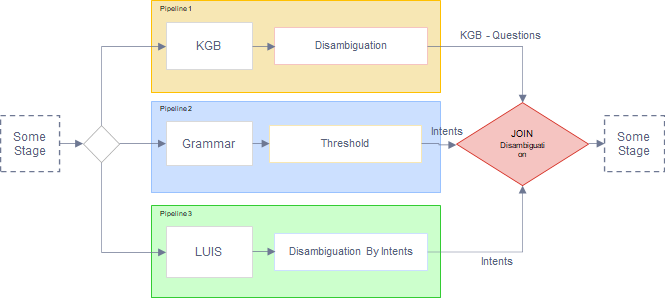
The disambiguation connector is a joint stage that allows disambiguation between different pipelines (therefore, between different recognizers).
The general behavior of this connector is shown as follows:
It executes in parallel the different pipelines.
When the execution of all the pipelines is finished, the connector will carry out a disambiguation by intents, comparing the top results from the execution of the pipelines.
However, take into account that, if there is a blacklist of intents, this behavior changes, as explained in the following section.
Disambiguation connector with a blacklist of intents
Aura NLP allows the integration of configurable blacklists of intents for a custom behavior of disambiguation.
In this case, the disambiguation mechanisms will not apply for the intents included in the blacklist.
The use case constructors can edit a blacklist of intents in the nlp.json configuration file, filling the parameter intent_blacklist.
When there is a blacklist of intents, the disambiguation connector behaves as explained below:
It executes in parallel the different pipelines, with their corresponding stages.
The recognized intents from each pipeline are extracted (unless they have a None intent).
If the top scored intent of these pipelines is included in the intent_blacklist or its score is greater than the exact_match threshold, then this intent is returned.
If the top intent is not included in the intent_blacklist, then the predefined values of the configuration parameters come into play:
All the intents between the disambiguation_margin and the top score, and not present in the intent_blacklist, are selected.
If there is only one intent, it will be returned in a pipeline message.
If there is more than one intent, a pipeline message with the intent intent_template and a score of 1.0 is assigned. This pipeline message will contain nor entities, neither domains, but it will contain all the selected intents in pipeline messages as options.
This stage requires a specific configuration in the dynamic NLP pipeline pipeline.json.
The following parameters are required for this stage:
elements: definition of every element composing the pipeline (stages and joints). It must include:
Element name. In this case, JointDisambiguation
type: It must be set to joint
classpath: path to be included in order to use this stage:
auracog_pipelines.pipelines.joint.disambiguation.DisambiguationPipeline
args section: dictionary with the following fields:
exact_match: If the intent with the highest score is greater than this value, the result is this intent. Float number.
disambiguation_margin: Margin between the highest score and the lower score considered for the response. Float number.
intent_template: Name of the intent that the stage returns when there are multiple options as response. String.
intent_blacklist: list of intents that will be removed in case there are other options. If there are no blacklisted intents it will have to be an empty list. List of strings.
See two examples of configuration for the disambiguation connector:
Catalog of NLP normalization pipelines to compose the NLP pipeline
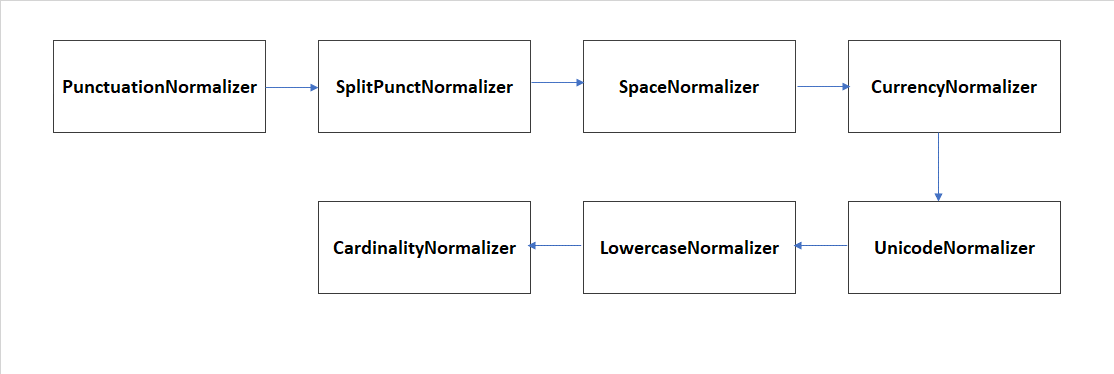
Aura Platform Team has implemented a set of normalization pipelines in order to be nested in the NLP model pipeline. They are built joining different normalization stages (normalizers).
In every use case, it is necessary to choose the most adequate normalization pipeline.
For example, if numbers are expected to be expressed with text characters (i.e., “one”), it is useful to include the normalization stage CardinalityNormalizer to turn them into digits (“1”).
Another example refers to the fact that written requests are required. In this situation, it can be important to include a normalization stage that reduces transcription mistakes.
Select your intended normalization pipeline in the left menu. Each of them is characterized by its description and configuration.
Section
Content
Role in the NLP process
Description
Identification and objective of the stage in the recognition process
Descriptive purpose of the stage in the recognition process
Configuration
Required configuration for each NLP stage
Configuration of each stage of the NLP model
3.1 - Nabro
Nabro normalization pipeline
Description and stages
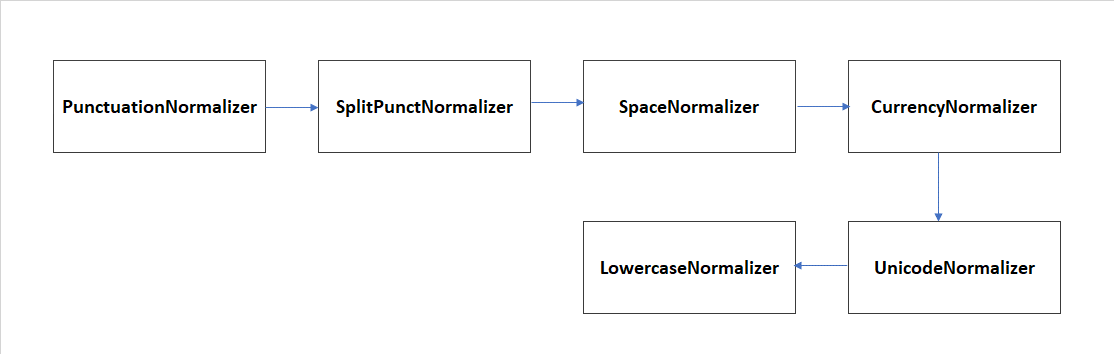
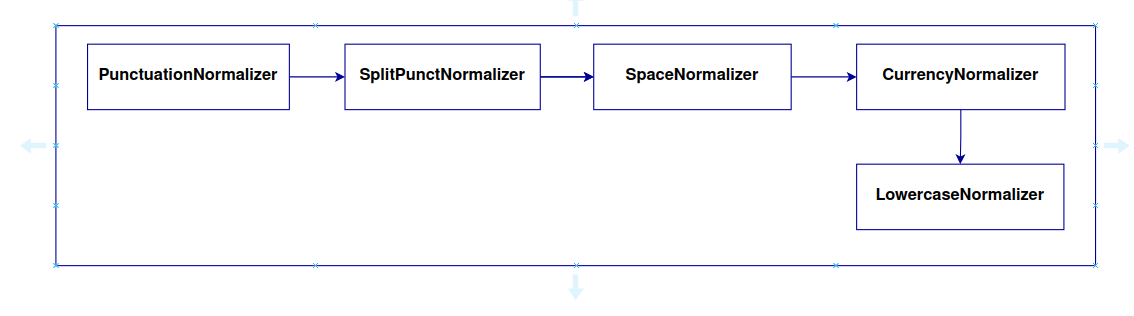
Nabro is a pipeline used for the normalization of the user’s utterance through the execution of the following normalizers:
For the specific language and channel, in the nlp field of this JSON file, the key normalizer_pipeline_class must be filled in with the value:
auracog_pipelines.pipelines.normalization.nabro.NabroPipeline
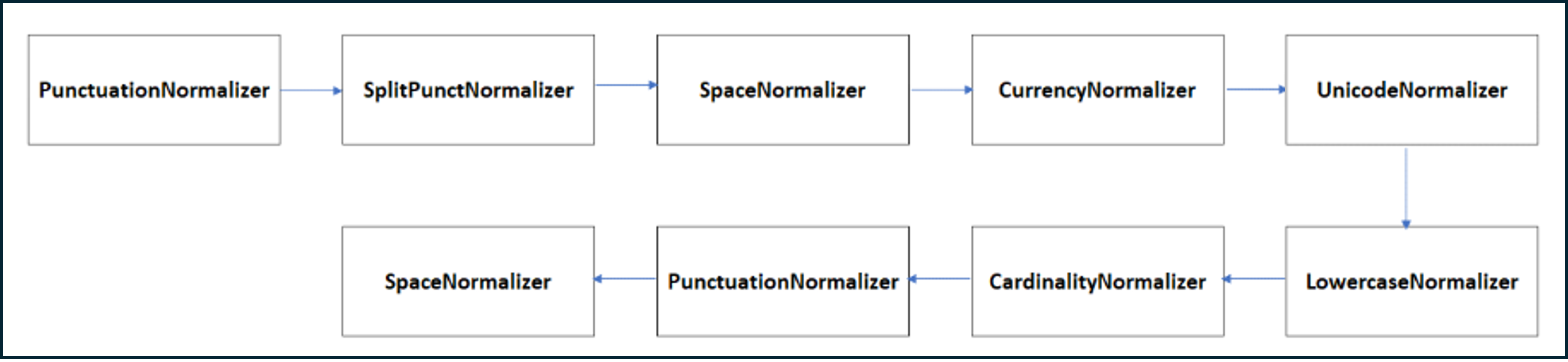
For the specific language and channel, in the nlp field of this JSON file, the key normalizer_pipeline_class must be filled in with the value:
auracog_pipelines.pipelines.normalization.narugo.NarugoPipeline
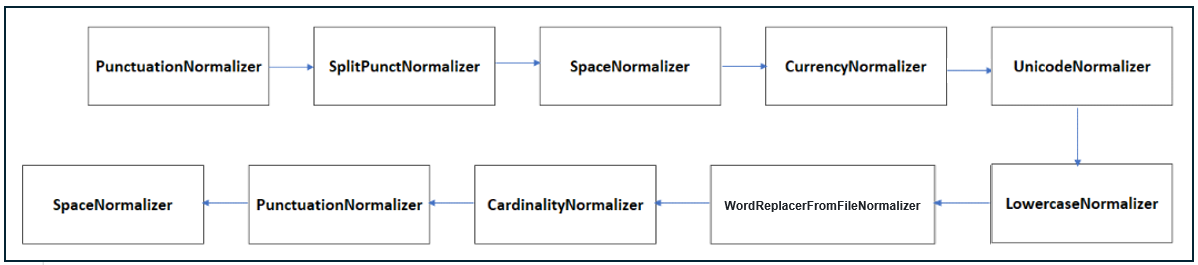
For the specific language and channel, in the nlp field of this JSON file, the key normalizer_pipeline_class must be filled in with the value:
auracog_pipelines.pipelines.normalization.naeba.NaebaPipeline
For the specific language and channel, in the nlp field of this JSON file, the key normalizer_pipeline_class must be filled in with the value:
auracog_pipelines.pipelines.normalization.nikko.NikkoPipeline
For the specific language and channel, in the nlp field of this JSON file, the key normalizer_pipeline_class must be filled in with the value:
auracog_pipelines.pipelines.normalization.niseko.NisekoPipeline
For the specific language and channel, in the nlp field of this JSON file, the key normalizer_pipeline_class must be filled in with the value:
auracog_pipelines.pipelines.normalization.norikura.NorikuraPipeline
For the specific language and channel, in the nlp field of this JSON file, the key normalizer_pipeline_class must be filled in with the value: auracog_pipelines.pipelines.normalization.noro.NoroPipeline