This is the multi-page printable view of this section. Click here to print.

Return to the regular view of this page.

Test Aura

Test Aura

Test the proper operation of Aura and its components

Introduction

Discover the different types of tests that can be executed to check the performance of Aura system or of an specific component:

1 - QA Tool

Aura QA global test set (QA Tool)

Check Aura global quality through the QA Tool. Find in this document the description and requisites for its execution and access to the guidelines for its installation, configuration and execution

⚠️ Recommended step if a new Aura Platform version is installed:
Even though you already have the QA Tool installed, it is highly recommended to reinstall the QA Tool requirements in order to assure its proper execution.

For this purpose, follow the steps in QA Tool installation guide: install requirements.

What’s the QA Tool?

The Aura Platform Team provides developers with a QA global test set (informally, QA tool) for them to check the quality of their Aura system, with their own configuration and installed use cases. This quality can be assured in two ways:

  • Verification of the optimum operation of Aura system with the OB’s configuration.
  • Verification of the proper performance of global use cases.

⚠️ Local use cases cannot be checked using the QA Tool

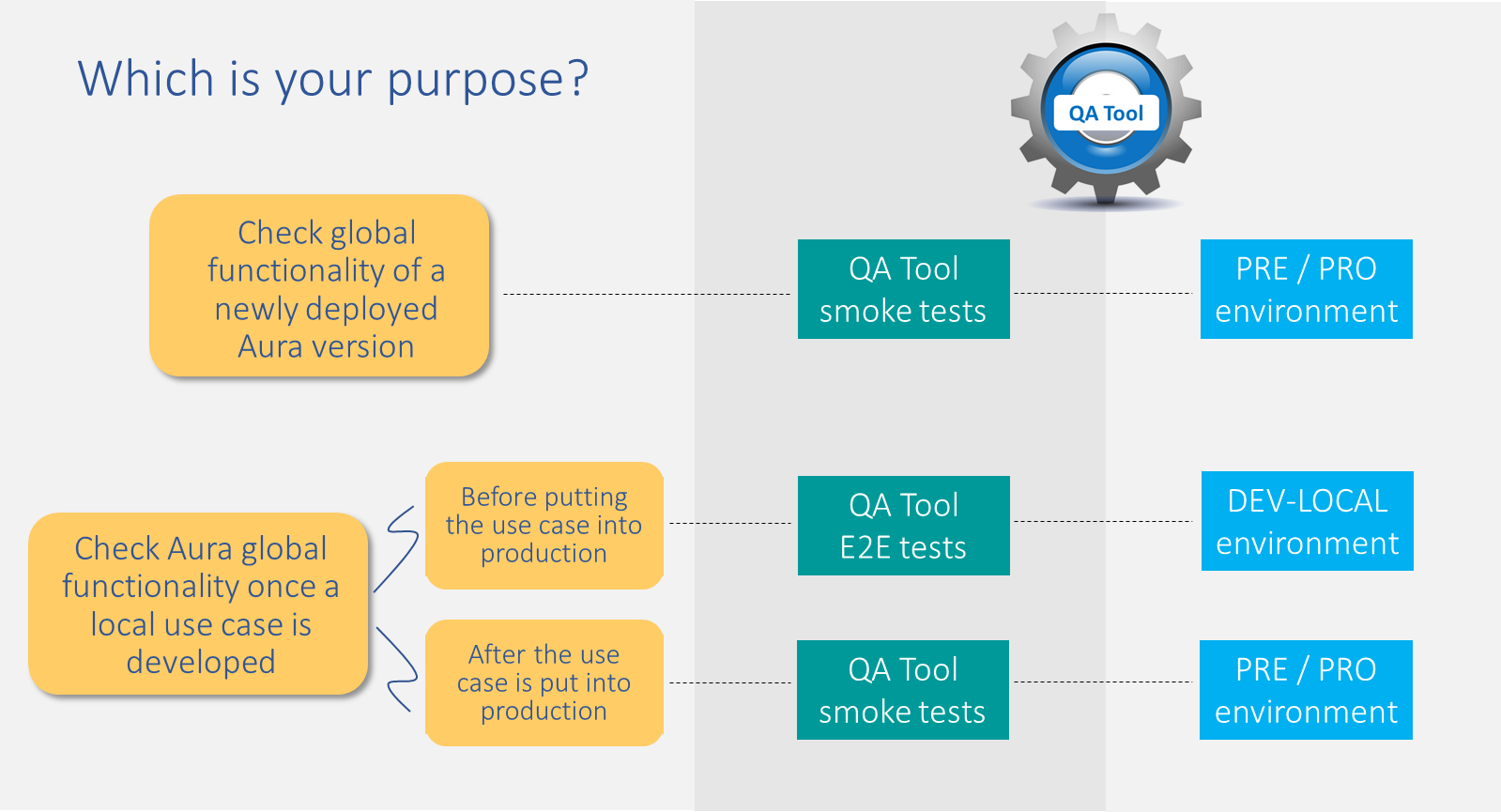
The QA tool can be configured by the OB both in pre-production/production and local environments. Each configuration is useful for a specific purpose and requires different types of tests, as detailed in the figure below. Each of them is fully defined in succeeding sections.

Use of the QA Tool

The following sections include the requisites for the QA Tool execution, as well as the description of the working directory and branches.

Moreover, consult the guidelines for:

Requisites for QA Tool execution

OBs must work with the below detailed minimum resources to execute the QA Tool:

Technological resources

The QA tests can be executed from Mac, Windows and Linux.

The required technological resources are listed below:

  • Python version: 3.10 / 3.11
  • Pip (>= 19.1)
  • virtualenv (>=15.0.0)
  • Github license
  • git (>=2.13.0)
  • tar (>=1.30)
  • kubectl (recent version)
  • Docker (recent version)
  • Docker-Compose (recent version)
  • Access to the aura-test Github repository

Aura release vs QA Tool branches

Each Aura Platform release has its own branch for the execution of the QA Tool. The name of this branch will be:
release/[release_name]
Where [release_name] must be a unique word written in lowercase letter. In case the release name contains two words, they will be unified.

For example:

  • Jimi Hendrix ➡️ release/jimihendrix
  • Nirvana ➡️ release/nirvana

QA Tool working directory and folders

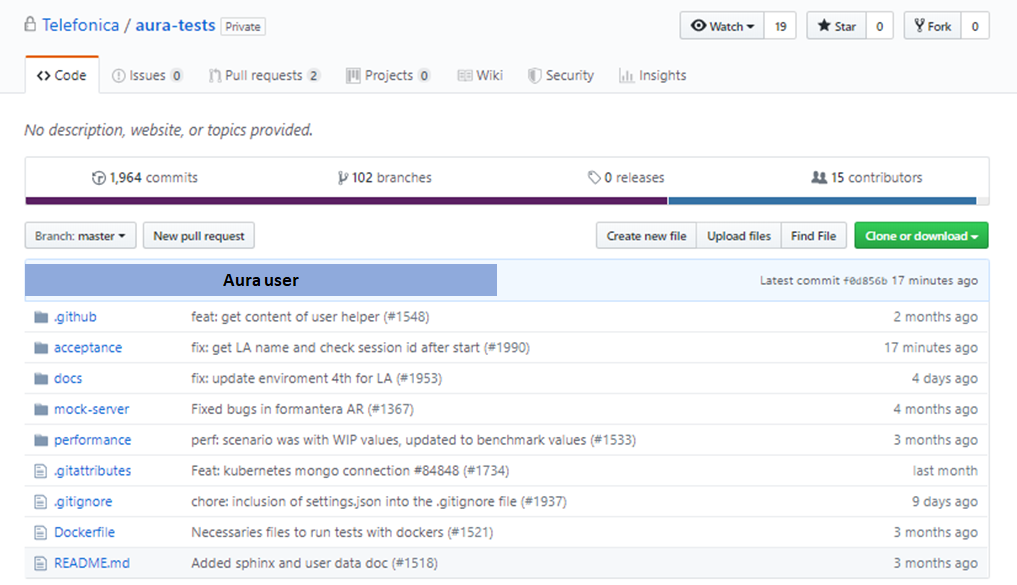
The main working directory for the execution of the QA Tool is: https://github.com/Telefonica/aura-tests

ℹ️ If the OB has any access problem, please report it to APE Team, through the established Teams chats.

  • The files from the aura-tests repository that will take part on the execution of the QA Tool are included in the folder /acceptance.
  • The remaining folders contain internal QA files that are not needed for this process:

aura-tests Github repository

📁 ~/[project_folder]/aura-tests/acceptance/

The folders that will take part in the process and their role, within the ~/[project_folder]/aura-tests/acceptance/ repository, are described below:

settings/ folder

📁 ~/[project_folder]/aura-tests/acceptance/settings/

resources/ folder

📁 ~/[project_folder]/aura-tests/acceptance/resources/

scripts/ folder

📁 ~/[project_folder]/aura-tests/acceptance/scripts/

Scripts for launching the different tests during the QA Tool execution.

_output folder

After the QA Tool execution, this folder will be generated containing the results from the different tasks:

  • Environment credentials
  • Versioning of module installed
  • Users’ configuration
  • Text resources (POEditor)
  • Output files

1.1 - QA Tool installation

QA Tool installation guide

Guidelines for the installation of Aura QA Tool

Download the QA test set from a Github repository

In order to download the QA tool from one specific branch in the GitHub repository, follow these instructions:

  1. Open a terminal.
  2. Change the current working directory to the location where the cloned directory will be placed.
  3. Type the following command: git clone https://github.com/Telefonica/aura-tests.git
  4. Press “Enter”. The local clone will be created.
    $ git clone https://github.com/Telefonica/aura-tests.git
    Cloning into 'aura-tests'...
    remote: Enumerating objects: 1095, done.
    remote: Counting objects: 100% (1095/1095), done.
    remote: Compressing objects: 100% (235/235), done.
    remote: Total 30040 (delta 962), reused 947 (delta 850), pack-reused 28945
    Receiving objects: 100% (30040/30040), 55.39 MiB | 3.28 MiB/s, done.
    Resolving deltas: 100% (23490/23490), done.
    
  5. Check the specific branch for your release in Aura release vs QA Tool branches and switch to this branch using the following instructions:
    git checkout <branch_name>
    

Create and activate the new virtual environment

Make available a new virtual environment through these steps:

  1. Create a virtual environment for the project:
    $ cd <project_folder>
    $ virtualenv venv
    
  2. Activate the virtual environment:
    $ source venv/bin/activate
    
  3. If it is required to deactivate the virtual environment:
    $ deactivate
    

Install requirements

⚠️ Remember that it is highly recommended to reinstall the QA Tool requirements if you have installed a new Aura Platform release

Once the virtual environment is activated, install the packages required for the QA tests execution in the current environment. The installation must be done inside the activated virtual environment.

The requirements are included in the file requirements_ob.txt, within the folder: https://github.com/Telefonica/aura-tests/blob/master/acceptance

The steps to do that, are described below:

$ cd [project_folder]/aura-tests 
$ cd acceptance/ 
$ pip install -r requirements_ob.txt

ℹ️ Please, ignore no critical warning or errors messages that can be displayed, depending on the system versions.

1.2 - QA Tool execution

Aura QA Tool execution guide

Guidelines for the configuration and execution of the QA global test set (QA Tool)

Configure the QA Tool

Four main steps are required for the QA Tool configuration, which are described in the following sections.

Test properties file encryption

Configuration of environment credentials

  1. For the configuration of the QA Tool, certain credentials are required, which are included in a JSON file. Ask for this file to the team that carries out the deployment: Global Deployment Team or OB’s Local Deployment Team.

    ⚠️ The credentials file is confidential. If the Local QA Team needs to share it through GitHub, they can use git-crypt for file encryption, as a suggestion.

  2. Unencrypt the credentials file, whose name is:
    [country_code]-[env]_info.json
    Otherwise, an error message will appear: “No JSON object could be decoded”.

  3. Place the file in the following folder:
    ~/[project_folder]/aura-tests/acceptance/settings/[country_code]/
    Where:

    • [country_code]: code of the corresponding country br, de, es, uk

Configuration of Kubernetes

  1. Ask the corresponding Deployment Team for the kubernetes config file: [env].yml

  2. Unencrypt the file. Otherwise, an error message will be shown:
    “‘utf8’ codec can’t decode byte #xee: invalid continuation byte”

  3. Place the unencrypted file in the following path:
    ~/[project_folder]/aura-tests/acceptance/settings/[country_code]/[env].yml

ℹ️ After installing an Aura platform release, you will find these two files needed for running the QATool in the output_install folder:

  • Once infrastructure is created, the kubeconfig file is generated.
  • Once the full installation is finished, a [country_code]-[environment]_info.json file is found.

Please, check the Aura Deployment documentation for further details:

Users’ configuration

For the configuration of users, create a new file in the following path: ~/[project_folder]/aura-tests/acceptance/settings/[country_code]/[country_code]-[environment]-users.json

It is important to follow the above mentioned syntax: [country_code]-[environment], where:

  • [country_code]: code of the corresponding country: br, de, es, uk
  • [environment]: environment name located in the properties file.

For example, for UK: (uk-dev-local-properties.json):

"environment": {
  "name": "uk-dev-local"
}

For the previous example, the path and file should be:
~/[project_folder]/aura-tests/acceptance/settings/uk/uk-dev-local-users.json

Afterwards, the file must be filled in with the different users’ configuration.

The detailed procedure is included in the document Configuration of users’ data.

This JSON file must include two differentiated sections:

  1. users_definition: definition of the different type of users and their associated parameters: type, msisdn, userid, subscription, etc.
  2. user: different use cases attached to the users defined in the previous section.

An extract of this file for UK is shown below: uk-pre-users.json

Extract of `uk-pre-users.json` file
"users_definition": {
    "user1": {
       "subscription_type": "prepaid",
       "user_type": "monomsisdn",
       "msisdn": "+44xxxxxxxx",
       "userid": "42058633",
       "uid": "325851",
       "email": user1@GMAIL.COM,
       password: ****
    },
    "user2": {
       "subscription_type": "postpaid",
        "user_type": "monomsisdn",
       "msisdn": "+ +44xxxxxxxx ",
        "userid": "126529396",
        "uid": "509652361",
       "email": user2@GMAIL.COM
       password: ****
    },
"users": {
"default": "user1",
"common":{
     "prepaid":"user1",
     "postpaid":"user2"
       },
       "data_usage":{
            "prepaid_monomsisdn_single":"user1",
            "prepaid_monomsisdn_multiple":"",
            "postpaid_monomsisdn_single":"user2",
            "prepaid_monomsisdn_multiple":"",
            "prepaid_multimsisdn_single":"",
            "postpaid_ multimsisdn _multiple":"",
            .
       },
"billing":{
            "prepaid_one_bill":"user1",
            "postpaid_no_bills":"user2",
            .
       },
"bundle":{
...
}

Moreover, some examples are included in the Github repository for the Local QA Teams that can be checked:
~/[project_folder]/aura-tests/acceptance/settings/[country_code]/[country_code]-[environment]-users.json

The mandatory authorization_id is supported by the QA Tool. This parameter is included in the properties file and can have the values optional or mandatory. The default value for authorization_id is optional.

"4p": {
  "authorization_id": "mandatory"
}

There are three different ways through which the user can authenticate:

  • MSISDN
  • Uid + password
  • Email + password

Detailed information can be found in Configuration of users’ data.

Input yaml resources and translation of input sentences for each use case

The ~/[project_folder]/aura-tests/acceptance/resources/language/ path, contains yaml files with the texts of the resources used in the tests, depending on the configured language.

Each yaml file will contain a different section for each [language_code]: es-es, en-gb, pt-bror de-de. See the example below.

At this stage, it is required to check these resources (statements) and update them in case it is necessary.

As an example, for the data_usage resource, the file questions_novum.yaml placed in the above mentioned path contains the label for the country and the texts for each language:

data_usage:
  question:
    en-gb: why do i experience slower speed when i browse?
    pt-br: Quantos dados celulares tenho disponíveis?
    de-de: Zeig mir meinen Verbrauch vom Datenvolumen
    es-es: Consumo de datos actual

Find below two examples where this file should be updated:

  • Test failure with result: “I can’t understand” or similar. Check the text inside the yaml file and update it if it is not appropriate for the specific use case.
  • Test failure with result: “es-es do not exist”. This means that the label for the country does not exist in the yaml file. Add the label and text for that resource.

Generate and export POEditor resources

The expected answers for a specific use case provided by aura-bot are generated in POEditor (both aura-bot resources and its associated texts).

At this stage, you should follow these steps:

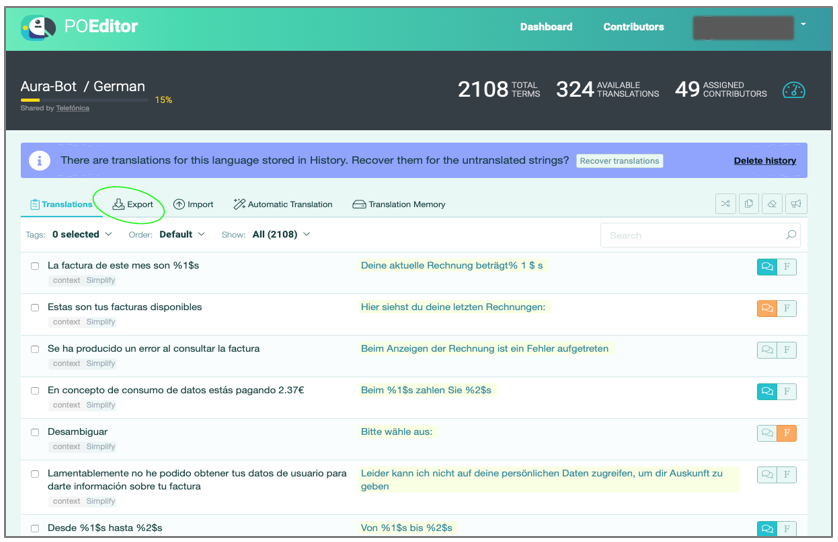
  1. Export from POEditor the JSON file containing resources and texts.

    • Ask the Aura Platform Team or Delivery Team for the file exported from POEditor containing the above-mentioned resources and texts. However, if the OB has admin credentials, the file can be directly downloaded from POEditor.
    • Select the “Export” option in the POEditor project.

    Export option in POEditor

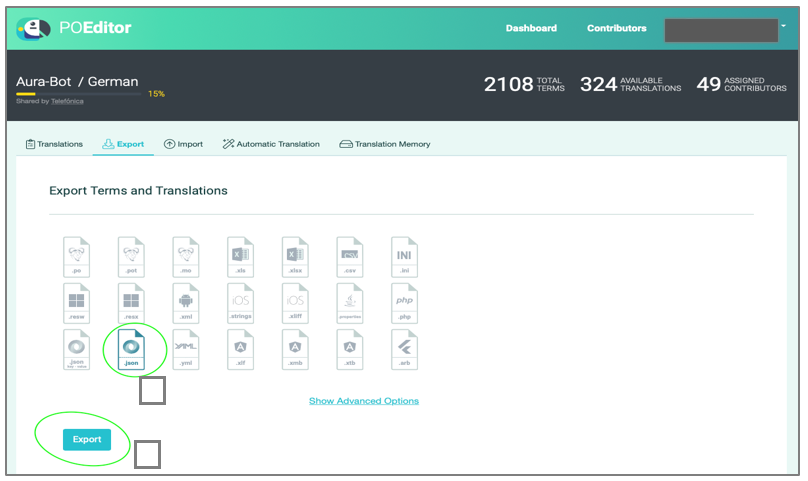
  • Select the JSON icon and press “Export”.

    Selection of JSON format file

  1. Rename this file as poeditor_terms.json and put it in the following path: ~/[project_folder]/aura-tests/acceptance/resources/poeditor/poeditor_terms[language_code].json_
    Where [language_code] can be: es-es, en-gb, pt-br, de-de.

If you need to modify these resources or create new ones, do it directly in the JSON file.

An example of POEditor resource in poeditor_terms.json file is shown below:

   {
        ... 
    },     
    {
       "term": "Currently you do not have data services",
       "definition": "Currently you do not have data services",
       "context": "data_usage",
       "term_plural": "",
       "reference": "services:services.usage.noData",
       "comment": ""
    },
    {
        ... 
    }

Execute the QA Tool

The current section includes the stages for the execution of the QA Tool from DEV-LOCAL, PRE and PRO environments.

⚠️ For the execution of tests, it is required to activate VPN full.

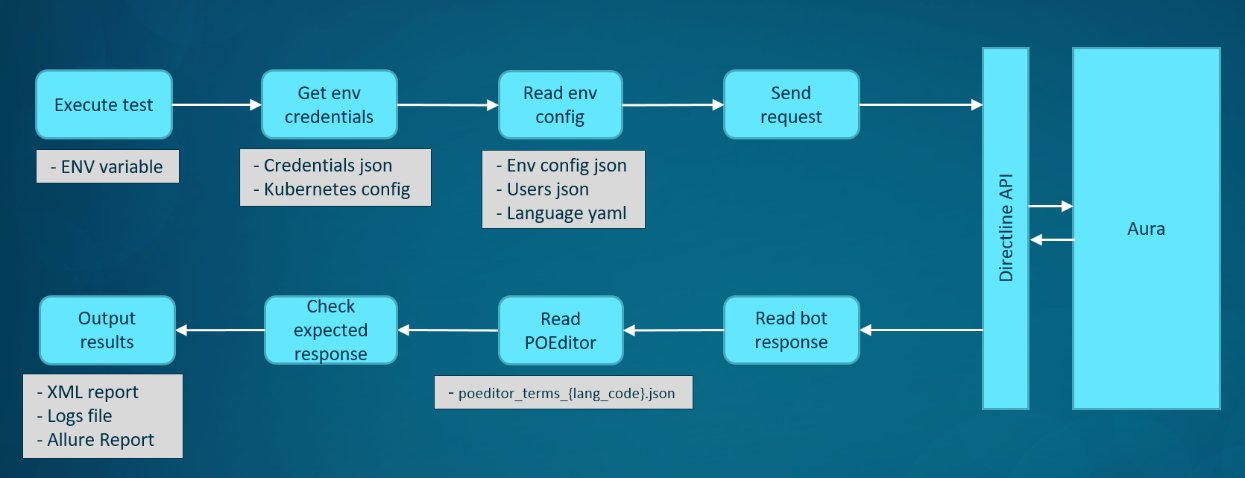
The following figure schematically shows this process for the execution of the QA test set:

QA Tool execution flowchart

Set and check global variables

Environment variables

Firstly, it is required to set ENV as global variable. The format depends on the specific environment:

  • For DEV-LOCAL environments: [country_code]-dev-local-[channel]
  • For PRE environments: [country_code]-pre-[channel]
  • For PRO environments: [country_code]-pro

Where:

  • [country_code]: code of the corresponding country: br, de, es, uk.

For setting the ENV variable within the activated virtualenv, execute the following command:

$ export ENV=<country_code>-<environment>
For example, for Brazil and del DEV-LOCAL environment: 
$ export ENV=br-dev-local

Properties file

The properties.json file is located in the following paths, depending on the environment.

  • DEV-LOCAL environments:
    ~/[project_folder]/aura-tests/acceptance/settings/[country_code]/[country_code]-dev-local-[channel]-properties.json
  • PRE environments: ~/[project_folder]/aura-tests/acceptance/settings/[country_code]/[country_code]-pre-[channel]-properties.json
  • PRO environments:
    ~/[project_folder]/aura-tests/acceptance/settings/[country_code]/[country_code]-pro-[channel]-properties.json

⚠️ Local QA Teams should not modify this file.

Execute QA Tool smoke tests

Remember that smoke tests are a sub-set of tests from the QA Tool that can be executed in PRE / PRO environments

Follow the instructions below for launching specific smoke tests.

$ cd <project_folder>/aura-tests
$ ./acceptance/scripts/run_tests_ob.sh -f <features> -t <feature_tag> -e -D behave_additional_tags=@smoke

Where:

  • -f [features]: parameter for the execution of an individual or a specific set of features. This set can be specified using the relative path to the folder that contains the desired feature files.
    For example:

    • -f features/end_to_end/novum/general

    The features are allocated in this folder:
    ~/[project_folder]/aura-tests/acceptance/features/

  • -t [feature_tag]: optional parameter that can have different values for several subsets of tests. The list of current allowed values is:

    • -t bugs: to execute the tests about bugs.

Some examples are shown below:

  • Execution of smoke test cases for data_usage feature:
    ./acceptance/scripts/run_tests_ob.sh -f features/end_to_end/novum/simplify/data_usage.feature -e -D behave_additional_tags=@smoke
    

⚠️ Check if the _output folder is not previously created. In the opposite case, it is necessary to ensure that this folder has the correct permissions:

$ ls -lrth <project_folder>/aura-tests/acceptance | grep _output
drwxr-xr-x  25 my_user  staff   800B 30 ene 13:30 _output
If the folder is returned in the previous command, set the correct permissions:
$ chmod R 755 <project_folder>/aura-tests/acceptance/_output

Execute QA Tool end-to-end tests

Remember that E2E tests include a complete QA Tool test set and are executed in DEV-LOCAL environment.

For the end-to-end test execution, launch the following commands:

$ cd <project_folder>/aura-tests
$ ./acceptance/scripts/run_tests_ob.sh -f [path to feature folder or file]

Where:

  • -f [features]: parameter for the execution of an individual or a specific set of features. This set can be specified using the relative path to the folder that contains the desired feature files.
    For example:
    • -f features/end_to_end/novum/general

The features are allocated in this folder:
~/[project_folder]/aura-tests/acceptance/features/

Each feature file can be launched alone using the its relative path. For example:

-f features/end_to_end/novum/general/alfred.feature

Different examples are shown below:

  • Execution of end-to-end tests for Novum channel:
    ~/[project_folder]/aura-tests/acceptance/scripts/run_tests_ob.sh -f features/end_to_end/novum
  • Execution of data_usage feature:
    ~/[project_folder]/aura-tests/acceptance/scripts/run_tests_ob.sh -f features/end_to_end/novum/simplify/data_usage.feature

1.3 - Output from QA Tool

Output from QA Tool: logs and reports

Learn how to manage the content of logs and results reports generated after the execution of the QA global test set

QA Tool general results reports

After the QA Tool execution, the results of the tests are copied to the local folder:
📁 ~/[project_folder]/aura-tests/acceptance/_output/

Four general files are generated for every test executed:

Logs file

📁 ~/[project_folder]/aura-tests/acceptance/_output/acceptance_int.log

This is a pass/fail test. When a test fails, a bug is generated and it is required to evaluate its criticity level. The logs will detail the errors that have occurred and the specific part of the code which is failing.

Example of logs file
INFO    2019-07-11 09:50:59,576 [commons] Installed versions in co-pre environment:
Aura: 3.5.0
Bot: 7.14.1
Authentication API: 3.0.0
Configuration API: None
User Helper: 3.2.0.214
NLP: 1.0.9 (container), 1.116.0 (pipelines)
.......
>>>>>>>>>>>>>>>>>>>>> Request >>>>>>>>>>>>>>>>>>>
	> Method: POST
	> Url: https://auth.co-pre.baikalplatform.com/token?grant_type=urn%3Aietf%3Aparams%3Aoauth%3Agrant-type%3Ajwt-bearer&assertion=eyJhbGciOiJSUzI1NiIsInR5cCI6IkpXVCIsImtpZCI6ImM0MmFjMWM0NmYxZDRlMjExYzczNWNjN2RmYWQ0ZmY4MzkxMTEwZTkifQ.eyJzdWIiOiI1MDczOSIsImlzcyI6Imh0dHBzOi8vYWktc2VydmljZXMtcHJlLWNvLmF1cmFjb2duaXRpdmUuY29tL2F1cmEtc2VydmljZXMvdjEvb3BlbmlkL2lzc3Vlci8iLCJwdXJwb3NlIjoiY3VzdG9tZXItc2VsZi1zZXJ2aWNlIGRldGVjdC1hYm5vcm1hbC11c2FnZSBkZXZpY2UtcmVjb21tZW5kYXRpb25zLXYzIHNpbS11cGdyYWRlLXN1Z2dlc3Rpb24gYXVyYS1yZWFkLWluc2lnaHQtZXZlbnRzIGlkZW50aWZ5LWN1c3RvbWVyIiwiZXhwIjoxNTYyODM1MDYyLCJpYXQiOjE1NjI4MzE0NjIsInNjb3BlIjoiIiwiYXVkIjoiaHR0cHM6Ly9hdXRoLmNvLXByZS5iYWlrYWxwbGF0Zm9ybS5jb20vIn0.Zqsc16RZYFFr-GGTTDSAGgb3numx9bhSgdpT0OOCJudJsm20nyXXLxj-MUITK4Pxhnmkc7zwFd0WHJkt955C6NxygwUpURYpxcN2vq7ISewATi-QnYzfcgUUeYXxGTCOb6wWdpYbviOnU_5g1KfaVtC8noYtYkRuspQCBLH8Ao4ZCPuTdCFJdJRb49ujIuL821qTJxrqkDTpzoFH-2_xdVfx_c2OdeCObFWIVFmXMfFW3X_5K0EIP0beBh4yyRoIsWdKFpGWWQ4Ebrx0tawtTTp8Sob42sSxyP4ADN83GpjodPtv-g4KJDoch3LSqDkbvFKzTnt1v2NVY1nqNPtV_w
	> Query params: [(u'grant_type', u'urn:ietf:params:oauth:grant-type:jwt-bearer'), (u'assertion', u'eyJhbGciOiJSUzI1NiIsInR5cCI6IkpXVCIsImtpZCI6ImM0MmFjMWM0NmYxZDRlMjExYzczNWNjN2RmYWQ0ZmY4MzkxMTEwZTkifQ.eyJzdWIiOiI1MDczOSIsImlzcyI6Imh0dHBzOi8vYWktc2VydmljZXMtcHJlLWNvLmF1cmFjb2duaXRpdmUuY29tL2F1cmEtc2VydmljZXMvdjEvb3BlbmlkL2lzc3Vlci8iLCJwdXJwb3NlIjoiY3VzdG9tZXItc2VsZi1zZXJ2aWNlIGRldGVjdC1hYm5vcm1hbC11c2FnZSBkZXZpY2UtcmVjb21tZW5kYXRpb25zLXYzIHNpbS11cGdyYWRlLXN1Z2dlc3Rpb24gYXVyYS1yZWFkLWluc2lnaHQtZXZlbnRzIGlkZW50aWZ5LWN1c3RvbWVyIiwiZXhwIjoxNTYyODM1MDYyLCJpYXQiOjE1NjI4MzE0NjIsInNjb3BlIjoiIiwiYXVkIjoiaHR0cHM6Ly9hdXRoLmNvLXByZS5iYWlrYWxwbGF0Zm9ybS5jb20vIn0.Zqsc16RZYFFr-GGTTDSAGgb3numx9bhSgdpT0OOCJudJsm20nyXXLxj-MUITK4Pxhnmkc7zwFd0WHJkt955C6NxygwUpURYpxcN2vq7ISewATi-QnYzfcgUUeYXxGTCOb6wWdpYbviOnU_5g1KfaVtC8noYtYkRuspQCBLH8Ao4ZCPuTdCFJdJRb49ujIuL821qTJxrqkDTpzoFH-2_xdVfx_c2OdeCObFWIVFmXMfFW3X_5K0EIP0beBh4yyRoIsWdKFpGWWQ4Ebrx0tawtTTp8Sob42sSxyP4ADN83GpjodPtv-g4KJDoch3LSqDkbvFKzTnt1v2NVY1nqNPtV_w')]
	> Headers:
{
    "Authorization": "Basic YXVyYS1ib3Q6U2pVVTdLY2dWdEllOWdGMHVjanlJakJJRA=="
}
DEBUG   2019-07-11 09:51:02,262 [connectionpool] Starting new HTTPS connection (1): auth.co-pre.baikalplatform.com
DEBUG   2019-07-11 09:51:02,950 [connectionpool] https://auth.co-pre.baikalplatform.com:443 "POST /token?grant_type=urn%3Aietf%3Aparams%3Aoauth%3Agrant-type%3Ajwt-bearer&assertion=eyJhbGciOiJSUzI1NiIsInR5cCI6IkpXVCIsImtpZCI6ImM0MmFjMWM0NmYxZDRlMjExYzczNWNjN2RmYWQ0ZmY4MzkxMTEwZTkifQ.eyJzdWIiOiI1MDczOSIsImlzcyI6Imh0dHBzOi8vYWktc2VydmljZXMtcHJlLWNvLmF1cmFjb2duaXRpdmUuY29tL2F1cmEtc2VydmljZXMvdjEvb3BlbmlkL2lzc3Vlci8iLCJwdXJwb3NlIjoiY3VzdG9tZXItc2VsZi1zZXJ2aWNlIGRldGVjdC1hYm5vcm1hbC11c2FnZSBkZXZpY2UtcmVjb21tZW5kYXRpb25zLXYzIHNpbS11cGdyYWRlLXN1Z2dlc3Rpb24gYXVyYS1yZWFkLWluc2lnaHQtZXZlbnRzIGlkZW50aWZ5LWN1c3RvbWVyIiwiZXhwIjoxNTYyODM1MDYyLCJpYXQiOjE1NjI4MzE0NjIsInNjb3BlIjoiIiwiYXVkIjoiaHR0cHM6Ly9hdXRoLmNvLXByZS5iYWlrYWxwbGF0Zm9ybS5jb20vIn0.Zqsc16RZYFFr-GGTTDSAGgb3numx9bhSgdpT0OOCJudJsm20nyXXLxj-MUITK4Pxhnmkc7zwFd0WHJkt955C6NxygwUpURYpxcN2vq7ISewATi-QnYzfcgUUeYXxGTCOb6wWdpYbviOnU_5g1KfaVtC8noYtYkRuspQCBLH8Ao4ZCPuTdCFJdJRb49ujIuL821qTJxrqkDTpzoFH-2_xdVfx_c2OdeCObFWIVFmXMfFW3X_5K0EIP0beBh4yyRoIsWdKFpGWWQ4Ebrx0tawtTTp8Sob42sSxyP4ADN83GpjodPtv-g4KJDoch3LSqDkbvFKzTnt1v2NVY1nqNPtV_w HTTP/1.1" 200 None
DEBUG   2019-07-11 09:51:02,952 [logger]
# Response 
	< Response code: 200
	< Headers:
{
    "Access-Control-Allow-Origin": "*",
    "Cache-Control": "no-cache, no-store, max-age=0, must-revalidate",
    "Content-Security-Policy": "script-src 'sha256-F+lLIWNuYKlUuNZaPUz2Et6V08PYVCIgGrSCOOLPEGc='",
    "Content-Type": "application/json;charset=UTF-8",
    "Date": "Thu, 11 Jul 2019 07:51:02 GMT",
    "Expires": "0",
    "Pragma": "no-cache",
    "Referrer-Policy": "no-referrer",
    "Strict-Transport-Security": "max-age=315360000; includeSubdomains; preload",
    "Transfer-Encoding": "chunked",
    "X-Content-Type-Options": "nosniff",
    "X-Frame-Options": "SAMEORIGIN",
    "X-Xss-Protection": "1; mode=block"
}
	< Payload received:
{"access_token":"eyJraWQiOiI0ZjI0MzM3NTI2NThmYTBjMTg4ZDM2MTdmNmNjNDY5ZjQ5NzJiOWYiLCJ0eXAiOiJKV1QiLCJhbGciOiJSUzI1NiJ9.eyJpZGVudGlmaWVyX2JvdW5kX3Njb3BlIjpbXSwiYXVkIjoiaHR0cHM6XC9cL2FwaS5jby1wcmUuYmFpa2FscGxhdGZvcm0uY29tIiwic3ViIjoiNTA3MzkiLCJwdXJwb3NlIjoiaWRlbnRpZnktY3VzdG9tZXIgZGV2aWNlLXJlY29tbWVuZGF0aW9ucy12MyBhdXJhLXJlYWQtaW5zaWdodC1ldmVudHMgc2ltLXVwZ3JhZGUtc3VnZ2VzdGlvbiBkZXRlY3QtYWJub3JtYWwtdXNhZ2UgY3VzdG9tZXItc2VsZi1zZXJ2aWNlIiwic2NvcGUiOiJldmVudC1sb3ctZGF0YS1yZWFkIGluc2lnaHRzLWRhdGEtdXNhZ2UtcmVzdWx0LXJlYWQgYXVyYWlkLXJlYWQgbW9iaWxlLWJhbGFuY2UtdHJhbnNmZXItd3JpdGUgd2Vidmlld3MtcGhvbmUtbnVtYmVyLXJlYWQgYW1vdW50LWR1ZS1waG9uZS1udW1iZXItcmVhZCBldmVudC1zdWJzY3JpcHRpb24tdHlwZS1taWdyYXRpb24tcmVhZCBhdXRoZW50aWNhdGlvbi1pbmZvcm1hdGlvbi1yZWFkIHByb2R1Y3QtbWFuYWdlbWVudC1vZmZlcnMtdXNlci1yZWFkIHByb2R1Y3QtbWFuYWdlbWVudC1vcmRlcnMtcmVhZCBldmVudC1uby1kYXRhLXJlYWQgdGltZWxpbmUtcGhvbmUtbnVtYmVyLXJlYWQgbW9iaWxlLWJhbGFuY2UtcmVhZCBzdWJzY3JpYmVkLXByb2R1Y3RzLXJlYWQgZXZlbnQtbm8tYmFsYW5jZS1yZWFkIHN1YnNjcmliZWQtcHJvZHVjdHMtdXNlci1yZWFkIGludm9pY2luZy1waG9uZS1udW1iZXItcmVhZCBldmVudC1hcHBvaW50bWVudC1yZW1pbmRlci1yZWFkIGlzc3Vlcy11c2VyLXJlYWQgaXNzdWVzLXVzZXItY3JlYXRlIGNvbnN1bXB0aW9uLXVzZXItcmVhZCB1bnVzdWFsLWRhdGEtdXNhZ2UtcmVhZCBtb2JpbGUtcXVvdGEtcmVhZCBpc3N1ZXMtcGhvbmUtbnVtYmVyLWNyZWF0ZSBldmVudC11bnVzdWFsLWJhbGFuY2UtcmVhZCBldmVudC1oaWdoLXNwZW5kLWFsZXJ0LXJlYWQgbW9iaWxlLWJhbGFuY2UtdG9wLXVwLXdyaXRlIGludm9pY2luZy11c2VyLXJlYWQgaW5zaWdodHMtc2V0dXAtNGctcmVhZHktcmVhZCBpc3N1ZXMtY3JlYXRlIHByb2R1Y3QtbWFuYWdlbWVudC1vZmZlcnMtcmVhZCBldmVudC1pbnZvaWNlLXJldGFpbmVkLXJlYWQgZXZlbnQtaW52b2ljZS1jaGFyZ2UtcmVhZCBwcm9kdWN0LW1hbmFnZW1lbnQtb3JkZXJzLXBob25lLW51bWJlci1yZWFkIGluc2lnaHRzLWRldmljZS1yZWNvbW1lbmRlci1waG9uZS1udW1iZXItcmVhZCB1c2VycHJvZmlsZS1yZWFkIGluc2lnaHRzLWJhbGFuY2UtcmVzdWx0LXJlYWQgd2Vidmlld3MtdXNlci1yZWFkIGV2ZW50LWxvdy12b2ljZS1yZWFkIHByb2R1Y3QtbWFuYWdlbWVudC1vZmZlcnMtcGhvbmUtbnVtYmVyLXJlYWQgaW5zaWdodHMtYmlsbGluZy1xdWVyaWVzLXJlc3VsdC1yZWFkIHByb2R1Y3QtbWFuYWdlbWVudC1vcmRlcnMtdXNlci1yZWFkIGV2ZW50LXVudXN1YWwtZGF0YS11c2FnZS1yZWFkIGV2ZW50LWJhci1hbGVydC1yZWFkIHByb2R1Y3QtbWFuYWdlbWVudC1vcmRlcnMtd3JpdGUgZXZlbnQtaW52b2ljZS1kZWJpdC1yZWFkIGV2ZW50LXBheW1lbnQtYWxlcnQtcmVhZCBhdXJhaWQtd3JpdGUgYW1vdW50LWR1ZS11c2VyLXJlYWQgc3Vic2NyaWJlZC1wcm9kdWN0cy1waG9uZS1udW1iZXItcmVhZCBldmVudC1uby12b2ljZS1yZWFkIGV2ZW50LXVudXN1YWwtYmlsbGluZy1yZWFkIG5vdGlmaWNhdGlvbnMtcmVhZCB0aW1lbGluZS1yZWFkIHByb2R1Y3QtbWFuYWdlbWVudC1vcmRlcnMtdXNlci13cml0ZSBub3RpZmljYXRpb24tZW1haWwtd3JpdGUgZXZlbnQtZGlzY29ubmVjdGlvbi1hbGVydC1yZWFkIGV2ZW50LWludm9pY2UtcGF5bWVudC1kdWUtcmVhZCBldmVudC1sb3ctYmFsYW5jZS1yZWFkIHByb2R1Y3QtbWFuYWdlbWVudC1vcmRlcnMtcGhvbmUtbnVtYmVyLXdyaXRlIG5vdGlmaWNhdGlvbi1lbWFpbC1yZWFkIGluc2lnaHRzLWRldmljZS1yZWNvbW1lbmRlci11c2VyLXJlYWQgY29uc3VtcHRpb24tcGhvbmUtbnVtYmVyLXJlYWQgdGltZWxpbmUtdXNlci1yZWFkIGFtb3VudC1kdWUtcmVhZCBtb2JpbGUtYmFsYW5jZS10b3AtdXAtcmVhZCBpbnZvaWNpbmctcmVhZCBpc3N1ZXMtcmVhZCBpc3N1ZXMtcGhvbmUtbnVtYmVyLXJlYWQiLCJpc3MiOiJodHRwczpcL1wvYXV0aC5jby1wcmUuYmFpa2FscGxhdGZvcm0uY29tXC8iLCJhY3RpdmUiOnRydWUsImV4cCI6MTU2MjgzNTA2MiwiaWF0IjoxNTYyODMxNDYyLCJjbGllbnRfaWQiOiJhdXJhLWJvdCIsImp0aSI6ImM0Y2NhN2M4LTdiMWUtNDMyMi1iNTFjLWRhYjQxOGEwNTgwMSJ9.OMLA5T8AMp8oSPZON8NcK6lvfWjI6beyXc8tGe7kKf9ZZLqTWK6b4I3ccS4IJ4uIVOi6KG53ueqojKBK4toHCAKnVMpLthiQlP4tG34Nd5TW21dRhqokX4a48LpQDZFadQVZq5wwGtiy9HIN3wxNGNje6FabX8NAnTAzVQuVHphtG5UoXHJDJ3LsUZ04pRLKRw6Vuza7Ct1igxYf7VkircwSszbVjGYuFFr23cwCY9YEDUbtACl68JUlUJLCWGUHTvasiGOAalf_-3EykEM8an7gMLyCXMYqJn2zPNgLJvmfiBBch_zNc-Qz7f8FeDdWJGwOgrXEkdCqwA0xSweroA","token_type":"Bearer","expires_in":3599,"scope":"event-low-data-read insights-data-usage-result-read auraid-read mobile-balance-transfer-write webviews-phone-number-read amount-due-phone-number-read event-subscription-type-migration-read authentication-information-read product-management-offers-user-read product-management-orders-read event-no-data-read timeline-phone-number-read mobile-balance-read subscribed-products-read event-no-balance-read subscribed-products-user-read invoicing-phone-number-read event-appointment-reminder-read issues-user-read issues-user-create consumption-user-read unusual-data-usage-read mobile-quota-read issues-phone-number-create event-unusual-balance-read event-high-spend-alert-read mobile-balance-top-up-write invoicing-user-read insights-setup-4g-ready-read issues-create product-management-offers-read event-invoice-retained-read event-invoice-charge-read product-management-orders-phone-number-read insights-device-recommender-phone-number-read userprofile-read insights-balance-result-read webviews-user-read event-low-voice-read product-management-offers-phone-number-read insights-billing-queries-result-read product-management-orders-user-read event-unusual-data-usage-read event-bar-alert-read product-management-orders-write event-invoice-debit-read event-payment-alert-read auraid-write amount-due-user-read subscribed-products-phone-number-read event-no-voice-read event-unusual-billing-read notifications-read timeline-read product-management-orders-user-write notification-email-write event-disconnection-alert-read event-invoice-payment-due-read event-low-balance-read product-management-orders-phone-number-write notification-email-read insights-device-recommender-user-read consumption-phone-number-read timeline-user-read amount-due-read mobile-balance-top-up-read invoicing-read issues-read issues-phone-number-read","purpose":"identify-customer device-recommendations-v3 aura-read-insight-events sim-upgrade-suggestion detect-abnormal-usage customer-self-service"}
DEBUG   2019-07-11 09:51:02,962 [connectionpool] Starting new HTTPS connection (1): api.co-pre.baikalplatform.com
DEBUG   2019-07-11 09:51:09,139 [connectionpool] https://api.co-pre.baikalplatform.com:443 "GET /userprofile/v3/users/50739 HTTP/1.1" 200 1144
INFO    2019-07-11 09:51:09,142 [data_4p] >>>>>>>>>>>>>>>>>>>>> Request 4TH PLATFORM >>>>>>>>>>>>>>>>>>>
INFO    2019-07-11 09:51:09,142 [data_4p] curl -s -H "Authorization: Bearer eyJraWQiOiI0ZjI0MzM3NTI2NThmYTBjMTg4ZDM2MTdmNmNjNDY5ZjQ5NzJiOWYiLCJ0eXAiOiJKV1QiLCJhbGciOiJSUzI1NiJ9.eyJpZGVudGlmaWVyX2JvdW5kX3Njb3BlIjpbXSwiYXVkIjoiaHR0cHM6XC9cL2FwaS5jby1wcmUuYmFpa2FscGxhdGZvcm0uY29tIiwic3ViIjoiNTA3MzkiLCJwdXJwb3NlIjoiaWRlbnRpZnktY3VzdG9tZXIgZGV2aWNlLXJlY29tbWVuZGF0aW9ucy12MyBhdXJhLXJlYWQtaW5zaWdodC1ldmVudHMgc2ltLXVwZ3JhZGUtc3VnZ2VzdGlvbiBkZXRlY3QtYWJub3JtYWwtdXNhZ2UgY3VzdG9tZXItc2VsZi1zZXJ2aWNlIiwic2NvcGUiOiJldmVudC1sb3ctZGF0YS1yZWFkIGluc2lnaHRzLWRhdGEtdXNhZ2UtcmVzdWx0LXJlYWQgYXVyYWlkLXJlYWQgbW9iaWxlLWJhbGFuY2UtdHJhbnNmZXItd3JpdGUgd2Vidmlld3MtcGhvbmUtbnVtYmVyLXJlYWQgYW1vdW50LWR1ZS1waG9uZS1udW1iZXItcmVhZCBldmVudC1zdWJzY3JpcHRpb24tdHlwZS1taWdyYXRpb24tcmVhZCBhdXRoZW50aWNhdGlvbi1pbmZvcm1hdGlvbi1yZWFkIHByb2R1Y3QtbWFuYWdlbWVudC1vZmZlcnMtdXNlci1yZWFkIHByb2R1Y3QtbWFuYWdlbWVudC1vcmRlcnMtcmVhZCBldmVudC1uby1kYXRhLXJlYWQgdGltZWxpbmUtcGhvbmUtbnVtYmVyLXJlYWQgbW9iaWxlLWJhbGFuY2UtcmVhZCBzdWJzY3JpYmVkLXByb2R1Y3RzLXJlYWQgZXZlbnQtbm8tYmFsYW5jZS1yZWFkIHN1YnNjcmliZWQtcHJvZHVjdHMtdXNlci1yZWFkIGludm9pY2luZy1waG9uZS1udW1iZXItcmVhZCBldmVudC1hcHBvaW50bWVudC1yZW1pbmRlci1yZWFkIGlzc3Vlcy11c2VyLXJlYWQgaXNzdWVzLXVzZXItY3JlYXRlIGNvbnN1bXB0aW9uLXVzZXItcmVhZCB1bnVzdWFsLWRhdGEtdXNhZ2UtcmVhZCBtb2JpbGUtcXVvdGEtcmVhZCBpc3N1ZXMtcGhvbmUtbnVtYmVyLWNyZWF0ZSBldmVudC11bnVzdWFsLWJhbGFuY2UtcmVhZCBldmVudC1oaWdoLXNwZW5kLWFsZXJ0LXJlYWQgbW9iaWxlLWJhbGFuY2UtdG9wLXVwLXdyaXRlIGludm9pY2luZy11c2VyLXJlYWQgaW5zaWdodHMtc2V0dXAtNGctcmVhZHktcmVhZCBpc3N1ZXMtY3JlYXRlIHByb2R1Y3QtbWFuYWdlbWVudC1vZmZlcnMtcmVhZCBldmVudC1pbnZvaWNlLXJldGFpbmVkLXJlYWQgZXZlbnQtaW52b2ljZS1jaGFyZ2UtcmVhZCBwcm9kdWN0LW1hbmFnZW1lbnQtb3JkZXJzLXBob25lLW51bWJlci1yZWFkIGluc2lnaHRzLWRldmljZS1yZWNvbW1lbmRlci1waG9uZS1udW1iZXItcmVhZCB1c2VycHJvZmlsZS1yZWFkIGluc2lnaHRzLWJhbGFuY2UtcmVzdWx0LXJlYWQgd2Vidmlld3MtdXNlci1yZWFkIGV2ZW50LWxvdy12b2ljZS1yZWFkIHByb2R1Y3QtbWFuYWdlbWVudC1vZmZlcnMtcGhvbmUtbnVtYmVyLXJlYWQgaW5zaWdodHMtYmlsbGluZy1xdWVyaWVzLXJlc3VsdC1yZWFkIHByb2R1Y3QtbWFuYWdlbWVudC1vcmRlcnMtdXNlci1yZWFkIGV2ZW50LXVudXN1YWwtZGF0YS11c2FnZS1yZWFkIGV2ZW50LWJhci1hbGVydC1yZWFkIHByb2R1Y3QtbWFuYWdlbWVudC1vcmRlcnMtd3JpdGUgZXZlbnQtaW52b2ljZS1kZWJpdC1yZWFkIGV2ZW50LXBheW1lbnQtYWxlcnQtcmVhZCBhdXJhaWQtd3JpdGUgYW1vdW50LWR1ZS11c2VyLXJlYWQgc3Vic2NyaWJlZC1wcm9kdWN0cy1waG9uZS1udW1iZXItcmVhZCBldmVudC1uby12b2ljZS1yZWFkIGV2ZW50LXVudXN1YWwtYmlsbGluZy1yZWFkIG5vdGlmaWNhdGlvbnMtcmVhZCB0aW1lbGluZS1yZWFkIHByb2R1Y3QtbWFuYWdlbWVudC1vcmRlcnMtdXNlci13cml0ZSBub3RpZmljYXRpb24tZW1haWwtd3JpdGUgZXZlbnQtZGlzY29ubmVjdGlvbi1hbGVydC1yZWFkIGV2ZW50LWludm9pY2UtcGF5bWVudC1kdWUtcmVhZCBldmVudC1sb3ctYmFsYW5jZS1yZWFkIHByb2R1Y3QtbWFuYWdlbWVudC1vcmRlcnMtcGhvbmUtbnVtYmVyLXdyaXRlIG5vdGlmaWNhdGlvbi1lbWFpbC1yZWFkIGluc2lnaHRzLWRldmljZS1yZWNvbW1lbmRlci11c2VyLXJlYWQgY29uc3VtcHRpb24tcGhvbmUtbnVtYmVyLXJlYWQgdGltZWxpbmUtdXNlci1yZWFkIGFtb3VudC1kdWUtcmVhZCBtb2JpbGUtYmFsYW5jZS10b3AtdXAtcmVhZCBpbnZvaWNpbmctcmVhZCBpc3N1ZXMtcmVhZCBpc3N1ZXMtcGhvbmUtbnVtYmVyLXJlYWQiLCJpc3MiOiJodHRwczpcL1wvYXV0aC5jby1wcmUuYmFpa2FscGxhdGZvcm0uY29tXC8iLCJhY3RpdmUiOnRydWUsImV4cCI6MTU2MjgzNTA2MiwiaWF0IjoxNTYyODMxNDYyLCJjbGllbnRfaWQiOiJhdXJhLWJvdCIsImp0aSI6ImM0Y2NhN2M4LTdiMWUtNDMyMi1iNTFjLWRhYjQxOGEwNTgwMSJ9.OMLA5T8AMp8oSPZON8NcK6lvfWjI6beyXc8tGe7kKf9ZZLqTWK6b4I3ccS4IJ4uIVOi6KG53ueqojKBK4toHCAKnVMpLthiQlP4tG34Nd5TW21dRhqokX4a48LpQDZFadQVZq5wwGtiy9HIN3wxNGNje6FabX8NAnTAzVQuVHphtG5UoXHJDJ3LsUZ04pRLKRw6Vuza7Ct1igxYf7VkircwSszbVjGYuFFr23cwCY9YEDUbtACl68JUlUJLCWGUHTvasiGOAalf_-3EykEM8an7gMLyCXMYqJn2zPNgLJvmfiBBch_zNc-Qz7f8FeDdWJGwOgrXEkdCqwA0xSweroA" --proxy http://proxytid.hi.inet:8080 "https://api.co-pre.baikalplatform.com/userprofile/v3/users/50739"
INFO    2019-07-11 09:51:09,142 [data_4p] >>>>>>>>>>>>>>>>>>>>> Response 4TH PLATFORM >>>>>>>>>>>>>>>>>>>
INFO    2019-07-11 09:51:09,142 [data_4p] status: 200, reason: OK
INFO    2019-07-11 09:51:09,142 [data_4p] data: {u'id_document': {u'country': u'CO', u'type': u'CC', u'value': u'1049615041'}, u'identities': [{u'services': [u'mobile_postpaid'], u'type': u'phone_number', u'id': u'+573182529375', u'roles': [u'owner']}, {u'services': [u'mobile_prepaid'], u'type': u'phone_number', u'id': u'+573142182110', u'roles': [u'owner']}, {u'services': [u'mobile_postpaid'], u'type': u'phone_number', u'id': u'+573132709928', u'roles': [u'owner']}, {u'services': [u'mobile_postpaid'], u'type': u'phone_number', u'id': u'+573005271795', u'roles': [u'owner']}, {u'services': [u'mobile_postpaid'], u'type': u'phone_number', u'id': u'+573114591615', u'roles': [u'owner']}, {u'services': [u'mobile_postpaid'], u'type': u'phone_number', u'id': u'+573167412035', u'roles': [u'owner']}, {u'services': [u'mobile_postpaid'], u'type': u'phone_number', u'id': u'+573166905565', u'roles': [u'owner']}, {u'services': [u'internet', u'landline'], u'type': u'phone_number', u'id': u'+5787457006', u'roles': [u'owner', u'user']}, {u'services': [u'dth'], u'type': u'uid', u'id': u'TV_93994162_2', u'roles': [u'owner', u'user']}, {u'services': [u'dth'], u'type': u'uid', u'id': u'TV_108879147_2', u'roles': [u'owner', u'user']}, {u'services': [u'email'], u'type': u'email', u'id': u'jcamiloct-9412@hotmail.com', u'roles': [u'owner']}], u'id': u'50739', u'name': u'ERIKA JURIETH VASQUEZ MARTINEZ'}
DEBUG   2019-07-11 09:51:09,155 [connectionpool] Starting new HTTPS connection (1): api.co-pre.baikalplatform.com
DEBUG   2019-07-11 09:51:11,094 [connectionpool] https://api.co-pre.baikalplatform.com:443 "GET /subscribed_products/v2/phone_numbers/+573167412035/products HTTP/1.1" 200 2999
INFO    2019-07-11 09:51:11,097 [data_4p] >>>>>>>>>>>>>>>>>>>>> Request 4TH PLATFORM >>>>>>>>>>>>>>>>>>>
INFO    2019-07-11 09:51:11,097 [data_4p] curl -s -H "Authorization: Bearer eyJraWQiOiI0ZjI0MzM3NTI2NThmYTBjMTg4ZDM2MTdmNmNjNDY5ZjQ5NzJiOWYiLCJ0eXAiOiJKV1QiLCJhbGciOiJSUzI1NiJ9.eyJpZGVudGlmaWVyX2JvdW5kX3Njb3BlIjpbXSwiYXVkIjoiaHR0cHM6XC9cL2FwaS5jby1wcmUuYmFpa2FscGxhdGZvcm0uY29tIiwic3ViIjoiNTA3MzkiLCJwdXJwb3NlIjoiaWRlbnRpZnktY3VzdG9tZXIgZGV2aWNlLXJlY29tbWVuZGF0aW9ucy12MyBhdXJhLXJlYWQtaW5zaWdodC1ldmVudHMgc2ltLXVwZ3JhZGUtc3VnZ2VzdGlvbiBkZXRlY3QtYWJub3JtYWwtdXNhZ2UgY3VzdG9tZXItc2VsZi1zZXJ2aWNlIiwic2NvcGUiOiJldmVudC1sb3ctZGF0YS1yZWFkIGluc2lnaHRzLWRhdGEtdXNhZ2UtcmVzdWx0LXJlYWQgYXVyYWlkLXJlYWQgbW9iaWxlLWJhbGFuY2UtdHJhbnNmZXItd3JpdGUgd2Vidmlld3MtcGhvbmUtbnVtYmVyLXJlYWQgYW1vdW50LWR1ZS1waG9uZS1udW1iZXItcmVhZCBldmVudC1zdWJzY3JpcHRpb24tdHlwZS1taWdyYXRpb24tcmVhZCBhdXRoZW50aWNhdGlvbi1pbmZvcm1hdGlvbi1yZWFkIHByb2R1Y3QtbWFuYWdlbWVudC1vZmZlcnMtdXNlci1yZWFkIHByb2R1Y3QtbWFuYWdlbWVudC1vcmRlcnMtcmVhZCBldmVudC1uby1kYXRhLXJlYWQgdGltZWxpbmUtcGhvbmUtbnVtYmVyLXJlYWQgbW9iaWxlLWJhbGFuY2UtcmVhZCBzdWJzY3JpYmVkLXByb2R1Y3RzLXJlYWQgZXZlbnQtbm8tYmFsYW5jZS1yZWFkIHN1YnNjcmliZWQtcHJvZHVjdHMtdXNlci1yZWFkIGludm9pY2luZy1waG9uZS1udW1iZXItcmVhZCBldmVudC1hcHBvaW50bWVudC1yZW1pbmRlci1yZWFkIGlzc3Vlcy11c2VyLXJlYWQgaXNzdWVzLXVzZXItY3JlYXRlIGNvbnN1bXB0aW9uLXVzZXItcmVhZCB1bnVzdWFsLWRhdGEtdXNhZ2UtcmVhZCBtb2JpbGUtcXVvdGEtcmVhZCBpc3N1ZXMtcGhvbmUtbnVtYmVyLWNyZWF0ZSBldmVudC11bnVzdWFsLWJhbGFuY2UtcmVhZCBldmVudC1oaWdoLXNwZW5kLWFsZXJ0LXJlYWQgbW9iaWxlLWJhbGFuY2UtdG9wLXVwLXdyaXRlIGludm9pY2luZy11c2VyLXJlYWQgaW5zaWdodHMtc2V0dXAtNGctcmVhZHktcmVhZCBpc3N1ZXMtY3JlYXRlIHByb2R1Y3QtbWFuYWdlbWVudC1vZmZlcnMtcmVhZCBldmVudC1pbnZvaWNlLXJldGFpbmVkLXJlYWQgZXZlbnQtaW52b2ljZS1jaGFyZ2UtcmVhZCBwcm9kdWN0LW1hbmFnZW1lbnQtb3JkZXJzLXBob25lLW51bWJlci1yZWFkIGluc2lnaHRzLWRldmljZS1yZWNvbW1lbmRlci1waG9uZS1udW1iZXItcmVhZCB1c2VycHJvZmlsZS1yZWFkIGluc2lnaHRzLWJhbGFuY2UtcmVzdWx0LXJlYWQgd2Vidmlld3MtdXNlci1yZWFkIGV2ZW50LWxvdy12b2ljZS1yZWFkIHByb2R1Y3QtbWFuYWdlbWVudC1vZmZlcnMtcGhvbmUtbnVtYmVyLXJlYWQgaW5zaWdodHMtYmlsbGluZy1xdWVyaWVzLXJlc3VsdC1yZWFkIHByb2R1Y3QtbWFuYWdlbWVudC1vcmRlcnMtdXNlci1yZWFkIGV2ZW50LXVudXN1YWwtZGF0YS11c2FnZS1yZWFkIGV2ZW50LWJhci1hbGVydC1yZWFkIHByb2R1Y3QtbWFuYWdlbWVudC1vcmRlcnMtd3JpdGUgZXZlbnQtaW52b2ljZS1kZWJpdC1yZWFkIGV2ZW50LXBheW1lbnQtYWxlcnQtcmVhZCBhdXJhaWQtd3JpdGUgYW1vdW50LWR1ZS11c2VyLXJlYWQgc3Vic2NyaWJlZC1wcm9kdWN0cy1waG9uZS1udW1iZXItcmVhZCBldmVudC1uby12b2ljZS1yZWFkIGV2ZW50LXVudXN1YWwtYmlsbGluZy1yZWFkIG5vdGlmaWNhdGlvbnMtcmVhZCB0aW1lbGluZS1yZWFkIHByb2R1Y3QtbWFuYWdlbWVudC1vcmRlcnMtdXNlci13cml0ZSBub3RpZmljYXRpb24tZW1haWwtd3JpdGUgZXZlbnQtZGlzY29ubmVjdGlvbi1hbGVydC1yZWFkIGV2ZW50LWludm9pY2UtcGF5bWVudC1kdWUtcmVhZCBldmVudC1sb3ctYmFsYW5jZS1yZWFkIHByb2R1Y3QtbWFuYWdlbWVudC1vcmRlcnMtcGhvbmUtbnVtYmVyLXdyaXRlIG5vdGlmaWNhdGlvbi1lbWFpbC1yZWFkIGluc2lnaHRzLWRldmljZS1yZWNvbW1lbmRlci11c2VyLXJlYWQgY29uc3VtcHRpb24tcGhvbmUtbnVtYmVyLXJlYWQgdGltZWxpbmUtdXNlci1yZWFkIGFtb3VudC1kdWUtcmVhZCBtb2JpbGUtYmFsYW5jZS10b3AtdXAtcmVhZCBpbnZvaWNpbmctcmVhZCBpc3N1ZXMtcmVhZCBpc3N1ZXMtcGhvbmUtbnVtYmVyLXJlYWQiLCJpc3MiOiJodHRwczpcL1wvYXV0aC5jby1wcmUuYmFpa2FscGxhdGZvcm0uY29tXC8iLCJhY3RpdmUiOnRydWUsImV4cCI6MTU2MjgzNTA2MiwiaWF0IjoxNTYyODMxNDYyLCJjbGllbnRfaWQiOiJhdXJhLWJvdCIsImp0aSI6ImM0Y2NhN2M4LTdiMWUtNDMyMi1iNTFjLWRhYjQxOGEwNTgwMSJ9.OMLA5T8AMp8oSPZON8NcK6lvfWjI6beyXc8tGe7kKf9ZZLqTWK6b4I3ccS4IJ4uIVOi6KG53ueqojKBK4toHCAKnVMpLthiQlP4tG34Nd5TW21dRhqokX4a48LpQDZFadQVZq5wwGtiy9HIN3wxNGNje6FabX8NAnTAzVQuVHphtG5UoXHJDJ3LsUZ04pRLKRw6Vuza7Ct1igxYf7VkircwSszbVjGYuFFr23cwCY9YEDUbtACl68JUlUJLCWGUHTvasiGOAalf_-3EykEM8an7gMLyCXMYqJn2zPNgLJvmfiBBch_zNc-Qz7f8FeDdWJGwOgrXEkdCqwA0xSweroA" --proxy http://proxytid.hi.inet:8080 "https://api.co-pre.baikalplatform.com/subscribed_products/v2/phone_numbers/+573167412035/products"
INFO    2019-07-11 09:51:11,097 [data_4p] >>>>>>>>>>>>>>>>>>>>> Response 4TH PLATFORM >>>>>>>>>>>>>>>>>>>
INFO    2019-07-11 09:51:11,098 [data_4p] status: 200, reason: OK
INFO    2019-07-11 09:51:11,098 [data_4p] data: [{u'phone_number': u'+573167412035', u'product_type': u'bundle', u'subscription_type': u'postpaid', u'price': {u'currency': u'COP', u'amount': 98990.0}, u'start_date': u'2017-01-05T19:00:00Z', u'descriptions': [{u'text': u'Mas Gigas: 28GB para navegar en internet+Min y sms ilimitados a todo destino nal+500 min LDI USA, Canada y Pto Rico+FamiliayAmigos+Movistar play lite+Cloud'}], u'sub_products': [{u'phone_number': u'+573167412035', u'product_type': u'value_added_service', u'subscription_type': u'postpaid', u'start_date': u'2017-01-05T19:00:00Z', u'descriptions': [{u'text': u'Movistar Play'}], u'display_name': u'Movistar play', u'id': u'GMEHPLP4PE3NTFG9F8'}, {u'phone_number': u'+573167412035', u'product_type': u'value_added_service', u'subscription_type': u'postpaid', u'start_date': u'2017-01-05T19:00:00Z', u'descriptions': [{u'text': u'Waze'}], u'display_name': u'Waze', u'id': u'XBKIIAUUKCH7R75PWH'}, {u'phone_number': u'+573167412035', u'product_type': u'value_added_service', u'subscription_type': u'postpaid', u'start_date': u'2017-01-05T19:00:00Z', u'descriptions': [{u'text': u'PAQUETE CHAT FACEBOOK INCLUIDO 10MB'}], u'display_name': u'Facebook', u'id': u'E61F2UBOMK7NUDYIII'}, {u'phone_number': u'+573167412035', u'product_type': u'value_added_service', u'subscription_type': u'postpaid', u'start_date': u'2017-01-05T19:00:00Z', u'descriptions': [{u'text': u'250 MB'}], u'display_name': u'Whatsapp', u'id': u'CMF7NEFWLRAGNP5VCA'}, {u'phone_number': u'+573167412035', u'product_type': u'value_added_service', u'subscription_type': u'postpaid', u'start_date': u'2017-01-05T19:00:00Z', u'descriptions': [{u'text': u'cloud '}], u'display_name': u'Movistar Cloud ', u'id': u'JYRESC775YDJYN2KUD'}, {u'phone_number': u'+573167412035', u'product_type': u'value_added_service', u'subscription_type': u'postpaid', u'start_date': u'2017-01-05T19:00:00Z', u'descriptions': [{u'text': u'5 x 1 Familia Movistar'}], u'display_name': u'5 x 1 Familia Movistar', u'id': u'C3P6PA9QCNA90CKIZ8'}, {u'phone_number': u'+573167412035', u'product_type': u'value_added_service', u'subscription_type': u'postpaid', u'start_date': u'2017-01-05T19:00:00Z', u'descriptions': [{u'text': u'120 MB'}], u'display_name': u'Twitter', u'id': u'WLN3NHWR9W0C9XUMS8'}, {u'phone_number': u'+573167412035', u'product_type': u'value_added_service', u'subscription_type': u'postpaid', u'start_date': u'2017-01-05T19:00:00Z', u'descriptions': [{u'text': u'Movistar m\ufffd\ufffdsica'}], u'display_name': u'Movistar Musica', u'id': u'NDZOB87DVQI0681VMP'}, {u'phone_number': u'+573167412035', u'product_type': u'value_added_service', u'subscription_type': u'postpaid', u'start_date': u'2017-01-05T19:00:00Z', u'descriptions': [{u'text': u'Movistar play lite'}], u'display_name': u'Movistar play Lite', u'id': u'19V0VDYPRIGTM3HLK4'}, {u'phone_number': u'+573167412035', u'product_type': u'mobile', u'subscription_type': u'postpaid', u'quota': {u'max_sms': -1, u'data_max_bytes': 29360128000, u'voice_max_seconds': -1}, u'start_date': u'2017-01-05T19:00:00Z', u'descriptions': [{u'text': u'Mas Gigas: 28GB para navegar en internet+Min y sms ilimitados a todo destino nal+500 min LDI USA, Canada y Pto Rico+FamiliayAmigos+Movistar play lite+Cloud'}], u'display_name': u'SIN CONTROL MIN + DATOS_2016', u'id': u'2016'}], u'display_name': u'SIN CONTROL MIN + DATOS_2016', u'id': u'2016'}]
DEBUG   2019-07-11 09:51:11,107 [connectionpool] Starting new HTTPS connection (1): api.co-pre.baikalplatform.com
DEBUG   2019-07-11 09:51:13,657 [connectionpool] https://api.co-pre.baikalplatform.com:443 "GET /mobile_balance/v2/phone_numbers/+573167412035/balance HTTP/1.1" 500 53
INFO    2019-07-11 09:51:39,975 [data_4p] >>>>>>>>>>>>>>>>>>>>> Request 4TH PLATFORM >>>>>>>>>>>>>>>>>>>
INFO    2019-07-11 09:51:39,975 [data_4p] curl -s -H "Authorization: Bearer eyJraWQiOiI0ZjI0MzM3NTI2NThmYTBjMTg4ZDM2MTdmNmNjNDY5ZjQ5NzJiOWYiLCJ0eXAiOiJKV1QiLCJhbGciOiJSUzI1NiJ9.eyJpZGVudGlmaWVyX2JvdW5kX3Njb3BlIjpbXSwiYXVkIjoiaHR0cHM6XC9cL2FwaS5jby1wcmUuYmFpa2FscGxhdGZvcm0uY29tIiwic3ViIjoiNTA3MzkiLCJwdXJwb3NlIjoiaWRlbnRpZnktY3VzdG9tZXIgZGV2aWNlLXJlY29tbWVuZGF0aW9ucy12MyBhdXJhLXJlYWQtaW5zaWdodC1ldmVudHMgc2ltLXVwZ3JhZGUtc3VnZ2VzdGlvbiBkZXRlY3QtYWJub3JtYWwtdXNhZ2UgY3VzdG9tZXItc2VsZi1zZXJ2aWNlIiwic2NvcGUiOiJldmVudC1sb3ctZGF0YS1yZWFkIGluc2lnaHRzLWRhdGEtdXNhZ2UtcmVzdWx0LXJlYWQgYXVyYWlkLXJlYWQgbW9iaWxlLWJhbGFuY2UtdHJhbnNmZXItd3JpdGUgd2Vidmlld3MtcGhvbmUtbnVtYmVyLXJlYWQgYW1vdW50LWR1ZS1waG9uZS1udW1iZXItcmVhZCBldmVudC1zdWJzY3JpcHRpb24tdHlwZS1taWdyYXRpb24tcmVhZCBhdXRoZW50aWNhdGlvbi1pbmZvcm1hdGlvbi1yZWFkIHByb2R1Y3QtbWFuYWdlbWVudC1vZmZlcnMtdXNlci1yZWFkIHByb2R1Y3QtbWFuYWdlbWVudC1vcmRlcnMtcmVhZCBldmVudC1uby1kYXRhLXJlYWQgdGltZWxpbmUtcGhvbmUtbnVtYmVyLXJlYWQgbW9iaWxlLWJhbGFuY2UtcmVhZCBzdWJzY3JpYmVkLXByb2R1Y3RzLXJlYWQgZXZlbnQtbm8tYmFsYW5jZS1yZWFkIHN1YnNjcmliZWQtcHJvZHVjdHMtdXNlci1yZWFkIGludm9pY2luZy1waG9uZS1udW1iZXItcmVhZCBldmVudC1hcHBvaW50bWVudC1yZW1pbmRlci1yZWFkIGlzc3Vlcy11c2VyLXJlYWQgaXNzdWVzLXVzZXItY3JlYXRlIGNvbnN1bXB0aW9uLXVzZXItcmVhZCB1bnVzdWFsLWRhdGEtdXNhZ2UtcmVhZCBtb2JpbGUtcXVvdGEtcmVhZCBpc3N1ZXMtcGhvbmUtbnVtYmVyLWNyZWF0ZSBldmVudC11bnVzdWFsLWJhbGFuY2UtcmVhZCBldmVudC1oaWdoLXNwZW5kLWFsZXJ0LXJlYWQgbW9iaWxlLWJhbGFuY2UtdG9wLXVwLXdyaXRlIGludm9pY2luZy11c2VyLXJlYWQgaW5zaWdodHMtc2V0dXAtNGctcmVhZHktcmVhZCBpc3N1ZXMtY3JlYXRlIHByb2R1Y3QtbWFuYWdlbWVudC1vZmZlcnMtcmVhZCBldmVudC1pbnZvaWNlLXJldGFpbmVkLXJlYWQgZXZlbnQtaW52b2ljZS1jaGFyZ2UtcmVhZCBwcm9kdWN0LW1hbmFnZW1lbnQtb3JkZXJzLXBob25lLW51bWJlci1yZWFkIGluc2lnaHRzLWRldmljZS1yZWNvbW1lbmRlci1waG9uZS1udW1iZXItcmVhZCB1c2VycHJvZmlsZS1yZWFkIGluc2lnaHRzLWJhbGFuY2UtcmVzdWx0LXJlYWQgd2Vidmlld3MtdXNlci1yZWFkIGV2ZW50LWxvdy12b2ljZS1yZWFkIHByb2R1Y3QtbWFuYWdlbWVudC1vZmZlcnMtcGhvbmUtbnVtYmVyLXJlYWQgaW5zaWdodHMtYmlsbGluZy1xdWVyaWVzLXJlc3VsdC1yZWFkIHByb2R1Y3QtbWFuYWdlbWVudC1vcmRlcnMtdXNlci1yZWFkIGV2ZW50LXVudXN1YWwtZGF0YS11c2FnZS1yZWFkIGV2ZW50LWJhci1hbGVydC1yZWFkIHByb2R1Y3QtbWFuYWdlbWVudC1vcmRlcnMtd3JpdGUgZXZlbnQtaW52b2ljZS1kZWJpdC1yZWFkIGV2ZW50LXBheW1lbnQtYWxlcnQtcmVhZCBhdXJhaWQtd3JpdGUgYW1vdW50LWR1ZS11c2VyLXJlYWQgc3Vic2NyaWJlZC1wcm9kdWN0cy1waG9uZS1udW1iZXItcmVhZCBldmVudC1uby12b2ljZS1yZWFkIGV2ZW50LXVudXN1YWwtYmlsbGluZy1yZWFkIG5vdGlmaWNhdGlvbnMtcmVhZCB0aW1lbGluZS1yZWFkIHByb2R1Y3QtbWFuYWdlbWVudC1vcmRlcnMtdXNlci13cml0ZSBub3RpZmljYXRpb24tZW1haWwtd3JpdGUgZXZlbnQtZGlzY29ubmVjdGlvbi1hbGVydC1yZWFkIGV2ZW50LWludm9pY2UtcGF5bWVudC1kdWUtcmVhZCBldmVudC1sb3ctYmFsYW5jZS1yZWFkIHByb2R1Y3QtbWFuYWdlbWVudC1vcmRlcnMtcGhvbmUtbnVtYmVyLXdyaXRlIG5vdGlmaWNhdGlvbi1lbWFpbC1yZWFkIGluc2lnaHRzLWRldmljZS1yZWNvbW1lbmRlci11c2VyLXJlYWQgY29uc3VtcHRpb24tcGhvbmUtbnVtYmVyLXJlYWQgdGltZWxpbmUtdXNlci1yZWFkIGFtb3VudC1kdWUtcmVhZCBtb2JpbGUtYmFsYW5jZS10b3AtdXAtcmVhZCBpbnZvaWNpbmctcmVhZCBpc3N1ZXMtcmVhZCBpc3N1ZXMtcGhvbmUtbnVtYmVyLXJlYWQiLCJpc3MiOiJodHRwczpcL1wvYXV0aC5jby1wcmUuYmFpa2FscGxhdGZvcm0uY29tXC8iLCJhY3RpdmUiOnRydWUsImV4cCI6MTU2MjgzNTA2MiwiaWF0IjoxNTYyODMxNDYyLCJjbGllbnRfaWQiOiJhdXJhLWJvdCIsImp0aSI6ImM0Y2NhN2M4LTdiMWUtNDMyMi1iNTFjLWRhYjQxOGEwNTgwMSJ9.OMLA5T8AMp8oSPZON8NcK6lvfWjI6beyXc8tGe7kKf9ZZLqTWK6b4I3ccS4IJ4uIVOi6KG53ueqojKBK4toHCAKnVMpLthiQlP4tG34Nd5TW21dRhqokX4a48LpQDZFadQVZq5wwGtiy9HIN3wxNGNje6FabX8NAnTAzVQuVHphtG5UoXHJDJ3LsUZ04pRLKRw6Vuza7Ct1igxYf7VkircwSszbVjGYuFFr23cwCY9YEDUbtACl68JUlUJLCWGUHTvasiGOAalf_-3EykEM8an7gMLyCXMYqJn2zPNgLJvmfiBBch_zNc-Qz7f8FeDdWJGwOgrXEkdCqwA0xSweroA" --proxy http://proxytid.hi.inet:8080 "https://api.co-pre.baikalplatform.com/mobile_quota/v2/phone_numbers/+573167412035/quota"
INFO    2019-07-11 09:51:39,976 [data_4p] >>>>>>>>>>>>>>>>>>>>> Response 4TH PLATFORM >>>>>>>>>>>>>>>>>>>
INFO    2019-07-11 09:51:39,976 [data_4p] status: 200, reason: OK
INFO    2019-07-11 09:51:39,976 [data_4p] data: {u'phone_number': u'+573167412035', u'sms': [], u'voice': [{u'time_bands': [u'all'], u'description': u'LDI', u'end_date': u'2038-01-02T04:59:59Z', u'consumed_seconds': 0, u'origins': [u'home'], u'max_seconds': 30000, u'start_date': u'2018-05-24T11:08:43Z', u'destinations': [u'national']}], u'data': [{u'time_bands': [u'all'], u'consumed_bytes': 2040109465, u'description': u'Datos', u'end_date': u'2038-01-02T04:59:59Z', u'origins': [u'home'], u'max_bytes': 30064771072, u'start_date': u'2018-10-06T01:11:29Z'}]}
DEBUG   2019-07-11 09:51:39,985 [connectionpool] Starting new HTTPS connection (1): api.co-pre.baikalplatform.com
DEBUG   2019-07-11 09:51:40,519 [connectionpool] https://api.co-pre.baikalplatform.com:443 "GET /insights/data_usage_result/v2/users/50739 HTTP/1.1" 404 47
..........
DEBUG   2019-07-11 09:51:40,552 [connectionpool] Starting new HTTPS connection (1): ai-pre-co.auracognitive.com
DEBUG   2019-07-11 09:51:41,122 [connectionpool] https://ai-pre-co.auracognitive.com:443 "GET /v1/kv/config/pre_co/aura-bot/FPA_SUBSCRIBED_PRODUCTS_ENDPOINT HTTP/1.1" 200 218
ERROR   2019-07-11 09:51:41,130 [configuration] Mapping chain not found in the configuration properties file or given json structure. 'mock.url'
INFO    2019-07-11 09:51:41,150 [authentication] JWT: {'nonce': '1fa324asxqdsf', 'acr': '3', 'sub': u'50739', 'name': 'QA user', 'iat': 1562831501, 'iss': u'https://ai-services-pre-co.auracognitive.com/aura-services/v1/openid/issuer/', 'exp': 1562832501, 'amr': ['sms'], 'authentication_context': [{'identifier': u'+573167412035', 'type': u'phone_number'}], 'aud': [u'https://api.co-pre.baikalplatform.com']}
INFO    2019-07-11 09:51:43,834 [configuration] Mapping language param 'data_usage.question' to its configured value '{'en-gb': 'why do i experience slower speed when i browse?', 'es-ar': u'\xbfComprobar el uso actual de mi plan de datos m\xf3viles?', 'de-de': 'Zeig mir meinen Verbrauch vom Datenvolumen', 'es-cl': 'Consumo de datos', 'es-co': 'Consumo de datos actual', 'pt-br': u'Quantos dados celulares tenho dispon\xedveis?'}'
DEBUG   2019-07-11 09:51:43,837 [activities] Question asked: Consumo de datos actual
DEBUG   2019-07-11 09:51:43,866 [logger]
>>>>>>>>>>>>>>>>>>>>> Request >>>>>>>>>>>>>>>>>>>
	> Method: POST
	> Url: https://directline.botframework.com/v3/directline/conversations/Je9bvMoUJQa6qWPKf89xCd-j/activities
	> Headers:
{
    "Authorization": "Bearer ew0KICAiYWxnIjogIlJTMjU2IiwNCiAgImtpZCI6ICJBT08tZXhGd2puR3lDTEJhOTgwVkxOME1tUTgiLA0KICAieDV0IjogIkFPTy1leEZ3am5HeUNMQmE5ODBWTE4wTW1ROCIsDQogICJ0eXAiOiAiSldUIg0KfQ.ew0KICAiYm90IjogIkJPVC1hdXJhLXByZS1jbyIsDQogICJzaXRlIjogIjRndnB0b29xZTBZIiwNCiAgImNvbnYiOiAiSmU5YnZNb1VKUWE2cVdQS2Y4OXhDZC1qIiwNCiAgIm5iZiI6IDE1NjI4MzE1MDIsDQogICJleHAiOiAxNTYyODM1MTAyLA0KICAiaXNzIjogImh0dHBzOi8vZGlyZWN0bGluZS5ib3RmcmFtZXdvcmsuY29tLyIsDQogICJhdWQiOiAiaHR0cHM6Ly9kaXJlY3RsaW5lLmJvdGZyYW1ld29yay5jb20vIg0KfQ.iQD6tVTKV2EYH70fBJIl10WwNh3h-1zM4ZTivsT4kZCfLDf67nG8-kmrLkcqme-ZaWDkkoPcJFLMLdthJo26Ef0KkVc9-eFZ7B5Su4z_m2vEiDWAuEP7AF7dQuYNBncMQ2PSq5jaeWz2xtbOwjbVOE2KeakkiaJhLvhQnZCRF7a7Jm7qXaH49VB3EQEef4cHjb6fY22YRMYhTPm8eCR_H4VcKAsff-Zw4qxUCShZ36FQRu1psZ1bbTBlgYyv04j0ix_0eUtGnA7a1aDFc5W9f2umcO-2TE3HBUmRtJcUcYnaqtEQIXoVe83ltBq_MvzXxJvyo3Hy5P6ZHWs8irMCdQ",
    "Content-Type": "application/json"
}
	> Payload sent:
{"text": "Consumo de datos actual", "channelData": {"imageMaxWidth": 480, "version": "0.3", "auraMode": {"fullAura": {"cards": "none", "voice": false}}, "allowed": ["commands", "handover"]}, "from": {"id": "26e29273-e928-4408-add1-b6bf0b499240", "name": "+573167412035"}, "type": "message", "timestamp": "Thu Jul 11 09:51:43 GMT+0200 2019"}
DEBUG   2019-07-11 09:51:43,867 [connectionpool] Starting new HTTPS connection (1): directline.botframework.com
DEBUG   2019-07-11 09:51:44,502 [connectionpool] https://directline.botframework.com:443 "POST /v3/directline/conversations/Je9bvMoUJQa6qWPKf89xCd-j/activities HTTP/1.1" 200 48
DEBUG   2019-07-11 09:51:44,512 [logger]
# Response 
	< Response code: 200
	< Headers:
{
    "Cache-Control": "no-cache",
    "Content-Length": "48",
    "Content-Type": "application/json; charset=utf-8",
    "Date": "Thu, 11 Jul 2019 07:51:44 GMT",
    "Expires": "-1",
    "Pragma": "no-cache",
    "Server": "Microsoft-IIS/10.0",
    "Strict-Transport-Security": "max-age=31536000",
    "x-ms-request-id": "|9cee4d1ebbcba0498d98da30e7c97348.9f932b10_"
}
	< Payload received:
{
  "id": "Je9bvMoUJQa6qWPKf89xCd-j|0000000"
}
INFO    2019-07-11 09:51:44,519 [activities] Getting bot response calling to activities endpoint
DEBUG   2019-07-11 09:52:08,347 [helpers]
# Response 
	< Response code: 200
	< Headers:
{
    "Cache-Control": "no-cache",
    "Content-Length": "5902",
    "Content-Type": "application/json; charset=utf-8",
    "Date": "Thu, 11 Jul 2019 07:52:06 GMT",
    "Expires": "-1",
    "Pragma": "no-cache",
    "Server": "Microsoft-IIS/10.0",
    "Strict-Transport-Security": "max-age=31536000",
    "x-ms-request-id": "|0afa06490259db4eaa4e31e8692fe060.2854829f_"
}
	< Payload received:
{
    "activities": [
        {
            "channelData": {
                "allowed": [
                    "commands",
                    "handover"
                ],
                "auraMode": {
                    "fullAura": {
                        "cards": "none",
                        "voice": false
                    }
                },
                "imageMaxWidth": 480,
                "version": "0.3"
            },
            "channelId": "directline",
            "conversation": {
                "id": "Je9bvMoUJQa6qWPKf89xCd-j"
            },
            "from": {
                "id": "26e29273-e928-4408-add1-b6bf0b499240",
                "name": "+573167412035"
            },
            "id": "Je9bvMoUJQa6qWPKf89xCd-j|0000000",
            "serviceUrl": "https://directline.botframework.com/",
            "text": "Consumo de datos actual",
            "timestamp": "2019-07-11T07:51:43.9546337Z",
            "type": "message"
        },
        {
            "channelData": {
                "hasMoreMessages": true
            },
            "channelId": "directline",
            "conversation": {
                "id": "Je9bvMoUJQa6qWPKf89xCd-j"
            },
            "from": {
                "id": "BOT-aura-pre-co",
                "name": "BOT-aura-pre-co"
            },
            "id": "Je9bvMoUJQa6qWPKf89xCd-j|0000001",
            "inputHint": "ignoringInput",
            "localTimestamp": "2019-07-11T07:51:48.562+00:00",
            "replyToId": "Je9bvMoUJQa6qWPKf89xCd-j|0000000",
            "text": "Te quedan 26.10 GB de datos de tu plan de 28 GB, hasta el 01/01/2038",
            "timestamp": "2019-07-11T07:51:48.6310043Z",
            "type": "message"
        },
        {
            "attachmentLayout": "carousel",
            "attachments": [
                {
                    "content": {
                        "actions": [
                            {
                                "title": "M\u00e1s detalles",
                                "type": "Action.OpenUrl",
                                "url": "https://web.movistar.com.co/_/account/redirect.php?target=subscription-dashboard"
                            }
                        ],
                        "body": [
                            {
                                "columns": [
                                    {
                                        "items": [
                                            {
                                                "type": "Image",
                                                "url": "https://stgfunctionspreco.blob.core.windows.net/static-resources/images/icn_assistant_data.png?sr=c&si=static-resources-policy-pre-co&sig=MkKm0NeX8MXcOU1qUtDqtepQusrnHh4YMDmOEvrUS4U%3D&sv=2018-03-28"
                                            }
                                        ],
                                        "type": "Column",
                                        "width": "auto"
                                    },
                                    {
                                        "items": [
                                            {
                                                "size": "medium",
                                                "text": "Datos",
                                                "type": "TextBlock",
                                                "weight": "bolder"
                                            }
                                        ],
                                        "type": "Column",
                                        "width": "auto"
                                    }
                                ],
                                "type": "ColumnSet"
                            },
                            {
                                "columns": [
                                    {
                                        "items": [
                                            {
                                                "altText": "74636f87-e35b-41f7-9d87-b73ca72ba9fa",
                                                "horizontalAlignment": "center",
                                                "id": "74636f87-e35b-41f7-9d87-b73ca72ba9fa",
                                                "type": "Image",
                                                "url": "https://stgfunctionspreco.blob.core.windows.net/aura-temporal-resources19071107/progress2Circles_1562831507956.png?st=2019-07-11T06%3A11%3A48Z&se=2019-07-11T08%3A16%3A48Z&sp=r&sv=2018-03-28&sr=b&sig=c3kKW26iwMwzGun%2FJ453FmmzA3mbc%2FWKc3QxTMRtgWU%3D"
                                            }
                                        ],
                                        "type": "Column"
                                    }
                                ],
                                "separator": true,
                                "spacing": "medium",
                                "type": "ColumnSet"
                            }
                        ],
                        "type": "AdaptiveCard",
                        "version": "1.0"
                    },
                    "contentType": "application/vnd.microsoft.card.adaptive"
                }
            ],
            "channelData": {
                "customData": {
                    "data": [
                        {
                            "74636f87-e35b-41f7-9d87-b73ca72ba9fa": [
                                {
                                    "max": {
                                        "amount": 28,
                                        "unit": "GB"
                                    },
                                    "of": "de",
                                    "progress": 0.06785714283718594,
                                    "remaining": {
                                        "amount": 26.100000000558794,
                                        "unit": "GB"
                                    },
                                    "usage": {
                                        "amount": 1.8999999994412065,
                                        "unit": "GB"
                                    }
                                },
                                {
                                    "endDate": "2038-01-02T04:59:59Z",
                                    "max": {
                                        "amount": 7028,
                                        "unit": "d\u00edas"
                                    },
                                    "progress": 0.039698349459305636,
                                    "remaining": {
                                        "amount": 6749,
                                        "unit": "d\u00edas"
                                    },
                                    "remainingText": "restante",
                                    "startDate": "2018-10-06T01:11:29Z",
                                    "usage": {
                                        "amount": 279,
                                        "unit": "d\u00edas"
                                    }
                                }
                            ]
                        }
                    ],
                    "type": "graphData"
                },
                "hasMoreMessages": false
            },
            "channelId": "directline",
            "conversation": {
                "id": "Je9bvMoUJQa6qWPKf89xCd-j"
            },
            "from": {
                "id": "BOT-aura-pre-co",
                "name": "BOT-aura-pre-co"
            },
            "id": "Je9bvMoUJQa6qWPKf89xCd-j|0000002",
            "inputHint": "acceptingInput",
            "localTimestamp": "2019-07-11T07:51:48.727+00:00",
            "replyToId": "Je9bvMoUJQa6qWPKf89xCd-j|0000000",
            "timestamp": "2019-07-11T07:51:48.7509824Z",
            "type": "message"
        }
    ],
    "watermark": "2"
}
...
Report XML file

📁 ~/[project_folder]/aura-tests/acceptance/_output/reports/1_[language]-[country]-[feature].xml

This file provides more general and complementary information regarding the QA Tool results: it identifies the step that is failing and in which feature (high level evaluation).

The result of this test can have three different status:

  • pass: tests are satisfactory.
  • skip: this status is achieved for tests that are not executed due to different internal reasons.
  • fail: tests are not satisfactory.

This test has the following general structure:

<?xml version='1.0' encoding='UTF-8'?>
<testsuite errors="0" failures="3" hostname="..." name="1_es-co_data_usage.Data Usage - Check data usage" skipped="28" tests="32" time="90.071549" timestamp="2019-07-30T13:23:19.913963">

Examples for the different status are shown below:

Example of FAIL test
<testcase classname="1_es-co_data_usage.Data Usage - Check data usage" name="Get the data usage of a postpaid user -- @1.1 users.data_usage.postpaid user logged with phone_number - [LANG:data_usage.question]" status="failed" time="29.682661"><failure message="Question asked: &quot;Consumo de datos actual&quot;&#10;Current response &quot;Te quedan 21.50 GB de datos de tu plan de 33 GB, hasta el 02/02/2029&quot; doesn´t match any of the &#10;Expected responses: [u'Conoce los servicios que tienes contratados']" type="AssertionError">
<![CDATA[
Failing step: And Message number "1" contains a text matching one of "services:services.usage.generic" ... failed in 0.014s
Location: features/end_to_end/novum/simplify/data_usage.feature:18
Assertion Failed: Question asked: "Consumo de datos actual"
Current response "Te quedan 21.50 GB de datos de tu plan de 33 GB, hasta el 02/02/2029" doesn´t match any of the 
Expected responses: [u'Conoce los servicios que tienes contratados']]]>
</failure><system-out>
<![CDATA[
@scenario.begin
  @smoke @TL.AUR-6748 @ap @ap_nov @ar @ar_nov @gb @gb_nov @br @br_nov @co @co_nov
  Scenario Outline: Get the data usage of a postpaid user -- @1.1 users.data_usage.postpaid user logged with phone_number - [LANG:data_usage.question]
    Given I have a users.data_usage.postpaid msisdn logged with phone_number ... passed in 21.850s
    And I have a valid AURA ID ... passed in 1.215s
    And I have started a conversation ... passed in 0.975s
    When I am prepared to ask a question ... passed in 0.009s
    And The following question is asked: "[LANG:data_usage.question]" ... passed in 0.746s
    Then The bot response is completed, that is, contains "3" messages ... passed in 4.867s
    And The response complies with the activities schema ... passed in 0.007s
    And Message number "1" contains a text matching one of "services:services.usage.generic" ... failed in 0.014s
    And Message number "2" contains a list "postpaid" of adaptive cards of type "data_usage" ... skipped in 0.000s
    And Message number "3" contains an actions card with suggestions of type: "check_data_usage" for: "postpaid" contract ... skipped in 0.000s
@scenario.end
-----------------------------------------------------------------------------
Example of SKIP test
</system-out></testcase><testcase classname="1_es-co_data_usage.Data Usage - Check data usage" name="Get the data usage in different situations of a postpaid user -- @2.4 postpaid data with 2.00 GB" status="skipped" time="0.0"><skipped /><system-out>
<![CDATA[
@scenario.begin
@ @TL.AUR-6082 @bug_br @ap @ap_nov @ar @ar_nov @br @br_nov @gb @gb_nov
  Scenario Outline: Get the data usage in different situations of a postpaid user -- @2.4 postpaid data with 2.00 GB
    Given I have a users.data_usage.data_round_2GB msisdn ... skipped in 0.000s
    And I have a valid AURA ID ... skipped in 0.000s
    And I have started a conversation ... skipped in 0.000s
    When I am prepared to ask a question ... skipped in 0.000s
    And The following question is asked: "[LANG:data_usage.question]" ... skipped in 0.000s
    Then The bot response is completed, that is, contains "3" messages ... skipped in 0.000s
    And The response complies with the activities schema ... skipped in 0.000s
    And Message number "1" contains a text matching one of "services:services.usage.summary" ... skipped in 0.000s
    And Message number "2" contains a list "postpaid.data.data_round_2GB" of adaptive cards of type "data_usage" ... skipped in 0.000s
    And Message number "3" contains an actions card with suggestions of type: "check_data_usage" for: "postpaid" contract ... skipped in 0.000s
@scenario.end
------------------------------------------------------------------------------
Example of PASS test
--------------------------
------------------------------------------------------------------------------
]]>
</system-out></testcase><testcase classname="1_es-co_data_usage.Data Usage - Check data usage" name="Try to get the data usage with a multimsisdn user with username -- @1.1 multimsisdn user - [LANG:data_usage.question]" status="passed" time="19.751802"><system-out>
<![CDATA[
@scenario.begin
  @smoke @ap @ap_nov @ar @ar_nov @gb @gb_nov @co @co_nov
  Scenario Outline: Try to get the data usage with a multimsisdn user with username -- @1.1 multimsisdn user - [LANG:data_usage.question]
    Given I have a users.multimsisdn.postpaid msisdn logged with username ... passed in 15.484s
    And I have a valid AURA ID ... passed in 1.237s
    And I have started a conversation ... passed in 0.992s
    When I am prepared to ask a question ... passed in 0.009s
    And The following question is asked: "[LANG:data_usage.question]" ... passed in 0.703s
    Then The bot response is completed, that is, contains "1" messages ... passed in 1.309s
    And The response complies with the activities schema ... passed in 0.004s
    And A single message contains a text matching one of "context-filter:user-type-not-allowed.text" ... passed in 0.013s
@scenario.end
--------------------------------------------------------------------------------
]]>
</system-out></testcase></testsuite> 

Allure Report

To generate the Allure report, run the following command:
$ allure serve ./_output/allure

The execution of this command generates a report in a temporary folder with data found in the provided path and then creates a local server instance, serves the generated report and opens it in the default browser.

Each Allure report contains a tree-like data structure that represents the test execution process. Different tabs allow to switch between the views of the original data structure, thus giving a different perspective: overview tab, navigation bar, several tabs for different types of data representation and test case pages for each individual test.

If you do not have Allure installed, access this link and follow the instructions: https://docs.qameta.io/allure/#_installing_a_commandline

⚠️ Allure is a third party tool and no support is provided by the Aura Global Team.

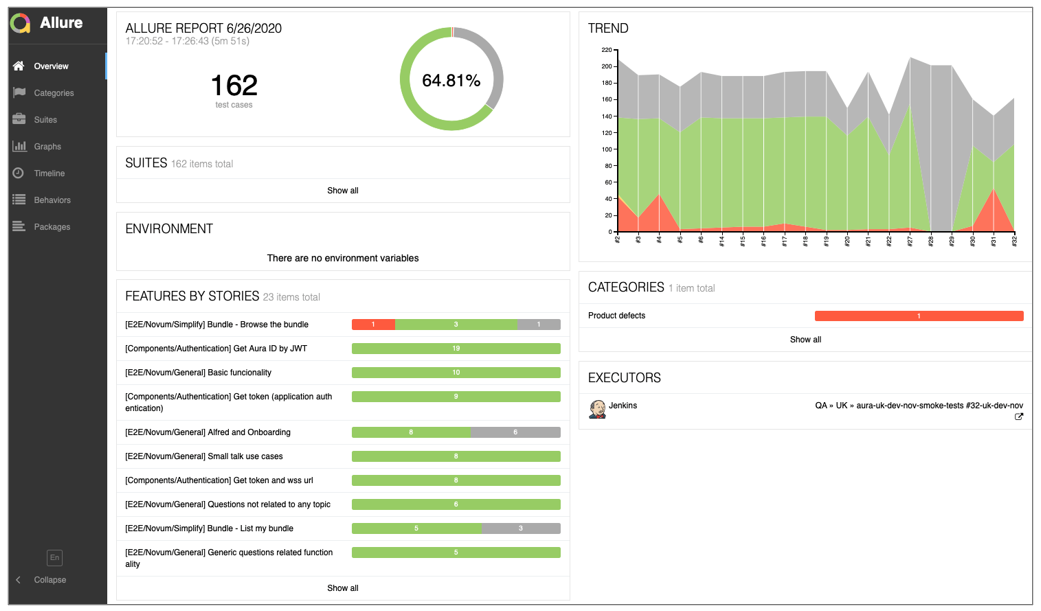
An example of the content of an Allure report is included below:

Overview page

The entry point for every report would be the overview page, that includes relevant dashboards and widgets:

Allure overview page

The overview page hosts several default widgets representing basic characteristics of the project and test environment. Navigation bar is collapsible and enables to switch into several basic results overview modes.

Detail

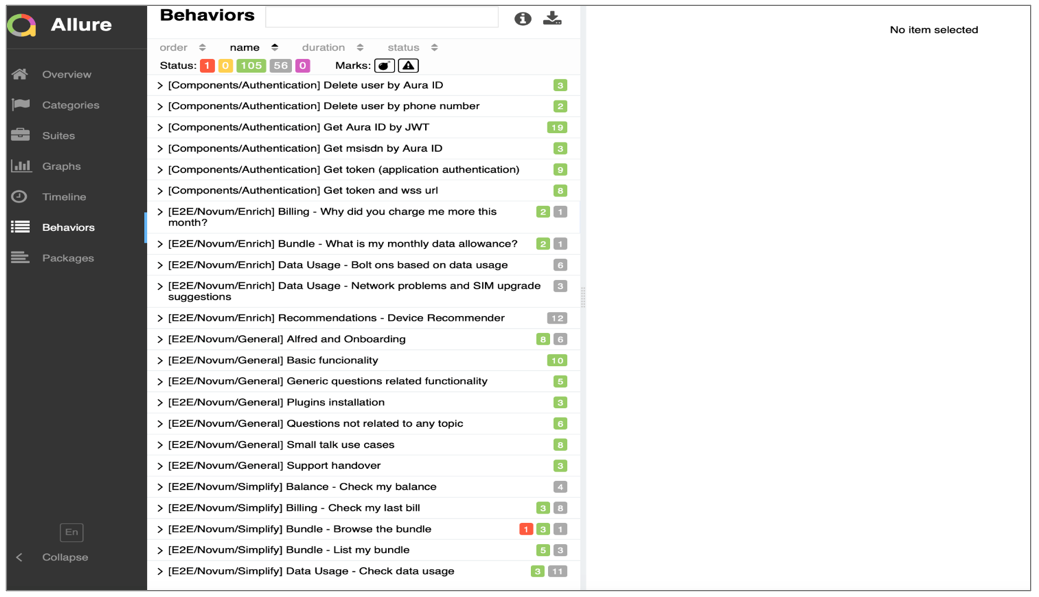
Tests are shown grouped by features, through clicking “show all” or “Behaviors” from the overview page:

Allure behaviors

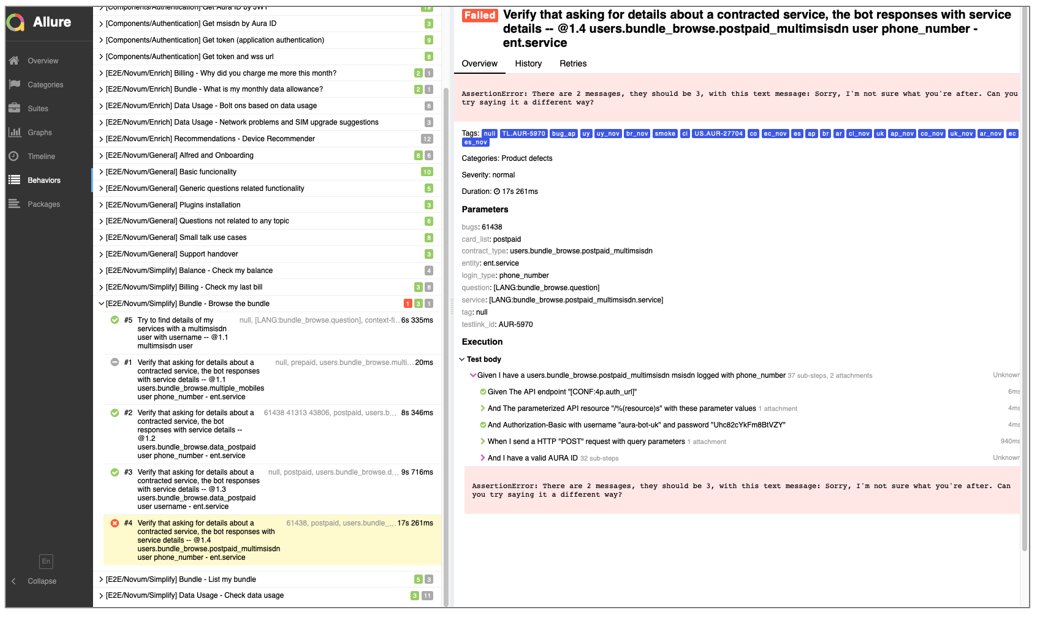
Test case page

For some of the results in the overview page described above, it is possible to access to the test case page after clicking on the individual tests. This page will typically contains relevant individual data related to the test case: steps executed during the test, timings, attachments, test categorization labels, descriptions and links.

Allure test case page

Users’ files

📁 ~/[project_folder]/aura-tests/acceptance/_output/users/[country]/[userid].json Users’ data are contained in the Telefónica Kernel APIs. When the QA tests are executed, the system recovers the data and stores it in these JSON files.

Example of Telefonica Kernel data user JSON file
{
    "bundle_list": [
        {
            "date": "regex:[0-9]{1,2} de [a-zA-Zç]+ de [0-9]{4}", 
           "name": "Plan Prepago *", 
           "desc": ": InternetXdiaPlus$14 x50MB, HABLÁ: Si elegiste HABLÁ tenés un 50% de descuento en llamadas a Movistar por 7 días con tus recargas desde $6"
        }
    ], 
   "bills": [], 
   "roles": [
        "owner", 
       "admin"
    ], 
   "subscription_type": "prepaid", 
   "msisdn": "+541136742577", 
   "userid": "126529396", 
   "user_type": "monomsisdn", 
   "setup_4g_ready": [
        {
            "suggestion_des": "Tu telefono es 4G, por favor revisa tu configuracion aca", 
           "result_tm": "2029-01-24", 
           "description1_des": "http://ayuda.movistar.com.ar/pregunta/como-configurar-mi-equipo-en-la-red-4g.html", 
           "result_dt": ""
        }
    ], 
   "data_usage": [
        {
            "suggestion_des": "De acuerdo a tu patron de consumo, te recomiendo el plan Plan Comunidad 1 GB", 
           "result_tm": "2029-01-20 00:00:00.0", 
           "end_data_day_dt": null, 
           "additional_info_des": null, 
           "consumed_qt": "44.923", 
           "contracted_qt": "524288000", 
           "anomaly_ind": false
        }
    ], 
   "services": [
        "mobile_prepaid"
    ], 
   "device_recommender": [], 
   "balance": {
        "date": "[0-9]{1,2} de [a-zA-Zç]+ de [0-9]{4}", 
       "currency": "ARS", 
       "amount": "\\$ [0-9]+,[0-9]+"
    }, 
   "data": [], 
   "email": "MEDINA.M1990@GMAIL.COM"
}

1.4 - Configuration of user's data

Configuration of user’s data

Guidelines for the configuration of of Aura users required to launch the QA tests

Introduction

The configuration of the different Aura’s users is required in order to launch the QA Tool.

When the QA tests are executed, the system recovers the users’ data from Telefónica Kernel APIs and stores it in the path:

~/[project_folder]/aura-tests/acceptance/_output/users/[country_code]/

At this stage, the local QA team must create a new file for the configuration of users in the following path:
~/[project_folder]/aura-tests/acceptance/settings/[country_code]/[country_code]-[environment]-local-users.json

This file must be edited with the sections and procedure detailed in the following sections.

Fields in the file [country_code]-[environment]-local-users.json

The required steps to fill in this file with the users’ configuration are fully explained below.

user_definition field

Firstly, it is required to fill in the user_definition field:

  • subscription_type: subscription type of users, it can be ‘prepaid’, ‘postpaid’ or ‘control’)
  • msisdn: phone number of the user
  • user_id: id of user in Telefónica Kernel
  • user_type: user type, it can be ‘monomsisdn’, ‘multimsisdn’, ’nomsisdn’, ‘invalid’
  • uid: user identification (used for authentication purposes)
  • email: email address of user (used for authentication purposes)
  • password: uid/email password (used for authentication purposes)

ℹ️ In environments with mandatory authorization_id, the user can authenticate through:

  • MSISDN
  • Uid + password
  • Email + password

If possible, add both fields, uid and email or add SKIP value to avoid authentication failures (if it is impossible, obtain the uid and/or email of the user), as tests with this user will be skipped.

See more details in Troubleshooting: Error related to users’ config file.

Example of definition
"users_definition": {
    "user1": {
      "subscription_type": "prepaid",
      "user_type": "monomsisdn",
      "msisdn": "+573152641455",
      "userid": "50914",
      login_user: navx@o2.com,
      login_password: test1234
    },
    "user2": {
      "subscription_type": "postpaid",
      "user_type": "monomsisdn",
      "msisdn": "+573156492873",
      "userid": "50908",
      "uid": "509652361",
      "email": user2@gmail.com,
      "password": "user2pwd"
    },
    "user3": {
      "subscription_type": "control",
      "user_type": "monomsisdn",
      "msisdn": "+573102553679",
      "userid": "50913"
      "uid": "509090909",
      "password": "user3pwd"

    },
    "user4": {
      "subscription_type": "postpaid",
      "user_type": "multimsisdn",
      "msisdn": "+573167412035",
      "userid": "50739"
      "email": user4@gmail.com,
      "password": "user4pwd"

    },
    "user5": {
      "subscription_type": "control",
      "user_type": "multimsisdn",
      "msisdn": "+573152445674",
      "userid": "50911"
    },
    "user6": {
      "subscription_type": "postpaid",
      "user_type": "monomsisdn",
      "msisdn": "999999999",
      "userid": "999999999"
    },
    "user7": {
      "subscription_type": "prepaid",
      "user_type": "monomsisdn",
      "msisdn": "",
      "userid": "50914"
    }
  }

users element

It is required to fill in the users’ definition name in the users element. For this purpose, there are different types of users, depending on the type of data that the user has on Telefónica Kernel.

Default user

Main user executed in tests, independently on the type of data.

Contract type

  • user_profile endpoint configured in Telefónica Kernel (element identities.services)
  • users.common.prepaid: Value of the service is ‘mobile_prepaid’
  • users.common.postpaid: Value of the service is ‘mobile_postpaid’
  • users.common.control: Value of the service element is ‘mobile_control’
Example of user profile call
"id_document": {
    "country": "ES",
    "type": "NIF",
    "value": "6667337566Y"
  },
  "identities": [
    {
      "type": "uid",
      "id": "412d606f-4937-443b-b5e7-a8d0f63ef0bc",
      "services": [
        "authentication"
      ],
      "roles": [
        "owner"
      ]
    },
    {
      "type": "uid",
      "id": "8971245361267438349",
      "services": [
        "iptv"
      ],
      "roles": [
        "owner"
      ],
      "group_ids": [
        "bundle_1"
      ]
    },
    {
      "type": "phone_number",
      "id": "+34629123456",
      "services": [
        "mobile_postpaid"
      ],
      "roles": [
        "owner",
        "admin"
      ],
      "group_ids": [
        "bundle_1"
      ]
    },
    {
      "type": "phone_number",
      "id": "+34609332266",
      "services": [
        "mobile_postpaid"
      ],
      "roles": [
        "owner"
      ],
      "group_ids": [
        "bundle_1"
      ]
    },
    {
      "type": "phone_number",
      "id": "+34983456789",
      "services": [
        "landline",
        "internet"
      ],
      "roles": [
        "owner"
      ],
      "group_ids": [
        "bundle_1"
      ]
    }
  ],
  "name": "Andrés Iniesta",
  "contact_media": [
    {
      "type": "phone_number",
      "value": "+34629123456"
    }
  ],
  "id": "412d606f-4937-443b-b5e7-a8d0f63ef0bc"
}

User type

user_profile endpoint configured on Telefónica Kernel (in the element identities.services).

Four types of users are defined:

  • monomsisdn User that only has one phone. In this case, it is possible to classify the user by subscription type:

    • users.prepaid: user type monomsisdn whose phone number is prepaid
    • users.postpaid: user type monomsisdn whose phone number is postpaid
    • users.control: user type monomsisdn whose phone number is control
  • multimsisdn: User that has several phones. In this case, it is possible to classify the user by subscription type:

    • users.multimsisdn.prepaid: user type multimsisdn whose phone number is prepaid
    • users.multimsisdn.postpaid: user type multimsisdn whose phone number is postpaid
    • users.multimsisdn.control: user type multimsisdn whose phone number is control
  • nomsisdn: User with no phone number.

  • invalid: Invalid user in Telefónica Kernel and Aura.

balance_check

It can be checked in mobile_balance and mobile_quota endpoints configured on Telefónica Kernel. User should have data in mobile_balance endpoint, for example:

{
    "phone_number": "+5567999170892",
    "expiration_date": "2019-03-08T09:42:51Z",
    "amount": 44.17,
    "currency": "BRL"
}
  • users.balance_check.voice_data
    User with voice and data in mobile quota endpoint.
    Example of mobile quota:
{
    "phone_number": "+541121700177",
    "sms": [
        {
            "consumed_sms": 0,
            "max_sms": 25000,
            "description": "SMS",
            "end_date": "2018-12-17T03:00:00Z",
            "start_date": "2018-11-18T03:00:00Z"
        }
    ],
    "voice": [
        {
            "description": "Minutos Multidestino No Acumulable",
            "end_date": "2018-12-17T03:00:00Z",
            "consumed_seconds": 3448,
            "max_seconds": 30000,
            "start_date": "2018-11-18T03:00:00Z",
            "destinations": [
                "any"
            ]
        },
        {
            "description": "Minutos a Comunidad",
            "end_date": "2018-12-17T03:00:00Z",
            "consumed_seconds": 75336,
            "max_seconds": 3000000,
            "start_date": "2018-11-18T03:00:00Z",
            "destinations": [
                "telefonica"
            ]
        }
    ],
    "data": [
        {
            "max_bytes": 4294967296,
            "consumed_bytes": 1230395392,
            "description": "Datos Incluidos/Velocidad",
            "end_date": "2018-12-17T03:00:00Z",
            "start_date": "2018-11-18T03:00:00Z"
        }
    ]
}
  • users.balance_check.no_voice
    User without voice element in mobile quota endpoint.
    Example of mobile quota data:
{
    "phone_number": "+541121700177",
    "sms": [
        {
            "consumed_sms": 0,
            "max_sms": 25000,
            "description": "SMS",
            "end_date": "2018-12-17T03:00:00Z",
            "start_date": "2018-11-18T03:00:00Z"
        }
    ],
    "voice": [],
    "data": [
        {
            "max_bytes": 4294967296,
            "consumed_bytes": 1230395392,
            "description": "Datos Incluidos/Velocidad",
            "end_date": "2018-12-17T03:00:00Z",
            "start_date": "2018-11-18T03:00:00Z"
        }
    ]
}
  • users.balance_check.multiple_mobiles
    User with multiple mobiles in subscribed_products endpoint.

  • users.balance_check.bonus_balance
    User with several bonus contracted.
    Example of mobile quota:

{
    "phone_number": "+5511982099898",
    "sms": [],
    "voice": [],
    "data": [
        {
            "max_bytes": 53689188352,
            "consumed_bytes": 1506646425,
            "description": "MULTIVIVO GRATIS.",
            "end_date": "2019-01-01T02:00:00Z",
            "start_date": "2018-12-02T02:00:00Z"
        },
        {
            "max_bytes": 524288000,
            "consumed_bytes": 524288000,
            "description": "BONUS CONTA DIGITAL",
            "end_date": "2019-01-01T02:00:00Z",
            "start_date": "2018-12-02T02:00:00Z"
        },
        {
            "max_bytes": 524288000,
            "consumed_bytes": 524288000,
            "description": "BONUS DEBITO AUTOMATICO",
            "end_date": "2019-01-01T02:00:00Z",
            "start_date": "2018-12-02T02:00:00Z"
        },
        {
            "max_bytes": 51215052308,
            "consumed_bytes": 0,
            "description": "Vivo Bis",
            "end_date": "2019-01-01T02:00:00Z",
            "start_date": "2018-12-02T02:00:00Z"
        },
        {
            "max_bytes": 53687091200,
            "consumed_bytes": 326620938,
            "description": "App Facilidades",
            "end_date": "2019-01-01T02:00:00Z",
            "start_date": "2018-12-02T02:00:00Z"
        },
        {
            "max_bytes": 42949672960,
            "consumed_bytes": 14754460467,
            "description": "Double Play",
            "end_date": "2019-01-01T02:00:00Z",
            "start_date": "2018-12-02T02:00:00Z"
        }
    ]
}
  • users.balance_check.no_balance
    Example of mobile balance data:
{
    "phone_number": "+541121700177",
    "expiration_date": "2019-03-06T13:45:33Z",
    "amount": 0,
    "currency": "ARS"
}
  • users.balance_check.start_date
    User with start_date in mobile quota.

  • users.balance_check.no_start_date
    User with no start_date in mobile quota.
    Example of mobile quota:

{
    "phone_number": "+541121700177",
    "sms": [
        {
            "consumed_sms": 0,
            "max_sms": 25000,
            "description": "SMS",
            "end_date": "2018-12-17T03:00:00Z",
            "start_date": "2018-11-18T03:00:00Z"
        }
    ],
    "voice": [
        {
            "description": "Minutos Multidestino No Acumulable",
            "end_date": "2018-12-17T03:00:00Z",
            "consumed_seconds": 3448,
            "max_seconds": 30000,
            "destinations": [
                "any"
            ]
        },
        {
            "description": "Minutos a Comunidad",
            "end_date": "2018-12-17T03:00:00Z",
            "consumed_seconds": 75336,
            "max_seconds": 3000000,
            "destinations": [
                "telefonica"
            ]
        }
    ],
    "data": [
        {
            "max_bytes": 4294967296,
            "consumed_bytes": 1230395392,
            "description": "Datos Incluidos/Velocidad",
            "end_date": "2018-12-17T03:00:00Z",
        }
    ]
}
  • users.balance_check.today_expiration
    User in which the expiration_date element in mobile balance endpoint is today.
{
    "phone_number": "+541121700177",
    "expiration_date": "{today}",
    "amount": 0,
    "currency": "ARS"
}

1.5 - Troubleshooting

Aura QA Tool troubleshooting guide

Find the most common problems and errors that may happen in the QA tool execution and the corresponding fixing procedures

Introduction

The most common problems and errors found in the QA Tool management have been included in this document.

  • Problems related to users’ configuration in Telefónica Kernel.
  • Problems related to a mismatch between expected and received response.
  • Problems related to users’ config file (authorization_id).

Error definition

The configuration of the user in Kernel is not the appropriated one.

An example of this type of error is included below:

AssertionError: FAILED SUB-STEP: Given I have a users.common.prepaid msisdn logged with phone_number
Substep info: Assertion Failed: INVALID USER: Contract type is not correct for user 'users.common.prepaid' with user_id '42005239175568025518978' and msisdn '+4917687465961'.
Expected: prepaid. Current: None

Fixing procedure

This error means that the tests are using the users.common.prepaid user set-up in:
~/[project_folder]/aura-tests/acceptance/settings/[country_code]/[environment]-users.json

Check the document Users’ configuration in order to know how to configure users.

"users": {
    "default": "user8",
    "common": {
      "postpaid": "user4",
      "control": "",
     "prepaid": "user6"
    },

In the example, the user has different configurations in Kernel. You will find the information for this user in the following file once the tests have run:

~/[project_folder]/aura-tests/acceptance/_output/users/[country_code]/[userid].json

Error definition

The test is expecting for a different sentence than the one received.

An example of this type of error is included below:

AssertionError: FAILED SUB-STEP: Then the element "aura_response" contains a response to the question "2" with a text matching one of "none:none.fallbackanswer"
Substep info: Assertion Failed: Question asked: "2"
Current response "Vertragskunde:
Um deinen aktuellen Tarif mit weiteren Geräten nutzen zu können, kannst du online in Mein o2 eine oder mehrere zusätzliche SIM-Karten, die sogenannte Multicard, bestellen.
Prepaidkunde:
Wenn du mit der Multicard mehrere Geräte mit ein- und derselben Rufnummer nutzen möchtest, ist das bei o2 ausschließlich mit einem Laufzeitvertrag möglich. Eine Multi-SIM ist für o2 Prepaid derzeit leider nicht erhältlich." doesn´t match any of the 
Expected responses: ['Diese Frage kann ich dir leider noch nicht beantworten.', 'Diese Frage kann ich dir leider noch nicht beantworten.', 'Diese Frage kann ich dir leider noch nicht beantworten.', 'Diese Frage kann ich dir leider noch nicht beantworten.']
First difference: received "Vertragsku" and expected "Diese Frag"

Fixing procedure

When this error is not a bug, the reason can probably be:

  • The poeditor_terms file used in the QA Tool is different from the one used in the environment or one of the resources is not the same.
    In this case, you should update the poeditor_terms_[language]_[country_code].json with the latest export from the POEditor website. In order to fix this error, add the sentence to poeditor_terms_[language_code]_[country_code].json, in the section described by the error explanation.

For example:

{
        "term": "Un poco de música nunca está de más.",
        "definition": "Ein bisschen Musik schadet nie.",
        "context": "Transversal",
        "term_plural": "",
        "reference": "none:none.fallbackanswer",
    },

Error definition

Check the authorization_id field in the properties.json file. This parameter can have the values optional or mandatory.

The default value for authorization_id is optional.

"4p": {
  "authorization_id": "mandatory"
}

The most common problems related to authorization_id are shown in the following sections.

uid/email not correctly configured

When authentication by uid or email is used in a test, but is not correctly configured in the users’ file, this error may be displayed:

Assertion Failed: Configured user "users.default" does not contain "uid" field in users file. May be one of these identities should be used: [{'uid': '69828310687261441744979'}, {'uid': None}, {'phone_number': '+4917625262904'}]
The way to solve it is to add the missing data in the users' file (in the example above, the uid field) or add SKIP value to avoid authentication failures, so the tests with this user + authentication method, are skipped).

Correct configuration for uid

Login error

In case of a login error, this error may be displayed in logs:

 ValueError: Missing query parameter code in url:
                - URL: https://login-crt.o2online.de/sso/UI/Login
- BODY: <html class=" no-touch transition transform animation mediaquery localstorage placeholder"><head><meta name="viewport" (rest of HTML code of error page)

Login error

If possible, add both fields, uid and email or password.

In case it is impossible to obtain the uid and/or email of the user, you can add SKIP value to avoid authentication failures (Note that tests with this user + authentication method are skipped).

MSISDN error

When authentication by phone number is used in a test, but is not correctly configured in the users’ file, this error may be displayed:

File "/home/rgl/virtualenvs/aura-tests-py3/lib/python3.7/site-packages/selenium/webdriver/support/wait.py", line 80, in until
raise TimeoutException(message, screen, stacktrace)
selenium.common.exceptions.TimeoutException: Message:
Page element of type 'InputText' with locator ('id', 'code') not found or is not visible after 15 seconds

The way to solve it is to add the missing data in the users’ file, in this case, the msisdn field.

Add msisdn field

Another error may occur when the authentication code is not received via SMS in the second step. In this scenario, ask the QA Global Team for the system method to obtain the authentication code via SMS automatically):

File "/home/rgl/virtualenvs/aura-tests-py3/lib/python3.7/site-packages/qa4pcommons/utils/simgrid.py", line 57, in find_new_sms_code
raise ValueError(msg.format(self.phone_number))
ValueError: New message not found for phone_number: "+4917625262904"

Error fetching data from Telefónica Kernel APIs

If there is a problem getting info from Kernel APIs, this error may be displayed:

Assertion Failed: Get Aura id response does not contain aura_id field

In test logs, the following warning may be displayed (in this case, there is a server problem getting info from a user in Kernel):

INFO    2021-05-12 08:54:23,254 [authentication] Getting aura id from 4P API
INFO    2021-05-12 08:54:23,262 [data_4p] >>>>>>>>>>>>>>>>>>>>> Request aura_id 4TH PLATFORM >>>>>>>>>>>>>>>>>>> 
DEBUG   2021-05-12 08:54:23,262 [data_4p] Curl request: curl "https://api.de-pre.baikalplatform.com/aura-services/v1/users/aura-id" -s -H "Authorization: Bearer eyJraWQiOiI1NDJhMzI4MjViZjBiZjMwODU2N2Q4ZTVjMTNmNWE4ZTNmNjE0ZmZjIiwidHlwIjoiSldUIiwiYWxnIjoiUlMyNTYifQ.eyJzdWIiOiI2OTgyODMxMDY4NzI2MTQ0MTc0NDk3OSIsImF1dGhvcml6YXRpb25faWQiOiJlZGE2MmI0YS03YzQxLTQwOTUtOTk3Yy1iMjM5MDgxMDc0ZTkiLCJwdXJwb3NlIjoiY3VzdG9tZXItc2VsZi1zZXJ2aWNlIGlkZW50aWZ5LWN1c3RvbWVyIiwiaXNzIjoiaHR0cHM6XC9cL2F1dGguZGUtcHJlLmJhaWthbHBsYXRmb3JtLmNvbVwvIiwiYXV0aGVudGljYXRpb25fY29udGV4dCI6W3siaWRlbnRpZmllciI6IjY5ODI4MzEwNjg3MjYxNDQxNzQ0OTc5IiwidHlwZSI6InVpZCJ9XSwiYWN0aXZlIjp0cnVlLCJjbGllbnRfaWQiOiJhdXJhLWJvdCIsImlkZW50aWZpZXJfYm91bmRfc2NvcGUiOltdLCJhdWQiOiJodHRwczpcL1wvYXBpLmRlLXByZS5iYWlrYWxwbGF0Zm9ybS5jb20iLCJzY29wZSI6ImV2ZW50LWxvdy1kYXRhLXJlYWQgYXVyYWlkLXJlYWQgdXNlcnByb2ZpbGUtcmVhZCBldmVudC1zdWJzY3JpcHRpb24tdHlwZS1taWdyYXRpb24tcmVhZCBldmVudC1sb3ctdm9pY2UtcmVhZCBhdXRoZW50aWNhdGlvbi1pbmZvcm1hdGlvbi1yZWFkIHNpbmdsZS1hY2Nlc3Mtc2Vzc2lvbnMtd3JpdGUgZXZlbnQtYmFyLWFsZXJ0LXJlYWQgZXZlbnQtbm8tZGF0YS1yZWFkIHN1YnNjcmliZWQtcHJvZHVjdHMtcmVhZCBtb2JpbGUtYmFsYW5jZS1yZWFkIGV2ZW50LW5vLWJhbGFuY2UtcmVhZCBzdWJzY3JpYmVkLXByb2R1Y3RzLXVzZXItcmVhZCBpbnZvaWNpbmctcGhvbmUtbnVtYmVyLXJlYWQgZXZlbnQtYXBwb2ludG1lbnQtcmVtaW5kZXItcmVhZCBldmVudC1pbnZvaWNlLWRlYml0LXJlYWQgZXZlbnQtcGF5bWVudC1hbGVydC1yZWFkIGF1cmFpZC13cml0ZSBtb2JpbGUtcXVvdGEtcmVhZCBzdWJzY3JpYmVkLXByb2R1Y3RzLXBob25lLW51bWJlci1yZWFkIGV2ZW50LW5vLXZvaWNlLXJlYWQgbm90aWZpY2F0aW9ucy1yZWFkIHRpbWVsaW5lLXJlYWQgZXZlbnQtaGlnaC1zcGVuZC1hbGVydC1yZWFkIGV2ZW50LWRpc2Nvbm5lY3Rpb24tYWxlcnQtcmVhZCBldmVudC1pbnZvaWNlLXBheW1lbnQtZHVlLXJlYWQgbW9iaWxlLWJhbGFuY2UtdG9wLXVwLXdyaXRlIGV2ZW50LWxvdy1iYWxhbmNlLXJlYWQgaW52b2ljaW5nLXVzZXItcmVhZCBpc3N1ZXMtY3JlYXRlIG1vYmlsZS1iYWxhbmNlLXRvcC11cC1yZWFkIGludm9pY2luZy1yZWFkIGV2ZW50LWludm9pY2UtcmV0YWluZWQtcmVhZCBpc3N1ZXMtcmVhZCBldmVudC1pbnZvaWNlLWNoYXJnZS1yZWFkIiwiYWNyX3ZhbHVlcyI6IjMiLCJleHAiOjE2MjA4MDYwNjMsImlhdCI6MTYyMDgwMjQ2MywianRpIjoiM2MyY2QzYTEtM2U0MS00ODE2LTkxMTgtZmZkOGM2MDRlYmU4In0.NNQSe_yD3U8togdNGhVXvO9hTlKJtgflmNmpQzLmucGBSmujmcSn4kWSYRkVOGRakzf6cRSGh9CNfuH0iWYqQrFVXlzDWadOkAzkZnb-7QPjZ1FclTCFe1EPn_JM8qcpERxB5IM_9a-M0MvMQ7-O0rpnE5V7ZG0Lnu2V_LO8Id-f1_AjLtnkNGXdK3n16R1Gzp4OzIANx28EGq7Wu2Y-5BfcMT8spdsQ7pKWF7O_aXOSxJmQnEKb2ZAzVCYekjpEUtic7IYP5jh4l1zQMy0_81IkdQPMdOAFA2LON4IgkF2RoXSilgS27zFkBWQkyj5bM6FsFeqswMaBF6DUEWbPGQ"
WARNING 2021-05-12 08:54:24,721 [data_4p] Error response for aura_id api with status 503: {'message': 'name resolution failed'}

Check the document Users’ configuration in order to know how to configure users.

2 - Test Aura Bot

Test Aura Bot

Check the performance of Aura Bot components

Introduction

The current documents contain different tests that can be executed over aura-bot components with several purposes:

2.1 - Debug with mocha and Typescript

Debug with mocha and Typescript

How to test an Aura Bot dialog after its development: debug with mocha and Typescript

Introduction

When developing a use case, and once the use case dialog is built, it is required to test the dialog in order to verify its proper performance in terms of the conversational flow between the user and aura-bot.

The current section includes the guidelines to debug with mocha and Typescript for the execution of the unit tests. This corresponds to the stage Test an Aura Bot dialog within the use case development process over aura-bot.

For this purpose, Bot Framework v4 provides a Test Adapter that allows launching unit tests for the validation of a component performance (mainly a dialog, but it can also be used for other components such as middlewares).

The Test Adapter simulates sending messages from the user to the bot, therefore it requires to mock certain data required by the dialog logic (i.e., Kernel data). With this data, the Test Adapter checks that the conversational flow of the dialog is correct. Tests are executed during each Pull Request and must be passed in order to merge the PR.

Requisites

Add the following dependencies (or check that they are declared) in the package.json file, within the use case library.

An extract is shown below as an example.

"devDependencies": {
 "@types/mocha": "^6.2.0",
 "@types/chai": "^4.2.3",
 "@types/jest": "^24.0.20",
 "ts-node": "^8.4.1",
 "mocha": "^6.2.1",

📌 Find a complete example for the common library in the following Github link.

Debug configuration

The debug configuration is carried out using Visual Studio Code.

📄 For this purpose, read the Visual Studio Code documentation regarding launch configurations.

Debugging information is kept in the file launch.json, included in the folder .vscode of the developer’s workspace. The launch.json file must be included in the same root repository as the corresponding dialog to be tested.

Within this file, the field configuration must be filled with the following content:

{
    "type": "node",
    "request": "launch",
    "name": "Mocha All",
    "program": "${workspaceFolder}/node_modules/mocha/bin/_mocha",
    "args": [
        "-r",
        "ts-node/register",
        "--timeout",
        "999999",
        "--colors",
        "${workspaceFolder}/src/**/*.spec.ts",
    ],
    "console": "integratedTerminal",
    "internalConsoleOptions": "neverOpen",
    "protocol": "inspector"
}

Execute tests in the Test Adapter

The Test adapter from Bot Framework 4 is used for executing unit tests. This adapter can be used to simulate sending messages from the user to aura-bot.

The following example sets up the test adapter and then executes a simple test:

const { TestAdapter } = require('botbuilder');

const adapter = new TestAdapter(async (context) => {
     await context.sendActivity(`Hello World`);
});

adapter.test(`hi`, `Hello World`)
       .then(() => done());

Adapter Test Method

At this stage, you can send something to the bot and check the response provided by it.

This is simply a wrapper around calls to send() and assertReply() methods.

adapter.test('hi', 'Hello World')
      .then(() => done());
  • @param userSays: text or activity simulating user’s input.
  • @param expected: expected text or activity sent by the bot as a reply to the user’s input.
  • @param description: (optional) description of the test case. If not provided, one is generated.
  • @param timeout: (optional) number of milliseconds to wait for the bot response. Default value: 3000.
 public test(
     userSays: string | Partial<Activity>,
     expected: string | Partial<Activity> | ((activity: Partial<Activity>, description?: string) => void),
     description?: string,
     timeout?: number
 ): TestFlow {
     return this.send(userSays)
         .assertReply(expected, description);
 }

An example is shown below:

 const { TestAdapter } = require('botbuilder');

 const adapter = new TestAdapter(async (context) => {
    if (context.text === 'hi') {
       await context.sendActivity(`Hello World`);
    } else if (context.text === 'bye') {
       await context.sendActivity(`Goodbye`);
    }
 });

 adapter.test(`hi`, `Hello World`)
        .test(`bye`, `Goodbye`)
        .then(() => done())
        .catch(e) => done(e));

Adapter Send and AssertReply methods

Send

This method sends something to aura-bot. It returns a new TestFlow instance which can be used to add additional steps for inspecting the bot reply and then sending additional activities.

📄 For further details, please check the corresponding the TestAdapter class documentation.

  • @param userSays: text or activity simulating user input.

    public send(userSays: string | Partial<Activity>): TestFlow
    

assertReply

This method generates an assertion if the aura-bot response does not match the expected text/activity.

  • @param expected: expected text or activity from the bot. It can be a callback to inspect the response using custom logic.
  • @param description: (optional) description of the test case. If not provided, one is generated.
  • @param timeout: (optional) number of milliseconds to wait for a bot response. The default value is 3000.
public assertReply(expected: string | Partial<Activity> | estActivityInspector, description?: string, timeout?: number): TestFlow 

An example is shown below:

 const { TestAdapter } = require('botbuilder');

 const adapter = new TestAdapter(async (context) => {
    if (context.text === 'hi') {
       await context.sendActivity(`Hello World`);
    } else if (context.text === 'bye') {
       await context.sendActivity(`Goodbye`);
    }
 });

 adapter.send(`hi`, 
        .assertReply(`Hello World`)
        .send(`bye`)
        .assertReply(`Goodbye`)
        .then(() => done())
        .catch(e) => done(e));

Check values in the current activity

Execute the following command: .assertReply(activity => assert.equal(activity.type, ActivityTypes.Message))

An example is shown below:

        await adapter.send('Hello')
           .assertReply(activity  => {
               assert(activity.attachments.length === 1);
               assert(activity.attachments[0].contentType === CardFactory.contentTypes.oauthCard);

               // send a mock EventActivity back to the bot with the token
               adapter.addUserToken(connectionName, activity.channelId, activity.recipient.id, token);

               let eventActivity = createReply(activity);
               eventActivity.type = ActivityTypes.Event;
               let from = eventActivity.from;
               eventActivity.from = eventActivity.recipient;
               eventActivity.recipient = from;
               eventActivity.name = "tokens/response";
               eventActivity.value = {
                   connectionName,
                   token
               };

               adapter.send(eventActivity);
           })
           .assertReply('Logged in.');

2.2 - Dialog test template

Template for Aura Bot dialogs testing

Template for testing an Aura Bot dialog

Template


import 'mocha';
import { TestAdapter, ConversationState, MemoryStorage, UserState } from 'botbuilder';
import { DialogTurnStatus, DialogSet } from 'botbuilder-dialogs';
import { AddBillDialog } from '../dialogs/collections/bill/add-bill';
import { AuraDataAccesor } from '../models';

describe('Dialog Test', function () {
    this.timeout(5000);
    /**
     * The dialog template test.
     */
    it('Bill dialog Test', (done) => {
        /**
         * Set the common data of Aura-Bot
         */
        const testData = setCommonData();
        /**
         * Uset TestAdapter to launch the bot framework
         */
        const adapter = new TestAdapter(async (turnContext) => {
            const dc = await dialogs.createContext(turnContext);
            const results = await dc.continueDialog();
            if (results.status === DialogTurnStatus.empty) {
                await dc.beginDialog('addBill');
            }
            await testData.conversationState.saveChanges(turnContext);
        });
        /**
         * Create the dialog set and add dialogs to test
         */
        const dialogs = new DialogSet(testData.auraDataAccesor.dialogState);
        dialogs.add(new AddBillDialog(testData.auraDataAccesor));
        /**
         * Make a flow with sends and assert responses
         */
        adapter.send('Hello')
            .assertReply('Dime algo bonito')
            .send('Algo bonito')
            .assertReply('Gracias por el piropo')
            .assertReply('Please enter your name. (1) Yes or (2) No')
            .send('claro')
            .assertReply('end Yes')
            .then(() => done())
            .catch((err) => done(err)); // <- send error to done
    });
});

/**
 * Common Data uses by the Aura Bot.
 */
function setCommonData() {
    const memoryStorage = new MemoryStorage();
    const conversationState = new ConversationState(memoryStorage);
    const auraDataAccesor: AuraDataAccesor = {
        conversationData: conversationState.createProperty('conversationData'),
        userData: new UserState(memoryStorage).createProperty('userData'),
        dialogState: conversationState.createProperty('DialogState')
    };
    return {
        auraDataAccesor,
        conversationState
    };

}

2.3 - Middleware test template

Template for Aura Bot middlewares testing

Template for testing an Aura Bot middleware

Template

/* eslint-disable @typescript-eslint/no-unused-vars */
/* eslint-disable require-await */
/* eslint-disable max-classes-per-file */
import { Activity, ActivityTypes, Middleware, TestAdapter, TurnContext } from 'botbuilder';

describe('Middleare Test', () => {

    describe('ChanngeMessage middleware with TurnContext', () => {

        class ChangeMessage implements Middleware {
            /**
             * On turn function of ChangeMessage.
             *
             * @param {TurnContext} context context
             * @param {() => Promise<void>} next next function
             */
            public async onTurn(context: TurnContext, next: () => Promise<void>): Promise<void> {
                context.activity.text = 'response message';
                await next();
            }
        }

        it('Testing for channgeMessage middleware', async () => {
            const adapter = new TestAdapter(async (context) => {
                await context.sendActivity(context.activity.text);
            });
            adapter.use(new ChangeMessage());

            await adapter.test('request message', 'response message');
        });
    });

    describe('ChanngeTurnState middleware with TurnContext', () => {

        class ChanngeTurnState implements Middleware {
            /**
             * On turn function of ChangeMessage.
             *
             * @param {TurnContext} context context
             * @param {() => Promise<void>} next next function
             */
            public async onTurn(context: TurnContext, next: () => Promise<void>): Promise<void> {
                context.turnState.set('testInTurnState', context.activity.text);
                await next();
            }
        }

        it('Testing for channgeTurnState middleware', async () => {
            const messageToTest = 'text in message';
            const adapter = new TestAdapter(async (context) => {
                const testInTurnState = context.turnState.get('testInTurnState');
                await context.sendActivity(testInTurnState);
            });
            adapter.use(new ChanngeTurnState());

            await adapter.test(messageToTest, messageToTest);
        });
    });

    describe('ChanngeActivity middleware with TurnContext', () => {

        class ChanngeActivity implements Middleware {
            /**
             * On turn function of ChangeMessage.
             *
             * @param {TurnContext} context context
             * @param {() => Promise<void>} next next function
             */
            public async onTurn(context: TurnContext, next: () => Promise<void>): Promise<void> {
                !context.activity.serviceUrl && (context.activity.serviceUrl = 'https://change-service-url.com');
                await next();
            }
        }

        it('Testing for ChanngeActivity middleware', async () => {
            const sendActivity: Partial<Activity> = {
                type: ActivityTypes.Message,
                text: 'text in message'
            };
            const adapter = new TestAdapter(async (context) => {
                await context.sendActivity(context.activity);
            }, { serviceUrl: undefined });
            adapter.use(new ChanngeActivity());

            await adapter.send(sendActivity).assertReply((activity) => {
                expect(activity.serviceUrl).toBe('https://change-service-url.com');
            });
        });
    });

    describe('ErrorMiddleware with TurnContext', () => {

        class ErrorMiddleware implements Middleware {
            /**
             * On turn function of ChangeMessage.
             *
             * @param {TurnContext} context context
             */
            public async onTurn(context: TurnContext): Promise<void> {
                throw new Error(context.activity.text);
            }
        }

        it('Testing for ErrorMiddleware', async () => {
            const adapter = new TestAdapter(async () => { /* */ });
            adapter.use(new ErrorMiddleware());

            const messageToTest = 'text in message';
            // Method1: with send/catch
            await adapter.send(messageToTest)
                .catch((err) => {
                    expect(err.message).toBe(messageToTest);
                });
            // Method2: with try/catch
            try {
                await adapter.send(messageToTest);
                // Fail test if above expression doesn't throw anything.
                expect(true).toBe(false);
            } catch (err) {
                expect(err.message).toBe(messageToTest);
            }
            // Method3: with expect/toThrow
            await expect(async () => {
                await adapter.send(messageToTest);
            }).rejects.toThrow(messageToTest);
        });
    });
});

2.4 - joi and ajv comparison

Performance comparison of joi and ajv libraries

Execution of tests to compare the performance between the joi library and the ajv library

Introduction

This document details the execution of the tests to compare the performance between the joi library, currently used in aura-bot development, and the ajv library, which stands out for its performance orientation.

The tests performed are based on a simple channel object. This property is defined in the channelData object to communicate with the bot.

Test code

const Ajv = require('ajv');
const Benchmark = require('benchmark');
const Joi = require('joi');

const channelSchema = {
  type: 'object',
  additionalProperties: false,
  properties: {
    id: {
      type: 'string',
      format: 'uuid'
    },
    interfaceLanguage: {
      type: 'string'
    },
    modality: {
      type: 'string',
      'enum': [
        'audio',
        'text',
        'form'
      ]
    }
  },
  required: [
    'id',
    'modality'
  ]
};

const ajvValidate = new Ajv().compile(channelSchema);

const joiSchema = Joi.object({
  id: Joi.string().guid().required(),
  interfaceLanguage: Joi.string(),
  modality: Joi.string()
    .valid('audio', 'text', 'form')
    .required()
}).unknown(false);

const suite = new Benchmark.Suite();
const value = { id: '45494a5b-835a-4fff-a813-b3d2be529dbe', interfaceLanguage: 'es-ES', modality: 'text' };

suite.add('Joi', () => {
  joiSchema.validate(value);
}).add('Ajv', () => {
  ajvValidate(value);
});

suite.on('cycle', (event) => {
  console.log(event.target.toString());
});

suite.on('complete', function () {
  console.log('Fastest is ' + this.filter('fastest').map('name'));
});

suite.run({ async: true });

Test result

$ node src/index.js
Joi x 284,136 ops/sec ±25.59% (61 runs sampled)
Ajv x 5,087,995 ops/sec ±1.57% (74 runs sampled)
Fastest is Ajv

2.5 - Migrate test from Jasmine to Jest

Migrate unittest from Jasmine to Jest

How to migrate a component unit tests from Jasmine to Jest

Migration steps

Step 1. Delete references to karma and jasmine

  • Delete the files: src/karma.conf.js and src/test.ts

  • In package.json remove the karma and jasmine packages from devDependencies.

    For example:

    "@types/jasmine": "~3.5.0",
    "@types/jasminewd2": "~2.0.3",
    "jasmine-core": "~3.6.0",
    "jasmine-spec-reporter": "~5.0.0",
    "karma": "~5.0.0",
    "karma-chrome-launcher": "~3.1.0",
    "karma-coverage-istanbul-reporter": "~3.0.2",
    "karma-jasmine": "~4.0.0",
    "karma-jasmine-html-reporter": "^1.5.0",
    
  • Uninstall these dependencies:

    npm uninstall @types/jasmine @types/jasminewd2 jasmine-core jasmine-spec-reporter karma karma-chrome-launcher karma-coverage-istanbul-reporter karma-jasmine karma-jasmine-html-reporter
    

Step 2. Install jest packages

Execute the following command:

npm i -D jest @types/jest @angular-builders/jest

Step 3. Configure jest

  • Add a file named jest.config.js (in the same folder as package.json)
    More information: https://jestjs.io/es-ES/docs/configuration#opciones

    module.exports = {
        preset: 'jest-preset-angular',
        setupFilesAfterEnv: ['<rootDir>/setup-jest.ts'],
        collectCoverage: false,
        coverageDirectory: 'coverage/testing-in-jest',
        testMatch: [
          '<rootDir>/src/**/*.spec.ts',
        ],
        coverageReporters: ['lcovonly', 'text-summary', 'cobertura'],
        coverageThreshold: {
            global: {
                statements: 10,
                lines: 10,
                branches: 10,
                functions: 10
            }
        },
        reporters: ['default'],
    };
    
  • Add file test-config.helpers.ts

    import { TestBed } from '@angular/core/testing';
    
    type CompilerOptions = Partial<{
      providers: any[];
      useJit: boolean;
      preserveWhitespaces: boolean;
    }>;
    export type ConfigureFn = (testBed: typeof TestBed) => void;
    
    export const configureTests = (configure: ConfigureFn, compilerOptions: CompilerOptions = {}) => {
      const compilerConfig: CompilerOptions = {
        preserveWhitespaces: false,
        ...compilerOptions,
      };
    
      const configuredTestBed = TestBed.configureCompiler(compilerConfig);
    
      configure(configuredTestBed);
    
      return configuredTestBed.compileComponents().then(() => configuredTestBed);
    };
    
  • Add file setup-jest.ts
    More information: https://jestjs.io/es-ES/docs/configuration#setupfiles-array

    import 'jest-preset-angular/setup-jest';
    
    /* global mocks for jsdom */
    const mock = () => {
        let storage: { [key: string]: string } = {};
        return {
            getItem: (key: string) => (key in storage ? storage[key] : null),
            setItem: (key: string, value: string) => (storage[key] = value || ''),
            removeItem: (key: string) => delete storage[key],
            clear: () => (storage = {}),
        };
    };
    
    Object.defineProperty(window, 'localStorage', { value: mock() });
    Object.defineProperty(window, 'sessionStorage', { value: mock() });
    Object.defineProperty(window, 'getComputedStyle', {
        value: () => ['-webkit-appearance'],
    });
    
    Object.defineProperty(document.body.style, 'transform', {
        value: () => {
            return {
                enumerable: true,
                configurable: true,
            };
        },
    });
    

Step 4. Change src/tsconfig.spec.json

  • Replace jasmine with jest in the types array

  • Add module: commonjs to the compilerOptions

  • Remove test.ts from the files array

{
    "extends": "./tsconfig.json",
    "compilerOptions": {
        "outDir": "./out-tsc/spec",
        "types": [
            "jest",
        ],
        "module": "commonjs",
        "emitDecoratorMetadata": true,
        "allowJs": true
    },
    "files": [
        "src/polyfills.ts"
    ],
    "include": [
        "src/**/*.spec.ts",
        "src/**/*.d.ts"
    ]
}

Step 5. Edit your angular.json file

Step 6. Migrate test with jest-codemods

  • Execute the following command:

    npx jest-codemods -f ./src/app/*.spec.ts

    ? Which parser do you want to use? TypeScript
    ? Which test library would you like to migrate from? Jasmine: globals
    ? Are you using the global object for assertions (i.e. without requiring them) No, I use import/require statements for my current assertion libr
    ary
    ? Will you be using Jest on Node.js as your test runner? Yes, use the globals provided by Jest (recommended)
    Executing command: jscodeshift -t /Users/moasl/.npm/_npx/13840/lib/node_modules/jest-codemods/dist/transformers/jasmine-globals.js ./src/app/app.component.spec.ts --ignore-pattern node_modules --parser ts --extensions=ts
    
    Executing command: jscodeshift -t .npm/_npx/14583/lib/node_modules/jest-codemods/dist/transformers/jasmine-globals.js ./src/app/app.component.spec.ts --ignore-pattern node_modules --parser ts --extensions=ts
    Processing 1 files...
    Spawning 1 workers...
    Sending 1 files to free worker...
    All done.
    Results:
    0 errors
    0 unmodified
    0 skipped
    1 ok
    Time elapsed: 1.286seconds
    
  • After all of these changes, it is recommended to delete your node_modules folder and run npm install again.

  • At this stages, you may have to change some test manually, for example, if jest does not have toBeTrue or toBeFalse.

Interesting library: jest-dom

Common errors

Converting circular structure to JSON

  • If you lose some import or injection in your component test, you will get this error type:

    (node:71567) UnhandledPromiseRejectionWarning: TypeError: Converting circular structure to JSON
        at JSON.stringify (<anonymous>)
        at process.target._send (internal/child_process.js:735:23)
        at process.target.send (internal/child_process.js:634:19)
        at reportSuccess (/Users/moasl/PROYECTOS/AURA/aura-channels-factory/packages/aura-channels-libraries/node_modules/jest-runner/node_modules/jest-worker/build/workers/processChild.js:67:11)
    (node:71567) UnhandledPromiseRejectionWarning: Unhandled promise rejection. This error originated either by throwing inside of an async function without a catch block, or by rejecting a promise which was not handled with .catch(). (rejection id: 1)
    (node:71567) [DEP0018] DeprecationWarning: Unhandled promise rejections are deprecated. In the future, promise rejections that are not handled will terminate the Node.js process with a non-zero exit code.
    
  • If you run the test with --detectOpenHandles option, you will get more information to solve the error:

    $ ng test --detectOpenHandles aura-channels-views
    .....
    FAIL  projects/aura-channels-views/src/lib/components/alfred/alfred.component.spec.ts
      ● AlfredComponentComponent › should render title
    
        Found the synthetic property @alfredAnimationState. Please include either "BrowserAnimationsModule" or "NoopAnimationsModule" in your application.
    
          at checkNoSyntheticProp (../packages/platform-browser/src/dom/dom_renderer.ts:269:11)
    ....
    

More information: Jest documentation –detectOpenHandles.

3 - Postman collections

Postman collections

In this section, you will find all the Postman collections generated in order to test APIs in Aura

Introduction

Postman is an application used for API testing. It is an HTTP client that tests HTTP requests, using a graphical user interface, through which we obtain different types of responses that need to be subsequently validated.

Postman collections are a tidy way to group your requests together so you can save, reuse, and share them with others.

The current document includes the Postman collections generated by Aura Platform Team:

3.1 - Video Contents Kernel API

Postman Collection - Video Contents Kernel API

Postman collection with sample requests to Video Contents Kernel API

Introduction

This Postman Collection is based in the Video Contents Kernel API.

It includes requests to get token and example requests of TV Search plugin.

Environment and collection files

Download environment and collection and import both files in Postman.

Import collection

To import the collection and environment, you can see the reference info about this process here.

Once the collections are imported, the environment’s values should be completed. Below, a short description about the enviroment’s variables is listed:

  • administrative_number_es: administrative number of Spanish user.
  • user_id_es: identifier of Spanish user.
  • channel_id_es: identifier of Spain channel authentication.
  • administrative_number_br: administrative number of Brazilian user.
  • user_id_br: identifier of Brazil user.
  • channel_id_br: identifier of Brazil channel authentication.
  • auth_url: authentication URL.
  • issuer_url: issuer URL.
  • expiration_token: time to expire the token in seconds.
  • scope: list of scopes separated with spaces.
  • purpose: list of purposes separated with spaces.
  • private_key: private key to get assertion token.
  • header_key_id: key id for headers to get assertion token.
  • client_id_es: client id to authenticate a Spanish user.
  • client_secret_es: client secret password to authenticate a Spanish user.
  • client_id_br: client id to authenticate a Brazilian user.
  • client_secret_br: client secret password to authenticate a Brazilian user.
  • authorization_id_es: authorization id for Spanish user.
  • authorization_id_br: authorization id for Brazilian user.

The majority of variables imported for this environment have assigned a default value, only the following variables must be completed: private_key, header_key_id, client_secret_es and client_secret_br.

The collection is composed by:

  • Get token ES request: to get the access token for Spanish users.
  • Get token BR request: to get the access token for Brazilian users.
  • ES folder: requests to search in the Spanish video content.
  • BR folder: requests to search in the Brazilian video content.

How to use this collection

First, select the environment imported, see the process here.

Then, to send a request in the folder ES or BR, it is previously required to send the request Get token ES or Get token BR respectively.

And finally, try to send any request included in the folder ES or BR.

⚠️ When the request response is UNAUTHENTICATED, send the request Get token ES or Get token BR according to each case and try again the previous request.

3.2 - Aura Bridge Postman collection

Aura bridge Postman collection

Postman collection for simulations in Aura bridge and requests to Kernel

Postman collection

Collection

Structure and format for Whatsapp messages, including media, text and template message.

Environment variables

Environment

Environment variables for aura-bridge collection.

3.3 - Aura distributed Postman collection

Aura distributed Postman collection

Postman collection for simulations in Aura distributed

Aura distributed collection

Collection

It includes requests to refresh skills and/or channels information, and health check.

Environment variables

Environment

Environment variables for aura-distributed collection.

3.4 - Aura Gateway API Postman collection

Aura Gateway API Postman collection

Postman collection for simulations in aura-gateway-api

Postman collection

Collection