1 - Plugins
Aura bridge plugins
Aura bridge plugins are components that provide different functionalities to the bridge
Introduction
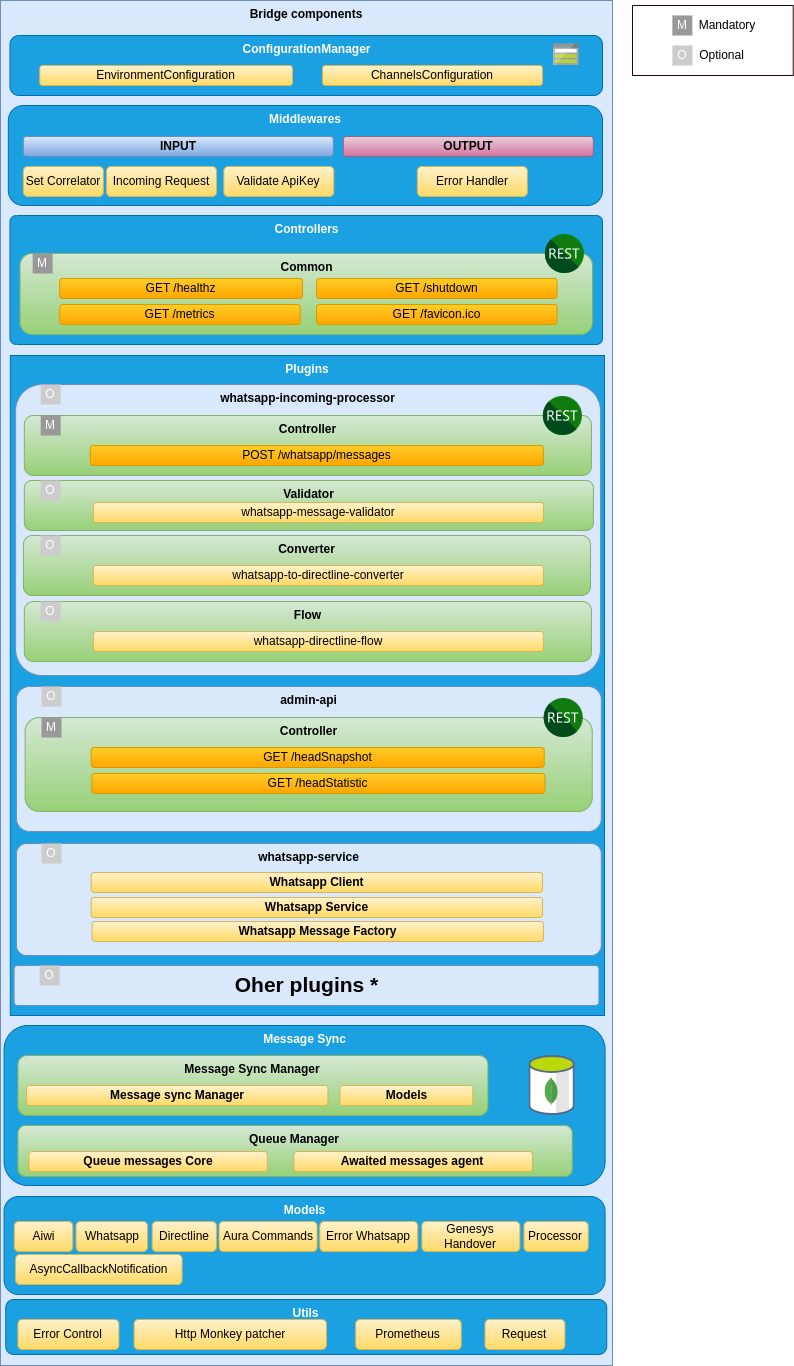
aura-bridge is composed of plugins, which provide functionality to the bridge. Plugins work independently, the same way as a service in a microservices oriented architecture: isolated, self-contained and without affecting other existing functionalities in the system.
The aura-bridge plugins system also allows an OB to generate new plugins and create an “ad hoc” aura-bridge, with the functionalities required and removing those which are not needed for the OB.
ℹ️ The practical process for the generation of plugins is included in develop a plugin and activate in aura-bridge.
Discover in the current documents detailed information regarding aura-bridge plugins:
Types of plugins
There are different types of plugins:
-
Api. REST services that perform specific tasks not associated with the communication with a channel.
-
Client. These plugins define clients that can be used to communicate with a channel. These clients are normally used by processor plugins.
-
Processor. Plugins in charge of communicating with a channel, transforming the message received from a source channel to a destination channel.
-
Service. Utility plugins to be used by the rest of plugins.
Plugins management
As indicated in the previous section, aura-bridge uses the library@architect/architect for the management of plugins, so it is the architect library that is responsible for managing the dependencies injection in each module.
To create the architect application, aura-bridge uses the PluginManager module (located in the modules/plugin-manager folder). This module starts as the rest of modules at the aura-bridge start-up.
The PluginManager performs the following tasks:
- It starts the architect application with the plugins defined in
plugin-config.json file, located at the root of the aura-bridge component.
- It adds the core modules to the IOC context. See the section modules added by aura-bridge.
- It stores the information of each module defined in the plugins.
An example to define aura-bridge-example-service plugin of the previous section is shown below:
/* file: plugin-config.json */
[
    "./lib/plugins/aura-bridge-example-service",
]
Currently, the plugins are in the src/plugins folder of aura-bridge, but in the future these plugins should be independent libraries and could be charged by library name (for example: @telefonica/aura-bridge-example-service).
Apart from the aura-bridge core environment variables, each plugin can define its own specific variables. Access the document Aura bridge environment variables and find them in the section corresponding to your plugin.
Plugin basic structure
Currently, aura-bridge uses @architect/architect library for plugins management.
A basic plugin must define at least:
- A
package.json file defining the library, like any other JavaScript library, with a plugin section defining which modules it consumes and supplies.
- A source code file that defines the modules that it supplies (
index.ts for example).
The structure of this basic plugin is as follows:
aura-bridge-example-service
├── index.ts
└── package.json
A couple of examples with the content of each file are included below:
/* file: index.ts */
import { PluginType, registerPlugin } from '@telefonica/aura-bridge-common';
import { v4 as uuidv4 } from 'uuid';
import { Services } from './example-consume-services';

export = registerPlugin([
    {
        type: PluginType.Service,       // Plugin service type
        name: 'exampleService',         // Name of the plugin service
        instance: {                     // [provides] Instance that provides the module
            getUniqueId() {
                return uuidv4();
            }
        },
        services: Services              // [consumes] Needed modules are added here
    }
]);
/* file: package.json */
{
    "name": "@telefonica/aura-bridge-example-service",
    "version": "1.0.0",
    "main": "index.js",
    "private": true,
    "plugin": {
        "consumes": [
            "configurationManager"
        ],
        "provides": [
            "exampleService"
        ]
    }
}
The modules specified in the plugin.consumes field define the services that are needed by this plugin. The modules specified in the plugin.provides field define the modules that this plugin offered.
Plugins modules
aura-bridge currently adds three modules that can be used by the different plugins. To use them, it is only necessary to add the package.json dependencies on plugin.consumes (like any other module/component).
- configurationManager: Module with the aura-bridge configuration information.
- auraBridgeCache: Module to manage the aura-bridge cache.
- prometheus: Service for metrics management.
A plugin can provide one or more plugin modules and each plugin module can be of a different type. Each type of module is intended to add a specific functionality to aura-bridge.
The existing types are defined in PluginType, which are described in the following sections.
export enum PluginType {
    Api = 'Api',
    Client = 'Client',
    Processor = 'Processor',
    Service = 'Service'
}
All plugins modules must follow the base Plugin interface:
export interface Plugin {
    /**
     * Plugin module name.
     */
    name: string;
    /**
     * Object where the services that plugin module consume will be injected (IOC).
     */
    services?: unknown;
    /**
     * Plugin module type.
     */
    type?: PluginType;
    /**
     * @hapi/joi schema definition with the variables used by the plugin module.
     */
    configuration?: { [key: string]: any; };
}
API plugin module
Use the aucli tool to generate the scaffolding of an API plugin: aucli bridge generate api
An API plugin module type mainly contains:
- At least one source code file that defines the API plugin module and controllers for each of the operations specified in the swagger definition.
- A
package.json file defining the library, with a plugin section defining which modules it consumes and supplies.
- A
swagger.yaml file that contains a detailed description of the entire API defined by the plugin.
The basic structure for a API plugin module type is as follows:
aura-bridge-example-api
├── index.ts
├── package.json
└── swagger.yaml
A type API module must implement the PluginApi interface:
export interface PluginApi extends Plugin {
    /**
     * List of controllers (Express) defined by the plugin module.
     */
    controller: { [operationId: string]: PluginApiController | ((req: Request, res: Response) => Promise<void>) };
}

export interface PluginApiController {
    /**
     * Is directline processor?
     */
    isDirectlineProcessor?: boolean;
    /**
     * Channel type.
     */
    channelType?: BridgeType;
    /**
     * Express controller function.
     */
    controller: (req: Request, res: Response) => Promise<void>;
    /**
     * Custom error handler.
     */
    errorHandler?: (err: any, request: express.Request, response: express.Response, next: express.NextFunction) => void;
}
A couple of examples with the content of each file are included below:
/* file: index.ts */
import { PluginType, registerPlugin } from '@telefonica/aura-bridge-common';
import { Services } from './example-api-consume-services';

const controller = {
    hello: (req: Request, res: Response) => {
        res.send({ message: 'Hello from example api!' });
    }
}

export = registerPlugin([
    {
        type: PluginType.Api,           // Plugin module type
        name: 'exampleApi',             // Plugin module name
        controller,                     // Controllers definitions (linked to swagger operationId),
                                        // or it is possible to also use the PluginApiController interface
        services: Services,             // [consumes] Needed modules are added here
    }
]);
/* file: package.json */
{
    "name": "@telefonica/aura-bridge-example-api",
    "version": "1.0.0",
    "main": "index.js",
    "private": true,
    "plugin": {
        "consumes": [ ],
        "provides": [
            "exampleApi"
        ]
    }
}
# file: swagger.yaml
openapi: 3.0.0
info:
  title: aura bridge example api
...
paths:
  /example/hello:
   get:
     operationId: hello             # Function name defined in "controller".
     x-router-controller: plugins   # It should always be "plugins".
     responses:
       '200':
         description: OK
         headers: { }
An API module can also define its own error handling and not use the default error handling defined in the bridge core.
Example:
public errorHandler(err: any, request: express.Request, response: express.Response, next: express.NextFunction) {
    const corr = (request as any).correlator;

    let status: number = 200;
    let message: string = 'Accepted request';

    if (err.statusCode === 401) {
        status = err.statusCode;
        message = 'Unauthorized request';
    }

    // An error in swagger validation is simply logged as a warning
    if (err.failedValidation) {
        logger.warning({
            msg: `Bad request on swagger validation. The first error message was: ${err?.validationResult[0]?.message}`,
            stck: err.validationResult, corr,
            step: AuraBridgeStep.Controller
        });
    }

    response.status(status).send({ code: status, message });
}
Client module
Use the aucli tool to generate the scaffolding of a client module: aucli bridge generate client
A client module type mainly contains:
- At least one source code file that defines the client module and the client itself.
- A
package.json file defining the library, with a plugin section defining which modules it consumes and supplies.
The basic structure for a client module type is as follows:
aura-bridge-example-client
├── index.ts
├── package.json
A type client module must implement the PluginClient interface:
export interface PluginClient extends Plugin {
    /**
     * Client instance.
     */
    instance?: any;
    /**
     * Returns a client instance if it must be initiated asynchronously.
     */
    getInstance?: () => any;
}
The instance field or the getInstance method should be used to obtain the client, but not both. If the client does not need to be initiated asynchronously, the client definition in the instance field is the preferred option. If it is necessary to asynchronously start the client, the getInstance method must be used.
A couple of examples with the content of each file are included below:
/* file: index.ts */
import { PluginType, registerPlugin } from '@telefonica/aura-bridge-common';
import { Services } from './example-consume-services';
import { ExampleClient } from './example-client';

export = registerPlugin([
    {
        type: PluginType.Client,
        name: 'ExampleClient',
        instance: new ExampleClient(),
        services: Services
    }
]);
/* file: package.json */
{
    "name": "@telefonica/aura-bridge-example-client",
    "version": "1.0.0",
    "main": "index.js",
    "private": true,
    "plugin": {
        "consumes": [
            "configurationManager"
        ],
        "provides": [
            "ExampleClient"
        ]
    }
}
/* file: example-client.ts */
import { AuraBridgeClient, AuraBridgeRequestInfo, SendMessageOptions } from '@telefonica/aura-bridge-common';
import { AuraLogger } from '@telefonica/aura-logging';
import { Services } from './example-consume-services';

const logger: AuraLogger.AuraBusEmitter = new AuraLogger.AuraBusEmitter('ExampleClient');

export class ExampleClient extends AuraBridgeClient {
    public constructor() {
        super('ExampleClient', Services.configurationManager.environmentConfiguration);
    }

    public async sendMessage(message: any, options: SendMessageOptions): Promise<void> {
        const { corr }: Partial<AuraBridgeRequestInfo> = options.requestInfo;
        // TODO: Implement the message sending logic here.
    }
}
A basic client should only extend the AuraBridgeClient class and implement the sendMessage method. The client can define any other method, but the sendMessage method will be used by the processors to send a message to a destination.
If the client uses the OAuth protocol, it is possible to add the OpenID authorization information to the client and automatically update the access token for the communication. To make use of this functionality, it is necessary that the new client extends from AuraBridgeClientOAuthTokens class instead of AuraBridgeClient class:
/* file: example-client.ts */
import { AuraBridgeClientOAuthTokens, AuraBridgeRequestInfo, SendMessageOptions } from '@telefonica/aura-bridge-common';
import { AuraLogger } from '@telefonica/aura-logging';
import { Services } from './example-consume-services';

const logger: AuraLogger.AuraBusEmitter = new AuraLogger.AuraBusEmitter('ExampleClient');

export class ExampleClient extends AuraBridgeClientOAuthTokens {
    public constructor() {
        super(
            'ExampleClient',
            Services.configurationManager.environmentConfiguration,
            [] // TODO: Add list ClientOAuthInformation here
        );
    }

    public async init(): Promise<void> {
        await this.refreshTokens();    // <-- It is responsible for updating the tokens before it expire.
    }

    public async sendMessage(message: any, options: SendMessageOptions): Promise<void> {
        const { corr }: Partial<AuraBridgeRequestInfo> = options.requestInfo;
        // TODO: Implement the message sending logic here.
    }
}
In addition to the refreshTokens method, the AuraBridgeClientOAuthTokens class defines the following methods:
addOpenIdClients: Add new clients to the list to update your tokens.getTokenByClientId: Get token by client id.stopRefreshTokens: Stop refresh client tokens.
Processor module
Use the aucli tool to generate the scaffolding of a processor module: aucli bridge generate processor.
As a general rule, a processor is responsible for converting an input message (from a “source” channel) to an output message (that will be sent to a “destination” channel).
Processor flow
To help with the task of generating a processor (in addition to the aucli tool) , the aura-bridge-common library provides the AuraBridgeFlow class that allows to define the converter and the client that will be used to convert and send the incoming message to the destination in a simple and declarative way.
const flow: BridgeFlow = {
    source: {                               // Source from where the request is initiated
        type: BridgeNodeType.Directline
    },
    destination: {                          // Destination where the request will be redirected
        type: BridgeNodeType.TestModel,
        converter: DirectlineToTestModelConverter,
        client: services.testModelClient,
        clientOptions: { queue: { bridgeFlowName: directlineToTestModelFlow.name } }
    },
    onError: {
        // ...
    }
};
In the same way, in case an exception occurs, it is possible to define the list of channels that should be informed.
const flow: BridgeFlow = {
    source: {
        // ...
    },
    destination: {
        // ...
    },
    onError: {                          // How and which channels should be informed on exception
        destinations: [
            {
                type: BridgeNodeType.TestModel,
                converter: ErrorToTestModelApiConverter,
                client: services.testModelClient,
                decode: TestModelDestinationResponseError
            },
            {
                type: BridgeNodeType.Directline,
                converter: ErrorToDirectlineEventConverter,
                client: services.directlineClient,
                decode: directlineDestinationResponseError
            }
        ]
    }
};
Declaring a destination
The destination field must follow the interface BridgeDestination.
export interface BridgeDestination extends BridgeNode {
    /**
     * Client instance that will be used to send the message to the destination
     */
    client: AuraBridgeClient;
    /**
     * Client options. System to send the message used: queue, retries, etc
     */
    clientOptions?: SendMessageClientOptions;
    /**
     * Converter to use
     */
    converter?: AuraBridgeMessageConverter;
    /**
     * Relationship between exception and response error
     */
    decode?: ExceptionResponseError[];
    /**
     * Optional condition for a destination to be executed
     */
    condition?: (error?: Error, lastError?: Error, requestInfo?: AuraBridgeRequestInfo, message?: any) => boolean;
}
The process to send a message using the previous definition is shown below:
If the indicated condition is true, the message will be converted (using converter) and sent (using client with options defined in clientOptions field). If during the process there is an error that throws an exception, all the destinations defined in onError.destinations field will be executed in order in the same way.
The following diagram shows the execution sequence:
flowchart LR
    subgraph source
        A[Message]
    end
    subgraph destination
    direction LR
        A[Message] --> Check{check condition}
        Check -->|True| Converter[Converter]
        Check -->|False| End[end]
        Converter --> |Converted message| Client[Client]
        help[Send message using clientOptions]
    end
When an exception is thrown, all the destinations defined in onError.Destinations are processed, passing both the original message and the exception occurred:
flowchart LR
    subgraph onError information
        Message[Message]
        Exception[Exception message]
    end
    subgraph onError destinations
    direction LR
        Message[Message] --> CheckOnError{check condition}
        Exception --> CheckOnError{check condition}
        CheckOnError -->|True| ConverterOnError[Converter]
        CheckOnError -->|False| EndOnError[Next destination]
        ConverterOnError --> |Converted message| ClientOnError[Client]
        helpOnError[Send message using clientOptions]
    end
Sending a specific message on exception
When an exception occurred during the execution of a flow (BridgeFlow), it is possible to decode the exception in a specific error message for each destination defined in onError.destinations field.
The list that relates the exception with each message is added in the field decode of BridgeDestination. Each of these elements must implement the following interface:
/**
 * @interface ExceptionResponseError
 */
export interface ExceptionResponseError {
    /**
     * Name error from exception
     */
    name?: string;
    /**
     * Message to user key
     */
    messageToUserKey?: string;
    /**
     * Error status from exception
     */
    status?: number;
    /**
     * Error response code
     */
    responseCode?: string;
    /**
     * Response error information
     */
    response: ResponseError;
}
In the following code, the example shows how to send a message with status 500 and message key bridge:error.transform when an error in the converter has occurred:
const exampleResponseError: ExceptionResponseError[] = [
    {
        name: AuraBridgeConverterError.name,
        response: {
            status: StatusCodes.INTERNAL_SERVER_ERROR,
            description: 'Internal bridge error converting input message to output format',
            messageToUserKey: 'bridge:error.transform'
        }
    }
];
Basic structure of the processor module
The processor module type mainly contains:
- At least one source code file that defines the processor plugin module and controllers for each of the operations specified in the swagger definition.
- A
package.json file defining the library, with a plugin section defining which modules it consumes and supplies.
- A
swagger.yaml file that contains a detailed description of the entire API defined by the plugin.
- A source code file that defines the
BridgeFlow.
- A source code file that defines the
AuraBridgeMessageConverter.
The basic structure for a processor plugin module type is as follows:
aura-bridge-example-processor
├── index.ts            # Processor plugin module and controller
├── converter.ts        # Converter (AuraBridgeMessageConverter)
├── flow.ts             # Flow (BridgeFlow)
├── package.json
└── swagger.yaml        # Api definition
A type processor module must implement the PluginProcessor interface:
export interface PluginProcessor extends PluginApi {
    /**
     * List of defined flows.
     */
    flows: BridgeFlow[];
}
In addition to the definition of flows, the same requirements as for an API plugin type are applied.
If the processor plugin must manage the aura-groot response (using DirectLine) for a channel type, it is possible to use the PluginApiController interface to define the controller.
For example:
/* Manage aura-groot response messages for whatsapp channels */
postDirectlineConversationsActivities: {
    isDirectlineProcessor: true,                            // Indicates if it is a directline processor
    channelType: BridgeType.Whatsapp,                      // Channel type
    controller: directlineWhatsappController.controller     // Controller definition
}
In this way, all the messages sent for the WhatsApp type channel to /aura-services/{channelName}/v3/conversations/{conversationId}/activities and
/aura-services/{channelName}/v3/conversations/{conversationId}/activities/{messageId} endpoints will be managed by the defined controller.
⚠️ These endpoints do not need to be defined in the plugin swagger, since they are supplied by the aura-bridge core.
A couple of examples with the content of each file are shown below:
/* file: index.ts */
/* description: Using controller function */

import ...

const controller = {
    exampleNotification: async (req: Request, res: Response) => {
        const env = Services.configurationManager.environmentConfiguration;
        res.status(200).send();
        await AuraBridgeFlow.process(exampleToDirectlineFlow(Services), getRequestInformation(req, env), req.body);
    }
};

export = registerPlugin([
    {
        type: PluginType.Processor,         // Plugin module type
        name: 'exampleProcessor',           // Plugin module name
        controller,                         // Controllers definitions (linked to swagger operationId)
        flows: [exampleToDirectlineFlow],   // Flows
        services: Services                  // [consumes] Needed modules are added here
    }
]);

/* file: index.ts */
/* description: Using PluginApiController interface */

import ...

const controller = {
    // This plugin manages all the requests from aura-groot for the testModel channel type destination
    postDirectlineConversationsActivities: {
        isDirectlineProcessor: true,
        channelType: BridgeType.TestModel,
        controller:  async (req: Request, res: Response) => {
            ...
        }
    }
};

export = registerPlugin([
    {
        type: PluginType.Processor,         // Plugin module type
        name: 'directlineTestModelProcessor',    // Plugin module name
        controller,                         // Controllers definitions (linked to swagger operationId)
        flows: [exampleToDirectlineFlow],   // Flows
        services: Services                  // [consumes] Needed modules are added here
    }
]);
/* file: converter.ts */
import ...

export class ExampleConverter extends AuraBridgeMessageConverter {
    public static async message(incomingMessage: ExampleMessage) {
        // Logic of the converter here
    }
}
/* file: flow.ts */
/**
 * Flow: example to directline.
 *
 *
 * [Example] ─────> (bridge) ───(ok)──────> [Directline]
 *
 * @returns {BridgeFlow} flow
 */
export function asyncCallbackToDirectlineFlow(services: any): BridgeFlow {
    const flow: BridgeFlow = {
        source: {
            type: BridgeNodeType.Example
        },
        destination: {
            type: BridgeNodeType.Directline,
            converter: ExampleConverter,
            client: services.directlineClient,
            clientOptions: { retries: {} }
        },
        onError: {
            destinations: [
                ...
            ]
        }
    };

    return flow;
}
/* file: package.json */
{
    "name": "@telefonica/aura-bridge-example-processor",
    "version": "1.0.0",
    "main": "index.js",
    "private": true,
    "plugin": {
        "consumes": [ ... ],
        "provides": [
            "exampleProcessor"
        ]
    }
}
# file: swagger.yaml
openapi: 3.0.0
info:
  title: aura bridge example processor
...
paths:
  /example/notification:
   get:
     operationId: exampleNotification       # Function name defined in "controller".
     x-router-controller: plugins           # It should always be "plugins".
     responses:
       '200':
         description: OK
         headers: { }
Service module
Use the aucli tool to generate the scaffolding of a service plugin: aucli bridge generate service
A service plugin module is a set of utilities that can be reused by the rest of plugins and mainly contains:
- At least one source code file that defines the service plugin module and the service itself.
- A
package.json file defining the library, with a plugin section defining that modules consume and supplies.
The basic structure for a service plugin module type is as follows:
aura-bridge-example-service
├── index.ts
└── package.json
A type service module must implement the PluginService interface:
export interface PluginService extends Plugin {
    /**
     * Service instance.
     */
    instance?: any;
    /**
     * Returns a service instance if it must be initiated asynchronously.
     */
    getInstance?: () => any;
}
The instance field or the getInstance method should be used to obtain the service, but not both. If the service does not need to be initiated asynchronously, the service definition in the instance field is the preferred option. If it is necessary to asynchronously start the service, the getInstance method must be used.
A couple of examples with the content of each file are shown below:
/* file: index.ts */
import { PluginType, registerPlugin } from '@telefonica/aura-bridge-common';
...

const exampleService = {
    isActionMessage: (message: ExampleMesageModel) => {
        return !!message?.channelData?.customData?.action;
    }
}

export = registerPlugin([
    {
        type: PluginType.Service,       // Plugin module type
        name: 'exampleService',         // Plugin module name
        instance: exampleService,       // Service instance
        services: Services              // [consumes] Needed modules are added here
    }
]);
/* file: package.json */
{
    "name": "@telefonica/aura-bridge-example-service",
    "version": "1.0.0",
    "main": "index.js",
    "private": true,
    "plugin": {
        "consumes": [ ],
        "provides": [
            "exampleService"
        ]
    }
}
Plugins in specific channels
There is a relationship between a channel and the different plugins that give full support to the channel in aura-bridge. This is because plugins can supply: services, incoming messages management, output messages management, etc.
Therefore, to support a channel like WhatsApp, several plugins may be necessary and knowing that relationship allows to enable/disable the support to the complete channel in aura-bridge correctly.
Plugins for WhatsApp channel
| Plugin |
Dependencies |
Core dependencies |
| whatsapp-incoming-processor |
whatsapp-service, directline-service |
configurationManager, prometheus |
| directline-whatsapp-processor |
whatsapp-service, directline-service |
configurationManager |
| directline-whatsapp-service |
whatsapp-service, directline-service |
configurationManager |
| whatsapp-service |
|
configurationManager, prometheus |
| directline-service |
|
configurationManager, auraBridgeCache |
How to disable the WhatsApp channel
To disable the WhatsApp channel, it is necessary to take into account the following:
-
The whatsapp-incoming-processor and directline-whatsapp-processor plugins are not dependent on any other plugin, so they can be removed from the plugin-config.json file.
-
The directline-whatsapp-service, whatsapp-service and directline-service plugins can be used by other plugins and can only be removed if they are not needed.
Plugins for async-callback
| Plugin |
Dependencies |
Core dependencies |
| async-callback-directline-processor |
directline-service |
configurationManager, prometheus |
How to disable the async-callback functionality
The async-callback-directline-processor plugin is not dependent on any other plugin, so it can be removed from the plugin-config.json file to completely disable the async-callback functionality.
Plugins for Genesys
How to disable the Genesys functionality
The genesys-directline-processor plugin is not dependent on any other plugin, so it can be removed from the plugin-config.json file to completely disable the Genesys functionality.
1.6 - directline-rcs-processor plugin
directline-rcs-processor plugin
Technical description of directline-rcs-processor plugin
Introduction
This plugin receives requests from aura-groot and send them to RCS callback.
Consumes components (IOC)
| Name |
Type |
Description |
| rcsClient |
PluginType.Service |
RCS client |
| directlineClient |
PluginType.Service |
Directline client |
| configurationManager |
PluginType.Service |
Configuration manager |
| directlineService |
PluginType.Service |
Services and utilities for Directline channel |
Provides components (IOC)
| Name |
Type |
Description |
| directlineRcsProcessor |
PluginType.Processor |
Manage RCS responses |
rcs-directline-processor flow definition
To process a message, the directline-rcs-processor uses AuraBridgeFlow with the following definition:
    const flow: BridgeFlow = {
        name: 'directlineToRcsFlow',
        source: {
            type: BridgeNodeType.Directline
        },
        destination: {
            type: BridgeNodeType.Rcs,
            converter: DirectlineToRcsConverter,
            client: services.rcsClient,
            clientOptions: { queue: { bridgeFlowName: directlineToRcsFlow.name } }
        },
        onError: {
            destinations: [
                {
                    type: BridgeNodeType.Rcs,
                    converter: ErrorToRcsApiConverter,
                    client: services.rcsClient,
                    decode: RcsDestinationResponseError
                },
                {
                    type: BridgeNodeType.Directline,
                    converter: ErrorToDirectlineEventConverter,
                    client: services.directlineClient,
                    decode: RcsDestinationResponseError
                }
            ]
        }
    };
According to the flow definition, AuraBridgeFlow tries to process, convert and send (using queues) the message to the Google RCS messages endpoint. If some type of error occurs during this process and is marked as recoverable, certain retries will be executed. If after all, the error continues, an error message will be sent to RCS and an error event will be sent to aura-groot.
rcsToDirectlineConverter
Main converter, in charge of transforming DirectLine activities to RCS format.
This converter only handles activities with an attachment type
application/vnd.telefonica.aura.rcs.message with content in RCS format.
{
  "type": "message",
  "serviceUrl": "http://localhost:8045/aura-services/javiagent",
  "channelId": "f7fd1021-41cd-588a-a461-387cc24be225",
  "from": {},
  "conversation": {
    "id": "d152aee9-1aaa-5b54-95a5-79352eee2e45"
  },
  "recipient": {
    "id": "34659949469",
    "name": "javiagent_xxxxxx_agent@rbm.goog"
  },
  "text": "Text doesn't matter",
  "inputHint": "acceptingInput",
  "attachments": [
    {
      "contentType": "application/vnd.telefonica.aura.rcs.message",
      "content": {
        "contentMessage": {
          "richCard": {
            "carouselCard": {
              "cardWidth": "MEDIUM",
              "cardContents": [
                {
                  "title": "Card #1",
                  "description": "The description for card #1",
                  "suggestions": [
                    {
                      "reply": {
                        "text": "Card #1",
                        "postbackData": "{\\"intent\\": \\"intent.factotum-test.rcs-formats\\",\\"entities\\":[{\\"type\\":\\"type\\",\\"entity\\":\\"postback\\"},{\\"type\\":\\"data\\",\\"entity\\":\\"card 1\\"}]}"
                      }
                    }
                  ],
                  "media": {
                    "height": "MEDIUM",
                    "contentInfo": {
                      "fileUrl": "https://storage.googleapis.com/kitchen-sink-sample-images/cute-dog.jpg",
                      "forceRefresh": "false"
                    }
                  }
                },
                {
                  "title": "Card #2",
                  "description": "The description for card #2",
                  "suggestions": [
                    {
                      "reply": {
                        "text": "Card #2",
                        "postbackData": "{\\"intent\\": \\"intent.factotum-test.rcs-formats\\",\\"entities\\":[{\\"type\\":\\"type\\",\\"entity\\":\\"postback\\"},{\\"type\\":\\"data\\",\\"entity\\":\\"card 2\\"}]}"
                      }
                    }
                  ],
                  "media": {
                    "height": "MEDIUM",
                    "contentInfo": {
                      "fileUrl": "https://storage.googleapis.com/kitchen-sink-sample-images/elephant.jpg",
                      "forceRefresh": "false"
                    }
                  }
                }
              ]
            }
          }
        }
      }
    }
  ],
  "channelData": {
    "correlator": "73b72144-7247-4876-880b-57b63efa323e",
    "version": "3",
    "status": {
      "code": "SUCCESS",
      "message": "Success"
    },
    "payload": {
      "bridge": {
        "channelId": "f7fd1021-41cd-588a-a461-387cc24be225"
      }
    }
  },
  "replyToId": "11879060267953086"
}
If an attachment of this type is not present, a simple message with the value of the activity.text field will be sent to the user.
1.8 - directline-whatsapp-service plugin
directline-whatsapp-service plugin
Technical description of directline-whatsapp-service plugin
Introduction
directline-whatsapp-service plugin contains the services and utilities for directline-whatsapp message conversion.
The specific environment variables for this plugin are located at directline-whatsapp-service configuration.
Consumes components (IOC)
| Name |
Type |
Description |
| configurationManager |
PluginType.Service |
Configuration manager |
| prometheus |
PluginType.Service |
Metrics client for prometheus |
| whatsappService |
PluginType.Service |
Services and utilities for WhatsApp channel |
Provides components (IOC)
| Name |
Type |
Description |
| directlineWhatsappService |
PluginType.Service |
Services and utilities for Direct Line - WhatsApp message conversion |
whatsappService
The DirectlineWhatsappService class provides the following utilities:
-
directlineToWhatsappConverter: It converts DirectLine messages (DirectlineMessageModel) to WhatsApp messages (WhatsappMessageResponseModel).
-
directlineWhatsappUtils: Utilities to help with message conversion: DirectLine to WhatsApp.
Converting Direct Line messages to WhatsApp models
The DirectlineToWhatsappConverter class extends from AuraBridgeMessageConverter and converts DirectLine messages to WhatsApp models.
To make this conversion, the DirectlineToWhatsappConverter differences between the following types of messages depending on the DirectLine message content:
| Type |
Direct Line message content |
text |
Direct Line messages that do not contain attachments |
list |
Direct Line messages that contain more than one attachment and the attachmentLayout field value is list. |
carousel |
Direct Line messages that contain more than one attachment and the attachmentLayout field value is carousel. |
heroCard |
Direct Line message that contains a single attachment and the contentType field value is application/vnd.microsoft.card.hero. |
file |
Direct Line message that contains a single attachment and the contentType field value is application/vnd.telefonica.aura.file. |
template |
Direct Line message that contains a single attachment and the contentType field value is application/vnd.telefonica.aura.template. |
videoCard |
Direct Line message that contains a single attachment and the contentType field value is application/vnd.microsoft.card.video. |
whatsapp |
Direct Line message that contains a single attachment and the contentType field value is application/vnd.telefonica.aura.whatsapp. |
In the case of list and carousel, in which there is more than one attachment, each attachment in list follows the same procedure to obtain type depending on the value of the contentType field.
⚠️ Currently, the file, template and videoCard types are disabled when they must be generated from list or carousel.
Type text conversion
DirectLine messages identified with the text type is transformed to WhatsApp text messages using the WhatsappMessageFactory.createTextMessage.
Find further information about sending WhatsApp text messages.
Type heroCard conversion
DirectLine messages identified with the heroCard type is transformed to WhatsApp text messages using the WhatsappMessageFactory.createTextMessage.
These messages will be transformed to WhatsApp list messages, WhatsApp reply buttons or enumerated text lists, following the defined guidelines in WhatsApp list options.
The transformation to a WhatsApp message depends on the type of list obtained:
-
button type. It will be transformed to WhatsApp interactive button message using the WhatsappMessageFactory.createInteractiveButtonMessage.
-
list type. It will be transformed to WhatsApp interactive list message using the WhatsappMessageFactory.createInteractiveListMessage.
-
enumeratedList type. It will be transformed to WhatsApp formatted text message using the WhatsappMessageFactory.createHeroCardMessage.
Type file conversion
DirectLine messages identified with the file type is transformed to WhatsApp media messages using the WhatsappMessageFactory.createFileMessage.
The currently supported file types are: image, document, audio and video.
Find here further information about sending WhatsApp media messages.
Type template conversion
DirectLine messages identified with the template type is transformed to WhatsApp media messages using the WhatsappMessageFactory.createTemplateMessage.
Find here further information about sending WhatsApp template messages.
Type videoCard conversion
DirectLine messages identified with the template type will be transformed to WhatsApp media messages using the WhatsappMessageFactory.createTemplateMessage.
Find here further information about sending WhatsApp template messages.
Type whatsapp conversion
Direct Line messages identified as type whatsapp will be sent to WhatsApp without any transformation. This kind of
messages is composed of an attachment type application/vnd.telefonica.aura.whatsapp whose content will be sent directly to
WhatsApp. Only the field to will be added.
Text conversion to WhatsApp markdown format
All texts obtained using LocaleManager instance are formatted in WhatsApp markdown format. This implies that all resources defined in POEditor to be used in WhatsApp messages must use the markdown standard format.
The getLocaleTextWithParsedMarkdown function from whatsapp-message-utils is responsible for converting the text to WhatsApp markdown format.
For the text sent from the DirectLine message, the DirectlineToWhatsappConverter class converts text to WhatsApp markdown format according to the following:
- If the DirectLine message contains information in the
channelData.payload.bridge.whatsapp.textConvert field, its value is used to convert to WhatsApp markdown format.
- If the request field is not present, the channel configuration is used.
- Finally, if it is not possible to obtain conversion information in the previous cases, the text message is converted by default.
By default, aura-bridge converts the text received from DirectLine message to specific WhatsApp markdown format.
The practical processes for modifying this behavior is explained in the following documents: