This is the multi-page printable view of this section.
Click here to print.
Return to the regular view of this page.
Aura Bridge
Aura Bridge
aura-bridge is the component in charge of the communication protocol between aura-groot and certain external channels that cannot implement the Direct Line protocol.
Find in the current documents the description of this component, its architecture, components and processes.
Aura Virtual Assistant component
Introduction to Aura Bridge
aura-bridge is the component of Aura in charge of adapting the communication protocol, both message format and API calls, between aura-groot and certain external channels, such as Whatsapp, that cannot implement Direct Line protocol (aura-groot native language). It is designed to be extensible, i.e., if any other external channel needs to be integrated with aura-groot, a new adapter for this channel might be added easily to the bridge.
aura-bridge is built as a set of configurable plugins that are deployed on top of aura-bridge core. Each plugin consists of an OpenAPI definition, a controller, a request handler and a converter.
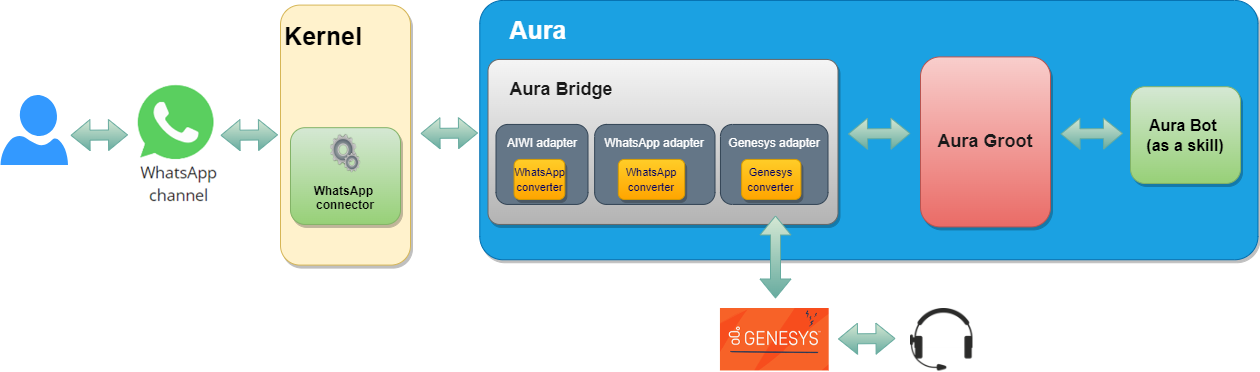
Regarding its implementation, the following technologies are used:
aura-bridge is divided into two sub-components from the logical point of view, where aura-bridge-outbound is a component which shares the same logical implementation as aura-bridge, with the main distinction lying in the differences in its configuration, which implies a deployment specialization:
- Component in charge of adapting the communication from the channel: aura-bridge
Channel communication protocol ➡️ Direct Line protocol
- Component in charge of adapting the communication to the channel: aura-bridge-outbound
Direct Line protocol ➡️ Channel communication protocol
aura-bridge documentation is included in different sections, depending on its scope:
Communication protocol
aura-groot communication protocol is completely asynchronous, this means that the answer of a request is not included in the HTTP response related to the request, but it is sent as a new HTTP request to the callback configured for each channel. For internal channels, the default callback is Direct Line, but for external channels, the callback is aura-bridge.
But, following the same asynchronous approach in aura-bridge, it must be defined a callback for each channel, too. Therefore, channels connected to aura-bridge must be able to handle asynchronous HTTP communication.
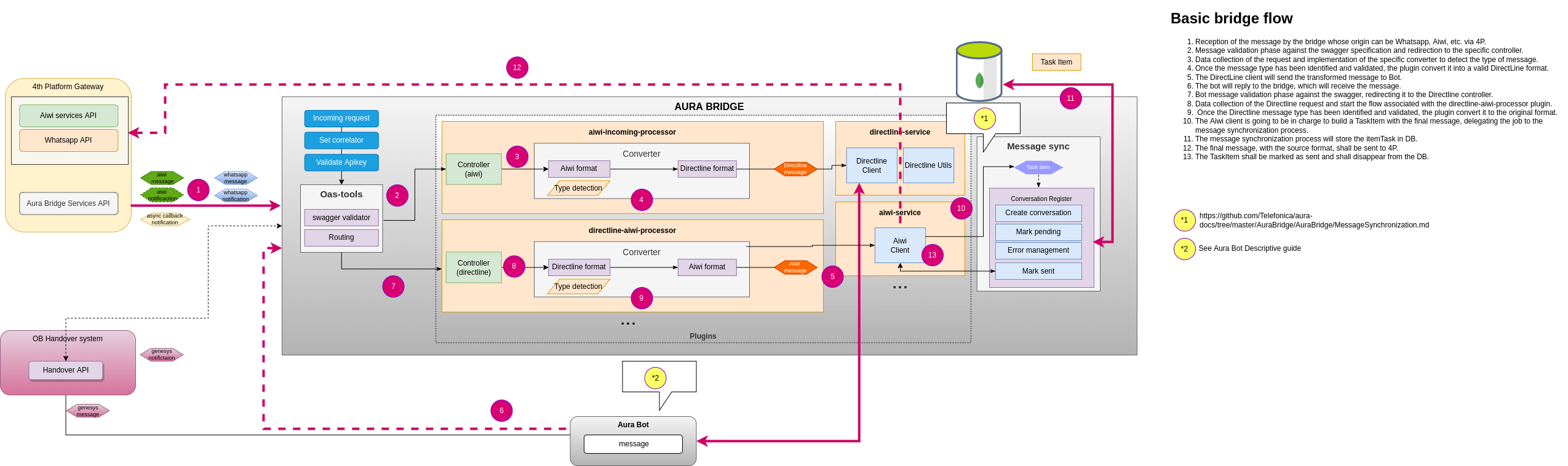
Aura bridge limitations for Whatsapp channels
-
Facebook does not have Service-Level Agreements (SLA) in their APIs, thus messages managed by aura-bridge could suffer delay in their response times.
-
If no ACK is received for the message sent, aura-bridge will wait until AURA_QUEUE_MANAGER_SENT_MESSAGE_TTL (in milliseconds) is met and this could cause a delay in the next message response.
-
If an ACK is received, it can have the following statues:
export enum StatusType {
    // Message the user sent to your business was deleted by the user.
    Deleted = 'deleted',
    // Message sent by your business was delivered to the user's device
    Delivered = 'delivered',
    // Message sent by your business failed to send
    Failed = 'failed',
    // Message sent by your business was read by the user
    Read = 'read',
    // Message sent by your business was received by the server
    Sent = 'sent',
    // Indicates an item in a catalog is not available or does not exist.
    Warning = 'warning'
}
Each one of this states is obtained through a new ACK, and by rule we receive from one to two, but this may change due to its dependency with WhatsApp Business API.
Aura bridge outbound
aura-bridge-outbound is a component which shares the same logical implementation as aura-bridge, with the main distinction lying in the differences in its configuration, which implies a deployment specialization.
Its main mission is focused on returning the responses of aura-groot to the users and leveraging load for aura-bridge
ℹ️ aura-bridge and aura-bridge-outbound share the same make-up process. Further information in aura-bridge make-up
As aura-bridge and aura-bridge-outbound work together, the configuration of both components must be consistent. Further information in aura-bridge environment variables.
Functionality
aura-bridge-outbound is in charge of sending the responses to the corresponding channel callback. For WhatsApp channels, the default callback is Kernel WhatsApp API implementation.
In Aura distributed architecture, this component also works as a translator for aura-groot, but the other way round as aura-bridge does: it translates the Direct Line formatted responses from aura-groot into the corresponding format for each channel (WhatsApp, etc.) and also implements the corresponding protocol for each channel.
ℹ️ aura-bridge and aura-bridge-outbound environment variable AURA_BRIDGE_ENDPOINT should point to internal network (Ex. http://aura-bridge-outbound:8045). Further information about these variables can be found in aura-bridge environment variables.
Sequence diagram
sequenceDiagram
    Channel->>+Aura Bridge: Channel sends a message to bridge.
    Aura Bridge->>+Aura Groot: AURA_BRIDGE_ENDPOINT as serviceUrl variable points to Aura Bridge Outbound, bridge sends the message to groot.
    Aura Groot->>+Aura Bridge Outbound: Groot processes message and sends converted message to outbound.
    Aura Bridge Outbound-->>-Channel: Processed message is sent back to Channel.
ℹ️ Note that message’s information is synchronized between aura-bridge and aura-bridge-outbound due to their shared cache.
1 - Architecture
Aura bridge architecture
Description of Aura bridge general architecture at the level of components
Introduction
aura-bridge architecture is designed based on three fundamental components:
-
aura-bridge: It is identified as the core component of the aura-bridge. It is in charge of starting the basic functionality modules, loading the plugins and starting the expressjs server.
-
aura-bridge-common: It can be defined as an SDK (Software Development Kit) to be able to develop a plugin.
-
aura-bridge-plugin. Component that provides functionality to aura-bridge. This component works the same way as a service in an architecture oriented to microservices (isolated, small and self-contained).
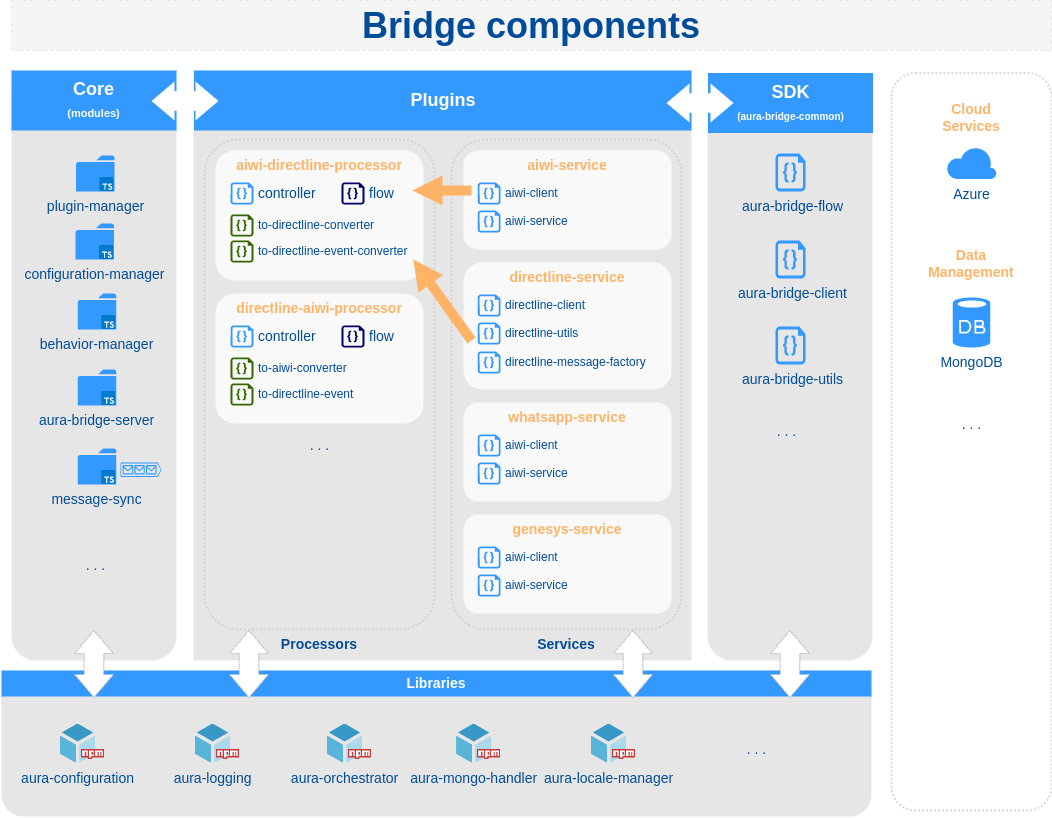
Aura bridge
As mentioned above, it is the core of the system and can work without the need for any plugin.
Source code structure
src
├── cache               # Two level cache module
├── config              # Configuration manager module
├── controllers         # Generic and metric controllers (oastool)
├── make                # Aura bridge make up
├── message-sync        # Queue management system
├── middlewares         # Express middlewares
├── modules             # Bridge modules: behavior-manager, plugin-manager
└── utils               # Bridge utilities: prometheus-utils
Aura bridge common
aura-bridge-common contains all the necessary utilities in order to develop a new aura-bridge plugin and the models used in these utilities.
Aura bridge plugin
Base class to develop an aura-bridge client.
To implement a new client, it is only necessary to extend the class AuraBridgeClient and implement the sendMessage method.
export class TestClient extends AuraBridgeClient {

    public async sendMessage(message: TestMessage, options: SendMessageOptions): Promise<any> {
      ...
    }
}
If the new aura-bridge client needs to use the OAuth protocol, it is possible to extend the class AuraBridgeClientOAuthTokens and indicate the configuration of OAuth clients, passing the parameter authClients in constructor. In this way, the tokens will be updated automatically.
export class TestOauthClient extends AuraBridgeClientOAuthTokens {
  ...
}
aura-bridge-flow
AuraBridgeFlow allows the generation of a “processor” type plugin in a quickly and standardized way: control of errors, logs, metrics, client retry policies, etc.
As a rule, a “processor” type plugin receives, converts and sends a message to a destination. In case of error, it can send messages to another list of destinations.
sequenceDiagram
    Origin->>+Processor Plugin: Message
    Processor Plugin->>+Processor Plugin: Convert message

    alt ok
        Processor Plugin->>+Destination: Converted message
    end
    opt Extra response
        Processor Plugin->>+Error destination (1): Error message (1)
        Processor Plugin->>+Error destination (2): Error message (2)
    end
aura-bridge-utils
AuraBridgeUtils contains utilities for request information, get generic errors, etc.
aura-bridge plugins
A plugin is a module/component that provides aura-bridge with new functionality and works independently without affecting other existing functionality in the system.
📃 Find here detailed descriptive documentation about aura-bridge plugins.
📃 Find here the guidelines for the generation of a plugin and activation in aura-bridge.
2 - Components
Aura bridge components
Description and role of the main Aura Bridge components
Introduction
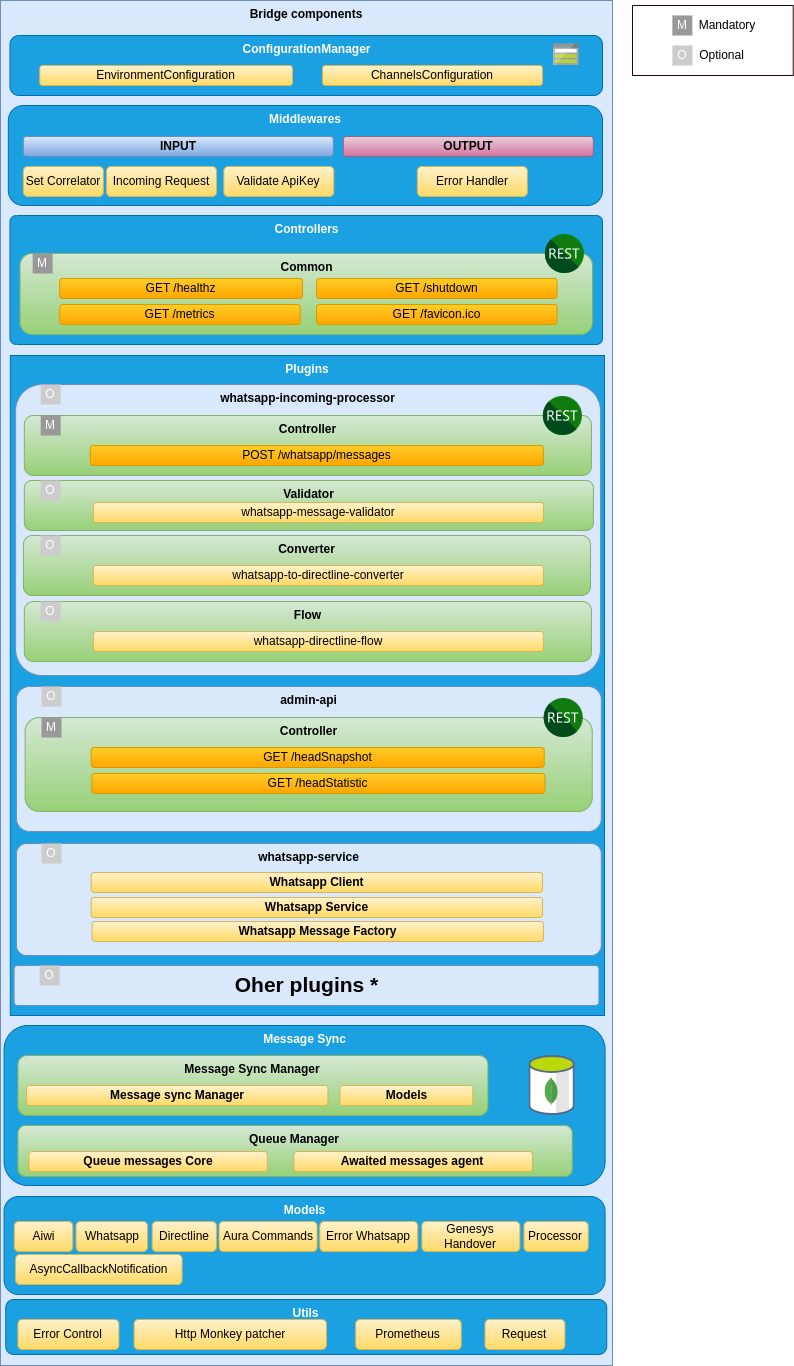
aura-bridge components are shown in the following schema and described below or in specific documents.
Server
The web server is implemented using express, that is the main web framework for nodeJS. It uses openapi-backend on top of Express to allow handling the OpenAPI v3 file.
It is in charge of setting up all the rest of the components that are needed during a request processing, as well as reading the before mentioned swagger file and setting up all the routes defined in it.
Access here to aura-bridge APIs definition.
Middlewares
Each route published in the API definition file is handled by a controller, but before a request lands on its controller, it goes through a series of middlewares, that provides some common steps needed by all the controllers of the server, such as: request authorization, request validation, common parameters extraction, logging, metrics initialization, etc.
Plugins
aura-bridge is composed of plugins, which provide functionality to the bridge.
Find complete information regarding this component in Aura bridge plugins.
Message syncer
One of the main features of aura-bridge is to be able to keep the order of the messages sent to the user, to assure that they are rendered in the correct order, so they are understandable by the users.
The component in charge of guaranteeing this order is call message syncer. It is an internal queue message system that lays on a two-level cache: a local one, that improves performance, and a remote one, to provide consistency.
Know the the detailed process for response messages synchronization managed by the message syncer.
Metrics
Aura metrics system is based on Prometheus that is an open-source systems monitoring and alerting toolkit originally built at SoundCloud.
Prometheus service pools every component to get the metrics generated during the last time period. Every component counts on a private endpoint (not accessible from internet) called /metrics where Prometheus requests the metrics.
For further information about metrics, read Metrics in aura-bridge.
2.1 - Plugins
Aura bridge plugins
Aura bridge plugins are components that provide different functionalities to the bridge
Introduction
aura-bridge is composed of plugins, which provide functionality to the bridge. Plugins work independently, the same way as a service in a microservices oriented architecture: isolated, self-contained and without affecting other existing functionalities in the system.
The aura-bridge plugins system also allows an OB to generate new plugins and create an “ad hoc” aura-bridge, with the functionalities required and removing those which are not needed for the OB.
ℹ️ The practical process for the generation of plugins is included in develop a plugin and activate in aura-bridge.
Discover in the current documents detailed information regarding aura-bridge plugins:
Types of plugins
There are different types of plugins:
-
Api. REST services that perform specific tasks not associated with the communication with a channel.
-
Client. These plugins define clients that can be used to communicate with a channel. These clients are normally used by processor plugins.
-
Processor. Plugins in charge of communicating with a channel, transforming the message received from a source channel to a destination channel.
-
Service. Utility plugins to be used by the rest of plugins.
Plugins management
As indicated in the previous section, aura-bridge uses the library@architect/architect for the management of plugins, so it is the architect library that is responsible for managing the dependencies injection in each module.
To create the architect application, aura-bridge uses the PluginManager module (located in the modules/plugin-manager folder). This module starts as the rest of modules at the aura-bridge start-up.
The PluginManager performs the following tasks:
- It starts the architect application with the plugins defined in
plugin-config.json file, located at the root of the aura-bridge component.
- It adds the core modules to the IOC context. See the section modules added by aura-bridge.
- It stores the information of each module defined in the plugins.
An example to define aura-bridge-example-service plugin of the previous section is shown below:
/* file: plugin-config.json */
[
    "./lib/plugins/aura-bridge-example-service",
]
Currently, the plugins are in the src/plugins folder of aura-bridge, but in the future these plugins should be independent libraries and could be charged by library name (for example: @telefonica/aura-bridge-example-service).
Apart from the aura-bridge core environment variables, each plugin can define its own specific variables. Access the document Aura bridge environment variables and find them in the section corresponding to your plugin.
Plugin basic structure
Currently, aura-bridge uses @architect/architect library for plugins management.
A basic plugin must define at least:
- A
package.json file defining the library, like any other JavaScript library, with a plugin section defining which modules it consumes and supplies.
- A source code file that defines the modules that it supplies (
index.ts for example).
The structure of this basic plugin is as follows:
aura-bridge-example-service
├── index.ts
└── package.json
A couple of examples with the content of each file are included below:
/* file: index.ts */
import { PluginType, registerPlugin } from '@telefonica/aura-bridge-common';
import { v4 as uuidv4 } from 'uuid';
import { Services } from './example-consume-services';

export = registerPlugin([
    {
        type: PluginType.Service,       // Plugin service type
        name: 'exampleService',         // Name of the plugin service
        instance: {                     // [provides] Instance that provides the module
            getUniqueId() {
                return uuidv4();
            }
        },
        services: Services              // [consumes] Needed modules are added here
    }
]);
/* file: package.json */
{
    "name": "@telefonica/aura-bridge-example-service",
    "version": "1.0.0",
    "main": "index.js",
    "private": true,
    "plugin": {
        "consumes": [
            "configurationManager"
        ],
        "provides": [
            "exampleService"
        ]
    }
}
The modules specified in the plugin.consumes field define the services that are needed by this plugin. The modules specified in the plugin.provides field define the modules that this plugin offered.
Plugins modules
aura-bridge currently adds three modules that can be used by the different plugins. To use them, it is only necessary to add the package.json dependencies on plugin.consumes (like any other module/component).
- configurationManager: Module with the aura-bridge configuration information.
- auraBridgeCache: Module to manage the aura-bridge cache.
- prometheus: Service for metrics management.
A plugin can provide one or more plugin modules and each plugin module can be of a different type. Each type of module is intended to add a specific functionality to aura-bridge.
The existing types are defined in PluginType, which are described in the following sections.
export enum PluginType {
    Api = 'Api',
    Client = 'Client',
    Processor = 'Processor',
    Service = 'Service'
}
All plugins modules must follow the base Plugin interface:
export interface Plugin {
    /**
     * Plugin module name.
     */
    name: string;
    /**
     * Object where the services that plugin module consume will be injected (IOC).
     */
    services?: unknown;
    /**
     * Plugin module type.
     */
    type?: PluginType;
    /**
     * @hapi/joi schema definition with the variables used by the plugin module.
     */
    configuration?: { [key: string]: any; };
}
API plugin module
Use the aucli tool to generate the scaffolding of an API plugin: aucli bridge generate api
An API plugin module type mainly contains:
- At least one source code file that defines the API plugin module and controllers for each of the operations specified in the swagger definition.
- A
package.json file defining the library, with a plugin section defining which modules it consumes and supplies.
- A
swagger.yaml file that contains a detailed description of the entire API defined by the plugin.
The basic structure for a API plugin module type is as follows:
aura-bridge-example-api
├── index.ts
├── package.json
└── swagger.yaml
A type API module must implement the PluginApi interface:
export interface PluginApi extends Plugin {
    /**
     * List of controllers (Express) defined by the plugin module.
     */
    controller: { [operationId: string]: PluginApiController | ((req: Request, res: Response) => Promise<void>) };
}

export interface PluginApiController {
    /**
     * Is directline processor?
     */
    isDirectlineProcessor?: boolean;
    /**
     * Channel type.
     */
    channelType?: BridgeType;
    /**
     * Express controller function.
     */
    controller: (req: Request, res: Response) => Promise<void>;
    /**
     * Custom error handler.
     */
    errorHandler?: (err: any, request: express.Request, response: express.Response, next: express.NextFunction) => void;
}
A couple of examples with the content of each file are included below:
/* file: index.ts */
import { PluginType, registerPlugin } from '@telefonica/aura-bridge-common';
import { Services } from './example-api-consume-services';

const controller = {
    hello: (req: Request, res: Response) => {
        res.send({ message: 'Hello from example api!' });
    }
}

export = registerPlugin([
    {
        type: PluginType.Api,           // Plugin module type
        name: 'exampleApi',             // Plugin module name
        controller,                     // Controllers definitions (linked to swagger operationId),
                                        // or it is possible to also use the PluginApiController interface
        services: Services,             // [consumes] Needed modules are added here
    }
]);
/* file: package.json */
{
    "name": "@telefonica/aura-bridge-example-api",
    "version": "1.0.0",
    "main": "index.js",
    "private": true,
    "plugin": {
        "consumes": [ ],
        "provides": [
            "exampleApi"
        ]
    }
}
# file: swagger.yaml
openapi: 3.0.0
info:
  title: aura bridge example api
...
paths:
  /example/hello:
   get:
     operationId: hello             # Function name defined in "controller".
     x-router-controller: plugins   # It should always be "plugins".
     responses:
       '200':
         description: OK
         headers: { }
An API module can also define its own error handling and not use the default error handling defined in the bridge core.
Example:
public errorHandler(err: any, request: express.Request, response: express.Response, next: express.NextFunction) {
    const corr = (request as any).correlator;

    let status: number = 200;
    let message: string = 'Accepted request';

    if (err.statusCode === 401) {
        status = err.statusCode;
        message = 'Unauthorized request';
    }

    // An error in swagger validation is simply logged as a warning
    if (err.failedValidation) {
        logger.warning({
            msg: `Bad request on swagger validation. The first error message was: ${err?.validationResult[0]?.message}`,
            stck: err.validationResult, corr,
            step: AuraBridgeStep.Controller
        });
    }

    response.status(status).send({ code: status, message });
}
Client module
Use the aucli tool to generate the scaffolding of a client module: aucli bridge generate client
A client module type mainly contains:
- At least one source code file that defines the client module and the client itself.
- A
package.json file defining the library, with a plugin section defining which modules it consumes and supplies.
The basic structure for a client module type is as follows:
aura-bridge-example-client
├── index.ts
├── package.json
A type client module must implement the PluginClient interface:
export interface PluginClient extends Plugin {
    /**
     * Client instance.
     */
    instance?: any;
    /**
     * Returns a client instance if it must be initiated asynchronously.
     */
    getInstance?: () => any;
}
The instance field or the getInstance method should be used to obtain the client, but not both. If the client does not need to be initiated asynchronously, the client definition in the instance field is the preferred option. If it is necessary to asynchronously start the client, the getInstance method must be used.
A couple of examples with the content of each file are included below:
/* file: index.ts */
import { PluginType, registerPlugin } from '@telefonica/aura-bridge-common';
import { Services } from './example-consume-services';
import { ExampleClient } from './example-client';

export = registerPlugin([
    {
        type: PluginType.Client,
        name: 'ExampleClient',
        instance: new ExampleClient(),
        services: Services
    }
]);
/* file: package.json */
{
    "name": "@telefonica/aura-bridge-example-client",
    "version": "1.0.0",
    "main": "index.js",
    "private": true,
    "plugin": {
        "consumes": [
            "configurationManager"
        ],
        "provides": [
            "ExampleClient"
        ]
    }
}
/* file: example-client.ts */
import { AuraBridgeClient, AuraBridgeRequestInfo, SendMessageOptions } from '@telefonica/aura-bridge-common';
import { AuraLogger } from '@telefonica/aura-logging';
import { Services } from './example-consume-services';

const logger: AuraLogger.AuraBusEmitter = new AuraLogger.AuraBusEmitter('ExampleClient');

export class ExampleClient extends AuraBridgeClient {
    public constructor() {
        super('ExampleClient', Services.configurationManager.environmentConfiguration);
    }

    public async sendMessage(message: any, options: SendMessageOptions): Promise<void> {
        const { corr }: Partial<AuraBridgeRequestInfo> = options.requestInfo;
        // TODO: Implement the message sending logic here.
    }
}
A basic client should only extend the AuraBridgeClient class and implement the sendMessage method. The client can define any other method, but the sendMessage method will be used by the processors to send a message to a destination.
If the client uses the OAuth protocol, it is possible to add the OpenID authorization information to the client and automatically update the access token for the communication. To make use of this functionality, it is necessary that the new client extends from AuraBridgeClientOAuthTokens class instead of AuraBridgeClient class:
/* file: example-client.ts */
import { AuraBridgeClientOAuthTokens, AuraBridgeRequestInfo, SendMessageOptions } from '@telefonica/aura-bridge-common';
import { AuraLogger } from '@telefonica/aura-logging';
import { Services } from './example-consume-services';

const logger: AuraLogger.AuraBusEmitter = new AuraLogger.AuraBusEmitter('ExampleClient');

export class ExampleClient extends AuraBridgeClientOAuthTokens {
    public constructor() {
        super(
            'ExampleClient',
            Services.configurationManager.environmentConfiguration,
            [] // TODO: Add list ClientOAuthInformation here
        );
    }

    public async init(): Promise<void> {
        await this.refreshTokens();    // <-- It is responsible for updating the tokens before it expire.
    }

    public async sendMessage(message: any, options: SendMessageOptions): Promise<void> {
        const { corr }: Partial<AuraBridgeRequestInfo> = options.requestInfo;
        // TODO: Implement the message sending logic here.
    }
}
In addition to the refreshTokens method, the AuraBridgeClientOAuthTokens class defines the following methods:
addOpenIdClients: Add new clients to the list to update your tokens.getTokenByClientId: Get token by client id.stopRefreshTokens: Stop refresh client tokens.
Processor module
Use the aucli tool to generate the scaffolding of a processor module: aucli bridge generate processor.
As a general rule, a processor is responsible for converting an input message (from a “source” channel) to an output message (that will be sent to a “destination” channel).
Processor flow
To help with the task of generating a processor (in addition to the aucli tool) , the aura-bridge-common library provides the AuraBridgeFlow class that allows to define the converter and the client that will be used to convert and send the incoming message to the destination in a simple and declarative way.
const flow: BridgeFlow = {
    source: {                               // Source from where the request is initiated
        type: BridgeNodeType.Directline
    },
    destination: {                          // Destination where the request will be redirected
        type: BridgeNodeType.TestModel,
        converter: DirectlineToTestModelConverter,
        client: services.testModelClient,
        clientOptions: { queue: { bridgeFlowName: directlineToTestModelFlow.name } }
    },
    onError: {
        // ...
    }
};
In the same way, in case an exception occurs, it is possible to define the list of channels that should be informed.
const flow: BridgeFlow = {
    source: {
        // ...
    },
    destination: {
        // ...
    },
    onError: {                          // How and which channels should be informed on exception
        destinations: [
            {
                type: BridgeNodeType.TestModel,
                converter: ErrorToTestModelApiConverter,
                client: services.testModelClient,
                decode: TestModelDestinationResponseError
            },
            {
                type: BridgeNodeType.Directline,
                converter: ErrorToDirectlineEventConverter,
                client: services.directlineClient,
                decode: directlineDestinationResponseError
            }
        ]
    }
};
Declaring a destination
The destination field must follow the interface BridgeDestination.
export interface BridgeDestination extends BridgeNode {
    /**
     * Client instance that will be used to send the message to the destination
     */
    client: AuraBridgeClient;
    /**
     * Client options. System to send the message used: queue, retries, etc
     */
    clientOptions?: SendMessageClientOptions;
    /**
     * Converter to use
     */
    converter?: AuraBridgeMessageConverter;
    /**
     * Relationship between exception and response error
     */
    decode?: ExceptionResponseError[];
    /**
     * Optional condition for a destination to be executed
     */
    condition?: (error?: Error, lastError?: Error, requestInfo?: AuraBridgeRequestInfo, message?: any) => boolean;
}
The process to send a message using the previous definition is shown below:
If the indicated condition is true, the message will be converted (using converter) and sent (using client with options defined in clientOptions field). If during the process there is an error that throws an exception, all the destinations defined in onError.destinations field will be executed in order in the same way.
The following diagram shows the execution sequence:
flowchart LR
    subgraph source
        A[Message]
    end
    subgraph destination
    direction LR
        A[Message] --> Check{check condition}
        Check -->|True| Converter[Converter]
        Check -->|False| End[end]
        Converter --> |Converted message| Client[Client]
        help[Send message using clientOptions]
    end
When an exception is thrown, all the destinations defined in onError.Destinations are processed, passing both the original message and the exception occurred:
flowchart LR
    subgraph onError information
        Message[Message]
        Exception[Exception message]
    end
    subgraph onError destinations
    direction LR
        Message[Message] --> CheckOnError{check condition}
        Exception --> CheckOnError{check condition}
        CheckOnError -->|True| ConverterOnError[Converter]
        CheckOnError -->|False| EndOnError[Next destination]
        ConverterOnError --> |Converted message| ClientOnError[Client]
        helpOnError[Send message using clientOptions]
    end
Sending a specific message on exception
When an exception occurred during the execution of a flow (BridgeFlow), it is possible to decode the exception in a specific error message for each destination defined in onError.destinations field.
The list that relates the exception with each message is added in the field decode of BridgeDestination. Each of these elements must implement the following interface:
/**
 * @interface ExceptionResponseError
 */
export interface ExceptionResponseError {
    /**
     * Name error from exception
     */
    name?: string;
    /**
     * Message to user key
     */
    messageToUserKey?: string;
    /**
     * Error status from exception
     */
    status?: number;
    /**
     * Error response code
     */
    responseCode?: string;
    /**
     * Response error information
     */
    response: ResponseError;
}
In the following code, the example shows how to send a message with status 500 and message key bridge:error.transform when an error in the converter has occurred:
const exampleResponseError: ExceptionResponseError[] = [
    {
        name: AuraBridgeConverterError.name,
        response: {
            status: StatusCodes.INTERNAL_SERVER_ERROR,
            description: 'Internal bridge error converting input message to output format',
            messageToUserKey: 'bridge:error.transform'
        }
    }
];
Basic structure of the processor module
The processor module type mainly contains:
- At least one source code file that defines the processor plugin module and controllers for each of the operations specified in the swagger definition.
- A
package.json file defining the library, with a plugin section defining which modules it consumes and supplies.
- A
swagger.yaml file that contains a detailed description of the entire API defined by the plugin.
- A source code file that defines the
BridgeFlow.
- A source code file that defines the
AuraBridgeMessageConverter.
The basic structure for a processor plugin module type is as follows:
aura-bridge-example-processor
├── index.ts            # Processor plugin module and controller
├── converter.ts        # Converter (AuraBridgeMessageConverter)
├── flow.ts             # Flow (BridgeFlow)
├── package.json
└── swagger.yaml        # Api definition
A type processor module must implement the PluginProcessor interface:
export interface PluginProcessor extends PluginApi {
    /**
     * List of defined flows.
     */
    flows: BridgeFlow[];
}
In addition to the definition of flows, the same requirements as for an API plugin type are applied.
If the processor plugin must manage the aura-groot response (using DirectLine) for a channel type, it is possible to use the PluginApiController interface to define the controller.
For example:
/* Manage aura-groot response messages for whatsapp channels */
postDirectlineConversationsActivities: {
    isDirectlineProcessor: true,                            // Indicates if it is a directline processor
    channelType: BridgeType.Whatsapp,                      // Channel type
    controller: directlineWhatsappController.controller     // Controller definition
}
In this way, all the messages sent for the WhatsApp type channel to /aura-services/{channelName}/v3/conversations/{conversationId}/activities and
/aura-services/{channelName}/v3/conversations/{conversationId}/activities/{messageId} endpoints will be managed by the defined controller.
⚠️ These endpoints do not need to be defined in the plugin swagger, since they are supplied by the aura-bridge core.
A couple of examples with the content of each file are shown below:
/* file: index.ts */
/* description: Using controller function */

import ...

const controller = {
    exampleNotification: async (req: Request, res: Response) => {
        const env = Services.configurationManager.environmentConfiguration;
        res.status(200).send();
        await AuraBridgeFlow.process(exampleToDirectlineFlow(Services), getRequestInformation(req, env), req.body);
    }
};

export = registerPlugin([
    {
        type: PluginType.Processor,         // Plugin module type
        name: 'exampleProcessor',           // Plugin module name
        controller,                         // Controllers definitions (linked to swagger operationId)
        flows: [exampleToDirectlineFlow],   // Flows
        services: Services                  // [consumes] Needed modules are added here
    }
]);

/* file: index.ts */
/* description: Using PluginApiController interface */

import ...

const controller = {
    // This plugin manages all the requests from aura-groot for the testModel channel type destination
    postDirectlineConversationsActivities: {
        isDirectlineProcessor: true,
        channelType: BridgeType.TestModel,
        controller:  async (req: Request, res: Response) => {
            ...
        }
    }
};

export = registerPlugin([
    {
        type: PluginType.Processor,         // Plugin module type
        name: 'directlineTestModelProcessor',    // Plugin module name
        controller,                         // Controllers definitions (linked to swagger operationId)
        flows: [exampleToDirectlineFlow],   // Flows
        services: Services                  // [consumes] Needed modules are added here
    }
]);
/* file: converter.ts */
import ...

export class ExampleConverter extends AuraBridgeMessageConverter {
    public static async message(incomingMessage: ExampleMessage) {
        // Logic of the converter here
    }
}
/* file: flow.ts */
/**
 * Flow: example to directline.
 *
 *
 * [Example] ─────> (bridge) ───(ok)──────> [Directline]
 *
 * @returns {BridgeFlow} flow
 */
export function asyncCallbackToDirectlineFlow(services: any): BridgeFlow {
    const flow: BridgeFlow = {
        source: {
            type: BridgeNodeType.Example
        },
        destination: {
            type: BridgeNodeType.Directline,
            converter: ExampleConverter,
            client: services.directlineClient,
            clientOptions: { retries: {} }
        },
        onError: {
            destinations: [
                ...
            ]
        }
    };

    return flow;
}
/* file: package.json */
{
    "name": "@telefonica/aura-bridge-example-processor",
    "version": "1.0.0",
    "main": "index.js",
    "private": true,
    "plugin": {
        "consumes": [ ... ],
        "provides": [
            "exampleProcessor"
        ]
    }
}
# file: swagger.yaml
openapi: 3.0.0
info:
  title: aura bridge example processor
...
paths:
  /example/notification:
   get:
     operationId: exampleNotification       # Function name defined in "controller".
     x-router-controller: plugins           # It should always be "plugins".
     responses:
       '200':
         description: OK
         headers: { }
Service module
Use the aucli tool to generate the scaffolding of a service plugin: aucli bridge generate service
A service plugin module is a set of utilities that can be reused by the rest of plugins and mainly contains:
- At least one source code file that defines the service plugin module and the service itself.
- A
package.json file defining the library, with a plugin section defining that modules consume and supplies.
The basic structure for a service plugin module type is as follows:
aura-bridge-example-service
├── index.ts
└── package.json
A type service module must implement the PluginService interface:
export interface PluginService extends Plugin {
    /**
     * Service instance.
     */
    instance?: any;
    /**
     * Returns a service instance if it must be initiated asynchronously.
     */
    getInstance?: () => any;
}
The instance field or the getInstance method should be used to obtain the service, but not both. If the service does not need to be initiated asynchronously, the service definition in the instance field is the preferred option. If it is necessary to asynchronously start the service, the getInstance method must be used.
A couple of examples with the content of each file are shown below:
/* file: index.ts */
import { PluginType, registerPlugin } from '@telefonica/aura-bridge-common';
...

const exampleService = {
    isActionMessage: (message: ExampleMesageModel) => {
        return !!message?.channelData?.customData?.action;
    }
}

export = registerPlugin([
    {
        type: PluginType.Service,       // Plugin module type
        name: 'exampleService',         // Plugin module name
        instance: exampleService,       // Service instance
        services: Services              // [consumes] Needed modules are added here
    }
]);
/* file: package.json */
{
    "name": "@telefonica/aura-bridge-example-service",
    "version": "1.0.0",
    "main": "index.js",
    "private": true,
    "plugin": {
        "consumes": [ ],
        "provides": [
            "exampleService"
        ]
    }
}
Plugins in specific channels
There is a relationship between a channel and the different plugins that give full support to the channel in aura-bridge. This is because plugins can supply: services, incoming messages management, output messages management, etc.
Therefore, to support a channel like WhatsApp, several plugins may be necessary and knowing that relationship allows to enable/disable the support to the complete channel in aura-bridge correctly.
Plugins for WhatsApp channel
| Plugin |
Dependencies |
Core dependencies |
| whatsapp-incoming-processor |
whatsapp-service, directline-service |
configurationManager, prometheus |
| directline-whatsapp-processor |
whatsapp-service, directline-service |
configurationManager |
| directline-whatsapp-service |
whatsapp-service, directline-service |
configurationManager |
| whatsapp-service |
|
configurationManager, prometheus |
| directline-service |
|
configurationManager, auraBridgeCache |
How to disable the WhatsApp channel
To disable the WhatsApp channel, it is necessary to take into account the following:
-
The whatsapp-incoming-processor and directline-whatsapp-processor plugins are not dependent on any other plugin, so they can be removed from the plugin-config.json file.
-
The directline-whatsapp-service, whatsapp-service and directline-service plugins can be used by other plugins and can only be removed if they are not needed.
Plugins for async-callback
| Plugin |
Dependencies |
Core dependencies |
| async-callback-directline-processor |
directline-service |
configurationManager, prometheus |
How to disable the async-callback functionality
The async-callback-directline-processor plugin is not dependent on any other plugin, so it can be removed from the plugin-config.json file to completely disable the async-callback functionality.
Plugins for Genesys
How to disable the Genesys functionality
The genesys-directline-processor plugin is not dependent on any other plugin, so it can be removed from the plugin-config.json file to completely disable the Genesys functionality.
2.1.1 - Global plugins catalog
Aura bridge global plugins catalog
Current global plugins developed in Aura bridge by the Aura Platform Team
Global plugins repository
Check the Github global plugins repository to see the currently available plugins in aura-bridge.
Aura Platform Team is progressively documenting each plugin within this section. The already documented ones include the corresponding link below.
-
admin-api plugin
-
async-callback-directline-processor plugin
-
auraline-conversation-api plugin
-
auraline-incoming-processor plugin
-
auraline-service plugin
-
aurapush-incoming-processor plugin
-
aurapush-sendfeedback-service plugin
-
directline-auraline-processor plugin
-
directline-rcs-processor plugin
-
directline-service plugin
-
directline-whatsapp-processor plugin
-
directline-whatsapp-service plugin
-
genesys-directline-processor plugin
-
rcs-incoming-processor plugin
-
rcs-service plugin
-
whatsapp-incoming-processor plugin
-
whatsapp-service plugin
2.1.2 - auraline-conversation-api plugin
auraline-conversation-api plugin
Technical description of auraline-conversation-api plugin
Introduction
auraline-conversation-api plugin allows you to generate conversation identifiers together with an associated token to be able to communicate through the new Auraline service. This service works similarly to Microsoft Direct Line.
It is mandatory to load this plugin if any channel wants to communicate with aura-bot through Auraline.
Based on official Direct Line API 3.0
Open a new conversation
Before establishing a communication between a client and aura-bot through the Auraline channel, it is necessary to obtain a conversation ID and a token associated to it. This token will be used as APIKey to send messages to the user together with the conversation ID created.
HTTP
POST https://bridge-url.com/aura-services/v1/auraline/conversations
Authorization: APIKEY [Secret]
Conversation Response Model (Create or Update Token)
| Property |
Type |
Description |
| conversationId |
string |
The identification of conversation created or updated (refresh token). |
| token |
string |
Token generated for conversation. It is temporary and can be refreshed. Use with “APIKEY” string in the Authorization HTTP header. |
| expires_in |
number |
Time in seconds for the duration of the token. If you want to refresh it, it must be done before this time has elapsed. It will be set based on the value of AURALINE_CONVERSATION_EXPIRATION_TIME |
The following snippets provide an example of the start conversation request and response.
-
Request
HTTP
POST https://bridge-url.com/aura-services/v1/auraline/conversations
Authorization: APIKEY iaJrC8xpy8qbOF5xnR2vtCX7CZj0LdjAPGfiCpg4Fv0y8qbOF5xPGfiCpg4Fv0y8qqbOF5x8qbOF5xn
-
Response
HTTP/1.1 201 Created
[other headers]
BODY
{
  "conversationId": "X7CZj0LdjAPGfiCpg4Fv",
  "token": "RCurR_XV9ZA.cwA.BKA.iaJrC8xpy8qbOF5xnR2vtCX7CZj0LdjAPGfiCpg4Fv0y8qbOF5xPGfiCpg4Fv0y8qqbOF5x8qbOF5xn",
  "expires_in": 1800,
}
Refresh a Conversation Token
A conversation token can be refreshed an unlimited number of times, as long as it has not expired, as an expired token cannot be refreshed.
To refresh a conversation token, issue this request:
HTTP
POST https://bridge-url.com/aura-services/v1/auraline/conversations/{conversationid}/refresh
Authorization: APIKEY [TOKEN_TO_BE_REFRESHED]
The following snippets provide an example of the Refresh Token request and response.
-
Request
HTTP
POST https://bridge-url.com/aura-services/v1/auraline/conversations/X7CZj0LdjAPGfiCpg4Fv/refresh
Authorization: APIKEY RCurR_XV9ZA.cwA.BKA.iaJrC8xpy8qbOF5xnR2vtCX7CZj0LdjAPGfiCpg4Fv0y8qbOF5xPGfiCpg4Fv0y8qqbOF5x8qbOF5xn
-
Response
If the request is successful, the response contains:
- A new token that is valid for the same conversation as the previous token.
- An
expires_in value that indicates the number of seconds until the new token expires.
For the new token to remain useful, you must refresh the token before it expires:
HTTP
HTTP/1.1 200 OK
[other headers]
BODY
{
  "conversationId": "X7CZj0LdjAPGfiCpg4Fv",
  "token": "RCurR_XV9ZA.cwA.BKA.y8qbOF5xPGfiCpg4Fv0y8qqbOF5x8qbOF5xniaJrC8xpy8qbOF5xnR2vtCX7CZj0LdjAPGfiCpg4Fv0",
  "expires_in": 1800
}
2.1.3 - auraline-incoming-processor plugin
auraline-incoming-processor plugin
Technical description of auraline-incoming-processor plugin
Introduction
This plugin receives requests and transforms them to Auraline format to send them to aura-groot.
The specific environment variables for this plugin are located at auraline-incoming-processor plugin configuration.
Consumes components (IOC)
| Name |
Type |
Description |
| auralineClient |
PluginType.Service |
Auraline client |
| configurationManager |
PluginType.Service |
Configuration manager |
| directlineClient |
PluginType.Service |
DirectLine client |
| directlineService |
PluginType.Service |
Services and utilities for Directline channel |
Provides components (IOC)
| Name |
Type |
Description |
| auraline-directline-processor |
PluginType.Processor |
Manage requests |
| auraline-status-processor |
PluginType.Processor |
Manage status |
Controller
This plugin sets the endpoints it supports.
| Operation id |
Path |
Description |
| postAuralineMessages |
/aura-services/v1/auraline/conversations/{conversationId}/activities |
Manage the messages sent |
| postAuralineStatus |
/aura-services/v1/auraline/conversations/{conversationId}/activities/{activityId}/status |
Manage the status |
auraline-directline-processor flow definition
To process a message, the auraline-directline-processor uses AuraBridgeFlow with the following definition:
    const flow: BridgeFlow = {
        name: 'auralineToDirectlineFlow',
        source: {
            type: BridgeNodeType.Auraline
        },
        destination: {
            type: BridgeNodeType.Directline,
            converter: AuralineToDirectlineConverter,
            client: services.directlineClient,
            clientOptions: { retries: {} }
        },
        onError: {
            destinations: [
                {
                    type: BridgeNodeType.Auraline,
                    converter: AuralineToAuralineApiConverter,
                    client: services.auralineClient,
                    decode: auralineDirectlineResponseError
                },
                {
                    type: BridgeNodeType.Directline,
                    converter: AuralineToDirectlineEventConverter,
                    client: services.directlineClient
                }
            ]
        }
    };
According to the flow definition, AuraBridgeFlow tries to process, convert and send (using retries) the message to aura-groot using the DirectLine client.
If some type of error occurs during this process, an event message will be sent to aura-groot and client with the error information.
flowchart LR
    subgraph Flow
        direction LR
        B(Controller) --> C(Converter)
    end
    A(Client) -->|message| Flow
    Flow -->|ok| D(Bot Directline)
    Flow -->|error| E(Bot Directline Event)
    Flow -->|error| F(Client message)
auraline-directline-processor message conversion
The plugin uses two converters to transform messages to DirectLine format: AuralineToDirectlineConverter and AuralineToDirectlineEventConverter.
AuralineToDirectlineConverter
Main converter, in charge of transforming messages to DirectLine format messages using the directline-message-factory-v3 service of directline-service plugin.
AuralineToDirectlineEventConverter
It makes the conversion to a DirectLine event message if an error in the process has occurred.
Auraline status controller
This controller handles Auraline status requests and validate the APIKey fields. After that, it returns the status and if there
is not an error, it passes the message to Auraline status processor.
Auraline status processor
This processor handles the status, deletes the message in queues and log errors if received.
2.1.4 - aurapush-sendfeedback-service
Aura Push send feedback service
Description of Aura Push send feedback service
Description
aurapush-sendfeedback-service plugin contains the services and utilities to send information to the aura-push service.
To send this information an event consumer is used: aurapush-sendfeedback-consumer. This consumer listens for the following events:
- whatsapp.ackMessageReceived: Event emitted when a new ack message is received.
- core.flow.error.directlineToWhatsappFlow: Event emitted when an error occurs during sending a message from Direct Line to WhatsApp.
sequenceDiagram
    alt whatsapp.ackMessageReceived
        AuraPushFeedbackConsumer->>+onAckMessageReceived: ACK
    end
    alt core.flow.error.directlineToWhatsappFlow
        AuraPushFeedbackConsumer->>+onCoreErrorDirectlineToWhatsappFlow: Core flow error
    end
        onAckMessageReceived->>+auraPushFeedbackClient: ACK and path
        onCoreErrorDirectlineToWhatsappFlow->>+auraPushFeedbackClient: Core flow error and path
        auraPushFeedbackClient->>+Aura Push: Message
⚠️ For Brazil OB, the aurapush-sendfeedback-service plugin requires a specific configuration in the installer aurak8s.
Consumes components (IOC)
| Name |
Type |
Description |
| configurationManager |
PluginType.Service |
Configuration manager |
| eventService |
PluginType.Service |
Bridge event management service |
Provides components (IOC)
| Name |
Type |
Description |
| auraPushSendFeedbackService |
PluginType.Service |
Services and utilities for AuraPush send message feedback |
| auraPushFeedbackClient |
PluginType.Service |
Aura push feedback client |
2.1.5 - directline-auraline-processor plugin
directline-auraline-processor plugin
Technical description of directline-auraline-processor plugin
Introduction
This plugin receives requests from aura-groot and send them to Auraline callback.
Consumes components (IOC)
| Name |
Type |
Description |
| auralineClient |
PluginType.Service |
Auraline client |
| configurationManager |
PluginType.Service |
Configuration manager |
| directlineService |
PluginType.Service |
Services and utilities for Directline channel |
Provides components (IOC)
| Name |
Type |
Description |
| directlineAuralineProcessor |
PluginType.Processor |
Manage Auraline responses |
auraline-directline-processor flow definition
To process a message, the auraline-directline-processor uses AuraBridgeFlow with the following definition:
    const flow: BridgeFlow = {
        name: 'directlineToAuralineFlow',
        source: {
            type: BridgeNodeType.Directline
        },
        destination: {
            type: BridgeNodeType.Auraline,
            converter: DirectlineToAuralineConverter,
            client: services.auralineClient,
            clientOptions: { queue: { bridgeFlowName: directlineToAuralineFlow.name } }
        },
        onError: {
            destinations: [
                {
                    type: BridgeNodeType.Auraline,
                    converter: ErrorToAuralineApiConverter,
                    client: services.auralineClient,
                    decode: AuralineDestinationResponseError
                }
            ]
        }
    };
According to the flow definition, AuraBridgeFlow tries to process, convert and send (using queues) the message to the
Auraline callback endpoint defined in the callbackOptions channel configuration property, within the ResponseOptions model.
If some type of error occurs during this process and is marked as recoverable, certain retries will be executed. If after all,
the error continues, an error message will be sent to the endpoint.
AuralineToDirectlineConverter
Main converter, in charge of transforming DirectLine activities to Auraline format. The response messages will have the
following format:
{
        "activities": [
            {
                "type": "message",
                "serviceUrl": "http://aura-bridge-outbound:8045/aura-services/auraline",
                "channelId": "c71dc728-5fe2-4735-927d-0c419b35ec59",
                "conversation": {
                    "id": "4nc3u4hn"
                },
                "recipient": {
                    "id": "user1"
                },
                "text": "Hi!",
                "inputHint": "acceptingInput",
                "channelData": {
                    "hasMoreMessages": false,
                    "correlator": "53c42d06-3be1-48c4-a6c9-afa6e76d54fc"
                },
                "replyToId": "8vvicc88",
                "id": "8vvicc88|0001"
            }
        ],
        "correlator": "53c42d06-3be1-48c4-a6c9-afa6e76d54fc",
        "timestamp": "2023-11-08T12:24:36.420Z",
        "id": "8vvicc88",
        "to": "user1",
        "conversationId": "4nc3u4hn"
    }
Inside the activities array, all activities will have a unique identifier (messageId|XXXX) that the client should store to
later send the ack to Auraline.
2.1.6 - directline-rcs-processor plugin
directline-rcs-processor plugin
Technical description of directline-rcs-processor plugin
Introduction
This plugin receives requests from aura-groot and send them to RCS callback.
Consumes components (IOC)
| Name |
Type |
Description |
| rcsClient |
PluginType.Service |
RCS client |
| directlineClient |
PluginType.Service |
Directline client |
| configurationManager |
PluginType.Service |
Configuration manager |
| directlineService |
PluginType.Service |
Services and utilities for Directline channel |
Provides components (IOC)
| Name |
Type |
Description |
| directlineRcsProcessor |
PluginType.Processor |
Manage RCS responses |
rcs-directline-processor flow definition
To process a message, the directline-rcs-processor uses AuraBridgeFlow with the following definition:
    const flow: BridgeFlow = {
        name: 'directlineToRcsFlow',
        source: {
            type: BridgeNodeType.Directline
        },
        destination: {
            type: BridgeNodeType.Rcs,
            converter: DirectlineToRcsConverter,
            client: services.rcsClient,
            clientOptions: { queue: { bridgeFlowName: directlineToRcsFlow.name } }
        },
        onError: {
            destinations: [
                {
                    type: BridgeNodeType.Rcs,
                    converter: ErrorToRcsApiConverter,
                    client: services.rcsClient,
                    decode: RcsDestinationResponseError
                },
                {
                    type: BridgeNodeType.Directline,
                    converter: ErrorToDirectlineEventConverter,
                    client: services.directlineClient,
                    decode: RcsDestinationResponseError
                }
            ]
        }
    };
According to the flow definition, AuraBridgeFlow tries to process, convert and send (using queues) the message to the Google RCS messages endpoint. If some type of error occurs during this process and is marked as recoverable, certain retries will be executed. If after all, the error continues, an error message will be sent to RCS and an error event will be sent to aura-groot.
rcsToDirectlineConverter
Main converter, in charge of transforming DirectLine activities to RCS format.
This converter only handles activities with an attachment type
application/vnd.telefonica.aura.rcs.message with content in RCS format.
{
  "type": "message",
  "serviceUrl": "http://localhost:8045/aura-services/javiagent",
  "channelId": "f7fd1021-41cd-588a-a461-387cc24be225",
  "from": {},
  "conversation": {
    "id": "d152aee9-1aaa-5b54-95a5-79352eee2e45"
  },
  "recipient": {
    "id": "34659949469",
    "name": "javiagent_xxxxxx_agent@rbm.goog"
  },
  "text": "Text doesn't matter",
  "inputHint": "acceptingInput",
  "attachments": [
    {
      "contentType": "application/vnd.telefonica.aura.rcs.message",
      "content": {
        "contentMessage": {
          "richCard": {
            "carouselCard": {
              "cardWidth": "MEDIUM",
              "cardContents": [
                {
                  "title": "Card #1",
                  "description": "The description for card #1",
                  "suggestions": [
                    {
                      "reply": {
                        "text": "Card #1",
                        "postbackData": "{\\"intent\\": \\"intent.factotum-test.rcs-formats\\",\\"entities\\":[{\\"type\\":\\"type\\",\\"entity\\":\\"postback\\"},{\\"type\\":\\"data\\",\\"entity\\":\\"card 1\\"}]}"
                      }
                    }
                  ],
                  "media": {
                    "height": "MEDIUM",
                    "contentInfo": {
                      "fileUrl": "https://storage.googleapis.com/kitchen-sink-sample-images/cute-dog.jpg",
                      "forceRefresh": "false"
                    }
                  }
                },
                {
                  "title": "Card #2",
                  "description": "The description for card #2",
                  "suggestions": [
                    {
                      "reply": {
                        "text": "Card #2",
                        "postbackData": "{\\"intent\\": \\"intent.factotum-test.rcs-formats\\",\\"entities\\":[{\\"type\\":\\"type\\",\\"entity\\":\\"postback\\"},{\\"type\\":\\"data\\",\\"entity\\":\\"card 2\\"}]}"
                      }
                    }
                  ],
                  "media": {
                    "height": "MEDIUM",
                    "contentInfo": {
                      "fileUrl": "https://storage.googleapis.com/kitchen-sink-sample-images/elephant.jpg",
                      "forceRefresh": "false"
                    }
                  }
                }
              ]
            }
          }
        }
      }
    }
  ],
  "channelData": {
    "correlator": "73b72144-7247-4876-880b-57b63efa323e",
    "version": "3",
    "status": {
      "code": "SUCCESS",
      "message": "Success"
    },
    "payload": {
      "bridge": {
        "channelId": "f7fd1021-41cd-588a-a461-387cc24be225"
      }
    }
  },
  "replyToId": "11879060267953086"
}
If an attachment of this type is not present, a simple message with the value of the activity.text field will be sent to the user.
2.1.7 - directline-service plugin
directline-service plugin
Technical description of directline-service plugin
Introduction
directline-service plugin contains the services and utilities related to message creation for Microsoft Directline v3. This plugin also contains the Directline client to send messages to aura-root.
The specific environment variables for this plugin are located at directline-service plugin configuration.
Consumes components (IOC)
| Name |
Type |
Description |
| configurationManager |
PluginType.Service |
Configuration manager |
| auraBridgeCache |
PluginType.Service |
Cache for ack messages |
Provides components (IOC)
| Name |
Type |
Description |
| directlineClient |
PluginType.Client |
Direct Line client |
| directlineService |
PluginType.Service |
Services and utilities for Direct Line protocol |
directlineClient plugin
The directlineClient class extends from the AuraBridgeClient and allows sending requests to aura-root.
directlineService
The directlineService class provides utilities related to the Directline client.
messageFactory for channelData v1 (DirectlineMessageFactory): Factory to create different types of Directline messages with channelData v1.messageFactory for channelData v3 (DirectlineMessageFactoryV3): Factory to create different types of Directline messages with channelData v3.
2.1.8 - directline-whatsapp-service plugin
directline-whatsapp-service plugin
Technical description of directline-whatsapp-service plugin
Introduction
directline-whatsapp-service plugin contains the services and utilities for directline-whatsapp message conversion.
The specific environment variables for this plugin are located at directline-whatsapp-service configuration.
Consumes components (IOC)
| Name |
Type |
Description |
| configurationManager |
PluginType.Service |
Configuration manager |
| prometheus |
PluginType.Service |
Metrics client for prometheus |
| whatsappService |
PluginType.Service |
Services and utilities for WhatsApp channel |
Provides components (IOC)
| Name |
Type |
Description |
| directlineWhatsappService |
PluginType.Service |
Services and utilities for Direct Line - WhatsApp message conversion |
whatsappService
The DirectlineWhatsappService class provides the following utilities:
-
directlineToWhatsappConverter: It converts DirectLine messages (DirectlineMessageModel) to WhatsApp messages (WhatsappMessageResponseModel).
-
directlineWhatsappUtils: Utilities to help with message conversion: DirectLine to WhatsApp.
Converting Direct Line messages to WhatsApp models
The DirectlineToWhatsappConverter class extends from AuraBridgeMessageConverter and converts DirectLine messages to WhatsApp models.
To make this conversion, the DirectlineToWhatsappConverter differences between the following types of messages depending on the DirectLine message content:
| Type |
Direct Line message content |
text |
Direct Line messages that do not contain attachments |
list |
Direct Line messages that contain more than one attachment and the attachmentLayout field value is list. |
carousel |
Direct Line messages that contain more than one attachment and the attachmentLayout field value is carousel. |
heroCard |
Direct Line message that contains a single attachment and the contentType field value is application/vnd.microsoft.card.hero. |
file |
Direct Line message that contains a single attachment and the contentType field value is application/vnd.telefonica.aura.file. |
template |
Direct Line message that contains a single attachment and the contentType field value is application/vnd.telefonica.aura.template. |
videoCard |
Direct Line message that contains a single attachment and the contentType field value is application/vnd.microsoft.card.video. |
whatsapp |
Direct Line message that contains a single attachment and the contentType field value is application/vnd.telefonica.aura.whatsapp. |
In the case of list and carousel, in which there is more than one attachment, each attachment in list follows the same procedure to obtain type depending on the value of the contentType field.
⚠️ Currently, the file, template and videoCard types are disabled when they must be generated from list or carousel.
Type text conversion
DirectLine messages identified with the text type is transformed to WhatsApp text messages using the WhatsappMessageFactory.createTextMessage.
Find further information about sending WhatsApp text messages.
Type heroCard conversion
DirectLine messages identified with the heroCard type is transformed to WhatsApp text messages using the WhatsappMessageFactory.createTextMessage.
These messages will be transformed to WhatsApp list messages, WhatsApp reply buttons or enumerated text lists, following the defined guidelines in WhatsApp list options.
The transformation to a WhatsApp message depends on the type of list obtained:
-
button type. It will be transformed to WhatsApp interactive button message using the WhatsappMessageFactory.createInteractiveButtonMessage.
-
list type. It will be transformed to WhatsApp interactive list message using the WhatsappMessageFactory.createInteractiveListMessage.
-
enumeratedList type. It will be transformed to WhatsApp formatted text message using the WhatsappMessageFactory.createHeroCardMessage.
Type file conversion
DirectLine messages identified with the file type is transformed to WhatsApp media messages using the WhatsappMessageFactory.createFileMessage.
The currently supported file types are: image, document, audio and video.
Find here further information about sending WhatsApp media messages.
Type template conversion
DirectLine messages identified with the template type is transformed to WhatsApp media messages using the WhatsappMessageFactory.createTemplateMessage.
Find here further information about sending WhatsApp template messages.
Type videoCard conversion
DirectLine messages identified with the template type will be transformed to WhatsApp media messages using the WhatsappMessageFactory.createTemplateMessage.
Find here further information about sending WhatsApp template messages.
Type whatsapp conversion
Direct Line messages identified as type whatsapp will be sent to WhatsApp without any transformation. This kind of
messages is composed of an attachment type application/vnd.telefonica.aura.whatsapp whose content will be sent directly to
WhatsApp. Only the field to will be added.
Text conversion to WhatsApp markdown format
All texts obtained using LocaleManager instance are formatted in WhatsApp markdown format. This implies that all resources defined in POEditor to be used in WhatsApp messages must use the markdown standard format.
The getLocaleTextWithParsedMarkdown function from whatsapp-message-utils is responsible for converting the text to WhatsApp markdown format.
For the text sent from the DirectLine message, the DirectlineToWhatsappConverter class converts text to WhatsApp markdown format according to the following:
- If the DirectLine message contains information in the
channelData.payload.bridge.whatsapp.textConvert field, its value is used to convert to WhatsApp markdown format.
- If the request field is not present, the channel configuration is used.
- Finally, if it is not possible to obtain conversion information in the previous cases, the text message is converted by default.
By default, aura-bridge converts the text received from DirectLine message to specific WhatsApp markdown format.
The practical processes for modifying this behavior is explained in the following documents:
2.1.9 - genesys-directline-processor plugin
genesys-directline-processor plugin
Technical description of genesys-directline-processor plugin
Introduction
This plugin receives requests from handover and transforms them to DirectLine format to send them to aura-groot.
The specific environment variables for this plugin are located at genesys-directline-processor plugin configuration.
Consumes components (IOC)
| Name |
Type |
Description |
| configurationManager |
PluginType.Service |
Configuration manager |
| directlineClient |
PluginType.Service |
DirectLine client |
| directlineService |
PluginType.Service |
Services and utilities for Directline channel |
Provides components (IOC)
| Name |
Type |
Description |
| genesysProcessor |
PluginType.Processor |
Manage requests from handover |
Controller
This plugin sets the endpoints that support handover.
| Operation id |
Path |
Description |
| postGenesysMessages |
/aura-services/v1/genesys/messages |
Manage the messages sent by handover |
Flow definition
To process a message from handover, the genesys-directline-processor plugin uses AuraBridgeFlow with the following definition:
    const flow: BridgeFlow = {
        source: {
            type: BridgeNodeType.Genesys
        },
        destination: {
            type: BridgeNodeType.Directline,
            converter: GenesysToDirectlineConverter,
            client: services.directlineClient,
            clientOptions: { retries: {} }
        },
        onError: {
            destinations: [
                {
                    type: BridgeNodeType.Directline,
                    converter: GenesysToDirectlineEventConverter,
                    client: services.directlineClient
                }
            ]
        }
    };
According to the flow definition, AuraBridgeFlow tries to process, convert and send (using retries) the message to aura-groot using the DirectLine client.
If some type of error occurs during this process, an event message will be sent to aura-groot with the error information.
flowchart LR
    subgraph Flow
        direction LR
        B(Controller) --> C(Converter)
    end
    A(Handover) -->|message| Flow
    Flow -->|ok| D(Groot Directline)
    Flow -->|error| E(Groot Directline Event)
Message conversion
The plugin uses two converters to transform messages from Handover to DirectLine format: GenesysToDirectlineConverter and GenesysToDirectlineEventConverter.
GenesysToDirectlineConverter
Main converter, in charge of transforming Handover messages to DirectLine format messages using the messageFactory service of directline-whatsapp-service plugin.
The Handover data information in DirectLine message is added to the channeldata.payload.handover field. The converted message also includes an auraCommand with suggestion type and value defined in the environment variable AURA_GENESYS_AURA_COMMAND_DEFAULT_INTENT (by default: intent.common.handover).
Further information about handover payload in channelData v3
GenesysToDirectlineEventConverter
It makes the conversion to a DirectLine event message if an error in the process has occurred.
2.1.10 - whatsapp-client-service plugin
whatsapp-client-service plugin
Technical description of whatsapp-client-service plugin
Introduction
whatsapp-client-service plugin contains the services and utilities related to the WhatsApp channel. This plugin also contains the WhatsApp client to send messages to WhatsApp through Kernel.
The specific environment variables for this plugin are located at whatsapp-client-service plugin configuration.
Consumes components (IOC)
| Name |
Type |
Description |
| configurationManager |
PluginType.Service |
Configuration manager |
| prometheus |
PluginType.Service |
Metrics client for Prometheus |
Provides components (IOC)
| Name |
Type |
Description |
| whatsappClient |
PluginType.Client |
WhatsApp client |
whatsappClient plugin
The WhatsappClient class extends from the AuraBridgeClientOAuthTokens class to obtain the access tokens used in OpenId authentication necessary to perform communications with the Kernel API.
The WhatsappClient allows sending requests to WhatsApp through the Kernel API and is responsible for managing and refreshing all the access tokens of the whatsapp channel type.
Management of multiple Kernel WhatsApp APIs
WhatsappClient is able to handle multiple versions of Kernel WhatsApp APIs. Every channel could have in its configuration a version field with the Kernel WhatsApp API version, and this is the version to be used. By default, if no version is configured, WhatsappClient will use v1. Currently, v1 and v2 are supported.
Configuration by channel
The whatsApp.client field allows the configuration of WhatsappClient options. The interface for this field is defined as follows:
export interface FPClientModel {
    /** Client id */
    id: string;
    /** Client secret */
    secret: string;
    /** Client purposes */
    purposes?: string;
    /** Client scopes */
    scopes?: string;
    /** Client version */
    version?: string;
}
Example:
{
    ...
    "type": "whatsapp",
    "whatsapp": {
        "client": {
            "id": "client-id",              // Client id
            "purposes": "client-purposes",  // Client purposes
            "scopes": "client-scopes",      // Client scopes
            "secret": "client-secret"       // Client secret
            "version": "v1"
        }
    }
}
Error management policy
The WhatsappClient defines its own retry policy when an error occurs.
export const whatsappClientErrorPolicy: IndexedErrorPolicy = {
    // Client code (whatsapp)
    responseCode: {
        429: {
            description: 'The frequency limit was reached',
            recoverable: true
        },
        500: {
            description: 'Generic error-Message failed to send because of an unknown error.Try again later.',
            recoverable: true
        },
        1015: {
            description: 'Customer frequency limit reached.',
            recoverable: true
        },
        1016: {
            description: 'System overloaded.',
            recoverable: true
        },
        1017: {
            description: 'It is not the main master node.',
            recoverable: true
        },
        1018: {
            description: 'It is not a primary main app.',
            recoverable: true
        }
    },
    // Http status (4P)
    status: {
        // 404
        [StatusCodes.NOT_FOUND]: {
            description: ReasonPhrases.NOT_FOUND,
            recoverable: true
        },
        // 408
        [StatusCodes.REQUEST_TIMEOUT]: {
            description: ReasonPhrases.REQUEST_TIMEOUT,
            recoverable: true
        },
        // 409
        [StatusCodes.CONFLICT]: {
            description: ReasonPhrases.CONFLICT,
            recoverable: true
        },
        // 413
        [StatusCodes.REQUEST_TOO_LONG]: {
            description: ReasonPhrases.REQUEST_TOO_LONG,
            recoverable: true
        },
        // 500
        [StatusCodes.INTERNAL_SERVER_ERROR]: {
            description: ReasonPhrases.INTERNAL_SERVER_ERROR,
            recoverable: true
        },
        // 502
        [StatusCodes.BAD_GATEWAY]: {
            description: ReasonPhrases.BAD_GATEWAY,
            recoverable: true
        },
        // 503
        [StatusCodes.SERVICE_UNAVAILABLE]: {
            description: ReasonPhrases.SERVICE_UNAVAILABLE,
            recoverable: true
        },
        // 504
        [StatusCodes.GATEWAY_TIMEOUT]: {
            description: ReasonPhrases.GATEWAY_TIMEOUT,
            recoverable: true
        }
    }
};
The WhatsappClient retry policy differences between two types of errors:
- Errors generated by WhatsApp API, associated with the
responseCode error field.
- Errors generated by Kernel API, associated with the
status error field.
2.1.11 - whatsapp-service plugin
whatsapp-service plugin
Technical description of whatsapp-service plugin
Introduction
whatsapp-service plugin contains the services and utilities related to the WhatsApp channel. This plugin also contains the WhatsApp client to send messages to WhatsApp through Kernel.
The specific environment variables for this plugin are located at whatsapp-service plugin configuration.
Consumes components (IOC)
| Name |
Type |
Description |
| configurationManager |
PluginType.Service |
Configuration manager |
| prometheus |
PluginType.Service |
Metrics client for Prometheus |
| whatsappClient |
PluginType.Client |
WhatsApp client |
Provides components (IOC)
| Name |
Type |
Description |
| whatsappService |
PluginType.Service |
Services and utilities for WhatsApp channel |
whatsappService
The WhatsappService class provides utilities related to the WhatsApp client.
messageFactory (WhatsappMessageFactory): Factory to create different types of WhatsApp messages.interactiveMessageUtils (WhatsappInteractiveMessageUtils): Utilities for interactive message management.whatsappUtils (WhatsappUtils): Utilities for WhatsApp channel.
Find here further information about WhatsApp API section.
2.2 - Aura Bridge cache
Aura Bridge cache
Description of Aura Bridge cache
Description
The aura-bridge currently makes use of two caches:
- ackCache: Cache that uses
RedisConnector and stores information associated with ack status messages of aura-bridge.
- commandCache: Cache using
RedisConnector that allows to store the Behavior Manager information.
Configuration
ackCache
ackCache is configured with the following environment variables:
| Property |
Type |
Description |
| BRIDGE_CACHE_MESSAGES_ACK_TTL |
number |
Time to live of the objects stored in the bridge ack cache messages in seconds. By default: 24 * 60 * 60. |
| BRIDGE_CACHE_MESSAGES_ACK_ACTIVE |
boolean |
Allows to enable/disable the ack messages cache. By default: false. |
commandCache
commandCache is configured with the following environment variables:
| Property |
Type |
Description |
| DEV_AURA_BEHAVIOR_CACHE_TTL |
number |
Maximum lifetime of behavior cache in aura-bridge in seconds. After this time, the system will delete the message. By default: 60 * 60 (60 min). |
3 - Environment variables
Aura bridge environment variables
Description of all the environment variables defined in Aura Bridge
Bridge Core environment variables
- Properties marked in bold are mandatory.
- Properties marked in italics are optional.
As aura-bridge and aura-bridge-outbound work together, the configuration of both components must be consistent, as it is detailed in the following tables.
| Property |
Type |
Description |
Modifiable by OB? |
Same in aura-bridge-outbound? |
| AURA_AUTHORIZATION_HEADER |
string |
Complete authorization header to be sent to aura-groot, with the following format: APIKEY xxxxxx. |
YES, but only if the previous APIKey was deprecated. |
YES |
| AURA_BRIDGE_DIRECTLINE_ACTIONS |
string[] |
Actions that must be forwarded to Directline. By default: ['REDIRECT.COMMAND'] |
YES |
YES |
| AURA_BRIDGE_REMOTE_CONTAINER_PREFIX |
number |
Remote container prefix. By default: aura-bridge. |
NO |
YES |
| AURA_BRIDGE_RETRIES |
number |
Number of retries made by aura-bridge in case of error in an HTTP request. By default: 3. |
NO, only if checked and validated with Aura Global Team. |
YES |
| AURA_BRIDGE_RETRY_DELAY |
number |
Delay between retries in case of error. By default: 100. |
NO, only if checked and validated with Aura Global Team. |
YES |
| AURA_BRIDGE_RETRY_FACTOR |
number |
Factor to multiply delay for every HTTP request retried. By default: 10. |
NO, only if checked and validated with Aura Global Team. |
YES |
| AURA_BRIDGE_SERVER_PORT |
number |
Port to where aura-bridge is listening. By default: 8045. |
NO |
YES |
| AURA_BRIDGE_STARTUP |
string[] |
Tasks executed during start-up. By default: ['readAwaitedMessages']. |
YES |
YES |
| AURA_BRIDGE_TIMEZONE |
string |
Timezone to be included in the channelData sent to aura-bot. By default: Europe/Madrid. |
YES |
YES |
| AURA_BRIDGE_WA_BLACKLISTED_NUMBERS |
Set |
Numbers that are blacklisted and will not be processed by aura-bridge. By default: ``. Example: ’number1,number2,number3' |
YES |
YES |
| AURA_CALLBACK_HEADER |
string |
Deprecated. Name of the HTTP header that contains the endpoint where aura-bridge sends the responses to the current user request. By default: answers-callback. Only for development. |
NO |
YES |
| AURA_CHANNELS_CONFIGURATION_API_ENDPOINT |
string |
Endpoint for aura-configuration-api. |
NO |
YES |
| AURA_DEFAULT_LOCALE |
string |
Culture code to be used by default in the current deployment: de-de, en-gb, es-es, pt-br. |
NO |
YES |
| AURA_ENCRYPTION_ALGORITHM |
string |
Encryption algorithm used to validate the APIKey. By default: aes-256-cbc. |
NO. It would break APIKey validation. |
YES |
| AURA_ENCRYPTION_IV_LENGTH |
number |
Size for the initialization vector used by the encryption algorithm that validates the APIKey. By default: 16. |
NO. It would break APIKey validation. |
YES |
| AURA_ENCRYPTION_IV_POSITION |
number |
Position where to insert the initialization vector in the final string with the encrypted payload. By default: 35. |
NO. It would break APIKey validation. |
YES |
| AURA_ENCRYPTION_KEY |
string |
Encryption key or comma-separated list of encryption keys to be used in the environment. It is mainly used to decrypt the APIKeys. |
NO. It would break database encrypted data and APIKey validation. |
YES |
| AURA_ENVIRONMENT_NAME |
string |
Name of the environment where aura-bridge is deployed. Used during aura-bridge make-up to handle the indexes of the database properly. For example: ap-next, es-dev, de-pre |
NO |
YES |
| AURA_HTTP_KEEP_ALIVE |
boolean |
Use of keep-alive in HTTP connections. Used in monkey-patcher. By default: true. |
NO |
YES |
| AURA_HTTP_KEEP_ALIVE_MSECS |
number |
Number of milliseconds to keep alive HTTP connections. Used in monkey-patcher. By default: 100000. |
NO |
YES |
| AURA_HTTP_KEEP_MAX_SOCKETS |
number |
Maximum number of sockets. Used in monkey-patcher. By default: 200. |
NO |
YES |
| AURA_HTTP_PATHS_LOG_DISABLED |
string |
HTTP paths separated by commas which request wouldn’t be logged. By default aura-kpis,static-resources Used in monkey-patcher. |
YES, if there is a path that is not wanted to be logged. The default values are always added to the provided list. |
YES |
| AURA_HTTP_MAX_REQUEST_SIZE |
string |
Maximum size in bytes of the request body. It is a string because, the allowed values must indicate the units: 10 mb, 200 kb… By default, 20mb. |
YES to decrease it, if it is considered too high. To increase it, both local and global operational teams must review it, because it could lead to DDoS attacks easily. |
YES |
| AURA_HTTP_RECOVERABLE_CODES |
string |
List of HTTP codes, separated by commas, that can be retried. By default: 500, 502, 503, 504, 409, 408, 404 |
Only after a careful review involving local and global teams, any of these codes can be considered unrecoverable. |
YES |
| AURA_HTTP_INCOMING_PATHS_LOG_DISABLED |
string |
Comma-separated string with all the incoming paths whose requests should not be logged. By default, /healthz, /metrics, /favicon.ico |
YES |
YES |
| AURA_LOCALE_FOLDER |
string |
Full path to the local folder where locale files are stored. By default: ./locale. |
NO |
YES |
| AURA_LOCALE_FORCE_IMPORT |
boolean |
true if locale remote loading must be carried out although there were validation errors. By default: false. |
YES |
YES |
| AURA_LOCALE_REMOTE_BACKUP |
boolean |
true if after updating locale files with the remote version, a backup of the former local files should be stored in Azure Storage. By default: false. |
YES |
YES |
| AURA_LOCALE_REMOTE_CONTAINER |
string |
Name of the Azure Storage Blob container where the locale files are stored. By default: static-resources. |
NO |
YES |
| AURA_LOCALE_REMOTE_CONTAINER_PREFIX |
string |
Path within AURA_LOCALE_REMOTE_CONTAINER where the locale files are stored. By default: aura-bridge/locale. |
NO |
YES |
| AURA_LOGGING_FORMAT |
string |
Format to be used in monitoring logs: json or dev(more visual format). By default: json. |
NO. Only for development, set it to dev. |
YES |
| AURA_LOGGING_LEVEL |
string |
Level to be used in monitoring logs, from more to less verbose: 'TRACE', 'DEBUG', 'INFO', 'WARN', 'ERROR', 'FATAL', 'OFF'. By default: INFO. |
YES, for development set it to ‘DEBUG’. In pre/production, it should be ‘INFO’ or ‘ERROR’. For analysis of an issue in pre/production, it may be changed to ‘DEBUG’. |
YES |
| AURA_LOGGING_EXTRA_TIME_METRICS |
boolean |
true if the time metrics should be logged in the monitoring logs. By default: false. |
NO |
YES |
| AURA_MAKEUP_MODE |
string |
It allows dev mode for the make-up with the value local. By default: full. |
NO, only for development, set it to local. |
YES |
| AURA_MICROSOFT_AZURE_STORAGE_ACCESS_KEY |
string |
Microsoft Storage password of the deployment. |
NO |
YES |
| AURA_MICROSOFT_AZURE_STORAGE_ACCOUNT |
string |
Microsoft Storage account of the environment. |
NO |
YES |
| AURA_MICROSOFT_AZURE_STORAGE_CONFIGURATION_CONTAINER |
string |
Aura configuration container name. By default: aura-configuration. |
NO |
YES |
| AURA_MICROSOFT_AZURE_STORAGE_STATIC_CONTAINER_NAME |
string |
Name of the container where the static resources are stored. |
NO |
YES |
| AURA_PHONE_COUNTRY_CODE_NU |
string |
Country code of the phone number. By default: 34. |
YES |
YES |
| AURA_QUEUE_MANAGER_AWAITED_MESSAGES_BY_TURN |
number |
Number of messages to be imported by the Awaited Message Agent in each turn. By default: 100. |
NO |
NO |
| AURA_QUEUE_MANAGER_AWAITED_MESSAGES_INTERVAL |
number |
In milliseconds, time interval of a shift for the Awaited Message Agent. By default: 20 * 1000. (20 seg) |
NO |
NO |
| AURA_QUEUE_MANAGER_AWAITED_MESSAGE_TTL |
number |
In milliseconds, maximum lifetime of a message in aura-bridge. After this time, the system will delete the message. By default: 15 * 60 * 1000 (15 min). |
NO |
YES |
| AURA_QUEUE_MANAGER_AWAITED_RETRIES_FACTOR |
number |
Factor to manage the Backoff of the AWAITED Message Agent. The time to consider an AWAITED message will be: currentRetry MAX_PENDING_TIME AWAITED_RETRIES_FACTOR. By default: 0.1. |
NO |
YES |
| AURA_QUEUE_MANAGER_CHECK_QUEUE_INTERVAL_TTL |
number |
In milliseconds, time interval used by the queue manager to check if the queue system has pending messages. If not, it deactivates the service and it will be reactivated when a new message comes in. By default: 1000. |
NO |
YES |
| AURA_QUEUE_MANAGER_CONCURRENT |
number |
Number of messages processed by the memory queue simultaneously. By default: 50. |
NO |
NO |
| AURA_QUEUE_MANAGER_CONCURRENT_FACTOR |
number |
Variable to control the queue execution in blocks. By default: 2. |
NO |
NO |
| AURA_QUEUE_MANAGER_INTERVAL |
number |
In milliseconds, time interval for processing messages in the queue. By default: 200. |
NO |
YES |
| AURA_QUEUE_MANAGER_FORCE_MESSAGE_ORDER |
boolean |
Flag to indicate whether or not aura-bridge outgoing messages order must be assured. By default: false. |
NO |
YES |
| AURA_QUEUE_MANAGER_MAX_PENDING_TTL |
number |
In milliseconds, time when a message is in PENDING status before it is considered AWAITED. By default: 30 * 1000. |
NO |
YES |
| AURA_QUEUE_MANAGER_MAX_PENDING_TTL_MARGIN |
number |
In milliseconds, time margin used by the memory queue to manage the time that a PENDING message has before being discarded and returned to the AWAITEDs system. By default: 5 * 1000. |
NO |
YES |
| AURA_QUEUE_MANAGER_MAX_RETRIES |
number |
Number of validation attempts. Do not confuse with message sending retries. These retries are for the validations that a message makes to see if it can be sent or if it has to continue waiting. By default: 100. |
NO |
YES |
| AURA_QUEUE_MANAGER_MESSAGE_TTL |
number |
In milliseconds, lifetime of an incoming message. By default: 5 * 1000. |
NO |
YES |
| AURA_QUEUE_MANAGER_SENT_MESSAGE_TTL |
number |
In milliseconds, lifetime of a message with status to SENT. If the ACK does not arrive from the client, then the message is considered as sent and is deleted from the system, making way for the next messages that the user has pending. By default: 5 * 1000. |
NO |
YES |
| AURA_QUEUE_MANAGER_METRICS_PARTIAL_INTERVAL |
number |
In milliseconds, when the queue must write a partial summary of its execution cycle. By default: 30 * 1000. |
NO |
YES |
| AURA_REDIS_MODE |
string |
Mode of Redis distribution. Values: CLUSTER, SENTINEL, SINGLE. By default: SENTINEL. |
NO |
YES |
| AURA_REDIS_SENTINEL_INSTANCE_NAME |
string |
Name of the Redis instance. Use in SENTINEL mode. |
NO |
YES |
| AURA_REDIS_HOSTS |
string |
A string with list of nodes separated by ‘,’, including host and port separated by ‘:’. For example: “localhost:port,localhost2:port2”. |
NO |
YES |
| AURA_REDIS_DATABASE |
number |
Database number for SINGLE or SENTINEL mode. By default: 0. |
YES |
YES |
| AURA_REDIS_PASSWORD |
string |
String with Redis password. |
YES |
YES |
| AURA_ENVIRONMENT_PREFIX |
string |
Prefix that will be used by all Redis keys when using redis-connector. This allows mixing in a single Redis service messages coming from different environments in the same Azure subscription. By default: ``. (empty) |
YES |
YES |
| AURA_REDIS_USE_CONNECTION_POOL |
string |
Use pool connections for Redis. By default: true. |
YES |
YES |
| AURA_REDIS_CONNECTION_POOL_MIN |
number |
Minimum number of connections in the pool. By default: 2. |
YES |
YES |
| AURA_REDIS_CONNECTION_POOL_MAX |
number |
Maximum number of connections in the pool. By default: 100. |
YES |
YES |
| AURA_REDIS_MAX_RECONNECT_RETRIES |
number |
Number of retries to connect to Redis. By default: 25 |
YES |
YES |
| AURA_REDIS_MAX_RECONNECT_INTERVAL |
number |
Time in milliseconds to wait before reconnecting to Redis. By default: 5000. |
YES |
YES |
| AURA_REQUEST_TIMEOUT |
number |
Number of seconds to wait for a request. By default: 30 * 1000. |
YES, in case of network issues. |
YES |
| AURA_SERVICE_ENVIRONMENT |
string |
Type of environment: 'DEV', 'PRE', 'PRO'. By default, DEV. It is used during locale translation, to get the correct text reference. |
NO |
YES |
| AURA_SHUTDOWN_GRACEFUL_TTL |
number |
Time in milliseconds to complete the SHUTDOWN signal and process all the messages in queue before SIGTERM. By default: 25 * 1000. |
YES |
YES |
| AURA_SWAGGER_LOCAL_PATH |
string |
Location of the swagger file generated from all loaded plugins. By default: swagger.yaml. Used during makeup to upload the file to remote. |
NO |
YES |
| AURA_SWAGGER_LOCAL_CORE_PATH |
string |
Location of aura-bridge swagger base file. By default: swagger-core.yaml. |
YES |
YES |
| AURA_SWAGGER_REMOTE_CONTAINER_PREFIX |
string |
Remote container prefix to store the swagger information. By default: aura-bridge/swagger |
YES |
YES |
| AURA_VERSION |
string |
Mandatory, release of Aura. |
NO |
YES |
| BRIDGE_CACHE_MESSAGES_ACK_ACTIVE |
boolean |
Flag to enable/disable the ack messages cache. By default: false |
YES |
YES |
| BRIDGE_CACHE_MESSAGES_ACK_DELETE_WHEN_USED |
boolean |
Removes the ack message from the cache when it is used. By default: true. |
YES |
YES |
| BRIDGE_CACHE_MESSAGES_ACK_TTL |
number |
Time to live of the objects stored in the bridge ack cache messages in seconds. By default: 24 * 60 * 60. |
YES |
YES |
| BRIDGE_EVENT_SERVICE_ACTIVE |
boolean |
Allows to enable/disable the bridge event service. By default: false. |
YES |
YES |
| DEV_AURA_BEHAVIOR_CACHE_TTL |
number |
Maximum lifetime of behavior cache in aura-bridge in seconds. After this time, the system will delete the message. By default: 60 * 60 (60 min). |
YES |
YES |
| DEV_AURA_BEHAVIOR_COMMAND_PATTERN |
string |
Pattern to recognize a behavior command. By default: ^\/bridge(:| +)(get|set|unset)(:| +)(\w+)(:| +)?.+ |
NO in production environments. This feature could only be activated in development environments. |
YES |
| DEV_AURA_BEHAVIOR_MANAGER_ACTIVE |
boolean |
Flag to indicate whether or not behavior-manager module should be activated in the current deployment. It is only valid for development environments. By default: false |
NO in production environments. This feature could only be activated in development environments. |
YES |
| DEV_AURA_BEHAVIOR_SETTINGS_FILE_CRON_PATTERN |
string |
CRON expression associated with the reload time of the configuration file. Configuration file is defined in: DEV_AURA_BEHAVIOR_SETTINGS_FILE_MICROSOFT_AZURE_STORAGE. By default: *\/5 * * * *. |
NO in production environments. This feature could only be activated in development environments. |
YES |
| DEV_AURA_BEHAVIOR_SETTINGS_FILE_MICROSOFT_AZURE_STORAGE |
string |
Profile configuration file location for the behavior-manager. By default: aura-bridge/aura-bridge-behavior-manager.json |
NO in production environments. This feature could only be activated in development environments. |
YES |
Bridge plugins environment variables
admin-api plugin
| Property |
Type |
Description |
Modifiable by OB? |
Same in Aura Bridge Outbound? |
| AURA_BOT_ENDPOINT |
string |
Endpoint to make requests to aura-groot. |
NO, for production environments. YES in local environments, to point to the local instance of aura-groot. |
YES |
directline-service plugin
| Property |
Type |
Description |
Modifiable by OB? |
Same in Aura Bridge Outbound? |
| AURA_BOT_APIKEY |
string |
APIKey to be authorized in aura-groot requests. |
YES, but only if the previous APIKey was deprecated. |
YES |
| AURA_BOT_ENDPOINT |
string |
Endpoint to make requests to aura-groot. |
NO for production environments. YES in local environments, to point to the local instance of aura-groot. |
YES |
| AURA_BRIDGE_DOMAIN |
string |
aura-bridge domain. By default: /aura-services. |
NO |
YES |
| AURA_BRIDGE_ENDPOINT |
string |
aura-bridge endpoint used by aura-groot to send the use cases responses. |
NO for production environments. YES in local environments, to point to the current instance of aura-bridge from aura-groot. |
YES |
| AURA_BRIDGE_OVERWRITE_LIST_TYPE_FROM_MSG |
boolean |
If set to true, it will get the type from the message. By default: false. |
YES |
YES |
| AURA_BRIDGE_REQUEST_VERSION |
string |
Version to send in the channelData property sent to aura-groot. By default: 2.0.0. |
NO |
YES |
genesys-directline-processor plugin
| Property |
Type |
Description |
Modifiable by OB? |
Same in Aura Bridge Outbound? |
| AURA_GENESYS_CALLBACK_HEADER |
string |
Name of the HTTP header that contains the endpoint where aura-bridge will send the callback response to Genesys. By default: genesys-callback. Only for development. |
NO |
YES |
| AURA_GENESYS_AURA_COMMAND_DEFAULT_INTENT |
string |
Intent always sent to DirectLine as Auracommand suggestion. By default: intent.common.handover. |
YES |
YES |
whatsapp-incoming-processor plugin
| Property |
Type |
Description |
Modifiable by OB? |
Same in Aura Bridge Outbound? |
| AURA_FP_WHATSAPP_ENDPOINT |
string |
Endpoint to the WhatsApp API in Kernel. Used to access WA API through Kernel. Must not contain the API version. |
NO |
YES |
whatsapp-service plugin
| Property |
Type |
Description |
Modifiable by OB? |
Same in Aura Bridge Outbound? |
| AURA_WHATSAPP_DIRECTLINE_DEFAULT_VERSION |
string |
Default version used to comunicate between bridge and bot. Default value ‘2’. Individual version could be configured for every channel. See defaultDirectlineVersion |
YES |
YES |
| AURA_FP_WHATSAPP_ENDPOINT |
string |
Endpoint to the WhatsApp API in Kernel. It will be used to access WA API through Kernel. Must not contain the API version. |
NO |
YES |
| AURA_WHATSAPP_LIST_OPTION_MAX_TITLE_LENGTH |
number |
Maximum number of characters to use message list. By default: 20. |
YES, with caution respecting the limits of the WhatsApp API |
YES |
| AURA_WHATSAPP_BUTTON_OPTION_MAX_TITLE_LENGTH |
number |
Maximum number of characters to use reply button. By default: 20. |
YES, with caution respecting the limits of the WhatsApp API |
YES |
| AURA_WHATSAPP_ACK_NO_ANSWER_STATUSES |
string |
List of status, separated by commas, to avoid sending error messages to WhatsApp when ACKs arrive with the status error defined in this variable. By default, 470. |
YES |
YES |
| AURA_WHATSAPP_BR_UNIFIED_CONVID |
string |
Unified conversation id for BR phones. By default, false. |
YES |
YES |
whatsapp-client-service plugin
| Property |
Type |
Description |
Modifiable by OB? |
Same in Aura Bridge Outbound? |
| AURA_FP_AUTHSERVER_ENDPOINT |
string |
URL of the Kernel AuthServer, used to get valid access_token or introspect_token to handle calls to Kernel data APIS. It MUST end with / |
NO |
YES |
| AURA_FP_WHATSAPP_ENDPOINT |
string |
Endpoint to the WhatsApp API in Kernel used to access WA API through Kernel. It must not contain the API version. |
NO |
YES |
aurapush-sendfeedback-service plugin
| Property |
Type |
Description |
Modifiable by OB? |
Same in Aura Bridge Outbound? |
| AURA_PUSH_FEEDBACK_ENDPOINT |
string |
URL for sending acks to Aura push |
YES |
YES |
| AURA_PUSH_FEEDBACK_SUBSCRIPTION_KEY |
string |
Subscription key to AURA_PUSH_FEEDBACK_ENDPOINT |
YES |
YES |
auraline-conversation-api-plugin
| Property |
Type |
Description |
Modifiable by OB? |
Same in Aura Bridge Outbound? |
| AURALINE_CONVERSATION_EXPIRATION_TIME |
string {time}{unit} |
Token validity time. This time can be expressed in years (y), months (M), days (d), hours (h), minutes (m) or seconds (s). Examples: 1y = one year 2M = two months 5h = five hours 3m = three minutes 90s = ninety seconds. By default 12h |
YES |
YES |
auraline-incoming-processor plugin
| Property |
Type |
Description |
Modifiable by OB? |
Same in Aura Bridge Outbound? |
| AURALINE_CHANNEL_ID |
string |
Channel ID to be included in the channelData property sent to aura-bot. Only if the channel is always the same and is not sent in the message activity |
YES |
YES |
| AURALINE_DEFAULT_VERSION |
string |
Version to be included in the channelData property sent to aura-bot. By default 3 |
NO |
YES |
rcs-service plugin
| Property |
Type |
Description |
Modifiable by OB? |
Same in Aura Bridge Outbound? |
| AURA_RCS_DEFAULT_VERSION |
string |
Version to be included in the channelData property sent to aura-bot. By default 3 |
NO |
YES |
| AURA_RCS_BUSSINESS_MESSAGING_AUTH_ENDPOINTS |
string |
Google authentication endpoint list. By default: https://www.googleapis.com/auth/rcsbusinessmessaging. |
YES |
YES |
| AURA_RCS_BUSSINESS_MESSAGING_ENDPOINT |
string |
Google RCS messages endpoint. By default: https://rcsbusinessmessaging.googleapis.com/. |
YES |
YES |
4 - Functionalities
Aura bridge functionalities
Description of the main functionalities carried by Aura bridge and the different processes that can be executed for its management
The current documents describe the main functionalities of aura-bridge and processes that can be carried out over it:
4.1 - Redirect command actions
Actions managed by redirect command
Description of the redirect command, in charge of sending a message to Aura Groot when this command is received by Aura Bridge
Introduction
Certain actions can be performed by aura-bridge when a specific command is received. Currently, only the redirect command is implemented in the plugins that manage messages from aura-groot:
- directline-whatsapp-processor plugin
- directline-rcs-processor plugin
Redirect command
The redirect command allows sending a message to aura-groot when a message with this command is received by aura-bridge from aura-groot. For example, if you want to launch an intent after login in aura-groot. In this case, aura-bot needs to receive the new requested intent from outside to relaunch and complete the authentication flow.
The format of an action message is the following:
{
  "type":"message",
  "channelData":{
    "actions":[
      {
        "target":"bridge",
        "name":"REDIRECT.COMMAND",
        "params":{
          "auraCommand":{
            "type":"suggestion",
            "value":{
              "intent":"intent.common.greetings"
            }
          }
        }
      }
    ]
  },
  "inputHint":"ignoringInput"
}
{
    "type": "message",
    "channelData": {
        "customData": {
            "type": "redirect",
            "action": "REDIRECT.COMMAND",
            "data": {
                "auraCommand": {
                    "type": "suggestion",
                    "value": {
                        "intent": "intent.common.greetings"
                    }
                }
            }
        },
    },
    "inputHint": "ignoringInput"
}
In this example, if aura-bridge receives this message, it will send an auraCommand with the intent intent.common.greetings to aura-groot.
Redirect command in directline-whatsapp-processor plugin
The directline-whatsapp-processor plugin can behave in different ways depending on the message containing the REDIRECT.COMMAND action:
- aura-groot message contains text in the
text field:
In this scenario, in addition to sending the message to the bot with the REDIRECT.COMMAND information, a message will be sent to WhatsApp with that text.
graph LR
    A(aura-groot) -->|Redirect message| B(Bridge)
    B -->|Whatsapp user message| W[Whatsapp]
    B -->|Redirect message| A
- aura-groot message does not contains text (empty) in the
text field:
In this scenario, only one message will be sent to the bot with the REDIRECT.COMMAND information. No message will be sent to the WhatsApp user.
graph LR
    A(aura-groot) -->|Redirect message with empty text| B(Bridge)
    B -->|Redirect message| A
The same process is followed in the directline-rcs-processor plugin.
4.2 - Response messages synchronization
Aura bridge response messages synchronization
Description of the process for the synchronization of the user’s messages executed by Aura Bridge using Redis as the database for storing Aura bridge cache
Introduction
aura-bridge manages the synchronization of the user’s messages.
Requirements
Messages in aura-bridge are divided into two parts:
- The entry of the message in the bridge (Request Message)
- The message replies (Response Message)
Message order
The messages must be sorted in order:
- If there is a previous message that has not yet received a reply, it must wait.
- If there is a previous response to the current one, wait for it.
Error returning messages to the client
- If a response returns a non-recoverable error, all messages belonging to the same group, i.e., to the same request, must be cancelled.
- If a response returns a recoverable error, the message must be included in messages to be resent, together with those of the same group.
Flow of messages in the queue
Incoming message (request)
This is the input message, containing a unique identifier requestId and the conversation identifier.
If the message does not have a direct response, but is made through an external service, the async callback must carry the identifier requestId, so that the bridge does not block the queue. Note that the requirement that a message cannot go out if it has a previous request would cause the queue to block because it has no response. By assigning this identifier to the callback, the bridge reuses the previous request and thus the callback response would unblock the queue.
Before sending an async Callback to aura-groot, you must assign the messageId with the id of the activity:
messageId = context.activity.id
Output message (response)
Output messages can be one or several for each input message. They all contain a unique identifier responseId, the identifier to the input message to which they belong (requestId) and the conversation identifier.
Awaited messages
The outgoing messages can be in two states:
PENDING, which means that messages are already included in the queue and it is currently trying to send them.AWAITED, which are messages that have been tried to be sent, but for whatever reason it has not been possible.
These messages must be reattempted to be sent.
All these processes are managed by the message syncer.
The related aura-bridge environment variables are shown in the following table:
| Property |
Type |
Description |
Default Value |
| AURA_QUEUE_MANAGER_AWAITED_MESSAGE_TTL |
number |
In milliseconds, maximum lifetime of a message in aura-bridge. After this time, the system will delete the message. |
900.000 (15 m) |
| AURA_QUEUE_MANAGER_AWAITED_MESSAGES_BY_TURN |
number |
Number of messages to be imported by the Awaited Message Agent in each turn. |
15 |
| AURA_QUEUE_MANAGER_AWAITED_MESSAGES_INTERVAL |
number |
In milliseconds, time interval of a shift for the Awaited Message Agent. |
20.000 |
| AURA_QUEUE_MANAGER_AWAITED_RETRIES_FACTOR |
number |
Factor to manage the backoff of the Awaited Message Agent. The time to consider an AWAITED message is:
currentRetry * MAX_PENDING_TIME * AWAITED_RETRIES_FACTOR |
1 |
| AURA_QUEUE_MANAGER_AWAITED_TIME_WHEN_RETRIES_END |
number |
In milliseconds, when a message has consumed all the retries from the queue, it goes to the AWAITED state. This variable assigns the waiting time assigned to retry the message. |
5000 |
| AURA_QUEUE_MANAGER_CHECK_QUEUE_INTERVAL |
number |
In milliseconds, time interval used by the queue manager to check if the queue system has pending messages. If not, it deactivates the service and it will be reactivated when a new message comes in. |
1000 |
| AURA_QUEUE_MANAGER_CONCURRENT |
number |
Number of messages processed by the memory queue simultaneously. |
25 |
| AURA_QUEUE_MANAGER_CONCURRENT_FACTOR |
number |
It sets together with AURA_QUEUE_QUEUE_MANAGER_CONCURRENT the maximum number of messages the message execution queue can have. The number is assigned with the operation:
AURA_QUEUE_QUEUE_MANAGER_CONCURRENT * AURA_QUEUE_QUEUE_MANAGER_CONCURRENT_FACTOR |
2 |
| AURA_QUEUE_MANAGER_INTERVAL |
number |
In milliseconds, time interval for processing messages in the queue. |
200 |
| AURA_QUEUE_MANAGER_MAX_PENDING_TTL |
number |
In milliseconds, time that a message is in PENDING status before it is considered as AWAITED. |
30.000 |
| AURA_QUEUE_MANAGER_MAX_PENDING_TTL_MARGIN |
number |
In milliseconds, time margin used by the memory queue to manage the time that a PENDING message has before being discarded and returned to the AWAITEDs system. |
5.000 |
| AURA_QUEUE_MANAGER_MAX_RETRIES |
number |
Number of validation attempts. Do not confuse with message sending retries. These retries are for the validations that a message makes to check if it can be sent or if it has to continue waiting. |
100 |
| AURA_QUEUE_MANAGER_MESSAGE_TTL |
number |
In milliseconds, lifetime of an incoming message. |
10.000 |
| AURA_QUEUE_MANAGER_SENT_MESSAGE_TTL |
number |
In milliseconds, lifetime of a message with status SENT. If the ACK does not arrive from the client, then the message is considered as sent and is deleted from the system, making way for the next messages that the user has pending. |
5.000 |
| AURA_QUEUE_MANAGER_DATABASE |
string |
Set the default database engine to store the queue information. Values: REDIS, MONGODB |
MONGODB |
| AURA_QUEUE_MANAGER_METRICS_PARTIAL_INTERVAL |
number |
In milliseconds, it is used to obtain partial values of the queue metrics. These metrics are internal and used for performance testing to see the behavior of the message queue. To enable these metrics, it is necessary to set the environment variable AURA_LOGGING_EXTRA_TIME_METRICS to true. |
30.000 |
Message Model
{
    _id?;                       // Mongo Id. Not used in Redis
    conversationId: string;     // Conversation Identifier
    origin: string;             // Name of Client
    requestId: string;          // Request Identifier
    taskItem?: TaskItem;        // Task Item Model
    requestTimestamp?: number;  // Date of request
    responseId?: string;        // Response Identifier
    responseTimestamp?: number; // Date of response
    asyncResponseId?: string;   // Identifier of Async response
    status?: MessageSyncStatus; // Status of Message
    lastAccess?: Date;          // Date of last Access
    sentAttempt?: number;       // Number of sent attempts
    awaitedRetries: number;     // Number of retries by Awaited Agent module
    awaitedToDate: Date;        // Next Date to retry to send the Message
    expiresAt?: Date;           // Message expiration Date
    requestIdCounter?: number;  // Number of response messages
    expiresAtTS?: number;       // Expiration Date in Unix Timestamp format (seconds)
    awaitedToDateTS?: number;   // Same that awaited to Date but in  Unix Timestamp format (seconds)
}
Redis Message Models
Several data structures designed to prioritize performance are required to manage messages in the queue with Redis.
These data structures will be responsible for storing the key data of a conversation: ConversationId, Request Message, Response Message, ACK management, Awaited Messages.
MinMessageInfo String
Structure containing the minimum information of an message, that is: requestId, responseId, conversationId.
It is used as a member of a list and must be passed as a string in a certain order to serve as an internal key and not generate duplicates.
Example:
{ rqId: [requestId], rsId: [responseId], cnId: [ConversationId] }
Redis KEYS
 Request Message:            bridge:queue:req:[ requestId ]  EXPIRES => AURA_QUEUE_MANAGER_MESSAGE_TTL**
 Response Message:           bridge:queue:res:[ responseId ]  EXPIRES => AURA_QUEUE_MANAGER_AWAITED_MESSAGE_TTL**
 Conversation Request List:  bridge:queue:[ conversationId ]:req   EXPIRES => AURA_QUEUE_MANAGER_MESSAGE_TTL**
 Conversation Response List: bridge:queue:[ conversationId ]   EXPIRES => AURA_QUEUE_MANAGER_MESSAGE_TTL**
 Pending Message List:       bridge:queue:pendingMessages    EXPIRES => AURA_QUEUE_MANAGER_MESSAGE_TTL**
 ACK Identifier:             bridge:queue:asyncRequest:[ asyncRequestId ]   EXPIRES => AURA_QUEUE_MANAGER_SENT_MESSAGE_TTL**
Request Message
Request messages are stored in a HASH structure:
KEY: bridge:queue:req:[ requestId ] EXPIRES: AURA_QUEUE_MANAGER_MESSAGE_TTL
FIELDS:
| Field |
Description |
| conversationId |
Conversation identifier |
| origin |
Sender client of the message |
| requestId |
Request identifier |
| requestTimestamp |
Timestamp with the date of request |
| status |
Status of message. Valuer: WAITING, PENDING |
| responseIdCounter |
Number of replies that have arrived with for this request message |
| expiresAtTS |
Timestamp with the expiration date of the message |
|
|
Response Message
Response messages are stored in a HASH structure:
KEY: bridge:queue:res:[ responseId ] EXPIRES: AURA_QUEUE_MANAGER_AWAITED_MESSAGE_TTL
FIELDS:
| Field |
Description |
| conversationId |
Conversation identifier |
| origin |
Sender client of the message |
| requestId |
Request identifier |
| responseId |
Response identifier |
| requestTimestamp |
Timestamp with the date of request |
| responseTimestamp |
Timestamp with the date of response |
| status |
Status of message. Values: WAITING, PENDING, SENT, AWAITED, CANCEL |
| expiresAtTS |
Timestamp with the expiration date of the message |
| awaitedToDateTS |
Timestamp with the next date to retry sending the message |
| awaitedRetries |
Number of awaited retries |
| taskItem |
TaskItem Model |
Conversation Structures
Request List
Queue-structured list of incoming messages in a conversation.
It is necessary to maintain the order of the messages. If a reply is going to be sent, make sure that there are no pending incoming messages.
KEY: bridge:queue:[ conversationId ]:req EXPIRES: AURA_QUEUE_MANAGER_MESSAGE_TTL
VALUES: Strings with the key of the requests.
bridge:queue:cnId-1:req

    bridge:queue:req:rqId-A (older)
    bridge:queue:req:rqId-B
Response List
Sorted list with the [ requestTimestamp ].([ responseTimestamp ] % 10000) as score. One for each conversation.
It will be the one that indicates the order in which the messages will be sent. It contains a MinMessageInfo
It must be taken into account that it must be used together with the previous one because a previous input message may not have received a response yet, so it will not be in this list yet.
Sorted list with the [ requestTimestamp ].([ responseTimestamp ] % 10000) as score. One for each conversation.
It will be the one that indicates the order in which the messages will be sent and contains a MinMessageInfo.
Take into account that it must be used together with the previous one because a previous input message may not have received a response yet, so it will not be in this list yet.
KEY: bridge:queue:[ conversationId ] EXPIRES: AURA_QUEUE_MANAGER_MESSAGE_TTL
VALUES: MinMessageInfo [requestTimestamp].([responseTimestamp] % 10000)
bridge:queue:cnId-1

    10000000.00001  { rqId: rqId-A, rsId: rsId-A1, cnId: cnId-1 }
    10000000.00009  { rqId: rqId-A, rsId: rsId-A2, cnId: cnId-1 }
    10000001.00007  { rqId: rqId-B, rsId: rsId-B1, cnId: cnId-1 }
Manage of awaited messages
When a message has consumed all its retries, it goes to an AWAITED state, so that it can be reattempted again. The information regarding when messages can be reattempted is stored in a sorted list, the date from which it can be reattempted and the message data is stored as MinMessageInfo.
KEY: bridge:queue:pendingMessages EXPIRES: AURA_QUEUE_MANAGER_MESSAGE_TTL
VALUES: MinMessageInfo [Timestamp]
bridge:queue:pendingMessages

    10000000  { rqId: rqId-A, rsId: rsId-A1, cnId: cnId-1 }
    10000002  { rqId: rqId-A, rsId: rsId-A2, cnId: cnId-1 }
    10000003  { rqId: rqId-B, rsId: rsId-B1, cnId: cnId-1 }
ACK Management
When a message is returned to the client, an identifier (asyncResponseId) is received, which is used to later identify to which message an ACK belongs. This identifier is stored in a key-value structure (asyncRequestId, MinMessageInfo).
KEY: bridge:queue:asyncRequest:[ asyncRequestId ] EXPIRES: AURA_QUEUE_MANAGER_SENT_MESSAGE_TTL
VALUE: MinMessageInfo
  bridge:queue:asyncRequest:rA1  -> { rqId: rqId-A, rsId: rsId-A1, cnId: cnId-1 }
  bridge:queue:asyncRequest:rA2  -> { rqId: rqId-A, rsId: rsId-A2, cnId: cnId-1 }
  bridge:queue:asyncRequest:rB1  -> { rqId: rqId-B, rsId: rsId-B1, cnId: cnId-1 }
Message flow and operations
Request Message
- The message information is stored in the request message structure.
AURA_QUEUE_MANAGER_MESSAGE_TTL is set to expire.- It is added to the request list of the conversation.
- The expiration of the list is set to
AURA_QUEUE_QUEUE_MANAGER_MESSAGE_TTL.
Example:
conversationId: conv-01
requestId:      rq-message-1


[Request Message]
Key
 bridge:queue:req:rq-message-1
Properties
 conversationId: "conv-01"
 origin: "whatsapp"
 requestId: "rq-message-1"
 requestTimestamp: 0000000001
 status: "WAITING"
 responseIdCounter: 0
 expiresAtTS: 000060001

[Conversation conv-01 List]
Key
 bridge:queue:conv-01:req
Value
 0: bridge:queue:req:rq-message-1
If another message from the same user comes in, its request message record is created and added to the end of the list.
In this way, the conversation list has the items sorted in order of arrival, with the oldest being the first. This is useful to know if a message has any unanswered incoming messages.
Example:
conversationId: conv-01
requestId:      rq-message-2

[Request Messages]
.....
Key
 bridge:queue:req:rq-message-1
Properties
 .....
Key
 bridge:queue:req:rq-message-2
Properties
 .....
....

[Conversation conv-01 List]
Key
 bridge:queue:conv-01:req
Value
 0: bridge:queue:req:rq-message-1
 1: bridge:queue:req:rq-message-2
If a message from another user arrives, we will have:
conversationId: conv-02
requestId:      rq-message-3

[Request Messages]
.....
Key
 bridge:queue:req:rq-message-1
Properties
 .....
Key
 bridge:queue:req:rq-message-2
Properties
 .....
Key
 bridge:queue:req:rq-message-3
Properties
 .....
....

[Conversations Lists]

Key
 bridge:queue:conv-01:req
Value
 0: bridge:queue:req:rq-message-1
 1: bridge:queue:req:rq-message-2


Key
 bridge:queue:conv-02:req
Value
 0: bridge:queue:req:rq-message-3
Response Message
-
Response messages have the identifier associated with the request message. With this identifier, the properties of the input message are obtained and a new HASH record is created for the response data.
-
The expiration time of AURA_QUEUE_MANAGER_AWAITED_MESSAGE_TTL is added.
-
Added 1 to the message counter of the request property requestIdCounter.
-
Add to the list of response Messages of the conversation.
-
The expiration of the conversation response list is set to AURA_QUEUE_QUEUE_MANAGER_AWAITED_MESSAGE_TTL.
-
It is added to the list of Pending Messages (awaited).
-
The expiration of the list of Pending Messages is set to AURA_QUEUE_QUEUE_MANAGER_AWAITED_MESSAGE_TTL.
Example:
conversationId: conv-01
responseId:      res-message-1-1


[Response Message]
Key
 bridge:queue:res:rq-message-1-1
Properties
 conversationId: "conv-01"
 origin: "whatsapp"
 requestId: "rq-message-1"
 responseId: "res-message-1-1"
 requestTimestamp: 0000000001
 responseTimestamp: 0000000012
 status: "PENDING"
 expiresAtTS: 000080001
 awaitedToDateTS: 000080001
 awaitedRetries: 0
 taskItem: [TaskItem data]

[Conversation responses conv-01 Sorted List]
Key
 bridge:queue:conv-01
Value
 0:  10000000.00001  "{ rqId: 'rq-message-1', rsId: 'res-message-1-1', cnId: 'conv-01' }"

[Pending messages Sorted List]
Key
 bridge:queue:pendingMessages
Value
 0:  000080001  "{ rqId: 'rq-message-1', rsId: 'res-message-1-1', cnId: 'conv-01' }"
If another response to the same request arrives, we will have:
 conversationId: conv-01
 responseId:      res-message-1-2


[Response Message]
Key
  bridge:queue:res:rq-message-1-2
Properties
 ....

[Conversation responses conv-01 Sorted List]
Key
  bridge:queue:conv-01
Value
  0:  10000000.00001  "{ rqId: 'rq-message-1', rsId: 'res-message-1-1', cnId: 'conv-01' }"
  0:  10000000.00002  "{ rqId: 'rq-message-1', rsId: 'res-message-1-2', cnId: 'conv-01' }"

[Pending messages Sorted List]
Key
  bridge:queue:pendingMessages
Value
  0:  000080001  "{ rqId: 'rq-message-1', rsId: 'res-message-1-1', cnId: 'conv-01' }"
  1:  000080002  "{ rqId: 'rq-message-1', rsId: 'res-message-1-2', cnId: 'conv-01' }"
If a message arrives from another request, we will have:
 conversationId: conv-02
 responseId:      res-message-2-1

[Response Message]
Key
  bridge:queue:res:rq-message-2-1
Properties
 ....

[Conversation responses conv-02 Sorted List]
Key
  bridge:queue:conv-02
Value
  0:  10000005.00003  "{ rqId: 'rq-message-2', rsId: 'res-message-2-1', cnId: 'conv-02' }"

[Pending messages Sorted List]
Key
  bridge:queue:pendingMessages
Value
  0:  000080001  "{ rqId: 'rq-message-1', rsId: 'res-message-1-1', cnId: 'conv-01' }"
  1:  000080002  "{ rqId: 'rq-message-1', rsId: 'res-message-1-2', cnId: 'conv-01' }"
  2:  000080003  "{ rqId: 'rq-message-2', rsId: 'res-message-2-1', cnId: 'conv-02' }"
Validate if the response can be sent to the client
It is the operation that each message must perform before being sent to ensure the order of the messages.
Steps:
-
The response message has an associated a request message. The first thing to be validated is whether the request message is the first in the list of request messages of the conversation list or not.
This is important because a previous request message may have operations as attachments, which means that response messages have not been received yet.
-
If the request message matches with the request message of the current Response message, then what is checked is whether this response message is the first in the list of Response messages in the conversation or not.
In this case three things can happen:
- If the current response message is the first in the list, the message can go out.
- If the first message in the list is not the current response message and it exists, then the current request message will wait.
- If the first message in the list is not the current response message and it does not exist, it is removed from the list and checked again.
Awaited Management
This is the management of messages that could not be sent because you still have previous messages to send and your sending attempts have been completed.
A message can also go to AWAITED status when a recoverable error occurs.
Steps:
- As they are in an ordered list (
bridge:queue:pendingMessages), simply collect the messages from that list.
- Once the messages to be processed have been collected, they must be blocked so that other services do not process the same messages.
- These collected messages are passed to the priority queue to be processed.
Logical States
These are logical states since any message that passes to these states is removed from the queuing system.

Message synchronization modules
Message synchronization is managed at two levels:
-
The first level is the micro-service memory. A queue within the micro-service’s own memory is used to manage message synchronization locally.
For the management of this level, a module called Memory Queue Manager is used, which is composed of two components:
- Memory Queue Core that implements an in-memory queue manager.
- Awaited Message Manager, which is responsible for collecting pending messages from Redis.
-
The second level is through Redis. It is used to synchronize messages between the different micro-services.
For queue management at this level, the Message Sync Module is used, which is responsible, among other things, for managing the CRUD operations of the messages in the queue in Redis.

Memory Queue Manager
Memory Queue Core
Message Task Model
{
  executionTask: QueueTask;                     // Task to execute when validation is OK
  validationTask?: QueueTask;                   // Task to validate if the Main task can be executed
  errorTask?: QueueTask;                        // Task to execute when Main Task fails
  taskId: string;                               // Task identify
  taskGroup: string;                            // Task Group
  tsInput: number;                              // Time when the input message was received
  tsOutput: number;                             // Time when the response message was received
  internalId?: number;                          // Use by the Queue internally
  timeInQueue?: number;                         // Maximum time that one Task can stay in Queue
  messageOptions: SendMessageOptions<any>;      // Message Options
  corr: string;                                 // Task correlator
}
Architecture

Life Cycle
Enqueue Phase
Messages can be queued in the memory queue for two reasons:
- Because a response arrives to aura-bridge and it wants to be synchronized or
- Because the agent that takes care of the pending messages has obtained messages from Redis,
bridge:queue:pendingMessages list.

The aura-bridge environment variables that are associated with this agent are:

Select Priority Tasks
At this point, those that are not expired are selected from the main queue, and secondly, if they belong to a group, only the first one to be sent to the priority queue will be sent to the priority queue.

The aura-bridge environment variables that are associated with this process are:

Execution Phase
In this phase, each task is validated to see if it can be executed. This validation is done, firstly, by validating if it has not expired or has not exceeded the maximum number of validations, and secondly if there is no pending task for the user to whom the message is addressed.

The flow within the execution phase is as follows:

The aura-bridge environment variables that are associated with this process are:

Awaited Messages Agent
This module is in charge of collecting messages with AWAITED status.
The collection of these messages is done periodically:
- The variable
AURA_QUEUE_QUEUE_MANAGER_AWAITED_MESSAGES_INTERVAL is the one that establishes the interval time.
- The number of messages to collect at each interval is determined by the environment variable
AURA_QUEUE_QUEUE_MANAGER_AWAITED_MESSAGES_BY_TURN.
When the module is started for the first time, a second within a minute is set, i.e., a value between 0 and 59 in which the first request for messages with AWAITED status will be launched, and from then on, the time interval is followed. This is to try to avoid that two instances of aura-bridge make the request at the same time.
Memory Sync Manager
This module is in charge of managing the synchronization between the different aura-bridge instances and their messages. This is performed through the MessageSyncManager class.
Methods
createConversationRegister
Method used for message input in aura-bridge. It sets the message to WAITING status.
This method has all steps to manage Request Message Flow.
-
Input:
origin: Name of the client sending the message. Example: “whatsapp”.conversationId: Conversation identifier.requestId: Identifier of the incoming message.corr: Correlator of the request.requestTimestamp: Date on which the request is made.
-
Output:
getInitDefaultValues
This is an auxiliary method used to initialize the values to their default value.
-
Input:
origin: Name of the client sending the message.conversationId: Conversation identifier.requestId: Identifier of the incoming message.requestTimestamp: Date on which the request is made.
-
Output
markPendingConversationRegister
This method is called when a response message has arrived and has all steps to manage Response Message Flow.
- Input:
origin: Name of the client sending the message.conversationId: Conversation identifier.requestId: Identifier of the incoming message.taskItem : Message Task Model.corr: Current correlator.responseId: Unique identifier for the response message.
markSentConversationRegister
This method is used when a message is sent to the destination client. It sets the status of the message to SENT.
- Input:
conversationId: Conversation identifier.requestId: Identifier of the incoming message.corr: Current correlator.responseId: Unique identifier for the response message.asyncResponseId: Identifier received when sending the message. This is used when sending messages against asynchronous clients. This identifier is necessary to manage the ACKs.
canSendConversationMessage
This is the method used by the default validator of a message to know whether or not the current message can be sent to the destination client.
The model used to the return value is:
CanSendResponse {
    canSendStatus: CanSendStatus;
    firstResponseId: string;
}
-
Input:
conversationId: Conversation identifier.requestId: Identifier of the incoming message.corr: Current correlator.
-
Output:
CanSendResponse: it returns a boolean value indicating whether or not the message can be sent.
getFirstConversationMessage
This method returns true if the current message is the first one, indicating that it can be sent immediately.
-
Input:
conversationId: Conversation identifier.
-
Output:
deleteConversationMessage
This method deletes all references in Redis of a message. To select the message to be deleted, it uses the model SyncMessageOptions.
SyncMessageOptions {
    responseId?: string;
    asyncResponseId?: string;
    corr: string;
}
- Input:
options: SyncMessageOptions
deleteConversationRegister
This method deletes all messages from the same RequestId.
- Input:
allOriginExcept: Indicates that messages should not be deleted.status: The status that the message must have to be deleted.requestInfo: Object generated in all requests that contains the relevant information of a request.
getConversationMessage
This method returns a message based on its responseId or asyncResponseId.
-
Input:
options: SyncMessageOptions.projection: A filter in JSON format to return only specific fields. Example: { name:1}.
-
Output:
setAwaitedByRequestId
This method sets the message to AWAITED status based on its requestId.
setAwaitedByResponseId
This method sets the message to AWAITED status based on its responseId.
- Input:
options: SyncMessageOptions.
getAwaitedMessages
It returns a specified number of messages with AWAITED status.
-
Input:
nMessages: Number of messages to return.corr: Current correlator.
-
Output:
setErrorById
Used when needs remove current message and their siblings.
- Input:
options: SyncMessageOptions.
updateAwaitedExpires
Set a new date for awaited.
- Input:
responseId: Response id of message to update.corr: Current correlator.
removeRequestMessage
Remove all references of a message in redis.
- Input:
syncOptions: SyncMessageOptions.removeOwner: True if the current message must be deletedcorr: Current correlator.
getAllSiblings
Get all siblings of a message
-
Input:
responseIdKey: Response message Key in Rediscorr: Current correlator.
-
Output:
ResponsesIdByRequestId: model with info and siblings.
removeAllSiblings
Remove all siblings from a RequestIdByRequestId model.
- Input:
ResponsesIdByRequestId: Model with info and siblings.corr: Current correlator.
generateUniqueMinInfoKey
Get all siblings of a message.
-
Input:
-
Output:
string: String with the data in JSON model: { rqId: minInfo.rqId, rsId: minInfo.rsId, cnId: minInfo.cnId }.
removeAllReferencesAtTime
Used to remove all references of a message in Redis setting a timer.
- Input:
syncOptions: SyncMessageOptions.delay: Delay in seconds to wait until remove the references.corr: Current correlator.
4.3 - Aura bridge payload model
Aura bridge channelData.payload model
Description of the data model used by Aura Bridge in channelData.payload
Description
aura-bridge adds relevant information in communication with aura-groot through a field called payLoad. This field is at the root of the channelData field of the activity:
{
    from: {
        ...
    },
    conversation: {
        ...
    },
    channelData: {
        payload: { ... } // Bridge extra information
    }
}
Read detailed information regarding the management of the channelData payload property.
aura-models library, available in aura-utilities repository, contains the basic typescript interfaces and models definitions used across aura-groot components.
4.4 - Aura bridge blacklist numbers in WhatsApp
Aura bridge blacklist numbers in WhatsApp
Description of the process for stoping call loops in numbers with autoreply activated in WhatsApp channel
Introduction
A call loop between two phone numbers occurs when both numbers have automated systems (such as voicemail, auto-reply or call-forwarding) that continuously trigger each other in response to calls. In this situation, each number responds to the other’s automatic actions, creating an endless cycle of calls back and forth.
aura-bridge manages a mechanism to stop call loops for numbers that have autoreply activated.
Configuration
The mechanism for stopping call loops is configured as follows:
- The numbers with autoreply response must be identified and included in the aura-bridge environment variable
AURA_BRIDGE_WA_BLACKLISTED_NUMBERS.
- Afterwards, it is necessary to restart the pod for this configuration to be refreshed.
- The Operations Team must remove the number from the list and reboot again, since it is a mechanism to stop the loop at a certain time. Otherwise, the list would grow exponentially and would not be programmatically viable.
Additionally to using this aura-bridge mechanism, a recommendation is to manage externally numbers with autoreply activated to limit them and consequently prevent call loops from ocurring.
When this configuration is set, if the from field of a message matches a number included in the blacklist, then aura-bridge avoids processing the message, thus preventing call loops.
4.5 - Supporting several WhatsApp numbers
Aura bridge supports several WhatsApp numbers
Description of the process for the configuration of Aura, so Aura bridge can support several WhatsApp channels
Introduction
aura-bridge is able to support different WhatsApp numbers, treating each of them as a different Aura channel. For example, it will be possible to have several numbers at the same time and with the support of the same bridge.
From Aura’s point of view, we would consider these numbers as different channels: they can be configured to all intents and purposes as different channels.
Communication flow
Request flow of a message to aura-groot from a web container or native app:
sequenceDiagram

whatsapp ->> Kernel: 1002 request
whatsapp ->> Kernel: 1004 request
Kernel ->> bridge: request + apiKey + channelId
Note right of bridge: get openId data for this channelId
bridge ->> aura: request + channelId
aura ->> bridge: response + channelId
bridge ->> Kernel: response + accessToken
Kernel ->> whatsapp: response to 1002
Kernel ->> whatsapp: response to 1004
Properties of the channel
The WhatsApp channel must have the following fields in its configuration, defined in the WhatsApp client model, within Aura channel model:
"channel_id": "<channel_id>",     // Contains the UUID that identifies the channel univocally in Aura.
...,
"whatsapp": {
    "client": {
        "id": "<id>",             // authorization ID with Kernel whatsapp client.
        "secret": "<secret>",     // authorization secret with Kernel whatsapp client
        "purposes": "<purposes>", // authorization purposes with Kernel whatsapp client
        "scopes": "<scopes>"      // authorization scopes with Kernel whatsapp client
    }
},
....
Set the webhook
The last step is to tell Kernel which is the callback of the service where Aura will process the WhatsApp requests. So, in this case, we must set as webhook the WhatsApp messages endpoint of aura-bridge.
An example request is shown below:
# substitute <aura-services-domain> with the domain of your environment, usually something like svc-es-pro
# substitute <api-key> with an APIKey generated
# substitute <channelId> with an whatsapp channel identifier

$ curl -i -X PATCH -H "Authorization: Bearer $TOKEN" -H 'content-type: application/json' -H 'x-correlator: $CORRELATOR' 'https://api.global-int-current.baikalplatform.com/whatsapp/v1/settings/webhook' -d '{"webhooks": {"url": "https://<aura-services-domain>.auracognitive.com/aura-services/v1/whatsapp/messages?apikey=<api_key>&channelId=<channel_id>"}}'

HTTP/2 201
{"webhooks": {"url": "https://<aura-services-domain>.auracognitive.com/aura-services/v1/whatsapp/messages?apikey=<api_key>&channelId=<channel_id>"}}
It is not needed that the endpoint is up and running to set it as webhook.
Further information of Kernel APIs for WhatsApp: https://developers.baikalplatform.com/apis/whatsapp/1.0.0/#operation/Update-Webhooks
Detailed information for WhatsApp activation.
4.6 - Errors management
Errors handled by Aura bridge
Description of how Aura bridge manages errors coming from different sources
Introduction
aura-bridge has to manage errors for different sources such as aura-groot, Kernel, WhatsApp, etc.
Management of Kernel errors
If a request to Kernel fails, aura-bridge receives a direct response error.
There are two error types:
- Recoverable: aura-bridge enqueues the message and tries to resend the message later.
- Unrecoverable: aura-bridge removes the message.
In both cases, aura-bridge cannot inform about the error to the user and must send an event to aura-groot, in order to record the KPIs.
@startuml
title Kernel error

Actor User
participant AuraBridge
participant AuraGroot
participant Kernel_Whatsapp


User -> AuraBridge: user message
AuraBridge -> AuraGroot: send user message
AuraGroot -> AuraBridge: replay with activity
AuraBridge -> Kernel_Whatsapp: send message from activity
Kernel_Whatsapp -> AuraBridge: response error
AuraBridge -> AuraGroot: send event for kpis
    alt error is unrecoverable
        AuraBridge -> AuraBridge: remove message from activity
    end
    alt error is recoverable
       loop For numRetries
            AuraBridge -> Kernel_Whatsapp: send message from activity
        end
    end
@enduml
Management of WhatsApp errors
If WhatsApp reports an error to Kernel, then Kernel sends the bridge a message with the errors.
There are two error types:
- Recoverable: aura-bridge enqueues the message and tries to resend the message later.
- Unrecoverable: aura-bridge removes the message and informs about it to the user.
In both cases, aura-bridge sends an event to aura-groot, in order to record the KPIs.
@startuml
title Error Whatsapp

Actor User
participant AuraBridge
participant AuraGroot
participant Kernel
participant Whatsapp


User -> AuraBridge: user message
AuraBridge -> AuraGroot: send user message
AuraGroot -> AuraBridge: replay with activity
AuraBridge -> Kernel  : send message from activity
Kernel -> Whatsapp: send message from activity
Whatsapp -> Kernel: response error
Kernel -> AuraBridge: response error
AuraBridge -> AuraGroot: send event for kpis
    alt error is unrecoverable
        AuraBridge -> User: send error message for user
        AuraBridge -> AuraBridge: remove message from activity
    end
    alt error is recoverable
       loop For numRetries
            AuraBridge -> Kernel: send message from activity
        end
    end
@enduml
Management of rendering errors
It occurs when the transformation from aura-groot activity to WhatsApp message fails.
aura-bridge sends an event to aura-groot, in order to record the KPIs and informs about error to the user.
@startuml
title Rendering error

Actor User
participant AuraBridge
participant AuraGroot
participant Kernel_Whatsapp


User -> AuraBridge: user message
AuraBridge -> AuraGroot: send user message
AuraGroot -> AuraBridge: replay with activity
alt rendering fails
    AuraBridge -> AuraBridge: render bot activity to whatsapp message
end
AuraBridge -> AuraGroot: send event for kpis
AuraBridge -> User: send error message for user
@enduml
4.7 - Bridge events management
Event management by Aura bridge
Description of how the aura-bridge can emit and listen to events through a centralized service.
Introduction
aura-bridge can emit and listen to events using the AuraBridgeEventService class. This service extends directly from EventEmitter, so any method of this class is available.
How to activate the event service?
The BRIDGE_EVENT_SERVICE_ACTIVE environment variable sets whether or not the event service will be active.
It is possible to continue using the event service even if it is not active. The code will compile and will not produce any errors on execution, but no events will be emitted or received.
Using the event service in a plugin
As for any other service that is necessary in an aura-bridge plugin, it must be added in the plugin configuration:
// plugin package.json file
{
    "name": "@telefonica/aura-bridge-example-service",
    "version": "1.0.0",
    "main": "index.js",
    "private": true,
    "plugin": {
        "consumes": [
            "eventService"          // <--
        ],
        "provides": [
            "exampleService"
        ]
    }
}
Emitting events
To emit an event when an important action must be notified, you can use the emit method:
Services.eventService.emit(WhatsappEvent.AckMessageReceived, eventData);
The events that a plugin emits must be defined in the events field of the service provided by the plugin.
export = registerPlugin([
    {
        type: PluginType.Processor,
        name: 'whatsappIncommingProcessor',
        events: [
            // Event emitted when a new ack message is received.
            WhatsappEvent.AckMessageReceived
        ]
        // ...
    }
]);
Listening for events
Once the event service is injected into the plugin, we can listen for events of a specific type using the on method:
Services.eventService.on(WhatsappEvent.AckMessageReceived, async () => {
    // process event here
});
⚠️ Check the BRIDGE_EVENT_SERVICE_ACTIVE variable if you are not receiving events
4.8 - Bridge channelData v3 configuration
Bridge channelData v3 configuration
Description of how the aura-bridge can be configured to communicate with aura-bot using channelData v3 for WhatsApp channels
Introduction
aura-bridge can handle WhatsApp messages and send them to aura-groot using channelData v2 and channelData v3. The version to be used will depend on the configuration of the channel.
To configure a channel to use channelData v3, you should set the variable defaultDirectlineVersion to true in the channel:
{
    "id": "888888-8888-8888-8888-8888888888",
    "name": "whatsapp",
    "prefix": "wa",
    "responseOptions": {
        .
        .
        .
        "versions": {
            "v2": {
                "singleMessage": true
            },
            "v3": {
                "singleMessage": true,
                "defaultDirectlineVersion": true
            }
        },
        "needsEmptyResponseEvent": true
    },
    "type": "whatsapp",
    .
    .
    .
}
On the contrary, if you want to configure at once all the WhatsApp channels to use channelData v3, you should set the following aura-bridge environment variable AURA_WHATSAPP_DIRECTLINE_DEFAULT_VERSION to 3.
Also with this configuration, you can configure any of the channels to use channelData v2 using the defaultDirectlineVersion flag, as seen previously.
5 - API definition
Aura Bridge APIs definition
Description of API swaggers for Aura bridge
Introduction
This section includes the OpenAPI definition files of the APIs of Aura. The folder contains the API of Aura and the partial published in Kernel.
The following APIs are available in aura-bridge:
5.1 - Aura bridge API
Aura bridge API
Description of Aura bridge API
Download swagger file
5.2 - AuraLine channel APIs
Aura Bridge APIs for AuraLine channel
Description of aura-bridge API swaggers for AuraLine channel
Introduction
Currently, aura-bridge counts on the following API swaggers for the AuraLine channel:
5.2.1 - AuraLine Channel Callback API
AuraLine Channel Callback API
Description of AuraLine Channel Callback API
Download swagger file
5.2.2 - AuraLine Conversation API
AuraLine Conversation API
Description of AuraLine Conversation API
Download swagger file
5.2.3 - AuraLine Message API
AuraLine Message API
Description of AuraLine Message API
Download swagger file