This is the multi-page printable view of this section.
Click here to print.
Return to the regular view of this page.
Grammars
Use of Grammars in Aura NLP
This section includes the description of Grammars, a deterministic recognition method used in Aura NLP for the recognition of the users’ utterances, their role in the NLP model and practical processes regarding how to use this stage in the understanding process
What are Grammars?
Grammars are a tool that provides an exact and lightweight utterance’s recognition method through a deterministic approach. Grammar uses probabilistic formalisms to recognize specific utterances from the users and to identify how to interpret them.
Aura NLP include Grammars as a stage that can be included in the NLP pipeline. It use has key limitations due to the large burden of building the language model, as Grammars are only able to recognize exact utterances. However, because of it, they constitute an interesting segment within Aura NLP, due to the existence of specific utterances produced by Aura’s users that must be recognized by Aura (such as common utterances from users or difficult ones that are hardly recognized by CLU).
Discover in the documents:
Grammars engines: GrapeNLP and Unitex/GramLab
GrapeNLP is used by Aura NLP for intent recognition and entity extraction using grammars. This grammar engine is based on handcrafted grammars which describe in an exact manner the sentences that are to be recognized and the output information that is to be generated for each one, in our case, the intent the sentence corresponds to and the entities to extract.
Linguists should develop by hand the grammar that exactly recognizes the required sentences. Just in the case of ambiguity (multiple interpretations defined in the grammar for the same sentence), GrapeNLP uses a heuristic approach in order to choose one of the interpretations: the one that in the grammar uses more restrictive linguistic conditions.
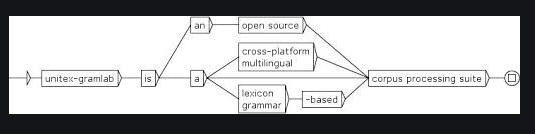
The core of GrapeNLP is implemented in C++ and includes a Python module to facilitate its integration with Python programs. It can analyse around 2700 sentences per second in an average computer and can be run in Ubuntu, Alpine, MacOS and Android. Moreover, it is open source and LPGL licensed, thus it can be used in commercial products.
GrapeNLP does not include a grammar editor. Instead, we use the editor included in the Unitex / GramLab platform.
Unitex / GramLab is also LGPL licensed and can be installed in Windows, Linux and MacOs machines.
The grammars created with Unitex are represented with graphs organized in connected boxes that linguists can easily create and update manually. Each box contains a set of possibilities for each token from the user’s utterance. The combination of different connected boxes provides a full variability of sentences to be recognized. The system also allows the generation of sub-grammars for specific Aura domains or for certain intents.
Once the grammars have been developed in Unitex, the grammar engine goes through all the graph paths from the beginning (left side) and compares box by box the user’s utterance with the grammar to evaluate the matching.
At the end of each path, a score is specified corresponding to the highest score among all the feasible paths. The output is a set of labels together with a start and end index and a score. The output is presented as a .json format.
It is important to bear in mind that, currently, grammars are used in Aura mainly for intents recognition. The grammar engine only provides recognized entities that have previously been labelled in the graphs.
As another example of Grammars, the utterance “I would like to watch the film Frozen” provides the following output:
PipelineMessage:
       -OriginalMessage:
         -phrase: 'I would like to watch the film Frozen'
       -normalized_phrase: 'i would like to watch the film frozen'
       -normalized_presentable_phrase: 'I would like to watch the film Frozen'
       -annotated_phrase: ' i would like to watch the film frozen'
       -intent:  intent.tv.search'
       -score: 1.0
       -entities:
               Entity: Frozen, Type: ent.audiovisual_film_title, Score: 1.0, Start index: 31, End index: 37, Canon: frozen, Label: None, Deep Links: None
Note that, even though GrapeNLP does not make use of statistical methods or probabilities, the resulting .json includes a score field. This has been added for homogeneity with the machine learning workflow, but it is always hardcoded to 1.0 (since GrapeNLP performs exact matching, the probability is 100%). The machine learning pipeline never returns a score of 1.0, thus this field can be used for knowing whether the sentence was recognized by GrapeNLP or by an intent recognition stage (CLU, etc.).
📄 For more information regarding the use of Grammars for language recognition, please check the Unitex User Manual.
Global and local grammars
There are two types of grammars defined in Aura NLP recognition process, both based on the Grammars engine that offer a different performance depending on the location where they are executed:
- Global grammars: defined and executed in Aura back-end.
- Local grammars: they are a subset of the Global grammar.
The understanding process is carried out locally, in the channel side, for an agile resolution of the process, therefore allowing a significant latency reduction. It is available for a selected set of use cases.
Global and local grammars must be aligned, so there are no differences in the E2E understanding process (for instance, the same user input must provide the same result in terms of NLP recognition both global and local grammars).
Channels can automatically update their local grammars based on the grammar backend information. Moreover, the channel needs to be able to share the information with the global backend in terms of logs and KPIs.
1 - Grammars generation guidelines
Guidelines for the generation of Grammars in Unitex
Guidelines and best practices for working with Unitex for the generation of the Grammars to be included in the NLP model.
General guidelines
Grammars is an Aura NLP stage that has its own path, files and configuration required to be included in the NLP model.
Firstly, if your pipeline contains the Grammar stage, you need to work with Unitex Gramlab and Grape NLP, which are included in the NLP Virtual Machine.
After that, linguists can proceed to create the grammars associated to the new use case. This process will be similar for global and local grammars.
The intent, entities and utterances defined for the new use case must be considered. A representative set of utterances will be selected and represented in Unitex through the creation of connected boxes that will contain, from left to right, different options for expressing each token of the selected utterances. The combination of different connected boxes provides a full variability of utterances to be recognized.
It is necessary to bear in mind that grammar engine only provides an exact recognition of utterances previously integrated in the model. Therefore, it is necessary to build up a rich and realistic utterance database to cover all the representative users’ utterances for a given use case.

Once the grammars have been developed in Unitex, the grammar engine Grape NLP goes through the grammar from the beginning (left side of the graph) and compares box by box the user’s utterance with the grammar to evaluate the matching.
The output will be a set of labels together with a start and end index.
Intents and entities tagging
Tag an intent in the grammar interface
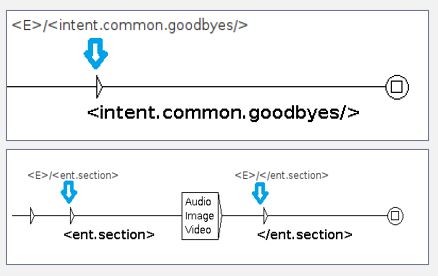
In order to tag an intent in a grammar graph, a box previous to the closing box of the graph should be created with the following information and format:
<E>/<intent.[intent_name]/>
Tag an entity in the grammar interface
-
Two separate boxes need to be created: one before and one after the entity values.
-
We need two entity tags because we need to wrap the entity values in order to know its position in the user’s utterance.
-
Opening entity tag should have the following information and format:
-
Closing entity tag requires the following information and format:
-
Consider the difference between the opening and closing entity tag and remember that the entity tags need to be included within the entity graph and not outside of it.
Best practices for graphs generation
- We highly recommend you the webinar Implementing new use cases: Grammar guidelines.
- The graphs must be as visually clear as possible.
- Avoid crosslines.
- The verbal graphs should be vertically aligned and the arrows connecting boxes should be horizontally aligned.
- Be careful when using too much optionality (“Epsilon” symbol), this may lead the grammar to recognize unwanted strings, collisions between UCs, etc.
- All graphs should have an appropriate size not to leave info/boxes out of the them.
- Try not to repeat the same box structure several times. Try to reuse it for different paths or to create a subgraph that can be reused anywhere in the intent axiom. Hence, avoid creating two or more paths recognizing the same input.
- Use comments if needed to clarify, for instance, if a path has some limitations due to potential conflicts with other UCs or just as explanatory notes of what a path is contemplating. For creating a comment within a graph, create a box and do not connect it to any other box. This way, you will see that the characters of comment message appear in red colour.
- Avoid leaving empty boxes in any graph.
- Avoid typos within the boxes info.
- The opening and closing entity tags used for wrapping the entity values should be contemplated in the entity graph and not outside of it.
- Make sure the intent and entity tags have been properly included.
- When adding prepositions and articles in boxes, put them separately. That is, create a box for the prepositions and another one for the articles.
- The circumstantial complements (e.g., time, location, manner…) are optional on many occasions regardless of whether they are in initial, middle or final position.
- No graph must recognize the “Epsilon” symbol:
<E>
So in case of optional subgraphs, the optionality should be in the graph where it is called and not in the subgraph.
- If the grammar makes use of the NER dictionaries to do the matching value > canon > label, the values contemplated in the different dictionaries should be also contemplated in the entity graphs of the grammar for the matching process to be successful.
- It is crucial to consider here that the grammar values contemplated in the entity graph should be normalized (same process as the normalization pipeline carries out except for the normalization of upper-case characters) in order to be recognized.
- That is, if a value in the dictionaries is ‘Mr. Robot’, since the normalization pipeline erases punctuation marks, the value that should be included in the entity graph should be ‘Mr Robot’.
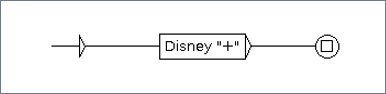
- There are special symbols that have specific meaning for the grammar and should be escaped (to check these symbols go to “Encoding of special characters in the graph editor” section of the Unitex Gram Lab official documentation).
An example of a special character would be “+” that needs to be escaped by using ““ (See figure below).
- It is highly recommendable to compile the grammar before pushing changes into the Pull Request. This way, the NLP developer will see if there is any error in the call to the subgraphs, if the grammar recognizes an empty path (the grammar recognizes: " “) or if there is any corrupt file.
- When compiling the grammar, some files are generated. These files have different extensions (
.fst2, .snt, .diff) and should be avoided. Thus, the NLP developer should erase them locally before committing further changes into the PR.
- For main verbs or list of keywords, create another graph.
- Try to reuse basic structures (grammar block) from one graph to another.
- Try to avoid ungrammatical paths if possible.
- If one graph gets too complex, try to split it into smaller blocks/subgraphs.
Best practices for the generation of .grf files
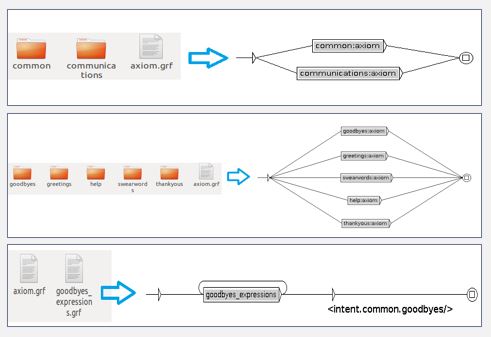
Create as many folders as existing domains/intents.
Graphs
- Call
axiom.grf to the main graph of the whole grammar (general graph that calls to the different domains).
- Generate another
axiom.grf file in the subfolder of each specific domain, which will be the main graph for this domain (graph that calls to the UCs related to that domain).
- Generate another
axiom.grf file for each use case/intent. Remember that, if different subgraphs are created to contemplate different structures or entity combinations for a given UC, the intent tag should be found in this general UC/intent axiom and not in the individual subgraphs.
Domain folder
- The name of the domain folder should be identical to the name of the corresponding domain.
- This way, when opening the main graph of the whole grammar, one could quickly see the domains that have, at least, some UC developed through the grammar engine. Make sure when including a new domain to make the proper call to it in the main axiom of the whole grammar.
Intent folder
- The name of the intent folder should contemplate the name of the corresponding intent.
For example: If the intent name is intent.common.greetings, the intent folder name would be greetings.
- If a given intent has different sub-use cases or the intent is divided into different graphs according to different linguistic structures/entities combination, the intent tag should be only tagged once in the main axiom of the use case and not in each of the different subgraphs.
Make sure when including a new intent to make the proper call to it in the domain axiom.
Entity graphs
- The entity graphs should have the name of the corresponding entity name, that is, if an entity name is
ent.device_tv, the name of the graph in the grammar folder should be ent.device_tv.grf.
- If an entity is only used in one use case/intent, the entity graph should be located in the intent folder.
- Otherwise, if an entity is used in different intents/UCs of the same domain, the entity graph should be located in the main folder of the domain.
- If an entity is used in different domains, the entity graph should be in the main folder of the whole grammar.
Verbal structure and nomenclature
Introduction
Verbal graphs need to be adapted based on the target language the NLP developer is working with.
The following verbal forms and tenses have been provided in Spanish as illustrative examples because the Spanish language varies morphologically depending on the person/number and tense info.
- Nomenclature of auxiliary verbs:
- Auxiliary verbs: They serve, among other things, to form the compound tenses, the progressive forms, the passive voice, as well as negations and questions (e.g., “I would like to eat an apple”).
- Main/Full verbs: They add meaning to the sentence and are essential for understanding the statement (e.g., “I eat two apples every morning”).
To this end, the NLP team has been working on an efficient structure and nomenclature to have them contemplated in the grammar.
Auxiliary verbs
aux_W: auxiliary verb + infinitive tense
It contemplates all the possible auxiliary verbs that can be found before a verb in infinitive tense.
This graph should be always optional since the infinitive tense without the auxiliary verb is also acceptable in linguistic terms (e.g., “I want to check my agenda” & “Check my agenda” are both linguistically correct).
aux_Y: auxiliary expressions/verbs + imperative tense
- aux_Y2s: second person singular in imperative tense.
- aux_Y3s: third person singular in imperative tense.
- aux_Y2p: second person plural in imperative tense.
- aux_Y3p: third person plural in imperative tense.
All these graphs contain possible auxiliary expressions that may be found before verbs in imperative tense.
These graphs should be also optional as the verbs in this tense can be also found in isolation (e.g., “Go and bring me some water” & “Bring me some water”). All these graphs should be found within the graph containing all imperative tenses of a given verb (e.g., verb_Y.grf -> buy_Y.grf).
aux_SQT: auxiliary verb + present/past imperfect subjunctive tense
It contains all possible expressions that can be found before a verb in present imperfect subjunctive tense (S) and past imperfect subjunctive tense (QT).
This graph should be always mandatory in these two tenses as the structure “I would like you to bring me some water” vs. “I like you to bring me some water” would be agrammatical without the modal verb.
Main verbs
This graph is used for ambivalent verbs that could work both as auxiliary and main/full verbs.
When this graph is used, all these verbs are conceived as being main/full verbs and thus do not need to be accompanied by another verb but by a complement in the form of a noun (e.g., “I want some water” vs. “I want to drink some water”).
Verbal graphs
- The names of the verbal graphs should be in English. This also applies to the name of the domain, intent, keywords and complement graphs.
- Before creating any verbal graph, make sure it is not repeated, that is, it is not already contemplated in any other of the grammar UCs. If a given verb is only used in a particular UC, place the verbal graphs within the folder of the UC. If a verb is shared by several UCs of the same domain, place the verbal graph at the domain folder level.
- If, on the other hand, a given verb is used by UCs belonging to different domains, place the verbal graphs in the folder of the whole grammar.
- If you create different verbal subgraphs for different verbal tenses, make sure you include all the verbs in each tense.
The basic verbal tenses included for each verb are:

[verb]_main_graph structure
To ease the grammar development process, we propose a common structure for all verbs.
The name of the verbal graph would be [verb]_main_graph.grf and would have the following structure:
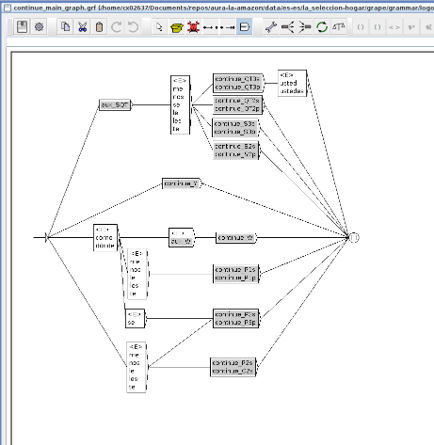
As it can be appreciated in the example, some pronouns have been added between aux_SQT and the verbal boxes for those tenses. This also happens before P3s/p, P2s and C2s verbal boxes.
These pronouns are needed for sentences such as: “Quiero que me compres este vuelo” (“I want you to buy me this flight”). Besides, the interrogative particle “cómo” has been added before aux_W and before P1s/p tenses for questions such as “¿Cómo puedo comprar este ticket?” (“How can I buy this ticket”) and “¿Cómo compro este ticket?” (“How do I buy this ticket”).
In case the clitic forms of verbs are needed, create a separate graph for them.
For this, create a verbal graph called [verb]_clitic_forms.grf.
As in the previous example, some pronouns have been included in some of the paths, but the main difference here would be that the boxes containing the clitic pronouns have been included in a mandatory way.
As seen in the figure, this graph would recognize sentences such as: “Quiero que me lo compres” (“I want you to buy it for me”).
Guidelines for testing Grammars in Unitex
There are two alternative ways of testing the grammars generated with Unitex:
1. Testing grammars using the Unitex interface
Useful for checking the potential overlaps among the different use cases developed through the grammar engine.
For this purpose, a .txt file should be created with the testing statements (sentences, phrases or isolated words) to be tested (each one on a different text line).
Keep in mind that when testing the grammar in the Unitex interface, the testing statements are not going to be processed with the normalization pipeline and, thus, must consider capitalization, accentuation marks, etc.
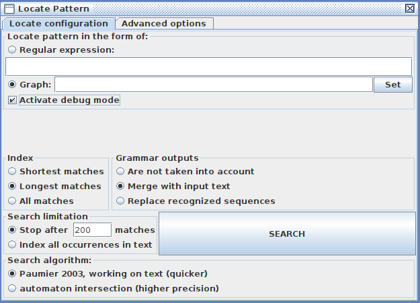
Afterwards, the following instructions should be carried out:
- Open the Unitex interface and go to the menu found in the upper section of the interface.
- Click on “Text > Open” and open the
.txt previously created (say “OK” to Process Text).
- Once the
.txt file is selected, go to “Text > Locate Pattern” and a window will pop up in which it is required to select the graph to be used to process the testing examples. The “Merge with input text option” should be also selected to see the intent and entity tags.
- Besides, we need to select the “Activate debug mode option” to see the paths activated in each of the testing examples as well as the “Longest matches option” to replicate how the system works.
- Click on “Search” and another window will pop up with the results.
If all the provided examples have obtained the expected intent, that means that the grammar engine has the expected behaviour.
2. Testing grammars through run_local_pipeline.sh scripts
The second option would be to launch queries through the run_local_pipeline.sh script to validate their intent assignment (remember that you must previously execute the build_local.sh script in order to train the pipeline).
Since the grammar engine is deterministic, based on the score (confidence) obtained, it is possible to know whether an utterance has been solved by CLU or by the grammar engine:
- Utterances detected by the grammar module obtain a score of
1.0
- The scores of utterances detected by CLU are float numbers between
0 and 1 (e.g. 0.98, 0.65…).
This testing option is the most recommendable one since this way we can see the faithful output of how the system works end-to-end.
2 - Recognition of several entities
Recognition of utterances with several entities in Grammars
Specific guidelines in the scenario when the user’s utterance includes several entities to be recognized by Grammars through the use of roles
Use of roles for the recognition of utterances with several entities
If the user’s utterance contains several entities of the same type, it is required to add a role tag to the entity identifier, following the format:
[entity_name:rol_value]
The role tag is used by the system to identify that there are two entities of the same type but with different roles.
This process will not affect the final output of the Grammars.
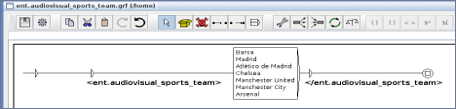
That is, if the entity with the role is ent.audiovisual_sports_team:visitor, the system will only retrieve the tag ent.audiovisual_sports_team.
A practical example of Grammars that use this functionality is shown below:
- The utterance “I would like to see Madrid against Barsa” contains two entities of the same type:
[ent.audiovisual_sports_team]
- For both entities to be detected correctly, it will be necessary to add the role when defining the name of the entities. For example, the roles of local and visitor could be assigned, resulting
[ent.audiovisual_sports_team:local] and [ent.audiovisual_sports_team:visitor]
Certain considerations must be considered:
- In order to recognize two entities of the same type in sequence, there is no need to create two entity graphs with the role tag but one, since the system is capable of discerning between the tagged entity and the untagged one.
- Entity values should be the same in both graphs.
- For better understanding purposes, we suggest using digits to name the entity graph having the role with the name of the role itself. For example:
ent.audiovisual_sports_team:1 -> ent.audiovisual_sports_team_1.grf
This can be also done using non-digit characters. That is, if the entity ent.audiovisual_sports_team has the role “visitor” (ent.audiovisual_sports_team:visitor), the name of the graph should be ent.audiovisual_sports_team_visitor.grf.