This is the multi-page printable view of this section.
Click here to print.
Return to the regular view of this page.
generic-dialog
Aura bot generic-dialog
Description of Aura bot generic-dialog, that allows managing several experiences for TV channels based on a simple configuration
Find here details regarding the global generic library and dialogs’ versions and the condition for a use case to be generic
Related documents
📄 Guidelines for the development of experiences through the generic-dialog
Introduction
The generic-dialog allows OBs to implement certain local use cases for Movistar Home, Movistar Plus and Set-top Box (STB) channels in an autonomous, agile and simple way with no code development, only by means of configuration.
Different versions compatible with channelData v1 and v3 are available:
Aura global generic-dialog
The generic-dialog responds to the intention of having a single dialog based on configuration that allows managing several intents whose behavior is similar.
Therefore, it allows the development of certain types of use cases in a simple and autonomous way, with no associated code development and simply by means of configuration.
The global generic-dialog file, generic-dialog.ts includes the logic for the use case execution, where configuration is recovered and the output message is generated with the defined parameters.
Besides this global generic-dialog, there are several plugins based on the same dialog, all of them working as the global one and with similar code. In this framework, each OB have a specific generic-dialog in its corresponding library generic-[OB]/ which must be used when developing a local use case.
The global library that includes the generic dialog is named generic and has been designed for the management of different types of dialogs.
You can find it here.
Conditions for a use case to be generic
In order to consider a use case as part of the generic-dialog, it must fulfil these conditions:
✅ Local use cases developed from scratch by the OBs.
✅ Use cases with intents that can be managed by Movistar Plus, Movistar Home or Set-Top-Box (STB) channels.
✅ Dialog with only one interaction with the user: only one message from the user and one response from the bot are allowed. For example: greetings dialog.
✅ There is a direct transformation from intent to action (you may or may not call the API Movistar Resolution for this purpose). For example: tv-remote-actions use cases).
✅ Use cases that require the conversion of input parameters through a function to get the correct payload. For example: conversion on entities. For example: move_forward.
✅ Currently, only one text response is allowed:
settings.locale.success when all works fine.settings.locale.error when something goes wrong.- Also, the text can be set in the response from the resolution API but, if required for example a variable text depending on the response of the API or the recognized entity, then developers must create another dialog.
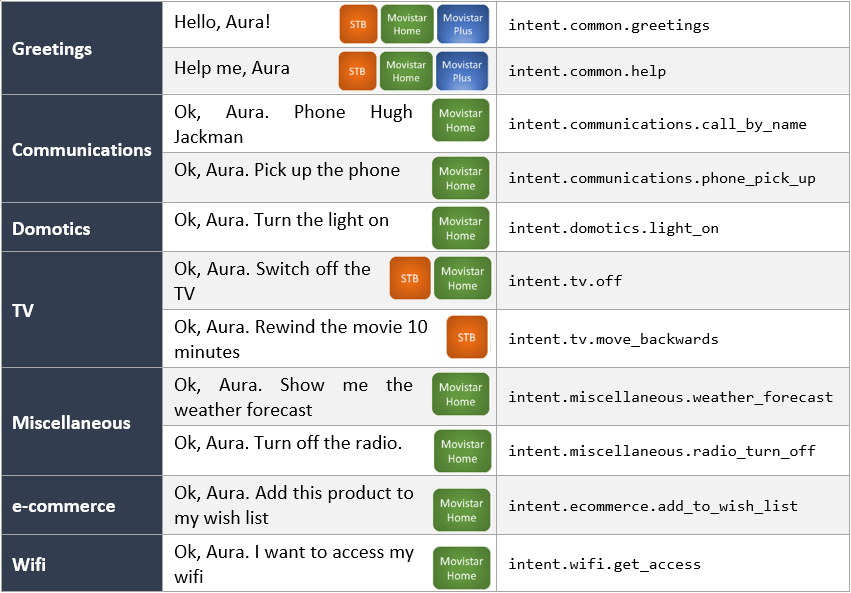
Merely as examples of the potential of aura-bot generic dialog, below you can find different use cases for the channels Movistar Plus, Movistar Home or STB channels that can be developed through it. Use them as a reference for developing your own local experiences!
1 - generic-dialog v1
Aura Bot generic-dialog v1
Dialog based on a simple configuration that allows managing several experiences for TV channels. This version is compatible with channelData v1.
Introduction
The generic-dialog allows OBs to implement certain local use cases for Movistar Home, Movistar Plus and Set-top Box (STB) channels in an autonomous, agile and simple way with no code development, only by means of configuration.
Use this generic-dialog if your channelData version is v1.
You can check its source code in Github: generic-dialog.ts.
Included intents
The next table shows current intents available on generic-dialog and the previous library where the intent was set.
| Intent |
Previous library |
| intent.common.goodbyes |
common |
| intent.common.greetings |
common |
| intent.common.help |
common |
| intent.common.swearwords |
common |
| intent.common.thankyous |
common |
| intent.communications.silent_mode_on |
communications |
| intent.communications.silent_mode_off |
communications |
| intent.communications.call_voicemail |
communications |
| intent.communications.add_contact |
communications |
| intent.communications.phone_pick_up |
communications |
| intent.communications.call |
communications |
| intent.communications.call_by_number |
communications |
| intent.communications.call_by_name |
communications |
| intent.communications.check_calls |
communications |
| intent.communications.redial |
communications |
| intent.communications.ignore_calls |
communications |
| intent.domotics.light_on |
domotics |
| intent.domotics.light_off |
domotics |
| intent.ecommerce.add_to_wish_list |
ecommerce |
| intent.miscellaneous.radio_turn_off |
miscellaneous |
| intent.miscellaneous.time_check |
miscellaneous |
| intent.miscellaneous.weather_forecast |
miscellaneous |
| intent.miscellaneous.news_listen |
miscellaneous |
| intent.navigation.section_show |
navigation |
| intent.navigation.back |
navigation |
| intent.navigation.next |
navigation |
| intent.navigation.previous |
navigation |
| intent.carousel.info |
tv |
| intent.tv.details |
tv |
| intent.tv.help |
tv |
| intent.tv.init |
tv |
| intent.tv.from_beginning |
tv |
| intent.tv.record |
tv |
| intent.tv.channel_down |
tv |
| intent.tv.channel_up |
tv |
| intent.tv.move_backwards |
tv |
| intent.tv.move_forwards |
tv |
| intent.tv.mute |
tv |
| intent.tv.unmute |
tv |
| intent.tv.stop |
tv |
| intent.tv.off |
tv |
| intent.tv.on |
tv |
| intent.tv.pause |
tv |
| intent.tv.resume |
tv |
| intent.tv.volume_down |
tv |
| intent.tv.volume_up |
tv |
| intent.tv.c2c |
tv |
| intent.tv.content_get_info |
tv |
| intent.tv.none |
tv |
| intent.tv.question_time_loc |
tv |
| intent.tv.search |
tv |
| intent.tv.search_similar |
tv |
| intent.tv.vod_epq_information |
tv |
| intent.tv.watching_now |
tv |
| intent.tv.suggestions |
tv |
| intent.wifi.get_access |
wifi |
Generic indexed text
Generic dialog implements an algorithm, which based on a dialog configuration, can customize its response. The getIndexedText function returns a POEditor resource based on the dialog configuration’s setting indexedResourceBase and the value entity.entity obtained from the first entity. This functionality relies in those two values and will return an error if they are not present.
{
    "intent": "intent.exact-match.faq",
    "settings": {
        "indexedResourceBase": "generic:faq-answer.",
        "functions": {
            "params": [
                "context",
                "currentIntent",
                "persistentData"
            ],
            "algorithm": "getIndexedText"
        }
    }
}
In this example, the reference that will be searched in POEditor will be generic:faq-answer.X, where X is the identifier gathered from the first entity.
Keep in mind that in function.params there has to be an array of parameters that will be used in getIndexedText.
Enabling AI resolution
To enable the AI-based fallback mechanism, add the flag enableAIResolution to true inside the dialog configuration for the intent. This setting allows the dialog to use the ai recognizer when the NLP resolution returns no entities or when the Movistar Plus resolution returns no results.
Example configuration:
{
    "intent": "intent.tv.search",
    "settings": {
        "locales": {
            "error": [
                "core:flc.answer.error"
            ]
        },
        "enableAIResolution": true,
        "needTvResolution": true
    }
}
AI fallback resolution
When using generic-dialog v1 and needTvResolution is set to true, a fallback mechanism using AI services is available if enableAIResolution is set to true in the dialog configuration.
If NLP resolution returns no entities or when the Movistar Plus resolution returns no results, the system applies an AI-based fallback strategy (“triage”). This ensures robustness and continuity of the dialog flow.
The fallback is triggered in two scenarios:
-
No entities detected
If the intent requires TV resolution and no entities are returned by the NLP (intentResult.entities?.length === 0), the dialog calls the recognizeUsingAI function.
If a new intent is successfully recognized, the current dialog is replaced by the new one.
-
Movistar Plus resolution returns no results
When the intent and entities are passed to Movistar Plus Resolution but no valid result is obtained (GENERIC_MP_RESOLUTION_NO_RESULT_CODE), the system again invokes recognizeUsingAI.
A new intent will be attempted and, if available, the dialog is redirected accordingly.
In both cases, the interaction origin is marked as InteractionOriginType.NoResults.
2 - generic-dialog-v3
Aura Bot generic-dialog-v3
Dialog based on a simple configuration that allows managing several experiences for TV channels. This version is compatible with channelData v3.
Introduction
The generic-dialog-v3 allows OBs to implement certain local use cases for channelData v3 channels in an autonomous, agile and simple way with no code development, only by means of configuration.
You can check its source code in Github: generic-v3-dialog.ts.
Differences between generic dialog v1 and v3
These are the main differences in comparison with the generic-dialog v1:
-
Deprecated fields in dialog’s settings (dialogLibraries.dialogs.triggerConditions.settings):
type, action, payload, addEntitiesToPayload, sound, payloadType and isFullScreen are no longer used.action, payload and sound configurations will be transformed to the new actions format and added to the new field actions.
-
New field actions: This field contains the configuration of all the actions returned inside the channelData.
Generic dialog environment variables
Generic
| Property |
Type |
Scope |
Description |
| TV_VOLUME_LEVELS_UP_DOWN |
number |
Local |
Number of points at which the volume can be raised and lowered. By default 5. |
| TV_MOVE_SECONDS_BACKWARD_FORWARD |
number |
Local |
Number of seconds in which user can forward or rewind a video. By default 60. |
| WIFI_FP_SMART_WIFI_ENDPOINT |
string |
Local |
URL Kernel endpoint endpoint to interact with smart wifi API. |
| TV_TIMER_RECOGNIZER_FIRST_ENTITY_CONFIG |
string |
Local |
Configuration of the recognition of entities with timer content in first position to calculate number of seconds. By default: 1 4:0.25,3 4s:0.75,4 de hora:0.25,hora:1.0,media:0.5,medio:0.5,minuto:1.0,un:1.0,un 4:0.25,una:1.0. |
| TV_TIMER_RECOGNIZER_SECOND_ENTITY_CONFIG | string | Local | Configuration of recognition of entities with timer content in second position to calculate number of seconds. By default: 1 4:0.25,3 4s:0.75,4 de hora:0.25,hora:1.0,media:0.5,medio:0.5,minuto:1.0,un:1.0,un 4:0.25,una:1.0,4:0.25. |
Generic dialog utilities
There are several functions that implement different requirements for the generic-dialog such as:
calculateSecondLevels: Calculate the value in seconds in case the entity type is not expressed in this format: ent.time_length_sec.
Right now it only converts minutes into seconds.getIndexedText: Get the text’s reference with information about the entity value.getInfoWifiPlus: Retrieve Wi-Fi info.getSecondsLevelsWithTimerRecognizer: Calculates the total number of seconds, based on the provided timer entities, making a recognition and conversion of them depending on the configuration of each country. The configuration is added in the environment variables: TV_TIMER_RECOGNIZER_FIRST_ENTITY_CONFIG and TV_TIMER_RECOGNIZER_SECOND_ENTITY_CONFIG.getWifiInfo: Manage Wi-Fi data by setting the persistentData and the value of movistarPlusResolution.
AI fallback resolution
The configuration and fallback mechanism for AI resolution in generic-dialog-v3 are the same as in generic-dialog v1.
The only difference is in the second fallback condition:
- In generic-dialog v1, the fallback is triggered when Movistar Plus resolution returns no results.
- In generic-dialog v3, the fallback is triggered when the complex logic resolution process returns no results.
All other aspects (configuration with enableAIResolution, marking the interaction origin as InteractionOriginType.NoResults, and redirecting to the new dialog) remain exactly the same.