Global authentication dialogs
Global authentication dialogs support different types of authentication in Aura
Global authentication dialogs include:
This is the multi-page printable view of this section. Click here to print.
Global authentication dialogs support different types of authentication in Aura
Global authentication dialogs include:
Description of the account-linking dialog, one of the dialogs that handles users’ account linking
The account-linking dialog is included in the global linking library.
It is in charge of handling user’s account linking for channels using integrated authentication, that is, channels that already have a proper user’s identifier that should be linked with the corresponding auraId and that cannot handle Kernel authentication directly:
This dialog launches authentication in Kernel based on browser navigation. It includes several steps to validate the Terms and Conditions of the services and to launch the user’s autentication in the OB authenticator and in Kernel that, in the end, would register the auraId in Aura users’ database.
| Property | Type | Scope | Description |
|---|---|---|---|
| LINKING_FP_ACCESS_SESSIONS_ENDPOINT | string | Local | URL to Kernel Access Sessions API |
| LINKING_FP_CALLBACK_LOGIN_URL | string | Local | URL to redirect to authentification login |
| LINKING_FP_CALLBACK_LOGOUT_URL | string | Local | URL to redirect to authentification logout |
| LINKING_TERMS_AND_CONDITIONS_URL | string | Local | URL to terms and conditions HTML file. By default: /documents/termsandconditions.html |
| SAFETY_CHECK_ENDPOINT | string | Local | URL API client endpoint |
Description of the get-oauth-url dialog, one of the dialogs that handles users’ account linking
The get-oauth-url dialog is included in the global linking library.
This dialog returns to the channel the oauth URL to launch the account linking.
Description of the account-remove dialog, one of the dialogs that handles users’ account linking
The account-remove dialog is included in the global linking library.
This dialog launches the logout process in Kernel based on browser navigation.
It includes several steps to remove the login session from Kernel and in the OB authenticator that, in the end, would remove the auraId from the Aura Users’ database.
Description of the seamless-account-remove dialog, one of the dialogs that handles users’ account linking
The seamless-account-remove dialog is included in the global linking library.
This dialog launches seamless logout in Kernel.
It counts on several steps to remove the login session from Kernel and in the OB authenticator that, in the end, would remove the auraId from the Aura users’ database.
Description of the global onboarding-whatsapp dialog for WhatsApp channel
The onboarding-whatsapp dialog is a simple dialog that returns some personalized messages for WhatsApp or other channel.
The dialog returns three messages with all the information necessary for the user’s onboarding and the Terms and Conditions acceptance.
According to the type of user (authenticated or anonymous), the messages will be different:
For anonymous users, the messages returned will be:
onboarding:onboarding.welcomeonboarding:onboarding.privacyonboarding:onboarding.terms-and-conditionsFor authenticated users, the returned messages will be:
onboarding:onboarding.auth.welcomeonboarding:onboarding.auth.privacyonboarding:onboarding.auth.terms-and-conditionsIf one of these texts are filled with " " in the locales, this message will not be sent, excepting terms-and-conditions text, which is mandatory. The first two messages, welcome and privacy, are only sent the first time this user arrives to the dialog. In succeeding interactions, only terms-and-conditions message will be returned.
aura-bot redirects to this dialog when Terms and Conditions settings are set, and the user has not accepted them yet.
More info about Terms and Conditions settings and flows here.
Description of the whatsapp-otp-login dialog, that handles SMS-OTP authentication in this channel
The whatsapp-otp-login dialog is a global dialog to make the user login in the WhatApp channel.
Currently, it only supports SMS-OTP authentication.
Access to the Kernel WhatsApp API.
📃 Check the dialog’s code in the aura-bot-libraries Github repository.
The dialog flow is divided in several steps, which are described in the following sections.
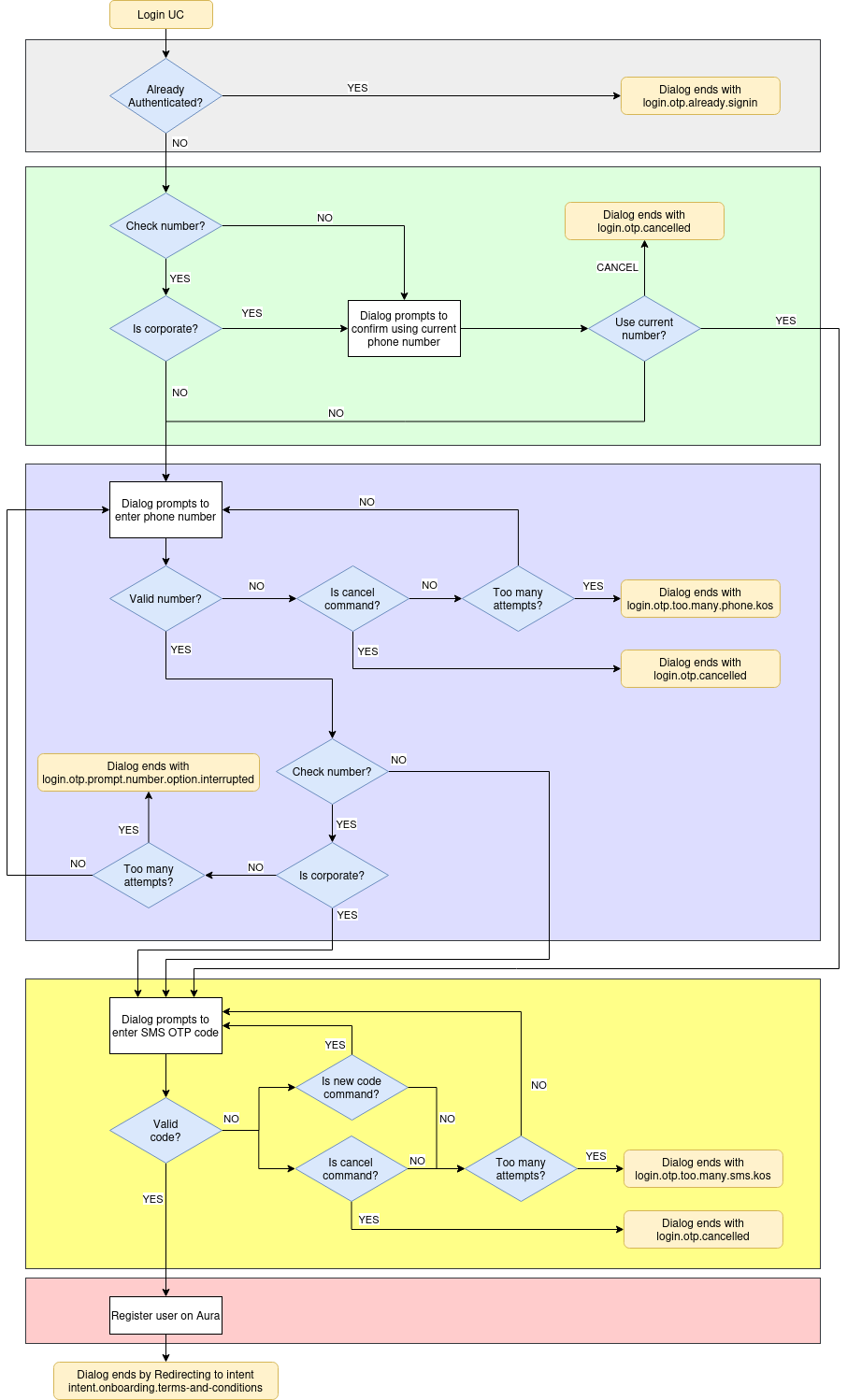
Additionally, a sequence flow is included in Operational flowcharts: WhatsApp OTP (LoA2) authentication.
When the dialog flow starts, it checks if the current user is already authenticated, verifying if the type of user is anonymous.
If so, the dialog flow ends with the text resource login.otp.already.signin. If not, it starts a sub-dialog to verify the phone number to send the SMS code.
In this step, if configured so, the system checks if the current phone number is corporate, to allow using it in next steps.
This step prompts the user to enter the phone number he wants to log in with in Aura, thus the dialog will send the SMS-OTP code to that phone number.
login.otp.too.many.phone.kos.To send this code to the user phone, the send code endpoint from Kernel is called. This endpoint returns an authentication_id that will be used in the next step to validate the OTP code.
This step prompts the user to enter the SMS authcode sent to phone number provided on the previous step.
When the user reaches the maximum authcode attempts the dialog ends with the text resource login.otp.too.many.sms.kos. A new code can be sent by sending the text resource login.otp.newCode.command which makes the bot to send a new auth code to the phone number provided.
To validate the code, the Kernel validate code endpoint is called with the code received by the user and the authentication_id returned in the previous api call. This call returns all the necessary data to register the user in Aura.
This step registers the user in Aura ecosystem and redirects to onboarding T&C with the intent intent.onboarding.terms-and-conditions or the requested intent before authentication if T&C are already accepted.
To do this registry, the method GET /users/aura-id/{auraId} from aura-authentication-api is called and the user is registered with the data obtained from Kernel in the previous step.
The redirect to onboarding (or the intent set) is done if the field actions.afterLogin is present in the channel configuration. An example of this configuration is shown below:
 {
  "name": "whatsapp",
  "prefix": "wa",
  "type": "whatsapp",
  "responseOptions": {
      "versions": {
          "v1": {
            "singleMessage": true,
          }
      }
  }
  .
  .
  .
  "actions":
    "afterLogin": {
        "type": "redirect",
        "action": "REDIRECT.COMMAND",
        "data": {
            "auraCommand": {
            "type": "suggestion",
            "value": {
                "intent": "intent.onboarding.terms-and-conditions"
            }
            }
        }
    }
  }
  .
  .
  .
This configuration is used to generate the redirect command that will be sent to launch the intent. If there is an intent requested before authentication and the T&C are already accepted, the intent set in configuration will be overwritten with the requested intent.
NOTE The user can cancel login flow at any moment by sending the text resource login.otp.cancel.command.
sequenceDiagram
    autonumber
    participant user
    participant auraBridge
    participant auraBot
    participant 4p
    participant auraAuth
    participant T&C API
    rect rgb(255, 255, 230)
    Note left of user: USER REQUESTS AN AUTHENTICATED UC
    user->>auraBridge: I want to see my billing data
    auraBridge->>auraBot:
    auraBot->>auraBot: Dialog needs auth and user is anonymous. Redirect to whatsapp login
    auraBot->>auraBridge:
    auraBridge->>user: login.otp.phone.number: Please enter your phone number
    user->>auraBridge: +34665762892
    auraBridge->>auraBot:
    auraBot->>4p: Aura requests a new OTP sms
    4p->>user: (SMS) login.otp.sms.code.message: Your verification code is 6789
    4p->>auraBot: authorization_id
    auraBot->>auraBridge:
    auraBridge->>user: login.otp.sms.sent.message: Please insert the code
    user->>auraBridge: 6789
    auraBridge->>auraBot:
    auraBot->>4p: Aura validates the code
    4p->>auraBot: Returns user data
    auraBot->>auraAuth: Register user
    auraAuth->>auraBot: 200 OK
    alt
        Note left of T&C API: User already accepted authenticated T&C
        auraBot->>T&C API: Checks terms and conditions
        T&C API->>auraBot: 200 OK
        auraBot->>auraBridge: Response + Redirect intent
        auraBridge->>user: login.otp.success: Great! you are now signed in
        auraBridge->>auraBot: intent.billing from redirect intent
        auraBot->>auraBot: authenticates the user and executes the billing dialog
        auraBot->>auraBridge:
        auraBridge->>user: "Here is your billing data"
    else
        Note left of T&C API: User needs to accept authenticated T&C
        auraBot->>T&C API: Checks terms and conditions
        T&C API->>auraBot: 404 Not found
        auraBot->>auraBridge: Response + Redirect intent
        auraBridge->>user: login.otp.success: Great! you are now signed in
        auraBridge->>auraBot: intent.onboarding.terms-and-conditions from redirect intent
        auraBot->>auraBot: authenticates the user and executes T&C dialog
        auraBot->>auraBridge:
        auraBridge->>user: onboarding:onboarding.auth.welcome
        auraBridge->>user: onboarding:onboarding.auth.privacy
        auraBridge->>user: onboarding:onboarding.auth.terms-and-conditions
    else
        Note left of T&C API: Channel doesn't have terms and conditions config
        auraBot->>auraBridge: Response + Redirect intent
        auraBridge->>user: login.otp.success: Great! you are now signed in
        auraBridge->>auraBot: intent.billing from redirect intent
        auraBot->>auraBot: authenticates the user and executes the billing dialog
        auraBot->>auraBridge:
        auraBridge->>user: "Here is your billing data"
    end
end
Currently, the dialog has a main intent intent.authentication.login and three auxiliary intents: otp-confirm-user-phone-number-dialog, intent.authentication.otp.phone.number and intent.authentication.otp.auth.code. These auxiliary intents are necessary to enable the flow between sub-dialogs.
        {
            "id": "whatsapp-otp-login-dialog",
            "triggerConditions": [
                {
                    "intent": "intent.authentication.login"
                }
            ]
        },
        {
            "id": "otp-confirm-user-phone-number-dialog",
            "triggerConditions": [
                {
                    "intent": "intent.otp.confirm.user.phone.number.dialog"
                }
            ]
        },
        {
            "id": "otp-phone-number-dialog",
            "triggerConditions": [
                {
                    "intent": "intent.authentication.otp.phone.number"
                }
            ]
        },
        {
            "id": "otp-sms-auth-code-dialog",
            "triggerConditions": [
                {
                    "intent": "intent.authentication.otp.auth.code"
                }
            ]
        }
This section lists and describes all the variables the whatsapp-otp-login dialog uses and that can be configured to adapt the environment:
| Property | Type | Description | Default value |
|---|---|---|---|
| LINKING_FP_WHATSAPP_ENDPOINT | string | WhatsApp API endpoint | |
| LINKING_WA_MAX_FP_SEND_SMS_RETRIES | number | Maximum SMS retries. | 3 |
| LINKING_WA_MAX_AUTHCODE_RETRIES | number | Maximum authcode retries. | 3 |
| LINKING_WA_MAX_PHONENUMBER_RETRIES | number | Maximum phonenumber retries. | 3 |
Description of the whatsapp-logout dialog, that handles the log out process for this channel
The whatsapp-logout dialog is a global dialog in charge of the user’s logout in the WhatsApp channel.
📃 Check the dialog’s code in the aura-bot-libraries Github repository.
The flow of this dialog is simple. In the first step, a prompt is returned to the user to confirm if he wants to logout.
After that, if he accepts, certain actions are performed: