This is the multi-page printable view of this section.
Click here to print.
Return to the regular view of this page.
Configure a use case
Optional actions in order to configure the use case, such as including it into Aura suggestions
Introduction
This section encloses optional tasks that may be carried out for the configuration of a developed use case, in the following scenarios:
1 - Suggest a use case
Guidelines for the integration of a use case into Aura suggestions
Discover how to integrate a developed use case into Aura suggestions, so it can be recommended to the users in order to enrich their experience in Aura
Introduction
Aura suggests options based on an AI algorithm to provide additional information to the users, proposing new use cases always aligned with the initial user’s request.
The objective of the suggestions is to foster the users’ engagement with Aura, letting them go on with the conversation with two objectives:
- Discover new functionalities: suggestions can help the users discover what Aura can offer.
- Interaction follow-up: suggestions simplify and (somehow) predict the follow-up messages from the user. In some scenarios, the user wants to dig deeper in a set of actions given the context of the conversation. Suggestions can help to make the interaction easier and faster.
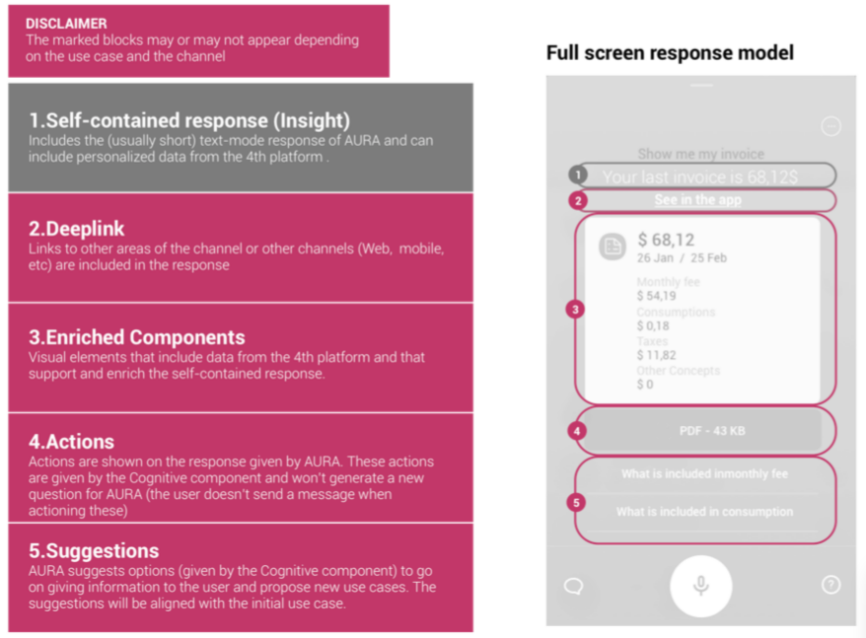
The suggestions-dialog is in charge of requesting suggestions to the Aura Suggestions API and preparing the corresponding activity with the format handled by the user channel.
Aura suggestions response model is used in every channel where Aura is available, and its visual components are adapted to the different constraints of the different channels.
How to integrate a use case into Aura suggestions
If, when developing a use case, you want it to be suggested by Aura, you have to set the property suggestions to true in the use case dialog, as shown in the following example for the balance-topup dialog (bill):
{
  "name": "bill",
  "dialogs": [
    {
      "id": "balance-topup",
      "suggestions": true,             // Suggestions enabled
      "authorization": {
        "purposes": "customer-self-service",
        "scopes": "mobile-balance-top-up-write"
      },
    }
  ]
}
In the previous example, the suggestions-dialog is executed after the balance-topup dialog.