This is the multi-page printable view of this section.
Click here to print.
Return to the regular view of this page.
Complementary processes
Complementary processes in the development process
Processes over external software that may be required when developing a use case over Aura NLP and best practices
Introduction
This section includes certain processes that may be carried out over external software when developing a use case in order to obtain credentials from these software, best practices for the generation of Pull Requests and procedures followed by the Aura NLP Global Team.
1 - Azure credentials for OpenAI
How to obtain Azure credentials for OpenAI
This process may be required in the first step for training the understanding model: Set up configuration properties.
Prerequisites
Pre-requisites:
- Azure account with permissions for applications registration.
- Azure CLI installed.
Guidelines
Review azure-cli documentation to validate the commands and parameters.
Follow the guidelines below for obtaining the Azure credentials for OpenAI:
- Login the account where the OpenAI service is to be created:
- Run the login command (documentation):
az login
- Sign in with your account credentials in the browser.
- You will obtain the different subscriptions within Azure corresponding to the logged account.
-
Select the specific subscription to be used, with its corresponding field id, and execute the following command to switch to this subscription (documentation):
az account set --subscription <subscription_id>
<subscription_id> is the id of the selected subscription
-
Create a resource group (documentation):
az group create --name <name_resource_group> --location <location>
<name_resource_group>: name of the resource group<location>: one location available for Azure (i.e., northeurope)
-
Create app (documentation):
az ad app create --display-name <display_name>
<display_name>: name of the service principal
From the output of az ad app create, we can obtain the field appId. This value is used for the variable OAI_AZURE_TOKEN_CLIENT_ID.
-
Create password for app (documentation):
az ad app credential reset --id <app_id>
<app_id>: app_id obtained from previous app creation
From the output of az ad app credential reset, we can obtain the field password. This value is used for the variable OAI_AZURE_TOKEN_CLIENT_SECRET.
From the output of az ad app credential reset, we can obtain the field tenant. This value is used for the variable OAI_AZURE_TOKEN_TENANT.
-
Create service principal (documentation):
az ad sp create --id <app_id>
- AppId: app_id obtained from previous app creation
-
Assign role contributor (documentation):
az role assignment create --assignee <appId> --role Contributor --scope <scope>
- <app_id>: app_id obtained from previous app creation
- <Scope>: scope of the role assignment. Read more in (documentation). A possible value is the of the resource group, you can obtain it with the command az group show --name <name_resource_group> | jq .id (documentation).
-
Create the OpenAI application (documentation):
az cognitiveservices account create --kind "OpenAI" --name <name_openai> -g <name_resource_group> --sku s0 -l <location>
<name_openai>: resource name<name_resource_group>: name of resource group (previously generated)<location>: location available for Azure (i.e., northeurope)
The values for the parameters required to fill in the build_local_variables.sh script for OpenAI execution must be obtained from the above-defined steps:
export OAI_ID_SUBSCRIPTION="$(az account show | jq -r .id)"
export OAI_RESOURCE_GROUP="<name_resource_group>"
export OAI_ACCOUNT_NAME="<name_openai>"
export OAI_AZURE_TOKEN_CLIENT_ID="<app_id>"
export OAI_AZURE_TOKEN_CLIENT_SECRET="<password>"
export OAI_AZURE_TOKEN_TENANT="$(az account show | jq -r .tenantId)"
2 - Azure credentials for CLU
How to obtain Azure credentials for CLU
This process may be required in the first step for training the understanding model: Set up configuration properties.
Prerequisites
Pre-requisites:
- Azure account with permissions for applications registration.
- Azure CLI installed.
Guidelines
Follow the guidelines below for obtaining the Azure credentials for CLU:
- Create the CLU application:
az cognitiveservices account create --kind "TextAnalytics" --name <clu_name> -g <name_resource_group> --sku S -l <location> --custom-domain <clu_name>
<clu_name>: resource name<name_resource_group>: name of resource group (previously generated)<location>: location available for Azure (i.e., northeurope)
The value for the parameters required to fill in the build_local_variables.sh script for CLU execution must be obtained from the above-defined steps:
export CLU_USER="<user_name>"
export CLU_RESOURCE_NAME="<clu_name>"
export CLU_SUBSCRIPTION_KEYS="$(az cognitiveservices account keys list --name <clu_name> -g <name_resource_group> | jq -r .key1)"
3 - Pull Request best practices
Best practices for the generation of a Pull Request
This process is required once the NLP model is fully developed and tested in local environment and it’s time to create a Pull Request to the corresponding release branch : Pull Request to release branch.
Best practices
- When creating a Pull Request, include the NLP Global Team as reviewers of the process and, likewise, notify the APE Team.
- It is mandatory to create reduced PRs (per use case, per bug, etc.) in order to speed up the validation process.
- Do not modify configuration files during the Pull Request, excepting in case the pipeline has been changed or if any configuration adjustment is required for the system’s proper performance. If configuration files have been modified locally for testing purposes, get sure that they are not uploaded in the PR in order to avoid conflicts.
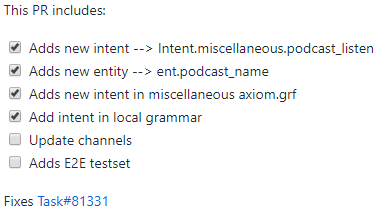
- It is recommended to specify different tasks in the PR, so the review progress can be marked:
- It is recommended to make a backup for those PRs modifying files that may conflict with other ones, or for large Pull Requests.
- If the use case is going to be available in different channels, check that the content and order of the training files is the same.
4 - Review by NLP Global Team
Review of a Pull Request by NLP Global Team
Procedure followed by the NLP Global Team in order to validate the Pull Request including the NLP model
This process is done once the Pull Request is launched, for the evaluation of the NLP model by the NLP Global Team: Certify NLP model accuracy: review by the NLP Global Team.
Introduction
The review of the Pull Request including the NLP model carried out by the NLP Global Team includes the processes explained in the following sections.
It can be very useful for Local Teams to know these processes and criteria used by the NLP Global Team in order to focus on the critical points.
Categories of errors and problems
Detected errors are classified into three categories:
-
BLOCK: Blocking task. It must be resolved in order to approve and merge the PR.
In case there are certain blockers to be modified, the system dismisses the GitHub Pull Request and publishes a comment describing the problem and indicating the procedure to resolve it. This case requires re-training the NLP model.
-
NON-BLOCK: Mandatory but non-blocking task. It must be resolved following the guidelines and best practices in the current or in further PRs.
-
SUGG: Not mandatory but recommended modifications that should be taken into account even for subsequent PRs. For them, it is recommended to inform the NLP Global Team whether the suggestion is taken into account or not.
The setting of an adequate threshold for the NLP system accuracy depends on the use case. Therefore, for a specific use case, the minimum accuracy should be agreed by L-CDO and the NLP Global Team.
Best practices for the Pull Request validation
These best practices should be followed both by the NLP Global Team and the local linguists, if they participate in the validation process.
-
Take into account the following icons that indicate different status to reviewers:
- 👍 It indicates that the reported problem has been visualized and will be included in further commits.
- 👀 It indicates that linguists have gone over the comment but it is not resolved yet. In this situation, linguists must include an explanatory text with the justification of this status (for example, to be resolved later; disagreement; etc.)
-
Comments should be launched from the corresponding file or from the general screen (conversation). For its resolution, click Resolve conversation or select Hide from the drop-down menu. Afterwards, select the option Resolved.
-
If the comment cannot be resolved, it is edited and substituted by “OK”.
-
In general, reviewers are in charge of changing the comment status to Resolved.
-
Comments should be as clarifying as possible by including screenshots or other references.
-
In case a comment resolution is pending, the local developer must be informed and it is recommended to change the status to still pending.
-
If the answer to a comment by the reviewer is not clearly understood, the local team can contact him.
-
If modifications affect to several channels, changes can be uploaded to one channel and, afterwards, copied to the other channels.
-
Comparation of branches:
- In case of merging of a large PR, it is recommended to compare the corresponding branches to avoid information to be lost. For this purpose, Pycharm can be useful.
- The tool compare allows this comparison, just by selecting the folder/file with the right bottom, selecting the option Git and compare with branch and then clicking on the branch to be compared.
- The different files appear in different colors: existing files in blue, added files in green and deleted ones in grey. By clicking on a file, a new window is opened showing the differences between branches.
- It is also possible to compare branches and versions from Github:
https://github.com/Telefonica/[REPO] /compare/
-
For the PR review, it is recommended the use of REGEX. Some examples are included below:
- Finding duplicates: ^(.?)$\s+?^(?=.^\1$)
- No space after an entity: [ent.[a-z_]+][a-z]+
- No space before an entity: [a-z]+[ent.[a-z_]+]
- No extra spaces after values: \h+$
- Sentences missing: "\¿[a-záéíóúñ _[].]+"
- Sentences missing: "[a-záéíóúñ _[].]+?"
-
The PR is reviewed by different members of the team, within an ongoing process.
The following table includes some of the most frequent comments that are reported during the review of the Pull Requests by the NLP Global Team, organized by category.
⚠️ Please, take the following tables as merely indicative in terms of the category where each comment is included as, depending on the specific scenario and the use case specifications, a comment can be moved from one category (“block”, “non-block” or “sugg”) to another.
Review of CLU training and testset
The following best practices are valid for the CLU intent recognition stage.
Entities
| Block |
non-block |
Sugg |
| Ill-formed (incorrect name, missing ‘[‘, blank space missing before/after the entity; blank space before ‘:’ in the entity name) |
Alphabetic order missing (by type and by value) |
Structuring of training and test set files in blocks (for example, verbs, use cases, entities, etc.) |
| Value declared in phraselist but not tagged in training set |
“Cosmetic changes”: uppercase letters, question marks, unnecessary blank spaces, accents |
New values for entities |
| Values with an incorrect entity |
Indentation |
Suggestions on phrases for training and test set files |
| Repeated values in two entities |
|
Suggestions on new entities |
| Repeated values for a specific entity |
|
Suggestions on patterns for the test set file |
| Value tagged but not declared in a phraselist |
|
|
| Typographical errors (if not on purpose), missing words |
|
|
| Values representativeness: as far as possible, the training set must contain all the different values of entities. At least, it must include a representative list of them |
|
|
Intents
| Block |
non-block |
Sugg |
| Intent name not agreed by the Global Team |
Alphabetic order missing (by type and by value) |
Structuring of training and test set files in blocks (for example, verbs, use cases, entities, etc.) |
| All intents not represented in the training set and testset files |
“Cosmetic changes”: uppercase letters, question marks, unnecessary blank spaces, accents |
New values for entities |
| Overlap between intents |
Indentation |
Suggestions on phrases for training and test set files |
| Phrases with out-of-scope intent |
|
Suggestions on new entities |
| Typographical errors, missing words |
|
Suggestions on patterns for the test set file |
| Repeated phrases |
|
|
| Illogical phrases |
|
|
| Unfulfillment of ratio 80%-20% for training-test statements |
|
|
Files
| Block |
non-block |
Sugg |
| Ill-formed json files |
|
|
| Not updated date |
|
|
| Different information between channels (between shared intents) |
|
|
| Modification on configuration files (except to agreed changes) |
|
|
Review of E2E testset
| Block |
non-block |
Sugg |
| Ill-formed json files |
“Cosmetic changes”: uppercase letters, question marks, unnecessary blank spaces, accents |
Structuring of training and test set files in blocks (for example, verbs, use cases, entities, etc.) |
| Wrong position of entities |
Lack of representativeness of the different structures |
New values for entities |
| Incorrect tags |
Alphabetic order missing (by domain, intent & utterance) |
Suggestions on phrases for training and test set files |
| Not represented intent |
“Default” domain |
Suggestions on new entities |
| Wrong order for keys: phrase, domain, intent, entities |
|
Suggestions on patterns for the test set file |
| Typographical errors (if not on purpose), missing words |
|
|
| Accuracy lower than 80% (by default value set by Aura Global Team) |
|
|
| Result validation: Review of results from the PR, identification of errors and improvement suggestions |
|
|
Regression file: Bugs or specific phrases not included in the testset.json file that must be recognized |
|
|
| Canonical phrase not included in E2E testset |
|
|
Unfulfillment for recommended number of testing statements in the E2E test set:
- 20 statements (CLU);
- 30 statements (CLU + Grammar);
- 3 statements (Grammar) |
|
|