1 - Basic jenkins configuration
Basic Jenkins configuration
Discover the basic Jenkins configuration
Introduction
Aura uses Jenkins as continuous integration (CI) tool. In particular, the in-house installation in DCIP.
Configuration
Prerequirement: administrative access to Github repository and to dcip are must.
-
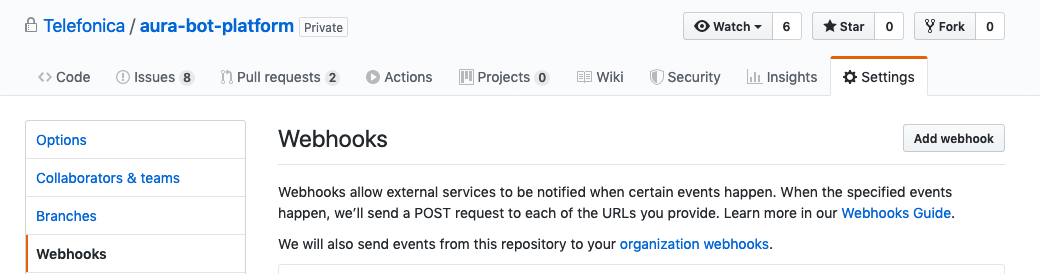
In the Github web of your repository, go to Settings and to Webhooks, as can be seen in the following picture:
-
Click on Add webhook, the following window will be shown:
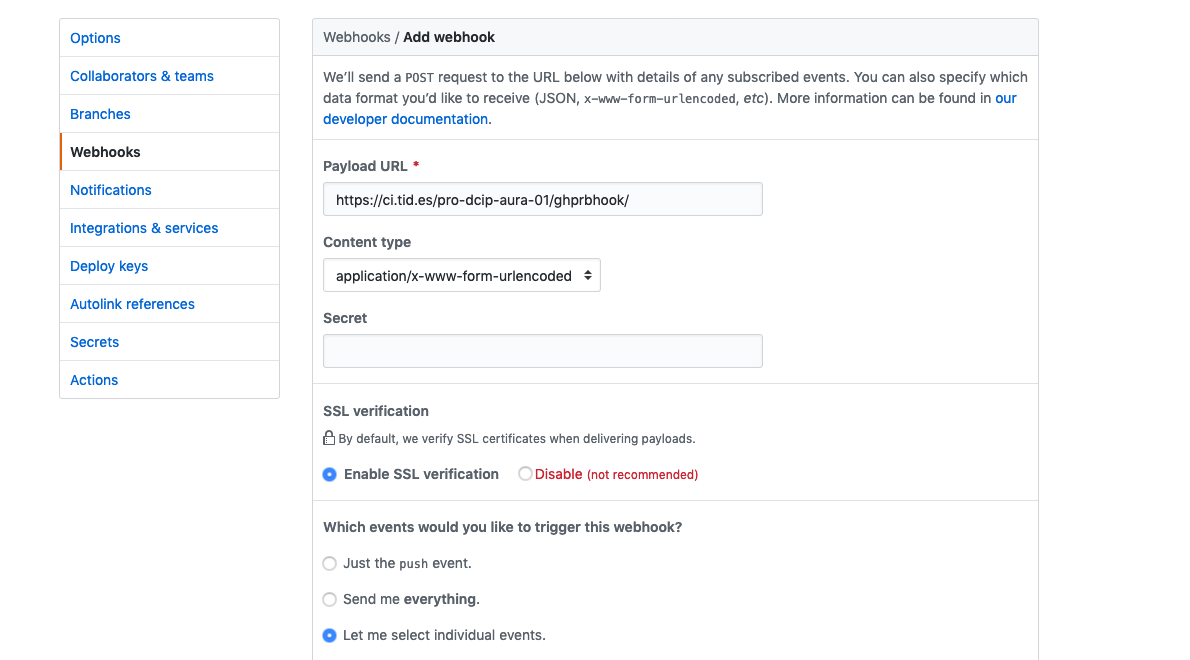
- Fill the URL of the webhook and its content type format
- Choose
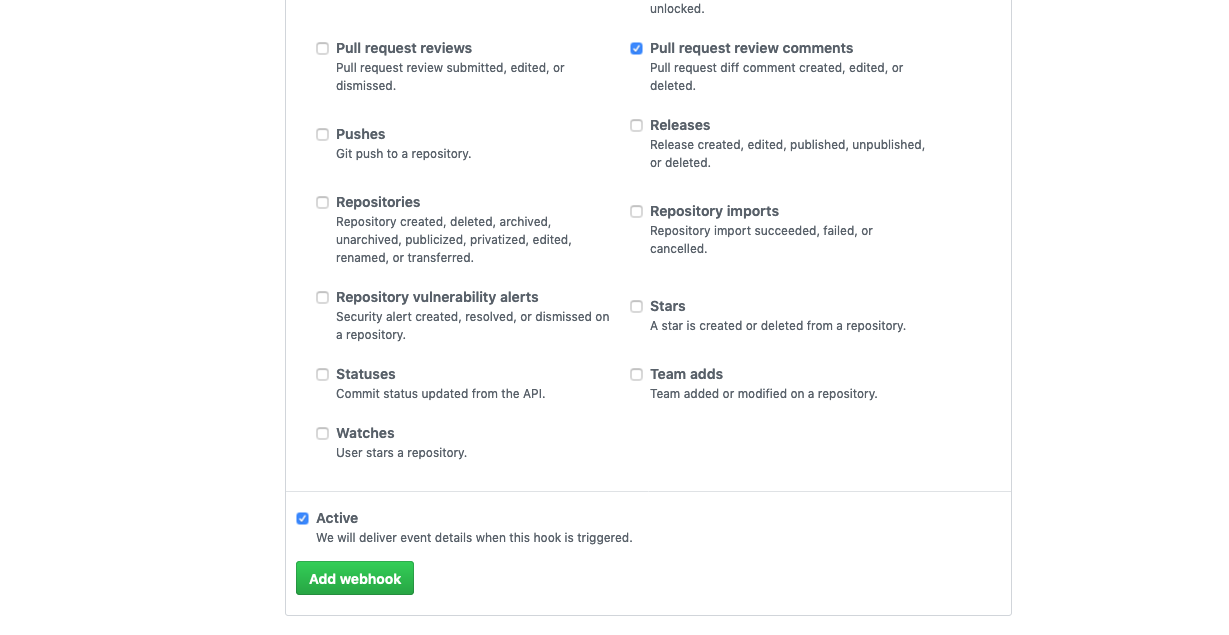
Let me select indivial events and select only Pull requests. Remember to uncheck Pushes that’s checkec by default.
- Set the webhook as
Active and click on the Add webhook button to save the configuration.
Jenkins jobs
ℹ️ Prerequirement: administrative access to dcip is a must.
-
First thing is to create a new set of Jenkins jobs for your brand new respository, so from the main aura
Jenkins page, you should run _component-setup job.

-
Choose Build with parameters and fill the data of your repository in this case aura-bot-platform.
Remember to use ssh as repository URL.
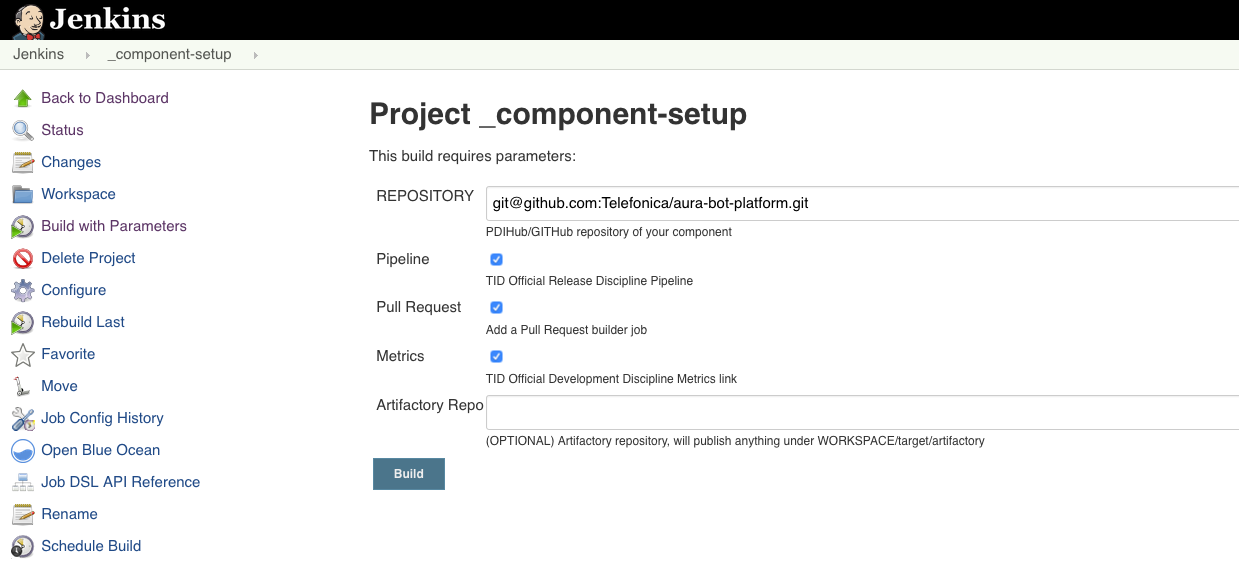
This job will generate a new set of jobs specific for the current repository and with its very same name.
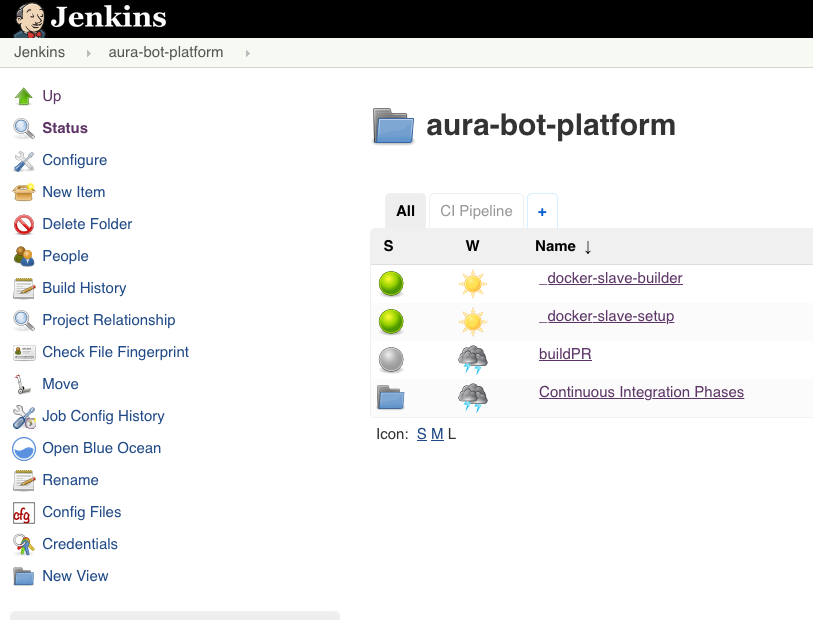
Generate a dedicated slave to run these jobs
Add a Dockerfile to the root of your repository (follow the one in aura-bot-platform). In this case, a new slave definition is needed to run the jobs with a node10 docker container.
To build it, just build the job _docker-slave-setup with parameters:
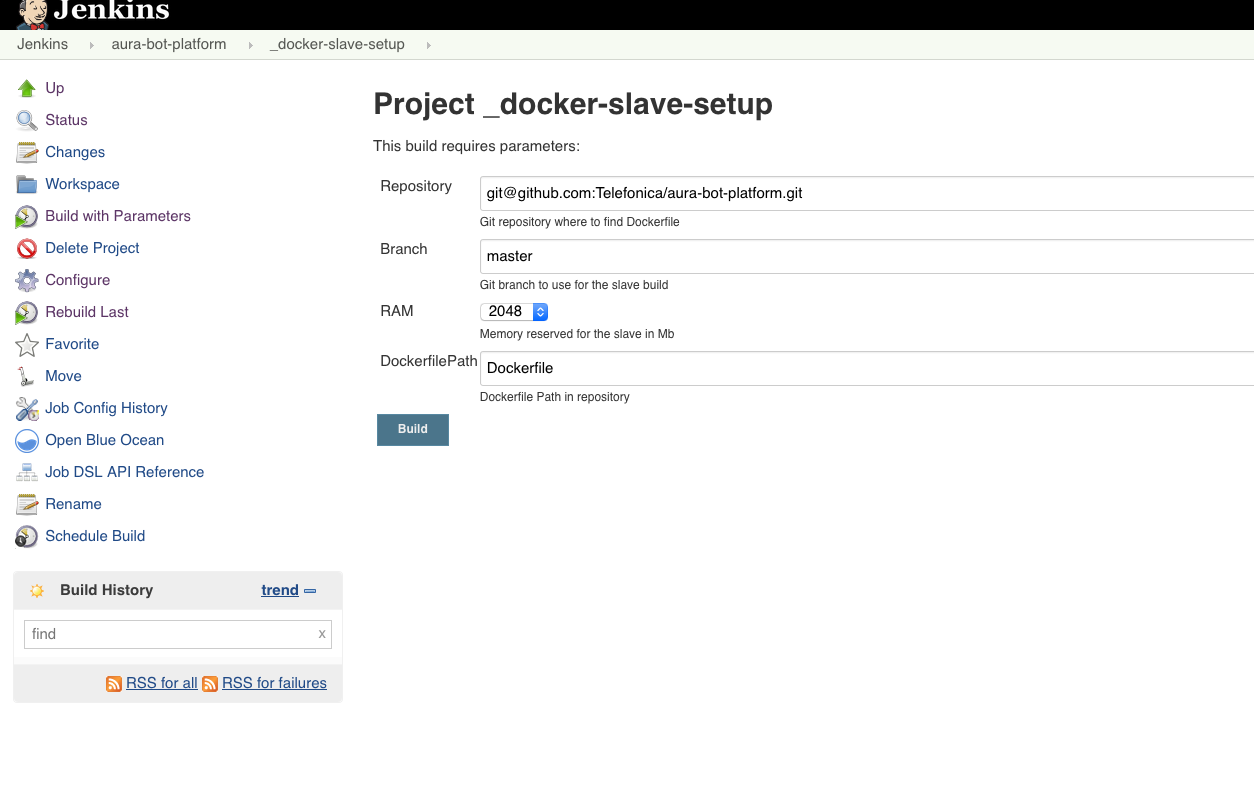
This will generate automatically the job _docker-slave-builder that will process, configure and publish a docker image based on the provided Dockerfile. Slaves using this image will be available under the label repository-name, in this case: aura-bot-platform.
Build PR job
This is one of the automatically jobs generated by the _component-setup job. It will run whenever a Pull Request is requested in the repository, if it counts on the corresponding webhook.
The basic configuration provided automatically is OK, but in Aura we should apply a couple of changes to handle it properly:
-
Check Restrict where this project can be run and write the just created aura-bot-platform labeled slaves.
-
To access github, select the already available credentials (usually contint (contint user for GITHub/PDIHub)).
-
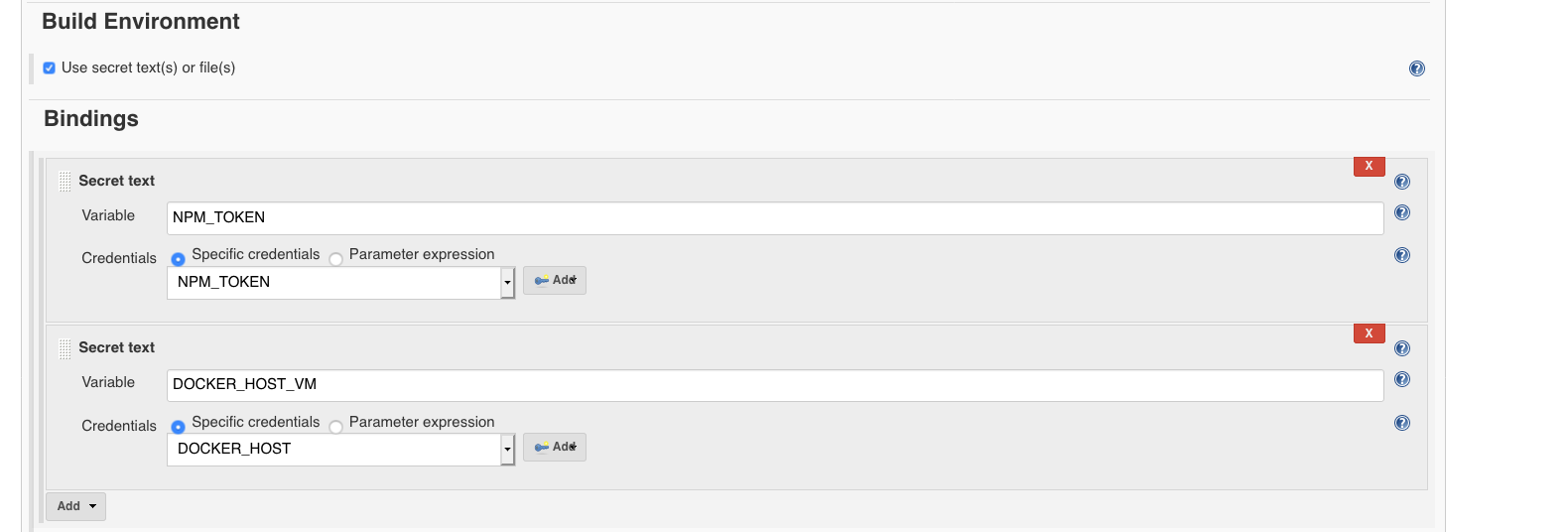
A couple of environment variables should be configured:
NPM_TOKEN: it should be added in “Build Environment” section, binding a secret text, with the specific credential.DOCKER_HOST: it should be added in “Build Environment” section, binding a secret text, with the specific credential.
-
The next step is to include execution of the existing delivery/pipelines/pr.sh script during the building phase of the job.
- In Build section, just add an
Execute shell step with the following content, depending on the project, further variables should be needed:
#!/bin/bash
set -e
export DOCKER_HOST=${DOCKER_HOST_VM}
git remote set-url origin git@github.com:Telefonica/aura-bot-platform.git
delivery/pipelines/pr.sh
2 - Jenkins pipelines definition
Jenkins pipelines definition
Understand how the Continuous Integration system works in Aura system in detail
Introduction
During the refactor phase, the way to declare the configuration of the different repositories has been redefined by trying to simplify the delivery/pipelines/Jenkinsfile file statement.
The main objective of the refactor is “to simplify”. This is attempted to achieve as follows:
- All repositories must execute the same stages (predefined).
- Repositories with a specific language should execute the same tasks in stages.
- Scripts to execute tasks should be common and defined in jenkins-libraries-aura repository to be reused.
General structure project
The files associated with the continuous integration system are found in the delivery folder, which has the following structure:
delivery/
├── docker                          # Folder to Dockerfile
├── pipelines/Jenkinsfile.aura      # Jenkinsfile
└── scripts                         # Utility script for pipelines
Scripts added to the delivery/scripts folder should be specific tasks for this repository. Otherwise, the scripts should be in the resources/org/aura/script folder and that can be reused.
Add script to delivery/scripts only if it is completely necessary.
Jenkinsfile example
@Library(['aura']) _

auraPipeline {
    language = 'node'
}
The previous definition is sufficient for a nodeJS type repository to execute the default continuous integration tasks defined for an Aura nodejs project.
Definition of pipelines
Common libraries
Although it is possible to directly define the tasks to be executed with groovy here, there are a number of predefined scripts to run common tasks that can be used by including the aura and devops libraries:
@Library(['aura','devops']) _
Pipeline configuration
auraPipeline {
    slave,          // Slave where pipeline will be executed. Default: 'aura-bot-platform-14'
    nature,         // Pipeline nature: Default: 'standard' (the refactor nature)
    language,       // Language used by the pipeline
    artifacts,      // List of artifacts that need to be generated.
    stages,         // List of stages. Default: default stages
    modifiedStages, // List of modified stages.
    options,        // Pipeline options.
    postJobs        // Post execution jobs.
}
slave property
Slave property indicates the slave where Jenkins stages will be executed.
If a slave is not specified explicitly, aura-bot-platform-14 will be finally used.
nature property
The nature property indicates the definition of pipeline that will be executed on the list defined in ‘jenkins-libraries-aura’ project.
The simplification in the definition of pipelines has reduced the list to a single generic pipeline defined as standard.
It is still possible to execute existing pipelines, previous to refactor. Simply, the value of nature should indicate the pipeline to be executed.
This is deprecated in favor of the new standard pipeline.
language property
The language property helps the standard pipeline to execute the appropriate tasks depending on the language of the repository itself.
The system is prepared to handle repositories whose source code is written in a single main language.
artifacts property
List of artifacts that will be generated.
stages property
Although the standard pipeline defines a series of default stages depending on the type of ‘push’ that is done on the repository, this field allows you to define the stages manually.
modifiedStages property
In some cases, it is necessary to modify the configuration of some default stage in standard pipeline, without defining all the stages again (as we would do on the stages property).
For example, we can modify the test stage for the ‘pr’ type:
modifiedStages = [
    'pr': [
        new Stage(name: 'test', description: 'Test', options: [ skipLint: true] )
    ]
]
or modify the test stages for all types (pr, release, etc):
modifiedStages = [
    '*': [
        new Stage(name: 'test', description: 'Test', options: [ skipLint: true] )
    ]
]
options property
The following options are available:
| Option |
Description |
type |
Default |
| deleteBuildOnSkip |
Delete build on skip |
boolean |
true |
| uploadGeneratedArtifacts |
Upload generated artifacts from ‘artifacts’ directory |
boolean |
false |
postJobs property
Jenkins jobs that will be executed once the current job ends.
Defining artifacts
The artifacts are components that we can generate during the execution of the pipeline. All artifacts must extend from the Artifact class and depending on its type will generate one component or another.
Currently, there are only two types of components (although it can grow in the future): AuraComponent and AuraLibrary.
A type component AuraComponent is used to generate a Docker image with the following configuration options:
| Option |
Description |
type |
Default |
| name |
Component name |
String |
|
| version |
Version for the docker image |
String |
|
| envVersionVar |
Environment version variable (as AURA_BOT_VERSION) |
String |
|
| scripts |
List of names of configuration scripts |
List |
|
| initScripts |
List of names of initialization scripts |
List |
|
| buildArguments |
Docker build arguments |
List |
|
| dockerImageName |
Docker image name |
String |
|
| dockerFile |
Docker file name |
String |
‘Dockerfile’ |
| dockerPromotionTag |
Docker promotion tag |
String |
’latest’ |
Example:
    artifacts = [
        new AuraComponent(
            name: "aura-bot",
            version: "\$BOT_UC_VERSION",
            dockerImageName: "aura/aura-bot-uc",
            dockerFile: "Dockerfile",
            scripts: ["librariesListFile.sh", "cfBotPlatformVersion.sh"],
            buildArguments: ["BOT_BASE_VERSION=\$BOT_BASE_VERSION", "UC_VERSION=\$UC_VERSION", "UC_REVISION=\$PRODUCT_REVISION"]),
    ]
A type component AuraLibrary is used in repositories containing several libraries (multi-repository). In this way, it is possible to execute the pipeline for each of the libraries defined in the list of components.
If a multi-repository follows the structure of adding each library within the “packages” directory, the stages in standard pipeline are able to automatically get the library list, so in most cases it is not necessary to define configuration by hand.
In case you need to define the library list, the following options are available:
| Option |
Description |
type |
Default |
| name |
Component name |
String |
|
| path |
Component path (Ex. packages/my-library) |
String |
|
| versionStrategy |
Version strategy: distag, old |
String |
distag |
Example:
    artifacts = [
        new AuraLibrary( name: "aura-json-schema-generator", path: "packages/aura-json-schema-generator")
    ]
How to define my own stages?
The standard pipeline defines the following stages by default:
// Default stages
'default': [
    'pr'     : [
        new Stage(name: 'decrypt', description: 'Decrypt'),
        new Stage(name: 'initialization', description: 'Initialization'),
        new Stage(name: 'build', description: 'Build'),
        new Stage(name: 'test', description: 'Test')
    ],
    'release': [
        new Stage(name: 'checkSkip', description: 'Checkout skip'),
        new Stage(name: 'decrypt', description: 'Decrypt'),
        new Stage(name: 'initialization', description: 'Initialization'),
        new Stage(name: 'build', description: 'Build'),
        new Stage(name: 'test', description: 'Test'),
        new Stage(name: 'versioning', description: 'Versioning'),
        new Stage(name: 'publish', description: 'Publish'),
        new Stage(name: 'promote', description: 'Promote'),
        new Stage(name: 'deploy', description: 'Deploy')
    ]
]
Although the standard pipeline supplies the previous list of stages by default, it is possible to define stages manually, indicating in the repository that stages will be executed for each type.
There are two different ways to do this:
-
Modify or add stages on the standard pipeline. For this you must use the modifiedStages property. If a stage is defined with the name of an existing one, it is becoming overwritten. In case the added stage has a name different from the existing default stage, the new stage will be added in the execution.
-
Refine completely the list of stages to be executed. As indicated above in the options, the stages property allows you to define the list of stages that will be executed.
Example to execute only the test stage in the ‘pr’ type:
stages = [
    'pr': [
        new Stage(name: 'test', description: 'Test')
    ]
]
What tasks are executed for each stages?
Each Stage executes a series of task based on the value of the language property.
Node
| Stage |
Description |
| checkSkip* |
Perform a check to know if it can do skip of the build. |
| decrypt* |
Decrypt files that need it. |
| initialization |
Gets versions for AuraComponent type artifacts. |
| build |
Run node/build.sh script for all Library type components (the scripts can get libraries automatically). |
| test |
Run node/test.sh script for all Library type components (the scripts can get libraries automatically). After execution, reports are generated for: Test, Coverage and LiNT. |
| versioning |
Run node/versioning.sh script for all Library type components (the scripts can get libraries automatically). |
| publish |
If the onlyPack option is added, the npmPack.sh script will be executed. Otherwise, the publish.sh script will be executed. |
| promote* |
For each AuraComponent type artifact performs a docker tag and push command |
| deploy* |
For each AuraComponent type artifact performs a deployment for the component |
The value * at the end of stage’s name indicates that it is a default stage and it has not been modified for the node language.
Scripts used in the execution process for the node language:
node
├── build.sh        # Execute "npm install".
├── npmPack.sh      # Execute "npm install", "npm pack" and move the generated packages to the _artifacts_ folder.
├── publish.sh      # Check if it is not published and runs "npm install" and "npm publish".
├── test.sh         # Execute "npm run coverage-jenkins" and "npm run lint-jenkins".
└── versioning.sh   # Detects changes in the library to increase version (only if publishConfig exists in package.json)
3 - Repositories configuration file
Repositories configuration file: aura-config.json
The purpose of the aura-config.json file is to provide a description of the repository to make it easier for releases and CI flows to manage each repository
Description
The aura-config.json configuration file can be created at the root of each Aura project to specify configuration that can be used to automate tasks.
Structure
Sections
{
    "release": {
        // Release information
    },
    "docs": {
        // Information associated with documentation (for example aura-docs)
    }
}
Fields
| Field |
Type |
Description |
| name |
string |
Library or package name |
| description |
string |
Library or package description |
| multiRepository |
boolean |
In deployment tasks, it is used to know if the project contains other projects (packages) |
| release.name |
string |
Current release name . It can be used by projects like aura-release-manager to increase versions automatically |
| release.version |
string |
Current release version. It follows the https://semver standard and it can be used by aura-release-manager and jenkins to increase versions automatically |
Fields in bold are required
Visual example
{
    "name": "aura-bot-libraries",
    "description": "aura-bot-libraries contains all global libraries required in aura-bot.",
    "multiRepository": true,
    "release": {
        "name": "tasos",
        "version": "4.0.0"
    }
}
Interfaces
AuraConfig
/**
 * @interface AuraConfig
 * @description Interface to aura-config.json file
 */
export interface AuraConfig {
    /**
     * Library or package name
     */
    name: string;
    /**
     * Library or package description
     */
    description: string;
    /**
     * In deployment tasks, it is used to know if the project contains other projects (packages)
     */
    multiRepository?: boolean;
    /**
     * Release information
     */
    release?: AuraConfigRelease;
}
AuraConfigRelease
/**
 * @interface AuraConfigRelease
 */
export interface AuraConfigRelease {
    /**
     * Contains the current release name . It can be used by projects like aura-release-manager
     * to increase versions automatically
     */
    name: string;
    /**
     * Contains the current release version. It follows the https://semver standard and it can be used by
     * aura-release-manager and jenkins to increase versions automatically
     */
    version: string;
}
Project using aura-config.json
| Project name |
Used configuration |
Used in |
| aura-bot-libraries |
release |
jenkins |
JSON Schema
aura-config.schema.json